1
Data Conversion Systems Ltd.
July 2015
Windows Driver Update
If you are using your Vivaldi Upsampler in USB Class 2 mode with a Windows PC and you have not
already updated from the 2012 version of the driver, please update the driver.
• Visit http://www.dcsltd.co.uk/vivaldi/vivaldi-upsampler, click on Support and download USB Class
2 Drivers 2014.
• Uninstall the previous version from your computer’s hard drive.
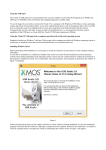
• Unzip the USB Class 2 Driver 2014 file and install the new version as described in the manual.
• Go to the Settings > USB Class menu page and change the setting. If necessary, change back to
Class 2. This refreshes the USB code.
The new driver adds compatibility with files sampled at 352.8 and 384kS/s.
Network Update v63
If you do not intend to use the Network or USB2 interfaces, it is not essential to do the
Network Update.
•
•
•
•
•
•
•
Update the main software to 1.20 before attempting to update the Network interface.
Visit http://www.dcsltd.co.uk/products/vivaldi-upsampler/, click on Support and download
Network Firmware v63.
The two software files are:
App_BD_STREAM700SVN-3254.bcd
App_CD_STREAM700SVN-3254.bcd
Unzip the Network Firmware v63.zip file and copy the files into the root folder (not a sub-folder)
of a USB flash drive. The space required is only 15MB.
Fit the USB flash drive to the Upsampler’s USB2 input and select that input.
Open the browser (hold down the Menu button for 2 seconds), wait for the Upsampler to read the
drive. The browser will not display the update files because they are not music files – don’t worry,
this is normal. Press the Power button once to close the browser.
Open the Upsampler‘s Information menu and select the Network Update page.
If the software on the flash drive is not more recent that that already loaded, the unit will not load it and
will report No new update available.
Otherwise, the update process takes a few minutes. The update progress will be displayed, followed
by Update Successful, then the Upsampler will switch off automatically.
• Remove the flash drive.
• Switch on and check that on the Information > Version menu page, the Network version is v63,
the Control version is 1.20 and the Display version is 1.20.
Your Vivaldi Upsampler is now ready for use.
SW Update note_VUP1_20
Page 2