1
ACE Contact Manager 7.1.0 User Manual
When you use the Advanced Query, you need to convert all the function to character format in order to
optimize the query. See Appendix A for a list of all the possible functions and what these functions
accomplish. Character fields generally should use the Upper () function to convert the fields to upper
case.
Numeric fields can use the Str() function to convert to character format. Date fields can use the DTos()
function to convert to character format. The Advanced Query menu is only accessible from the Query by
Example maple screen. See the explanation under the Query by Example and see Advanced Query.
Good hunting!
5.15.0. ACE Task Manager
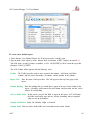
ACE has a Task Manager. In it you can manage tasks assigned to yourself and others to create a To Do
list, reminders and keep notes.
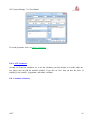
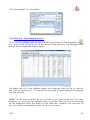
The Task Manager window shows your tasks in a list format. Individual entries are display in order of
Priority. The highest priority tasks are shown first. You can browse the list using cursor keys, scroll bars
or mouse.
The ACE Task Manager uses numbers to assign priority. Items in the ACE Task Manager are displayed
by Priority first and Date Due second. The highest priority is one (1).
Normally only unfinished tasks are shown in the Task Manager display. However, all tasks are kept on
file after completion, unless you delete them. The Task Manager displays the finished tasks when you
press {Alt} {S} or click on the Show Finished check box.
Normally, you would use Popup Tables when entering the Status information of tasks. Popup tables are
accessed by double clicking on the field or by pressing {Shift} {Enter}. By using Popup tables, you will
ACE7
57