1
blinking; Red lights for power should be on.
Sending card: If the green light is not blinking: check the “clone” of the graphics card and
open “clone”. Make sure the RS232 (serial cable) is connected. Reinstall the driver of the
graphics card and click “Default” in “Option”-”software setup”- input “Linsn”- “168”“sender” would solve the data problem in the sender.
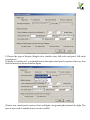
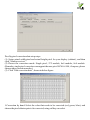
2.Shown in below figure, click “Display connection”, input display QTY, for
example, if a sending card supports 3 displays, input number: 3, if one, input number: 1;then
click “Update display QTY” ,
Setup type of screen, such as full-color, double-color, etc.,
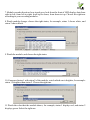
Input the card qty, X (width), Y (height), and then the computer will show the connection
scheme, (Remark: the connection scheme is the copy as you face the Led display; one small
box stands for a receiving card)
The receiving card that first gets signals from sending card is Order No.1,
Then input figures, for example, main cable: No.1, extension cable: 1, order No.: 1, width:
192, height: 128;
Remarks: mail cable: because maximum four sending cards can be cascaded, and each
sending card has two signal-output ports, there are 8 options for choosing. “1 No. sender U
cable (1U)” means the cable connect to the U port (near the lights) of the first sending card.
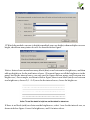
The receiving card connected with the fist receiving card as Order No. 2, then input figures;
Click “Send to receiver”. Each receiving card can be set to support the same pixels or
different pixels or no pixel (suitable for irregular screen.),
Send the data to receiving card or save it (.CON) in the computer file.