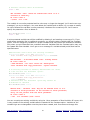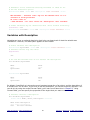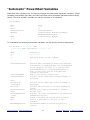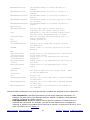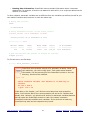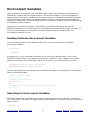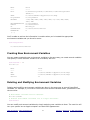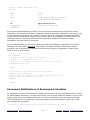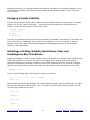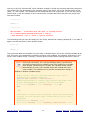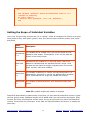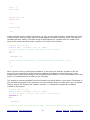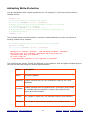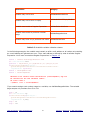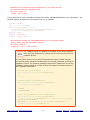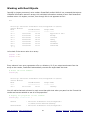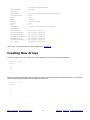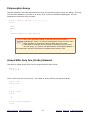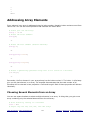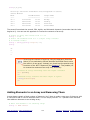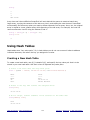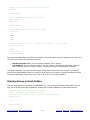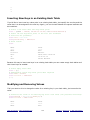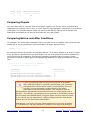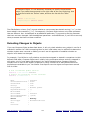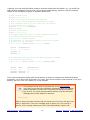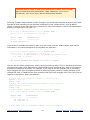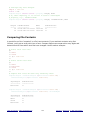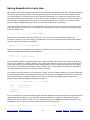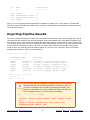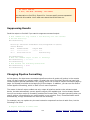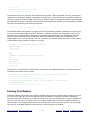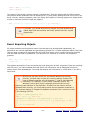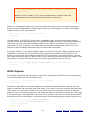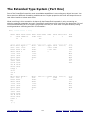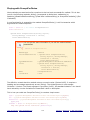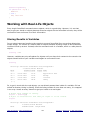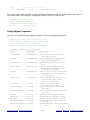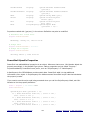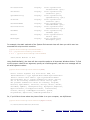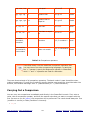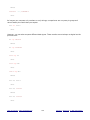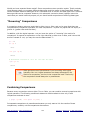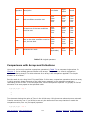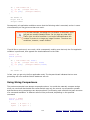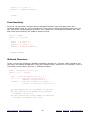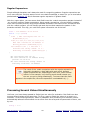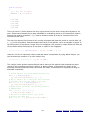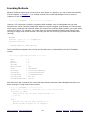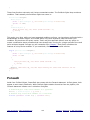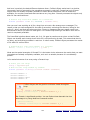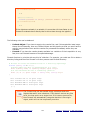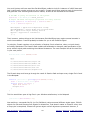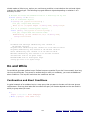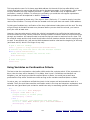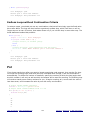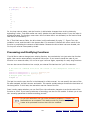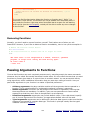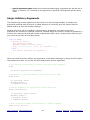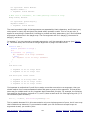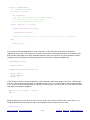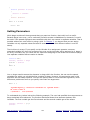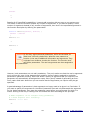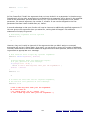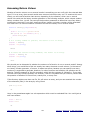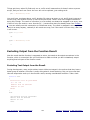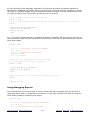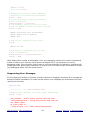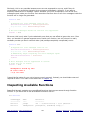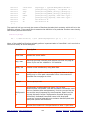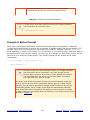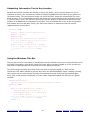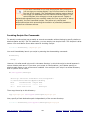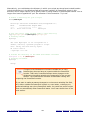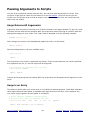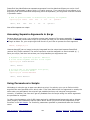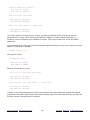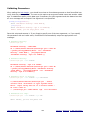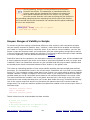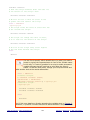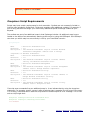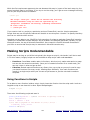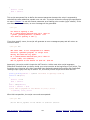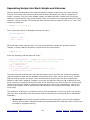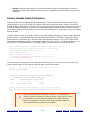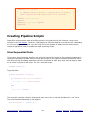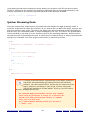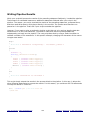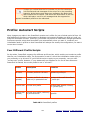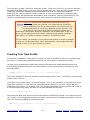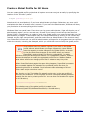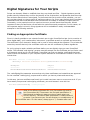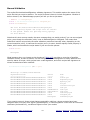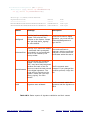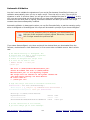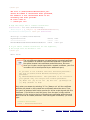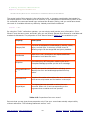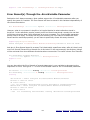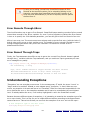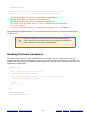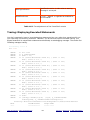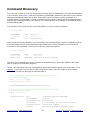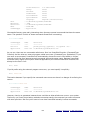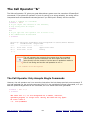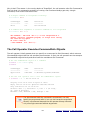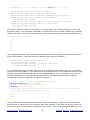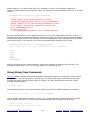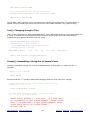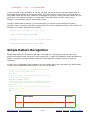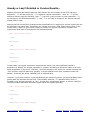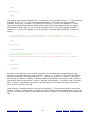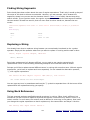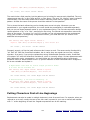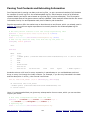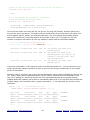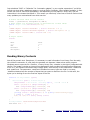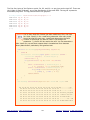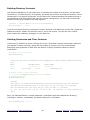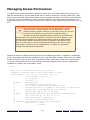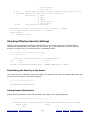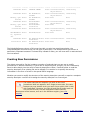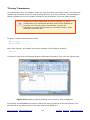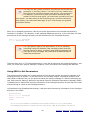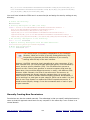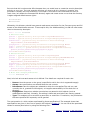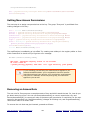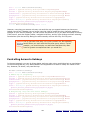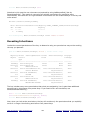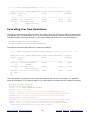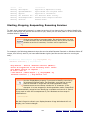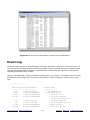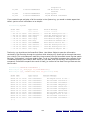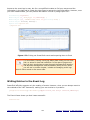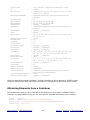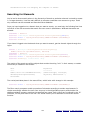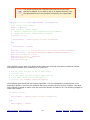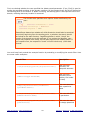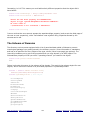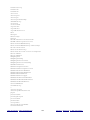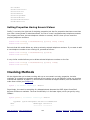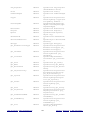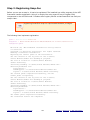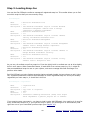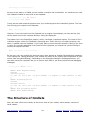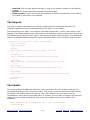
1
Copyright © 2009 BBS Technologies ALL RIGHTS RESERVED. No part of this work covered by the copyright herein may be reproduced, transmitted, stored, or used in any form or by any means graphic, electronic, or mechanical, including but not limited to photocopying, recording, scanning, digitizing, taping, Web distribution, information networks, or information storage and retrieval systems except as permitted under Section 107 or 108 of the 1976 United States Copyright Act without the prior written permission of the publisher. For permission to use material from the text please contact Idera at [email protected]. Microsoft® Windows PowerShell® and Microsoft® SQL Server® are registered trademarks of Microsoft Corporation in the United Stated and other countries. All other trademarks are the property of their respective owners. About the Author Dr. Tobias Weltner is one of the most visible PowerShell MVPs in Europe. He has published more than 80 books on Windows and Scripting Techniques with Microsoft Press and other publishers, is a regular speaker at conferences and road shows and does high level PowerShell and Scripting trainings for companies throughout Europe. He created the powershell.com website and community in an effort to help people adopt and use PowerShell more efficiently. As software architect, he created a number of award-winning scripting tools such as SystemScripter (VBScript), the original PowerShell IDE and PowerShell Plus, a comprehensive integrated PowerShell development system. Acknowledgments First and foremost, I’d like to thank my family who is always a source of inspiration and encouragement. A special thanks to Idera, Rick Pleczko, David Fargo, Richard Giles, Conley Smith and David Twamley for helping to bring this book to the English speaking world. It has been a pleasure working with you all. You are all great friends and partners. For Aleksandar Nikolic, our technical editor and very good friend, I thank you very much for all your hard work. You not only edited the book, but many times your insight and attention to detail improved the overall value as well. Finally, I'd like to thank my dog and close companion Cofi for his loyal faith and for pulling me away from work from time to time to enjoy life. Sincerely, Dr. Tobias Weltner Windows PowerShell MVP Mastering PowerShell Chapters 1. The PowerShell Console 11. Finding and Avoiding Errors 2. Interactive PowerShell 12. Command Discovery and Scriptblocks 3. Variables 13. Text and Regular Expressions 4. Arrays and Hashtables 14. XML 5. The PowerShell Pipeline 15. The File System 6. Using Objects 16. The Registry 7. Conditions 17. Processes, Services, Event Logs 8. Loops 18. Windows Management Instrumentation 9. Functions 19. User Management 10. Scripts 20. Your Own Cmdlets and Extensions Extras Copyright Notice About the Author Acknowledgments About Idera's PowerShell Plus Sponsors Additional Resources CHAPTER 1. The PowerShell Console Welcome to PowerShell! This chapter will introduce you to the PowerShell console and show you how to configure it, including font colors and sizes, editing and display options. Topics Covered: • • • • • Starting PowerShell • Figure 1.1: How to always open PowerShell with administrator rights First Steps with the Console • Figure 1.2: First commands in the PowerShell console • Incomplete and Multi-line Entries • Important Keyboard Shortcuts • Deleting Incorrect Entries • Overtype Mode • Command History: Reusing Entered Commands • Automatically Completing Input • Scrolling Console Contents • Selecting and Inserting Text • QuickEdit Mode • Figure 1.3: Marking and copying text areas in QuickEdit mode • Standard Mode Customizing the Console • Opening Console Properties • Figure 1.4: Opening console properties • Defining Options • Figure 1.5: Defining the QuickEdit and Insert modes • Specifying Fonts and Font Sizes • Figure 1.6: Specifying new fonts and font sizes • Setting Window and Buffer Size • Figure 1.7: Specifying the size of the window buffer • Selecting Colors • Figure 1.8: Select better colors for your console • Directly Assigning Modifications in PowerShell • Saving Changes Piping and Routing • Piping: Outputting Information Page by Page • Redirecting: Storing Information in Files Summary • Table 1.1: Important keys and their meaning in the PowerShell console Table of Contents | About PowerShell Plus 6 Sponsors | Resources | © BBS Technologies Starting PowerShell After you installed PowerShell, you'll find the PowerShell icon on the Start Menu in the program folder Windows PowerShell. Open this program folder and click on Windows PowerShell and the PowerShell console comes up. By the way, if you aren't able to find the program folder, PowerShell is probably not installed on your computer. It is an optional download from Microsoft for Windows XP, Server 2003, and Windows Vista. You can also start PowerShell directly. Just press (Windows)+(R) to open the Run window and then enter powershell (Enter). If you use PowerShell often, you should open the program folder for Windows PowerShell and right-click on Windows PowerShell. That will give you several options: • • • • Add to the start menu: On the context menu, click on Pin to Start Menu so that PowerShell will be displayed directly on your start menu from now on and you won't need to open its program folder first. Quick Launch toolbar: Click Add to Quick Launch toolbar if you use Windows Vista and would like to see PowerShell right on the Quick Launch toolbar inside your taskbar. Windows XP lacks this command so XP users will have to add PowerShell to the Quick Launch toolbar manually. Keyboard shortcuts: Administrators particularly prefer using a keyboard instead of a mouse. If you select Properties on the context menu, you can specify a key combination in the hot-key field. Just click on this field and press the key combination intended to start PowerShell, such as (Alt)+(P). In the properties window, you also have the option of setting the default window size to start PowerShell in a normal, minimized, or maximized window. Autostart: If you use PowerShell daily, it makes sense to Autostart the application. Then, it will automatically launch the PowerShell window when Windows starts up so all you have to do to bring it up is to click on its window button on the taskbar. If you want to set up a PowerShell autostart, open the Windows PowerShell 1.0 program folder and right-click on Windows PowerShell on the All Programs menu of your start menu. On the context menu, select Copy. Next, open Startup folder, right-click on a blank area, and select paste on the context menu. This will place a PowerShell shortcut in the folder. All you have to do now is click on the shortcut with the right button of your mouse and choose Properties. Specify the window size as Minimized. Here is a special note for Vista users: The default settings of Windows Vista start all programs without administrator privileges. This applies to the PowerShell console as well. So, even if you have administrator privileges, you will initially have no access to your administrator rights when using the PowerShell console. That's a new security feature that does make sense. You'd be surprised to see how many routine tasks can be performed without these powerful (and potentially dangerous) rights. If you need more privileges because commands aren't working right or your system complains about lacking administrator rights, then request your full administrator privileges. To do so, right-click on the PowerShell entry on your start menu and select Run As Administrator on the context menu. The PowerShell console window won't show by default whether you have enabled full administrator privileges, but you can add that feature later (see Chapter 9). Table of Contents | About PowerShell Plus 7 Sponsors | Resources | © BBS Technologies If you'd like to always launch PowerShell with full administrator privileges, click on the shortcut on the start menu with the right button of your mouse and choose Properties. Then click below right on Advanced and activate the option Run As Administrator. Figure 1.1: How to always open PowerShell with administrator rights (Run without administrative privileges whenever possible) First Steps with the Console After PowerShell starts, its console window opens, and you see a blinking text prompt, asking for your input with no icons or menus. PowerShell is a command console and almost entirely operated via keyboard input. The prompt begins with "PS" and after it is the path name of the directory where you are located. Start by trying out a few commands. For example, type: hello (Enter) As soon as you press (Enter), your entry will be sent to PowerShell. Because PowerShell has never heard of the command "hello" you will be confronted with an error message highlighted in red. Table of Contents | About PowerShell Plus 8 Sponsors | Resources | © BBS Technologies Figure 1.2: First commands in the PowerShell console For example, if you'd like to see which files and folders are in your current directory, then type dir (Enter). You'll get a text listing of all the files in the directory. PowerShell's communication with you is always text-based. PowerShell can do much more than display simple directory lists. Just pick a different command as the next one provides a list of all running processes: Get-Process (Enter) PowerShell's advantage is its tremendous flexibility since it allows you to control and display nearly all the information and operations on your computer. The command cls deletes the contents of the console window and the exit command ends PowerShell. Incomplete and Multi-line Entries Whenever you enter something PowerShell cannot understand, you get a red error message, explaining what went wrong. However, if you enter something that isn't wrong but incomplete (like a string with one missing closing quote), PowerShell gives you a chance to complete your input. You then see a double-prompt (">>"), and once you completed the line and pressed ENTER twice, PowerShell executes the command. You can also bail out at any time and cancel the current command or input by pressing: (Ctrl)+(C). The "incomplete input" prompt will also appear when you enter an incomplete arithmetic problem like this one: 2 + (Enter) >> 6 (Enter) >> (Enter) 8 Table of Contents | About PowerShell Plus 9 Sponsors | Resources | © BBS Technologies This feature enables you to make multi-line PowerShell entries: "This is my little multiline entry.(Enter) >> I'm now writing a text of several lines. (Enter) >> And I'll keep on writing until it's no longer fun."(Enter) >>(Enter) This is my little multiline entry. I'm now writing a text of several lines. And I'll keep on writing until it's no longer fun. The continuation prompt generally takes its cue from initial and terminal characters like open and closed brackets or quotation marks at both ends of a string. As long as the symmetry of these characters is incorrect, you'll continue to see the prompt. However, you can activate it even in other cases: dir `(Enter) >> -recurse(Enter) >>(Enter) So, if the last character of a line is what is called a "backtick" character, the line will be continued. You can retrieve that special character by pressing (`). Important Keyboard Shortcuts Shortcuts are important since almost everything in PowerShell is keyboard-based. For example, by pressing the keys (Arrow left) and (Arrow right), you can move the blinking cursor to the left or right. Use it to go back and correct a typo. If you want to move the cursor word by word, hold down (Ctrl) while pressing the arrow keys. To place the cursor at the beginning of a line, hit (Home). Pressing (End) will send the cursor to the end of a line. If you haven't entered anything, then the cursor won't move since it will only move within entered text. There's one exception: if you've already entered a line and pressed (Enter) to execute the line, you can make this line appear again character-by-character by pressing (Arrow right). Deleting Incorrect Entries If you've mistyped something, press (Backspace) to delete the character to the left of the blinking cursor. (Del) erases the character to the right of the cursor. And you can use (Esc) to delete your entire current line. The hotkey (Ctrl)+(Home) works more selectively: it deletes all the characters at the current position up to the beginning of the line. Characters to the right of the current position (if there are any) remain intact. (Ctrl)+(End) does it the other way around and deletes everything from the Table of Contents | About PowerShell Plus 10 Sponsors | Resources | © BBS Technologies current position up to the end of the line. Both combinations are useful only after you've pressed (Arrow left) to move the cursor to the middle of a line, specifically when text is both to the left and to the right of the cursor. Overtype Mode If you enter new characters and they overwrite existing characters, then you know you are in typeover mode. By pressing (Insert) you can switch between insert and type-over modes. The default input mode depends on the console settings you select. You'll learn more about console settings soon. Command History: Reusing Entered Commands For example, you don't have to re-type commands to edit them. Simply press (Arrow up) to redisplay the command that you entered. Press (Arrow up) and (Arrow down) to scroll up and down your command history. Using (F5) and (F8) do the same as the up and down arrow keys. This command history feature is extremely useful. Later, you'll learn how to configure the number of commands the console "remembers." The default setting is the last 50 commands. You can display all the commands in your history by pressing (F7) and then scrolling up and down the list to select commands using (Arrow up) and (Arrow down) and (Enter). The numbers before the commands in the Command History list only denote the sequence number. You cannot enter a number to select the associated command. What you can do is move up and down the list by hitting the arrow keys. Simply press (F9) to 'activate' the numbers so that you can select a command by its number. This opens a menu that accepts the numbers and returns the desired command. The keyboard sequence (Alt)+(F7) will clear the command history and start you off with a new list. (F8) provides more functionality than (Arrow up) as it doesn't just show the last command you entered, but keeps a record of the characters you've already typed in. If, for example, you'd like to see all the commands you've entered that begin with "d", type: d(F8) Press (F8) several times. Every time you press a key another command will be displayed from the command history provided that you've already typed in commands with an initial "d." Table of Contents | About PowerShell Plus 11 Sponsors | Resources | © BBS Technologies Automatically Completing Input An especially important key is (Tab). It will save you a great deal of typing (and typing errors). When you press this key, PowerShell will attempt to complete your input automatically. For example, type: cd(Tab) The command cd changes the directory in which you are currently working. Put at least one space behind the command and then press (Tab). PowerShell suggests a subdirectory. Press (Tab) again to see other suggestions. If (Tab) doesn't come up with any suggestions, then there probably aren't any subdirectories available. This feature is called AutoComplete, which works in many places. For example, you just learned how to use the command Get-Process, which lists all running processes. If you want to know what other commands there are that begin with "Get-", then type: Get-(Tab) Just make sure that there's no space before the cursor when you press (Tab). Keep hitting (Tab) to see all the commands that begin with "Get-". A more complete review of the AutoComplete feature is available in Chapter 9. AutoComplete works really well with long path names that require a lot of typing. For example: c:\p(Tab) Every time you press (Tab), PowerShell will prompt you with a new directory or a new file that begins with "c:\p." So, the more characters you type, the fewer options there will be. In practice, you should type in at least four or five characters to reduce the number of suggestions. When the list of suggestions is long, it can take a second or two until PowerShell has compiled all the possible suggestions and displays the first one. Wildcards are allowed in path names. For example, if you enter c:\ pr*e (Tab) in a typical Windows system, PowerShell will respond with "c:\Program Files". PowerShell will automatically put the entire response inside double quotation marks if the response contains whitespace characters. Table of Contents | About PowerShell Plus 12 Sponsors | Resources | © BBS Technologies Scrolling Console Contents The visible part of your console depends on the size of your console window, which you can change with your mouse. Drag the window border while holding down your left mouse button until the window is the size you want. Note that the actual contents of the console, the "screen buffer," don't change. So, if the window is too small to show everything, you should use the scroll bars. Selecting and Inserting Text Use your mouse if you'd like to select text inside the PowerShell window and copy it onto the clipboard. Move the mouse pointer to the beginning of the selected text, hold down the left mouse button and drag it over the text area that you want to select. QuickEdit Mode QuickEdit is the default mode for selecting and copying text in PowerShell. Select the text using your mouse and PowerShell will highlight it. After you've selected the text, press (Enter) or right-click on the marked area. This will copy the selected text to the clipboard. which you can now paste into other applications. To unselect press (Esc). You can also insert the text in your console at the blinking command line by right-clicking your mouse. Figure 1.3: Marking and copying text areas in QuickEdit mode Table of Contents | About PowerShell Plus 13 Sponsors | Resources | © BBS Technologies Standard Mode If QuickEdit is turned off and you are in Standard mode, the simplest way to mark and copy text is to right-click in the console window. If QuickEdit is turned off, a context menu will open. Select Mark to mark text and Paste if you want to insert the marked text (or other text contents that you've copied to the clipboard) in the console. It's usually more practical to activate QuickEdit mode so that you won't have to use to the context menu. Customizing the Console You can customize a variety of settings in the console including edit mode, screen buffer size, font colors, font sizes etc. Opening Console Properties The basic settings of your PowerShell console are configured in a special Properties dialog box. Click on the PowerShell icon on the far left of the title bar of the console window to open it. Figure 1.4: Opening console properties That will open a context menu. You should select Properties and A dialog box will open. To get help, click on the question mark button on the title bar of the window. A question mark is then pinned to your mouse pointer. Next, click on the option you need help for. The help appears as a ScreenTip window. Table of Contents | About PowerShell Plus 14 Sponsors | Resources | © BBS Technologies Defining Options Under the heading Options are four panels of options: Figure 1.5: Defining the QuickEdit and Insert modes • • • • Edit options: You should select the QuickEdit mode as well as the insert mode. We've already discussed the advantages of the QuickEdit mode: it makes it much easier to select, copy, and insert text. The insert mode makes sure that new characters don't overwrite existing input so new characters will be added without erasing text you've already typed in when you're editing command lines. Cursor size: Here is where you specify the size of the blinking cursor. Display options: Determine whether the console should be displayed as a window or full screen. The "window" option is best so that you can switch to other windows when you're working. The full screen display option is not available on all operating systems. Command history: Here you can choose how many command inputs the console "remembers". This allows you to select a command from the list by pressing (Arrow up) or (F7). The option Discard Old Duplicates ensures that the list doesn't have any duplicate entries. So, if you enter one command twice, it will appear only once in the history list. Specifying Fonts and Font Sizes On the Font tab, you can choose both the font and the font size displayed in the console. The console often uses the raster font as its default. This font is available in a specific range of sizes with available sizes shown in the "Size" list. Scalable TrueType fonts are much more flexible. They're marked in the list by a "TT" symbol. When you select a TrueType font, you can choose any size in the size list or enter them as text in the text box. TrueType fonts can be dynamically scaled. Table of Contents | About PowerShell Plus 15 Sponsors | Resources | © BBS Technologies Figure 1.6: Specifying new fonts and font sizes You should also try experimenting with TrueType fonts by using the "bold fonts" option. TrueType fonts are often more readable if they're displayed in bold. Your choice of fonts may at first seem a bit limited. To get more font choices, you can add them to the console font list. The limited default font list is supposed to prevent you from choosing unsuitable fonts for your console. One reason for this is that the console always uses the same width for each character (fixed width fonts). This restricts the use of most Windows fonts because they're proportional typefaces: every character has its own width. For example, an "" is narrower than an "m". If you're sure that a certain font will work in the console, then here's how to add the font to the console font list. Open your registry editor. In the key HKEY_LOCAL_MACHINE\SOFTWARE\Microsoft\Windows NT\ CurrentVersion\Console\TrueTypeFont insert a new "string value" and give this entry the name "00" (numbers, not letters). If there's already an entry that has this name, then call the new entry "000" or add as many zeroes as required to avoid conflicts with existing entries. You should then double-click your new entry to open it and enter the name of the font. The name must be exactly the same as the official font name, just the way it's stated under the key HKEY_LOCAL_MACHINE\SOFTWARE\Microsoft\Windows NT\CurrentVersion\Fonts. Table of Contents | About PowerShell Plus 16 Sponsors | Resources | © BBS Technologies The newly added font will now turn up in the console's option field. However, the new font will work only after you either log off at least once or restart your computer. If you fail to do so, the console will ignore your new font when you select it in the dialog box. Setting Window and Buffer Size On the Layout tab, you can specify how large the screen buffer should be, meaning how much information the console should "remember" and how far back you can scroll with the scroll bars. You should select a width of at least 120 characters in the window buffer size area with the height should be at least 1,000 lines or larger. This gives you the opportunity to use the scroll bars to scroll the window contents back up so that you can look at all the results of your previous commands. Figure 1.7: Specifying the size of the window buffer You can also set the window size and position on this tab if you'd like your console to open at a certain size and screen position on your display. Choose the option Let system position window and Windows will automatically determine at what location the console window will open. Selecting Colors On the Colors tab, you can select your own colors for four areas: Table of Contents | About PowerShell Plus 17 Sponsors | Resources | © BBS Technologies • • • • Screen text: Console font Screen background: Console background color Popup text: Popup window font, such as command history's (F7) Popup background: Popup window background color You have a palette of 16 colors for these four areas. So, if you want to specify a new font color, you should first select the option Screen Text and click on one of the 16 colors. If you don't like any of the 16 colors, then you can mix your own special shade of color. Just click on a palette color and choose your desired color value at the upper right from the primary colors red, green, and blue. Figure 1.8: Select better colors for your console Directly Assigning Modifications in PowerShell Some of the console configuration can also be done from within PowerShell code. You'll hear more about this later. To give you a quick impression, take a look at this: $host.ui.rawui (Enter) $host.ui.rawui.ForegroundColor = "Yellow" (Enter) $host.ui.rawui.WindowTitle = "My Console" (Enter) These changes will only be temporary. Once you close and re-open PowerShell, the changes are gone. You would have to include these lines into one of your "profile scripts," which run every time you launch PowerShell, to make them permanent. You can read more about this in Chapter 10. Table of Contents | About PowerShell Plus 18 Sponsors | Resources | © BBS Technologies Saving Changes Once you've successfully specified all your settings in the dialog box, you can close the dialog box. If you're using Windows Vista, all changes will be saved immediately, and when you start PowerShell the next time, your new settings will already be in effect. You may need Admin rights to save settings if you launched PowerShell with a link in your start menu that applies for all users. If you're using Windows XP, you'll see an additional window and a message asking you whether you want to save changes temporarily (Apply properties to current window only) or permanently (Modify shortcut that started this window). Piping and Routing You may want to view the information page by page or save it in a file since some commands output a lot of information. Piping: Outputting Information Page by Page The pipe command more outputs information screen page by screen page. You will need to press a button (like Space) to continue to the next page. Piping uses the vertical bar (|). The results of the command to the left of the pipe symbol are then fed into the command on the right side of the pipe symbol. This kind of piping is also known in PowerShell as the "pipeline": Get-Process | more (Enter) You can press (Ctrl)+(C) to stop output. Piping also works with other commands, not just more. For example, if you'd like to get a sorted directory listing, pipe the result to Sort-Object and specify the columns you would like to sort: dir | Sort-Object -property Length, Name (Enter) You'll find more background information on piping as well as many useful examples in Chapter 5. Redirecting: Storing Information in Files If you'd like to redirect the result of a command to a file, you can use the redirection symbol ">": Help > help.txt (Enter) The information won't appear in the console but will instead be redirected to the specified file. You can then open the file. However, opening a file in PowerShell is different from opening a file in the classic console: Table of Contents | About PowerShell Plus 19 Sponsors | Resources | © BBS Technologies help.txt (Enter) The term "help.txt" is not recognized as a cmdlet, function, operable program, or script file. Verify the term and try again. At line:1 character:8 + help.txt <<<< If you only specify the file name, PowerShell will look for it in all folders listed in the PATH environment variable. So to open a file, you will have to specify its absolute or relative path name. For example: .\help.txt (Enter) Or, to make it even simpler, you can use AutoComplete and hit (Tab) after the file name: help.txt(Tab) The file name will automatically be completed with the absolute path name, and then you can open it by pressing (Enter): & "C:\Users\UserA\help.txt" (Enter) You can also append data to an existing file. For example, if you'd like to supplement the help information in the file with help on native commands, you can attach this information to the existing file with the redirection symbol ">>": Cmd /c help >> help.txt (Enter) If you'd like to directly process the result of a command, you won't need traditional redirection at all because PowerShell can also store the result of any command to a variable: $result = Ping 10.10.10.10 $result Reply from 10.10.10.10: bytes=32 time<1ms TTL=128 Reply from 10.10.10.10: bytes=32 time<1ms TTL=128 Reply from 10.10.10.10: bytes=32 time<1ms TTL=128 Reply from 10.10.10.10: bytes=32 time<1ms TTL=128 Ping statistics for 10.10.10.10: Packets: Sent = 4, Received = 4, Lost = 0 (0% loss), Approximate round trip times in milli-seconds: Minimum = 0ms, Maximum = 0ms, Average = 0ms Variables are universal data storage and variable names always start with a "$". You'll find out more about variables in Chapter 3. Table of Contents | About PowerShell Plus 20 Sponsors | Resources | © BBS Technologies Summary PowerShell is an optional component for Windows XP and better. You will have to download and install PowerShell before using it. Beginning with Windows Server 2008, PowerShell is included with Windows by default. It still needs to be enabled in Windows software feature list. You will find PowerShell, like any other program, in the start menu below "All Programs." It is located in the program folder Windows PowerShell 1.0. The program file name is "powershell.exe." PowerShell is a basic console program that relies heavily on text input. There are plenty of special keys listed in Table 1.1. Key Meaning (Alt)+(F7) Deletes the current command history (PgUp), (PgDn) Display the first (PgUp) or last (PgDn) command you used in current session (Enter) Send the entered lines to PowerShell for execution (End) Moves the editing cursor to the end of the command line (Del) Deletes the character to the right of the insertion point (Esc) Deletes current command line (F2) Moves in current command line to the next character corresponding to specified character (F4) Deletes all characters to the right of the insertion point up to specified character (F7) Displays last entered commands in a dialog box (F8) Displays commands from command history beginning with the character that you already entered in the command line (F9) Opens a dialog box in which you can enter the number of a command from your command history to return the command. (F7) displays numbers of commands in Table of Contents | About PowerShell Plus 21 Sponsors | Resources | © BBS Technologies command history (Left arrow), (Right arrow) Move one character to the left or right respectively (Arrow up), (Arrow Repeat the last previously entered command down), (F5), (F8) (Home) Moves editing cursor to beginning of command line (Backspace) Deletes character to the left of the insertion point (Ctrl)+(C) Cancels command execution (Ctrl)+(End) Deletes all characters from current position to end of command line (Ctrl)+(Arrow left), (Ctrl)+ (Arrow right) Move insertion point one word to the left or right respectively (Ctrl)+(Home) Deletes all characters of current position up to beginning of command line (Tab) Automatically completes current entry, if possible Table 1.1: Important keys and their meaning in the PowerShell console You will find that the keys (Arrow up), which repeats the last command, and (Tab), which completes the current entry, are particularly useful. By hitting (Enter), you complete an entry and send it to PowerShell. If PowerShell can't understand a command, an error message appears highlighted in red stating the possible reasons for the error. Two special commands are cls (deletes the contents of the console) and exit (ends PowerShell). You can use your mouse to select information in the console and copy it to the Clipboard by pressing (Enter) or by right-clicking when you have turned on the QuickEdit mode. With QuickEdit mode turned off, you will have to right-click inside the console and then select Mark in a context menu. The basic settings of the console—QuickEdit mode as well as colors, fonts, and font sizes—can be customized in the properties window of the console. This can be accessed by right-clicking the icon to the far left in the title bar of the console window. In the dialog box, select Properties. Table of Contents | About PowerShell Plus 22 Sponsors | Resources | © BBS Technologies Along with the commands, a number of characters in the console have special meanings as you have already become acquainted with three of them: • • Piping: The vertical bar "|" symbol pipes the results of a command to the next. When you pipe the results to the command more, the screen output will be paused once the screen is full, and continued when you press a key. Redirection: The symbol ">" redirects the results of a command to a file. You can then open and view the file contents. The symbol ">>" appends information to an existing file. Table of Contents | About PowerShell Plus 23 Sponsors | Resources | © BBS Technologies CHAPTER 2. Interactive PowerShell PowerShell has two faces: interactivity and script automation. In this chapter, you will first learn how to work with PowerShell interactively. Then, we will take a look at PowerShell scripts. Topics Covered: • • • • • • • PowerShell as a Calculator • Calculating with Number Systems and Units • Table 2.1: Arithmetic operators Executing External Commands • Starting the "Old" Console • Discovering Useful Console Commands • Figure 2.1: Run PowerShell as administrator • Security Restrictions at Program Start • Trustworthy Subdirectories Cmdlets: "Genuine" PowerShell Commands • Table 2.2: The most important standard actions and their descriptions • Using Parameters • Using Named Parameters • Switch Parameter • Positional Parameters • Common Parameters • Table 2.3: Common parameters in effect for (nearly) all cmdlets Aliases: Giving Commands Other Names • Resolving Aliases • Creating Your Own Aliases • Removing—or Permanently Retaining—an Alias • Overwriting Alias Definitions and Deleting Them Manually Functions: "Expanded" Aliases • Calling Commands with Arguments • Creating Shortcut Commands Invoking Files and Scripts • Starting Scripts • Running Batch Files • Running VBScript Files • Running PowerShell Scripts Summary PowerShell as a Calculator You can use the PowerShell console to execute arithmetic operations the same way you would with a calculator. Just enter a math expression and PowerShell will give you the result: 2+4 (Enter) Table of Contents | About PowerShell Plus 24 Sponsors | Resources | © BBS Technologies 6 You can use all of the usual basic arithmetic operations. Even parentheses will work just the way they do when you use your pocket calculator: (12+5) * 3 / 4.5 (Enter) 11.3333333333333 Parentheses play a special role in PowerShell as they always works from the inside out: the results inside the parentheses are produced before evaluating the expressions outside of the parentheses, i.e. (2*2)*2 = 4*2. For example, operations performed within parentheses have priority and ensure that multiplication operations do not take precedence over addition operations. Parentheses are also important when using PowerShell commands, as you'll discover in upcoming chapters. For example, you could list the contents of subdirectories with the dir command and then determine the number of files in a folder by enclosing the dir command in parentheses. (Dir *.txt).Count (Enter) 12 Using a comma instead of a decimal point seems to return the wrong result: 4,3 + 2 (Enter) 4 3 2 In the example above, PowerShell simply displayed the numbers again. The comma always creates an array. The important thing to remember is that the decimal point is always a point and not a comma in PowerShell. Calculating with Number Systems and Units The next arithmetic problem is a little unusual. 4GB / 720MB (Enter) 5.68888888888889 Table of Contents | About PowerShell Plus 25 Sponsors | Resources | © BBS Technologies The example above calculates how many CD-ROMs can be stored on a DVD. PowerShell supports units like kilobyte, megabyte, and gigabyte. Just make sure you do not use a space between number and unit. 1mb (Enter) 1048576 The units KB, MB, and GB can be upper or lower case—how you write them doesn't matter to PowerShell. However, white space characters do matter. Units of measure must directly follow the number and must not be separated from it by a space. Otherwise, PowerShell will interpret the unit as a new command. Take a look at the following command line: 12 + 0xAF (Enter) 187 PowerShell can easily understand hexadecimal values: simply prefix the number with "0x": 0xAFFE (Enter) 45054 Here is a quick summary: • • • • • • Operators: Arithmetic problems can be solved with the help of operators. Operators evaluate the two values to the left and the right. For basic operations, a total of five operators are available, which are also called "arithmetic operators" (Table 2.1). Brackets: Brackets group statements and ensure that expressions in parentheses are evaluated first. Decimal point: Fractions use a point as decimal separator (never a comma). Comma: Commas create arrays and so are irrelevant for normal arithmetic operations. Special conversions: Hexadecimal numbers are designated by the prefix "0x", which ensures that they are automatically converted into decimal values. If you add one of the KB, MB, or GB units to a number, the number will be multiplied by the unit. White space characters aren't allowed between numbers and values. Results and formats: Numeric results are always returned as decimal values. If you'd like to see the results presented in a different way, use a format operator like -f, which will be discussed in detail later in this book. Operator Description example result + 5 + 4.5 9.5 Adds two values Table of Contents | About PowerShell Plus 26 Sponsors | Resources | © BBS Technologies - * / % Subtracts two values Multiplies two values Divides two values Supplies the rest of division 2gb + 120mb 2273312768 0x100 + 5 261 "Hello " + "there" "Hello there" 5 - 4.5 0.5 12gb - 4.5gb 8053063680 200 - 0xAB 29 5 * 4.5 22.5 4mb * 3 12582912 12 * 0xC0 2304 "x" * 5 "xxxxx" 5 / 4.5 1.1111111111111 1 1mb / 30kb 34.133333333333 3 0xFFAB / 0xC 5454,25 5%4.5 0.5 Table 2.1: Arithmetic operators Table of Contents | About PowerShell Plus 27 Sponsors | Resources | © BBS Technologies Executing External Commands PowerShell can also launch external programs in very much the same way the classic console does. For example, if you want to examine the settings of your network card, enter the command ipconfig —it works in PowerShell the same way it does in the traditional console: Ipconfig Windows IP Configuration Wireless LAN adapter Wireless Network Connection: Connection-specific DNS Suffix: Connection location IPv6 Address . : fe80::6093:8889:257e:8d1%8 IPv4 address . . . . . . . . . . : 192.168.1.35 Subnet Mask . . . . . . . . . . : 255.255.255.0 Standard Gateway . . . . . . . . . : 192.168.1.1 This following command enables you to verify if a Web site is online and tells you the route the data packets are sent between a Web server and your computer: Tracert powershell.com Trace route to powershell.com [74.208.54.218] over a maximum of 30 hops: 1 12 ms 7 ms 11 ms TobiasWeltner-PC [192.168.1.1] 2 15 ms 16 ms 16 ms dslb-088-070-064-001.pools.arcor-ip.net 3 15 ms 16 ms 16 ms han-145-254-11-105.arcor-ip.net (...) 17 150 ms 151 ms 152 ms vl-987.gw-ps2.slr.lxa.oneandone.net 18 145 ms 145 ms 149 ms ratdog.info You can execute any Windows programs. Just type notepad (Enter) or explorer (Enter). There's a difference between text-based commands like ipconfig and Windows programs like Notepad. Text-based commands are executed synchronously, and the console waits for the commands to complete. Windows-based programs are executed asynchronously. Press (Ctrl)+(C) to cancel a text-based command, which may take longer than expected and is blocking the console. To clear the console screen type cls (Enter). Table of Contents | About PowerShell Plus 28 Sponsors | Resources | © BBS Technologies Starting the "Old" Console To temporarily switch back to the "old" console, simply enter cmd (Enter). Since the old console is just another text-based command, you can easily launch it from within PowerShell. To leave the old console, type exit (Enter). Even PowerShell can be closed by entering exit. Most text-based commands use exit to quit. Occasionally, the command quit is required in commands instead of exit. Discovering Useful Console Commands The cmd command can be used for just one command when you specify the parameter /c. This is useful for invoking an old console command like help. This command has no external program that you can access directly from PowerShell, it's only available inside the classic console. Using this command will return a list of many other useful external console commands. Cmd /c Help For more ASSOC AT ATTRIB BREAK CACLS CALL CD CHCP CHDIR CHKDSK CHKNTFS CLS CMD COLOR COMP COMPACT information on a specific command, type HELP command-name Displays or modifies file extension associations. Schedules commands and programs to run on a computer. Displays or changes file attributes. Sets or clears extended CTRL+C checking. Displays or modifies access control lists (ACLs) of files. Calls one batch program from another. Displays the name of or changes the current directory. Displays or sets the active code page number. Displays the name of or changes the current directory. Checks a disk and displays a status report. Displays or modifies the checking of disk at boot time. Clears the screen. Starts a new instance of the Windows command interpreter. Sets the default console foreground and background colors. Compares the contents of two files or sets of files. Displays or alters the compression of files on NTFS partitions. CONVERT Converts FAT volumes to NTFS. You cannot convert the current drive. COPY Copies one or more files to another location. DATE Displays or sets the date. DEL Deletes one or more files. DIR Displays a list of files and subdirectories in a directory. DISKCOMP Compares the contents of two floppy disks. DISKCOPY Copies the contents of one floppy disk to another. DOSKEY Edits command lines, recalls Windows commands, and creates macros. ECHO Displays messages, or turns command echoing on or off. ENDLOCAL Ends localization of environment changes in a batch file. ERASE Deletes one or more files. EXIT Quits the CMD.EXE program (command interpreter). FC Compares two files or sets of files, and displays the differences between them. FIND Searches for a text string in a file or files. Table of Contents | About PowerShell Plus 29 Sponsors | Resources | © BBS Technologies FINDSTR FOR FORMAT FTYPE Searches for strings in files. Runs a specified command for each file in a set of files. Formats a disk for use with Windows. Displays or modifies file types used in file extension associations. GOTO Directs the Windows command interpreter to a labeled line in a batch program. GRAFTABL Enables Windows to display an extended character set in graphics mode. HELP Provides Help information for Windows commands. IF Performs conditional processing in batch programs. LABEL Creates, changes, or deletes the volume label of a disk. MD Creates a directory. MKDIR Creates a directory. MODE Configures a system device. MORE Displays output one screen at a time. MOVE Moves one or more files from one directory to another directory. PATH Displays or sets a search path for executable files. PAUSE Suspends processing of a batch file and displays a message. POPD Restores the previous value of the current directory saved by PUSHD. PRINT Prints a text file. PROMPT Changes the Windows command prompt. PUSHD Saves the current directory then changes it. RD Removes a directory. RECOVER Recovers readable information from a bad or defective disk. REM Records comments (remarks) in batch files or CONFIG.SYS. REN Renames a file or files. RENAME Renames a file or files. REPLACE Replaces files. RMDIR Removes a directory. SET Displays, sets, or removes Windows environment variables. SETLOCAL Begins localization of environment changes in a batch file. SHIFT Shifts the position of replaceable parameters in batch files. SORT Sorts input. START Starts a separate window to run a specified program or command. SUBST Associates a path with a drive letter. TIME Displays or sets the system time. TITLE Sets the window title for a CMD.EXE session. TREE Graphically displays the directory structure of a drive or path. TYPE Displays the contents of a text file. VER Displays the Windows version. VERIFY Tells Windows whether to verify that your files are written correctly to a disk. VOL Displays a disk volume label and serial number. XCOPY Copies files and directory trees. You can use all of the above commands in your PowerShell console. To try this, pick some commands from the list. For example: Table of Contents | About PowerShell Plus 30 Sponsors | Resources | © BBS Technologies Cmd /c help vol As an added safety net, you should run PowerShell without administrator privileges when experimenting with new commands. That will protect you against mistakes, because most dangerous commands can no longer be executed without administrator rights: defrag c: You must have Administrator privileges to defragment a volume. Use an administrator command line and then run the program again. If you must use admin privileges and have enabled User Account Control on Windows Vista, remember to start your PowerShell explicitly with administrator rights. To do this, right-click PowerShell.exe and in the context menu, select Run as Administrator. Figure 2.1: Run PowerShell as administrator. (Run without administrator privileges whenever possible) Table of Contents | About PowerShell Plus 31 Sponsors | Resources | © BBS Technologies Security Restrictions at Program Start Strangely enough, it seems that some programs can't be launched from PowerShell. While you can launch notepad, you cannot launch wordpad: wordpad The term "wordpad" is not recognized as a cmdlet, function, operable program or script file. Verify the term and try again. At line:1 char:7 + wordpad <<<< PowerShell always needs to know where the program is stored. So, if you know the exact path name of Wordpad, PowerShell launches Wordpad after all - almost: C:\programs\Windows NT\accessories\wordpad.exe The term "C:\programs\Windows" is not recognized as a cmdlet, function, operable program or script file. Verify the term and try again. At line:1 char:21 + C:\programs\Windows <<<< NT\accessories\wordpad.exe Because the path name includes white space characters and because PowerShell interprets white space characters as separators, PowerShell is actually trying to start the program C:\programs\Windows. An error message is generated because this path doesn't exist. If path names include spaces, the path must be enclosed in quotation marks. But that causes another problem: "C:\programs\Windows NT\accessories\wordpad.exe" C:\programs\Windows NT\accessories\wordpad.exe PowerShell treats text in quotation marks as a string and immediately returns this string. To ensure that PowerShell executes the text in the quotation marks, type an ampersand in front of it: & "C:\programs\Windows NT\accessories\wordpad.exe" Finally, WordPad successfully starts. Hmmm. Wouldn't it be easier to switch from the current subdirectory to the subdirectory where the program we're looking for is located? Cd "C:\programs\Windows NT\accessories" wordpad.exe The term "wordpad" is not recognized as a cmdlet, function, operable program or script file. Verify the term and try again. At line:1 char:11 + wordpad.exe <<<< Table of Contents | About PowerShell Plus 32 Sponsors | Resources | © BBS Technologies This results in another error because PowerShell requires a relative or absolute path. The absolute path name is the complete path while a relative path name always refers to the current directory. To launch a program in your current subdirectory, you use this relative path: .\wordpad.exe Trustworthy Subdirectories PowerShell distinguishes between trustworthy folders and all other folders. You won't need to provide the path name or append the file extension to the command name if the program is located in a trustworthy folder. Commands like ping or ipconfig work as-is because they are in located a trustworthy folder, while the program in our last example, WordPad, is not. The Windows environment variable Path determines whether a folder is trustworthy or not. All folders listed in this environment variable are treated as "trustworthy" by PowerShell. You could put all your important programs in one of the folders listed in the environment variable Path. You can find out this list by entering: $env:Path C:\Windows\system32;C:\Windows;C:\Windows\System32\Wbem;C:\program Files\Softex\OmniPass;C:\Windows\System32\WindowsPowerShell\v1.0\;c :\program Files\Microsoft SQL Server\90\Tools\binn\;C:\program File s\ATI Technologies\ATI.ACE\Core-Static;C:\program Files\MakeMsi\;C: \program Files\QuickTime\QTSystem\ You'll find more on variables as well as special environment variables in the next chapter. As a clever alternative, you can add other folders containing important programs to your Path environment variables, such as: $env:path += ";C:\programs\Windows NT\accessories" wordpad.exe After this change, you can suddenly launch WordPad just by entering its program name. Note that your change to the environment variable Path is valid only as long as PowerShell is running. Once you end PowerShell, your modification is discarded. So, if you'd like to permanently extend Path, you need to add the line for the extension to one of your profile scripts. Profile scripts start automatically when PowerShell starts and their purpose is to customize your PowerShell environment. You read more about profile scripts in Chapter 10. • Programs in special subdirectories: You can simply enter the program name to launch the program if the program is located in one of the special folders specified in the Path environment variable. Almost all relevant tools can be launched that way. Table of Contents | About PowerShell Plus 33 Sponsors | Resources | © BBS Technologies • • • Specifying a path: You must tell the console where it is if the program is located somewhere else. To do so, specify the absolute or relative path name of the program. Watch out for white space characters: if white space characters occur in path names, enclose the entire path in quotes so that PowerShell doesn't interpret white space characters as separators. It doesn't matter whether you use double quotation marks ("") or single quotation marks ( ' ' ); you just have to be consistent. Stick to single quotes. For example, PowerShell "resolves" text in double quotation marks, replacing variables with their values. The "&" changes string into commands: PowerShell doesn't treat text in quotes as a command. Prefix string with "&" to actually execute it. The "&" symbol allows you to execute any string just as if you had entered the text directly on the command line. & ("note" + "pad") If you have to enter a very long path names, remember (Tab), the key for automatic completion: C:\(Tab) Press (Tab) again and again until the suggested subdirectory is the one you are seeking. Add a "\" and press (Tab) once again in order to specify the next subdirectory. The moment a white space character turns up in a path, AutoComplete also puts the path in quotation marks and inserts an "&" before it. However, if you want to add further subdirectories, you must first remove the last quotation mark with (Backspace). Cmdlets: "Genuine" PowerShell Commands PowerShells internal commands are called 'cmdlets'. The "mother" of all cmdlets is called GetCommand: Get-Command -commandType cmdlet It retrieves a list of all available cmdlets. Cmdlet names always consist of an action (verb) and something that is acted on (noun). This naming convention helps you to find the right command. Let's take a look at how the system works. If you're looking for a command for a certain task, you should first select the action that best describes the task. There are relatively few actions that the strict PowerShell naming conditions permit (Table 2.2). If you know that you want to obtain something, the proper action is "get." That already gives you the first part of the command name, and all you have to do now is to take a look at a list of commands that are likely candidates: Get-Command -verb get CommandType Name Table of Contents | About PowerShell Plus Definition 34 Sponsors | Resources | © BBS Technologies ----------cmdlet cmdlet cmdlet cmdlet cmdlet cmdlet cmdlet cmdlet cmdlet cmdlet cmdlet cmdlet cmdlet cmdlet cmdlet cmdlet cmdlet cmdlet cmdlet cmdlet cmdlet cmdlet cmdlet cmdlet cmdlet cmdlet cmdlet cmdlet cmdlet ---Get-Acl Get-Alias Get-Authenticode Signature Get-ChildItem Get-Command Get-Content Get-Credential Get-Culture Get-Date Get-EventLog Get-Execution Policy Get-Help Get-History Get-Host Get-Item Get-ItemProperty Get-Location Get-Member Get-PfxCertificate Get-Process Get-PSDrive Get-PSProvider Get-PSSnapin Get-Service Get-TraceSource Get-UICulture Get-Unique Get-Variable Get-WmiObject ---------Get-Acl [[-Path] <String[]>] [-A... Get-alias [[-Name] <String[]>] [... Get-AuthenticodeSignature [-File... Get-ChildItem [[-Path] <String[]... Get-Command [[-ArgumentList] <Ob... Get-Content [-Path] <String[]> [... Get-Credential [-Credential] <PS... Get-Culture [-Verbose] [-Debug] ... Get-Date [[-Date] <DateTime>] [-... Get-EventLog [-LogName] <String>... Get-ExecutionPolicy [-Verbose] [... Get-Help [[-Name] <String>] [-Ca... Get-History [[-Id] <Int64[]>] [[... Get-Host [-Verbose] [-Debug] [-E... Get-Item [-Path] <String[]> [-Fi... Get-ItemProperty [-Path] <String... Get-Location [-PSProvider <Strin... Get-Member [[-Name] <String[]>] ... Get-PfxCertificate [-FilePath] <... Get-Process [[-Name] <String[]>]... Get-PSDrive [[-Name] <String[]>]... Get-PSProvider [[-PSProvider] <S... Get-PSSnapin [[-Name] <String[]>... Get-Service [[-Name] <String[]>]... Get-TraceSource [[-Name] <String... Get-UICulture [-Verbose] [-Debug... Get-Unique [-InputObject <PSObje... Get-Variable [[-Name] <String[]>... Get-WmiObject [-Class] <String> ... As you see, the relevant cmdlet Get-Command comes from the "get" group. Action Description Add Add Clear Delete Compare Compare Convert Convert Copy Copy Table of Contents | About PowerShell Plus 35 Sponsors | Resources | © BBS Technologies Export Export Format Format Get Acquire Group Group Import Import Measure Measure Move Move New Create new Out Output Read Read Remove Remove Rename Rename Resolve Resolve Restart Restart Resume Resume Select Select Set Set Sort Sort Split Split Table of Contents | About PowerShell Plus 36 Sponsors | Resources | © BBS Technologies Start Start Stop Stop Suspend Suspend Tee Split up Test Test Trace Trace Update Update Write Write Table 2.2: The most important standard actions and their descriptions You can look up help for any cmdlet using Get-Help: Get-Help Get-Command -detailed You can easily discover commands for certain actions because Get-Command also allows wildcards: Get-Command *help* -CommandType cmdlet CommandType ----------cmdlet Name ---Get-Help Definition ---------Get-Help [[-Name] <String>] [-Category... Using Parameters Parameters add information so a cmdlet knows what to do. Once again, Get-Help will show you which parameter are supported by any given cmdlet. For example, the cmdlet Get-ChildItem lists the contents of the current subdirectory. The contents of the current folder will be listed if you enter the cmdlet without additional parameters: Get-ChildItem For example, if you'd prefer to get a list of the contents of another subdirectory, you should enter the subdirectory name after the cmdlet: Table of Contents | About PowerShell Plus 37 Sponsors | Resources | © BBS Technologies Get-ChildItem c:\windows You can use Get-Help to output full help on Get-ChildItem to find out which parameters are supported: Get-Help Get-ChildItem -full This will give you comprehensive information as well as several examples. Of particular interest is the "Parameters" section: -path <string[]> Specifies a path to one or more locations. Wildcards are permitted. The default location is the current directory (.). Required? false Position? 1 Default value <NOTE: if not specified uses the Current location> Accept pipeline input? true (ByValue, ByPropertyName) Accept wildcard characters? true -include <string[]> Retrieves only the specified items. The value of this parameter qualifies the Path parameter. Enter a path element or pattern, such as "*.txt". Wildcards are permitted. The Include parameter is effective only when the command includes the Recurse parameter or the path leads to the contents of a directory, such as C:\Windows\*, where the wildcard character specifies the contents of the C:\Windows directory. Required? false Position? named Default value Accept pipeline input? Table of Contents | About PowerShell Plus false 38 Sponsors | Resources | © BBS Technologies Accept wildcard characters? true -exclude <string[]> Omits the specified items. The value of this parameter qualifies the Path parameter. Enter a path element or pattern, such as "*.txt". Wildcards are permitted. This parameter does not work properly in this cmdlet. Required? false Position? named Default value Accept pipeline input? false Accept wildcard characters? true -filter <string> Specifies a filter in the provider's format or language. The value of this parameter qualifies the Path parameter. The syntax of the filter, including the use of wildcards, depends on the provider. Filters are more efficient than other parameters, because the provider applies them when retrieving the objects, rather than having Windows PowerShell filter the objects after they are retrieved. Required? false Position? 2 Default value Accept pipeline input? false Accept wildcard characters? true Table of Contents | About PowerShell Plus 39 Sponsors | Resources | © BBS Technologies -name <SwitchParameter> Retrieves only the names of the items in the locations. If you pipe the output of this command to another command, only the item names are sent. Required? false Position? named Default value False Accept pipeline input? false Accept wildcard characters? false -recurse <SwitchParameter> Gets the items in the specified locations and in all child items of the locations. Recurse works only when the path points to a container that has child items, such as C:\Windows or C:\Windows\*, and not when it points to items that do not have child items, such as C:\Windows\*.exe. Required? false Position? named Default value False Accept pipeline input? false Accept wildcard characters? false -force <SwitchParameter> Overrides restrictions that prevent the command from succeeding, just so the changes do not compromise security. For example, Force will override the read-only attribute or create directories to complete a file path, but it will not attempt to change file permissions. Table of Contents | About PowerShell Plus 40 Sponsors | Resources | © BBS Technologies Required? false Position? named Default value False Accept pipeline input? false Accept wildcard characters? false -codeSigningCert <SwitchParameter> Retrieves only the certificates that have code signing authority. This parameter is valid only when using the Windows PowerShell Certificate provider. For more information, type "get-help about_provider" and "get-help about_signing". Required? false Position? named Default value Accept pipeline input? false Accept wildcard characters? false -literalPath <string[]> Specifies a path to one or more locations. Unlike Path, the value of LiteralPath is used exactly as it is typed. No characters are interpreted as wildcards. If the path includes escape characters, enclose it in single quotation marks. Single quotation marks tell Windows PowerShell not to interpret any characters as escape sequences Required? true Position? 1 Default value Table of Contents | About PowerShell Plus 41 Sponsors | Resources | © BBS Technologies Accept pipeline input? true (ByPropertyName) Accept wildcard characters? false <CommonParameters> This cmdlet supports the common parameters: -Verbose, -Debug, -ErrorAction, -ErrorVariable, and OutVariable. For more information, type, "get-help about_commonparameters". Get-ChildItem supports a total of its own eight parameters as well as several CommonParameters. Every parameter has a specific name that begins with a hyphen. Using Named Parameters Named parameters really work like key-value pairs. You specify the name of a parameter (which always starts with a hyphen), then a space, then the value you want to assign to the parameter. If you ever used VBA (Visual Basic for Applications), it is similar to named parameters there. Let's say you'd like to list all files with the extension *.exe that are located somewhere in the folder c:\windows or in one of its subdirectories, you could use this command: Get-ChildItem -path c:\windows -filter *.exe -recurse -name There are clever tricks to make life easier. You don't have to specify the complete parameter name as it is OK to type out just enough to make clear which parameters you mean: Get-ChildItem -pa c:\windows -fi *.exe -r -n Don't worry: If you are getting too lazy and shorten parameter names too much, PowerShell will report ambiguities and specify the parameter it can no longer assign clearly: Get-ChildItem -pa c:\windows -f *.exe -r -n Get-ChildItem : Parameter cannot be processed because the parameter name 'f' is ambiguous. Possible matches include: -Filter -Force. At line:1 char:14 + Get-ChildItem <<<< -pa c:\windows -f *.exe -r -n You can also turn off parameter recognition. This is necessary in the rare event that an argument reads like a parameter name, and so must be entered in such a way that it is not interpreted as a parameter. So, if you need to output the text "-BackgroundColor" Table of Contents | About PowerShell Plus 42 Sponsors | Resources | © BBS Technologies with Write-Host, this will likely result in a conflict. PowerShell would assume that you meant -BackgroundColor and notify you that the argument for this parameter is missing. Write-Host -BackgroundColor Write-Host : Missing an argument for parameter 'BackgroundColor'. Specify a parameter of type "System.consoleColor" and try again. At line:1 char:27 + Write-Host -BackgroundColor <<<< You always have the choice of including the text in quotes. Or you can expressly turn off parameter recognition by typing "--". Everything following these two symbols will no longer be recognized as a parameter: Write-Host "-BackgroundColor" -BackgroundColor Write-Host -- -BackgroundColor -BackgroundColor Switch Parameter Sometimes, parameters really are no key-value pairs. Whenever a parameter represents a boolean value (true or false), most often it is used as a switch parameter (present or not). So, switch parameters stand for themselves, no values follow. If they're specified, they turn on a certain function. If they're left out, they don't turn on the function. For example, the parameter -recurse ensures that Get-ChildItem searches not only the -path specified subdirectories but all subdirectories. And the switch parameter -name makes Get-ChildItem output only the names of files (as string rather than rich file and folder objects). The help on Get-ChildItem clearly identifies switch parameters. "<SwitchParameter>" follows the parameter names: -recurse <SwitchParameter> Gets the items in the specified locations and all child items of the locations. (...) Table of Contents | About PowerShell Plus 43 Sponsors | Resources | © BBS Technologies Positional Parameters Some parameters have fixed positions while others are "named" - you can find out in Help when you look at the cmdlet parameters and check out their "Position" property. Named parameters are easy: they always need to be named so you always have to specify the parameter name, a space, and then the parameter value. Positional parameters work the same but you can also specify them as positional. So when a parameter has a position of 1, the first "unnamed" parameter is assigned to it. That's why you could have expressed the command we just discussed in one of the following ways: Get-ChildItem c:\windows *.exe -recurse -name Get-ChildItem -recurse -name c:\windows *.exe Get-ChildItem -name c:\windows *.exe -recurse In all three cases, PowerShell identifies and eliminates the named arguments -recurse and -name first because they are clearly specified. The remaining are arguments are "unnamed" and need to be assigned based on their position: Get-ChildItem c:\windows *.exe The parameter -path has the position 1, and no value has yet been assigned to it. So, PowerShell attaches the first remaining argument to this parameter. -path <string[]> Specifies a path to one or more locations. Wildcards are permitted. The default location is the current directory (.). Required? false Position? 1 Standard value used <NOTE: if not specified uses the Current location> Accept pipeline input? true (ByValue, ByPropertyName) Accept wildcard characters? true The parameter -filter has the position 2. Consequently, it is assigned the second remaining argument. The position specification makes it easier to use a cmdlet because you don't have to specify any parameter names for the most frequently and commonly used parameters. Here is a tip: In daily interactive PowerShell scripting, you want short and fast commands so use aliases, positional parameters, and abbreviated parameter names. Once you write PowerShell scripts, you should not use these shortcuts and instead use the true cmdlet names and stick to fully named parameters. One reason is that scripts should be portable and not depend on specific aliases you may have defined. Second, scripts are more complex and need to be as readable and understandable as possible. Named parameters help other people better understand what you are doing. Common Parameters Cmdlets also support a set of generic "CommonParameters": <CommonParameters> Table of Contents | About PowerShell Plus 44 Sponsors | Resources | © BBS Technologies This cmdlet supports the common parameters: -Verbose, -Debug, -ErrorAction, -ErrorVariable, and -OutVariable. For more information, type "get-help about_commonparameters". These parameters are called "common" because they are permitted for (nearly) all cmdlets and behave the same way. Common Parameter Type Description -Verbose Switch Generates as much information as possible. Without this switch, the cmdlet restricts itself to displaying only essential information -Debug Switch Outputs additional warnings and error messages that help programmers find the causes of errors. You can find more information in Chapter 11. -ErrorAction Value Determines how the cmdlet responds when an error occurs. Permitted values: NotifyContinue: reports error and continues (default) NotifyStop: reports error and stops SilentContinue: displays no error message, continues SilentStop: displays no error message, stops Inquire: asks how to proceed You can find more information in Chapter 11. -ErrorVariable Value Name of a variable in which in the event of an error information about the error is stored. You can find more information in Chapter 11. Name of a variable in which the result of a cmdlet is to be stored. This parameter is usually superfluous because you can directly assign the value to a variable. The difference is that it will no longer be displayed in the console if you assign the result to a variable. -OutVariable Value $result = Get-ChildItem It will be output to the console and stored in a variable if you assign the result additionally to a variable: Get-ChildItem -OutVariable result Table of Contents | About PowerShell Plus 45 Sponsors | Resources | © BBS Technologies Table 2.3: Common parameters in effect for (nearly) all cmdlets Aliases: Giving Commands Other Names Cmdlet names with their verb-noun convention are very systematic, yet not very practical. In every day admin life, you want short and familiar commands. This is why PowerShell has a built-in alias system as it comes with a lot of predefined aliases. This is why in PowerShell, both Windows admins and UNIX admins can list folder contents. There are predefined aliases called "dir" and "ls" which both point to the PowerShell cmdlet Get-ChildItem. Get-ChildItem c:\ Dir c:\ ls c:\ So, aliases have two important tasks in PowerShell: • • Historical: New commands are designed to be accessed under old conventional names to facilitate the transition to PowerShell Comfort: Frequently used commands are meant to be accessed over short and concise commands Resolving Aliases Use these lines if you'd like to know what "genuine" command is hidden in an alias: $alias:Dir Get-ChildItem $alias:ls Get-ChildItem $alias:Dir lists the element Dir of the drive alias:. That may seem somewhat surprising because there is no drive called alias: in the classic console. In contrast, PowerShell works with many different virtual drives, and alias: is only one of them. If you want to know more, the cmdlet GetPSDrive lists them all. You can also list alias: like any other drive with Dir. The result would be a list of aliases in their entirety: Dir alias: CommandType ----------alias alias alias (...) Name ---ac asnp clc Definition ---------Add-Content Add-PSSnapin Clear-Content Table of Contents | About PowerShell Plus 46 Sponsors | Resources | © BBS Technologies You can also get the list of aliases using the cmdlet Get-Alias. You receive a list of individual alias definitions by using its parameter -name: Get-alias -name Dir Get-ChildItem It's a little more complex to list all aliases for a given cmdlet. Just use the PowerShell pipeline which feeds the result of a command into the next one and chains together commands. The concept of the pipeline will be discussed in detail in Chapter 5. You may not really grasp the significance of the next command until after you've read this chapter. Nevertheless, here it is: Get-Alias | Where-Object {$_.Definition -eq "Get-ChildItem"} Here, the list of aliases that Get-Alias generates is fed into the next cmdlet, Where-Object. This cmdlet is a pipeline filter and allows only those objects to pass through that meet the specified condition. In this case, the condition is called "$_.Definition -eq 'Get-ChildItem' ". $_ represents the current pipeline object. The condition checks the Definition property in this object, and if it equals the "Get-ChildItem" string, the object can continue to pass through the pipeline. If not, it is filtered out. CommandType ----------alias alias alias Name ---gci ls Dir Definition ---------Get-ChildItem Get-ChildItem Get-ChildItem As it turns out, there's even a third alias for Get-ChildItem called "gci". Generally speaking, PowerShell allows you to find several approaches to the same goal so you could have found the same result by entering: Dir alias: | Out-String -Stream | Select-String "Get-ChildItem" Here, the PowerShell pipeline works with conventional string, not objects. Out-String converts the objects that Dir alias: generates into string. The parameter -Stream makes sure each objects' string representation is immediately forwarded to the next command in the pipeline. Select-String filters a string, allowing only a string to pass through that includes the search word you specified. Don't worry; all the techniques scratched here will be covered in detail in upcoming chapters. Here is another example for you to try out the power of the PowerShell pipeline: Dir alias: | Group-Object definition Here, the individual alias definitions are again fed through the PowerShell pipeline, yet this time the cmdlet Group-Object grouped the objects by their definition property. That's why Group-Object generates a neatly ordered list of all cmdlets, for which there are shorthand expressions for aliases. In the Group column, you'll find the respective aliases in braces ({}). Count ----1 1 1 Name ---Add-Content Add-PSSnapin Clear-Content Table of Contents | About PowerShell Plus Group ----{ac} {asnp} {clc} 47 Sponsors | Resources | © BBS Technologies 1 1 1 3 1 1 1 1 1 1 1 2 1 1 1 3 3 1 1 3 1 2 1 1 2 1 1 1 1 1 1 1 2 1 1 1 3 1 1 2 1 1 1 1 6 2 1 1 1 1 1 1 1 Clear-Item Clear-ItemProperty Clear-Variable Copy-Item Copy-ItemProperty Convert-Path Compare-Object Export-Alias Export-Csv Format-Custom Format-List ForEach-Object Format-Table Format-Wide Get-Alias Get-Content Get-ChildItem Get-Command Get-PSDrive Get-History Get-Item Get-Location Get-Member Get-ItemProperty Get-Process Group-Object Get-Service Get-PSSnapin Get-Unique Get-Variable Get-WmiObject Invoke-Expression Invoke-History Invoke-Item Import-Alias Import-Csv Move-Item Move-ItemProperty New-Alias New-PSDrive New-Item New-Variable Out-Host Remove-PSDrive Remove-Item Rename-Item Rename-ItemProperty Remove-ItemProperty Remove-PSSnapin Remove-Variable Resolve-Path Set-Alias Start-Service Table of Contents | About PowerShell Plus {cli} {clp} {clv} {cpi, cp, copy} {cpp} {cvpa} {diff} {epal} {epcsv} {fc} {fl} {foreach, %} {ft} {fw} {gal} {gc, cat, type} {gci, ls, Dir} {gcm} {gdr} {ghy, h, history} {gi} {gl, pwd} {gm} {gp} {gps, ps} {group} {gsv} {gsnp} {gu} {gv} {gwmi} {iex} {ihy, r} {ii} {ipal} {ipcsv} {mi, mv, move} {mp} {nal} {ndr, mount} {ni} {nv} {oh} {rdr} {ri, rm, rmdir, del...} {rni, ren} {rnp} {rp} {rsnp} {rv} {rvpa} {sal} {sasv} 48 Sponsors | Resources | © BBS Technologies 1 1 1 3 1 1 1 2 1 2 1 2 2 2 1 1 1 Set-Content Select-Object Set-Item Set-Location Start-Sleep Sort-Object Set-ItemProperty Stop-Process Stop-Service Set-Variable Tee-Object Where-Object Write-Output Clear-Host Out-Printer Pop-Location Push-Location {sc} {select} {si} {sl, cd, chdir} {sleep} {sort} {sp} {spps, kill} {spsv} {sv, set} {tee} {where, ?} {write, echo} {clear, cls} {lp} {popd} {pushd} Creating Your Own Aliases Anyone can create a new alias, which is a shortcut for another command. The cmdlet Set-Alias adds additional alias definitions. You could actually override commands with aliases since aliases have precedence over other commands. Take a look at the next example: Edit Set-Alias edit notepad.exe Edit Edit typically launches the console-based Editor program. To exit without completely closing the console window, press (Alt)+(F) and then (X). If you create a new alias called "Edit" and set it to "notepad.exe", the command Edit will be reprogrammed. The next time you enter it, PowerShell will no longer run the old Editor program, but the Notepad. $alias:edit Removing—or Permanently Retaining—an Alias How do you remove aliases? You don't. All new aliases are discarded as soon as you exit PowerShell. All of your own aliases will be gone the next time you start PowerShell. "Built-in" aliases like "dir" and "cd" will still be there. If you'd like to keep your own aliases permanently, you have the following options: • • Manually each time: Set your aliases after every start manually using Set-Alias. That is, of course, rather theoretical. Automated in a profile: Let your alias be set automatically when PowerShell starts: add your aliases to a start profile. You'll learn how to do this in Chapter 10. Table of Contents | About PowerShell Plus 49 Sponsors | Resources | © BBS Technologies • Import and export: You can use the built-in import and export function for aliases. For example, if you'd like to export all currently defined aliases as a list to a file, enter: Export-Alias Because you haven't entered any file names after Export-Alias, the command will ask you what the name are under which you want to save the list. Type in: alias1 (Enter) The list will be saved. You can look at the list afterwards and manipulate it. For example, you might want the list to include a few of your own alias definitions: Notepad alias1 You can import the list to activate the alias definitions: Import-Alias alias1 Import-Alias : Alias not allowed because an alias with the name "ac" already exists. At line:1 char:13 + Import-Alias <<<< alias1 Import-Alias notifies you that it couldn't create some aliases of the list because these aliases already exist. Specify additionally the option -Force to ensure that Import-Alias overwrites existing aliases, : Import-Alias alias1 -Force You could add the Import-Alias instruction to your start profile and specify a permanent path to the alias list. This would make PowerShell automatically read this alias list when it starts. Later, you can add new aliases. Then, it would suffice to update the alias list with Export-Alias and to write over the old file. This is one way for you to keep your aliases permanently. Overwriting Alias Definitions and Deleting Them Manually You can overwrite aliases with new definitions any time. Just redefine the alias with the cmdlet SetAlias. Use this command if you'd like to remove an alias completely and don't want to wait until you end PowerShell: Del alias:edit Table of Contents | About PowerShell Plus 50 Sponsors | Resources | © BBS Technologies This instruction deletes the "Edit" alias. Here, the uniform provider approach becomes evident. The very same "Del" command would allow you to delete files and subdirectories in the file system as well. Perhaps you're already familiar with the command from the classic console: Del C:\garbage.txt Here is an example that finds all aliases that point to no valid target, which is a great way of finding outdated or damaged aliases: Get-Alias | ForEach-Object { if (!(Get-Command $_.Definition -ea SilentlyContinue)) {$_}} Functions: "Expanded" Aliases Aliases are simple shortcuts to call commands with another name (shortcut names), or to make the transition to PowerShell easier (familiar names). The arguments of a command can never be included in an alias, though. If you want that, you will need to use functions. Calling Commands with Arguments If you find yourself using the command ping quite often to verify network addresses, you may want to make this easier by creating a shortcut that not only calls ping.exe, but also appends standard arguments to it. Let's see how you could automate this call: Ping -n 1 -w 100 10.10.10.10 Aliases won't work in this case because they can't specify command arguments. Functions can since they are more flexible: function quickping { ping -n 1 -w 100 $args } quickping 10.10.10.10 Pinging 10.10.10.10 with 32 bytes of data: Reply from 10.10.10.10: bytes=32 time<1ms TTL=128 Ping statistics for 10.10.10.10: Packets: Sent = 1, Received = 1, Lost = 0 (0% loss), Approximate round trip times in milli-seconds: Minimum = 0ms, Maximum = 0ms, Average = 0ms Set-Alias qp quickping qp 10.10.10.10 Pinging 10.10.10.10 with 32 bytes of data: Reply from 10.10.10.10: bytes=32 time<1ms TTL=128 Table of Contents | About PowerShell Plus 51 Sponsors | Resources | © BBS Technologies Ping statistics for 10.10.10.10: Packets: Sent = 1, Received = 1, Lost = 0 (0% loss), Approximate round trip times in milli-seconds: Minimum = 0ms, Maximum = 0ms, Average = 0ms Unlike alias definitions, you can specify complex code inside of braces in functions. So, you are no longer limited to just specify a single command, but can also add any argument you want to be part of the call. $args in this connection acts as placeholder for the arguments that you assign to the function. Creating Shortcut Commands You may have noticed that PowerShell doesn't accept console commands like the following one, which do work in the classic console: Cd.. The term "Cd.." is not recognized as a cmdlet, function, operable program, or script file. Verify the term and try again. At line:1 char:14 + Set-Location.. <<<< The reason is that PowerShell is more strict and needs a space as delimiter between command and argument. Cd is an alias and points to the cmdlet Set-Location. If you omit a space, PowerShell tried to find a command called "Cd.." and since it can't find one, it outputs an exception. The solution is rather easy: you should define your own "cd.." command by defining a function with that name: function Cd.. { Cd .. } Cd.. The entry Cd.. works immediately because now PowerShell is running your new function. You can add many other shortcuts this way. Functions have exactly the same lifespan as aliases. As soon as you exit PowerShell, it "forgets" all new aliases and functions that you added. If you want to retain your PowerShell functions, you should put them into one of the profile scripts that PowerShell runs automatically when it starts. This is covered in Chapter 10. Invoking Files and Scripts To run files (like documents or scripts), PowerShell uses the same rules that apply to executables: either, you specify an absolute or relative path, or the file needs to be located in one of the special trustworthy folders defined in the Path environment variable. Table of Contents | About PowerShell Plus 52 Sponsors | Resources | © BBS Technologies # Save information on all running processes to HTML file # (lasts several seconds): Get-Process | ConvertTo-Html | Out-File test.htm # File cannot be opened directly: test.htm The term "test.htm" is not recognized as a cmdlet, function, operable program, or script file. Verify the term and try again. At line:1 char:8 + test.htm <<<< # Specify a relative or absolute path name: .\test.htm Starting Scripts Scripts and batch files are pseudo-executables as they contain script code that can be executed by a command line interpreter. Running Batch Files Batch files are text files with the extension ".bat". They may include all the commands allowed in a classic cmd.exe console. When a batch file is opened, the classic console immediately starts to execute the commands it contains. Let's check it out. First, create this test file: Notepad ping.bat Now enter this text: @echo off echo An attacker can do dangerous things here pause Dir %windir% pause Dir %windir%\system Save the text and close Notepad. Your batch file is ready for action. Try to launch the batch file by entering its name: Ping The batch file won't run. Because it has the same name and you didn't specify any IP address or Web site address, the Ping command spits out its internal help message. If you want to launch your batch file, you're going to have to specify either the relative or absolute path name. .\ping Your batch file opens, then immediately run the commands it contains. Table of Contents | About PowerShell Plus 53 Sponsors | Resources | © BBS Technologies PowerShell has just defended a clever attack. If you were using the classic console, you would have been fooled by the attacker. All you have to do is switch over to the classic console and see for yourself: Cmd Ping 10.10.10.10 An attacker can do dangerous things here Press any key . . . If an attacker had smuggled a batch file named "ping.bat" into your current folder, then the Ping command, harmless though it might seem, could have had catastrophic consequences. A classic console doesn't distinguish between files and commands. It looks first in the current folder, finds the batch file, and executes it immediately. Such a mix-up would never happen in the PowerShell console. So, return to your much safer PowerShell environment: Exit Running VBScript Files VBScript is another popular automation language as its scripts are tagged with the file extension ".vbs". What we have just discussed about batch files also applies to these scripts: Notepad test.vbs Enter this VBScript code in Notepad: Set wmi = GetObject("winmgmts:") Set collection = wmi.ExecQuery("select * from Win32_Process") For Each process in collection WScript.Echo process.getObjectText_ Next You should know how to run this script: .\test.vbs (Enter) You should first switch the Windows Script Host into the console display before running the script so it will output its results directly within the console. If you don't do this, every output will be shown in its own window and you'll have to manually close each one. Wscript //H:CScript And this is the way to switch it back to Windows display: WScript //H:WScript Table of Contents | About PowerShell Plus 54 Sponsors | Resources | © BBS Technologies You can also run your VBS script without switching as a console script by directly specifying the script host you want: CScript test.vbs The script lists all running processes and provides many interesting details on every process. VBScript is a very versatile and powerful automation language, and it's important to show how you can use VBScript files in PowerShell. Running PowerShell Scripts PowerShell has its own script files with the file extension ".ps1". While you will learn much more about PowerShell scripts in Chapter 10, you already know enough to write your first script: Notepad test.ps1 Enter in Notepad any PowerShell command you like. Everything you've successfully entered in the console up to now is allowed. PowerShell scripts function very much like the batch files of the classic console: if the script is opened later, PowerShell works through everything in your script one step at a time, just as if you had directly entered each line one-by-one in the console. Dir Get-PSProvider help Dir Try to bring it to life after you've saved your script: .\test.ps1 File "C:\Users\UserA\test.ps1" cannot be loaded because the execution of scripts is disabled on this system. Please see "get-help about_signing" for more details. At line:1 char:10 + .\test.ps1 <<<< You'll probably receive an error message similar to the one in the above example. In PowerShell, all scripts are at first disabled and cannot be started. PowerShell will start scripts only once you enabled them (for which you need admin privileges since a regular user cannot change this setting). You can give your permission by entering Set-ExecutionPolicy: Set-ExecutionPolicy RemoteSigned Table of Contents | About PowerShell Plus 55 Sponsors | Resources | © BBS Technologies This grants permission to run locally stored PowerShell scripts as scripts from the Internet remain prohibited unless they have a valid signature. The implications of signatures and other security settings will be discussed in Chapter 10. For now, the command described above should be enough for you to experiment with your own PowerShell scripts. To restore the original setting and prohibit PowerShell scripts, you should enter: Set-ExecutionPolicy Default Summary The PowerShell console runs all kinds of commands interactively: you enter a command, and the console will more or less immediately return the results. Cmdlets are PowerShell's own internal commands. A cmdlet name always consists of a description of an action (verb), and the object of the action (noun). The cmdlet Get-Command will provide a list of all cmdlets. Get-Help will also offer information about a particular cmdlet and can also search for cmdlet names when you specify a search phrase and wildcards: Get-Command *Service* In addition, you can use aliases, functions, and scripts in PowerShell. An alias is a shortcut name for any other command, enabling you to create your own convenient shorthand expressions for commands you use frequently. Functions and scripts combine several PowerShell commands. If you enter a command and execute it by pressing (Enter), PowerShell looks for the command in this order: • • • • • • Alias: It will first look to see if your command corresponds to an alias. If it does, the command will be executed that the alias designates. You can "overwrite" any other command with an alias by using the cmdlet Set-Alias because aliases have highest priority. Function: If no alias could be found, PowerShell looks next for a function, which resembles an alias, but can consist of many PowerShell instructions. You can wrap commands, including frequently used arguments, in functions. Cmdlet: If it's not possible to find a function, PowerShell looks for cmdlets, which are internal PowerShell commands that conform to strict naming rules and whose names always consist of a verb and a noun. Application: PowerShell looks first for a cmdlet, and if it can't find any, it then searches for external commands in the subdirectories specified in the Path environment variables. If you'd like to use a command at some other location, then you must specify a relative or absolute path name. Script: If PowerShell can't find any external commands, it looks next for a script with the file extension ".ps1". However, scripts are executed only when restrictions of the ExecutionPolicy are eased, allowing PowerShell scripts to be run. Files: If no PowerShell scripts are found, PowerShell keeps looking for other files. PowerShell reports an error if your command doesn't match any files. Again, use Get-Command to find out if there are any ambiguities. The next line will list all commands that PowerShell knows that use "ping" as a name. Get-Command ping Table of Contents | About PowerShell Plus 56 Sponsors | Resources | © BBS Technologies Type this if you'd like to find out whether there are commands with the same names in differently named categories that conflict: Get-Command -type cmdlet,function,alias | Group-Object name | Where-Object {$_.count -gt 1} Table of Contents | About PowerShell Plus 57 Sponsors | Resources | © BBS Technologies CHAPTER 3. Variables It is time to combine commands whenever a single PowerShell command can't solve your problem. One way of doing this is by using variables. PowerShell can store results of one command in a variable and then pass the variable to another command. In addition, variables are rich 'objects' and can do much more than simply store data. In this chapter, we'll explain what variables are and how you can use them to solve complex problems. Topics Covered: • • • • • • • Your Own Variables • Selecting Variable Names • Assigning and Returning Values • Populating Several Variables with Values Simultaneously • Exchanging the Contents of Variables • Assigning Different Values to Several Variables • Overview of Variables in Use • Finding Variables • Verify Whether a Variable Exists • Deleting Variables • Using Special Variable Cmdlets • Table 3.1: Cmdlets for managing variables • Write-Protecting Variables: Creating Constants • Variables with Description "Automatic" PowerShell Variables Environment Variables • Reading Particular Environment Variables • Searching for Environment Variables • Creating New Environment Variables • Deleting and Modifying Environment Variables • Permanent Modifications of Environment Variables Drive Variables • Directly Accessing File Paths • Table 3.2: Variable areas made available by external providers • Ad-hoc Variables: Sub-Expressions Scope of Variables • Automatic Restriction • Changing Variable Visibility • Advantage of Lifting Visibility Restrictions: Clear and Unambiguous Start Conditions • Setting the Scope of Individual Variables • Table 3.3: Variable scopes and validity of variables • Table 3.4: Practical usage of scope allocations Variable Types and "Strongly Typing" • Assigning Fixed Types • The Advantages of Specialized Types • Table 3.5: Variable types Variable Management: Behind the Scenes Table of Contents | About PowerShell Plus 58 Sponsors | Resources | © BBS Technologies • • Subsequent Modification of Variables Options • Activating Write-Protection • Table 3.6: Options of a PowerShell variable • Type Specification of Variables • Verifying and Validating Variable Contents • Table 3.7: Available variable validation classes Summary Your Own Variables Variables store information temporarily so you can take the information contained in a variable and process it in further steps. # Create variables and assign to values $amount = 120 $VAT = 0.19 # Calculate: $result = $amount * $VAT # Output result $result 22.8 # Replace variables in text with values: $text = "Net amount $amount matches gross amount $result" $text Net amount 120 matches gross amount 142.8 PowerShell creates new variables automatically so there is no need to specifically "declare" variables. Simply assign data to a variable. The only thing you need to know is that variable names are always prefixed with a "$". You can then output the variable content by entering the variable name, or you can merge the variable content into text strings. To do that, just make sure the string is delimited by doublequotes. Single-quoted text will not resolve variables. Selecting Variable Names In PowerShell, a variable name always begins with a dollar sign "$". The rest of the name may consist of almost anything you want: letters, numbers, and the underline character. PowerShell variable names are not case sensitive. There is only one exception: certain special characters have special meaning for PowerShell. While you can still use those special characters in variable names, you will then need to enclose the variable name in braces. The best suggestion is not to use PowerShell's special characters in variable names to avoid braces: Table of Contents | About PowerShell Plus 59 Sponsors | Resources | © BBS Technologies # Variable names with special characters belong in braces: ${this variable name is "unusual," but permitted} = "Hello World" ${this variable name is "unusual," but permitted} Hello World Assigning and Returning Values The assignment operator "=" sets a variable to a specified value. You can assign almost anything to a variable, even complete command results: # Temporarily store results of a cmdlet: $listing = Get-ChildItem c:\ $listing Directory: Microsoft.PowerShell.Core\FileSystem::C:\ Mode LastWriteTime Length Name --------------------- ---d---06.26.2007 15:36 2420 d---05.04.2007 21:06 ATI d---08.28.2006 18:22 Documents and settings d---08.08.2007 21:46 EFSTMPWP d---04.28.2007 02:18 perflogs (...) # Temporarily store the result of a legacy external command: $result = ipconfig $result Windows IP Configuration Ethernet adapter LAN Connection: Media state . . . . . . . . . . . : Medium disconnected Connection-specific DNS Suffix: Ethernet adapter LAN Connection 2: Media state . . . . . . . . . . . : Medium disconnected Connection-specific DNS Suffix: Wireless LAN adapter wireless network connection: Media state . . . . . . . . . . . : Medium disconnected Connection-specific DNS Suffix: Populating Several Variables with Values Simultaneously Not only can the assignment operator assign values to a single variable, it can set the contents of several variables in one step. For example, you could set a whole series of variables to one shared initial value: Table of Contents | About PowerShell Plus 60 Sponsors | Resources | © BBS Technologies # Populate several variables with the same value in one step: $a = $b = $c = 1 $a 1 $b 1 $c 1 Exchanging the Contents of Variables Now and then you might want to exchange the contents of two variables. In traditional programming languages, that would require several steps: $Value1 $Value2 $Temp = $Value1 $Value2 = 10 = 20 $Value1 = $Value2 = $Temp With PowerShell, swapping variable content is much easier. First of all, you can write several statements in one line if you separate the statements from each other by semi-colon. Second, assignment operators will accept several variables on each side that replace each other: # Exchange variable values: $Value1 = 10; $Value2 = 20 $Value1, $Value2 = $Value2, $Value1 Assigning Different Values to Several Variables The real trick in the last example is the comma. PowerShell always uses the comma to create a variable array (a variable that holds more than one value). We'll be exploring these arrays in depth in Chapter 4, but it is important for you to know now that the assignment operator also processes arrays. If you state to its left and right an array having the same number of elements, then it will assign the elements of the array on the right side to the elements of the array on the left side. This is a way for you to use a single assignment operator to populate different variables with different values. It can thus simplify the previous example even more: # Populate several variables with the same value in one step: $Value1, $Value2 = 10,20 $Value1, $Value2 = $Value2, $Value1 Table of Contents | About PowerShell Plus 61 Sponsors | Resources | © BBS Technologies Overview of Variables in Use PowerShell keeps a record of all variable assignments, which is accessible via a virtual drive called variable:. To see all currently defined variables, you should just output this drive to a list: Dir variable: Don't be surprised to see not only variables you've created yourself, but also many more. The reason: PowerShell also defines variables and calls them "automatic variables." You'll learn more about this soon. Finding Variables Using the variable: virtual drive makes it easy to find variables by allowing wildcards, just like in the file system. If you'd like to see all the variables whose name begins with the letters "value", try this: Dir variable:value* Name ---value2 value1 Value ----20 10 Dir lists the two variables $value1 and $value2 as well as returning their current contents. You can also use the Dir parameters -include and -exclude (the alias for Get-ChildItem). The next example uses the -exclude parameter to find all the variables that begin with the letters "value" but don't use an "l" in their names: Dir variable: -include value* -exclude *1* Name ---value2 Value ----20 If you'd like to know which variables currently contain the value 20, the solution isn't quite so simple, yet it is still doable. It consists of several commands piped together. dir variable: | Out-String -stream | Select-String " 20 " value2 $ 20 20 Here, the output from Dir is passed on to Out-String,which converts the results of Dir into text. The parameter -stream ensures that every variable supplied by Dir is separately output as text. SelectString selects the lines that include the desired value, filtering out the rest. To ensure that only the desired value is found and not other values that contain the number 20 (like 200), white space is added before and after the number 20. Table of Contents | About PowerShell Plus 62 Sponsors | Resources | © BBS Technologies Verify Whether a Variable Exists To find out whether a variable already exists, you should again do as you would with the file system. Using the cmdlet Test-Path, you can verify whether a certain file exists. Similar to files, variables are stored in their own "drive" called variable:and every variable has a path name that you can verify with Test-Path: # Verify whether the variable $value2 exists: Test-Path variable:\value2 True # verify whether the variable $server exists: Test-Path variable:\server False Whether a variable already exists or not doesn't usually matter. When you assign a value to an existing variable, the new value will simply overwrite the old one. However, sometimes you might want to assign a value only when the variable doesn't exist yet. Also, variables can be writeprotected so that you cannot easily overwrite an existing variable. Deleting Variables Because variables are deleted automatically as soon as you exit PowerShell, you don't necessarily need to clean them up manually. If you'd like to delete a variable immediately, again, do exactly as you would in the file system: # create a test variable: $test = 1 # verify that the variable exists: Dir variable:\te* # delete variable: del variable:\test # variable is removed from the listing: Dir variable:\te* Using Special Variable Cmdlets To manage your variables, PowerShell provides you with the five separate cmdlets listed in Table 3.1. You won't need these for everyday tasks because, as you've just seen, the virtual drive variable: enables you to perform the most important management tasks just as you do in the file system. Only two of the five cmdlets really offer you new options: 1. New-Variable enables you to specify options, such as a description or write protection. This makes a variable into a constant. Set-Variable does the same for existing variables. 2. Get-Variable enables you to retrieve the internal PowerShell variables store. Table of Contents | About PowerShell Plus 63 Sponsors | Resources | © BBS Technologies Cmdlet Description Example ClearVariable Clears the contents of a variable, but not the variable itself. The subsequent value of the variable is NULL (empty). If a data or object type is specified for the variable, by using Clear-Variable the type of the objected stored in the variable will be preserved. ClearVariable a same as: $a = $null GetVariable Gets the variable object, not the value in which the variable is stored. Get-Variable a NewVariable Creates a new variable and can set special variable options. NewVariable value 12 RemoveVariable Deletes the variable, and its contents, as long as the variable is not a constant or is created by the system. RemoveVariable a same as: del variable:\a SetVariable Resets the value of variable or variable options such as a description and creates a variable if it does not exist. Set-Variable a 12 same as: $a = 12 Table 3.1: Cmdlets for managing variables Write-Protecting Variables: Creating Constants Constants store a constant value that cannot be modified. They work like variables with a writeprotection. PowerShell doesn't distinguish between variables and constants. However, it does offer you the option of write-protecting a variable. In the following example, the write-protected variable $test is created with a fixed value of 100. In addition, a description is attached to the variable. # Create new variable with description and write-protection: New-Variable test -value 100 -description ` "test variable with write-protection" -option ReadOnly $test 100 Table of Contents | About PowerShell Plus 64 Sponsors | Resources | © BBS Technologies # Variable contents cannot be modified: $test = 200 The variable "test" cannot be overwritten since it is a constant or read-only. At line:1 char:6 + $test <<<< = 200 The variable is now write-protected and its value may no longer be changed. You'll receive an error message if you try to change it. You must delete the variable and re-define it if you want to modify its value. Because the variable is write-protected, it behaves like a read-only file. You'll have to specify the parameter -force to delete it: del variable:\test -force $test = 200 A write-protected variable can still be modified by deleting it and creating a new copy of it. If you need strong protection like in traditional constants, you should create a variable with the Constant option. This will change the variable to a proper constant that may neither be modified nor deleted. Only when you quit PowerShell are constants removed. Variables with the Constant option may only be created with New-Variable. You'll get an error message if a variable already exists that has the specified name: #New-Variable cannot write over existing variables: New-Variable test -value 100 -description ` "test variable with copy protection" -option Constant New-Variable : A variable named "test" already exists. At line:1 Char:13 + New-Variable <<<< test -value 100 -description "test variable with copy protection" -option Constant # If existing variable is deleted, New-Variable can create # a new one with the "Constant" option: del variable:\test -force New-Variable test -value 100 -description ` "test variable with copy protection" ` -option Constant # variables with the "Constant" option may neither be # modified nor deleted: del variable:\test -force Remove-Item : variable "test" may not be removed since it is a constant or write-protected. If the variable is write-protected, carry out the process with the Force parameter. At line:1 Char:4 + del <<<< variable:\test -force You can overwrite an existing variable by using the -force parameter of New-Variable. Of course, this is only possible if the existing variable wasn't created with the Constant option. Variables of the constant type are unchangeable once they have been created, and -force does not change this: Table of Contents | About PowerShell Plus 65 Sponsors | Resources | © BBS Technologies # Parameter -force overwrites existing variables if these do not # use the "Constant" option: New-Variable test -value 100 -description "test variable" -force New-Variable : variable "test" may not be removed since it is a constant or write-protected. At line:1 char:13 + New-Variable <<<< test -value 100 -description "test variable" # normal variables may be overwritten with -force without difficulty. $available = 123 New-Variable available -value 100 -description "test variable" -force Variables with Description Variables can have an optional description that helps you keep track of what the variable was intended for. However, this description appears to be invisible: # Create variable with description: New-Variable myvariable -value 100 -description "test variable" -force # Variable returns only the value: $myvariable 100 # Dir and Get-Variable also do not deliver the description: Dir variable:\myvariable Name ---myvariable Value ----100 Get-Variable myvariable Name ---myvariable Value ----100 By default, PowerShell only shows the most important properties of an object, and the description of a variable isn't one of them. If you'd like to see the description, you have to explicitly request it. You can do this by using the cmdlet Format-Table (you'll learn much about this in Chapter 5). Using Format-Table, you can specify the properties of the object that you want to see: # variable contains a description: dir variable:\myvariable | Format-Table Name, Value, Description -autosize Name Value Description ---- ----- ----------test 100 test variable Table of Contents | About PowerShell Plus 66 Sponsors | Resources | © BBS Technologies "Automatic" PowerShell Variables PowerShell uses variables, too, for internal purposes and calls those "automatic variables." These variables are available right after you start PowerShell since PowerShell has defined them during launch. The drive variable: provides you with an overview of all variables: Dir variable: Name ---Error DebugPreference PROFILE Value ----{} SilentlyContinue C:\Users\Tobias Weltner\Documents\ WindowsPowerShell\Micro... C:\Users\Tobias Weltner HOME (...) To understand the meaning of automatic variables, you can simply view their description: Dir variable: | Sort-Object Name | Format-Table Name, Description -autosize -wrap Name ---$ ? ^ _ ConfirmPreference ConsoleFileName DebugPreference Error ErrorAction Preference ErrorView ExecutionContext false FormatEnumeration Limit HOME Host MaximumAliasCount Description ----------Execution status of last command. Dictates when confirmation should be requested. Confirmation is requested when the ConfirmImpact of the operation is equal to or greater than $ConfirmPreference. If $ConfirmPreference is None, actions will only be confirmed when Confirm is specified. Name of the current console file. Dictates action taken when an Debug message is delivered. Dictates action taken when an Error message is delivered. Dictates the view mode to use when displaying errors. The execution objects available to cmdlets. Boolean False Dictates the limit of enumeration on formatting IEnumerable objects. Folder containing the current user's profile. This is a reference to the host of this Runspace. The maximum number of aliases allowed in a session. Table of Contents | About PowerShell Plus 67 Sponsors | Resources | © BBS Technologies MaximumDriveCount MaximumErrorCount MaximumFunctionCount MaximumHistoryCount MaximumVariableCount MyInvocation NestedPromptLevel null OutputEncoding PID PROFILE ProgressPreference PSHOME PWD ReportErrorShow ExceptionClass ReportErrorShow InnerException ReportErrorShow Source ReportErrorShow StackTrace ShellId StackTrace true VerbosePreference WarningPreference WhatIfPreference The maximum number session. The maximum number session. The maximum number session. The maximum number in a session. The maximum number session. of drives allowed in a of errors to retain in a of functions allowed in a of history objects to retain of variables allowed in a Dictates what type of prompt should be displayed for the current nesting level. References to the null variable always return the null value. Assignments have no effect. The text encoding used when piping text to a native executable. Current process ID. Dictates action taken when Progress Records are delivered. Parent folder of the host application of this Runspace. Causes errors to be of the error class. Causes errors to be exceptions. Causes errors to be the error. Causes errors to be trace. displayed with a description displayed with the inner displayed with the source of displayed with a stack The ShellID identifies the current shell. is used by #Requires. This Boolean True Dictates the action taken when a Verbose message is delivered. Dictates the action taken when a Warning message is delivered. If true, WhatIf is considered to be enabled for all commands. Most automatic variables are very well documented. Variables are assigned to three categories: • • User information: PowerShell permanently stores some important information. For example, the path name of the standard profile in $HOME. In addition, some standard variables, like $true and $false, are set. Fine adjustments: Numerous default settings allow the behavior of PowerShell to be modified and customized. For example, you can set how detailed error messages are reported, or whether a command should continue to execute, in the event of an error. You'll learn more about this in Chapter 11. Table of Contents | About PowerShell Plus 68 Sponsors | Resources | © BBS Technologies • Running time information: PowerShell returns valuable information when it executes statements. For example, a function can determine who calls it, or a script can determine the location of its folder. In other respects, automatic variables are no different from the variables you define yourself as you can read the contents and use them in much the same way: # Verify user profile: $HOME C:\Users\UserA # Verify PowerShell Process -id and access profile: "current process -ID of PowerShell is $PID" current process -ID of PowerShell is 6116 Get-Process -id $PID Handles ------656 NPM(K) -----22 PM(K) ----107620 WS(K) VM(M) ----- ----72344 334 CPU(s) -----118,69 Id ProcessName -- ----------6116 PowerShell # Open the standard user profile in notepad for editing: notepad $profile To find out more, use Get-Help: Get-Help about_Automatic_variables PowerShell write protects several of its automatic variables. While you can read them, you can't modify them. That makes sense because information, like the process-ID of the PowerShell console or the root directory, should not be modified. $pid = 12 Cannot overwrite variable "PID" because it is read-only or constant. At line:1 char:5 + $pid <<<< = 12 A little later in this chapter, you'll find out more about how write-protection works. You'll then be able to turn write-protection off and on for variables that already exist. However, you should never do this for automatic variables because that can cause the PowerShell console to crash. One reason is because PowerShell continually modifies some variables. If you set them to read-only, PowerShell may stop and not respond to any inputs. Table of Contents | About PowerShell Plus 69 Sponsors | Resources | © BBS Technologies Environment Variables Older consoles do not typically have a variable system of their own that was as sophisticated as PowerShell's. Instead, those consoles relied on "environment variables," which are managed by Windows itself. Environment variables are important sources of information for PowerShell because they include many details about the operating system. Moreover, while PowerShell's variable are visible only inside of the current PowerShell session, environment variables can persist and thus can be readable by other programs. Working with environment variables in PowerShell is just as easy as working with internal PowerShell variables. All you have to do is to tell PowerShell precisely which variable you mean. To do this, you should specify the variable source at the beginning of the variable name. For environment variables, it's env:. Reading Particular Environment Variables You can read the location of the Windows folder of the current computer from a Windows environment variable: $env:windir C:\Windows By adding env:, you've instructed PowerShell not to look for the variable windir in the normal PowerShell variable store, but in Windows environment variables. In other respects, the variable behaves just like any other PowerShell variable. For example, you could embed it in the text: "The Windows folder is here: $env:windir" The Windows folder is here: C:\Windows You can just as easily use the variable with commands and switch over temporarily to the Windows folder in the following way: # save in current folder: Push-Location # change to Windows folder cd $env:windir Dir # change back to initial location after executed task Pop-Location Searching for Environment Variables PowerShell keeps track of Windows environment variables and lists them in the env: virtual drive. So, if you'd like an overview of all existing environment variables, you should just list the contents of the env: drive: Dir env: Table of Contents | About PowerShell Plus 70 Sponsors | Resources | © BBS Technologies Name ---Path TEMP ProgramData PATHEXT ALLUSERSPROFILE PUBLIC OS USERPROFILE HOMEDRIVE (...) Value ----C:\Windows\system32;C:\Windows;C:\Windows\System32 \Wbem;C:\ C:\Users\TOBIAS~1\AppData\Local\Temp C:\ProgramData .COM;.EXE;.BAT;.CMD;.VBS;.VBE;.JS;.JSE;.WSF;.WSH; .MSC;.4mm C:\ProgramData C:\Users\Public Windows_NT C:\Users\Tobias Weltner C: You'll be able to retrieve the information it contains when you've located the appropriate environment variable and you know its name: $env:userprofile C:\Users\Tobias Weltner Creating New Environment Variables You can create completely new environment variables in the same way you create normal variables. Just specify in which area the variable is to be created, with env: $env:TestVar = 12 Dir env:\t* Name ---TMP TEMP TestVar Value ----C:\Users\TOBIAS~1\AppData\Local\Temp C:\Users\TOBIAS~1\AppData\Local\Temp 12 Deleting and Modifying Environment Variables Deleting and modifying environment variables are done in the same way as normal PowerShell variables. For example, if you'd like to remove the environment variable windir, just delete it from the env:drive: # Environment variable will be deleted: del env:\windir # Deleted environment variables are no longer available: $env:windir You can modify environment variables by simply assigning new variables to them. The next line will turn your system into an Apple computer—at least to all appearances: Table of Contents | About PowerShell Plus 71 Sponsors | Resources | © BBS Technologies $env:OS = "Apple MacIntosh OS X" Dir env: Name ---Path (...) OS USERPROFILE HOMEDRIVE Value ----C:\Windows\system32;C:\Windows; C:\Windows\System32\Wbem;C:\ Apple MacIntosh OS X C:\Users\Tobias Weltner C: Aren't these changes dangerous? After all, the environment variables control the entire system. Fortunately, all changes you make are completely safe and reversible. PowerShell works with a copy of real environment variables, the so called "process" set. After closing and restarting PowerShell, the environment variables will return to their previous state. Your changes only affect the current PowerShell session. Use direct .NET framework methods to change environment variables persistently. We cover those in a moment. You can add new folders to the list of trustworthy folders by changing or appending environment variables. You have read in Chapter 2 that content in trustworthy folders (documents, scripts, programs) can be launched in PowerShell without having to specify an absolute or relative path name or even a file extension. # Create a special folder: md c:\myTools # Create an example script in this folder: " 'Hello!' " > c:\myTools\sayHello.ps1 # Usually, you would have to specify a qualified path name: C:\myTools\sayHello.ps1 Hello! # The folder is now added to the path environment: $env:path += ";C:\myTools" # All scripts and commands can be started immediately in this # folder simply by entering their name: sayHello Hello! Permanent Modifications of Environment Variables All changes to environment variables only affect the local copy that your PowerShell session is using. To make changes permanent, you have two choices. You can either make the changes in one of your profile scripts, which get executed each time you launch PowerShell or you can use sophisticated .NET methods directly to change the underlying original environment variables. When you do this your changes are permanent. $oldValue = [environment]::GetEnvironmentvariable("Path", "User") Table of Contents | About PowerShell Plus 72 Sponsors | Resources | © BBS Technologies $newValue = ";c:\myTools" [environment]::SetEnvironmentvariable("Path", $newValue, "User") Access to commands of the .NET Framework as shown in this example will be described in depth in Chapter 6. When you close and restart PowerShell, the Path environment variable will now retain the changed value. You can easily check this: $env:Path The permanent change you just made applies only to you, the logged-on user. If you'd like the change to be in effect for all computer users, replace the "User" argument by "Machine." You will need full administrator privileges to do that. Change environment variables permanently only when there is no other way. For most purposes, it is completely sufficient to change the temporary process set from within PowerShell. Drive Variables When you access variables outside of PowerShell's own variable system (like the environment variables), the prefix to the variable name really is just the name of the virtual drive that gives access to the information. Let's take a closer look: $env:windir Using this statement, you've just read the contents of the environment variable windir. However, in reality, env:windir is a file path and leads to the "file" windir on the env:drive. So, if you specify a path name behind "$", this variable will furnish the contents of the specified "file". Directly Accessing File Paths This actually works with (nearly) all drives, even with real data drives. In this case, the direct variable returns the contents of the actual file. The path must be enclosed in braces because normal files paths include special characters like ":" and "\", which PowerShell can misinterpret: ${c:\autoexec.bat} REM Dummy file for NTVDM Table of Contents | About PowerShell Plus 73 Sponsors | Resources | © BBS Technologies And there's yet another restriction: the path behind "$" is always interpreted literally. You cannot use variables or environment variables in it. As a result, the following command would be useless because PowerShell wouldn't find the file: ${$env:windir\windowsupdate.log} This problem could be solved by the cmdlet Invoke-Expression. It executes any kind of command that you pass as a string. Here, you could assemble the path name and pass it to Invoke-Expression: $command = "`${$env:windir\windowsupdate.log}" Invoke-Expression $command The "`" character in front of the first "$", by the way, is not a typo but a character as it's known as the "backtick" character. You specify it in front of all characters that normally have a special meaning that you want to override during the current operation. Without the backtick character, PowerShell would interpret the contents in the first line as a direct variable and replace it with the value of the variable. But after a backtick, the "$" character remains a normal text character. Why didn't we enclose the text in the first line in simple quotation marks? Because then PowerShell wouldn't have made any automatic replacements. The environment variable $env:windir wouldn't have been resolved, either. Consequently, you need the backtick character in text whenever you want to resolve only part of the text. Direct variables work with most (but not all) drives that Get-PSDrive reports. For example, you would address the function with your path name to see the definition of a function: $function:tabexpansion You can also load functions in Notepad in this way: $function:tabexpansion > function.ps1; notepad function.ps1 Area allocator Description env: Environment variables function: Functions variable: Variables Table of Contents | About PowerShell Plus 74 Sponsors | Resources | © BBS Technologies [Path name] File system Table 3.2: Variable areas made available by external providers Ad-hoc Variables: Sub-Expressions There are also variables that are never assigned a value in the first place. Instead, the variable contains an expression. The expression is evaluated and yields the result each time you query the variable. The code in the parentheses always recalculates the content of this "variable." $(2+2) 4 Why not just simply write: (2+2) 4 Or even simpler: 2+2 4 $(2+2) is a variable and, consequently, like all other variables, can be embedded. For example, in text: "Result = $(2+2)" Result = 4 You'll find that ad hoc variables are important once you're working with objects and want to output a particular object property. We'll discuss objects in more detail later in Chapter 6. Until then, the following example should make the principle clear: # Get file: $file = Dir c:\autoexec.bat # File size given by length property: $file.length # To embed the file size in text, ad hoc variables are required: "The size of the file is $($file.Length) bytes." Try this without ad hoc variables. PowerShell would only have replaced $file with the value of the variable and appended ".Length" as static text: Table of Contents | About PowerShell Plus 75 Sponsors | Resources | © BBS Technologies "The size of the file is $($file.Length) bytes." The size of the file is C:\autoexec.bat.Length bytes. Scope of Variables PowerShell variables can have a "scope" which determines where a variable is available. PowerShell supports four special variable scopes: global, local, private, and script. These scopes allow you to restrict variable visibility in functions or scripts. Automatic Restriction If you don't do anything at all, PowerShell will automatically restrict the visibility of its variables. To see how this works, create a little test script: Notepad test1.ps1 Notepad will open. Type the following script, save it, and then close Notepad: $windows = $env:windir "Windows Folder: $windows" Now call your script: .\test.ps1 If your script doesn't start, script execution may be turned off. By entering the command Set-ExecutionPolicy RemoteSigned, you can grant PowerShell permission to run scripts. You'll learn more about this in Chapter 10. The script reports the Windows folder. From within the script, the folder path is stored in the variable $windows. After the script has done its work, take a look to see what variables the script has left behind: retrieve the variable $windows. It's empty. The variables in your script were defined in a different scope than the variables within your console and so were isolated from each other. $windows in the console and $windows in your script are, in fact, completely different variables as shown by this script: $windows = "Hello" .\test1.ps1 $windows "Hello" Table of Contents | About PowerShell Plus 76 Sponsors | Resources | © BBS Technologies Although the script in its variable $windows stored other information, the variable $windows in your console retains its value. PowerShell normally creates its own variable scope for every script and every function. Changing Variable Visibility You can easily find out how the result would have looked without automatic restrictions on variable visibility. All you do is type a single dot "." before the script file path to turn off restrictions on visibility. Type a dot and a space in front of the script: $windows = "Hello" . .\test1.ps1 $windows "C:\Windows" This time, the variables within the script will take effect on variables in the console. If you launch the script "dot-sourced," PowerShell won't create new variables for your script. Instead, it uses the variable scope of the caller. That has advantages and disadvantages that you'll have to weigh carefully in each application. Advantage of Lifting Visibility Restrictions: Clear and Unambiguous Start Conditions Imagine an example in which a script creates a read-only variable as a constant. Such variables may neither be modified nor removed. This won't be a problem if you start the script with scoping restrictions because the constant is created in the variable scope of the script. The entire variable scope will be completely disposed of when the script ends. Constants that you create in scripts are therefore write-protected only within the script. You can create another test script to verify that: Notepad test2.ps1 Type in it the following code, which creates a read-only constant: New-Variable a -value 1 -option Constant "Value: $a" Save the test script and close Notepad. The write-protected constant will be created when you start the script the way you would normally, , but it will also be removed when the script ends. You can run the script as often as you wish: .\test2.ps1 Value: 1 .\test2.ps1 Value: 1 Table of Contents | About PowerShell Plus 77 Sponsors | Resources | © BBS Technologies Now try to call the "dot-sourced" script. Because it doesn't include any scoping restrictions anymore, the constant will not be created in the variable scope of the script, but in the variable scope of the caller, i.e., the console. The constant will be preserved when the script ends. If you call the script a second time, it will fail because it can't overwrite the constant that still exists from the script that was last invoked: . .\test2.ps1 Value: 1 . .\test2.ps1 New-Variable : A variable with the name "a" already exists. At C:\Users\Tobias Weltner\test2.ps1:1 char:13 + New-Variable <<<< a -value 1 -option Constant It's interesting that you can still always run the script, despite the existing variable $a, if you start it again normally and with its own variable scope: .\test2.ps1 Value: 1 The script now takes all variables from the caller's variable scope, and so the existing variable $a as well, but when new variables are created or existing ones modified, this happens exclusively in the script's own variable scope. Therefore, conflicts are minimized when scoping restriction is active. This works conversely, too: use the AllScope option if you'd like to expressly prevent the own variable scope from redefining a variable from another variable scope. This way, the variable will be copied automatically to every new variable scope and created there as a local variable. This enables you to prevent constants from being redefined in another variable scope: # Test function with its own local variable scope tries to # redefine the variable $setValue: Function Test {$setValue = 99; $setValue } # Read-only variable is created. Test function may modify this # value nevertheless by creating a new local variable: New-Variable setValue -option "ReadOnly" -value 200 Test 99 # Variable is created with the AllScope option and automatically # copied to local variable scope. Overwriting is now no longer # possible. Remove-Variable setValue -force New-Variable setValue -option "ReadOnly,<b>AllScope</b>" -value Table of Contents | About PowerShell Plus 78 Sponsors | Resources | © BBS Technologies 200 The variable "setValue" cannot be overwritten since it is a constant or read-only. At line:1 char:27 + Function Test {$setValue <<<< = 99; $setValue } 200 Setting the Scope of Individual Variables Up to now, the governing principle was "all or nothing": either all variables of a function or a script were private or they were public (global). Now, let's use the scope modifiers private, local, script, and global. Scope allocation Description $private:tes t=1 The variable will be created only in the current scope and not passed to other scopes. Consequently, it can only be read and written in the current scope. $local:test =1 Variables will be created only in the local scope. That is the default for variables that are specified without a scope. Local variables can be read from scopes originating from the current scope, but they cannot be modified. $script:test =1 The variable is valid only in a script, but valid everywhere in it. Consequently, a function in a script can address other variables, which, while defined in a script, are outside the function. $global:test =1 The variable is valid everywhere, even outside functions and scripts. Table 3.3: Variable scopes and validity of variables PowerShell automatically creates scopes, even when you first start the PowerShell console. It gets the first (global) scope. Additional scopes will be added when you use functions and scripts. Every function and every script acquires its own scope. As long as you work from within the PowerShell console, there will be only one scope. In this case, all scope allocations will function in exactly the same way: Table of Contents | About PowerShell Plus 79 Sponsors | Resources | © BBS Technologies $test = 1 $local:test 1 $script:test = 12 $global:test 12 $private:test 12 Create a second scope by defining a function. As soon as you call the function, PowerShell will switch to the function's own new scope. And now things appear somewhat confusing: which rules apply to variables and their validity? Let's take a look at what happens to variables that you create in the scope of the console and then read or modify in the scope of the function: # Define test function: Function test { "variable = $a"; $a = 1000 } # Create variable in console scope and call test function: $a = 12 Test variable = 12 # After calling test function, control modifications in console scope: $a 12 When you don't use any special scope allocators, a new scope can read the variables of the old scope, but not change them. If the new scope modifies a variable from the old scope, as in the example above, then the modification will be automatically created in a new local variable of the new scope. The modification has no effect on the old scope. Is it possible to prevent variables from the old scope from being read by a new scope? The answer is yes. Variables are private for the allocator, since the variables that you create with it are not passed to other scopes. The function then reports "variable = ", because the variable $a is suddenly invisible to the function. # Define test function: Function test { "variable = $a"; $a = 1000 } # Create variable in console scope and call test function: $private:a = 12 Test variable = # Check variable for modifications after calling test function in console scope: Table of Contents | About PowerShell Plus 80 Sponsors | Resources | © BBS Technologies $a 12 Only when you create a completely new variable by using $private: is it in fact private. If the variable already existed, PowerShell will not reset the scope of the existing variable. That is (somewhat) logical, because there is only one scope in the console scope. The existing variable is found under the private: allocator and so is not created again. To achieve the result you expect, you must either first remove the existing variable $a using the statement Remove-Variable a before you create it again, or manually allocate the status of a private variable to an existing variable: (Get-Variable a).Options = "Private". Also, by using (Get-Variable a).Options = "None" you can make a variable become a local variable again. The scope of a variable is disclosed, as shown in Table 3.6, by selecting the Options property. It works conversely too as the function can also modify the variable in the console scope. That's the purpose of the global: allocator. If it's specified, then the statement changes the variable in all existing scopes: # Define test function: Function test { "variable = $a"; $global:a = 1000 } # Create variable in console scope and call test function: Remove-Variable a $private:a = 12 Test variable = # After calling test function check variable for modifications # in console: $a 1000 The allocator script: works in a very similar way. It makes a variable global inside of a script, but does not touch variables outside of the script. If you call the function directly from within the console, then global: and script: will supply the same result. But when you use script: from within PowerShell scripts, you will create variables that are valid everywhere within the script. However, after termination of the script, will have no effect on the console used to call the script. Scope Use $global The variable is valid in all scopes and is preserved when a script or a Table of Contents | About PowerShell Plus 81 Sponsors | Resources | © BBS Technologies function ends its work. $script The variable is valid only within a script, but everywhere within it. Once the script is executed, the variable is removed. $private The variable is valid only in the current scope, either a script or a function. It cannot be passed to other scopes. $local The variable is valid only in the current scope. All scopes called with it can read, but not change, the contents of the variable. Modifications are also stored in new local variables of the current scope. $local: is the default if you don't specify a particular scope. Table 3.4: Practical usage of scope allocations Variable Types and "Strongly Typing" Variables store arbitrary information when PowerShell automatically picks the appropriate data type. You don't have to do anything. However, by appending the command .GetType().Name to a variable, you can verify the data type that PowerShell has chosen for a variable. You don't even need the variable. Type the value in parentheses and call .GetType().Name to find out in which data type PowerShell stores the value: (12).GetType().Name Int32 (1000000000000).GetType().Name Int64 (12.5).GetType().Name Double (12d).GetType().Name Decimal ("H").GetType().Name String (Get-Date).GetType().Name Table of Contents | About PowerShell Plus 82 Sponsors | Resources | © BBS Technologies DateTime PowerShell assigns the best-fit primitive data type for a given value. If a number is too large for a 32-bit integer, it will use a 64-bit integer. If it's a decimal number, then the Double data type will be used. In the case of text, PowerShell uses the String data type. Date and time values are stored in DateTime objects. This process of automatic selection is called "weakly typed," and while easy, it's also often restrictive —or even risky. If PowerShell picks the wrong data type, strange things can happen. For example, let's say a variable should really store the number of files to be copied. If you erroneously assign a text value instead of a numeric value to this variable, PowerShell will happily store the text, not the number. The variable type will be automatically modified. This is why professional programmers and script developers often prefer strongly typed variables that specify the exact type of data to be stored, rather than delivering error messages when a wrong data type is assigned. Another reason for a strong type specification: Every data type has its own set of helper functions. In fact, PowerShell doesn't always select the best data type for a particular value. For example, date, time and XML, are by default stored as plain text in a String data type. This is somewhat unfortunate, because you'll have to do without many useful date or XML commands that use specialized DateTime or XML data types. So, in practice, there are two important reasons for you to set the variable type yourself: • • Type safety: If you have assigned a type to a variable yourself, then the type will be preserved no matter what happens and will never be automatically modified. You can be absolutely sure that a value of the correct type is stored in the variable. If later on someone were to mistakenly assign a value to the variable that doesn't match the originally chosen type, this will cause an error message to be delivered. Special variable types: When automatically assigning a variable type, PowerShell takes into consideration only general variable types like Int32 or String. Often, it's appropriate to store values in a specialized variable type like DateTime in order to be able to use the special commands and options available for this variable type. Assigning Fixed Types To assign a particular type to a variable, enclose it in square brackets before the variable name. For example, if you know that a particular variable should hold only numbers in the range 0 to 255, you could create this variable explicitly with the Byte type: [Byte]$flag = 12 $flag.GetType().Name Byte The variable will now store your contents in a single byte, which is not only very economical, but it will also flag it with an error if a value outside the permissible range is specified: $flag = 300 The value "300" cannot be converted to the type "System.Byte". Error: "The value for an unsigned byte was too large or too small." At line:1 char:6 Table of Contents | About PowerShell Plus 83 Sponsors | Resources | © BBS Technologies + $flag <<<< = 300 The Advantages of Specialized Types There is an additional and important reason to assign data types manually because every data type has its own set of special commands. For example, a date can be stored as text in a String data type. And that's just exactly what PowerShell does: it's not clever enough to automatically guess that this really is a date or time: $date = "November 12, 2004" $date November 12, 2004 If you store a date as String, then you'll have no access to special date functions. Only DateTime objects make them available. So, if you're working with date and time indicators, it's better to store them explicitly as DateTime: [datetime]$date = "November 12, 2004" $date Friday, November 12, 2004 00:00:00 The output of the variable will now immediately tell you the day of the week corresponding to the date, and also enable comprehensive date and time calculation commands. That makes it easy, for example, to find the date 60 days later: $date.AddDays(60) Tuesday, January 11, 2005 00:00:00 PowerShell supports all the usual .NET variable types that you find in Table 3.5. XML documents can be much better processed using the XML data type then the standard String data type: # PowerShell stores a text in XML format as a string: $t = "<servers><server name='PC1' ip='10.10.10.10'/>" + "<server name='PC2' ip='10.10.10.12'/></servers>" $t <servers><server name='PC1' ip='10.10.10.10'/> <server name='PC2' ip='10.10.10.12'/></servers> # If you assign the text to a data type[xml], you'll # suddenly be able to access the XML structure: [xml]$list = $t $list.servers server -----{PC1, PC2} Table of Contents | About PowerShell Plus 84 Sponsors | Resources | © BBS Technologies $list.servers.server name ---PC1 PC2 ip -10.10.10.10 10.10.10.12 # Even changes to the XML contents are possible: $list.servers.server[0].ip = "10.10.10.11" $list.servers name ---PC1 PC2 ip -10.10.10.11 10.10.10.12 # The result could be output again as text, including the # modification: $list.get_InnerXML() <servers><server name="PC1" ip="10.10.10.11" /> <server name="PC2" ip="10.10.10.12" /></servers> Variable type Description [array] An array [bool] Yes-no value [boolean]$flag = $true [byte] Unsigned 8-bit integer, 0...255 [byte]$value = 12 [char] Individual unicode character [char]$a = "t" [datetime] Date and time indications [datetime]$date = "12.Nov 2004 12:30" [decimal] Decimal number [decimal]$a = 12 $a = 12d [double] Double-precision floating point decimal $amount = 12.45 [guid] Globally unambiguous 32-byte [guid]$id = Table of Contents | About PowerShell Plus Example 85 Sponsors | Resources | © BBS Technologies [System.Guid]::NewGuid( ) $id.toString() identification number [hashtable] Hash table [int16] 16-bit integer with characters [int16]$value = 1000 [int32], [int] 32-bit integers with characters [int32]$value = 5000 [int64], [long] 64-bit integers with characters [int64]$value = 4GB [nullable] Widens another data type to include the ability to contain null values. It can be used, among others, to implement optional parameters [Nullable``1[[System.Dat eTime]]]$test = Get-Date $test = $null [psobject] PowerShell object [regex] Regular expression $text = "Hello World" [regex]::split($text, "lo") [sbyte] 8-bit integers with characters [sbyte]$value = -12 [scriptblock] PowerShell scriptblock [single], [float] Single-precision floating point number [single]$amount = 44.67 [string] String [string]$text = "Hello" [switch] PowerShell switch parameter [timespan] Time interval [type] Type Table of Contents | About PowerShell Plus [timespan]$t = NewTimeSpan $(Get-Date) "1.Sep 07" 86 Sponsors | Resources | © BBS Technologies [uint16] Unsigned 16-bit integer [uint16]$value = 1000 [uint32] Unsigned 32-bit integer [uint32]$value = 5000 [uint64] Unsigned 64-bit integer [uint64]$value = 4GB [xml] XML document Table 3.5: Variable types Variable Management: Behind the Scenes Whenever you create a new variable in PowerShell, it will be stored "behind the scenes" in a PSVariable object. This object contains not just the value of the variable, but also other information, such as the description that you assigned to the variable or additional options like write-protection. If you retrieve a variable in PowerShell, PowerShell will return only the variable value. If you'd like to see the remaining information that was assigned to the variable, you'll need the underlying PSVariable object. Get-Variable will get it to you: $testvariable = "Hello" $psvariable = Get-Variable testvariable You can now display all the information about $testvariable by outputting $psvariable. To see all object properties and not just the default properties, pipe the output to the cmdlet Format-List: $psvariable | Format-List Name Description Value Options Attributes • • • • : : : : : testvariable Hello None {} Description: The description you specified for the variable. Value: the value assigned currently to the variable (i.e. its contents). Options: Options that have been set such as write-protection or AllScope. Attributes: Additional features, such as permitted data type of a variable for strongly typed variables. The brackets behind Attributes indicate that this is an array, which can consist of several values that can be combined with each other. Table of Contents | About PowerShell Plus 87 Sponsors | Resources | © BBS Technologies Subsequent Modification of Variables Options One reason for dealing with the PSVariable object of a variable is to modify the variable's settings. Use either the cmdlet Set-Variable or directly modify the PSVariable object. For example, if you'd like to change the description of a variable, get the appropriate PSVariable object and modify its Description property: # Create new variable: $test = "New variable" # Create PSVariable object: $psvariable = Get-Variable test # Modify description: $psvariable.Description = "Subsequently added description" Dir variable:\test | Format-Table name, description Name ---test Description ----------Subsequently added description # Get PSVariable object and directly modify the description: (Get-Variable test).Description = "An additional modification of the description." Dir variable:\test | Format-Table name, description Name ---test Description ----------An additional modification of the description. # Modify a description of an existing variable with Set-Variable: Set-Variable test -description "Another modification" Dir variable:\test | Format-Table name, description Name ---test Description ----------Another modification As you can see in the example above, you do not need to store the PSVariable object in its own variable to access its Description property. Instead, use a sub-expression, i.e. a statement in parentheses. PowerShell will then evaluate the contents of the sub-expression separately. The expression directly returns the required PSVariable object so you can then call the Description property directly from the result of the sub-expression. You could have done the same thing by using Set-Variable. Reading the settings works only with the PSVariable object: (Get-Variable test).Description An additional modification of the description. Table of Contents | About PowerShell Plus 88 Sponsors | Resources | © BBS Technologies Activating Write-Protection You can manipulate other variable properties, too. For example, if you'd like to write-protect a variable, do this: $Example = 10 # Put option directly in PSVariable object: (Get-Variable Example).Options = "ReadOnly" # Modify option as wish with Set-Variable; because the variable # is read-only, -force is required: Set-Variable Example -option "None" -force # Write-protection turned off again; variable contents may now # be modified freely: $Example = 20 The Constant option must be set when a variable is created because you may not convert an existing variable into a constant. # A normal variable may not be converted into a constant: $constant = 12345 (Get-Variable constant).Options = "Constant" Exception in setting "Options": "The existing variable "constant" may not be set as a constant. Variables may only be set as constants when they are created." At line:1 char:26 + (Get-Variable constant).O <<<< options = "Constant" The remaining two options, Private and AllScope, are the basis for local and global variables as they can then be extracted using the method described above. Option Description "None" NO option (default) "ReadOnly Variable contents may only be modified by means of the -force " parameter "Constant " Variable contents can't be modified at all. This option must already be specified when the variable is created. Once specified this option cannot be changed. "Private" The variable is visible only in a particular context (local variable). "AllScope" The variable is automatically copied in a new variable scope. Table of Contents | About PowerShell Plus 89 Sponsors | Resources | © BBS Technologies Table 3.6: Options of a PowerShell variable Type Specification of Variables PowerShell stores the strict data type of a variable in the Attributes property if you specified a special type. As long as Attributes is empty, the variable will store any type of data and PowerShell will automatically select the appropriate data type. Once you assign a fixed data type to a variable, the data type will be stored in the Attributes property, setting the variable to the assigned data type. If you delete the Attributes property, the variable will be un-typed again and stores all kinds of data: # List attributes and delete: (Get-Variable a).Attributes TypeId -----System.Management.Automation.ArgumentTypeConverterAttribute # Delete type specification: (Get-Variable a).Attributes.Clear() # Strong type specification is removed; now the variable can # store text again: $a = "Test" Verifying and Validating Variable Contents The Attributes property of a PSVariable object can include additional conditions, such as the maximum length of a variable. In the following example, a valid length from 2 to 8 characters is assigned to a variable. An error will be generated if you try to store text that is shorter than 2 characters or longer than 8 characters: $a = "Hello" $aa = Get-Variable a $aa.Attributes.Add($(New-Object ` System.Management.Automation.ValidateLengthAttribute ` -argumentList 2,8)) $a = "Permitted" $a = "Prohibited because its length is not from 2 to 8 characters" Because of an invalid value verification (Prohibited because its length is not from 2 to 8 characters) may not be carried out for the variable "a". At line:1 char:3 + $a <<<< = "Prohibited because its length is not from 2 to 8 In the above example Add() added a new .NET object to the attributes with New-Object. You'll learn more about New-Object in Chapter 6. Along with ValidateLengthAttribute, there are additional restrictions that you can place on variables. Table of Contents | About PowerShell Plus 90 Sponsors | Resources | © BBS Technologies Restriction Category Variable may not be zero ValidateNotNullAttribute Variable may not be zero or empty ValidateNotNullOrEmptyAttribut e Variable must match a Regular Expression ValidatePatternAttribute Variable must match a particular number range ValidateRangeAttribute Variable may have only a particular set value ValidateSetAttribute Table 3.7: Available variable validation classes In the following example, the variable must contain a valid e-mail address or all values not matching an e-mail address will generate an error. The e-mail address is defined by what is called a Regular Expression. You'll learn more about Regular Expressions in Chapter 13. $email = "[email protected]" $v = Get-Variable email $pattern = "\b[A-Z0-9._%+-]+@[A-Z0-9.-]+\.[A-Z]{2,4}\b" $v.Attributes.Add($(New-Object ` System.Management.Automation.ValidatePatternAttribute ` -argumentList $pattern)) $email = "[email protected]" $email = "invalid@email" Because of an invalid value verification (invalid@email) may not be carried out for the variable "email". At line:1 char:7 + $email <<<< = "invalid@email" If you want to assign a set number range to a variable, use ValidateRangeAttribute. The variable $age accepts only numbers from 5 to 100: $age = 18 $v = Get-Variable age $v.Attributes.Add($(New-Object ` System.Management.Automation.ValidateRangeAttribute ` -argumentList 5,100)) $age = 30 $age = 110 Table of Contents | About PowerShell Plus 91 Sponsors | Resources | © BBS Technologies Because of an invalid value verification (110) may not be carried out for the variable "age". At line:1 char:7 + $age <<<< = 110 If you would like to limit a variable to special key values, ValidateSetAttribute is the right option. The variable $option accepts only the contents yes, no, or perhaps: $option = "yes" $v = Get-Variable option $v.Attributes.Add($(New-Object ` System.Management.Automation.ValidateSetAttribute ` -argumentList "yes", "no", "perhaps")) $option = "no" $option = "perhaps" $option = "don't know" Verification cannot be performed because of an invalid value (don't know) for the variable "option". At line:1 char:8 + $option <<<< = "don't know" The validations that you applied to variables in the above example were originally designed for cmdlets, but you can also use them for variables as well. If you'd like to find out more about the parameters that a cmdlet accepts, you should simply examine the attribute of the cmdlet parameter and look for validation entries. The following example examines all parameters of the GetChildItem cmdlet and takes a closer look at the range of permitted values of the -OutBuffer parameter: # Output all parametersets: (Get-Command Get-ChildItem).ParameterSets (...) # Output names of parametersets: (Get-Command Get-ChildItem).ParameterSets | ForEach-Object { $_.Name } Items LiteralItems # List all parameters of all parametersets: (Get-Command Get-ChildItem).ParameterSets | ForEach-Object { $_.Parameters } | ForEach-Object { $_.Name } # Select one parameter: $parameter = (Get-Command Get-ChildItem).ParameterSets | ForEach-Object { $_.Parameters } | Table of Contents | About PowerShell Plus 92 Sponsors | Resources | © BBS Technologies Where-Object { $_.Name -eq "OutBuffer" } | Select-Object -first 1 $parameter Name ParameterType IsMandatory IsDynamic Position ValueFromPipeline ValueFromPipelineByPropertyName ValueFromRemainingArguments HelpMessage Aliases Attributes {System.Management.Automation. : : : : : : : : : : : OutBuffer System.Int32 False False -2147483648 False False False {ob} AliasAttribute, __AllParameter Sets,System.Management.Auto mat ion.ValidateRangeAttribute} # Determine permitted values: $parameter.Attributes | Where-Object { $_.TypeId -match "ValidateRangeAttribute" } MinRange -------0 MaxRange -------2147483647 TypeId -----System.Management.Automat... Summary Variables store any information. The variable name always begins with the dollar sign "$". The variable name can consist of numbers, characters, and special characters like the underline character "_". Variables are not case-sensitive. If you'd like to use characters in variable names with special meaning to PowerShell (like parenthesis), the variable name must be enclosed in braces. PowerShell doesn't require that variables be specifically created or declared before use. Aside from the variables that you create yourself, there are predefined variables that PowerShell creates called "automatic variables." These variables function like self-defined variables, but they already include useful key system data or configuration data for PowerShell. PowerShell always stores variables internally in a PSVariable object. For example, it contains settings that write-protect a variable or attach a description to it (Table 3.6). It's easiest for you to activate this special function by using the New-Variable or Set-Variable cmdlets (Table 3.1). Table of Contents | About PowerShell Plus 93 Sponsors | Resources | © BBS Technologies By default, variables store any values you want. PowerShell automatically ensures that the variable type matches the value. If you'd like to set variables to a particular variable type ("strong type specification"), specify the desired type (Table 3.5) in square brackets before the variable name. Then the variable will store only the values that match the type. In addition, the variable will now enable the special commands associated with the variable type, such as date manipulation and math with the DateTime variable type. Every variable is created in a fixed scope, which PowerShell uses to determine the valid scope of a variable. When PowerShell starts, an initial variable scope is created, and every script and every function receive their own respective scope. You may specify a special scope by typing the name of the desired scope before the variable name and separating it with a colon from the variable name. You can use the local:, private:, script:, and global: scopes, to address local and global variables. In addition, further providers can make their own scopes available, which enable you to address their information just like normal variables. For example, environment variables, which can be accessed through env: (Table 3.2). Finally, direct variables are special variable types. Variable names determine their values. Either a valid file path is specified as a valid file path, and the variable outputs the contents of this data object, or the variable name consists of PowerShell code in parentheses. PowerShell then recalculates the respective "contents" of the variable. Table of Contents | About PowerShell Plus 94 Sponsors | Resources | © BBS Technologies CHAPTER 4. Arrays and Hash Tables No matter how many results a command returns, you can always store the results in a variable because of a clever trick. PowerShell automatically wraps results into an array when there is more than one result. In this chapter, you'll learn how arrays work. You'll also discover a special type of array, a hash table. While normal arrays use a numeric index to access their elements, hash tables use key-value-pairs. Topics Covered: • • • • • • • PowerShell Commands Return Arrays • Storing Results in Arrays • Further Processing of Array Elements in a Pipeline • Working with Real Objects Creating New Arrays • Polymorphic Arrays • Arrays With Only One (Or No) Element Addressing Array Elements • Choosing Several Elements from an Array • Adding Elements to an Array and Removing Them Using Hash Tables • Creating a New Hash Table • Storing Arrays in Hash Tables • Inserting New Keys in an Existing Hash Table • Modifying and Removing Values • Using Hash Tables for Output Formatting Copying Arrays and Hash Tables Strongly Typed Arrays Summary PowerShell Commands Return Arrays If you store the result of a command in a variable and then output it, you might at first think that the variable contains plain text: $a = ipconfig $a Windows IP Configuration Ethernet adapter LAN Connection Media state . . . . . . . . . . . : Medium disconnected Connection-specific DNS Suffix: Connection location IPv6 Address Table of Contents | About PowerShell Plus . : fe80::6093:8889:257e:8d1%8 95 Sponsors | Resources | © BBS Technologies IPv4 address . . . . . . . . . . . : 192.168.1.35 Subnet Mask . . . . . . . . . . . . : 255.255.255.0 Standard Gateway . . . . . . . . . . : 192.168.1.1 However, that's not true. Each line is stored as a separate value in your variable and the variable is really an array. This happens automatically whenever a command returns more than one result. Storing Results in Arrays This is how you identify arrays: $a = "Hello" $a -is [Array] False $a = ipconfig $a -is [Array] True If the result is an array, you can find the number of elements stored in it by using the Count property: $a.Count 53 In this example, the ipconfig command returned 53 single results that are all stored in $a. If you'd like to examine a single array element, specify its index number. If an array has 53 elements, its valid index numbers are 0 to 52 (the index always starts at 0). # Show the second element: $a[1] Windows IP Configuration Whether or not the result is an array depends on the number of results that were returned. If more than one, PowerShell returns an array. Otherwise, it returns the result directly so the same command can behave differently from case to case, depending on the number of results. $result = Dir $result -is [array] True Table of Contents | About PowerShell Plus 96 Sponsors | Resources | © BBS Technologies $result = Dir C:\autoexec.bat $result -is [array] False Use the construct @() if you'd like to force a command to always return its result in an array. This way the command will always return an array, even if the command returns only one result or none at all. This way you find out the number of files in a folder: $result = @(Dir) $result.Count Or in a line: @(Dir).Count Further Processing of Array Elements in a Pipeline Ipconfig returns each line of text as array, enabling you to process them individually: # Store result of an array and then pass along a pipeline to Select-String: $result = ipconfig $result | Select-String "Address" Connection location IPv6 Address . . . : fe80::6093:8889:257e:8d1%8 IPv4 address . . . . . . . . . . . : 192.168.1.35 Connection location IPv6 Address . : fe80::5efe:192.168.1.35%16 Connection location IPv6 Address . . . : fe80::14ab:a532:a7b9:cd3a%11 # Everything in one line: output only lines including the # word "address": ipconfig | Select-String "Address" Connection location IPv6 IPv4-Adress . . . . . Connection location IPv6 Connection location IPv6 Address . . . . Address Address . . . . . . . . . . . . : : : : fe80::6093:8889:257e:8d1%8 192.168.1.35 fe80::5efe:192.168.1.35%16 fe80::14ab:a532:a7b9:cd3a%11 The result of ipconfig was passed to Select-String,which is a text filter that allows only text lines that include the searched word through the PowerShell pipeline. With minimal effort, you can reduce the results of ipconfig to the information you find relevant. Table of Contents | About PowerShell Plus 97 Sponsors | Resources | © BBS Technologies Working with Real Objects Ipconfig is a legacy command, not a modern PowerShell cmdlet. While it is a command that returns individual information stored in arrays, this individual information consists of text. Real PowerShell cmdlets return rich objects, not text, even though this is not apparent at first: Dir Directory: Microsoft.PowerShell.Core\FileSystem::C:\Users\ Tobias Weltner Mode LastWriteTime Length Name --------------------- ---d---10/01/2007 16:09 Application Data d---07/26/2007 11:03 Backup d-r-04/13/2007 15:05 Contacts d---06/28/2007 18:33 Debug d-r-10/04/2007 14:21 Desktop d-r-10/04/2007 21:23 Documents d-r-10/09/2007 12:21 Downloads (...) Let's check if the return value is an array: $result = Dir $result.Count 82 Every element in an array represents a file or a directory. So if you output an element from the array to the console, PowerShell automatically converts the object back into text: # Access the fifth element: $result[4] Directory: Microsoft.PowerShell.Core\FileSystem::C:\Users\ Tobias Weltner Mode LastWriteTime Length Name --------------------- ---d-r-04.10.2007 14:21 Desktop You will realize that each element is much more than plain text when you pass it to the Format-List cmdlet and use an asterisk to see all of its properties: # Display all properties of this element: $result[4] | Format-List * PSPath PSParentPath : Microsoft.PowerShell.Core\FileSystem:: C:\Users\Tobias Weltner\Desktop : Microsoft.PowerShell.Core\FileSystem:: Table of Contents | About PowerShell Plus 98 Sponsors | Resources | © BBS Technologies PSChildName PSDrive PSProvider PSIsContainer Mode Name Parent Exists Root FullName Extension CreationTime CreationTimeUtc LastAccessTime LastAccessTimeUtc LastWriteTime LastWriteTimeUtc Attributes : : : : : : : : : : : : : : : : : : C:\Users\Tobias Weltner Desktop C Microsoft.PowerShell.Core\FileSystem True d-r-Desktop Tobias Weltner True C:\ C:\Users\Tobias Weltner\Desktop 04/13/2007 01:54:53 04/12/2007 23:54:53 10/04/2007 14:21:20 10/04/2007 12:21:20 10/04/2007 14:21:20 10/04/2007 12:21:20 ReadOnly, Directory You'll learn more about these types of objects in Chapter 5. Creating New Arrays You can create your own arrays, too. The easiest way is to use the comma operator: $array = 1,2,3,4 $array 1 2 3 4 Specify the single elements that you want to store in the array and then separate them by a comma. There's even a special shortcut for sequential numbers: $array = 1..4 $array 1 2 3 4 Table of Contents | About PowerShell Plus 99 Sponsors | Resources | © BBS Technologies Polymorphic Arrays Just like variables, individual elements of an array can store any type of value you assign. This way, you can store whatever you want in an array, even a mixture of different data types. You can separate the elements using commas: $array = "Hello", "World", 1, 2, (Get-Date) $array Hello World 1 2 Tuesday, August 21, 2007 12:12:28 Why is the Get-Date cmdlet in the last example enclosed in parentheses? Just try it without parentheses. Arrays can only store data. Get-Date is a command and no data. Since you want PowerShell to evaluate the command first and then put its result into the array, you need to use parentheses. Parentheses identify a sub-expression and tell PowerShell to evaluate and process it first. Arrays With Only One (Or No) Element How do you create arrays with just one single element? Here's how: $array = ,1 $array.Length 1 You'll need to use the construct @(...)to create an array without any elements at all: $array = @() $array.Length 0 $array = @(12) $array 12 $array = @(1,2,3,"Hello") $array Table of Contents | About PowerShell Plus 100 Sponsors | Resources | © BBS Technologies 1 2 3 Hello Addressing Array Elements Every element in an array is addressed using its index number. Negative index numbers count from last to first. You can also use expressions that calculate the index value: # Create your own new array: $array = -5..12 # Access the first element: $array[0] -5 # Access the last element (several methods): $array[-1] 12 $array[$array.Count-1] 12 $array[$array.length-1] 12 # Access a dynamically generated array that is not stored in a variable: (-5..12)[2] -3 Remember, the first element in your array always has the index number 0. The index -1 will always give you the last element in an array. The example demonstrates that the total number of all elements will be returned in two properties: Count and Length. Both of these properties will behave identically. Choosing Several Elements from an Array You can use square brackets to select multiple elements in an array. In doing that, you get a new array containing only the selected elements from the old array: # Store directory listing in a variable: $list = dir # Output only the 2nd, 5th, 8th, and 13th entry: Table of Contents | About PowerShell Plus 101 Sponsors | Resources | © BBS Technologies $list[1,4,7,12] Directory: Microsoft.PowerShell.Core\FileSystem::C:\Users\ Tobias Weltner Mode LastWriteTime Length Name --------------------- ---d---07/26/2007 11:03 Backup d-r-08/20/2007 07:52 Desktop d-r-08/12/2007 10:21 Favorites d-r-04/13/2007 01:55 Saved Games The second line selects the second, fifth, eighth, and thirteenth elements (remember that the index begins at 0). You can use this approach to reverse the contents of an array: # Create an array with values from 1 to 10 $array = 1..10 # Select the elements from 9 to 0 (output array contents # in reverse order): $array = $array[($array.length-1)..0] $array 10 9 ... 1 Reversing the contents of an array using the approach (described above) is not particularly efficient because PowerShell has to store the result in a new array. Instead, you should use the special array functions of the .NET Framework (see Chapter 6). They enable you to reverse the contents of an array very efficiently: # Create an array containing text and output contents: $a = ipconfig $a # Reverse array contents and then output it again: [array]::Reverse($a) $a Adding Elements to an Array and Removing Them Arrays always contain a fixed number of elements. You'll have to make a new copy of the array with a new size to add or remove elements later. You can simply use the "+=" operator to do that and then add new elements to an existing array: # Add a new element to an existing array: $array += "New Value" Table of Contents | About PowerShell Plus 102 Sponsors | Resources | © BBS Technologies $array 1 2 3 New Value Array sizes can't be modified so PowerShell will work behind the scenes to create a brand-new, larger array, copying the contents of the old array into it, and adding the new element. PowerShell works exactly the same way when you want to delete elements from an array. Here, too, the original array is copied to a new, smaller array while disposing of the old array. For example, the next line removes elements 4 and 5 using the indexes 3 and 4: $array = $array[0..2] + $array[5..10] $array.Count 9 Using Hash Tables Hash tables store "key-value pairs." So, in hash tables you do not use a numeric index to address individual elements, but rather the key you assigned to a value. Creating a New Hash Table To create a new hash table, use @{} instead of @(), and specify the key-value pair that is to be stored in your new hash table. Use semi-colons to separate key-value pairs: # Create a new hash table with key-value pairs $list = @{Name = "PC01"; IP="10.10.10.10"; User="Tobias Weltner"} Name ---Name IP User Value ----PC01 10.10.10.10 Tobias Weltner # Access to the key "IP" returns the assigned value: $list["IP"] 10.10.10.10 # As for arrays, several elements can be selected at the same time: $list["Name", "IP"] PC01 10.10.10.10 Table of Contents | About PowerShell Plus 103 Sponsors | Resources | © BBS Technologies # A key can also be specified by dot notation: $list.IP 10.10.10.10 # A key can even be stored in a variable: $key = "IP" $list.$key 10.10.10.10 # Keys returns all keys in the hash table: $list.keys Name IP User # If you combine this, you can output all values in the hash table $list[$list.keys] PC01 10.10.10.10 Tobias Weltner The example shows that you retrieve the values in the hash table using the assigned key. There are two forms of notation you can use to do this: • • Square brackets: Either you use square brackets, like in arrays; Dot notation: Or you use dot notation, like with objects, and specify respectively the key name with the value you want to return. The key name can be specified as a variable. The square brackets can return several values at the same time exactly like arrays if you specify several keys and separate them by a comma. Note that the key names in square brackets must be enclosed in quotation marks (you don't have to do this if you use dot notation). Storing Arrays in Hash Tables You can store classic array inside of hash tables, too. This is possible because hash tables use the semi-colon as key-value-pair separators, leaving the comma available to create classic arrays: # Create hash table with arrays as value: $test = @{ value1 = 12; value2 = 1,2,3 } # Return values (value 2 is an array with three elements): $test.value1 12 $test.value2 Table of Contents | About PowerShell Plus 104 Sponsors | Resources | © BBS Technologies 1 2 3 Inserting New Keys in an Existing Hash Table If you'd like to insert new key-value pairs in an existing hash table, just specify the new key and the value that is to be assigned to the new key. Again, you can choose between the square brackets and dot notations. # Create a new hash table with key-value pairs $list = @{Name = "PC01"; IP="10.10.10.10"; User="Tobias Weltner"} # Insert two new key-value pairs in the list (two different # notations are possible): $list.Date = Get-Date $list["Location"] = "Hanover" # Check result: $list Name ---Name Location Date IP User Value ----PC01 Hanover 08/21/2007 13:00:18 10.10.10.10 Tobias Weltner Because it's easy to insert new keys in an existing hash table you can create empty hash tables and then insert keys as needed: # Create empty hash table $list = @{} # Subsequently insert key-value pairs when required $list.Name = "PC01" $list.Location = "Hanover" (...) Modifying and Removing Values If all you want to do is to change the value of an existing key in your hash table, just overwrite the value: # Overwrite the value of an existing key with a new value (two possible notations): $list["Date"] = (Get-Date).AddDays(-1) $list.Location = "New York" Name ---Name Table of Contents | About PowerShell Plus Value ----PC01 105 Sponsors | Resources | © BBS Technologies Location Date IP User New York 08/20/2007 13:10:12 10.10.10.10 Tobias Weltner If you'd like to completely remove a key from the hash table, use Remove() and as an argument specify the key that you want to remove: $list.remove("Date") Using Hash Tables for Output Formatting An interesting use for hash tables is to format text. Normally, PowerShell outputs the result of most commands as a table and internally uses the cmdlet Format-Table: # Both lines return the same result: Dir Dir | Format-Table If you use Format-Table, you can pass it a hash table with formatting specifications. This enables you to control how the result of the command is formatted. Every column is defined with its own hash table. In the hash table, values are assigned to the following four keys: • • • • Expression: The name of object property to be displayed in this column Width: Character width of the column Label: Column heading Alignment: Right or left justification of the column All you need to do is to pass your format definitions to Format-Table to ensure that your listing shows just the name and date of the last modification in two columns: # Setting formatting specifications for each column in a hash table: $column1 = @{expression="Name"; width=30; ` label="filename"; alignment="left"} $column2 = @{expression="LastWriteTime"; width=40; ` label="last modification"; alignment="right"} # Output contents of a hash table: $column1 Name ---alignment label width expression Value ----left File name 30 Name # Output Dir command result with format table and # selected formatting: Table of Contents | About PowerShell Plus 106 Sponsors | Resources | © BBS Technologies Dir | Format-Table $column1, $column2 File Name --------Application Data Backup Contacts Debug Desktop Documents (...) Last Modification --------------10/1/2007 16:09:57 07/26/2007 11:03:07 04/13/2007 15:05:30 06/28/2007 18:33:29 10/4/2007 14:21:20 10/4/2007 21:23:10 You'll learn more about format cmdlets like Format-Table in the Chapter 5. Copying Arrays and Hash Tables Copying arrays or hash tables from one variable to another works, but may produce unexpected results. The reason is that arrays and hash tables are not stored directly in variables, which always store only a single value. When you work with arrays and hash tables, you are dealing with a reference to the array or hash table. So, if you copy the contents of a variable to another, only the reference will be copied, not the array or the hash table. That could result in the following unexpected behavior: $array1 = 1,2,3 $array2 = $array1 $array2[0] = 99 $array1[0] 99 Although the contents of $array2 were changed in this example, this affects $array1 as well, because they are both identical. The variables $array1 and $array2 internally reference the same storage area. Therefore, you have to create a copy if you want to copy arrays or hash tables,: $array1 = 1,2,3 $array2 = $array1.Clone() $array2[0] = 99 $array1[0] 1 Whenever you add new elements to an array (or a hash table) or remove existing ones, a copy action takes place automatically in the background and its results are stored in a new array or hash table. The following example clearly shows the consequences: # Create array and store pointer to array in $array2: $array1 = 1,2,3 $array2 = $array1 # Assign a new element to $array2. A new array is created in the process and stored in $array2: Table of Contents | About PowerShell Plus 107 Sponsors | Resources | © BBS Technologies $array2 += 4 $array2[0]=99 # $array1 continues to point to the old array: $array1[0] 1 Strongly Typed Arrays Arrays are typically polymorphic: you can store any type of value you want in any element. PowerShell automatically selects the appropriate type for each element. If you want to limit the type of data that can be stored in an array, use "strong typing" and predefine a particular type. You should specify the desired variable type in square brackets. You also specify an open and closed square bracket behind the variable type because this is an array and not a normal variable: # Create a strongly typed array that can store whole numbers only: [int[]]$array = 1,2,3 # Everything that can be converted into a number is allowed # (including strings): $array += 4 $array += 12.56 $array += "123" # If a value cannot be converted into a whole number, an error # will be reported: $array += "Hello" The value "Hello" cannot be converted into the type "System.Int32". Error: "Input string was not in a correct format." At line:1 char:6 + $array <<<< += "Hello" In the example, $array was defined as an array of the Integer type. Now, the array is able to store only whole numbers. If you try to store values in it that cannot be turned into whole numbers, an error will be reported. Summary Arrays and hash tables can store as many separate elements as you like. Arrays assign a sequential index number to elements that always begin at 0. Hash tables in contrast use a key name. That's why every element in hash tables consists of a key-value pair. You create new arrays with @(Element1, Element2, ...). You can also leave out @() for arrays and only use the comma operator. You create new hash tables with @{key1=value1;key2=value2; ...). @{} must always be specified for hash tables. Semi-colons by themselves are not sufficient to create a new hash table. Table of Contents | About PowerShell Plus 108 Sponsors | Resources | © BBS Technologies You can address single elements of an array or hash able by using square brackets. Specify either the index number (for arrays) or the key (for hash tables) of the desired element in the square brackets. Using this approach you can select and retrieve several elements at the same time. Table of Contents | About PowerShell Plus 109 Sponsors | Resources | © BBS Technologies CHAPTER 5. The PowerShell Pipeline The PowerShell pipeline chains together a number of commands similar to a production assembly. So, one command hands over its result to the next, and at the end, you receive the result. Topics Covered: • • • • • • • Using the PowerShell Pipeline • Object-oriented Pipeline • Text Not Converted Until the End • Table 5.1: Typical pipeline cmdlets and functions • Streaming: Real-time Processing or Not? • "Blocking" Pipeline Commands Converting Objects into Text • Making Object Properties Visible • Formatting Pipeline Results • Displaying Particular Properties • Using Wildcard Characters • Scriptblocks and "Synthetic" Properties • Changing Column Headings • Optimizing Column Width • PropertySets and Views Sorting and Grouping Pipeline Results • Sort Object and Hash Tables • Grouping Information • Using Grouping Expressions • Using Formatting Cmdlets to Form Groups Filtering Pipeline Results • Filtering Objects Out of the Pipeline • Selecting Object Properties • Limiting Number of Objects • Processing All Pipeline Results Simultaneously • Removing Doubles Analyzing and Comparing Results • Statistical Calculations • Comparing Objects • Comparing Before-and-After Conditions • Detecting Changes to Objects • Comparing File Contents • Saving Snapshots for Later Use Exporting Pipeline Results • Suppressing Results • Changing Pipeline Formatting • Forcing Text Display • Excel: Exporting Objects • HTML Outputs The Extended Type System (Part One) • Rendering Text as Text and Only Text • Your Wish Has Priority Table of Contents | About PowerShell Plus 110 Sponsors | Resources | © BBS Technologies • • Known Objects and Formatting • Unknown Objects • Emergency Mode • "The Case of the Vanished Column" • ETS Enhancement • Planning Enhancement Summary Using the PowerShell Pipeline Instruction chains are really nothing new. The old console was able to forward (or "pipe") the results of a command to the next with the "pipe" operator "|". One of the more known usages was to pipe data to the tool more, which then would present the data screen page by screen page: Dir | more In contrast to the traditional concept of text piping, the PowerShell pipeline takes an object-oriented approach and implements it in real time. Have a look: Dir | Sort-Object Length | Select-Object Name, Length | ConvertTo-Html | Out-File report.htm .\report.htm It returns an HTML report on the current directory contents sorted by file size. All of this starts with a Dir command, which then passes its result to Sort-Object. The sorted result then gets limited to only the properties you want in the report. ConvertTo-Html converts the objects to HTML which is then written to a file. Object-oriented Pipeline What you see here is a true object-oriented pipeline so the results from a command remain rich objects. Only at the end of the pipeline will the results be reduced to text or HTML or whatever you choose for output. Take a look at Sort-Object. It sorts the directory listing by file size. If the pipeline had simply fed plain text into Sort-Object, you would have had to tell Sort-Object just where the file size information was to be found in the raw text. You would also have had to tell Sort-Object to sort this information numerically and not alphabetically. Not so here. All you need to do is tell SortObject which object property you want to sort. The object nature tells Sort-Object all it needs to know: where the information you want to sort is found, and whether it is numeric or letters. You only have to tell Sort-Object which object property to use for sorting because PowerShell sends results as rich .NET objects through the pipeline. Sort-Objectdoes all the rest automatically. Simply replace Length with another object property, such as Name or LastWriteTime, to sort according to these criteria. Unlike text, information in an object is clearly structured: this is a crucial PowerShell pipeline advantage. Table of Contents | About PowerShell Plus 111 Sponsors | Resources | © BBS Technologies Text Not Converted Until the End The PowerShell pipeline is always used, even when you provide only a single command. PowerShell attaches to your input the cmdlet Out-Default which converts the resulting objects into text at the end of the pipeline. Even a simple Dir command is appended internally and converted into a pipeline command: Dir | Out-Default Of course, the real pipeline benefits show only when you start adding more commands. The chaining of several commands allows you to use commands like Lego building blocks to assemble a complete solution from single commands. The following command would output only a directory's text files listing in alphabetical order: Dir *.txt | Sort-Object The cmdlets in Table 5.1 have been specially developed for the pipeline and the tasks frequently performed in it. They will all be demonstrated in the following pages of this chapter. Just make sure that the commands you use in a pipeline actually do process information from the pipeline. The following line, while it is technically OK, is really useless because notepad.exe cannot process pipeline results: Dir | Sort-Object | notepad If you'd like to open pipeline results in an editor, you should put the results in a file first and then open the file with the editor: Dir | Sort-Object | Out-File result.txt; notepad result.txt Cmdlet/Functi on Description Compare-Object Compares two objects or object collections and marks their differences ConvertTo-Html Converts objects into HTML code Export-Clixml Saves objects to a file (serialization) Export-Csv Saves objects in a comma-separated values file Table of Contents | About PowerShell Plus 112 Sponsors | Resources | © BBS Technologies ForEach-Object Returns each pipeline object one after the other Format-List Outputs results as a list Format-Table Outputs results as a table Format-Wide Outputs results in several columns Get-Unique Removes duplicates from a list of values Group-Object Groups results according to a criterion Import-Clixml Imports objects from a file and creates objects out of them (deserialization) Measure-Object Calculates the statistical frequency distribution of object values or texts more Returns text one page at a time Out-File Writes results to a file Out-Host Outputs results in the console Out-Host -paging Returns text one page at a time Out-Null Deletes results Out-Printer Sends results to printer Out-String Converts results into plain text Select-Object Filters properties of an object and limits number of results as requested Sort-Object Sorts results Tee-Object Copies the pipeline's contents and saves it to a file or a Table of Contents | About PowerShell Plus 113 Sponsors | Resources | © BBS Technologies variable Where-Object Filters results according to a criterion Table 5.1: Typical pipeline cmdlets and functions Streaming: Real-time Processing or Not? When you combine several commands in a pipeline, you'll want to ask when each separate command will actually be processed: consecutively or at the same time? The pipeline processes the results in real time, at least when the commands chained together in the pipeline support real-time processing. That's why there are two pipeline modes: • • Sequential (slow) mode: In sequential mode, pipeline commands are executed one at a time. So the command's results are passed on to the next one only after the command has completely performed its task. This mode is slow and hogs memory because results are returned only after all commands finish their work and the pipeline has to store the entire results of each command. The sequential mode basically corresponds to the variable concept that first saves the result of a command to a variable before forwarding it to the next command. Streaming Mode (quick): The streaming mode immediately processes each command result. Every single result is directly passed onto the subsequent command. It rushes through the entire pipeline and is immediately output. This quick mode saves memory because results are output while the pipeline commands are still performing their tasks. The pipeline doesn't have to store all of the command's results, but only one single result at a time. "Blocking" Pipeline Commands You can sort pipeline results through a blocking operation because sorting can only take place when all results are available. This also means there can be long processing times and it can even cause instability if you don't pay attention to memory requirements: # Attention: danger! Dir C:\ -recurse | Sort-Object If you execute this extreme example, you won't see any signs of life from PowerShell for a long time. If you let the command run too long, you may even lose control of your computer and have to reboot it because it runs out of memory. What's going on here? In this example Dir returns all files and directors of C:\. These results are passed by the pipeline to Sort-Object, and because Sort-Objectcan only sort the results when all of them are available, it collects the results as they come in. Those results then create a "data jam" in the pipeline. The two problem Table of Contents | About PowerShell Plus 114 Sponsors | Resources | © BBS Technologies areas in sequential mode are: First problem: You won't see any activity as long as data is being collected. The more data that has to be acquired, the longer the wait time will be. In the above example, it can take several minutes. Second problem: Because enormous amounts of data have to be stored temporarily before Sort-Object can process them, the memory space requirement is very high. In this case, it's even higher that the entire Windows system will respond more and more clumsily until finally you won't be able to control it any longer. That's not all. In this specific case, confusing error messages will pile up: if you have Dir output a complete recurse folder listing, it may encounter subdirectories where you have no access rights. This will lead to (benign) error messages that will always be immediately output. Since the results of the Dir command are passed along the pipeline to the following command, which collects it before outputting it, error messages will appear out of the blue. So, if you use sequential pipeline commands like Sort-Object, which block the pipeline and wait for all results, make sure the pipeline is not processing excessive amount of data. Whether a command supports streaming is up to the programmer. For Sort-Object, there are technical reasons why this command must first wait for all results. Otherwise, it wouldn't be able to sort the results. If you use commands that are not designed for PowerShell then clearly their original programmers could not have taken into account the special demands of PowerShell. For example, if you use the traditional command more.com to output information one page at a time, it will work but more.com is also a blocking command that could interrupt pipeline streaming: # If the preceding command can execute its task quickly, # you may not notice that it can be a block: Dir | more.com # If the preceding command requires much time, # its blocking action may cause issues: Dir c:\ -recurse | more.com But also genuine PowerShell cmdlets, functions, or scripts can block pipelines if the programmer doesn't use streaming. Surprisingly, PowerShell developers forgot to add streaming support to the integrated more function. This is why more essentially doesn't behave much differently than the ancient more.com command: # The more function doesn't support streaming, either, # and that means you'll have to wait: Dir c:\ -recurse | more Table of Contents | About PowerShell Plus 115 Sponsors | Resources | © BBS Technologies The cmdlet Out-Host means you don't have to wait. Its parameter -paging also supports page-bypage outputs. Because this cmdlet supports streaming, you won't have to sit in front of the console twiddling your thumbs: Dir c:\ -recurse | Out-Host -paging In Chapters 9 and 10, you'll learn what a programmer has to watch out for so that PowerShell cmdlets, functions, or scripts will support the pipeline streaming mode. Converting Objects into Text At the end of a day, you want commands to return visible results, not objects. So, while results stay rich data objects while traveling the pipeline, at the end of the pipeline, they must be converted into text. This is done by (internally) adding Out-Default to your input. The following commands are identical: Dir Dir | Out-Default Out-Default transforms the pipeline result into visible text. To do so, it first calls Format-Table (or Format-List when there are more than five properties to output) internally, followed by Out-Host. Out-Host outputs the text in the console. So, this is what happens internally: Dir | Format-Table | Out-Host Making Object Properties Visible To really see all the object properties and not just the ones PowerShell "thinks" are important, use Format-Table and add a "*" to select all object properties. Dir | Format-Table * PSPat PSPar PSChi PSDri PSPro PSIsC Mode Name Pare Exis Root Full h entPa ldNam ve vider ontai nt ts Name th e ner ----Mi... Mi... Mi... Mi... Mi... ----Mi... Mi... Mi... Mi... Mi... ----Ap... Ba... Co... Debug De... ----C C C C C ----- ----- ---- ---- ---- ---- ---Mi... True d... A... T... True C:\ Mi... True d... B... T... True C:\ Mi... True d... C... T... True C:\ Mi... True d... D... T... True C:\ Mi... True d... D... T... True C:\ Table of Contents | About PowerShell Plus 116 ---C... C... C... C... C... Sponsors | Resources | © BBS Technologies You now get so much information that columns shrink to an unreadable format. For example, if you'd prefer not to reduce visual display because of lacking space, use the -wrap parameter, like this: Dir | Format-Table * -wrap Still, the horizontal table design is unsuitable for more than just a handful of properties. This is why PowerShell uses Format-List instead of Format-Table whenever there are more than five properties to display, and you should do the same: Dir | Format-List * You will now see a list of several lines for each object's property. For a folder, it might look like this: PSPath : Microsoft.PowerShell.Core\FileSystem::C:\ Users\Tobias Weltner\Music PSParentPath : Microsoft.PowerShell.Core\FileSystem::C:\ Users\Tobias Weltner PSChildName : Music PSDrive : C PSProvider : Microsoft.PowerShell.Core\FileSystem PSIsContainer : True Mode : d-r-Name : Music Parent : Tobias Weltner Exists : True Root : C:\ FullName : C:\Users\Tobias Weltner\Music Extension : CreationTime : 13.04.2007 01:54:53 CreationTimeUtc : 12.04.2007 23:54:53 LastAccessTime : 10.05.2007 21:37:26 LastAccessTimeUtc : 10.05.2007 19:37:26 LastWriteTime : 10.05.2007 21:37:26 LastWriteTimeUtc : 10.05.2007 19:37:26 Attributes : ReadOnly, Directory A file has slightly different properties: PSPath PSParentPath PSChildName PSDrive PSProvider PSIsContainer Mode : Microsoft.PowerShell.Core\FileSystem::C:\ Users\Tobias Weltner\views.PS1 : Microsoft.PowerShell.Core\FileSystem::C:\ Users\Tobias Weltner : views.PS1 : C : Microsoft.PowerShell.Core\FileSystem : False : -a--- Table of Contents | About PowerShell Plus 117 Sponsors | Resources | © BBS Technologies Name Length DirectoryName Directory IsReadOnly Exists FullName Extension CreationTime CreationTimeUtc LastAccessTime LastAccessTimeUtc LastWriteTime LastWriteTimeUtc Attributes : : : : : : : : : : : : : : : views.PS1 4045 C:\Users\Tobias Weltner C:\Users\Tobias Weltner False True C:\Users\Tobias Weltner\views.PS1 .PS1 18.09.2007 16:30:13 18.09.2007 14:30:13 18.09.2007 16:30:13 18.09.2007 14:30:13 18.09.2007 16:46:12 18.09.2007 14:46:12 Archive The property names are located on the left and their content on the right. You now know how to find out which properties an object contains. Formatting Pipeline Results Transforming objects produced by the pipeline is carried out by formatting cmdlets. There are four choices: Get-Command -verb format CommandType ----------Cmdlet Cmdlet Cmdlet Cmdlet Name ---Format-Custom Format-List Format-Table Format-Wide Definition ---------Format-Custom [[-Property] <Objec... Format-List [[-Property] <Object[... Format-Table [[-Property] <Object... Format-Wide [[-Property] <Object>... These formatting cmdlets are not just useful for converting all of an object's properties into text but you can also select the properties you want to see. Displaying Particular Properties To do so, you should type the property that you want to see and not just an asterisk behind the cmdlet. The next instruction gets you a directory listing with only Name and Length. Because subdirectories don't have a property called Length, the Length column for the subdirectory is empty: Dir | Format-Table Name, Length Name ---Sources Test 172.16.50.16150.dat Length ------ 16 Table of Contents | About PowerShell Plus 118 Sponsors | Resources | © BBS Technologies 172.16.50.17100.dat output.htm output.txt 16 10834 1338 Using Wildcard Characters Wildcard characters are allowed so the next command outputs all running processes that begin with "l". All properties starting with "pe" and ending in "64" are output: Get-Process i* | Format-Table name,pe*64 Name ---IAAnotif IAANTmon Idle ieuser iexplore IfxPsdSv IFXSPMGT IFXTCS iPodService iTunesHelper PeakPagedMemory Size64 --------------3432448 761856 0 12193792 37224448 1396736 3670016 3375104 3231744 2408448 PeakWorkingSet64 ---------------6496256 2363392 0 25616384 52764672 3436544 9932800 7675904 5177344 5935104 PeakVirtualMemory Size64 ----------------81596416 25346048 0 180887552 203845632 43646976 73412608 72654848 57401344 70582272 If you want to use even more complex wildcards, regular expressions are permitted (more information coming in Chapter 13). For example, WMI objects that are returned by Get-WmiObject contain a number of properties that PowerShell returns and that all begin with the "__" character. To exclude these properties, you should use a wildcard like this one: Get-WmiObject Win32_Share | Format-List [a-z]* Status Type Name AccessMask AllowMaximum Caption Description InstallDate MaximumAllowed Path Status Type Name AccessMask AllowMaximum Caption Description InstallDate MaximumAllowed : : : : : : : : : : : : : : : : : : : OK 2147483648 ADMIN$ True Remote Admin Remote Admin C:\Windows OK 2147483648 C$ True Default share Default share Table of Contents | About PowerShell Plus 119 Sponsors | Resources | © BBS Technologies Path (...) : C:\ Scriptblocks and "Synthetic" Properties Scriptblocks can be used as columns as they basically act as PowerShell instructions included in braces that work like synthetic properties to calculate their value. Within a scriptblock, the variable $_ contains the actual object. The scriptblock could convert the Length property into kilobytes if you'd like to output file sizes in kilobytes rather than bytes: Dir | Format-Table Name, { [int]($_.Length/1KB) } Name ---output.htm output.txt backup.pfx cmdlet.txt [int]($_.Length/1KB) -------------------11 13 2 23 Or perhaps you'd like your directory listing to denote how many days have passed since a file or a subdirectory was last modified. While the file object doesn't furnish such information, you could calculate this by means of available properties and provide it its own new property. In the LastWriteTime property, the date of the last modification is indicated. By using the New-TimeSpan cmdlet, you can calculate how much time has elapsed up to the current date. To see how this works, look at the line below as an example that calculates the time difference between January 1, 2000, and the current date: New-TimeSpan "01/01/2000" (Get-Date) Days Hours Minutes Seconds Milliseconds Ticks TotalDays TotalHours TotalMinutes TotalSeconds TotalMilliseconds : : : : : : : : : : : 2818 11 59 3 699 2435183436996134 2818,49934837516 67643,9843610037 4058639,06166022 243518343,699613 243518343699,613 Use this scriptblock to output how many days have elapsed from the LastWriteTime property up to the current date and to read it out in its own column: {(New-TimeSpan $_.LastWriteTime (Get-Date)).Days} Dir would then return a subdirectory listing that shows how old the file is in days: Dir | Format-Table Name, Length, ` {(New-TimeSpan $_.LastWriteTime (Get-Date)).Days} -autosize Table of Contents | About PowerShell Plus 120 Sponsors | Resources | © BBS Technologies Name ---Application Data Backup Contacts Debug Desktop Documents (...) Length (New-TimeSpan $_.LastWriteTime (Get-Date)).Days ------ ---------------61 55 158 82 19 1 Changing Column Headings As you use synthetic properties, you'll notice that column headings look strange because PowerShell puts code in them that computes the column contents. However, after reading the last chapter, you know that you can use a hash table to format columns more effectively and that you can also rename them: $column = @{Expression={ [int]($_.Length/1KB) }; Label="KB" } Dir | Format-Table Name, $column Name ---output.htm output.txt backup.pfx cmdlet.txt KB -11 13 2 23 Optimizing Column Width Text output conforms to the width of your PowerShell console's display buffer as it tries to accommodate as much data as possible. Because the pipeline processes results in real time, FormatTable cannot know how wide of a space the column elements will occupy. As a result, the cmdlet tends to be generous in sizing columns. If you specify the -auto parameter, Format-Table will collect all results first before setting the maximum width for all elements. You can optimize output, but the results will no longer be output in real time: $column = @{Expression={ [int]($_.Length/1KB) }; Label="KB" } Dir | Format-Table Name, $column -auto Name ---output.htm output.txt backup.pfx cmdlet.txt KB -11 13 2 23 Table of Contents | About PowerShell Plus 121 Sponsors | Resources | © BBS Technologies PropertySets and Views If you don't specify any particular properties behind the formatting cmdlet, PowerShell will determine which object properties to convert into text. This automatic feature comes from what is known as the Extended Type System (ETS), which you'll learn more about a bit later. For many commands, PowerShell supplies PropertySets,which are compilations of especially important object properties. They make it unnecessary to specify properties manually, yet still receive basic information. If you output the result of Get-Process without further specifications, PowerShell will routinely convert the following Process properties objects into text: Get-Process Handles ------36 328 105 NPM(K) -----2 9 3 PM(K) ----712 16620 1044 WS(K) ----48 3752 592 VM(M) ----21 114 37 CPU(s) ------ Id -2616 464 1228 ProcessName ----------agrsmsvc AppSvc32 Ati2evxx You can set quite a different priority by specifying a PropertySet like PSResources after FormatTable: Get-Process | Format-Table PSResources Name ---agrsmsvc AppSvc32 Ati2evxx Ati2evxx ATSwpNav (...) Id Handle Count Working Set PagedMem orySize -2616 464 1228 1732 2064 -----36 328 105 130 79 ------49152 3842048 606208 3743744 1069056 -------729088 17018880 1069056 2097152 4808704 Private Memory Size -------729088 17018880 1069056 2097152 4808704 VirtualMe Total morySize Process or Time --------- ------21884928 119091200 38473728 50249728 60739584 00:09 And PowerShell will select other properties when you use the PropertySet PSConfiguration: Get-Process | Format-Table PSConfiguration Name ---agrsmsvc AppSvc32 Ati2evxx Ati2evxx ATSwpNav Id PriorityClass -- ------------2616 464 1228 1732 2064 Normal FileVersion ----------- 7, 7, 0, 25 This raises the question of what exactly is a PropertySet and how to find out what they are about. PropertySets are defined for each cmdlet. If you want to see which PropertySets are available for the Get-Process cmdlet, use Get-Member to list all members of the PropertySet type: Table of Contents | About PowerShell Plus 122 Sponsors | Resources | © BBS Technologies Get-Process | Get-Member -MemberType PropertySet TypeName: System.Diagnostics.Process Name MemberType Definition ------------- ---------PSConfiguration PropertySet PSConfiguration {Name, Id, PriorityClass, FileVersion} PSResources PropertySet PSResources {Name, Id, Handlecount, WorkingSet, NonPagedMemorySize, PagedMemory... The properties that make a PropertySetvisible are listed after the respective PropertySet. As you see, two PropertySets exist for the Get-Process cmdlet. No practical PropertySets are defined for most other cmdlets, but you make up for that. In the section about the ETS toward the end of this chapter, you'll learn how to define a command's properties that are most important for you as a PropertySet. Views work in a similar way as they set not just the properties that are to be converted into text, but they can also specify column names or widths and even group information. # All running Get-Process | # All running Get-Process | processes grouped after start time: Format-Table -view StartTime processes grouped according to priority: Format-Table -view Priority Views are highly specific and always apply to particular object types and particular formatting cmdlets. The Priority view applies only to Format-Table and only when you display Process objects with it. This view doesn't work for Format-List: Get-Process | Format-List -view Priority Format-List : View name Priority cannot be found. At line:1 char:26 + Get-Process | Format-List <<<< -view Priority You'll get an error message if you try to use it to format a file listing and not processes,: Dir | Format-Table -view Priority Format-Table : View name Priority cannot be found. At line:1 char:19 + Dir | Format-Table <<<< -view Priority Unfortunately, there is no built-in option for finding out which views are available. In the section on the ETS, you'll learn solutions to this problem, and you'll also read about how to define your own views. Table of Contents | About PowerShell Plus 123 Sponsors | Resources | © BBS Technologies Sorting and Grouping Pipeline Results Your first task is to process and concentrate this information since PowerShell commands often return large amounts of data. Using the cmdlets Sort-Object and Group-Object, you can sort and group other command results. In the simplest scenario, just append Sort-Object to a pipeline command and your output will already be sorted. It's really very simple: Dir | Sort-Object When you do that, Sort-Object selects the property it uses for sorting. It's better to choose the sorting criterion yourself as every object property may be used as a sorting criterion. For example, you could use one to create a descending list of a subdirectory's largest files: Dir | Sort-Object -property Length -descending So that you can make good use of Sort-Object and all the other following cmdlets, you must also know which properties are available for the objects traveling through the pipeline. In the last section, you learned how to do that. Send the result of Dir to Format-List * first, then you'll see all properties and you can select one to use for subsequent sorting: Dir | Format-List * The parameter -property allows you to use any object property as a sorting criterion. In this case, Length is used and Sort-Object does the rest of the work itself. You need only describe where the file size is located (it is clearly available in the Length object property). You do not have to state explicitly that the file size is numeric and so has to be sorted numerically, not alphabetically. SortObject can sort by more than one property at the same time. For example, if you'd like to alphabetize all the files in a subdirectory by type first (Extension property) and then by name (Name property), specify both properties: Dir | Sort-Object Extension, Name Sort Object and Hash Tables Sort-Object not only uses properties for sorting operations. You may also use hash tables as an alternative. Let's assume that you want to sort a subdirectory listing by file size and name, while the file size must be sorted in descending and names in ascending order. How do you accomplish that? In any case, not like this: Dir | Sort-Object Length, Name -descending, -ascending Sort-Object : A parameter could not be found that matches parameter name "System.Object[]". At line:1 char:18 Table of Contents | About PowerShell Plus 124 Sponsors | Resources | © BBS Technologies + Dir | Sort-Object <<<< Length, Name -descending, -ascending You can solve this problem by passing Sort-Object to a hash table (see Chapter 4). Dir | Sort-Object @{expression="Length";Descending=$true}, ` @{expression="Name";Ascending=$true} The hash table makes it possible to append additional information to a property, so you can separately specify for each property the sorting sequence you prefer. Apropos hash tables: can you sort these, too? At first glance, it would seem so: $hash=@{"Tobias"=90;"Martina"=90;"Cofi"=80;"Zumsel"=100} $hash | Sort-Object Value -descending Name ---Tobias McGuffin Cofi Martina Value ----90 100 80 90 Yet it does work if you pass the enumerator directly to Sort-Object. This is what you'll get with GetEnumerator(): $hash.GetEnumerator() | Sort-Object Value -descending Name ---Zumsel Martina Tobias Cofi Value ----100 90 90 80 Grouping Information Group-Object works by grouping similar objects and then reporting their number. You only need specify the property to Group-Object as your grouping criterion. The next line returns a good status overview of services: Get-Service | Group-Object Status Count ----91 Name ---Running 67 Stopped Group ----{AeLookupSvc, AgereModemAudio, Appinfo, Ati External Event Utility...} {ALG, AppMgmt, Automatic LiveUpdate - Scheduler, BthServ...} Table of Contents | About PowerShell Plus 125 Sponsors | Resources | © BBS Technologies In this case, Group-Object returns an object for every group. The number of groups depends only on how many different values could be found in the property specified in the grouping operation. The Status property always returns either the values "running" or "stopped" for services. This is why Group-Object returned exactly two objects in this example. The results' object always contains the properties Count, Name, and Group. Services are grouped according to the desired criteria in the Group property. The following shows how you could obtain a list of all currently running services: $result = Get-Service | Group-Object Status $result[0].Group It works in a very similar way for other objects. In a file system, Group-Object would put file types in a subdirectory and list their frequency if you use Extension as grouping property: Dir | Group-Object Extension Of course, you could subsequently also sort the result: Dir | Group-Object Extension | Sort-Object Count -descending Count ----22 16 12 4 3 2 2 Name ---.ps1 .txt .csv .bat .xml .htm Group ----{Application Data, Backup, Contacts, Debug...} {filter.ps1, findview.PS1, findview2.PS1, findvi...} {output.txt, cmdlet.txt, ergebnis.txt, error.txt...} {ergebnis.csv, history.csv, test.csv, test1.csv} {ping.bat, safetycopy.bat, test.bat} {export.xml, now.xml} {output.htm, report.htm} Using Grouping Expressions Group-Object not only groups by set properties but also can use PowerShell expressions. These must be specified in braces behind Group-Object. The respective object is within the expression as is customary for a $_ variable. The expression can report back on any results. Then Group-Object groups the objects accordingly. In the following line, the expression returns True if the file size exceeds 100 KB or False as the line returns two groups, True and False. All files larger than 100KB are in the True group: Dir | Group-Object {$_.Length -gt 100KB} Count ----67 2 Name ---False True Group ----{Application Data, Backup, Contacts, Debug...} {export.xml, now.xml} in the column Count... Table of Contents | About PowerShell Plus 126 Sponsors | Resources | © BBS Technologies However, the expression's return value doesn't have to be either True or False, but is arbitrary. In the next line, the expression determines the file name's first letter and returns this in capitals. The result: Group-Object groups the subdirectory contents by first letters: Dir | Group-Object {$_.name.SubString(0,1).toUpper()} Count ----4 2 2 5 5 3 3 3 7 15 2 1 1 4 4 1 2 3 2 Name ---A B C D F L M P S T V [ 1 E H I N R U Group ----{Application Data, alias1, output.htm, output.txt} {Backup, backup.pfx} {Contacts, cmdlet.txt} {Debug, Desktop, Documents, Downloads...} {Favorites, filter.ps1, findview.PS1, findview2.PS1...} {Links, layout.lxy, liste.txt} {MSI, Music, meinskript.ps1} {Pictures, p1.nrproj, ping.bat} {Saved Games, Searches, Sources, SyntaxEditor...} {Test, test.bat, test.csv, test.ps1...} {Videos, views.PS1} {[test]} {1} {result.csv, result.txt, error.txt, export.xml} {mainscript.ps1, help.txt, help2.txt, history.csv} {info.txt} {netto.ps1, now.xml} {countfunctions.ps1, report.htm, root.cer} {unsigned.ps1, .ps1} If you take a closer look at the Group-Object result, you'll notice that after each group name is an array in which single group objects are summarized. So, you could output a practical, alphabetically grouped directory view from this result: Dir | Group-Object {$_.name.SubString(0,1).toUpper()} | ForEach-Object { ($_.Name)*7; "======="; $_.Group} (...) BBBBBBB ======= d----a--CCCCCCC ======= d-r--a--DDDDDDD ======= d---d-r-d-r-d-r--a--(...) 26.07.2007 17.09.2007 11:03 16:05 Backup 1732 backup.pfx 13.04.2007 13.08.2007 15:05 13:41 Contacts 23586 cmdlet.txt 28.06.2007 30.08.2007 17.09.2007 24.09.2007 26.04.2007 18:33 15:56 13:29 11:22 11:43 Debug Desktop Documents Downloads 1046 drive.vbs Table of Contents | About PowerShell Plus 127 Sponsors | Resources | © BBS Technologies Of course, it will cost a little memory space to store the grouped objects in arrays. Use the parameter -noelement if you don't need the grouped objects.. You could then receive a quick listing of how many processes of which companies are running on your computer. However, because of the -noelement parameter, you will not be able to see any longer which processes these are in detail: Get-Process | Group-Object -property Company -noelement Count ----50 1 2 1 2 30 1 1 1 1 2 1 1 2 1 1 1 Name ---AuthenTec, Inc. LG Electronics Inc. Symantec Corporation ATI Technologies Inc. Microsoft Corporation Adobe Systems, Inc. BIT LEADER LG Electronics Intel Corporation Apple Inc. BlazeVideo Company ShellTools LLC Infineon Technologies AG Just Great Software Realtek Semiconductor Synaptics, Inc. Using Formatting Cmdlets to Form Groups Group-Object isn't the only option for grouping information. Formatting cmdlets like Format-Table or Format-List can also group information if you use the -groupBy parameter. You can specify the property that you want to use as a grouping criterion after it. For example, if you'd like to group a subdirectory's contents by file type, use the Extension property: Dir | Format-Table -groupBy Extension The result appears to be correct at first glance. However, if you look more carefully, you'll find many groups repeated as Format-Table tried not to disrupt the streaming pipeline and processed the files unleashed by Dir running through the pipeline in real time. This leads to a continual accumulation of new groups as files pass through the pipeline that no longer fit into the current group. So, if you want to form groups, you will need to interrupt pipeline streaming and sort the files first, based on the criterion you want to group them afterwards: Dir | Sort-Object Extension, Name | Format-Table -groupBy Extension Directory: Microsoft.PowerShell.Core\FileSystem::C:\Users\ Tobias Weltner Mode LastWriteTime Length Name --------------------- ----a--10.08.2007 11:28 116 ping.bat Table of Contents | About PowerShell Plus 128 Sponsors | Resources | © BBS Technologies -a--18.09.2006 23:43 24 backupcopy.bat -a--15.08.2007 20:00 569 test.bat Directory: Microsoft.PowerShell.Core\FileSystem::C:\Users\ Tobias Weltner Mode LastWriteTime Length Name --------------------- ----a--15.08.2007 08:44 307 history.csv -a--15.08.2007 09:35 8160 test.csv In this example, the result of Dir is directly sorted by Sort-Object according to two properties, first by extension and then by name. The result is that the groups are sorted alphabetically by name. Filtering Pipeline Results Pipeline filters allow only certain objects or object properties through the pipeline. That's practical, because often you will want all results that a command returns. Where-Object permits only those objects to pass through that meet certain criterion. Select-Object also allows only certain object properties to travel through the pipeline. You can use ForEach-Object to process all objects in the pipeline sequentially, enabling you to make your own filters. Finally, Get-Unique removes pipeline duplicates. Let's take a closer look at filters. Filtering Objects Out of the Pipeline If you're only interested in certain objects, assign Where-Object the task of closely examining all objects and allowing only those through that meet your criterion, which consists of object properties. For example, if you don't want to view all services returned by Get-Service, but only currently running services, you'll first have to know which service object property reveals whether the service is running or not. You will need more detailed knowledge about the properties supported by an object. You already know how to ferret out these properties. If you'll recall, Format-List neatly lists all of an object's properties when you use the asterisk character as an argument. You will only need an object example that you can examine with Format-List. To do so, use the same command that you will want to use later in your pipeline, such as GetService and save its result to a variable. As commands return their results in arrays and store each object in it as array elements, you can take the first element you find out of the array and pass it to Format-List: $result = Get-Service $result[0] | Format-List * Name : AeLookupSvc CanPauseAndContinue : False CanShutdown : False Table of Contents | About PowerShell Plus 129 Sponsors | Resources | © BBS Technologies CanStop DisplayName DependentServices MachineName ServiceName ServicesDependedOn ServiceHandle Status ServiceType Site Container : : : : : : : : : : : True Applicationlookup {} . AeLookupSvc {} Running Win32ShareProcess Now, you can already see all of the object's properties and then its current values. It should be obvious right away that the information sought can be found in the Status property, so you only want to view the objects whose Status property contains the "running" value. You're now ready to use the pipeline filter: Get-Service | Where-Object { $_.Status -eq "Running" } Status -----Running Running Running Running Running Running Running Running Running (...) Name ---AeLookupSvc AgereModemAudio Appinfo AppMgmt Ati External Ev... AudioEndpointBu... Audiosrv BFE BITS DisplayName ----------Applicationlookup Agere Modem Call Progress Audio Applicationinformation Applicationmanagement Ati External Event Utility Windows-Audio-Endpoint-building Windows-Audio Basis Filter Engine Intelligent Background Transmiss... In fact, it works just the way you want it to work so that now you can see only those services that are actually running. How does Where-Object function? The cmdlet expects you to type a PowerShell command in braces and evaluate the command for every pipeline object. The object that WhereObject was just examining can always be found in the variable $_. $_.Status returns the Status property content and needs only be compared to the value that you want to let through. In reality, the instruction behind Where-Object works like a condition (see Chapter 7): if the expression results in $true, the object will be let through. That's why you may formulate conditions as complex as you like, but you must only make sure that your instruction results in either $true or $false. The pipeline filter's principle may be applied to all object types and works in the same way everywhere. As an experienced administrator, you may be a little disappointed that the service objects returned by Get-Service contain relatively little information. If you want to list all services that would automatically start, but at the moment aren't running, you can leverage the built-in Windows Management Instrumentation (WMI) infrastructure as an information source to supply more data. You'll harvest much more information when you ask it about services: $services = Get-WmiObject Win32_Service $services[0] | Format-List * Table of Contents | About PowerShell Plus 130 Sponsors | Resources | © BBS Technologies Name Status ExitCode DesktopInteract ErrorControl PathName ServiceType StartMode __GENUS __CLASS __SUPERCLASS __DYNASTY __RELPATH __PROPERTY_COUNT __DERIVATION : : : : : : : : : : : : : : : __SERVER __NAMESPACE __PATH : : : AcceptPause AcceptStop Caption CheckPoint CreationClassName Description : : : : : : DisplayName InstallDate ProcessId ServiceSpecificExitCode Started StartName State SystemCreationClassName SystemName TagId WaitHint : : : : : : : : : : : AeLookupSvc OK 0 False Normal C:\Windows\system32\svchost.exe -k netsvcs Share Process Auto 2 Win32_Service Win32_BaseService CIM_ManagedSystemElement Win32_Service.Name="AeLookupSvc" 25 {Win32_BaseService, CIM_Service, CIM_Logic alElement, CIM_ManagedSystemElement} TOBIASWELTNE-PC root\cimv2 \\TOBIASWELTNE-PC\root\cimv2:Win32_Service. Name="AeLookupSvc" False True Applicationlookup 0 Win32_Service Processes application compatibility cache requirements when applications start. Applicationlookup 1276 0 True localSystem Running Win32_ComputerSystem TOBIASWELTNE-PC 0 0 The information needed for your criteria are located in the Started and StartMode properties. And because the Where-Object pipeline filter is used very often, there exists a practical abbreviation for it: "?". Here is an example of what your pipeline filter could look like: Get-WmiObject Win32_Service | ? {($_.Started -eq $false) -and ($_.StartMode -eq "Auto")} | Format-Table ExitCode -------0 0 0 Name ---Automatic... ehstart LiveUpdate... ProcessId --------0 Auto 0 Auto 0 Auto Table of Contents | About PowerShell Plus StartMode --------Stopped Stopped Stopped 131 State ----OK OK OK Status ------ Sponsors | Resources | © BBS Technologies 0 WinDefend 0 Auto Stopped OK If everything works properly, these lines shouldn't report any services at all because services in the "auto" start-up mode are automatically started and, for this reason, should be running. If you're notified of services, you should verify whether these services are (no longer) running despite auto start. One cause could be that the service has completed its task and was then ended as scheduled. Incidentally, because WMI objects are not on the internal PowerShell list, results are always displayed as lists. For this reason, at the end our above example, we set a table format using Format-Table, which is much clearer. The internal WMI service will provide you with helpful information about your computer in response to almost any question. You'll find out exactly what it is in Chapter 18. If you use the -query parameter, you can pass SQL-type queries to this service so that the command will automatically return only the information sought and make pipeline filtering superfluous. You should always keep in mind when using any command that the pipeline filter is practical and easy to use, but not particularly economical. It limits results that are already available. It is better right at the beginning to ask only about the information needed, as it is not as easy to do for all commands as it is for Get-WmiObject: Get-WmiObject -query "select * from win32_Service where ` Started=false and StartMode='Auto'" | Format-Table ExitCode -------0 0 0 0 Name ProcessId StartMode State Status ------------ --------- ---------Automatic Li... 0 Auto Stopped OK ehstart 0 Auto Stopped OK LiveUpdate N... 0 Auto Stopped OK WinDefend 0 Auto Stopped OK Selecting Object Properties The information contained in individual objects may be limited as well. You've just seen that some objects, depending on type, may contain many properties of which you often need only a few. By using Select-Object, you can select those properties that really interest you. All other properties will not be allowed through by Select-Object. For example, the following lines will acquire the user object for the integrated Guest account of your computer: Get-WmiObject Win32_UserAccount -filter ` "LocalAccount=True AND Name='guest'" AccountType : 512 Caption : TobiasWeltne-PC\guest Domain : TobiasWeltne-PC Table of Contents | About PowerShell Plus 132 Sponsors | Resources | © BBS Technologies SID FullName Name : S-1-5-21-3347592486-2700198336-2512522042-501 : : guest Most of these properties won't interest you, so Select-Object was able to remove them. In the following, just three of your specified properties were returned: Get-WmiObject Win32_UserAccount -filter ` "LocalAccount=True AND Name='guest'" | Select-Object Name, Disabled, Description Name ---guest Disabled -------True Description ----------Default account for guests... You could have had the same result if you had used a formatting cmdlet. That would even have been to your advantage since you could use the -autosize parameter to optimize column width: Get-WmiObject Win32_UserAccount -filter ` "LocalAccount=True AND Name='guest'" | Format-Table Name, Disabled, Description -autosize Name Disabled Description ---- -------- ----------guest True Default account for guest access to computer or domain The significant difference: Format-Table converts properties specified to the object into text. In contrast, Select-Object creates a completely new object containing just these specified properties: Get-WmiObject Win32_UserAccount -filter ` "LocalAccount=True AND Name='guest'" | Select-Object Name, Disabled, Description | Format-Table * Name Disabled Description ---- -------- ----------guest True Default account for guest access to computer or domain You should make sparing use of Select-Object because it takes a disproportionate effort to create a new object. Instead, use formatting cmdlets to specify which object properties are to be displayed. Select-Object is particularly useful when you don't want to convert a pipeline result into text, but instead want to output a comma-separated list using Export-Csv or HTML code using ConvertTo-Html. If you type an asterisk as wildcard character after Select-Object, all properties will be marked as relevant. Formatting cmdlets will now output all object properties: Table of Contents | About PowerShell Plus 133 Sponsors | Resources | © BBS Technologies Dir | Select-Object * | Format-Table -wrap If you'd like to view nearly all of an object's properties, it's easier to display only the properties you don't want by typing the parameter -exclude to specify those properties you want to remove from the object. The next line will output all of a file's properties and directory objects, except for those beginning with "PS" (and show internal PowerShell help properties): Dir | Select-Object * -exclude PS* Limiting Number of Objects Select-Object filters not only object properties but can also, if you prefer, reduce the number of objects allowed to traverse the pipeline. This function is considerably more interesting because it allows you to view, among others, the five largest files of a directory or the five processes that have been running the longest: # List the five largest files in a directory: Dir | Sort-Object Length -descending | Select-Object -first 5 # List the five longest-running processes: Get-Process | Sort-Object StartTime | Select-Object -last 5 | Format-Table ProcessName, StartTime # Alias shortcuts make the line shorter but also harder to read: gps | sort StartTime -ea SilentlyContinue | select -last 5 | ft ProcessName, StartTime ProcessName ----------iexplore iexplore iexplore PowerShellPlus.vshost iexplore StartTime --------20.09.2007 20.09.2007 20.09.2007 20.09.2007 20.09.2007 15:00:20 15:05:26 15:30:51 16:07:54 16:56:20 A couple of things are interesting here. For example, if you sort a list of processes by StartTime, you'll presumably get several error messages. If you aren't logged on with administrator privileges, you may not retrieve the information from some processes. However, you can avoid this difficulty by setting Sort-Object with parameter -ErrorAction (in short: -ea) to SilentlyContinue. This option is available for nearly every cmdlet and makes sure that error messages won't be displayed. As a result of such restricted access, not all processes will have any control at all over StartTime. Wherever you can't read the start time because you don't have administrator privileges, a null value will be returned, which messes up the sorting result. You wouldn't get the right results if you wanted to use -first to view the processes that last started running,: Get-Process | Sort-Object StartTime | Select-Object -first 5 | Format-Table ProcessName, StartTime ProcessName ----------- StartTime --------- Table of Contents | About PowerShell Plus 134 Sponsors | Resources | © BBS Technologies services SLsvc SearchIndexer opvapp sdclt Sort-Object uses the value 0 for empty properties. That's why PowerShell gives you the processes for which it couldn't find any start times. This is interesting since those would be exactly the processes which you have no full access rights. However, this is a problem you can solve, and you already know how: by using the pipeline as just previously described. You should simply filter all of the pipeline's objects out that have an empty StartTime property so that you can better understand what those processes actually are, and then add the Description property in the output. That's where process objects record a brief description of the process: Get-Process | Where-Object {$_.StartTime -ne $null} | Sort-Object StartTime | Select-Object -first 5 | Format-Table ProcessName, StartTime, Description ProcessName ----------taskeng dwm explorer GiljabiStart ATSwpNav StartTime --------19.09.2007 19.09.2007 19.09.2007 19.09.2007 19.09.2007 09:35:19 09:35:19 09:35:19 09:35:21 09:35:21 Description ----------Task planning module Desktop window manager Windows Explorer Giljabi Start ATSwpNav Application If you concatenate several commands in the pipeline, you can use Tee-Object to skim off intermediate results: either because you need this information somewhere else, too, or because you want to check how the pipeline is working. Get-Process | Tee-Object -variable a1 | Select-Object Name, Description | Tee-Object -variable a2 | Sort-Object Name Get-Process first returns all running processes in this pipeline. Select-Object removes every object property except for Name and Description. It then sorts the processes by name. At two locations in this pipeline, Tee-Object accesses the current pipeline result and stores it in a variable without further slowing or influencing pipeline execution. After the pipeline has done its work, you'll find the intermediate result in the variables $a1 and $a2, and you'll be able to analyze it in more depth or use it somewhere else. If you decide not to set Tee-Object to the -variable parameter, the intermediate result will be saved to a file, and Tee-Object will expect you to provide a file path name. The same applies if you expressly specify the -filePath parameter. Table of Contents | About PowerShell Plus 135 Sponsors | Resources | © BBS Technologies Processing All Pipeline Results Simultaneously If you prefer, you may also submit the results separately to the pipeline and then decide on a caseby-case basis what to do with them. The right tool is the ForEach-Object cmdlet that can convert objects into text: Get-Service | ForEach-Object { "The service {0} is called '{1}': {2}" -f ` $_.Name, $_.DisplayName, $_.Status } The service AeLookupSvc is called 'Application Lookup': Running The service AgereModemAudio is called 'Agere Modem Call Progress Audio': Running The service ALG is called 'Application Layer Gateway Service': Stopped The service Appinfo is called 'Application Information': Running The service AppMgmt is called 'Application Management': Stopped The service Ati External Event Utility is called 'Ati External Event Utility': Running The service AudioEndpointBuilder is called 'Windows-Audio-EndpointGenerator': Running (...) An instruction block in braces follows ForEach-Object so you can execute as many PowerShell commands as you like as long as you separate the commands by ";". This statement block is executed for every single pipeline object: within the block the current object is available in the $_ variable. In the example, ForEach-Object output a text for every service retrieved by Get-Service and inserts into the text the three properties Name, DisplayName, and Status. In case you're asking yourself right now what "-f" is and how to insert information into text: look it up in Chapter 13, where all the tasks involving text are explained in detail. ForEach-Object is actually just Where-Object's big brother; ForEach-Object, Where-Object, can filter out pipeline objects by criterion. To enable ForEachObject to do this, you merely use a condition. That is, only if the condition is met will the object you want be back in the pipeline. The following lines all lead to the same result: Get-Service Get-Service Get-Service } Get-Service | Where-Object { $_.Status -eq "Running" } | ? { $_.Status -eq "Running" } | ForEach-Object { if ($_.Status -eq "Running") { $_ } | % { if ($_.Status -eq "Running") { $_ } } All four lines retrieve a list of currently running services. You see that WhereObject can be shortened with "?" and ForEach-Object with "%". You also can see that Where-Object is actually only ForEach-Object with a built-in condition. For Where-Object, the condition is directly within the braces, and for ForEach-Object in parentheses after the If statement. The rationale for the existence of Where- Table of Contents | About PowerShell Plus 136 Sponsors | Resources | © BBS Technologies Object is comfort and clarity. ForEach-Object actually executes three script blocks, not just one. If you specify only one script block in braces after ForEach-Object, it will be executed once for every pipeline object. If you specify two script blocks, the first will be executed once and before the first pipeline object. If you specify three script blocks, the last will be executed once after the last pipeline object. The following will help you carry out initialization and tidying tasks or simply output initial and ending messages: Get-Service | ForEach-Object {"Running services:"}{ if ($_.Status -eq "Running") { $_ } }{"Done."} The three script blocks of ForEach-Object actually correspond to the three script blocks begin, process, and end, which you'll examine in more detail in Chapters 9 and 12. You'll understand after reading these chapters that functions, cmdlets like ForEach-Object and script blocks, are all three basically the same. Removing Doubles Get-Unique removes duplicate entries from a sorted list as it presumes that the list was initially sorted according to criterion to make things easier. Get-Unique goes through every element on the list and compares it with the preceding ones. If two are identical, the new object is discarded. So, if you haven't done any sorting, Get-Unique won't work: 1,2,3,1,2,3,1,2,3 | Get-Unique 1,2,3,1,2,3,1,2,3 Only after you sort the list—in this case, an array—will doubles be removed: 1,2,3,1,2,3,1,2,3 | Sort-Object | Get-Unique 1,2,3 This method is particularly interesting when you break down text files' contents into single words. You can use the following line to do so: $filename = "c:\autoexec.bat" $(foreach ($line in Get-Content $filename) { $line.tolower().split(" ")}) Table of Contents | About PowerShell Plus 137 Sponsors | Resources | © BBS Technologies Then, you could sort this list of each word of a file and then either send it to Get-Unique (the list of all words that are in a text) or to Group-Object (the number of words used in a text): $filename = "c:\autoexec.bat" $(foreach ($line in Get-Content $filename) { $line.tolower().split(" ")}) | Sort-Object | Get-Unique $(foreach ($line in Get-Content $filename) { $line.tolower().split(" ")}) | Sort-Object | Group-Object Analyzing and Comparing Results Using the cmdlets Measure-Object and Compare-Object, you can measure and evaluate PowerShell command results. For example, Measure-Object allows you to determine how often particular object properties are distributed. Compare-Object enables you to compare before-and-after snapshots. Statistical Calculations Using the Measure-Object cmdlet, you can carry out statistical calculations so you can work out minimal, maximal, and average values for a particular object property. For example, if you want to know how files sizes are distributed in a directory, let Dir give you a directory listing and then examine the Length property: Dir | Measure-Object Length Count Average Sum Maximum Minimum Property : 50 : : : : : Length Measure-Object counts by default only the specified property's frequency. You should now know that there are 50 objects that have the Length property. Use the relevant parameters if you'd also like to receive the other statistical statements: Dir | Measure-Object Length -average -maximum -minimum -sum Count Average Sum Maximum Minimum Property : : : : : : 50 36771,76 1838588 794050 0 Length Measure-Object can also search through other text files and ascertain the frequency of characters, words, and lines in them: Get-Content c:\autoexec.bat | Measure-Object -character -line -word Table of Contents | About PowerShell Plus 138 Sponsors | Resources | © BBS Technologies Lines ----1 Words ----5 Characters Property ---------- -------24 Comparing Objects You may often want to compare "before-and-after" conditions to find out which processes have restarted since a certain point in time, or which services have changed in comparison to a particular initial state. The Compare-Object cmdlet can perform this task by making use of the fact that PowerShell commands do not retrieve text internally, but real objects. Comparing Before-and-After Conditions For example, you should take a snapshot first if you want to find out whether new processes have started up, or running processes, have terminated in a certain period of time:: $before = Get-Process All processes will now be stored in the variable $before. To be exact, $before is an array in which every process is represented by a process object. You can now compare the current state at any time you like with this snapshot. Just pass the snapshot list and the list of currently running processes to Compare-Object,which will subsequently establish the differences between the two lists: Compare-Object -referenceObject $before ` -differenceObject (Get-Process) InputObject SideIndicator ----------------------System.Diagnostics.Process (regedit) => System.Diagnostics.Process (SearchFilterHost) <= System.Diagnostics.Process (SearchProtocolHost) <= If you're wondering right now why the current list of processes after -differenceObject is enclosed in parentheses, just remember that parameters expect actual results. In the example, the list of currently running processes is acquired as they are newly generated by the Get-Process cmdlet. This command must be placed between parentheses because Get-Process is a cmdlet and the list in question... Everything in parentheses will be executed by PowerShell first and the call result returned afterwards. Compare-Object can work with this result. If you had left out the parentheses, -differenceObject wouldn't have known what to do with the Get-Process specification. Alternatively, you could, of course, have stored the list of current processes in a variable first, and then passed this variable, even without parentheses, Table of Contents | About PowerShell Plus 139 Sponsors | Resources | © BBS Technologies to Compare-Object. It's not absolutely necessary to specify the parameter name if you state the arguments in the right order at the very beginning, that is, first the list with the "before" state, and then the list with the "after" state: $after = Get-Process Compare-Object $before $after The SideIndicator column (line?) reports whether a new process has started running ("=>") or has been ended in the meantime ("<="). Consequently, Compare-Object returns only those processes that are different. Use -includeEqual as an additional parameter, if you want to see the processes that have not been changed. Use the additional parameter -excludeDifferent, if you'd like to see only those processes that have not been modified. Detecting Changes to Objects If you use Compare-Object as described above, it will only check whether every object in one list is matched in another list. While comparing them to their initial state, may be sufficient to determine whether objects were removed or added, you can't use this approach to establish whether an object's inner status has changed. For example, if you'd like to verify whether services have stopped or started in comparison to their defined initial state, Compare-Object won't initially help you because when a service is stopped it still exists: only its inner status has changed. You should instead instruct Compare-Object to compare one or more of the object's properties by using Format-List to easily determine which properties are available to you. You should. first acquire a service object and experiment around with it a little: # Pick out Windows Update Service: $service = Get-Service wuauserv # Inspect all properties of this services: $service | Format-List * Name CanPauseAndContinue CanShutdown CanStop DisplayName DependentServices MachineName ServiceName ServicesDependedOn ServiceHandle Status ServiceType Site Container : : : : : : : : : : : : : : wuauserv False True True Windows Update {} . wuauserv {rpcss} Running Win32ShareProcess Table of Contents | About PowerShell Plus 140 Sponsors | Resources | © BBS Technologies It quickly turns out that the Status property retrieves the desired information. So, you could first make another snapshot of all services, stop a service subsequently, and then instruct CompareObject to use the Status property to ascertain differences: # Save current state: $before = Get-Service # Pick out a service and stop this service: # (Note: this usually requires administrator rights. # Stop services only if you are sure that the service # is absolutely not required. $service = Get-Service wuauserv $service.Stop() # Record after state: $after = Get-Service # A simple comparison will not find differences because # the service existed before and after: Compare-Object $before $after # A comparison of the Status property reports the halted # service but not its name: Compare-Object $before $after -Property Status Status -----Stopped Running SideIndicator ------------=> <= # A comparison with the Status and Name properties returns # the required information: Compare-Object $before $after -Property Status, Name Status -----Stopped Running Name ---wuauserv wuauserv SideIndicator ------------=> <= If you instruct Compare-Object with the parameter -property to compare the Status and Name properties, you'll receive the information you want: the service wuauserv was executed in the list in $before, but not in the list in $after. So it was stopped. This example shows how to stop services. In the next chapter, you'll learn more about the methods (commands) built into objects. What's important to note here is only that you change the state of any service. You could also accomplish that by using the Microsoft Management Console Snapin for services: services.msc Start or stop only those services that you know won't incur any risk when you start or stop them. If an error message pops up when you try to modify a service, this is usually because you don't have administrator rights. Just Table of Contents | About PowerShell Plus 141 Sponsors | Resources | © BBS Technologies remember that for Vista, or when group policies are in effect, that you must start up PowerShell with administrator rights. Otherwise, you're only a normal user, even if you log on with an administrator account. Since the Compare-Object results consist of objects, you could make a further analysis of the result. Perhaps all that interests you are executed modifications. Use a pipeline filter, such as WhereObject, to specify to the filter that you're interested in only those objects in which the SideIndicator property corresponds to the value "=": Compare-Object $before $after -property Status, Name | Where-Object { $_.SideIndicator -eq "=>" } Status -----Stopped Name ---wuauserv SideIndicator ------------=> If you'd like to formulate the result in plain text, use a loop, such as, Where-Object, and use the information in the retrieved objects to put together the plain text: Compare-Object $before $after -property Status, Name | Where-Object { $_.SideIndicator -eq "=>" } | ForEach-Object { "The service {0} has changed its status to {1}" ` -f $_.Name, $_.Status} The service wuauserv has changed its status to Stopped You can use this same procedure for widely varying monitoring tasks. Think in advance about which command you could use to determine an object's status to be monitored and, which of the object's properties will describe its status. For example, if you want to find out whether files in a directory have changed, the right command would be Dir and the property could be Length (because of the changed file size) or LastWriteTime (the contents could have been changed even if its size is just as large as it was before). Here's an example: # Create test file and Before snapshot of the directory: "Hello" > test.txt $before = Dir # Modify test file and create After snapshot of the directory: "Hello world" > test.txt $after = Dir # Compare-Object reports all files whose size has changed: Compare-Object $before $after -property Length, Name Length -----26 16 Name ---test.txt test.txt SideIndicator ------------=> <= # Files whose size is unchanged, however, were not recognized Table of Contents | About PowerShell Plus 142 Sponsors | Resources | © BBS Technologies # although they were changed: "Hey!" > test.txt $after = Dir Compare-Object $before $after -property Length, Name # So, when comparing, it is crucial to select a meaningful # property, e.g., LastWriteTime: Compare-Object $before $after -property Length, LastWriteTime, Name Length -----16 16 LastWriteTime ------------20.09.2007 14:13:09 20.09.2007 14:13:02 Name ---test.txt test.txt SideIndicator ------------=> <= Comparing File Contents A special form of the "snapshot" is a file's text contents. If you read text contents using GetContent, you'll get an array with lines of text. Compare-Object can compare this array again and determine which lines within text files have changed: Here's another example: # Create first test file: @" >> Hello >> world >> "@ > test1.txt >> # Create second test file: @" >> Hello >> beautiful >> world >> "@ > test2.txt >> # Compare both files and show only differing lines: Compare-Object -referenceObject $(Get-Content test1.txt) ` -differenceObject $(Get-Content test2.txt) InputObject ----------beautiful SideIndicator ------------=> Compare-Object -referenceObject $(Get-Content test1.txt) ` -differenceObject $(Get-Content test2.txt) -includeEqual InputObject ----------Hello world beautiful SideIndicator ------------== == => Table of Contents | About PowerShell Plus 143 Sponsors | Resources | © BBS Technologies Saving Snapshots for Later Use Some before-and-after comparisons may not be able to be completed in one day. Perhaps you would like to compare operating states over a longer time period, and are not sure if the computer (and your PowerShell) is running the entire time without interruptions. Or maybe you would like to use the same precisely set initial state. In this case, you can "serialize" the objects in the initial state. In other words, the objects are stored as a file in a special data format, more or less "frozen." Later, you can load the object at any time from the file and use them for comparison. The Export-Clixml cmdlet carries out serialization. All you need to do is to specify a file name under which the objects can be saved. For example, the following line saves a list of all running processes to the file before.xml: Get-Process | Export-Clixml before.xml Because the initial state is now stored as a file, you could close PowerShell and reboot your computer. As soon as you are ready to compare the current processes with the stored initial status, you can load the file back in PowerShell: $before = Import-Clixml before.xml However, if you try to compare the contents of $before with the current list of processes, CompareObject will output an endless list of deviations: $after = Get-Process Compare-Object $before $after In the simplest scenario, Compare-Object only verifies whether the objects are in both lists. But as soon as you serialize or "freeze" objects, your object type changes. If you use Import-Clixml later to input these objects, the information will be brought back to life in a different type while the objects will continue to contain all information. Why? Because the re-input objects no longer correspond to running processes but are the "unfrozen" older processes. You already know the solution to the problem: simply instruct Compare-Object to compare particular properties because the revived objects continue to contain all the important information. As soon as you compare objects, Compare-Object doesn't care at all about the object type as long as the objects to be compared support the same properties: Compare-Object $before $after -property Name Name ---notepad regedit SideIndicator ------------=> <= You now know that a process called notepad has been added since the snapshot and a process called regedit was ended. However, you wouldn't yet know whether the processes that have the same name are in fact identical. To find out, you would have to include additional object properties in the comparison, such as the process ID, which clearly identifies processes: Compare-Object $basis (Get-Process) -property Id, Name Table of Contents | About PowerShell Plus 144 Sponsors | Resources | © BBS Technologies Id -- Name ---- SideIndicator ------------- 7788 8004 3032 344 notepad PowerShellPlus.vshost PowerShellPlus.vshost regedit => => <= <= Now, you can see as well that PowerShell was started up again once. The instance of PowerShell with the process ID 8004 was ended and in its place a new instance of PowerShell with the process ID 3032 was started. Exporting Pipeline Results You have learned that pipeline results are converted into text when they reach the pipeline's end at the latest and are output in the console because PowerShell appends the Out-Default cmdlet to the end of every entry. As a result, this cmdlet decided where pipeline results will be output. Along with Out-Default, there are a number of additional output cmdlets that you can put at your pipeline's end so the result is redirected to a file or printed out rather than output in the console. The pipeline stops its work on reaching the first output cmdlet; if you enter one, Out-Host, which PowerShell appends automatically, won't go into operation: Get-Command -verb out CommandType ----------Cmdlet Cmdlet Cmdlet Cmdlet Cmdlet Cmdlet Name ---Out-Default Out-File Out-Host Out-Null Out-Printer Out-String Definition ---------Out-Default [-InputObject <PSObject>]... Out-File [-FilePath] <String> [[-Enco... Out-Host [-Paging] [-InputObject <PSO... Out-Null [-InputObject <PSObject>] [-... Out-Printer [[-Name] <String>] [-Inpu... Out-String [-Stream] [-Width <Int32>]... Dir | Out-File output.txt .\output.txt Dir | Out-Printer Out-File supports the parameter -encoding, which you can use to determine the format in which information is written to a file. If you don't remember which encoding formats are allowed, just specify a value which you know is absolutely false, and then the error message will tell you which values are allowed: Dir | Out-File -encoding Dunno Out-File : Cannot validate argument "Dunno" because it does not belong to the set "unicode, utf7, utf8, utf32, ascii, bigendianunicode, default, oem". Table of Contents | About PowerShell Plus 145 Sponsors | Resources | © BBS Technologies At line:1 char:25 + Dir | Out-File -encoding <<<< Dunno An alternative to Out-File is Export-Csv. You can specify comma-separated lists with this cmdlet. You'll read more about that a little later on. Suppressing Results Send the output to Out-Null if you want to suppress command output: # This command not only creates a new directory but also returns # the new directory: md testdirectory Directory: Microsoft.PowerShell.Core\FileSystem::C:\Users\ Tobias Weltner Mode LastWriteTime Length Name --------------------- ---d---- 19.09.2007 14:31 testdirectory rm testdirectory # Here the command md testdirectory | rm testdirectory # That matches the md testdirectory > rm testdirectory output is sent to "nothing" Out-Null following redirection: $null Changing Pipeline Formatting At first glance, Out-Host seems somewhat superfluous since all results will end up in the console when you don't specify any output cmdlet. So what's the use of Out-Host? On the one hand, this cmdlet supports optional parameters like -paging, which can be used to output information page by page. You already tried that at the beginning of this chapter. In addition, you can use Out-Host to control pipeline formatting, which in itself is much more important. The reason is that all output cmdlets not only output all pipeline results to the relevant output device, but also automatically convert pipeline objects into readable text. You've already learned how this conversion works by formatting cmdlets like Format-Table. This gets interesting when you specify neither a formatting nor an output cmdlet in your pipeline. Then, PowerShell takes action automatically, though sometimes the result can be confusing. For example, can you explain why the next instruction outputs all services in table form, but the following in list form? # Outputs services in table form: Table of Contents | About PowerShell Plus 146 Sponsors | Resources | © BBS Technologies Get-Service # Outputs services in list form: Get-Location; Get-Service In the second line, the results of two commands are mixed. That's permitted, and you just have to remember to separate individual commands by a semicolon. None of the two commands outputs its results by using an output cmdlet. That's why all results remain in the pipeline and are automatically processed at the end by Out-Host. That's exactly what causes the problem since PowerShell extends the line in the following way behind the scenes: & {Get-Location; Get-Service} | Out-Default Out-Default determines whether you gave one of the formatting cmdlets a particular format. If not, it tries to find an appropriate format. In doing so, it takes a cue from the first object in the result, the path name of Get-Location. However, an unexpectedly colorful series of Get-Service services follows so no predefined format exists with which this muddled medley can be displayed, OutDefault falls back on the list format. You can encounter the problem described here in many places. It also affects, among others, functions or scripts: # Example of problem when using a function: function test { Get-Location Get-Service } test # Example of problem when using a script: @" Get-Location Get-Service "@ > test.ps1 .\test.ps1 The solution to this problem: either specify a format for the pipeline yourself or send the results of individual commands to the console: # Specify the output format yourself so that PowerShell won't need # to specify the format: Get-Location | Format-Table; Get-Service # Or send the intermediate results to the console so that no mixed # results appear: Get-Location | Out-Host; Get-Service Forcing Text Display PowerShell delays conversion until the last possible moment and converts pipeline objects into text only until they reach the end of the pipeline since information is typically lost when objects are converted into text. However, by using Out-String, you can force PowerShell to convert objects into text any time you like. Out-String is the only output cmdlet that continues the pipeline instead of terminating it. Out-String puts the objects it receives back into the pipeline as text. You can assign the result to a variable Because it behaves like a normal pipeline command.: Table of Contents | About PowerShell Plus 147 Sponsors | Resources | © BBS Technologies $text = Dir | Out-String $text.toUpper() The result of Out-String is always a single, complete text. That also means that Out-String blocks the pipeline stream and waits until all results arrive. If you'd prefer getting the text line by line in an array, use the -stream parameter; then Out-String will transform incoming objects into single blocks of text in real time and won't block the pipeline: Dir | Out-String -stream | ForEach-Object { $_.toUpper() } If possible, you should avoid turning objects into text because that makes them lose the structure and many options that only original objects offer. Excel: Exporting Objects All output cmdlets convert pipeline results into text that may be displayed haphazardly. An alternative are comma-separated lists generated by Export-Csv. Comma-Separated Value (CSV) files that can then be opened in programs like Microsoft Excel allows you to continue working smoothly with the data retrieved by PowerShell. You can then turn columns of numbers into expressive graphics. Dir | Export-Csv test.csv .\test.csv The objects returned by Dir are converted into text along with all their properties. Open the resulting CSV file and, if you have installed Microsoft Excel, the information will be displayed column-bycolumn as an Excel spreadsheet. You could also display the information in a text editor if you don't have Excel. While Excel can open a CSV file, but cannot identify the columns correctly, the fault may lie with your country settings. Export-CSV uses as default separator the list separator "," that is internationally customary. For example, if you're using a German system, the Windows control panel country settings would use the not very customary tab character as list separator. So that Excel can import commaseparated lists correctly, you must change either the list separator character in your regional settings or change the separator character from a comma to a tab in the resulting CSV file: # Make a comma-separated list Dir | Export-Csv test1.csv # Replace a comma by a tab respectively in this list Get-Content test1.csv | ForEach-Object { $_.replace(',', "`t") } | Out-File test2.csv Table of Contents | About PowerShell Plus 148 Sponsors | Resources | © BBS Technologies # A German system will now assign columns correctly in Excel: .\test2.csv However, this is a case of a very simple replacement so it doesn't take into consideration the commas that could be found in column text. Export-Csv consequently takes care of the formatting data job by writing all object properties as arrays in comma-separated files. What happens when you mess things up by using a formatting cmdlet is shown by the next example: Dir | Format-Table | Export-Csv test.csv .\test.csv The information in the CSV file is now nearly unreadable, and it becomes clear how formatting cmdlets do their work behind the scenes by embedding objects in their own formatting instructions. That's why you may never use formatting cmdlets if you want to use Export-Csv to store raw information in a file. In general, you should also use formatting cmdlets only at the end of your pipeline so that formatting instructions will not disrupt other commands. A question remains: if you use formatting cmdlets to specify which of an object's properties you're interested in, how then can you determine which properties are written into the CSV file? The answer is to strip away the unwanted properties from the objects by using Select-Object. You can then state the property that you want to keep. All the others will be removed from the object. That's the solution, for Export-Csv always writes all (remaining) properties into the CSV file: Dir | Select-Object Name, Length, LastWriteTime | Export-Csv test.csv .\test.csv HTML Outputs If you'd like, PowerShell can also pack its results into (rudimentary) HTML files. Converting objects into HTML formats is done by ConvertTo-Html: Get-Process | ConvertTo-Html | Out-File output.htm .\output.htm But don't be alarmed if the procedure takes a while because PowerShell has to read out all of the objects' properties and save them as a HTML table. If you want to see only particular properties as a HTML report, as in the case of Export-Csv, you should never use formatting cmdlets. It would be better for you to use Select-Object here. You could also take this opportunity to give the HTML page a title by using the -title parameter. The title will turn up later on the title bar of the browser that is displaying your file. Unfortunately, the cmdlet doesn't have formatting options that go beyond this: Get-Process | Select-Object Name, Description | ConvertTo-Html -title "Process Report" | Out-File output.htm .\output.htm Table of Contents | About PowerShell Plus 149 Sponsors | Resources | © BBS Technologies The Extended Type System (Part One) One of the PowerShell console's most remarkable capabilities is converting any object into text. You have seen how different formatting cmdlets can turn object properties into text and output them as text either beside or below each other. What is striking in this connection is above all that PowerShell succeeds in only converting an object's essential properties into text. PowerShell would have to fail right from the beginning if it had to convert absolutely all of an object's properties into text, for then even a simple directory listing would generate a confusing amount of information: Dir | Format-Table * -wrap PSPat PSPar PSChi PSDri PSPro PSIsC Mode h entPa ldNam ve vider ontai th e ner ----Micro soft. Power Shell .Core \File Syste m::C: \User s\Tob ias W eltne r\App licit ion D ata Micro soft. Power Shell .Core \File Syste m::C: \User s\Tob ias W eltne r\Bac kup (...) ----Micro soft. Power Shell .Core \File Syste m::C: \User s\Tob ias W eltne r Paren Exist Root t s Full Name ----- ----- ----- ----- ---- ---- ----- ----- ---Appli C Micro True d---- Appli Tobia True C:\ catio soft. catio s Wel n Dat Power n Dat tner a Shell a .Core \File Syste m ---C:\U sers \Tob ias Welt ner\ Appl icat ion Data Micro Backu C soft. p Power Shell .Core \File Syste m::C: \User s\Tob ias W eltne r Micro soft. Power Shell .Core \File Syste m Table of Contents | About PowerShell Plus Name True d---- Backu Tobia p s Wel tner 150 True C:\ C:\U sers \Tob ias Welt ner\ Back up Sponsors | Resources | © BBS Technologies You don't have to make do with this raw, completely unserviceable text conversion of object properties. You can convert text in a way that makes sense in a practical way by using the Extended Type System (ETS),. Only the ETS can enable PowerShell to process internal objects, waiting until they reach the end of the pipeline before transforming them into understandable text. Dir Directory: Microsoft.PowerShell.Core\FileSystem::C:\Users\ Tobias Weltner Mode LastWriteTime Length Name --------------------- ---d---01.10.2007 16:09 Application Data d---26.07.2007 11:03 Backup (...) The ETS consists of two parts. One part takes care of formatting objects and will be described next. The other part attends to object properties and will be explained in the next chapter. Rendering Text as Text and Only Text The ETS goes into action only when objects are output in the console. The ETS does nothing if the data is already available as text. So, if you wanted to use Out-String to convert a directory listing into text right from the beginning and then pass it through one of the formatting cmdlets, it would not be rendered any differently: # Convert directory listing objects into plain text: $text = Dir | Out-String # All additional outputs will return the identical result, # for text will not be converted: $text $text | Format-Table $text | Format-List Your Wish Has Priority The ETS will still remain inactive if you specify after a formatting cmdlet like Format-Table which properties should be converted into text., The conversion of objects into text is not the problem, but the selection and differentiation of important and unimportant properties is the issue. If you specify which properties should be converted, you won't let the ETS make this decision: # If you specify the properties, ETS will no longer select them: Dir | Format-Table Name, Length, LastWriteTime Table of Contents | About PowerShell Plus 151 Sponsors | Resources | © BBS Technologies Known Objects and Formatting If you use a formatting cmdlet like Format-Table without selecting properties after it, the ETS will go into action for the first time, because the way in which these objects are to be displayed and which properties are to be shown now must be selected automatically. To do this, the ETS first determines what kinds of objects are to be converted into text: Dir | ForEach-Object { $_.GetType().FullName } Dir returns files in a System.IO.FileInfo object and files in a System.IO.DirectoryInfo object. Then, the ETS looks in its own internal records to see how these objects must be converted into text. The records are stored in the form of XML files that have the file extension ".ps1xml": Dir $pshome\*.format.ps1xml Mode ----a---a---a---a---a---a---a--- LastWriteTime ------------13.04.2007 19:40 13.04.2007 19:40 13.04.2007 19:40 13.04.2007 19:40 13.04.2007 19:40 13.04.2007 19:40 13.04.2007 19:40 Length -----22120 60703 19730 250197 65283 13394 13540 Name ---Certificate.format.ps1xml DotNetTypes.format.ps1xml FileSystem.format.ps1xml Help.format.ps1xml PowerShellCore.format.ps1xml PowerShellTrace.format.ps1xml Registry.format.ps1xml Every object is precisely defined in these XML files. Among others, the definition includes which object properties are supposed to be converted into text and whether the object should be displayed in the form of a list or table. The ETS runs into trouble only when you mix several object types that don't really fit together, as is the case here: Get-Process; Dir | Format-Table (...) out-lineoutput : Object of type "Microsoft.PowerShell.Commands. Internal.Format.FormatStartData" is not legal or not in the correct sequence. This is likely caused by a user-specified "format-table" command which is conflicting with the default formatting. The files and directories that Dir outputs cannot be displayed by the formatting that PowerShell uses for Processes. So, they won't allow themselves to be mixed. One solution would be to send the objects individually to the fitting formatter: Get-Process | Format-Table; Dir | Format-Table Table of Contents | About PowerShell Plus 152 Sponsors | Resources | © BBS Technologies Another solution would be not to use any formatting cmdlets at all, because then the ETS would nose around automatically until it found the fitting format —as you will see soon. Unknown Objects If the object that the ETS is supposed to convert into text is unknown because it isn't defined in one of the ps1xml records, the ETS will flatly convert all properties of the object into text. Then, the question becomes whether the object is to be displayed as a table or a list. If there are fewer than five, the ETS uses a table view, otherwise a list view. You can verify that easily enough yourself by fabricating your own "homemade" objects: # Create a new empty object: $object = New-Object PSObject # Attach a new property: Add-Member NoteProperty "a" 1 -inputObject $object # Powershell outputs the object with Format-Table and show the # single property: $object a 1 # Add three additional properties: Add-Member NoteProperty "b" 1 -inputObject $object Add-Member NoteProperty "c" 1 -inputObject $object Add-Member NoteProperty "d" 1 -inputObject $object # The object is still shown as a table: $object a 1 b 1 c 1 d 1 # The fifth property makes a difference: Add-Member NoteProperty "e" 1 -inputObject $object # Now the object is converted with Format-List (properties below # and not beside each other): $object a b c d e : : : : : 1 1 1 1 1 Table of Contents | About PowerShell Plus 153 Sponsors | Resources | © BBS Technologies Emergency Mode If during output the ETS discovers a critical condition, it will automatically switch over to list view. Such a critical condition can arise, for example, when the ETS encounters unexpected objects. The following instruction will initially output the list of running processes in table view, but because file system objects turn up suddenly and unexpectedly, during the output the ETS switches over to emergency mode and lines up the remaining objects in list view. Get-Process; Dir "The Case of the Vanished Column" When encountering unknown objects, the ETS always takes its cue from the first object that it outputs. That can cause a strange phenomenon. The ETS always shows all object properties for an unknown object, but only all object properties of the first object that the ETS outputs. If further objects follow with more properties, the present selection of properties remains and information is suppressed. The following example shows how information can be withheld: Get-Process returns a list of running processes. They are sorted by the property StartTime and subsequently the only properties that are output are Name and StartTime: Get-Process | Sort-Object StartTime | Select-Object Name,StartTime When you execute these lines, you may possibly get a lot of error messages, but that's not your fault. Without administrator privileges, you aren't allowed to access many processes: you can't even ask what the start-up time was. As a result, you'll get a list of processes of which only a few are listed with their start times. Only the process names are output. The start times of all processes is simply suppressed. Why? Whenever you use Select-Object to take a property away from an object, you change the object type. Get-Process retrieves Process objects, and you cannot simply cancel the properties of these objects. That's why Select-Object wraps the information of the incoming Process objects in new objects, which it creates new: Get-Process | Sort-Object StartTime | Select-Object Name,StartTime | ForEach-Object { $_.GetType().FullName } System.Management.Automation.PSCustomObject (...) The new objects are of the PSCustomObject type. There is no entry in the ETS record for this object type, and so the ETS outputs all the properties of the first object. Because you had used Sort-Object to sort the output by ascending start times, the list begins with the objects that have no start time because of access restrictions. As a result, the ETS recognizes only one property, Name, in the first object. It doesn't find the start time in the first object and so start times are not output for the following objects. You can solve this problem by not relying on the ETS, but instead selecting the object you want: Table of Contents | About PowerShell Plus 154 Sponsors | Resources | © BBS Technologies Get-Process | Sort-Object StartTime | Select-Object Name,StartTime | Format-Table Name, StartTime ETS Enhancement If the ETS is familiar with a certain object type, it can convert it into text optimally. For unknown objects, conversion is far less elegant, possibly even useless. Fortunately, the ETS can be enhanced: all you need to do is to teach ETS how to handle new object types so that they, too, can be displayed as text optimally. Planning Enhancement The first step of ETS enhancement is to determine which object type you want to display better. You may frequently use Get-WmiObject to get information from the WMI service, but you're not happy with the way PowerShell displays these objects: Get-WmiObject Win32_Processor __GENUS __CLASS __SUPERCLASS __DYNASTY __RELPATH __PROPERTY_COUNT __DERIVATION : : : : : : : __SERVER __NAMESPACE __PATH : : : AddressWidth Architecture Availability Caption ConfigManagerErrorCode ConfigManagerUserConfig CpuStatus CreationClassName CurrentClockSpeed CurrentVoltage DataWidth Description DeviceID ErrorCleared ErrorDescription ExtClock Family : : : : : : : : : : : : : : : : : Table of Contents | About PowerShell Plus 2 Win32_Processor CIM_Processor CIM_ManagedSystemElement Win32_Processor.DeviceID="CPU0" 48 {CIM_Processor, CIM_LogicalDevice, CIM_LogicalElement, CIM_Managed SystemElement} TOBIASWELTNE-PC root\cimv2 \\TOBIASWELTNE-PC\root\cimv2:Win32_ Processor.DeviceID="CPU0" 32 9 3 x64 Family 6 Model 15 Stepping 6 1 Win32_Processor 1000 12 64 x64 Family 6 Model 15 Stepping 6 CPU0 1 155 Sponsors | Resources | © BBS Technologies InstallDate L2CacheSize L2CacheSpeed L3CacheSize L3CacheSpeed LastErrorCode Level LoadPercentage Manufacturer MaxClockSpeed Name NumberOfCores NumberOfLogicalProcessors OtherFamilyDescription PNPDeviceID PowerManagementCapabilities PowerManagementSupported ProcessorId ProcessorType Revision Role SocketDesignation Status StatusInfo Stepping SystemCreationClassName SystemName UniqueId UpgradeMethod Version VoltageCaps : : : : : : : : : : : : : : : : : : : : : : : : : : : : : : : 4096 0 0 6 GenuineIntel 2167 Intel(R) Core(TM)2 CPU T7400 @ 2.16GHz 2 2 False BFEBFBFF000006F6 3 3846 CPU U1 OK 3 6 Win32_ComputerSystem TOBIASWELTNE-PC 8 Modell 15, Stepping 6 First, find out what type of object is returned by the command: $object = Get-WmiObject Win32_Processor | Select-Object -first 1 $object.GetType().FullName System.Management.ManagementObject This shows you that you need an ETS enhancement for objects of the type System.Management.ManagementObject. Next, take a look at this object's properties and select one that you want the ETS to convert into text. For example, DeviceID, Name, and ProcessorID. Then, formulate the definition of the object in XML. In the TableHeaders area, set column headers, and in the TableRowEntries area, set object properties. <Configuration> <ViewDefinitions> <View> <Name>CustomView</Name> <ViewSelectedBy> <TypeName>System.Management.ManagementObject</TypeName> </ViewSelectedBy> Table of Contents | About PowerShell Plus 156 Sponsors | Resources | © BBS Technologies <TableControl> <TableHeaders> <TableColumnHeader> <Label>Name</Label> <Width>12</Width> </TableColumnHeader> <TableColumnHeader> <Label>Description</Label> <Width>30</Width> </TableColumnHeader> <TableColumnHeader> <Label>ID</Label> </TableColumnHeader> </TableHeaders> <TableRowEntries> <TableRowEntry> <TableColumnItems> <TableColumnItem> <PropertyName>DeviceID</PropertyName> </TableColumnItem> <TableColumnItem> <PropertyName>Description</PropertyName> </TableColumnItem> <TableColumnItem> <PropertyName>ProcessorID</PropertyName> </TableColumnItem> </TableColumnItems> </TableRowEntry> </TableRowEntries> </TableControl> </View> </ViewDefinitions> </Configuration> Store this XML code in a file called Win32_Processor.format.ps1xml.Thhen, use Update-FormatData to read it into the ETS: Update-FormatData Win32_Processor.format.ps1xml Now, the result will be much easier to understand when you output Win32_Processorobjects again: Get-WmiObject Win32_Processor Name ---CPU0 Description ID -----------x64 Family 6 Model 15 Stepp... BFEBFBFF000006F6 However, in this particular instance a mishap occurred. When you acquire other WMI objects, these will now also be displayed in the format that you just defined: Get-WmiObject Win32_Share Table of Contents | About PowerShell Plus 157 Sponsors | Resources | © BBS Technologies Name ---- Description ----------Remote Admin Default share Default share Remote IPC Default share ID -- The reason has to do with special features of the WMI. It returns all WMI objects in a System.Management.ManagementObject type. $object = Get-WmiObject Win32_Service | Select-Object -first 1 $object.GetType().FullName System.Management.ManagementObject So, the ETS didn't make a mistake. Instead, the culprit is the WMI as for WMI objects (and only for these), ETS enhancements must be more specific since the type name alone is not enough. That's why WMI objects are assigned to additional object types that you can find in the PSTypeNames property: $object = Get-WmiObject Win32_Processor | Select-Object -first 1 $object.PSTypeNames System.Management.ManagementObject#root\cimv2\Win32_Processor System.Management.ManagementObject System.Management.ManagementBaseObject System.ComponentModel.Component System.MarshalByRefObject System.Object The object name that is specific to Win32_Processor objects is called System.Management.ManagementObject#root\cimv2\Win32_Processor. So, you would have to specify this object name in your ETS enhancement so that the enhancement applies only to Win32_Processor WMI objects: <Configuration> <ViewDefinitions> <View> <Name>CustomView</Name> <ViewSelectedBy> <TypeName>System.Management.ManagementObject#root \cimv2\Win32_Processor</TypeName> </ViewSelectedBy> <TableControl> <TableHeaders> <TableColumnHeader> (...) Modify your enhancement accordingly, and read it again with Update-FormatData. You can safely ignore the resulting error message. After updating, your enhancement will be valid only for Win32_Process WMI objects. Table of Contents | About PowerShell Plus 158 Sponsors | Resources | © BBS Technologies Summary PowerShell uses a pipeline for all command entries, which feeds the results of the preceding command directly into the subsequent command. The pipeline is active even when you enter only a single command because PowerShell always automatically adds the Out-Default cmdlet at the pipeline's end so that it always results in a two-member instruction chain. Single command results are passed as objects. The cmdlets shown in Table 5.1 can filter, sort, compare, measure, expand, and restrict pipeline elements. All cmdlets accomplish this on the basis of object properties. In the process, the pipeline distinguishes between sequential and streaming modes. In streaming mode, command results are each collected, and then passed in mass onto the next command. Which mode you use depends solely on the pipeline commands used. Output cmdlets dispose of output. If you specify none, PowerShell automatically uses Out-Host to output the results in the console. However, you could just as well send results to a file or printer. All output cmdlets convert objects into readable text while formatting cmdlets are responsible for conversion. Normally, formatting cmdlets convert only the most important, but if requested, all objects into text. The Extended Type System (ETS) helps convert objects into text. The ETS uses internal records that specify the best way of converting a particular object type into text. If an object type isn't in an ETS internal record, the ETS resorts to a heuristic method, which is guided by, among other things, how many properties are contained in the unknown object. In addition to traditional output cmdlets, export cmdlets store objects either as comma-separated lists that can be opened in Excel or serialized in an XML format. Serialized objects can be comfortably converted back into objects at a later time. Because when exporting, in contrast to outputting, only plain object properties, without cosmetic formatting, are stored so that no formatting cmdlets are used. Table of Contents | About PowerShell Plus 159 Sponsors | Resources | © BBS Technologies CHAPTER 6. Using Objects PowerShell always works with objects. Whenever you output objects into the PowerShell console, PowerShell automatically converts the rich objects into readable text. In this chapter, you will learn what objects are and how to get your hands on PowerShell objects before they get converted to simple text. Topics Covered: • • • • • • Objects = Properties + Methods • Creating a New Object • Adding Properties • Adding Methods Properties: What an Object "Is" • Properties Containing Objects • Read-Only and Read-Write Properties • Table 6.1: Properties of the RawUI object • Property Types • Listing All Properties Methods: What an Object "Can Do" • Eliminating "Internal" Methods • Get_ and Set_ Methods • Standard Methods • Table 6.2: Standard methods of a .NET object • Calling a Method • Call Methods with Arguments • Which Arguments are Required? • Low-Level Functions • Several Method "Signatures" • Playing with PromptForChoice Working with Real-Life Objects • Storing Results in Variables • Using Object Properties • PowerShell-Specific Properties • Table 6.3: Different property types • Using Object Methods • Different Method Types • Table 6.4: Different types of methods Using Static Methods • Table 6.5: Mathematical functions from the [Math] library • Finding Interesting .NET Types • Converting Object Types • Using Static Type Members • Using Dynamic Object Instance Members • Listing Assemblies • EndFinding Interesting Classes (Types) • Looking for Methods Creating New Objects • Creating New Objects with New-Object Table of Contents | About PowerShell Plus 160 Sponsors | Resources | © BBS Technologies • Using Constructors New Objects by Conversion Loading Additional Assemblies: Improved Internet Download Using COM Objects • Which COM Objects Are Available? • How Do You Use COM Objects? Summary • • • • Objects = Properties + Methods In real life, you probably already know what an object is: everything you can touch. Objects in PowerShell are actually quite similar. Let's turn a typical real-world object like a pocketknife into a PowerShell object. How would you describe this object to someone, let's say over a phone line? You would probably carefully examine the object and then describe what it is and what it can do: • • Properties: a pocketknife has particular properties, such as its color, manufacturer, size, or number of blades. The object is red, weights 55 grams, has three blades, and is made by the firm Idera. So properties describe what an object is. Methods: in addition, you can do things with this object, such as cut, turn screws, or pull corks out of wine bottles. The object can cut, screw, and remove corks. Everything that an object can is called its methods. In the computing world, an object is very similar: its nature is described by properties, and the actions it can perform are called its methods. Properties and methods are called members. Creating a New Object Let's turn our real-life pocketknife into a virtual pocketknife. Using New-Object, PowerShell can generate new objects, even a virtual pocketknife. First you need a new and empty object: $pocketknife = New-Object Object This new object is actually pretty useless right now. If you call it, PowerShell will literally return "nothing": $pocketknife Adding Properties Next, let's start describing what our object is. To do that, add properties to the object. # Adding a new property: Add-Member -memberType NoteProperty -name Color -value Red -inputObject $pocketknife Table of Contents | About PowerShell Plus 161 Sponsors | Resources | © BBS Technologies Use the Add-Member cmdlet to add properties. Here, you added the property Color with the value Red to the object $pocketknife. If you call the object now, it suddenly has a first property telling the world that its color is red: $pocketknife Color ----Red In the same way, you now add more properties to describe the object even better. Remember that you don't need to completely write out parameter names. It is enough to write only as much as to make the parameter name unambiguous: # Shorten parameter names: Add-Member -Me NoteProperty -In $pocketknife -Na Weight -Value 55 In fact, you don't need to specify parameter names for some of the parameters at all because some of them are positional: provided you specify parameters in the right order, PowerShell can automatically assign your values to the correct parameter. Adding new properties to your object becomes even easier: # Specify arguments without parameter names by position data: Add-Member -inputObject $pocketknife NoteProperty Manufacturer Idera Most PowerShell cmdlets can receive their input objects either by parameter (-inputObject) or via the pipeline, so you can add properties to your object in yet another way: # Specify "inputObject" through the pipeline: $pocketknife | Add-Member NoteProperty Blades 3 By now, you've described the object in $pocketknife with a total of four properties. If you output the object in $pocketknife in the PowerShell console, PowerShell automatically converts the object into readable text: # Show all properties of the object all at once: $pocketknife Color ----Red Weight -----55 Manufacturer -----------Idera Blades ------3 Outputting an object to the console gets you a quick overview over its properties. To access the value of a specific property, add a dot and then the property name: # Display a particular property: $pocketknife.manufacturer Idera Table of Contents | About PowerShell Plus 162 Sponsors | Resources | © BBS Technologies Adding Methods With every new property you added to your object, $pocketknife has been gradually taking shape, but it still really can't do anything. Properties only describe what an object is, not what it can do. The actions your object can do are called its methods. So let's teach your object a few useful methods: # Adding a new method: Add-Member -memberType ScriptMethod -In $pocketknife ` -name cut -Value { "I'm whittling now" } # Specify arguments without parameter names by position data: Add-Member -in $pocketknife ScriptMethod screw { "Phew...it's in!" } # Specifying "InputObject" directly through the pipeline: $pocketknife | Add-Member ScriptMethod corkscrew { "Pop! Cheers!" } Again, you used the Add-Member cmdlet, but this time you added a method instead of a property (in this case, a ScriptMethod). The value is a scriptblock marked by braces, which contains the PowerShell instructions you want the method to perform. If you output your object, it will still look the same because PowerShell only visualizes object properties, not methods: $pocketknife Color ----Red Weight -----55 Manufacturer -----------Idera Blades ------3 To use any of the three newly added methods, add a dot and then the method name followed by two parentheses, which are what distinguish properties from methods. For example, if you'd like to remove a cork with your virtual pocketknife, enter this instruction: $pocketknife.corkscrew() Pop! Cheers! Your object really does carry out the exact script commands you assigned to the corkscrew() method. So, methods perform actions, while properties merely provide information. Always remember to add parentheses to method names. If you forget them, something interesting happens: # If you don't use parentheses, you'll retrieve information on a method: $pocketknife.corkscrew Script OverloadDefinitions MemberType TypeNameOfValue Value Name IsInstance : : : : : : : "Pop! Cheers!" {System.Object corkscrew();} ScriptMethod System.Object System.Object corkscrew(); corkscrew True Table of Contents | About PowerShell Plus 163 Sponsors | Resources | © BBS Technologies You just received a method description. What's interesting about this is mainly the OverloadDefinitions property. As you'll see later, it reveals the exact way to use a command for any method. In fact, the OverloadDefinitions information is in an additional object. For PowerShell, absolutely everything is an object so you could store the object in a variable and then specifically ask the OverloadDefinitions property for information: # Information about a method is returned in an object of its own: $info = $pocketknife.corkscrew $info.OverloadDefinitions System.Object corkscrew(); The "virtual pocketknife" example reveals that objects are containers that contain data (properties) and actions (methods). Our virtual pocketknife was a somewhat artificial object with no real use. Next, let's take a look at a more interesting object which PowerShell stores in the variable $host. Properties: What an Object "Is" Properties describe an object. Object properties are automatically converted into text when you output the object to the console. That's enough to investigate any object. Check out the properties in $host! $host Name Version InstanceId UI : : : : ConsoleHost 1.0.0.0 e32debaf-3d10-4c4c-9bc6-ea58f8f17a8f System.Management.Automation.Internal. Host.InternalHostUserInterface CurrentCulture : en-US CurrentUICulture : en-US PrivateData : Microsoft.PowerShell.ConsoleHost+ConsoleColorProxy The object stored in the variable $host apparently contains seven properties. The properties' names are listed in the first column. So, if you want to find out which PowerShell version you're using, you could access and return the Version property: $host.Version Major ----1 Minor ----0 Build ----0 Revision -------0 It works—the version is displayed. However, the version isn't displayed as a single number. Rather, PowerShell displays four columns: Major, Minor, Build and Revision. Whenever you see columns, you know these are the object properties that PowerShell has just converted into text. Let's check out the data type that the Version property uses: Table of Contents | About PowerShell Plus 164 Sponsors | Resources | © BBS Technologies $version = $host.Version $version.GetType().FullName System.Version The version is not stored as a String object but as a System.Version object. This object type is perfect for storing versions, allowing you to easily read all details about any given version: $host.Version.Major 1 $host.Version.Build 0 Knowing an object type is very useful because once you know there is a type called System.Version, you can use it for your own purposes as well. Try and convert a simple string of your choice into a rich version object! To do that, simply make sure the string consists of four numbers separated by dots (the typical format for versions), then make PowerShell convert the string into a System.Version type. You convert things by adding the target type in square brackets in front of the string: [System.Version]'12.55.3.28334' Major ----12 Minor ----55 Build ----3 Revision -------28334 The CurrentCulture property is just another example of the same concept. Read this property and find out its type: $host.CurrentCulture LCID ---1033 Name ---en-US DisplayName ----------English (United States) $host.CurrentCulture.GetType().FullName System.Globalization.CultureInfo Country properties are again stored in a highly specialized type that describes a culture with the properties LCID, Name, and DisplayName. If you wanted to know which international version of PowerShell you are using, read the DisplayName property: $host.CurrentCulture.DisplayName English (United States) $host.CurrentCulture.DisplayName.GetType().FullName Table of Contents | About PowerShell Plus 165 Sponsors | Resources | © BBS Technologies System.String Likewise, you could convert any suitable string into a CultureInfo-object. So if you wanted to find out details about the 'de-DE' locale, do this: [System.Globalization.CultureInfo]'de-DE' LCID ---1031 Name ---de-DE DisplayName ----------German (Germany) You could also convert the LCID into a CultureInfo object by converting a suitable number: [System.Globalization.CultureInfo]1033 LCID ---1033 Name ---en-US DisplayName ----------English (United States) Properties Containing Objects The properties of an object store data, and this data is, in turn, stored in various other objects. Two properties in $host seem to be special: UI and PrivateData. When you output $host into the console, all other properties are converted into readable text - except for the properties UI and PrivateData: $host Name Version InstanceId UI : : : : ConsoleHost 1.0.0.0 e32debaf-3d10-4c4c-9bc6-ea58f8f17a8f System.Management.Automation.Internal. Host.InternalHostUserInterface CurrentCulture : en-US CurrentUICulture : en-US PrivateData : Microsoft.PowerShell.ConsoleHost+ConsoleColorProxy The reason is that both these properties contain an object that, as the only property, provides, in turn, an object. If you'd like to find out what is actually stored in the UI property, read the property: $host.UI RawUI ----System.Management.Automation.Internal. Host.InternalHostRawUserInterface You see that the property UI contains only a single property called RawUI, in which yet another object is stored. Let's see what sort of object is stored in the RawUI property: $host.ui.rawui Table of Contents | About PowerShell Plus 166 Sponsors | Resources | © BBS Technologies ForegroundColor BackgroundColor CursorPosition WindowPosition CursorSize BufferSize WindowSize MaxWindowSize MaxPhysicalWindowSize KeyAvailable WindowTitle : : : : : : : : : : : DarkYellow DarkMagenta 0,136 0,87 25 120,3000 120,50 120,62 140,62 False PowerShell "RawUI" stands for "Raw User Interface" and exposes the raw user interface settings your PowerShell console uses. You can read all of these properties, but can you also change them? Read-Only and Read-Write Properties Can you actually change properties, too? And if you can, what happens then? Properties need to accurately describe an object, so if you modify a property, the underlying object has to also be modified to reflect that change. If that is not possible, the property cannot be changed and is called "read-only." Console background and foreground colors are a great example of properties you can easily change. If you do, the console will change colors accordingly. Your property changes are reflected by the object, and the changed properties still accurately describe the object. $host.ui.rawui.BackgroundColor = "Green" $host.ui.rawui.ForegroundColor = "White" Type cls so the entire console adopts this color scheme. Other properties cannot be changed. If you try anyway, you'll get an error message: $host.ui.rawui.keyavailable = $true "KeyAvailable" is a ReadOnly-property. At line:1 char:16 + $host.ui.rawui.k <<<< eyavailable = $true Whether the console receives key press input, or not, depends on whether you pressed a key or not. You cannot control that by changing a property, so this property refuses to be changed. You can only read it. Property Description ForegroundColor Text color. Optional values are Black, DarkBlue, Table of Contents | About PowerShell Plus 167 Sponsors | Resources | © BBS Technologies DarkGreen, DarkCyan, DarkRed, DarkMagenta, DarkYellow, Gray, DarkGray, Blue, Green, Cyan, Red, Magenta, Yellow, and White. BackgroundColor Background color. Optional values are Black, DarkBlue, DarkGreen, DarkCyan, DarkRed, DarkMagenta, DarkYellow, Gray, DarkGray, Blue, Green, Cyan, Red, Magenta, Yellow, and White. CursorPosition Current position of the cursor WindowPosition Current position of the window CursorSize Size of the cursor BufferSize Size of the screen buffer WindowSize Size of the visible window MaxWindowSize Maximally permissible window size MaxPhysicalWindowSiz e Maximum possible window size KeyAvailable Makes key press input available WindowTitle Text in the window title bar Table 6.1: Properties of the RawUI object Property Types Some properties accept numeric values. For example, the size of a blinking cursor is specified as a number from 0 to 100 and corresponds to the fill percentage. The next line sets a cursor size of 75%. Values outside the 0-100 numeric range generate an error: # A value from 0 to 100 is permitted: $host.ui.rawui.cursorsize = 75 # Values outside this range will generate an error: $host.ui.rawui.cursorsize = 1000 Table of Contents | About PowerShell Plus 168 Sponsors | Resources | © BBS Technologies Exception setting "CursorSize": "Cannot process "CursorSize" because the cursor size specified is invalid. Parameter name: value Actual value was 1000." At line:1 char:16 + $host.ui.rawui.c <<<< ursorsize = 1000 Other properties expect color settings. You cannot specify any color that comes to your mind, though. Instead, PowerShell expects a "valid" color, and if your color is unknown, you receive an error message listing the colors you can use: # Colors are specified as text (in quotation marks): $host.ui.rawui.ForegroundColor = "yellow" # Not all colors are allowed: $host.ui.rawui.ForegroundColor = "pink" Exception setting "ForegroundColor": "Cannot convert value "pink" to type "System.ConsoleColor" due to invalid enumeration values. Specify one of the following enumeration values and try again. The possible enumeration values are "Black, DarkBlue, DarkGreen, DarkCyan, DarkRed, DarkMagenta, DarkYellow, Gray, DarkGray, Blue, Green, Cyan, Red, Magenta, Yellow, White." At line:1 char:16 + $host.ui.rawui.F <<<< oregroundColor = "pink" If you assign an invalid value to the property ForegroundColor, the error message lists the possible values. If you assign an invalid value to the property CursorSize, you get no hint. Why? Every property expects a certain object type. Some object types are more specific than others. Use Get-Member to find out which object types a given property expects: $host.ui.RawUI | Get-Member -memberType Property TypeName: System.Management.Automation.Internal.Host. InternalHostRawUserInterface Name MemberType Definition ------------- ---------BackgroundColor Property System.ConsoleColor BackgroundColor {get;set;} BufferSize Property System.Management.Automation. Host.Size BufferSize {get;set;} CursorPosition Property System.Management.Automation. Host.Coordinates CursorPosition {get;set;} CursorSize Property System.Int32 CursorSize {get;set;} ForegroundColor Property System.ConsoleColor ForegroundColor {get;set;} Table of Contents | About PowerShell Plus 169 Sponsors | Resources | © BBS Technologies KeyAvailable Property MaxPhysicalWindowSize Property System.Boolean KeyAvailable {get;} System.Management.Automation. Host.Size MaxPhysicalWindowSize MaxWindowSize Property WindowPosition Property WindowSize Property WindowTitle Property {get;} System.Management.Automation. Host.Size MaxWindowSize {get;} System.Management.Automation. Host.Coordinates WindowPosition {get;set;} System.Management.Automation. Host.Size WindowSize {get;set;} System.String WindowTitle {get;set;} As you see, ForegroundColor expects a System.ConsoleColor type. This type is a highly specialized type, a list of possible values, a so called enumeration: [system.ConsoleColor].IsEnum True Whenever a type is an enumeration, you can use a special .NET method called GetNames() to list the possible values defined in that enumeration: [System.Enum]::GetNames([System.ConsoleColor]) Black DarkBlue DarkGreen DarkCyan DarkRed DarkMagenta DarkYellow Gray DarkGray Blue Green Cyan Red Magenta Yellow White If you specify anything not contained in the enumeration, the error message will simply return the enumeration's contents. Table of Contents | About PowerShell Plus 170 Sponsors | Resources | © BBS Technologies CursorSize stores its data in a System.Int32 object, which is simply a 32bit number. So, if you try to set the cursor size to 1000, you are actually not violating the object boundaries because the value of 1000 can be stored in a System.Int32 object. You get an error message anyway because of the validation code that the CursorSize property executes internally. So, whether you get detailed error information really depends on the property's definition. In the case of CursorSize, you would receive only an indication that your value is invalid, but not the reason why. Sometimes, a property expects a value wrapped in a specific object. For example, if you'd like to change the PowerShell window size, you could use the WindowSize property. As it turns out, the property expects a new window size wrapped in an object of type System.Management.Automation.Host.Size. Where can you get an object like that? $host.ui.rawui.WindowSize = 100,100 Exception setting "WindowSize": "Cannot convert "System.Object[]" to "System.Management.Automation.Host.Size"." At line:1 char:16 + $host.ui.rawui.W <<<< indowSize = 100,100 There are a number of ways to provide specialized objects for properties. The easiest approach: read the existing value of a property (which will get you the object type you need), change the result, and then write back the changes. For example, here's how you would change the PowerShell window size to 80 x 30 characters: $value = $host.ui.rawui.WindowSize $value Width ----110 Height -----64 $value.Width = 80 $value.Height = 30 $host.ui.rawui.WindowSize = $value Or, you can freshly create the object you need by using New-Object: $value = New-Object ` System.Management.Automation.Host.Size(80,30) $host.ui.rawui.WindowSize = $value Or in a line: Table of Contents | About PowerShell Plus 171 Sponsors | Resources | © BBS Technologies $host.ui.rawui.WindowSize = New-Object ` System.Management.Automation.Host.Size(80,30) Listing All Properties Because properties and methods are all members of an object, Get-Member returns detailed information about them. Let's use Get-Member to examine all properties defined in $host. To limit Get-Member to only properties, use the memberType parameter and specify "property": $host | Get-Member -memberType property Name ---CurrentCulture MemberType Definition ---------- ---------Property System.Globalization.CultureInfo CurrentCulture {get;} CurrentUICulture Property System.Globalization.CultureInfo CurrentUICulture {get;} InstanceId Property System.Guid InstanceId {get;} Name Property System.String Name {get;} PrivateData Property System.Management.Automation.PSObject PrivateData {get;} UI Property System.Management.Automation.Host. PSHostUserInterface UI {get;} Version Property System.Version Version {get;} In the column Name, you now see all supported properties in $host. In the column Definition, the property object type is listed first. For example, you can see that the Name property stores a text as System.String type. The Version property uses the System.Version type. At the end of each definition, braces report whether the property is read-only ({get;}) or can also be modified ({get;set;}). You can see at a glance that all properties of the $host object are only readable. Now, take a look at the $host.ui.rawui object: $host.ui.rawui | Get-Member -memberType property BackgroundColor Property BufferSize Property CursorPosition Property CursorSize ForegroundColor KeyAvailable MaxPhysicalWindowSize Property Property Property Property MaxWindowSize Property Table of Contents | About PowerShell Plus System.ConsoleColor BackgroundColor {get;set;} System.Management.Automation.Host. Size BufferSize {get;set;} System.Management.Automation.Host. Coordinates CursorPosition {get;set;} System.Int32 CursorSize {get;set;} System.ConsoleColor ForegroundColor {get;set;} System.Boolean KeyAvailable {get;} System.Management.Automation.Host.Size MaxPhysicalWindowSize {get;} System.Management.Automation.Host.Size 172 Sponsors | Resources | © BBS Technologies WindowPosition Property WindowSize Property WindowTitle Property MaxWindowSize {get;} System.Management.Automation.Host. Coordinates WindowPosition {get;set;} System.Management.Automation.Host.Size WindowSize {get;set;} System.String WindowTitle {get;set;} This result is more differentiated. It shows you that some properties could be changed, while others could not. There are different "sorts" of properties. Most properties are of the Property type, but PowerShell can add additional properties like ScriptProperty. So if you really want to list all properties, use the memberType parameter and assign it a value of *Property. The wildcard in front of "property" will also select all specialized properties like "ScriptProperty". Methods: What an Object "Can Do" Methods are things that an object can do. When you output an object to the console, only its properties are converted into readable text. Its methods remain invisible. To list the methods of an object, use Get-Member and use the parameter "memberType" with the value "method": $host | Get-Member -memberType Method Name ---EnterNestedPrompt Equals ExitNestedPrompt GetHashCode GetType get_CurrentCulture MemberType ---------Method Method Method Method Method Method get_CurrentUICulture Method get_InstanceId get_Name get_PrivateData Method Method Method get_UI Method get_Version NotifyBeginApplication NotifyEndApplication SetShouldExit Method Method Method Method Table of Contents | About PowerShell Plus Definition ---------System.Void EnterNestedPrompt() System.Boolean Equals(Object obj) System.Void ExitNestedPrompt() System.Int32 GetHashCode() System.Type GetType() System.Globalization.CultureInfo get_CurrentCulture() System.Globalization.CultureInfo get_CurrentUICulture() System.Guid get_InstanceId() System.String get_Name() System.Management.Automation.PSObject get_PrivateData() System.Management.Automation.Host. PSHostUserInterface get_UI() System.Version get_Version() System.Void NotifyBeginApplication() System.Void NotifyEndApplication() System.Void SetShouldExit(Int32 exitCode) 173 Sponsors | Resources | © BBS Technologies ToString Method System.String ToString() Eliminating "Internal" Methods Get-Member lists all methods defined by an object. Not all of them are really useful to you. Let's check out why some of the listed methods are really only of limited use. Get_ and Set_ Methods Any method that starts with "get_" is really a method to retrieve a property value. So the method "get_someInfo()" is getting you the very same information you could also have retrieved with the "someInfo" property. # Query property: $host.version Major ----1 Minor ----0 Build ----0 Revision -------0 # Query property value using getter method: $host.get_Version() Major ----1 Minor ----0 Build ----0 Revision -------0 The same is true for Set_ methods: they change a property value and exist for properties that are read/writeable. Note in this example: all properties of the $host object can only be read so there are no Set_ methods. There can be more internal methods like this, such as Add_ and Remove_ methods. Generally speaking, when a method name contains an underscore, it most likely is an internal method. Standard Methods In addition, nearly every object contains a number of "inherited" methods that are also not specific to the object but perform general tasks for every object: Method Description Equals Verifies whether the object is identical to a comparison object GetHashCode Retrieves an object's digital "fingerprint" Table of Contents | About PowerShell Plus 174 Sponsors | Resources | © BBS Technologies GetType Retrieves the underlying object type ToString Converts the object into readable text Table 6.2: Standard methods of a .NET object To sort out all methods that contain an underscore, you could use Where-Object and the comparison operator -notlike: $host | Get-Member -memberType *method | Where-Object { $_.Name -notlike '*_*' } The $host object really only contains these unique and useful methods: Name ---EnterNestedPrompt ExitNestedPrompt NotifyBeginApplication NotifyEndApplication SetShouldExit MemberType ---------Method Method Method Method Method Definition ---------System.Void System.Void System.Void System.Void System.Void exitCode) EnterNestedPrompt() ExitNestedPrompt() NotifyBeginApplication() NotifyEndApplication() SetShouldExit(Int32 Calling a Method Watch out: before you invoke a method: make sure you know what the method will do. Methods are commands that do something, and what a command does can be dangerous. To call a method, add a dot to the object and then the method name. Add an opened and closed parenthesis, like this: $host.EnterNestedPrompt() The PowerShell prompt changes to ">>". You have used EnterNestedPrompt() to open a nested prompt. Nested prompts are not especially useful in a normal console, so exit it again using the exit command or call $host.ExitNestedPrompt(). Nested prompts are very useful in functions or scripts because they work like breakpoints and can temporarily stop a function or script so you can verify variable contents or make code changes, after which you continue the code by entering exit. You'll learn more about this in Chapter 11. Call Methods with Arguments There are a bunch of useful methods in the UI object. Here's how you get a good overview: $host.ui | Get-Member -memberType Method Table of Contents | About PowerShell Plus 175 Sponsors | Resources | © BBS Technologies TypeName: System.Management.Automation.Internal.Host. InternalHostUserInterface Name MemberType Definition ------------- ---------Equals Method System.Boolean Equals(Object obj) GetHashCode Method System.Int32 GetHashCode() GetType Method System.Type GetType() get_RawUI Method System.Management.Automation.Host. PSHostRawUserInterface get_RawUI() Prompt Method System.Collections.Generic.Dictionary `2[[System.String, mscorlib, ... PromptForChoice Method System.Int32 PromptForChoice(String caption, String message, ... PromptForCredential Method System.Management.Automation. PSCredential PromptForCredential... ReadLine Method System.String ReadLine() ReadLineAsSecureString Method System.Security.SecureString ReadLineAsSecureString() ToString Method System.String ToString() Write Method System.Void Write(String value), System.Void Write(ConsoleColor... WriteDebugLine Method System.Void WriteDebugLine(String message) WriteErrorLine Method System.Void WriteErrorLine(String value) WriteLine Method System.Void WriteLine(), System.Void WriteLine(String value)... WriteProgress Method System.Void WriteProgress(Int64 sourceId, ProgressRecord record) WriteVerboseLine Method System.Void WriteVerboseLine(String message) WriteWarningLine Method System.Void WriteWarningLine(String message) Most methods require additional arguments from you, which are listed in the Definition column. Which Arguments are Required? Pick out a method from the list, and ask Get-Member to get you more info. Let's pick WriteDebugLine(): # Ask for data on the WriteDebugLine method # in $host.ui: $info = $host.UI | Get-Member WriteDebugLine # $info contains all the data on this method: $info TypeName: System.Management.Automation. Internal.Host.InternalHostUserInterface Name MemberType Definition ------------- ---------Table of Contents | About PowerShell Plus 176 Sponsors | Resources | © BBS Technologies WriteDebugLine Method System.Void WriteDebugLine (String message) # Definition shows which arguments are required # and which result will be returned: $info.Definition System.Void WriteDebugLine(String message) The Definition property tells you how to call the method. Every definition starts with the object type that a method returns. In this example it is System.Void, a special object type because it represents "nothing": the method doesn't return anything at all. A method "returning" System.Void is really a procedure, not a function. Next, a method's name follows, which is then followed by required arguments. WriteDebugLine needs exactly one argument called message, which is of String type. Here is how you call WriteDebugLine(): $host.ui.WriteDebugLine("Hello!") Hello! Low-Level Functions WriteDebugLine() really does nothing spectacular. In fact, most methods found in the $host object are really only low-level commands used by the standard PowerShell cmdlets. For example, you could also have output the debug notification by using the following cmdlet: Write-Debug "Hello!" However, there are differences: No matter what—WriteDebugText() always writes out yellow debug messages. The high-level Write-Debug cmdlet only outputs the debug message when the $DebugPreference variable is set to anything other than "SilentlyContinue" (which is the default). The same applies to the WriteErrorLine, WriteVerboseLine, and WriteWarningLine methods, which are the low-level functions for the Write-Error, Write-Verbose, and Write-Warning cmdlets. So, if you'd like to output error or warning messages that are independent of the various preference settings in PowerShell, use the low-level commands in $host.UI.RawUI instead of the cmdlets. Several Method "Signatures" Some methods accept different argument types or even different numbers of arguments. To find out which "signatures" a method supports, use Get-Member again and look at the Definition property: $info = $host.UI | Get-Member WriteLine $info.Definition Table of Contents | About PowerShell Plus 177 Sponsors | Resources | © BBS Technologies System.Void WriteLine(), System.Void WriteLine(String value), System.Void WriteLine( ConsoleColor foregroundColor, ConsoleColor backgroundColor, String value) Unfortunately, the definition is hard to read at first. Make it more readable by using Replace() to add line breaks. Remember the strange "backtick" character ("`"). It introduces special characters; "`n" stands for a line break. $info.Definition.Replace("), ", ")`n") System.Void WriteLine() System.Void WriteLine(String value) System.Void WriteLine( ConsoleColor foregroundColor, ConsoleColor backgroundColor, String value) This definition tells you: You do not necessarily need to supply arguments: $host.ui.WriteLine() The result is an empty line. To output text, you specify one argument only, the text itself: $host.ui.WriteLine("Hello world!") Hello world! The third variant adds support for foreground and background colors: $host.ui.WriteLine("Red", "White", "Alarm!") WriteLine() actually is the low-level function of the Write-Host cmdlet: Write-Host Write-Host "Hello World!" Write-Host -foregroundColor Red ` -backgroundColor White Alarm! Table of Contents | About PowerShell Plus 178 Sponsors | Resources | © BBS Technologies Playing with PromptForChoice Most methods you examined so far turned out to be low-level commands for cmdlets. This is also true for the following methods: Write() (corresponds to Write-Host -noNewLine) or ReadLine()/ReadLineAsSecureString() (Read-Host -asSecureString) or PromptForCredential() (GetCredential). A new functionality is exposed by the method PromptForChoice(). Let's first examine which arguments this method expects: $info = $host.UI | Get-Member PromptForChoice $info.Definition System.Int32 PromptForChoice(String caption, String message, Collection`1 choices, Int32 defaultChoice) You can get the same information if you call the method without parentheses: $host.ui.PromptForChoice MemberType : Method OverloadDefinitions : {System.Int32 PromptForChoice( String caption, String message, Collection`1 choices, Int32 defaultChoice)} TypeNameOfValue : System.Management.Automation.PSMethod Value : System.Int32 PromptForChoice( String caption, String message, Collection`1 choices, Int32 defaultChoice) Name : PromptForChoice IsInstance : True The definition reveals that this method returns a numeric value (System.Int32). It requires a heading and a message respectively as text (String). The third argument is a bit strange: Collection`1 choices. The fourth argument is a number (Int32), the standard selection. You should have noticed by now the limitations of PowerShell's built-in description. This is how you could use PromptForChoice() to create a simple menu: $yes = ([System.Management.Automation.Host.ChoiceDescription]"&yes") $no = ([System.Management.Automation.Host.ChoiceDescription]"&no") $selection = [System.Management.Automation.Host.ChoiceDescription[]] ` ($yes,$no) $answer = $host.ui.PromptForChoice('Reboot', 'May the system now be rebooted?',$selection,1) Table of Contents | About PowerShell Plus 179 Sponsors | Resources | © BBS Technologies $selection[$answer] if ($selection -eq 0) { "Reboot" } else { "OK, then not" } Working with Real-Life Objects Every single PowerShell command returns objects, which is a good thing. However, it is not that easy to get your hands on objects because whenever objects hit the PowerShell console, they will be converted to text and lose a lot of their information. Storing Results in Variables Do not output command results to the console to prevent PowerShell from converting objects into simple strings. The console is a hostile place for objects because anything output to the PowerShell console will end up as text. Instead, save the command result in a variable, which is a safe place for objects. $listing = Dir However, variables are only safe places for objects until you dump their content to the console: the objects stored inside of your variable would again be converted to text. $listing Directory: Microsoft.PowerShell.Core\FileSystem:: C:\Users\Tobias Weltner Mode LastWriteTime Length Name ---------------- ------ ---d---04.03.2009 11:37 Application Data d---05.03.2009 11:03 Backup d-r-13.02.2009 15:05 Contacts d---28.01.2009 18:33 Debug (...) So, to get in touch with the real objects, you can directly access them inside of a variable. Dir has stored its directory listing in $listing. Since the listing consists of more than one entry, it is wrapped in an array. Access an array element to get your hands on a real object: # Access first element in listing $object = $listing[0] # Object is converted into text when you output it in the console $object Directory: Microsoft.PowerShell.Core\FileSystem:: C:\Users\Tobias Weltner Mode LastWriteTime Length Name Table of Contents | About PowerShell Plus 180 Sponsors | Resources | © BBS Technologies ---d---- ------------0.07.2007 11:37 ------ ---Application Data The object picked here happens to match the folder Application Data; so it represents a directory. If you would prefer to directly pick a particular directory or file, you can do this: # Address $object = # Address $object = a particular file: Dir c:\autoexec.bat the Windows directory: Get-Item $env:winDir Using Object Properties You can now use Get-Member again to produce a list of all available properties: # $object is a fully functional object that # describes the "Application Data" directory # First, list all object properties: $object | Get-Member -memberType *property TypeName: System.IO.DirectoryInfo Name MemberType Definition ---------------------PSChildName NoteProperty System.String PSChildName= Application Data PSDrive NoteProperty System.Management.Automation. PSDriveInfo PSDrive=C PSIsContainer NoteProperty System.Boolean PSIsContainer= True PSParentPath NoteProperty System.String PSParentPath= Microsoft.PowerShell.Core\ FileSystem::C:\Users... PSPath NoteProperty System.String PSPath=Microsoft. PowerShell.Core\FileSystem:: C:\Users\Tobia... PSProvider NoteProperty System.Management.Automation. ProviderInfo PSProvider= Microsoft.PowerShell... Attributes Property System.IO.FileAttributes Attributes {get;set;} CreationTime Property System.DateTime CreationTime {get;set;} CreationTimeUtc Property System.DateTime CreationTimeUtc {get;set;} Exists Property System.Boolean Exists {get;} Extension Property System.String Extension {get;} FullName Property System.String FullName {get;} LastAccessTime Property System.DateTime LastAccessTime {get;set;} LastAccessTimeUtc Property System.DateTime LastAccessTimeUtc {get;set;} Table of Contents | About PowerShell Plus 181 Sponsors | Resources | © BBS Technologies LastWriteTime LastWriteTimeUtc Name Parent Root Mode Property System.DateTime LastWriteTime {get;set;} Property System.DateTime LastWriteTimeUtc {get;set;} Property System.String Name {get;} Property System.IO.DirectoryInfo Parent {get;} Property System.IO.DirectoryInfo Root {get;} ScriptProperty System.Object Mode {get=$catr = "";... Properties marked with {get;set;} in the column Definition may also be modified: # Determine last access date: $object.LastAccessTime Wednesday, January 14, 2009 11:37:39 # Change Date: $object.LastAccessTime = Get-Date # Change was accepted: $object.LastAccessTime Saturday, March 7, 2009 15:31:41 PowerShell-Specific Properties PowerShell can add additional properties to an object. Whenever that occurs, Get-Member labels the property accordingly in the MemberType column. Native properties are just called "Property." Properties added by PowerShell use a prefix, such as "ScriptProperty" or "NoteProperty." A NoteProperty like PSChildName contains static data. PowerShell adds it to tag additional information to an object. A ScriptProperty like Mode executes PowerShell script code that calculates the property's value. If you want to see the script code being executed when you call the ScriptProperty Mode, ask GetMember to list the property definition: $info = $object | Get-Member Mode $info.Definition System.Object Mode {get=$catr if ( $this.Attributes -band else { $catr += "z" }; if ( $this.Attributes -band else { $catr += "-" }; if ( $this.Attributes -band else { $catr += "-" }; if ( $this.Attributes -band Table of Contents | About PowerShell Plus = ""; 16 ) { $catr += "d" } 32 ) { $catr += "a" } 1 ) { $catr += "r" } 2 ) { $catr += "h" } 182 Sponsors | Resources | © BBS Technologies else { $catr += "-" }; if ( $this.Attributes -band 4 ) else { $catr += "-" }; $catr;} { $catr += "s" } As it turns out, Mode evaluates the native Attributes property which is a bitmask. Binary bitmasks are hard to read so that is why the new Mode script property converts the binary information into a more user friendly format. MemberType Description AliasProperty Alternative name for a property that already exists CodeProperty Static .NET method returns property contents Property Genuine property NoteProperty Subsequently added property with set data value ScriptProperty Subsequently added property whose value is calculated by a script ParameterizedPropert y Property requiring additional arguments Table 6.3: Different property types Using Object Methods Use Get-Member again to find out the methods that an object supports: # List all methods of the object: $object | Get-Member -memberType *method TypeName: System.IO.DirectoryInfo Name MemberType Definition ------------- ---------Create Method System.Void Create(), System.Void Create( DirectorySecurity DirectoryS... CreateObjRef Method System.Runtime.Remoting.ObjRef CreateObjRef(Type requestedType) CreateSubDirectory Method System.IO.DirectoryInfo Table of Contents | About PowerShell Plus 183 Sponsors | Resources | © BBS Technologies Delete Method Equals GetAccessControl Method Method GetDirectories Method GetFiles Method GetFileSystemInfos Method GetHashCode GetLifetimeService GetObjectData Method Method Method GetType get_Attributes Method Method get_CreationTime get_CreationTimeUtc get_Exists get_Extension get_FullName get_LastAccessTime get_LastAccessTimeUtc Method Method Method Method Method Method Method get_LastWriteTime get_LastWriteTimeUtc Method Method get_Name get_Parent get_Root InitializeLifetimeService Method Method Method Method MoveTo Refresh SetAccessControl Method Method Method set_Attributes Method set_CreationTime Method set_CreationTimeUtc Method set_LastAccessTime Method set_LastAccessTimeUtc Method Table of Contents | About PowerShell Plus CreateSubDirectory(String path), System.IO.Di... System.Void Delete(), System.Void Delete(Boolean recursive) System.Boolean Equals(Object obj) System.Security.AccessControl. DirectorySecurity GetAccessCo... System.IO.DirectoryInfo[] GetDirectories(), System.IO. DirectoryInfo[]... System.IO.FileInfo[] GetFiles( String searchPattern), System.IO. FileIn... System.IO.FileSystemInfo[] GetFileSystemInfos(String searchPattern), ... System.Int32 GetHashCode() System.Object GetLifetimeService() System.Void GetObjectData( SerializationInfo info, StreamingContext co... System.Type GetType() System.IO.FileAttributes get_Attributes() System.DateTime get_CreationTime() System.DateTime get_CreationTimeUtc() System.Boolean get_Exists() System.String get_Extension() System.String get_FullName() System.DateTime get_LastAccessTime() System.DateTime get_LastAccessTimeUtc() System.DateTime get_LastWriteTime() System.DateTime get_LastWriteTimeUtc() System.String get_Name() System.IO.DirectoryInfo get_Parent() System.IO.DirectoryInfo get_Root() System.Object InitializeLifetimeService() System.Void MoveTo(String destDirName) System.Void Refresh() System.Void SetAccessControl( DirectorySecurity DirectorySecurity) System.Void set_Attributes( FileAttributes value) System.Void set_CreationTime( DateTime value) System.Void set_CreationTimeUtc( DateTime value) System.Void set_LastAccessTime( DateTime value) System.Void set_LastAccessTimeUtc( 184 Sponsors | Resources | © BBS Technologies set_LastWriteTime Method set_LastWriteTimeUtc Method ToString Method DateTime value) System.Void set_LastWriteTime( DateTime value) System.Void set_LastWriteTimeUtc( DateTime value) System.String ToString() Again, standard methods are displayed in bold font so you can safely ignore them because they exist in every object or match properties. You can apply methods just like you did in the previous examples. For example, use the CreateSubDirectory method if you'd like to create a new subdirectory. Find out first which arguments this method requires and what it returns: $info = $object | Get-Member CreateSubDirectory $info.Definition.Replace("), ", ")`n") System.IO.DirectoryInfo CreateSubDirectory(String path) System.IO.DirectoryInfo CreateSubDirectory(String path, DirectorySecurity DirectorySecurity) You can see that the method has two signatures. Use the first to create a subdirectory and the second to add access permissions. The next line creates a subdirectory called "My New Directory" without any special access privileges: $object.CreateSubDirectory("My New Directory") Mode ---d---- LastWriteTime ------------03.07.200915:49 Length Name ------ ---My New Directory Because the method returns a DirectoryInfo object as result and you haven't caught and stored this object in a variable, the pipeline converts it into text and outputs it. You could just as well have stored the result of the method in a variable: $subdirectory = $object.CreateSubDirectory("Another subdirectory") $subdirectory.CreationTime = "September 1, 1980" $subdirectory.CreationTime Monday, September 1, 1980 00:00:00 Different Method Types Similarly to properties, PowerShell can also add additional methods to an object. Table of Contents | About PowerShell Plus 185 Sponsors | Resources | © BBS Technologies MemberType Description CodeMethod Method mapped to a static .NET method Method Genuine method ScriptMethod Method invokes PowerShell code Table 6.4: Different types of methods Using Static Methods By now, you know that PowerShell stores information in objects, and objects always have a type. You know that simple text is stored in objects of type System.String and that a date, for example, is stored in an object of type System.DateTime. You also know by now that each .NET object has a GetType() method with a FullName property which tells you the name of the type this object was derived from: $date = Get-Date $date.GetType().FullName System.DateTime Every type can have its own set of private members called "static" members. Simply specify a type in square brackets, then pipe it to Get-Member and use the -static parameter to see the static members of a type. [System.DateTime] | Get-Member -static -memberType *method TypeName: System.DateTime Name MemberType Definition ------------- ---------Compare Method static System.Int32 Compare( DateTime t1, DateTime t2) DaysInMonth Method static System.Int32 DaysInMonth( Int32 year, Int32 month) Equals Method static System.Boolean Equals( DateTime t1, DateTime t2), static Sys... FromBinary Method static System.DateTime FromBinary( Int64 dateData) FromFileTime Method static System.DateTime FromFileTime(Int64 fileTime) FromFileTimeUtc Method static System.DateTime FromFileTimeUtc(Int64 fileTime) Table of Contents | About PowerShell Plus 186 Sponsors | Resources | © BBS Technologies FromOADate Method get_Now get_Today get_UtcNow IsLeapYear Method Method Method Method op_Addition Method op_Equality Method op_GreaterThan Method op_GreaterThanOrEqual Method op_Inequality Method op_LessThan Method op_LessThanOrEqual Method op_Subtraction Method Parse Method ParseExact Method ReferenceEquals Method SpecifyKind Method TryParse Method TryParseExact Method Table of Contents | About PowerShell Plus static System.DateTime FromOADate( Double d) static System.DateTime get_Now() static System.DateTime get_Today() static System.DateTime get_UtcNow() static System.Boolean IsLeapYear( Int32 year) static System.DateTime op_Addition(DateTime d, TimeSpan t) static System.Boolean op_Equality(DateTime d1, DateTime d2) static System.Boolean op_GreaterThan(DateTime t1, DateTime t2) static System.Boolean op_GreaterThanOrEqual(DateTime t1, DateTime t2) static System.Boolean op_Inequality(DateTime d1, DateTime d2) static System.Boolean op_LessThan(DateTime t1, DateTime t2) static System.Boolean op_LessThanOrEqual(DateTime t1, DateTime t2) static System.DateTime op_Subtraction(DateTime d, TimeSpan t), sta... static System.DateTime Parse(String s), static System. DateTime Par... static System.DateTime ParseExact(String s, String format, IFormat... static System.Boolean ReferenceEquals(Object objA, Object objB) static System.DateTime SpecifyKind(DateTime value, DateTimeKind kind) static System.Boolean TryParse(String s, DateTime& result), static... static System.Boolean TryParseExact(String s, String format, IFo... 187 Sponsors | Resources | © BBS Technologies values. There are a lot of method names starting with "op_," with "op" standing for "operator." These are methods called internally whenever you use this data type with an operator. op_GreaterThanOrEqual is the method that does the internal work when you use the PowerShell comparison operator "-ge" with date The System.DateTime class supplies you with a bunch of important date and time methods. For example, to convert a date string into a real DateTime object and use the current locale, use Parse(): [System.DateTime]::Parse("March 12, 1999") Friday, March 12, 1999 00:00:00 You could easily find out whether a certain year is a leap year: [System.DateTime]::isLeapYear(2010) False for ($x=2000; $x -lt 2010; $x++) { if( [System.DateTime]::isLeapYear($x) ) { "$x is a leap year!" } } 2000 is a leap year! 2004 is a leap year! 2008 is a leap year! Or you'd like to tell your children with absolute precision how much time will elapse before they get their Christmas gifts: [DateTime]"12/24/2007 18:00" - [DateTime]::now Days Hours Minutes Seconds Milliseconds Ticks TotalDays TotalHours TotalMinutes TotalSeconds TotalMilliseconds : : : : : : : : : : : 74 6 28 49 215 64169292156000 74.2700140694444 1782,48033766667 106948,82026 6416929,2156 6416929215,6 Two dates are being subtracted from each other here so you now know what happened during this operation: Table of Contents | About PowerShell Plus 188 Sponsors | Resources | © BBS Technologies • • • The first time indication is actually text. For it to become a DateTime object, you must specify the desired object type in square brackets. Important: Converting a String to a DateTime this way always uses the US locale. To convert a String to a DateTime using your current locale, use the Parse() method as shown a couple of moments ago! The second time comes from the Now static property, which returns the current time as DateTime object. This is the same as calling the Get-Date cmdlet (which you'd then need to put in parenthesis because you wouldn't want to subtract the Get-Date cmdlet but rather the result of the Get-Date cmdlet). The two timestamps are subtracted from each other using the subtraction operator ("-"). This was possible because the DateTime class defined the op_Subtraction() static method, which is needed for this operator. Of course, you could have called the static method yourself and received the same result: [DateTime]::op_Subtraction("12/24/2007 18:00", [DateTime]::Now) Now it's your turn. In the System.Math class, you'll find a lot of useful mathematical methods. Try to put some of these methods to work. Function Description Example Abs Returns the absolute value of a specified number (without signs). [Math]::Abs(-5) Acos Returns the angle whose cosine is the specified number. [Math]::Acos(0.6) Asin Returns the angle whose sine is the specified number. [Math]::Asin(0.6) Atan Returns the angle whose tangent is the specified number. [Math]::Atan(90) Atan2 Returns the angle whose tangent is the quotient of two specified numbers. [Math]::Atan2(90, 15) BigMul Calculates the complete product of two 32-bit numbers. [Math]::BigMul(1gb, 6) Ceiling Returns the smallest integer greater than or equal to the specified number. [Math]::Ceiling(5.7) Cos Returns the cosine of the specified angle. [Math]::Cos(90) Table of Contents | About PowerShell Plus 189 Sponsors | Resources | © BBS Technologies Cosh Returns the hyperbolic cosine of the specified angle. [Math]::Cosh(90) DivRem Calculates the quotient of two numbers and returns the remainder in an output parameter. $a = 0 [Math]::DivRem(10,3 ,[ref]$a) $a Exp Returns the specified power of e (2.7182818). [Math]::Exp(12) Floor Returns the largest integer less than or equal to the specified number. [Math]::Floor(5.7) IEEERemainde Returns the remainder of division of r two specified numbers. [Math]::IEEERemaind er(5,2) Log Returns the natural logarithm of the specified number. [Math]::Log(1) Log10 Returns the base 10 logarithm of the specified number. [Math]::Log10(6) Max Returns the larger of two specified numbers. [Math]::Max(-5, 12) Min Returns the smaller of two specified numbers. [Math]::Min(-5, 12) Pow Returns a specified number raised to the specified power. [Math]::Pow(6,2) Round Rounds a value to the nearest integer or to the specified number of decimal places. [Math]::Round(5.51) Sign Returns a value indicating the sign of a number. [Math]::Sign(-12) Sin Returns the sine of the specified angle. [Math]::Sin(90) Sinh Returns the hyperbolic sine of the [Math]::Sinh(90) Table of Contents | About PowerShell Plus 190 Sponsors | Resources | © BBS Technologies specified angle. Sqrt Returns the square root of a specified number. [Math]::Sqrt(64) Tan Returns the tangent of the specified angle. [Math]::Tan(45) Tanh Returns the hyperbolic tangent of the specified angle. [Math]::Tanh(45) Truncate Calculates the integral part of a number. [Math]::Truncate(5.6 7) Table 6.5: Mathematical functions from the [Math] library Finding Interesting .NET Types The .NET framework consists of thousands of types, and maybe you are getting hungry for more. Are there other interesting types? There are actually plenty! Here are the three things you can do with .NET types: Converting Object Types For example, use System.Net.IPAddress to work with IP addresses. This is an example of a .NET type conversion where a string is converted into a System.Net.IPAddress type: [system.Net.IPAddress]'127.0.0.1' IPAddressToString Address AddressFamily ScopeId IsIPv6Multicast IsIPv6LinkLocal IsIPv6SiteLocal : : : : : : : 127.0.0.1 16777343 InterNetwork False False False Using Static Type Members Or use System.Net.DNS to resolve host names. This is an example of accessing a static type method like GetHostByAddress(): Table of Contents | About PowerShell Plus 191 Sponsors | Resources | © BBS Technologies [system.Net.Dns]::GetHostByAddress("127.0.0.1") HostName -------PCNEU01 Aliases ------{} AddressList ----------{127.0.0.1} Using Dynamic Object Instance Members Or you can derive an instance of a type and use its dynamic members. For example, to download a file from the Internet: # Download address of a file: $address = "http://powershell.com/cs/media/p/467/download.aspx" # Save the file to this location: $target = "$home\chart_drive_space.V2.ps1" # Carry out download: $object = New-Object Net.WebClient $object.DownloadFile($address, $target) "File was downloaded!" Listing Assemblies The search for interesting types begins with assemblies as they contain the types. First, you need to get a list of all the assemblies that PowerShell has loaded. Use the AppDomain type to find out the loaded assemblies. Its CurrentDomain() static method will give you access to the internal PowerShell .NET framework where you'll find the GetAssemblies() dynamic method, which will enable you to get a list of the loaded assemblies: [AppDomain]::CurrentDomain FriendlyName : DefaultDomain Id : 1 ApplicationDescription : BaseDirectory : C:\WINDOWS\system32\WindowsPowerShell\v1.0\ DynamicDirectory : RelativeSearchPath : SetupInformation : System.AppDomainSetup ShadowCopyFiles : False [AppDomain]::CurrentDomain.GetAssemblies() GAC Version Location ---------------True v2.0.50727 C:\Windows\Microsoft.NET\Framework\ v2.0.50727\mscorlib.dll True v2.0.50727 C:\Windows\assembly\GAC_MSIL\Microsoft. PowerShell.ConsoleHost\... True v2.0.50727 C:\Windows\assembly\GAC_MSIL\System\ 2.0.0.0__b77a5c561934e089\... True v2.0.50727 C:\Windows\assembly\GAC_MSIL\System. Management.Automation\1.0.... Table of Contents | About PowerShell Plus 192 Sponsors | Resources | © BBS Technologies True v2.0.50727 True v2.0.50727 True v2.0.50727 True v2.0.50727 True v2.0 True v2.0.50727 True v2.0.50727 True v2.0.50727 True v2.0.50727 True v2.0 True v2.0.50727 True v2.0 True v2.0 True v2.0.50727 C:\Windows\assembly\GAC_MSIL\System. Configuration.Install\2.0.... C:\Windows\assembly\GAC_MSIL\Microsoft. PowerShell.Commands.Man... C:\Windows\assembly\GAC_MSIL\Microsoft. PowerShell.Security\1.0... C:\Windows\assembly\GAC_MSIL\Microsoft. PowerShell.Commands.Uti... C:\Windows\assembly\GAC_MSIL\Microsoft. PowerShell.ConsoleHost.... C:\Windows\assembly\GAC_32\System. Data\2.0.0.0__b77a5c561934e0... C:\Windows\assembly\GAC_MSIL\System. Xml\2.0.0.0__b77a5c561934e... C:\Windows\assembly\GAC_MSIL\System. DirectoryServices\2.0.0.0_... C:\Windows\assembly\GAC_MSIL\System. Management\2.0.0.0__b03f5f... C:\Windows\assembly\GAC_MSIL\System. Management.Automation.reso... C:\Windows\Microsoft.NET\Framework\ v2.0.50727\mscorlib.dll C:\Windows\assembly\GAC_MSIL\Microsoft. PowerShell.Security.res... C:\Windows\assembly\GAC_MSIL\Microsoft. PowerShell.Commands.Uti... C:\Windows\assembly\GAC_MSIL\System. Configuration\2.0.0.0__b03... You may see more assemblies than listed above. Any PowerShell snap-in loads its own assemblies, and the System.Reflection.Assembly type provides methods to manually load additional assemblies from .NET DLL files or the global assembly cache. Finding Interesting Classes (Types) To find out which types are located in an assembly, use the GetExportedTypes() method provided by an assembly. Since most assemblies contain way too many types you could search for a specific keyword. This code list all types that include the search word "environment": $searchtext = "*Environment*" [AppDomain]::CurrentDomain.GetAssemblies() | ForEach-Object { $_.GetExportedTypes() } | Where-Object { $_ -like $searchtext } | ForEach-Object { $_.FullName } System.EnvironmentVariableTarget Table of Contents | About PowerShell Plus 193 Sponsors | Resources | © BBS Technologies System.Environment System.Environment+SpecialFolder System.Runtime.InteropServices.RuntimeEnvironment System.Security.Permissions.EnvironmentPermissionAccess System.Security.Permissions.EnvironmentPermission System.Security.Permissions.EnvironmentPermissionAttribute System.ComponentModel.Design.Data.IDataEnvironment Microsoft.PowerShell.Commands.EnvironmentProvider System.Web.Configuration.HostingEnvironmentSection System.Web.Hosting.HostingEnvironment One of the types that show up is the type System.Environment. The System.Environment type can do very useful things. Let's list its static members: [System.Environment] | Get-Member -static TypeName: System.Environment Name MemberType Definition ------------- ---------Exit Method static System.Void Exit(Int32 exitCode) ExpandEnvironmentVariables Method static System.String ExpandEnvironmentVariables... FailFast Method static System.Void FailFast(String message) GetCommandLineArgs Method static System.String[] GetCommandLineArgs() GetEnvironmentVariable Method static System.String GetEnvironmentVariable(... GetEnvironmentVariables Method static System.Collections. IDictionary GetEnvironmentV... GetFolderPath Method static System.String GetFolderPath(SpecialFolder... GetLogicalDrives Method static System.String[] GetLogicalDrives() SetEnvironmentVariable Method static System.Void SetEnvironmentVariable(... CommandLine Property static System.String CommandLine {get;} CurrentDirectory Property static System.String CurrentDirectory {get;set;} ExitCode Property static System.Int32 ExitCode {get;set;} HasShutdownStarted Property static System.Boolean HasShutdownStarted {get;} MachineName Property static System.String MachineName {get;} NewLine Property static System.String NewLine {get;} OSVersion Property static System. OperatingSystem OSVersion {get;} Table of Contents | About PowerShell Plus 194 Sponsors | Resources | © BBS Technologies ProcessorCount Property StackTrace Property SystemDirectory Property TickCount Property UserDomainName Property UserInteractive Property UserName Property Version Property WorkingSet Property static System.Int32 ProcessorCount {get;} static System.String StackTrace {get;} static System.String SystemDirectory {get;} static System.Int32 TickCount {get;} static System.String UserDomainName {get;} static System.Boolean UserInteractive {get;} static System.String UserName {get;} static System.Version Version {get;} static System.Int64 WorkingSet {get;} For example, the static methods of the System.Environment class will show you which user has executed the script on which machine: [system.Environment]::UserDomainName + "\" + [System.Environment]::UserName + " on " + [System.Environment]::MachineName Idera\Tobias Weltner on PC12 Using GetFolderPath(), the class will also reveal the paths to all important Windows folders. To find out the proper values for an argument, specify an invalid argument, and the error message will list all valid argument values: [System.Environment]::GetFolderPath("HH") Cannot convert argument "0", with value: "HH", for "GetFolderPath" to type "System.Environment+SpecialFolder": "Cannot convert value "HH" to type "System.Environment+ SpecialFolder" due to invalid enumeration values. Specify one of the following enumeration values and try again. The possible enumeration values are "Desktop, Programs, Personal, MyDocuments, Favorites, Startup, Recent, SendTo, StartMenu, MyMusic, DesktopDirectory, MyComputer,Templates, ApplicationData, LocalApplicationData, InternetCache, Cookies, History, CommonApplicationData, System, ProgramFiles, MyPictures, CommonProgramFiles"." So, if you'd like to know where the picture folder is on your computer, use MyPictures. [System.Environment]::GetFolderPath("MyPictures") C:\Users\Tobias Weltner\Pictures Table of Contents | About PowerShell Plus 195 Sponsors | Resources | © BBS Technologies Looking for Methods Next, let's search for some interesting methods. Here's a way for you to find the GetFolderPath() method of the previous example: $searchtext = "*getfolder*" [AppDomain]::CurrentDomain.GetAssemblies() | ForEach-Object { $_.GetExportedTypes() } | ForEach-Object { $_.getmembers() } | Where-Object { $_.isStatic} | Where-Object { $_ -like $searchtext } | ForEach-Object { "[{0}]::{1} --> {2}" -f ` $_.declaringtype, $_.toString().SubString( ` $_.toString().IndexOf(" ")+1), $_.ReturnType } [System.Environment]::GetFolderPath(SpecialFolder) --> System.String The search can easily take a few minutes because PowerShell examines every single method in every type exposed by every loaded assembly. Creating New Objects You have seen that many .NET types contain useful static methods. In addition, you can create new objects (instances) that are derived from a specific type. To create new instances, you can either convert an existing object to a new type, or you can create a new instance using New-Object. In addition, you may be able to call some cmdlet or method that happens to return the object type you are after: $datetime = [System.DateTime] '1.1.2000' $datetime.GetType().Fullname System.DateTime $datetime = New-Object System.DateTime $datetime.GetType().Fullname System.DateTime $datetime = Get-Date $datetime.GetType().Fullname System.DateTime $datetime = [System.DateTime]::Parse('1.1.2000') $datetime.GetType().Fullname System.DateTime Table of Contents | About PowerShell Plus 196 Sponsors | Resources | © BBS Technologies Creating New Objects with New-Object You can create a .NET object with New-Object, which gives you full access to all type "constructors." These are invisible methods that create the new object. To create a new instance of a type, the type needs to have at least one constructor. If it has none, you cannot create instances of this type. The DateTime type has one constructor that takes no argument. If you create a new instance of a DateTime object, you get back a date set to the very first date a DateTime type can represent which happens to be January 1, 0001: New-Object System.DateTime Monday, January 01, 0001 12:00:00 AM To create a specific date, you would use a different constructor. There is one that takes three numbers for year, month, and day: New-Object System.DateTime(2000,5,1) Monday, May 01, 2000 12:00:00 AM If you simply add a number, yet another constructor is used which interprets the number as ticks, the smallest time unit a computer can process: New-Object System.DateTime(568687676789080999) Monday, February 07, 1803 7:54:38 AM Using Constructors When you create a new object using New-Object, you can submit additional arguments by adding argument values as a comma separated list enclosed in parentheses. New-Object in fact is calling a method called ctor which is the type constructor. Like any other method, it can support different argument signatures. Let's check out how you can discover the different constructors a type supports. The next line creates a new instance of a System.String and uses a constructor that accepts a character and a number: New-Object System.String(".", 100) .................................................. .................................................. To list the available constructors for a type, use the GetConstructors() method available in each type. For example, you could find out which constructors are offered by the System.String type to produce System.String objects: [System.String].GetConstructors() | Table of Contents | About PowerShell Plus 197 Sponsors | Resources | © BBS Technologies ForEach-Object { $_.toString() } Void .ctor(Char*) Void .ctor(Char*, Int32, Int32) Void .ctor(SByte*) Void .ctor(SByte*, Int32, Int32) Void .ctor(SByte*, Int32, Int32, System.Text.Encoding) Void .ctor(Char[], Int32, Int32) Void .ctor(Char[]) Void .ctor(Char, Int32) In fact, there are eight different signatures to create a new object of the System.String type. You just used the last variant: the first argument is the character, and the second a number that specifies how often the character is to be repeated. PowerShell itself uses the next to last constructor so if you specify text in quotation marks, it will interpret text in quotation marks as a field with nothing but characters (Char[]). New Objects by Conversion Objects can often be created without New-Object by using type casting instead. You've already seen how it's done for variables in Chapter 3: # PowerShell normally wraps text as a System.String: $date = "November 1, 2007" $date.GetType().FullName System.String $date November 1, 2007 # Use strong typing to set the object type of $date: [System.DateTime]$date = "November 1, 2007" $date.GetType().FullName System.DateTime $date Thursday, November 1, 2007 00:00:00 So, if you enclose the desired .NET type in square brackets and put it in front of a variable name, PowerShell will require you to use precisely the specified object type for this variable. If you assign a value to the variable, PowerShell automatically converts it to that type. That process is sometimes called "implicit type conversion." Explicit type conversion works a little different. Here, the desired type is put in square brackets again but placed on the right side of the assignment operator: $value = [DateTime]"November 1, 2007" Table of Contents | About PowerShell Plus 198 Sponsors | Resources | © BBS Technologies $value Thursday, November 1, 2007 00:00:00 PowerShell would first convert the text into a date because of the type specification and then assign it to the variable $value, which itself remains a regular variable without type specification. Because $value is not limited to DateTime types, you can assign other data types to the variable later on. $value = "McGuffin" Using the type casting, you can also create entirely new objects without New-Object. First, create an object using New-Object: New-Object system.diagnostics.eventlog("System") Max(K) Retain OverflowAction ------ ------ -------------20,480 0 OverwriteAsNeeded Entries Name ------- ---64,230 System You could have accomplished the same thing without New-Object: [System.Diagnostics.EventLog]"System" Max(K) Retain OverflowAction ------ ------ -------------20,480 0 OverwriteAsNeeded Entries Name ------- ---64,230 System In the second example, the string System was converted into the System.Diagnostics.Eventlog type: The result is an EventLog object representing the System event log. So, when should you use New-Object and when type conversion? It is largely a matter of taste, but whenever a type has more than one constructor and you want to select the constructor, use NewObject and specify the arguments for the constructor of your choice. Type conversion automatically chooses one constructor, and you have no control over which constructor is picked. # Using New-Object, you can select the # constructor you wish of the type yourself: New-Object System.String(".", 100) .................................................. .................................................. # # # # # # # # # When casting types, PowerShell selects the constructor automatically. For the System.String type, a constructor will be chosen that requires no arguments. Your arguments will then be interpreted as a PowerShell subexpression in which an array will be created. PowerShell will change this array into a System.String type. PowerShell changes arrays into text by separating elements from each other with whitespace: Table of Contents | About PowerShell Plus 199 Sponsors | Resources | © BBS Technologies [system.string](".",100) . 100 # If your arguments are not in round brackets, # they will be interpreted as an array and the first # array element cast in the System.String type: [system.string]".", 100 . 100 Type conversion can also include type arrays (identified by "[]") and can be a multi-step process where you convert from one type over another type to a final type. This is how you would convert string text into a character array: [char[]]"Hello!" H e l l o ! You could then convert each character into integers to get the character codes: [Int[]][Char[]]"Hello World!" 72 97 108 108 111 32 87 101 108 116 33 Conversely, you could make a numeric list out of a numeric array, and turn that into a string: [string][char[]](65..90) A B C D E F G H I J K L M N O P Q R S T U V W X Y Z Table of Contents | About PowerShell Plus 200 Sponsors | Resources | © BBS Technologies $OFS = "," [string][char[]](65..90) A,B,C,D,E,F,G,H,I,J,K,L,M,N,O,P,Q,R,S,T,U,V,W,X,Y,Z Just remember: if arrays are converted into a string, PowerShell uses the separator in the $OFS automatic variable as a separator between the array elements. Loading Additional Assemblies: Improved Internet Download To get access to even more functionality, you can load additional assemblies with more types and members. If you have ever written VBScript scripts, you may want to get back some of your beloved VisualBasic methods such as MsgBox() or InputBox(). Simply load the Microsoft.VisualBasic assembly, which is located in the global assembly cache: # Load required assembly: [void][reflection.assembly]::` LoadWithPartialName("Microsoft.VisualBasic") Once you did that, you have access to a whole bunch of new types: [Microsoft.VisualBasic.Interaction] | Get-Member -static TypeName: Microsoft.VisualBasic.Interaction Name MemberType Definition ------------- ---------AppActivate Method static System.Void AppActivate(Int32 Proces... Beep Method static System.Void Beep() CallByName Method static System.Object CallByName(Object Obje... Choose Method static System.Object Choose(Double Index, P... Command Method static System.String Command() CreateObject Method static System.Object CreateObject(String Pr... DeleteSetting Method static System.Void DeleteSetting(String App... Environ Method static System.String Environ(Int32 Expressi... Equals Method static System.Boolean Equals(Object objA, O... GetAllSettings Method static System.String[,] GetAllSettings(Stri... Table of Contents | About PowerShell Plus 201 Sponsors | Resources | © BBS Technologies GetObject Method GetSetting Method IIf Method InputBox Method MsgBox Method Partition Method ReferenceEquals Method SaveSetting Method Shell Method Switch Method static System.Object GetObject(String PathN... static System.String GetSetting(String AppN... static System.Object IIf(Boolean Expression... static System.String InputBox(String Prompt... static Microsoft.VisualBasic. MsgBoxResult M... static System.String Partition(Int64 Number... static System.Boolean ReferenceEquals(Objec... static System.Void SaveSetting(String AppNa... static System.Int32 Shell(String PathName, ... static System.Object Switch(Params Object[]... [microsoft.VisualBasic.Interaction]::` InputBox("Enter Name", "Name", "$env:username") Tobias Or, you could use a much-improved download method, which shows a progress bar while downloading files from the Internet: # Reload required assembly: [void][reflection.assembly]::` LoadWithPartialName("Microsoft.VisualBasic") # Download address of a file: $address = "http://powershell.com/cs/" + "media/p/467/download.aspx" # This is where the file should be saved: $target = "$home\chart_drive_space.V2.ps1" # Download will be carried out: $object = New-Object ` Microsoft.VisualBasic.Devices.Network $object.DownloadFile( $address, $target, "", "", $true, 500, $true, "DoNothing") Using COM Objects In addition to .NET, PowerShell can also load and access COM objects which work similar to .NET types and objects but use an older technology. Table of Contents | About PowerShell Plus 202 Sponsors | Resources | © BBS Technologies Which COM Objects Are Available? COM objects each have a unique name known as ProgID or Programmatic Identifier, which is stored in the registry. So, if you want to look up COM objects available on your computer, visit the registry: Dir REGISTRY::HKEY_CLASSES_ROOT\CLSID ` -include PROGID -recurse | foreach {$_.GetValue("")} How Do You Use COM Objects? Once you know the ProgID of a COM component, use New-Object to put it to work in PowerShell. Just specify the additional parameter -comObject: $object = New-Object -comObject WScript.Shell You'll get an object which behaves very similar to .NET objects. It will contain properties with data and methods that you can execute. And, as always, Get-Member finds all object members for you. Let's look at its methods: # Make the methods of the COM objects visible: $object | Get-Member -memberType *method TypeName: System.__ComObject#{41904400-be1811d3-a28b-00104bd35090} Name MemberType Definition ------------- ---------AppActivate Method bool AppActivate (Variant, Variant) CreateShortcut Method IDispatch CreateShortcut (string) Exec Method IWshExec Exec (string) ExpandEnviron Method string ExpandEnvironmentStrings mentStrings (string) LogEvent Method bool LogEvent (Variant, string, string) Popup Method int Popup (string, Variant, Variant, Variant) RegDelete Method void RegDelete (string) RegRead Method Variant RegRead (string) RegWrite Method void RegWrite (string, Variant, Variant) Run Method int Run (string, Variant, Variant) SendKeys Method void SendKeys (string, Variant) The information required to understand how to use a method can be inadequate. Only the expected object types are given, but not why the arguments exist. If you want to know more about a COM command, the Internet can help you. Go to a search site of your choice and enter two keywords: the ProgID of the COM components (in this case, it will be WScript.Shell) and the name of the method that you want to use. Table of Contents | About PowerShell Plus 203 Sponsors | Resources | © BBS Technologies Some of the commonly used COM objects are WScript.Shell, WScript.Network, Scripting.FileSystemObject, InternetExplorer.Application, Word.Application, and Shell.Application. Let's create a shortcut to powershell.exe using WScript.Shell Com object and its method CreateShorcut(): # Create an object: $wshell = New-Object -comObject WScript.Shell # Assign a path to Desktop to the variable $path $path = [system.Environment]::GetFolderPath('Desktop') # Create a link object $link = $wshell.CreateShortcut("$path\PowerShell.lnk") # $link is an object and has the properties and methods $link | Get-Member TypeName: System.__ComObject#{f935dc23-1cf0-11d0-adb9-00c04fd58a0b} Name MemberType Definition ---------------------Load Method void Load (string) Save Method void Save () Arguments Property string Arguments () {get} {set} Description Property string Description () {get} {set} FullName Property string FullName () {get} Hotkey Property string Hotkey () {get} {set} IconLocation Property string IconLocation () {get} {set} RelativePath Property {get} {set} TargetPath Property string TargetPath () {get} {set} WindowStyle Property int WindowStyle () {get} {set} WorkingDirectory Property string WorkingDirectory () {get} {set} # We can populate some of the properties $link.TargetPath = 'powershell.exe' $link.Description = 'Launch Windows PowerShell console' $link.WorkingDirectory = $profile $link.IconLocation = 'powershell.exe' # And save the changes using Save() method $link.Save() Summary Everything in PowerShell is represented by objects that have exactly two aspects: properties and methods, which both form the members of the object. While properties store data, methods are executable commands. Objects are the result of all PowerShell commands and are not converted to readable text until you output the objects to the console. However if you save a command's result in a variable, you will get a handle on the original objects and be able to evaluate their properties or call their commands. If you would like to see all of an object's properties, then pass the object to Format-List and type an asterisk after it. In this way, all—and not only the most important—properties will be output as text. Table of Contents | About PowerShell Plus 204 Sponsors | Resources | © BBS Technologies The Get-Member cmdlet retrieves even more data, enabling you to output detailed information on the properties and methods of any object. All the objects with which you work in PowerShell originate from .NET framework, on which PowerShell is layered. Aside from the objects that PowerShell commands provide you as results, you can also invoke objects directly from the .NET framework and gain access to a powerful arsenal of new commands. Along with the dynamic methods furnished by objects, there are also static methods, which are provided directly by the class from which objects are also derived. If you cannot perform a task either with the cmdlets, regular console commands, or methods of the .NET framework, you can resort to the unmanaged world outside the .NET framework. Either directly access the low-level API functions, the foundation of the .NET framework, or use COM components. Table of Contents | About PowerShell Plus 205 Sponsors | Resources | © BBS Technologies CHAPTER 7. Conditions You'll need a condition first to compose intelligent PowerShell code capable of making decisions. That's why you'll learn in the first part of this Chapter how to formulate questions as conditions. In the second part, you'll employ conditions to execute PowerShell instructions only if a particular condition is actually met. Topics Covered: • • • • • Formulating Conditions • Table 7.1: Comparison operators • Carrying Out a Comparison • "Reversing" Comparisons • Combining Comparisons • Table 7.2: Logical operators • Comparisons with Arrays and Collections • Verifying Whether an Array Contains a Particular Element Where-Object • Filtering Results in the Pipeline • Formulating a Condition • Using Alias If-ElseIf-Else Switch • Testing Range of Values • No Applicable Condition • Several Applicable Conditions • Using String Comparisons • Case Sensitivity • Wildcard Characters • Regular Expressions • Processing Several Values Simultaneously Summary Formulating Conditions A condition is nothing more than a question that can be answered clearly in the positive (true) or in the negative (false). Nearly all questions are phrased with the help of comparisons. The following PowerShell comparison operators allow you to compare values: Operator Conventional Description Example Result -eq, -ceq, -ieq = 10 -eq 15 $false Table of Contents | About PowerShell Plus equals 206 Sponsors | Resources | © BBS Technologies -ne, -cne, -ine <> not equal 10 -ne 15 $true -gt, -cgt, -igt > greater than 10 -gt 15 $false -ge, -cge, -ige >= greater than or equal to 10 -ge 15 $false -lt, -clt, -ilt < less than 10 -lt 15 $true -le, -cle, -ile <= less than or equal to 10 -le 15 $true -contains, -ccontains, -icontains contains 1,2,3 -contains 1 $true -notcontains, -cnotcontains, -inotcontains does not contain 1,2,3 -notcontains $false 1 Table 7.1: Comparison operators PowerShell doesn't use the traditional comparison operators that you may know from other programming languages. In particular, the "=" operator is purely an assignment operator in PowerShell, while ">" and "<" operators are used for redirection. There are three variants of all comparison operators. The basic variant is case-insensitive when making comparisons. If you'd like to explicitly specify whether case sensitivity should be taken into account, use variants that begin with "c" (case-sensitive) or "i" (case-insensitive). Carrying Out a Comparison You can carry out comparisons immediately and directly in the PowerShell console. First, enter a value, then a comparison operator, and then the second value that you want to compare with the first. As soon as you hit (enter), the comparison will be performed. The result should always be True (condition is correct) or False (condition is incorrect). 4 -eq 10 Table of Contents | About PowerShell Plus 207 Sponsors | Resources | © BBS Technologies False "secret" -ieq "SECRET" True As long as you compare only numbers or only strings, comparisons are very easy to grasp and return exactly the result that you expect: 123 -lt 123.5 True However, you can also compare different data types. These results are not always as logical as the previous one: 12 -eq "Hello" False 12 -eq "000012" True "12" -eq 12 True "12" -eq 012 True "012" -eq 012 False 123 -lt 123.4 True 123 -lt "123.4" False 123 -lt "123.5" True Table of Contents | About PowerShell Plus 208 Sponsors | Resources | © BBS Technologies Would you have expected these results? Some comparisons return peculiar results. That's precisely what happens when you compare different data types, and the reason is that PowerShell actually cannot compare different data types at all. PowerShell tries to convert the data types into a common data type that can be compared. However, this automatic conversion doesn't always return the result that you would intuitively expect, so you should avoid comparisons of differing data types. "Reversing" Comparisons A comparison always returns a result that is either true or false, and you've seen that there are complementary comparison operators for most comparisons: -eq and -ne (equal and not equal) or gt and -lt (greater than and less than). In addition, with the logical operator -not you have the option of "reversing" the result of a comparison. It expects an expression on the right side that is either true or false, and it turns this around. Instead of -not, you may also use the abbreviated "!": $a = 10 $a -gt 5 True -not ($a -gt 5) False # Shorthand: instead of -not "!" can also be used: !($a -gt 5) False Make generous use of parentheses if you're working with logical operators like -not. Logical operators are always interested in the result of a comparison, but not in the comparison itself. That's why the comparison should always be in parentheses. Combining Comparisons Because every comparison returns either True or False, you can combine several comparisons with logical operators. The following conditional statement would evaluate to true only if both comparisons evaluate to true: ( ($age -ge 18) -and ($sex -eq "m") ) Put separate comparisons in parentheses because you only want to link the results of these comparisons, certainly not the comparisons themselves. Table of Contents | About PowerShell Plus 209 Sponsors | Resources | © BBS Technologies Operator Description Left Value Right Value Result -and Both conditions must be met True False False True False True False True False False False True -or At least one of the two conditions must be met True False False True False True False True True True False True -xor One or the other condition must be met, but not both True False False True True False True False False False True True -not Reverses the result (not applicable) True False False True Table 7.2: Logical operators Comparisons with Arrays and Collections Up to now, you've only used the comparison operators in Table 7.1 to compare single values. In Chapter 4, you've already become familiar with arrays. The question is: how do comparison operators react to arrays? To which element of an array is the comparison applied? The simple answer: to all of them. But the result is not a long list of True and False. In this case, comparison operators return an array in which precisely those elements of the initial array reappear in the matched comparison— resembling a sort of filter. In the simplest case, use the comparison operator -eq (equal) to find all elements in an array equal to the specified value: 1,2,3,4,3,2,1 -eq 3 3 3 Two elements having the value of 3 are in the initial array. Only these two elements were returned. It works conversely, too: if you'd like to see only the elements of an array that don't match the comparison value, use -ne (not equal) operator: 1,2,3,4,3,2,1 -ne 3 Table of Contents | About PowerShell Plus 210 Sponsors | Resources | © BBS Technologies 1 2 4 2 1 Verifying Whether an Array Contains a Particular Element How can you find out whether an array contains a particular element? As you have seen, -eq provides no answer to this question. That's why there are the comparison operators -contains and -notcontains. They verify whether a certain value exists in an array. # -eq returns only those elements matching the criterion: 1,2,3 -eq 5 # -contains answers the question of whether the sought element is included in the array: 1,2,3 -contains 5 False 1,2,3 -notcontains 5 True Where-Object Let's now apply conditions in real life. The first area of application is the PowerShell pipeline, which you became acquainted with in Chapter 5. In the pipeline, the results of a command are forwarded directly to the next one, and the Where-Object cmdlet works like a filter, allowing only those objects through the pipeline that meet a certain condition. To make this work, specify your condition to Where-Object. Filtering Results in the Pipeline The cmdlet Get-Process, will return all running processes. However, you are not likely to be interested in all processes, but instead you want an answer to a specific problem. For instance, you would like to find out currently running instances of the Notepad. First, get an initial overview of which properties the processes contain by using Get-Process. That's important, because you'll use these properties afterwards as the basis for your condition. This is how you can find the available properties: Get-Process | Select-Object -first 1 | Format-List * __NounName Name Handles Table of Contents | About PowerShell Plus : Process : agrsmsvc : 36 211 Sponsors | Resources | © BBS Technologies VM WS PM NPM Path Company CPU FileVersion ProductVersion Description Product Id PriorityClass HandleCount WorkingSet PagedMemorySize PrivateMemorySize VirtualMemorySize TotalProcessorTime BasePriority ExitCode HasExited ExitTime Handle MachineName MainWindowHandle MainWindowTitle MainModule MaxWorkingSet MinWorkingSet Modules NonpagedSystemMemorySize NonpagedSystemMemorySize64 PagedMemorySize64 PagedSystemMemorySize PagedSystemMemorySize64 PeakPagedMemorySize PeakPagedMemorySize64 PeakWorkingSet PeakWorkingSet64 PeakVirtualMemorySize PeakVirtualMemorySize64 PriorityBoostEnabled PrivateMemorySize64 PrivilegedProcessorTime ProcessName ProcessorAffinity Responding SessionId StartInfo StartTime SynchronizingObject Threads Table of Contents | About PowerShell Plus : : : : : : : : : : : : : : : : : : : : : : : : : : : : : : : : : : : : : : : : : : : : : : : : : : : : : 21884928 57344 716800 1768 1316 36 57344 716800 716800 21884928 8 . 0 1768 1768 716800 24860 24860 716800 716800 2387968 2387968 21884928 21884928 716800 agrsmsvc True 0 System.Diagnostics.ProcessStartInfo {1964, 1000} 212 Sponsors | Resources | © BBS Technologies UserProcessorTime VirtualMemorySize64 EnableRaisingEvents StandardInput StandardOutput StandardError WorkingSet64 Site Container : : 21884928 : False : : : : 57344 : : Formulating a Condition The name of a process can be found in the Name property. If you're just looking for the processes of the Notepad, your condition should be name -eq 'notepad'. Now, supply this condition to WhereObject: Get-Process | Where-Object { $_.name -eq 'notepad' } Handles NPM(K) PM(K) WS(K) VM(M) CPU(s) Id ProcessName ------- ------ ----- ----- ----- ------- ----------68 4 1636 8744 62 0,14 7732 notepad 68 4 1632 8764 62 0,05 7812 notepad The pipeline now returns only those processes that meet your condition. If you're not currently running the Notepad, nothing will be returned. If you take a closer look at Where-Object, you'll see that your condition is specified in braces after the cmdlet. The $_ variable contains the current pipeline object. The next one-liner would retrieve all processes whose company name begins with "Micro" and output for each process its name, description, and company name: Get-Process | Where-Object { $_.company -like 'micro*' } | Format-Table name, description, company Name ---conime dwm ehmsas ehtray EXCEL explorer GrooveMonitor ieuser iexplore msnmsgr notepad notepad sidebar taskeng WINWORD Description ----------Console IME Desktopwindow-Manager Media Center Media Statu... Media Center Tray Applet Microsoft Office Excel Windows-Explorer GrooveMonitor Utility Internet Explorer Internet Explorer Messenger Editor Editor Windows-Sidebar Task Scheduler Engine Microsoft Office Word Table of Contents | About PowerShell Plus 213 Company ------Microsoft Microsoft Microsoft Microsoft Microsoft Microsoft Microsoft Microsoft Microsoft Microsoft Microsoft Microsoft Microsoft Microsoft Microsoft Corporation Corporation Corporation Corporation Corporation Corporation Corporation Corporation Corporation Corporation Corporation Corporation Corporation Corporation Corporation Sponsors | Resources | © BBS Technologies wmpnscfg wpcumi Windows Media Player Net... Microsoft Corporation Windows Parental Control... Microsoft Corporation In Chapter 6 you learned that every single process in this list is actually an object that not only has the properties that you just made visible in the previous example, but also has methods. That means you could go on to process the result of your condition object by object and, in doing so, invoke methods for every object. To do so, you need loops, which will be explained in more detail in the next Chapter. However, for the time being, here's a little preview: the next line ends all Notepad processes. Watch out: the processes will be ended immediately and without request for confirmation. All data that you haven't saved will be lost: # Attention: all instances of Notepad will be terminated # immediately and without further notification: Get-Process | Where-Object { $_.name -eq 'notepad' } | Foreach-Object { $_.Kill() } Using Alias Because you often need conditions in the pipeline, an alias exists for Where-Object: "?". So, instead of Where-Object, you may also use "?'". # The two following instructions return the same result: # all running services Get-Service | ForEach-Object {$_.Status -eq 'Running' } Get-Service | ? {$_.Status -eq 'Running' } If-ElseIf-Else Where-object works splendidly in the pipeline, but it is inappropriate if you want to make longer code segments dependent on meeting a condition. Here, the If..ElseIf..Else statement works much better. In the simplest case, the statement looks like this: If (condition) { # If the condition applies, # this code will be executed } The condition must be enclosed in parentheses and follow the keyword If. If the condition is met, the code in the braces after it will be executed, otherwise not. Try it out: If ($a -gt 10) { "$a is larger than 10" } Table of Contents | About PowerShell Plus 214 Sponsors | Resources | © BBS Technologies It's likely, though, that you won't (yet) see a result. The condition was not met, and so the code in the braces wasn't executed. To get an answer, make sure that the condition is met: $a = 11 If ($a -gt 10) { "$a is larger than 10" } 11 is larger than 10 Now the comparison is correct, and the If statement ensures that the code in the braces returns a result. As it is, that clearly shows that the simplest If statement usually doesn't suffice in itself, because you would like to always get a result, even when the condition isn't met. To accomplish that, expand the If statement with Else: If ($a -gt 10) { "$a is larger than 10" } Else { "$a is less than or equal to 10" } Now the code in the braces after If is executed if the condition is met; if the preceding condition isn't true, the code in the braces after Else is executed. If you have several conditions you may insert as many ElseIf blocks between If and Else as you like: If ($a -gt 10) { "$a is larger than 10" } ElseIf ($a -eq 10) { "$a is exactly 10" } Else { "$a is less than 10" } The If statement here always executes the code in the braces after the condition that is met. The code after Else will be executed when none of the preceding conditions are true. What happens if several conditions are true? Then the code after the first applicable condition will be executed and all other applicable conditions will be ignored. If ($a -gt 10) { "$a is larger than 10" } ElseIf ($a -eq 10) { "$a is exactly 10" } Table of Contents | About PowerShell Plus 215 Sponsors | Resources | © BBS Technologies ElseIf ($a -ge 10) { "$a is larger than or equal to 10" } Else { "$a is smaller than 10" } The fact is that the If statement doesn't care at all about the condition that you state. All that the If statement evaluates is $true or $false. If condition evaluates $true, the code in the braces after it will be executed, otherwise not. Conditions are only a way to return one of the requested values $true or $false. But the value could come from another function or from a variable: # Returns True from 14:00 on, otherwise False: Function isAfternoon { (Get-Date).Hour -gt 13 } isAfternoon True # Result of the function determines which code the If statement executes: If (isAfternoon) { "Time for break!" } Else { "It's still early." } Time for break! The example shows that the condition after If must always be in parentheses, but it can also come from any source as long as it is $true or $false. In addition, you may also write the If statement in a single line. If you'd like to execute more than one command in the braces without having to use new lines, separate the commands with a semicolon ";". Switch If you'd like to test a value against many comparison values, the If statement could quickly become confusing. The Switch statement is much clearer and quicker: # Test a value against several comparison values (with If statement): $value = 1 If ($value -eq 1) { " Number 1" } ElseIf ($value -eq 2) { Table of Contents | About PowerShell Plus 216 Sponsors | Resources | © BBS Technologies " Number 2" } ElseIf ($value -eq 3) { " Number 3" } Number 1 # Test $value Switch { 1 { 2 { 3 { } a value against several comparison values (with Switch statement): = 1 ($value) "Number 1" } "Number 2" } "Number 3" } Number 1 This is how to use the Switch statement: the value to switch on is in the parentheses after the Switch keyword. That value is matched with each of the conditions case by case. If a match is found, the action associated with that condition is performed. Default comparison operator is the -eq operator to verify equality. Testing Range of Values The default comparison operator is -eq operator, but you could also compare a value with your own conditions. Formulate your own condition and put it in braces. Condition must result in either true or false: $value = 8 Switch ($value) { # Instead of a standard value, a code block is used # that results in True for numbers smaller than 5: {$__-le 5} { "Number from 1 to 5" } # A value is used here; Switch checks whether this # value matches $value: 6 { "Number 6" } # Complex conditions are allowed as they are here, # where -and is used to combine two comparisons: {(($__-gt 6) -and ($__-le 10))} { "Number from 7 to 10" } } Number from 7 to 10 • The code block {$_ -le 5} includes all numbers less than or equal to 5. Table of Contents | About PowerShell Plus 217 Sponsors | Resources | © BBS Technologies • The code block {(($_ -gt 6) -and ($_ -le 10))} combines two conditions and results in true if the number is either larger than 6 or less than-equal to 10. Consequently, you may combine any PowerShell statements in the code block and also use the logical operators listed in Table 7.2. Here, you used the initial value stored in $_ for your conditions, but because $_ is generally available anywhere in the Switch block, you could just as well have put it to work in the result code: $value = 8 Switch ($value) { # The initial value (here it is in $value) # is available in the variable $_: {$_ -le 5} { "$_ is a number from 1 to 5" } 6 { "Number 6" } {(($_ -gt 6) -and ($_ -le 10))} { "$_ is a number from 7 to 10" } } 8 is a number from 7 to 10 No Applicable Condition In a similar manner as an If statement, the Switch statement executes code only if at least one of the specified conditions is met. The keyword, which for the If statement is called Else, is called default for Switch statement. When no other condition matches, the default clause is run. $value = 50 Switch ($value) { {$_ -le 5} { "$_is a number from 1 to 5" } 6 { "Number 6" } {(($_ -gt 6) -and ($_ -le 10))} { "$_ is a number from 7 to 10" } # The code after the next statement will be # executed if no other condition has been met: default {"$_ is a number outside the range from 1 to 10" } } 50 is a number outside the range from 1 to 10 Several Applicable Conditions If more than one condition applies, then Switch will behave differently than If. For If, only the first applicable condition was executed. For Switch, all applicable conditions are executed: $value = 50 Switch ($value) { Table of Contents | About PowerShell Plus 218 Sponsors | Resources | © BBS Technologies 50 { "the number 50" } {$_ -gt 10} {"larger than 10"} {$_ -is [int]} {"Integer number"} } The Number 50 Larger than 10 Integer number Consequently, all applicable conditions ensure that the following code is executed, and so in some circumstances you may get more than one result. Try out that example, but assign 50.0 to $value. In this case, you'll get just two results instead of three. Do you have any idea why? That's right: the third condition is no longer fulfilled because the number in $value is no longer an integer number. The other two conditions, however, remain fulfilled. If you'd like to receive only one result, while consequently making sure that only the first applicable condition is performed, then append the break statement to the code. $value = 50 Switch ($value) { 50 { "the number 50"; break } {$_ -gt 10} {"larger than 10"; break} {$_ -is [int]} {"Integer number"; break} } The number 50 In fact, now you get only the first applicable result. The keyword break indicates that no more processing will occur and the Switch statement will exit. Using String Comparisons The previous examples have always compared numbers. You could also naturally compare strings since you now know that behind the scenes Switch uses only the normal -eq comparison operator and that there string comparisons are also permitted. The following code could be the basic structure of a command evaluation. A different action will be performed, depending on the specified command: $action = "sAVe" Switch ($action) { "save" { "I save..." } "open" { "I open..." } Table of Contents | About PowerShell Plus 219 Sponsors | Resources | © BBS Technologies "print" Default { "I print..." } { "Unknown command" } } I save... Case Sensitivity Since the -eq comparison operator doesn't distinguish between lower and upper case, case sensitivity doesn't play any role in comparisons. If you want to distinguish between them, then use the -case option. Working behind the scene, it will replace the -eq comparison operator with -ceq, after which case sensitivity will suddenly become crucial: $action = "sAVe" Switch -case ($action) { "save" { "I save..." } "open" { "I open..." } "print" { "I print..." } Default { "Unknown command" } } Unknown command Wildcard Characters In fact, you can also exchange a standard comparison operator for -like and -match operators and then carry out wildcard comparisons. Using the -wildcard option, activate the -like operator, which is conversant, among others, with the "*" wildcard character: $text = "IP address: 10.10.10.10" Switch -wildcard ($text) { "IP*" { "The text begins with IP: $_" } "*.*.*.*" { "The text contains an IP " + "address string pattern: $_" } "*dress*" { "The text contains the string " + "'dress' in arbitrary locations: $_" } } The text begins with IP: IP address: 10.10.10.10 The text contains an IP address string pattern: IP address: 10.10.10.10 The text contains the string 'dress' in arbitrary locations: IP address: 10.10.10.10 Table of Contents | About PowerShell Plus 220 Sponsors | Resources | © BBS Technologies Regular Expressions Simple wildcard characters can't always be used for recognizing patterns. Regular expressions are much more efficient. But they assume much more basic knowledge, a reason for you to now take a peek ahead at Chapter 13, which discusses regular expression in greater detail. With the -regex option, you can ensure that Switch uses the -match comparison operator instead of -eq, and thus employs regular expressions. Using regular expressions, you can identify a pattern much more precisely than by using simple wildcard characters. But that's not all: as was the case with the -match operator, you will usually get back the text that matches the pattern in the $matches variable. This way, you could even parse information out of the text: $text = "IP address: 10.10.10.10" Switch -regex ($text) { "^IP" { "The text begins with IP: " + "$($matches[0])" } "\d{1,3}\.\d{1,3}\.\d{1,3}\.\d{1,3}" { "The text contains an IP address " + "string pattern: $($matches[0])" } "\b.*?dress.*?\b" { " The text " + "contains the string 'dress' in " + "arbitrary locations: $($matches[0])" } } The text begins with IP: IP The text contains an IP address string pattern: 10.10.10.10 The text contains the string 'dress' in arbitrary locations: IP address The result of the -match comparison with the regular expression is returned in $matches, a hash table with each result, because regular expressions can, depending on their form, return several results. In the example, only the first result should interest you, the one you got by using $matches[0]. To ensure that this result appears in the output text, the entire expression is embedded in $(...). Processing Several Values Simultaneously Until now, you have always passed to Switch just one value for evaluation. But Switch can also process several values at the same time. To do so, pass to Switch the values in an array or a collection. In the following example, Switch is passed an array containing five elements. Switch automatically takes all the elements one at a time from the array and compares each of them, one by one: $array = 1..5 Table of Contents | About PowerShell Plus 221 Sponsors | Resources | © BBS Technologies Switch ($array) { {$_ % 2} { "$_ is odd."} Default { "$_ is even."} } 1 2 3 4 5 is is is is is odd. even. odd. even. odd. There you have it: Switch accepts not only single values but also entire arrays and collections. As such, Switch would actually be an ideal candidate for evaluating results on the PowerShell pipeline because the pipeline character ("|") is used to forward results as arrays or collections from one command to the next. The next line queries Get-Process for all running processes and pipes the result to a script block (& {...}). In the script block, Switch evaluates the result of the pipeline, which is available in $input. If the WS property of a process is larger than one megabyte, this process is output Switch will filter all the processes whose WS property is less than or equal to one megabyte: Get-Process | & { Switch($input) { {$_.WS -gt 1MB} { $_ }}} However, this line is extremely hard to read and seems complicated. By using Where-Object, you can formulate the condition in a much clearer way: Get-Process | Where-Object { $_.WS -gt 1MB } This variant is also quicker because Switch had to wait until the pipeline had collected the entire results of the preceding command in $input. In Where-Object, it processes the results of the preceding command precisely when the results are ready. This difference is especially striking for elaborate commands: # Switch returns all files beginning with "a": Dir | & { Switch($input) { {$_.name.StartsWith("a")} { $_ } }} # But it doesn't do so until Dir has retrieved # all data, and that can take a long time: Dir -Recurse | & { Switch($input) { {$_.name.StartsWith("a")} { $_ } }} # Where-Object processes the incoming results # immediately: Dir -recurse | Where-Object { $_.name.StartsWith("a") } # The alias of Where-Object ("?") works # exactly the same way: Dir -recurse | ? { $_.name.StartsWith("a") } Table of Contents | About PowerShell Plus 222 Sponsors | Resources | © BBS Technologies Summary Intelligent decisions are based on conditions, which in the simplest form can be reduced to plain Yes or No answers. Using the comparison operators listed in Table 7.1, you can formulate such conditions and can even combine these with the logical operators listed in Table 7.2 to form complex queries. The simple Yes/No answers of your conditions determine whether particular PowerShell instructions should be carried out or not. In the simplest form, you can use the Where-Object cmdlet in the pipeline. It functions there like a filter, allowing only those results through the pipeline that correspond to your condition. If you would like more control, or would like to execute larger code segments independently of conditions, use the If statement, which evaluates as many different conditions as you wish and, depending on the result, executes the allocated code. This is the typical "If-Then" scenario: if certain conditions are met, then certain code segments will be executed. An alternative to the If statement is the Switch statement: using it, you can compare a fixed initial value with various possibilities. Switch is the right choice when you want to check a particular variable against many different possible values. Table of Contents | About PowerShell Plus 223 Sponsors | Resources | © BBS Technologies CHAPTER 8. Loops Loops are a good example that iterations do not have to be boring. They repeat particular PowerShell statements with the pipeline being one of the areas where you can benefit from loops. Most PowerShell commands wrap their results in arrays, and you'll need a loop when you want to examine single elements in an array more closely. Topics Covered: • • • • • • • ForEach-Object • Evaluating Pipeline Objects Separately • Integrating Conditions • Invoking Methods Foreach Do and While • Continuation and Abort Conditions • Using Variables as Continuation Criteria • Endless Loops without Continuation Criteria For • For Loops: Just Special Types of the While Loop • Unusual Uses for the For Loop Switch • Processing File Contents Line by Line Exiting Loops Early • Continue: Skipping Loop Cycles • Nested Loops and Labels Summary ForEach-Object The PowerShell pipeline works like an assembly line. Each command is tied to the next and hands over its result to the following command, pretty much like assembly line robots. So, the results from the initial command will be processed by all other commands in real time. If you'd like to look more closely at these objects, you'll need the ForEach-Object cmdlet. It executes the code that you specify after it for every object that is guided through the pipeline. This is one of the most important ways to acquire native PowerShell objects. At the same time, it's the simplest form of a loop. Evaluating Pipeline Objects Separately If you use Get-WmiObject to retrieve all information about all running services, Get-WmiObject will acquire the services as objects and direct them through the pipeline. Normally, PowerShell converts these objects into text when they reach the end of the pipeline; at most, you could format the output by using the formatting cmdlets described in Chapter 5: Get-WmiObject Win32_Service | Table of Contents | About PowerShell Plus 224 Sponsors | Resources | © BBS Technologies Format-Table Name, StartMode, PathName Name ---AeLookupSvc StartMode PathName --------- -------Auto C:\Windows\system32\ svchost.ex... AgereModemAudio Auto C:\Windows\system32\ agrsmsvc.exe ALG Manual C:\Windows\System32\ alg.exe Appinfo Manual C:\Windows\system32\ svchost.ex... AppMgmt Manual C:\Windows\system32\ svchost.ex... Ati External Event Utility Auto C:\Windows\system32\ Ati2evxx.exe AudioEndpointBuilder Auto C:\Windows\System32\ svchost.ex... Audiosrv Auto C:\Windows\System32\ svchost.ex... Automatic LiveUpdate... Auto "C:\Program Files\ Symantec\Liv... (...) ForEach-Object gives you more options. It enables you to access all the properties and methods of each object. The ForEach-Object cmdlet executes a block of statements for every single object in a pipeline. Automatic variable $_ contains the current pipeline object. Get-WmiObject Win32_Service | ForEach-Object { "{0} ({1}): Path: {2}" ` -f $_.Name, $_.StartMode, $_.PathName } AeLookupSvc (Auto): Path: C:\Windows\system32\svchost.exe -k netsvcs AgereModemAudio (Auto): Path: C:\Windows\system32\agrsmsvc.exe ALG (Manual): Path: C:\Windows\System32\alg.exe Appinfo (Manual): Path: C:\Windows\system32\svchost.exe -k netsvcs AppMgmt (Manual): Path: C:\Windows\system32\svchost.exe -k netsvcs (...) Integrating Conditions In the script block after ForEach-Object, all PowerShell commands and statements are permitted, so you could output only running services along with their descriptions: Get-WmiObject Win32_Service | ForEach-Object { if ($_.Started) { "{0}({1}) = {2}" -f $_.Caption, $_.Name, $_.Description } } Table of Contents | About PowerShell Plus 225 Sponsors | Resources | © BBS Technologies Windows Audio Endpoint Builder = Manages audio devices for the Windows Audio service. If this service is stopped, audio devices and effects will not function properly. If this service is disabled, any services that explicitly depend on it will no longer start. Windows-Audio(Audiosrv) = Manages audio devices for Windows-based programs. If this service is stopped, audio devices and effects will not function properly. If this service is disabled, any services that explicitly depend on it will fail to start. Base Filtering Engine (BFE) = The Base Filtering Engine is a service that manages firewall and Internet Protocol security (Ipsec) policies and implements user mode filtering. Stopping or disabling the BFE service will significantly reduce the security of the system. It will also result in unpredictable behavior in IPsec management and firewall applications. Remember the building-block principle of the pipeline and keep it simple and modular! Although it is permitted to specify conditions and complex instructions in the script block after ForEach-Object, the pipeline will be easier to read and more flexible if you subdivide each task into separate steps and use the Where-Object cmdlet described in Chapter 7 as a condition: Get-WmiObject Win32_Service | Where-Object { $_.Started -eq $true } | ForEach-Object {"{0}({1}) = {2}" -f ` $_.Caption, $_.Name, $_.Description} Don't forget the conditions covered in Chapter 7: they must result in $true or $false—that's the only requirement. If a variable already contains $true or $false, its result can be used immediately. So, it doesn't matter at all whether you formulate $_.Started -eq $true as a condition or the shorter $_.Started, because in either case, the result will be either $true or $false. Because the Where-Object and ForEach-Object building blocks are often used in practice, you can use aliases: "?" stands for Where-Object and "%" stands for ForEach-Object. This won't make the lines more readable, but they'll be shorter and easier to enter: Get-WmiObject Win32_Service | ? { $_.Started } | % { "{0}({1}) = {2}"-f $_.Caption, $_.Name, $_.Description } Table of Contents | About PowerShell Plus 226 Sponsors | Resources | © BBS Technologies Invoking Methods Because ForEach-Object gives you access to each object in a pipeline, you can invoke the methods of these objects. In Chapter 7, you already learned how to take advantage of this to close all instances of the Notepad. Get-Process notepad | ForEach-Object { $_.Kill() } However, this instruction closes all processes called notepad, even the Notepads that you had opened much earlier. Because PowerShell always works with objects, and because you have access to all object properties and methods within the scope of the ForEach-Object cmdlet, you could select just some of them. For example, you could stop only those Notepad processes that haven't been running for longer than three minutes. How can you find out how long a process has already been running? Notepad $process = @(Get-Process notepad)[0] $process.StartTime Sunday, March 8, 2009 08:17:27 The time difference between the current and the start time is calculated by the New-TimeSpan cmdlet: New-TimeSpan $process.StartTime (Get-Date) Days Hours Minutes Seconds Milliseconds Ticks TotalDays TotalHours TotalMinutes TotalSeconds TotalMilliseconds : : : : : : : : : : : 0 0 3 7 766 1877660000 0,00217321759259259 0,0521572222222222 3,12943333333333 187,766 187766 And that's how the command line could look that ends all processes called Notepad that have not been running for longer than three minutes: Get-Process notepad | ForEach-Object { $time = (New-TimeSpan $_.StartTime (Get-Date)).TotalSeconds; if ($time -lt 180) { "Stop process $($_.id) after $time seconds..."; $_.Kill() } else { "Process $($_.id) has been running for " + "$time seconds and have not be stopped." } Table of Contents | About PowerShell Plus 227 Sponsors | Resources | © BBS Technologies } These lines function extremely well, but are somewhat unclear. The ForEach-Object loop contains a condition. That's actually where Where-Object can come in: Get-Process notepad | Where-Object { $time = (New-TimeSpan $_.StartTime (Get-Date)).TotalSeconds; ($time -lt 180) } | ForEach-Object { "Stop process $($_.id) after $time seconds..."; $_.Kill() } This works, too. Now, while you have separated condition and loop, you have been confronted with a disadvantage of Where-Object: this cmdlet allows only those objects to pass that match your condition. All the others will quietly vanish. That's why this approach doesn't have any option to output a notification about processes that have already been running for a longer period of time and have not been stopped. Perhaps you still remember from Chapter 7 that Switch combines the features of a loop and a condition. If you need both, Switch can be a useful solution: Switch (Get-Process notepad) { { $time = (New-TimeSpan $_.StartTime (Get-Date)).TotalSeconds; $time -le 180 } { "Stop process $($_.id) after $time seconds..."; $_.Kill() } default {"Process $($_.id) has been running for some time and will not be stopped."} } Foreach Aside from ForEach-Object, PowerShell also comes with the Foreach statement. At first glance, both appear to work nearly identically. While ForEach-Object obtains its entries from the pipeline, the Foreach statement iterates over a collection of objects: # ForEach-Object lists each element in a pipeline: Dir C:\ | ForEach-Object { $_.name } # Foreach loop lists each element in a colection: Foreach ($element in Dir C:\) { $element.name } Table of Contents | About PowerShell Plus 228 Sponsors | Resources | © BBS Technologies And here is precisely the basic difference between them. ForEach-Object works best in a pipeline, where each result is returned by the preceding command in real time. Foreach can only process objects that are already completely available. Foreach blocks PowerShell until all results are available; for complex commands that can take a very long time. Foreach processes the objects only after Dir has retrieved them: # Foreach loop lists each element in a collection: Foreach ($element in Dir C:\ -recurse) { $element.name } Now you won't see anything at all for a long time—at most a few strange error messages. The reason is that you have assigned Dir the task of recursively retrieving the directory listing for the entire C:\ drive, and that can take some time. The error messages that may appear come from directories for which you have no read rights. The Foreach loop cannot go into action until the Dir result is completely available. The PowerShell pipeline does a better job. In it, Dir gets its results one at a time so that ForEachObject can already work through them while Dir is still performing its task. This means that there's no delay, and everything proceeds in real time. In other words, ForEach-Object processes the results of Dir while Dir returns them: # ForEach-Object lists each element in a pipeline: Dir C:\ -recurse | ForEach-Object { $_.name } What are the special strengths of Foreach? It is the better choice whenever the results that you want to evaluate are already completely available, such as in a variable, because it is considerably quicker. Let's read all elements of an array using a Foreach loop. # Create your own array: $array = 3,6,"Hello",12 # Read out this array element by element: Foreach ($element in $array) {"Current element: $element"} Current Current Current Current element: element: element: element: 3 6 Hello 12 ForEach-Object and the pipeline could also iterate through an array: $array = 3,6,"Hello",12 $array | ForEach-Object { "Current element: $_" } But Foreach is significantly quicker. You can find out how dramatic the time advantage is by using Measure-Command cmdlet: (Measure-Command { $array | ForEach-Object { "Current element: $_" } Table of Contents | About PowerShell Plus 229 Sponsors | Resources | © BBS Technologies }).totalmilliseconds 2.8 (Measure-Command { Foreach ($element in $array) {"Current element: $element"} }).totalmilliseconds 0.2 If the objects are already in a variable, it's more than 10 times faster to use Foreach to evaluate them directly than to drive them through the pipeline. The following rules can be deduced: • • ForEach-Object: If you have to acquire the results first, and if this acquisition lasts longer than a few milliseconds, then use ForEach-Object and the pipeline so that you won't have to wait for long periods of time and the results are processed immediately where they are available. Foreach: If you have the results already available in a variable or if their acquisition is very fast, then use Foreach because of its speed advantage. Foreach functions in principle with any kind of collection. For example, you could use Dir to obtain a directory listing and then use Foreach to further process each file and directory: # Process all files and subdirectories in a directory separately: Foreach ($entry in dir c:\) { # Either embed the data as subexpressions in a text: "File $($entry.name) is $($entry.length) bytes large" # Or use wildcards and the -f formatting operator: "File {0} is {1} bytes large" -f $entry.name, $entry.length } File autoexec.bat File autoexec.bat File BOOTSECT.BAK File BOOTSECT.BAK (...) is is is is 24 bytes large 24 bytes large 8192 bytes large 8192 bytes large The Foreach loop can also handle empty collections and even objects that aren't even collections. If Dir doesn't retrieve any files at all, the loop won't run a single time. If Dir returns just one file, then Foreach will automatically recognize that this is one single object, and it will run the loop exactly one time. Table of Contents | About PowerShell Plus 230 Sponsors | Resources | © BBS Technologies You could just as well have used the Get-WmiObject cmdlet to look for instances of a WMI class and had it retrieve all running services on your system. Foreach would then examine each of the services and generate a list with the general service names, as well as the localized service names: # Use WMI to query all services of the system: $services = Get-WmiObject Win32_Service # Output the Name and Caption properties for every service: Foreach ($service in $services) { $service.Name + " = " + $service.Caption } AeLookupSvc = Application Experience Lookup AgereModemAudio = Agere Modem Call Progress Audio ALG = Application Layer Gateway Service Appinfo = Application Information (...) That, however, pushes things to the limit because Get-WmiObject may require several seconds in some circumstances. It would probably be better for you to use ForEach-Object. In principle, Foreach requires only a collection of objects. Such collections, when you look closely, are widely distributed. The Resolve-Path cmdlet uses wildcards to change a path specification to an array with all actual paths matching the wildcard characters. The next example lists all the text files in your user profile: Resolve-Path -Path "$home\*.txt" Path ---C:\Users\Tobias C:\Users\Tobias C:\Users\Tobias C:\Users\Tobias C:\Users\Tobias Weltner\output.txt Weltner\cmdlet.txt Weltner\error.txt Weltner\list.txt Weltner\snapshot.txt The Foreach loop could now go through the result of Resolve-Path and open every single file it found in the Notepad: function open-editor ([string]$path="$home\*.txt") { $list = Resolve-Path -Path $path Foreach ($file in $list) { "Open File $file..." notepad $file } } This line would then open all log files in your Windows subdirectory in the Notepad: open-editor $env:windir\*.log Now and then, commands like Dir (or Get-Childitem) retrieve several different object types, FileInfo objects for files and DirectoryInfo objects for directories. That doesn't matter to Foreach: every time a loop cycle is completed, Foreach will get an object until all objects are processed. However, it Table of Contents | About PowerShell Plus 231 Sponsors | Resources | © BBS Technologies should matter a little to you, and so you could use a condition to test whether the retrieved object matches the desired type. The following loop gets different objects depending on whether it is a directory or a file: # Process all files and subdirectories in a directory one by one: Foreach ($entry in dir c:\) { # Is it a FileInfo object? if ($entry -is [System.IO.FileInfo]) { # If yes, output name and size: "File {0} is {1} bytes large" -f $entry.name, $entry.length } # Or is it perhaps a DirectoryInfo object? elseif ($entry -is [System.IO.DirectoryInfo]) { # If yes, output name and creation time: "Subdirectory {0} was created on {1:}" -f $entry.name, $entry.CreationTime } } Documents and Settings subdirectory was created on 08.28.2006 19:15:14 Program Files subdirectory was created on 11.02.2006 12:18:33 Programs subdirectory was created on 08.28.2006 19:15:47 Users subdirectory was created on 11.02.2006 12:18:33 Windows subdirectory was created on 11.02.2006 12:18:34 autoexec.bat file is 24 bytes large BOOTSECT.BAK file is 8192 bytes large config.sys file is 10 bytes large Do and While Do and While generate endless loops. Endless loops are practical if you don't know exactly how long the loop should iterate. To prevent an endless loop to really run endlessly, you must set additional abort conditions. The loop will end when the conditions are met. Continuation and Abort Conditions A typical example of an endless loop is a user query that you want to iterate until the user gives a valid answer. How long that lasts and how often the query will iterate depends on the user and his ability to grasp what you want. Do { $input = Read-Host "Your homepage" } While (!($input -like "www.*.*")) Table of Contents | About PowerShell Plus 232 Sponsors | Resources | © BBS Technologies This loop asks the user for his home page Web address. At the end of the loop after While is the criteria that has to be met so that the loop can be iterated once again. In the example, -like is used to verify whether the input matches the www.*.* pattern. While that's only an approximate verification, usually it suffices. To refine your verification you could also use regular expressions. Both procedures will be explained in detail in Chapter 13. This loop is supposed to iterate only if the input is false. That's why "!" is used to simply invert the result of the condition. The loop will then be iterated until the input does not match a Web address. In this type of endless loop, verification of the loop criteria doesn't take place until the end. The loop will go through its iteration at least once, because before you can check the criteria, you have to query the user at least once. However, there are also cases in which the criteria is supposed to be verified at the beginning and not at the end of the loop, namely whenever there are certain conditions when the loop must not go through any iteration. An example could be a text file that you want to read one line at a time. The file could be empty and the loop should check before its first iteration whether there's anything at all to read. To accomplish this, just put the While statement and its criteria at the beginning of the loop (and leave out Do, which is no longer of any use): # Open a file for reading: $file = [system.io.file]::OpenText("C:\autoexec.bat") # Continue loop until the end of the file has been reached: While (!($file.EndOfStream)) { # Read and output current line from the file: $file.ReadLine() } # Close file again: $file.close Using Variables as Continuation Criteria The fact is that the continuation criteria after While works like a simple switch. If the expression is $true, then the loop will be iterated; if it is $false, then it won't. Conditions are therefore not obligatory, but just simply provide the required $true or $false. You could just as well have presented the loop with a variable as criteria as long as the variable contained $true or $false. In such a way, you could have verified the criteria in the loop as well and stored the result in a variable. Then you could have used the verification result in the loop and output an explanatory text when the user gave false input so that he would know why he was being queried a second time: Do { $input = Read-Host "Your Homepage" if ($input -like "www.*.*") { # Input correct, no further query: $furtherquery = $false } else { # Input incorrect, give explanation and query again: Write-Host -Fore "Red" "Please give a valid web address." $furtherquery = $true } Table of Contents | About PowerShell Plus 233 Sponsors | Resources | © BBS Technologies } While ($furtherquery) Your Homepage: hjkh Please give a valid web address. Your Homepage: www.powershell.com Endless Loops without Continuation Criteria In extreme cases, you should not use any continuation criteria at all but simply type the fixed value $true after While. The loop will then become a genuinely endless loop, which from then on will no longer stop on its own. Of course, that makes sense only if you exit the loop in some other way. The break statement makes that possible: While ($true) { $input = Read-Host "Your homepage" if ($input -like "www.*.*") { # Input correct, no further query: break } else { # Input incorrect, give explanation and ask again: Write-Host -Fore "Red" "Please give a valid web address." } } Your homepage: hjkh Please give a valid web address. Your homepage: www.powershell.com For If you know exactly how often you want to iterate a particular code segment, then use the For loop. For loops are counting loops, and when the loop is iterated often enough, it will end its iterations automatically. To define the number of iterations, specify the number at which the loop begins and at which number it will end, as well as which increments will be used for counting. The following loop will retrieve exactly seven lottery numbers for you. It begins counting at 0, counts until the value is less than seven, and increases the value by one with every new iteration. # Create random number generator $random = New-Object system.random # Output seven random numbers from 1 to 49 For ($i=0; $i -lt 7; $i++) { $random.next(1,49) } 32 29 44 43 6 Table of Contents | About PowerShell Plus 234 Sponsors | Resources | © BBS Technologies 38 9 For Loops: Just Special Types of the While Loop If you take a closer look at the For loop, you'll quickly notice that it is actually only a specialized form of the While loop. The For loop, in contrast to the While loop, evaluates not only one but three expressions: • • • Initialization: The first expression is evaluated when the loop begins. Continuation criteria: The second expression is evaluated before every iteration. It basically corresponds to the continuation criteria of the While loop. If this expression is $true, the loop will iterate. Increment: The third expression is likewise re-evaluated with every looping, but it is not responsible for iterating. Be careful: this expression cannot generate output. These three expressions are used to initialize a control variable, to verify whether a final value is achieved, and to change a control variable with a particular increment at every iteration of the loop. Of course, it is entirely up to you whether you want to use the For loop solely for this purpose. A For loop can become a While loop if you ignore the first and the third expression and only use the second expression, the continuation criteria: # First expression: simple While loop: $i = 0 While ($i -lt 5) { $i++ $i } 1 2 3 4 5 # Second expression: the For loop behaves like the While loop: $i = 0 For (;$i -lt 5;) { $i++ $i } 1 2 3 4 5 Table of Contents | About PowerShell Plus 235 Sponsors | Resources | © BBS Technologies Unusual Uses for the For Loop Of course, it might have been preferable in this case to use the While loop right from the beginning. It certainly makes more sense not to ignore the other two expressions of the For loop, but to use them for other purposes. The first expression of the For loop can be used in general for initialization tasks. The third expression could set the increment of a control variable as well as perform different tasks in the loop. You could also use it, in fact, in the user query example we just had: For ($input=""; !($input -like "www.*.*"); $input = Read-Host "Your homepage") { Write-Host -fore "Red" " Please give a valid web address." } In the first expression, the $input variable is set to an empty string. The second expression checks whether a valid Web address is in $input, and if it is, it uses "!" to invert the result so that it is $true if an invalid Web address is in $input. In this case, the loop is iterated. In the third expression, the user is queried for a Web address. Really nothing more needs to be in the loop. In the example, an explanatory text is output. In addition, the line-by-line reading of a text file can be implemented by a For loop with less code: For ($file = [system.io.file]::OpenText("C:\autoexec.bat"); !($file.EndOfStream); $line = $file.ReadLine()) { # Output read line: $line } $file.close() REM Dummy file for NTVDM In this example, the first expression of the loop opened the file so it could be read. In the second expression, a check is made whether the end of the file has been reached. The "!" operator inverts the result again so that it returns $true if the end of the file hasn't been reached yet so that the loop will iterate in this case. The third expression reads a line from the file. The read line is then output in the loop. The third expression of the For loop is executed before every loop cycle. In the example, the current line from the text file is read. This third expression is always executed invisibly; that means you can't use it to output any text. So, the contents of the line are output within the loop. Table of Contents | About PowerShell Plus 236 Sponsors | Resources | © BBS Technologies Switch Do you still remember the Switch statement discussed in Chapter 7? Switch is not only a condition but also functions like a loop. That makes Switch one of the most powerful statements in PowerShell. Switch works almost exactly like the Foreach loop. Moreover, it can evaluate conditions. For a demonstration, take a look at the following simple Foreach loop: $array = 1..5 Foreach ($element in $array) { "Current element: $element" } Current Current Current Current Current element: element: element: element: element: 1 2 3 4 5 If you used Switch, this loop would look like this: $array = 1..5 Switch ($array) { Default { "Current element: $_" } } Current Current Current Current Current element: element: element: element: element: 1 2 3 4 5 The control variable that returns the current element of the array for every loop cycle cannot be named for Switch, as it can for Foreach, but is always called $_. The external part of the loop functions in exactly the same way. Inside the loop, there's an additional difference: while Foreach always executes the same code every time the loop cycles, Switch can utilize conditions to execute optionally different code for every loop. In the simplest case, the Switch loop contains only the default statement. The code that is to be executed follows it in braces. That means Foreach is the right choice if you want to execute exactly the same statements for every loop cycle anyway. On the other hand, if you'd like to process each element of an array according to its contents, it would be preferable to use Switch: $array = 1..5 Switch ($array) { 1 { "The number 1" } {$_ -lt 3} { "$_ is less than 3" } {$_ % 2} { "$_ is odd" } Default { "$_ is even" } Table of Contents | About PowerShell Plus 237 Sponsors | Resources | © BBS Technologies } The number 1 1 is less than 3 1 is odd 2 is less than 3 3 is odd 4 is even 5 is odd If you're wondering why Switch returned this result, take a look at Chapter 7 where you'll find an explanation of how Switch evaluates conditions. What's important here is the other, loop-like aspect of Switch. Processing File Contents Line by Line If you need conditions in your loop, Switch is a clever alternative to Foreach. The same thing is true when you want to process text files, because if you wish Switch will treat a text file like an array and the lines it contains like elements in the array. This means that you don't have to worry about how to open files for reading; you can just leave that up to Switch. For example, an interesting text file is windowsupdate.log in the Windows subdirectory because it records all updates of the operating system. Because the system often has exclusive access to this file, the following code copies the file and then uses Switch to output its contents line by line. Afterwards, the copy is deleted: Copy-Item $env:windir\windowsupdate.log example.log Switch -file example.log { Default { "read: $_" } } Remove-Item example.log Switch is really too sophisticated a tool for just opening a text file and outputting its contents line by line. If all you were interested in was the entire text content of the file, you could have output it more easily: Get-Content $env:windir\windowsupdate.log The strength of Switch lies in its ability to evaluate single lines of a text file and then output only particular data. Because this is really a case for regular expressions, you'll find numerous examples in Chapter 13. Exiting Loops Early You can exit all loops by using the Break statement, which gives you the additional option of defining additional stop criteria in the loop. The following is a little example that asks for a password and then uses Break to exit the loop as soon as the password "secret" is entered. Table of Contents | About PowerShell Plus 238 Sponsors | Resources | © BBS Technologies While ($true) { $password = Read-Host "Enter password" If ($password -eq "secret") {break} } The Break statement is actually unnecessary in this loop because you could have also stopped the loop by using the usual continuation criteria. You just have to consider here whether the iteration criteria should be verified at the beginning (and then you'd use While) or at the end (and then Do...While) of the loop: Do { $password = Read-Host "Enter password" } While ($password -ne "secret") It would make more sense to use Break in For loops, because in For loops you can optimally combine the unscheduled Break with the scheduled iteration criteria of the loop. Perhaps you'd like to give users just three tries at entering a correct password. The following loop asks for a password a maximum three times, but can, thanks to Break, be exited earlier when the correct password is entered: For ($i=0; $i -lt 3; $i++) { $password = Read-Host "Enter password ($i. try)" If ($password -eq "secret") {break} } But the For loop would not only give up after a maximum three tries, but would also grant you access even without the right password. To prevent that from happening, after the third unsuccessful try, you should trigger an error: For ($i=1; $i -lt 4; $i++) { $password = Read-Host "Enter password ($i. try)" If ($password -eq "secret") {break} If ($i -ge 3) { Throw "The entered password was incorrect." } } What you see here is only a very simple password query showing the password in plain text. Secure password queries that have encrypted input will be covered in Chapter 13 in connection with the feature called SecureStrings. Table of Contents | About PowerShell Plus 239 Sponsors | Resources | © BBS Technologies Continue: Skipping Loop Cycles The Continue statement operates somewhat more mildly than Break, because Continue won't force you to exit the entire loop right away but will only skip the current loop cycle. Let's look at the Foreach loop that cycles through all elements of a collection. In this case, Dir will supply the collection and the collection will hold the contents of a directory. These contents can consist of files and subdirectories; and, as you should know by now, files are represented by a FileInfo and subdirectories by a DirectoryInfo object. So, when you want to process just files and not directories in the Foreach loop, then you should initially verify the type of the respective object. If the type doesn't match the FileInfo object, provide the Continue statement: the loop will then stop its current cycle immediately and continue with the next element: Foreach ($entry in Dir $env:windir) { # If the current element matches the desired type, # continue immediately with the next element: If (!($entry -is [System.IO.FileInfo])) { Continue } "File {0} is {1} bytes large." -f $entry.name, $entry.length } Of course, you could have also achieved the same thing if you had used a condition to sub-divide the entire contents of the loop, though usually that is substantially less clear: Foreach ($entry in Dir $env:windir) { If ($entry -is [System.IO.FileInfo]) { "File {0} is {1} bytes large." -f $entry.name, $entry.length } } Nested Loops and Labels Loops may be nested within each other. However, if you do nest loops, the question arises of how their Break and Continue statements will behave. Of course, they will behave for the time being the way you expect them to and will always have an effect on the current loop in which they were invoked. The next example nests two Foreach loops. The first (outer) loop cycles through a field with three WMI class names. The second (inner) loop runs through all instances of the respective WMI class. In this way, you could output all instances of all three WMI classes. The inner loop checks whether the name of the current instance begins with "a"; if not, the inner loop invokes Continue and so skips all instances not beginning with "a." The result is a list of all services, user accounts, and running processes that begin with "a": Foreach ($wmiclass in "Win32_Service","Win32_UserAccount","Win32_Process") { Foreach ($instance in Get-WmiObject $wmiclass) { If (!(($instance.name.toLower()).StartsWith("a"))) {continue} Table of Contents | About PowerShell Plus 240 Sponsors | Resources | © BBS Technologies "{0}: {1}" -f $instance.__CLASS, $instance.name } } Win32_Service: AeLookupSvc Win32_Service: AgereModemAudio Win32_Service: ALG Win32_Service: Appinfo Win32_Service: AppMgmt Win32_Service: Ati External Event Utility Win32_Service: AudioEndpointBuilder Win32_Service: Audiosrv Win32_Service: Automatic LiveUpdate - Scheduler Win32_UserAccount: Administrator Win32_Process: Ati2evxx.exe Win32_Process: audiodg.exe Win32_Process: Ati2evxx.exe Win32_Process: AppSvc32.exe Win32_Process: agrsmsvc.exe Win32_Process: ATSwpNav.exe As expected, the Continue statement in the inner loop had an effect on the inner loop in which the statement was contained. But how should you proceed if you'd like to see only the first respective element of all services, user accounts, and processes that begins with "a"? Actually, nearly the exact same way, only in this case Continue would have to have an effect on the outer loop. As soon as an element is found that begins with "a," the outer loop should jump to the next WMI class. So that statements like Continue or Break know which loop they are supposed to relate to, you should give loops unambiguous names and then specify these names after Continue or Break: :WMIClasses Foreach ($wmiclass in "Win32_Service","Win32_UserAccount","Win32_Process") { :ExamineClasses Foreach ($instance in Get-WmiObject $wmiclass) { If (($instance.name.toLower()).StartsWith("a")) { "{0}: {1}" -f $instance.__CLASS, $instance.name continue WMIClasses } } } Win32_Service: AeLookupSvc Win32_UserAccount: Administrator Win32_Process: Ati2evxx.exe Table of Contents | About PowerShell Plus 241 Sponsors | Resources | © BBS Technologies Summary The cmdlet ForEach-Object gives you the option of processing single objects of the PowerShell pipeline, such as to output the data contained in object properties as text or to invoke methods of the object. Foreach is a similar type of loop whose contents do not come from the pipeline, but from an array or a collection. In addition, there are endless loops that iterate a code block until a particular condition is met. The simplest type of such loops is While, in which continuation criteria are checked at the beginning of the loop. If you want to do the checking at the end of the loop, choose Do...While. The For loop is an extended While loop, because it can count loop cycles and automatically terminate the loop after a designated number of iterations. This means that For is suited mainly for loops in which counts are to be made or which must complete a set number of iterations. Do...While and While, on the other hand, are suited for loops that have to be iterated as long as the respective situation and running time conditions require it. Finally, Switch is a combined Foreach loop with integrated conditions so that you can immediately implement different actions independently of the read element. Moreover, Switch can step through the contents of text files line by line and evaluate even log files of substantial size. All loops can exit ahead of schedule with the help of Break and skip the current loop cycle with the help of Continue. In the case of nested loops, you can assign an unambiguous name to the loops and then use this name to apply Break or Continue to nested loops. Table of Contents | About PowerShell Plus 242 Sponsors | Resources | © BBS Technologies CHAPTER 9. Functions PowerShell has the purpose of solving problems, and the smallest tool it comes equipped with for this is commands. By now you should be able to appreciate the great diversity of the PowerShell command repertoire: in the first two chapters, you already learned how to use the built-in PowerShell commands called cmdlets, as well as innumerable external commands, such as ping or ipconfig. In Chapter 6, the objects of the .NET framework, and COM objects were added, providing you with a powerful arsenal of commands. In Chapters 3, 4, and 5, command chains forged out of these countless single commands combined statements either by using variables or the PowerShell pipeline. The next highest level of automation is functions, which are self-defined commands that internally use all of the PowerShell mechanisms you already know, including the loops and conditions covered in the last two chapters. Topics Covered: • • • • Creating New Functions • First Example: Shorthand Functions • Second Example: Combining Several Steps • Comfortably Entering Functions of Several Lines • Reducing a Function to a Single Line • Using Text Editors • Understanding NextFreeDrive • Processing and Modifying Functions • Removing Functions Passing Arguments to Functions • $args: Arbitrary Arguments • Using the Argument Parser of $args • Setting Parameters • Arguments Having Predefined Default Values • Using Strongly Typed Arguments • Only Numbers Allowed • Date Required • "Switch" Parameter Is Like a Switch Specifying Return Values of a Function • One or More Return Values? • The Return Statement • Accessing Return Values • Excluding Output from the Function Result • Excluding Text Output from the Result • Using Debugging Reports • Suppressing Error Messages Inspecting Available Functions • Table 9.1: Predefined PowerShell functions • Prompt: A Better Prompt • Outputting Information Text at Any Location Table of Contents | About PowerShell Plus 243 Sponsors | Resources | © BBS Technologies • • • Using the Windows Title Bar • Administrator Warning • Clear-Host: Deleting the Screen Buffer • Predefined Functions Once Again: A:, B:, C: Functions, Filters and the Pipeline • The Slow Sequential Mode: $input • Filter: Rapid Streaming Mode • Developing Genuine Pipeline Functions Summary Creating New Functions Functions are self-defined new commands consisting of general PowerShell building blocks. They have in principle three tasks: • • • Shorthand: very simple shorthand for commands and immediately give the commands arguments to take along Combining: functions can make your work easier by combining several steps Encapsulating and extending: small but highly complex programs consisting of many hundreds of statements and providing entirely new functionalities The basic structure of a function is the same in all three instances: after the Function statement follows the name of the function, and after that the PowerShell code in braces. Let's take a look at couple of examples: First Example: Shorthand Functions Perhaps you'd simply like to create comfortable shorthand for the customary console commands you already know. If PowerShell doesn't accept the "Cd.." entry because the mandatory blank character isn't interposed between command and argument, then create the appropriate shorthand function on the spot—and the problem will be solved right away: Function Cd.. { Cd .. } Cd.. Whenever you enter the Cd.. command afterwards, you won't get any error messages because PowerShell will invoke your function. When you find yourself still repeatedly entering the same lengthy commands, functions may be the remedy. For example, if you're frequently using ping.exe with certain parameters, like ping.exe -w 100 -n 1 10.10.10.10, then this function will save you time: Function myPing { ping.exe -w 100 -n 1 10.10.10.10 } myPing Pinging 10.10.10.10 with 32 bytes of data: Reply from 88.70.64.1: destination host unreachable. Table of Contents | About PowerShell Plus 244 Sponsors | Resources | © BBS Technologies However, this function would be inflexible in practice; it would ping the same network address again and again. That's why most functions use arguments. Everything the caller specifies after the function name is in the $args variable. Let's modify our myPing function to ping any address. Function myPing { ping.exe -w 100 -n 1 $args } myPing www.microsoft.com Pinging lb1.www.ms.akadns.net [207.46.193.254] with 32 bytes of data: Request timed out. Ping statistics for 207.46.193.254: Packets: Sent = 1, Received = 0, Lost = 1 (100% Loss), As you see, you only need to type the function again in order to overwrite the old version. Second Example: Combining Several Steps You might often need the nearest unallocated drive letter. The NextFreeDrive function can locate it. But before you try out the function and think about how to make it work, you should first answer the question of how to enter such a lengthy function. Function NextFreeDrive { For ($x=67; $x -le 90; $x++) { $driveletter = [char]$x + ":" If (!(Test-Path $driveletter)) { $driveletter break } } } Comfortably Entering Functions of Several Lines Typing short functions is no problem but when a function consists of more than one line, PowerShell immediately activates its multiline mode, alerting you by the prompt symbol ">>": Function NextFreeDrive >> { >> For ($x=67; $x -le 90; $x++) (...) Once the multiline mode is turned on, you have to type the entire function to the end. The prompt symbol ">>" will appear a last time, but when you press (Enter), the function will be operational. This kind of typing is not very user friendly, and when you make a typing mistake somewhere and forget a brace or quotation mark, you won't even be able to exit the multiline mode. Then it's time to cancel the multiline mode by hitting (Ctrl)+(C) and to begin all over again or to think about other options. Table of Contents | About PowerShell Plus 245 Sponsors | Resources | © BBS Technologies Reducing a Function to a Single Line You could enter the function in just a single line, but it's not necessarily wise because then the function will hardly be understandable. If you want to reduce functions to a single line, then add a semi-colon after every command: Function NextFreeDrive{For($x=67;$x -le 90;$x++){$driveletter=[char]$x+":"; If(!(Test-Path $driveletter)){$driveletter;break}}} Using Text Editors Functions can be written more easily in text editors. Even the Notepad is adequate. Start the Notepad with the Notepad command, type the function and when it's done, mark the entire text and copy it to the Clipboard. Afterwards, switch to the PowerShell console and right-click in it. If QuickEdit mode is active (see Chapter 1), the function code will be immediately inserted; if not, select Paste from the context menu. Special PowerShell editors like PowerShellPlus by Idera offer even more help. Understanding NextFreeDrive NextFreeDrive is an example of a function that doesn't require any arguments but supplies a return value: NextFreeDrive D: $lw = NextFreeDrive $lw D: So, let's take a look at how NextFreeDrive finds the next free drive letter and then reports back on it with a return value. The core of the function is a For loop (see Chapter 8) that counts from 67 to 90: For ($x=67; $x -le 90; $x++) { $x } 67 68 69 (...) 89 90 The function needs drive letters and it makes use of the fact that every letter is layered over ANSI code and the letters from "C" to "Z" have the ANSI codes from 67 to 90. To turn these numbers into letters, the function uses the type conversion we saw in Chapter 6 and converts the number into a character: Table of Contents | About PowerShell Plus 246 Sponsors | Resources | © BBS Technologies For ($x=67; $x -le 90; $x++) { [char]$x } C D E F (...) X Y Z So, the loop returns letters, and the function in $driveletter changes them to drive letters by appending a colon. Test-Path cmdlet can verify whether this path already exists. If yes, the letter is already allocated. The function must return the first letter that is not allocated, so the result of that test has to be inverted by "!". So, if Test-Path returns False, the drive letter is still unallocated. By using "!", If gets True, the condition is met, and the code in the braces after If is executed. It defines the return value of the function by outputting the contents of $driveletter. Because the drive letter has been located, the For loop can now be interrupted by break. Processing and Modifying Functions If you'd like to make a change to an existing function, the usual advice is to just enter the function again. New version automatically overwrites old version. If you haven't stored the code of your function in an external editor, it's no fun to type it all over again, especially for really long functions. You can also convert functions into a script, an external file that has the ".psl" file extension. # The next two commands both store the content of the tabexpansion function in a file: $function:tabexpansion | Out-File myscript.ps1 $function:tabexpansion > myscript.ps1 # Notepad opens the file: notepad $$ The last line used to open the file in the Notepad is a little unusual. You can specify the name of the file after notepad, but $$ is shorter and easier. This special variable always contains the last token of the last pipeline. In this case, the last token was the name of the file. Does it really matter whether you use Out-File or the redirection character to write the code of the function to a file? If you have to take care of encoding, use the Out-File cmdlet. It allows you to use the -encoding parameter to define encoding yourself. Do you still remember how you write-protected variables in Chapter 3 or declared them as constants? This always works for functions as you can create write-protected functions that can't be modified: Table of Contents | About PowerShell Plus 247 Sponsors | Resources | © BBS Technologies Set-Item function:test { "This function can neither be deleted nor modified."} -option constant test Try to use Del function:test to delete the function or function test { "Hello" } to overwrite it—both will fail. The function will not be deleted until PowerShell exits. If you create the function right away when PowerShell starts as part of a self-starting profile script (see the next chapter), nobody will be able to make any more changes to the function. Removing Functions Normally, you don't need to remove functions yourself. That's taken care of when you exit PowerShell. However, if you'd like to delete a function immediately, here is how you'd accomplish it: # Remove the function called "test": Del function:test # The "test" function is deleted and can no longer be found: test The term "test" is not recognized as a cmdlet, function, operable program, or script file. Verify the term and try again. At line:1 char:4 + test <<<< Passing Arguments to Functions It's true that functions can work completely autonomously, executing exactly the same commands whenever they're called. But usually that doesn't make sense. It's more often the case that you want functions to process given data or to control them to a certain extent. You can accomplish that by using arguments, which is additional information that you pass when calling a function. How you pass these arguments to your function is a matter of personal preference: • • • • Arbitrary arguments: the $args variable contains all the arguments that are passed to a function. This is a good solution to implementing optional (voluntary) arguments. Named arguments: a function can also assign a fixed name to arguments, ensuring that these arguments are mandatory. In addition, users can use parameters to name named arguments so that they won't have to be specified in a set sequence. Predefined arguments: arguments may include default values. If the caller doesn't specify any of his own arguments to the function, the appropriate default value will be used. Typed arguments: arguments can be defined for particular data types to make sure that the arguments correspond to a certain data type. This works in principle exactly like the typed variables covered in Chapter 3. Table of Contents | About PowerShell Plus 248 Sponsors | Resources | © BBS Technologies • Special argument types: aside from conventional data types, arguments can also act like a switch: if a switch (i.e., the name of the argument) is specified, the argument has the $true value. $args: Arbitrary Arguments The simplest way to pass arguments to a function is to use the $args variable. It contains the arguments specified when a function is called, and then it is entirely up to the function itself to decide what to do with the contents of $args. Because a function has no mandatory requirement for arguments, none have to be given. Arguments are voluntary or optional. Moreover, because $args can hold any number of arguments, a function isn't restricted to a limited number of arguments either. Here's a test function that will give you your first overview of how $args works: function Howdy { If ($args -ne $null) { "You specified: $args" "Argument number: $($args.count)" $args | ForEach-Object { $i++; "$i. Argument: $_" } } Else { "You haven't specified any arguments!" } } When you call this function without any arguments, it will detect that $args is empty and will output the relevant text. Now, try how the function behaves with various arguments: # The function notices when you haven't specified any arguments: Howdy You haven't specified any arguments! # Arguments are specified directly after the function name: Howdy Tobias You specified: Tobias Argument number: 1 1. Argument: Tobias # Several arguments are separated by blank characters: Howdy Tobias Weltner You specified: Tobias Weltner Argument number: 2 1. Argument: Tobias 2. Argument: Weltner # Text in quotation marks is evaluated as a single argument: Howdy "Tobias Weltner" Table of Contents | About PowerShell Plus 249 Sponsors | Resources | © BBS Technologies You specified: Tobias Weltner Argument number: 1 1. Argument: Tobias Weltner # When used in PowerShell, the comma generally creates an array Howdy Tobias, Weltner You specified: System.Object[] Argument number: 1 1. Argument: Tobias Weltner The most important insight is that arguments are separated by blank characters, and if there's any white space in a text, the text has to be placed within quotation marks. This isn't a new rule. It applies to everything in PowerShell, including to cmdlets and their parameters. You'll find individual arguments as elements in the $args array. The first argument will be in $args[0], the second in $args[1], and so on. In contrast, if you use commas to separate arguments, you'll be generating an array (see Chapter 4). The entire array can be found as a single argument in $args. Just take a look: function test { Foreach ($element in $args) { $i++ If ($element -is [array]) { "$i. Argument is an array: $element" } Else { "$i. Argument is not an array: $element" } } } test Hello test 1. Argument is not an array: Hello 2. Argument is not an array: test test Hello,test value1 value2 1. Argument is an array: Hello test 2. Argument is not an array: value1 3. Argument is not an array: value2 It's important to realize that if you'd like to assign more than one value to an argument, then you should make a list of comma-separated values and pass an array to this argument. This works the same way for cmdlets and is a very important basic PowerShell principle. For example, the following line would list the directory contents of C:\ and C:\Users as well as all DLL files beginning with "p" in the Windows system directory: Dir c:\, c:\users, $env:windir\system32\p*.dll This is possible because Dir in this case contains only one single argument of yours, but it is an array that includes three elements. If you wanted to enable your own functions to accept arrays as arguments as well, you could try this: Table of Contents | About PowerShell Plus 250 Sponsors | Resources | © BBS Technologies function SaySomething { # No argument was given: If ($args -eq $null) { "No arguments" # An array was specified as the first argument, # so the function calls itself again # for every argument in the array: } ElseIf ($args[0] -is [array]) { Foreach ($element in $args[0]) { SaySomething $element } # The first argument is not an array; the actual task was not completed: } Else { "Howdy, $args" } } If you pass a comma-separated list to the function, it will recognize that the first argument ($args[0]) is an array. The function then picks out the array elements separately in a Foreach loop and invokes itself again with each separate element. Now your function is just as flexible as most cmdlets and can process an individual argument as well as a comma-separated list: SaySomething Tobias Howdy, Tobias SaySomething Tobias, Martina, Cof Howdy, Tobias Howdy, Martina Howdy, Cof If you'd like to refer to certain arguments, just remember again that $args is an array. That means you can refer to each argument as you would with an array, by using an index, beginning at position 0. So, you'll find the first argument in $args[0]. Knowing this, you can make your own little function that adds two numbers together: Add function{ $args[0] + $args[1]} Add 1 2 3 Because $args is an array and you can find out at any time which elements are in this array, you could reformulate the function so that it would add as many numbers as you wish: Add function Table of Contents | About PowerShell Plus 251 Sponsors | Resources | © BBS Technologies { Foreach ($number in $args) { $result += $number } "Total: $result" } Add 1 4 5 12 436 Total: 458 Setting Parameters While $args contains all the arguments that you pass to a function, that really isn't so useful. Because $args is an array, you're continually forced to access unreadable array elements. It would be easier if the passed arguments were available with their own names in separate variables. That is possible without too much effort by using a trick. In Chapter 3, you learned that you can assign variables not only separate values but also fill several variables with different values in one fell swoop. The trick here is arrays. If you specify on the left side of an assignment operator a commaseparated variable list, then the contents of an array on the right side will be assigned to it. $args is an array, and that's why you could use this method of assigning to sub-divide the contents of $args into separate variables that are easier to handle: function Add { $Value1, $Value2 = $args $Value1 + $Value2 } Add 1 6 7 You no longer need to access the elements in $args within the function, but can use the named variables into which you sub-divided the contents of $args. However, the arguments used in this approach are still always optional. You can also specify fewer or more than two arguments, which becomes a problem as soon as you specify more than two arguments: Add 1 2 3 "System.Object[]" cannot be converted to "System.Int32". At line:3 char:9 + $value1 + <<<< $value2 To understand why, take a look at the following example. The user had specified three arguments as $args contained three elements. The function distributed these three elements between two variables. The first variable got the first element and the second variable got all the others: $value1, $value2 = 1,2,3 $value1 Table of Contents | About PowerShell Plus 252 Sponsors | Resources | © BBS Technologies 1 $value2 2 3 Despite all of PowerShell's capabilities, it cannot add a number with an array so you get an error. The reason is that the function accepts any number of arguments. If you want to specify a fixed number of arguments instead of any number of arguments, then lock in the expected arguments in the function description by defining the parameters: Function subtract($Value1, $Value2) { $value1 - $value2 } Subtract 5 2 3 Subtract 5 5 By the way, arguments and parameters, while not the same, at least have a friendly relationship. What the user passes to a function in the way of additional information are arguments. They originate from whatever invokes the function. The function itself can define parameters. The user's arguments are then assigned to the parameters. However, both parameters are not really mandatory. They only make sure that the user's arguments won't end up any more in the $args general container, but are clearly assigned to particular parameters: parameter binding. If the user doesn't specify an argument that you required, the parameter will automatically be assigned an empty value ($null) instead of generating an error. You'll read a little later about how you can ensure that the arguments you require really do get specified. A great advantage of parameters is that arguments no longer need to be given in a fixed order. If you want to specify the argument for the Value2 parameter first and only afterwards the argument for the Value1 parameter, then type the parameter name before every argument for which it is meant. Writing it this way is nothing new: all cmdlets also work according to this principle: # Named arguments can be assigned using parameters; # a fixed sequence isn't necessary: Subtract -Value1 12 2 10 Table of Contents | About PowerShell Plus 253 Sponsors | Resources | © BBS Technologies Subtract -Value2 12 2 -10 At first, PowerShell "binds" the arguments that you have locked in to a parameter in the above way. Subsequently, all the other arguments not yet assigned to a parameter will be bound in the specified order to the parameters yet to be taken care of. So, if you bind the first argument to the Value2 parameter, the second argument, the number 2, remains. It can now be assigned to the first parameter that hasn't been looked after yet, Value1. A second advantage is that your function will now be immune to additionally specified arguments. If the user gives more arguments than you asked for, nothing bad will happen. His additional statement will simply be ignored. # Unnecessary arguments will be ignored: Subtract 5 2 3 3 However, they won't really be ignored. All the arguments that you didn't assign to unnamed arguments will end up in $args again. As a result, you can check or query any number of additional voluntary statements to see whether additional arguments have been specified, and then use Throw to generate an appropriate error message: # This function won't accept any optional arguments: Subtract function($Value1, $Value2) { # Verify whether there are additional inputs; # if yes, generate an error message: If ($args.Count -ne 0) { Throw "I don't need any more than just two arguments." } $value1 - $value2 } Subtract 1 2 -1 # If there are more than the two required arguments, # the function will generate an error message: Subtract 1 2 3 I don't need any more than just two arguments. At line:2 char:31 + If ($args.Count -ne 0) { Throw <<<< "I don't need any more than just two arguments."} Table of Contents | About PowerShell Plus 254 Sponsors | Resources | © BBS Technologies Arguments Having Predefined Default Values You have just seen that functions with fixed parameters will not output errors if fewer arguments are given than what are asked for. Instead, parameters that haven't been taken care of yet will just simply be left empty. However, they don't have to remain empty, because by using default values you can determine which value a parameter is supposed to have if a user omits the argument. # This function uses fixed default values for its parameters: function subtract($Value1=10, $Value2=20) { $value1 - $value2 } # If no argument is given, the function # will use the supplied default value: Subtract -10 # If arguments are incomplete, the function will use the # following defaults for the missing arguments: Subtract -Value1 30 10 Subtract -Value2 100 -90 Can you require that the user must give the requested arguments? That will also work because fixed values are not only allowed as default values: sub-expressions are, too. Do you remember? Subexpressions are always enclosed in parentheses and evaluated separately. The result of the subexpression will be reported subsequently if you put a "$" before it. Take advantage of that if you want to make it mandatory for an argument to be specified for a parameter: as default value, assign to the parameter for which you make an argument obligatory a sub-expression that output an error message. If the function is invoked without the mandatory argument, the function will try to use the default value and evaluate the sub-expression. The error message it contains will be output. This sounds much more complicated than it really is, as the next example shows: # This function will report an error if the # argument for "Value1" is not specified: Subtract function($Value1=$(Throw "Value1 wasn't specified!"), $Value2=20) { $value1 - $value2 } # The second argument may be omitted; the default value will be used: Subtract 10 -10 Table of Contents | About PowerShell Plus 255 Sponsors | Resources | © BBS Technologies # The first argument may not be omitted because # the default value is an error message: Subtract Value1 wasn't specified! At line:1 char:36 + Subtract function($Value1=$(Throw <<<< "Value1 wasn't specified!"), $Value2=20) { The fact that you may use complete sub-expressions as default values for parameters is useful in other situations as well. You can adjust parameters to current daily requirements, such as date, logon names, or any other information that has default value at the moment in which the function is invoked: function Weekday ($date=$(Get-Date)) { $date.DayOfWeek } If you invoke your Weekday function without an argument, it will output the current day of the week. The standard value of the $date parameter is reset by the sub-expression, with the help of Get-Date, every time the function is invoked. If you specify another date after your function, you will, theoretically, find out on what day of the week the date falls. In practice, nothing at all happens. To find out why the function (still) doesn't work using its own arguments, read the next section. Using Strongly Typed Arguments You've just seen that things can get really muddled when the user's arguments are assigned to function parameters. The culprit is the argument parser, which takes the user's unprocessed arguments and distributes them among the function parameters. The argument parser of functions is usually an arrogant guy who is completely indifferent to what information you give as argument. The argument parser is only interested in neatly splitting the raw data specified after the function into separate arguments and then passing these to the function parameters. Of course, the function "sees" that quite differently because it must solve a very specific problem with the passed arguments and it doesn't care at all about what sort of arguments they are. That leads to trouble when the function expects arguments of a particular data type. This problem was already evident in the preceding examples, and you'll learn how to solve it in this section. Only Numbers Allowed Subtract function instantly throws an error if you pass string to it instead of numbers because it's impossible to "count" string: Subtract Hello world Table of Contents | About PowerShell Plus 256 Sponsors | Resources | © BBS Technologies Method invocation failed because [System.String] doesn't contain a method named "op_Subtraction". At line:3 char:9 + $value1 - <<<< $value2 Errors caused by mismatching data types are difficult to locate and remove because the resulting error message sounds confusing and the error is reported in a completely wrong location where the process is trying to get something done with an inappropriate data type. It would make much more sense if the argument parser of the function hadn't accepted the mismatching arguments in the first place, which brings us to the solution: you can tell the argument parser which data types the parameters of your function can use. If the user specifies the wrong data types as an argument anyway, the argument parser will refuse to accept it and report the mistake with a much more explicit error message: # This function accepts nothing but numbers as an argument: function Subtract([int]$Value1, [int]$Value2) { $value1 - $value2 } Subtract 5 2 3 # As long as the argument can be converted # to a number, the function is satisfied: Subtract "5" 2 3 # The function will accept no inputs that cannot # be converted to numbers Subtract Hello world subtract : cannot convert value "Hello" to type "System.Int32". Error: "input string was not in a correct format." At line:1 char:12 + Subtract <<<< Hello world To get the argument parser to accept nothing but very specific data types, you should use the strong type specification that you learned about in Chapter 3. For that purpose, jot down the desired data type in brackets in front of the parameter. Effective immediately, the parameter will accept only numbers or information that can be changed to numbers. If the user specifies the wrong data type, an error will be generated that will now describe the cause with much greater clarity. But watch out when you choose the data type for your arguments. Do you have any idea why your function returns the following results? Subtract 8.2 0.2 8 Subtract 8.2 1.4 Table of Contents | About PowerShell Plus 257 Sponsors | Resources | © BBS Technologies 7 Subtract 8.2 1.9 6 Because your function expects the Integer data type for arguments, the specified floating point numbers are changed automatically to whole numbers and rounded off. To a certain extent, the same thing happens here: [int]1.4 1 [int]1.9 2 So, if you'd like your function to handle floating point numbers properly, then you may not set the data type of the argument to Integer([int]). Instead, use the ([double]) floating point data type and the computational results will be correct: function Subtract ([double]$Value1, [double]$Value2) { $value1 - $value2 } Subtract 8.2 0.2 8 Subtract 8.2 1.4 6.8 Subtract 8.2 1.9 6.3 You can find an overview of the most used data types in Chapter 3. Date Required However, strong type specification is not only useful for rejecting mismatching data types. It can also be put to work to convert data types into a better format. You must surely remember the mysterious Weekday function, which would output the day of the week for the current date but not for the date that you specified. Without strong type specification, PowerShell automatically transformed your argument into the presumably matching data type, namely a string. Table of Contents | About PowerShell Plus 258 Sponsors | Resources | © BBS Technologies The function uses the DayOfWeek method to determine the weekday and because the String data type doesn't contain this method, the function consequently didn't return a result. You should know the solution by now: require the argument to be of the DateTime type. Then, the argument parser will, if possible, convert the input automatically into this type. If it isn't possible for it to convert the argument, an error will be generated: function Weekday([datetime]$date=$(Get-Date)) { $date.DayOfWeek } Weekday 1.1.1980 Tuesday Weekday 1.2.1980 Friday Weekday sometime Weekday : Cannot convert value "sometime" to type "System.DateTime". Error: "The string was not recognized as a valid DateTime. There is an unknown word starting at index 0." At line:1 char:10 + Weekday <<<< sometime "Switch" Parameter Is Like a Switch The simplest conceivable parameter of a function contains just a binary yes/no value. This simple feature can (as an exception) even be represented entirely without an argument: if the parameter exists, then it will contain $true(for "yes"), otherwise $false(for "no"). If your function can utilize such yes/no decisions, then it can employ the simplified "switch" parameters, which are used most frequently to select special options. The following function, WriteText, writes text in the console. If you specify the -inverse switch, then the text will be output inversely: Function WriteText([Switch]$inverse, $text) { If ($inverse) { Write-Host -ForegroundColor "Black" ` -BackgroundColor "White" $text } Else { $text } } If -inverse is specified as an argument, nothing new will happen: the argument parser will recognize that it is a parameter name. Normally, the parser would now assign the argument after -inverse to the parameter $inverse. However, because this parameter is of the [Switch] type, the argument parser "knows" that it is a simple parameter that can contain only $true or $false, and assigns it the $true value. On the other hand, if you don't specify -inverse, then the automatic default value of the parameter is $false. Table of Contents | About PowerShell Plus 259 Sponsors | Resources | © BBS Technologies Specifying Return Values of a Function A function should ultimately return a result to whatever invoked the function. The examples of functions in this chapter have done their best to show that already. But exactly how functions return results is a highly interesting matter because functions work completely differently in PowerShell than in all other programming languages. That's reason enough to take a closer look at this aspect of functions. One or More Return Values? In fact, PowerShell functions don't return a single particular value. They simply return everything that they output at one juncture or another, while a function does its work. In the simplest case, that's just a single value, like the one in the following example. If you invoke the function interactively, the result will be output in the console. But you could just as well store the result of the function in a variable and process it further: Function VAT([double]$amount=0) { $amount * 0.19 } # An interactively invoked function # output results in the console: VAT 130.67 24.8273 # But the result of the function can # also be assign to a variable: $result = VAT 130.67 $result 24.8273 # The result is a single number value # of the "double" type: $result.GetType().Name Double In this example, the function returned a single number value. But what would happen if the function returned more than one result? To test that, we only need a function that output more than one result: Function VAT([double]$amount=0) { $factor = 0.19 $total = $amount * $factor "Value added tax {0:C}" -f $total "Value added tax rate: {0:P}" -f $factor } Table of Contents | About PowerShell Plus 260 Sponsors | Resources | © BBS Technologies # The function returns two results: VAT 130.67 Value added tax $24.83 Value added tax rate: 19.00% # All results are stored in a single variable: $result = VAT 130.67 $result Value added tax $24.83 Value added tax rate: 19.00% # Several results are automatically stored in an array: $result.GetType().Name Object[] # You can get each separate result of the # function by using the index number: $result[0] Value added tax $24.83 # The data type of the respective array element # corresponds to the included data: $result[0].GetType().Name String To summarize, if a function outputs only one value, then this value will be returned immediately. In this respect, functions behave very much like functions in other programming languages. On the other hand, if a function returns more than one value, then all the values will be wrapped in an array. However, often you won't even notice because PowerShell cleverly converted each of the elements in the array into string and output them one below the other when you output the array. As a result, at first sight it looks like all the output of the function had merged together to form a joint text. That's not the case, as shown by the preceding example. Each result of the function is neatly segregated as a separate result so that you could pick a specific result out of the array and output it. The Return Statement You now know that functions basically return as a result everything that you output somewhere in the function. How to understand the special return statement that you see in the next example? Might it influence what a function returns as a result or does it even determine the result? Function Add([double]$Value1, [double]$Value2) { return $Value1 + $Value2 Table of Contents | About PowerShell Plus 261 Sponsors | Resources | © BBS Technologies } # The function returns the value that comes after "return": Add 1 6 7 It seems so—at least at first. In fact, return works quite differently. The function still returns as a result everything that is output in the function. But in addition (and not instead of this), a result is returned of what follows return. So, you could just as well have omitted return. That raises the question of why return was even invented. • • First, return exists for stylistic reasons because in many other programming languages it is customary to expressly specify values a function returns by using a statement like return. Unfortunately, return causes more confusion than it helps since it conceals the fact that all the other output of the function was returned, as well and not just what follows return. Second, to some extent return also acts like a break statement. All further statements after return are ignored. Therefore, you could immediately leave the function in a loop or a condition, provided that some particular interrupt criterion is met. Function Add([double]$value1, [double]$value2) { # This time the function returns a whole # series of oddly assorted results: "Here the result follows:" 1 2 3 # Return also returns a further result: return $value1 + $value2 # This statement will no longer be executed # because the function will exit when return is used: "Another text" } Add 1 6 Here the result follows: 1 2 3 7 $result = Add 1 6 $result Here the result follows: 1 2 3 7 Table of Contents | About PowerShell Plus 262 Sponsors | Resources | © BBS Technologies Accessing Return Values Whether a function returns one or several results is something you can verify with the returned data type. If it is an array, then several results were returned, otherwise only one. To examine this more closely, we will need a function that returns, depending on the situation, either one or several results. We could use the lottery number generator in the following example, which outputs random lottery numbers from 1 to 49. You can use the $number parameter to determine how many lottery numbers are returned. If you don't specify anything, exactly one lottery number will be generated. Your task now is to find out whether a function will retrieve exactly one or several results. Function lottery([int]$number=1) { $rand = New-Object system.random For ($i=1; $i -le $number; $i++) { $rand.next(1,50) } } # If a lottery number is queried, the result is not an array: $result = lottery $result -is [array] False # If there are several lottery numbers, the result is an array: $result = lottery 10 $result -is [array] True Why should you be interested in whether the outcome of a function is one or several results? Among other things, you would like to find out exactly how many elements a result returns. In the case of our lottery number generator, of course, it makes less sense, because you can specify how many numbers it's supposed to generate. However, for other functions and cmdlets, the question can be decisive. Take the example of the Dir command, which lists the contents of a directory. If you want to know how many files are actually in a directory, then it's inevitable that you concern yourself with the question of whether Dir found none, exactly one, or many files. If the directory holds more than one file, Dir will return an array, and you can ascertain the number of the elements (files) in the array by using Count: (Dir c:\).Count 25 Here, in the parentheses again is a sub-expression which must be evaluated first. You could just as well have written: $list = Dir c:\ $list.count 25 Table of Contents | About PowerShell Plus 263 Sponsors | Resources | © BBS Technologies Things get thorny when Dir finds only one or no file at all, because then it doesn't return anymore arrays, and you can't use Count. An error will not be reported, just nothing at all: (Dir *.MacGuffin).Count You could now, as shown above, verify whether Dir returns an array or not, and if what it returns is not an array, see whether one file or none at all was found. There's a far more elegant method for doing this, though. The result of a function (or of a cmdlet) can always be wrapped in an array, even if there is only one result or none. Use the @(...) construction that you already know from Chapter 4. You can usually use this construction to create new array. The result is wrapped in an array. If the result is an array anyway, naturally it will remain an array, but if the result is not an array, after this it will be one. @(Dir c:\).count 25 @(Dir *.MacGuffin).count 0 Excluding Output from the Function Result Now the result that the function is supposed to return just needs to be output somewhere in the function, which is convenient. But you'll still have to watch out that you don't mistakenly output anything that isn't part of the function result. Excluding Text Output from the Result During development, many script authors insert a little text output in the code so that they have a better grasp of whether a function is really doing what it should be doing. But you know now that this text output also ends up in the function result, causing considerable confusion. Take a look: Function Test { "Calculation will be performed" $a = 12 * 10 "Result will be emitted" "Result is: $a" "Done" } Test Calculation will be performed Result will be emitted Result is: 120 Done Table of Contents | About PowerShell Plus 264 Sponsors | Resources | © BBS Technologies At first everything looks absolutely impeccable: the function documents its internal sequence of operations by additional text output. But as soon as you fail to use the function interactively, storing the result in a variable instead, things change quite suddenly because your text comments will now no longer be output when the function runs but end up in the result: # Your debugging report will not be emitted: $result = Test # In fact some debugging reports as well as all other output are in the result: $result Calculation will be performed Result will be emitted Result is: 120 Done So, if you want to output text that is supposed to appear immediately and not flow into the function result, then this output must be sent directly to the console, which can be accomplished by using the Write-Host cmdlet: Function Test { Write-Host "Calculation will be performed" $a = 12 * 10 Write-Host "Result will be emitted" "Result is: $a" Write-Host "Done" } # This time your debugging reports will already # be output when the function is executed: $result = test Calculation will be performed Result will be emitted Done # The result will no long include your debugging reports: $result Result is: 120 Using Debugging Reports You would have to go to some trouble to remove these temporary messages when the function is ready and can be used in a production environment. You can save yourself the trouble by using the Write-Debug cmdlet for temporary text output. Function Test { Write-Debug "Calculation will be performed" $a = 12 * 10 Write-Debug "Result will be emitted" Table of Contents | About PowerShell Plus 265 Sponsors | Resources | © BBS Technologies "Result is: $a" Write-Debug "Done" } # Debugging reports will remain completely # invisible in the production environment: $result = Test # If you would like to debug your function, # turn on reporting: $DebugPreference = "Continue" # Your debugging reports will now be output # with the "DEBUG:" prefix and output in yellow: $result = Test DEBUG: Calculation will be performed DEBUG: Result will be emitted DEBUG: Done # They are not contained in the result: $result Result is: 120 # Everything is running the way you wish; # turn off debugging: $DebugPreference = "SilentlyContinue" $result = Test Write-Debug has a number of advantages. First, your debugging reports will be clearly marked and output in another color. Second, these reports will appear only if you expressly turn on the debugging mode. If your function is being used in a normal production environment, PowerShell will simply ignore the Write-Debug instruction. As a result, you won't have to take the trouble to remove your debugging output when the script is done. Suppressing Error Messages Errors cropping up inside your function normally cause error messages, and these error message will always be output immediately. So unlike normal output, error messages will not become part of the result of your function. Function Test { Stop-Process -name "Unavailableprocess" } # Normally error messages are always output immediately: $result = Test Stop-Process : Cannot find a process with the name "Unavailableprocess". Verify the process name and call the cmdlet again. At line:2 char:13 + Stop-Process <<<< -name "Unavailableprocess" Table of Contents | About PowerShell Plus 266 Sponsors | Resources | © BBS Technologies Obviously, this is very sensible because errors are not supposed to crop up, and if they do nevertheless, you should be alerted to their presence immediately. However, if you want to expressly make the error message "vanish" because you find it unimportant, turn off the error message output inside your function. But remember that from then on all error messages inside the function will no longer be generated: Function Test { # Suppress all error messages from now on: $ErrorActionPreference = "SilentlyContinue" Stop-Process -name "Unavailableprocess" } # All error messages inside the function are suppressed: $result = Test Of course, this is only wise if you're absolutely sure that you can afford to ignore the error. Even then, you shouldn't in general suppress errors inside your function, but only where it is really necessary so that you won't overlook other (and perhaps completely unexpected) errors: Function Test { # Suppress all error messages from now on: $ErrorActionPreference = "SilentlyContinue" Stop-Process -name "Unavailableprocess" # Immediately begin outputting all error messages again: $ErrorActionPreference = "Continue" 1/$null } # Error messages will be suppressed in certain # areas but not in others: $result = Test Attempted to divide by zero. At line:5 char:3 + 1/$ <<<< zero It would be far better for you not to ignore errors in general. Instead, you should take note and respond to them. You'll learn more about this in Chapter 11. Inspecting Available Functions PowerShell already contains some predefined functions that you can access through function: PSDrive. If you would like to see all available functions use Dir: Dir function: CommandType ----------Function Function Name ---prompt TabExpansion Table of Contents | About PowerShell Plus Definition ---------'PS ' + $(Get-Location) + $(If ($nested... param($line, $lastWord) &{... 267 Sponsors | Resources | © BBS Technologies Function Function Function Function Function Function Function Function (...) Clear-Host more help man mkdir md A: B: $spaceType = [System.Management.Automat... param([string[]]$paths); If(($paths -n... param([string]$Name,[string[]]$Category... param([string]$Name,[string[]]$Category... param([string[]]$paths); New-Item -type... param([string[]]$paths); New-Item -type... Set-Location A: Set-Location B: The result will tell you not only the names of functions but also their contents, which will be in the Definition column. If you would like to examine the definition of a particular function more closely, then directly access the function: $function:prompt 'PS ' + $(Get-Location) + $(If ($nestedpromptlevel -ge 1) { '>>' }) + '> ' Many of the predefined functions already perform important tasks in PowerShell. Let's now look a little more closely at a few examples: Function Description Clear-Host Deletes the screen buffer help, man Retrieves get-help internally and outputs help text one page at a time if you use the -detailed or -full switches mkdir, md Creates a new subdirectory using New-Item more Outputs either pipeline contents one page at a time or—if you specify one or more path names after more—the contents of specified files one page at a time prompt Returns prompt text TabExpansio n This function is called when you press (Tab) so that AutoComplete is activated. This tab completion mechanism uses the two variables $line and $lastword, in which you can find the line and the word requested for AutoComplete. Apart from the original Microsoft function TabExpansion supplied along with PowerShell, dedicated PowerShell users have developed numerous improved alternatives to enhance AutoComplete with many new options and functions. X: Invokes Set-Location for the specified drive letter. A pure alias Table of Contents | About PowerShell Plus 268 Sponsors | Resources | © BBS Technologies could not accomplish this; functions can invoke cmdlets combined with arguments, while alias names cannot. Table 9.1: Predefined PowerShell functions If you'd like to know how many functions are currently defined in your PowerShell environment, type: (Dir Function:).Count Prompt: A Better Prompt Every time a command is successfully executed and the blinking cursor reappears, PowerShell invokes the Prompt function to receive new commands. In default setting, the prompt displays "PS", the path name of the current directory (retrieved by get-location), and after that one ">" or " >>" signs depending on whether the console is in normal mode or in a nested prompt. Because a publicly accessible function retrieves the prompt, you can make any changes you wish to the prompt. All you have to do is to reset the Prompt function. The relevant changes to the prompt will be made immediately: Function Prompt { "Type something. >" } Type something. > How do you get the old prompt back? When you change a function, the old function will be overwritten. You can't just get the old function back. However, all functions will be deleted the moment you end PowerShell. So, when you end and restart PowerShell, you'll get back your familiar prompt. Of course, that raises the question of how you can permanently modify the prompt, as well as from where PowerShell actually got the original Prompt function. You can specify permanent changes to the functions in one of your PowerShell profiles, which contain scripts that are automatically executed after PowerShell starts. PowerShell also defines its own functions in profiles so that's where you can change them permanently. You'll find out more about profiles in Chapter 10. Table of Contents | About PowerShell Plus 269 Sponsors | Resources | © BBS Technologies Outputting Information Text at Any Location Because the console contents are actually in the screen buffer, which you can access one line or character at a time, you also have the option of displaying additional information at any position in the screen buffer. The next function shows you how to do that. Access the screen buffer by using $host.ui.rawui. The CursorPosition function will furnish the current position of the blinking cursor as X (column) and Y (line). The function will note the current position in $curPos and specify the new position as an additional 60 characters to the right. Then it relocates the cursor at the new position and outputs the time and date. Finally, the old cursor position is restored so that the prompt reappears at its usual location: function prompt { $curPos = $host.ui.rawui.CursorPosition $newPos = $curPos $newPos.X+=60 $host.ui.rawui.CursorPosition = $newPos Write-Host ("{0:D} {0:T}" -f (Get-Date)) ` -foregroundcolor Yellow $host.ui.rawui.CursorPosition = $curPos Write-Host ("PS " + $(get-location) +">") ` -nonewline -foregroundcolor Green " " } Using the Windows Title Bar There is also room for information in the Windows console title bar where your prompt function could put useful information, such as the name of the user who is currently logged on or the current line. Use $host.ui.rawui.WindowTitle to set the text of the Windows title bar. The next example specifies the name of the user who is currently logged on. We'll use the GetCurrent .NET static method to get the name from the WindowsIdentity object. Because invoking this function can consume several seconds of computing time and should not be executed again every time a new prompt is displayed, the user name is specified outside the function as a global variable: $global:CurrentUser = ` [System.Security.Principal.WindowsIdentity]::GetCurrent() function prompt { $host.ui.rawui.WindowTitle = "Line: " ` + $host.UI.RawUI.CursorPosition.Y + " " ` + $CurrentUser.Name + " " + $Host.Name ` + " " + $Host.Version Write-Host ("PS " + $(get-location) +">") ` -nonewline -foregroundcolor Green return " " } Table of Contents | About PowerShell Plus 270 Sponsors | Resources | © BBS Technologies The example incidentally shows how long lines in particular can be split up into several shorter lines. If you type a backtick character ("`") at the end of a line, the line will be continued in the next line. Administrator Warning The Prompt function can also warn you if you're using PowerShell with elevated privileges. Use WindowsPrincipal to find out your current user identity to determine whether or not you currently have administrator privileges. You don't need to understand the .NET code. It will return a global variable in $Admin to you that contains $true if you have administrator rights. This variable evaluates the Prompt function. If you're working with elevated privileges, the word "Administrator:" will appear in the Windows title bar and the ">" sign of the prompt will be displayed in red: $CurrentUser = ` [System.Security.Principal.WindowsIdentity]::GetCurrent() $principal = new-object ` System.Security.principal.windowsprincipal($CurrentUser) $global:Admin = ` $principal.IsInRole( ` [System.Security.Principal.WindowsBuiltInRole]::Administrator) Function prompt { # Output standard prompt: Write-Host ("PS " + $(get-location)) -nonewline # The rest depends on whether you have admin rights or not: If ($admin) { $oldtitle = $host.ui.rawui.WindowTitle # "Administrator: " displayed in title bar # if its not already included: If (!$oldtitle.StartsWith("Administrator: ")) { $host.ui.rawui.WindowTitle = "Administrator: " + $oldtitle } # End prompt in red: Write-Host ">" -nonewline -foregroundcolor Red } Else { Write-Host ">" -nonewline } return " " } Table of Contents | About PowerShell Plus 271 Sponsors | Resources | © BBS Technologies Clear-Host: Deleting the Screen Buffer No doubt, you've already noticed that the cls command deletes the screen buffer. In fact, cls is actually only an alias for the Clear-Host function. At first, though, you can't see the contents of this function: $function:Clear-Host You must provide a value expression on the right-hand side of the "-" operator. At line:1 char:17 + $function:clear-h <<<< ost The "-" sign is a special character for PowerShell and, as always, if names contain special characters, put the entire expression in braces (remove line breaks to collapse to one line): ${function:Clear-Host} $spaceType = [System.Management.Automation.Host.BufferCell]; $space = [System.Activator]::CreateInstance($spaceType); $space.Character = ' '; $space.ForegroundColor = $host.ui.rawui.ForegroundColor; $space.BackgroundColor = $host.ui.rawui.BackgroundColor; $rectType = [System.Management.Automation.Host.Rectangle]; $rect = [System.Activator]::CreateInstance($rectType); $rect.Top = $rect.Bottom = $rect.Right = $rect.Left = -1; $Host.UI.RawUI.SetBufferContents($rect, $space); $coordType = [System.Management.Automation.Host.Coordinates]; $origin = [System.Activator]::CreateInstance($coordType); $Host.UI.RawUI.CursorPosition = $origin; This function is very hard to read because it has been written as one long one-liner. The function could be read better in this way: $spaceType = [System.Management.Automation.Host.BufferCell] $space = [System.Activator]::CreateInstance($spaceType) $space.Character = ' ' $space.ForegroundColor = $host.ui.rawui.ForegroundColor $space.BackgroundColor = $host.ui.rawui.BackgroundColor $rectType = [System.Management.Automation.Host.Rectangle] $rect = [System.Activator]::CreateInstance($rectType) $rect.Top = $rect.Bottom = $rect.Right = $rect.Left = -1 $Host.UI.RawUI.SetBufferContents($rect, $space) $coordType = [System.Management.Automation.Host.Coordinates] $origin = [System.Activator]::CreateInstance($coordType) $Host.UI.RawUI.CursorPosition = $origin It doesn't make much sense to customize the Clear-Host function because what it is supposed to do —clearing the console contents—it does well. Nevertheless, you could easily override the function: function Clear-Host { } cls Table of Contents | About PowerShell Plus 272 Sponsors | Resources | © BBS Technologies Because Clear-Host is now "empty" and isn't doing anything, you won't be able to delete the screen contents any more—not even by using cls, because this alias will internally invoke the same function. To get back Clear-Host, restart PowerShell. Predefined Functions Once Again: A:, B:, C: The list of functions shows that even drive letters are independent functions. How could that be? And, above all: when can that be? Let's first look at what the function D: is actually doing: ${function:D:} Set-Location D: The function does nothing other than switch over to the "D:" drive, much like Cd d:. But now the question arises: just when is that doing? Or, in other words: when does PowerShell actually invoke the D: function? If you type "D:", for example, after a statement, this entry will be interpreted as normal text. That means the built-in D: function will not be invoked: Write-Host D: D: Dir D: Only when "D:" itself becomes a statement, for example, because the term is the first in a line, or because the term is a sub-expression in parentheses, the D: function will be executed: PS C:\> Dir (D:) Directory: Microsoft.PowerShell.Core\FileSystem::D:\ Mode LastWriteTime Length Name --------------------- ---d---08.03.2007 16:17 M d---07.26.2007 10:29 n1 d---07.26.2007 09:16 nst PS D:\> The astonishing result: the D: function is invoked and switches over first to the D: drive. Dir then lists the current drive, that is, D:. In conclusion, D: remains the current drive. That means that within a line you have not only changed the current drive, but also then listed this drive. But that's not really so spectacular because usually what is enclosed in parentheses is executed first, and you could also have typed the following in them: Dir (Cd e:) X: functions are interesting more for the reason that they show how you can access statements along with arguments under new and concise names. Aliases like Cd (for Set-Location) can abbreviate unwieldy command names, but they can't predefine additional arguments. In contrast, Table of Contents | About PowerShell Plus 273 Sponsors | Resources | © BBS Technologies functions can invoke other commands as well with predefined arguments. They are designed to ensure that by simply typing a drive name you can switch to that drive just like you would when using the older console: # Actually, a function is being invoked here: e: Dir Functions, Filters and the Pipeline Can functions actually read and further process the results of other commands? They can, namely by the pipeline, which PowerShell uses to connect more than one command to each other (see Chapter 5). In Chapter 5, you learned that the pipeline can command two modes: a slow sequential mode and a rapid streaming mode. In which of the two modes the pipeline can operate really depends on the statements used in the pipeline, and how you define your functions. The Slow Sequential Mode: $input In the simplest case, your function doesn't really support the pipeline. Your function is limited merely to processing the results of the preceding pipeline command if the command has completed its work. The results of the preceding command are always in the $input automatic variable. $input is an array: depending on the circumstances, it can contain many elements, exactly one element, or no element at all. In the simplest case, a function will merely output the contents of $input again: Function output { $input } # The function, when invoked alone, # will return nothing because no pipeline # results are available: output # If you create an array in the pipeline, # the function will output the array: 1,2,3 | output 1 2 3 # The function is completely indifferent to # which type of data is in the pipeline: Dir | output Directory: Microsoft.PowerShell.Core\FileSystem:: C:\Users\Tobias Weltner Mode LastWriteTime Length Name Table of Contents | About PowerShell Plus 274 Sponsors | Resources | © BBS Technologies ---d---d---d-r-(...) ------------07.20.2007 11:37 07.26.2007 11:03 04.13.2007 15:05 ------ ---Application Data Backup Contacts Up to now, the function has merely output the pipeline results, and the result wasn't exactly spectacular. In the next step, the function should process each pipeline result separately. We want to create a function called MarkEXE, which will inspect the result of Dir and highlight executable programs having the ".exe" file extension in a red color: Function MarkEXE { # Note old foreground color $oldcolor = $host.ui.rawui.ForegroundColor # Inspect each pipeline element separately in a loop Foreach ($element in $input) { # If the name ends in ".exe", change the foreground color to red: If ($element.name.toLower().endsWith(".exe")) { $host.ui.Rawui.ForegroundColor = "red" } Else { # Otherwise, use the normal foreground color: $host.ui.Rawui.ForegroundColor = $oldcolor } # Output element $element } # Finally, restore the old foreground color: $host.ui.Rawui.ForegroundColor = $oldcolor } When you pass on the result of Dir to this function, you will immediately receive directory listings in which executable programs are listed in red: Dir $env:windir | MarkEXE Filter: Rapid Streaming Mode The slow sequential mode of the pipeline that you became accustomed to can be a problem when you have to process large quantities of data, resulting in enormous memory consumption and waiting periods. If your function supports the rapid streaming mode of the pipeline, in which the results of preceding commands are processed in real time while using minimal memory, then all you need is a little trick: use the Filter keyword instead of the Function keyword. You would actually just need to replace the first "function" keyword by "filter" in your MarkEXE function, and it would begin to use the rapid streaming mode right away. Now, without having to endure long waits and the risk of a crash, you could use your filter to process recursive directory listings, even extremely lengthy ones: Dir c:\ -recurse | MarkEXE Table of Contents | About PowerShell Plus 275 Sponsors | Resources | © BBS Technologies While your MarkEXE would be invoked only a single time, after Dir has done its work, the MarkEXE filter would be invoked again and again for every single element. For filters, $input always contains only a single result. That's why $input in filters is not useful at all. It's better for you to use the $_ variable in filters because it contains the current result of the preceding command immediately. That simplifies code because from then on you no longer need any more loops: Filter MarkEXE { # Note old foreground color $oldcolor = $host.ui.rawui.ForegroundColor # The current pipeline element is in $_ # If the name ends in ".exe", change # the foreground color to red: If ($_.name.toLower().endsWith(".exe")) { $host.ui.Rawui.ForegroundColor = "red" } Else { # Otherwise, use the normal foreground color: $host.ui.Rawui.ForegroundColor = $oldcolor } # Output element $_ # Finally, restore the old foreground color: $host.ui.Rawui.ForegroundColor = $oldcolor } Developing Genuine Pipeline Functions Filters are superior to normal functions in pipelines because they immediately process every single result of the preceding command and don't have to wait until the preceding command has completed all its tasks. However, filters must be invoked repeatedly for every single result of the preceding command. That's difficult because certain tasks, like initialization or tidying, have to be carried out again every single time the filter is invoked. The MarkEXE function, for example, notes the current console foreground color when it begins and restores it when it finishes. The filter would then have to perform this task repeatedly for every single result of the preceding command. That costs time and resources. In reality, filters are nothing more than special functions. If a function is used inside a pipeline, then you can define three fundamentally different task areas: the first initialization in which the function completes preparatory steps; the processing of each single result that traverses the pipeline from the preceding command; and the tidying chores at the end. These three task areas can be defined in functions by using begin, process and end blocks. It turns into a filter as soon as a function defines at least the process block. A filter is nothing more than a function with a process block. Unlike a filter, a function, can also define begin and end block. That's why the following MarkEXE function is, of all our examples, the most efficient approach because the initialization and cleanup tasks need to be performed only once: Function MarkEXE { begin { # Note old foreground color $oldcolor = $host.ui.rawui.ForegroundColor } Table of Contents | About PowerShell Plus 276 Sponsors | Resources | © BBS Technologies process { # The current pipeline element is in $_ # If the name ends in ".exe", change # the foreground color to red: If ($_.name.toLower().endsWith(".exe")) { $host.ui.Rawui.ForegroundColor = "red" } Else { # Otherwise, use the normal foreground color: $host.ui.Rawui.ForegroundColor = $oldcolor } # Output element $_ } end { # Finally, restore the old foreground color: $host.ui.Rawui.ForegroundColor = $oldcolor } } The next example will show that a filter is actually only a normal function that has a process block. First, it defines a filter: filter Test { "Output: " + $_ } Let's look now at the definition of the filter: $function:Test process { "Output: " + $_ } PowerShell has translated its filter instruction into a normal function and set the code in a process block. Therefore, filters are functions that have a process block; nothing more. Summary Functions bring together one or more PowerShell commands under one name. If a function is invoked, it will execute the commands defined in it one after the other. PowerShell uses this concept for internal purposes too; that's why it comes equipped with a number of predefined functions (see Table 9.1). You may modify these predefined functions if you'd like to change how PowerShell behaves. Table of Contents | About PowerShell Plus 277 Sponsors | Resources | © BBS Technologies You have the freedom of creating your own additional functions. For example, you can invent your own convenient shorthand for tasks that would otherwise require the execution of several steps or statements. In the simplest case, specify the name of your new function after the Function keyword and append the commands in braces that are supposed to carry out the function. Functions will be more flexible if you pass them arguments that include additional information telling the function precisely what it is to do. The function can either access these arguments through the $args variable or define its own parameters. The arguments will then be automatically assigned to these parameters ("parameter binding") and all the arguments that might be left over will turn up again in $args. The parameters of a function can also be typed (in which case they will accept only a particular data type), and they may contain default values. Default values can also consist of PowerShell commands. The result of a function includes everything that the function has output anywhere within its code. Therefore, a function can return zero results, exactly one result, or very many results. As soon as the result consists of more than one value, the function wraps it automatically in an array. It remains unaltered by the optional return statement, which merely has the purpose of exiting a function ahead of time. In the PowerShell pipeline, functions also play a role in that they have the option of reading the results of the preceding command and processing them further. The results of the preceding command are in the $input variable. A function can implement the process block so that functions will not have to wait until the preceding command has completely carried out its work. This block will immediately step through every single result of the preceding command, and the respective result of the preceding command will then be provided in the $_ variable. Filter functions exactly like functions with a process block. In addition, functions can implement a begin and end block, which runs just once respectively and serves the purpose of executing preparatory and follow-up tasks. Table of Contents | About PowerShell Plus 278 Sponsors | Resources | © BBS Technologies CHAPTER 10. Scripts PowerShell scripts function like batch files in the traditional console: scripts are text files that can include any PowerShell code. If you run a PowerShell script, PowerShell will read the instructions in it, and then execute them. As a result, scripts are ideal for complex automation tasks. In this chapter, you'll learn how to create and execute scripts. PowerShell makes certain requirements mandatory for their execution because scripts can contain potentially dangerous statements. Depending on the security setting and storage location, scripts must have a digital signature or be specified with their absolute or relative path names. These security aspects will also be covered in this chapter. Topics Covered: • • • • • • Writing and Starting PowerShell Scripts • Using Redirection to Create Scripts • Creating Scripts with an Editor • Starting Scripts • Execution restrictions • Table 10.1: Execution policy setting options • Invoking Scripts like Commands Passing Arguments to Scripts • $args Returns All Arguments • $args is an Array • Accessing Separate Arguments in $args • Using Parameters in Scripts • Validating Parameters • Scopes: Ranges of Validity in Scripts • #requires: Script Requirements Making Scripts Understandable • Using Functions in Scripts • Separating Scripts into Work Scripts and Libraries • Library Scripts Central Directory Creating Pipeline Scripts • Slow Sequential Mode • Quicker Streaming Mode • Writing Pipeline Results Profile: Autostart Scripts • Four Different Profile Scripts • Table 10.2: PowerShell profiles • Creating Your Own Profile • Create a Global Profile for All Users Digital Signatures for Your Scripts • Finding an Appropriate Certificate • Figure 10.1: Using an option dialog to select a certificate • Creating a New Certificate • Creating Self-Signed Certificates • Examining the Code-Signing Certificate • Declaring a Certificate "Trusted" Table of Contents | About PowerShell Plus 279 Sponsors | Resources | © BBS Technologies • • Figure 10.2: Certificates must be declared trusted • Figure 10.3: The trusted certificate may now be used for signatures • Signing PowerShell Scripts • Using the First Available Certificate • Recursively Signing All PowerShell Scripts • Selecting Certificates Using the Dialog Box • Validating Signed PowerShell Scripts • Manual Validation • Table 10.3: Status reports of signature validation and their causes • Automatic Validation • Building a Miniature PKI • Creating a Root Certificate • Creating Staff Certificates • Creating a Backup • Installing Enterprise-Wide Root Certificates Summary Writing and Starting PowerShell Scripts A PowerShell script is nothing more than a text file containing PowerShell code. If the text file is executed, PowerShell steps through its statements and executes them. PowerShell scripts work very much like the batch files of older consoles: you can create PowerShell scripts with much the same simplicity you could using batch files. Using Redirection to Create Scripts If your script is short, you could create it directly from within the console by redirecting the script code to a file: ' "Hello world" ' > myscript.ps1 But because you must use quotation marks to enclose text, it can be confusing to use quotation marks inside the script code. Or you may like to specify multi-line text. So, using "here-strings" would work better in this example: @' "Hello world" "One more line" Get-Process Dir '@ > myscript.ps1 Here-strings always begin with @' and end with '@. Everything in between is stored as text, including all special characters and line breaks. If you use double instead of single quotation marks, PowerShell will expand all variables in your here-string. Table of Contents | About PowerShell Plus 280 Sponsors | Resources | © BBS Technologies Creating Scripts with an Editor Considerably more convenient are genuine text editors, such as Notepad. Assign it the task of creating a new file: Notepad myscript.ps1 Notepad will open and offer to create the myscript.ps1 file. Click Yes. Now you can write your script in Notepad. Just enter the same statements in Notepad that you would otherwise have typed interactively in the console: "Howdy!" Then use File/Save to save your script and close the Notepad. Starting Scripts While your script was created, it can't be started just like that. If you enter the file name of your script file, you'll get an error message: myscript.ps1 The term "myscript.ps1" is not recognized as a cmdlet, function, operable program, or script file. Verify the term and try again. At line:1 char:14 + myscript.ps1 <<<< It won't work until you specify at least the relative path name of the script, which is .\myscript.ps1: .\myscript.ps1 Howdy! Execution restrictions PowerShell always initially prohibits scripts from running. Whether scripts can be started or not is determined by the execution policy: .\myscript.ps1 File "C:\Users\Tobias Weltner\myscript.ps1" cannot be loaded because the execution of scripts is disabled on this system. Please see "get-help about_signing" for more details. At line:1 char:16 + .\myscript.ps1 <<<< Table of Contents | About PowerShell Plus 281 Sponsors | Resources | © BBS Technologies Only an administrator can change this setting. The Get-ExecutionPolicy cmdlet will tell you the current setting of your execution policy: Get-ExecutionPolicy Restricted If you want to run scripts, choose another setting from Table 10.1 for the execution policy and use Set-ExecutionPolicy to specify it. You just need to change this setting once. PowerShell will make a permanent note of it. Setting Description Restricted Script execution is absolutely prohibited. Default Standard system setting normally corresponding to "Restricted". AllSigned Only scripts having valid digital signatures may be executed. Signatures ensure that the script comes from a trusted source and has not been altered. You'll read more about signatures later on. RemoteSigne d Scripts downloaded from the Internet or from some other "public" location must be signed. Locally stored scripts may be executed even if they aren't signed. Whether a script is "remote" or "local" is determined by a feature called Zone Identifier, depending on whether your mail client or Internet browser correctly marks the zone. Moreover, it will work only if downloaded scripts are stored on drives formatted with the NTFS file system. Unrestricted PowerShell will execute any script. Table 10.1: Execution policy setting options Usually, the best "liberal" setting is RemoteSigned because you can run your own locally stored scripts and potentially dangerous scripts downloaded from the Internet are not allowed: Set-ExecutionPolicy RemoteSigned .\myscript.ps1 Howdy! Table of Contents | About PowerShell Plus 282 Sponsors | Resources | © BBS Technologies If you want PowerShell to run only those scripts that you approve, you can sign your scripts digitally. You'll find out how to do that at the end of this chapter. The RemoteSigned setting requires that all the scripts you download from the Internet must be signed. If you select AllSigned, this will apply to local scripts as well. Digital or Authenticode signatures are an excellent means for firms to provide a "stamp of quality" for their PowerShell scripts. They allow only verified and authorized scripts while preventing the execution of potentially hazardous scripts from unknown sources. Invoking Scripts like Commands To actually invoke scripts just as easily as normal commands—without having to specify relative or absolute paths and the ".psl" file extension—you can employ two simple tricks. The simplest is alias names. You could define a new alias name for invoking a script: Set-Alias dosomething .\myscript.ps1 You could immediately launch you script by entering the dosomething command: dosomething Howdy! However, this alias would only work in the same directory in which the script is stored because it uses a relative path name. If you store your scripts in fixed locations, you'd better specify an absolute path name or use environment variables. You could put your script in a central directory and in a profile for all users: md $env:appdata\PSScripts directory: Microsoft.PowerShell.Core\FileSystem:: C:\Users\Tobias Weltner\AppData\Roaming Mode LastWriteTime Length Name ---------------- ------ ---d---- 09.14.2007 10:00 PSScripts Then copy the script to this directory: copy myscript.ps1 $env:appdata\PSScripts\myscript.ps1 Now, specify a fixed destination path independently of the current directory: Set-Alias dosomething $env:appdata\PSScripts\myscript.ps1 Table of Contents | About PowerShell Plus 283 Sponsors | Resources | © BBS Technologies Alternatively, you could declare the directory in which your scripts are stored as a trusted location: include this directory in the Windows Path environment variable. All PowerShell scripts in this directory will no longer require you to specify them by using relative or absolute path names. You no longer even have to append the "ps1" file extension in this connection. Try it out: # Create a directory for your scripts md c:\PSScripts Directory: Microsoft.PowerShell.Core\FileSystem::C:\ Mode LastWriteTime Length Name ---------------- ------ ---d---- 09.14.2007 10:08 PSScripts # Copy the script under another name to this directory copy myscript.ps1 c:\PSScripts\myscript.ps1 # Invoking failed: myscript The term "myscript" is not recognized as a cmdlet, function, operable program or script file. Verify the term and try again. At line:1 char:4 + myscript <<<< 100 # Include the directory in the PATH environment variable: $env:path += "; c:\PSScripts" # Invoking succeeded: myscript Howdy! Changes to the Windows environment variable can be risky because they also can have an impact outside the PowerShell console. That's why PowerShell always stores changes to the Windows environment variable only temporarily for the current session. The modifications would be revoked after closing and reopening the PowerShell console. If you want to make permanent changes to environment variables like Path, do it either outside the PowerShell console or, even better, re-define your preferred settings every time PowerShell starts. You could use profile scripts that run automatically when PowerShell starts. You'll learn about them in the next section. Table of Contents | About PowerShell Plus 284 Sponsors | Resources | © BBS Technologies Passing Arguments to Scripts You can write scripts that interact with the user, who can then pass arguments to a script. That works for scripts just as it does for the functions in the last chapter. Let's look at how you can modify your first simple script so that its output is not an unchangeable text, but a welcome text that a user can modify. $args Returns All Arguments Arguments that you pass to a function or a script are located in the $args variable. To get your script to output the text that the user specifies after the script name when the script is invoked, make the appropriate changes to your script. First, load it back in Notepad as in the following example: notepad myscript.ps1 Now, change your script in the Notepad and replace the lines in it with these: "Hello, $args!" Save the change and try out your modified script. .\myscript.ps1 Hello, ! The script works, but no text in particular was output. That's obvious because you haven't specified any arguments yet. So, try out the script with an argument: # The argument is integrated into the text: .\myscript.ps1 Tobias Hello, Tobias! It works and everything that you specify after the script name will be passed as an argument to your script. $args is an Array The data you specify after your script when it is invoked are called arguments. PowerShell evaluates these arguments and uses spaces to separate each argument from the other, which explains why your script brings together several spaces in succession: # Spaces separate arguments. Several spaces # following each other are combined into one: .\myscript.ps1 This text has a lot of spaces! Hello, This text has a lot of spaces!! Table of Contents | About PowerShell Plus 285 Sponsors | Resources | © BBS Technologies PowerShell has identified seven separate arguments from the data that follows your script. You'll find them all afterwards in $args, which is in reality an array. If you would like to use spaces in an argument, and avoid PowerShell interpreting them as separators, your argument must be enclosed in quotation marks: # Text in quotation marks is understood as precisely one argument: .\myscript.ps1 "This text has a lot of spaces!" Hello, This text has a lot of spaces!! Now all the spaces are output. Accessing Separate Arguments in $args Because $args is an array, you could also process each element of the array separately. In Chapter 4, you familiarized yourself with arrays so you know now that you can access elements in an array through an index. So, your script might look like this if you'd like to process the first argument: "Hello, $($args[0])!" However,$args[0] can no longer be simply integrated into the output text because PowerShell resolves only simple variables. The entire expression must be wrapped in a direct variable $(...). Save your script, and then look at how your script handles your arguments now: # Arguments are separated by spaces. "Weltner" # is the second argument and will not be output: .\myscript.ps1 Tobias Weltner Hello, Tobias! # If you'd like to use arguments with spaces, # put them in quotation marks: .\myscript.ps1 "Tobias Weltner" Hello, Tobias Weltner! Using Parameters in Scripts While$args is a simple way to pass user data to a script, it's entirely up to you to find out which argument the user specified and in which order. If the user didn't enter his arguments in exactly the same order you anticipated, the script will get muddled and may not interpret his arguments correctly. In addition, the user won't get any feedback from the script telling him which arguments are permitted or required. In older script languages, a lot of effort was required to validate passed arguments and to allocate them properly. But PowerShell has this option and it works very much like the parameters of the functions in the last chapter. For functions, parameters specified in parentheses after the function name: Table of Contents | About PowerShell Plus 286 Sponsors | Resources | © BBS Technologies function Test($path, $name) { "The path is: $path" "The name is: $name" } Test "The path" "The name" The path is: The path The name is: The name Test -name "The name" -path "The path" The path is: The path The name is: The name This works exactly the same way for scripts, just that the question arises of where to put the parameters for a script. While functions are always located in a function Name(Parameter) {...} construct, such a framework isn't available for scripts. That's why scripts have to use the param statement. Let's translate the function with the two parameters $path and $name into a script. Open your script again for processing in Notepad: notepad myscript.ps1 Now type this code: param($path, $name) "The path is: $path" "The name is: $name" Save your script and try it out: .\myscript.ps1 "the path" "the name" The path is: the path The name is: the name .\myscript.ps1 -name "the name" -path "the path" The path is: the path The name is: the name It works: your script responds now just like the function and uses parameters instead of unnamed arguments. The data in parentheses after param exactly match the same data that you put after the function names in parentheses for functions. Table of Contents | About PowerShell Plus 287 Sponsors | Resources | © BBS Technologies Validating Parameters After reading the last chapter, you should know how to formulate arguments so that PowerShell can verify that they were specified. The next script requires an argument called name and another called age. It establishes exactly which data type is necessary for each argument and also determines that an error message will be output if the argument is not specified: param([string]$Name=$( ` Throw "Parameter missing: -name Name"), [int]$age=$( ` Throw "Parameter missing: -age x as number")) ` "Hello $name, you are $age years old!" Save this script and execute it. If you forget to specify one of the two arguments, or if you specify the parameter with an invalid value, PowerShell will automatically output an appropriate error message: # Parameter missing: .\testscript.ps1 Parameter missing: -name Name At C:\Users\Tobias Weltner\testscript.ps1:1 char:28 + param([string]$Name=$(Throw <<<< "Parameter missing: -name Name"), [int]$age=$(Throw "Parameter missing: -age x as number")) # Parameter missing: .\testscript.ps1 -name Tobias Parameter missing: -age x as number At C:\Users\Tobias Weltner\testscript.ps1:1 char:80 + param([string]$Name=$(Throw "Parameter missing: -name Name"), [int]$age=$(Throw <<<< "Parameter missing: -age x as number")) # Parameter value is invalid: .\testscript.ps1 -name Tobias -age willibald C:\Users\Tobias Weltner\testscript.ps1 : Cannot convert value "willibald" to type "System.Int32". Error: "Input string was not in a correct format." At line:1 char:37 + .\testscript.ps1 -name Tobias -age <<<< willibald # Parameters are okay: .\testscript.ps1 -name Tobias -age 212 Hello Tobias, you are 212 years old! Table of Contents | About PowerShell Plus 288 Sponsors | Resources | © BBS Technologies Strictly speaking, there are not any difference at all between functions and scripts. The statements in parentheses after the function name are also translated for functions into exactly the same param statement as they are for scripts. You can easily convince yourself that this is the case by typing the Test function in the preceding example and then outputting the source code of the function. You'll see that the function framework has vanished and the param statement is now in the script block: $function:test param($path, $name) "The path is: $path" "The name is: $name" Scopes: Ranges of Validity in Scripts To prevent scripts from having unintentional effects on other scripts or their interactive consoles, they are usually executed in isolation. Here, "isolation" means that all the variables and functions you create in a script are valid only inside the script. If you want to remove isolation, you can "dot source" scripts and functions when you invoke them: this just means putting a single dot or period in front of scripts and functions when you call them. If you want to define the scope of each variable or function separately, use the identifiers described in Chapter 3. PowerShell stores all the variables in the interactive console in the global: area. All the variables that a script creates are stored in the script: area. When a script has completed its work, its script: area is deleted. That's how PowerShell removes only the variables that the script created. Variables that are already there remain untouched because of their location in the global: area. This raises an interesting question of how scripts handle variables that have already been defined previously. If a variable doesn't exist in the current scope, PowerShell will try to find it in the parent scope. So, if you created a variable called $test in the console, your script would be able to read this variable. However, change is constant in the current scope: if you modify the contents of the $test variable inside your script, PowerShell would create a new variable called $test in the script: area. The result would be two variables: one in the global: area and one in the script: area. Your script would use the new variable because when you invoke $test inside the script, PowerShell will always look in the current scope first and will not proceed to the parent scope until it cannot locate the sought word. The script can read this variable since $test was created in the current scope. Here's a little test script: "Variable contents: $test" $test = "modified" "Variable contents: $test" Take a look at how the script handles the $test variable: # Invoke your script: .\myscript.ps1 # The $test variable was not defined in the # global area, and so it is empty: Table of Contents | About PowerShell Plus 289 Sponsors | Resources | © BBS Technologies Variable contents: # Then the script modifies $test and uses its # own version in the script: area: Variable contents: modified # We will now set a value for $test in the # global area and restart the script $test = "default" .\myscript.ps1 # The script finds the value in $test that was # set outside the script: Variable contents: default # The script can change the value of $test, # so it uses its own version in the script: Variable contents: modified # As soon as the script ends, $test regains # the old value because the script: $test default You are free to specify which variable store (or area) you want to access by typing the requested area in front of the variable name. In this way, it is entirely possible for a script to make permanent variable changes that will continue to exist after the script is ended. To see how that works, change your script as follows and take another look at the results afterwards: $test = "default" # Create a script: @' "default contents: $test"; $global:test = "modified"; "Variable contents: $test" '@ > myscript.ps1 # Execute a script: .\myscript.ps1 Variable contents: default Variable contents: modified $test modified You'll find more details on directly accessing the variable store in Chapter 3. However, in practice it's often sufficient to decide whether a script should be Table of Contents | About PowerShell Plus 290 Sponsors | Resources | © BBS Technologies generally isolated or not isolated. #requires: Script Requirements Scripts may have certain requirements for their execution. Cmdlets are not necessarily limited to just the ones included in PowerShell. Third-party suppliers offer additional cmdlets. For example, if you're using Microsoft Exchange you'll have many additional special Exchange cmdlets at your disposal. The cmdlets are part of an additional snap-in that Exchange includes. All additional snap-ins are loaded on the basis of an automatically starting profile script by using Add-PSSnapin. Get-PSSnapin can show you which snap-ins are currently in use by your PowerShell console: get-pssnapin Name : Microsoft.PowerShell.Core PSVersion : 1.0 Description : This Windows PowerShell snap-in contains Windows PowerShell management cmdlets used to manage components of Windows PowerShell. Name : Microsoft.PowerShell.Host PSVersion : 1.0 Description : This Windows PowerShell snap-in contains cmdlets used by the Windows PowerShell host. Name : Microsoft.PowerShell.Management PSVersion : 1.0 Description : This Windows PowerShell snap-in contains management cmdlets used to manage Windows components. Name : Microsoft.PowerShell.Security PSVersion : 1.0 Description : This Windows PowerShell snap-in contains cmdlets to manage Windows PowerShell security. Name : Microsoft.PowerShell.Utility PSVersion : 1.0 Description : This Windows PowerShell snap-in contains utility Cmdlets used to manipulate data. If a script uses commands from an additional snap-in, it can indicate that by using the #requires statement. For example, specify a snap-in after #requires that is essential for the script. If the snapin is missing, PowerShell won't start the script and will instead output an error message. This is how such a script might look: #requires -PSSnapin Microsoft.PowerShell.Host #requires -PSSnapin something.unavailable "It worked" Table of Contents | About PowerShell Plus 291 Sponsors | Resources | © BBS Technologies While the first requirement appears to be met because this snap-in is part of the basic snap-ins, the second required snap-in is missing. If you try to run the script, you'll get an error message informing you why the script couldn't be started: .\test1.ps1 The script 'test1.ps1' cannot be run because the following Windows PowerShell snap-ins that are specified by its "#requires" statements are missing: something.unavailable. At line:1 char:11 + .\test1.ps1 <<<< If you want to lock in a script to a particular version of PowerShell, use the -Version parameter. Scripts that use new V2-specific features will be able to use #requires -Version 2 to specify that they can't be run with the older version. Note that you are able to use -ShellID to limit execution of scripts to particular PowerShell consoles. -ShellID is a PowerShell console identifier and is located in the $ShellID automatic variable. For the Microsoft console, the tag is Microsoft.PowerShell. Use #requires -ShellID Microsoft.PowerShell if you'd like to ensure that a script may be executed in Microsoft consoles only. Making Scripts Understandable Scripts may be as long as you'd like but typically the longer a script is, the harder it will be to read it. For this reason, lengthy scripts use two methods to keep script code understandable: • • Functions: Consolidate smaller tasks in functions, which not only make code easier to grasp but can also be reused conveniently. Once you've created a function for a certain task, you can use it later in other scripts as well. Libraries: Embed required functions as a library into your script so you won't need to copy your basic functions into every script, inflating them artificially. Your basic functions can remain in a single script while your current script focuses on just the one task it needs to complete. Using Functions in Scripts To be able to use a function inside a script, simply insert the function into the script code. Look at a lengthier script to see how this is done. Open Notepad again: notepad net.ps1 Then enter the following script and save it: param ([double]$amount = $(Throw "You have to specify a sum.")) $tax = VAT($amount) $total = $amount + $tax "{1:C} VAT is payable on the amount of {0:C}: {2:C}" ` -f $amount, $tax, $total function VAT($net) Table of Contents | About PowerShell Plus 292 Sponsors | Resources | © BBS Technologies { $factor = 0.19 $net * $factor } This script uses param first to define the amount parameter because the script is supposed to calculate the value-added tax payable on a net sum. The script utilizes the strong type specification we saw in Chapter 3 to set the amount parameter as a floating point number (type: double). If the user doesn't name a number, an error message will be generated. .\net.ps1 You have to specify a sum. At C:\Users\Tobias Weltner\net.ps1:1 char:33 + param ([double]$amount = $(Throw <<<< "You have to specify a sum.")) If you then specify a sum, the script will generate an error message anyway and will return an incorrect result: .\net.ps1 100 The term "VAT" is not recognized as a cmdlet, function, operable program, or script file. Verify the term and try again. At C:\Users\Tobias Weltner\net.ps1:3 char:15 + $tax = VAT( <<<< $amount) VAT is payable on the amount of $100.00: $100.00 Apparently, the script couldn't locate the VAT function. Unlike most other script languages, PowerShell functions that you define inside your script must be at the beginning of your script. The functions come into play only after PowerShell has read and created the functions with PowerShell reading scripts rigidly from top to bottom. So, a correctly written script should look like this: param ([double]$amount = $(Throw "You have to specify a sum.")) function VAT($net) { $factor = 0.19 $net * $factor } $tax = VAT($amount) $total = $amount + $tax "{1:C} VAT is payable on the amount of {0:C}: {2:C}" ` -f $amount, $tax, $total After this transposition, the script now works as expected: .\net.ps1 100 $19.00 VAT is payable on the amount of $100.00: $119.00 Table of Contents | About PowerShell Plus 293 Sponsors | Resources | © BBS Technologies Separating Scripts into Work Scripts and Libraries Genuine scripts developed to solve practical problems usually include many more than just one function. The scripts may become unclear when function definitions pile up at the beginning of scripts. Functions, once you have created, tested, and approved them, should really not be eyecatching. Prevent that by using script libraries. Save your functions in a separate script file for later inclusion in all your scripts. The scripts can then use the functions saved in the file. Try it out. First, create a script library: notepad calcfunctions.ps1 Then, enter this function in Notepad and save the script: function VAT($net) { $factor = 0.19 $net * $factor } After this step, create a work script. The work script shouldn't include any general functions. Instead, it simply loads the functions it requires from the script library. notepad net.ps1 Enter the following code and save the script: param ([double]$amount = $(Throw "You have to specify a sum.")) # Functions will be loaded dot sourced from the library: . .\calcfunctions.ps1 $tax = VAT($amount) $total = $amount + $tax "{1:C} VAT is payable on the amount of {0:C}: {2:C}" ` -f $amount, $tax, $total The work script will execute the script with the functions first, and then this script will create the required functions. Note that all variables and functions that create a script are as a rule "private" and are valid only within the script. That's critical because scripts must not have unintentional effects on each other. However, because in this case you want the library script to affect the work script (namely by creating new functions that will be disclosed in the work script), the "dot sourced" library script will be invoked: a single dot will be placed in front of the invoked script. The dot will cancel script isolation, and all the functions that the library script creates will also be valid in your work script. This method is enabling you to load any number of script libraries in your work script. The result is that your work script stays clear and concise while the functions in the libraries can be developed separately. • Work script: work scripts shouldn't include any general functions, just the code needed to perform current tasks. Required functions are implemented from external scripts. These must be called by using dot sourcing. Table of Contents | About PowerShell Plus 294 Sponsors | Resources | © BBS Technologies • Library: libraries may contain only function definitions and no code except for function definitions because the code would otherwise be immediately executed when the library is reloaded. Library Scripts Central Directory You should work out a strategy for optimal storage of library scripts as soon as you start using library scripts in your work scripts. One option would be to store the library scripts in the same directory as the work scripts. That way your work scripts could always access its library scripts over a relative path specification, as seen in the preceding example. Another option would be to copy your work scripts to another location, but in then you would have to remember to copy your library scripts as well. If you'd prefer to store your library scripts in a central location because you want to deny general access to them, or because the library scripts should be stored in a directory that grants users authorization to read them only, and then type absolute path names in your work script. Utilize environment variables to specify the directory where the library script is. If library scripts are in a user profile in the PSLib directory, you could modify your work script in the following way: param ([double]$amount = $(Throw "You have to specify a sum.")) # Functions will be loaded dot sourced from the library: . $env:appdata\PSLib\calcfunctions.ps1 $tax = VAT($amount) $total = $amount + $tax "{1:C} VAT is payable on the amount of {0:C}: {2:C}" ` -f $amount, $tax, $total You could use the following lines to create the PSLib directory in a user profile and to copy your locally stored library in this area to which all users could have access: # Create a directory for commonly used script libraries: md $env:appdata\PSLib directory: Microsoft.PowerShell.Core\FileSystem:: C:\Users\Tobias Weltner\AppData\Roaming Mode LastWriteTime Length Name ---------------- ------ ---d---- 14.09.2007 09:42 PSLib # Copy the locally stored library to the central directory: copy calcfunctions.ps1 $env:appdata\PSLib\calcfunctions.ps1 Use the $MyInvocation automatic variable if you want to know where a script is stored from within a script, to give library scripts an absolute path name that are located in the same directory. Here's an example of a script, which when executed states its name and the directory where it is located: Table of Contents | About PowerShell Plus 295 Sponsors | Resources | © BBS Technologies function get-scriptname { if ($myInvocation.ScriptName) { $myInvocation.ScriptName } else { $myInvocation.MyCommand.Definition; "second" } } $myPath = get-scriptname $myPath $myParent = split-path $myPath $myParent Creating Pipeline Scripts PowerShell scripts can be used as building blocks in the pipeline just like functions, which were covered in the last chapter. Moreover, what applies to functions applies to scripts as well: depending on how you program the script, you can either force the pipeline to adopt the slow and memoryintensive sequential mode or enable the rapid streaming mode. Slow Sequential Mode If you use a script inside the pipeline, the script will collect the results of the preceding statement in the $input automatic variable. But the script also blocks up the pipeline because the pipeline has to wait first until the preceding statement has fully completed its task. Only then can the pipeline pass on its result in $input to the script. Try out a new test script: notepad filter.ps1 Type this code: Foreach ($element in $input) { If ($element.name.contains(".exe")) { Write-Host -fore "red" $element } Else { Write-Host $element } } The script will read the results in $input and mark every line in red that includes the ".exe" term. The script functions flawlessly in the pipeline: Dir $env:windir | .\filter.ps1 Table of Contents | About PowerShell Plus 296 Sponsors | Resources | © BBS Technologies Long waiting periods occur because the script doesn't go into action until Dir has done its work. Moreover, because all the results of the preceding statement have to be stored temporarily first, memory consumption is extremely high and may even make Windows unstable: Dir c:\ -recurse | .\filter.ps1 Quicker Streaming Mode There are reasons why scripts used in the pipeline should support the rapid streaming mode. It works for scripts just as it does for functions: all you need to do is to define the begin, process, and end script blocks in your script. The code in the begin block will be executed once at the beginning and can carry out initialization tasks or output messages to the user. The code in the process block will be executed in real time for every incoming result of the preceding statement, and the code in the end block will be executed at the end. It could carry out cleanup chores or simply report that the operation is concluded. Your filter script would function in real time as follows: begin { "Evaluation is beginning... one moment, please." } process { if ($_.name.contains(".exe")) { Write-Host -fore "Red" $_ } else { Write-Host $_ } } end { "Evaluation is concluded." } A normal script that doesn't implement any of the begin, process or end blocks will automatically get what amounts to an end block. However, you can't combine them. As soon as you insert one of the begin, process or end blocks in your script, no more script code may be left outside one of these blocks. If you do, you will receive an error message like this one: No combined Begin/Process/End clauses with command text could be processed. A script or a function can decide over begin/process/end clauses or command text, but not over both. At C:\Users\Tobias Weltner\filter.ps1:23 char:9 + "Done!" <<<< Table of Contents | About PowerShell Plus 297 Sponsors | Resources | © BBS Technologies Writing Pipeline Results While your script did process the results of the preceding statement faultlessly, it ended the pipeline. That's wasn't as noticeable because no additional statements followed after your script in the pipeline. The reason: your script received the results of the preceding statement, processed them, and then used Write-Host to write them directly in the console. The results were therefore not passed on in the pipeline. That's OK if your script concludes the pipeline. However, if you want to write an authentic pipeline script that not only receives pipeline data but hands them on to the next statement, you need to make sure that the processed data are subsequently put back into the pipeline. The next script does that by using a Switch condition to validate a number of file extensions. In this specific example, changing the characters of the names to upper case works: begin { Write-Host " Evaluation is beginning... one moment, please." } process { $element = $_ Switch($_.Extension.toLower()) { ".ps1" { $element.name.toUpper() } ".vbs" { $element.name.toUpper() } ".txt" { $element.name.toUpper() } ".xml" { $element.name.toUpper() } default { $element.name.toLower() } } } end { Write-Host "Evaluation is concluded." } This script simply outputs the results in the process block to the pipeline. In this way, it allows the other following statements to process the results. For this reason, you could use Out-File afterwards to wrap the results in a text file: Dir | .\filter.ps1 | Out-File list.txt .\list.txt Table of Contents | About PowerShell Plus 298 Sponsors | Resources | © BBS Technologies Perhaps you noticed that the list includes only the file names and not the start and end messages of the script. As in the preceding example, Write-Host output these two messages. But Write-Host didn't output the file names. That shows the importance of the role Write-Host plays: use it for all messages that are supposed to appear immediately and never be redirected. Profile: Autostart Scripts Many changes you make in the PowerShell console are in effect for just a limited period of time. All alias definitions, functions, and changes to Windows environment variables are valid only until you close the PowerShell console. That's why you should use profiles to make basic changes permanent. Profiles are special scripts that PowerShell runs automatically when you start it. Locate all your initialization tasks in profiles so that PowerShell will always use exactly the configuration you want it to use when it starts. Four Different Profile Scripts On the whole, PowerShell supports four different profile scripts, which enable you to select a profile that fits your initialization tasks. The first question to ask is: should the initialization tasks apply to you personally or to all users? If you'd like the script to apply to you personally, use your own "current user" profile. However, if your statements are supposed to run for all users whenever PowerShell is started, the correct profile to use is "all users." Profile Description Location All users Common profile for all users $pshome\profile.ps1 All users (private) Common profile for all users; valid only in powershell.exe $pshome\Microsoft.PowerShell _profile.ps1 Current user Current user profile $((Split-Path $profile -Parent) + "\profile.ps1") Current user (private) Current user profile; valid only $profile in powershell.exe Table 10.2: PowerShell profiles Table of Contents | About PowerShell Plus 299 Sponsors | Resources | © BBS Technologies There are also "private" options for these two profiles. These only function if you use the Microsoft Windows PowerShell console. Are there others? Indeed there are. More and more companies are supporting PowerShell. Alternative consoles already exist that you could use instead of powershell.exe. Use the general profile if you'd like to have your modifications executed when PowerShell starts with applications developed by other companies. Use the private profile If you want your modifications to be executed only when using the original PowerShell console. Table 10.2 lists the four PowerShell profiles and also tells you where each profile can be found. You might notice a PowerShell design weakness here: the private profile for the current user can be accessed easily by using the predefined variable $profile. That could lead to many users (and add-on developers) stored their extensions in this profile. However, because it is a private profile, it can only be run by the original Microsoft console. And that could become a problem right away if you switch to another company's PowerShell product. For this reason, you should try not to use private profiles as much as possible so that you can be prepared for future developments. Use the general profile instead, even if it isn't quite so easy to control. Creating Your Own Profile Profiles aren't mandatory. That's why you might not have an available profile. You've already seen how easy it is create new PowerShell scripts and it's just as easy to create profile scripts Perhaps you've created some useful alias shortcuts and would like these alias definitions to be automatically activated whenever PowerShell starts. You can achieve that by creating your own personal profile: notepad $((Split-Path $profile -Parent) + "\profile.ps1") This opens Notepad. It will show whether a profile already exists. If not, it will offer to create a new, empty script. Click Yes. If a profile script already exists, you should inspect it first. In all probability it originates from some PowerShell extension or other that you downloaded and installed. In this case, simply add some statements to the script. For example, insert the following statement into the profile script to set up a new alias called edit, which will allow you to start Notepad conveniently: Set-Alias edit notepad.exe Save the script after that, and then close and reopen the PowerShell console. Your profile script will run invisibly in the background, and your new alias command will be created automatically. You can use it for convenient editing of PowerShell scripts: edit $((Split-Path $profile -Parent) + "\profile.ps1") Table of Contents | About PowerShell Plus 300 Sponsors | Resources | © BBS Technologies Create a Global Profile for All Users You can create global profile scripts that all system users can use just as easily by specifying the location of the "all users" profile: notepad $pshome\profile.ps1 Note that this is permitted only if you have administrator privileges. Otherwise, any user could manipulate the start of another user's console. If you aren't the administrator, Windows will deny you permission to store anything at this location. Windows Vista is a special case. Even when you log on as administrator, Vista will deprive you of administrator status: you're a normal user, at least if you haven't turned off the User Account Control (UAC). Consequently, to create or work on a global profile, you must first activate your full administrator privileges. To accomplish that, don't start PowerShell by clicking in the normal way. Instead, use the right mouse button, and then select Run as Administrator in the shortcut menu. Your PowerShell console will run with full administrator privileges for all programs that you call from within the console, including the Notepad, which you could then use to modify the global profile. Some editors issue no problem reports if you work on the global profile without administrator privileges. Apparently, these editors have the capacity to make changes to the global profile, as shown by the fact that these changes go into effect when you restart PowerShell—and yet that's not security vulnerability. In reality, Windows Vista just deceives such editors. For compatibility reasons, Vista redirects the attempt to modify the protected profile file to a hidden shadow area where editors can change profile files in whatever way they wish. When PowerShell starts again the same thing happens: PowerShell processes the concealed shadow file instead of the protected profile file when no authentic global file is available. Could someone take advantage of this to foist a start script onto other users? No, there's no risk. The hidden file actually exists only in the user profile of the user who created it. It has no effect on other users and basically behaves exactly like the user's private profile file. You can then find shadow file copies in this directory: Cd $env:localappdata\VirtualStore The shadow copy of the global profile is located in the Windows\System32\WindowsPowerShell\v1.0 subdirectory. Table of Contents | About PowerShell Plus 301 Sponsors | Resources | © BBS Technologies Digital Signatures for Your Scripts Scripts can be easily faked or modified since they are simple text files. . Digital signatures provide greater security because they confirm the identity of the script author and guarantee that the script has not been altered since it was signed. To the extent that you trust the script publisher, you can be sure that nobody is trying to palm off malicious code on you. Even many experts don't completely understand how that works because these mechanisms are based on wickedly complex theories. Fortunately, in the practical world you need not concern yourself about these theories. What's important is that you familiarize yourself with the mechanisms and procedures. For this reason, all the important steps involved in using signatures will be embedded in easily understandable examples in the following sections. Finding an Appropriate Certificate Since it is hardly possible to use a classic fountain pen to sign PowerShell scripts (not to mention all other digital data), you'll need another instrument: a certificate as well as a private and secret key. The certificate is your electronic identity and is proof of who produced the signature. The private and secret key ensures that only the certificate owner can use the certificate to produce signatures. So you're going to need a suitable certificate before you can digitally sign your own PowerShell scripts. The intended "code signing" purpose must be entered into the certificate and you'll also need a private and secret key for the certificate. PowerShell can find out whether certificates that meet these criteria are available on your computer system because all certificates are located in the cert: virtual drive: Dir cert: -Recurse -codeSigningCert directory: Microsoft.PowerShell.Security\Certificate::CurrentUser\My Thumbprint ---------E24D967BE9519595D7D1AC527B6449455F949C77 Subject ------CN=PowerShellTestCert The -codeSigningCert parameter ensures that only those certificates are located that are approved for the intended "code signing" purpose and for which you have a private and secret key. In this case, just one certificate was found, but it could have been more or even none at all. If you have exactly one personal code-signing certificate, you could access it over this line: Dir cert:\CurrentUser\My -codeSigningCert What is the difference between Dir cert:\CurrentUser\My and Dir cert:CurrentUser\My? The answer: the first path specification is absolute and consequently always works no matter what your current directory. The second path specification is relative and will go amiss if you have set your current directory to a subdirectory of the certificate store. For this reason, always type a "\" character after cert:. Table of Contents | About PowerShell Plus 302 Sponsors | Resources | © BBS Technologies If you have a choice of several certificates, you have to narrow your choices down to one. In this example, you would specify the certificate name as your choice: $certificate = Dir cert:\CurrentUser\My | Where-Object { $_.Subject -eq "CN=PowerShellTestCert" } You can even use SelectFromCollection() to open an option dialog and easily select a certificate provided that you address the internal functions of the .NET framework from within PowerShell. But first you would have to use LoadWithPartialName() to load the System.Security.dll in advance: $Store = New-Object ` system.security.cryptography.X509Certificates.x509Store( ` "My", "CurrentUser") $store.Open("ReadOnly") [System.Reflection.Assembly]::` LoadWithPartialName("System.Security") $certificate = ` [System.Security.Cryptography.x509Certificates.X509Certificate2UI]::` SelectFromCollection($store.certificates, ` "Your certificates", "Please select", 0) $store.Close() $certificate Thumbprint ---------372883FA3B386F72BCE5F475180CE938CE1B8674 Subject ------CN=MyCertificate Figure 10.1: Using an option dialog to select a certificate Creating a New Certificate In most cases, you won't find any code-signing certificates on your computer so you'll have to obtain one from one of several sources: Table of Contents | About PowerShell Plus 303 Sponsors | Resources | © BBS Technologies • • • Private: Companies that run their own Public Key Infrastructure (PKI) will provide you with a private PKI. Typically, only business firms that have their own computing centers or universities can offer this option because a PKI is complex and expensive. Moreover, such certificates are usually valid within their own sphere of influence only. Purchased: Well-known and recognized certification companies like VeriSign or Thawte will be happy to sell you code-signing certificates in return for payment. You won't need your own private PKI, and such certificates are valid worldwide. However, the transaction is expensive and must usually be repeated regularly, such as every year. In addition, you have to go through elaborate procedures to prove your identity to the certifying enterprise. Self-signed:An individual certificate basically requires no complicated PKI. You can simply act as your own signing authority and issue one to yourself. You can then test and tinker with all aspects of the digital signature. Nobody will prevent you from using your own self-signed certificates productively. However, self-signed certificates are not managed by any certifying authorities. You are solely responsible for these certificates and their integrity. If a self-signed certificate lands in the wrong hands, nobody will be able to help you limit damages. For this reason, self-signed certificates are mostly used solely in testing environments and later replaced with certificates issued by a recognized PKI signing authority. Creating Self-Signed Certificates The key to making self-signed certificates is the Microsoft tool makecert.exe. Unfortunately, this tool can't be downloaded separately and it may not be spread widely. You have to download it as part of a free "Software Development Kit" (SDK). Makecert.exe is in the .NET framework SDK which you can find athttp://msdn2.microsoft.com/en-us/netframework/aa731542.aspx. After the SDK is installed, you'll find makecert.exe on your computer and be able to issue a new code-signing certificate with a name you specify by typing the following lines: $name = "PowerShellTestCert" pushd Cd "$env:programfiles\Microsoft Visual Studio 8\SDK\v2.0\Bin" .\makecert.exe -pe -r -n "CN=$name" -eku 1.3.6.1.5.5.7.3.3 -ss "my" popd It will be automatically saved to the \CurrentUser\My certificate store. From this location, you can now call and use any other certificate: $name = "PowerShellTestCert" $certificate = Dir cert:\CurrentUser\My | Where-Object { $_.Subject -eq "CN=$name"} Examining the Code-Signing Certificate The code-signing certificate represents your digital identity. But let's first take a look at what the certificate "knows" about you. To do so, first call the certificate and store it in a variable: # Call all code-signing certificates and store them in a field: $certs = @(Dir cert:CurrentUser\My -codeSigningCert) "{0} certificates were found." -f $certs.count Table of Contents | About PowerShell Plus 304 Sponsors | Resources | © BBS Technologies 3 certificates were found. # Use the first certificate that was found: $certificate = $certs[0] # Who is represented by this certificate? $certificate.subject CN=PowerShellTestCert # Who issued this certificate? $certificate.issuer CN=PowerShellTestCert Declaring a Certificate "Trusted" As you will quickly see, the certificate naturally contains only data than you specified yourself when creating the certificate. Even falsehoods are allowed. Nobody is going to prevent you from assuming someone else's identity when you create a certificate yourself. This means that certificates are not tamper-proof. The certificate itself "knows" this: if you use Verify() to check whether you can trust the data given in the certificate, PowerShell will respond with False in the case of self-signed certificates: the certificate is not trusted. $certificate.Verify() False And why is the certificate untrustworthy? You can use a little trick to find out the answer. PowerShell can access the options of the System.Security.dll library of the .NET framework to get DisplayCertificate() to display all the data about the certificate in a clearly understandable dialog box. But first you'll have to use LoadWithPartialName() to reload the library: # Show all the certificate data in a dialog box: [System.Reflection.Assembly]::` LoadWithPartialName("System.Security") [System.Security.Cryptography.x509Certificates.X509Certificate2UI]::` DisplayCertificate($certificate) The dialog box tells you what's wrong with the certificate: "This CA Root certificate is not to be trusted. To enable trust, install this certificate in the Trusted Root Certificates Authorities store." In the area below this, the dialog box reports that issued by and issued for are identical, meaning that this is a self-signed certificate not issued by any external PKI. To make this certificate trusted, it must be stored additionally in the certificate store of trusted root certification authorities. Table of Contents | About PowerShell Plus 305 Sponsors | Resources | © BBS Technologies Figure 10.2: Certificates must be declared trusted In the case of certificates issued by a PKI, there is a difference between the references to issued by and issued for: after issued by, you'll find the name of the signing authority. This is precisely the advantage of PKI: all you need to do is to copy the signing authority just once to the store of trusted root certificate authorities. From then on, all certificates issued by this authority are automatically accepted as trusted. You can use their certificates immediately because the most important commercial certificate authorities are already registered in the store of root certificate authorities and they are valid as a standard of trust. You can get this done either manually or by letting PowerShell do it for you. The following lines will copy the certificate in $certificate to the store of root certificate authorities: $Store = New-Object ` system.security.cryptography.X509Certificates.x509Store( ` "root", "CurrentUser") $Store.Open("ReadWrite") $Store.Add($certificate) $Store.Close() Table of Contents | About PowerShell Plus 306 Sponsors | Resources | © BBS Technologies Whenever you put new certificates into the certificate store, a dialog box will ask you whether you really want to do it. This prevents you from running this script unsupervised. The certificate is immediately trusted; you can use Verify() to check it, and the result will now be True: $certificate.Verify() True If you open the certificate properties again in the dialog box, this will also tell you that the certificate is acceptable. Click the Certification Path tab, and you will see the enabled trust. For self-signed certificates, it is the certificate itself. For certificates issued by a PKI, you will see which signing authority certifies that the certificate on your computer is trusted. The uppermost certificate in this view is always in your store of trusted root certificate authorities. Figure 10.3: The trusted certificate may now be used for signatures To find out what exactly happened and how to also perform this procedure manually, take a look at your certificate store: certmgr.msc Table of Contents | About PowerShell Plus 307 Sponsors | Resources | © BBS Technologies Microsoft Management Console (MMC) opens and shows you your certificate store. In the Personal Certificates\Certificates branch, you'll find all your personal certificates, including the code-signing certificates that you created yourself, so you'll also find a copy of your self-signed certificate. If you delete the certificate, it will no longer be trusted. If you use your right mouse button to drag your self-signed certificate from the Personal Certificates\Certificates branch to the Trusted Root Certification Authorities\Certificates branch, you will only need to select Copy here to carry out the same copy procedure that your PowerShell code just automated for you. Signing PowerShell Scripts PowerShell script signatures require only two things: a valid code-signing certificate and the script that you want to sign. The cmdlet Set-AuthenticodeSignature takes care of the rest. Using the First Available Certificate Dir along with the parameter -codeSigningCert will retrieve appropriate code-signing certificates. In the most rudimentary case, you can use the first available certificate to sign one—or even all— PowerShell scripts in your current directory. The following lines will create a simple PowerShell script named test.ps1 and sign this script file with first available code-signing certificate: ' "Hello world" ' > test.ps1 $certificate = @(Dir cert:CurrentUser\My ` -codeSigningCert -recurse)[0] Set-AuthenticodeSignature test.ps1 $certificate directory: C:\Users\Tobias Weltner SignerCertificate ----------------E24D967BE9519595D7D1AC527B6449455F949C77 Status -----Valid Path ---test.ps1 The signature will be directly inserted into the script as a data block and consist of a digital fingerprint of the script (also known as a hash), which can be encrypted using the private key of the certificate. You'll find out how useful this is in the next section. # Disclose the signature in the script file: type test.ps1 "Hello world" # SIG # Begin signature block # MIIEEQYJKoZIhvcNAQcCoIIEAjCCA/4CAQExCzAJBgUrDgMCGgUAMGkGCisGAQQB # gjcCAQSgWzBZMDQGCisGAQQBgjcCAR4wJgIDAQAABBAfzDtgWUsITrck0sYpfvNR # AgEAAgEAAgEAAgEAAgEAMCEwCQYFKw4DAhoFAAQUf02ePVE/w2QMUVYbQhkeTsl4 # AdqgggIqMIICJjCCAY+gAwIBAgIQ0+Yc503n6LJKxel1bq1xtTANBgkqhkiG9w0B # AQQFADAdMRswGQYDVQQDExJQb3dlclNoZWxsVGVzdENlcnQwHhcNMDcwOTE0MTAz # MTE0WhcNMzkxMjMxMjM1OTU5WjAdMRswGQYDVQQDExJQb3dlclNoZWxsVGVzdENl # cnQwgZ8wDQYJKoZIhvcNAQEBBQADgY0AMIGJAoGBAO99s+DoANjTbcx1AYfvlR0q # MnoWKkHm9oc+F8hLAXpI8fPiBnxlqrwhZcmiuE1dE1rYIFktomNNtS0i70G2d445 # o5mUKRtZ9THuwYGnCY+luDBM5cmN0sjcJK9iPHGgtIjFylYwMXhgHA8bBODc8zf0 Table of Contents | About PowerShell Plus 308 Sponsors | Resources | © BBS Technologies # # # # # # # # # # # # # # 54lSoH5NTOB7uZ4fijVfAgMBAAGjZzBlMBMGA1UdJQQMMAoGCCsGAQUFBwMDME4G A1UdAQRHMEWAEAtDyFc0PeNlfKpgXP1kDKahHzAdMRswGQYDVQQDExJQb3dlclNo ZWxsVGVzdENlcnSCENPmHOdN5+iySsXpdW6tcbUwDQYJKoZIhvcNAQEEBQADgYEA lkCaA6rqq9f/RJifhLY3gZPABVtymP6SGbm6LgASLKzYfdhcmsDxOnwQjAzo4xDk nLux4JccT9vFM+0tR/5d3alsY9rH8E+y8gs6opZNsg0ls4CCDrEWCMD3BOk70ch5 yVCv0PDqtLboO/O4dcJiGt9HViUNISHMEYnlR1qgBJExggFRMIIBTQIBATAxMB0x GzAZBgNVBAMTElBvd2VyU2hlbGxUZXN0Q2VydAIQ0+Yc503n6LJKxel1bq1xtTAJ BgUrDgMCGgUAoHgwGAYKKwYBBAGCNwIBDDEKMAigAoAAoQKAADAZBgkqhkiG9w0B CQMxDAYKKwYBBAGCNwIBBDAcBgorBgEEAYI3AgELMQ4wDAYKKwYBBAGCNwIBFTAj BgkqhkiG9w0BCQQxFgQUwY+7iwxEhe2RiHMICRnV/mGny5gwDQYJKoZIhvcNAQEB BQAEgYAyscnxSQsTeqIkmh92ros8NBS+L7tvwRDl8KwAwvBVsMTy7cFzz3lnqc5T /25KFjcVp0Id6oKsQgHW07zdlcR7mC9nfwSKPBTE2G1+tmLHNopMqlcwjH0YriBW f25oYXEKRMMgzsuwC4IjblrVGBe+MdcJy1Cmd2qR3UQXm3m6ZA== SIG # End signature block Recursively Signing All PowerShell Scripts Set-AuthenticodeSignature allows you to sign not only individual scripts, but also many scripts at once in one operation. That means you could use a few lines to sign all your personal PowerShell scripts with your digital signature. Set-AuthenticodeSignature will also accept arrays as file names that can contain any number of separate file names. Instead of a fixed file name, enclose in parentheses a subexpression in your statement, and let Dir list all the PowerShell scripts in the current directory. They will all be signed immediately. $certificate = @(Dir cert:CurrentUser\My -codeSigningCert -recurse)[0] Set-AuthenticodeSignature (Dir *.ps1) $certificate SignerCertificate ----------------E24D967BE9519595D7D1AC527B6449455F949C77 E24D967BE9519595D7D1AC527B6449455F949C77 E24D967BE9519595D7D1AC527B6449455F949C77 E24D967BE9519595D7D1AC527B6449455F949C77 E24D967BE9519595D7D1AC527B6449455F949C77 E24D967BE9519595D7D1AC527B6449455F949C77 E24D967BE9519595D7D1AC527B6449455F949C77 E24D967BE9519595D7D1AC527B6449455F949C77 E24D967BE9519595D7D1AC527B6449455F949C77 Status -----Valid Valid Valid Valid Valid Valid Valid Valid Valid Path ---filter.ps1 myscript.ps1 net.ps1 calcfunctions.ps1 test.ps1 test1.ps1 test3.ps1 testscript.ps1 unsigned.ps1 If you'd like to sign the scripts in your current directory as well as all PowerShell scripts in all subdirectories, the invocation is just as clear because you only need to use the -recurse parameter: Set-AuthenticodeSignature (Dir -recurse -include *.ps1) $certificate Selecting Certificates Using the Dialog Box If there's more than one code-signing certificate on your computer, such as certificates used for diverse purposes, then you surely wouldn't want to use the first available certificate but the most suitable one. One option is to use the certificate name if you know it: Table of Contents | About PowerShell Plus 309 Sponsors | Resources | © BBS Technologies $certificate = Dir cert:\CurrentUser\My | Where-Object { $_.Subject -eq "CN=PowerShellTestCert" } Another option is to use the built-in dialog box of .NET framework. It lists all certificates for selection that you pass to SelectFromCollection(). Before you can do this, you must wrap the certificates in a special collection. In the simplest scenario, you should offer all code-signing certificates for selection: # Text for the dialog box: $title = "Available identities" $text = "Please select a certificate for signing" # Find certificates: $certificates = Dir cert:\ -recurse -codeSigningCert # Load System.Security librara and wrap # certificates in a collection: [System.Reflection.Assembly]::` LoadWithPartialName("System.Security") $collection = New-Object ` System.Security.Cryptography.X509Certificates.X509Certificate2Collection $certificates | ForEach-Object { $collection.Add($_) } # Display options: $certificate = ` [System.Security.Cryptography.x509Certificates.X509Certificate2UI]::` SelectFromCollection($collection, $title, $text, 0) # Use selected certificate to sign Set-AuthenticodeSignature -Certificate $certificate[0] ` -FilePath test.ps1 directory: C:\Users\Tobias Weltner SignerCertificate ----------------372883FA3B386F72BCE5F475180CE938CE1B8674 Status -----Valid Path ---test.ps1 Validating Signed PowerShell Scripts How exactly do signatures in scripts benefit you and others? The simple answer is they can be validated, both manually and automatically, and tell you whether a PowerShell is trusted or may contain malicious code. • • Validate it yourself: For manual validation, check whether a signature is in a PowerShell script and if it is, whether it is unobjectionable. Among other things, you can find out who signed the script, whether the script code was changed, and whether whoever signed the script is someone you trust. Validate automatically: If you set the PowerShell execution policy to AllSigned, PowerShell will carry out validation automatically as soon as you attempt to run the script. The script will run only if the script issuer is trusted and the signature has not been altered since it was signed. Table of Contents | About PowerShell Plus 310 Sponsors | Resources | © BBS Technologies Manual Validation The cmdlet Get-AuthenticodeSignature validates signatures. This cmdlet requires the name of the script file that you want to examine. The script file doesn't have to include a signature. Whether it does or doesn't, the StatusMessage property will tell you the script status: ' "Hello" ' > unsigned.ps1 $check = Get-AuthenticodeSignature unsigned.ps1 $check.StatusMessage The file "C:\Users\Tobias Weltner\unsigned.ps1" is not digitally signed. The script will not execute on the system. Please see "get-help about_signing" for more details. Note that this text conveys exactly the same message that you would receive if you ran an unsigned script, even though the execution policy is set to RemoteSigned or AllSigned. This means that PowerShell carries out precisely the same validation procedure internally when, depending on the current execution policy, it examines the scripts you try to start. Another equally useful property is Status, which summarizes the script status in just one concise phrase: $check.Status NotSigned What happens when you inspect script signatures? Table 10.3 provides an overview of possible validation results, as well as causes. You can use get-authenticodesignature to easily ascertain the security status of scripts, which scripts have a valid signature, and which scripts lack signatures or whose contents have been modified: Get-AuthenticodeSignature (Dir *.ps1) directory: C:\Users\Tobias Weltner SignerCertificate ----------------E24D967BE9519595D7D1AC527B6449455F949C77 E24D967BE9519595D7D1AC527B6449455F949C77 E24D967BE9519595D7D1AC527B6449455F949C77 E24D967BE9519595D7D1AC527B6449455F949C77 E24D967BE9519595D7D1AC527B6449455F949C77 E24D967BE9519595D7D1AC527B6449455F949C77 E24D967BE9519595D7D1AC527B6449455F949C77 E24D967BE9519595D7D1AC527B6449455F949C77 E24D967BE9519595D7D1AC527B6449455F949C77 E24D967BE9519595D7D1AC527B6449455F949C77 Status -----Valid Valid Valid Valid Valid Valid HashMismatch UnknownError Valid Valid NotSigned Path ---filter.ps1 hauptskript.ps1 myscript.ps1 net.ps1 calcfunctions.ps1 test.ps1 test1.ps1 test3.ps1 testscript.ps1 unsigned.ps1 unterskript.ps1 If you want to see only those scripts that are potentially malicious, whose contents have been tampered with since they were signed (HashMismatch), or whose signature comes from an untrusted certificate (UnknownError), use Where-Object to filter your results: Table of Contents | About PowerShell Plus 311 Sponsors | Resources | © BBS Technologies Get-AuthenticodeSignature (Dir *.ps1) | Where-Object {(($_.Status -eq "HashMismatch") ` -or ($_.Status -eq "UnknownError"))} directory: C:\Users\Tobias Weltner SignerCertificate ----------------E24D967BE9519595D7D1AC527B6449455F949C77 94FD1387CE1CA1340E59A7B16541C6179FDEEC7D Status -----HashMismatch UnknownError Path ---test1.ps1 test3.ps1 Status Message Description NotSigned The file "xyz" is not digitally signed. The script will not execute on the system. Please see "get-help about_signing" for more details. Since the file has no digital signature, you must use SetAuthenticodeSignature to sign the file. The file "xyz" cannot be loaded. A certificate chain processed, UnknownError but ended in a root certificate which is not trusted by the trust provider. The used certificate is unknown. Add the certificate publisher to the trusted root certificates authorities store. File XXX check this cannot be loaded. The contents of file "…" may have been tampered because the hash of the file does not match the hash stored HashMismatch in the digital signature. The script will not execute on the system. Please see "get-help about_signing" for more details. The file contents were changed. If you changed the contents yourself, resign the file. Valid The file contents match the signature and the signature is valid. Signature was validated. Table 10.3: Status reports of signature validation and their causes Table of Contents | About PowerShell Plus 312 Sponsors | Resources | © BBS Technologies Automatic Validation You don't need to validate the signatures of your script files because PowerShell will carry out validation automatically when you try to start a script. The script will run only if the script file signature is valid. In all other cases, you will get an error message like those in Table 10.3. In this way, you can ensure that only those scripts will run that were inspected by a trusted authority and were found to be valid (that is, signed). Automatic validation will alert you as well if the script contents have been subsequently modified. Automatic validation is always active when you use Set-ExecutionPolicy to set the execution policy either to AllSigned or RemoteSigned. All scripts will be tested in principle if you choose AllSigned. If you set your execution policy to AllSigned, you should make sure that your profile scripts are correctly signed. Otherwise, PowerShell will no longer execute the profile scripts. If you select RemoteSigned, only those scripts will be checked that you downloaded from the Internet, received as an e-mail attachment, or from some other unreliable source. Here's a little test: # Set ExecutionPolicy to AllSigned. All # scripts must now have a valid signature: Set-ExecutionPolicy AllSigned # Create an unsigned test script file. # It will not be able to run: ' "Hello world" ' > test1.ps1 .\test1.ps1 The file "C:\Users\Tobias Weltner\test1.ps1" cannot be loaded. The file "C:\Users\Tobias Weltner\test1.ps1" is not digitally signed. The script will not execute on the system. Please see "get-help about_signing" for more details. At line:1 char:11 + .\test1.ps1 <<<< # Sign the script file with an untrusted certificate: $certificate = Dir cert:\CurrentUser\My | Where-Object { $_.Subject -eq "CN=malicious certificate" } Set-AuthenticodeSignature test1.ps1 $certificate directory: C:\Users\Tobias Weltner SignerCertificate ----------------94FD1387CE1CA1340E59A7B16541C6179FDEEC7D Status -----Valid Path ---test1.ps1 # If the certificate is not trusted, # you will always get an error message: Table of Contents | About PowerShell Plus 313 Sponsors | Resources | © BBS Technologies .\test1.ps1 The file "C:\Users\Tobias Weltner\test1.ps1" cannot be loaded. A certificate chain processed, but ended in a root certificate which is not trusted by the trust provider. At line:1 char:11 + .\test1.ps1 <<<< # Sign the script with a trusted certificate: $certificate = Dir cert:\CurrentUser\My | Where-Object { $_.Subject -eq "CN=PowerShellTestCert" } Set-AuthenticodeSignature test1.ps1 $certificate directory: C:\Users\Tobias Weltner SignerCertificate ----------------E24D967BE9519595D7D1AC527B6449455F949C77 Status -----Valid Path ---test1.ps1 # If you used a trusted certificate for the signature, # the script will be allowed to run: .\test1.ps1 Hello world The sole difference between a trusted and an untrusted certificate is the question of whether the certificate publisher is specified in the special trusted root certificates authorities store. But even when you invoke a script signed with a trusted certificate, your first invocation will be accompanied by an additional query: Do you want to run software from this untrusted publisher? The file "C:\Users\Tobias Weltner\testscript.ps1" is published by "CN=PowerShellTestCert". This publisher is not trusted on your system. Only run scripts from trusted publishers. [E] Never run [N] Do not run [M] Run once [A] Always run [?] Help (default is "N"): Only when you answer by selecting "A" for "Always run" will the certificate publisher be placed in the trusted root certificates authorities store. Then, you won't be pestered with further queries for all the scripts signed with this certificate. If you'd like to avoid this query from the start, simply add the publisher of your script to the list of trusted root certificates authorities and also to the list of trusted publishers. With self-signed certificates, you could type: # Select certificate: $name = "PowerShellTestCert" Table of Contents | About PowerShell Plus 314 Sponsors | Resources | © BBS Technologies $certificate = Dir cert:\CurrentUser\My | Where-Object { $_.Subject -eq "CN=$name " } # Declare certificate publisher to be generally trusted $Store = New-Object ` system.security.cryptography.X509Certificates.x509Store( ` "root", "CurrentUser") $Store.Open("ReadWrite") $Store.Add($certificate) $Store.Close() # Run certificates of this publisher: $Store = New-Object ` system.security.cryptography.X509Certificates.x509Store( ` "TrustedPublisher", "CurrentUser") $Store.Open("ReadWrite") $Store.Add($certificate) $Store.Close() Building a Miniature PKI You've seen that you can use self-signed certificates to fully utilize PowerShell security functions without an elaborate PKI. While a managed PKI is the better approach, you should also look at how you can build your own miniature PKI with the help of the Microsoft tool makecert.exe. before you decide to entirely forego the security of digital signatures just because you have no PKI available. In the following example, the intended aim is to allow a business department to sign PowerShell scripts created by you with valid signatures. The signatures are to be valid across the enterprise. In addition, every staff member of the department will receive a personal certificate so that it will be possible to trace who has signed which script. Creating a Root Certificate The first step is to create for the department a root certificate, which will not actually be used later for signing purposes. It serves merely as publisher of staff certificates. The root certificate will not be created in the certificate store of the current user but in the Local Machine store so you will require administrator privileges. This is how to create a root certificate: $departmentname = "IT Department 23" pushd Cd "$env:programfiles\Microsoft Visual Studio 8\SDK\v2.0\Bin" .\makecert -n "CN=$departmentname" -a sha1 -eku 1.3.6.1.5.5.7.3.3 ` -r -sv root.pvk root.cer -ss Root -sr localMachine Succeeded Popd Table of Contents | About PowerShell Plus 315 Sponsors | Resources | © BBS Technologies Makecert has created the root certificate as well as the files root.pvk and root.cer. Both will be used later but right now you should verify that the certificate was created properly: $certificate = Dir cert:\LocalMachine\Root | Where-Object { $_.Subject -eq "CN=$departmentname" } $certificate directory: Microsoft.PowerShell.Security\Certificate:: LocalMachine\Root Thumbprint Subject ---------------AD68EC74428B4F294B1FDF7EB8A64D5ED327F84B CN=IT Department 23 Creating Staff Certificates With the help of the root certificate, you can now create any number of staff certificates as long as you know the secret password that you stipulated when creating the root certificate. Ideally, only the department head knows the password. This is how you would proceed to create a new staff certificate: $staff = "Tobias Weltner" pushd Cd "$env:programfiles\Microsoft Visual Studio 8\SDK\v2.0\Bin" .\makecert -pe -n "CN=$staff" -ss MY -a sha1 -eku 1.3.6.1.5.5.7.3.3 ` -iv root.pvk -ic root.cer Succeeded popd Makecert registers the previous root certificate as publisher in the new staff certificate. This information is loaded by makecert from the root.pvk and root.cer files, which were generated when the root certificate was created. You should store these two files in a safe location as soon as all staff certificates have been created. You will need these two files if you want to create additional staff certificates later. Protect in particular the root.pvk file from unauthorized access, because whoever has this file (as well as the secret access code you invented when you created the root certificates) can make new staff certificates. Verify that the staff certificate was created properly: $staff = "Tobias Weltner" $certificate = Dir cert:\CurrentUser\My | Where-Object { $_.Subject -eq "CN=$staff" } [System.Reflection.Assembly]::` Table of Contents | About PowerShell Plus 316 Sponsors | Resources | © BBS Technologies LoadWithPartialName("System.Security") [System.Security.Cryptography.x509Certificates.X509Certificate2UI]::` DisplayCertificate($certificate) The dialog box will now show differing specifications for Issued by and Issued for. The issuer of the staff certificate is now your new root certificate, and if you click the Certification path tab, you'll then see a genuine chain of trust starting with the root certificate for your department. That has great advantages because now all that remains to be done is to register your root certificate in the store of trusted root certification authorities in the entire enterprise. All the staff certificates originating from your root certificate are now automatically trusted. Creating a Backup Every staff member should save a copy of his staff certificate and store it in a protected location. The backup can be done directly from within PowerShell. The following lines will create a passwordprotected PFX file with the name backup.pfx in the current directory. In the example, the password is set to "strictlyconfidential" and, of course, should never be modified. The certificate, along with its secret and private key can be imported again only if the specified password is known. $filename = "$(get-location)\backup.pfx" $pwd = "strictlyconfidential" [System.Reflection.Assembly]::LoadWithPartialName("System.Security") $collection = New-Object ` System.Security.Cryptography.X509Certificates.X509Certificate2Collection $collection.Add($certificate) $bytes = $collection.Export(3, $pwd) $filestream = New-Object System.IO.FileStream($filename, "Create") $filestream.Write($bytes, 0, $bytes.Length) $filestream.Close() If you assume the role of department head, you can now create a code-signing certificate for every staff member, generate a respective pfx backup copy, and then forward this to every staff member. To open this pfx file, a staff member would only need to double-click the file, enter the assigned password, and confirm all further settings. Finally, the certificate could be installed in its own certificate store, and staff members could begin to sign their scripts. Installing Enterprise-Wide Root Certificates Your "miniature PKI" should already be functioning on the computer where you stored the root certificate. So that your new staff certificates are recognized enterprise-wide, register the root certificate across the enterprise in the store of trusted root certification authorities. You can do that either manually or you can use Group Policy guidelines in an Active Directory for automatic distribution. PowerShell installs the root certificate in the root.cer file in the system-wide store of trusted root certification authorities in the following way: copy "$env:programfiles\Microsoft Visual Studio 8\SDK\v2.0\Bin\root.cer" ` "root.cer" $Store = New-Object ` Table of Contents | About PowerShell Plus 317 Sponsors | Resources | © BBS Technologies system.security.cryptography.X509Certificates.x509Store( ` "root", "LocalMachine") $filename = "$(get-location)\root.cer" $store.Open("ReadWrite") $collection = New-Object ` System.Security.Cryptography.X509Certificates.X509Certificate2Collection $collection.Import($filename) $store.Add($collection[0]) $store.Close() You could likewise open the root.cer file by double-clicking it or invoke it from within PowerShell: .\root.cer In this case, you would install the certificate interactively with the help of an assistant. In the dialog box, click the Install certificate button. Follow the directions of the assistant, and select the option Save all certificates in the following store. Click Search. A further dialog box should open. Select the option Display physical store. Then select in the upper tree structure the following branch: Trusted root certification authorities/Local computer. Click OK and then Continue to install the certificate. Summary PowerShell scripts are text files with a ".psl" file extension. They function like the batch files of older consoles and may include any PowerShell statements. If you start a PowerShell script, PowerShell will execute its included statements. You can't start scripts without the permission of the execution policy. This setting initially prohibits scripts from starting, but an administrator can use Set-ExecutionPolicy to change the setting (see Table 10.1) and specify which scripts are allowed to start. The execution policy can specify that only those scripts may run that have a valid digital signature; it can also distinguish between local scripts and scripts originating from the Internet. To execute a PowerShell script, the script must be invoked with its relative or absolute path name. For this reason, it does not suffice to specify only the script name unless the script is in a trusted directory, meaning all directories that are named in the Path environment variable. Another way to launch scripts comfortably is to use an alias name that you assign to the script with the help of SetAlias. Arguments can be passed to scripts. PowerShell automatically analyzes all the data that you specify after a script name when you invoke a script, and it uses a space as separator for arguments. The arguments are provided to the script in $args. Alternatively, the script can also bind arguments to set parameters. To do so, the parameters, much like functions, are defined inside the script by using the Param statement. So to ensure that elaborate scripts remain clearly understandable, individual tasks should be encapsulated as functions. Functions must always be located at the beginning of a script. However, they can be relocated to an external library script that is subsequently reloaded by a work script similar to an Include statement. Table of Contents | About PowerShell Plus 318 Sponsors | Resources | © BBS Technologies PowerShell scripts may be used inside the pipeline. So that scripts do not block the pipeline, they must, like functions, define at least one process block. The block is separately invoked for every object in the pipeline. All variables and functions that a script creates are private and apply only within the script. If you want to cancel their isolation, carry out a dot-sourced invocation of scripts and functions, such as typing a single dot in front of them when they are called. Set the validity of separate variable and function layers by using area designators like script: and global:. When starting, PowerShell automatically looks for a series of profile scripts. If they are present, PowerShell runs them automatically provided that the execution policy allows their execution. You can set up the PowerShell work environment in the profile scripts and define alias names or functions that are to be provided automatically after PowerShell starts. Digital signatures ensure that a script originates from a trusted source and has not been subsequently modified. You can imagine such scripts as a stamp of quality. Depending on the execution policy setting, PowerShell will permit only those scripts to run that have this stamp of quality. Table of Contents | About PowerShell Plus 319 Sponsors | Resources | © BBS Technologies CHAPTER 11. Finding and Avoiding Errors The more complex your commands, pipelines, functions, or scripts become, the more often that errors can creep in. PowerShell has its own remedies for finding and correcting errors at various levels of complexity. In simple cases, use "what-if" scenarios to check whether a command or a pipeline is really doing what you expect it to do. With the help of such scenarios, you can simulate the result of commands without actually executing the commands. You can permit commands to do their work only after you're convinced that the commands will function flawlessly. If you've written your own functions or scripts, PowerShell can also step through the code and halt its execution at locations called breakpoints, which allow you to examine functions or scripts more closely at these locations. You can verify whether variables actually do contain an expected result. Moreover, PowerShell offers you the option of integrating debugging messages into functions or scripts. This enables your code to output progress reports to you at key locations when your code is in the development stage. Topics Covered: • • • • • • • "What-if" Scenarios • Dry Runs: Simulating Operations • Stepped Confirmation: Separate Queries • Table 11.1: Selection options in stepped confirmation • Automatic Confirmation of Dangerous Actions Defining Fault tolerance • Table 11.2: Setting options for ErrorAction and $ErrorActionPreference Recognizing and Responding to Errors • Error Status in $? • Using Traps • Traps Require Unhandled Exceptions • Using Break and Continue to Determine What Happens after an Error • Finding Out Error Details Error Records: Error Details • Error Record by Redirection • Table 11.3: Properties of an error record • Error Record(s) Through the -ErrorVariable Parameter • Error Records Through $Error • Error Record Through Traps Understanding Exceptions • Handling Particular Exceptions • Throwing Your Own Exceptions Catching Errors in Functions and Scripts Stepping Through Code: Breakpoints • Table 11.4: Settings for $DebugPreference • Table 11.5: Fine adjustments of the PowerShell console • Tracing: Displaying Executed Statements • Stepping: Executing Code Step-by-Step Table of Contents | About PowerShell Plus 320 Sponsors | Resources | © BBS Technologies • Summary "What-if" Scenarios Automation is enormously convenient, but it you can also automate errors into the process that can wreak total havoc. That's why PowerShell has some mechanisms t to check and protect against potentially dangerous processes: these mechanisms are simulation and stepped confirmation. Dry Runs: Simulating Operations If you'd like to first find out what effects a particular command could have when you use it, try simulation. PowerShell will make no changes to your system but show you what would happen if you were to run a command without simulation. Use the -whatif parameter, which many cmdlets support, to turn on simulation. # What exactly would happen if Stop-Process # ended all processes beginning with "c"? Stop-Process -Name c* -WhatIf WhatIf: WhatIf: WhatIf: WhatIf: WhatIf: WhatIf: "Stop-Process" "Stop-Process" "Stop-Process" "Stop-Process" "Stop-Process" "Stop-Process" operation operation operation operation operation operation is is is is is is run run run run run run for for for for for for the the the the the the target target target target target target "ccApp (920)". "CCC (5612)". "ccSvcHst (1848)". "conime (5280)". "csrss (632)". "csrss (688)". Of course, your own functions and scripts will support simulation only if you integrate them. Do this by simply defining a switch parameter called whatif: function MapDrive([string]$driveletter, ` [string]$target, [switch]$whatif) { If ($whatif) { Write-Host "WhatIf: creation of a network drive " + ` "with the letter ${driveletter}: at destination $target" } Else { New-PSDrive $driveletter FileSystem $target } } # Simulate the command first to see what it does: MapDrive k \\127.0.0.1\c$ -whatif WhatIf: creation of a network drive with letter k: at destination \\127.0.0.1\c$ # Execute command: Table of Contents | About PowerShell Plus 321 Sponsors | Resources | © BBS Technologies MapDrive k \\127.0.0.1\c$ Name ---k Provider -------FileSystem Root ---\\127.0.0.1\c$ Stepped Confirmation: Separate Queries As you've seen, PowerShell commands, mainly by using wildcards like "*", are capable of carrying out several tasks at once. To prevent unintentional operations from running, you can give the command the task of asking for confirmation before carrying out every single operation. In contrast to simulation, stepped confirmation gives you the option of actually carrying out operations one at a time, or all at once. Use the -Confirm parameter to turn on stepping: Stop-Service a* -Confirm Confirm Are you sure you want to perform this action? Performing operation "Stop-Service" on Target "ApplicationLookup (AeLookupSvc)". |Y| Yes |A| Yes to All |N| No |L| No to All |S| Suspend |?| Help : Confirm Are you sure you want to perform this action? Performing operation "Stop-Service" on Target "Agere Modem Call Progress Audio (AgereModemAudio)". |Y| Yes |A| Yes to All |N| No |L| No to All |S| Suspend |?| Help: The confirming procedure offers you six options for each action that can be selected by pressing a button. Option Description Yes Action will be carried out Yes to all Action will be carried out and all remaining actions will also be carried out without further queries No Action will not be carried out No to all Action will not be carried out and the remaining actions will also not be carried out without further queries (terminate) The action will be interrupted and you will be returned to the Suspend prompt, where you can carry out additional checks. As soon as you type the command "exit", you will continue the interrupted action Table of Contents | About PowerShell Plus 322 Sponsors | Resources | © BBS Technologies Help Supplies Help information Table 11.1: Selection options in stepped confirmation Automatic Confirmation of Dangerous Actions Because some operations are more critical than others, developers of PowerShell cmdlets have assigned a risk evaluation to each command. There are three settings to choose from: Low, Medium, and High. The Stop-Process cmdlet, which is used to stop running processes and programs, is set to Medium because while it is somewhat risky to stop processes, you normally shouldn't expect any irreversible damage. The Exchange cmdlet, used to remove a user mailbox, is categorized as High because when a mailbox is deleted all of its contents are lost as well. You may not change this risk assessment, but you can respond to it. PowerShell's default setting requires that it check with you automatically about operations in the High risk category even if you haven't specified the -Confirm parameter. This standard setting is stored in the $ConfirmPreference variable so you can respond by making the default less or more rigorous. If you set $ConfirmPreference to "Low"(and use quotation marks), PowerShell will automatically question all actions. But if you set $ConfirmPreference to "None", PowerShell will no longer automatically question any actions, even if cmdlets are set to High. # Calculator may be started and stopped without being called # into question because Stop-Process is in the Medium category: Calc Stop-Process -Name calc # If the default setting is changed from High to Low, # PowerShell will automatically question every action: $ConfirmPreference = "Low" calc Stop-Process -Name calc Confirm Are you sure you want to perform this action? "Stop-Process" operation is run for the target "calc(2388)". |Y| Yes |A| Yes to All |N| No |L| No to All |S| Suspend |?| Help: Two consequences result from this: • • High-risk environment: If you are uncertain, or working in an environment in which the slightest error can have far-reaching consequences, set $ConfirmPreference to "Low" so that you will be queried even for actions that aren't so hazardous. Unintentional execution:If actions run unintentionally, then no interactive queries should appear, not even for risky actions. In such cases, turn off querying by using the -Confirm: $false parameter for a single command. Alternatively, turn off automatic querying in general Table of Contents | About PowerShell Plus 323 Sponsors | Resources | © BBS Technologies by setting $ConfirmPreference="None". If you'd like to turn off automatic querying for scripts only but still keep the console in interactive mode, then set $script:ConfirmPreference="None" inside your script. Defining Fault tolerance PowerShell is very tolerant when errors occur: it simply continues execution—and that is often exactly the mode you want. For example, imagine if you started a file copying action that takes several hours. Returning to your system some time later, you wouldn't be pleased to find out that the operation had already been halted after the fifth data file because of an error. PowerShell default settings take this into account and carry out your tasks to the greatest possible extent rather than stopping them because of errors. If an error fails to cause PowerShell to halt an entire task, you can end up with undesired consequences. Although PowerShell can't locate the file in the previous example and can't delete it for this reason, the subsequent command is executed anyway, and PowerShell concludes its work with a cheerful "Done!". Del "nosuchthing"; Write-Host "Done!" Remove-Item : Cannot find "C:\Users\Tobias Weltner\nosuchthing" because it does not exist. At line:1 char:4 + Del <<<< "nosuchthing"; Write-Host "Done!" Done! If you set the $ErrorView automatic variable to the CategoryView value, PowerShell will sum up error messages briefly in just one line, and that's the better policy for real professionals: $errorview NormalView 1/$null Attempted to divide by zero. At line:1 char:3 + 1/$ <<<< null $errorview = "categoryview" 1/$null NotSpecified: (:) [], RuntimeException Table of Contents | About PowerShell Plus 324 Sponsors | Resources | © BBS Technologies To determine how PowerShell handles errors, use ErrorAction, which specifies whether an error may terminate or may not terminate an operation. The default setting is "Continue", meaning that PowerShell will report an error but continue. Set ErrorAction to "Stop" so that PowerShell doesn't just go on processing the next statement but stops if a terminating error crops up. This setting will be in effect for all subsequent commands or only for a particular one as the case may be. If the setting is supposed to apply to one particular command, use the -ErrorAction parameter of the command to set ErrorAction. Then the next command will halt the action and will no longer output any messages that the action was successful: Del "nosuchthing" -ErrorAction "Stop"; Write-Host "Done!" Remove-Item : Command execution stopped because the shell variable "ErrorActionPreference" is set to Stop: Cannot find path "C:\Users\Tobias Weltner\nosuchthing" because it does not exist. At line:1 char:4 + Del <<<< "nosuchthing" -ErrorAction "Stop"; Write-Host "Done!" On the other hand, if you want the setting to apply universally as a new default to all commands, then assign it to the $ErrorActionPreference variable. Take the example of a script: type this statement at the beginning of your script if you prefer actions in general to be stopped when errors occur: $script:ErrorActionPreference = "Stop" Whenever you let a cmdlet run, PowerShell checks first to see whether you used the -ErrorAction parameter to set the ErrorAction for the cmdlet. If not, PowerShell will use as an alternative the value deposited in $ErrorActionPreference. If you would like to change the default in scripts only and not in the interactive console, then use a local variable in the script the way you did in the above example. Local variables begin with the "script:" prefix. Setting Description SilentlyContinu e Suppress error message; continue to run the next command Continue Output error message; continue to run next command (default) Stop Halt the execution Inquire Query Table of Contents | About PowerShell Plus 325 Sponsors | Resources | © BBS Technologies Table 11.2: Setting options for ErrorAction and $ErrorActionPreference Recognizing and Responding to Errors If you want to react to errors yourself so you can output your own, more readable error messages, you'll need two things: first, a way to suppress the built-in error message; second, a mechanism telling you whether an error has arisen or not. You already know how to suppress error messages because you have, once again, dealt with by ErrorAction. If you set it to "SilentlyContinue", then PowerShell will no longer output any error messages. You've already taken the first step: Del "nosuchthing" -ErrorAction "SilentlyContinue" Error Status in $? Evaluate the $? variable as well to give the user feedback about whether an action was successful or not. . It will tell you whether an error has occurred. If one has, the variable will contain the value $false. This should give you enough to write a little evaluation script: Del "nosuchthing" -ErrorAction "SilentlyContinue" If (!$?) { "Didn't work!"; break }; "Everything's okay!" If you're now wondering about the peculiarity of the conglomeration "(!$?)", here's a brief refresher: "!" stands for the logical "Not" operator. The condition is met if the $? variable doesn't contain the $true value (meaning that an error has occurred). Break ensures that the string doesn't keep on running. The result is that the text "Everything's okay!" will be output only if an error hasn't occurred. If you'd like to find out just what sort of error came up, inspect the element 0 in the $error array. PowerShell keeps a record of all errors in $error. The most recent one is in the element 0: Del "nosuchthing" -ErrorAction "SilentlyContinue" If (!$?) { "Error: $($error[0])"; break }; "Everything's okay!" Error: Cannot find path "u:\nosuchthing" because it does not exist. Using Traps Alternatively, you can use so-called "traps". If you know that a particular command may not execute successfully under runtime conditions, then note in front of it what should happen if an error occurs: Trap { "A dreadful error has occurred!"} 1/$null A dreadful error has occurred! Attempted to divide by zero. At line:1 char:53 + Trap { "A dreadful error has occurred!"} 1/$ <<<< null Table of Contents | About PowerShell Plus 326 Sponsors | Resources | © BBS Technologies This shows that the Trap statement specifies PowerShell code that is meant to run as soon as an error occurs that cannot be handled in any other way. Traps Require Unhandled Exceptions To get this to work, an error really does have to occur or, to be precise, an unhandled exception has to come up. In the next example, you'll see that this is not always the case because the code after Trap is not executed, even though an error message pops up: Trap { "A dreadful error has occurred!"} 1/0 Attempted to divide by zero. At line:1 char:53 + Trap { "A dreadful error has occurred!"} 1/0 <<<< The reason: the 1/0 statement consists exclusively of constant values; that's why PowerShell evaluates it even as it is being compiled. The parser that performs this task recognizes entirely on its own that the statement is an invalid numerical value and handles the error itself. So, it isn't even reported to Trap. Very much the same thing happens with most cmdlets because when a cmdlet triggers an error, the error is likewise processed internally by the cmdlet and is not reported to Trap: Trap { "A dreadful error has occurred!" } Del "nosuchthing" Remove-Item : Cannot find path "C:\Users\Tobias Weltner\nosuchthing" because it does not exist. At line:1 char:54 + Trap { "A dreadful error has occurred!"} Del <<<< "nosuchthing" Surely, it must be possible to catch an error inside a cmdlet? Yes, but only if you set the ErrorAction of the cmdlet to "Stop", which ensures that the error does in fact get reported back to the caller and that the cmdlet doesn't snare it internally: Trap { "A dreadful error has occurred!" } ` Del "nosuchthing" -ErrorAction "Stop" A dreadful error has occurred! Remove-Item : Command execution stopped because the shell variable "ErrorActionPreference" is set to Stop: Cannot find path "C:\Users\Tobias Weltner\nosuchthing" because it does not exist. At line:1 char:54 + Trap { "A dreadful error has occurred!"} Del <<<< "nosuchthing" Table of Contents | About PowerShell Plus 327 Sponsors | Resources | © BBS Technologies Using Break and Continue to Determine What Happens after an Error After Trap has processed the error by executing the code you specified after Trap, it continues execution. That means that PowerShell will output the error message about the current error and continue execution with the next command just as if nothing at all had happened. That's why in the next example your own error message is output first, then PowerShell's, and finally all further commands, which in this case means the text "Hello": Trap { "A dreadful error has occurred!" } ` Del "nosuchthing" -ErrorAction "Stop"; "Hello" A dreadful error has occurred! Remove-Item : Command execution stopped because the shell variable "ErrorActionPreference" is set to Stop: Cannot find path "C:\Users\Tobias Weltner\nosuchthing" because it does not exist. At line:1 char:54 + Trap { "A dreadful error has occurred!"} Del <<<< "nosuchthing" Hello If you would like a different response, use the keyword Break or Continue in the Trap statement. If you specify Continue, Trap will behave to a certain extent like the ErrorAction "SilentlyContinue" and will suppress the integrated PowerShell error message: Trap {"A dreadful error has occurred!";Continue} ` Del "nosuchthing" -ea "Stop"; "Hello" A dreadful error has occurred! Hello Trap continues execution with the next statement, which is in the same block as Trap itself. That might seem to be hedged in with too many clauses, but that doesn't play any role in this example because there's only one area. A little later on, you'll see that such a subtlety is actually very crucial. If you use the Break statement instead of Continue, Trap will respond to a certain extent like the ErrorAction "Stop" and will generate its built-in error message. Subsequent statements will no longer be executed. Finding Out Error Details Inside the code after Trap, PowerShell automatically inserts the $_ variable, which includes all details about the current error. Your "universal" Trap might look like this if you want to catch an error and output details: Trap { Write-Host -Fore Red -back White $_.Exception.Message; ` Continue }; 1/$null Table of Contents | About PowerShell Plus 328 Sponsors | Resources | © BBS Technologies Error Records: Error Details You have just output details about the error using the $error automatic variable and $_ inside the Trap block. Let's take a closer look at what is actually stored in these variables and how an Error Record looks. Error Records are precisely what the name says, namely what you normally see when an error occurs in PowerShell: the actual error message, which PowerShell displays in red: Dir MacGuffin Get-ChildItem : Cannot find path "C:\Users\Tobias Weltner\MacGuffin" because it does not exist. At line:1 char:4 + Dir <<<< MacGuffin You may have already asked yourself where does PowerShell actually set the color of its error message? This setting is located in $host.PrivateData. The following lines will set error message colors to red on a white background: $host.PrivateData.ErrorForegroundColor = "Red" $host.PrivateData.ErrorBackgroundColor = "White" You can also find additional properties in the same location which enable you to change the colors of warning and debugging messages. However, this is only how Error Records look when you output the records in the console because PowerShell, as always, reduces the object with its wealth of information to text. Just how do you access the actual Error Record object? There are four approaches: • • Redirection: Redirect the error stream to a variable. The -ErrorVariable parameter: The error record will be stored in this variable if you use the -ErrorVariable parameter to specify a variable name. If you put a plus sign in front of the variable name, the error will be added to the variable so that you could store several errors in the variable: -ErrorVariable +listing • • $error: All errors will be stored as an error record in the $error variable. As a result, the last error is in $error[0]. Traps and $_:Inside the Trap statement, the current error record is provided in $_. Table of Contents | About PowerShell Plus 329 Sponsors | Resources | © BBS Technologies Error Record by Redirection If you want to redirect a command result, use the redirection operator ">": Dir MacGuffin > error.txt Get-Content error.txt Unfortunately, that won't help if the command outputs an error, because errors are not written in the standard stream but in the Error stream. If you want to redirect it, the redirection operator must be "2>": Dir MacGuffin 2> error.txt Get-Content error.txt Get-ChildItem : Cannot find path "C:\Users\Tobias Weltner\MacGuffin" because it does not exist. At line:1 char:4 + Dir <<<< MacGuffin 2> error.txt It works: the error message—the Error Record—was in fact redirected and written in a file that GetContent subsequently reads. However, Error Record is actually not text at all but, like nearly everything else in PowerShell, an object containing much more information than its plain text representation. When you redirect Error Record to a file, much of the data contained in Error Record gets lost in the process. The clever method is this: # Redirect Error Record and move it into the pipeline and # assign it to $myerror afterwards $myerror = Del "nosuchthing" 2>&1 # $myerror now contains the Error Record in object form # so that error details can be queried: # Error message: $myerror.Exception.Message Cannot find path "C:\Users\Tobias Weltner\nosuchthing" because it does not exist. # Error cause: $myerror.InvocationInfo MyCommand ScriptLineNumber OffsetInLine ScriptName Line PositionMessage : : : : : : Remove-Item 1 -2147483648 $myerror = Del "nosuchthing" 2>&1 At line:1 char:15 + $myerror = Del <<<< "nosuchthing" 2>&1 InvocationName : Del PipelineLength : 1 PipelinePosition : 1 Table of Contents | About PowerShell Plus 330 Sponsors | Resources | © BBS Technologies # Clearly erroneous identification: $myerror.FullyQualifiedErrorId PathNotFound,Microsoft.PowerShell.Commands.RemoveItemCommand The central point of this example is the redirection to &1, a character combination that stands for the output pipeline. Think about this for a moment: If you had passed a valid directory name to the Dir command, the command would have retrieved the directory listing, and you could have stored the result in a variable without any difficulty. Nobody would have wondered: $result = Dir By using the "2>&1" redirection operator, you can simply send just the error information— Error Record—over the same route, and that's why you can directly allocate Error Record to a variable and evaluate it afterwards. The properties of Error Record listed in Table 11.3 are available to you. Property Description CategoryInfo The error is assigned to broad category, activity, cause, caller, and call type. In this way, similar errors of differing origin can be recognized and jointly handled. ErrorDetails Often this is null; developers can deposit additional information here about the error. Exception The underlying .NET exception matching the error. Exception.Message provides you the error message. FullyQualifiedErrorI D Specific and special misidentification allowing you to identify the error and enable appropriate follow-up action. InvocationInfo Supplies information about where the error occurred, such as the script name and its location in the script. TargetObject The object that was operated on when the error occurred. Often null or text corresponding to the argument that a cmdlet could not process. Table 11.3: Properties of an error record But note that you are given these properties only if the error record was actually output visibly without redirection. The following statement returns "null": Table of Contents | About PowerShell Plus 331 Sponsors | Resources | © BBS Technologies $myerror = Del "nosuchthing" -ea "SilentlyContinue" 2>& amp;1 Error Record(s) Through the -ErrorVariable Parameter Redirection isn't always necessary. Most cmdlets support the -ErrorVariable parameter after you specify the name of a variable. The Error Record will then be stored in this variable independently of the current ErrorAction: Del "nosuchthing" -ErrorVariable myError -ErrorAction "SilentlyContinue" However, what is now present in $myError isn't quite identical to what redirection stored in $myError. In the redirection process, exactly one Error Record was stored—namely the one that would have otherwise been visibly displayed as an error message. The -ErrorVariable parameter always returns an array. The array has only one element, but if you want to evaluate the Error Record and its manifold properties, you will have to specifically access this array element: $myError[0].Exception.Message Cannot find path "C:\Users\Tobias Weltner\nosuchthing" because it does not exist. And why is Error Record stored in an array? Isn't that totally superfluous when, after all, there's only one Error Record? Several Error Records can in fact exist. In the next example, the directory listings will be retrieved from three different directories where none exists. The result is three Error Records: Dir nosuchthing,notthere,whereisit ` -ErrorVariable myError -ErrorAction "SilentlyContinue" $myError.Count 3 You can also collect the Error Records of several statements in your variable to document entire sequences of errors. Just type a "+" in front of the variable name for the -ErrorVariable parameter. Cd notthere -ErrorVariable listing -ErrorAction "SilentlyContinue" Del nosuchthing -ErrorVariable + listing -ErrorAction "SilentlyContinue" $listing Set-Location : Cannot find path "C:\Users\Tobias Weltner\notthere" because it does not exist. At line:1 char:3 + Cd <<<< notthere -ErrorVariable listing -ErrorAction "SilentlyContinue" Remove-Item : Cannot find path "C:\Users\Tobias Weltner\nosuchthing" because it does not exist. At line:1 char:4 + Del <<<< nosuchthing -ErrorVariable +listing -ErrorAction "SilentlyContinue" Table of Contents | About PowerShell Plus 332 Sponsors | Resources | © BBS Technologies In case you're asking yourself why PowerShell outputs all Error Records at the same time when you're outputting $listing in the example, remember that PowerShell converts the contents of an array into text automatically if you fail to explicitly select a specific element from it. Error Records Through $Error There's still another way to get to Error Records. PowerShell keeps exacting records of all errors and stores these records in the $Error variable. So, even if you've forgotten to redirect the Error Record in time or to specify the -ErrorVariable parameter, you can still get to the Error Record of an error. $Error is an array, too. The most current error always ends up as the first entry (with the index 0) and all other errors move up their position once. The number of errors stored is limited to ensure enough storage space when many errors are recorded. The maximum number is set in $MaximumErrorCount. Error Record Through Traps Finally, the Trap statement also offers a way to get to the current Error Record. Access is gained through the $_ variable inside the Trap statement, and you could use Trap to generate your own error messages very easily: Trap {"Oops, error: $($_.Exception.Message)";Continue} ` Del nosuchthing -ea Stop Oops, error: Command execution stopped because the shell variable "ErrorActionPreference" is set to Stop: Cannot find path "C:\Users\Tobias Weltner\nosuchthing" because it does not exist. Understanding Exceptions "Exceptions" are not everyday occurrences. In the contemporary IT world, the terms "errors" or "bugs" tend to be avoided. Instead, a more elegant word, "exception," is used. When an error occurs, an exception is thrown and has to be "remedied." Either the command responsible for the error rectifies the error or the exception escalates and it has to be remedied at the next-highest level. If nobody tackles the error, it will end up highlighted in red in the PowerShell console. Because there are different types of exceptions, it is interesting to examine the exception type of an error more closely. This is a way for you to initiate different actions according to the approximate cause of an error. Take a look at how you can flush the exception of an error out into the open: # List exception type of the last error: $error[0].Exception.GetType().Name Table of Contents | About PowerShell Plus 333 Sponsors | Resources | © BBS Technologies RuntimeException # Output all exception types for all errors in this PS session: $error | Foreach-Object { $_.Exception.GetType().FullName } System.Management.Automation.CommandNotFoundException System.Management.Automation.RuntimeException System.Management.Automation.ItemNotFoundException You cannot use the NULL value to call a method for an expression. At line:1 char:47 + $error | Foreach-Object { $_.Exception.GetType( <<<< ).FullName } Both examples presuppose that errors were actually listed previously, because otherwise $error would be null. When you get errors in the listing that complain about a NULL value, then you'll know that some error records are contained in $error that were not thrown by an exception. Handling Particular Exceptions The code set by Trap is normally executed for any exception. As you've just seen, there are exception groups, and if you'd prefer to use one or several groups of different error handlers, go ahead. Just write several Trap statements and specify for each the type of exception for which the statement is responsible: function Test { Trap [System.DivideByZeroException] { "Divided by null!"; Continue } Trap [System.Management.Automation.ParameterBindingException] { "Incorrect parameter!"; Continue } 1/$null Dir -MacGuffin } Test Divided by null! Incorrect parameter! Table of Contents | About PowerShell Plus 334 Sponsors | Resources | © BBS Technologies Throwing Your Own Exceptions If you're writing your own functions or scripts, sooner or later you'll want to output your own error messages in them. You should never output unchangeable error messages to enable your functions and scripts to be inserted like building blocks in PowerShell just like all the previous cmdlets and functions you've already seen.,. Instead, it would be better to use Throw to throw exceptions and to leave it up to the system to handle your exception. function TextOutput([string]$text) { If ($text -eq "") { Throw "You have to enter some text." } Else { "OUTPUT: $text" } } # An error message will be thrown if no text is entered: TextOutput You have to enter some text. At line:5 char:10 + Throw <<<< "You have to enter some text." # No error will be output in text output: TextOutput Hello OUTPUT: Hello Of course, you already know from your reading of Chapter 9 that it's best for you to define error messages about the arguments of a function as default values. The previous example was supposed to be just a general demonstration of how exceptions are thrown inside a function. If the objective is merely to validate the correct arguments, the function can be simplified considerably: function TextOutput([string]$text = $(Throw "You have to enter some text.")) { "OUTPUT: $text" } But the main thing is that your function should not output its own error messages in the event of a fault, but instead throw an exception. That leaves it up to the user of the function to decide what to do with the exception you have thrown: Trap { "Oh, an error."; Continue} ; TextOutput Oh, an error. Table of Contents | About PowerShell Plus 335 Sponsors | Resources | © BBS Technologies Catching Errors in Functions and Scripts Error handling basically works in your own functions or scripts just as it does in the console. Use traps if you want to catch errors. In this connection, it isn't important where you exactly situate the Trap statement. No matter if you put the statement at the beginning or at the end, as soon as an error occurs inside the function, the Trap statement code will be executed. This means that the following two functions would behave in exactly the same way: function malfunction1 { Trap { "An error occurred." } 1/$null Get-Process "nosuchthing" Dir xyz: } malfunction1 An error occurred. Attempted to divide by zero. At line:3 char:5 + 1/$ <<<< null Get-Process : Cannot find a process with the name "nosuchthing". Verify the process name and call the cmdlet again. At line:4 char:14 + Get-Process <<<< "nosuchthing"Get-ChildItem : Cannot find drive. A drive with name "xyz" does not exist. At line:5 char:6 + Dir <<<< xyz: The result of the function example is interesting and confusing at the same time. The first statement inside the function doesn't cause an error. That's why the code after Trap is executed and returns the error message "An error occurred". PowerShell's error message follows afterwards because ErrorAction is not set to SilentlyContinue. The remaining two faulty commands are also executed. To be precise, they are executed this time without renewed execution of the Trap block. You already know the reason why: Trap can only capture errors that it can see. Cmdlets use the standard setting Continue as ErrorAction. In this setting, cmdlets do not report errors to the caller but handle errors themselves. If you'd like your trap to deal with such errors, you must reset ErrorAction to Stop: function malfunction1 { Trap { "An error occurred."} 1/$null Get-Process "nosuchthing" -ea Stop Dir xyz: -ea Stop } malfunction1 An error occurred. Attempted to divide by zero. Table of Contents | About PowerShell Plus 336 Sponsors | Resources | © BBS Technologies At line:4 char:5 + 1/$ <<<< null An error occurred. Get-Process : Command execution stopped because the shell variable "ErrorActionPreference" is set to Stop: Cannot find a process with the name "nosuchthing". Verify the process name and call the cmdlet again. At line:5 char:14 + Get-Process <<<< "nosuchthing" -ea Stop An error occurred. Get-ChildItem : Command execution stopped because the shell variable "ErrorActionPreference" is set to Stop: Cannot find drive. A drive with name "xyz" does not exist. At line:6 char:6 + Dir <<<< xyz: -ea Stop Now, the function works the way it was expected to originally. The trap is called for every single error. However, internal PowerShell error messages are still generated subsequently. Error messages will no longer appear if you use Continue to instruct your trap to keep on going after the error. Your trap should return an explanatory comment so that you can also find out which error actually occurred. function malfunction1 { Trap {"Oops, error: $($_.Exception.Message)";Continue} 1/$null Get-Process "nosuchthing" -ea Stop Dir xyz: -ea Stop } malfunction1 Oops, error: Attempted to divide by zero. Oops, error: Command execution stopped because the shell variable "ErrorActionPreference" is set to Stop: Cannot find a process with the name "nosuchthing". Verify the process name and call the cmdlet again. Oops, error: Command execution stopped because the shell variable "ErrorActionPreference" is set to Stop: Cannot find drive. A drive with name "xyz" does not exist. If you would prefer that the function stops when the first error occurs, you should use the Break statement inside Trap: instead of Continue. function malfunction1 { Trap {"Oops, error: $($_.Exception.Message)"; Break} 1/$null Get-Process "nosuchthing" -ea Stop Dir xyz: -ea Stop } malfunction1 Oops, error: Attempted to divide by zero. Table of Contents | About PowerShell Plus 337 Sponsors | Resources | © BBS Technologies Attempted to divide by zero. At line:4 char:5 + 1/$ <<<< null Now the function is stopped when the first error occurs, but the internal PowerShell message turns up again after your own error message. Break does stop execution in the current area, but does this by throwing the original error again and letting PowerShell handle it. This means that when you use Break you'll always get the PowerShell error message. If you would prefer that a function stops after the first error without PowerShell adding its own error message, you must do without Break and understand a little better what the Continue statement is actually doing. Continue carries on execution after an error with the next statement that is in the same area as Trap. So, if the Trap statement is inside your function, and if an error occurs, then Continue would carry on with the next command inside the function. However, you must move Trap to the parent area since you want the function to stop after the first faulty command. You could call the function from within a second function: function Caller { Trap {"Oops, error: $($_.Exception.Message)"; Continue} malfunction } function malfunction { 1/$null Get-Process "nosuchthing" -ea Stop Dir xyz: -ea Stop } Caller Oops, error: Attempted to divide by zero. Now the sequence of operations functions as requested. Trap recognizes the first error in the Malfunction function and because of Continue carries on execution with the next statement: not with the next statement in Malfunction but with the next statement in Caller, because that's where Trap was defined. Of course, this type of call is little peculiar. Do you really have to bother about a second separate caller function just so you can stop a function when the first error occurs and take care of the error yourself? You don't. You just need to make sure that the Trap statement is in another area than the one in which the rest of the function is located. For example, you could define an additional one inside your function and then call it: function malfunction { # Trap is defined in the outer area of the function: Trap {"Oops, error: $($_.Exception.Message)"; Continue} # The rest of the function is your own function InnerCore { 1/$null Get-Process "nosuchthing" -ea Stop Table of Contents | About PowerShell Plus 338 Sponsors | Resources | © BBS Technologies Dir xyz: -ea Stop } InnerCore } It is indeed possible for you to nest functions in PowerShell. The InnerCore function is then a private function that is valid only inside the Malfunction function. However, it does not suffice to only define the InnerCore function, which naturally must also be specifically called so that it completes its task. Because the faulty lines now run in their own encapsulated function and Trap is defined outside it, Continue doesn't execute the next statement in InnerCore but the next statement in Malfunction. In the next chapter, you'll find out in detail how PowerShell really implements functions. You'll learn more about scriptblocks. You don't necessarily have to create your own nested subfunctions. It suffices for you to put critical instruction lines in their own scriptblock and to use the call operator "&" to execute the block: function malfunction { # Trap is defined in the outer area of the function: Trap {"Oops, error: $($_.Exception.Message)"; Continue} # The rest of the function is in its own scriptblock # that is immediately executed by using "&": & { 1/$null Get-Process "nosuchthing" -ea Stop Dir xyz: -ea Stop } } malfunction Oops, error: Attempted to divide by zero. Stepping Through Code: Breakpoints You can stop PowerShell code inside your functions and scripts at any point to see whether everything is working the way it should. To do so, use breakpoints, which are nothing more than commands. In less complicated cases, you can input the breakpoint command right in the PowerShell console: Write-Debug "I'll just stop for a moment." Table of Contents | About PowerShell Plus 339 Sponsors | Resources | © BBS Technologies Surprisingly, this command appears to have no effect whatsoever. Nothing happens. The reason is that the $DebugPreference variable is set as default for the "SilentlyContinue" variable. "SilentlyContinue" corresponds exactly to what you've already seen it do: output nothing, continue. As long as $DebugPreference is set to this value, debugging is turned off. If you want to turn it on, set $DebugPreference to another one of the values listed in Table 11.4. Setting Description SilentlyContinu e Debugging is turned off Stop Execution is stopped because debugging makes less sense Continue Debugging information is output and the statement immediately continued Inquire You receive the selection and, you can temporarily suspend execution to examine your code Table 11.4: Settings for $DebugPreference There you have the tools you need for a little debugging kit: • • • • Installing breakpoints: Use Write-Debug at all locations inside a function or a script that you want to monitor more closely and have Write-Debug output useful comments. Simple debugging: Switch $DebugPreference to "Continue" so that Write-Debug will output its comments, allowing you to follow the sequence of code operations. Extended debugging: Switch $DebugPreference to "Inquire" so that Write-Debug works like a real breakpoint. Execution is then stopped for every Write-Debug, and you can use the suspend option to get back to a prompt and from there use customary PowerShell commands, such as to verify the contents of variables. Execution will be continued as soon as you type the exit command. Turning off debugging again: If you would like to stop debugging again, simply set $DebugPreference to the initial value "SilentlyContinue". All Write-Debug statements will immediately be ignored so that you won't need to remove these statements. Perhaps you would like to debug the code later again. As long as $DebugPreference is set to "SilentlyContinue", these statements will have no effect. The following loop shows how your breakpoints will respond to different settings for $DebugPreference. If you use the default for execution, 10 numbers will be output: For ($i=0; $i -lt 10; $i++) { Write-Debug "Counter is at $i"; $i } 0 1 2 Table of Contents | About PowerShell Plus 340 Sponsors | Resources | © BBS Technologies 3 (...) If you turn on simple debugging, the Write-Debug comments will be highlighted in yellow: $Debug-Preference = "Continue" For ($i=0; $i -lt 10; $i++) { Write-Debug "Counter is at $i"; $i } DEBUG: Counter is at 0 0 DEBUG: Counter is at 1 1 DEBUG: Counter is at 2 2 (...) By using extended debugging, you can convert Write-Debug statements into genuine breakpoints. You could also interrupt execution, inspect variables, and even make changes. As soon as you enter the Exit command, execution will continue: # Activate full debugging: $Debug-Preference = "Inquire" For ($i=0; $i -lt 10; $i++) { Write-Debug "Counter is at $i"; $i } DEBUG: Counter is at 0 Confirm Continue with this operation? |Y| Yes |A| Yes to All |B| Suspend command "J"): |S| Suspend |?| Help (default is (H) >> # Execution is suspended; you may inspect variables and make changes: >> $i 0 >> $i=7 >> # Use the Exit command to continue execution >> exit Confirm Continue with this operation? |Y| Yes |A| Yes to All |B| Suspend command "Y"): |S| Suspend |?| Help (default is (A) 7 (...) Table of Contents | About PowerShell Plus 341 Sponsors | Resources | © BBS Technologies Aside from the automatic variable $DebugPreference, which you can use to determine whether and how debugging messages are output, there are a number of additional automatic variables that work in a similar way and define how PowerShell should respond if you make no further specifications (Table 11.5). Variable Description ConfirmPreference Specifies when confirmation should be requested. Confirmation is requested when "ConfirmImpact" of the operation is greater than or equal to "$ConfirmPreference". If "$ConfirmPreference" is set to "None", actions will be confirmed only if "Confirm" is specified. DebugPreference Specifies the action to take when a debugging message is conveyed. ErrorActionPreference Specifies the action to take when an error message is conveyed. ErrorView Specifies the display mode for showing errors. ProgressPreference Specifies the action to take when status files are conveyed. ReportErrorShowExceptionClas s Results in display of errors with a description of the exception class. ReportErrorShowInnerExceptio n Results in display of errors with inner exceptions. ReportErrorShowSource Results in display of errors with cause of errors. ReportErrorShowStackTrace Results in display of errors with stack trace. VerbosePreference Specifies the action to take when a detailed message is conveyed. Permitted values are "SilentlyContinue", "Stop", "Continue" and "Inquire". Table of Contents | About PowerShell Plus 342 Sponsors | Resources | © BBS Technologies WarningPreference Specifies the action to take when a warning message is conveyed. WhatIfPreference If "true", "WhatIf" is regarded as enabled for all commands. Table 11.5: Fine adjustments of the PowerShell console Tracing: Displaying Executed Statements You don't necessarily have to insert debugging statements into your code since sometimes it's not your code that is even being executed. .However, you do have the option to enable tracing. This allows PowerShell to output each statement automatically as a debugging message. The cmdlet SetPSDebug manages tracing. Set-PSDebug -trace 1 Dir *.txt DEBUG: DEBUG: DEBUG: DEBUG: 1+ 1+ 1+ 2+ Dir *.txt $_.PSParentPath $catr = ""; If ( $this.Attributes -band 16 ) { $catr += "d" } Else { $catr += "-" } ; DEBUG: 2+ If ( $this.Attributes -band 16 ) { $catr += "d" } Else { $catr += "-" } ; DEBUG: 3+ If ( $this.Attributes -band 32 ) { $catr += "a" } Else { $catr += "-" } ; DEBUG: 3+ If ( $this.Attributes -band 32 ) { $catr += "a" } Else { $catr += "-" } ; DEBUG: 4+ If ( $this.Attributes -band 1 ) { $catr += "r" } Else { $catr += "-" } ; DEBUG: 4+ If ( $this.Attributes -band 1 ) { $catr += "r" } Else { $catr += "-" } ; DEBUG: 5+ If ( $this.Attributes -band 2 ) { $catr += "h" } Else { $catr += "-" } ; DEBUG: 5+ If ( $this.Attributes -band 2 ) { $catr += "h" } Else { $catr += "-" } ; DEBUG: 6+ If ( $this.Attributes -band 4 ) { $catr += "s" } Else { $catr += "-" } ; DEBUG: 6+ If ( $this.Attributes -band 4 ) { $catr += "s" } Else { $catr += "-" } ; DEBUG: 7+ $catr DEBUG: 2+ [String]::Format("{0,10} {1,8}", $_.LastWriteTime. ToString("d"), $_.LastWriteTime.ToString("t")) Directory: Microsoft.PowerShell.Core\FileSystem::C:\Users\Tobias Weltner Mode LastWriteTime Length Name --------------------- ---Table of Contents | About PowerShell Plus 343 Sponsors | Resources | © BBS Technologies -a--- 19.09.2007 14:30 13386 output.txt Here, PowerShell lists the PowerShell code of the ScriptProperty Mode, which is executed when you output a directory listing. Simple tracing will show you only PowerShell statements executed in the current context. If you invoke a function or a script, only the invocation will be shown but not the code of the function or script. If you would like to see the code, turn on detailed traced by using the -trace 2 parameter. Set-PSDebug -trace 2 If you would like to turn off tracing again, select 0: Set-PSDebug -trace 0 Stepping: Executing Code Step-by-Step You don't even need your own breakpoints to run PowerShell code one step at a time. Just turn on automatic stepping: Set-PSDebug -step From then on, PowerShell will ask you when every single statement is displayed whether you want to execute the statement, skip it, or temporarily suspend the code. If you choose Suspend by pressing "H", you will end up in a nested prompt, which you will recognize by the ">>" sign at the prompt. The code will then be interrupted so you could analyze the system in the console or check variable contents. As soon as you enter Exit, execution of the code will continue. Just select the "A" operation for "Yes to All" in order to turn off the stepping mode. By the way, you can also create your own breakpoints by using nested prompts: call $host.EnterNestedPrompt() inside a script or a function. Set-PSDebug has another important parameter called -strict. It ensures that unknown variables will throw an error. Without the Strict option, PowerShell will simply set a null value for unknown variables. Summary By using "what-if" scenarios, you can validate the consequences of commands in safe dry runs. One option is to specify the -whatif parameter if you'd like to see what a command might do. The other option is to specify the -Confirm parameter if you would like to confirm every single operation manually before execution (Table 11.1). Most cmdlets support both parameters so you can reproduce this functionality in your own functions or scripts by using self-defined switch parameters. Table of Contents | About PowerShell Plus 344 Sponsors | Resources | © BBS Technologies Code in functions and scripts can be provided with debugging messages and breakpoints for diagnostic purposes. Insert Write-Debug statements into the code and use $DebugPreference to determine whether Write-Debug outputs a message or is actually supposed to suspend the code at the location (Table 11.4). If the code is suspended, you can make a detailed examination of the variables of your function or script in the console. Type Exit when you end the breakpoint and want to continue execution of code. PowerShell includes other automatic variables that enable you to determine whether and when commands have to be confirmed and how detailed error reports should be (Table 11.5). Among these variables is $ErrorActionPreference, which you can use to specify whether PowerShell should continue execution even if errors occur, or stop execution. The default setting does not stop execution when errors occur unexpectedly. You can evaluate a number of variables if you prefer responding to errors yourself. The $? variable contains $false if the last command caused an error. PowerShell lists error details in the $error array, in which every error is stored as an Error Record. You can gain more control over errors by using traps, which are statements executed when an error occurs. So that traps work, the error really must throw an exception and may not be caught by the command that caused it. For this reason, traps can react to errors only if you have previously switched ErrorAction from Continue to Stop. Within the code after Trap, you'll be provided with all the details on the current error in the $_ variable, which contains the Error Record of the error. Your Trap statement can also use the Break and Continue statements to determine what will happen next. If you specify Break, then execution will be ended in the code block where Trap is defined. PowerShell will output the error message of the current error. If you specify Continue, PowerShell will continue execution with the next statement in the same block where Trap is defined. PowerShell will not output any error message. Table of Contents | About PowerShell Plus 345 Sponsors | Resources | © BBS Technologies CHAPTER 12. Command Discovery and Scriptblocks In previous chapters you learned step by step how to use various PowerShell command types and mechanisms. After 11 chapters, we have reached the end of the list. You'll now put together everything you've seen. All of it can actually be reduced to just two PowerShell basic principles: command discovery and scriptblocks. The purpose of this chapter is to tie up the many loose ends of previous chapters and to weave them into a larger whole: the basics are complete and the remaining chapters will put the knowledge gained to the test of daily tasks. Topics Covered: • • • • • Command Discovery The Call Operator "&" • The Call Operator Only Accepts Single Commands • The Call Operator Executes CommandInfo Objects • Identically Named Commands: Which is Running? • Table 12.1: Various PowerShell command types Using Scriptblocks • Executing Entire Instruction Lines • Invoke-Expression • Pipeline: ForEach-Object • Loops: If and For • Functions Are Named "Scriptblocks" • Building Scriptblocks • Passing Arguments to Scriptblocks • Begin, Process, End Pipeline Blocks • Validity of Variables ExecutionContext • InvokeCommand • Table 12.2: Important special characters and the internal methods underlying them • Resolving Variables • Creating Scriptblocks • Executing Instruction Lines • SessionState • Managing Variables • Managing Drives • Path Specifications • Table 12.3: Path cmdlets and underlying low-level methods of the SessionState object Summary Table of Contents | About PowerShell Plus 346 Sponsors | Resources | © BBS Technologies Command Discovery From the user's point of view, it's rather easy to assign tasks to PowerShell: you type the command in the console, press (Enter), and the command is immediately carried out. But much more complex things are happening behind the scenes. PowerShell has to first find out which command you actually meant. This operation is called command discovery and is usually performed automatically. Use the Get-Command cmdlet if you want to run command discovery yourself to understand what is actually taking place. If you'd like to know what the Dir command actually is, pass it to Get-Command: Get-Command Dir CommandType ----------Alias Name ---Dir Definition ---------Get-ChildItem Get-Command correctly identifies your command in the CommandType column as Alias and reports in the Definition column which actual command PowerShell invoked. Basically, this is the way it functions for all commands—even if you invoke the external programs: Get-Command ping CommandType ----------Application Name ---PING.EXE Definition ---------C:\Windows\system32\PING.EXE This time the CommandType column reports the Application type, and in the definition the exact path is output to the external program. In fact, Get-Command returns a CommandInfo object that contains much more information. From Chapter 5 you know how to make all object properties visible: send the object to a formatting cmdlet like Format-List and type an asterisk after it: # Get-Command returns a CommandInfo object that exists # in various subtypes: $info = Get-Command ping $info.GetType().FullName System.Management.Automation.ApplicationInfo # Send the object to Format-List and append an asterisk # to see all properties: $info | Format-List * FileVersionInfo : File: InternalName: OriginalFilename: FileVersion: FileDescription: Product: Table of Contents | About PowerShell Plus C:\Windows\system32\PING.EXE ping.exe ping.exe.mui 6.0.6000.16386 (vista_rtm.061101-2205) TCP/IP Ping Command Microsoft® Windows® operating system 347 Sponsors | Resources | © BBS Technologies Path Extension Definition Name CommandType : : : : : ProductVersion: 6.0.6000.16386 Debug: False Patched: False PreRelease: False PrivateBuild: False SpecialBuild: False Language: English (United States) C:\Windows\system32\PING.EXE .EXE C:\Windows\system32\PING.EXE PING.EXE Application Command discovery gets really interesting when there are several commands that have the same name. The question is which of these commands PowerShell is executing: Get-Command more CommandType ----------Function Application Name ---more more.com Definition ---------param([string[]]$paths); If(($paths -ne... C:\Windows\system32\more.com As you see, there are two commands called more. One is a PowerShell function (CommandType: Function) and the other an external program called more.com (CommandType: Application). If you use more as a command, PowerShell will automatically choose the one it uses based on its own internal priority list from among several commands having the same name. Because PowerShell functions have a higher priority than external applications, the internal PowerShell functions will always be the first in line: Dir | more If you'd prefer using the external program more.com, you must specify it explicitly: Dir | more.com That works because if you specify the command name more.com there's no danger of confusing the names: Get-Command more.com CommandType ----------Application Name ---more.com Definition ---------C:\Windows\system32\more.com However, there's no guarantee because there could be an alias called more.com on your system. That's why you'll soon learn better methods to execute exactly the command you want to execute with utter precision. But first you'll have to know how PowerShell actually invokes commands. Table of Contents | About PowerShell Plus 348 Sponsors | Resources | © BBS Technologies The Call Operator "&" The little call operator "&" gives you great discretionary power over the execution of PowerShell commands. If you place this operator in front of a string (or a string variable), the string will be interpreted as a command and executed just as if you had input it directly into the console. # Store a command in a variable: $command = "Dir" # If you output the contents of the variable, # only string will be output: $command Dir # If you type the call operator "&" in front of it, # the command will be executed: & $command Directory: Microsoft.PowerShell.Core\FileSystem::C:\Users\Tobias Weltner Mode LastWriteTime Length Name ---------------- ------ ---d---- 10.01.2007 16:09 Application Data d---- 07.26.2007 11:03 Backup (...) The call operator also comes to the rescue when the command name contains special characters like white space and can't be input directly into the console. Put the name in quotation marks to turn it into string and use the call operator to run it: & "A command with whitespace" The Call Operator Only Accepts Single Commands However, the call operator won't run an entire instruction line but always precisely one command. If you had assigned not just a single command, like Dir in the variable but several commands, or if you had also specified arguments for the command, an error would have been generated: $command = "Dir C:\" & $command The term "Dir c:\" is not recognized as a cmdlet, function, operable program, or script file. Verify the term and try again. At line:1 Char:2 + & <<<< $command Table of Contents | About PowerShell Plus 349 Sponsors | Resources | © BBS Technologies Why is that? The reason: in the murky depths of PowerShell, the call operator calls Get-Command to find out what it is supposed to actually be running. Get-Command always gets only a single command, never entire instruction lines: # A single command is recognized correctly: Get-Command "Dir" CommandType ----------Alias Name ---Dir Definition ---------Get-ChildItem # A command with arguments or several commands is not recognized: Get-Command "Dir C:\" Get-Command : The term "Dir c:\" is not recognized as a cmdlet, function, operable program, or script file. Verify the term and try again. At line:1 Char:12 + Get-Command <<<< "Dir C:\" The Call Operator Executes CommandInfo Objects The call operator initially passes what you specify as a command to Get-Command, which returns a CommandInfo object that the call operator then executes. In fact, the call operator can also accept a CommandInfo object directly and save itself the roundabout Get-Command: # Get the CommandInfo object of a command: $command = Get-Command ping $command CommandType ----------Application Name ---PING.EXE Definition ---------C:\Windows\system32\PING.EXE # Use the call operator "&" to call the CommandInfo object: & $command -n 1 -w 100 10.10.10.10 Pinging 10.10.10.10 with 32 bytes of data: Reply from 10.10.10.10: Bytes=32 Time<1ms TTL=128 Ping statistics for 10.10.10.10: Packets: Sent = 1, Received = 1, Lost = 0 (0% Loss), Ca. time in millisec: Minimum = 2ms, Maximum = 2ms, Average = 2ms The & $command calls the command in $command. You may specify any arguments after it, but you can't wrap the arguments directly in $command because the call operator always executes only one single command without arguments. Table of Contents | About PowerShell Plus 350 Sponsors | Resources | © BBS Technologies # not allowed: & "Dir C:\" Did you just have a little déjà -vu experience? Aliases behave exactly the same way and can provide only single commands under another name, but not commands with arguments. Aliases are nothing more than named call operators. If you input the alias, PowerShell will internally invoke the call operator for the command that you assigned to the alias. Identically Named Commands: Which is Running? PowerShell supports a great many commands of the most diverse types, cmdlets, functions, aliases, or external commands. Within this range of command types, command names should not be ambiguous as there can never be more than one function or alias having the same name. However, among the various command types, names can be identical; usually, that's even highly desirable. If there are several commands having identical names, PowerShell will examine its own internal priority list (Table 12.1) and decide which command will be executed. For example, you can use aliases to set up "command redirection" because aliases have a higher priority than external programs. # Run an external command: ping -n 1 10.10.10.10 Pinging 10.10.10.10 with 32 bytes of data: Reply from 10.10.10.10: Bytes=32 Time<1ms TTL=128 Ping statistics for 10.10.10.10: Packets: Sent = 1, Received = 1, Lost = 0 (0% Loss), Ca. time in millisec: Minimum = 2ms, Maximum = 2ms, Average = 2ms # Create a function having the same name: function Ping { "Ping is not allowed." } # Function has priority over external program and turns off command: ping -n 1 10.10.10.10 Ping is not allowed. PowerShell functions have a higher priority than external commands, and that's why PowerShell has executed its new Ping function instead of the old Ping command. You have seemingly brought the Ping command to a halt. Instead of a function, you could also have created an alias, which has an even higher priority so that your newly created function would then no longer be invoked. Set-Alias ping echo ping -n 1 10.10.10.10 -n Table of Contents | About PowerShell Plus 351 Sponsors | Resources | © BBS Technologies 1 10.10.10.10 Now, Ping calls the Echo command, which is an alias for Write-Output and simply outputs the parameters that you may have specified after Ping in the console. If you'd like to see all the commands of a particular type, specify the -commandType parameter. The next statement lists all commands of the Filter type: Get-Command -commandType Filter CommandType Description Priority Alias An alias for another command added by using SetAlias 1 Function A PowerShell function defined by using function 2 Filter A PowerShell filter defined by using filter (a function with a process block) 2 Cmdlet A PowerShell cmdlet from a registered snap-in 3 Application An external Win32 application 4 ExternalScript An external script file with the file extension ".ps1" 5 Script A scriptblock - Table 12.1: Various PowerShell command types If you enter the Ping command in this example, Get-Command will first find out which commands are possible: Get-Command Ping CommandType ----------Function Alias Application Name ---Ping ping PING.EXE Table of Contents | About PowerShell Plus Definition ---------"Ping is not allowed." echo C:\Windows\system32\PING.EXE 352 Sponsors | Resources | © BBS Technologies Based on the internal PowerShell priority list, the command of the alias type is selected from these three commands and executed. If you'd rather run another Ping command, you will have to circumvent automatic selection. You've seen that the call operator accepts commands in two ways: either as a string (in which case it tasks Get-Command with automatically choosing an appropriate command) or as a CommandInfo object (in which case it is clear which command is meant). So, if you'd like to run a particular command yourself, get its CommandInfo object. That will retrieve Get-Command. If you'd like to run the original Ping command, the third array element is suitable: # Get all commands named "Ping": $commands = Get-Command Ping # Call the third command (array index 2): & $commands[2] -n 1 10.10.10.10 Pinging 10.10.10.10 with 32 bytes of data: Reply from 10.10.10.10: Bytes=32 Time<1ms TTL=128 Ping statistics for 10.10.10.10: Packets: Sent = 1, Received = 1, Lost = 0 (0% Loss), Ca. time in millisec: Minimum = 2ms, Maximum = 2ms, Average = 2ms However, calling by means of an array index is usually not a good idea because you don't know whether several identically named commands exist, and if they do, in which order the commands were defined. It's better to specify right from the beginning the type you want, which Get-Command always reports in the CommandType column. Name conflicts are out of the question because there can be only one command having a particular name for each type. The original Ping command is of the Application type. So, if you'd like to invoke this command, instruct Get-Command to retrieve for you the Ping command of the Application type. It shouldn't be important to you at all whether there are any other identically named commands of other types. PowerShell will start the original Ping command in any case: # Return and then start the "Ping" command of the "Application" type: $command = Get-Command -commandType Application Ping & $command -n 1 10.10.10.10 Pinging 10.10.10.10 with 32 bytes of data: Reply from 10.10.10.10: Bytes=32 Time<1ms TTL=128 Ping statistics for 10.10.10.10: Packets: Sent = 1, Received = 1, Lost = 0 (0% Loss), Ca. time in millisec: Minimum = 2ms, Maximum = 2ms, Average = 2ms # Call in only one line: & (Get-Command -commandType Application Ping) -n 1 10.10.10.10 Pinging 10.10.10.10 with 32 bytes of data: Reply from 10.10.10.10: Bytes=32 Time<1ms TTL=128 Ping statistics for 10.10.10.10: Packets: Sent = 1, Received = 1, Lost = 0 (0% Loss), Ca. time in millisec: Table of Contents | About PowerShell Plus 353 Sponsors | Resources | © BBS Technologies Minimum = 2ms, Maximum = 2ms, Average = 2ms You now know how PowerShell finds out which command is supposed to be run and how you can use the call operator to invoke your own commands. However, the call operator does have one nasty limitation: it can never execute more than one single command, nor can it execute any instruction lines, nor commands with arguments. If the call operator is calling the shots behind the scenes, how can it execute the entire instruction lines that you type in the console? To clear that up, you'll need another very important PowerShell basic element - scriptblocks. Using Scriptblocks The scriptblock is a special form of command. The scriptblock can contain as much PowerShell code as you like. It is defined by braces. The smallest possible scriptblock is just the minimal amount of PowerShell code in braces. You can use the previously described call operator to execute a scriptblock: & { "Today's date: " + (get-date) } Today's date: 10/07/2007 12:32:39 Executing Entire Instruction Lines Perhaps you're beginning to realize how scriptblocks enable the call operator to execute not just single commands, but entire instruction lines. The call operator normally runs just single commands, but among the permitted commands, according to Table 12.1, are commands of the script type, the scriptblocks. This is the solution to running whole lines of instructions since scriptblocks can consist of any number of commands. In the next example, the call operator runs several statements in the line: # The call operator "&" can run several commands # if these are enclosed in braces: & {Get-Process | Where-Object { $_.Name -like 'a*'}} This is the way command entry works in the PowerShell console: if you type an instruction line in the console, PowerShell will turn the line into a scriptblock and execute it just the way it did in the previous example. Scriptblocks are the universal basic element of PowerShell. Many PowerShell commands and structures, upon closer examination, are nothing more than scriptblocks. Let's take a look at all the places where scriptblocks are hidden in PowerShell. Invoke-Expression You've seen above that the call operator can process whole instruction lines with the help of a scriptblock. Actually, this function corresponds to the Invoke-Expression cmdlet, which is nothing more than a scriptblock that is passed to the call operator: Invoke-Expression 'Get-Process | Where-Object { $_.Name -like "a*"}' Table of Contents | About PowerShell Plus 354 Sponsors | Resources | © BBS Technologies Handles ------36 311 105 130 79 99 NPM(K) -----2 9 3 5 4 3 PM(K) ----712 10988 1044 2056 4612 11892 WS(K) VM(M) ----- ----48 21 3324 112 736 37 3916 48 1092 58 7600 45 CPU(s) ------ 2,75 Id -2616 464 1228 1732 2064 1432 ProcessName ----------agrsmsvc AppSvc32 Ati2evxx Ati2evxx ATSwpNav audiodg Just remember to put code after Invoke-Expression in single quotation marks. If you use double quotation marks, PowerShell will replace all the variable names in the string with the variable contents. Because part of the $_ variable in the last example is part of the code to be executed, it would be incorrectly replaced with "null" and generate an error: # Don't enclose the string after Invoke-Expression # in double quotation marks: Invoke-Expression "Get-Process | Where-Object { $_.Name -like 'a*'}" The term ".Name" is not recognized as a cmdlet, function, operable program, or script file. Verify the term and try again. At line:1 Char:35 + Get-Process | Where-Object { .Name <<<< -like 'a*'} The following statement is completely identical: & {Get-Process | Where-Object { $_.Name -like 'a*'}} Pipeline: ForEach-Object In Chapter 5, you used the ForEach-Object cmdlet in the pipeline, which loops over every pipeline object one by one. PowerShell code follows ForEach-Object in braces, so it is actually a scriptblock. The following scriptblock was executed for every object in the pipeline: Get-Process | ForEach-Object { $_.name } Loops: If and For Do you remember Chapter 7? You worked with conditions, which also use scriptblocks, as they do in this example: $age = 21 If ($age -lt 21) Table of Contents | About PowerShell Plus 355 Sponsors | Resources | © BBS Technologies { "You're too young." } Else { "You may drink a wine." } The If statement uses two scriptblocks. The first is executed if the condition after If is met; the second, if it is not met. You saw much the same thing for the loops in Chapter 8: For ($x=1; $x -le 10; $x++) { $x } Again, here's a scriptblock in braces that iterates until the termination condition of the loop is met. Functions Are Named "Scriptblocks" A new light is shed on the functions from Chapter 9, because functions and scriptblocks are basically identical. Functions are nothing more than named scriptblocks that you can call directly through a set name. Take a look: function Test { "Hello world!" } The identifier function sets a name for the scriptblock that follows it in braces. That's why this scriptblock will be run when you specify the assigned name: Test Hello world! You can see that the function actually consists of just one conventional scriptblock when you get the scriptblock of the function: $scriptblock = $function:Test $scriptblock "Hello world!" $scriptblock.GetType().Name ScriptBlock You could reprogram the function by allocating another scriptblock to it: # Allocate scriptblock in braces: $function:Test = { "Morning!" } Test Table of Contents | About PowerShell Plus 356 Sponsors | Resources | © BBS Technologies Morning! # String will be automatically changed to a scriptblock type: $function:Test = ' "Morning!" ' Test Morning! # Don't use braces inside a string: $function:Test = "{ 'Morning!' }" Test 'Morning!' Just remember not to use braces in a string. If you do anyway the braces will not delimit the scriptblock but ensure that any special characters in the string are not evaluated as special characters. That's why the Test function in the last example outputs a string along with the quotation marks. If you like, you could use your newly acquired skills to even create functions entirely without the Function statement: # Directly create a new function: New-Item function:newFunction -value {"Hello world!"} -force CommandType ----------Function Name ---newFunction Definition ---------"Hello world!" newFunction Hello world! Building Scriptblocks Because functions are nothing more than named scriptblocks, which support all the features that distinguish functions. Let's see whether that's really true. Passing Arguments to Scriptblocks Parameters may be specified in parentheses after the name of a function so that the user of the function can pass additional arguments to it later. The following simple function example defines a parameter called $text and outputs only what was passed to the function as an argument: Table of Contents | About PowerShell Plus 357 Sponsors | Resources | © BBS Technologies function TextOutput($text) { $text } TextOutput "Hello" Hello How can a scriptblock offer the same functionality? After all, a scriptblock doesn't have a function statement after which you could define a parameter. In reality, every function is only a scriptblock. Have a look here to see how a scriptblock embeds parameters: $function:TextOutput param($text) $text A scriptblock uses the param statement to define a parameter. Think of Chapter 10 and scripts, which do precisely the same thing. So scripts are also nothing more than scriptblocks, although they tend to be very extensive ones. You could easily define your own anonymous scriptblock (i.e., one you don't have to name) that processes arguments. The following scriptblock accepts two parameters and multiplies them: { param($value1, $value2) $value1 * $value2 } To invoke the scriptblock, use the call operator again: & { param($value1, $value2) $value1 * $value2 } 10 5 50 & { param($value1, $value2) $value1 * $value2 } "Hello" 10 HelloHelloHelloHelloHelloHelloHelloHelloHelloHello Begin, Process, End Pipeline Blocks A further characteristic of functions is their ability to define three blocks called begin, process, and end in order to process PowerShell pipeline results in real time. Do you still remember Chapter 9? If a function is used inside a pipeline, it initially runs code in the begin block, then once again in the process block for every pipeline object, and finally in the end block. If the three blocks aren't defined, the function can't process pipeline results in real time, but blocks the pipeline until all results are available. Scriptblocks can also define these three blocks and be used in the pipeline. In fact, the ForEachObject cmdlet is basically nothing more than a scriptblock that has in itself a process block: # The ForEach-Object cmdlet... Get-Process | ForEach-Object { $_.Name } # ...is a scriptblock that has a process block in itself: Get-Process | & { process { $_.Name } } Table of Contents | About PowerShell Plus 358 Sponsors | Resources | © BBS Technologies The Where-Object cmdlet works in a similar way: # The Where-Object cmdlet... Get-Process | Where-Object { $_.Name -like "a*" } # ...is a scriptblock with a process and a condition: Get-Process | & { process { If ($_.Name -like "a*") { $_ } } } Validity of Variables All the variables that are created inside a function are private and valid (only inside the function) unless you expressly specify another validity in the variable name. In the following example, the Test function defines two variables. The variable $value1 is created without any particular validity identifier and consequently is private. This variable is valid only inside the function. On the other hand, the variable $value2, is created with the global: validity identifier and consequently is also valid outside the function: function Test { $value1 = 10 $global:value2 = 20 } Test $value1 $value2 20 Let's try the same thing with a scriptblock: & { $value1 = 10; $global:value2 = 20 } $value1 $value2 20 As it turns out, scriptblocks determine the validity of variables. All the variables that you define without any particular validity identifier inside a scriptblock are valid only inside the scriptblock. This behavior is not confined to functions but applies in all scriptblocks invoked by using the "&" call operator. In contrast, PowerShell runs scriptblocks executed inside loops or conditions in the current context. That's why the $text variable is valid outside the condition as well: If ($age -ge 18) { $text = "You are of age" } Else { $text = "You are under age" } $text Table of Contents | About PowerShell Plus 359 Sponsors | Resources | © BBS Technologies You are under age ExecutionContext PowerShell provides a very special object, the automatic variable $ExecutionContext, which you will rarely need but which will help you better understand PowerShell internal operations. This object offers two main properties:InvokeCommand and SessionState. InvokeCommand By now, you should be familiar with three important special characters that PowerShell uses in the console. Double quotation marks define not only a string but also ensure at the same time that variable names in the string are replaced with variable contents. The ampersand, "&", is the call operator and runs commands. Finally, braces create new scriptblocks. In fact, behind these special characters are internal methods that perform the actual tasks. You can control these methods directly. The automatic variable $ExecutionContext makes these methods accessible through its InvokeCommand property. It is important to know how PowerShell works internally, even though you usually won't need these methods because the special characters are easier to get to. Special Character Definition Internal Method " Resolves variables in a string ExpandString() & Executes commands InvokeScript() {} Creates a new scriptblock NewScriptBlock() Table 12.2: Important special characters and the internal methods underlying them Resolving Variables Whenever you assign a string in double quotation marks to a variable, PowerShell resolves the variable and replaces it with matching variable contents: $name = 'Tobias Weltner' # String variables in double quotation marks will be resolved: $text = "Your name is $name" $text Your name is Tobias Weltner Table of Contents | About PowerShell Plus 360 Sponsors | Resources | © BBS Technologies The method ExpandString() carries out this resolution internally. This means that variables can also be resolved in the following way: $name = 'Tobias Weltner' # String variables in single quotation marks will not be resolved: $text = 'Your name is $name' $text Your name is $name # The method ExpandString() actually resolves the variable: $executioncontext.InvokeCommand.ExpandString($text) Your name is Tobias Weltner Creating Scriptblocks If you place PowerShell code in braces, PowerShell will make a scriptblock out of the code. You've seen how you can either use the call operator to immediately execute a scriptblock or to assign it to a function. The method NewScriptBlock() is used to generate new scriptblocks: # Create a new scriptblock $sb = { 4*5 } $sb.GetType().Name ScriptBlock & $sb 20 # Do the same using the low level function NewScriptBlock(): $sb = $executioncontext.InvokeCommand.NewScriptBlock('4*5') $sb.GetType().Name ScriptBlock & $sb 20 Executing Instruction Lines Input instruction lines are executed internally by the InvokeScript() method. The following three commands accomplish the same thing: Invoke-Expression '4*5' Table of Contents | About PowerShell Plus 361 Sponsors | Resources | © BBS Technologies 20 & { 4*5 } 20 $executioncontext.InvokeCommand.InvokeScript('4*5') 20 SessionState SessionState is an object that reflects the current state of your PowerShell environment. You can likewise locate this object in the $ExecutionContext automatic variable: $executioncontext.SessionState | Format-List * Drive : System.Management.Automation.DriveManagementIntrinsics Provider : System.Management.Automation.CmdletProviderManagementIntrinsics Path : System.Management.Automation.PathIntrinsics PSVariable : System.Management.Automation.PSVariableIntrinsics The four properties Drive, Provider, Path and PSVariable, are subobjects that you can use to query the current state of these PowerShell areas as well as to modify them. Managing Variables PSVariable will retrieve the value of any variable and can also be used to modify variables: $value = "Test" # Retrieve variable contents: $executioncontext.SessionState.PSVariable.GetValue("value") Test # Modify variable contents: $executioncontext.SessionState.PSVariable.Set("value", 100) $value 100 Managing Drives Drive manages drives in PowerShell. You could define the current drive in the following way: $executioncontext.SessionState.Drive.Current Name ---C Provider -------FileSystem Table of Contents | About PowerShell Plus Root ---C:\ CurrentLocation --------------Users\Tobias Weltner 362 Sponsors | Resources | © BBS Technologies GetAll() lists all available drives and as such is equivalent to the Get-PSDrive cmdlet: $executioncontext.SessionState.Drive.GetAll() Name ---Alias Env C D Function HKLM HKCU Variable cert Provider -------Alias Environment FileSystem FileSystem Function Registry Registry Variable Certificate Root ---- CurrentLocation --------------- C:\ D:\ Users\Tobias Weltner HKEY_LOCAL_MACHINE HKEY_CURRENT_USER \ If you are interested only in the drives of a particular provider, such as only in genuine data file drives, use GetAllForProvider() and specify the provider you want: $executioncontext.SessionState.Drive.GetAllForProvider("FileSystem") Name ---C D Provider -------FileSystem FileSystem Root ---C:\ CurrentLocation --------------Users\Tobias Weltner Path Specifications Path returns several methods that cover all aspects of path names that are usually taken care of by cmdlets (Table 12.3). Moreover, the object offers some additional methods that you can use: # Put together a path name from a directory part and a file part: $executioncontext.SessionState.Path.Combine("C:", "test.txt") C:\test.txt Method Description Cmdlet CurrentLocation Current working directory GetLocation PopLocation() Retrieve stored directory PopLocation PushCurrentLocation() Store current working directory PushLocation Table of Contents | About PowerShell Plus 363 Sponsors | Resources | © BBS Technologies SetLocation() Set new directory as current working directory SetLocation GetResolvedPSPathFromPSPat h() Return absolute path name for specified relative path name ResolvePath Table 12.3: Path cmdlets and underlying low-level methods of the SessionState object Summary Whenever you assign the task of running a command to PowerShell, it relies on command discovery to look up which command is intended. If the command is unclear because several commands have the same name, PowerShell uses a priority list (Table 12.1) and automatically selects a command from it. You can use the call operator character, "&", to run commands that you do not directly input in the console. The call operator carries out the same command discovery process as the console does for direct command inputs. Alternatively, you can use Get-Command to carry out command discovery and to pass the result directly to the call operator. This allows you to determine which identically named commands should be executed so that the choice is made by you and not by the integrated PowerShell priority list. Put everything together in a scriptblock if you would like to invoke more than a single command or to pass arguments to a command. Scriptblocks are nothing more than any piece of PowerShell code enclosed in braces. You can run scriptblocks by using the call operator. It is interesting to note that scriptblocks are the foundation of PowerShell. They provide the basis for many cmdlets and are the "soul" of every function and script. If you'd like to take a look behind the scenes to see how PowerShell actually does run commands or create scriptblocks, you will need the object in the $ExecutionContext automatic variable. It offers you access to many low-level functions, which actually perform the tasks involved when you create scriptblocks or use the call operator (Table 12.2). Table of Contents | About PowerShell Plus 364 Sponsors | Resources | © BBS Technologies CHAPTER 13. Text and Regular Expressions PowerShell distinguishes sharply between text in single quotation marks and text in double quotation marks. PowerShell won't modify text wrapped in single quotation marks but it does inspect text in single quotation marks and may modify it by inserting variable contents automatically. Enclosing text in double quotation marks is the foremost and easiest way to couple results and descriptions. The formatting operator -f, one of many specialized string operators, offers more options. For example, you can use -f to output text column-by-column and to set it flush. Other string commands are also important. They can replace selected text, change case, and much more. Pattern recognition adds a layer of complexity because it uses wildcard characters to match patterns. In simple cases, you can use the same wildcards that you use in the file system. Substantially more powerful, but also more complex, are regular expressions. Topics Covered: • • • • Defining Text • Special Characters in Text • Resolving Variables • Inserting Special Characters • Table 13.1: Special characters and "escape" sequences for text • "Here-Strings": Acquiring Text of Several Lines • Communicating with the User • Querying User Name and Password • Figure 13.1: Querying user passwords using the integrated secure dialog box Using Special Text Commands • String Operators • Table 13.2: Operators used for handling string • Formatting String • Setting Numeric Formats • Table 13.3: Formatting numbers • Table 13.4: Formatting date values • Table 13.5: Customized date value formats • Outputting Values in Tabular Form: Fixed Width • String Object Methods • Table 13.6: The methods of a string object • Analyzing Methods: Split() as Example • Using String Class Commands • Join(): Changing Arrays to Text • Concat(): Assembling a String Out of Several Parts Simple Pattern Recognition • Table 13.7: Using simple placeholders Regular Expressions • Describing Patterns • Table 13.8: Placeholders for characters • Quantifiers Table of Contents | About PowerShell Plus 365 Sponsors | Resources | © BBS Technologies • Table 13.9: Quantifiers for patterns Anchors • Table 13.10: Anchor boundaries • Recognizing IP Addresses • Validating E-Mail Addresses • Simultaneous Searches for Different Terms • Case Sensitivity • Table 13.11: Regular expression elements • Finding Information in Text • Searching for Several Keywords • Forming Groups • Further Use of Sub-Expressions • Greedy or Lazy? Detailed or Concise Results... • Finding String Segments • Replacing a String • Using Back References • Putting Characters First at Line Beginnings • Removing Superfluous White Space • Finding and Removing Doubled Words Summary • • Defining Text Use quotation marks to delimit it if you'd like to save text in a variable or to output it. Use single quotation marks if you want text to be stored in a variable in (literally) exactly the same way you specified it: $text = 'This text may also contain $env:windir `: $(2+2)' This text may also contain $env:windir `: $(2+2) Text will have an entirely different character when you wrap it in (conventional) double quotation marks because enclosed special characters will be evaluated: $text = "This text may also contain $env:windir `: $(2+2)" This text may also contain C:\Windows: 4 Special Characters in Text If text is enclosed in double quotation marks, PowerShell will look for particular special characters in it. Two special characters are important in this regard: "$" and the special backtick character, "`". Resolving Variables If PowerShell encounters one of the variables from Chapter 3, it will assign the variable its value: Table of Contents | About PowerShell Plus 366 Sponsors | Resources | © BBS Technologies $windir = "The Windows directory is here: $env:windir" $windir The Windows directory is here: C:\Windows This also applies to direct variables, which calculate their value themselves: $result = "One CD has the capacity of $(720MB / 1.44MB) diskettes." $result One CD has the capacity of 500 diskettes. Inserting Special Characters The peculiar backtick character, "`", has two tasks: if you type it before characters that are particularly important for PowerShell, such as "$" or quotation marks, PowerShell will interpret the characters following the backtick as normal text characters. You could output quotation marks in text like this: "This text includes `" quotation marks`"" This text includes "quotation marks" If one of the letters listed in Table 13.1 follows the backtick character, PowerShell will insert special characters: $text = "This text consists of`ntwo lines." This text consists of two lines! Escape Sequence Special Characters `n New line `r Carriage return `t Tabulator `a Alarm `b Backspace `' Single quotation mark Table of Contents | About PowerShell Plus 367 Sponsors | Resources | © BBS Technologies `" Double quotation mark `0 Null `` Backtick character Table 13.1: Special characters and "escape" sequences for text "Here-Strings": Acquiring Text of Several Lines Using "here-strings" is the best way to acquire long text consisting of several lines or many special characters. "Here-strings" are called by this name because they enable you to acquire text exactly the way you want to store it in a text variable, much like a text editor. Here-strings are preceded by the @" character and terminated by the "@ character. Note here once again that PowerShell will automatically resolve (assign variable values and evaluate backtick characters in) text enclosed by @" and "@ characters. If you use single quotation marks instead, the text will remain exactly the way you typed it: $text = @" Here-Strings can easily stretch over several lines and may also include "quotation marks". Nevertheless, here, too, variables are replaced with their values: C:\Windows, and subexpressions like 4 are likewise replaced with their result. The text will be concluded only if you terminate the here-string with the termination symbol "@. "@ $text Here-Strings can easily stretch over several lines and may also include "quotation marks". Nevertheless, here, too, variables are replaced with their values: C:\Windows, and subexpressions like 4 are likewise replaced with their result. The text will be concluded only if you terminate the here-string with the termination symbol "@. Communicating with the User If you'd like to request users to input text, use Read-Host: $text = Read-Host "Your entry" Your entry: Hello world! $text Hello world! Table of Contents | About PowerShell Plus 368 Sponsors | Resources | © BBS Technologies Text acquired by Read-Host behaves like text enclosed in single quotation marks. Consequently, special characters and variables are not resolved. Manually use the ExpandString() method if you want to resolve the contents of a text variable later on, that is, have the variables and special characters in it replaced. PowerShell normally uses this method internally when you allocate text in double quotation marks: # Query and output text entry by user: $text = Read-Host "Your entry" Your entry: $env:windir $text $env:windir # Treat entered text as if it were in double quotation marks: $ExecutionContext.InvokeCommand.ExpandString($text) $text C:\Windows If you'd like to use Read-Host to acquire sensitive data, passwords, use the -asSecureString parameter. The screen entries will be masked by asterisks. The result will be a so-called SecureString. To be able to work on the encrypted SecureString as a normal text entry, it must be changed to plain text first: $pwd = Read-Host -asSecureString "Password" Password: ************* $pwd System.Security.SecureString [Runtime.InteropServices.Marshal]::` PtrToStringAuto([Runtime.InteropServices.Marshal]::` SecureStringToBSTR($pwd)) strictly confidential Querying User Name and Password If you'd like to authenticate a user, such as query his name and password, use Get-Credential. This cmdlet uses the secure dialog boxes that are integrated into Windows to request user name and password: Get-Credential -Credential "Your name?" UserName -------\Your name Password -------System.Security.SecureString Table of Contents | About PowerShell Plus 369 Sponsors | Resources | © BBS Technologies The result is an object having two properties: the given user name is in UserName and the encrypted password is in Password as an instance of SecureString: Figure 13.1: Querying user passwords using the integrated secure dialog box Normally, Get-Credential is used if logon data are actually needed, such as to run a program under a particular user name: $logon = Get-Credential $startinfo = new-object System.Diagnostics.ProcessStartInfo $startinfo.UserName = $logon.UserName $startinfo.Password = $logon.Password $startinfo.FileName = "$env:windir\regedit.exe" $startinfo.UseShellExecute = $false [System.Diagnostics.Process]::Start($startinfo) However, the user context that creates the Secure String can turn it into readable text whenever you wish, as was the case for Read-Host. For this reason, you can also use Get-Credential to query sensitive information that you can work on subsequently in plain text: $logon = Get-Credential [Runtime.InteropServices.Marshal]::` PtrToStringAuto([Runtime.InteropServices.Marshal]::` SecureStringToBSTR($logon.Password)) MySecretPassword Using Special Text Commands Often, results need to be properly output and provided with descriptions. The simplest approach doesn't require any special commands: insert the result as a variable or sub-expression directly into text and make sure that text is enclosed in double quotation marks. # Embedding a subexpression in text: "One CD has the capacity of $(720MB / 1.44MB) diskettes." Table of Contents | About PowerShell Plus 370 Sponsors | Resources | © BBS Technologies One CD has the capacity of 500 diskettes. # Embedding a variable in text: $result = 720MB / 1.44MB "One CD has the capacity of $result diskettes." One CD has the capacity of 500 diskettes. More options are offered by special text commands that PowerShell furnishes from three different areas: • • • String operators: PowerShell includes a number of string operators for general text tasks, which you can use to replace text and to compare text (Table 13.2). Dynamic methods: the String data type, which saves text, includes its own set of text statements that you can use to search through, dismantle, reassemble, and modify text in diverse ways (Table 13.6). Static methods:finally, the String .NET class includes static methods bound to no particular text. String Operators The -f format operator is the most important PowerShell string operator. You'll soon be using it to format numeric values for easier reading: "{0} diskettes per CD" -f (720mb/1.44mb) 500 diskettes per CD All operators function in basically the same way: they anticipate data from the left and the right that they can link together. For example, you can use -replace to substitute parts of the string for other parts: "Hello Carl" -replace "Carl", "Eddie" Hello Eddie There are three implementations of the -replace operator; many other string operators also have three implementations. Its basic version is case insensitive. If you'd like to distinguish between lowercase and uppercase, use the version beginning with "c" (for case-sensitive): # No replacement because case sensitivity was turned off this time: "Hello Carl" -creplace "carl", "eddie" Hello Carl The third type begins with "i" (for insensitive) and is case insensitive. This means that this version is actually superfluous because it works the same way as -replace. The third version is merely demonstrative: if you use -ireplace instead of -replace, you'll make clear that you expressly do not want to distinguish between uppercase and lowercase. Table of Contents | About PowerShell Plus 371 Sponsors | Resources | © BBS Technologies Operator Description Example * Repeats a string "=" * 20 + Combines two string parts "Hello " + "World" -replace, -ireplace Substitutes a string; case insensitive "Hello Carl" -replace "Carl", "Eddie" -creplace Substitutes a string; case sensitive "Hello Carl" -creplace "carl", "eddie" -eq, -ieq Verifies equality; case insensitive "Carl" -eq "carl" -ceq Verifies equality; case sensitive "Carl" -ceq "carl" -like, -ilike Verifies whether a string is included in another string (wildcards are permitted; case insensitive) "Carl" -like "*AR*" -clike Verifies whether a string is included in another string (wildcards are permitted; case sensitive) "Carl" -clike "*AR*" -notlike, -inotlike Verifies whether a string is not included in another string (wildcards are permitted; case insensitive) "Carl" -notlike "*AR*" -cnotlike Verifies whether a string is included in another string (wildcards are permitted; case sensitive) "Carl" -cnotlike "*AR*" -match, -imatch Verifies whether a pattern is in a string; case insensitive "Hello" -match "[ao]" -cmatch Verifies whether a pattern is in a string; case sensitive "Hello" -cmatch "[ao]" Table of Contents | About PowerShell Plus 372 Sponsors | Resources | © BBS Technologies -notmatch, -inotmatch Verifies whether a pattern is not in a string; case insensitive "Hello" -notmatch "[ao]" -cnotmatch Verifies whether a pattern is not in a string; case sensitive "Hello" -cnotmatch "[ao]" Table 13.2: Operators used for handling string Formatting String The format operator -f formats a string and requires a string, along with wildcards on its left side and on its right side, that the results are to be inserted into the string instead of the wildcards: "{0} diskettes per CD" -f (720mb/1.44mb) 500 diskettes per CD It is absolutely necessary that exactly the same results are on the right side that are to be used in the string are also on the left side. If you want to just calculate a result, then the calculation should be in parentheses. As is generally true in PowerShell, the parentheses ensure that the enclosed statement is evaluated first and separately and that subsequently, the result is processed instead of the parentheses. Without parentheses, -f would report an error: "{0} diskettes per CD" -f 720mb/1.44mb Bad numeric constant: 754974720 diskettes per CD. At line:1 char:33 + "{0} diskettes per CD" -f 720mb/1 <<<< .44mb You may use as many wildcard characters as you wish. The number in the braces states which value will appear later in the wildcard and in which order: "{0} {3} at {2}MB fit into one CD at {1}MB" ` -f (720mb/1.44mb), 720, 1.44, "diskettes" 500 diskettes at 1.44MB fit into one CD at 720MB Setting Numeric Formats The formatting operator -f can insert values into text as well as format the values. Every wildcard used has the following formal structure: {index[,alignment][:format]}: Table of Contents | About PowerShell Plus 373 Sponsors | Resources | © BBS Technologies • • • Index: This number indicates which value is to be used for this wildcard. For example, you could use several wildcards with the same index if you want to output one and the same value several times, or in various display formats. The index number is the only obligatory specification. The other two specifications are voluntary. Alignment: Positive or negative numbers can be specified that determine whether the value is right justified (positive number) or left justified (negative number). The number states the desired width. If the value is wider than the specified width, the specified width will be ignored. However, if the value is narrower than the specified width, the width will be filled with blank characters. This allows columns to be set flush. Format: The value can be formatted in very different ways. Here you can use the relevant format name to specify the format you wish. You'll find an overview of available formats below. Formatting statements are case sensitive in different ways than what is usual in PowerShell. You can see how large the differences can be when you format dates: # Formatting with a small letter d: "Date: {0:d}" -f (Get-Date) Date: 08/28/2007 # Formatting with a large letter D: "Date: {0:D}" -f (Get-Date) Date: Tuesday, August 28, 2007 Symbol Type Call Result # Digit placeholder "{0:(#).##}" -f $value (1000000) % Percentage "{0:0%}" -f $value 100000000% , Thousands separator "{0:0,0}" -f $value 1,000,000 ,. Integral multiple of 1,000 "{0:0,.} " -f $value 1000 . Decimal point "{0:0.0}" -f $value 1000000.0 0 0 placeholder "{0:00.0000}" -f $value 1000000.0000 Table of Contents | About PowerShell Plus 374 Sponsors | Resources | © BBS Technologies c Currency "{0:c}" -f $value 1,000,000.00 € d Decimal "{0:d}" -f $value 1000000 e Scientific notation "{0:e}" -f $value 1.000000e+006 e Exponent wildcard "{0:00e+0}" -f $value 10e+5 f Fixed point "{0:f}" -f $value 1000000.00 g General "{0:g}" -f $value 1000000 n Thousands separator "{0:n}" -f $value 1,000,000.00 x Hexadecimal "0x{0:x4}" -f $value 0x4240 Table 13.3: Formatting numbers Using the formats in Table 13.3, you can format numbers quickly and comfortably. No need for you to squint your eyes any longer trying to decipher whether a number is a million or 10 million: 10000000000 "{0:N0}" -f 10000000000 10,000,000,000 There's also a very wide range of time and date formats. The relevant formats are listed in Table 13.4 and their operation is shown in the following lines: $date= Get-Date Foreach ($format in "d","D","f","F","g","G","m","r","s","t","T", ` "u","U","y","dddd, MMMM dd yyyy","M/yy","dd-MM-yy") { "DATE with $format : {0}" -f $date.ToString($format) } DATE DATE DATE DATE DATE DATE DATE DATE DATE DATE with with with with with with with with with with d D f F g G m r s t : : : : : : : : : : 10/15/2007 Monday, 15 October, 2007 Monday, 15 October, 2007 02:17 PM Monday, 15 October, 2007 02:17:02 PM 10/15/2007 02:17 10/15/2007 02:17:02 October 15 Mon, 15 Oct 2007 02:17:02 GMT 2007-10-15T02:17:02 02:17 PM Table of Contents | About PowerShell Plus 375 Sponsors | Resources | © BBS Technologies DATE DATE DATE DATE DATE DATE DATE with with with with with with with T : 02:17:02 PM u : 2007-10-15 02:17:02Z U : Monday, 15 October, 2007 00:17:02 y : October, 2007 dddd, MMMM dd yyyy : Monday, October 15 2007 M/yy : 10/07 dd-MM-yy : 15-10-07 Symbol Type Call Result d Short date format "{0:d}" -f $value 09/07/2007 D Long date format "{0:D}" -f $value Friday, September 7, 2007 t Short time format "{0:t}" -f $value 10:53 AM T Long time format "{0:T}" -f $value 10:53:56 AM f Full date and time (short) "{0:f}" -f $value Friday, September 7, 2007 10:53 AM F Full date and time (long) "{0:F}" -f $value Friday, September 7, 2007 10:53:56 AM g Standard date (short) "{0:g}" -f $value 09/07/2007 10:53 AM G Standard date (long) "{0:G}" -f $value 09/07/2007 10:53:56 AM M Day of month "{0:M}" -f $value September 07 r RFC1123 date format "{0:r}" -f $value Fri, 07 Sep 2007 10:53:56 GMT s Sortable date format "{0:s}" -f $value 2007-09-07T10:53:56 Table of Contents | About PowerShell Plus 376 Sponsors | Resources | © BBS Technologies u Universally sortable date format "{0:u}" -f $value 2007-09-07 10:53:56Z U Universally sortable GMT date format "{0:U}" -f $value Friday, September 7, 2007 08:53:56 Y Year/month format pattern "{0:Y}" -f $value September 2007 Table 13.4: Formatting date values If you want to find out which type of formatting options are supported, you need only look for .NET types that support the toString() method: [appdomain]::currentdomain.getassemblies() | ForEach-Object { $_.GetExportedTypes() | Where-Object {! $_.IsSubclassof([System.Enum])} } | ForEach-Object { $Methods = $_.getmethods() | Where-Object {$_.name -eq "tostring"} |%{"$_"}; If ($methods -eq "System.String ToString(System.String)") { $_.fullname } } System.Enum System.DateTime System.Byte System.Convert System.Decimal System.Double System.Guid System.Int16 System.Int32 System.Int64 System.IntPtr System.SByte System.Single System.UInt16 System.UInt32 System.UInt64 Microsoft.PowerShell.Commands.MatchInfo For example, among the supported data types is the "globally unique identifier" System.Guid. Because you'll frequently require GUID, which is clearly understood worldwide, here's a brief example showing how to create and format a GUID: $guid = [GUID]::NewGUID() Foreach ($format in "N","D","B","P") { "GUID with $format : {0}" -f $GUID.ToString($format)} Table of Contents | About PowerShell Plus 377 Sponsors | Resources | © BBS Technologies GUID GUID GUID GUID with with with with N D B P : : : : 0c4d2c4c8af84d198b698e57c1aee780 0c4d2c4c-8af8-4d19-8b69-8e57c1aee780 {0c4d2c4c-8af8-4d19-8b69-8e57c1aee780} (0c4d2c4c-8af8-4d19-8b69-8e57c1aee780) Symbol Type Call Result dd Day of month "{0:dd}" -f $value 07 ddd Abbreviated name of day "{0:ddd}" -f $value Fri dddd Full name of day "{0:dddd}" -f $value Friday gg Era "{0:gg}" -f $value A. D. hh Hours from 01 to 12 "{0:hh}" -f $value 10 HH Hours from 0 to 23 "{0:HH}" -f $value 10 mm Minute "{0:mm}" -f $value 53 MM Month "{0:MM}" -f $value 09 MMM Abbreviated month name "{0:MMM}" -f $value Sep MMMM Full month name "{0:MMMM}" -f $value September ss Second "{0:ss}" -f $value tt AM or PM "{0:tt}" -f $value yy Year in two digits "{0:yy}" -f $value 07 yyyy Year in four digits "{0:YY}" -f $value 2007 zz Time zone including leading zero "{0:zz}" -f $value +02 zzz Time zone in hours and minutes "{0:zzz}" -f $value Table of Contents | About PowerShell Plus 378 56 +02:00 Sponsors | Resources | © BBS Technologies Table 13.5: Customized date value formats Outputting Values in Tabular Form: Fixed Width To display the output of several lines in a fixed-width font and align them one below the other, each column of the output must have a fixed width. A formatting operator can set outputs to a fixed width. In the following example, Dir returns a directory listing, from which a subsequent loop outputs file names and file sizes. Because file names and sizes vary, the result is ragged right and hard to read: dir | ForEach-Object { "$($_.name) = $($_.Length) Bytes" } history.csv = 307 Bytes info.txt = 8562 Bytes layout.lxy = 1280 Bytes list.txt = 164186 Bytes p1.nrproj = 5808 Bytes ping.bat = 116 Bytes SilentlyContinue = 0 Bytes The following result with fixed column widths is far more legible. To set widths, add a comma to the sequential number of the wildcard and after it specify the number of characters available to the wildcard. Positive numbers will set values to right alignment, negative numbers to left alignment: dir | ForEach-Object { "{0,-20} = {1,10} Bytes" -f $_.name, $_.Length } history.csv info.txt layout.lxy list.txt p1.nrproj ping.bat SilentlyContinue = = = = = = = 307 8562 1280 164186 5808 116 0 Bytes Bytes Bytes Bytes Bytes Bytes Bytes String Object Methods You know from Chapter 6 that PowerShell stores everything in objects and that every object contains a set of instructions known as methods. Text is stored in a String object, which includes a number of useful commands for working with text. For example, to ascertain the file extension of a file name, use LastIndexOf() to determine the position of the last "." character, and then use Substring() to extract text starting from the position: $path = "c:\test\Example.bat" Table of Contents | About PowerShell Plus 379 Sponsors | Resources | © BBS Technologies $path.Substring( $path.LastIndexOf(".")+1 ) bat Another approach uses the dot as separator and Split() to split up the path into an array. The result is that the last element of the array (-1 index number) will include the file extension: $path.Split(".")[-1] bat Table 13.6 provides an overview of all the methods that include a string object. Function Description Example CompareTo() Compares one string to another ("Hello").CompareTo( "Hello") Contains() Returns "True" if a specified comparison string is in a string or if the comparison string is empty ("Hello").Contains("ll" ) CopyTo() Copies part of a string to another string $a = ("Hello World").toCharArray() ("User!").CopyTo(0, $a, 6, 5) $a EndsWith() Tests whether the string ends with a specified string ("Hello").EndsWith("lo ") Equals() Tests whether one string is identical ("Hello").Equals($a) to another string IndexOf() Returns the index of the first occurrence of a comparison string ("Hello").IndexOf("l") IndexOfAny() Returns the index of the first occurrence of any character in a comparison string ("Hello").IndexOfAny( "loe") Insert() Inserts new string at a specified index in an existing string ("Hello World").Insert(6, "brave ") Table of Contents | About PowerShell Plus 380 Sponsors | Resources | © BBS Technologies GetEnumerator() Retrieves a new object that can enumerate all characters of a string ("Hello").GetEnumera tor() LastIndexOf() Finds the index of the last occurrence of a specified character ("Hello").LastIndexOf( "l") Finds the index of the last LastIndexOfAny() occurrence of any character of a specified string ("Hello").LastIndexOf Any("loe") PadLeft() Pads a string to a specified length and adds blank characters to the left (right-aligned string) ("Hello").PadLeft(10) PadRight() Pads string to a specified length and adds blank characters to the right (left-aligned string) ("Hello").PadRight(10 ) + "World!" Remove() Removes any requested number of characters starting from a specified position ("Hello World").Remove(5,6) Replace() Replaces a character with another character ("Hello World").Replace("l", "x") Split() Converts a string with specified splitting points into an array ("Hello World").Split("l") StartsWith() Tests whether a string begins with a specified character ("Hello World").StartsWith("H e") Substring() Extracts characters from a string ("Hello World").Substring(4, 3) ToCharArray() Converts a string into a character array ("Hello World").toCharArray() ToLower() Converts a string to lowercase ("Hello World").toLower() Table of Contents | About PowerShell Plus 381 Sponsors | Resources | © BBS Technologies ToLowerInvariant () Converts a string to lowercase using casing rules of the invariant language ("Hello World").toLowerInvari ant() ToUpper() Converts a string to uppercase ("Hello World").toUpper() ToUpperInvariant () Converts a string to uppercase using casing rules of the invariant language ("Hello World").ToUpperInvar iant() Trim() Removes blank characters to the right and left (" Hello ").Trim() + "World" TrimEnd() Removes blank characters to the right (" Hello ").TrimEnd() + "World" TrimStart() Removes blank characters to the left (" Hello ").TrimStart() + "World" Chars() Provides a character at the specified position ("Hello").Chars(0) Table 13.6: The methods of a string object Analyzing Methods: Split() as Example You already know in detail from Chapter 6 how to use Get-Member to find out which methods an object contains and how to invoke them. Just as a quick refresher, let's look again at an example of the Split() method to see how it works. ("something" | Get-Member Split).definition System.String[] Split(Params Char[] separator), System.String[] Split( Char[] separator, Int32 count), System.String[] Split(Char[] separator, StringSplitOptions options), System.String[] Split(Char[] separator, Int32 count, StringSplitOptions options), System.String[] Split(String[] separator, StringSplitOptions options), System.String[] Split(String[] separator, Int32 count, StringSplitOptions options) Definition gets output, but it isn't very easy to read. Because Definition is also a string object, you can use methods from Table 13.6, including Replace(), to insert a line break where appropriate. That makes the result much more understandable: Table of Contents | About PowerShell Plus 382 Sponsors | Resources | © BBS Technologies ("something" | Get-Member Split).Definition.Replace("), ", ")`n") System.String[] Split(Params Char[] separator) System.String[] Split(Char[] separator, Int32 count) System.String[] Split(Char[] separator, StringSplitOptions options) System.String[] Split(Char[] separator, Int32 count, StringSplitOptions options) System.String[] Split(String[] separator, StringSplitOptions options) System.String[] Split(String[] separator, Int32 count, StringSplitOptions options) There are six different ways to invoke Split(). In simple cases, you might use Split() with only one argument, Split(), you will expect a character array and will use every single character as a possible splitting separator. That's important because it means that you may use several separators at once: "a,b;c,d;e;f".Split(",;") a b c d e f If the splitting separator itself consists of several characters, then it has got to be a string and not a single Char character. There are only two signatures that meet this condition: System.String[] Split(String[] separator, StringSplitOptions options) System.String[] Split(String[] separator, Int32 count, StringSplitOptions options) You must make sure that you pass data types to the signature that is exactly right for it to be able to use a particular signature. If you want to use the first signature, the first argument must be of the String[] type and the second argument of the StringSplitOptions type. The simplest way for you to meet this requirement is by assigning arguments first to a strongly typed variable. Create the variable with exactly the type that the signature requires: # Create a variable of the [StringSplitOptions] type: [StringSplitOptions]$option = "None" # Create a variable of the String[] type: [string[]]$separator = ",;" # Invoke Split with the wished signature and use a two-character long separator: ("a,b;c,;d,e;f,;g").Split($separator, $option) a,b;c d,e;f g Split() in fact now uses a separator consisting of several characters. It splits the string only at the points where it finds precisely the characters that were specified. There does remain the question of how do you know it is necessary to assign the value "None" to the StringSplitOptions data type. The Table of Contents | About PowerShell Plus 383 Sponsors | Resources | © BBS Technologies simple answer is: you don't know and it isn't necessary to know. If you assign a value to an unknown data type that can't handle the value, the data type will automatically notify you of all valid values: [StringSplitOptions]$option = "werner wallbach" Cannot convert value "werner wallbach" to type "System.StringSplitOptions" due to invalid enumeration values. Specify one of the following enumeration values and try again. The possible enumeration values are "None, RemoveEmptyEntries". At line:1 char:28 + [StringSplitOptions]$option <<<< = "werner wallbach" By now it should be clear to you what the purpose is of the given valid values and their names. For example, what was RemoveEmptyEntries() able to accomplish? If Split() runs into several separators following each other, empty array elements will be the consequence. RemoveEmptyEntries() deletes such empty entries. You could use it to remove redundant blank characters from a text: [StringSplitOptions]$option = "RemoveEmptyEntries" "This text has too much whitespace".Split(" ", $option) This text has too much whitespace Now all you need is just a method that can convert the elements of an array back into text. The method is called Join(); it is not in a String object but in the String class. Using String Class Commands Chapter 6 clearly defined the distinction between classes and objects (or instances). Just to refresh your memory: every String object is derived from the String class. Both include diverse methods. You can see these methods at work when you press (Tab) after the following instruction, which activates AutoComplete: [String]::(Tab) Get-Member will return a list of all methods. This time, specify the -Static parameter in addition: "sometext" | Get-Member -Static -MemberType Method You've already used static methods. In reality, the -f format operator corresponds to the Format() static method, and that's why the following two statements work in exactly the same way: # Using a format operator: "Hex value of 180 is &h{0:X}" -f 180 Table of Contents | About PowerShell Plus 384 Sponsors | Resources | © BBS Technologies Hex value of 180 is &hB4 # The static method Format has the same result: [string]::Format("Hex value of 180 is &h{0:X}", 180) Hex value of 180 is &hB4 The Format() static method is very important but is usually ignored because -f is much easier to handle. But you wouldn't be able to do without two other static methods: Join() and Concat(). Join(): Changing Arrays to Text Join() is the counterpart of Split() discussed above. Join() assembles an array of string elements into a string. It enables you to complete the above example and to make a function that removes superfluous white space characters from the string: function RemoveSpace([string]$text) { $private:array = $text.Split(" ", ` [StringSplitOptions]::RemoveEmptyEntries) [string]::Join(" ", $array) } RemoveSpace "Hello, this text has too much whitespace." Hello, this text has too much whitespace. Concat(): Assembling a String Out of Several Parts Concat() assembles a string out of several separate parts. At first glance, it works like the "+" operator: "Hello" + " " + "World!" Hello World! But note that the "+" operator always acts strangely when the first value isn't a string: # Everything will be fine if the first value is string: "Today is " + (Get-Date) Today is 08/29/2007 11:02:24 # If the first value is not text, errors may result: (Get-Date) + " is a great date!" Cannot convert argument "1", with value: " is a great date!", for "op_Addition" to type "System.TimeSpan": "Cannot convert value " is a great date!" to type "System.TimeSpan". Error: "Input string was not in a correct format."" At line:1 char:13 Table of Contents | About PowerShell Plus 385 Sponsors | Resources | © BBS Technologies + (Get-Date) + <<<< " is a great date! If the first value of the calculation is a string, all other values will be put into the string form and assembled as requested into a complete string. If the first value is not a string—in the example, it was a date value—all the other values will be changed to this type. That's just what causes an error, because it is impossible to change "is a great date!" to a date value. For this reason, the "+" operator is an unreliable tool for assembling a string. Concat() causes fewer problems: it turns everything you specify to the method into a string. Concat(), when converting, also takes into account your current regional settings; it will provide, for example, U.S. English date and time formats: [string]::Concat("Today is ", (Get-Date)) Today is 8/29/2007 11:06:00 AM [string]::Concat((Get-Date), " is a great date!") 8/29/2007 11:06:24 AM is a great date! Simple Pattern Recognition Recognizing patterns is a frequent task that is necessary for verifying user entries, such as to determine whether a user has given a valid network ID or valid e-mail address. Useful and effective pattern recognition requires wildcard characters that represent a certain number and type of characters. A simple form of wildcards was invented for the file system many years ago and it still works today. In fact, you've doubtlessly used it before in one form or another: # List all files in the current directory that # have the txt file extension: Dir *.txt # List all files in the Windows directory that # begin with "n" or "w": dir $env:windir\[nw]*.* # List all files whose file extensions begin with # "t" and which are exactly 3 characters long: Dir *.t?? # List all files that end in one of the letters # from "e" to "z" dir *[e-z].* Wildcar d Description Example * Any number of any character (including no characters Dir *.txt Table of Contents | About PowerShell Plus 386 Sponsors | Resources | © BBS Technologies at all) ? Exactly one of any characters Dir *.??t [xyz] One of specified characters Dir [abc]*.* [x-z] One of the characters in the specified area Dir *[p-z].* Table 13.7: Using simple placeholders The placeholders in Table 13.7 not only work in the file system, but also in conjunction with string operators like -like and -notlike. This makes child's play of pattern recognition. For example, if you want to verify whether a user has given a valid IP address, you could do so in the following way: $ip = Read-Host "IP address" If ($ip -like "*.*.*.*") { "valid" } Else { "invalid" } If you want to verify whether a valid e-mail address is in a variable, you could check the pattern in the following way: $email = "[email protected]" $email -like "*.*@*.*" However, such wildcards only reveal the worst errors and are not very exact: # Wildcards are appropriate only for very simple pattern # recognition and leave room for erroneous entries: $ip = "300.werner.6666." If ($ip -like "*.*.*.*") { "valid" } Else { "invalid" } valid # The following invalid e-mail address was not identified as false: $email = ".@." $email -like "*.*@*.*" True Regular Expressions Use regular expressions for more accurate pattern recognition if you require it. Regular expressions offer many more wildcard characters; for this reason, they can describe patterns in much greater detail. For the very same reason, however, regular expressions are also much more complicated. Table of Contents | About PowerShell Plus 387 Sponsors | Resources | © BBS Technologies Describing Patterns Using the regular expression elements listed in Table 13.11, you can describe patterns with much greater precision. These elements are grouped into three categories: • • • Char: The Char represents a single character and a collection of Char objects represents a string. Quantifier: Allows you to determine how often a character or a string occurs in a pattern. Anchor: Allows you to determine whether a pattern is a separate word or must be at the beginning or end of a sentence. The pattern represented by a regular expression may consist of four different character types: • • • • Literal characterslike "abc" that exactly matches the "abc" string. Masked or "escaped" characters with special meanings in regular expressions; when preceded by "\", they are understood as literal characters: "\[test\]" looks for the "[test]" string. The following characters have special meanings and for this reason must be masked if used literally: ". ^ $ * + ? { [ ] \ | ( )". Predefined wildcard charactersthat represent a particular character category and work like placeholders. For example, "\d" represents any number from 0 to 9. Custom wildcard characters: They consist of square brackets, within which the characters are specified that the wildcard represents. If you want to use any character except for the specified characters, use "^" as the first character in the square brackets. For example, the placeholder "[^f-h]" stands for all characters except for "f", "g", and "h". Element Description . Exactly one character of any kind except for a line break (equivalent to [^\n]) [^abc] All characters except for those specified in brackets [^a-z] All characters except for those in the range specified in the brackets [abc] One of the characters specified in brackets [a-z] Any character in the range indicated in brackets \a Bell alarm (ASCII 7) \c Any character allowed in an XML name \cA-\cZ Control+A to Control+Z, equivalent to ASCII 0 to ASCII 26 Table of Contents | About PowerShell Plus 388 Sponsors | Resources | © BBS Technologies \d A number (equivalent to [0-9]) \D Any character except for numbers \e Escape (ASCII 9) \f Form feed (ASCII 15) \n New line \r Carriage return \s Any whitespace character like a blank character, tab, or line break \S Any character except for a blank character, tab, or line break \t Tab character \uFFFF Unicode character with the hexadecimal code FFFF. For example, the Euro symbol has the code 20AC \v Vertical tab (ASCII 11) \w Letter, digit, or underline \W Any character except for letters \xnn Particular character, where nn specifies the hexadecimal ASCII code .* Any number of any character (including no characters at all) Table 13.8: Placeholders for characters Table of Contents | About PowerShell Plus 389 Sponsors | Resources | © BBS Technologies Quantifiers Every wildcard listed in Table 13.8 is represented by exactly one character. Using quantifiers, you can more precisely determine how many characters are respectively represented. For example, "\d{1,3}" stands for a number occurring one to three times for a one-to-three digit number. Element Description * Preceding expression is not matched or matched once or several times (matches as much as possible) *? Preceding expression is not matched or matched once or several times (matches as little as possible) .* Any number of any character (including no characters at all) ? Preceding expression is not matched or matched once (matches as much as possible) ?? Preceding expression is not matched or matched once (matches as little as possible) {n,} n or more matches {n,m} Inclusive matches between n and m {n} Exactly n matches + Preceding expression is matched once Table 13.9: Quantifiers for patterns Anchors Anchors determine whether a pattern has to be at the beginning or ending of a string. For example, the regular expression "\b\d{1,3}" finds numbers only up to three digits if these turn up separately in a string. The number "123" in the string "Bart123" would not be found. Elements Description Table of Contents | About PowerShell Plus 390 Sponsors | Resources | © BBS Technologies $ Matches at end of a string (\Z is less ambiguous for multi-line texts) \A Matches at beginning of a string, including multi-line texts \b Matches on word boundary (first or last characters in words) \B Must not match on word boundary \Z Must match at end of string, including multi-line texts ^ Must match at beginning of a string (\A is less ambiguous for multi-line texts) Table 13.10: Anchor boundaries Recognizing IP Addresses The patterns, such as an IP address, can be much more precisely described by regular expressions than by simple wildcard characters. Usually, you would use a combination of characters and quantifiers to specify which characters may occur in a string and how often: $ip = "10.10.10.10" $ip -match "\b\d{1,3}\.\d{1,3}\.\d{1,3}\.\d{1,3}\b" True $ip = "a.10.10.10" $ip -match "\b\d{1,3}\.\d{1,3}\.\d{1,3}\.\d{1,3}\b" False $ip = "1000.10.10.10" $ip -match "\b\d{1,3}\.\d{1,3}\.\d{1,3}\.\d{1,3}\b" False The pattern is described here as four numbers (char: \d) between one and three digits (using the quantifier {1,3}) and anchored on word boundaries (using the anchor \b), meaning that it is surrounded by white space like blank characters, tabs, or line breaks. Checking is far from perfect since it is not verified whether the numbers really do lie in the permitted number range from 0 to 255. # There still are entries incorrectly identified as valid IP addresses: Table of Contents | About PowerShell Plus 391 Sponsors | Resources | © BBS Technologies $ip = "300.400.500.999" $ip -match "\b\d{1,3}\.\d{1,3}\.\d{1,3}\.\d{1,3}\b" True Validating E-Mail Addresses If you'd like to verify whether a user has given a valid e-mail address, use the following regular expression: $email = "[email protected]" $email -match "\b[A-Z0-9._%+-]+@[A-Z0-9.-]+\.[A-Z]{2,4}\b" True $email = ".@." $email -match "\b[A-Z0-9._%+-]+@[A-Z0-9.-]+\.[A-Z]{2,4}\b" False Whenever you look for an expression that occurs as a single "word" in text, delimit your regular expression by word boundaries (anchor: \b). The regular expression will then know you're interested only in those passages that are demarcated from the rest of the text by white space like blank characters, tabs, or line breaks. The regular expression subsequently specifies which characters may be included in an e-mail address. Permissible characters are in square brackets and consist of "ranges" (for example, "A-Z09") and single characters (such as "._%+-"). The "+" behind the square brackets is a quantifier and means that at least one of the given characters must be present. However, you can also stipulate as many more characters as you wish. Following this is "@" and, if you like, after it a text again having the same characters as those in front of "@". A dot (\.) in the e-mail address follows. This dot is introduced with a "\" character because the dot actually has a different meaning in regular expressions if it isn't within square brackets. The backslash ensures that the regular expression understands the dot behind it literally. After the dot is the domain identifier, which may consist solely of letters ([A-Z]). A quantifier ({2,4}) again follows the square brackets. It specifies that the domain identifier may consist of at least two and at most four of the given characters. However, this regular expression still has one flaw. While it does verify whether a valid e-mail address is in the text somewhere, there could be another text before or after it: $email = "Email please to [email protected] and reply!" $email -match "\b[A-Z0-9._%+-]+@[A-Z0-9.-]+\.[A-Z]{2,4}\b" True Table of Contents | About PowerShell Plus 392 Sponsors | Resources | © BBS Technologies Because of "\b", when your regular expression searches for a pattern somewhere in the text, it only takes into account word boundaries. If you prefer to check whether the entire text corresponds to an authentic e-mail, use the elements for sentence beginnings (anchor: "^") and endings (anchor: "$"):instead of word boundaries. $email -match "^[A-Z0-9._%+-]+@[A-Z0-9.-]+\.[A-Z]{2,4}$" Simultaneous Searches for Different Terms Sometimes, search terms are ambiguous because there may be several ways to write them. You can use the "?" quantifier to mark parts of the search term as optional. In simple cases, put a "?" after an optional character. Then the character in front of "?" may, but doesn't have to, turn up in the search term: "color" -match "colou?r" True "colour" -match "colou?r" True The "?" character here doesn't represent any character at all, as you might expect after using simple wildcards. For regular expressions, "?" is a quantifier and always specifies how often a character or expression in front of it may occur. In the example, therefore, "u?" ensures that the letter "u" may, but not necessarily, be in the specified location in the pattern. Other quantifiers are "*" (may also match more than one character) and "+" (must match characters at least once). If you prefer to mark more than one character as optional, put the character in a sub-expression, which are placed in parentheses. The following example recognizes both the month designator "Nov" and "November": "Nov" -match "\bNov(ember)?\b" True "November" -match "\bNov(ember)?\b" True If you'd rather use several alternative search terms, use the OR character "|": "Bob and Ted" -match "Alice|Bob" True Table of Contents | About PowerShell Plus 393 Sponsors | Resources | © BBS Technologies And if you want to mix alternative search terms with fixed text, use sub-expressions again: # finds "and Bob": "Peter and Bob" -match "and (Bob|Willy)" True # does not find "and Bob": "Bob and Peter" -match "and (Bob|Willy)" False Case Sensitivity In keeping with customary PowerShell practice, the -match operator is case insensitive. Use the operator -cmatch as alternative if you'd prefer case sensitivity.: # -match is case insensitive: "hello" -match "heLLO" True # -cmatch is case sensitive: "hello" -cmatch "heLLO" False If you want case sensitivity in only some pattern segments, use -match. Also, specify in your regular expression which text segments are case sensitive and which are insensitive. Anything following the "(?i)" construct is case insensitive. Conversely, anything following "(?-i)" is case sensitive. This explains why the word "test" in the below example is recognized only if its last two characters are lowercase, while case sensitivity has no importance for the first two characters: "TEst" -match "(?i)te(?-i)st" True "TEST" -match "(?i)te(?-i)st" False If you use a .NET framework RegEx object instead of -match, the RegEx object will automatically sense shifts between uppercase and lowercase, behaving like -cmatch. If you prefer case insensitivity, either use the above construct to specify an option in your regular expression or avail yourself of "IgnoreCase" to tell the RegEx object your preference: [regex]::matches("test", "TEST", "IgnoreCase") Table of Contents | About PowerShell Plus 394 Sponsors | Resources | © BBS Technologies Element Description Category (xyz) Sub-expression | Alternation construct Selection \ When followed by a character, the character is not recognized as a formatting character but as a literal character Escape x? Changes the x quantifier into a "lazy" quantifier Option (?xyz) Activates of deactivates special modes, among others, case sensitivity Option x+ Turns the x quantifier into a "greedy" quantifier Option ?: Does not backtrack Reference ? <name> Specifies name for back references Reference Table 13.11: Regular expression elements Of course, a regular expression can perform any number of detailed checks, such as verifying whether numbers in an IP address lie within the permissible range from 0 to 255. The problem is that this makes regular expressions long and hard to understand. Fortunately, you generally won't need to invest much time in learning complex regular expressions like the ones coming up. It's enough to know which regular expression to use for a particular pattern. Regular expressions for nearly all standard patterns can be downloaded from the Internet. In the following example, we'll look more closely at a complex regular expression that evidently is entirely made up of the conventional elements listed in Table 13.11: $ip = "300.400.500.999" $ip -match "\b(?:(?:25[0-5]|2[0-4][0-9]|[01]?[0-9][0-9]?)\.)" + ` "{3}(?:25[0-5]|2[0-4][0-9]|[01]?[0-9][0-9]?)\b" Table of Contents | About PowerShell Plus 395 Sponsors | Resources | © BBS Technologies False The expression validates only expressions running into word boundaries (the anchor is \b). The following sub-expression defines every single number: (?:25[0-5]|2[0-4][0-9]|[01]?[0-9][0-9]?) The construct ?: is optional and enhances speed. After it come three alternatively permitted number formats separated by the alternation construct "|". 25[0-5] is a number from 250 through 255. 2[0-4][0-9] is a number from 200 through 249. Finally, [01]?[0-9][0-9]? is a number from 09 or 00-99 or 100-199. The quantifier "?" ensures that the preceding pattern must be included. The result is that the sub-expression describes numbers from 0 through 255. An IP address consists of four such numbers. A dot always follows the first three numbers. For this reason, the following expression includes a definition of the number: (?:(?:25[0-5]|2[0-4][0-9]|[01]?[0-9][0-9]?)\.){3} A dot, (\.), is appended to the number. This construct is supposed to be present three times ({3}). When the fourth number is also appended, the regular expression is complete. You have learned to create sub-expressions (by using parentheses) and how to iterate sub-expressions (by indicating the number of iterations in braces after the sub-expression), so you should now be able to shorten the first used IP address regular expression: $ip = "10.10.10.10" $ip -match "\b\d{1,3}\.\d{1,3}\.\d{1,3}\.\d{1,3}\b" True $ip -match "\b(?:\d{1,3}\.){3}\d{1,3}\b" True Finding Information in Text Regular expressions can recognize patterns. They can also filter out data corresponding to certain patterns from text. As such, regular expressions are excellent tools for parsing raw data. For example, use the same regular expression as the one above to identify e-mail addresses if you want to extract an e-mail address from a letter. Afterwards, look in the $matches variable to see which results were returned. The $matches variable is created automatically when you use the -match operator (or one of its siblings, like -cmatch). $matches is a hash table (Chapter 4), so you can either output the entire hash table or access single elements in it by using their names, which you must specify in square brackets: Table of Contents | About PowerShell Plus 396 Sponsors | Resources | © BBS Technologies $rawtext = "If it interests you, my e-mail address is [email protected]." # Simple pattern recognition: $rawtext -match "\b[A-Z0-9._%+-]+@[A-Z0-9.-]+\.[A-Z]{2,4}\b" True # Reading data matching the pattern from raw text: $matches Name ---0 Value [email protected] $matches[0] [email protected] Does that also work for more than one e-mail addresses in text? Unfortunately, it doesn't do so right away. The -match operator looks only for the first matching expression. So, if you want to find more than one occurrence of a pattern in raw text, you have to switch over to the RegEx object underlying the -match operator and use it directly. In one essential respect, the RegEx object behaves unlike the -match operator. Case sensitivity is the default for the RegEx object, but not for -match. For this reason, you must put the "(?i)" option in front of the regular expression to eliminate confusion, making sure the expression is evaluated without taking case sensitivity into account. # A raw text contains several e-mail addresses. -match finds the first one only: $rawtext = "[email protected] sent an e-mail that was forwarded to [email protected]." $rawtext -match "\b[A-Z0-9._%+-]+@[A-Z0-9.-]+\.[A-Z]{2,4}\b" True $matches Name ---0 Value [email protected] # A RegEx object can find any pattern but is case sensitive by default: $regex = [regex]"(?i)\b[A-Z0-9._%+-]+@[A-Z0-9.-]+\.[A-Z]{2,4}\b" $regex.Matches($rawtext) Groups : {[email protected]} Success : True Captures : {[email protected]} Table of Contents | About PowerShell Plus 397 Sponsors | Resources | © BBS Technologies Index Length Value Groups Success Captures Index Length Value : : : : : : : : : 4 13 [email protected] {[email protected]} True {[email protected]} 42 13 [email protected] # Limit result to e-mail addresses: $regex.Matches($rawtext) | Select-Object -Property Value Value [email protected] [email protected] # Continue processing e-mail addresses: $regex.Matches($rawtext) | ForEach-Object { "found: $($_.Value)" } found: [email protected] found: [email protected] Searching for Several Keywords You can use the alternation construct "|" to search for a group of keywords, and then find out which keyword was actually found in the string: "Set a=1" -match "Get|GetValue|Set|SetValue" True $matches Name ---0 Value ----Set $matches tells you which keyword actually occurs in the string. But note the order of keywords in your regular expression—it's crucial because the first matching keyword is the one selected. In this example, the result would be incorrect: "SetValue a=1" -match "Get|GetValue|Set|SetValue" True $matches[0] Set Table of Contents | About PowerShell Plus 398 Sponsors | Resources | © BBS Technologies Either change the order of keywords so that longer keywords are checked before shorter ones …: "SetValue a=1" -match "GetValue|Get|SetValue|Set" True $matches[0] SetValue ... or make sure that your regular expression is precisely formulated, and remember that you're actually searching for single words. Insert word boundaries into your regular expression so that sequential order no longer plays a role: "SetValue a=1" -match "\b(Get|GetValue|Set|SetValue)\b" True $matches[0] SetValue It's true here, too, that -match finds only the first match. If your raw text has several occurrences of the keyword, use a RegEx object again: $regex = [regex]"\b(Get|GetValue|Set|SetValue)\b" $regex.Matches("Set a=1; GetValue a; SetValue b=12") Groups Success Captures Index Length Value Groups Success Captures Index Length Value Groups Success Captures Index Length Value : : : : : : : : : : : : : : : : : : {Set, Set} True {Set} 0 3 Set {GetValue, GetValue} True {GetValue} 9 8 GetValue {SetValue, SetValue} True {SetValue} 21 8 SetValue Table of Contents | About PowerShell Plus 399 Sponsors | Resources | © BBS Technologies Forming Groups A raw text line is often a heaping trove of useful data. You can use parentheses to collect this data in sub-expressions so that it can be evaluated separately later. The basic principle is that all the data that you want to find in a pattern should be wrapped in parentheses because $matches will return the results of these sub-expressions as independent elements. For example, if a text line contains a date first, then text, and if both are separated by tabs, you could describe the pattern like this: # Defining pattern: two characters separated by a tab $pattern = "(.*)\t(.*)" # Generate example line with tab character $line = "12/01/2009`tDescription" # Use regular expression to parse line: $line -match $pattern True # Show result: $matches Name ---2 1 0 Value ----Description 12/01/2009 12/01/2009 Description $matches[1] 12/01/2009 $matches[2] Description When you use sub-expressions, $matches will contain the entire searched pattern in the first array element named "0". Sub-expressions defined in parentheses follow in additional elements. To make them easier to read and understand, you can assign sub-expressions their own names and later use the names to call results. To assign names to a sub-expression, type ?<Name> in parentheses for the first statement: # Assign subexpressions their own names: $pattern = "(?<Date>.*)\t(?<Text>.*)" # Generate example line with tab character: $line = "12/01/2009`tDescription" # Use a regular expression to parse line: $line -match $pattern True # Show result: $matches Table of Contents | About PowerShell Plus 400 Sponsors | Resources | © BBS Technologies Name ---Text Date 0 Value ----Description 12/01/2009 12/01/2009 Description $matches.Date 12/01/2009 $matches.Text Description Each result retrieved by $matches for each sub-expression naturally requires storage space. If you don't need the results, discard them to increase the speed of your regular expression. To do so, type "?:" as the first statement in your sub-expression: # Don't return a result for the second subexpression: $pattern = "(?<Date>.*)\t(?:.*)" # Generate example line with tab character: $line = "12/01/2009`tDescription" # Use a regular expression to parse line: $line -match $pattern True # No more results will be returned for the second subexpression: $matches Name ---Date 0 Value ----12/01/2009 12/01/2009 Description Further Use of Sub-Expressions With the help of results from each sub-expression, you can create surprisingly flexible regular expressions. For example, how could you define a Web site HTML tag as a pattern? A tag always has the same structure: <tagname [parameter]>...</tagname>. This means that a pattern for one particular strictly predefined HTML tag can be found quickly: "<body background=1>contents</body>" -match "<body\b[^>]*>(.*?)</body>" True $matches[1] Contents Table of Contents | About PowerShell Plus 401 Sponsors | Resources | © BBS Technologies The pattern begins with the fixed text "<body". Any additional words, separated by word boundaries, may follow with the exception of ">". The concluding ">" follows and then the contents of the body tag, which may consist of any number of any characters (.*?). The expression, enclosed in parentheses, is a sub-expression and will be returned later as a result in $matches so that you'll know what is inside the body tag. The concluding part of the tag follows in the form of fixed text ("</body"). This regular expression works fine for body tags, but not for other tags. Does this mean that a regular expression has to be defined for every HTML tag? Naturally not. There's a simpler solution. The problem is that the name of the tag in the regular expression occurs twice, once initially ("<body...>") and once terminally ("</body>"). If the regular expression is supposed to be able to process any tags, then it would have to be able to find out the name of the tag automatically and use it in both locations. How to accomplish that? Like this: "<body background=2>Contents</body>" -match "<([A-Z][A-Z0-9]*)[^>]*>(.*?)</\1>" True $matches Name ---2 1 0 Value ----Contents body <body background=2>Contents</body> This regular expression no longer contains a strictly predefined tag name and works for any tags matching the pattern. How does that work? The initial tag in parentheses is defined as a subexpression, more specifically as a word that begins with a letter and that can consist of any additional alphanumeric characters. ([A-Z][A-Z0-9]*) The name of the tag revealed here must subsequently be iterated in the terminal part. Here you'll find "</\1>". "\1" refers to the result of the first sub-expression. The first sub-expression evaluated the tag name and so this name is used automatically for the terminal part. The following RegEx object could directly return the contents of any HTML tag: $regexTag = [regex]"(?i)<([A-Z][A-Z0-9]*)[^>]*>(.*?)</\1>" $result = $regexTag.Matches("<button>Press here</button>") $result[0].Groups[2].Value + " is in tag " + $result[0].Groups[1].Value Press here is in tag button Table of Contents | About PowerShell Plus 402 Sponsors | Resources | © BBS Technologies Greedy or Lazy? Detailed or Concise Results... Readers who have paid careful attention may wonder why the contents of the HTML tag were defined by ".*?" and not simply by ".*" in regard to regular expressions. . After all, ".*" should suffice so that an arbitrary character (char: ".") can turn up any number of times (quantifier: "*"). At first glance, the difference between ".*" and ".*? is not easy to recognize; but a short example should make it clear. Assume that you would like to evaluate month specifications in a logging file, but the months are not all specified in the same way. Sometimes you use the short form, other times the long form of the month name is used. As you've seen, that's no problem for regular expressions, because subexpressions allow parts of a keyword to be declared optional: "Feb" -match "Feb(ruary)?" True $matches[0] Feb "February" -match "Feb(ruary)?" True $matches[0] February In both cases, the regular expression recognizes the month, but returns different results in $matches. By default, the regular expression is "greedy" and wants to achieve a match in as much detail as possible. If the text is "February," then the expression will search for a match starting with "Feb" and then continue searching "greedily" to check whether even more characters match the pattern. If they do, the entire (detailed) text is reported back. However, if your main concern is just standardizing the names of months, you would probably prefer getting back the shortest common text. That's exactly what the "??" quantifier does, which in contrast to the regular expression is "lazy." As soon as it recognizes a pattern, it returns it without checking whether additional characters might match the pattern optionally. "Feb" -match "Feb(ruary)?" True $matches[0] Feb "February" -match "Feb(ruary)?" Table of Contents | About PowerShell Plus 403 Sponsors | Resources | © BBS Technologies True $matches[0] Feb Just what is the connection between the "??" quantifier of this example and the "*?" if the preceding example? In reality, "*?" is not a self-contained quantifier. It just turns a normally "greedy" quantifier into a "lazy" quantifier. This means you could use "?" to force the quantifier "*" to be "lazy" and to return the shortest possible result. That's exactly what happened with our regular expressions for HTML tags. You can see how important this is if you use the greedy quantifier "*" instead of "*?", then it will attempt to retrieve a result in as much detail as possible. That can go wrong: # The greedy quantifier * returns results in as much detail as possible: "<body background=1>Contents</body></body>" -match "<body\b[^>]*>(.*)</body>" True $matches[1] Contents<\body> # The right quantifier is *?, the lazy one, which returns results that # are as short as possible "<body background=1>Contents</body></body>" -match "<body\b[^>]*>(.*?)</body>" True $matches[1] Contents According to the definition of the regular expression, any characters are allowed inside the tag. Moreover, the entire expression must end with "</body>". If "</body>" is also inside the tag, the following will happen: the greedy quantifier ("*"), coming across the first "</body>", will at first assume that the pattern is already completely matched. But because it is greedy, it will continue to look and will discover the second "</body>" that also fits the pattern. The result is that it will take both "</body>" specifications into account, allocate one to the contents of the tag, and use the other as the conclusion of the tag. I this example, it would be better to use the lazy quantifier ("*?") that notices when it encounters the first "</body>" that the pattern is already correctly matched and consequently doesn't go to the trouble of continuing to search. It will ignore the second "</body>" and use the first to conclude the tag. Table of Contents | About PowerShell Plus 404 Sponsors | Resources | © BBS Technologies Finding String Segments Entire books have been written about the uses of regular expressions. That's why it would go beyond the scope of this book to discuss more details. However, our last example, which locates text segments, shows how you can use the elements listed in Table 13.11 to easily harvest surprising search results. If you type two words, the regular expression will retrieve the text segment between the two words if at least one word is, and not more than six other words are, between the two words: "Find word segments from start to end" -match "\bstart\W+(?:\w+\W+){1,6}?end\b" True $matches[0] Name ---0 Value ----start to end Replacing a String You already know how to replace a string because you were already introduced to the -replace operator. Simply tell the operator what term you want to replace in a string and the task is done: "Hello, Ralph" -replace "Ralph", "Martina" Hello, Martina But simple replacement isn't always sufficient, so you need to use regular expressions for replacements. Some of the following interesting examples show how that could be useful. Perhaps you'd like to replace several different terms in a string with one other term. Without regular expressions, you'd have to replace each term separately. Or use instead the alternation operator, "|", with regular expressions: "Mr. Miller and Mrs. Meyer" -replace "(Mr.|Mrs.)", "Our client" Our client Miller and Our client Meyer You can type any term in parentheses and use the "|" symbol to separate them. All the terms will be replaced with the replacement string you specify. Using Back References This last example replaces specified keywords anywhere in a string. Often, that's sufficient, but sometimes you don't want to replace a keyword everywhere it occurs but only when it occurs in a certain context. In such cases, the context must be defined in some way in the pattern. How could you change the regular expression so that it replaces only the names Miller and Meyer? Like this: "Mr. Miller, Mrs. Meyer and Mr. Werner" ` Table of Contents | About PowerShell Plus 405 Sponsors | Resources | © BBS Technologies -replace "(Mr.|Mrs.)\s*(Miller|Meyer)", "Our client" Our client, Our client and Mr. Werner The result looks a little peculiar, but the pattern you're looking for was correctly identified. The only replacements were Mr. or Mrs. Miller and Mr. or Mrs. Meyer. The term "Mr. Werner" wasn't replaced. Unfortunately, the result also shows that it doesn't make any sense here to replace the entire pattern. At least the name of the person should be retained. Is that possible? This is where the back referencing you've already seen comes into play. Whenever you use parentheses in your regular expression, the result inside the parentheses is evaluated separately, and you can use these separate results in your replacement string. The first sub-expression always reports whether a "Mr." or a "Mrs." was found in the string. The second sub-expression returns the name of the person. The terms "$1" and "$2" provide you the sub-expressions in the replacement string (the number is consequently a sequential number; you could also use "$3" and so on for additional sub-expressions). "Mr. Miller, Mrs. Meyer and Mr. Werner" ` -replace "(Mr.|Mrs.)\s*(Miller|Meyer)", "Our client $2" Our client , Our client and Mr. Werner Strangely enough, at first the back references don't seem to work. The cause can be found quickly: "$1" and "$2" look like PowerShell variables, but in reality they are regular terms of the -replace operator. As a result, if you put the replacement string inside double quotation marks, PowerShell will replace "$2" with the PowerShell variable $2, which is normally empty. So that replacement with back references works, consequently, you must either put the replacement string inside single quotation marks or add a backtick to the "$" special character so that PowerShell won't recognize it as its own variable and replace it: # Replacement text must be inside single quotation marks # so that the PS variable $2: "Mr. Miller, Mrs. Meyer and Mr. Werner" -replace ` "(Mr.|Mrs.)\s*(Miller|Meyer)", 'Our client $2' Our client Miller, Our client Meyer and Mr. Werner # Alternatively, $ can also be masked by `$: "Mr. Miller, Mrs. Meyer and Mr. Werner" -replace ` "(Mr.|Mrs.)\s*(Miller|Meyer)", "Our client `$2" Our client Miller, Our client Meyer and Mr. Werner Putting Characters First at Line Beginnings Replacements can also be made in multiple instances in text of several lines. For example, when you respond to an e-mail, usually the text of the old e-mail is quoted in your new e-mail as and marked with ">" at the beginning of each line. Regular expressions can do the marking. Table of Contents | About PowerShell Plus 406 Sponsors | Resources | © BBS Technologies However, to accomplish this, you need to know a little more about "multi-line" mode. Normally, this mode is turned off, and the "^" anchor represents the text beginning and the "$" the text ending. So that these two anchors refer respectively to the line beginning and line ending of a text of several lines, the multi-line mode must be turned on with the "(?m)" statement. Only then will -replace substitute the pattern in every single line. Once the multi-line mode is turned on, the anchors "^" and "\A", as well as "$" and "\Z", will suddenly behave differently. "\A" will continue to indicate the text beginning, while "^" will mark the line ending; "\Z" will indicate the text ending, while "$" will mark the line ending. # Using Here-String to create a text of several lines: $text = @" Here is a little text. I want to attach this text to an e-mail as a quote. That's why I would put a ">" before every line. "@ $text Here is a little text. I want to attach this text to an e-mail as a quote. That's why I would put a ">" before every line. # Normally, -replace doesn't work in multiline mode. # For this reason, only the first line is replaced: $text -replace "^", "> " > Here is a little text. I want to attach this text to an e-mail as a quote. That's why I would put a ">" before every line. # If you turn on multiline mode, replacement will work in every line: $text -replace "(?m)^", "> " > Here is a little text. > I want to attach this text to an e-mail as a quote. > That's why I would put a ">" before every line. # The same can also be accomplished by using a RegEx object, # where the multiline option must be specified: [regex]::Replace($text, "^", "> ", ` [Text.RegularExpressions.RegExOptions]::Multiline) > Here is a little text. > I want to attach this text to an e-mail as a quote. > That's why I would put a ">" before every line. # In multiline mode, \A stands for the text beginning # and ^ for the line beginning: [regex]::Replace($text, "\A", "> ", ` [Text.RegularExpressions.RegExOptions]::Multiline) > Here is a little text. I want to attach this text to an e-mail as a quote. Table of Contents | About PowerShell Plus 407 Sponsors | Resources | © BBS Technologies That's why I would put a ">" before every line. Removing Superfluous White Space Regular expressions can perform routine tasks as well, such as remove superfluous white space. The pattern describes a blank character (char: "\s") that occurs at least twice (quantifier: "{2,}"). That is replaced with a normal blank character. "Too many blank characters" -replace "\s{2,}", " " Too many blank characters Finding and Removing Doubled Words How is it possible to find and remove doubled words in text? Here, you can use back referencing again. The pattern could be described as follows: "\b(\w+)(\s+\1){1,}\b" The pattern searched for is a word (anchor: "\b"). It consists of one word (the character "\w" and quantifier "+"). A blank character follows (the character "\s" and quantifier "?"). This pattern, the blank character and the repeated word, must occur at least once (at least one and any number of iterations of the word, quantifier "{1,}"). The entire pattern is then replaced with the first back reference, that is, the first located word. # Find and remove doubled words in a text: "This this this is a test" -replace "\b(\w+)(\s+\1){1,}\b", '$1' This is a test Summary Text is demarcated either by single or double quotation marks. If you use double quotation marks, PowerShell will replace PowerShell variables and special characters in text. Text enclosed in single quotation marks will remain unchanged. The same is true for characters in text marked with the backtick character, which can be used to insert special characters in the text (Table 13.1). The user can query text directly through the Read-Host cmdlet. Lengthier text, text of several lines, can also be inputted through Here-Strings, which are begun with @"(Enter) and ended with "@(Enter). By using the format operator -f, you can output formatted text. This gives you the option to display text in different ways or to set fixed widths to output text in aligned columns (Table 13.3 through Table 13.5). Along with the formatting operator, PowerShell has a number of further string operators you can use to validate patterns or to replace a string (Table 13.2). Most of these operators are also available in two special forms, which are either case-insensitive (preceded by "i") or case-sensitive (preceded by "c"). Table of Contents | About PowerShell Plus 408 Sponsors | Resources | © BBS Technologies PowerShell stores text in string objects, which contain dynamic methods to work on the stored text. You can use these methods by typing a dot after the string object (or the variable in which the text is stored) and then activating auto complete (Table 13.6). Along with the dynamic methods that always refer to text stored in a string object, there are also static methods that are provided directly by the string data type by qualifying the string object with "[string]::". The simplest way to describe patterns is to use the simple wildcards in Table 13.7. This allows you to check whether text is recognized in a particular pattern. However, simple wildcards are appropriate tools only for rudimentary pattern recognition. Moreover, simple wildcards can only recognize patterns; they cannot extract data from them. A far more sophisticated tool is regular expressions. They consist of the diverse elements listed in Table 13.11, consisting basically of the categories "character," "quantifier," and "anchor." Regular expressions describe any complex pattern and can be used along with the operators -match or -replace. Use the .NET object [regex] if you want to be very specific and utilize advanced functionality of regular expressions. The -match operator reports whether the string contains the pattern you're looking for and subsequently retrieves the contents of the pattern in the $matches variable. This means that you can use -match not only to recognize patterns, but also to parse unstructured data directly. The -replace operator searches for a pattern and replaces it with an alternative string. Both operators also support back references, whose use was explained in detail in several chapter examples. Table of Contents | About PowerShell Plus 409 Sponsors | Resources | © BBS Technologies CHAPTER 14. XML Raw information used to be stored in comma-separated lists or .ini files, but for some years the XML standard has prevailed. XML is an acronym for Extensible Markup Language and is a descriptive language for any structured information. In the past, handling XML was difficult, but PowerShell now has excellent XML support. With its help, you can comfortably wrap data in XML as well as read existing XML files. Topics Covered: • • • XML Structure Loading and Processing XML Files • Accessing Single Nodes and Modifying Data • Using SelectNodes() to Choose Nodes • Accessing Attributes • Adding New Nodes Exploring the Extended Type System • The XML Data of the Extended Type System • Finding Predefined Views XML Structure XML uses tags to uniquely identify pieces of information. A tag is a pair of angle brackets like the ones used for HTML documents in a Web site. Typically, a piece of information is delimited by a start and end tag. The end tag is preceded by "/"; the result is known as a node, which in this case is called Name: <Name>Tobias Weltner</Name> In addition, nodes possess attributes, or information relating to the node itself. This information is in the introductory tag: <staff branch="Hanover" Type="sales">...</staff> If a node is empty, the start and end tags can be collapsed. The ending symbol "/" drifts toward the end of the tag. If the branch office in Hanover doesn't have any staff currently working in the sales department, the tag will look like this: <staff branch="Hanover" Type="sales"/> Usually, though, nodes aren't empty and they contain further information, which in turn is included in tags. This allows reproduction of information structures that can be nested as deeply as you like. The following XML structure describes two staff members of the Hanover branch office who are working in the sales department. <staff branch="Hanover" Type="sales"> Table of Contents | About PowerShell Plus 410 Sponsors | Resources | © BBS Technologies <employee> <Name>Tobias Weltner</Name> <function>management</function> <age>39</age> </employee> <employee> <Name>Cofi Heidecke</Name> <function>security</function> <age>4</age> </employee> </staff> So that XML files can be recognized as such, they usually begin with a header, which in a very simple case might look like this: <?xml version="1.0" ?> This header declares that the subsequent XML conforms to the specifications of XML version 1.0. What is known as a "schema" could also be given here. Specifically, a schema has the form of an XSD (XML Schema Definition) file and describes what the valid structure of the XML file should be to fulfill a certain purpose. In the previous example, the schema could specify that there must always be a node called "staff" as part of staff information, which in turn could include as many sub-nodes named "staff" as required. The schema would also specify that information relating to name and function must also be defined for each staff member. Because XML files consist of plain text, you can easily create them using any editor or directly from within PowerShell. Let's save the previous staff list as an xml file: $xml = @' <?xml version="1.0" standalone="yes"?> <staff branch="Hanover" Type="sales"> <employee> <Name>Tobias Weltner</Name> <function>management</function> <age>39</age> </employee> <employee> <Name>Cofi Heidecke</Name> <function>security</function> <age>4</age> </employee> </staff> '@ | Out-File employee.xml XML is case-sensitive! Table of Contents | About PowerShell Plus 411 Sponsors | Resources | © BBS Technologies Loading and Processing XML Files If you want to process XML files as actual XML and not as text, the text contents must be converted into the XML type. The type conversion covered in Chapter 6 performs this task in just one line: $xmldata = [xml](Get-Content employee.xml) Use Get-Content to read the XML from the previously saved xml file and [xml] to convert the XML into genuine XML. You could just as easily have directly specified the XML from the $xml variable: $xmldata = [xml]$xml However, conversion works only if the specified XML is also valid and contains no syntactic errors. You'll get an error when trying to convert if the structure of your XML is faulty. The structure of information that describes the XML is now included in $xmldata. From now on, it will be very easy to retrieve single pieces of information because the XML object represents each node as attributes. You can get a staff list like this: $xmldata.staff.employee Name ---Tobias Weltner Cofi Heidecke Function ----management security Age ----39 4 Accessing Single Nodes and Modifying Data If a node in your XML is unique, you can access it by typing a dot as in the previous example. Often, however, XML documents contain many similar nodes (known as siblings) just as the last example includes individual employees. For example, you could use the PowerShell pipeline if you'd like to access a particular employee to modify his data: $xmldata.staff.employee | Where-Object { $_.Name -match "Tobias Weltner" } Name ---Tobias Weltner function ----management Age ----39 $employee = $xmldata.staff.employee | Where-Object { $_.Name -match "Tobias Weltner" } $employee.function = "vacation" $xmldata.staff.employee Name ---Tobias Weltner Cofi Heidecke function ----vacation security Table of Contents | About PowerShell Plus Age ----39 4 412 Sponsors | Resources | © BBS Technologies Using SelectNodes() to Choose Nodes The SelectNodes() method, which the XPath query language supports, also allows you to select nodes. XPath specifies the "path name" to a node: $xmldata = [xml](Get-Content employee.xml) $xmldata.SelectNodes("staff/employee") Name ---Tobias Weltner Cofi Heidecke function ----management security Age ----39 4 The result looks just like the direct accessing of attributes in the preceding example. However, XPath supports wildcards enclosed in square brackets. The next statement retrieves just the first employee node: $xmldata.SelectNodes("staff/employee[1]") Name ---Tobias Weltner function ----management Age ----39 If you'd like, you can get a list of all employees who are under the age of 18: $xmldata.SelectNodes("staff/employee[age<18]") Name ---Cofi Heidecke function ----security Age ----4 In a similar way, the query language will also retrieve the last employee on the list. Position specifications are also possible: $xmldata.SelectNodes("staff/employee[last()]") $xmldata.SelectNodes("staff/employee[position()>1]") Alternatively, you can also use what is known as the XpathNavigator, which you get by multiple type conversion from XML text: # Create navigator for XML: $xpath = [System.XML.XPath.XPathDocument]` [System.IO.TextReader][System.IO.StringReader]` (Get-Content employee.xml | out-string) $navigator = $xpath.CreateNavigator() # Output the last employee name of the Hanover branch office: $query = "/staff[@branch='Hanover']/employee[last()]/Name" $navigator.Select($query) | Format-Table Value Table of Contents | About PowerShell Plus 413 Sponsors | Resources | © BBS Technologies Value ----Cofi Heidecke # Output all employees for the Hanover branch office # except for Tobias Weltner: $query = "/staff[@branch='Hanover']/employee[Name!='Tobias Weltner']" $navigator.Select($query) | Format-Table Value Value ----Cofi Heideckesecurity4 Accessing Attributes Attributes are information defined in an XML tag. If you'd like to see the attributes of a node, use get_Attributes(): $xmldata.staff.get_Attributes() #text ----Hanover sales Use GetAttribute() i f you'd like to query a particular attribute: $xmldata.staff.GetAttribute("branch") Hanover Use SetAttribute() to specify new attributes or modify (overwrite) existing ones: $xmldata.staff.SetAttribute("branch", "New York") $xmldata.staff.GetAttribute("branch") New York Adding New Nodes If you'd like to add the names of new employees to the employee list, first use CreateElement() to create an employee element and then to lay down its inner structure. Afterwards, the element can be inserted at the desired location in the XML structure: Table of Contents | About PowerShell Plus 414 Sponsors | Resources | © BBS Technologies # Load XML from file: $xmldata = [xml](Get-Content employee.xml) # Create new node: $newemployee = $xmldata.CreateElement("employee") $newemployee.set_InnerXML( ` "<Name>Bernd Seiler</Name><function>expert</function>") # Write nodes in XML: $xmldata.staff.AppendChild($newemployee) # Check result: $xmldata.staff.employee Name ---Tobias Weltner Cofi Heidecke Bernd Seiler Function ----management security expert Age ----39 4 # Output plain text: $xmldata.get_InnerXml() <?xml version="1.0"?><Branch office staff="Hanover" Type="sales"> <employee><Name>Tobias Weltner</Name><function>management</function> <age>39</age></employee><employee><Name>Cofi Heidecke</Name> <function>security</function><age>4</age></employee><employee> <Name>Bernd Seiler</Name><function>expert</function></employee></staff> Exploring the Extended Type System The PowerShell Extended Type System (ETS) ensures that objects can be converted into meaningful text; moreover, it can pass additional properties and methods to objects. The precise instructions for these operations are laid down in XML files having the .ps1xml file extension. The XML Data of the Extended Type System Whenever PowerShell has to convert an object into text, it searches through several of its own internal records to find any that describe the object and its conversion. The right files contain XML; their name ends with .format.ps1xml. These files are located in the PowerShell root directory $pshome: Dir $pshome\*.format.ps1xml Mode ----a---a---a---a---a---a--- LastWriteTime ------------4/13/2007 19:40 4/13/2007 19:40 4/13/2007 19:40 4/13/2007 19:40 4/13/2007 19:40 4/13/2007 19:40 Table of Contents | About PowerShell Plus Length -----22120 60703 19730 250197 65283 13394 415 Name ---Certificate.format.ps1xml DotNetTypes.format.ps1xml FileSystem.format.ps1xml Help.format.ps1xml PowerShellCore.format.ps1xml PowerShellTrace.format.ps1xml Sponsors | Resources | © BBS Technologies -a--- 4/13/2007 19:40 13540 Registry.format.ps1xml All these files define a multitude of Views, which you can examine using PowerShell XML support. [xml]$file = Get-Content "$pshome\dotnettypes.format.ps1xml" $file.Configuration.ViewDefinitions.View Name ---System.Reflection.Assembly System.Reflection.AssemblyName System.Globalization.CultureInfo System.Diagnostics.FileVersionInfo System.Diagnostics.EventLogEntry System.Diagnostics.EventLog System.Version System.Drawing.Printing.PrintDo... Dictionary ProcessModule process PSSnapInInfo PSSnapInInfo Priority StartTime service (...) ViewSelectedBy -------------ViewSelectedBy ViewSelectedBy ViewSelectedBy ViewSelectedBy ViewSelectedBy ViewSelectedBy ViewSelectedBy ViewSelectedBy ViewSelectedBy ViewSelectedBy ViewSelectedBy ViewSelectedBy ViewSelectedBy ViewSelectedBy ViewSelectedBy ViewSelectedBy TableControl -----------TableControl TableControl TableControl TableControl TableControl TableControl TableControl TableControl TableControl TableControl TableControl TableControl TableControl TableControl TableControl Finding Predefined Views Predefined views are highly interesting because you can use the -view parameter to make extensive adjustments and modifications of results given by formatting cmdlets like Format-Table or FormatList. Get-Process | Format-Table -view Priority Get-Process | Format-Table -view StartTime Unfortunately, there's nobody to inform you of the availability of the Priority and StartTime predefined views or of other views. You can look in the relevant XML files. The view shows that every view node contains the child nodes Name, ViewSelectedBy, and TableControl. But the raw XML data of the view may look confusing and unclear at first: $xmldata = $file.Configuration.ViewDefinitions.View | Select-Object -first 1 $xmldata.get_OuterXML() A little re-formatting results in text that's easier to read: $xmldata.get_OuterXML().Replace("<", "`t<").Replace(">", ">`t")` .Replace(">`t`t<", ">`t<").Split("`t") | ForEach-Object {$x=0}{ If ($_.StartsWith("</")) {$x--} ` Table of Contents | About PowerShell Plus 416 Sponsors | Resources | © BBS Technologies ElseIf($_.StartsWith("<")) { $x++}; (" " * ($x)) + $_; ` if ($_.StartsWith("</")) { $x--} elseif ` ($_.StartsWith("<")) {$x++} } <View> <Name> System.Reflection.Assembly </Name> <ViewSelectedBy> <TypeName> System.Reflection.Assembly </TypeName> </ViewSelectedBy> <TableControl> <TableHeaders> <TableColumnHeader> <Label> GAC </Label> <Width> 6 </Width> </TableColumnHeader> <TableColumnHeader> <Label> Version </Label> <Width> 14 </Width> </TableColumnHeader> <TableColumnHeader /> </TableHeaders> <TableRowEntries> <TableRowEntry> <TableColumnItems> <TableColumnItem> <PropertyName> GlobalAssemblyCache </PropertyName> </TableColumnItem> <TableColumnItem> <PropertyName> ImageRuntimeVersion </PropertyName> </TableColumnItem> <TableColumnItem> <PropertyName> Location </PropertyName> </TableColumnItem> </TableColumnItems> </TableRowEntry> Table of Contents | About PowerShell Plus 417 Sponsors | Resources | © BBS Technologies </TableRowEntries> </TableControl> </View> Each view consists of a Name, a .NET type in ViewSelectedBy for which the view is valid, as well as the TableControl node specifying how the object is supposed to be converted into text. Just use Format-Table to output the data if you want to output all the views specified in the XML file in columns, . Then, select the properties that you want to show in the summary: [xml]$file = Get-Content "$pshome\dotnettypes.format.ps1xml" $file.Configuration.ViewDefinitions.View | Format-Table Name, {$_.ViewSelectedBy.TypeName} Name ---System.Reflection.Assembly System.Reflection.AssemblyName System.Globalization.CultureInfo System.Diagnostics.FileVersionInfo System.Diagnostics.EventLogEntry System.Diagnostics.EventLog System.Version System.Drawing.Printing.PrintDocument System.Drawing.Printing.PrintDocument Dictionary ProcessModule process Deserialized.Sy... PSSnapInInfo System.Management.Automation.PSSnapInInfo PSSnapInInfo System.Management.Automation.PSSnapInInfo Priority StartTime service System.ServiceProcess.ServiceController System.Diagnostics.FileVersionInfo System.Diagnostics.EventLogEntry System.Diagnostics.EventLog System.TimeSpan System.TimeSpan System.TimeSpan System.AppDomain System.ServiceProcess.ServiceController System.ServiceProcess.ServiceController System.Reflection.Assembly System.Collections.DictionaryEntry process DateTime System.Security.AccessControl.ObjectSecurity System.Security.AccessControl.ObjectSecurity Table of Contents | About PowerShell Plus 418 $_.ViewSelectedBy.TypeName -------------------------System.Reflection.Assembly System.Reflection.AssemblyName System.Globalization.CultureInfo System.Diagnostics.FileVersionInfo System.Diagnostics.EventLogEntry System.Diagnostics.EventLog System.Version System.Collections.DictionaryEntry System.Diagnostics.ProcessModule {System.Diagnostics.Process, System.Diagnostics.Process System.Diagnostics.Process System.Diagnostics.FileVersionInfo System.Diagnostics.EventLogEntry System.Diagnostics.EventLog System.TimeSpan System.TimeSpan System.TimeSpan System.AppDomain System.Reflection.Assembly System.Collections.DictionaryEntry System.Diagnostics.Process System.DateTime Sponsors | Resources | © BBS Technologies System.Security.AccessControl.ObjectSecurity System.Security.AccessControl.ObjectSecurity System.Management.ManagementClass System.Management.ManagementClass Here you see all of the views defined in this XML file. The object types for which the views are defined are in the second column. The Priority and StartTime views, which we just used, are also on the list. After a look at the second column, it should be clear that the views are intended for System.Diagnostics.Process objects, precisely the objects that Get-Process retrieves: (Get-Process | Select-Object -first 1).GetType().FullName System.Diagnostics.Process Surprisingly, doubles of some names crop up. The reason is that, along with the TableControl node in the last example, other nodes convert objects: ListControl, WideControl and CustomControl. These nodes weren't displayed in the first overview simply because only one node of this kind is allowed for each view. A TableControl was output more or less randomly since PowerShell bases its text conversion of unknown objects on the first record. You are now in a position to extract all required information from the XML file. First, sort the views by ViewSelectedBy.TypeName, and then group them by this criterion. You can sort out all the views that match only once for a particular object type. You need only those views of which several exist for an object type, making it worthwhile to use the -view parameter for the selection. [xml]$file = Get-Content "$pshome\dotnettypes.format.ps1xml" $file.Configuration.ViewDefinitions.View | Sort-Object {$_.ViewSelectedBy.TypeName} | Group-Object {$_.ViewSelectedBy.TypeName} | Where-Object { $_.Count -gt 1} | ForEach-Object { $_.Group} | Format-Table Name, {$_.ViewSelectedBy.TypeName}, ` @{expression={if ($_.TableControl) { "Table" } elseif ` ($_.ListControl) { "List" } elseif ($_.WideControl) { "Wide" } ` elseif ($_.CustomControl) { "Custom" }};label="Type"} -wrap If you're wondering about the formatting of these lines, take a look again at Chapter 5, which covered formatting. What's important about formatting cmdlets like Format-Table and others is that they make it possible for you to specify object properties or scriptblocks as columns. Sub-expressions are mandatory as long as what you want to display in a column is not the direct but subordinate property of the object. Because you aren't interested in the direct property ViewSelectedBy but rather in its sub-property TypeName, the column would have to be defined as a scriptblock. The third column is also a scriptblock. Because its length conflicts with the column heading, a formatting hash table should be applied here to permit you to select the column heading. Table of Contents | About PowerShell Plus 419 Sponsors | Resources | © BBS Technologies The result is an edited list that provides you with the names of all the views in the first column. The view that is appropriate for a respective object type is in the second column. The third column shows whether a view is meant for Format-Table, Format-List, Format-Wide or Format-Custom. Name ---Dictionary System.Collections. DictionaryEntry System.Diagnostics. EventLog System.Diagnostics. EventLog System.Diagnostics. EventLogEntry System.Diagnostics. EventLogEntry System.Diagnostics. FileVersionInfo System.Diagnostics. FileVersionInfo Priority process StartTime PSSnapInInfo PSSnapInInfo System.Reflection. Assembly System.Reflection. Assembly System.Security. AccessControl. ObjectSecurity System.Security. AccessControl. ObjectSecurity service $_.ViewSelectedBy.TypeName -------------------------System.Collections.DictionaryEntry System.Collections.DictionaryEntry Type ---Table List System.Diagnostics.EventLog Table System.Diagnostics.EventLog List System.Diagnostics.EventLogEntry List System.Diagnostics.EventLogEntry Table System.Diagnostics.FileVersionInfo Table System.Diagnostics.FileVersionInfo List System.Diagnostics.Process System.Diagnostics.Process System.Diagnostics.Process System.Management.Automation. PSSnapInInfo System.Management.Automation. PSSnapInInfo System.Reflection.Assembly Table Wide Table List System.Reflection.Assembly List System.Security.AccessControl. ObjectSecurity List System.Security.AccessControl. ObjectSecurity Table System.ServiceProcess. ServiceController System.ServiceProcess. System.ServiceProcess. ServiceController ServiceController System.TimeSpan System.TimeSpan System.TimeSpan System.TimeSpan System.TimeSpan System.TimeSpan Table Table Table List List Wide Table Remember that there are several XML files containing formatting information. You'll only get a full overview of them when you generate a list for all formatting XML files. Table of Contents | About PowerShell Plus 420 Sponsors | Resources | © BBS Technologies CHAPTER 15. The File System The file system has special importance within the PowerShell console. One obvious reason is that administrators perform many tasks that involve the file system. Another is that the file system is the prototype of a hierarchically structured information system. In coming chapters, you'll see that PowerShell controls other hierarchical information systems on this basis. You can easily apply what you have learned about drives, directories, and files in PowerShell to other areas, including the registry or Microsoft Exchange. Topics Covered: • • • • • Table 15.1: Overview of the most important file system commands Accessing Files and Directories • Listing Directory Contents • Recursively Searching the Entire File System • Filter and Exclusion Criterion • Getting File and Directory Contents • Passing Files to Cmdlets, Functions, or Scripts Navigating the File System • Relative and Absolute Paths • Table 15.2: Important special characters used for relative path specifications • Converting Relative Paths into Absolute Paths • Figure 15.1: Using Resolve-Path to select several files and opening them by querying • Saving Directory Locations • Finding Special Directories • Table 15.3: Important Windows directories that are stored in environment variables • Constructing Paths • Table 15.4: Methods for constructing paths Working with Files and Directories • Creating New Directories • Creating New Files • Creating New Drives • Reading the Contents of Text Files • Processing Comma-Separated Lists • Parsing Text Contents and Extracting Information • Reading Binary Contents • Moving and Copying Files and Directories • Renaming Files and Directories • Numerous Renames • Changing File Extensions • Sorting Out File Names • Deleting Files and Directories • Deleting Directory Contents • Deleting Directories and Their Contents Managing Access Permissions • Checking Effective Security Settings • Establishing the Identity of the Owner Table of Contents | About PowerShell Plus 421 Sponsors | Resources | © BBS Technologies • • Listing Access Permissions Creating New Permissions • "Cloning" Permissions • Figure 15.2: Modifying security settings of the directory using a dialog box • Using SDDL to Set Permissions • Manually Creating New Permissions A number of cmdlets in Table 15.1 do the main work as they are rarely accessed under their real names. Aliases are much more useful and the aliases of cmdlets come from both the Windows and the UNIX worlds. This makes it easy for new learners to find the right cmdlets quickly. Alias Description Cmdlet ac Adds the contents of a file Add-Content cls, clear Clears the console window Clear-Host cli Clears file of its contents, but not the file itself Clear-Item copy, cp, cpi Copies file or directory Copy-Item Dir, ls, gci Lists directory contents Get-Childitem type, cat, gc Reads contents of text-based file Get-Content gi Accesses specific file or directory Get-Item gp Reads property of a file or directory GetItemProperty ii Invokes file or directory using allocated Windows program Invoke-Item - Joins two parts of a path into one path, for example, a drive and a file name Join-Path mi, mv, move Moves files and directories Move-Item ni Creates new file or new directory New-Item Table of Contents | About PowerShell Plus 422 Sponsors | Resources | © BBS Technologies ri, rm, rmdir, del, erase, rd Deletes empty directory or file Remove-Item rni, ren Renames file or directory Rename-Item rvpa Resolves relative path or path including wildcard characters Resolve-Path sp Sets property of file or directory SetItemProperty Cd, chdir, sl Changes to specified directory Set-Location - Extracts a specific part of a path like the parent path, drive, or file name Split-Path - Returns True if the specified path exists Test-Path Table 15.1: Overview of the most important file system commands Accessing Files and Directories Use Get-ChildItem to list the contents of a directory. The predefined aliases for this are Dir and ls. Get-ChildItem perform a number of important tasks: • • • • Making directory contents visible Searching through the file system recursively and finding certain files Getting files and directory objects Passing files to other cmdlets, functions, or scripts Because Windows administrators use the alias Dir in practice, not the cmdlet Get-ChildItem by its name, Dir is used in the following examples. Dir can also be replaced by ls (UNIX) or Get-ChildItem in all examples. Table of Contents | About PowerShell Plus 423 Sponsors | Resources | © BBS Technologies Listing Directory Contents In rudimentary cases, you may simply want to know which files are in a certain directory. If you don't specify another one, Dir lists the contents of the current directory. If you specify a directory after Dir, its contents will be listed. Also, if you use the -recurse parameter, Dir will list the contents of all subdirectories. Wildcard characters are also allowed. For example, if you want to get a list of all PowerShell script files stored in the current directory, type this command: Dir *.ps1 Dir even accepts arrays, which allow you to list different drives at the same time. The following instruction lists all the PowerShell scripts in the PowerShell root directory, as well as all log files in the Windows directory: Dir $pshome\*.ps1, $env:windir\*.log If you're interested only in the names of items in one directory, use the parameter -name. Dir will not retrieve objects (files and directories), but just their names in plain text. Dir -name Some characters have a special meaning in PowerShell, such as square brackets. Square brackets always designate array elements (see Chapter 4). That's why using file names can cause confusion. All special characters will be evaluated as path segments and won't be interpreted by PowerShell if you use the -literalPath parameter to specify file names. Recursively Searching the Entire File System Use the -recurse parameter if you want your search to include every subdirectory. However, note the failure of the following invocation: Dir *.ps1 -recurse You need to know a few more details about how -recurse works to understand why this happens,. Dir always retrieves directory contents as file and directory objects. If you set the -recurse switch, Dir will invoke directory objects recursively. Because you instructed Dir in the last example to retrieve only those files that had the .ps1 extension, Dir found no directories that -recurse could have stepped through. The concept may be hard to get used to at first, but it explains why in the following example you get a recursive directory listing, even when you use wildcards: Dir $home\d* -recurse Table of Contents | About PowerShell Plus 424 Sponsors | Resources | © BBS Technologies Here, Dir retrieves all the items from your root directory that begin with the letter "D". The directories are searched recursively as well because directories are among them. Filter and Exclusion Criterion But let's return to our initial problem: how to get a recursive listing of all files of one type, such as PowerShell scripts. The answer is to instruct Dir to list the directory contents completely and to specify a filter additionally. Dir then filters the files you want out of all the files: Dir $home -filter *.ps1 -recurse In addition to -filter, there is a parameter that at first glance works in a very similar way: -include: Dir $home -include *.ps1 -recurse You'll see some dramatic speed differences: -filter is much quicker than -include. (Measure-Command {Dir $home -filter *.ps1 -recurse}).TotalSeconds 4,6830099 (Measure-Command {Dir $home -include *.ps1 -recurse}).TotalSeconds 28,1017376 The reason is that -include supports regular expressions, which are fundamentally more complicated, while -filter only understands simple wildcard characters. That's why you could use -include to make even more complex filters than the following ones, which find all script files beginning with one of the letters from "A" to "F". That's beyond the capacity of -filter: # -filter looks for all files that begin with "[A-F]" and finds none: Dir $home -filter [a-f]*.ps1 -recurse # -include understands regular expressions and looks for files that begin with a-f and end with .ps1: Dir $home -include [a-f]*.ps1 -recurse Directory: Microsoft.PowerShell.Core\FileSystem::C:\Users\Tobias Weltner\Documents Mode LastWriteTime Length Name --------------------- ----a--28.09.2007 23:59 1442 finddouble3.ps1 Directory: Microsoft.PowerShell.Core\FileSystem::C:\Users\Tobias Weltner\Downloads\PowerShell CX-24134\Branches\Developer\rlehrbaum\Src\Pscx\Profile Mode LastWriteTime Length Name --------------------- ----a--30.07.2007 08:40 6225 Cd.ps1 -a--30.07.2007 08:40 2083 Debug.ps1 -a--30.07.2007 08:40 1930 Dir.ps1 -a--30.07.2007 08:40 2279 Environment.ps1 Table of Contents | About PowerShell Plus 425 Sponsors | Resources | © BBS Technologies -a---a---a---a---a--- 30.07.2007 30.07.2007 30.07.2007 30.07.2007 30.07.2007 08:40 08:40 08:40 08:40 08:40 2898 1588 2096 2254 591 Environment.VisualStudio2005.ps1 EyeCandy.Jachym.ps1 EyeCandy.Keith.ps1 EyeCandy.ps1 FileSystem.ps1 The counterpart to -include is -exclude. Use -exclude if you would like to suppress certain files. Unlike -filter, the -include and -exclude parameters accept arrays, which enables you to get a list of all image files in your profile: Dir $home -recurse -include *.bmp,*.png,*.jpg, *.gif Avoid just one thing: don't combine -filter and -include. Choose one of the two parameters. Specifically you should use -filter when you don't need any regular expressions or arrays because of its enormous speed advantage. You can't use Dir to list files that have a certain size because with its filters, Dir can apply restrictions only at the level of file and directory names. If you want to filter results returned by Dir using other criteria, use Where-Object (Chapter 5). The next example retrieves the biggest memory hogs in your user profile, specifically files that are at least 100 MB large: Dir $home -recurse | Where-Object { $_.length -gt 100MB } If you want to know just how many items Dir found, instruct Dir to retrieve its result as an array and set its Count property. The next instruction will tell you how many images are stored in your user profile (an operation that can take a long time): @(Dir $home -recurse -include *.bmp,*.png,*.jpg, *.gif).Count 6386 Getting File and Directory Contents You can use Dir to directly access individual files because Dir returns the contents of a directory in the form of file and directory objects. This enables you to obtain the FileInfo object of each file: $file = Dir c:\autoexec.bat $file | Format-List * PSPath PSParentPath PSChildName PSDrive PSProvider : : : : : Microsoft.PowerShell.Core\FileSystem::C:\autoexec.bat Microsoft.PowerShell.Core\FileSystem::C:\ autoexec.bat C Microsoft.PowerShell.Core\FileSystem Table of Contents | About PowerShell Plus 426 Sponsors | Resources | © BBS Technologies PSIsContainer Mode Name Length DirectoryName IsReadOnly Exists FullName Extension CreationTime CreationTimeUtc LastAccessTime LastAccessTimeUtc LastWriteTime LastWriteTimeUtc Attributes : : : : : : : : : : : : : : : : False -a--autoexec.bat 24 C:\: C:\ False True C:\autoexec.bat .bat 11.02.2006 11:23:09 11.02.2006 10:23:09 11.02.2006 11:23:09 11.02.2006 10:23:09 09.18.2006 23:43:36 09.18.2006 21:43:36 Archive This is how you could read the properties of single files as well as modify them if their properties allow modification: $file.Attributes Archive $file.Mode -a--Get-Item uses another approach to access the file object. All three commands return the same result, which is the file object of the specified file. $file = Dir c:\autoexec.bat $file = Get-Childitem c:\autoexec.bat $file = Get-Item c:\autoexec.bat However, Get-Childitem and Get-Item act very differently when accessing directories instead of files: # Dir or Get-Childitem retrieve the CONTENTS of a directory: $directory = Dir c:\windows $directory = Get-Childitem c:\windows $directory Directory: Microsoft.PowerShell.Core\FileSystem::C:\windows Mode LastWriteTime Length Name --------------------- ---d---11.02.2006 13:35 addins d---10.11.2007 03:18 AppPatch d-r-s 08.31.2007 13:42 assembly (...) Table of Contents | About PowerShell Plus 427 Sponsors | Resources | © BBS Technologies # Get-Item retrieves the directory object itself: $directory = Get-Item c:\windows $directory Directory: Microsoft.PowerShell.Core\FileSystem::C:\ Mode LastWriteTime Length Name --------------------- ---d---11.10.2007 03:07 windows $directory | Format-List * PSPath PSParentPath PSChildName PSDrive PSProvider PSIsContainer Mode Name Parent Exists Root FullName Extension CreationTime CreationTimeUtc LastAccessTime LastAccessTimeUtc LastWriteTime LastWriteTimeUtc Attributes : : : : : : : : : : : : : : : : : : : : Microsoft.PowerShell.Core\FileSystem::C:\windows Microsoft.PowerShell.Core\FileSystem::C:\ windows C Microsoft.PowerShell.Core\FileSystem True d---windows True C:\ C:\windows 02.11.2006 02.11.2006 11.10.2007 11.10.2007 11.10.2007 11.10.2007 65552 12:18:34 11:18:34 03:07:30 01:07:30 03:07:30 01:07:30 Passing Files to Cmdlets, Functions, or Scripts Because Dir returns individual file and directory objects in its result, Dir can pass these objects directly to other cmdlets or to your own functions and scripts. This makes Dir an important selection command, which you can very conveniently use to recursively find all files having the type you're looking for on the entire hard disk drive or even on several drives. To do so, process the result of Dir in the pipeline either by using Where-Object and then ForEachObject (Chapter 5), or write your own pipeline filter (Chapter 9). You can also combine the results of several separate Dir commands. In the following example, two separate Dir commands generate two separate file listings, which PowerShell combines into a total list and sends on for further processing in the pipeline. The example takes all the DLL files from the Windows system directory and all program installation directories, and then returns a list Table of Contents | About PowerShell Plus 428 Sponsors | Resources | © BBS Technologies with the name, version, and description of DLL files: $list1 = Dir $env:windir\system32\*.dll $list2 = Dir $env:programfiles -recurse -filter *.dll $totallist = $list1 + $list2 $totallist | ForEach-Object { $info = [system.diagnostics.fileversioninfo]::GetVersionInfo($_.FullName); "{0,-30} {1,15} {2,-20}" -f $_.Name, ` $info.ProductVersion, $info.FileDescription } aaclient.dll accessibilitycpl.dll acctres.dll acledit.dll aclui.dll (...) 6.0.6000.16386 6.0.6000.16386 6.0.6000.16386 6.0.6000.16386 6.0.6000.16386 Anywhere access client Ease of access control panel Microsoft Internet Account... Access Control List Editor Security Descriptor Editor Because Dir retrieves directories as well as files, it can sometimes be important to limit the result of Dir only to files or only to directories. There are several ways to do this. You can either validate the attribute of the returned object, the PowerShell PSIsContainer property, or the object type: # List directories Dir | Where-Object Dir | Where-Object Dir | Where-Object # List files only: Dir | Where-Object Dir | Where-Object Dir | Where-Object only:: { $_ -is [System.IO.DirectoryInfo] } { $_.PSIsContainer } { $_.Mode.Substring(0,1) -eq "d" } { $_ -is [System.IO.FileInfo] } { $_.PSIsContainer -eq $false} { $_.Mode.Substring(0,1) -ne "d" } The first variant (controlling object types) is the fastest by far while the latter (text comparison) is more complex and slower as a result of it complexity. Where-Object can filter files according to other criteron as well. For example, use the following pipeline filter if you'd like to locate only files that were created after May 12, 2007: Dir | Where-Object { $_.CreationTime -gt [datetime]::Parse("May 12, 2007") } You can use relative data if all you want to see are files that have been changed in the last two weeks: Dir | Where-Object { $_.CreationTime -gt (Get-Date).AddDays(-14) } Table of Contents | About PowerShell Plus 429 Sponsors | Resources | © BBS Technologies Navigating the File System Unless you changed your prompt in the way described in Chapter 9, the current directory in which you are working inside the PowerShell console is named at the command line prompt. You can find out what the current directory is by using Get-Location: Get-Location Path ---C:\Users\Tobias Weltner\Sources If you want to navigate to another location in the file system, use Set-Location or the Cd alias: # One directory higher (relative): Cd .. # In the parent directory of the current drive (relative): Cd \ # In a specified directory (absolute): Cd c:\windows # Take directory name from environment variable (absolute): Cd $env:windir # Take directory name from variable (absolute): Cd $home Relative and Absolute Paths Path specifications can be either relative or absolute. In the last example you used both types. Relative path specifications depend on the current directory, and the .\test.txt specification always refers to the test.txt file in the current directory while ..\test.txt refers to the test.txt file in the parent directory. Relative path specifications are useful, for example, if you want to use library scripts that are located in the same directory as your work script. Your work script will then be able to locate library scripts under relative paths—no matter what the directory is called. Absolute paths are always unique and are independent of your current directory. Character Meaning Example Result . Current directory ii . Opens the current directory in Windows Explorer .. Parent directory Cd .. Changes to the parent directory \ Root Cd \ Changes to the topmost directory of a Table of Contents | About PowerShell Plus 430 Sponsors | Resources | © BBS Technologies directory ~ Home directory drive Changes to the directory that PowerShell initially creates automatically Cd ~ Table 15.2: Important special characters used for relative path specifications Converting Relative Paths into Absolute Paths Whenever you use relative paths, PowerShell must convert these relative paths into absolute paths. That occurs automatically when you invoke a file or a command using relative paths. You can resolve them yourself by using Resolve-Path. Resolve-Path .\test.txt Path ---C:\Users\Tobias Weltner\test.txt Resolve-Path, however, only works for files that actually exist. If there is no file in your current directory that's called test.txt, Resolve-Path will report an error. Resolve-Path can have more than one result if the path that you specify includes wildcard characters. The following invocation will retrieve the names of all the ps1xml files in the PowerShell home directory: Resolve-Path $pshome\*.ps1xml Path ---C:\Windows\System32\WindowsPowerShell\v1.0\Certificate.format.ps1xml C:\Windows\System32\WindowsPowerShell\v1.0\DotNetTypes.format.ps1xml C:\Windows\System32\WindowsPowerShell\v1.0\FileSystem.format.ps1xml C:\Windows\System32\WindowsPowerShell\v1.0\Help.format.ps1xml C:\Windows\System32\WindowsPowerShell\v1.0\PowerShellCore.format.ps1xml C:\Windows\System32\WindowsPowerShell\v1.0\PowerShellTrace.format.ps1xml C:\Windows\System32\WindowsPowerShell\v1.0\Registry.format.ps1xml C:\Windows\System32\WindowsPowerShell\v1.0\types.ps1xml Like Dir, Resolve-Path can act as a selection filter for a downstream function. The following example shows opening a file in Notepad for processing. The command calls Notepad to open a file by using Resolve-Path. Table of Contents | About PowerShell Plus 431 Sponsors | Resources | © BBS Technologies Figure 15.1: Using Resolve-Path to select several files and opening them by querying If there are no files at all that conform to the criterion, Resolve-Path will throw an error, which will be noted in the $? variable (Chapter 11). The expression !$? is always satisfied when an error occurs, and in such a case the function reports that no file was found. The result is an array if Resolve-Path finds more than one file. In this case, the function lists the files that were found so not too many files will be unexpectedly opened in the event of a faulty entry. The function uses the internal PowerShell function PromptForChoice() that we saw in Chapter 6 to request the user for confirmation. The Call operator we saw in Chapter 12 launches the file(s). Of course, this will only work if an application is allocated to the respective file type. function edit-file([string]$path=$(Throw "Specify a relative path!")) { # Resolve relative path and suppress error: $files = Resolve-Path $path -ea SilentlyContinue # Verify whether an error was generated: if (!$?) { # If yes, no file met the criterion, give notification and stop: "No file met your criterion."; break } # If several files are found, $files is an array: if ($files -is [array]) { # In this case, list all found files: Write-Host -foregroundColor "Red" -backgroundColor "White" ` "Do you want to open these files?" foreach ($file in $files) { Table of Contents | About PowerShell Plus 432 Sponsors | Resources | © BBS Technologies "- " + $file.Path } # Then query whether all these files should really be opened: $yes = ([System.Management.Automation.Host.ChoiceDescription]"&yes") $no = ([System.Management.Automation.Host.ChoiceDescription]"&no") $choices = [System.Management.Automation.Host.ChoiceDescription[]]($yes,$no) $result = $host.ui.PromptForChoice('Open files','Open these files?',$choices,1) # If yes, invoke all files with the "&" call operator: if ($result -eq 0) { foreach ($file in $files) { & $file } } } else { # If there is only a single file, this is directly located # in $files and can be started using "&": & $files } } Saving Directory Locations The current directory where you are working can be "pushed" to the top of a list of locations, called a "stack," by using Push-Location. Each Push-Location adds a new directory to the top of the stack. Use Pop-Location to get it back again. So, to perform a task that forces you to leave your current directory, first type Push-Location to store your current location. Then, you can complete your task and when ready, use Pop-Location to retrieve your stored location. Cd $home will always take you back to your home directory. Moreover, both Push-Location and Pop-Location support the -stack parameter. This enables you to create as many stacks as you want, such as one for each task. Push-Location -stack job1 puts the current directory not on the standard stack, but on the stack called "job1"; you can use Pop-Location -stack job1 to restore the initial directory from this stack. Table of Contents | About PowerShell Plus 433 Sponsors | Resources | © BBS Technologies Finding Special Directories Windows uses a number of special directories which, depending on installation, may be found at different locations. The paths of the most important directories are located in the Windows environment variables so that PowerShell can clearly allocate these special directories. You can find many other special directories through the Environment class of the .NET framework. Special directory Description Access Application data Application data locally stored on the machine $env:localappdata User profile User directory $env:userprofile Data used in common Directory for data used by all programs $env:commonprogramfil es Public directory Common directory of all local users $env:public Program directory Directory in which programs are $env:programfiles installed Roaming Profiles Application data for roaming profiles $env:appdata Temporary files (private) Directory for temporary files of the user $env:tmp Temporary files Directory for temporary files $env:temp Windows directory Directory in which Windows is installed $env:windir Table 15.3: Important Windows directories that are stored in environment variables Environment variables return only a few, and by far not all, of the paths of special directories. For example, if you'd like to put a file directly on a user's Desktop, you'll need the path to the Desktop that the environment variables can't retrieve for you. However, The GetFolderPath() method of the environment class of the .NET framework (Chapter 6) can do that. The following shows how you could put a link on the Desktop. Table of Contents | About PowerShell Plus 434 Sponsors | Resources | © BBS Technologies [Environment]::GetFolderPath("Desktop") C:\Users\Tobias Weltner\Desktop # Put a link on the Desktop: $path = [Environment]::GetFolderPath("Desktop") + "\EditorStart.lnk" $comobject = New-Object -comObject WScript.Shell $link = $comobject.CreateShortcut($path) $link.targetpath = "notepad.exe" $link.IconLocation = "notepad.exe,0" $link.Save() The types of directories that GetFolderPath() can find are noted in the SpecialFolder enumeration. You should use the following line to view its contents: [System.Environment+SpecialFolder] | Get-Member -static -memberType Property TypeName: System.Environment+SpecialFolder Name MemberType Definition ------------- ---------ApplicationData Property static System.Environment+SpecialFolder ApplicationData {get;} CommonApplicationData Property static System.Environment+SpecialFolder CommonApplicationData ... CommonProgramFiles Property static System.Environment+SpecialFolder CommonProgramFiles {get;} Cookies Property static System.Environment+SpecialFolder {get;} Desktop Property static System.Environment+SpecialFolder {get;} DesktopDirectory Property static System.Environment+SpecialFolder DesktopDirectory {get;} Favorites Property static System.Environment+SpecialFolder Favorites {get;} History Property static System.Environment+SpecialFolder {get;} InternetCache Property static System.Environment+SpecialFolder InternetCache {get;} LocalApplicationData Property static System.Environment+SpecialFolder LocalApplicationData {... MyComputer Property static System.Environment+SpecialFolder MyComputer {get;} MyDocuments Property static System.Environment+SpecialFolder MyDocuments {get;} MyMusic Property static System.Environment+SpecialFolder {get;} MyPictures Property static System.Environment+SpecialFolder MyPictures {get;} Personal Property static System.Environment+SpecialFolder {get;} ProgramFiles Property static System.Environment+SpecialFolder ProgramFiles {get;} Programs Property static System.Environment+SpecialFolder {get;} Table of Contents | About PowerShell Plus 435 Cookies Desktop History MyMusic Personal Programs Sponsors | Resources | © BBS Technologies Recent {get;} SendTo {get;} StartMenu StartMenu {get;} Startup {get;} System {get;} Templates Templates {get;} Property static System.Environment+SpecialFolder Recent Property static System.Environment+SpecialFolder SendTo Property static System.Environment+SpecialFolder Property static System.Environment+SpecialFolder Startup Property static System.Environment+SpecialFolder System Property static System.Environment+SpecialFolder If you want an overview of all the directories that GetFolderPath() can locate, you can retrieve that as follows: [System.Environment+SpecialFolder] | Get-Member -static -memberType Property | ForEach-Object { "{0,-25}= {1}" -f $_.name, ` [Environment]::GetFolderPath($_.Name) } ApplicationData = C:\Users\Tobias Weltner\AppData\Roaming CommonApplicationData = C:\ProgramData CommonProgramFiles = C:\Program Files\Common Files Cookies = C:\Users\Tobias Weltner\AppData\Roaming\Microsoft\Windows\Cookies Desktop = C:\Users\Tobias Weltner\Desktop DesktopDirectory = C:\Users\Tobias Weltner\Desktop Favorites = C:\Users\Tobias Weltner\Favorites History = C:\Users\Tobias Weltner\AppData\Local\Microsoft\Windows\History InternetCache = C:\Users\Tobias Weltner\AppData\Local\Microsoft\Windows\Temporary Internet Files LocalApplicationData = C:\Users\Tobias Weltner\AppData\Local MyComputer = MyDocuments = C:\Users\Tobias Weltner\Documents MyMusic = C:\Users\Tobias Weltner\Music MyPictures = C:\Users\Tobias Weltner\Pictures Personal = C:\Users\Tobias Weltner\Documents ProgramFiles = C:\Program Files Programs = C:\Users\Tobias Weltner\AppData\Roaming\Microsoft\Windows\Start Menu\Programs Recent = C:\Users\Tobias Weltner\AppData\Roaming\Microsoft\Windows\Recent SendTo = C:\Users\Tobias Weltner\AppData\Roaming\Microsoft\Windows\SendTo StartMenu = C:\Users\Tobias Weltner\AppData\Roaming\Microsoft\Windows\Start Menu Startup = C:\Users\Tobias Weltner\AppData\Roaming\Microsoft\Windows\ Start Menu\Programs\Startup System = C:\Windows\system32 Table of Contents | About PowerShell Plus 436 Sponsors | Resources | © BBS Technologies Templates = C:\Users\Tobias Weltner\AppData\Roaming\Microsoft\Windows\Templates Constructing Paths Path names consist of text so you can construct them however you like. You saw above how you can construct the path of a file that is intended to be on a user's Desktop: $path = [Environment]::GetFolderPath("Desktop") + "\file.txt" $path C:\Users\Tobias Weltner\Desktop\file.txt Be absolutely sure that you put the right number of backward slashes in your path. That's why a backward slash was specified in front of the file name in the last example. A more reliable way would be to put together paths using Join-Path or the methods of the Path .NET class: $path = Join-Path ([Environment]::GetFolderPath("Desktop")) "test.txt" $path C:\Users\Tobias Weltner\Desktop\test.txt $path = [System.IO.Path]::Combine([Environment]::` GetFolderPath("Desktop"), "test.txt") $path C:\Users\Tobias Weltner\Desktop\test.txt The Path class includes a number of additionally useful methods that you can use to put together paths or extract information from paths. Just insert [System.IO.Path]:: in front of the methods listed in Table 15.4, for example: [System.IO.Path]::ChangeExtension("test.txt", "ps1") test.ps1 Method Description Example ChangeExtension() Changes the file extension ChangeExtension("test.txt", "ps1") Combine() Combines path strings; Combine("C:\test", "test.txt") corresponds to Join-Path GetDirectoryName() Returns the Table of Contents | About PowerShell Plus 437 GetDirectoryName("c:\test\file. Sponsors | Resources | © BBS Technologies directory; corresponds to txt") Split-Path -parent GetExtension() Returns the file extension GetFileName() Returns the file name; GetFileName("c:\test\file.txt") corresponds to Split-Path -leaf GetFileNameWithoutExtensio n() Returns the file name GetFileNameWithoutExtension( without the file "c:\test\file.txt") extension GetFullPath() Returns the absolute path GetInvalidFileNameChars() Lists all characters that are not GetInvalidFileNameChars() allowed in a file name GetInvalidPathChars() Lists all characters that are not GetInvalidPathChars() allowed in a path GetPathRoot() Gets the root directory; corresponds to GetPathRoot("c:\test\file.txt") Split-Path -qualifier GetRandomFileName() Returns a random file name GetTempFileName() Table of Contents | About PowerShell Plus Returns a temporary file 438 GetExtension("c:\test\file.txt") GetFullPath(".\test.txt") GetRandomFileName() GetTempFileName() Sponsors | Resources | © BBS Technologies name in the Temp directory GetTempPath() Returns the path of the GetTempPath() directory for temporary files HasExtension() True, if the path includes a HasExtension("c:\test\file.txt") file extension IsPathRooted() True, if the path is absolute; IsPathRooted("c:\test\file.txt") corresponds to Split-Path -isAbsolute Table 15.4: Methods for constructing paths Working with Files and Directories The cmdlets Get-ChildItem and Get-Item can get you file and directory items that already exist. You can also create your own new files and directories, rename them, fill them with content, copy them, move them, and, of course, delete them. Creating New Directories The easiest way to create new directories is to use the Md function, which invokes the cmdlet NewItem internally and specifies as -type parameter the Directory value: # "md" is the predefined function and creates new directories: md Test1 Directory: Microsoft.PowerShell.Core\FileSystem::C:\users\Tobias Weltner Mode LastWriteTime Length Name --------------------- ---d---12.10.2007 17:14 Test1 # "New-Item" can do that, too, but takes more effort: New-Item Test2 -type Directory Table of Contents | About PowerShell Plus 439 Sponsors | Resources | © BBS Technologies Directory: Microsoft.PowerShell.Core\FileSystem::C:\users\Tobias Weltner Mode LastWriteTime Length Name --------------------- ---d---12.10.2007 17:14 Test2 You can also create several subdirectories in one step as PowerShell automatically creates all the directories that don't exist yet in the specified path: md test\subdirectory\somethingelse Three subdirectories will be created as long as the directories Test and Subdirectory are not in the current directory. Creating New Files You could also use New-Item to create new files, but they would be completely empty: New-Item "new file.txt" -type File Directory: Microsoft.PowerShell.Core\FileSystem::C:\users\Tobias Weltner Mode LastWriteTime Length Name --------------------- ----a--10.12.2007 17:16 0 new file.txt Files are usually automatically created when you save data results because empty files are not particularly useful,. Redirection and the cmdlets Out-File and Set-Content can help you: Dir > info1.txt .\info1.txt Dir | Out-File info2.txt .\info2.txt Dir | Set-Content info3.txt .\info3.txt Set-Content info4.txt (Get-Date) .\info4.txt As it turns out, redirection and Out-File are very similar in operation: when PowerShell converts pipeline results, file contents look just like they would if you output the information in the console. Set-Content works differently as it only returns directory listing names because when you use SetContent PowerShell doesn't turn objects into text automatically. Instead, Set-Content takes out a standard property from an object. In this case, the property is Name. Normally, you would use Set-Content to write any text to a file. This last line shows how you could write a date to a file. For example, if you manually convert the pipeline result by using ConvertToHTML, Out-File and Set-Content will behave alike. Table of Contents | About PowerShell Plus 440 Sponsors | Resources | © BBS Technologies Dir | ConvertTo-HTML | Out-File report1.htm .\report1.htm Dir | ConvertTo-HTML | Set-Content report2.htm .\report2.htm If you want to determine which object properties are displayed on a HTML page, use Select-Object, which was discussed in Chapter 5, to filter out the properties before conversion into HTML: Dir | Select-Object name, length, LastWriteTime | ConvertTo-HTML | Out-File report.htm .\report.htm During redirection, the encoding of the console is used automatically to specify how special characters will be displayed in text. You can manually set encoding for Out-File.by using the -encoding parameter. If you prefer to export the result as a comma-separated list, use the ExportCsv cmdlet instead of Out-File. You can use either double redirection or Add-Content if you want to attach information to a text file: Set-Content info.txt "First line" "Second line" >> info.txt Add-Content info.txt "Third line" Get-Content info.txt First Line S e c o n d Third line L i n e The result may surprise you: the double redirection arrow worked, but text was displayed in spaced characters. The redirection operations basically use the console encoding , and this can lead to unexpected results if you happen to mix together the ANSI and Unicode character sets. Instead, use the cmdlets Set-Content, Add-Content, and Out-File without the redirections to avoid this risk. All three commands support the -encoding parameter, which you can use to select a character set. Creating New Drives It may surprise you that PowerShell allows you to create new drives. You're not limited to network drives only. You can also use drives as convenient shortcuts to other important locations in your file system and even beyond your file system. Use New-PSDrive to create new drives. To set up a network drive, proceed as follows: New-PSDrive -name network -psProvider FileSystem -root \\127.0.0.1\c$ Table of Contents | About PowerShell Plus 441 Sponsors | Resources | © BBS Technologies Name ---network Provider -------FileSystem Root ---\\127.0.0.1\c$ You can now access the network drive through the new virtual drive network: like this: Dir network: It's also easy to create convenient shortcuts in working locations. The next lines create the drives desktop: and docs:, which represent your Desktop and the Windows folder "My Documents": New-PSDrive desktop FileSystem ` ([Environment]::GetFolderPath("Desktop")) | out-null New-PSDrive docs FileSystem ` ([Environment]::GetFolderPath("MyDocuments")) | out-null If you want to change to your Desktop later on, type: Cd desktop: Use Remove-PSDrive to remove a virtual drive you have created. You can't remove the drive if the drive is in use. Note that drive letters for New-PSDrive and Remove-PSDrive are specified without colons. On the other hand, when working with drives using customary file system commands, you do have to specify a colon. Remove-PSDrive desktop Reading the Contents of Text Files Use Get-Content to retrieve the contents of a text-based file: Get-Content $env:windir\windowsupdate.log There is a shortcut that uses variable notation if you know the absolute path of the file: ${c:\windows\windowsupdate.log} However, this notation usually isn't very practical because it doesn't allow any variables inside braces. In most cases, the file path can't be accessed through the same absolute path on all computer systems. Get-Content reads the contents of a file line by line and passes on every line of text through the pipeline. So, you should add Select-Object if you wanted to read only the first 10 lines of a very long file: Get-Content $env:windir\windowsupdate.log | Select-Object -first 10 Use Select-String to filter out the information you want from text files. The next line gets only those lines from the windowsupdate.log file that contain the phrase "added update": Table of Contents | About PowerShell Plus 442 Sponsors | Resources | © BBS Technologies Get-Content $env:windir\windowsupdate.log | Select-String "Added update" Processing Comma-Separated Lists You should use Import-Csv if you want to process information from comma-separated lists in PowerShell. For test purposes, first create a comma-separated list: Set-Content Add-Content Add-Content Add-Content Get-Content user.txt user.txt user.txt user.txt user.txt "Username,Function,Passwordage" "Tobias,Normal,10" "Martina,Normal,15" "Cofi,Administrator,-1" Username,Function,Passwordage Tobias,Normal,10 Martina,Normal,15 Cofi,Administrator,-1 Now, use Import-Csv to input this comma-separated list: Import-Csv user.txt Username -----------Tobias Martina Cofi Function ----Normal Normal Administrator Passwordage ------------10 15 -1 As you see, Import-Csv understands the comma format and displays the data column by column. Save yourself the substantial effort usually involved in parsing a comma-separated value file: Import-Csv will do it for you. The first line is read as a column heading. You could then conveniently use the data in the comma-separated value as an input, such as to create user accounts. Import-Csv user.txt | ForEach-Object { $_.Username } Tobias Martina Cofi Instead of a ForEach-Object loop, you can use a scriptblock in braces. The scriptblock is invoked inside the pipeline for every pipeline object and must be bound to a cmdlet parameter. In the following example, every user name in a comma-separated file is returned by the parameter -InputObject to echo and output. Import-Csv user.txt | echo -InputObject {$_.Username } Table of Contents | About PowerShell Plus 443 Sponsors | Resources | © BBS Technologies Parsing Text Contents and Extracting Information One frequent task is parsing raw data, such as log files , to get a structured readout of all the data. An example of such a log file is the windowsupdate.log file, which keeps a record of all Windows updates details (and which was misused as a guinea pig in previous examples). This file contains numerous data that at first glance seems scarcely readable. Initial analysis shows that the file stores information line by line and separates each piece of data by tab characters. Regular expressions offer the easiest way to describe such a text format, which you already used in Chapter 13. You could use regular expressions to correctly describe the windowsupdate.log file contents as follows: # The text pattern consists of six text arrays separated by tabs: $pattern = "(.*)\t(.*)\t(.*)\t(.*)\t(.*)\t(.*)" (Enter) # Inputting log: $text = Get-Content $env:windir\windowsupdate.log (Enter) # Take out any (here the 21st) line from the log and parse it: $text[20] -match $pattern True $matches Name ---6 5 4 3 2 1 0 Value ----* Added update {C14637DF-43D9-4201-9C0F-615D43943635}.101 to search result Agent 2400 1248 09:18:02:087 2007-05-19 2007-05-19 09:18:02:087 1248 2400 Agent * Added update... $matches returns a hit here for every expression in parentheses so you could address each text array on every line through the index numbers. For example, if you are only interested in the date and the description in a line y, then format it as follows: "On {0} this took place: {1}" -f $matches[1], $matches[6] On 2007-05-19 this took place: * Added update {C14637DF-43D9-4201-9C0F-615D43943635}.101 to search result Here, it is recommended that you give every subexpression its own name, which you can use later to query the result: # This time, subexpressions have their own name: $pattern = "(?<Datum>.*)\t(?<time>.*)\t(?<Code1>.*)" + ` "\t(?<Code2>.*)\t(?<Program>.*)\t(?<Text>.*)" # Inputting log: $text = Get-Content $env:windir\windowsupdate.log Table of Contents | About PowerShell Plus 444 Sponsors | Resources | © BBS Technologies # Take out any (here the 21st) line from the log and parse it: $text[20] -match $pattern True # You can retrieve the information in $matches # directly through the assigned name: $matches.time + $matches.text 09:18:02:087 * Added update {C14637DF-43D9-4201 -9C0F-615D43943635}.101 to search result You could now read in the entire log file, line by line, by using Get-Content, and then parse every line just the way it was above. This means that you could collect all the information you need, even from a gigantic log file, quickly and relatively efficiently. The next example does exactly that by listing only those lines in whose description is the phrase "woken up". This helps you find out whether a computer was woken up from the standby or sleep mode by automatic updates: Get-Content $env:windir\windowsupdate.log | ForEach-Object { if ($_ -match "woken up") { $_ } } 2007-05-24 03:00:34:609 1276 1490 AU 2007-05-24 03:00:34:609 1276 1490 AU 2007-06-28 03:00:11:563 1272 fe0 AU The machine was woken up by Windows Update The system was woken up by Windows Update, but found to be running on battery power. Skip the forcedinstall. The machine was woken up by Windows Update If the loop is successful, it will output the entire line that was stored in $_. You now know how you could use a further regular expression to split up this line into arrays to output from it only certain pieces of information. However, there is a second, and a much more sophisticated, way to select individual text lines of the file: Switch. Merely tell this statement which file you want to examine and how the pattern looks that you're looking for. Switch will do the rest. The next statement gets all log entries showing installed automatic updates, and it does so considerably faster than if you had used Get-Content and ForEach-Object. Just remember that in regular expressions ".*" can represent any number of any characters. Switch -regex -file $env:windir\wu1.log { 'START.*Agent: Install.*AutomaticUpdates' { $_ }} 2007-05-19 09:22:04:113 1248 1d0c Agent **START** Agent: Installing updates [CallerId = AutomaticUpdates] 2007-05-24 22:31:51:046 1276 c38 Agent **START** Agent: Installing updates [CallerId = AutomaticUpdates] 2007-06-13 12:05:44:366 1252 228c Agent **START** Agent: Installing updates [CallerId = AutomaticUpdates] (...) Table of Contents | About PowerShell Plus 445 Sponsors | Resources | © BBS Technologies Just substitute "SMS" or "Defender" for "automatic updates" in your regular expression if you'd like to find out when other updating programs, such as SMS or Defender, have installed updates. In fact, Switch can look for more than one pattern, and depending on the pattern it finds, carry out the instructions in the braces that follow it. This means you need only a few lines of code to find out how many updates you received and from which service: # Create new hash table for the results: result = @{Defender=0; AutoUpdate=0; SMS=0} # Parse update log and keep record of installations in hash table: Switch -regex -file $env:windir\wu1.log { 'START.*Agent: Install.*Defender' { $result.Defender += 1 }; 'START.*Agent: Install.*AutomaticUpdates' { $result.AutoUpdate +=1 }; 'START.*Agent: Install.*SMS' { $result.SMS += 1} } # Output result: $result Name ---SMS Defender AutoUpdate Value ----0 1 8 Reading Binary Contents Not all files contain text. Sometimes, it's necessary to read information from binary files. Normally, the visible file extension of a file plays the greatest role because it determines which program Windows uses to open the file. However, in many binary files, a header is also tightly integrated with the file. The header includes an internal type designation that provides information about what sort of file it is. Get-Content can obtain these "magic bytes" with the help of the parameters -readCount and -totalCount. The parameter -readCount indicates how many bytes are read in one step; -totalCount determines the number of bytes that you want to read from the file. In this case, the bytes you're looking for are the first four bytes of the file: function Get-MagicNumber ($path) { Resolve-Path $path | ForEach-Object { $magicnumber = Get-Content -encoding byte $_ -read 4 -total 4 $hex1 = ("{0:x}" -f ($magicnumber[0] * ` 256 + $magicnumber[1])).PadLeft(4, "0") $hex2 = ("{0:x}" -f ($magicnumber[2] * ` 256 + $magicnumber[3])).PadLeft(4, "0") [string] $chars = $magicnumber| %{ if ([char]::IsLetterOrDigit($_)) { [char] $_ } else { "." }} "{0} {1} '{2}'" -f $hex1, $hex2, $chars } } Get-MagicNumber "$env:windir\explorer.exe" 4d5a 9000 'M Z . .' Table of Contents | About PowerShell Plus 446 Sponsors | Resources | © BBS Technologies The first four bytes of the Explorer are 4d, 5a, 90, and 00—or are given as the text MZ. Those are the initials of Mark Zbikowski, one of the developers of Microsoft DOS. The tag MZ represents executable programs. The tag looks different for graphics: Get-MagicNumber "$env:windir\web\wallpaper\*.*" ffd8 ffe0 'ÿ Ø ÿ à ' ffd8 ffe0 'ÿ Ø ÿ à ' ffd8 ffe0 'ÿ Ø ÿ à ' ffd8 ffe0 'ÿ Ø ÿ à ' ffd8 ffe0 'ÿ Ø ÿ à ' ffd8 ffe0 'ÿ Ø ÿ à ' (...) You've seen that Get-Content can also read binary files, one byte at a time. Specify in the -readCount parameter how many bytes should be read for each step. -totalCount determines the total number of bytes that you want to read. If you assign the parameter -1, the file will be read to the end. You can assemble a little viewer for yourself that outputs data in hexadecimal form because binary data doesn't particularly look good as text: function Get-HexDump($path,$width=10, $bytes=-1) { $OFS="" Get-Content -encoding byte $path -readCount $width ` -totalCount $bytes | ForEach-Object { $characters = $_ if (($characters -eq 0).count -ne $width) { $hex = $characters | ForEach-Object { " " + ("{0:x}" -f $_).PadLeft(2,"0")} $char = $characters | ForEach-Object { if ([char]::IsLetterOrDigit($_)) { [char] $_ } else { "." }} "$hex $char" } } } Get-HexDump $env:windir\explorer.exe -width 15 -bytes 150 4d 5a 90 00 03 00 00 00 04 00 00 00 ff ff 00 MZ..........ÿÿ. 00 b8 00 00 00 00 00 00 00 40 00 00 00 00 00 ............... d8 00 00 00 0e 1f ba 0e 00 b4 09 Cd 21 b8 01 Ø.....º....Í... 4c Cd 21 54 68 69 73 20 70 72 6f 67 72 61 6d LÍ.This.program 20 63 61 6e 6e 6f 74 20 62 65 20 72 75 6e 20 .cannot.be.run. 69 6e 20 44 4f 53 20 6d 6f 64 65 2e 0d 0d 0a in.DOS.mode.... 24 00 00 00 00 00 00 00 ec 53 20 a3 a8 32 4e ........ìS...2N f0 a8 32 4e f0 a8 32 4e f0 8f f4 33 f0 ae 32 ð.2Nð.2Nð.ô3ð.2 Table of Contents | About PowerShell Plus 447 Sponsors | Resources | © BBS Technologies Moving and Copying Files and Directories Move-Item and Copy-Item perform moving and copying operations. You may use wildcard characters with them. The following statement copies all PowerShell scripts from your home directory to the Desktop: Copy-Item $home\*.ps1 ([Environment]::GetFolderPath("Desktop")) However, only those scripts were copied that are directly available in the $home directory. While Copy-Item is familiar with the -recurse parameter, the parameter, similar to Dir, won't work if your initial path no longer contains any directories. Copy-Item -recurse $home\*.ps1 ([Environment]::GetFolderPath("Desktop")) Use Dir to copy all the PowerShell scripts to your Desktop anyway. Let it find the PowerShell scripts for you, and then pass the result on to Copy-Item: Dir -filter *.ps1 -recurse | ForEach-Object { Copy-Item $_.FullName ([Environment]::GetFolderPath("Desktop")) } You might be tempted to reduce this line because every file object has an integrated CopyTo() method: Dir -filter *.ps1 -recurse | ForEach-Object { $_.CopyTo([Environment]::GetFolderPath("Desktop")) } But the result would be an error. CopyTo() is a low-level function and needs the destination path for the file that is to be copied. Because you just want to copy all the files to the Desktop, you specified the path of the destination directory. CopyTo() will try to copy the file under precisely this name, which naturally cannot succeed because the Desktop already exists as a directory. Copy-Item is smarter: the file will be copied to this directory if the destination is a directory. Because by now your Desktop is probably teeming with PowerShell scripts, it would be better to store them in their own subdirectory. You should create a new subdirectory on the Desktop, and move all your PowerShell scripts on the Desktop into this subdirectory: $desktop = [Environment]::GetFolderPath("Desktop") md ($desktop + "\PS Scripts") Move-Item ($desktop + "\*.ps1") ($desktop + "\PS Scripts") Your Desktop is now tidy again, and all your scripts are safely stored in a common directory on your Desktop. Table of Contents | About PowerShell Plus 448 Sponsors | Resources | © BBS Technologies Renaming Files and Directories Use Rename-Item if you want to give a file or a directory another name. But be careful when you do this because Windows could be ruined if you rename system directories or files. Even if you rename the file extensions of files, you may not be able to open these files and display them properly any more. Set-Content testfile.txt "Hello,this,is,an,enumeration" # File is opened in editor: .\testfile.txt # File is opened in Excel: Rename-Item testfile.txt testfile.csv .\testfile.csv Numerous Renames Because Rename-Item can be used as a building block in the pipeline, it provides surprisingly simple solutions to complex tasks. For example, if you want to remove the term "x86" from a directory and all its subdirectories, as well as all the included files, this instruction will suffice: Dir | ForEach-Object { Rename-Item $_.Name $_.Name.replace("-x86", "") } However, this command will now actually attempt to rename all the files and directories, even if the term you're looking for isn't even in the file name. That generates errors and is very timeconsuming. To greatly speed things up, sort out in advance all the files and directories that are in question by using Where-Object, which can increase speed by a factor of 50: Dir | Where-Object { $_.Name -contains "-x86" } | ForEach-Object { Rename-Item $_.Name $_.Name.replace("-x86", "") } Changing File Extensions If you want to change the file extension, be aware first of the consequences: the file will subsequently be recognized as another file type, and possibly be opened by the wrong application program or perhaps not be able to be opened by any application at all. The next instruction renames all PowerShell scripts in the current directory and changes the file extension from ".ps1" to ".bak". Dir *.ps1 | ForEach-Object { Rename-Item $_.Name ` ([System.IO.Path]::GetFileNameWithoutExtension($_.FullName) + ` ".bak") -whatIf } What if: Performing operation "Rename file" on Target "Element: C:\Users\Tobias Weltner\tabexpansion.ps1 Destination: C:\Users\Tobias Weltner\tabexpansion.bak". Because of the -whatIf parameter, initially the statement only indicates which renaming operation you could carry out. Table of Contents | About PowerShell Plus 449 Sponsors | Resources | © BBS Technologies Sorting Out File Names Data collections often grow over time. If you want to sort out a directory, you could give all the files it contains uniform names and sequential numbers, or you could synthesize file names from some specific properties of files. Remember that PowerShell script folder that we just created on your Desktop? Let's properly number the PowerShell scripts in the folder in sequence: $directory = [Environment]::GetFolderPath("Desktop") + "\PS Scripts" Dir $directory\*.ps1 Directory: Microsoft.PowerShell.Core\FileSystem::C:\Users\Tobias Weltner\Desktop\ PS Scripts Mode LastWriteTime Length Name --------------------- ----a--02.08.2007 17:21 46 a.ps1 -a--02.08.2007 17:32 146 b.ps1 -a--20.06.2007 16:41 766 clearhost.ps1 -a--20.06.2007 14:47 768 clearhost2.PS1 -a--02.08.2007 18:51 46 d.PS1 -a--18.06.2007 13:32 869 findCommandName.ps1 -a--27.04.2007 23:39 200 getdlls.ps1 -a--10.05.2007 14:53 1138 installfont.ps1 -a--02.08.2007 18:53 15 k.PS1 -a--27.04.2007 13:19 264 myinvoke.ps1 -a--20.06.2007 12:08 27 junk.PS1 -a--21.06.2007 08:15 2742 prereqs.ps1 -a--27.06.2007 14:11 495 profile.ps1 -a--26.04.2007 21:59 250 progress.ps1 -a--15.06.2007 15:44 4366 tabexpansion.ps1 -a--08.06.2007 12:56 176 test - Copy (2).ps1 -a--08.06.2007 12:56 176 test - Copy (3).ps1 -a--08.06.2007 12:56 176 test - Copy (4).ps1 -a--08.06.2007 12:56 176 test - Copy (5).ps1 -a--08.06.2007 12:56 176 test - Copy.ps1 -a--08.06.2007 12:56 176 test.ps1 -a--27.04.2007 20:42 106 test2.ps1 -a--20.06.2007 14:42 766 Untitled.ps1 Dir $directory\*.ps1 | ForEach-Object {$x=0} { Rename-Item $_ ("Script " + $x + ".ps1"); $x++ } {"Finished!"} Dir $directory\*.ps1 Directory: Microsoft.PowerShell.Core\FileSystem::C:\Users\Tobias Weltner\Desktop\ PS Scripts Mode LastWriteTime Length Name --------------------- ----a--08.02.2007 17:21 46 Script 0.ps1 -a--08.02.2007 17:32 146 Script 1.ps1 -a--06.08.2007 12:56 176 Script 10.ps1 -a--06.08.2007 12:56 176 Script 11.ps1 Table of Contents | About PowerShell Plus 450 Sponsors | Resources | © BBS Technologies -a---a---a---a---a---a---a---a---a---a---a---a---a---a---a---a---a---a---a--- 06.20.2007 06.08.2007 04.27.2007 06.20.2007 06.20.2007 08.02.2007 06.18.2007 04.27.2007 06.20.2007 05.10.2007 02.08.2007 04.27.2007 06.21.2007 06.27.2007 04.26.2007 06.15.2007 08.06.2007 08.06.2007 08.06.2007 16:41 12:56 20:42 14:42 14:47 18:51 13:32 23:39 12:08 14:53 18:53 13:19 08:15 14:11 21:59 15:44 12:56 12:56 12:56 766 176 106 766 768 46 869 200 27 1138 15 264 2742 495 250 4366 176 176 176 Script Script Script Script Script Script Script Script Script Script Script Script Script Script Script Script Script Script Script 12.ps1 13.ps1 14.ps1 15.ps1 16.ps1 17.ps1 18.ps1 19.ps1 2.ps1 20.ps1 21.ps1 22.ps1 3.ps1 4.ps1 5.ps1 .ps1 7.ps1 8.ps1 9.ps1 Deleting Files and Directories Use Remove-Item or the Del alias to remove files and directories, which deletes files and directories irrevocably. If a file is write-protected, you'll have to specify the -force parameter. # Create an example file: $file = New-Item testfile.txt -type file # There is no write protection: $file.isReadOnly False # Activate write protection: $file.isReadOnly = $true $file.isReadOnly True # Write-protected file may be deleted only by using the -Force parameter: del testfile.txt Remove-Item : Cannot remove item C:\Users\Tobias Weltner\testfile.txt: Not enough permission to perform operation. At line:1 char:4 + del <<<< testfile.txt del testfile.txt -force Table of Contents | About PowerShell Plus 451 Sponsors | Resources | © BBS Technologies Deleting Directory Contents Use wildcard characters if all you want to do is to delete the contents of a directory, but still keep the directory. The following line, for example, will delete the contents of the Recent directory, which corresponds to "My Recent Documents" on the start menu. Because deleting files and directories is not something to be taken lightly and can have serious consequences, you can just simulate their deletion first by using -whatIf to see what happens: $recents = [Environment]::GetFolderPath("Recent") del $recents\*.* -whatIf If you are convinced that your command is correct, and that it will delete the correct files, repeat the statement without -whatIf. On the other hand, if you're still unsure, you can also use -confirm, which makes every deletion contingent on your approval. Deleting Directories and Their Contents If a directory is deleted, its entire contents will be lost. PowerShell requests confirmation whenever you attempt to erase a directory along with its contents to prevent you from unintentionally destroying large quantities of data. Only the deletion of empty directories does not require confirmation: # Create a test directory: md testdirectory Directory: Microsoft.PowerShell.Core\FileSystem::C:\Users\Tobias Weltner\Sources\ docs Mode LastWriteTime Length Name --------------------- ---d---13.10.2007 13:31 testdirectory # Create a file in the directory: Set-Content .\testdirectory\testfile.txt "Hello" # Delete directory: del testdirectory Confirm The item at "C:\Users\Tobias Weltner\Sources\docs\testdirectory" has children and the Recurse parameter was not specified. If you continue, all children will be removed with the item. Are you sure you want to continue? |Y| Yes |A| Yes to All |N| No |L| No to All |S| Suspend |?| Help (default is "Y"): But if you had specified the -recurse parameter, PowerShell would have deleted the directory, including its contents, immediately and without asking for confirmation: del testdirectory -recurse Table of Contents | About PowerShell Plus 452 Sponsors | Resources | © BBS Technologies Managing Access Permissions For NTFS drives, access permissions determine which users may access files and directories. For each file and directory, security data is laid down in what is known as a "security descriptor" (SD). The security descriptor determines whether security settings are valid only for the current directory or whether they can be passed on other files and directories. The real access permissions are on access control lists (ACL). An access control entry (ACE) for every single access permission is on the ACL. File and directory access permissions are equivalent to complex electronic locks. If used properly, you can make them into an effective security system. However if improperly used, you can just as easily lock yourself out, lose access to important data, or damage the Windows operating system (when you unintentionally block access to key system directories). As owner of a file or directory, you always have the option of correcting permissions, and as an administrator, you can always assume ownership of a file or directory. But that's a back door you can't rely on: you should change permissions only when you are fully aware of what will be the consequences. It's better to experiment initially with test directories and files. PowerShell uses the cmdlets Get-Acl und Set-Acl to manage permissions. In addition, traditionally proven commands like cacls are available to you in the PowerShell console. Often, they can modify access permissions more quickly than PowerShell cmdlets, particularly when you're working with very many files and directories. Since Windows Vista was released, cacls has been regarded as outdated. If possible, use its successor, icacls. cacls /? NOTE: Cacls is now deprecated, please use Icacls. Displays or modifies access control lists (ACLs) of files CACLS Filename [/T] [/M] [/L] [/S[:SDDL]] [/E] [/C] [/G user:perm] [/R user [...]] [/P user:perm [...]] [/D user [...]] Filename Displays ACLs. /T Changes ACLs of specified files in the current directory and all subdirectories. /L Performs the action on a symbolic link versus its destination. /M Changes ACLs of volumes mounted to a directory. /S Displays the SDDL string for the DACL. /S:SDDL Replaces the ACLs with those specified in the SDDL string (not valid with /E, /G, /R, /P, or /D). /E Edit ACL instead of replacing it. /C Continue on access denied errors. /G user:perm Grant specified user access permissions. Perm can be: R Read W Write Table of Contents | About PowerShell Plus 453 Sponsors | Resources | © BBS Technologies /R user /P user:perm /D user C Change (write) F Full control Revoke specified user's access permissions (only valid with /E). Replace specified user's access permissions Perm can be: N None R Read W Write C Change (write) F Full control Deny specified user access. Wildcards can be used to specify more than one file in a command. You can specify more than one user in a command. Abbreviations: CI - Container Inherit. Checking Effective Security Settings Effective security settings of directories and files are on the access control list, and PowerShell retrieves the contents of this list when you use Get-Acl. So, if you would like to find out who has access to a certain file or a certain directory, proceed as follows: # list permissions for Windows directory: Get-Acl $env:windir Directory: Microsoft.PowerShell.Core\FileSystem::C:\ Path Owner Access ------------Windows NT SERVICE\TrustedInstaller CREATOR OWNER Allow 268435... Establishing the Identity of the Owner The owner of a file or directory has special rights. For example, the owner can always get access and you can find the owner in the Owner property: (Get-Acl $env:windir).Owner NT SERVICE\TrustedInstaller Listing Access Permissions Actual access permissions—who may do what—are output in the Access property: (Get-Acl $env:windir).Access | Format-Table -wrap FileSystem Access IdentityReference IsInhe InheritanceFlags PropagationFlags Rights Control rited Type Table of Contents | About PowerShell Plus 454 Sponsors | Resources | © BBS Technologies ---------- ------- ----------------- ------ ---------------268435456 Allow CREATOR OWNER False ContainerInherit, ObjectInherit 268435456 Allow NT AUTHORITY\ False ContainerInherit, SYSTEM ObjectInherit Modify, Sync Allow NT AUTHORITY\ False None hronize SYSTEM 268435456 Allow BUILTIN\Admi False ContainerInherit, nistrators ObjectInherit Modify, Sync Allow BUILTIN\Admi False None hronize nistrators -1610612736 Allow BUILTIN\Users False ContainerInherit, ObjectInherit ReadAndExecu Allow BUILTIN\Users False None te, Synchron ize 268435456 Allow NT SERVICE\Truste False ContainerInherit dInstaller FullControl Allow NT SERVICE\Truste False None dInstaller ---------------InheritOnly InheritOnly None InheritOnly None InheritOnly None InheritOnly None The IdentityReference column of this overview tells you who has special permission; the FileSystemRights column also tell you the type of permission. The AccessControlType column is particularly important because if it shows Deny instead of Allow, you will know who is restricted and who has access. Creating New Permissions The object returned by Get-Acl contains a number of methods that you can use to modify permissions or assume ownership. If you'd like to set permissions yourself, you don't necessarily have to delve deeply into the world of security descriptors. Often, it suffices either to read the security descriptor of an existing file and to transfer it to another or to specify the security information in the form of a text in the special SDDL language. Whether you want to modify the structure of the security descriptor yourself or acquire a complete security descriptor: use Set-Acl to assign the security descriptor to a new object. The below examples will acquaint you with all the usual procedures. Note two aspects: don't forget proven tools, like cacls, because you may be able to do your work more quickly with it than with PowerShell. Moreover, the Get-Acl and Set-Acl team work not only on the file level, but also everywhere where security descriptors control access, such as in the Windows registry (see next chapter). Table of Contents | About PowerShell Plus 455 Sponsors | Resources | © BBS Technologies "Cloning" Permissions In a rudimentary case, you wouldn't create any new permissions but would "clone" permissions by transferring the access control list of an existing directory (or a file) to another. The advantage is that this enables you to use a graphic interface to set permissions, which are often complex. Because the manual adjustment of security settings is a job for professionals, non-commercial Windows versions like Windows XP Home do not have this option. Nevertheless, you can use PowerShell to modify file and directory permissions used in these Windows versions as well. To begin, create two directories as a test: md Prototype | out-null md Protected | out-null Now, open Explorer, and change the security settings of the Prototype directory. explorer . In Explorer, right-click the Prototype directory and select Properties. Then, click the Security tab. Figure 15.2: Modifying security settings of the directory using a dialog box Click Modify and add additional people to change the security settings of the test directory. Set permissions for the new persons in the lower area of the dialog box. Table of Contents | About PowerShell Plus 456 Sponsors | Resources | © BBS Technologies You may also deny users permission by putting a check mark after permission in the Deny column. You have to be very careful when doing this since restrictions always have priority over permissions. For example, if you were to grant yourself full access but deny access for the Everyone group, you would shut yourself out of your own system. You also belong to the Everyone group, and since restrictions have priority, the restrictions also apply to you—even though you granted yourself full access. After you've changed permissions, take a look at the permissions of the second test directory, Protected, in Explorer. This directory is still assigned default permissions. In the next step, the new permissions of the Prototype directory will be transferred to the Protected directory: $acl = Get-Acl Prototype Set-Acl Protected $acl You need special rights to set permissions. If you're operating PowerShell using the Windows Vista operating system and User Account Control is active, you won't have these permissions and you'll get an error message. Run PowerShell as administrator to obtain the permissions. That's all there is to it. The Protected directory is now just as secure as the Prototype directory, and when you check their security settings in Explorer, you'll see that all their settings are identical. Using SDDL to Set Permissions The previous example was very simple because all you did was transfer the security settings of an existing directory to another. In your daily work, you'll always require a Prototype directory, and that's often unwanted. But you can also summarize the security settings of a security descriptor as text. Each security setting is defined in the special Security Descriptor Description Language (SDDL). It enables you to read out the security information of the Prototype directory as text and use it later without having to resort to the Prototype directory. Let's delete the old Protected test directory, and then save the security information of the Prototype directory in the SDDL: Del Protected $acl = Get-Acl Prototype $sddl = $acl.Sddl $sddl O:S-1-5-21-3347592486-2700198336-2512522042-1000G:S-1-5-21-33475924862700198336-2512522042-513D:AI(A;OICI;0x1200a9;;;WD)(A;OICI;FA;;;LA)(A;ID; Table of Contents | About PowerShell Plus 457 Sponsors | Resources | © BBS Technologies FA;;;S-1-5-21-3347592486-2700198336-2512522042-1000)(A;OICIIOID;GA;;;S-15-21-3347592486-2700198336-2512522042-1000)(A;ID;FA;;;SY)(A;OICIIOID;GA;; ;SY)(A;ID;FA;;;BA)(A;OICIIOID;GA;;;BA) You could now include the SDDL text in a second script and assign its security settings to any directory . # Create new directory Md Protected # Security description in SDDL (one line): $sddl = "O:S-1-5-21-3347592486-2700198336-2512522042-1000G:" + ` "S-1-5-21-3347592486-2700198336-2512522042-513D:" + ` "AI(A;OICI;0x1200a9;;;WD)(A;OICI;FA;;;LA)" + ` "(A;ID;FA;;;S-1-5-21-3347592486-2700198336-2512522042-1000)" + ` "(A;OICIIOID;GA;;;S-1-5-21-3347592486-2700198336-2512522042-1000)" + ` "(A;ID;FA;;;SY)(A;OICIIOID;GA;;;SY)(A;ID;FA;;;BA)(A;OICIIOID;GA;;;BA)" # Get security description of the directory: $acl = Get-Acl Protected # Replace security description with the SDDL definition: $acl.SetSecurityDescriptorSddlForm($sddl) # Write back modification Set-Acl Protected $acl Your second script is completely independent of your Prototype directory. What you've done is use the Prototype directory only temporarily to generate the SDDL definition of your security settings with the help of the user interface. However, the SDDL cannot be simply transferred to other computers. If you take a second look, you'll see that each authorized person is not identified by name, but by a security identifier (SID). This SID differs from person to person so even if there were accounts on several computers that have the same name, they would be different accounts, in reality, with different SIDs. However inside a domain, the SIDs of user accounts is the same on all computers because the domain centrally manages them. As a result, the SDDL solution is ideal for domain-based company networks. Nevertheless, if you're working in a small peer-to-peer network, SDDL can be useful. You just have to use "copy & paste" to replace the SIDs of respective accounts. It would be even simpler, though, to use the commands cacls or icacls in peerto-peer networks. Manually Creating New Permissions Permissions can also be created manually. The advantage is that you specify authorized users by name so that this approach would work on any computer in the same way—even if there is no central domain. Table of Contents | About PowerShell Plus 458 Sponsors | Resources | © BBS Technologies But note that this involves extra effort because then you would have to create the security descriptor entirely on your own. The next example will show you how to do this. However in practice, this procedure is usually too time-consuming. It's simpler in this case to use commands like cacls or icacls. Now, let's delete the Protected test directory again and create a new one so that the directory is again assigned default access rights: Del Protected Md Protected Ultimately, this directory should have general read access permission for the Everyone group and full access to the Administrator account. To accomplish this, use AddAccessRule() to add two new access rules to the security descriptor: $acl = Get-Acl Protected # Add first rule: $person = [System.Security.Principal.NTAccount]"Administrator" $access = [System.Security.AccessControl.FileSystemRights]"FullControl" $inheritance = [System.Security.AccessControl.InheritanceFlags] ` "ObjectInherit,ContainerInherit" $propagation = [System.Security.AccessControl.PropagationFlags]"None" $type = [System.Security.AccessControl.AccessControlType]"Allow" $rule = New-Object System.Security.AccessControl.FileSystemAccessRule( ` $person,$access,$inheritance,$propagation,$type) $acl.AddAccessRule($rule) # Add second rule: $person = [System.Security.Principal.NTAccount]"Everyone" $access = [System.Security.AccessControl.FileSystemRights]"ReadAndExecute" $inheritance = [System.Security.AccessControl.InheritanceFlags] ` "ObjectInherit,ContainerInherit" $propagation = [System.Security.AccessControl.PropagationFlags]"None" $type = [System.Security.AccessControl.AccessControlType]"Allow" $rule = New-Object System.Security.AccessControl.FileSystemAccessRule( ` $person,$access,$inheritance,$propagation,$type) $acl.AddAccessRule($rule) # Write back changed permissions: Set-Acl Protected $acl Next, let's look at how each access rule is defined. Five details are required for each rule: • • • • • Person: Here the person or the group is specified to which the rule is supposed to apply. Access: Here permissions are selected that the rule controls. Inheritance: Here the objects are selected to which the rule applies.The rule can, and normally also is, granted to child objects, so it applies automatically to files that are in a directory. Propagation: Determines whether permissions are passed to child objects (such as subdirectories and files). Normally, the setting is None and permissions are merely granted. Type: This enables you to set either a permission or restriction. If restriction, the permissions that were specified will expressly not be granted. The next question is: which values are allowed for these specifications? The example shows that specifications are given in the form of special .NET objects (Chapter 6). You can list all the permitted values for access permissions by using the following trick: Table of Contents | About PowerShell Plus 459 Sponsors | Resources | © BBS Technologies [System.Enum]::GetNames([System.Security.AccessControl.FileSystemRights]) ListDirectory ReadData WriteData CreateFiles CreateDirectories AppendData ReadExtendedAttributes WriteExtendedAttributes Traverse ExecuteFile DeleteSubdirectoriesAndFiles ReadAttributes WriteAttributes Write Delete ReadPermissions Read ReadAndExecute Modify ChangePermissions TakeOwnership Synchronize FullControl You would actually have to combine the relevant values from the list if you want to set access permissions, such as like this: $access = [System.Security.AccessControl.FileSystemRights]::Read ` -bor [System.Security.AccessControl.FileSystemRights]::Write $access 131209 The result is a number, the bitmask for permissions to read and write. In the above example, you achieved the same result more easily because you are allowed to specify wanted items, even if they are comma-separated items and enclosed in brackets, after a .NET enumeration: $access = [System.Security.AccessControl.FileSystemRights]"Read,Write" $access Write, Read [int]$access 131209 Because you didn't carry out any binary -bor calculations here, the result is readable text. But in this case the bitmask is at work here, as the conversion to the Integer data type proves. You can find out what the underlying value of a setting is at any time like this: Table of Contents | About PowerShell Plus 460 Sponsors | Resources | © BBS Technologies [int][System.Security.AccessControl.InheritanceFlags] ` "ObjectInherit,ContainerInherit" 3 The significance of this for you is that you can now examine the permitted values for the other .NET enumerations and convert these into numbers. While it won't make your commands more readable, they will be shorter because the following lines do the same thing as the lines in the preceding example: Del Protected Md Protected $acl = Get-Acl Protected $rule = New-Object System.Security.AccessControl.FileSystemAccessRule( ` "Administrator",2032127,3,0,0) $acl.AddAccessRule($rule) $rule = New-Object System.Security.AccessControl.FileSystemAccessRule( ` "Everyone",131241,3,0,0) $acl.AddAccessRule($rule) # Write back changed permissions: Set-Acl Protected $acl Finally, let's look at how PowerShell specifies persons to whom permissions apply. In the above examples, you specified the names of users or of groups. Because permissions are not responsive to names, but to the unique SIDs of user accounts, names are changed internally to SIDs. You can also change names manually to see whether a specified user account in fact exists: $Account = [System.Security.Principal.NTAccount]"Administrators" $SID = $Account.translate([System.Security.Principal.Securityidentifier]) $SID BinaryLength -----------16 AccountDomainSid ---------------- Value ----S-1-5-32-544 An NTAccount object describes a security principal, which is something to which permissions can be granted. In practice, this is users and groups. The NTAccount object can use Translate() to output the information it contains through the principal into its SID. However, this will only work if the specified account in fact exists. Otherwise, you will get an error, so you should use Translate() to validate the existence of the account. The unique SID that Translate() retrieves is also useful. If you look closely, you'll discover that the SID of the Administrators group clearly differs from the SID of your own user account: ([System.Security.Principal.NTAccount]"$env:userdomain\$env:username").` Translate([System.Security.Principal.Securityidentifier]).Value S-1-5-21-3347592486-2700198336-2512522042-1000 ([System.Security.Principal.NTAccount]"Administrators").` Translate([System.Security.Principal.Securityidentifier]).Value Table of Contents | About PowerShell Plus 461 Sponsors | Resources | © BBS Technologies S-1-5-32-544 The SID of the Administrators group is not only much shorter, but also unique. For its integrated accounts, Windows uses so-called "well-known" SIDs, which are the same in all Windows systems. This is important because if you were to run your above script on a German system, it would fail since the Administrators group is called "Administratoren," and the "Everyone" group is called "Jeder" on systems localized for Germany. The SIDs of these groups are identical, and knowing this for integrated accounts, you should use SIDs instead of localized names. This is how you turn a SID into the name of a user account: $sid = [System.Security.Principal.SecurityIdentifier]"S-1-1-0" $sid.Translate([System.Security.Principal.NTAccount]) Value ----Everyone And this is how your script could work flawlessly in international localizations: Del Protected Md Protected $acl = Get-Acl Protected # Full access for Administrators: $sid = [System.Security.Principal.SecurityIdentifier]"S-1-5-32-544" $access = [System.Security.AccessControl.FileSystemRights]"FullControl" $rule = New-Object System.Security.AccessControl.FileSystemAccessRule( ` $sid,$access,3,0,0) $acl.AddAccessRule($rule) # Read access for all: $sid = [System.Security.Principal.SecurityIdentifier]"S-1-1-0" $access = [System.Security.AccessControl.FileSystemRights]"ReadAndExecute" $rule = New-Object System.Security.AccessControl.FileSystemAccessRule( ` $sid,$access,3,0,0) $acl.AddAccessRule($rule) # Write back changed permissions: Set-Acl Protected $acl Table of Contents | About PowerShell Plus 462 Sponsors | Resources | © BBS Technologies CHAPTER 16. The Registry You can navigate the Windows registry just as you would the file system because PowerShell treats the file system concept discussed in Chapter 15 as a prototype for all hierarchical information systems. Topics Covered: • • • • • Table 16.1: The most important commands for working with the registry "Provider": Locations Outside the File System • Available Providers • Table 16.2: Default providers • Creating Drives • Figure 16.1: Roots in the registry Searching the Registry • Recursive Search • Individual Registry Keys • Table 16.3: Properties of a Microsoft.Win32.Registry object (registry key) • How PowerShell Addresses Registry Keys • Figure 16.2: PowerShell settings in the registry editor • Values of Keys • Subkey of a Key Creating and Deleting Keys and Values • Table 16.4: Permitted ItemTypes in the registry • Deleting Keys with Contents • Setting, Changing, and Deleting Values of Keys • Adding New Values • Figure 16.3: Writing various data types in the registry • Reading Values • Deleting Values • Default Entry • Example: Extending the Context Menu • Executing and Editing PowerShell Scripts Permissions in the Registry • Taking Ownership • Setting New Access Permissions • Removing an Access Rule • Controlling Access to Subkeys • Revealing Inheritance • Controlling Your Own Inheritance You can navigate the Windows registry just as you would the file system because PowerShell treats the file system concept discussed in Chapter 15 as a prototype for all hierarchical information systems: Cd HKCU:Dir SKC VC Name Table of Contents | About PowerShell Plus Property 463 Sponsors | Resources | © BBS Technologies --- -- ---2 0 AppEvents 17 1 Console 15 0 Control Panel 0 3 Environment 4 0 EUDC 1 6 Identities User ID...} 3 0 Keyboard Layout 0 0 Network 4 0 Printers 55 1 Software 2 0 System 0 1 SessionInformation 1 8 Volatile Environment -------{} {CurrentPage} {} {PATH, TEMP, TMP} {} {Identity Ordinal, Migrated7, Last Username, Last {} {} {} {(default)} {} {ProgramCount} {LOGONSERVER, USERDOMAIN, USERNAME, USERPROFILE...} The keys in the registry correspond to directories in the file system. However, key values don't quite behave analogously to files in the file system. Instead, they are managed as properties of keys and are displayed in the Property column. Table 16.1 lists all the commands that you require for access to the registry. Command Description Dir, Get-ChildItem Lists the contents of a key Cd, Set-Location Changes current directory (key) HKCU:, HKLM: Predefined drives for the two most important roots of the registry Get-ItemProperty Reads the value of a key Set-ItemProperty Modifies the value of a key New-ItemProperty Creates a new value for a key Clear-ItemProperty Deletes the value contents of a key RemoveItemProperty Removes the value of a key New-Item, md Creates a new key Remove-Item, Del Deletes a key Table of Contents | About PowerShell Plus 464 Sponsors | Resources | © BBS Technologies Test-Path Verifies whether a key exists Table 16.1: The most important commands for working with the registry The registry stores nearly all central Windows settings. That's why it's an important location for reading information and modifying the Windows configuration. Incorrect entries or erroneous deletion and modification represent a serious risk and can damage Windows or make it unbootable. You'll find the most important settings in the HKEY_LOCAL_MACHINE root key, which Windows protects by requiring administrator rights to make changes there. "Provider": Locations Outside the File System PowerShell has a modular structure and uses what are called "providers," Which are responsible for a particular information store. In the last chapter, you used a file system provider so you'll need a registry provider if you want to access the Windows registry instead of the file system. In other respects, everything works the way it did in the last chapter. You use the same commands in the registry that you use in the file system. Available Providers Get-PSProvider retrieves a list of all installed providers. Your list could be longer than in the following example, because providers can be added later on. For example, PowerShell doesn't have its own provider for Active Directory. Get-PSProvider Name ---Alias Environment FileSystem Function Registry Variable Certificate Capabilities -----------ShouldProcess ShouldProcess Filter, ShouldProcess ShouldProcess ShouldProcess ShouldProcess ShouldProcess Table of Contents | About PowerShell Plus 465 Drives -----{Alias} {Env} {C, E, S, D} {Function} {HKLM, HKCU} {Variable} {cert} Sponsors | Resources | © BBS Technologies What's interesting here is the "Drives" column, which names the drives that are managed by respective providers. As you see, the registry provider mounts the drives HKLM: (for the registry root HKEY_LOCAL_MACHINE) and HKCU: (for the registry root HKEY_CURRENT_USER). These drives work just like traditional file system drives. Try this out: Cd HKCU: Dir Hive: Microsoft.PowerShell.Core\Registry::HKEY_CURRENT_USER SKC VC Name Property --- -- ----------2 0 AppEvents {} 7 1 Console {CurrentPage} 15 0 Control Panel {} 0 2 Environment {TEMP, TMP} 4 0 EUDC {} 1 6 Identities {Identity Ordinal, Migrated7, Last ... 3 0 Keyboard Layout {} 0 0 Network {} 4 0 Printers {} 38 1 Software {(default)} 2 0 System {} 0 1 SessionInformation {ProgramCount} 1 8 Volatile Environment {LOGONSERVER, USERDOMAIN, USERNAME,... From this location, you could navigate through the "subdirectory" in exactly the same way you did through a genuine file system. The same special characters apply here as well. The symbol for the root directory "~" is unknown in the registry and generates an error. While the other providers do not have a role in this chapter since we will be focusing on the registry, they are listed in Table 16.2 for reference. Provider Description Alias Manages aliases, which enable you to address a Dir Alias: command under another name. You'll learn $alias:Dir more about aliases in Chapter 2. Environmen t Provides access to the environment variables of Dir env: the system. More in Chapter 3. $env:windir Function Lists all defined functions. Functions operate much like macros and can combine several Dir function: commands under one name. Functions can also $function:tabex be an alternative to aliases and will be pansion described in detail in Chapter 9. Table of Contents | About PowerShell Plus Example 466 Sponsors | Resources | © BBS Technologies FileSystem Provides access to drives, directories and files. Dir c: $ (c:\autoexec.ba t) Registry Provides access to branches of the Windows registry. Dir HKCU: Dir HKLM: Variable Manages all the variables that are defined in the PowerShell console. Variables are covered in Chapter 3. Dir variable: $variable:psho me Certificate Provides access to the certificate store with all its digital certificates. These are examined in detail in Chapter 10. Dir cert: Dir cert: -recurse Table 16.2: Default providers Creating Drives Registry provider provides access to the registry. You address them through drives. If you would like to see which drives are already used by registry provider, use Get-PSDrive with -PSProvider: Get-PSDrive -PSProvider Registry Name ---HKCU HKLM Provider -------Registry Registry Root ---HKEY_CURRENT_USER HKEY_LOCAL_MACHINE Here it might have struck your attention that the registry consists of more roots than just these two. Table of Contents | About PowerShell Plus 467 Sponsors | Resources | © BBS Technologies Figure 16.1: Roots in the registry The root HKEY_CLASSES_ROOT is actually not an independent root but corresponds to HKEY_LOCAL_MACHINE\SOFTWARE\Classes. That means you could use New-PSDrive to create a new drive that has its starting point there: New-PSDrive -name HKCR -PSProvider registry -root HKLM:\SOFTWARE\Classes Dir HKCR: You already have access to this registry branch. In fact, you could get direct access to any of the roots listed in Figure 16.1. Remove-PSDrive HKCR New-PSDrive -name HKCR -PSProvider registry -root HKEY_CLASSES_ROOT Dir HKCR: You could create any additional drives you like when you're working extensively in a specific registry area: New-PSDrive job1 registry ` "HKLM:\Software\Microsoft\Windows NT\CurrentVersion" Dir job1: Hive: Microsoft.PowerShell.Core\Registry:: HKEY_LOCAL_MACHINE\Software\Microsoft\Windows NT\CurrentVersion SKC VC Name Property --- -- ----------1 0 Accessibility {} 1 3 AeDebug {UserDebuggerHotKey, Auto, Debugger} 0 10 APITracing {LogFileDirectory, InstalledManifests, LogApiNamesOnly, ... 4 1 AppCompatFlags {ApphelpUIExe} Table of Contents | About PowerShell Plus 468 Sponsors | Resources | © BBS Technologies 1 0 ASR 0 174 Compatibility 0 1 Compatibility32 3 0 Console 1 2 CorruptedFileRecovery 0 3 DefaultProductKey 2 1 DiskDiagnostics (...) {} {_3DPC, _BNOTES, _LNOTES, ACAD...} {winword} {} {RunCount, TraceLevel} {ProductId, DigitalProductId, DigitalProductId4} {DFDCollectorInvokeTimes} Searching the Registry Using Dir, you can search the registry just like you did the file system in Chapter 15. Simply use the new drives that the registry provider uses. The drive HKCU: provides an overview of the contents of the HKEY_CURRENT_USER root key: Cd HKCU: Dir Redirect the result to Format-List if you'd rather list contents below each other: Dir | Format-List Dir | Format-List Name Dir | Format-List * Recursive Search The registry provider doesn't support any filters so you may not use the Dir parameter -filter when you search the registry. However, the parameters -recurse, -include, and -exclude are supported; you used them in the last chapter to search the file system recursively. This works in the registry as well. For example, if you wanted to know the location of registry entries that include the word "PowerShell", you could search using: Dir HKCU:, HKLM: -recurse -include *PowerShell* This instruction searches the HKEY_CURRENT_USER root first and then the HKEY_LOCAL_MACHINE root. It finds all the keys that contain the word "PowerShell." Because there could be a large number of these, search for registry keys that have the word "PowerShell" in their names without using any wildcard characters. Search operations of this kind usually generate error messages because when you search, segments of the registry are read to which you may have no access authorization. To filter the messages out of the result, use the parameter -ErrorAction and set its value to SilentlyContinue: Dir HKCU:, HKLM: -recurse -include PowerShell -ErrorAction SilentlyContinue Table of Contents | About PowerShell Plus 469 Sponsors | Resources | © BBS Technologies Hive: Microsoft.PowerShell.Core\Registry:: HKEY_LOCAL_MACHINE\SOFTWARE\Classes\Directory\shell SKC VC Name Property --- -- ----------1 1 PowerShell {(default)} Hive: Microsoft.PowerShell.Core\Registry:: HKEY_LOCAL_MACHINE\SOFTWARE\Classes\Drive\shell SKC VC Name Property --- -- ----------1 1 PowerShell {(default)} Hive: Microsoft.PowerShell.Core\Registry:: HKEY_LOCAL_MACHINE\SOFTWARE\Microsoft SKC VC Name Property --- -- ----------1 0 PowerShell {} Individual Registry Keys Every element that Dir retrieves corresponds to a registry key (Microsoft.Win32.Registry object) that includes these important properties: $key = Dir HKCU: | Select-Object -first 1 $key.GetType().FullName Microsoft.Win32.RegistryKey $key | Get-Member -memberType *Property TypeName: Microsoft.Win32.RegistryKey Name MemberType Definition ---------------------Property NoteProperty System.String[] Property=System.String[] PSChildName NoteProperty System.String PSChildName=AppEvents PSDrive NoteProperty System.Management.Automation.PSDriveInfo PSDrive=HKCU PSIsContainer NoteProperty System.Boolean PSIsContainer=True PSParentPath NoteProperty System.String PSParentPath=Microsoft.PowerShell.Core\Registry::HKEY_... PSPath NoteProperty System.String PSPath=Microsoft.PowerShell.Core\Registry::HKEY_CURREN... PSProvider NoteProperty System.Management.Automation.ProviderInfo PSProvider=Microsoft.Power... Name Property System.String Name {get;} SubKeyCount Property System.Int32 SubKeyCount {get;} ValueCount Property System.Int32 ValueCount {get;} Property Description Name Path of a key as displayed in the registry editor Table of Contents | About PowerShell Plus 470 Sponsors | Resources | © BBS Technologies Property Array including names of values stored in a key PSChildName Name of current key PSDrive Registry root for a key PSParentPath Parent key PSPath PowerShell path of a key. Use Dir to view contents of a key under this path PSProvider Name of provider: Registry SubKeyCount (SKC) Number of keys stored in a key ValueCount (VC) Number of values stored in a key PSIsContainer Always True Table 16.3: Properties of a Microsoft.Win32.Registry object (registry key) How PowerShell Addresses Registry Keys Let's take a closer look at the allocation of individual properties to a real key. In the example, the HKLM:\Software\Microsoft\PowerShell\1 key is used and in Figure 16.2 shown as displayed in the registry editor. This is the registry location where PowerShell stores its internal settings. Table of Contents | About PowerShell Plus 471 Sponsors | Resources | © BBS Technologies Figure 16.2: PowerShell settings in the registry editor Use Get-Item from within PowerShell to access the key: $key = Get-Item HKLM:\Software\Microsoft\PowerShell\1 $key.Name HKEY_LOCAL_MACHINE\Software\Microsoft\PowerShell\1 # Read PowerShell properties: $key | Format-List ps* PSPath : Microsoft.PowerShell.Core\Registry::HKEY_LOCAL_MACHINE\Software\Microsoft\PowerSh ell\1 PSParentPath : Microsoft.PowerShell.Core\Registry::HKEY_LOCAL_MACHINE\Software\Microsoft\PowerSh ell PSChildName : 1 PSDrive : HKLM PSProvider : Microsoft.PowerShell.Core\Registry PSIsContainer : True As expected, the Name property retrieves the complete name of the key. Of greater interest are the properties that begin with "PS" and which PowerShell subsequently adds. They split the path of the registry key into various segments. Values of Keys Values of keys are in Figure 16.2 in the right column of the registry editor. There are three values. PowerShell reports just two values: $key.ValueCount 2 Table of Contents | About PowerShell Plus 472 Sponsors | Resources | © BBS Technologies One value seems to be missing. You'll see which values PowerShell records if you look more closely at the Property property: $key.Property Install PID These names correspond to the names of values in Figure 16.2. The value (Default) is missing, and rightly so, because as you can see in Figure 16.2, the default value is empty. The registry editor, Regedit, reports: (value not set). If you want to retrieve the contents of values, use Get-ItemProperty and pass the path from the PSPath property: Get-ItemProperty $key.PSPath PSPath : Microsoft.PowerShell.Core\Registry::HKEY_LOCAL_MACHINE\Software\Microsoft\PowerSh ell\1 PSParentPath : Microsoft.PowerShell.Core\Registry::HKEY_LOCAL_MACHINE\Software\Microsoft\PowerSh ell PSChildName : 1 PSProvider : Microsoft.PowerShell.Core\Registry Install : 1 PID : 89383-100-0001260-04309 In this way, all the values of the registry key are automatically retrieved and displayed. As you see, along with usual properties, the value contains other properties added by PowerShell. You should access their corresponding properties if you want to retrieve only some particular values: # Retrieve all values of a registry key $values = Get-ItemProperty $key.PSPath # Obtain value for Install: $values.Install 1 # Obtain value for PID: $values.PID 89383-100-0001260-04309 If you want to retrieve all the values of a key, without including the properties added by PowerShell, you could proceed as follows: $key = Get-Item HKLM:\Software\Microsoft\PowerShell\1 $values = Get-ItemProperty $key.PSPath foreach ($value in $key.Property) { $value + "=" + $values.$value } Table of Contents | About PowerShell Plus 473 Sponsors | Resources | © BBS Technologies Install=1 PID=89383-100-0001260-04309 Once you have navigated through the registry to the key whose values you want to examine, you can list values using a second method: Cd HKLM:\Software\Microsoft\PowerShell\1 (Get-ItemProperty .).PID 89383-100-0001260-04309 Here "." was used to pass Get-ItemProperty to the relative path of the registry key. For this to work, you should use Cd first to switch to the key so your current directory must correspond to the registry key that you are interested in: Get-ItemProperty You should use Dir if you'd like to output the values of several keys. The result of Dir can be passed along in the pipeline to ForEach-Object. In this way, you could evaluate all the subkeys of a key one after the other and, for example, access the respective values of the key. The next line lists all the subkeys of Uninstall and then reports the values DisplayName and MoreInfoURL. This provides you with a rough list of installed programs: Dir hklm:\software\microsoft\windows\currentversion\uninstall | ForEach-Object { Write-Host -ForegroundColor Yellow "Installed Products:" }{ $values = Get-ItemProperty $_.PSPath; "{0:-30} {1:20}" -f $values.DisplayName, $values.MoreInfoURL }{Write-Host -ForegroundColor Yellow "Finished!"} Subkey of a Key In Figure 16.2, you can see in the left column that this key contains four subkeys. PowerShell also reports four subkeys: $key.SubKeyCount 4 Dir retrieves the names of subkeys. To accomplish this, pass to Dir the PowerShell path of the key that you find in the PSPath property: Dir $key.PSPath Hive: Microsoft.PowerShell.Core\Registry::HKEY_LOCAL_MACHINE\Software\Microsoft\PowerSh ell\1 Table of Contents | About PowerShell Plus 474 Sponsors | Resources | © BBS Technologies SKC VC Name --- -- ---0 1 1033 0 5 PowerShellEngine ConsoleHostAssemblyNam... 1 0 PowerShellSnapIns 1 0 ShellIds Property -------{Install} {ApplicationBase, RuntimeVersion, {} {} Creating and Deleting Keys and Values Use New-item or the md function to create new keys. Keys in the registry behave like directories in the file system. New-Item -type Directory HKCU:\Software\Test1 Hive: Microsoft.PowerShell.Core\Registry::HKEY_CURRENT_USER\Software SKC VC Name Property --- -- ----------0 0 Test1 {} md HKCU:\Software\Test2 Hive: Microsoft.PowerShell.Core\Registry::HKEY_CURRENT_USER\Software SKC VC Name Property --- -- ----------0 0 Test2 {} But the two statements create a key that is completely empty: its default value is not defined. If you want to define the default value of a key, use New-Item instead of md, and specify one of the values in Table 16.4 as -itemType. Set the value of the default entry using the -value parameter: New-Item -itemType String HKCU:\Software\Test3 -value "A default value" Hive: Microsoft.PowerShell.Core\Registry::HKEY_CURRENT_USER\Software SKC VC Name Property --- -- ----------0 1 Test3 {(default)} If you want to delete a key, proceed the way you did in the file system and use Remove-Item or the short Del: Remove-Item HKCU:\Software\Test1 Del HKCU:\Software\Test2 Del HKCU:\Software\Test3 ItemType Description Table of Contents | About PowerShell Plus DataType 475 Sponsors | Resources | © BBS Technologies String A string REG_SZ ExpandStrin g A string with environment variables that are resolved when invoked REG_EXPAND _SZ Binary Binary values REG_BINARY DWord Numeric values REG_DWORD MultiString Text of several lines REG_MULTI_S Z QWord 64-bit numeric values REG_QWORD Table 16.4: Permitted ItemTypes in the registry Deleting Keys with Contents If a key name includes blank characters, enclose the path in quotation marks. Unfortunately, you can't create more than one key in one step the way you could in the file system. The parent key has to exist. That's why this statement has caused an error; the parent key, First key, was missing: md "HKCU:\Software\First key\Second key" New-Item : The registry key at the specified path does not exist. At line:1 char:34 + param([string[]]$paths); New-Item <<<< -type directory -path $paths You have to split up the statement into several steps: md "HKCU:\Software\First key" | Out-Null md "HKCU:\Software\First key\Second key" | Out-Null If you try to delete the First key now, you'll be queried, like you were in the file system, because the key includes subkeys and isn't empty: Del "HKCU:\Software\First key" Confirm The item at "HKCU:\Software\First key" has children and the Recurse parameter was not specified. If you continue, all children will be Table of Contents | About PowerShell Plus 476 Sponsors | Resources | © BBS Technologies removed with the item. Are you sure you want to continue? |Y| Yes |A| Yes to All |N| No |L| No to All |S| Suspend |?| Help (default is "Y"): Use the -recurse parameter to explicitly delete keys that have contents: Del "HKCU:\Software\First key" -recurse Setting, Changing, and Deleting Values of Keys The registry editor distinguishes between keys and values in a well-structured way: keys are in the left column with values in the right. The keys correspond to directories in the file system, and values correspond to files in the directory. If you want to create a new key, use md as you did above or, even better, New-Item, and then use New-Item and the -itemType and -value parameters to assign a default value to your new key. New-Item HKCU:\Software\Testkey -itemType String -value "A test value" | Out-Null Adding New Values Unfortunately, the file system analogy won't help you if you want to add additional values to a key, because normally you would use Set-Content to create new files inside a directory. But the registry provider is not the right tool: Set-Content HKCU:\Software\Testkey\Value1 "Contents" Set-Content : Cannot use interface. The IcontentCmdletProvider interface is not implemented by this provider. At line:1 char:12 + Set-Content <<<< HKCU:\Software\Testkey\Value1 "Contents" Instead, use Set-ItemProperty to add new values to a key: Set-ItemProperty HKCU:\Software\Testkey -name "Entry1" -value "123" The values that you add in this way are automatically registered as REG_SZ values in the registry, that is, as a string. If you want to use another data type, use New-ItemProperty and the -propertyType parameter. It accepts the types listed in Table 16.4: # Create Testkey if you haven't done so already: if (!(Test-Path HKCU:\Software\Testkey)) { md HKCU:\Software\Testkey } New-ItemProperty HKCU:\Software\Testkey -name "Entry2" ` -value "123" -propertyType dword PSPath : Microsoft.PowerShell.Core\Registry:: HKEY_CURRENT_USER\Software\Testkey PSParentPath : Microsoft.PowerShell.Core\Registry:: HKEY_CURRENT_USER\Software Table of Contents | About PowerShell Plus 477 Sponsors | Resources | © BBS Technologies PSChildName PSDrive PSProvider Entry2 : : : : Testkey HKCU Microsoft.PowerShell.Core\Registry 123 New-ItemProperty HKCU:\Software\Testkey Entry3 ` -value "Windows is in %windir%" -propertyType string New-ItemProperty HKCU:\Software\Testkey Entry4 ` -value "Windows is in %windir%" -propertyType expandstring New-ItemProperty HKCU:\Software\Testkey Entry5 ` -value "One","Two","Three" -propertyType multistring New-ItemProperty HKCU:\Software\Testkey Entry6 ` -value 1,2,3,4,5 -propertyType binary New-ItemProperty HKCU:\Software\Testkey Entry7 ` -value 100 -propertyType dword New-ItemProperty HKCU:\Software\Testkey Entry8 ` -value 100 -propertyType qword The registry editor shows the result in Figure 16.3. Figure 16.3: Writing various data types in the registry If you have the Microsoft.Win32.Registry object of a key available, you can add and read out additional values easily by using the SetValue() and GetValue() methods. When you use md or NewItem to create a new key, this object is what you will get as a result, and all you have to do is to save it so that you can add additional values to it in the next step: # Creating key having several values: $key = md HKCU:\Software\Test2 $key.SetValue("Entry1", "123") $key.SetValue("Entry2", "123", "Dword") $key.SetValue("Entry3", "%windir%", "ExpandString") $key.GetValue("Entry3") C:\Windows Table of Contents | About PowerShell Plus 478 Sponsors | Resources | © BBS Technologies The SetValue() method works only for keys that you created again using New-Item or md because PowerShell will open only those keys that have write permissions. Existing keys that you get by using Get-Item will be opened in read-only mode. You can't use SetValue() to change values in this instance. Instead, use SetItemProperty(see below). Reading Values Reading registry values is the only area in which the rules are not particularly clear. Normally, you would assume that values created using Set-ItemProperty could be read using Get-ItemProperty. Unfortunately, that's only partly true because when you use Get-ItemProperty, PowerShell retrieves not only the value you're looking for but also an object with extraneous PowerShell properties: Get-ItemProperty HKCU:\Software\Testkey Entry3 PSPath : Microsoft.PowerShell.Core\Registry:: HKEY_CURRENT_USER\Software\Testkey PSParentPath : Microsoft.PowerShell.Core\Registry:: HKEY_CURRENT_USER\Software PSChildName : Testkey PSDrive : HKCU PSProvider : Microsoft.PowerShell.Core\Registry Entry3 : Windows is in %windir% You'll get the information you want only when you explicitly retrieve the right property from the object that That is, Get-ItemProperty retrieves the name of the value that interests you. An incidental consequence is that the difference between the file types REG_SZ and REG_EXPAND_SZ becomes clear. (Get-ItemProperty HKCU:\Software\Testkey Entry3).Entry3 Windows is in %windir% (Get-ItemProperty HKCU:\Software\Testkey Entry4).Entry4 Windows is in C:\Windows Because Entry3 was stored as a REG_SZ value, you will get the precise string value that was stored there when you read it. Entry4 is of the REG_EXPAND_SZ type. Windows automatically resolves environment variables contained in the string when they are retrieved. That's why the Windows directory was retrieved, instead of the environment variable. Table of Contents | About PowerShell Plus 479 Sponsors | Resources | © BBS Technologies Perhaps you're wondering why in the last examples the name of the value that you want to read out occurred twice: (Get-ItemProperty HKCU:\Software\Testkey Entry3).Entry3 In this example, Get-ItemProperty retrieves the Entry3 value. However, you've seen that what Get-ItemProperty retrieves is an object that has several properties. You can enclose your invocation in parentheses so that your subexpression will be evaluated first since you're only interested in the Entry3 value.,. Finally, get the property you want from the returned object, Entry3. The following statement seems to do exactly that or at least it returns the same result: (Get-ItemProperty HKCU:\Software\Testkey).Entry3 Here, however, you should instruct Get-ItemProperty to get all the values of the key, which will be far more than you'll actually need. Deleting Values Use Remove-ItemProperty to remove a value. The next instruction deletes the Entry5 value that you created in the previous example: Remove-ItemProperty HKCU:\Software\Testkey Entry5 Clear-ItemProperty deletes only the contents of a value, but not the value itself. Default Entry The default entry of the key plays a special role. It is always shown in the right column under the name (default). But this entry is actually unnamed: it is the only value of a key that has no name. The default value of a key doesn't have to be defined. If the value isn't set, the registry editor will display "value not set." Normally, you would set a value when using New-Item and the -value parameter to create new keys. But you can also directly address the value by the name (default): # Create an empty Testkey md HKCU:\Software\Test3 # Verify creation of the default value: Table of Contents | About PowerShell Plus 480 Sponsors | Resources | © BBS Technologies Get-ItemProperty HKCU:\Software\Test3 "(default)" Get-ItemProperty : Property (default) does not exist at path HKEY_CURRENT_USER\Software\Test3. At line:1 char:17 + Get-ItemProperty <<<< HKCU:\Software\Test3 "(default)" # Create default value: New-ItemProperty HKCU:\Software\Test3 "(default)" -value "A value" # Verify creation of the default value: Get-ItemProperty HKCU:\Software\Test3 "(default)" PSPath : Microsoft.PowerShell.Core\Registry:: HKEY_CURRENT_USER\Software\Test3 PSParentPath : Microsoft.PowerShell.Core\Registry:: HKEY_CURRENT_USER\Software PSChildName : Test3 PSDrive : HKCU PSProvider : Microsoft.PowerShell.Core\Registry (default) : A value # Read contents of the default value (Get-ItemProperty HKCU:\Software\Test3 "(default)")."(default)" A value # Delete default value: # Owing to a PowerShell bug you can set the default value # to "empty" only. Remove-ItemProperty will not function here: Clear-ItemProperty HKCU:\Software\Test3 "(default)" Be sure to delete your test key in the registry asthe registry is no place to leave irrelevant entries behind: Del HKCU:\Software\Testkey -recurse Del HKCU:\Software\Test2 -recurse Del HKCU:\Software\Test3 -recurse Example: Extending the Context Menu Entries in the registry can have widely varying consequences. Among others, this is where Windows sets the entries for the Explorer context menu. In the next example, you will, as a test, add three new commands to the context menu for PowerShell scripts: "Execute and Leave Open," "Execute and Close," and "Edit". Table of Contents | About PowerShell Plus 481 Sponsors | Resources | © BBS Technologies Executing and Editing PowerShell Scripts To do this, you have to know first how to launch PowerShell scripts outside the PowerShell console. It's easy. First, create a little example script: Cd $home # Create an example script '"Hello world!"' | Out-File test.ps1 Inside the PowerShell console, invoke the script by typing its relative or absolute path: .\test.ps1 But how to invoke PowerShell scripts outside the PowerShell console? Start powershell.exe and specify the -NoExit option so that the console will stay open after the script has been processed, allowing you to see and evaluate the results of the script. After the -Command parameter, specify the command line that PowerShell is supposed to execute. Enclose the path in single quotation marks and put the call operator in front of it because you don't know whether the path of the script contains blank characters. Put this command inside double quotation marks: powershell.exe -NoExit -Command "& '.\test.ps1'" If you would like to edit a script, the command is much simpler: invoke the editor of your choice and pass the script to it: notepad.exe ".\test.ps1" The context menu extension will be entered into the registry next. This requires administrator privileges: # Create shortcut for HKEY_CLASSES_ROOT: New-PSDrive -Name HKCR -PSProvider registry -root HKEY_CLASSES_ROOT | Out-Null # Find out key name that is assinged to the PS1 file: $keyname = (Get-ItemProperty HKCR:\.ps1)."(default)" # Add three new commands: New-Item ("HKCR:\$keyname\shell\execute1") -value ` 'Execute and Leave Open' -type String New-Item ("HKCR:\$keyname\shell\execute1\command") -value ` "powershell.exe -NoExit -Command `"& '%L'`"" -type String New-Item ("HKCR:\$keyname\shell\execute2") -value ` 'Execute and Close' -type String New-Item ("HKCR:\$keyname\shell\execute2\command") -value ` "powershell.exe -Command `"& '%L'`"" -type String New-Item ("HKCR:\$keyname\shell\editnotepad") -value ` 'Edit with Notepad' -type String New-Item ("HKCR:\$keyname\shell\editnotepad\command") -value ` 'notepad.exe "%L"' -type String # Set icon # Delete if it already exists: if (Test-Path ("HKCR:\$keyname\DefaultIcon")) { Del ("HKCR:\$keyname\DefaultIcon") } $icon = '%windir%\System32\WindowsPowerShell\v1.0\powershell.exe,0' Table of Contents | About PowerShell Plus 482 Sponsors | Resources | © BBS Technologies New-Item ("HKCR:\$keyname\DefaultIcon") -value $icon -type ExpandString Permissions in the Registry In Chapter 15, you learned in detail how to control permissions for files and directories. The same mechanisms also work in the registry as you could use Get-Acl to show current permissions of a key: md HKCU:\Software\Testkey Get-Acl HKCU:\Software\Testkey Path Owner Access ------------Microsoft.PowerShell.Core... TobiasWeltne-PC\Tobias Weltner TobiasWeltnePC\Tobias Weltner A... Because you manage permissions exactly the way you do in the file system, you should take another look at Chapter 15 and review the basics before assigning new permissions to a registry key. The .NET classes that are required for permissions in the registry are a little different from the ones in the file system. Instead of a FilesystemAccessRule, you will need a RegistryAccessRule, and the fundamental difference between them is the diverging access rights that can be set in them. In a RegistryAccessRule, permissions do not correpond to the FilesystemRights enumeration, but to RegistryRights: [System.Enum]::GetNames([System.Security.AccessControl.RegistryRights]) QueryValues SetValue CreateSubKey EnumerateSubKeys Notify CreateLink Delete ReadPermissions WriteKey ExecuteKey ReadKey ChangePermissions TakeOwnership FullControl Taking Ownership Make sure that you are the "owner" of the key before modifying key permissions as a test. Only if you are the owner you will be able to undo possible mistakes. This is how to take ownership of a registry key (to the extent that your permissions allow it): $acl = Get-Acl HKCU:\Software\Testkey $acl.Owner Table of Contents | About PowerShell Plus 483 Sponsors | Resources | © BBS Technologies scriptinternals\TobiasWeltner $me = [System.Security.Principal.NTAccount]"$env:userdomain\$env:username" $acl.SetOwner($me) Setting New Access Permissions The next step is to assign new permissions to the key. The group "Everyone" is prohibited from making changes to this key: $acl = Get-Acl HKCU:\Software\Testkeys $person = [System.Security.Principal.NTAccount]"Everyone" $access = [System.Security.AccessControl.RegistryRights]"WriteKey" $inheritance = [System.Security.AccessControl.InheritanceFlags]"None" $propagation = [System.Security.AccessControl.PropagationFlags]"None" $type = [System.Security.AccessControl.AccessControlType]"Deny" $rule = New-Object System.Security.AccessControl.RegistryAccessRule( ` $person,$access,$inheritance,$propagation,$type) $acl.AddAccessRule($rule) Set-Acl HKCU:\Software\Testkey $acl The modifications immediately go into effect.Try creating new subkeys in the registry editor or from within PowerShell to check and you'll get an error message: md HKCU:\Software\Testkey\subkey New-Item : Requested registry access is not allowed. At line:1 char:34 + param([string[]]$paths); New-Item <<<< -type directory -path $paths If you're asking yourself why the restriction also applies to you because as administrator you're supposed to have full access: restrictions always have priority over permissions, and because everyone is a member of the Everyone group, the restriction applies to you as well. Removing an Access Rule The new rule for Everyone was a complete waste of time and didn't stand the test. So, how do you go about removing a rule? You can use RemoveAccessRule() to remove a particular rule, and RemoveAccessRuleAll() to remove all rules of the same type (permission or restriction) for the user named in the specified rule. ModifyAccessRule() changes an existing rule, and PurgeAccessRules() removes all rules for a certain user. To remove the rule that was just inserted, proceed as follows: Table of Contents | About PowerShell Plus 484 Sponsors | Resources | © BBS Technologies $acl = Get-Acl HKCU:\Software\Testkey $person = [System.Security.Principal.NTAccount]"Everyone" $access = [System.Security.AccessControl.RegistryRights]"WriteKey" $inheritance = [System.Security.AccessControl.InheritanceFlags]"None" $propagation = [System.Security.AccessControl.PropagationFlags]"None" $type = [System.Security.AccessControl.AccessControlType]"Deny" $rule = New-Object System.Security.AccessControl.RegistryAccessRule( ` $person,$access,$inheritance,$propagation,$type) $acl.RemoveAccessRule($rule) Set-Acl HKCU:\Software\Testkey $acl -force However, removing your access rule may not work the way you expect because you have now locked yourself out. Because you no longer have the right to modify the key, that also applies to changes to your security settings. You can correct the problem only if you take ownership of the key. If this occurs, open the registry editor, navigate to the key, and by right-clicking and then selecting Permissions open the security dialog box and manually remove the entry for Everyone. You've just seen how easy it is to lock yourself out. Be especially careful when you work with the Everyone group, where, if at all possible, you should employ no restrictions because they often have far greater consequences than you would like. Controlling Access to Subkeys In the next example, you can do things better and use rules not on restrictions but on permissions. In the following test key, only administrators are supposed to be able to modify the values of the key. However, all others, may read the key: md HKCU:\Software\Testkey2 $acl = Get-Acl HKCU:\Software\Testkey2 # Admins may do everything: $person = [System.Security.Principal.NTAccount]"Administrators" $access = [System.Security.AccessControl.RegistryRights]"FullControl" $inheritance = [System.Security.AccessControl.InheritanceFlags]"None" $propagation = [System.Security.AccessControl.PropagationFlags]"None" $type = [System.Security.AccessControl.AccessControlType]"Allow" $rule = New-Object System.Security.AccessControl.RegistryAccessRule( ` $person,$access,$inheritance,$propagation,$type) $acl.ResetAccessRule($rule) # Everyone may only read and create subkeys: $person = [System.Security.Principal.NTAccount]"Everyone" $access = [System.Security.AccessControl.RegistryRights]"ReadKey" $inheritance = [System.Security.AccessControl.InheritanceFlags]"None" $propagation = [System.Security.AccessControl.PropagationFlags]"None" $type = [System.Security.AccessControl.AccessControlType]"Allow" $rule = New-Object System.Security.AccessControl.RegistryAccessRule( ` $person,$access,$inheritance,$propagation,$type) $acl.ResetAccessRule($rule) Table of Contents | About PowerShell Plus 485 Sponsors | Resources | © BBS Technologies Set-Acl HKCU:\Software\Testkey2 $acl Note that in this case the new rules were not entered by using AddAccessRule() but by ResetAccessRule(). This results in removal of all existing permissions for respective users. Nevertheless, the result still isn't right because normal users can still create subkeys in the key and write values: md hkcu:\software\Testkey2\Subkey Hive: Microsoft.PowerShell.Core\Registry::HKEY_CURRENT_USER\software\Testkey2 SKC VC Name Property --- -- ----------0 0 Subkey {} Set-ItemProperty HKCU:\Software\Testkey2 Value1 "Here is text" Revealing Inheritance Look at the current permissions of the key: to determine why your permissions may not be working the way you planned: (Get-Acl HKCU:\Software\Testkey2).Access | Format-Table -wrap Registry Access Rights Control Type -------- ------ReadKey Allow FullCont Allow rol FullCont Allow rol FullCont Allow rol FullCont Allow rol ReadKey Allow IdentityReference IsInhe rited InheritanceFlags Propagat ionFlags ----------------- ------ ----------------Everyone False None BUILT-IN\ False None Administrators TobiasWeltner-PC\ True ContainerInherit, Tobias Weltner ObjectInherit NT AUTHORITY\ True ContainerInherit, SYSTEM ObjectInherit BUILT-IN\ True ContainerInherit, Administrators ObjectInherit NT AUTHORITY\ True ContainerInherit, RESTRICTED ACCESS ObjectInherit -------None None None None None None The key includes many more permissions than what you assigned to it so it gets these additional permissions by inheritance from parent keys. If you want to turn off inheritance, use SetAccessRuleProtection(): $acl = Get-Acl HKCU:\Software\Testkey2 $acl.SetAccessRuleProtection($true, $false) Set-Acl HKCU:\Software\Testkey2 $acl Now, when you look at the permissions, the key will contain only the permissions that you explicitly set so it no longer inherits any permissions from parent keys: Table of Contents | About PowerShell Plus 486 Sponsors | Resources | © BBS Technologies (Get-Acl HKCU:\Software\Testkey2).Access | Format-Table -wrap Registry Access Rights Control Type -------- ------ReadKey Allow FullCont Allow rol IdentityReference IsInhe rited InheritanceFlags Propagat ionFlags ----------------- ------ ----------------Everyone False None BUILT-IN\ False None Administrators -------None None Controlling Your Own Inheritance Inheritance is a sword that cuts both ways. You have just turned off the inheritance of permissions from parent keys, but what about your own inheritance permissions? Launch a PowerShell console with administrator privileges so that you can create additional subkeys for your protected key: md HKCU:\Software\Testkey2\Subkey1 md HKCU:\Software\Testkey2\Subkey1\Subkey2 Then take a look at the permissions for these new subkeys: (Get-Acl HKCU:\Software\Testkey2\Subkey1\Subkey2).Access | Format-Table -wrap Registry Access Rights Control Type -------- ------FullCont Allow rol FullCont Allow rol CreateLi Allow nk, Read Key IdentityReference IsInhe rited InheritanceFlags Propagat ionFlags ----------------- ------ ----------------NT AUTHORITY\ False None SYSTEM BUILT-IN\ False None Administrators S-1-5-5-0-344927 False None -------None None None The result doesn't correspond to the access permissions that you set. The reason: you specified None as inheritance. If you want to pass on your permissions to subdirectories, change the setting: del HKCU:\Software\Testkey2 md HKCU:\Software\Testkey2 $acl = Get-Acl HKCU:\Software\Testkey2 # Admins may do anything: $person = [System.Security.Principal.NTAccount]"Administrators" $access = [System.Security.AccessControl.RegistryRights]"FullControl" $inheritance = [System.Security.AccessControl.InheritanceFlags]` "ObjectInherit,ContainerInherit" $propagation = [System.Security.AccessControl.PropagationFlags]"None" $type = [System.Security.AccessControl.AccessControlType]"Allow" $rule = New-Object System.Security.AccessControl.RegistryAccessRule( ` $person,$access,$inheritance,$propagation,$type) Table of Contents | About PowerShell Plus 487 Sponsors | Resources | © BBS Technologies $acl.ResetAccessRule($rule) # Everyone may only read and create subkeys: $person = [System.Security.Principal.NTAccount]"Everyone" $access = [System.Security.AccessControl.RegistryRights]"ReadKey" $inheritance = [System.Security.AccessControl.InheritanceFlags]` "ObjectInherit,ContainerInherit" $propagation = [System.Security.AccessControl.PropagationFlags]"None" $type = [System.Security.AccessControl.AccessControlType]"Allow" $rule = New-Object System.Security.AccessControl.RegistryAccessRule( ` $person,$access,$inheritance,$propagation,$type) $acl.ResetAccessRule($rule) Set-Acl HKCU:\Software\Testkey2 $acl Table of Contents | About PowerShell Plus 488 Sponsors | Resources | © BBS Technologies CHAPTER 17. Processes, Services, Event Logs In your daily work as an administrator, you often have to deal with programs (processes), services, and innumerable entries in event logs so this is a good opportunity to put into practice the basic knowledge you gained from the first 12 chapters. The examples and topics covered in this chapter are meant to give you an idea of the full range of options. In the course of your reading, you will no doubt rack your brains occasionally and find yourself flipping back pages to the introductory chapters. What's really astonishing are the many and diverse options you have in using the PowerShell pipeline (as discussed in Chapter 5) and associated formatting cmdlets to wring out every last bit of data from pipeline objects. What was just dry theory in Chapter 5 will now become very interesting in the following. Topics Covered: • • • Processes • Starting Processes • Monitoring Processes • Filtering and Clearly Displaying Processes • Counting Processes • Accessing Process Objects • Stopping Processes Services • Table 17.1: Cmdlets for managing services • Listing Services • Starting, Stopping, Suspending, Resuming Services • Figure 17.1: Use the services snap-in to check your modifications Event Log • Figure 17.2: Picking out PowerShell events and exporting them to Excel • Writing Entries to the Event Log • Figure 17.3: Events you make may look a little strange Processes Processes are basically running programs as most routine tasks can be mastered using the cmdlets Get-Process and Stop-Process. In addition, processes can also be controlled directly by the objects and methods of the .NET framework. Starting Processes Starting processes is inherent in the console. You can launch any executable program in a directory named in the PATH environment variable simply by typing its name: notepad regedit Table of Contents | About PowerShell Plus 489 Sponsors | Resources | © BBS Technologies explorer . But note how PowerShell loses control over Windows applications. After applications start, they are left to their own devices since PowerShell can't directly access these processes once they've started. Direct control of a process is only possible if you start the process using the Start() .NET method, which enables you to check whether a process still responds or is terminated. You can also force a process to stop running: $process = [System.Diagnostics.Process]::Start("notepad") $process.Responding True $process.HasExited False $process.Kill() You can even use WaitForExit() to get PowerShell to wait until the process exits, which comes in handy inside PowerShell scripts when you want to make sure that a process has completed its task before you go on to the next step: $process = [System.Diagnostics.Process]::Start("notepad") $process.WaitForExit() Monitoring Processes Get-Process retrieves all running processes. What applies here applies in general to PowerShell: the cmdlet retrieves Process objects as result, not text. Text will appear only if you output the result of Get-Process to the console: # Output all processes beginning with "P": Get-Process p* Handles ------377 184 NPM(K) -----8 7 PM(K) ----21224 10328 WS(K) ----13344 9528 VM(M) ----167 85 CPU(s) -----1,84 2,28 Id -7144 5652 ProcessName ----------powershell PSDrt Each Process object contains more information than is displayed in the console. To view all properties, send the result to a formatting cmdlet like Format-List and append with an asterisk: Get-Process powershell | Format-List * __NounName Name Handles VM WS Table of Contents | About PowerShell Plus : : : : : Process powershell 377 175292416 13664256 490 Sponsors | Resources | © BBS Technologies PM NPM Path : 21733376 : 8268 : C:\WINDOWS\system32\WindowsPowerShell\ v1.0\powershell.exe Company : Microsoft Corporation CPU : 1,8408118 FileVersion : 6.0.6000.16386 (winmain(wmbla).070112-1312) ProductVersion : 6.0.6000.16386 Description : PowerShell.EXE Product : Microsoft® Windows® PowerShell Id : 7144 PriorityClass : Normal HandleCount : 377 WorkingSet : 13664256 PagedMemorySize : 21733376 PrivateMemorySize : 21733376 VirtualMemorySize : 175292416 TotalProcessorTime : 00:00:01.8408118 BasePriority : 8 ExitCode : HasExited : False ExitTime : Handle : 1648 MachineName : . MainWindowHandle : 1774772 MainWindowTitle : Windows PowerShell MainModule : System.Diagnostics.ProcessModule (powershell.exe) MaxWorkingSet : 1413120 MinWorkingSet : 204800 Modules : {powershell.exe, ntdll.dll, kernel32.dll, ADVAPI32.dll...} NonpagedSystemMemorySize : 8268 NonpagedSystemMemorySize64 : 8268 PagedMemorySize64 : 21733376 PagedSystemMemorySize : 137688 PagedSystemMemorySize64 : 137688 PeakPagedMemorySize : 43565056 PeakPagedMemorySize64 : 43565056 PeakWorkingSet : 32870400 PeakWorkingSet64 : 32870400 PeakVirtualMemorySize : 195878912 PeakVirtualMemorySize64 : 195878912 PriorityBoostEnabled : True PrivateMemorySize64 : 21733376 PrivilegedProcessorTime : 00:00:00.5928038 ProcessName : powershell ProcessorAffinity : 3 Responding : True SessionId : 1 StartInfo : System.Diagnostics.ProcessStartInfo StartTime : 16.10.2007 13:32:55 SynchronizingObject : Table of Contents | About PowerShell Plus 491 Sponsors | Resources | © BBS Technologies Threads UserProcessorTime VirtualMemorySize64 EnableRaisingEvents StandardInput StandardOutput StandardError WorkingSet64 Site Container : : : : : : : : : : {6584, 6816, 7032, 6412} 00:00:01.2480080 175292416 False 13664256 Filtering and Clearly Displaying Processes As described in Chapter 5, you can use pipeline filters to work on lists of processes. If you were only interested in processes that have been running for less than three hours, you could find them like this: Get-Process | Where-Object { $_.StartTime -gt ` (Get-Date).AddMinutes(-180) } | Format-Table Handles ------671 571 51 411 110 303 844 NPM(K) -----75 29 3 17 3 6 35 PM(K) ----50944 60180 1248 69892 3072 5136 50480 WS(K) ----41392 40824 5468 54936 5320 8668 107004 VM(M) ----316 213 56 291 54 69 381 CPU(s) -----13,96 71,09 0,19 27,42 0,06 0,09 141,02 Id -4408 8076 5932 7224 1508 7096 6460 ProcessName ----------devenv iexplore notepad PowerShellPlus.vshost SearchFilterHost SearchProtocolHost WINWORD If you want start times displayed, append the property you seek to Format-Table. As shown in Chapter 5, the next statement adds a new Minutes column that calculates the elapsed time in minutes since a program began running: Get-Process | Where-Object { $_.StartTime -gt (Get-Date).AddMinutes(-180) } | Format-Table Name, Id, StartTime, @{expression={ [int](New-TimeSpan ` $_.StartTime (get-date) ).TotalMinutes }; label="Minutes" } -autosize Name ---devenv iexplore notepad PowerShellPlus.vshost SearchFilterHost SearchProtocolHost taskeng WINWORD Id -4408 8076 5932 7224 4584 7884 2864 6460 Table of Contents | About PowerShell Plus StartTime --------10.16.2007 10.16.2007 10.16.2007 10.16.2007 10.16.2007 10.16.2007 10.16.2007 10.16.2007 492 16:06:42 16:15:48 17:35:16 16:32:26 18:14:21 18:14:21 18:11:55 17:29:01 Minutes ------129 119 40 103 1 1 3 46 Sponsors | Resources | © BBS Technologies Use the option described in Chapter 5: with Format-Table or FormatList to output calculated columns. This allows you to select from current properties of a Process object, as well as properties of child objects, and you can also obtain or calculate entirely new data. In the following example, Get-Process returns for each process not only its name but also the directory from which the process was started, as well as a description of the process. The start directory is a property of a child object in MainModule. The static .NET method GetVersionInfo() will obtain a description of the process if it is given the path of the process. That can be found in the Path property: Get-Process | Format-Table Name, @{ex={ $_.MainModule.FileName }; la="StartDirectory"}, @{ex={([system.diagnostics.fileversioninfo]::` GetVersionInfo($_.Path)).FileDescription}; la="Description"} -wrap Name ---agrsmsvc AppSvc32 Ati2evxx ATSwpNav BatteryMiser5 ccApp StartDirectory ----------C:\Windows\system32\ agrsmsvc.exe C:\Program Files\Common Files\Symantec Shared\App Core\AppSvc32.exe C:\Windows\system32\ Ati2evxx.exe C:\Program Files\Finger print Sensor\ATSwpNav .exe C:\Program Files\LG Software\Battery Miser\ BatteryMiser5.exe C:\Program Files\Common Files\Symantec Shared\ ccApp.exe Description -----------Agere Soft Modem Call Progress Service Symantec Application Core Service ATI External Event Utility EXE Module ATSwpNav Application Battery Miser Symantec User Session (...) Counting Processes Processes can be counted rather easily because the result of Get-Process is (nearly) always an array, which comes with the Count property. Get-Process won't necessarily return the result as an array; only if the result is a single process or no process at all. That's why you should always first convert the result into an array before you determine the number of array elements: # Determine the number of notepads: @(Get-Process notepad).Count 1 Table of Contents | About PowerShell Plus 493 Sponsors | Resources | © BBS Technologies Another sort of "measurement" is carried out by Measure-Object. It makes a statistical evaluation of a particular object property. For example, if you wanted to know what the minimum, maximum, and average values of the PagedSystemMemorySize property are, proceed as follows: Get-Process | Measure-Object -Average -Maximum ` -Minimum -Property PagedSystemMemorySize Count Average Sum Maximum Minimum Property : : : : : : 112 86227,2857142857 369472 0 PagedSystemMemorySize Accessing Process Objects Each Process object contains methods and properties. As discussed in detail in Chapter 6, many properties may be read as well as modified, and methods can be executed like commands. This allows you to control many fine settings of processes. For example, you can specifically raise or lower the priority of a process. The next statement lowers the priority of all Notepads: Get-Process notepad | ForEach-Object { $_.PriorityClass = "BelowNormal" } Stopping Processes You can use Stop-Process to stop running processes, but that can be risky because PowerShell makes it so very easy to do. The following statement closes all opened Notepads and does so without asking for confirmation—even when the Notepads contain unsaved text: Stop-Process -name Notepad However, a small safety measure is integrated that forces you to specify the -name parameter. The standard parameter that you can use even without a parameter name is for Stop-Process the process ID. Use the -whatif option for Stop-Process to check in advance what the command would do. Use -confirm when you want to have each step confirmed to avoid risks. Table of Contents | About PowerShell Plus 494 Sponsors | Resources | © BBS Technologies Services Services are special programs, which are executed unsupervised and require no interactive logon session. Services provide functions usually not linked to any individual user. You should use the following PowerShell cmdlets to manage services: Cmdlet Description Get-Service Lists services New-Service Registers a service RestartService Stops a service and then restarts it. For example, to allow modifications of settings to take effect ResumeService Resumes a stopped service Set-Service Modifies settings of a service Start-Service Starts a service Stop-Service Stops a service SuspendService Suspends a service Table 17.1: Cmdlets for managing services Listing Services Get-Service works like Get-Process and Get-ChildItem: it returns service objects that meet your criterion. All services will be listed if you don't specify any criterion. Use Where-Object in the pipeline if you want to filter the result: # List all services beginning with "A": Get-Service a* # Only running services beginning with "A": Get-Service a* | Where-Object { $_.status -eq 'Running' } Status Name Table of Contents | About PowerShell Plus DisplayName 495 Sponsors | Resources | © BBS Technologies -----Running Running Running Running Running Running ---AeLookupSvc AgereModemAudio Appinfo Ati External Ev... AudioEndpointBu... Audiosrv ----------Application Experience Lookup Agere Modem Call Progress Audio Application information Ati External Event Utility Windows Audio Endpoint Builder Windows Audio Starting, Stopping, Suspending, Resuming Services To start, stop, temporarily suspend, or restart a service, all you have to do is to clearly identify the service. Get-Service will retrieve the service for you, which you can then pass on to one of the other cmdlets listed in Table 17.1. Most services perform important tasks. Be cautious when you stop or start services. Pick out a harmless service, and if you're not sure whether a service is harmless, it's wiser not to experiment. For example, the following statement stops the service called Parental Controls on Windows Vista. Of course, this will only work if you have administrator rights (and the service has to be running as well): Get-Service | Where-Object { $_.DisplayName -eq ` 'Parental Controls' } | Stop-Service Stop-Service : Service "Parental Controls (WPCSvc)" cannot be stopped due to the following error: Cannot stop WPCSvc service on computer '.'. At line:1 char:79 + Get-Service | Where-Object { $_.DisplayName -eq 'Parental Controls' } | Stop-Service <<<< Use the DisplayName property if you want to identify a service by its language-localized name. Be absolutely sure that the service name is enclosed in single and not double quotation marks, because some service names include the "$" character. If the character is in text wrapped in double quotation marks, PowerShell will automatically recognize it as identifying a variable and remove it. Start it if you want to track the consequences of your Windows services snap-in modifications: services.msc But don't forget to refresh your display because it lags behind and will not display your current changes. Table of Contents | About PowerShell Plus 496 Sponsors | Resources | © BBS Technologies Figure 17.1: Use the services snap-in to check your modifications Event Log Windows makes records of all malfunctions, warnings, and other information in its event logs. You can use the Get-Eventlog cmdlet to access log entries. That's a prudent thing to do because event logs are jam-packed with information, and PowerShell is absolutely the right tool to extract the important information they contain. Use the -list parameter to find out what event logs are on your system. The Entries column should already give you a rough idea of how much information is being collected in some of your event logs: Get-EventLog -List Max(K) Retain OverflowAction ------ ------ -------------512 7 OverwriteOlder 20,480 0 OverwriteAsNeeded 15,168 0 OverwriteAsNeeded 20,480 0 OverwriteAsNeeded 512 512 8,192 16,384 7 7 0 0 Entries ------659 21,032 0 0 OverwriteOlder OverwriteOlder OverwriteAsNeeded OverwriteAsNeeded Table of Contents | About PowerShell Plus 0 0 0 8 497 Name ---ACEEventLog Application DFS Replication Microsoft-WindowsForwarding/Operational Internet Explorer Key Management Service Media Center Microsoft Office Sponsors | Resources | © BBS Technologies 0 OverwriteAsNeeded 20,480 15,360 0 OverwriteAsNeeded 0 OverwriteAsNeeded Diagnostics 524 Microsoft Office Sessions 61,829 System 18,465 Windows PowerShell 16,384 If you wanted to get a display of all the entries in the System log, you would no doubt agree that there's just too much information to be helpful: Get-EventLog System Index ----...81 ...80 ...79 ...78 ...77 ...76 ...75 ...74 ...73 Time ---Oct 16 Oct 16 Oct 16 Oct 16 Oct 16 Oct 16 Oct 16 Oct 16 Oct 16 19:02 18:59 18:59 18:59 18:59 18:59 18:45 18:29 18:29 Type ---Info Info Info Info Info Info Info Info Info Source -----Service Service Tcpip Tcpip Dhcp BROWSER Service Service Tcpip EventID Message ------- ------7036 The description for... 7036 The description for... 4201 Network adapter "wi... 4201 Network adapter "wi... 1103 Network address was... 8033 Search service has ... 7036 The description for... 7036 The description for... 4201 Network adapter "wi... ... ... ... ... That's why you should use the PowerShell filters. Use Where-Object to pass the information retrieved by Get-Eventlog through the pipeline while allowing only those entries through that meet your criteria. The next statement reads only those events from the PowerShell event log that match the type, "Information", and have today's date. To do so, PowerShell compares the contents of the TimeWrittenproperty with today's date. Since only the date, and not the time, are supposed to be compared, PowerShell compares the result of Date(), a method of the DateTime type that sets the time to zero. Get-Eventlog "Windows PowerShell" | Where-Object {$_.EntryType -eq "Information"} | Where-Object {($_.TimeWritten).Date -eq (Get-Date).Date} Index ----60339 60338 60337 60336 60335 60334 60333 60332 60331 60330 60329 (...) Time ---Oct 16 Oct 16 Oct 16 Oct 16 Oct 16 Oct 16 Oct 16 Oct 16 Oct 16 Oct 16 Oct 16 16:32 16:32 16:32 16:32 16:32 16:32 16:32 16:32 16:27 16:27 16:27 Type ---Info Info Info Info Info Info Info Info Info Info Info Table of Contents | About PowerShell Plus Source -----PowerShell PowerShell PowerShell PowerShell PowerShell PowerShell PowerShell PowerShell PowerShell PowerShell PowerShell EventID ------400 600 600 600 600 600 600 600 400 600 600 498 Message ------Engine state is cha... Provider "Certifica... Provider "Variable"... Provider "Registry"... Provider "Function"... Provider "FileSyste... Provider "Environme... Provider "Alias" is... Engine state is cha... Provider "Certifica... Provider "Variable"... Sponsors | Resources | © BBS Technologies Access to the event logs is easy, but it's a more difficult matter to find your way around the information in the logs and to create the right filters to extract the right information. However, once you have mastered that, you can process information in Excel by using Export-Csv: Get-Eventlog "System" | Where-Object {$_.EntryType -eq "Warning"} | Where-Object {($_.TimeWritten).Date -eq (Get-Date).Date} | Select-Object EventID, Message | Export-Csv report2.csv .\report2.csv Figure 17.2: Picking out PowerShell events and exporting them to Excel For PowerShell, filtering event logs takes place mostly on the client side, so access is slow and ineffective. In the case of huge event logs, all their results have to pass through the PowerShell pipeline. The Windows Management Instrumentation (WMI) service, which you will use in another chapter, is better at managing event logs since it filters events on the server side. Writing Entries to the Event Log PowerShell officially supports only the reading of events. However, since you can always resort to the methods of the .NET framework, making your own entries is no problem: [Diagnostics.EventLog]::WriteEntry("Application","PS Script started","Warning") The Event Viewer shows you that it was successful: eventvwr.msc Table of Contents | About PowerShell Plus 499 Sponsors | Resources | © BBS Technologies Figure 17.3: Events you make may look a little strange What happened here is that the event you made was properly written, but because you aren't known as an event log source, the event display is hard to understand. Table of Contents | About PowerShell Plus 500 Sponsors | Resources | © BBS Technologies CHAPTER 18. WMI: Windows Management Instrumentation It might have escaped your attention, but the Windows Management Instrumentation (WMI) service introduced with Windows 2000 has been part of every Windows version since then. The WMI service is important because it can retrieve information about nearly every aspect of your system and can even make some modifications. However, it would be beyond the scope of this book to go into WMI in greater depth because that alone could fill another volume. For this reason, we will focus on how the WMI service basically works and how PowerShell handles it. Topics Covered: • • • • • WMI Classes and Instances • Instances of a Class • Displaying All Properties • Filtering Out PowerShell Properties • Selecting Particular Instances • Directly Accessing Instances • Modifying Properties • Viewing Class Descriptions Invoking WMI Methods • Instance-based Methods • Listing Methods • Static Methods • Help with Classes and Methods • Figure 18.1: WMI classes and their methods are documented in detail on the Internet WMI Events Remote Access and Namespaces • Accessing WMI Objects on another Computer • Namespaces: WMI Extensions WMI and the Extended Type System • Converting the WMI Date Format • Adding On a Type Converter WMI Classes and Instances WMI represents the insides of your computer in the form of classes. WMI provides classes for nearly everything: processor, BIOS, memory, user accounts, services, etc. The name of a class usually consists of the "Win32" prefix and the English-language name of what that class is meant to describe. For example, the Win32_Service describes services. Table of Contents | About PowerShell Plus 501 Sponsors | Resources | © BBS Technologies Instances of a Class If you already know the name of a WMI class, Get-WmiObject will retrieve all instances of the class for you: Get-WmiObject Win32_BIOS SMBIOSBIOSVersion Manufacturer Name SerialNumber Version : : : : : RKYWSF21 Phoenix Technologies LTD Phoenix TrustedCore(tm) NB Release SP1 1.0 701KIXB007922 PTLTD - 6040000 If you can't remember the name of a WMI class, use the -list parameter: Get-WmiObject -list (...) Win32_HeatPipe Win32_Refrigeration Win32_Fan Win32_Printer CIM_ManagementController Win32_SCSIController Win32_InfraredDevice (...) CIM_Refrigeration CIM_Fan CIM_Printer CIM_Controller CIM_SCSIController CIM_InfraredController CIM_PCIController You'll then get a list of all the WMI classes of the current namespaces. The list can be very long. The class names don't all begin with "Win32_". Classes that begin with an underline character are designated for internal purposes and would seldom be useful to you. Classes that begin with "CIM" are usually basic classes. Specialized classes derived from these begin with "Win32" and are more appropriate. So, if you're looking for a particular class, focus on class names that begin with "Win32". Here's a simple way to find all WMI classes that have anything to do with the subject of "printing": Get-WmiObject -list | Select-String -InputObject { $_.Name } Win32_Print* Win32_PrinterConfiguration Win32_PrinterSetting Win32_PrintJob Win32_Printer Win32_PrinterDriver Win32_PrinterShare Win32_PrinterDriverDll Win32_PrinterController Table of Contents | About PowerShell Plus 502 Sponsors | Resources | © BBS Technologies Displaying All Properties Often, only the most important properties of instances are displayed. You may remember the reason why from Chapter 5 and only if you want to display all properties. Specify one of the formatting cmdlets with an asterisk: Get-WmiObject Win32_BIOS | Format-List * Status Name Caption SMBIOSPresent __GENUS __CLASS __SUPERCLASS __DYNASTY __RELPATH : : : : : : : : : __PROPERTY_COUNT __DERIVATION : : __SERVER __NAMESPACE __PATH : : : BiosCharacteristics BIOSVersion : : BuildNumber CodeSet CurrentLanguage Description IdentificationCode InstallableLanguages InstallDate LanguageEdition ListOfLanguages Manufacturer OtherTargetOS PrimaryBIOS ReleaseDate SerialNumber SMBIOSBIOSVersion SMBIOSMajorVersion SMBIOSMinorVersion SoftwareElementID : : : : : : : : : : : : : : : : : : OK Phoenix TrustedCore(tm) NB Release SP1 1.0 Phoenix TrustedCore(tm) NB Release SP1 1.0 True 2 Win32_BIOS CIM_BIOSElement CIM_ManagedSystemElement Win32_BIOS.Name="Phoenix TrustedCore(tm) NB Release SP1 1.0",SoftwareElementID="Phoenix TrustedCore(tm) NB Release SP1 1.0",Software ElementState=3,TargetOperatingSystem=0,Versi on="PTLTD - 6040000" 27 {CIM_BIOSElement, CIM_SoftwareElement, CIM_L ogicalElement, CIM_ManagedSystemElement} JSMITH-PC root\cimv2 \\JSMITH-PC\root\cimv2:Win32_BIOS.Name="Phoen ix TrustedCore(tm) NB Release SP1 1.0",Softwa reElementID="Phoenix TrustedCore(tm) NB Relea se SP1 1.0",SoftwareElementState=3,TargetOper atingSystem=0,Version="PTLTD - 6040000" {4, 7, 8, 9...} {PTLTD - 6040000, Phoenix TrustedCore(tm) NB Release SP1 1.0, Ver 1.00PARTTBL} Phoenix TrustedCore(tm) NB Release SP1 1.0 Phoenix Technologies LTD True 20061110000000.000000+000 701KIXB007922 RKYWSF21 2 4 Phoenix TrustedCore(tm) NB Release SP1 1.0 Table of Contents | About PowerShell Plus 503 Sponsors | Resources | © BBS Technologies SoftwareElementState : 3 TargetOperatingSystem : 0 Version : PTLTD - 6040000 Filtering Out PowerShell Properties PowerShell binds to every WMI object a number of properties that begin with a double underline character but aren't actually part of the object. PowerShell uses these additional properties to manage WMI objects, something that will become very important a little later on in connection with the PowerShell Extended Type System. You can filter out any additional properties that distract you: Get-WmiObject Win32_BIOS | Format-List [a-z]* Now only those properties will be displayed that begin with a letter. Selecting Particular Instances It's seldom that you'll find a real use for all instances of a class. That's why you should use filters. The simplest (and slowest) filter is PowerShell itself. By using Where-Object, you can make sure that only those instances that have certain properties will be listed, such as all processes that have a specific name: Get-WmiObject Win32_Process | Where-Object { $_.Name -eq 'powershell.exe' } It would be more efficient to pass this filter directly to WMI so that WMI will return only the instances you wanted right from the outset. To do so, use the -filter parameter. The filter that you specify with this parameter is not in PowerShell code but in the WMI query language (WQL), which in turn borrows a great deal from the SQL database query language. Get-WmiObject Win32_Process -filter 'name = "powershell.exe"' In addition, you can use the -query parameter if you would like to choose which properties of the instance should be returned by WMI. The next line returns the Caption and Commandline properties for all processes beginning with the letter "p": Get-WmiObject -query ` 'select caption,commandline from Win32_Process where name like "p%"' The result is hard to understand because PowerShell supplements every WMI object with additional internal properties. For this reason, pass it to Format-Table and specify the properties that you want to make visible: Get-WmiObject -query ` 'select caption,commandline from Win32_Process where name like "p%"' | Format-Table [a-z]* -wrap Caption CommandL Scope ine Table of Contents | About PowerShell Plus Options ClassPa Propert SystemP Qualifi th ies roperti ers 504 Sponsors | Resources | © BBS Technologies ------PowerShe llPlus.e xe -------"C:\Prog ram File s\Idera\ PowerShe llPlus\p owershel lplus.ex e" ----System.M anagemen t.Manage mentScop e es ------- ------- ------- ------System.M Win32_P {Captio {__GENU anagemen rocess n, Comm S, __CL t.Object andLine ASS, __ GetOptio } SUPERCL ns ASS, __ DYNASTY ...} ------{dynami c, Loca le, pro vider, UUID} PowerShell supports the [WmiSearcher] type accelerator, which you can use to achieve basically the same thing you just did with the -query parameter: $searcher = [WmiSearcher]"select caption,commandline from ` Win32_Process where name like 'p%'" $searcher.Get() | Format-Table [a-z]* -wrap Directly Accessing Instances Every WMI instance has its own unique path. This path is important if you want to access a particular instance directly. The path of a WMI object is located in the __PATH property. First get a display of this property if you want to find out how the path of a specific object is structured: Get-WmiObject Win32_Service | ForEach-Object { $_.__PATH } \\JSMITH-PC\root\cimv2:Win32_Service.Name="AeLookupSvc" \\JSMITH-PC\root\cimv2:Win32_Service.Name="AgereModemAudio" \\JSMITH-PC\root\cimv2:Win32_Service.Name="ALG" \\JSMITH-PC\root\cimv2:Win32_Service.Name="Appinfo" \\JSMITH-PC\root\cimv2:Win32_Service.Name="AppMgmt" \\JSMITH-PC\root\cimv2:Win32_Service.Name="Ati External Event Utility" \\JSMITH-PC\root\cimv2:Win32_Service.Name="AudioEndpointBuilder" \\JSMITH-PC\root\cimv2:Win32_Service.Name="Audiosrv" \\JSMITH-PC\root\cimv2:Win32_Service.Name="Automatic LiveUpdate - Scheduler" \\JSMITH-PC\root\cimv2:Win32_Service.Name="BFE" \\JSMITH-PC\root\cimv2:Win32_Service.Name="BITS" \\JSMITH-PC\root\cimv2:Win32_Service.Name="Browser" (...) The path consists basically of the class name as well as one or more key properties. For services, the key property is Name and is the English-language name of the service. If you want to work directly with a particular service through WMI, specify its path and do a type conversion. Use either the [wmi] type accelerator or the underlying [System.Management.ManagementObject] .NET type: [wmi]"Win32_Service.Name='Fax'" Table of Contents | About PowerShell Plus 505 Sponsors | Resources | © BBS Technologies ExitCode Name ProcessId StartMode State Status : : : : : : 1077 Fax 0 Manual Stopped OK In fact, you don't necessarily need to specify the name of the key property as long as you at least specify its value. This way, you'll find all the properties of a specific WMI instance right away. $disk = [wmi]'Win32_LogicalDisk="C:"' $disk.FreeSpace 10181373952 [int]($disk.FreeSpace / 1MB) 9710 $disk | Format-List [a-z]* Status Availability DeviceID StatusInfo Access BlockSize Caption Compressed ConfigManagerErrorCode ConfigManagerUserConfig CreationClassName Description DriveType ErrorCleared ErrorDescription ErrorMethodology FileSystem FreeSpace InstallDate LastErrorCode MaximumComponentLength MediaType Name NumberOfBlocks PNPDeviceID PowerManagementCapabilities PowerManagementSupported ProviderName Purpose QuotasDisabled QuotasIncomplete Table of Contents | About PowerShell Plus : : : : : : : : : : : : : : : : : : : : : : : : : : : : : : : C: 0 C: False Win32_LogicalDisk Local hard drive 3 NTFS 10181373952 255 12 C: 506 Sponsors | Resources | © BBS Technologies QuotasRebuilding Size SupportsDiskQuotas SupportsFileBasedCompression SystemCreationClassName SystemName VolumeDirty VolumeName VolumeSerialNumber : : : : : : : : : 100944637952 False True Win32_ComputerSystem JSMITH-PC AC039C05 Modifying Properties Most of the properties that you find in WMI objects are read-only. There are few, though, that can be modified. For example, if you want to change the description of a drive, add new text to the VolumeName property of the drive: $drive = [wmi]"Win32_logicaldisk='C:'" $drive.VolumeName = "My Harddrive" $drive.Put() Path RelativePath Server NamespacePath ClassName IsClass IsInstance IsSingleton : : : : : : : : \\.\root\cimv2:Win32_LogicalDisk.DeviceID="C:" Win32_LogicalDisk.DeviceID="C:" . root\cimv2 Win32_LogicalDisk False True False Three conditions must be met before you can modify a property: • • • The property must allow modifications in general. Most properties are read-only. You require the proper permissions for modifications. The drive description applies to all users of a computer so only administrators may modify them. You must use Put()to save the modification. Without Put(), the modification will not take effect. Viewing Class Descriptions Nearly every WMI class has a built-in description that explains its purpose. You can view this description only if you first set a hidden option called UseAmendedQualifiers to $true. Once that's done, the WMI class will readily supply information about its function: $class = [wmiclass]'Win32_LogicalDisk' $class.psbase.Options.UseAmendedQualifiers = $true ($class.psbase.qualifiers["description"]).Value The Win32_LogicalDisk class represents a data source that resolves to an actual local storage device on a Table of Contents | About PowerShell Plus 507 Sponsors | Resources | © BBS Technologies Win32 system. The class returns both local as well as mapped logical disks. However, the recommended approach is to use this class for obtaining information on local disks and to use the Win32_MappedLogicalDisk for information on mapped logical disk. In a similarly thorough way, all the properties of the class are documented. Look it up if you want to know the intended aim of the VolumeDirty property: $class = [wmiclass]'Win32_LogicalDisk' $class.psbase.Options.UseAmendedQualifiers = $true $voldirty = $class.psbase.properties["VolumeDirty"] $voldirty.Type Boolean ($voldirty.Qualifiers["Description"]).Value The VolumeDirty property indicates whether the disk requires chkdsk to be run at next boot up time. The property is applicable to only those instances of logical disk that represent a physical disk in the machine. It is not applicable to mapped logical drives. Invoking WMI Methods Basically, the same thing applies to WMI as it does to the .NET framework, and in Chapter 6 you learned that both classes and instances can provide methods, such as executable commands. Instance-Based Methods The instances of the Win32_Process class offer you, among other things, the Terminate() method with which you can force a process to stop running. To use Terminate(), you just need Win32_Process instances. Get-WmiObject can retrieve these for you. The next line ends all running Notepad instances. However, any unsaved work will be lost: Get-WmiObject Win32_Process -filter "name='notepad.exe'" | ForEach-Object { $_.Terminate() } For every instance that Terminate() closes, it retrieves an object that is displayed in the console and that reports in ReturnValue whether the operation was carried out properly. If you want to verify its success, capture the object and inspect the ReturnValue property: Get-WmiObject Win32_Process -filter "name='notepad.exe'" | ForEach-Object {"Close all Notepads."; $good=0; $bad=0} { $result=$_.Terminate(); if($result.ReturnValue -eq 0) {$good++} else {$bad++} Table of Contents | About PowerShell Plus 508 Sponsors | Resources | © BBS Technologies } { "Have closed $good instances. Problems arose in the ` case of $bad instances." } Close all Notepads. Have closed 2 instances. Problems arose in the case of 0 instances. If you already know the process ID of a process, you can work on the process directly just as you did in the last section because the process ID is the key property of processes. For example, you could terminate the process with the ID 1234 like this: ([wmi]"Win32_Process='1234'").Terminate() If you'd rather check your hard disk drive C:\ for errors, the proper invocation is: ([wmi]"Win32_LogicalDisk='C:'").Chkdsk(... However, since this method requires additional arguments, the question here is what you should specify. Invoke the method without parentheses in order to get initial brief instructions: ([wmi]"Win32_LogicalDisk='C:'").Chkdsk MemberType : Method OverloadDefinitions : {System.Management.ManagementBaseObject Chkdsk(System.Boolean FixErrors, System. Boolean VigorousIndexCheck, System.Boole an SkipFolderCycle, System.Boolean Force Dismount, System.Boolean RecoverBadSecto rs, System.Boolean OkToRunAtBootUp)} TypeNameOfValue : System.Management.Automation.PSMethod Value : System.Management.ManagementBaseObject Chkdsk(System.Boolean FixErrors, System. Boolean VigorousIndexCheck, System.Boole an SkipFolderCycle, System.Boolean Force Dismount, System.Boolean RecoverBadSecto rs, System.Boolean OkToRunAtBootUp) Name : Chkdsk IsInstance : True Table of Contents | About PowerShell Plus 509 Sponsors | Resources | © BBS Technologies Listing Methods Get-Member will tell you which methods a WMI object supports: $object = Get-WmiObject Win32_Process | Select-Object -first 1 $object | Get-Member -memberType Method TypeName: System.Management.ManagementObject# root\cimv2\Win32_Process Name MemberType Definition ------------- ---------AttachDebugger Method System.Management.Management BaseObject AttachDebugger() GetOwner Method System.Management.Management BaseObject GetOwner() GetOwnerSid Method System.Management.Management BaseObject GetOwnerSid() SetPriority Method System.Management.Management BaseObject SetPriority(System. Int32 Priority) Terminate Method System.Management.Management BaseObject Terminate(System. UInt32 Reason) Static Methods A WMI class directly supplies static methods, very much like static methods of a .NET class. If you want to renew the IP addresses of all network cards, use the Win32_NetworkAdapterConfiguration class and its static method RenewDHCPLeaseAll(): ([wmiclass]"Win32_NetworkAdapterConfiguration").RenewDHCPLeaseAll() You get the WMI class by using type conversion. You can either use the [wmiclass] type accelerator or the underlying [System.Management.ManagementClass] .NET type. Get-Member will again retrieve the methods of the class: [wmiclass]"Win32_NetworkAdapterConfiguration" | Get-Member -memberType Method TypeName: System.Management.ManagementClass# ROOT\cimv2\Win32_NetworkAdapterConfiguration Name MemberType Definition ------------- ---------EnableDNS Method System.Management.Management BaseObject EnableDNS(System. String ... EnableIPFilterSec Method System.Management.Management Table of Contents | About PowerShell Plus 510 Sponsors | Resources | © BBS Technologies EnableWINS Method ReleaseDHCPLeaseAll Method RenewDHCPLeaseAll Method SetArpAlwaysSourceRoute Method SetArpUseEtherSNAP Method SetDatabasePath Method SetDeadGWDetect Method SetDefaultTOS Method SetDefaultTTL Method SetDNSSuffixSearchOrder Method SetForwardBufferMemory Method SetIGMPLevel Method SetIPUseZeroBroadcast Method SetIPXVirtualNetworkNumber Method SetKeepAliveInterval Method SetKeepAliveTime Method SetMTU Method Table of Contents | About PowerShell Plus 511 BaseObject EnableIPFilterSec (System... System.Management.Management BaseObject EnableWINS(System .Boolea... System.Management.Management BaseObject ReleaseDHCPLeaseA ll() System.Management.Management BaseObject RenewDHCPLeaseAll () System.Management.Management BaseObject SetArpAlwaysSourc eRoute(... System.Management.Management BaseObject SetArpUseEtherSNA P(Syste... System.Management.Management BaseObject SetDatabasePath(S ystem.S... System.Management.Management BaseObject SetDeadGWDetect(S ystem.B... System.Management.Management BaseObject SetDefaultTOS(Sys tem.Byt... System.Management.Management BaseObject SetDefaultTTL(Sys tem.Byt... System.Management.Management BaseObject SetDNSSuffixSearc hOrder(... System.Management.Management BaseObject SetForwardBufferM emory(S... System.Management.Management BaseObject SetIGMPLevel(Syst em.Byte... System.Management.Management BaseObject SetIPUseZeroBroad cast(Sy... System.Management.Management BaseObject SetIPXVirtualNetw orkNumb... System.Management.Management BaseObject SetKeepAliveInter val(Sys... System.Management.Management BaseObject SetKeepAliveTime( System.... System.Management.Management BaseObject SetMTU(System.UIn t32 MTU) Sponsors | Resources | © BBS Technologies SetNumForwardPackets Method SetPMTUBHDetect Method SetPMTUDiscovery Method SetTcpMaxConnectRetransmissions Method SetTcpMaxDataRetransmissions Method SetTcpNumConnections Method SetTcpUseRFC1122UrgentPointer Method SetTcpWindowSize Method System.Management.Management BaseObject SetNumForwardPack ets(Sys... System.Management.Management BaseObject SetPMTUBHDetect(S ystem.B... System.Management.Management BaseObject SetPMTUDiscovery( System.... System.Management.Management BaseObject SetTcpMaxConnectR etransm... System.Management.Management BaseObject SetTcpMaxDataRetr ansmiss... System.Management.Management BaseObject SetTcpNumConnecti ons(Sys... System.Management.Management BaseObject SetTcpUseRFC1122U rgentPo... System.Management.Management BaseObject SetTcpWindowSize( System.... Help with Classes and Methods The methods of a WMI class are also documented in detail inside WMI. For example, you get the description of the Win32Shutdown() method of the Win32_OperatingSystem class like this: $class = [wmiclass]'Win32_OperatingSystem' $class.psbase.Options.UseAmendedQualifiers = $true (($class.psbase.methods["Win32Shutdown"]).Qualifiers["Description"]).Value The Win32Shutdown method provides the full set of shutdown options supported by Win32 operating systems. The method returns an integer value that can be interpretted as follows: 0 - Successful completion. Other - For integer values other than those listed above, refer to Win32 error code documentation. Moreover, nearly all WMI classes have excellent documentation on the Internet. That's a good thing, too, because it's not easy to find out what the method wants from you, especially when WMI methods require arguments. If you'd like to learn more about a WMI class or a method, navigate to an Internet search page like Google and specify as keyword the WMI class name, as well as the method. It's best to limit your search to the Microsoft MSDN pages: Win32_NetworkAdapterConfiguration RenewDHCPLeaseAll site:msdn2.microsoft.com. Table of Contents | About PowerShell Plus 512 Sponsors | Resources | © BBS Technologies Figure 18.1: WMI classes and their methods are documented in detail on the Internet WMI Events WMI returns not only information but can also wait for certain events. If the events occur, an action will be started. In the process, WMI can alert you when one of the following things involving a WMI instance happens: • • • • __InstanceCreationEvent: A new instance was added such as a new process was started or a new file created. __InstanceModificationEvent: The properties of an instance changed. For example, the FreeSpace property of a drive was modified. __InstanceDeletionEvent: An instance was deleted, such as a program was shut down or a file deleted. __InstanceOperationEvent: This is triggered in all three cases. You can use these to set up an alarm signal. For example, if you want to be informed as soon as Notepad is started, type: Select * from __InstanceCreationEvent WITHIN 1 WHERE targetinstance isa 'Win32_Process' AND targetinstance.name = 'notepad.exe' Table of Contents | About PowerShell Plus 513 Sponsors | Resources | © BBS Technologies WITHIN specifies the time interval of the inspection and "WITHIN 1" means that you want to be informed no later than one second after the event occurs. The shorter you set the interval, the more effort involved, which means that WMI will require commensurately more computing power to perform your task. As long as the interval is kept at not less than one second, the computation effort will be scarcely perceptible. Here is an example: $alarm = New-Object Management.EventQuery $alarm.QueryString = "Select * from __InstanceCreationEvent ` WITHIN 1 WHERE targetinstance isa 'Win32_Process' AND ` targetinstance.name = 'notepad.exe'" $watch = New-Object Management.ManagementEventWatcher $alarm #Start Notepad after issuing a wait command: $result = $watch.WaitForNextEvent() #Get target instance of Notepad: $result.targetinstance #Access the live instance: $path = $result.targetinstance.__path $live = [wmi]$path # Close Notepad using the live instance $live.terminate() Remote Access and Namespaces Maybe you have the impression that WMI intersects with some cmdlets. That is in fact correct. Whether you use Get-WmiObject Win32_Process or better Get-Process to inspect running processes is often just a matter of taste. Even Get-WmiObject Win32_Service and Get-Service can return similar results—at least, at first glance. WMI objects come from an entirely different source than the results of cmdlets, which is why they contain different, often additional information. Moreover, there are innumerable WMI classes for which cmdlets do not exist, because WMI is extensible and many third-party vendors create WMI extensions in additional namespaces. Finally, WMI works locally as well as remotely while most PowerShell cmdlets work only locally. Accessing WMI Objects on another Computer Using WMI makes remote access very easy and convenient provided that you have a network connection to the target system, sufficient permissions on that system, and no firewall is operating between you and the target system. Use the -ComputerName parameter of Get-WmiObject to access another computer system using WMI. Then specify the name of the computer after it: Get-WmiObject -computername pc023 Win32_Process If you want to log on to the target system using another user account, use the -Credential parameter to specify additional log on data as in this example: $credential = Get-Credential Get-WmiObject -computername pc023 -credential $credential Win32_Process Table of Contents | About PowerShell Plus 514 Sponsors | Resources | © BBS Technologies Namespaces: WMI Extensions WMI has a hierarchical structure much like a file system does. Up to now, all the classes that you have used have come from the WMI "directory" root\cimv2. Third-party vendors can create additional WMI directories, known as Namespaces, and put in them their own classes, which you can use to control software, like Microsoft Office or hardware like switches and other equipment. Because the topmost directory in WMI is always named root, from its location you can inspect existing namespaces. Get a display first of the namespaces on this level: Get-WmiObject -Namespace root __Namespace | Format-Wide Name subscription MicrosoftDfs Cli SECURITY Infineon directory ServiceModel MSAPPS12 aspnet DEFAULT CIMV2 nap RSOP WMI Policy SecurityCenter Microsoft As you can see, the cimv2 directory is only one of them. What other directories are shown here depends on the software and hardware that you use. For example, if you use Microsoft Office, you may find a directory called MSAPPS12. Take a look at the classes in it: Get-WmiObject -Namespace root\msapps12 -list | Where-Object { $_.Name.StartsWith("Win32_") } Win32_PowerPoint12Tables Win32_Publisher12Hyperlink Win32_Word12Fonts Win32_OutlookDefaultFileLocation Win32_ExcelAddIns Win32_ADOCoreComponents Win32_Word12CharacterStyle Win32_OutlookSummary Win32_WordComAddins Win32_OutlookComAddins Win32_Word12Settings Win32_OdbcDriver Win32_Word12StartupFileLocation Win32_FrontPagePageProperty Win32_Language Win32_Word12PageSetup Win32_ServerExtension Win32_Word12Addin Win32_PowerPoint12PageNumber Win32_Publisher12Fonts Win32_OutlookAlternateStartupFile Win32_Access12ComAddins Win32_Word12FileConverters Table of Contents | About PowerShell Plus Win32_Publisher12PageNumber Win32_PowerPointSummary Win32_PowerPointActivePresent... Win32_Word12Document Win32_PowerPoint12Table Win32_Publisher12SelectedTable Win32_Word12Styles Win32_Word12DefaultFileLocation Win32_PowerPoint12AlternateSt... Win32_ExcelCharts Win32_FrontPageActiveWeb Win32_AccessProject Win32_ExcelActiveWorkbook Win32_Publisher12MailMerge Win32_FrontPageAddIns Win32_Word12HeaderAndFooter Win32_Publisher12ActiveDocume... Win32_WordComAddin Win32_JetCoreComponents Win32_Word12Table Win32_Word12Tables Win32_Excel12AlternateStartup... Win32_Access12StartupFolder 515 Sponsors | Resources | © BBS Technologies Win32_Word12ParagraphStyle Win32_Excel12StartupFolder Win32_FrontPageWebProperty Win32_Publisher12StartupFolder Win32_ExcelSheet Win32_FrontPageTheme Win32_Word12Template Win32_Access12AlternateStartupFileLoc Win32_PublisherSummary Win32_Word12Field Win32_PowerPoint12ComAddin Win32_PowerPoint12DefaultFileLoc Win32_OutlookStartupFolder Win32_Word12ActiveDocumentNotable Win32_Word12Hyperlinks Win32_Word12FileConverter Win32_FrontPageActivePage Win32_OleDbProvider Win32_Word12SelectedTable Win32_OdbcCoreComponent Win32_FrontPageSummary Win32_Word12Hyperlink Win32_Publisher12Font Win32_AccessDatabase Win32_Publisher12ActiveDocument Win32_PowerPoint12Fonts Win32_ExcelComAddin Win32_Word12Fields Win32_Publisher12COMAddIn Win32_OutlookComAddin Win32_FrontPageAddIn Win32_WebConnectionError Win32_RDOCoreComponents Win32_Publisher12ParagraphStyle Win32_Transport Win32_FrontPageThemes Win32_ExcelAddIn Win32_PowerPoint12SelectedTable Win32_Access12ComAddin Win32_PowerPointPresentation Win32_Publisher12Table Win32_WebConnectionErrorText Win32_Publisher12Tables Win32_PowerPoint12ComAddins Win32_ExcelComAddins Win32_Word12ActiveDocument Win32_Publisher12DefaultFileL... Win32_Publisher12Hyperlinks Win32_PowerPoint12Hyperlink Win32_Publisher12Sections Win32_Access12JetComponents Win32_Publisher12CharacterStyle Win32_Word12MailMerge Win32_PowerPoint12Hyperlinks Win32_Word12Summary Win32_Publisher12PageSetup Win32_PowerPoint12StartupFolder Win32_PowerPoint12PageSetup Win32_AccessSummary Win32_OfficeWatsonLog Win32_WebConnectionErrorMessage Win32_Publisher12Styles Win32_Word12AlternateStartupF... Win32_Word12Sections Win32_Excel12DefaultFileLoc Win32_ExcelActiveWorkbookNotable Win32_ExcelWorkbook Win32_PowerPoint12Font Win32_ExcelChart Win32_Word12Font Win32_Word12PageNumber Win32_Publisher12COMAddIns Win32_Access12DefaultFileLoc Win32_ExcelSummary Win32_Publisher12AlternateSta... WMI and the Extended Type System In Chapters 5 and 6, you learned a few things about the PowerShell Extended Type System. With its help, you can give objects new properties and methods. That is very useful in the case of WMI. The Extended Type System can do more: it can be used to add on type converters. You'll see later why that's useful. Table of Contents | About PowerShell Plus 516 Sponsors | Resources | © BBS Technologies Converting the WMI Date Format WMI includes some untypical date formats. Particularly, the date and time format looks very weird. For example, look at the example of the Win32_OperatingSystem class: Get-WmiObject win32_Operatingsystem | Format-List *time* CurrentTimeZone : 120 LastBootUpTime : 20071016085609.375199+120 LocalDateTime : 20071016153922.498000+120 The date and time are given as a sequence of numbers, first the year, then the month, and finally the day. Following this is the time in hours, minutes, and milliseconds, and then the time zone. This is the so-called DMTF, which is hard to read. However, you can use ToDateTime() of the ManagementDateTimeConverter.NET class to decipher this cryptic format: $boottime = (Get-WmiObject win32_Operatingsystem).LastBootUpTime $boottime 20071016085609.375199+120 $realtime = [System.Management.ManagementDateTimeConverter]::` ToDateTime($boottime) $realtime Tuesday, October 16, 2007 8:56:09 AM You only need to take one look to see what the date and the time are now. Moreover, you can also continue to work with the time indicator in various ways, such as using New-TimeSpan to calculate current system uptime: New-TimeSpan $realtime (get-date) Days Hours Minutes Seconds Milliseconds Ticks TotalDays TotalHours TotalMinutes TotalSeconds TotalMilliseconds : : : : : : : : : : : 0 6 47 9 762 244297628189 0.282751884478009 6.78604522747222 407.162713648333 24429.7628189 24429762.8189 Adding On a Type Converter It would be much more logical if you could convert the WMI date format by type conversion into a DateTime format, such as like this: Table of Contents | About PowerShell Plus 517 Sponsors | Resources | © BBS Technologies [datetime]"20071016085609.375199+120" Cannot convert value "20071016085609.375199+120" to type "System.DateTime". Error: "String was not recognized as a valid DateTime." At line:1 char:11 + [datetime]" <<<< 20071016085609.375199+120" This fails because the standard type converter is not the right tool for this conversion. But the Extended Type System can add on not only properties and methods, but also type converters. To see how, make a type converter first: notepad typeconverter.cs Notepad offers to create a new file. Agree, and then type this code: using System.Management.Automation; using System; using System.IO; using System.Management; namespace WMItoDate { public class DateTimeTypeConverter : PSTypeConverter { public override bool CanConvertFrom(Object sourceValue, Type destinationType) { string src = sourceValue as string; if (src != null) { try { DateTime Date = ManagementDateTimeConverter.ToDateTime(src); if (Date != null) return true; } catch (Exception) { return false; } } return false; } public override object ConvertFrom(object sourceValue, Type destinationType, IFormatProvider provider, bool IgnoreCase) { if (sourceValue == null) throw new InvalidCastException("Conversion error"); if (this.CanConvertFrom(sourceValue, destinationType)) { try { string src = sourceValue as string; DateTime Date = ManagementDateTimeConverter.ToDateTime(src); return Date; Table of Contents | About PowerShell Plus 518 Sponsors | Resources | © BBS Technologies } catch (Exception) { throw new InvalidCastException("Conversion error"); } } throw new InvalidCastException("Conversion error"); } public override bool CanConvertTo(object Value, Type destinationType) { return false; } public override object ConvertTo(object Value, Type destinationType, IFormatProvider provider, bool IgnoreCase) { throw new InvalidCastException("Conversion error"); } } } Save the code as the code has to be compiled in a DLL library. PowerShell can take care of this chore for you: $compiler = "$env:windir/Microsoft.NET/Framework/v2.0.50727/csc" $ref = [PsObject].Assembly.Location &$compiler /target:library /reference:$ref typeconverter.cs The result is the file typeconverter.dll. Now all you have to do is load it in PowerShell: $path = resolve-path .\typeconverter.dll [void][System.Reflection.Assembly]::LoadFrom($path) The Extended Type System must be informed that a new type converter is available. To do so, create a ps1xml file that basically contains XML data: notepad typeconverter.wmi.ps1xml Agree to creation of the file, and type this code: <Types> <Type> <Name>System.DateTime</Name> <TypeConverter> <TypeName>WMItoDate.DateTimeTypeConverter</TypeName> </TypeConverter> </Type> </Types> Save the file and import the extension into the Extended Type System: Update-TypeData typeconverter.wmi.ps1xml Table of Contents | About PowerShell Plus 519 Sponsors | Resources | © BBS Technologies Finally, try out the extension. From now on, PowerShell can use type conversion to convert WMI dates into DateTime specifications: [datetime]"20071016085609.375199+120" Tuesday, October 16, 2007 8:56:09 AM So that the extension automatically remains in operation, you have to load your DLL library into one of your PowerShell start profiles. You also have to load the type extension into the profile using Update-TypeData. Table of Contents | About PowerShell Plus 520 Sponsors | Resources | © BBS Technologies CHAPTER 19. User Management For many administrators, managing users is an important part of their work. PowerShell V1 does not contain any cmdlets to manage users. However, you can add them from third-party vendors. But if you do not want any dependencies on third-party tools and snap-ins, you will learn in this chapter how to use native .NET framework methods for user management. Topics Covered: • • • • • • Connecting to a Domain • Logging On Under Other User Names Accessing a Container • Listing Container Contents Accessing Individual Users or Groups • Using Filters and the Pipeline • Directly Accessing Elements • Obtaining Elements from a Container • Searching for Elements • Table 19.1: Examples of LDAP queries • Accessing Elements Using GUID Reading and Modifying Properties • Just What Properties Are There? • Practical Approach: Look • Theoretical Approach: Much More Thorough • Reading Properties • Modifying Properties • Deleting Properties • Table 19.2: PutEx() operations • The Schema of Domains • Setting Properties Having Several Values Invoking Methods • Changing Passwords • Controlling Group Memberships • In Which Groups Is a User a Member? • Which Users Are Members of a Group? • Adding Users to a Group Creating New Objects • Creating New Organizational Units • Create New Groups • Table 19.3: Group Types • Creating New Users Connecting to a Domain If your computer is a member of a domain, the first step in managing users is to connect to a logon domain. You can set up a connection like this: Table of Contents | About PowerShell Plus 521 Sponsors | Resources | © BBS Technologies $domain = [ADSI]"" $domain distinguishedName ----------------{DC=scriptinternals,DC=technet} If your computer isn't a member of a domain, the connection setup will fail and generate an error message: out-lineoutput : Exception retrieving member "ClassId2e4f51ef21dd47e99d3c952918aff9cd": "The specified domain either does not exist or could not be contacted." If you want to manage local user accounts and groups, instead of LDAP: use the WinNT: moniker. But watch out: case-sensitivity is in effect. For example, you can access the local administrator account like this: $user = [ADSI]"WinNT://./Administrator,user" $user | Format-List * We won't go into local user accounts in any more detail in the following examples. Logging On Under Other User Names Behind the name [ADSI] is a PowerShell type accelerator. [ADSI] actually corresponds to the DirectoryServices.DirectoryEntry .NET type. That's why you could have set up the previous connection this way as well: $domain = [DirectoryServices.DirectoryEntry]"" $domain distinguishedName ----------------{DC=scriptinternals,DC=technet} This is important to know if you don't want to log on with your current user account but with another account. The [ADSI] type accelerator always logs you on using your current identity. By comparison, the underlying DirectoryServices.DirectoryEntry .NET type gives you the option of logging on with another identity. But why would anyone want to do something like that? Here are a few reasons: • External consultant: You may be visiting a company as an external consultant and have brought along your own notebook computer, which isn't a member of the company domain. This prevents you from setting up a connection to the company domain. But if you have a Table of Contents | About PowerShell Plus 522 Sponsors | Resources | © BBS Technologies • valid user account along with its password at your disposal, you can use your notebook and this identity to access the company domain. Your notebook doesn't have to be a domain member to access the domain. Several domains: Your company has several domains and you want to manage one of them, but it isn't your logon domain. More likely than not, you'll have to log on to the new domain with an identity known to it. Logging onto a domain that isn't your own with another identity works like this: $domain = New-Object DirectoryServices.DirectoryEntry( "LDAP://10.10.10.1","domain\user", "secret") $domain.name scriptinternals $domain.distinguishedName DC=scriptinternals,DC=technet Two things are important for ADSI paths. First, their names are case-sensitive. That's why the two following approaches are wrong: $domain = [ADSI]"ldap://10.10.10.1" Wrong! $useraccount = [ADSI]"Winnt://./Administrator,user" # # Wrong! Second, surprisingly enough, ADSI paths use a normal slash. A backslash like the one commonly used in the file system would generate error messages: $domain = [ADSI]"LDAP:\\10.10.10.1" $useraccount = [ADSI]"WinNT:\\.\Administrator,user" # Wrong! # Wrong! If you don't want to put logon data in plain text in your code, use Get-Credential. Since the password has to be given when logging on in plain text, and Get-Credential returns the password in encrypted form, an intermediate step is required in which it is converted into plain text: $cred = Get-Credential $pwd = [Runtime.InteropServices.Marshal]::PtrToStringAuto( [Runtime.InteropServices.Marshal]::SecureStringToBSTR($cred.Password)) $domain = New-Object DirectoryServices.DirectoryEntry( "LDAP://10.10.10.1",$cred.UserName, $pwd) $domain.name scriptinternals Table of Contents | About PowerShell Plus 523 Sponsors | Resources | © BBS Technologies Logon errors are initially invisible. PowerShell reports errors only when you try to connect with a domain. This procedure is known as "binding." Calling the $domain.Name property won't cause any errors because when the connection fails, there isn't even any property called Name in the object in $domain. So, how can you find out whether a connection was successful or not? Just invoke the Bind() method, which does the binding. Bind() always throws an exception and Trap can capture this error. The code called by Bind() must be in its own scriptblock, which means it must be enclosed in braces. If an error occurs in the block, PowerShell will cut off the block and execute the Trap code, where the error will be stored in a variable. This is created using script: so that the rest of the script can use the variable. Then If verifies whether an error occurred. A connection error always exists if the exception thrown by Bind() has the -2147352570error code. In this event, If outputs the text of the error message and stops further instructions from running by using Break. $cred = Get-Credential $pwd = [Runtime.InteropServices.Marshal]::PtrToStringAuto( [Runtime.InteropServices.Marshal]::SecureStringToBSTR($cred.Password )) $domain = New-Object DirectoryServices.DirectoryEntry( "LDAP://10.10.10.1",$cred.UserName, $pwd) trap { $script:err = $_ ; continue } &{ $domain.Bind($true); $script:err = $null } if ($err.Exception.ErrorCode -ne -2147352570) { Write-Host -Fore Red $err.Exception.Message break } else { Write-Host -Fore Green "Connection established." } Logon failure: unknown user name or bad password. By the way, the error code -2147352570 means that although the connection was established, Bind() didn't find an object to which it could bind itself. That's OK because you didn't specify any particular object in your LDAP path when the connection was being set up.. Table of Contents | About PowerShell Plus 524 Sponsors | Resources | © BBS Technologies Accessing a Container Domains have a hierarchical structure like the file system directory structure. Containers inside the domain are either predefined directories or subsequently created organizational units. If you want to access a container, specify the LDAP path to the container. For example, if you want to access the predefined directory Users, you could access like this: $ldap = "/CN=Users,DC=scriptinternals,DC=technet" $cred = Get-Credential $pwd = [Runtime.InteropServices.Marshal]::PtrToStringAuto( [Runtime.InteropServices.Marshal]::SecureStringToBSTR($cred.Password)) $users = New-Object DirectoryServices.DirectoryEntry( "LDAP://10.10.10.1$ldap",$cred.UserName, $pwd) $users distinguishedName ----------------{CN=Users,DC=scriptinternals,DC=technet} The fact that you are logged on as a domain member naturally simplifies the procedure considerably because now you need neither the IP address of the domain controller nor logon data. The LDAP name of the domain is also returned to you by the domain itself in the distinguishedName property. All you have to do is specify the container that you want to visit: $ldap = "CN=Users" $domain = [ADSI]"" $dn = $domain.distinguishedName $users = [ADSI]"LDAP://$ldap,$dn" $users While in the LDAP language predefined containers use names including CN=, specify OU= for organizational units. So, when you log on as a user to connect to the sales OU, which is located in the company OU, you should type: $ldap = "OU=sales,OU=company" $domain = [ADSI]"" $dn = $domain.distinguishedName $users = [ADSI]"LDAP://$ldap,$dn" $users Listing Container Contents At some point, you'd like to know who or what the container contains to which you have set up a connection. The approach here is somewhat less intuitive because now you need the PSBase object. PowerShell wraps Active Directory objects and adds new properties and methods while removing others. Unfortunately, PowerShell also in the process gets rid of the necessary means to get to the contents of a container. PSBase returns the original (raw) object just like PowerShell received it before conversion, and this object knows the Children property: $ldap = "CN=Users" Table of Contents | About PowerShell Plus 525 Sponsors | Resources | © BBS Technologies $domain = [ADSI]"" $dn = $domain.distinguishedName $users = [ADSI]"LDAP://$ldap,$dn" $users.PSBase.Children distinguishedName ----------------{CN=admin,CN=Users,DC=scriptinternals,DC=technet} {CN=Administrator,CN=Users,DC=scriptinternals,DC=technet} {CN=All,CN=Users,DC=scriptinternals,DC=technet} {CN=ASPNET,CN=Users,DC=scriptinternals,DC=technet} {CN=Belle,CN=Users,DC=scriptinternals,DC=technet} {CN=Consultation2,CN=Users,DC=scriptinternals,DC=technet} {CN=Consultation3,CN=Users,DC=scriptinternals,DC=technet} {CN=ceimler,CN=Users,DC=scriptinternals,DC=technet} (...) Accessing Individual Users or Groups There are various ways to access individual users or groups. For example, you can filter the contents of a container. You can also specifically select individual items from a container or access them directly through their LDAP path. And you can search for items across directories. Using Filters and the Pipeline Children gets back fully structured objects that, as shown in Chapter 5, you can process further in the PowerShell pipeline. Among other things, if you want to list only users, not groups, you could query the sAMAccountType property and use it as a filter criterion: $ldap = "CN=Users" $domain = [ADSI]"" $dn = $domain.distinguishedName $users = [ADSI]"LDAP://$ldap,$dn" $users.PSBase.Children | Where-Object { $_.sAMAccountType -eq 805306368 } Another approach makes use of the class that you can always find in the objectClass property. $users.PSBase.Children | Select-Object -first 1 | ForEach-Object { $_.sAMAccountName + $_.objectClass } admin top person organizationalPerson user Table of Contents | About PowerShell Plus 526 Sponsors | Resources | © BBS Technologies As it happens, the objectClass property contains an array with all the classes from which the object is derived. The listing process proceeds from the general to the specific so you can find only those elements that are derived from the user class: $users.PSBase.Children | Where-Object { $_.objectClass -contains "user" } distinguishedName ----------------{CN=admin,CN=Users,DC=scriptinternals,DC=technet} {CN=Administrator,CN=Users,DC=scriptinternals,DC=technet} {CN=ASPNET,CN=Users,DC=scriptinternals,DC=technet} {CN=Belle,CN=Users,DC=scriptinternals,DC=technet} (...) Directly Accessing Elements If you know the ADSI path to a particular object, you don't have to resort to a circuitous approach but can access it directly through the pipeline filter. You can find the path of an object in the distinguishedName property: $users.PSBase.Children | Format-Table sAMAccountName, distinguishedName -wrap sAMAccountName -------------{admin} {Administrator} {All} {ASPNET} {Belle} {consultation2} {consultation3} distinguishedName ----------------{CN=admin,CN=Users,DC=scriptinternals, DC=technet} {CN=Administrator,CN=Users,DC=scriptin ternals,DC=technet} {CN=All,CN=Users,DC=scriptinternals,DC =technet} {CN=ASPNET,CN=Users,DC=scriptinternals ,DC=technet} {CN=Belle,CN=Users,DC=scriptinternals, DC=technet} {CN=consultation2,CN=Users,DC=scriptin ternals,DC=technet} {CN=consultation3,CN=Users,DC=scriptin ternals,DC=technet} (...) For example, if you want to access the Guest account directly, specify its distinguishedName. If you're a domain member, you don't have to go to the trouble of using the distinguishedName of the domain: $ldap = "CN=Guest,CN=Users" $domain = [ADSI]"" $dn = $domain.distinguishedName $guest = [ADSI]"LDAP://$ldap,$dn" $guest | Format-List * Table of Contents | About PowerShell Plus 527 Sponsors | Resources | © BBS Technologies objectClass cn description : {top, person, organizationalPerson, user} : {Guest} : {Predefined account for guest access to the computer or domain) distinguishedName : {CN=Guest,CN=Users,DC=scriptinternals,DC= technet} instanceType : {4} whenCreated : {12.11.2005 12:31:31 PM} whenChanged : {06.27.2006 09:59:59 AM} uSNCreated : {System.__ComObject} memberOf : {CN=Guests,CN=Builtin,DC=scriptinternals,DC= technet} uSNChanged : {System.__ComObject} name : {Guest} objectGUID : {240 255 168 180 1 206 85 73 179 24 192 164 100 28 221 74} userAccountControl : {66080} badPwdCount : {0} codePage : {0} countryCode : {0} badPasswordTime : {System.__ComObject} lastLogoff : {System.__ComObject} lastLogon : {System.__ComObject} logonHours : {255 255 255 255 255 255 255 255 255 255 255 255 255 255 255 255 255 255 255 255 255} pwdLastSet : {System.__ComObject} primaryGroupID : {514} objectSid : {1 5 0 0 0 0 0 5 21 0 0 0 184 88 34 189 250 183 7 172 165 75 78 29 245 1 0 0} accountExpires : {System.__ComObject} logonCount : {0} sAMAccountName : {Guest} sAMAccountType : {805306368} objectCategory : {CN=Person,CN=Schema,CN=Configuration,DC= scriptinternals,DC=technet} isCriticalSystemObject : {True} nTSecurityDescriptor : {System.__ComObject} Using the asterisk as wildcard character, Format-Listmakes all the properties of an ADSI object visible so that you can easily see which information is contained in it and under which names. Obtaining Elements from a Container You already know what to use to read out all the elements in a container: PSBase.Children. However, by using PSBase.Find() you can also retrieve individual elements from a container: $domain = [ADSI]"" $users = $domain.psbase.Children.Find("CN=Users") $useraccount = $users.psbase.Children.Find("CN=Administrator") $useraccount.Description Table of Contents | About PowerShell Plus 528 Sponsors | Resources | © BBS Technologies Predefined account for managing the computer or domain. Searching for Elements You've had to know exactly where in the hierarchy of domain a particular element is stored to access it. In larger domains, it can be really difficult to relocate a particular user account or group. That's why a domain can be accessed and searched like a database. Once you have logged on to a domain that you want to search, you need only the following few lines to find all of the user accounts that match the user name in $UserName. Wildcard characters are allowed: $UserName = "*mini*" $searcher = New-Object DirectoryServices.DirectorySearcher([ADSI]"") $searcher.filter = "(&(objectClass=user)(sAMAccountName= $UserName))" $searcher.findall() If you haven't logged onto the domain that you want to search, get the domain object through the logon: $domain = New-Object DirectoryServices.DirectoryEntry( "LDAP://10.10.10.1","domain\user", "secret") $UserName = "*mini*" $searcher = New-Object DirectoryServices.DirectorySearcher($domain) $searcher.filter = "(&(objectClass=user)(sAMAccountName= $UserName))" $searcher.findall() | Format-Table -wrap The results of the search are all the objects that contain the string "mini" in their names, no matter where they're located in the domain: Path ---LDAP://10.10.10.1/CN=Administrator, CN=Users,DC=scriptinternals, DC=technet Properties ---------{samaccounttype, lastlogon, objectsid, whencreated...} The crucial part takes place in the search filter, which looks a bit strange in this example: $searcher.filter = "(&(objectClass=user)(sAMAccountName= $UserName))" The filter merely compares certain properties of elements according to certain requirements. It checks accordingly whether the term user turns up in the objectClass property and whether the sAMAccountName property matches the specified user name. Both criteria are combined by the "&" character, so they both have to be met. This would enable you to assemble a convenient search function. Table of Contents | About PowerShell Plus 529 Sponsors | Resources | © BBS Technologies The search function Get-LDAPUser searches the current logon domain by default. If you want to log on to another domain, note the appropriate lines in the function and specify your logon data. function Get-LDAPUser([string]$UserName, [string]$Start) { # Use current logon domain: $domain = [ADSI]"" # OR: log on to another domain: # $domain = New-Object DirectoryServices.DirectoryEntry( # "LDAP://10.10.10.1","domain\user", "secret") If ($start -ne "") { $startelement = $domain.psbase.Children.Find($start) } else { $startelement = $domain } $searcher = New-Object DirectoryServices.DirectorySearcher($startelement) $searcher.filter = "(&(objectClass=user)(sAMAccountName=$UserName))" $Searcher.CacheResults = $true $Searcher.SearchScope = "Subtree" $Searcher.PageSize = 1000 $searcher.findall() } Get-LDAPUser can be used very flexibly and locates user accounts everywhere inside the domain. Just specify the name you're looking for or a part of it: # Find all users who have an "e" in their names: Get-LDAPUser *e* # Find only users with "e" in their names that are # in the "main office" OU or come under it. Get-LDAPUser *e* "OU=main office,OU=company" Get-LDAPUser gets the found user objects right back. You can subsequently process them in the PowerShell pipeline—just like the elements that you previously got directly from children. How does Get-LDAPUser manage to search only the part of the domain you want it to? The following snippet of code is the reason: If ($start -ne "") { $startelement = $domain.psbase.Children.Find($start) } else { $startelement = $domain } Table of Contents | About PowerShell Plus 530 Sponsors | Resources | © BBS Technologies First, we checked whether the user specified the $start second parameter. If yes, Find() is used to access the specified container in the domain container (of the topmost level) and this is defined as the starting point for the search. If $start is missing, the starting point is the topmost level of the domain, meaning that every location is searched. The function also specifies some options that are defined by the user: $Searcher.CacheResults = $true $Searcher.SearchScope = "Subtree" $Searcher.PageSize = 1000 SearchScope determines whether all child directories should also be searched recursively beginning from the starting point, or whether the search should be limited to the start directory. PageSize specifies in which "chunk" the results of the domain are to be retrieved. If you reduce the PageSize, your script may respond more freely, but will also require more network traffic. If you request more, the respective "chunk" will still include only 1,000 data records. You could now freely extend the example function by extending or modifying the search filter. Here are some useful examples: Search Filter Description (&(objectCategory=person)(objectClass=User)) Find only user accounts, not computer accounts (sAMAccountType=805306368) Find only user accounts (much quicker, but harder to read) (&(objectClass=user)(sn=Weltner) (givenName=Tobias)) Find user accounts with a particular name (&(objectCategory=person)(objectClass=user) (msNPAllowDialin=TRUE)) Find user with dialin permission (&(objectCategory=person)(objectClass=user) (pwdLastSet=0)) Find user who has to change password Table of Contents | About PowerShell Plus 531 Sponsors | Resources | © BBS Technologies at next logon (&(objectCategory=computer)(!description=*)) Find all computer accounts having no description (&(objectCategory=person)(description=*)) Find all user accounts having no description (&(objectCategory=person)(objectClass=user) (whenCreated>=20050318000000.0Z)) Find all elements created after March 18, 2005 (&(objectCategory=person)(objectClass=user) (|(accountExpires=9223372036854775807) (accountExpires=0))) Find all users whose account never expires (OR condition, where only one condition must be met) (&(objectClass=user)(userAccountControl: 1.2.840.113556.1.4.803:=2)) Find all disabled user accounts (bitmask logical AND) (&(objectCategory=person)(objectClass=user) (userAccountControl:1.2.840.113556.1.4.803:=32 )) Find all users whose password never expires (&(objectClass=user)(!userAccountControl: 1.2.840.113556.1.4.803:=65536)) Find all users whose password expires (logical NOT using "!") (&(objectCategory=group)(!groupType: 1.2.840.113556.1.4.803:=2147483648)) Finding all distribution groups (&(objectCategory=Computer)(! userAccountControl :1.2.840.113556.1.4.803:=8192)) Finding all computer accounts that are not domain controllers Table of Contents | About PowerShell Plus 532 Sponsors | Resources | © BBS Technologies Table 19.1: Examples of LDAP queries Accessing Elements Using GUID Elements in a domain are subject to change. The only thing that is really constant is the so-called GUID of an account. A GUID is assigned just one single time, namely when the object is created, after which it always remains the same. You can find out the GUID of an element by accessing the account. For example, use the practical Get-LDAPUser function above: $searchuser = Get-LDAPUser "Guest" $useraccount = $searchuser.GetDirectoryEntry() $useraccount.psbase.NativeGUID f0ffa8b401ce5549b318c0a4641cdd4a Because the results returned by the search include no "genuine" user objects, but only reduced SearchResult objects, you must first use GetDirectoryEntry() to get the real user object. This step is only necessary if you want to process search results. You can find the GUID of an account in PSBase.NativeGUID. In the future, you can access precisely this account via its GUID. Then you won't have to care whether the location, the name, or some other property of the user accounts changes. The GUID will always remain constant: $acccount = [ADSI]"LDAP://<GUID=f0ffa8b401ce5549b318c0a4641cdd4a>" $acccount distinguishedName ----------------{CN=Guest,CN=Users,DC=scriptinternals,DC=technet} Specify the GUID when you log on if you want to log on to the domain: $guid = "<GUID=f0ffa8b401ce5549b318c0a4641cdd4a>" $acccount = New-Object DirectoryServices.DirectoryEntry( "LDAP://10.10.10.1/$guid","domain\user", "secret") distinguishedName ----------------{CN=Guest,CN=Users,DC=scriptinternals,DC=technet} Reading and Modifying Properties In the last section, you learned how to access individual elements inside a domain: either directly through the ADSI path, the GUID, searching through directory contents, or launching a search across domains. Table of Contents | About PowerShell Plus 533 Sponsors | Resources | © BBS Technologies The elements you get this way are full-fledged objects. You use the methods and properties of these elements to control them. Basically, everything applies that you read about in Chapter 6. In the case of ADSI, there are some additional special features: • • • Twin objects: Every ADSI object actually exists twice: first, as an object PowerShell synthesizes and then as a raw ADSI object. You can access the underlying raw object via the PSBase property of the processed object. The processed object contains all Active Directory attributes, including possible schema extensions. The underlying base object contains the .NET properties and methods you need for general management. You already saw how to access these two objects when you used Children to list the contents of a container. Phantom objects: Search results of a cross-domain search look like original objects only at first sight. In reality, these are reduced SearchResult objects. You can get the real ADSI object by using the GetDirectoryEntry() method. You just saw how that happens in the section on GUIDs. Properties: All the changes you made to ADSI properties won't come into effect until you invoke the SetInfo() method. In the following examples, we will use the Get-LDAPUser function described above to access user accounts, but you can also get at user accounts with one of the other described approaches. Just What Properties Are There? There are theoretical and a practical approaches to establishing which properties any ADSI object contains. Practical Approach: Look The practical approach is the simplest one: if you output the object to the console, PowerShell will convert all the properties it contains into text so that you not only see the properties, but also right away which values are assigned to the properties. In the following example, the user object is the result of an ADSI search, to be precise, of the above-mentioned Get-LDAPUser function: $useraccount = Get-LDAPUser Guest $useraccount | Format-List * Path : LDAP://10.10.10.1/CN=Guest,CN=Users, DC=scriptinternals,DC=technet Properties : {samaccounttype, lastlogon, objectsid, whencreated...} The result is meager but, as you know by now, search queries only return a reduced SearchResult object. You get the real user object from it by calling GetDirectoryEntry(). Then you'll get more information: $useraccount = $useraccount.GetDirectoryEntry() Table of Contents | About PowerShell Plus 534 Sponsors | Resources | © BBS Technologies $useraccount | Format-List * objectClass cn description : {top, person, organizationalPerson, user} : {Guest} : {Predefined account for guest access to the computer or domain) distinguishedName : {CN=Guest,CN=Users,DC=scriptinternals, DC=technet} instanceType : {4} whenCreated : {12.12.2005 12:31:31 PM} whenChanged : {06.27.2006 09:59:59 AM} uSNCreated : {System.__ComObject} memberOf : {CN=Guests,CN=Builtin,DC=scriptinternals, DC=technet} uSNChanged : {System.__ComObject} name : {Guest} objectGUID : {240 255 168 180 1 206 85 73 179 24 192 164 100 28 221 74} userAccountControl : {66080} badPwdCount : {0} codePage : {0} countryCode : {0} badPasswordTime : {System.__ComObject} lastLogoff : {System.__ComObject} lastLogon : {System.__ComObject} logonHours : {255 255 255 255 255 255 255 255 255 255 255 255 255 255 255 255 255 255 255 255 255} pwdLastSet : {System.__ComObject} primaryGroupID : {514} objectSid : {1 5 0 0 0 0 0 5 21 0 0 0 184 88 34 189 250 183 7 172 165 75 78 29 245 1 0 0} accountExpires : {System.__ComObject} logonCount : {0} sAMAccountName : {Guest} sAMAccountType : {805306368} objectCategory : {CN=Person,CN=Schema,CN=Configuration, DC=scriptinternals,DC=technet} isCriticalSystemObject : {True} nTSecurityDescriptor : {System.__ComObject} In addition, further properties are available in the underlying base object: $useraccount.PSBase | Format-List * AuthenticationType Children Guid ObjectSecurity Name NativeGuid NativeObject : : : : Secure {} b4a8fff0-ce01-4955-b318-c0a4641cdd4a System.DirectoryServices.ActiveDirec torySecurity : CN=Guest : f0ffa8b401ce5549b318c0a4641cdd4a : {} Table of Contents | About PowerShell Plus 535 Sponsors | Resources | © BBS Technologies Parent Password Path Properties SchemaClassName SchemaEntry UsePropertyCache Username Options Site Container : System.DirectoryServices.Directory Entry : : LDAP://10.10.10.1/CN=Guest,CN=Users, DC=scriptinternals,DC=technet : {objectClass, cn, description, disti nguishedName...} : user : System.DirectoryServices.Directory Entry : True : scriptinternals\Administrator : System.DirectoryServices.Directory EntryConfiguration : : The difference between these two objects: the object that was returned first represents the respective user. The underlying base object is responsible for the ADSI object itself and, for example, reports where it is stored inside a domain or what is its unique GUID. The UserName property, among others, does not state whom the user account represents (which in this case is Guest), but who called it (Administrator). Theoretical Approach: Much More Thorough The practical approach we just saw is quick and returns a lot of information, but it is also incomplete. PowerShell shows only those properties in the output that actually do include a value right then (even if it is an empty value). In reality, many more properties are available so the tool you need to list them is Get-Member: $useraccount | Get-Member -memberType *Property Name ---accountExpires badPasswordTime badPwdCount cn codePage countryCode MemberType Definition ---------- ---------Property System.DirectoryServices. PropertyValueCollection accountExpires {get;set;} Property System.DirectoryServices. PropertyValueCollection badPasswordTime {get;set;} Property System.DirectoryServices. PropertyValueCollection badPwdCount {get;set;} Property System.DirectoryServices. PropertyValueCollection cn {get;set;} Property System.DirectoryServices. PropertyValueCollection codePage {get;set;} Property System.DirectoryServices. PropertyValueCollection Table of Contents | About PowerShell Plus 536 Sponsors | Resources | © BBS Technologies description Property distinguishedName Property instanceType Property isCriticalSystemObject Property lastLogoff Property lastLogon Property logonCount Property logonHours Property memberOf Property name Property nTSecurityDescriptor Property objectCategory Property objectClass Property objectGUID Property objectSid Property primaryGroupID Property pwdLastSet Property sAMAccountName Property Table of Contents | About PowerShell Plus countryCode {get;set;} System.DirectoryServices. PropertyValueCollection description {get;set;} System.DirectoryServices. PropertyValueCollection distinguishedName {get;... System.DirectoryServices. PropertyValueCollection instanceType {get;set;} System.DirectoryServices. PropertyValueCollection isCriticalSystemObject ... System.DirectoryServices. PropertyValueCollection lastLogoff {get;set;} System.DirectoryServices. PropertyValueCollection lastLogon {get;set;} System.DirectoryServices. PropertyValueCollection logonCount {get;set;} System.DirectoryServices. PropertyValueCollection logonHours {get;set;} System.DirectoryServices. PropertyValueCollection memberOf {get;set;} System.DirectoryServices. PropertyValueCollection name {get;set;} System.DirectoryServices. PropertyValueCollection nTSecurityDescriptor {g... System.DirectoryServices. PropertyValueCollection objectCategory {get;set;} System.DirectoryServices. PropertyValueCollection objectClass {get;set;} System.DirectoryServices. PropertyValueCollection objectGUID {get;set;} System.DirectoryServices. PropertyValueCollection objectSid {get;set;} System.DirectoryServices. PropertyValueCollection primaryGroupID {get;set;} System.DirectoryServices. PropertyValueCollection pwdLastSet {get;set;} System.DirectoryServices. 537 Sponsors | Resources | © BBS Technologies sAMAccountType Property userAccountControl Property uSNChanged Property uSNCreated Property whenChanged Property whenCreated Property PropertyValueCollection sAMAccountName {get;set;} System.DirectoryServices. PropertyValueCollection sAMAccountType {get;set;} System.DirectoryServices. PropertyValueCollection userAccountControl {get... System.DirectoryServices. PropertyValueCollection uSNChanged {get;set;} System.DirectoryServices. PropertyValueCollection uSNCreated {get;set;} System.DirectoryServices. PropertyValueCollection whenChanged {get;set;} System.DirectoryServices. PropertyValueCollection whenCreated {get;set;} In this list, you will also learn whether properties are only readable or if they can also be modified. Modifiable properties are designated by {get;set;} and read-only by {get;}. If you change a property, the modification won't come into effect until you subsequently call SetInfo(). $useraccount.Description = "guest account" $useraccount.SetInfo() Moreover, Get-Member can supply information about the underlying PSBase object: $useraccount.PSBase | Get-Member -MemberType *Property TypeName: System.Management.Automation.PSMemberSet Name MemberType Definition ------------- ---------AuthenticationType Property System.DirectoryServices. AuthenticationTypes Authe nticationType {get;set;} Children Property System.DirectoryServices. DirectoryEntries Children {get;} Container Property System.ComponentModel. IContainer Container {get;} Guid Property System.Guid Guid {get;} Name Property System.String Name {get;} NativeGuid Property System.String NativeGuid {get;} NativeObject Property System.Object NativeObject {get;} ObjectSecurity Property System.DirectoryServices. ActiveDirectorySecurity Table of Contents | About PowerShell Plus 538 Sponsors | Resources | © BBS Technologies Options Property Parent Property Password Property Path Property Properties Property SchemaClassName Property SchemaEntry Property Site Property UsePropertyCache Property Username Property ObjectSecurity {get;set;} System.DirectoryServices. DirectoryEntryConfiguration Options {get;} System.DirectoryServices. DirectoryEntry Parent {get;} System.String Password {set;} System.String Path {get;set;} System.DirectoryServices. PropertyCollection Properties {get;} System.String SchemaClass Name {get;} System.DirectoryServices. DirectoryEntry SchemaEntry {get;} System.ComponentModel.ISite Site {get;set;} System.Boolean UseProperty Cache {get;set;} System.String Username {get;set;} Reading Properties The convention is that object properties are read using a dot, just like all other objects (see Chapter 6). So, if you want to find out what is in the Description property of the $useraccount object, formulate: $useraccount.Description Predefined account for guest access But there are also two other options and they look like this: $useraccount.Get("Description") $useraccount.psbase.InvokeGet("Description") At first glance, both seem to work identically. However, differences become evident when you query another property: AccountDisabled. $useraccount.AccountDisabled $useraccount.Get("AccountDisabled") Exception calling "Get" with 1 Argument(s): "The directory property cannot be found in the cache." At line:1 Char:14 Table of Contents | About PowerShell Plus 539 Sponsors | Resources | © BBS Technologies + $useraccount.Get( <<<< "AccountDisabled") $useraccount.psbase.InvokeGet("AccountDisabled") False The first variant returns no information at all, the second an error message, and only the third the right result. What happened here? The object in $useraccount is an object processed by PowerShell. All attributes (directory properties) become visible in this object as properties. However, ADSI objects can contain additional properties, and among these is AccountDisabled. PowerShell doesn't take these additional properties into consideration. The use of a dot categorically suppresses all errors as only Get() reports the problem: nothing was found for this element in the LDAP directory under the name AccountDisabled. In fact, AccountDisabled is located in another interface of the element as only the underlying PSBase object, with its InvokeGet() method, does everything correctly and returns the contents of this property. As long as you want to work on properties that are displayed when you use Format-List * to output the object to the console, you won't have any difficulty using a dot or Get(). For all other properties, you'll have to use PSBase.InvokeGet().Use GetEx() iIf you want to have the contents of a property returned as an array. Modifying Properties In a rudimentary case, you can modify properties like any other object: use a dot to assign a new value to the property. Don't forget afterwards to call SetInfo() so that the modification is saved. That's a special feature of ADSI. For example, the following line adds a standard description for all users in the user directory if there isn't already one: $ldap = "CN=Users" $domain = [ADSI]"" $dn = $domain.distinguishedName $users = [ADSI]"LDAP://$ldap,$dn" $users.PSBase.Children | Where-Object { $_.sAMAccountType -eq 805306368 } | Where-Object { $_.Description.toString() -eq "" } | ForEach-Object { $_.Description = "Standard description"; ` $_.SetInfo(); $_.sAMAccountName + " was changed." } In fact, there are also a total of three approaches to modifying a property. That will soon become very important as the three ways behave differently in some respects: $searchuser = Get-LDAPUser Guest $useraccount = $searchuser.GetDirectoryEntry() Table of Contents | About PowerShell Plus 540 Sponsors | Resources | © BBS Technologies # Method 1: $useraccount.Description = "A new description" $useraccount.SetInfo() # Method 2: $useraccount.Put("Description", "Another new description") $useraccount.SetInfo() # Method 3: $useraccount.PSBase.InvokeSet("Description", "A third description") $useraccount.SetInfo() As long as you change the normal directory attributes of an object, all three methods will work in the same way. Difficulties arise when you modify properties that have special functions. For example among these is the AccountDisabled property, which determines whether an account is disabled or not. The Guest account is normally disabled: $useraccount.AccountDisabled The result is "nothing" because this property is—as you already know from the last section—not one of the directory attributes that PowerShell manages in this object. That's not good because something very peculiar will occur in PowerShell if you now try to set this property to another value: $useraccount.AccountDisabled = $false $useraccount.SetInfo() Exception calling "SetInfo" with 0 Argument(s): "The specified directory service attribute or value already exists. (Exception from HRESULT: 0x8007200A)" At line:1 Char:18 + $useraccount.SetInfo( <<<< ) $useraccount.AccountDisabled False PowerShell has summarily input to the object a new property called AccountDisabled. If you try to pass this object to the domain, it will resist: the AccountDisabled property added by PowerShell does not match the AccountDisabled domain property. This problem always occurs when you want to set a property of an ADSI object that hadn't previously been specified. To eliminate the problem, you have to first return the object to its original state so you basically remove the property that PowerShell added behind your back. You can do that by using GetInfo() to reload the object from the domain. This shows that GetInfo() is the opposite member of SetInfo(): $useraccount.GetInfo() Once PowerShell has added an "illegal" property to the object, all further attempts will fail to store this object in the domain by using SetInfo(). You must call GetInfo() or create the object again. Table of Contents | About PowerShell Plus 541 Sponsors | Resources | © BBS Technologies Finally, use the third above-mentioned variant to set the property, namely not via the normal object processed by PowerShell, but via its underlying raw version: $useraccount.psbase.InvokeSet("AccountDisabled", $false) $useraccount.SetInfo() Now the modification works. The lesson: the only method that can reliably and flawlessly modify properties is InvokeSet() from the underlying PSBase object. The other two methods that modify the object processed by PowerShell will only work properly with the properties that the object does display when you output it to the console. Deleting Properties If you want to completely delete a property, you don't have to set its contents to 0 or empty text. If you delete a property, it will be completely removed. PutEx() can delete properties and also supports properties that store arrays. PutEx() requires three arguments. The first specifies what PutEx() is supposed to do and corresponds to the values listed in Table 19.2. The second argument is the property name that is supposed to be modified. Finally, the third argument is the value that you assign to the property or want to remove from it. Numerical Value Meaning 1 Delete property value (property remains intact) 2 Replace property value completely 3 Add information to a property 4 Delete parts of a property Table 19.2: PutEx() operations To completely remove the Description property, use PutEx() with these parameters: $useraccount.PutEx(1, "Description", 0) $useraccount.SetInfo() Then, the Description property will be gone completely when you call all the properties of the object: $useraccount | Format-List * objectClass cn : {top, person, organizationalPerson, user} : {Guest} Table of Contents | About PowerShell Plus 542 Sponsors | Resources | © BBS Technologies distinguishedName : {CN=Guest,CN=Users,DC=scriptinternals, DC=technet} instanceType : {4} whenCreated : {11.12.2005 12:31:31} whenChanged : {17.10.2007 11:59:36} uSNCreated : {System.__ComObject} memberOf : {CN=Guests,CN=Builtin,DC=scriptintern als,DC=technet} uSNChanged : {System.__ComObject} name : {Guest} objectGUID : {240 255 168 180 1 206 85 73 179 24 192 164 100 28 221 74} userAccountControl : {66080} badPwdCount : {0} codePage : {0} countryCode : {0} badPasswordTime : {System.__ComObject} lastLogoff : {System.__ComObject} lastLogon : {System.__ComObject} logonHours : {255 255 255 255 255 255 255 255 255 255 255 255 255 255 255 255 255 255 255 255 255} pwdLastSet : {System.__ComObject} primaryGroupID : {514} objectSid : {1 5 0 0 0 0 0 5 21 0 0 0 184 88 34 189 250 183 7 172 165 75 78 29 245 1 0 0} accountExpires : {System.__ComObject} logonCount : {0} sAMAccountName : {Guest} sAMAccountType : {805306368} objectCategory : {CN=Person,CN=Schema,CN=Configur ation,DC=scriptinternals,DC=technet} isCriticalSystemObject : {True} nTSecurityDescriptor : {System.__ComObject} Even Get-Member won't return to you any more indications of the Description property. That's a real deficiency as you have no way to recognize what other properties the ADSI object may possibly support as long as you're using PowerShell's own resources. PowerShell always shows only properties that are defined. However, this doesn't mean that the Description property is now gone forever. You can create a new one any time: $useraccount.Description = "New description" $useraccount.SetInfo() Table of Contents | About PowerShell Plus 543 Sponsors | Resources | © BBS Technologies Interesting, isn't it? This means you could add entirely different properties that the object didn't have before: $useraccount.wwwHomePage = "http://www.powershell.com" $useraccount.favoritefood = "Meatballs" Cannot set the Value property for PSMemberInfo object of type "System.Management.Automation.PSMethod". At line:1 Char:11 + $useraccount.L <<<< oritefood = "Meatballs" $useraccount.SetInfo() It turns out that the user account accepts the wwwHomePage property (and so sets the Web page of the user on user properties), while "favoritefood" was rejected. Only properties allowed by the schema can be set. The Schema of Domains The directory service comes equipped with a list of permitted data called a Schema to prevent meaningless garbage from getting stored in the directory service. Some information is mandatory and has to be specified for every object of the type, others (like a home page) are optional. The internal list enables you to get to the properties that you may deposit in an ADSI object. The SchemaClass property will tell you which "operating manual" you need for the object: $useraccount.psbase.SchemaClassName user Take a look under this name in the schema of the domain. The result is the schema object for user objects, which returns the names of all permitted properties in SystemMayContain. $schema = $domain.PSBase.Children.find( "CN=user,CN=Schema,CN=Configuration") $schema.systemMayContain | Sort-Object accountExpires aCSPolicyName adminCount badPasswordTime badPwdCount businessCategory codepage controlAccessRights dBCSPwd defaultClassStore desktopProfile dynamicLDAPServer groupMembershipSAM groupPriority groupsToIgnore Table of Contents | About PowerShell Plus 544 Sponsors | Resources | © BBS Technologies homeDirectory homeDrive homePhone initials lastLogoff lastLogon lastLogonTimestamp lmPwdHistory localeID lockoutTime logonCount logonHours logonWorkstation mail manager maxStorage mobile msCOM-UserPartitionSetLink msDRM-IdentityCertificate msDS-Cached-Membership msDS-Cached-Membership-Time-Stamp mS-DS-CreatorSID msDS-Site-Affinity msDS-User-Account-Control-Computed msIIS-FTPDir msIIS-FTPRoot mSMQDigests mSMQDigestsMig mSMQSignCertificates mSMQSignCertificatesMig msNPAllowDialin msNPCallingStationID msNPSavedCallingStationID msRADIUSCallbackNumber msRADIUSFramedIPAddress msRADIUSFramedRoute msRADIUSServiceType msRASSavedCallbackNumber msRASSavedFramedIPAddress msRASSavedFramedRoute networkAddress ntPwdHistory o operatorCount otherLoginWorkstations pager preferredOU primaryGroupID profilePath pwdLastSet scriptPath servicePrincipalName terminalServer Table of Contents | About PowerShell Plus 545 Sponsors | Resources | © BBS Technologies unicodePwd userAccountControl userCertificate userParameters userPrincipalName userSharedFolder userSharedFolderOther userWorkstations Setting Properties Having Several Values PutEx() is not only the right tool for deleting properties but also for properties that have more than one value. Among these is otherHomePhone, the list of a user's supplementary telephone contacts. The property can store just one telephone number or several, which is how you can reset the property telephone numbers: $useraccount.PutEx(2, "otherHomePhone", @("123", "456", "789")) $useraccount.SetInfo() But note that this would delete any other previously entered telephone numbers. If you want to add a new telephone number to an existing list, proceed as follows: $useraccount.PutEx(3, "otherHomePhone", @("555")) $useraccount.SetInfo() A very similar method allows you to delete selected telephone numbers on the list: $useraccount.PutEx(4, "otherHomePhone", @("456", "789")) $useraccount.SetInfo() Invoking Methods All the objects that you've been working with up to now contain not only properties, but also methods. In contrast to properties, methods do not require you to call SetInfo() when you invoke a method that modifies an object. To find out which methods an object contains, use Get-Member to make them visible (see Chapter 6): $guest | Get-Member -memberType *Method Surprisingly, the result is something of a disappointment because the ADSI object PowerShell delivers contains no methods. The true functionality is in the base object, which you get by using PSBase: $guest.psbase | Get-Member -memberType *Method TypeName: System.Management.Automation.PSMemberSet Name MemberType Definition ------------- ---------Table of Contents | About PowerShell Plus 546 Sponsors | Resources | © BBS Technologies add_Disposed Method Close CommitChanges Method Method CopyTo Method CreateObjRef Method DeleteTree Dispose Equals Method Method Method GetHashCode Method GetLifetimeService Method GetType get_AuthenticationType Method Method get_Children Method get_Container Method get_Guid get_Name get_NativeGuid Method Method Method get_ObjectSecurity Method get_Options Method get_Parent Method get_Path get_Properties Method Method get_SchemaClassName Method get_SchemaEntry Method get_Site Method Table of Contents | About PowerShell Plus System.Void add_Disposed (EventHandler value) System.Void Close() System.Void CommitChanges () System.DirectoryServices. DirectoryEntry CopyTo(Dir ectoryEntry newPare... System.Runtime.Remoting. ObjRef CreateObjRef(Type requestedType) System.Void DeleteTree() System.Void Dispose() System.Boolean Equals( Object obj) System.Int32 GetHashCode () System.Object GetLifetime Service() System.Type GetType() System.DirectoryServices. AuthenticationTypes get_ AuthenticationType() System.DirectoryServices. DirectoryEntries get_ Children() System.ComponentModel. IContainer get_Container () System.Guid get_Guid() System.String get_Name() System.String get_Native Guid() System.DirectoryServices. ActiveDirectorySecurity get_ObjectSecurity() System.DirectoryServices. DirectoryEntryConfigura tion get_Options() System.DirectoryServices. DirectoryEntry get_ Parent() System.String get_Path() System.DirectoryServices. PropertyCollection get_ Properties() System.String get_Schema ClassName() System.DirectoryServices. DirectoryEntry get_ SchemaEntry() System.ComponentModel. ISite get_Site() 547 Sponsors | Resources | © BBS Technologies get_UsePropertyCache Method get_Username Method InitializeLifetimeService Method Invoke Method InvokeGet Method InvokeSet Method MoveTo Method RefreshCache Method remove_Disposed Method Rename Method set_AuthenticationType Method set_ObjectSecurity Method set_Password Method set_Path Method set_Site Method set_UsePropertyCache Method set_Username Method ToString Method System.Boolean get_Use PropertyCache() System.String get_User name() System.Object Initialize LifetimeService() System.Object Invoke( String methodName, Params Object[] args) System.Object InvokeGet( String propertyName) System.Void InvokeSet( String propertyName, Params Object[] args) System.Void MoveTo(Direct oryEntry newParent), System.Void MoveTo(Dire... System.Void RefreshCache(), System.Void RefreshCache( String[] propert... System.Void remove_Dis posed(EventHandler value) System.Void Rename(String newName) System.Void set_Authentic ationType(Authentication Types value) System.Void set_ObjectSec urity(ActiveDirectorySec urity value) System.Void set_Password (String value) System.Void set_Path( String value) System.Void set_Site( ISite value) System.Void set_Use PropertyCache(Boolean value) System.Void set_Username( String value) System.String ToString() Changing Passwords The password of a user account is an example of information that isn't stored in a property. That's why you can't just read out user accounts. Instead, methods ensure the immediate generation of a completely confidential hash value out of the user account and that it is deposited in a secure location. You can use the SetPassword() and ChangePassword() methods to change passwords: $useraccount.SetPassword("New password") Table of Contents | About PowerShell Plus 548 Sponsors | Resources | © BBS Technologies $useraccount.ChangePassword("Old password", "New password") Here, too, the deficiencies of Get-Member become evident when it is used with ADSI objects because Get-Member suppresses both methods instead of displaying them. You just have to "know" that they exist. SetPassword() requires administrator privileges and simply resets the password. That can be risky because in the process you lose access to all your certificates outside a domain, including the crucial certificate for the Encrypting File System (EFS), though it's necessary when users forget their passwords. ChangePassword doesn't need any higher level of permission because confirmation requires giving the old password. When you change a password, be sure that it meets the demands of the domain. Otherwise, you'll be rewarded with an error message like this one: Exception calling "SetPassword" with 1 Argument(s): "The password does not meet the password policy requirements. Check the minimum password length, password complexity and password history requirements. (Exception from HRESULT: 0x800708C5)" At line:1 Char:22 + $realuser.SetPassword( <<<< "secret") Controlling Group Memberships Methods also set group memberships. Of course, the first thing you need is the groups in which a user becomes a member. That basically works just like user accounts as you could specify the ADSI path to a group to access the group. Alternatively, you can use a universal function that helpfully picks out groups for you: function Get-LDAPGroup([string]$UserName, [string]$Start) { # Use current logon domain: $domain = [ADSI]"" # OR: log on to another domain: # $domain = New-Object DirectoryServices.DirectoryEntry( # "LDAP://10.10.10.1","domain\user", "secret") If ($start -ne "") { $startelement = $domain.psbase.Children.Find($start) } else { $startelement = $domain } $searcher = New-Object DirectoryServices.DirectorySearcher($startelement) Table of Contents | About PowerShell Plus 549 Sponsors | Resources | © BBS Technologies $searcher.filter = "(&(objectClass=group)(sAMAccountName=$UserName))" $Searcher.CacheResults = $true $Searcher.SearchScope = "Subtree" $Searcher.PageSize = 1000 $searcher.findall() } In Which Groups Is a User a Member? There are two sides to group memberships. Once you get the user account object, the memberOf property will return the groups in which the user is a member: $guest = (Get-LDAPUser Guest).GetDirectoryEntry() $guest.memberOf CN=Guests,CN=Builtin,DC=scriptinternals,DC=technet Which Users Are Members of a Group? The other way of looking at it starts out from the group: members are in the Member property in group objects: $admin = (Get-LDAPGroup "Domain Admins").GetDirectoryEntry() $admin.member CN=Tobias Weltner,CN=Users,DC=scriptinternals,DC=technet CN=Markus2,CN=Users,DC=scriptinternals,DC=technet CN=Belle,CN=Users,DC=scriptinternals,DC=technet CN=Administrator,CN=Users,DC=scriptinternals,DC=technet Groups on their part can also be members in other groups. So, every group object has not only the Member property with its members, but also memberOf with the groups in which this group is itself a member. Adding Users to a Group To add a new user to a group, you need the group object as well as (at least) the ADSI path of the user, who is supposed to become a member. To do this, use Add(): $administrators = (Get-LDAPGroup "Domain Admins").GetDirectoryEntry() $user = (Get-LDAPUser Cofi1).GetDirectoryEntry() $administrators.Add($user.psbase.Path) $administrators.SetInfo() Table of Contents | About PowerShell Plus 550 Sponsors | Resources | © BBS Technologies In the example, the user Cofi1 is added to the group of Domain Admins. It would have sufficed to specify the user's correct ADSI path to the Add() method. But it's easier to get the user and pass the path property of the PSBase object. Aside from Add(), there are other ways to add users to groups: $administrators.Member = $administrators.Member + $user.distinguishedName $administrators.SetInfo() $administrators.Member += $user.distinguishedName $administrators.SetInfo() Instead of Add() use the Remove() method to remove users from the group again. Creating New Objects The containers at the beginning of this chapter also know how to handle properties and methods. So, if you want to create new organizational units, groups, and users, all you have to do is to decide where these elements should be stored inside a domain. Then, use the Create() method of the respective container. Creating New Organizational Units Let's begin experimenting with new organizational units that are supposed to represent the structure of a company. Since the first organizational unit should be created on the topmost domain level, get a domain object: $domain = [ADSI]"" Next, create a new organizational unit called "company" and under it some additional organizational units: $company = $domain.Create("organizationalUnit", "OU=Idera") $company.SetInfo() $sales = $company.Create("organizationalUnit", "OU=Sales") $sales.SetInfo() $marketing = $company.Create("organizationalUnit", "OU=Marketing") $marketing.SetInfo() $service = $company.Create("organizationalUnit", "OU=Service") $service.SetInfo() Create New Groups Groups can be created as easily as organizational units. You should decide again in which container the group is to be created and specify the name of the group. In addition, define with the groupType property the type of group that you want to create, because in contrast to organizational units there are several different types of groups: Table of Contents | About PowerShell Plus 551 Sponsors | Resources | © BBS Technologies Group Code Global 2 Local 4 Universal 8 As security group Add -2147483648 Table 19.3: Group Types Security groups have their own security ID so you can assign permissions to them. Distribution groups organize only members, but have no security function. In the following example, a global security group and a global distribution group are created: $group_marketing = $marketing.Create("group", "CN=Marketinglights") $group_marketing.psbase.InvokeSet("groupType", -2147483648 + 2) $group_marketing.SetInfo() $group_newsletter = $company.Create("group", "CN=Newsletter") $group_newsletter.psbase.InvokeSet("groupType", 2) $group_newsletter.SetInfo() Creating New Users To create a new user, proceed analogously, and first create the new user object in a container of your choice. Then, you can fill out the required properties and set the password using SetPassword(). Using the AccountDisabled property, enable the account. The following lines create a new user account in the previously created organization unit "Sales": $user = $sales.Create("User", "CN=MyNewUser") $user.SetInfo() $user.Description = "My New User" $user.SetPassword("TopSecret99") $user.psbase.InvokeSet('AccountDisabled', $false) $user.SetInfo() Instead of Create() use the Delete() method to delete objects. Table of Contents | About PowerShell Plus 552 Sponsors | Resources | © BBS Technologies CHAPTER 20. Your Own Cmdlets and Extensions Since PowerShell is layered on the .NET framework, you already know from Chapter 6 how you can use .NET code in PowerShell to make up for missing functions. In this chapter, we'll take up this idea once again. You'll learn about the options PowerShell has for creating command extensions on the basis of the .NET framework. You should be able to even create your own cmdlets at the end of this chapter. Topics Covered: • • • Compiling Your Own .NET Expansions • Extension for the Clipboard • In-Memory Compiling • DLL Compilation Building Your Own Cmdlets • How Cmdlets Are Structured • Step 1: Compiling the Snap-In • Step 2: Registering Snap-Ins • Step 3: Loading Snap-Ins The Structure of Cmdlets • The Snap-In • The Cmdlet • Begin, Process, End Compiling Your Own .NET Expansions Many functionalities of the .NET framework are available right in PowerShell. For example, the following two lines suffices to set up a dialog window: [System.Reflection.Assembly]::` LoadWithPartialName("Microsoft.VisualBasic") [Microsoft.VisualBasic.Interaction]::` MsgBox("Do you agree?", "YesNoCancel,Question", "Question") In Chapter 6, you learned in detail about how this works and what an "assembly" is. To briefly explain what happened here, PowerShell used LoadWithPartialName() to load a system library and was then able to use the classes from it to call a static method like MsgBox(). That's extremely practical when there is already a system library that offers the method you're looking for, but for some functionality even the .NET framework doesn't have any right commands. For example, you have to rely on your own resources if you want to move text to the clipboard. The only way to get it done is to access the low-level API functions outside the .NET framework. Table of Contents | About PowerShell Plus 553 Sponsors | Resources | © BBS Technologies Extension for the Clipboard As soon as you need more than just a few lines of code or access to API functions to implement the kinds of extensions you want, it makes sense to write the extension directly in .NET program code. The following example shows how a method called CopyToClipboard() might look in VB.NET. The VB.NET code is directly assigned in the form of a Here string to the $code variable: $code = @' Imports Microsoft.VisualBasic Imports System Namespace ClipboardAddon Public Class Utility Private Declare Function OpenClipboard Lib "user32" _ (ByVal hwnd As Integer) As Integer Private Declare Function EmptyClipboard Lib "user32" _ () As Integer Private Declare Function CloseClipboard Lib "user32" _ () As Integer Private Declare Function SetClipboardData Lib "user32" _ (ByVal wFormat As Integer, ByVal hMem As Integer) As Integer Private Declare Function GlobalAlloc Lib "kernel32" _ (ByVal wFlags As Integer, ByVal dwBytes As Integer) As Integer Private Declare Function GlobalLock Lib "kernel32" _ (ByVal hMem As Integer) As Integer Private Declare Function GlobalUnlock Lib "kernel32" _ (ByVal hMem As Integer) As Integer Private Declare Function lstrcpy Lib "kernel32" (ByVal _ lpString1 As Integer, ByVal lpString2 As String) As Integer Public Sub CopyToClipboard(ByVal text As String) Dim result As Boolean = False Dim mem As Integer = GlobalAlloc(&H42, text.Length + 1) Dim lockedmem As Integer = GlobalLock(mem) lstrcpy(lockedmem, text) If GlobalUnlock(mem) = 0 Then If OpenClipboard(0) Then EmptyClipboard() result = SetClipboardData(1, mem) CloseClipboard() End If End If End Sub End Class End Namespace '@ You have to first compile the code before PowerShell can execute it. Compilation is a translation of your source code into machine-readable intermediate language (IL). There are two options here. Table of Contents | About PowerShell Plus 554 Sponsors | Resources | © BBS Technologies In-Memory Compiling In a very simple case, you can task PowerShell to use CompileAssemblyFromSource() to translate your source code directly in a memory. The result is a new .NET assembly. As soon as the assembly is compiled, PowerShell can use the methods in it as well as CopyToClipboard() to move text to the clipboard: $provider = New-Object Microsoft.VisualBasic.VBCodeProvider $params = New-Object System.CodeDom.Compiler.CompilerParameters $params.GenerateInMemory = $True $refs = "System.dll","Microsoft.VisualBasic.dll" $params.ReferencedAssemblies.AddRange($refs) $results = $provider.CompileAssemblyFromSource($params, $code) $object = New-Object clipboardaddon.Utility $object.CopyToClipboard("Hi Everyone!") You might be asking yourself why you have to use New-Object first to create a new object in order to call your CopyToClipboard() method? That wasn't necessary in the first example of the MsgBox() method. CopyToClipboard() is created in your source code as a dynamic method, which requires you to first create an instance of the class, and that's exactly what New-Object does. Then the instance can call the method. Alternatively, methods can also be static. For example, MsgBox() in the first example is a static method. To call static methods, you need neither NewObject nor any instances. Static methods are called directly through the class in which they are defined. If you would rather use CopyToClipboard()as a static method, all you need to do is to make a slight change to your source code. Replace this line: Public Sub CopyToClipboard(ByVal text As String) Type this line instead: Public Shared Sub CopyToClipboard(ByVal text As String) Once you have compiled your source code, then you can immediately call the method like this: $provider = New-Object Microsoft.VisualBasic.VBCodeProvider $params = New-Object System.CodeDom.Compiler.CompilerParameters $params.GenerateInMemory = $True $refs = "System.dll","Microsoft.VisualBasic.dll" $params.ReferencedAssemblies.AddRange($refs) $results = $provider.CompileAssemblyFromSource($params, $code) [clipboardaddon.Utility]::CopyToClipboard("Hi Everyone!") Table of Contents | About PowerShell Plus 555 Sponsors | Resources | © BBS Technologies DLL Compilation You'll lose your compilation in the memory as soon as you end PowerShell, which means you would have to do everything all over again every time you need the CopyToClipboard() method. An often better approach is to compile your source code in a Dynamic Link Library (DLL), whose file can then be loaded whenever you need it or passed on to friends and colleagues. To make a DLL file from your source code, call the vbc.exe VB.NET compiler directly: $code | Out-File sourcecode.vb $path = Resolve-Path sourcecode.vb $compiler = "$env:windir/Microsoft.NET/Framework/v2.0.50727/vbc" &$compiler /target:library $path dir sourcecode.dll The result is the sourcecode.dll file. If you want to put it to work, all you have left to do now is to use LoadFrom() to load it in PowerShell: $path = Resolve-Path sourcecode.dll [System.Reflection.Assembly]::LoadFrom($path) $object = New-Object clipboardaddon.Utility $object.CopyToClipboard("Hi Everyone!") If you'd rather compile c# code, simply use the csc.exe c# compiler instead of vbc.exe. Use LoadFrom() if you want to load assemblies from any DLLs again and LoadWithPartialName() if you want to load system assemblies that are registered in the central .NET Global Assembly Cache (GAC). Building Your Own Cmdlets Command extensions based on DLLs that you compile yourself are an interesting alternative, but somewhat unwieldy. You would have to already know exactly where to find the DLL, use LoadFrom() to load it, and still have to know which method in the assembly is the right one. A further disadvantage is that methods from external DLLs don't support the PowerShell pipeline. Your command extension will work much more conveniently if you turn it into a cmdlet. Your own new cmdlet will behave just like cmdlets that already exist. You can put it to work inside the pipeline, and it won't require any unusual method invocations. Table of Contents | About PowerShell Plus 556 Sponsors | Resources | © BBS Technologies How Cmdlets Are Structured Every cmdlet represents a single command. These are wrapped as a package in the form of a snapin so that PowerShell can use your cmdlets. The following example makes use of your clipboard function above in the Out-Clipboard cmdlet and wraps this in the ClipboardSnapin snap-in. A little later, it will be explained just how the following source code works. First, take a look at what steps are necessary to make this source code into a functioning cmdlet: $code = @' Imports System Imports System.Configuration.Install Imports System.Collections.Generic Imports System.Text Imports System.ComponentModel Imports System.Management.Automation Namespace MSPressBuch.PowerShell.Cmdlets <RunInstaller(True)> Public Class ClipboardSnapin Inherits PSSnapIn Public Sub New() MyBase.New() End Sub Public Overrides ReadOnly Property Name() As String Get Return "Clipboard-Tool" End Get End Property Public Overrides ReadOnly Property Vendor() As String Get Return "Dr. Tobias Weltner" End Get End Property Public Overrides ReadOnly Property VendorResource() As String Get Return String.Format("{0},{1}", Name, Vendor) End Get End Property Public Overrides ReadOnly Property Description() As String Get Return "Copy text to clipboard" End Get End Property Public Overrides ReadOnly Property _ DescriptionResource() As String Get Return String.Format("{0},{1}", Name, Description) End Get End Property End Class <Cmdlet(VerbsData.Out, "Clipboard")> Public Class ClipboardHelper Inherits Cmdlet Private data As String = "" Table of Contents | About PowerShell Plus 557 Sponsors | Resources | © BBS Technologies Private _Text() As String Private linefeed as string = "" <Parameter(Mandatory:=False, _ Position:=0, _ ValueFromPipeline:=True, _ HelpMessage:="Text to copy to Clipboard"), _ ValidateNotNullOrEmpty()> _ Public Property Text() As String() Get Return _Text End Get Set(ByVal value As String()) _Text = value End Set End Property Protected Overrides Sub BeginProcessing() WriteDebug("Enter BeginProcessing") data = "" MyBase.BeginProcessing() End Sub Protected Overrides Sub EndProcessing() WriteDebug("Enter EndProcessing") Utility.CopyToClipboard(data) MyBase.EndProcessing() End Sub Protected Overrides Sub ProcessRecord() WriteDebug("Processing Record") Try For Each Line As String In _Text data += Line data += linefeed linefeed = (chr(13) + chr(10)) Next Catch ex as Exception WriteDebug("Failure: " & ex.Message) End Try WriteDebug("Done Processing Record") End Sub End Class Public Class Utility Private Declare Function OpenClipboard Lib "user32" _ (ByVal hwnd As Integer) As Integer Private Declare Function EmptyClipboard Lib "user32" _ () As Integer Private Declare Function CloseClipboard Lib "user32" _ () As Integer Private Declare Function SetClipboardData Lib "user32" _ (ByVal wFormat As Integer, ByVal hMem As Integer) _ As Integer Private Declare Function GlobalAlloc Lib "kernel32" _ (ByVal wFlags As Integer, ByVal dwBytes As Integer) _ As Integer Private Declare Function GlobalLock Lib "kernel32" _ Table of Contents | About PowerShell Plus 558 Sponsors | Resources | © BBS Technologies (ByVal hMem As Integer) As Integer Private Declare Function GlobalUnlock Lib "kernel32" _ (ByVal hMem As Integer) As Integer Private Declare Function lstrcpy Lib "kernel32" _ (ByVal lpString1 As Integer, ByVal lpString2 As _ String) As Integer Public Shared Sub CopyToClipboard(ByVal text As String) Dim result As Boolean = False Dim mem As Integer = GlobalAlloc(&H42, text.Length + 1) Dim lockedmem As Integer = GlobalLock(mem) lstrcpy(lockedmem, text) If GlobalUnlock(mem) = 0 Then If OpenClipboard(0) Then EmptyClipboard() result = SetClipboardData(1, mem) CloseClipboard() End If End If End Sub End Class End Namespace '@ Step 1: Compiling the Snap-In As in the first examples, your source code must first be compiled. Again, use the vbc.exe VB.NET compiler. However, because your cmdlet uses classes like Cmdlet and PSSnapIn, which PowerShell provides, the compiler has to be given a reference to the PowerShell libraries. Use the /reference switch to give this reference. The simplest way to find the location of the PowerShell libraries is to query the Assembly.Location property of the PSObject type. $code | Out-File cmdlet.vb $path = Resolve-Path cmdlet.vb $compiler = "$env:windir/Microsoft.NET/Framework/v2.0.50727/vbc" $ref = [PsObject].Assembly.Location &$compiler /target:library /reference:$ref $path dir cmdlet.dll Directory: Microsoft.PowerShell.Core\FileSystem:: C:\Users\Tobias Weltner Mode LastWriteTime Length Name --------------------- ----a--10.24.2007 12:13 8192 cmdlet.dll If you haven't made any typing errors in $code of your source code, you'll get the file cmdlet.dll: your new snap-in, which includes your cmdlet. Table of Contents | About PowerShell Plus 559 Sponsors | Resources | © BBS Technologies Step 2: Registering Snap-Ins Before you can use a snap-in, it has to be registered. The installutil.exe utility program of the .NET framework handles registration. Using it is roughly like using regsvr32.exe to register COM components in the old COM world. It makes some registry entries so that PowerShell can find your snap-in later. Registering PowerShell snap-ins requires administrator privileges. The following lines implement registration: $path = Resolve-Path cmdlet.dll $register = "$env:windir/Microsoft.NET/Framework/v2.0.50727/installutil" &$register $path Microsoft (R) .NET Framework Installation utility Version 2.0.50727.312 Copyright (c) Microsoft Corporation. All rights reserved. Running a transacted installation. Beginning the Install phase of the installation. See the contents of the log file for the C:\Users\ Tobias Weltner\cmdlet.dll assembly's progress. The file is located at C:\Users\Tobias Weltner\ cmdlet.InstallLog. Installing assembly 'C:\Users\Tobias Weltner\cmdlet.dll'. Affected parameters are: logtoconsole = assemblypath = C:\Users\Tobias Weltner\cmdlet.dll logfile = C:\Users\Tobias Weltner\cmdlet.InstallLog The Install phase completed successfully, and the Commit phase is beginning. See the contents of the log file for the C:\Users\ Tobias Weltner\cmdlet.dll assembly's progress. The file is located at C:\Users\Tobias Weltner\ cmdlet.InstallLog. Installing assembly 'C:\Users\Tobias Weltner\cmdlet.dll'. Affected parameters: logtoconsole = assemblypath = C:\Users\Tobias Weltner\cmdlet.dll logfile = C:\Users\Tobias Weltner\cmdlet.InstallLog The Commit phase completed successfully. The transacted install has completed. Table of Contents | About PowerShell Plus 560 Sponsors | Resources | © BBS Technologies Step 3: Loading Snap-Ins You use the Get-PSSnapin cmdlet to manage all registered snap-ins. This cmdlet allows you to find out which snap-ins that you are currently using: Get-PSSnapin Name : Microsoft.PowerShell.Core PSVersion : 1.0 Description : This Windows PowerShell snap-in contains Windows PowerShell management cmdlets used to manage components of Windows PowerShell. Name : Microsoft.PowerShell.Host PSVersion : 1.0 Description : This Windows PowerShell snap-in contains cmdlets used by the Windows PowerShell host. Name : Microsoft.PowerShell.Management PSVersion : 1.0 Description : This Windows PowerShell snap-in contains management cmdlets used to manage Windows components. Name : Microsoft.PowerShell.Security PSVersion : 1.0 Description : This Windows PowerShell snap-in contains cmdlets to manage Windows PowerShell security. Name : Microsoft.PowerShell.Utility PSVersion : 1.0 Description : This Windows PowerShell snap-in contains utility Cmdlets used to manipulate data. As you see, all cmdlets come from snap-ins. Even the tightly built-in cmdlets are not at all as tightly built-in as it seems. When PowerShell starts, it loads them from various snap-ins. So, it might be that some additional snap-ins are on your system, such as to manage Microsoft Exchange or to perform other tasks. But Get-PSSnapin not only displays snap-ins that are already loaded, but any others as well. Using the -registered parameter instructs Get-PSSnapin to list all registered snap-ins. Since you already registered your own snap-in, it should be in this list: Get-PSSnapin -registered Name PSVersion Description Name PSVersion Description : : : : : : Clipboard-Tool 1.0 Copy text to clipboard Pscx 1.0 PowerShell Community Extensions (PSCX) base snapin which implements a general purpose set of cmdlets. If you want to use a new snap-in, you have to load it using Add-PSSnapin. You need to do it once for every PowerShell session so, if you need the snap-in often, you should get it to automatically load right into one of your PowerShell profile scripts (see Chapter 10). Table of Contents | About PowerShell Plus 561 Sponsors | Resources | © BBS Technologies Add-PSSnapin Clipboard-Tool As soon as the snap-in is loaded, all the cmdlets it contains will be available. You could call your new Out-Clipboard cmdlet to move text to the clipboard: Out-Clipboard -text "Hi there" Out-Clipboard "Hi there" It may also be used inside the pipeline since your cmdlet supports the PowerShell pipeline. The next line will copy your output to the clipboard: Dir | Out-Clipboard However, if you insert text from the clipboard into a program like Notepad, you may ask why just the file name and not the complete directory listing are displayed. The answer lies in the PowerShell pipeline, which, remember, transports objects. The result of Dir is individual objects, while Out-Clipboard is expecting text. That's why only one object property, the name, is passed onto the clipboard. If you really want to move the entire directory listing in the form in which it is normally displayed in the console to the clipboard, you should first use Out-String to convert the objects into text: Dir | Out-String | Out-Clipboard By the way, your new cmdlet also supports many other aspects of cmdlets like debugging messages. If you specify the -debug parameter, your cmdlet will output all the reports that were written to your source code using WriteDebug(). Depending on the debugging settings in $debugpreference, you can either have your computer ask you to confirm each step or just show yellow-colored debugging messages. Out-Clipboard Hello -debug DEBUG: Enter BeginProcessing Confirm Continue action? |Y| Yes |A| Yes to All |H| Halt Command y DEBUG: Processing Record Confirm Continue action? |Y| Yes |A| Yes to All |H| Halt Command a DEBUG: Done Processing Record DEBUG: Enter EndProcessing |S| Suspend |?| Help (default is "Y"): |S| Suspend |?| Help (default is "Y"): The Structure of Cmdlets Now, let's look a little more closely at the source code of your cmdlet, which actually consists of three classes: Table of Contents | About PowerShell Plus 562 Sponsors | Resources | © BBS Technologies • • • Snap-Ins: The first class defines the snap-in, that is, the general container for all following cmdlets. Cmdlet: The second class defines the Out-Clipboard cmdlet. Helper classes: Finally, the third class corresponds to clipboard functionality and is used by the cmdlet to copy text to the clipboard. The Snap-In The snap-in enables installation of the cmdlet package using the RunInstaller attribute. The installutil registration tool can automatically enter this snap-in in the registry. The second task of the snap-in is to retrieve information about maker, version, and function of the package. The ClipboardSnapin class is derived from the PSSnapin prototype using Inherit so that this information can be called for every snap-in while always using the same properties. This enables the class to be assigned standard properties that the class later defines more precisely using Overrides. <RunInstaller(True)> Public Inherits PSSnapIn Public Sub New() (...) End Sub Public Overrides ReadOnly (...) End Property Public Overrides ReadOnly (...) End Property Public Overrides ReadOnly (...) End Property Public Overrides ReadOnly (...) End Property Public Overrides ReadOnly (...) End Property End Class Class ClipboardSnapin Property Name() As String Property Vendor() As String Property VendorResource() As String Property Description() As String Property DescriptionResource() As String The Cmdlet The actual cmdlet is an additional class that is derived this time from the Cmdlet prototype. The Cmdlet attribute defines the name of the cmdlet. Only certain names are allowed as verbs because the names of all cmdlets obey strict naming rules. That's why the verb out comes from the VerbsData list, which sets the permitted name. In contrast, the noun part of the name can be freely selected and is specified as Clipboard. As a result, the complete name of this cmdlet is OutClipboard. <Cmdlet(VerbsData.Out, "Clipboard")> Public Class ClipboardHelper Inherits Cmdlet Table of Contents | About PowerShell Plus 563 Sponsors | Resources | © BBS Technologies There follow the parameters of the cmdlet. In this case, only one parameter called Text is set. Its position is 0, which means that if no parameter name is specified, Out-Clipboard will bind the first specified argument to the parameter. For this reason, you may type both Out-Clipboard -text Hello and Out-Clipboard Hello. So that your cmdlet can also get input from the pipeline, ValueFromPipeline is set to True,making it possible for you to use your cmdlet inside the pipeline: Dir | Out-Clipboard. <Parameter(Mandatory:=False, Position:=0, ValueFromPipeline:=True, _ HelpMessage:="Text to copy to Clipboard"), ValidateNotNullOrEmpty()> _ Public Property Text() As String() Get Return _Text End Get Set(ByVal value As String()) _Text = value End Set End Property Begin, Process, End In conclusion, you should specify what will happen when your cmdlet is called. Like the functions we saw in Chapter 9, three phases must be distinguished. BeginProcessing() is called when the cmdlet is activated (initialization). EndProcessing() is called when the cmdlet has ended its work (tidying tasks). And ProcessRecord() is called for every single object that is passed to the cmdlet. Protected Overrides Sub BeginProcessing() (...) End Sub Protected Overrides Sub EndProcessing() (...) End Sub Protected Overrides Sub ProcessRecord() (...) End Sub It is best for you to look at what happens in practice by calling your cmdlet using the -debug parameter, which enables you to read the debugging messages that are in your source text with WriteDebug() and that tell you exactly when each part was executed. Table of Contents | About PowerShell Plus 564 Sponsors | Resources | © BBS Technologies About Idera's PowerShell Plus Architected and developed by Dr. Tobias Weltner, Idera’s PowerShell Plus is the most advanced Interactive Development Environment for Windows PowerShell available today. Designed to help administrators and developers quickly learn and master Windows PowerShell, it also dramatically increases the productivity of expert users. Try PowerShell Plus free for 14-days and see how much more productive you can be! PowerShell Plus Interactive Console Enables you to work interactively with PowerShell from a feature rich Windows UI. This integration makes working with PowerShell faster and easier to use than ever before! Advanced Script Editor The advanced debugger and script editor lets you build and test complex PowerShell scripts, try one line PowerShell commands from an embedded console window, and sign your script with a security certificate… All from a single workspace! Comprehensive Learning Center The Comprehensive Learning Center helps you experience PowerShell by example. Short tutorials guide you through basic concepts at your own pace. The Comprehensive Learning Center also includes dynamically created help topics from currently installed PowerShell CmdLets, Snap-Ins and WMI objects. » Try PowerShell Plus Free for 14-Days Table of Contents | About PowerShell Plus 565 Sponsors | Resources | © BBS Technologies Sponsors Idera Idera delivers a new generation of tools for managing, administering, and securing Microsoft Windows Servers. Idera's products help companies ensure server performance and availability and reduce administrative overhead and expense. Idera provides solutions for SQL Server, SharePoint and PowerShell. Headquartered in Houston, Texas, Idera's products are sold and supported directly and via authorized resellers and distributors around the globe. To learn more, please contact Idera at +1-713.523.4433 or visit www.idera.com. PowerShell.com Created by Dr. Tobias Weltner, PowerShell.com is a leading PowerShell resource to help increase the adoption and use of PowerShell by providing free scripts, videos and other learning materials, expert guidance, news, forums and libraries for sharing best practices. The site is designed to serve as a place for Windows PowerShell people to congregate, communicate, collaborate and construct new ideas. www.powershell.com. Compellent Compellent is a leading provider of enterprise-class network storage solutions that are highly scalable, feature-rich and designed to be easy to use and cost effective. Compellent Technologies’ principal offices are located in Eden Prairie, Minn. www.compellent.com/powershell. /n software /n software is a leading provider of software components for Internet, security, and E-Business development. Founded in 1994, /n software (pronounced 'n software') is based in Research Triangle Park, North Carolina. You can reach the company via email at [email protected], on the World Wide Web at www.nsoftware.com or by calling US: (800) 225-4190 or International: (919) 544-7070. Table of Contents | About PowerShell Plus 566 Sponsors | Resources | © BBS Technologies Additional Resources » PowerShell.com » Practical PowerShell Video Series » Latest Twitter Streams » Concentrated Technology » PowerShellCommunity.org Table of Contents | About PowerShell Plus 567 Sponsors | Resources | © BBS Technologies