1
Z41 Remote
devices), the user will recover the control as it was before the interruption, and not from
the Menu page of Z41
In case the application is switched to run in background for more than 30 seconds, the
above will not apply. In such case, the new session will be opened from the Menu
page.
USER PROFILES
Note: this function is supposed to be used only upon Zennio’s request.
Z41 Remote allows switching to certain user profiles depending on the context where
the application is going to be used. The different profiles do not entail differences in the
functionality nor implications for the user, but they ensure that the data of users of a
particular profile (e.g., users that are testing the application) and that of users of a
different profile (e.g., those performing everyday use) remain separated, thus avoiding
interference or interruptions in the normal service due to punctual requirements.
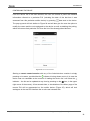
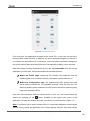
To change the user profile in the Android application, please enter the Preferences
window (Figure 20) and press ten times on any of the volume control keys of the
mobile terminal. This will enable the User Code field, so the user can enter the required
information, as provided by Zennio. When necessary, the IP field will also become
enabled.
http://www.zennio.com
Tecnical Support: http://zennioenglish.zendesk.com
21