1
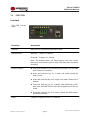
VIGILANT SERIES VIGILANT SERIES OPERATING MANUAL OPERATING MANUAL 3. Function 3.0 FUNCTION Interface True RMS Current Meter Functions Description Ethernet RJ45 port for network communication port. Audible Alarm Warning - 1 beep in 1 second. Overload - 3 beeps in 1 second. Note: The audible alarm will keep beeping until the current returns to normal and is also at least 0.5A lower than the alarm threshold. Function Button Press and release to turn off the warning beep. The overload beep cannot be cancelled. Press and hold the key for 1 beep; the meter shows the total current. Press and hold the key for 2 beeps; the meter shows the IP address Press and hold the key for 4 beeps; sets DHCP ON or OFF. Note that VIGILANT Series PDUs are shipped with DHCP set to ON. Press and hold the key for 6 beeps; Resets the PDU back to it’s default settings. Meter 3 digits to display current or IP Address. VIGILANT Series PDU User Manual Manual No. PDUAC1USM-2 Page 6 Page 5 10/10 pduac1us-man pduac1us-man-rev2-0115.indd