1
VIGILANT SERIES
OPERATING MANUAL
VIGILANT SERIES
OPERATING MANUAL
Hardware
1. Install mounting brackets.
The PDU comes with brackets for mounting in a rack. To mount the PDU into a rack
perform the following procedure:
Attach the mounting brackets to the unit, using the four retaining screws provided for
each of the brackets.
Choose a location for the brackets.
Align the mounting holes of brackets with the notched hole on the vertical rail and
attach with the retaining screws.
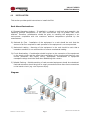
2. Connect input and output power.
3. Connect Ethernet cable to the PDU.
4. Switch on the PDU.
Note 1:
The default setting for obtaining an IP address is via DHCP. If a DHCP server is not
available the IP address can be programmed as desired manually using a PC set to the
same network segment and connected with a cross-over Ethernet cable. The default IP
address is 192.168.0.216.
Note 2:
TO SETUP THE NETWORK SYSTEM FOR VIGILANT PDUs, IT IS STRONGLY RECOMMENDED
TO BUILD UP THE POWER MONITORING NETWORK ISOLATED FROM ANY OTHERS.
Manual No. PDUAC1USM-2
VIGILANT Series PDU User Manual
Page 8
Page 9
pduac1us-man-rev2-0115.indd
10/10 pduac1us-man