1
Building From Source
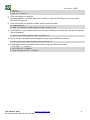
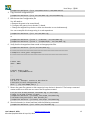
$ petalinux-build -x package
5. Copy the guest linux kernel image
$ cp $RELEASE_DIR/XenZynqDist/images/linux/Image $RELEASE_DIR/Dom1-Kernel
5.2.
Build the Guest Domain File System
1. Change to the $RELEASE_DIR/buildroot directory. Create the default configuration file for a guest FS.
$ cd $RELEASE_DIR/buildroot
$ make zynq_ultra_mpsoc_guest_defconfig
2. Run the menuconfig tool if there is specific functionality that needs to be built into the FS.
$ make menuconfig
3. Once your configuration is complete, build the FS.
$ make
The make command generates a FS tarball called rootfs.tar in the following location:
$ ls $RELEASE_DIR/buildroot/output/images
rootfs.cpio rootfs.cpio.gz rootfs.tar
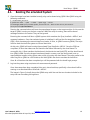
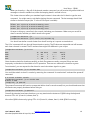
4. If the Xen tools are not built, then follow the steps to build the Xen-Tools in the step Configure and
build the Xen tools to create the tools. Following this, then execute the command below.
$ cd $RELEASE_DIR
$ cp $RELEASE_DIR/buildroot/output/images/rootfs.tar dom1.rootfs.tar
$ fakeroot tar -rvf dom1.rootfs.tar --transform='s,usr/lib64,usr/lib,S' -transform='s,var/log,tmp,S' --show-transformed-names C$RELEASE_DIR/XenZynqDist/components/apps/xen/xen-src/dist/install ./etc/ C$RELEASE_DIR/XenZynqDist/components/apps/xen/xen-src/dist/install ./usr/ C$RELEASE_DIR/XenZynqDist/components/apps/xen/xen-src/dist/install ./var/
5.3.
Install the Guest Images into the Dom0 File System
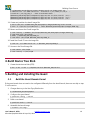
To construct the configuration files for a new domain and then insert those files into the dom0 File system,
follow the steps below:
1. Attach dom0’s FS to a loop device, and mount it to a temporary directory.
$
$
$
$
cd $RELEASE_DIR
sudo losetup -o 1048576 /dev/loop0 $RELEASE_DIR/XenZynqDist/images/dom0.img
mkdir -p $RELEASE_DIR/tmp/dom0_fs
sudo mount /dev/loop0 $RELEASE_DIR/tmp/dom0_fs
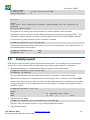
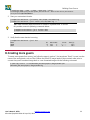
2. Move the Dom1-Kernel into dom0’s filesystem.
$ sudo mv $RELEASE_DIR/Dom1-Kernel $RELEASE_DIR/tmp/dom0_fs/root/Dom1-Kernel
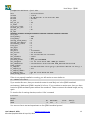
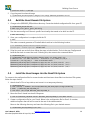
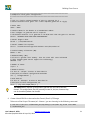
3. Create a configuration file for your DomU. Below is the configuration file for Dom1. It contains
additional options that will not be used in the rest of the demonstration.
Move to the following directory and insert the following file in your desired manner:
$ cd $RELEASE_DIR/tmp/dom0_fs/etc/xen/
User’s Manual - BETA
www.dornerworks.com
Xilinx-XenZynq-DOC-0001 v0.2 April 22, 2015
20