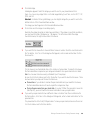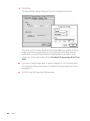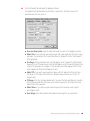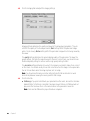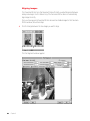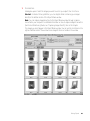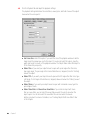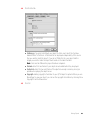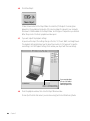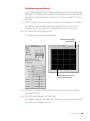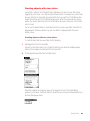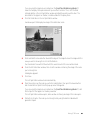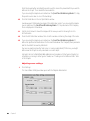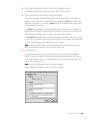
1
C H A P T E R 1 Setting Up Your Software System requirements for using QuickTime VR Authoring Studio This section describes the hardware and software you need to use QuickTime VR Authoring Studio. Minimum system configuration m m m m Mac OS–based computer with a PowerPC™ processor 16 MB RAM available for the QuickTime VR Authoring Studio application program 40 MB of space available on your hard disk CD-ROM drive If you plan to create complex QTVR scenes or make high-resolution panoramas and object movies, you may need a system that exceeds the minimum requirements. System requirements for playing QTVR media The QTVR media you create with QuickTime VR Authoring Studio can be played on any Mac OS or Windows® computer, either from a local disk or over the Internet using a World Wide Web browser. Mac OS The computer must have a 68030, 68040, or PowerPC processor. In addition, the computer should have the following software installed: m QuickTime extension version 2.5 or later m QuickTime VR extension version 2.0.1 or later m MoviePlayer version 2.5 or SimpleText 1 If you’re playing the QTVR media over the Internet, you also need a World Wide Web browser with the QuickTime plug-in version 2.0 installed. Windows The computer must have a 486 or Pentium processor. In addition, the computer should have the following software installed: m QuickTime for Windows version 3.0 or later m QuickTime VR components version 2.1 or later m MoviePlayer version 3.0 or later If you’re playing the QTVR media over the Internet, you also need a World Wide Web browser with the QuickTime plug-in version 2.0 installed. What’s included with QuickTime VR Authoring Studio The QuickTime VR Authoring Studio package includes a CD-ROM disc that contains the following: m QuickTime VR Authoring Studio application program m Lenses file that contains files for a variety of camera lenses ( You’ll need this for stitching panoramas.) m MoviePlayer 2.5 m QuickTime VR 2.0.1 m QuickTime 2.5 m QTVR Sample Source Material folder ( You’ll use this as you complete the tutorials in Chapters 3 through 7.) m QTVRConverter ( You use this to convert QTVR 1.0 files to QTVR 2.0 files.) m SimpleText 1.4 m QTVR Examples folder 2 Chapter 1 Installing QuickTime VR Authoring Studio Before you install QuickTime VR Authoring Studio, be sure to have your QuickTime VR Authoring Studio serial number available. You will not be able to use the application until you enter the serial number. To install QuickTime VR Authoring Studio, follow these steps: 1 Insert the QuickTime VR Authoring Studio CD into your CD-ROM drive. 2 Open the QuickTime VR Authoring Studio CD icon, then double-click the Installer icon. The Installer window opens. 3 Follow the onscreen installation instructions. 4 After the installation is complete, double-click the QuickTime VR Authoring Studio icon. A dialog box appears. 5 Enter the serial number that came with the QuickTime VR Authoring Studio. You only need to enter the serial number the first time you use the program. Setting Up Your Software 3 C H A P T E R 2 Introduction to QuickTime VR Authoring Studio QuickTime VR Authoring Studio is a set of authoring tools that lets you create QTVR panoramas, objects, and scenes. With its powerful and easy-to-use graphical user interface, QuickTime VR Authoring Studio lets users quickly produce professional-quality media that can be played back with MoviePlayer on Mac OS or Windows computers and over the Internet using a World Wide Web browser with the QuickTime plug-in. QuickTime VR Authoring Studio’s five authoring tools are m Panorama Maker, for converting a rendered image or a single panoramic image into a QTVR panorama m Panorama Stitcher, for stitching together a series of images into a single QTVR panorama m Object Maker, for making QTVR objects m Scene Maker, for creating virtual reality scenes that allow users to move through the scene and select destinations or manipulate objects m Project Manager, for managing complex projects and automating processing tasks 5 What you can do with QuickTime VR Authoring Studio QuickTime VR Authoring Studio has several features that help you create QTVR media easily and efficiently. Using these features, you can m take advantage of the easy-to-use graphical user interface With its menus, windows, and dialog boxes, QuickTime VR Authoring Studio offers you the same easy-to-use graphical user interface that you enjoy in the Mac OS. As a result, you’ll be working productively right away and will have more time to concentrate on creating compelling QTVR media. m create Internet-savvy objects and panoramas QTVR media that you create on your Mac OS computer can be played on a Mac OS or Windows computer that has Internet access, Web browser software, and the QuickTime plug-in. QTVR media does not require as much disk space as video, so it can be delivered more quickly over the Internet than video can. m automate tasks You can achieve greater efficiency and productivity by using QuickTime VR Authoring Studio’s Project Manager to automate common operations in QuickTime VR Authoring Studio, such as creating objects and panoramas. Once you set the Project Manager in motion, you are free to do other tasks. m organize complex projects The Project Manager helps you organize the media resources you’ll use for large projects, such as creating a virtual space. 6 Chapter 2 QTVR media types There are three types of QTVR media you can create with QuickTime VR Authoring Studio: panoramas, objects, and scenes. Panoramas A QTVR panorama lets you view a scene, such as a room or an outdoor vista, from a variety of angles. A full panorama can be panned horizontally 360 degrees to provide the illusion that you are standing in the center of the panorama. Several examples of panoramas are on the QuickTime VR Authoring Studio CD-ROM disc. You view a QTVR panorama by pressing the mouse button and dragging the pointer over the image in the direction you want to view. You can also zoom in on parts of the image for a closer look by clicking the zoom button in the lower-left area of the MoviePlayer playback window. Objects A QTVR object lets you view a three-dimensional object, such as a teacup, a statue, or a dinosaur bone, from a variety of angles. Several examples of objects are on the QuickTime VR Authoring Studio CD-ROM disc. You can rotate a QTVR object by pressing the mouse button and dragging the pointer over the image in the direction you want to rotate it. You can also zoom in on parts of the image for a closer look by clicking the zoom button in the lower-left area of the MoviePlayer playback window. Scenes A QTVR scene is a collection of QTVR panoramas, objects, and other media. Each media element in a scene is called a node. A scene resembles a panorama, but unlike a simple panorama, you can interact with parts of the scene. Scenes have hot spots—areas that are linked to other media. For example, a hot spot in a museum scene could link to another room in the museum, or it could allow you to manipulate one of the objects in the museum. Hot spots can also link to World Wide Web sites and a variety of other media. Introduction to QuickTime VR Authoring Studio 7 Creating a QTVR scene Creating a QTVR scene involves four steps: m planning the project m creating source material m using a QuickTime VR Authoring Studio tool m checking the final product Planning the project During the planning stage, you determine the type of experience you want to deliver to your audience. For example, will you use real-world images or computer-generated images? Will you include many panoramas within a scene for navigational freedom, or only a few? Will you include QTVR objects that can be picked up and manipulated? Will you include links to Web pages to which users can go for additional information? Often, your decisions involve a tradeoff between creative preferences and resource limitations. If you plan to develop a real-world scene from photographic or video images, you may want to do some preliminary steps, including the following: m Draw a floor plan to depict the layout of the scene and the location of each node. m Mark the locations of the nodes on the floor plan with pins, stickers, or other materials to facilitate the photography process. m Create a scene log or notebook in which you and others involved with the photo shoot and postproduction can keep track of production details. m Create a storyboard for each scene. m Build a database that will allow you to track your project through its completion. The time you invest in planning your project will pay off in the subsequent stages of development. Creating source material Source material can take a number of forms: m images taken with a digital camera m images captured through a video camera m images taken with a film camera, then converted to digital form using a flatbed or film scanner m images contained on a PhotoCD m images created with a rendering program 8 Chapter 2 Some of the techniques and equipment used to photograph or capture images for a QTVR scene are different from the techniques used for standard photography. Chapter 8 contains guidelines for creating high-quality source material and describes some of the special setups you can use to photograph objects and panoramas. Using a QuickTime VR Authoring Studio tool You can use the Scene Maker or Project Manager to create a QTVR scene. You can drag panoramas and objects created with the Object Maker, Panorama Stitcher, or Panorama Maker directly into the Scene Maker window. Checking the final product Once you’ve created the scene, you should check the hot spots to be sure each hot spot links to the appropriate destination and to the correct view for that destination. You should also test the scene on the system your audience is likely to use. If you plan to make the QTVR scene viewable on the Internet, be sure to test the scene using a World Wide Web browser with the QuickTime plug-in version 2.0 or later. How to get started on your first QTVR project 1 Install the software. For instructions, see Chapter 1, “Setting Up Your Software.” 2 Learn to use QuickTime VR Authoring Studio’s five authoring tools. “Fundamentals of the QuickTime VR Authoring Studio Interface” and “Setting QuickTime VR Authoring Studio Preferences,” later in this chapter, provide a general orientation to QuickTime VR Authoring Studio’s user interface and show how you can customize QuickTime VR Authoring Studio for your use. Chapters 3 through 7 contain step-by-step guides to using each of QuickTime VR Authoring Studio’s five tools. As you work through each chapter, use the source material provided on the QuickTime VR Authoring Studio CD so you can focus on learning how to use the tools. 3 Read Chapter 8, “Creating Source Material.” Once you know how to use the QuickTime VR Authoring Studio tools, read Chapter 8 for tips on creating your own QTVR source material. These tips focus on the differences between conventional photographic techniques and techniques for QTVR photography (or videography). You’ll also find information about QTVR equipment rigs. Introduction to QuickTime VR Authoring Studio 9 Fundamentals of the QuickTime VR Authoring Studio interface When you open one of QuickTime VR Authoring Studio’s five tools, the window for that tool appears. The windows for the Object Maker, Panorama Maker, Panorama Stitcher, and Scene Maker have similar layouts. Each has a section for defining source images, another for defining output files (the files the tool creates as it processes your QTVR media), a process button, and a section where you can view source material. You save output files by clicking the checkbox next to the file you want to save. You can save intermediate files as well as final QTVR media files. You define locations and names for output files here. The number and type of files depend on the tool. This area contains a button associated with a process, such as stitching a panorama or creating a scene. You define source images here. The number and type of buttons that appear depend on the tool. You use the Rotate and Sort buttons to move images in the bottom part of the window. 10 Chapter 2 Images used in panoramas and objects are displayed in this part of the window. Icons for scene nodes and Project Manager elements appear in this area. Setting QuickTime VR Authoring Studio preferences You can change QuickTime VR Authoring Studio’s default preferences by choosing Preferences from the Edit menu. The Preferences window has six tabs. Click a tab to set the preferences related to that topic. General m Show Help Labels—If this option is selected, labels appear when you place the pointer over buttons in the tool windows. Make m Display Images In Progress Window—Select this option if you want the images in your QTVR media project to appear in a progress window as the images are being processed. Selecting this option can increase processing time. Introduction to QuickTime VR Authoring Studio 11 m Display QuickTime VR Movie After Make Is Complete—If this option is selected, a playback window appears automatically after an object, panorama, or scene is created. m Use Temporary Memory When Necessary—You may need to select this option if you are making high-resolution QTVR media or media that contains a lot of source images. If this option is selected, QuickTime VR Authoring Studio uses some of your hard disk space as virtual memory. Files m Temporary Files—The QuickTime VR Authoring Studio tools create intermediate files while processing your QTVR media. You can specify the location where the temporary files will be saved. m Aliases—Select whether you want to use relative aliases, and whether you want to include the full path name in the filenames for output files. A relative alias records the location of a file relative to the QuickTime VR Authoring Studio document it is associated with. m Output Files—Select the checkbox labeled Automatically Specify Output Files When Saving Documents if you do not want to name output files each time you create a scene, object, or panorama. If you want to name the final QTVR file, but don’t care about the names of the intermediate files, then select the checkbox labeled Only Specify Necessary Output Files. 12 Chapter 2 Panoramas m Compression—You can select a default compression method for making panoramas. Details on selecting a compression method appropriate for panoramas are in Appendix A. m Tiles—You can specify a tiling scheme if you do not want the Panorama Maker or the Panorama Stitcher tools to set the tiling scheme automatically. For more information on tiling, see Chapters 3 and 4. m Files suffixes—If you do not want to use the default file suffixes shown, type new file suffixes in the “Panorama image file,” “Panorama Node file,” and “Tile file” boxes. These file types are explained in Chapter 4. Objects m Compression—You can select a default compression method for making objects. Details on selecting a compression method appropriate for objects are in Appendix A. m Files suffixes—If you do not want to use the default file suffixes shown, type new file suffixes in the “Movie file” and “Object file” boxes. These file types are explained in Chapter 5. Introduction to QuickTime VR Authoring Studio 13 m Preload—Select to have frames of your object movie loaded before they are played. m Cache hint—Select to have each frame of the object movie kept in memory as long as possible when playing the object movie. Motion Control m Use motion control application—If you have a camera attached to your computer, you can capture images directly into the Object Maker window. (See “Capturing Images Directly” in Chapter 5 for more information.) You can use a motion control application to control the movement of the turntable the object is mounted on, or to control the movement of the camera. m Select Application—If you click this button, a dialog box appears that lets you select a motion control application. m Wait for acknowledgments from application—If this option is selected, QuickTime VR Authoring Studio waits a specified amount of time for the motion control application to send a signal before capturing each image. This assures the object is not moving when the image is captured. 14 Chapter 2 C H A P T E R 3 Making a Panorama From an Existing Panoramic Image You can create a QTVR panorama in one of two ways using QuickTime VR Authoring Studio: m by first creating a single panoramic image with a 3D rendering or CAD application or a panoramic camera, and then converting the image to a QTVR panorama using the Panorama Maker m by capturing a series of images and then stitching the images together using the Panorama Stitcher This chapter shows you how to use the Panorama Maker. It’s recommended that you learn the features of the Panorama Maker by using the panoramic image provided on the QuickTime VR Authoring Studio CD. Once you have mastered using the Panorama Maker, see Chapter 8, “Creating Source Material,” for tips on creating your own images. 15 Using the Panorama Maker To make a panorama from a single panoramic image, follow these steps: 1 Double-click the QuickTime VR Authoring Studio icon. 2 Choose New from the File menu, then select Panorama Maker. A dialog box appears. 3 Type a name for your Panorama Maker document. A Panorama Maker document is a record of your Panorama Maker session. If you quit QuickTime VR Authoring Studio before you make the panorama, you can open the document later to continue your work. You can also open the Panorama Maker document to make changes to a panorama you’ve already finished. 4 Click Save. The Panorama Maker window appears. 16 Chapter 3 5 Click Add Image. A dialog box appears. Select the image you want to use for your panorama and click Open. You can use any image that is in a format supported by QuickTime, such as PICT, TIFF, JPEG, and GIF. Shortcut: Instead of clicking Add Image, you can drag the image file you want to use to the bottom section of the Panorama Maker window. The image you select appears in the Panorama Maker window. 6 Check to be sure the image is oriented properly. Normally the image should be in landscape orientation. If the image is in portrait orientation, you may need to rotate it 90 degrees or –90 degrees. The left arrow rotates the image counterclockwise; the right arrow rotates it clockwise. 7 If you want the tile movie file to have a different name or location from the one listed next to the Tile button, click Tile. In the dialog box that appears, enter a name and location for the tile movie file. The tile movie is an intermediate step in the creation of a panorama. To make the tile movie, the Panorama Maker compresses your image and divides it into equal-sized sections called tiles. You can view a tile movie using a standard QuickTime player. Be sure to click the checkbox next to the Tile button if you want to save the tile movie. There are two reasons you may want to save the tile movie: m To save time—If you decide to remake the panorama later and you saved the tile movie, the Panorama Maker does not have to repeat the compression step. m To play the panorama from your hard disk—If you don’t flatten the panoramic movie file (see step 14), you must save the tile movie to be able to view your panorama. 8 If you want your panorama to have a different name or location from the one listed next to the Pano button, click Pano. In the dialog box that appears, enter a name and location for the panorama file. The panorama file is the final QTVR panorama. To save your panorama, make sure there is an X in the checkbox next to the Pano button. Making a Panorama From an Existing Panoramic Image 17 9 Click Settings. The Panorama Maker Settings window opens with the Compression tab selected. If there is an X in the checkbox labeled Auto, the Panorama Maker will calculate the optimal number of tiles to dice your panorama into. You should use the Auto setting unless you understand the concept of tiling and want the Panorama Maker to use a specific dicing scheme. You can find out more about tiling in Virtual Reality Programming with QuickTime VR 2.0. 10 If you want to change the type, depth, or quality of compression, click the Settings button. The Compression Settings window opens. For details on selecting a compression method, see Appendix A. 11 18 Chapter 3 Click OK to close the Compression Settings window. 12 Click the Playback tab and adjust the playback settings. The playback settings determine the orientation, viewing size, and field of view of the panorama when the user opens it. m Panorama Viewing Size—Type the width and height, in pixels, of the playback window. m Default Pan—If you want your panorama to open with a pan angle other than zero, type a pan angle. The pan angle is the horizontal distance (in degrees) from the “starting point” of the panorama. m Pan Range—If the panorama covers a full 360 degrees, enter 0 degrees for Start and 360 degrees for End. If the panorama is less than 360 degrees, enter the values that specify the scope of the panorama. For example, if the panorama covers 210 degrees of the horizon, enter 0 degrees for Start and 210 degrees for End. m Default Tilt—If you want your panorama to open with a tilt angle other than zero, type a tilt angle. The tilt angle is the distance (in degrees) above or below the “horizon” of the panorama. m Tilt Range—Click the checkbox labeled Auto if you want the Panorama Maker to calculate the tilt range automatically. Otherwise, enter values to specify the tilt angles for the top and bottom of the panorama. m Default Zoom—If you want your panorama to open with a zoomed-in view, type the percentage of zoom. m Zoom Range—Enter the minimum and maximum zoom angle for your panorama. Making a Panorama From an Existing Panoramic Image 19 13 Click the Imaging tab and adjust the imaging settings. Imaging settings determine the quality and speed of the image during playback. (They do not affect the quality of the stored panorama.) Static settings affect the panoramic image when it is not moving. Motion settings affect the panoramic image while it is being moved by the viewer. The quality settings determine the general display quality of the panorama. The lower the quality settings, the faster the responsiveness to the user. In most cases, you should choose the Normal quality setting for motion and the High quality setting for static. The correction settings determine how much the image is processed to make it look correct on the screen. You should usually choose Full correction when the image is a true panorama. You can choose None when the image is planar, such as a map. Note: You should use the same correction settings for both static and motion to avoid discontinuity between viewing the moving and the static image. 14 20 Chapter 3 Click the File tab. m Flattening—If you plan to distribute your panorama to other users, be sure the checkbox labeled Flatten To Data Fork is selected. Panoramic movies that are not flattened will not play unless the tile movie file is in the same location as the panoramic movie file. Note: Files must be flattened to play on Windows computers. m Copyright—Adding copyright information to your QTVR panorama is optional. When you use MoviePlayer to view your panorama, you can see the copyright information by choosing Show Copyright from the Movie menu. 15 Click OK. The Panorama Maker Settings window closes. 16 Click Make Pano. It takes a few minutes for the Panorama Maker to create the panorama. When it is done, a playback window opens. Making a Panorama From an Existing Panoramic Image 21 Using this window, you can view the panorama and adjust the playback settings. These settings determine how the panorama looks when it is first opened. If you make any adjustments you want to save, click Set Playback Settings, then remake the panorama with the new settings. 17 Close the playback window, then close the Panorama Maker window. Choose Quit from the File menu if you are done using QuickTime VR Authoring Studio. 22 Chapter 3 C H A P T E R 4 Stitching a Panorama From a Series of Images This chapter shows you how to create a panorama from multiple images. The source material for a stitched panorama can be images taken with a film or digital camera, images captured from a video camera or video media, or 3D rendered graphics. It’s recommended that you learn the features of the Panorama Stitcher by using the source material provided on the QuickTime VR Authoring Studio CD. Once you have mastered using the Panorama Stitcher, see Chapter 8, “Creating Source Material,” for tips on capturing or photographing images for panoramas. Using the Panorama Stitcher To make a panorama from a series of images, follow these steps: 1 Double-click the QuickTime VR Authoring Studio icon. 2 Choose New from the File menu, then select Panorama Stitcher. A dialog box appears. 3 Type a name for your Panorama Stitcher document. A Panorama Stitcher document is a record of your Panorama Stitcher session. If you quit QuickTime VR Authoring Studio before you stitch the panorama, you can open the document later to continue your work. You can also open the Panorama Stitcher document to make changes to a panorama you’ve already finished. 23 4 Click Save. The Panorama Stitcher window appears. 5 Open the Lens pop-up menu and choose the lens you used to photograph your images. If your lens does not appear in the menu, choose Edit, then click New. Add the appropriate information. For details on how to add a new lens, see “Adding a Lens” later in this chapter. If you are using the images from the QuickTime VR Authoring Studio CD, choose 18mm Portrait. 6 Click Add Images. A dialog box appears. Select the images you want to use for your panorama and click Open. You can use any images that are in a format supported by QuickTime, such as PICT, TIFF, JPEG, and GIF. Shortcut: Instead of clicking Add Images, you can drag the folder containing the images you want to use to the bottom section of the Panorama Stitcher window. The images you select appear in the Panorama Stitcher window in alphanumeric order by filename. If the file-naming scheme you used does not result in the proper sequence of images for your panorama, you need to rename your files before you add them to the Panorama Stitcher window. 24 Chapter 4 7 Click to select the checkbox labeled Images Wrapped if the images give a 360-degree view of the scene. If this option is selected, the Panorama Stitcher connects the first image to the last image. Do not wrap the images if you are creating a partial panorama. The sample images on the QuickTime VR Authoring Studio CD form a 360-degree panorama. 8 Click Image Alignment. The Image Alignment window opens. 9 Enter the appropriate information in the Horizontal Alignment section. Enter the number of degrees between each image. For example, if you captured 12 images for a 360-degree panorama, each image is 30 degrees from the next. The Panorama Stitcher calculates the amount of overlap in pixels based on the number of degrees between images and the length of lens you used to capture the images. If you change the lens length or the degrees between images, click Recalculate. If you want the Panorama Stitcher to search for the best horizontal alignment, enter a value in the box labeled Search Range. The Panorama Stitcher looks for similarities between images within the pixel range you specify. Stitching a Panorama From a Series of Images 25 10 If your images were not captured on a level plane, enter the appropriate information in the Vertical Alignment section. If you are not able to keep the camera absolutely level when you shoot your images, adjacent images may be vertically misaligned. You can estimate the vertical offset (in pixels) to compensate for the misalignment. You can also enter a search range that the Panorama Stitcher uses to align the image. Note: If your images do not align properly, see “Aligning Images” later in this chapter for information on how to use the Pair Alignment feature of the Panorama Stitcher. 11 Click OK. 12 Check to be sure the images are oriented properly and in the correct order. Click each image you want to rotate, then click one of the rotation arrows to rotate the image counterclockwise or clockwise. 13 Click one of the Sort buttons if you want to change the order of the images. You can sort your images in alphanumeric or reverse alphanumeric order. Note: You can also change the order of images by dragging the image you want to move to a new position in the series of images. 14 If you want the PICT file to have a different name or location from the one listed next to the PICT button, click PICT. In the dialog box that appears, enter a name and location for the PICT file. The PICT file is an intermediate step in the creation of a panorama. To create the PICT file, the Panorama Stitcher stitches your images into one file, then stores it in the location you specify. If you want to save the PICT file for later use, click the checkbox next to the PICT button. 26 Chapter 4 There are three reasons you may want to save the PICT file: m To save time—If you save the PICT file and you later decide to remake your panorama, the Panorama Stitcher skips the stitching step, so processing time is much shorter. m To retouch the image—If you want to make changes to the image, you can change the PICT file, then remake the panorama. m To diagnose problems—If your panorama does not look the way you think it should, the PICT file may help you determine the problem. 15 If you want the tile movie file to have a different name or location from the one listed next to the Tile button, click Tile. In the dialog box that appears, enter a name and location for the tile movie file. The tile movie is an intermediate step in the creation of a panorama. To make the tile movie, the Panorama Stitcher creates a PICT image, then compresses it and divides it into equalsized sections called tiles. You can view a tile movie using a standard QuickTime player. Be sure to click the checkbox next to the Tile button if you want to save the tile movie. There are two reasons you may want to save the tile movie: m To save time—If you decide to remake the panorama later and you saved the tile movie, the Panorama Stitcher does not have to repeat the compression step. m To play the panorama from your hard disk—If you don’t flatten the panoramic movie file (see step 24), you must save the tile movie to be able to view your panorama. 16 If you want your panorama to have a different name or location from the one listed next to the Pano button, click Pano. In the dialog box that appears, enter a name and location for the panorama file. The panorama file is the final QTVR panorama. To save your panorama, make sure there’s an X in the checkbox next to the Pano button. 17 Click Settings. The Stitch Settings window opens with the Image tab selected. Stitching a Panorama From a Series of Images 27 18 Select the image options appropriate for the panorama. Image Processing These options determine the types of processing applied to the stitched image. All except Stretch are selected by default. m Blend—Softens sharp edges within an image and where images overlap. m Fill—Fills the edge of the image not covered by pixels from the source images with the first non-black color identified by the Panorama Stitcher. m Deskew—Compensates for slight rotation in images that occurs when you capture the images. m Sharpen—Sharpens blurry images by increasing the contrast of adjacent pixels. m Stretch—Stretches the source images as needed so they can be aligned more accurately. Image Size m Crop—Removes pixels from the top and bottom of the stitched image to give a clean edge and hide the boundaries of the original images. It is selected by default. m Auto Size—Lets the size of the stitched image be determined by the size of the source images. If you want to specify the size, be sure the Auto Size checkbox is not selected. Then enter values (in pixels) in the Height and Width boxes. If you are specifying the size, you should check the Tiles setting in the Compression tab. Height must be a multiple of 4 times the number of vertical tiles. Width must be a multiple of 4 times the number of horizontal tiles. If you use the default tiling scheme of 24 vertical tiles and 1 horizontal tile, height must be divisible by 96, and width must be divisible by 4. Important 28 Chapter 4 19 Click the Compression tab. If there is an X in the checkbox labeled Auto, the Panorama Stitcher will calculate the optimal number of tiles to dice your panorama into. You should use the Auto setting unless you understand the concept of tiling and want the Panorama Stitcher to use a specific dicing scheme. You can find out more about tiling in Virtual Reality Programming with QuickTime VR 2.0. 20 If you want to change the type, depth, or quality of compression, click the Settings button. The Compression Settings window opens. For details on selecting a compression method, see Appendix A. 21 Click OK to close the Compression Settings window. 22 Click the Playback tab and adjust the playback settings. The playback settings determine the orientation, viewing size, and field of view of the panorama when the user opens it. Stitching a Panorama From a Series of Images 29 m Panorama Viewing Size—Type the width and height, in pixels, of the playback window. m Default Pan—If you want your panorama to open with a pan angle other than zero, type a pan angle. The pan angle is the horizontal distance (in degrees) from the “starting point” of the panorama. m Pan Range—If the panoramic image covers a full 360 degrees, enter 0 degrees for Start and 360 degrees for End. If the panorama is less than 360 degrees, enter the values that correctly specify the scope of the panorama. For example, if the panorama covers 210 degrees of the horizon, enter 0 degrees for Start and 210 degrees for End. m Default Tilt—If you want your panorama to open with a tilt angle other than zero, type a tilt angle. The tilt angle is the distance (in degrees) above or below the “horizon” of the panorama. m Tilt Range—Click the checkbox labeled Auto if you want the Panorama Stitcher to calculate the tilt range automatically. Otherwise, enter values to specify the tilt angles for the top and bottom of the panorama. m Default Zoom—If you want your panorama to open with a zoomed-in view, type the percentage of zoom. m Zoom Range—Enter the minimum and maximum percentage of zoom for your panorama. 30 Chapter 4 23 Click the Imaging tab and adjust the Imaging settings. Imaging settings determine the quality and speed of the image during playback. (They do not affect the quality of the stored panorama.) Static settings affect the panoramic image when it is not moving. Motion settings affect the panoramic image while it is being moved by the viewer. The quality settings determine the general display quality of the panorama. The lower the quality settings, the faster the responsiveness to the user. In most cases, you should choose the Normal quality setting for motion and the High quality setting for static. The correction settings determine how much the image is processed to make it look correct on the screen. You should usually choose Full correction when the image is a true panorama. You can choose None when the image is planar, such as a map. Note: You should use the same correction settings for both static and motion to avoid discontinuity between viewing the moving and the static image. 24 Click the File tab. m Flattening—If you plan to distribute your panorama to other users, be sure the checkbox labeled Flatten To Data Fork is selected. Panoramic movies that are not flattened will not play unless the tile movie file is in the same location as the panoramic movie file. Note: Files must be flattened to play on Windows computers. m Copyright—Adding copyright information to your QTVR panorama is optional. When you use MoviePlayer to view your panorama, you can see the copyright information by choosing Show Copyright from the Movie menu. Stitching a Panorama From a Series of Images 31 25 Click OK. The Stitch Settings window closes. 26 Click Stitch Pano. It takes a few minutes for the Panorama Stitcher to create the panorama. Processing time depends on the number and resolution of the source images, the speed of your computer, the amount of RAM available to the Panorama Stitcher, and the type of compression method you chose. When the process is finished, a playback window opens. 32 Chapter 4 Using this window, you can view the panorama and adjust the playback settings. These settings determine how the panorama looks when it is first opened. If you make any adjustments you want to save, click Set Playback Settings, then remake the panorama with the new settings. 27 Close the playback window, then close the Panorama Stitcher window. Choose Quit from the File menu if you are done using QuickTime VR Authoring Studio. Adding a lens If the lens you used to shoot your panorama is not listed in the Lens pop-up menu, you can add it. Follow these steps to add a lens. 1 Choose Edit from the Lens pop-up menu. The Edit Lenses window appears. Stitching a Panorama From a Series of Images 33 2 Click New and type a name in the Lens Name box. 3 Enter the focal length of the lens. 4 If you know the length of the lens used to capture the images, click Calculate. If you do not know the lens length, complete the steps in the next section, “Estimating a Lens.” The Lens Calculator window opens. 5 If you did not use 35mm film, choose Other from the Film pop-up menu. Then enter the film size. If you used a digital or video camera, check the user’s manual that came with your camera to see if it lists a 35mm equivalent for your camera. If not, then follow the lens estimation procedure in the next section. 6 Click Calculate. The vertical angles of view for portrait and landscape orientations appear. 7 Click Use next to Portrait or Landscape to indicate the appropriate orientation of the lens. The Lens Calculator window closes. The degree information for the orientation you selected is stored with the lens information. 8 Click Done. The Edit Lenses window closes. Your lens appears as a choice in the Lens pop-up menu. 34 Chapter 4 Estimating a lens 1 Click Estimate in the Edit Lenses window. The Lens Estimator window opens. The first two images of your series appear. If you want to use another pair of images for the estimation, click Previous or Next until you reach the pair you want to use. You should choose images that have detail, but do not contain repeating patterns. The pictures of the Company Store below have enough detail to be aligned properly. A poor example would be two images of window blinds. The blinds consist of a repeating pattern of horizontal slats, so the estimator could align the wrong slats. 2 Enter estimated values for the beginning and end vertical angle of view; then enter a step value in the Step box. The Panorama Stitcher uses the values you enter to establish a search range. Within that range, it searches for similar areas between the two images. The beginning vertical angle of view is the starting value. For each search, the Lens Estimator advances the number of degrees specified in the Step box. 3 Click Estimate. A progress window appears. When the calculation is complete, the Lens Estimator window closes. The estimated vertical angle of view appears in the Edit Lenses window. 4 Click Done in the Edit Lenses window. The Edit Lenses window closes. Your lens appears as a choice in the Lens pop-up menu. Stitching a Panorama From a Series of Images 35 Aligning images The Panorama Stitcher has a Pair Alignment feature that lets you adjust alignment between side-by-side images. Use this feature only if the Panorama Stitcher does not automatically align images correctly. Once you have opened a Panorama Stitcher document and added images to the Panorama Stitcher window, follow these steps: 1 Click the triangle between the two images you want to align. The Pair Alignment window appears. 36 Chapter 4 2 Adjust the alignment options or click the checkbox labeled Use Defaults. If you don’t use the default values, you should first drag one image so that it is roughly aligned with the other image. ( You can use the arrow keys to align the two images more precisely.) As you move the images, the horizontal overlap and vertical offset values change. Next, adjust the other alignment options: m Horizontal Search Range—The horizontal distance in pixels over which the Panorama Stitcher searches to find similar areas. The default value is calculated from the lens length. Type another value if you do not want to use the default. m Vertical Search Range—The vertical distance in pixels over which the Panorama Stitcher searches to find similar areas. The default value is calculated from the lens length. Type another value if you do not want to use the default. m Search Range—Click Zero if you have aligned the images manually and don’t want the Panorama Stitcher to search for similar areas. A zero appears in the Horizontal and Vertical Search Range boxes. Click Default if you aligned the images manually, but decide to use the default search range values instead. m Rotation (degrees)—Enter the number of degrees by which to rotate the image on the right. m Vertical Stretch (left side)—Enter a number of pixels; the left side of the image on the right is stretched by the amount you specify. 3 Click Correlate. You see what the Panorama Stitcher calculates to be the best alignment between the two images. If the images are not aligned properly after being correlated, try one or both of the following: m Increase the horizontal and vertical search range, then click Correlate. m Check to see if one image looks rotated with respect to the other. If so, adjust the rotation, then click Correlate. 4 Click OK. The Pair Alignment window closes. Stitching a Panorama From a Series of Images 37 Getting image information Press and hold the arrow beneath an image, as shown. The filename and location, size, and other information about the image appear in a pop-up window. 38 Chapter 4 C H A P T E R 5 Making Objects This chapter shows you how to create an object using the Object Maker. The source material for an object can be images taken with a film or digital camera, images captured from a video camera or video media, or 3D rendered graphics. It’s recommended that you learn the features of the Object Maker by using the source material provided on the QuickTime VR Authoring Studio CD. Once you have mastered using the Object Maker, see Chapter 8, “Creating Source Material,” for guidelines on photographing or capturing your own images. The Object Maker lets you m make QTVR objects that can be grabbed, moved, and rotated by the user m add animation to views within an object m add view states to an object (A view state is an alternate set of images for an object.) m make absolute objects that let the user see views that correspond to where the user clicks Using the Object Maker This section shows you how to make a simple QTVR object. Later sections show you how to add view states and animation to an object, and how to create an absolute object. To make an object, follow these steps: 1 Double-click the QuickTime VR Authoring Studio icon. 2 Choose New from the File menu, then select Object Maker. A dialog box appears. 39 3 Type a name for your Object Maker document. An Object Maker document is a record of your Object Maker session. If you quit QuickTime VR Authoring Studio before you make your QTVR object, you can open the document later to continue your work. You can also open the Object Maker document to make changes to an object you’ve already finished. 4 Click Save. The Object Maker window appears. 5 Click “Define object.” The Define Object window appears. 6 Enter the number of rows and columns in your object and the degrees separating each row and column. Then click OK. Row refers to the number of images in the vertical plane. Column refers to the number of images in the horizontal plane. 40 Chapter 5 7 Click Add Files. A dialog box opens. Select the images you want to use for your object, then click Done. Shortcut: Instead of clicking Add Files, you can drag the folder containing your images directly to the bottom section of the Object Maker window. Note: You can capture images directly into the Object Maker window through a camera connected to your computer. For detailed information on how to capture images from within QuickTime VR Authoring Studio, see “Capturing Images Directly” later in this chapter. The images you select appear in the Object Maker window. You can use the scroll bars on the right and bottom sides of the window to see images that are not visible in the window. Making Objects 41 8 Check to be sure the images are oriented properly and in the correct order. Click each image you want to rotate, then click one of the rotation arrows to rotate the image counterclockwise or clockwise. Note: QuickTime VR Authoring Studio displays files in alphanumeric order by filename. If the file-naming scheme you used does not result in the proper sequence of images, you need to change the order of images by dragging the image you want to move to a new position in the series of images. You can also rename your files before adding them to the Object Maker window. 9 If you want the movie file to have a different name or location from the one listed next to the Movie button, click Movie. In the dialog box that appears, enter a name and location for the movie file. The movie file is an intermediate step in the creation of an object. If you want to save the file, make sure there’s an X in the checkbox next to the Movie button. Saving the file may save processing time later if you decide to remake the object. If you do not want to save the file, click the checkbox to remove the X. 10 If you want your object to have a different name or location from the one listed next to the Object button, click Object. In the dialog box that appears, enter a location for the object file. The object file is your QTVR object movie. To save the object movie, make sure there’s an X in the checkbox next to the Object button. 42 Chapter 5 11 Click Settings. The Object Maker Settings window opens with the Compression tab selected. If you want to change the type, quality, or depth of compression, click the Settings button. The Compression Settings window opens. Some compression methods work better for making objects. For details on selecting a compression method, see Appendix A. 12 Click the Object tab and adjust the object settings. Making Objects 43 Horizontal and vertical controls When you view your object in the playback window, you control the horizontal and vertical motion by using the mouse. By default the object rotates or moves in the direction the mouse is moved. m Horizontal Controls: Wrap—Select if the object rotates 360 degrees horizontally. m Horizontal Controls: Reverse—If you select this option, the object rotates or moves in the opposite direction from the direction the mouse is moved. m Vertical Controls: Wrap—Select if the object rotates 360 degrees vertically. m Vertical Controls: Reverse—If you select this option, the object rotates or moves in the opposite direction from the direction the mouse is moved. m Swap Controls—Select if you want the vertical control to operate the horizontal motion of the object and vice versa. Animate View Frames Each image in an object movie is a view. With the Object Maker, you can add animation to one or more views of your object. (For information on how to include animation in your object, see “Animating View Frames” later in this chapter.) The following settings determine how animation appears in the object movie. m Animate View Frames—Select if you want to add animation to one or more views. m Loop—Select to have animated views play continuously. After the last frame of the animation is shown, the animation begins again with the first frame. m Loop Back And Forth—Select to have animated views play from the first to the last frame, then backwards, then forwards, and so on. m Restart Each View—Select to have animated views start over on the first animation frame whenever the view is changed. m Frame Speed—Enter the speed at which you want animations to play. If you want animated views to play faster than the frames per second specified for views, type a number greater than 1. To have them play slower, type a number between 0 and 1. You may need to experiment with different values to get the desired result. ( You specify the frames per second in the Frame Duration section, described later.) Auto-play Views m Auto-play Views—Select to have the object movie play through all of the views in one row automatically when the user opens it. m Loop Back And Forth—Select to have the object movie play from the first to the last view in a row, and then backwards through the row. m Sync to Frame Rate—Select if you want all of the frames of an animated view to play before the next view is shown. 44 Chapter 5 m Auto-play Speed—Enter the speed at which you want the object movie to play automatically. If you want the object movie to play faster than the rate you specified in Frame Duration, type a number greater than 1. To have it play slower, type a number between 0 and 1. You may need to experiment with different values to get the desired result. (The Frame Duration options are described later.) Scaleable m Enable Translation—Select to allow the user to move a zoomed-in object within the playback window. m Angle of View and Minimum AOV—Enter values for the angle of view and minimum angle of view. The amount the user can zoom is determined by the scaling factor. The scaling factor is the angle of view divided by the minimum AOV. By default you can allow the user to zoom by a factor of 8 to 1. Mouse Scale Factor m Mouse Scale Factor—Enter the number of degrees the object will pan when the mouse is dragged the width of the playback window. Object Type The object type defines how a user controls the playback of a QTVR object. m Object—The user presses and holds the mouse button to drag an object. When the pointer is near the edge of the playback window, the object movie plays automatically. Select this type for objects that in reality would be small enough for the user to pick up. m Scene—The controls operate similar to a joystick. The user presses and holds the mouse button to rotate the object. The user cannot drag the object. m Drag-only—The user presses and holds the mouse button to drag the object. The user cannot make the object play automatically. m Absolute—The user clicks the mouse button at various parts of the object to display different views of the object. Absolute objects can be viewed in different ways from other object types. For more information, see “Creating Absolute Objects” later in this chapter. Frame Duration To set the playback speed for the object, open the Frame Duration pop-up menu and enter a value for frame duration or for frames per second. m Frame Duration—The number of one-six-hundredths of a second one frame of the object movie appears on the screen. When you enter the frame duration, the value for frames per second is calculated automatically. m Frames Per Second—When you enter a value for frames per second, the frame duration is calculated automatically. Making Objects 45 13 Click the Playback tab and adjust the playback settings. The playback settings determine the orientation, viewing size, and field of view of the object movie when the user opens it. m Use Frame Size—Select this option if you want the size of the playback window to be the same size as the images you use for the object. If you do not select this option, type the width and height, in pixels, of the playback window. The Object Maker scales the object to fit the frame size you specify. m Default Pan—If you want your object movie to open with a pan angle other than zero, type a pan angle. The pan angle is the horizontal distance (in degrees) from the “starting” view of the object. m Default Tilt—If you want your object movie to open with a tilt angle other than zero, type a tilt angle. The tilt angle is the distance (in degrees) above or below the “starting” view of the object. m Default Zoom—If you want your object movie to open with a zoomed-in view, type the percentage of zoom. m Default View State and Mouse Down View State—If you create an object with more than one view state, you can select the view state you want the user to see when the object opens. You can also select the view state the user sees when the mouse button is pressed. For more information, see “Creating Objects With View States” later in this chapter. 46 Chapter 5 14 Click the File tab. m Flattening—If you plan to distribute your object to other users, select the checkbox labeled Flatten To Data Fork. A flattened file can be played independently of the source files you used to create the object. If you do not flatten the file, your object and the images you used to create the object must reside on the same hard disk. Note: Files must be flattened to play on Windows computers. m Preload—Select to have frames of your object movie loaded before they are played. m Cache hint—Select to have each frame of the object movie kept in memory as long as possible when playing the object movie. m Copyright—Adding copyright information to your QTVR object is optional. When you use MoviePlayer to view your object, you can see the copyright information by choosing Show Copyright from the Movie menu. 15 Click OK. Making Objects 47 16 Click Make Object. It takes a few minutes for the Object Maker to create the QTVR object. Processing time depends on the number and resolution of the source images, the speed of your computer, the amount of RAM available to the Object Maker, and the type of compression you selected. When the process is finished, a playback window opens. 17 If you wish, adjust the playback settings. As you move the object, the settings change in the Pan, Tilt, Zoom, Width, and Height boxes. The playback settings determine how the object looks when it is first opened. To save the new settings, click Set Playback Settings, then remake your object with the new settings. If you move the object, you can click Reset to move the object to the default playback view. 18 Close the playback window, then close the Object Maker window. Choose Quit from the File menu if you are done using QuickTime VR Authoring Studio. 48 Chapter 5 Capturing images directly You can capture images directly into the Object Maker window if you have a camera that can be attached to a computer, and your computer has AV capability. See the documentation that came with your camera for instructions on how to connect it to your computer. Then follow these steps: 1 Define the number of rows and columns in your object, as described earlier in this chapter. The images you capture are added sequentially, starting with the first row, first column, followed by the first row, second column, and ending with the last row, last column. 2 Click Capture in the Object Maker window. The Capture Controls and Video windows appear. Move the guides by dragging the guide markers. Use the crosshairs to center your object in the Video window. 3 Click Folder in the Capture Controls window, then enter a folder name. Your images are captured into this folder. 4 Position the camera and object for the first image. Your image should appear in the Video window. If it does not, check to see that the camera is connected to your computer and turned on. Making Objects 49 5 Use the controls in the Capture Controls window to adjust the brightness, color, and contrast of the image. 6 Check to be sure the object is centered in the Video window; make adjustments to the object if necessary. Use the crosshairs and guides in the Video window to be sure the object support is centered in the window. Rotate the object 360 degrees, and as you rotate it check to be sure the object remains in the field of view of the Video window. You can move the guides in the Video window by dragging the guide markers. 7 In the Object Maker window, select the row 1, column 1 view frame by clicking the camera icon in the lower left of the row 1, column 1 view frame. The shaded camera indicates the image will be captured into this row and column. Note: The shaded camera icon appears only when you capture images directly. 8 Click Capture Frame in the Capture Controls window. The first image appears in row 1, column 1. 9 Position the object or camera for the next image. Move either the camera or the object by the number of degrees you specified in the Define Object window. The one you move depends upon the type of setup you have. If you are starting a new row, you may need to move both the camera and the object. 10 Select the next view frame in the Object Maker window by clicking the camera icon. If you click the checkbox labeled “Auto-select next cell after capture” in the Capture Controls window, you do not need to select the next view frame manually. 11 Click Capture Frame. The second image appears in row 1, column 2. 12 50 Chapter 5 Repeat steps 9, 10, and 11 until you have captured the correct number of images to fill the number of rows and columns you defined earlier. Creating objects with view states A view state is a specific set of images that are displayed for an object. A view state can be triggered by a user action, such as pressing the mouse button. For example, you could create two view states for the Twentieth Anniversary Macintosh—one with the CD-ROM drive door closed, and another with the CD-ROM drive door open. When the user presses the mouse button, they see the Macintosh with the CD-ROM drive door open. Otherwise, the CD-ROM door is closed. You can use the Object Maker to create objects with two or more view states. View State 1 is displayed when the mouse button is up and View State 2 is displayed when the mouse button is down. Creating objects with two view states To create an object with two view states, do the following: 1 Add image files for the first view state. Follow the instructions earlier in this chapter for defining your object and adding images. Add only those images associated with the first view state. 2 Choose Append View State from the Object menu. View State 2 appears in the pop-up menu in the lower-left corner of the Object Maker window. You can switch from View State 2 to View State 1 by choosing the desired state from the View State pop-up menu. Making Objects 51 3 Add image files for the second view state. Be sure View State 2 appears in the View State pop-up menu, then add files as you did for View State 1. Note: View State 2 must contain the same number of rows and columns as View State 1. 4 Click Settings, then click the Playback tab. 5 Choose View State 2 from the Mouse Down View State pop-up menu. 6 Click OK. 7 Click Make Object. Creating objects with more than two view states It is possible to use the Object Maker to make objects that have more than two view states, but you cannot play back more than two view states from within QuickTime VR Authoring Studio or using MoviePlayer. You need to use a programming tool to access the other view states. For information on making custom applications that can display objects with more than two view states, consult Virtual Reality Programming with QuickTime VR 2.0. 52 Chapter 5 Animating view frames You can animate a view in your object by adding multiple images, or frames, that play in sequence when that view appears. To see an example of an animated object, open the PowerBook 3400 object on your QuickTime VR Authoring Studio CD. The view in row 1, column 1 has an animation that creates the illusion of the QTVR logo spinning on the screen. Animation requires more frames and more disk space, so you need to plan accordingly. You may need to use a compression method with a high compression ratio. To add animation to one view in your object, first shoot multiple frames of that view, with a variation in each frame. For example, to make the animation of the QTVR logo spinning, as in the example on your CD, you’d shoot each successive frame with the logo in a different position (but the PowerBook always facing the same direction). This section shows you how to animate one view of an object. Before following these instructions, open the Object Maker window and add the images for the views of your object. 1 Double-click the view you want to animate. A window for that view opens. The view appears in the window and is labeled “Frame 1.” 2 Click Add Files. A dialog box opens. 3 Select the images you want to add, then click Done. The images appear in the view window in alphanumeric order by filename. If the images are not in the correct sequence for the animation, you can select each image that is out of order and drag it to the correct location. Making Objects 53 4 Choose Close from the File menu to close the view window. 5 If you want to animate other views, repeat steps 1 through 4. You don’t need to animate every view. For example, if you want to animate the screen of a PowerBook 3400, you only need to animate those views that show all or part of the PowerBook screen. 6 Follow steps 8 through 18 in “Using the Object Maker,” earlier in this chapter. When you open the Object Maker Settings window to the Object tab, be sure to click the checkbox labeled Animate View Frames. If you select the Auto-play Views option, you may want to click the checkbox labeled “Sync to Frame Rate.” When this option is checked, all the animation frames of a view will play before the next view is displayed. 54 Chapter 5 Creating absolute objects The view a user sees of an absolute object depends upon where on the object the user clicks. Because of the spatial relationship between where the user clicks and what the user sees, absolute objects are used in different ways from all other object types (that is, object, scene, and drag-only). Take a look at the absolute objects on the QuickTime VR Authoring Studio CD. There are two examples: a rock climber and a color grid. Open the rock climber object and click several different locations. Each time you click, the climber appears in a different location on the climbing wall. There are 18 images in the object, arranged in a 3-row–by–6-column grid. Open the 6 x 6 object. As you click different locations, a colored cube appears where you click. There are 36 images in this object, arranged in a 6-row–by–6-column grid. Each click calls up one view of the object. With other object types, views of an object are presented in a linear sequence to give the illusion of smooth rotation. The views of absolute objects can be accessed in any order. Follow these steps to make your version of the rock climber: 1 Double-click the QuickTime VR Authoring Studio icon. 2 Choose New from the File menu, then select Object Maker. In the dialog box that appears, type a name for your Object Maker document and click Save. The Object Maker window appears. 3 Click “Define object.” Enter the number of rows and columns in your object and the degrees separating each row and column. Then click OK. The number of rows and columns defines how many images are in the object. For the rock climber example, enter 3 rows and 6 columns. The value for degrees apart roughly corresponds to how far the user must move the pointer for a click to show a different view. For the rock climber example, enter 60 degrees for the rows and 60 degrees for the columns. Making Objects 55 4 Click Add Files. A dialog box opens. Select the images you want to use for your object, then click OK. (Add the rock climbing files located on the QuickTime VR Authoring Studio CD.) The images you select appear in the Object Maker window. When the user clicks the lower-right part of the object, this image is displayed. When the user clicks the upper-left part of the object, this image is displayed. Be sure the images are in the correct sequence. Once the object is made, the image in row 1, column 1 appears when the user clicks the lower-right part of the object. The images appear sequentially from row 1, column 1 through the last row, last column as the user clicks from right to left and from the bottom to the top of the object. 5 Follow steps 8 though 11 in “Using the Object Maker,” earlier in this chapter. 6 Click the Object tab and adjust the object settings. Be sure to choose Absolute from the Object Type pop-up menu. 56 Chapter 5 7 Follow steps 13 though 18 in “Using the Object Maker,” earlier in this chapter. Once the absolute object is made, you should check to be sure you see the views that correspond with the location of each mouse click. If your object behaves the opposite of the way it should, select the Reverse Horizontal Controls and the Reverse Vertical Controls options in the Object tab of the Object Maker Settings window and remake the object. Making Objects 57 C H A P T E R 61 Making QTVR Scenes This chapter shows you how to create a QTVR scene using the Scene Maker. A QTVR scene is a collection of media, or nodes, such as panoramas, objects, and links to World Wide Web pages. The nodes are assembled to create a virtual environment that the user can interact with and explore. An example of a scene is on the QuickTime VR Authoring Studio CD. To create a scene, you should already know how to use the Object Maker, Panorama Maker, and Panorama Stitcher tools. You can create QTVR panoramas and objects within the Scene Maker, or you can drag panoramas and objects you’ve already created using QuickTime VR Authoring Studio directly into the Scene Maker window. You use the Scene Maker’s features to define hot spots that link the nodes within a scene. Before you begin this chapter, read Chapter 2, “Introduction to QuickTime VR Authoring Studio,” for an overview of the scene-authoring process. Then learn the features of the Scene Maker tool by using the source material provided on the QuickTime VR Authoring Studio CD. Once you have mastered using the Scene Maker, see Chapter 8, “Creating Source Material,” for guidelines on photographing or capturing your own images. Using the Scene Maker There are several steps to creating a scene using the Scene Maker: m Opening QuickTime VR Authoring Studio m Adding a map m Specifying output files m Creating scene components m Creating links m Defining hot spots and setting destinations m Adjusting scene settings m Processing the scene m Checking the links 59 Opening QuickTime VR Authoring Studio 1 Double-click the QuickTime VR Authoring Studio icon. 2 Choose New from the File menu, then select Scene Maker. A dialog box appears. 3 Type a name for your Scene Maker document. A Scene Maker document is a record of your Scene Maker session. If you quit QuickTime VR Authoring Studio before you make the final scene, you can open the document later to continue your work. You can also open the Scene Maker document to make changes to a scene you’ve already finished. 4 Click Save. The Scene Maker window appears. Adding a map A map is a backdrop that appears in the Scene Maker window and helps you to lay out and keep track of the nodes and links in the scene. It is the floor plan of your virtual space. Adding a map is optional, but highly recommended. You can make a map with any drawing program, or you can draw a map of the space on paper, then scan it into your computer. Maps must be in PICT format. 1 60 Chapter 6 Click Add Map. A dialog box opens. 2 Select a map file for your scene. If you are using the material provided on the QuickTime VR Authoring Studio CD, select the Store Map. The map appears in the Scene Maker window. The map shown above depicts the physical space of the Company Store. The boxes and circles represent scene components. Making QTVR Scenes 61 Specifying output files 1 If you want the hot spots file to have a different name or location from the one listed next to the Hot Spots button, click Hot Spots. In the dialog box that appears, enter a name and location for the hot spots file. Hot spots are locations in an object or panorama that the user can interact with. When you create hot spots (later in this chapter), information about them is saved in the hot spots file. 2 If you want the scene file to have a different name or location from the one listed next to the Scene button, click Scene. In the dialog box that appears, enter a name and location for the scene file. The scene file is your final QTVR scene. Creating scene components The Scene Maker window has buttons that represent the different types of nodes you can put in a scene. As you move the pointer over each button, a label appears showing the type of node represented by that button. These steps show you how to create a panorama from within Scene Maker, then how to add a panorama and an object that were previously created using QuickTime VR Authoring Studio. Creating a panorama within Scene Maker 1 Click the Panorama Stitcher button. The pointer changes to a circle. 62 Chapter 6 2 Move the circle to a location on the map and click. An icon representing a panorama node appears and the circle changes back to an arrow. The node’s name, Untitled, appears just below it. Tip: If you double-click a node button, the pointer does not change back to an arrow after you add the node, so you can add as many nodes as you like. To change the pointer back to an arrow, click the Select Nodes button. 3 Type a new name for the panorama node. If you are using the sample source material on the QuickTime VR Authoring Studio CD, name the panorama The Company Store.pano. 4 Place the pointer over the panorama node you just created, then press and hold the mouse button. A pop-up menu appears. m Edit Hot Spots—Opens the Hot Spot Editor window (you’ll do this later). m Open—Opens the tool for the node (in this case, the Panorama Stitcher). m Make—Processes the node. (In this case, choosing this command would stitch a panorama if images had already been added with the Panorama Stitcher.) 5 Choose Open. The Panorama Stitcher window appears. 6 Create the panorama. If you are using the sample source material on the QuickTime VR Authoring Studio CD, use the images provided for the Company Store panorama. Follow the steps for stitching a panorama described in Chapter 4. Be sure to save the PICT, tile movie, and panorama files in the same location as your Scene Maker document. 7 Close the Panorama Stitcher window after the panorama has been stitched. Making QTVR Scenes 63 Adding previously created QTVR media You can add objects and panoramas that you created previously using QuickTime VR Authoring Studio. You can also add QTVR media created with other software applications, as long as the media are QTVR Version 2.0 or later. ( You can use the QTVRConverter included on the QuickTime VR Authoring Studio CD to convert QTVR version 1.0 media to QTRV version 2.0 media.) 1 Drag a panorama file created using QuickTime VR Authoring Studio directly into the Scene Maker window. If you are using the sample source material on the QuickTime VR Authoring Studio CD, drag the Apple Icon Garden.pano icon into the Scene Maker window. A panorama node appears in the Scene Maker window. 2 Drag an object file created using QuickTime VR Authoring Studio directly into the Scene Maker window. If you are using the sample source material on the QuickTime VR Authoring Studio CD, drag the 20th Anniversary Mac.obj icon into the Scene Maker window. An object node appears in the Scene Maker window. Tip: As you add more components to your scene, you may want to see a list of the components rather than the icons and links that appear in the Scene Maker window. To see a list, click the Scene List button in the bottom-left corner of the Scene Maker window. Click the Scene List button to see a list view of the components in your scene. 64 Chapter 6 Creating links 1 Click the Set Dual Links button. Dual links let the user move back and forth between nodes in a scene. One-way links let the user move from one node to the next (for example, in a game). 2 Place the pointer over a node. Press and hold the mouse button, drag the pointer to another node, and then let go of the mouse button. A dual link between the two nodes appears. If you are using the sample source material on the QuickTime VR Authoring Studio CD, create a dual link between the Company Store panorama and the Apple Icon Garden panorama. Then create a dual link between the Company Store panorama and the Twentieth Anniversary Macintosh object. Note: When you double-click the arrow that connects two nodes in the Scene Maker window, a Link Info dialog box appears. You can enter comments and other information about the link in this box. Defining hot spots and setting destinations Once you have defined a link, you must define a hot spot—the area in the scene that, when clicked, takes the user to the panorama or other object to which it is linked. If the link is to a QTVR panorama or object, you must also set the destination—the view that is displayed when the panorama or object appears. 1 Place the pointer over one of the linked nodes in the scene, then press and hold the mouse button. Choose Edit Hot Spots from the pop-up menu that appears. If you are using the sample source material on the QuickTime VR Authoring Studio CD, edit the hot spot for the Company Store panorama. Two windows open: the Hot Spot Editor and a window containing an image of the node you’re linking from. The Hot Spot Editor window contains a list of the nodes in the scene to which you’ve created links from this node. Making QTVR Scenes 65 2 Choose a destination to link to by clicking one of the nodes listed in the Hot Spot Editor window. If you are using the sample source material on the QuickTime VR Authoring Studio CD, select the Apple Icon Garden panorama. 3 Define the hot spot in the node you’re linking from. To define the hot spot, click one of the buttons labeled with a geometric shape in the Hot Spot Editor window. Then press the mouse button and drag the pointer over the area in the panorama window that you want to define as a hot spot. Then release the mouse button. The shape you selected appears in the panorama. The shape does not appear in the final QTVR scene. It’s best to make a hot spot that approximates the shape of the object you want the user to interact with. You use the three buttons on the left to define the areas the user can interact with. You use the three buttons on the right to modify the areas of interaction For example, if you want the user to interact with just the round table in the image above, you first use the filled circle to define the area around the table. Then you use unfilled shapes to delete the areas that should not respond to the user, such as the computer keyboard. 66 Chapter 6 If you are using the sample source material on the QuickTime VR Authoring Studio CD, move the Company Store panorama until you see the front door. Then, click the filled rectangle button in the Hot Spot Editor window and drag the pointer over the door. The door leads to the Apple Icon Garden, located outside the Company Store. 4 Click Set Destination in the Hot Spot Editor window. A window opens that displays an image of the destination node. 5 Press and hold the mouse button towards the edge of the image to move the image until the view you want is showing, then click Set Destination. You should select a view that fits well with the view from which the user will be linked. 6 Close the Set Destination window, then close the window containing the image of the node you’re linking from. A dialog box appears. 7 Click Save. The Hot Spot Editor window closes automatically. 8 Place the pointer over the node you just set as a destination, then press the mouse button and choose Edit Hot Spots from the pop-up menu that appears. If you are using the sample source material on the QuickTime VR Authoring Studio CD, edit the hot spot for the Apple Icon Garden panorama. The Hot Spot Editor window opens, and a window containing an image of the node opens. 9 Define the hot spot in the node you’re linking from by using the buttons labeled with geometric shapes. Making QTVR Scenes 67 Press the mouse button and drag the pointer over the area in the panorama that you want to define as a hot spot. Then release the mouse button. If you are using the sample source material on the QuickTime VR Authoring Studio CD, drag the pointer over a door on one of the buildings. 10 Click Set Destination in the Hot Spot Editor window. A window opens that displays an image of the destination node. If you are using the sample source material on the QuickTime VR Authoring Studio CD, the panorama of the Company Store is displayed in the window. 11 Use the scroll arrows to move the image until the view you want is showing, then click Set Destination. 12 Close the Set Destination window, then close the window containing the image of the node. 13 If you are using the sample source material on the QuickTime VR Authoring Studio CD, define hot spots and set destinations for the dual link between the Company Store panorama and the Twentieth Anniversary Macintosh. You are now ready to make the final scene. In a more complicated QTVR scene, you might define several hot spots in each panorama or on each object. Hot spots can link to World Wide Web addresses and a number of other types of media. For information on linking to other types of media, see “Creating Links to Blobs and URLs” later in this chapter. Adjusting scene settings 1 Click Settings. The Scene Maker Settings window opens with the Playback tab selected. 68 Chapter 6 2 Enter the width and height in pixels of the scene in the playback window. The playback window is what the user sees when your QTVR scene opens. 3 Choose quality and correction levels for panoramic imaging. The Panoramic Imaging settings determine the quality and speed of the panorama during playback. (They do not affect the quality of the stored panorama.) Static settings affect the panoramic image when it is not moving. Motion settings affect the panoramic image while it is being moved by the viewer. The quality settings determine the general display quality of the panorama. The lower the quality settings, the faster the responsiveness to the user. In most cases, you should choose the Normal quality setting for motion and the High quality setting for static. The correction settings determine how much the image is processed to make it look correct on the screen. You should usually choose Full correction when the image is a true panorama. You can choose None when the image is planar, such as a map. Note: You should use the same correction settings for both static and motion to avoid discontinuity between viewing the moving and the static image. 4 Click the File tab. If you plan to distribute your QTVR scene to other users, be sure the checkbox labeled Flatten To Data Fork is selected. A flattened file can be played independently of the source files used to create the scene. If you don’t flatten the file, the source files must reside in the same location as the scene file. Note: Files must be flattened to play on Windows computers. Adding copyright information to your QTVR scene is optional. Making QTVR Scenes 69 Processing the scene 1 Define the starting node for the scene. Click the node in the Scene Maker window that represents the object or panorama you want the user to see when the scene opens. Then choose Set Start Node from the Scene menu. 2 Click the Make Scene button in the Scene Maker window. It takes several minutes for the Scene Maker to create the QTVR scene. Processing time depends on the number and resolution of the source images, the speed of your computer, the amount of RAM available to the Scene Maker, the number of nodes in the scene, and the type of compression you selected. When the process is finished, a playback window opens. 3 If you wish, adjust the playback settings. As you move the scene, the settings change in the Pan, Tilt, Zoom, Width, and Height boxes. These settings determine how the panorama looks when it is first opened. To save the new settings, click Set Playback Settings, then remake your scene with the new settings. 70 Chapter 6 Checking the links It is important to check each link in your scene to be sure it leads to the objects or locations that you specified in your initial plan. 1 Locate and click each hot spot. If the hot spots do not behave the way you anticipated, make the appropriate changes and make the scene again. 2 Once you’ve verified that the links work the way you want them to, choose Quit from the File menu. Creating links to blobs and URLs Blob is a catch-all term for a link to anything other than panoramas or objects created in QuickTime VR Authoring Studio. Although you can create a link to a blob from within QuickTime VR Authoring Studio, you must use a programming tool or scripting language to define what action is taken when the user clicks a blob. For example, you could import a QTVR scene with a blob link into Macromedia Director. From within Macromedia Director, you define what action Director is to take when the user clicks the blob link. URL is an abbreviation for Uniform Resource Locator. You can use a URL link to specify the address of a World Wide Web page. When the user clicks a URL link, their default World Wide Web browser opens and connects to the URL you specified. For the URL link to work properly, the user must have a connection to the Internet set up and the following installed: m QuickTime VR extension version 2.1 m QuickTime extension version 3.0 m InternetConfig version 1.3 To create a link to a blob or URL, follow these steps: 1 Click the Blob or URL button in the Scene Maker window. Making QTVR Scenes 71 2 Create a one-way link from a panorama or object in the scene to the blob or URL node. Two links are shown below, one to a blob and another to a URL. Note: You cannot create a dual link to a blob or URL. 3 Place the pointer over the node that is linked to the blob or URL; then press and hold the mouse button. A pop-up menu appears. 4 Choose Edit Hot Spots. Follow the steps described earlier in this chapter for defining a hot spot in a panorama or object. 5 If you are creating a link to a blob, write down its ID number. The ID number appears in the Hot Spot Editor window. You’ll need the ID number later, when you use a programming tool or scripting language to define what action is taken when the user clicks the blob link. Note: The ID number is linked to the hot spot color. If you change the hot spot color, the ID number changes. To change the color, place the pointer over the hot spot color, then press and hold the mouse button. Select a color from the pop-up palette that appears. 72 Chapter 6 C H A P T E R 7 Managing QTVR Projects This chapter shows you how to use the Project Manager to manage large QTVR projects. The Project Manager lets you m organize media according to a system appropriate for your project m set up batch processes, such as creating several scenes, panoramas, and objects m store information about a file, such as creation and modification dates or comments m update QTVR media when source files are changed m maintain different versions of media, such as low- and high-resolution versions Using the Project Manager A QTVR project is a collection of QTVR media. This section shows you how to use the Project Manager to set up and build a project that consists of a variety of QTVR media. Building a project involves these steps: m opening QuickTime VR Authoring Studio m naming QTVR media and folders that are in the project m adding files and setting preferences for each QTVR object, panorama, or scene in the project m building the project Opening QuickTime VR Authoring Studio 1 Double-click the QuickTime VR Authoring Studio icon. 2 Choose New from the File menu, then select Project Manager. A dialog box appears. 3 Type a name for your Project Manager document. 73 A Project Manager document is a record of your Project Manager session. If you quit QuickTime VR Authoring Studio before you build a QTVR project, you can open the document later to continue your work. You can also open the Project Manager document to make changes to a project you’ve already finished. 4 Click Save. The Project Manager window appears. The top of the window is divided into two sections. You create QTVR media and folders using the buttons in the “Create new” section, and you build the final project by clicking the Build Project button. Naming QTVR media and folders The buttons in the “Create new” section of the Project Manager window represent the kinds of media you can add to a project. The first four buttons represent the Panorama Stitcher, Panorama Maker, Object Maker, and Scene Maker tools. The fifth button lets you define a folder to organize the media and source files for your project. As you move the pointer over each button, a label that identifies the button appears. 1 Click the Panorama Stitcher button to add a panorama to the project. A panorama stitcher icon named “untitled 1” appears. Creation and modification dates are added automatically. Type a name for the panorama. 74 Chapter 7 You can add as many panoramas as you like to the project. A diamond in the Make column indicates that the item needs to be made. Any time you change one of the settings for a QTVR item that has already been made, a diamond appears. The next time you build the project, this item will be updated. Note: If you change the source files, a diamond does not appear. A diamond appears only when you make a change from within QuickTime VR Authoring Studio. 2 Click the Notes column to add a comment about the panorama. 3 Click the Object Maker button if you want to add an object to the project, then click Notes to add a comment. You can add as many objects as you like to the project. 4 Click the Scene Maker button if you want to add a scene to the project, then click Notes to add a comment. You can add as many scenes as you like to the project. 5 Click the Panorama Maker button if you want to add a panorama created from a panoramic image to the project, then click Notes to add a comment. You can add as many panoramas as you like to the project. 6 Click the Folder button to add a folder to the project. You can use folders to organize project components, as shown below. You can add as many folders as you like to the project. Adding files and setting preferences You must add source files for the QTVR media in your project before you can build the project. 1 Double-click an icon that represents a panorama, object, or scene. The window for the associated QuickTime VR Authoring Studio tool appears. For example, if you click a stitched panorama icon, the Panorama Stitcher window opens. Managing QTVR Projects 75 2 Add files to the tool window and set preferences. Follow the procedure described in one of the previous chapters for adding files and changing settings. For example, if you are defining a stitched panorama, follow steps 5 through 25 in Chapter 4, “Stitching a Panorama From a Series of Images.” Do not make the panorama. The Project Manager will do that for you later. 3 Close the window. 4 Follow steps 1 through 3 for each of the QTVR objects, panoramas, and scenes in your project. Building the project You use the Build Project button to make the QTVR panoramas, objects, and scenes you define. 1 Click Build Project. A progress window opens. The elapsed time and the image being processed appear in the window. Processing continues automatically until the project is complete. 76 Chapter 7 Processing time depends on the number of QTVR media in the project, the number and resolution of the source images, the speed of your computer, the amount of RAM available to QuickTime VR Authoring Studio, and the compression methods you’re using for objects, panoramas, and scenes. 2 When the processing is finished, close the Project Manager window. Choose Quit from the File menu if you are done using QuickTime VR Authoring Studio. Changing source files and updating media If you change some of the source files used for any of the QTVR media in your project, open the Project Manager document for that project, then click Build Project. The Project Manager rebuilds only those QTVR media whose source files have changed. Maintaining different versions of media You can use folders to organize multiple versions of QTVR media. For example, you might create low-resolution and high-resolution versions of the same QTVR media if you plan to deliver the media over the Internet and on a CD. You’d use the low-resolution version for the Internet, where playback speed is an issue. Managing QTVR Projects 77 C H A P T E R 8 Creating Source Material This chapter provides basic guidelines and tips for creating high-quality source material using analog or digital photography or videography. The guidelines are provided to help you get started, and should not be considered absolute do’s and don’ts. Depending on the effect you want for your project, you can get excellent results by not following these guidelines. You can create QuickTime VR panoramas, objects, and scenes either from real-world spaces and objects that you photograph, or from computer-rendered images. The quality of your final product depends on the quality of the source material that you use. If you plan to capture your material with photographic film, you should already be familiar with basic photographic techniques, including the use of lighting. You must also be able to convert your film or slides to digital format using a scanner. If you plan to use a digital or video camera, you should be familiar with techniques for digital photography or videography, as well as lighting techniques applicable to these media. Capturing panoramas A panoramic photograph represents the view that you see when you stand in a single spot and turn full circle. With QuickTime VR Authoring Studio, you can create a panoramic view by taking a series of overlapping shots using a camera and a tripod with a pan/tilt head. To shoot a panorama, position the tripod at a single spot, called the node marker. After taking the first shot, rotate the camera a calculated number of degrees to the next position and take the next shot. Repeat these steps until you have rotated full circle. 79 Equipment guidelines For best results, it’s recommended that you use the following equipment to capture photographic images: m A film camera with manual lens focus adjustments and motor-driven film advance. Use the camera in portrait orientation for a greater vertical field of view. Alternatively, you can use a digital camera or a video camera. You have better exposure control and can achieve a variety of effects if you use a camera that has interchangeable lens and filters. For example, you can use wide- or ultra-wide-angle lenses to capture a range of environments from small rooms to outdoor expanses. m A rectilinear lens. You should not use a wide-angle lens with a fish-eye distortion.Wider lenses provide a greater vertical field of view in the resulting QuickTime VR panorama, and require fewer exposures per panorama. m High-speed color print film. This type of film provides adequate detail, as well as flexibility for varying light conditions. Low-speed films can limit flexibility under certain lighting conditions. The benefits provided by a fine grain film generally are not noticeable in interactive media. A good all-around choice for panoramas is 200 ASA film. It has a wide enough latitude to capture details and yet can be used under a variety of lighting conditions. m A bracket for mounting the camera to the pan/tilt head in portrait orientation. You can obtain a bracket from one of the companies listed in Appendix B. m A sturdy pan/tilt head. To make it easier to adjust, it’s a good idea to use a head with axial bubble levels, rather than circular bubble levels. m A sturdy tripod. m Remote shutter-release cord. m Hand-held incident light meter. m Double spirit level. m Plumb line for positioning the rig directly over node markers. Note: The focal (or nodal) point of the lens is where light rays actually cross within the barrel of the lens. The axis for camera rotation should be over this point, not the focal (film) plane. 80 Chapter 8 Focal point of lens Double spirit level Light rays cross at focal point Pan/tilt head Tripod Front view Side view Photographic techniques This section provides guidelines for exposure, considerations for indoor and outdoor photography, and recommendations for determining how many images you need for panoramas. What to shoot Images that have objects in the foreground, middle ground, and background result in pleasing panoramas that give the user a better perception of the depth of field. Exposure You can easily and effectively capture images for a panorama using natural light and available light from overhead, desk, and floor lamps. When photographing a room, try to illuminate the room evenly by using all available lights. You should shield the lens from direct light. Be sure to identify exposure problems such as back lighting. When calculating the exposure, consider whether detail in shadows and highlights is important for your project. Use manual rather than automatic exposure, and select a setting based on the average meter reading for the scene. Creating Source Material 81 Indoor photography It can be difficult to ensure consistent lighting effects for indoor photography, especially when there are windows in the scene. You should take meter readings, shoot test shots, and experiment with lighting before you shoot the final scene. Using additional lights to illuminate and accent an interior scene gives you more control and provides higher-quality results. However, adding lights generally is costlier and more time-consuming. Outdoor photography Lens flare can result from direct sunlight or bright lights at night, and it’s more likely to occur with a wide-angle lens. To avoid lens flare, mask the lens from the sunlight by placing the tripod in a shaded area, shielding the lens from direct light, or shooting when there are clouds. Choosing a lens The length of the lens used to capture a panoramic image affects the user’s ability to pan up and down in the resulting QuickTime VR panorama, as well as the detail of distant objects when zooming in. Using a wide-angle lens to capture a scene provides the user with the greatest zoom and vertical panning range. A 14mm or 15mm lens provides the best overall view for many types of scenes, but these are expensive and prone to lens flare. An 18mm lens may be a better choice, giving the user a better view of objects farther off in the distance. For outdoor photography, a 24mm or 28mm lens gives better resolution to small objects or points of interest near the horizon in the resulting QTVR panorama. These lenses are also usually less expensive. Determining the number of images The number of shots depends on your lens size, orientation (portrait or landscape), and the amount of overlap between images. It’s a good idea to overlap the images by at least 50 percent in case one of the images does not turn out. You can get good results by overlapping images by as little as 30 percent, but if one image is poor, you will not be able to replace it. Although it is possible to create a panorama from images that overlap by as little as 1 percent, you will not get a satisfactory image. Tip: Overlap images by at least 30 percent to avoid banding. Banding describes vertical bands that appear in the final QTVR panorama due to different exposures between images. When the images overlap by 30 percent or more, the Panorama Stitcher tool blends the overlapping areas so the transition from one image to another appears as seamless as possible. One way to estimate the number of images you need to capture to provide for at least 50 percent overlap is to look through the view finder of your camera and count how many images you need to make a 360-degree panorama without overlap. Round that value to an integer and multiply by 2. You can use this method with any type of camera. 82 Chapter 8 The following table lists the number of images you need to get 50 percent overlap with a variety of lenses if you’re shooting a 360-degree panorama in portrait orientation, using a 35mm film camera. Lens (mm) 14 or 15 18 or 20 22 or 24 27 35 42 50 Number of images 12 12 18 18 20 24 28 Digitizing images To create a QTVR panorama from photographed panoramas, you must first digitize the images. You can digitize the images with a scanner or other standard input device, or by having a PhotoCD created from your negatives. Images from a digital camera can be used directly as long as they are in a standard QuickTime format. Computer-rendered images If you decide to build a QTVR panorama from computer-generated images, you can use an off-the-shelf rendering package to create a 360-degree rendered view of your scene. Either create individual adjacent, overlapping images, or use a tool that allows you to render 360degree panoramas directly. Creating Source Material 83 Capturing images for QTVR objects You can capture real-world objects using a video, film, or digital camera. For best results, shoot the object frames in sequence, using a coordinate system and a manual or motorized rig to ensure that all possible viewpoints you want are captured. Motorized and manual rigs are available from a number of companies; some are listed in Appendix B. In the setup pictured below, the object, a portable computer, is mounted on a support that can be rotated. The camera is mounted on a motorized support. An alternative is to mount the camera on a stationary support, and place the object securely on a turntable or other solid support that can be rotated. Video, film, or digital camera Use a stable support and fix the object firmly to the support so it does not fall. Tip: An economical solution for shooting an object that has one row is to place it on a “lazy Susan.” Photographic techniques This section covers some of the issues you should consider before you begin to photograph your objects. Backdrop It’s a good idea to use a backdrop when photographing objects. A black or white backdrop helps create the illusion that the object is “floating in space” and that the user is picking up and manipulating the object, rather than just walking around it. If the object is too dark to contrast well against a black backdrop, use another solid color evenly lit. Then you can change the background color using an image-processing program. 84 Chapter 8 Supporting the object Place the object on a support, as pictured previously. Use as small (but solid) a support as possible, so that it does not stand out in the resulting movie. Also, it’s a good idea to use a support that is the same color as the backdrop. Including an object to eliminate jitter Jitter describes unwanted motion of your object in the final QTVR object due to misalignment of frames. Frames are misaligned in the scanning process when you convert images to digital format. This is less likely to occur when you use a digital (video or still) camera. If you use a film camera to capture images, include a small reference object in the photographic field that will not move from frame to frame. After you digitize your images, you can use a software program, such as Adobe™ After Effects™, to key in on this object to remove the jitter. Then you can remove the reference object from each frame. Selecting and setting up the camera Using a video camera gives you greater control of lighting, as you can preview your results before you capture the images. With a video camera, it’s easier to make the background uniformly black, because you can adjust the brightness, contrast, black level, and gamma levels on the camera and digitizer board. You can capture images directly from a video camera into the Object Maker window if you have an AV computer or a video digitizing board in your computer. You can use a standard film camera to shoot objects, but more postproduction time is required to achieve the same results you can get with a video camera. Ordering frames Capture the images in the order you want them to appear in the QTVR object. Be sure to select a name for each image that reflects the sequence in which the images will be viewed. This eliminates the need to reorder or rename frames afterward. Note: QuickTime VR Authoring Studio puts frames in alphanumeric order. If you name a series of 24 files image1, image2, and so on through image24, your files will be out of order in the final object. QuickTime VR Authoring Studio orders them as image1, image11, image12 through image19, then image2, image20, and so on. For the images to be in sequential order, you need to label them image001, image002, and so on. Creating Source Material 85 C H A P T E R 9 Tips and Troubleshooting This chapter describes solutions to problems you may encounter when creating QTVR media. General problems These problems may appear in panoramas or object movies. When I zoom in on an image, it looks blurred. Cause 1: The images are not of a high enough resolution. Solution 1a: If you took your images from a PhotoCD, check to see if you have higherresolution images. If so, remake your panorama or object with the higher-resolution images. Solution 1b: Reshoot the source material at a higher resolution. It’s usually a good idea to capture or photograph the source material at the highest resolution possible, and then use an image-processing tool such as Adobe Photoshop™ to make copies that are lower in resolution. You can always go back to the higher-resolution originals if you find the resolution you selected is too low. Solution 1c: Limit how much the user can zoom in by adjusting the playback settings for the panorama or object. Cause 2: You used a compression method or compression quality settings that introduced too much distortion in the image. Solution 2: Open the QuickTime VR Authoring Studio document and select a different compression method, or use the same compression method at a higher quality setting. 87 I can’t play a QTVR panorama, object, or scene. Cause 1: The computer on which you are trying to play the media does not have the necessary components to play QTVR media. Solution 1: See “System Requirements for Playing QTVR Media” in Chapter 1. You may need to obtain a component, such as the QuickTime VR extension, if you are playing QTVR media on a computer other than the one you used to create the QTVR media. Cause 2: The QTVR media file is not flattened, and you are playing it back on a computer that does not have the source material files. Solution 2: Before you build QTVR media, click the File tab in the Settings window and click the checkbox labeled Flatten To Data Fork. Then rebuild your QTVR panorama, object, or scene. I have to wait a very long time to view a QTVR panorama or object movie over the Internet. Cause: When you view QTVR media over the Internet, the data must be transmitted to your computer. Therefore, it takes longer to view an object or panorama over the Internet than it would if you were viewing it directly from your hard disk. Data is transmitted more slowly if you are connected to the Internet through a modem rather than through a local area network. Solution: Decrease the resolution or size of the images used to build your panorama or object movie. You may also want to pick a compression method, such as Photo JPEG, that decompresses well over the Internet. I see a message that my movie file can’t be found when I try to play QTVR media. Cause: The QTVR media file is not flattened, and you are playing it back on a computer that does not have the source material files. Solution: Before you build QTVR media, click the File tab in the Settings window and click the checkbox labeled Flatten To Data Fork. Then rebuild your QTVR panorama, object, or scene. I have to keep swapping CDs while my scene or project is being built. Cause: Your source material resides on two or more CDs. Solution: Copy just the images you need for your scene or project from your CDs to one location, such as your hard disk or a mass storage device. Use these images to build your scene or project. 88 Chapter 9 Media-specific problems Panoramas I see something that looks like stair steps at the top and bottom of the panorama. Cause: The camera was not level when you captured your images. Solution 1: To work with images that were captured with an off-level camera, you may need to rotate the images to the approximate angle at the time of capture. Try to make the horizon in the panorama images a level line from one image to the next, rather than an upward or downward slope. If the sequence steps upward, try stitching the images with a clockwise rotation angle of 1 degree. If the sequence steps downward, try rotating the images 1 degree counterclockwise. Try different values until the stepping is eliminated. Solution 2: Use the Pair Alignment feature of the Panorama Stitcher tool. See Chapter 4 for instructions on how to align images when stitching a panorama. The panorama looks distorted, or the pixels look abnormally large or small in either height or width. Cause: You did not correctly calculate the vertical angle of view. Solution: Use the lens calculator to figure the vertical angle of view and redo the stitching process. For more information, see “Adding a Lens” in Chapter 4. I see rectangular bands at regular intervals in the panorama. Cause: You didn’t take your images with enough overlap between them, and the lighting or exposure was uneven from frame to frame. Solution 1: Select Blend in the Image tab in the Stitch Settings window, then restitch the panorama. Solution 2: Reshoot the source material with 50 percent overlap. Use a light meter and supplemental lighting to correct for frame-to-frame differences in lighting. Solution 3: Turn off auto exposure. Select a manual setting based on the average meter reading for the scene. Tips and Troubleshooting 89 One of my source images is missing or has been destroyed. Solution 1: If you captured the source images with at least 50 percent overlap, you can manually align the two photos that have image information for the missing image by using the Pair Alignment feature of the Panorama Stitcher. See “Aligning Images” in Chapter 4. Solution 2: Reshoot only the missing image. As the lighting and alignment for the image may not match the other images, you may need to make adjustments to the color and brightness of the image using software such as Adobe Photoshop. Then you may need to use the Pair Alignment feature in the Panorama Stitcher. I added the same picture twice. Solution: Select the image in the Panorama Stitcher window, press the Delete key, then rebuild the panorama. The Panorama Stitcher moves the images after I align them manually. Cause: The search range is set to a value greater than 0. After you align the images, the Panorama Stitcher finds an optimal alignment based on the search range. Solution: Set the search range to zero, then align the images manually. Objects The object jitters as it rotates. Cause: When you digitized the negatives or slides, slight errors were introduced that resulted in misalignment of frames. Solution: Reshoot the images, and include a small reference object in the photographic field that will not move from frame to frame. Once you’ve digitized the images, use software such as Adobe After Effects to key in on the object to remove jitter. Once the jitter is eliminated, you can digitally remove the reference object. The object appears to flicker as it rotates. Cause: When you photographed the object, the lighting was not even across the photographic field. Solution: Use a light meter to check lighting conditions. You may need to use four lights spaced at 90-degree intervals and a solid background that reflects light evenly. The object movie “gets stuck” on a bottom view. Cause: The values in the Columns and Rows boxes in the Define Object window may not be correct. Solution: Correct the values, then rebuild the object. 90 Chapter 9 The object slips under the pointer or I don’t get the illusion of grabbing the object. Cause: The mouse scale factor is wrong. Solution: Open the Object Maker Settings window. Click the Object tab and adjust the mouse scale factor. The mouse scale factor determines the amount the object will rotate or move when the mouse is moved from side to side. Try a scale factor of 180. Then rebuild the object. The object movie plays too fast. Cause: The playback rate is set too high. Solution: Open the Object Maker Settings window. Click the Object tab and adjust either the frame duration or frames per second. Then rebuild the object. After I use another tool to process my movie file (that is, the .mov file), my object no longer pans correctly or the views appear out of order. Cause: The frame rate you used to create the movie file in QuickTime VR Authoring Studio does not match the frame rate you used to process the movie file in your postproduction software. Solution: Make sure the software you use to do postproduction processing is set to the same frame rate you used to create your object movie in QuickTime VR Authoring Studio. Scenes When I click a hot spot, I don’t get the results I expect. Cause: The destination is not set correctly. Solution: Use the Hot Spot Editor window in the Scene Maker tool to set the destination to the view you want to see. (See “Defining Hot Spots and Setting Destinations” in Chapter 6.) Then remake the scene. Tips and Troubleshooting 91 A P P E N D I X A Compression Compression reduces the size of your media files and improves the interactive response time of your QTVR movies. Compression methods are referred to as codecs because a method specifies a compression scheme as well as a decompression scheme. Several compression methods are available in QuickTime VR Authoring Studio. This appendix discusses those methods that are best to use with QTVR media files: m Animation m Cinepak m Graphics m Photo JPEG m Video Choosing a compression method Each compression method has strengths and weaknesses. Some methods are more appropriate for storing video than they are for storing still images. Some compression methods introduce more distortion in the final product than others. Some compress slowly and decompress quickly, while others compress and decompress at the same rate. Some methods can compress a file to one one-hundredth of its original size, while others decrease the file size very little. When you choose a compression method, consider the following: m the source material m the quality of the compressed image m the file size of the compressed image m the time it takes to compress and decompress an image 93 Source material Compression methods are optimized for specific types of source material. Video compression is a good choice when the source material is video. If your source material is computer-generated animation, consider using Animation or Graphics compression. Photo JPEG compression works well with any type of source material, but is best for photographic stills, video, and computer-generated images that do not have sharp edges. Image quality Except for Animation at 100 percent quality, all other compression methods provided in QuickTime VR Authoring Studio will introduce some distortion into the image. If you are creating a panorama or object that the user can zoom in on, choose a compression method that preserves enough image quality to allow the user to zoom in and still see detail. You may want to experiment with different quality levels to see how a level affects the image. File size Some compression methods have a higher compression ratio than others for a given image quality. Although compression reduces file size, you should consider other ways to reduce file size if size is a concern. If your QTVR media will be viewed over the Internet, you may want to reduce the resolution of the images in addition to compressing the file. Compression and decompression time A compression method that takes the same amount of time to compress an image as it does to decompress an image is referred to as a symmetrical codec. When the compression and decompression times are different, the method is called an asymmetrical codec. Some methods that have fast decompression, such as Cinepak, take a long time to compress. Cinepak has a 192 to 1 compression/decompression ratio. You may want to choose a compression method with a fast compression time (but lower-quality results) when you are previewing a panorama or object movie. Later, when you make the final product, you can use a slower compression method that provides higher-quality results. Comparing compression methods The best way to assess the quality of a compression scheme for a specific file is to establish a basis for comparison by saving the file at the best quality level. Then compress and save the file at the next best quality level and compare it with the previous quality level. Continue compressing, saving, and comparing until you have reached the minimum level of acceptable quality for your project. Repeat this process for each compression method. 94 Appendix A Animation Animation compression is best for animation, computer-generated video, and sequences of computer-screen images. It decompresses files faster than the Graphics compression method. Cinepak Cinepak takes significantly longer to compress an image than to decompress it. You use Cinepak when you need a high compression ratio and fast playback speed. The ideal source material is video, but it should be the cleanest, uncompressed, captured video source you can get. Otherwise your results will be poor. Cinepak compression is a good choice for images read from a CD. Graphics Graphics compression is a good alternative to Animation compression when you need a high amount of compression and aren’t as concerned about the decompression speed. It is best for computer-generated animation, and some video. It works well if your QTVR media is played from a CD or over the Internet. It is a better alternative for the Internet than animated GIFs. Graphics is the best to use for images dithered down to 8 bits. Photo JPEG Regardless of the type of QTVR media, Photo JPEG results in the highest-quality image for any amount of compression. If you’re playing your QTVR media over the Internet, use Photo JPEG set to 25–40 percent quality. This produces the smallest files for a given quality level while maintaining good playback speed. Photo JPEG takes longer to decompress than most other methods. For panoramas, this may cause a visual “stutter” as the user pans. For objects, the user may see sluggish movement. If you use Photo JPEG and see these problems, you may want to try Video compression at 50–75 percent quality or Cinepak compression at 75–100 percent quality. Video Video compression plays back fast while maintaining decent picture quality. It is a good codec to use when you are checking edits you’ve done on QTVR media. Compression 95 The following table compares the codecs most often used for QTVR media. Comp. Ideal Source Comp. Decomp. Comp. Method Material Speed Speed Ratio Comments Animation Computer-generated animation Fast Fast Lowest Poor compression ratio. Cinepak Video Slow Fast High Use as an alternative to Photo JPEG. Graphics Computer-generated animation Moderate Fast Low Only allows compression at 100% quality. Photo JPEG Photographic stills or video Moderate Slow Highest 25–40% quality gives good results. Best for QTVR media. Video Video Fast Fast High Compression ratio better than Cinepak. Use as an alternative to Photo JPEG. Other ways to reduce file size You can do one or more of the following before compressing a file to help reduce file size: m Fill background areas with a solid color—Background color on a captured image may look solid, but it contains small variations due to noise. If you use an image-processing program to fill the background with a solid color, the variations disappear, and you will get better compression. m Crop images—If the areas of interest are only in the center of your images, but not on the sides, crop the images. m Dejitter object movies—Better compression can be achieved if objects are located in precisely the same location in each view frame. See “Capturing Images for QTVR Objects” in Chapter 8 for details on eliminating jitter from your objects. 96 Appendix A A P P E N D I X B Equipment, Software, and Services Object and camera rigs The following companies sell object and camera rigs you can use to photograph images for QTVR object movies and panoramas: Corybant West m 800-884-2674 m [email protected] m http://www.corybantwest.com Kaidan, Inc. m 215-364-1778 m [email protected] m http://www.kaidan.com Peace River Studios m 617-491-6262 m [email protected] m http://www.peaceriverstudios.com Authoring environments You can import QTVR panoramas, object movies, and scenes into environments authored with these tools: Director m Macromedia, Inc. m 800-326-2128 m http://www.macromedia.com/software/director/ 97 mTropolis m mFactory, Inc. m 415-548-0600 m http://www.mfactory.com/mtropolis/ Software These tools are used to process source material: Adobe Photoshop m Retouch images for panoramas. Adobe After Effects Remove object supports in an object movie; remove jitter. m Adobe Systems, Inc. m 800-833-6687 m http://www.adobe.com This tool is used to convert VRML to QTVR: ModelShop VR m Electric Café, Inc. m 415-675-7480 m http://www.eleccafe.com/ A growing number of 3D rendering applications support the output of QTVR panoramas and objects. More information can be found at the Apple QuickTime VR Web site, listed in the next section. Production services The QuickTime VR Service Directory at Apple’s QuickTime VR World Wide Web site lists some of the companies that provide multimedia production services. You can access the service directory by going to the Apple QuickTime VR Web site at http://qtvr.quicktime.apple.com/. 98 Appendix B Index A absolute objects 55–57 Add Images button 24 Add Map button 60 aliases 12 aligning images 25, 26, 36, 37, 90 alignment options 36, 37 Animate View Frames settings 44 animating view frames 44, 53, 54 Animation compression method 94, 95, 96 Append View State command 51 Apple Web sites viii, 99 application programs Adobe After Effects 85, 90 Adobe Photoshop 87, 90 Macromedia Director vii, 71 motion control applications 14 mTropolis vii SimpleText 2 asymmetrical codec 94 authoring environments 98 Automatically Specify Output Files option 12 Auto option 29 “Auto-play Views” settings 44, 45 Auto Size option 28 B backdrop 84 banding 82 Blend option 28 Blob button 71 blobs 71, 72 blurred images 87 brightness, adjusting 49 browser 1, 5, 6, 9, 71 Build Project button 76 C “Cache hint” option 13, 14, 47 camera capturing images directly with 14, 49, 50 capturing real-world objects with 84, 85 digital camera 83 guidelines for 80 camera rigs 97 “can’t find source PICTs” message 88 Capture Controls window 49 capturing images 14, 49, 50, 84, 85 capturing panoramas 79–83 CD-ROM discs QuickTime VR Authoring Studio CD 2, 3, 7 troubleshooting 88 Cinepak compression method 94, 95, 96 codecs 92, 94, 96 color, adjusting 49 columns 40, 41, 90 compression problems with 87, 88 settings for 13, 18, 29, 43 using with QTVR media files 93–96 Compression Settings window 18, 29 computer-generated images 83 contrast, adjusting 49 99 copyright settings 21, 31, 47 correction settings 20, 31, 69 Correlate button 37 Crop option 28 D decompression time 94 Default Pan setting 19, 30, 46 Default Tilt setting 19, 30, 46 Default View State setting 46 Default Zoom setting 19, 30, 46 Define Object window 40, 55 Deskew option 28 destinations, setting 65–68, 91 digital camera 83 digitizing images 83 Display Images In Progress Window option 11 Display QuickTime VR Movie After Make Is Complete option 12 dual links between nodes 65, 72 E Edit Lenses window 33, 34 equipment 80, 81, 84, 97 estimating a lens 35 exposure 81 F files adding 75, 76 aliases for 12 alphanumeric order of 42 compression for 93–96 flattening 20, 31, 47, 69, 88 naming 13 PICT files 26, 27, 60, 88 preferences for 12 size of 94, 96 source files 77, 90 specifying output files 62 suffixes for 13 file settings 31, 32, 47 100 Index Files preferences 12 Fill option 28 film, type of 34, 80 Flatten To Data Fork option 20, 31, 47, 69, 88 flicker, avoiding 90 folders, naming 74, 75 Frame Duration settings 45 frames animating view frames 44, 53, 54 keeping in memory 14 misaligned 85 ordering 85 preloading 14 G General preferences 11 Graphics compression method 94, 95, 96 H help labels 11 horizontal controls 44 Horizontal Search Range option 37 Hot Spot Editor window 66, 72 hot spots. See also links blobs and 72 defining 62–65, 68 description of 7 troubleshooting 91 I, J, K Image Alignment button 25 Image Alignment window 25 Image Processing options 28 images aligning 25, 26, 36, 37, 90 appearing in progress window 11 blurred 87 capturing directly 14, 49, 50 capturing for QTVR objects 84, 85 compression and 94 computer-generated 83 cropping 28 determining number of 82, 83 digitizing 83 getting information about 38 missing or destroyed 90 modifying 28 quality of 20, 49, 94 rotating 17, 26, 42 selecting for panorama 24 size of 28 sorting 26 types of 8, 9 using to create panorama 15–38 image settings 28 Image Size options 28 Images Wrapped option 25 imaging settings 20, 31 indoor photography 82 installation requirements 1 installing QuickTime VR Authoring Studio 3 Internet media playback speed and 77 playing QTVR media over 2, 6, 88, 94, 95 testing scenes with browser 9 InternetConfig 71 jitter, avoiding 85, 90 M L O labels 11 lens adding 33, 34 choosing type of 24, 80, 82 estimating 35 Lens Calculator window 34 Lens Estimator window 35 lighting 81, 82, 90 links. See also hot spots to blobs 71, 72 checking 71 creating 65 dual links 65, 72 to URLs 71, 72 Object Maker capturing images directly with 49, 50 compression and 43 creating a simple object with 39–49 creating objects with 39–57 creating objects with view states 51, 52 Object Maker Settings window 43 Object Maker window 40 object movies 90, 91 object rigs 97 objects animating 53, 54 capturing images for 84, 85 compression for 13 creating absolute objects 55, 57 creating a simple object 39, 49 Mac OS-based computers, system requirements for 1, 2 Make Object button 48 Make Pano button 21 Make preferences 11, 12 Make Scene button 70 maps, adding 60, 61 Motion Control preferences 14 motion settings 20, 31, 69 Mouse Down View State setting 46 Mouse Scale Factor settings 45, 91 movie file 42 MoviePlayer 2 movies 90, 91 multimedia production services 99 N naming files 12 naming panoramas 17 naming QTVR media and folders 74, 75 naming tile movies 17, 27 node marker 79 nodes 7, 65 Index 101 creating with Object Maker 39, 57 creating with view states 51, 52 description of 7 file suffixes for 13 supporting 85 troubleshooting 88, 90, 91 zooming in on 46 Objects preferences 13, 14 Object Type settings 45 Only Specify Necessary Output Files option 12 opening QuickTime VR Authoring Studio 60, 73, 74 ordering frames 85 ordering images 26 outdoor photography 82 output files 12, 62 P Pair Alignment feature 36, 37, 89 Pair Alignment window 36 panning settings for 19, 30 troubleshooting 91 Panorama Maker 15–22 Panorama Maker Settings window 18 Panorama Maker window 16 panoramas capturing 79–83 compression for 13, 18 creating within Scene Maker 62, 63 creating with Panorama Maker 15–22 creating with Panorama Stitcher 23–38 description of 7 file suffixes for 13 preferences 13 renaming 17 selecting images for 24 size of 19, 30 troubleshooting 88, 89, 90 viewing 22, 33 zooming in on 19, 30 Panorama Stitcher adding a lens in 33, 34 102 Index aligning images in 36, 37 creating a panorama with 23–38 estimating a lens in 35 getting image information in 38 troubleshooting 90 Panorama Stitcher button 62, 74 Panorama Stitcher window 10, 24 Panorama Viewing Size setting 19, 30 Pan Range setting 19, 30 PhotoCD 87 photographic equipment guidelines for 80, 81, 84 object and camera rigs 97 photographic techniques 81, 85 Photo JPEG compression method 94, 95, 96 PICT files “can’t find source PICTs” message 88 maps and 60 naming 26 saving 26, 27 pixels distorted 89 overlap in 25, 26 removing 28 planning a project 8 playback 20, 31, 91 playback settings Object Maker 46 Panorama Maker 19, 22 Panorama Stitcher 29, 30 Scene Maker 68, 69 playback window 21, 22, 32, 33, 48 playing panorama from hard disk 17 playing QTVR media system requirements for 1, 2 troubleshooting 88, 91 preferences 11–14, 75, 76 Preload option 14, 47 problems. See troubleshooting processing scenes 70 production services 98 progress window 76 Project Manager 73–77 Project Manager window 74 projects building 76, 77 getting started on 9 managing with Project Manager 73–77 planning 8 Q QTVR media adding previously created media 64 compression and 93–96 maintaining different versions of 77 naming 74–75 system requirements for playing 1, 2 types of 7 updating 77 QTVR objects. See objects QTVR projects. See projects QTVR scenes. See scenes quality settings 20, 31, 69 QuickTime extension 1, 2, 71 QuickTime for Windows 2 QuickTime plug-in 2, 5, 9 QuickTime virtual reality. See QTVR QuickTime VR Authoring Studio description of 5–14 installing 3 interface fundamentals 10 opening 60, 73, 74 package contents 2 quitting 22, 33, 48 setting preferences for 11–14, 75, 76 setting up 1, 3 system requirements for 1 QuickTime VR Authoring Studio CD 2, 3, 7 QuickTime VR components 2 QuickTime VR extension 1, 2, 71 Quit command 22, 33, 48 R reference materials vii, viii relative aliases 12 renaming panoramas 17, 27 renaming tile movies 17, 27 rotating images 17, 26, 42, 90 rotation arrows 17, 26, 42 “Rotation (degrees)” option 37 rows 40, 41, 90 S saving tile movies 17 Scaleable settings 45 Scene List button 64 Scene Maker 59–72 Scene Maker Settings window 66 Scene Maker window 60 scenes adjusting scene settings 68, 69 creating 8, 9 creating scene components 62–64 creating with Scene Maker 59–72 description of 7 processing 70 troubleshooting 88, 91 Search Range option 37 Select Application button 14 Select Nodes button 63 serial number 3 Set Dual Links button 65 setting up QuickTime VR Authoring Studio 1–3 Sharpen option 28 Show Copyright command 21, 31, 47 Index 103 Show Help Labels option 11 SimpleText program 2 Sort buttons 26 source material changing source files 77 compression and 94 creating 79–85 missing or destroyed images 90 types of 8, 9, 23, 39 static settings 20, 31, 69 stitching a panorama 23–38 Stitch Pano button 32 Stitch Settings window 27–32, 28 Stretch option 28 symmetrical codec 94 system requirements 1, 2 T techniques, photographic 81–85 temporary files 12 tile movies 17, 27 Tiles setting 28 tiling 13, 29 tilt angle 19, 30 Tilt Range setting 19, 30 troubleshooting 87, 91 compression settings 87, 88 flicker 90 general problems 87–88 jitter 85, 90 media-specific problems 89–91 objects 90, 91 panoramas 88, 89, 90 PICT files 27, 88 problems playing QTVR media 88 scenes 91 U Uniform Resource Locators (URLs) 71, 72 updating media 77 URL button 71 URLs (Uniform Resource Locators) 71, 72 104 Index Use Defaults option 37 Use Frame Size option 46 “Use motion control application” option 14 Use Temporary Memory When Necessary option 12 V version management, media 77 vertical controls 44 Vertical Search Range option 37 “Vertical Stretch (left side)” option 37 video camera 85 Video compression method 95, 96 Video window 49 view frames 44, 53, 54 view states 51, 52, 91 W, X, Y “Wait for acknowledgments from application” option 14 Web sites Apple Media Program Web site viii Apple QuickTime VR Web site viii, 99 for authoring environment software 98 for equipment 97 Windows-based computers flattened files and 20, 31, 47, 69 system requirements for playing QTVR media 2 World Wide Web browser 1, 5, 6, 9, 71 World Wide Web pages 71 Z zooming blurred images and 87 compression and 94 objects and 46 panoramas and 19, 30 Zoom Range setting 19, 30 QuickTime VR Authoring Studio User’s Manual K Apple Computer, Inc. © 1997 Apple Computer, Inc. All rights reserved. 1 Infinite Loop Cupertino, CA 95014-2084 408-996-1010 http://www.apple.com Under the copyright laws, this manual may not be copied, in whole or in part, without the written consent of Apple. Your rights to the software are governed by the accompanying software license agreement. The Apple logo is a trademark of Apple Computer, Inc., registered in the U.S. and other countries. Use of the “keyboard” Apple logo (Option-Shift-K) for commercial purposes without the prior written consent of Apple may constitute trademark infringement and unfair competition in violation of federal and state laws. Every effort has been made to ensure that the information in this manual is accurate. Apple is not responsible for printing or clerical errors. Apple, the Apple logo, LaserWriter, Mac, Macintosh, PowerBook, and QuickTime are trademarks of Apple Computer, Inc., registered in the U.S. and other countries. Adobe, Adobe After Effects, Adobe Illustrator, Adobe Photoshop, and PostScript are trademarks of Adobe Systems Incorporated or its subsidiaries and may be registered in certain jurisdictions. Helvetica is a registered trademark of Linotype-Hell AG and/or its subsidiaries. PowerPC is a trademark of International Business Machines Corporation, used under license therefrom. Windows is a registered trademark of Microsoft Corporation. Simultaneously published in the United States and Canada. Other company and product names mentioned herein may be trademarks of their respective companies. Mention of third-party products is for informational purposes only and constitutes neither an endorsement nor a recommendation. Apple assumes no responsibility with regard to the performance or use of these products. Images of the Twentieth Anniversary Macintosh in Chapter 5 copyright © 1997 John Greenleigh, John Greenleigh Studios, San Francisco, CA, USA. Contents Preface Welcome 1 vii Setting Up Your Software 1 System requirements for using QuickTime VR Authoring Studio 1 Minimum system configuration 1 System requirements for playing QTVR media 1 Mac OS 1 Windows 2 What’s included with QuickTime VR Authoring Studio 2 Installing QuickTime VR Authoring Studio 3 2 Introduction to QuickTime VR Authoring Studio 5 What you can do with QuickTime VR Authoring Studio 6 QTVR media types 7 Panoramas 7 Objects 7 Scenes 7 Creating a QTVR scene 8 Planning the project 8 Creating source material 8 Using a QuickTime VR Authoring Studio tool 9 Checking the final product 9 iii How to get started on your first QTVR project 9 Fundamentals of the QuickTime VR Authoring Studio interface 10 Setting QuickTime VR Authoring Studio preferences 11 General 11 Make 11 Files 12 Panoramas 13 Objects 13 Motion Control 14 3 Making a Panorama From an Existing Panoramic Image Using the Panorama Maker 16 4 Stitching a Panorama From a Series of Images Using the the Panorama Stitcher 23 Adding a lens 33 Estimating a lens 35 Aligning images 36 Getting image information 38 5 Making Objects 39 Using the Object Maker 39 Capturing images directly 49 Creating objects with view states 51 Creating objects with two view states 51 Creating objects with more than two view states 52 Animating view frames 53 Creating absolute objects 55 6 Making QTVR Scenes 59 Using the Scene Maker 59 Opening QuickTime VR Authoring Studio 60 Adding a map 60 Specifying output files 62 iv Contents 23 15 Creating scene components 62 Creating links 65 Defining hot spots and setting destinations 65 Adjusting scene settings 68 Processing the scene 70 Checking the links 71 Creating links to blobs and URLs 71 7 Managing QTVR Projects 73 Using the Project Manager 73 Opening QuickTime VR Authoring Studio 73 Naming QTVR media and folders 74 Adding files and setting preferences 75 Building the project 76 Changing source files and updating media 77 Maintaining different versions of media 77 8 Creating Source Material 79 Capturing panoramas 79 Equipment guidelines 80 Photographic techniques 81 Digitizing images 83 Computer-rendered images 83 Capturing images for QTVR objects 84 Photographic techniques 84 9 Tips and Troubleshooting 87 General problems 87 Media-specific problems 89 Panoramas 89 Objects 90 Scenes 91 Contents v Appendix A Compression 93 Choosing a compression method 93 Source material 94 Image quality 94 File size 94 Compression and decompression time 94 Comparing compression methods 94 Animation 95 Cinepak 95 Graphics 95 Photo JPEG 95 Video 95 Other ways to reduce file size 96 Appendix B Equipment, Software, and Services Object and camera rigs 97 Authoring environments 98 Software 98 Production services 99 Index vi Contents 101 97 P R E F A C E Welcome QuickTime VR Authoring Studio is a set of QuickTime virtual reality (QTVR) authoring tools that let you create panoramas, objects, and scenes, and manage QTVR projects. Using QuickTime VR Authoring Studio, you can quickly and easily produce professional-quality QTVR media. No programming is required. Who should read this manual This manual provides the information you need to install and use QuickTime VR Authoring Studio. This manual is for newcomers to multimedia, users with some multimedia experience, and experienced multimedia professionals who want to create QTVR media. Users who want to produce CD-ROM titles should investigate Macromedia Director (with the QuickTime VR Xtra), mTropolis, or other multimedia authoring tools that can import QTVR media created with QuickTime VR Authoring Studio. For more information There are many books that provide you with information on QuickTime and multimedia authoring. m How to Digitize Video, Nels Johnson, Fred Gault, Mark Florence, and Keith Weiskamp ( John Wiley & Sons, 1994). This book provides comprehensive yet practical guidelines for converting video to digital format. m Multimedia Demystified: A Guide to the World of Multimedia from Apple Computer, Inc. (Random House Electronic Publishing, 1994). This book provides a comprehensive look at the markets, media, and organizations that make up the multimedia industry. Much of the material is based on interviews with multimedia developers who have successfully moved from an idea to a completed product. m QuickTime: The Official Guide for Macintosh Users, Judith L. Stern and Robert A. Lettieri (Hayden Books, 1995). The book and accompanying CD help users create, edit, and play QuickTime movies on a Mac OS–based computer. vii m Virtual Reality Programming with QuickTime VR 2.0 (Apple Computer, Inc., 1997). This book is for developers who want to to gain greater control over QuickTime VR panoramas and objects and to achieve special effects that are not possible with QuickTime VR Authoring Studio. This book includes a CD that contains header files and libraries necessary to create applications using the QuickTime VR Manager. The CD also contains sample code illustrating how to use the QuickTime VR API. m Virtual Tutor with QuickTime VR (Apple Computer, Inc., 1997). The Virtual Tutor for QuickTime VR is a self-paced, hands-on course that provides a comprehensive environment for learning the steps of the QTVR development process. It is available on the World Wide Web at the following address: http://devworld.apple.com/dev/devtraining/QTVR_Web/ For more information, you can also check out the following Web sites: m QuickTime VR Web site This site includes developer information, QTVR demonstrations, support information, a worldwide service directory, software updates, and tips for creating QTVR content for the Internet. You can find the site at the following address: http://www.quicktimevr.apple.com m Apple Media Program Web site The Apple Media Program provides multimedia marketing, technical, and business resources to its members. For more information, go to the Apple Media Program Web site, located at the following address: http://www.amp.apple.com viii Preface Apple Computer, Inc. 1 Infinite Loop Cupertino, California 95014-2084 408-996-1010 http://www.apple.com U97600-084A Printed in U.S.A.