1
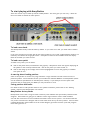
To start playing with ManyStation There are several ways to load up sounds in ManyStation. This note gives you one way – check out the user manual for details of other options. To load a new bank The ManyStation factory bank will load by default. If you want to use this, you need take no further action. If you want to load a new bank, click on the patch number (it says “bank” underneath this number as a reminder) as indicated in the graphic above. A dropdown menu of the available banks will display. Click on the bank you want to load. To load a new patch To load a new patch, you can either: click on the patch name (as indicated in the graphic): a dropdown menu will appear displaying all the patches in the currently loaded bank – click on the patch you want to load, or click on the nudge up and nudge down buttons (highlighted in red on the graphic) to audition each patch in turn. A warning about loading patches Some of the patches use several very large soundsets. Large soundsets can take a time to load, so please be patient. You should also ensure your machine has sufficient RAM to use ManyStation (check out the minimum specifications on the Manytone website). If you attempt to load a patch with soundsets that are larger than your RAM you may encounter a crash. Saving patches and banks For details of how to edit patches and then save patches and banks, please refer to the “Getting started” section of the ManyStation user manual. ManyStation factory banks ManyStation comes with a range of banks created by some brilliant and spectacularly talented sound designers. More banks are going to be added at a later stage and these will be made available. You will also notice that we have included some banks which are not yet full – we left the banks this way so that we feature the designer and his work rather than mix up all of the patches. Some of these partially filled banks will be added to as the sound designers get further into the synth and program some more gems for us.



![ManyGuitar user manual [november 2005]](http://vs1.manualzilla.com/store/data/005861536_1-a0b937985b357a67600aa3c9a5e7e46a-150x150.png)


![How To Make A Noise [free version - July 2007]](http://vs1.manualzilla.com/store/data/005953668_1-8b501b70130f0a85eac6cc9cd6ff18b6-150x150.png)