1
To Perform a Manual Search of Direct Verification Records
Without Case/EDG Number
1.
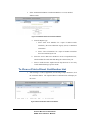
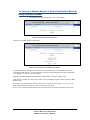
On the Direct Verification main page, select “Search Page”.
Figure 25: Direct Verification Search Screen
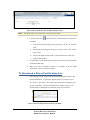
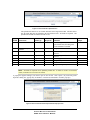
Select the “Student Information” radio button to search for records without entering a Case or EDG
(Eligibility Determination Group) number.
Figure 26: Direct Verification Student Information Search Criteria
To search only direct verification records that have not been matched by your organization, select the
“Unmatched” radio button. To search all direct verification records, including those already matched by
your organization, select the “All” radio button.
Enter the desired search criteria into the provided text boxes. (For SSN, do not include dashes. For Birth
Date, enter in the format mm/dd/yyyy.)
Note:
For confidentiality reasons, there are minimum search criteria on this screen. You
can search by either social security number (SSN) and birth date, or by last name, first
name and birth date (and county if desired). When using the second set of search criteria,
you can also include a “Sounds Like” search on the first name. Selecting this option will
result in matches where the last name and birth date fields match, but the first name has a
different spelling (ex. Marisa vs Marissa).
20
SCHOOL NUTRITION PROGRAMS
DCDV SUPPLEMENTAL MANUAL