1
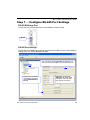
Configure RS-485 Port Settings
Additional Options
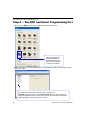
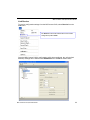
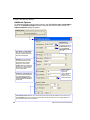
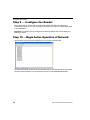
For additional RS-485 communications options, click the Click for more configuration...
button in the Additional Options section of the RS-485 communications view. The
Additional Options dialog will appear.
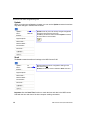
Time Stamp and Date Stamp
allow you to append the time
and date to symbol data that is
decoded and displayed.
Separator lets you determine
the ASCII character that will
separate the time and date
stamps from symbol data.
Location allows you to determine
whether you want the time and
date stamps to appear before
or after symbol data.
Preamble and Postamble allow
you to set the ASCII character(s)
or control characters (such as
^M for Carriage Return) that will
precede and follow the displayed
symbol data.
Host Protocol
defines the type of
connection to the host.
LRC Enabled lets you
turn Longitudinal
Redundancy Check
on or off.
Include Address
allows you to
append the
reader’s Multidrop
address to the
beginning of each
reader’s data output.
Intercharacter Timeout allows you to set the amount of time that must pass before the end of a read cycle.
Line Terminator is the end-of-message character that must be sent at the end of a message stream to or
from the MS-Connect 5100 or host device.
14
MS-Connect 5100 Quick Start Guide