1
Gigaset E310/E310A / Great Britain / A31008-M2301-L101-1-7619 / overview.fm / 26.07.2011
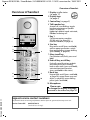
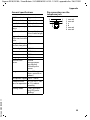
Overview of handset
Overview of handset
Ð
Ã
1
INT 1
23.04.
‘
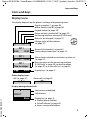
1 Display in idle status
(¢ page 17)
2 Display keys
(¢ page 4)
3 Control key (¢ page 5)
4 Talk/speaker key
Accept call; start dialling; toggle
between earpiece and speaker
mode (¢ page 28);
Lights up: speaker mode activated;
Flashes: incoming call
U
5 Key 1
Call the answering machine
(E310A only) (¢ page 35)/
network mailbox (¢ page 39)
10:53
Menu
6 Star key
2
3
4
8
Ring tones on/off (press and hold);
with an open connection: switch
from pulse dialling to tone dialling
(press briefly, ¢ page 50)
7 0 key/recall key
Consultation call (flash): press and
hold
5
8 End call key, on/off key
End call; cancel function; go back
one menu level (press briefly);
back to idle status (press and hold);
activate/deactivate handset
(press and hold in idle status)
6
9
7
10
9 Hash key
Keypad lock on/off (press and hold,
¢ page 20); upper/lower case and
digits (¢ page 60); enter dialling
pause (press and hold)
10 Microphone
Please note
To change the display language,
proceed as described on page 44.
Version 5, 03.04.2011
Gigaset service contact numbers:
For personal advice on our range of products and for repairs or guarantee/warranty claims call:
Service Centre UK:
0845 367 0812
(local call cost charge)
1