1
User’s Guide
Scyld ClusterWare Release 6.4.4-644g0000
July 8, 2013
User’s Guide: Scyld ClusterWare Release 6.4.4-644g0000; July 8, 2013
Revised Edition
Published July 8, 2013
Copyright © 1999 - 2013 Penguin Computing, Inc.
All rights reserved. No part of this publication may be reproduced, stored in a retrieval system, or transmitted in any form or by any means (electronic,
mechanical, photocopying, recording or otherwise) without the prior written permission of Penguin Computing, Inc..
The software described in this document is "commercial computer software" provided with restricted rights (except as to included open/free source). Use beyond
license provisions is a violation of worldwide intellectual property laws, treaties, and conventions.
Scyld ClusterWare, the Highly Scyld logo, and the Penguin Computing logo are trademarks of Penguin Computing, Inc.. Intel is a registered trademark of Intel
Corporation or its subsidiaries in the United States and other countries. Infiniband is a trademark of the InfiniBand Trade Association. Linux is a registered
trademark of Linus Torvalds. Red Hat and all Red Hat-based trademarks are trademarks or registered trademarks of Red Hat, Inc. in the United States and other
countries. All other trademarks and copyrights referred to are the property of their respective owners.
Table of Contents
Preface ..................................................................................................................................................................................... v
Feedback ......................................................................................................................................................................... v
1. Scyld ClusterWare Overview ............................................................................................................................................ 1
What Is a Beowulf Cluster? ............................................................................................................................................ 1
A Brief History of the Beowulf............................................................................................................................. 1
First-Generation Beowulf Clusters ....................................................................................................................... 2
Scyld ClusterWare: A New Generation of Beowulf.............................................................................................. 3
Scyld ClusterWare Technical Summary ......................................................................................................................... 3
Top-Level Features of Scyld ClusterWare ............................................................................................................ 3
Process Space Migration Technology ................................................................................................................... 5
Compute Node Provisioning ................................................................................................................................. 5
Compute Node Categories .................................................................................................................................... 5
Compute Node States............................................................................................................................................ 5
Major Software Components ................................................................................................................................ 6
Typical Applications of Scyld ClusterWare.................................................................................................................... 7
2. Interacting With the System.............................................................................................................................................. 9
Verifying the Availability of Nodes ................................................................................................................................ 9
Monitoring Node Status.................................................................................................................................................. 9
The BeoStatus GUI Tool ....................................................................................................................................... 9
BeoStatus Node Information ..................................................................................................................... 10
BeoStatus Update Intervals ....................................................................................................................... 10
BeoStatus in Text Mode ............................................................................................................................ 11
The bpstat Command Line Tool.......................................................................................................................... 11
The beostat Command Line Tool ........................................................................................................................ 12
Issuing Commands........................................................................................................................................................ 14
Commands on the Master Node.......................................................................................................................... 14
Commands on the Compute Node ...................................................................................................................... 14
Examples for Using bpsh........................................................................................................................... 14
Formatting bpsh Output............................................................................................................................. 15
bpsh and Shell Interaction ......................................................................................................................... 16
Copying Data to the Compute Nodes ........................................................................................................................... 17
Sharing Data via NFS ......................................................................................................................................... 17
Copying Data via bpcp........................................................................................................................................ 17
Programmatic Data Transfer ............................................................................................................................... 18
Data Transfer by Migration................................................................................................................................. 18
Monitoring and Controlling Processes ......................................................................................................................... 18
3. Running Programs ........................................................................................................................................................... 21
Program Execution Concepts ....................................................................................................................................... 21
Stand-Alone Computer vs. Scyld Cluster ........................................................................................................... 21
Traditional Beowulf Cluster vs. Scyld Cluster.................................................................................................... 21
Program Execution Examples ............................................................................................................................. 22
Environment Modules................................................................................................................................................... 24
Running Programs That Are Not Parallelized .............................................................................................................. 24
Starting and Migrating Programs to Compute Nodes (bpsh).............................................................................. 25
Copying Information to Compute Nodes (bpcp) ................................................................................................ 25
Running Parallel Programs ........................................................................................................................................... 26
An Introduction to Parallel Programming APIs.................................................................................................. 26
iii
MPI ............................................................................................................................................................ 27
PVM .......................................................................................................................................................... 28
Custom APIs.............................................................................................................................................. 28
Mapping Jobs to Compute Nodes ....................................................................................................................... 28
Running MPICH and MVAPICH Programs ....................................................................................................... 29
mpirun........................................................................................................................................................ 29
Setting Mapping Parameters from Within a Program ............................................................................... 30
Examples ................................................................................................................................................... 30
Running OpenMPI Programs.............................................................................................................................. 31
Pre-Requisites to Running OpenMPI ........................................................................................................ 31
Using OpenMPI......................................................................................................................................... 31
Running MPICH2 and MVAPICH2 Programs ................................................................................................... 32
Pre-Requisites to Running MPICH2/MVAPICH2 .................................................................................... 32
Using MPICH2.......................................................................................................................................... 32
Using MVAPICH2..................................................................................................................................... 32
Running PVM-Aware Programs ......................................................................................................................... 32
Porting Other Parallelized Programs................................................................................................................... 33
Running Serial Programs in Parallel............................................................................................................................. 33
mpprun ................................................................................................................................................................ 33
Options ...................................................................................................................................................... 34
Examples ................................................................................................................................................... 34
beorun.................................................................................................................................................................. 34
Options ...................................................................................................................................................... 34
Examples ................................................................................................................................................... 35
Job Batching ................................................................................................................................................................. 35
Job Batching Options for ClusterWare ............................................................................................................... 35
Job Batching with TORQUE .............................................................................................................................. 35
Running a Job ............................................................................................................................................ 36
Checking Job Status .................................................................................................................................. 37
Finding Out Which Nodes Are Running a Job.......................................................................................... 37
Finding Job Output .................................................................................................................................... 38
Job Batching with POD Tools............................................................................................................................. 38
File Systems.................................................................................................................................................................. 38
Sample Programs Included with Scyld ClusterWare .................................................................................................... 39
linpack ................................................................................................................................................................. 39
A. Glossary of Parallel Computing Terms ......................................................................................................................... 41
B. TORQUE Release Information ...................................................................................................................................... 45
Release Notes................................................................................................................................................................ 45
README.array_changes ............................................................................................................................................. 50
Change Log................................................................................................................................................................... 52
C. OpenMPI Release Information .................................................................................................................................... 101
D. MPICH2 Release Information...................................................................................................................................... 141
E. MVAPICH2 Release Information................................................................................................................................. 147
F. MPICH-3 Release Information..................................................................................................................................... 171
CHANGELOG ........................................................................................................................................................... 171
Release Notes.............................................................................................................................................................. 198
iv
Preface
Welcome to the Scyld ClusterWare HPC User’s Guide. This manual is for those who will use ClusterWare to run applications, so it presents the basics of ClusterWare parallel computing — what ClusterWare is, what you can do with it, and
how you can use it. The manual covers the ClusterWare architecture and discusses the unique features of Scyld ClusterWare HPC. It will show you how to navigate the ClusterWare environment, how to run programs, and how to monitor their
performance.
Because this manual is for the user accessing a ClusterWare system that has already been configured, it does not cover how
to install, configure, or administer your Scyld cluster. You should refer to other parts of the Scyld documentation set for
additional information, specifically:
•
Visit the Penguin Computing Support Portal at http://www.penguincomputing.com/support to find the latest documentation.
•
If you have not yet built your cluster or installed Scyld ClusterWare HPC, refer to the latest Release Notes and the
Installation Guide.
•
If you are looking for information on how to administer your cluster, refer to the Administrator’s Guide.
•
If you plan to write programs to use on your Scyld cluster, refer to the Programmer’s Guide.
Also not covered is use of the Linux operating system, on which Scyld ClusterWare is based. Some of the basics are
presented here, but if you have not used Linux or Unix before, a book or online resource will be helpful. Books by O’Reilly
and Associates2 are good sources of information.
This manual will provide you with information about the basic functionality of the utilities needed to start being productive
with Scyld ClusterWare.
Feedback
We welcome any reports on errors or difficulties that you may find. We also would like your suggestions on improving this
document. Please direct all comments and problems to [email protected].
When writing your email, please be as specific as possible, especially with errors in the text. Please include the chapter
and section information. Also, please mention in which version of the manual you found the error. This version is Scyld
ClusterWare HPC, Revised Edition, published July 8, 2013.
Notes
1. http://www.penguincomputing.com/support
2. http://www.oreilly.com
v
Preface
vi
Chapter 1. Scyld ClusterWare Overview
Scyld ClusterWare is a Linux-based high-performance computing system. It solves many of the problems long associated
with Linux Beowulf-class cluster computing, while simultaneously reducing the costs of system installation, administration,
and maintenance. With Scyld ClusterWare, the cluster is presented to the user as a single, large-scale parallel computer.
This chapter presents a high-level overview of Scyld ClusterWare. It begins with a brief history of Beowulf clusters, and
discusses the differences between the first-generation Beowulf clusters and a Scyld cluster. A high-level technical summary
of Scyld ClusterWare is then presented, covering the top-level features and major software components of Scyld. Finally,
typical applications of Scyld ClusterWare are discussed.
Additional details are provided throughout the Scyld ClusterWare HPC documentation set.
What Is a Beowulf Cluster?
The term "Beowulf" refers to a multi-computer architecture designed for executing parallel computations. A "Beowulf
cluster" is a parallel computer system conforming to the Beowulf architecture, which consists of a collection of commodity
off-the-shelf computers (COTS) (referred to as "nodes"), connected via a private network running an open-source operating
system. Each node, typically running Linux, has its own processor(s), memory storage, and I/O interfaces. The nodes
communicate with each other through a private network, such as Ethernet or Infiniband, using standard network adapters.
The nodes usually do not contain any custom hardware components, and are trivially reproducible.
One of these nodes, designated as the "master node", is usually attached to both the private and public networks, and is
the cluster’s administration console. The remaining nodes are commonly referred to as "compute nodes". The master node
is responsible for controlling the entire cluster and for serving parallel jobs and their required files to the compute nodes.
In most cases, the compute nodes are configured and controlled by the master node. Typically, the compute nodes require
neither keyboards nor monitors; they are accessed solely through the master node. From the viewpoint of the master node,
the compute nodes are simply additional processor and memory resources.
In conclusion, Beowulf is a technology of networking Linux computers together to create a parallel, virtual supercomputer.
The collection as a whole is known as a "Beowulf cluster". While early Linux-based Beowulf clusters provided a costeffective hardware alternative to the supercomputers of the day, allowing users to execute high-performance computing
applications, the original software implementations were not without their problems. Scyld ClusterWare addresses — and
solves — many of these problems.
A Brief History of the Beowulf
Cluster computer architectures have a long history. The early network-of-workstations (NOW) architecture used a group of
standalone processors connected through a typical office network, their idle cycles harnessed by a small piece of special
software, as shown below.
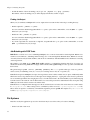
1
Chapter 1. Scyld ClusterWare Overview
Figure 1-1. Network-of-Workstations Architecture
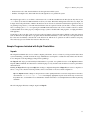
The NOW concept evolved to the Pile-of-PCs architecture, with one master PC connected to the public network, and the
remaining PCs in the cluster connected to each other and to the master through a private network as shown in the following
figure. Over time, this concept solidified into the Beowulf architecture.
Figure 1-2. A Basic Beowulf Cluster
For a cluster to be properly termed a "Beowulf", it must adhere to the "Beowulf philosophy", which requires:
•
Scalable performance
•
The use of commodity off-the-shelf (COTS) hardware
•
The use of an open-source operating system, typically Linux
Use of commodity hardware allows Beowulf clusters to take advantage of the economies of scale in the larger computing
markets. In this way, Beowulf clusters can always take advantage of the fastest processors developed for high-end workstations, the fastest networks developed for backbone network providers, and so on. The progress of Beowulf clustering
technology is not governed by any one company’s development decisions, resources, or schedule.
2
Chapter 1. Scyld ClusterWare Overview
First-Generation Beowulf Clusters
The original Beowulf software environments were implemented as downloadable add-ons to commercially-available Linux
distributions. These distributions included all of the software needed for a networked workstation: the kernel, various utilities, and many add-on packages. The downloadable Beowulf add-ons included several programming environments and
development libraries as individually-installable packages.
With this first-generation Beowulf scheme, every node in the cluster required a full Linux installation and was responsible
for running its own copy of the kernel. This requirement created many administrative headaches for the maintainers of
Beowulf-class clusters. For this reason, early Beowulf systems tended to be deployed by the software application developers
themselves (and required detailed knowledge to install and use). Scyld ClusterWare reduces and/or eliminates these and
other problems associated with the original Beowulf-class clusters.
Scyld ClusterWare: A New Generation of Beowulf
Scyld ClusterWare streamlines the process of configuring, administering, running, and maintaining a Beowulf-class cluster computer. It was developed with the goal of providing the software infrastructure for commercial production cluster
solutions.
Scyld ClusterWare was designed with the differences between master and compute nodes in mind; it runs only the appropriate software components on each compute node. Instead of having a collection of computers each running its own
fully-installed operating system, Scyld creates one large distributed computer. The user of a Scyld cluster will never log into
one of the compute nodes nor worry about which compute node is which. To the user, the master node is the computer, and
the compute nodes appear merely as attached processors capable of providing computing resources.
With Scyld ClusterWare, the cluster appears to the user as a single computer. Specifically,
•
The compute nodes appear as attached processor and memory resources
•
All jobs start on the master node, and are migrated to the compute nodes at runtime
•
All compute nodes are managed and administered collectively via the master node
The Scyld ClusterWare architecture simplifies cluster setup and node integration, requires minimal system administration,
provides tools for easy administration where necessary, and increases cluster reliability through seamless scalability. In
addition to its technical advances, Scyld ClusterWare provides a standard, stable, commercially-supported platform for
deploying advanced clustering systems. See the next section for a technical summary of Scyld ClusterWare.
Scyld ClusterWare Technical Summary
Scyld ClusterWare presents a more uniform system view of the entire cluster to both users and applications through extensions to the kernel. A guiding principle of these extensions is to have little increase in both kernel size and complexity and,
more importantly, negligible impact on individual processor performance.
In addition to its enhanced Linux kernel, Scyld ClusterWare includes libraries and utilities specifically improved for highperformance computing applications. For information on the Scyld libraries, see the Reference Guide. Information on using
the Scyld utilities to run and monitor jobs is provided in Chapter 2 and Chapter 3. If you need to use the Scyld utilities to
configure and administer your cluster, see the Administrator’s Guide.
Top-Level Features of Scyld ClusterWare
The following list summarizes the top-level features of Scyld ClusterWare.
3
Chapter 1. Scyld ClusterWare Overview
Security and Authentication
With Scyld ClusterWare, the master node is a single point of security administration and authentication. The authentication
envelope is drawn around the entire cluster and its private network. This obviates the need to manage copies or caches
of credentials on compute nodes or to add the overhead of networked authentication. Scyld ClusterWare provides simple
permissions on compute nodes, similar to Unix file permissions, allowing their use to be administered without additional
overhead.
Easy Installation
Scyld ClusterWare is designed to augment a full Linux distribution, such as Red Hat Enterprise Linux (RHEL) or CentOS.
The installer used to initiate the installation on the master node is provided on an auto-run CD-ROM. You can install from
scratch and have a running Linux HPC cluster in less than an hour. See the Installation Guide for full details.
Install Once, Execute Everywhere
A full installation of Scyld ClusterWare is required only on the master node. Compute nodes are provisioned from the master
node during their boot process, and they dynamically cache any additional parts of the system during process migration or
at first reference.
Single System Image
Scyld ClusterWare makes a cluster appear as a multi-processor parallel computer. The master node maintains (and presents
to the user) a single process space for the entire cluster, known as the BProc Distributed Process Space. BProc is described
briefly later in this chapter, and more details are provided in the Administrator’s Guide.
Execution Time Process Migration
Scyld ClusterWare stores applications on the master node. At execution time, BProc migrates processes from the master
to the compute nodes. This approach virtually eliminates both the risk of version skew and the need for hard disks on the
compute nodes. More information is provided in the section on process space migration later in this chapter. Also refer to
the BProc discussion in the Administrator’s Guide.
Seamless Cluster Scalability
Scyld ClusterWare seamlessly supports the dynamic addition and deletion of compute nodes without modification to existing
source code or configuration files. See the chapter on the BeoSetup utility in the Administrator’s Guide.
Administration Tools
Scyld ClusterWare includes simplified tools for performing cluster administration and maintenance. Both graphical user
interface (GUI) and command line interface (CLI) tools are supplied. See the Administrator’s Guide for more information.
Web-Based Administration Tools
Scyld ClusterWare includes web-based tools for remote administration, job execution, and monitoring of the cluster. See the
Administrator’s Guide for more information.
Additional Features
Additional features of Scyld ClusterWare include support for cluster power management (IPMI and Wake-on-LAN, easily
extensible to other out-of-band management protocols); runtime and development support for MPI and PVM; and support
for the LFS and NFS3 file systems.
4
Chapter 1. Scyld ClusterWare Overview
Fully-Supported
Scyld ClusterWare is fully-supported by Penguin Computing, Inc.
Process Space Migration Technology
Scyld ClusterWare is able to provide a single system image through its use of the BProc Distributed Process Space, the Beowulf process space management kernel enhancement. BProc enables the processes running on compute nodes to be visible
and managed on the master node. All processes appear in the master node’s process table, from which they are migrated
to the appropriate compute node by BProc. Both process parent-child relationships and Unix job-control information are
maintained with the migrated jobs. The stdout and stderr streams are redirected to the user’s ssh or terminal session on
the master node across the network.
The BProc mechanism is one of the primary features that makes Scyld ClusterWare different from traditional Beowulf
clusters. For more information, see the system design description in the Administrator’s Guide.
Compute Node Provisioning
Scyld ClusterWare utilizes light-weight provisioning of compute nodes from the master node’s kernel and Linux distribution.
For Scyld Series 30 and Scyld ClusterWare HPC, PXE is the supported method for booting nodes into the cluster; the 2-phase
boot sequence of earlier Scyld distributions is no longer used.
The master node is the DHCP server serving the cluster private network. PXE booting across the private network ensures
that the compute node boot package is version-synchronized for all nodes within the cluster. This boot package consists of
the kernel, initrd, and rootfs. If desired, the boot package can be customized per node in the Beowulf configuration file
/etc/beowulf/config, which also includes the kernel command line parameters for the boot package.
For a detailed description of the compute node boot procedure, see the system design description in the Administrator’s
Guide. Also refer to the chapter on compute node boot options in that document.
Compute Node Categories
Compute nodes seen by the master over the private network are classified into one of three categories by the master node,
as follows:
•
Unknown — A node not formally recognized by the cluster as being either a Configured or Ignored node. When bringing
a new compute node online, or after replacing an existing node’s network interface card, the node will be classified as
unknown.
•
Ignored — Nodes which, for one reason or another, you’d like the master node to ignore. These are not considered part
of the cluster, nor will they receive a response from the master node during their boot process.
•
Configured — Those nodes listed in the cluster configuration file using the "node" tag. These are formally part of the
cluster, recognized as such by the master node, and used as computational resources by the cluster.
For more information on compute node categories, see the system design description in the Administrator’s Guide.
5
Chapter 1. Scyld ClusterWare Overview
Compute Node States
BProc maintains the current condition or "node state" of each configured compute node in the cluster. The compute node
states are defined as follows:
•
down — Not communicating with the master, and its previous state was either down, up, error, unavailable, or boot.
•
unavailable — Node has been marked unavailable or "off-line" by the cluster administrator; typically used when performing maintenance activities. The node is useable only by the user root.
•
error — Node encountered an error during its initialization; this state may also be set manually by the cluster administrator. The node is useable only by the user root.
•
up — Node completed its initialization without error; node is online and operating normally. This is the only state in
which non-root users may access the node.
•
reboot — Node has been commanded to reboot itself; node will remain in this state until it reaches the boot state, as
described below.
•
halt — Node has been commanded to halt itself; node will remain in this state until it is reset (or powered back on) and
reaches the boot state, as described below.
•
pwroff — Node has been commanded to power itself off; node will remain in this state until it is powered back on and
reaches the boot state, as described below.
•
boot — Node has completed its stage 2 boot but is still initializing. After the node finishes booting, its next state will be
either up or error.
For more information on compute node states, see the system design description in the Administrator’s Guide.
Major Software Components
The following is a list of the major software components included with Scyld ClusterWare HPC. For more information, see
the relevant sections of the Scyld ClusterWare HPC documentation set, including the Installation Guide, Administrator’s
Guide, User’s Guide, Reference Guide, and Programmer’s Guide.
6
•
BProc — The process migration technology; an integral part of Scyld ClusterWare.
•
BeoSetup — A GUI for configuring the cluster.
•
BeoStatus — A GUI for monitoring cluster status.
•
beostat — A text-based tool for monitoring cluster status.
•
beoboot — A set of utilities for booting the compute nodes.
•
beofdisk — A utility for remote partitioning of hard disks on the compute nodes.
•
beoserv — The cluster’s DHCP, PXE and dynamic provisioning server; it responds to compute nodes and serves the boot
image.
•
BPmaster — The BProc master daemon; it runs on the master node.
•
BPslave — The BProc compute daemon; it runs on each of the compute nodes.
•
bpstat — A BProc utility that reports status information for all nodes in the cluster.
•
bpctl — A BProc command line interface for controlling the nodes.
•
bpsh — A BProc utility intended as a replacement for rsh (remote shell).
•
bpcp — A BProc utility for copying files between nodes, similar to rcp (remote copy).
Chapter 1. Scyld ClusterWare Overview
•
MPI — The Message Passing Interface, optimized for use with Scyld ClusterWare.
•
PVM — The Parallel Virtual Machine, optimized for use with Scyld ClusterWare.
•
mpprun — A parallel job-creation package for Scyld ClusterWare.
Typical Applications of Scyld ClusterWare
Scyld clustering provides a facile solution for anyone executing jobs that involve either a large number of computations or
large amounts of data (or both). It is ideal for both large, monolithic, parallel jobs and for many normal-sized jobs run many
times (such as Monte Carlo type analysis).
The increased computational resource needs of modern applications are frequently being met by Scyld clusters in a number
of domains, including:
•
Computationally-Intensive Activities — Optimization problems, stock trend analysis, financial analysis, complex pattern
matching, medical research, genetics research, image rendering
•
Scientific Computing / Research — Engineering simulations, 3D-modeling, finite element analysis, computational fluid
dynamics, computational drug development, seismic data analysis, PCB / ASIC routing
•
Large-Scale Data Processing — Data mining, complex data searches and results generation, manipulating large amounts
of data, data archival and sorting
•
Web / Internet Uses — Web farms, application serving, transaction serving, data serving
These types of jobs can be performed many times faster on a Scyld cluster than on a single computer. Increased speed
depends on the application code, the number of nodes in the cluster, and the type of equipment used in the cluster. All of
these can be easily tailored and optimized to suit the needs of your applications.
7
Chapter 1. Scyld ClusterWare Overview
8
Chapter 2. Interacting With the System
This chapter discusses how to verify the availability of the nodes in your cluster, how to monitor node status, how to issue
commands and copy data to the compute nodes, and how to monitor and control processes. For information on running
programs across the cluster, see Chapter 3.
Verifying the Availability of Nodes
In order to use a Scyld cluster for computation, at least one node must be available or up. Thus, the first priority when
interacting with a cluster is ascertaining the availability of nodes. Unlike traditional Beowulf clusters, Scyld ClusterWare
provides rich reporting about the availability of the nodes.
You can use either the BeoStatus GUI tool or the bpstat command to determine the availability of nodes in your cluster.
These tools, which can also be used to monitor node status, are described in the next section.
If fewer nodes are up than you think should be, or some nodes report an error, check with your Cluster Administrator.
Monitoring Node Status
You can monitor the status of nodes in your cluster with the BeoStatus GUI tool or with either of two command line tools,
bpstat and beostat. These tools are described in the sections that follow. Also see the Reference Guide for information on
the various options and flags supported for these tools.
The BeoStatus GUI Tool
The BeoStatus graphical user interface (GUI) tool is the best way to check the status of the cluster, including which nodes
are available or up. There are two ways to open the BeoStatus GUI as a Gnome X window, as follows.
Click the BeoStatus icon in the tool tray or in the applications pulldown.
Alternatively, type the command beostatus in a terminal window on the master node; you do not need to be a privileged
user to use this command.
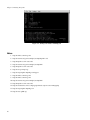
The default BeoStatus GUI mode is a tabular format known as the "Classic" display (shown in the following figure). You
can select different display options from the Mode menu.
9
Chapter 2. Interacting With the System
Figure 2-1. BeoStatus in the "Classic" Display Mode
BeoStatus Node Information
Each row in the BeoStatus display reports information for a single node, including the following:
•
Node — The node’s assigned node number, starting at zero. Node -1, if shown, is the master node. The total number
of node entries shown is set by the "iprange" or "nodes" keywords in the file /etc/beowulf/config, rather than the
number of detected nodes. The entry for an inactive node displays the last reported data in a grayed-out row.
•
Up — A graphical representation of the node’s status. A green checkmark is shown if the node is up and available.
Otherwise, a red "X" is shown.
•
State — The node’s last known state. This should agree with the state reported by both the bpstat command and in the
BeoSetup window.
•
CPU "X" — The CPU loads for the node’s processors; at minimum, this indicates the CPU load for the first processor in
each node. Since it is possible to mix uni-processor and multi-processor machines in a Scyld cluster, the number of CPU
load columns is equal to the maximum number of processors for any node in your cluster. The label "N/A" will be shown
for nodes with less than the maximum number of processors.
•
Memory — The node’s current memory usage.
•
Swap — The node’s current swap space (virtual memory) usage.
•
Disk — The node’s hard disk usage. If a RAM disk is used, the maximum value shown is one-half the amount of physical
memory. As the RAM disk competes with the kernel and application processes for memory, not all the RAM may be
available.
•
Network — The node’s network bandwidth usage. The total amount of bandwidth available is the sum of all network
interfaces for that node.
BeoStatus Update Intervals
Once running, BeoStatus is non-interactive; the user simply monitors the reported information. The display is updated at 4second intervals by default. You can modify this default using the command beostatus -u secs (where secs is the number
of seconds) in a terminal window or an ssh session to the master node with X-forwarding enabled.
10
Chapter 2. Interacting With the System
Tip: Each update places load on the master and compute nodes, as well as the interconnection network. Too-frequent
updates can degrade the overall system performance.
BeoStatus in Text Mode
In environments where use of the Gnome X window system is undesirable or impractical, such as when accessing the master
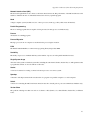
node through a slow remote network connection, you can view the status of the cluster as curses text output (shown in the
following figure). Do do this, enter the command beostatus -c in a terminal window on the master node or an ssh session to
the master node.
BeoStatus in text mode reports the same node information as reported by the "Classic" display, except for the graphical
indicator of node up (green checkmark) or node down (red X). The data in the text display is updated at 4-second intervals
by default.
Figure 2-2. BeoStatus in Text Mode
The bpstat Command Line Tool
You can also check node status with the bpstat command. When run at a shell prompt on the master node without options,
bpstat prints out a listing of all nodes in the cluster and their current status. You do not need to be a privileged user to use
this command.
Following is an example of the outputs from bpstat for a cluster with 10 compute nodes.
[user@cluster user] $ bpstat
Node(s)
5-9
4
0-3
Status
down
up
up
Mode
User
---------- root
---x--x--x any
---x--x--x root
Group
root
any
root
bpstat will show one of the following indicators in the "Status" column:
•
A node marked up is available to run jobs. This status is the equivalent of the green checkmark in the BeoStatus GUI.
11
Chapter 2. Interacting With the System
•
Nodes that have not yet been configured are marked as down. This status is the equivalent of the red X in the BeoStatus
GUI.
•
Nodes currently booting are temporarily shown with a status of boot. Wait 10-15 seconds and try again.
•
The "error" status indicates a node initialization problem. Check with your Cluster Administrator.
For additional information on bpstat, see the section on monitoring and controlling processes later in this chapter. Also see
the Reference Guide for details on using bpstat and its command line options.
The beostat Command Line Tool
You can use the beostat command to display raw status data for cluster nodes. When run at a shell prompt on the master
node without options, beostat prints out a listing of stats for all nodes in the cluster, including the master node. You do not
need to be a privileged user to use this command.
The following example shows the beostat output for the master node and one compute node:
[user@cluster user] $ beostat
model
model name
stepping
cpu MHz
cache size
fdiv_bug
hlt_bug
sep_bug
f00f_bug
coma_bug
fpu
fpu_exception
cpuid level
wp
bogomips
:
:
:
:
:
:
:
:
:
:
:
:
:
:
:
5
AMD Opteron(tm) Processor 248
10
2211.352
1024 KB
no
no
no
no
no
yes
yes
1
yes
4422.05
*** /proc/meminfo *** Sun Sep 17 10:46:33 2006
total:
used:
free: shared: buffers: cached:
Mem: 4217454592 318734336 3898720256
0 60628992
Swap: 2089209856
0 2089209856
MemTotal:
4118608 kB
MemFree:
3807344 kB
MemShared:
0 kB
Buffers:
59208 kB
Cached:
0 kB
SwapTotal: 2040244 kB
SwapFree:
2040244 kB
0
*** /proc/loadavg *** Sun Sep 17 10:46:33 2006
3.00 2.28 1.09 178/178 0
*** /proc/net/dev *** Sun Sep 17 10:46:33 2006
Inter-|
Receive
| Transmit
face |bytes
packets errs drop fifo frame compressed multicast|bytes
packets errs drop fifo co
eth0:85209660
615362
0
0
0
0
0
0 703311290 559376
eth1:4576500575 13507271
0
0
0
0
0
0 9430333982 13220730
12
Chapter 2. Interacting With the System
sit0:
0
0
*** /proc/stat ***
cpu0 15040 0 466102 25629625
cpu1 17404 0 1328475 24751544
0
0
0
0
0
0
0
0
Sun Sep 17 10:46:33 2006
Sun Sep 17 10:46:33 2006
*** statfs ("/") *** Sun Sep 17 10:46:33 2006
path:
/
f_type:
0xef53
f_bsize:
4096
f_blocks:
48500104
f_bfree:
41439879
f_bavail:
38976212
f_files:
24641536
f_ffree:
24191647
f_fsid:
000000 000000
f_namelen:
255
============== Node: .0 (index 0) ==================
*** /proc/cpuinfo *** Sun Sep 17 10:46:34 2006
num processors : 2
vendor_id
: AuthenticAMD
cpu family
: 15
model
: 5
model name
: AMD Opteron(tm) Processor 248
stepping
: 10
cpu MHz
: 2211.386
cache size
: 1024 KB
fdiv_bug
: no
hlt_bug
: no
sep_bug
: no
f00f_bug
: no
coma_bug
: no
fpu
: yes
fpu_exception
: yes
cpuid level
: 1
wp
: yes
bogomips
: 4422.04
*** /proc/meminfo *** Sun Sep 17 10:46:34 2006
total:
used:
free: shared: buffers:
Mem: 4216762368 99139584 4117622784
0
Swap:
0
0
0
MemTotal:
4117932 kB
MemFree:
4021116 kB
MemShared:
0 kB
Buffers:
0 kB
Cached:
0 kB
SwapTotal:
0 kB
SwapFree:
0 kB
cached:
0
0
*** /proc/loadavg *** Sun Sep 17 10:46:34 2006
0.99 0.75 0.54 36/36 0
13
Chapter 2. Interacting With the System
*** /proc/net/dev *** Sun Sep 17 10:46:34 2006
Inter-|
Receive
| Transmit
face |bytes
packets errs drop fifo frame compressed multicast|bytes
packets errs drop fifo co
eth0:312353878
430256
0
0
0
0
0
0 246128779 541105
eth1:
0
0
0
0
0
0
0
0
0
0
*** /proc/stat ***
cpu0 29984 0 1629 15340009
cpu1 189495 0 11131 15170565
Sun Sep 17 10:46:34 2006
Sun Sep 17 10:46:34 2006
*** statfs ("/") *** Sun Sep 17 10:46:34 2006
path:
/
f_type:
0x1021994
f_bsize:
4096
f_blocks:
514741
f_bfree:
492803
f_bavail:
492803
f_files:
514741
f_ffree:
514588
f_fsid:
000000 000000
f_namelen:
255
The Reference Guide provides details for using beostat and its command line options.
Issuing Commands
Commands on the Master Node
When you log into the cluster, you are actually logging into the master node, and the commands you enter on the command
line will execute on the master node. The only exception is when you use special commands for interacting with the compute
nodes, as described in the next section.
Commands on the Compute Node
Scyld ClusterWare provides the bpsh command for running jobs on the compute nodes. bpsh is a replacement for the
traditional Unix utility rsh, used to run a job on a remote computer. Like rsh, the bpsh arguments are the node on which to
run the command and the command. bpsh allows you to run a command on more than one node without having to type the
command once for each node, but it doesn’t provide an interactive shell on the remote node like rsh does.
bpsh is primarily intended for running utilities and maintenance tasks on a single node or a range of nodes, rather than for
running parallel programs. For information on running parallel programs with Scyld ClusterWare, see Chapter 3.
bpsh provides a convenient yet powerful interface for manipulating all (or a subset of) the cluster’s nodes simultaneously.
bpsh provides you the flexibility to access a compute node individually, but removes the requirement to access each node
individually when a collective operation is desired. A number of examples and options are discussed in the sections that
follow. For a complete reference to all the options available for bpsh, see the Reference Guide.
14
Chapter 2. Interacting With the System
Examples for Using bpsh
Example 2-1. Checking for a File
You can use bpsh to check for specific files on a compute node. For example, to check for a file named output in the /tmp
directory of node 3, you would run the following command on the master node:
[user@cluster user] $ bpsh 3 ls /tmp/output
The command output would appear on the master node terminal where you issued the command.
Example 2-2. Running a Command on a Range of Nodes
You can run the same command on a range of nodes using bpsh. For example, to check for a file named output in the /tmp
directory of nodes 3 through 5, you would run the following command on the master node:
[user@cluster user] $ bpsh 3,4,5 ls /tmp/output
Example 2-3. Running a Command on All Available Nodes
Use the -a flag to indicate to bpsh that you wish to run a command on all available nodes. For example, to check for a file
named output in the /tmp directory of all nodes currently active in your cluster, you would run the following command
on the master node:
[user@cluster user] $ bpsh -a ls /tmp/output
Note that when using the -a flag, the results are sorted by the response speed of the compute nodes, and are returned without
node identifiers. Because this command will produce output for every currently active node, the output may be hard to read if
you have a large cluster. For example, if you ran the above command on a 64-node cluster in which half of the nodes have the
file being requested, the results returned would be 32 lines of /tmp/output and another 32 lines of ls: /tmp/output:
no such file or directory. Without node identifiers, it is impossible to ascertain the existence of the target file on a
particular node.
See the next section for bpsh options that enable you to format the results for easier reading.
Formatting bpsh Output
The bpsh command has a number of options for formatting its output to make it more useful for the user, including the
following:
•
The -L option makes bpsh wait for a full line from a compute node before it prints out the line. Without this option,
the output from your command could include half a line from node 0 with a line from node 1 tacked onto the end, then
followed by the rest of the line from node 0.
•
The -p option prefixes each line of output with the node number of the compute node that produced it. This option causes
the functionality for -L to be used, even if not explicitly specified.
15
Chapter 2. Interacting With the System
•
The -s option forces the output of each compute node to be printed in sorted numerical order, rather than by the response
speed of the compute nodes. With this option, all the output for node 0 will appear before any of the output for node 1.
To add a divider between the output from each node, use the -d option.
•
Using -d generates a divider between the output from each node. This option causes the functionality for -s to be used,
even if not explicitly specified.
For example, if you run the command bpsh -a -d -p ls /tmp/output on an 8-node cluster, the output would make it clear
which nodes do and do not have the file output in the /tmp directory, for example:
0
--------------------------------------------------------------------/tmp/output
1 --------------------------------------------------------------------1: ls: /tmp/output: No such file or directory
2 --------------------------------------------------------------------2: ls: /tmp/output: No such file or directory
3 --------------------------------------------------------------------3: /tmp/output
4 --------------------------------------------------------------------4: /tmp/output
5 --------------------------------------------------------------------5: /tmp/output
6 --------------------------------------------------------------------6: ls: /tmp/output: No such file or directory
7 --------------------------------------------------------------------7: ls: /tmp/output: No such file or directory
bpsh and Shell Interaction
Special shell features, such as piping and input/output redirection, are available to advanced users. This section provides
several examples of shell interaction, using the following conventions:
•
The command running will be cmda.
•
If it is piped to anything, it will be piped to cmdb.
•
If an input file is used, it will be /tmp/input.
•
If an output file is used, it will be /tmp/output.
•
The node used will always be node 0.
Example 2-4. Command on Compute Node, Output on Master Node
The easiest case is running a command on a compute node and doing something with its output on the master node, or
giving it input from the master. Following are a few examples:
[user@cluster user] $ bpsh 0 cmda | cmdb
[user@cluster user] $ bpsh 0 cmda > /tmp/output
[user@cluster user] $ bpsh 0 cmda < /tmp/input
16
Chapter 2. Interacting With the System
Example 2-5. Command on Compute Node, Output on Compute Node
A bit more complex situation is to run the command on the compute node and do something with its input (or output) on
that same compute node. There are two ways to accomplish this.
The first solution requires that all the programs you run be on the compute node. For this to work, you must first copy the
cmda and cmdb executable binaries to the compute node. Then you would use the following commands:
[user@cluster user] $ bpsh 0 sh -c "cmda | cmdb"
[user@cluster user] $ bpsh 0 sh -c "cmda > /tmp/output"
[user@cluster user] $ bpsh 0 sh -c "cmda < /tmp/input"
The second solution doesn’t require any of the programs to be on the compute node. However, it uses a lot of network
bandwidth as it takes the output and sends it to the master node, then sends it right back to the compute node. The appropriate
commands are as follows:
[user@cluster user] $ bpsh 0 cmda | bpsh 0 cmdb
[user@cluster user] $ bpsh 0 cmda | bpsh 0 dd of=/tmp/output
[user@cluster user] $ bpsh 0 cat /tmp/input | bpsh 0 cmda
Example 2-6. Command on Master Node, Output on Compute Node
You can also run a command on the master node and do something with its input or output on the compute nodes. The
appropriate commands are as follows:
[user@cluster user] $ cmda | bpsh 0 cmdb
[user@cluster user] $ cmda | bpsh 0 dd of=/tmp/output
[user@cluster user] $ bpsh 0 cat /tmp/input | cmda
Copying Data to the Compute Nodes
There are several ways to get data from the master node to the compute nodes. This section describes using NFS to share
data, using the Scyld ClusterWare command bpcp to copy data, and using programmatic methods for data transfer.
Sharing Data via NFS
The easiest way to transfer data to the compute nodes is via NFS. All files in your /home directory are shared by default to
all compute nodes via NFS. Opening an NFS-shared file on a compute node will, in fact, open the file on the master node;
no actual copying takes place.
Copying Data via bpcp
To copy a file, rather than changing the original across the network, you can use the bpcp command. This works much like
the standard Unix file-copying command cp, in that you pass it a file to copy as one argument and the destination as the next
argument. Like the Unix scp, the file paths may be qualified by a computer host name.
17
Chapter 2. Interacting With the System
With bpcp, you can indicate the node number for the source file, destination file, or both. To do this, prepend the node
number with a colon before the file name, to specify that the file is on that node or should be copied to that node. For
example, to copy the file /tmp/foo to the same location on node 1, you would use the following command:
[user@cluster user] $ bpcp /tmp/foo 1:/tmp/foo
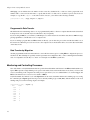
Programmatic Data Transfer
The third method for transferring data is to do it programmatically. This is a bit more complex than the methods described
in the previous section, and will only be described here only conceptually.
If you are using an MPI job, you can have your Rank 0 process on the master node read in the data, then use MPI’s message
passing capabilities to send the data over to a compute node.
If you are writing a program that uses BProc functions directly, you can have the process first read the data while it is on
the master node. When the process is moved over to the compute node, it should still be able to access the data read in while
on the master node.
Data Transfer by Migration
Another programmatic method for file transfer is to read a file into memory prior to calling BProc to migrate the process to
another node. This technique is especially useful for parameter and configuration files, or files containing the intermediate
state of a computation. See the Reference Guide for a description of the BProc system calls.
Monitoring and Controlling Processes
One of the features of Scyld ClusterWare that isn’t provided in traditional Beowulf clusters is the BProc Distributed Process
Space. BProc presents a single unified process space for the entire cluster, run from the master node, where you can see and
control jobs running on the compute nodes. This process space allows you to use standard Unix tools, such as top, ps, and
kill. See the Administrator’s Guide for more details on BProc.
Scyld ClusterWare also includes a tool called bpstat that can be used to determine which node is running a process. Using
the command option bpstat -p will list all processes currently running by processID (PID), with the number of the node
running each process. The following output is an example:
[user@cluster user] $ bpstat -p
PID
6301
6302
6303
6304
6305
6313
6314
6321
18
Node
0
1
0
2
1
2
3
3
Chapter 2. Interacting With the System
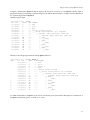
Using the command option bpstat -P (with an uppercase "P" instead of a lowercase "p") tells bpstat to take the output of
the ps and reformat it, pre-pending a column showing the node number. The following two examples show the difference in
the outputs from ps and from bpstat -P.
Example output from ps:
[user@cluster user] $ ps xf
PID
6503
6665
6471
6538
6553
6654
6655
6656
6658
6657
6660
6659
6662
6661
6663
TTY
pts/2
pts/2
pts/3
pts/3
pts/3
pts/3
pts/3
pts/3
pts/3
pts/3
pts/3
pts/3
pts/3
pts/3
pts/3
STAT
S
R
S
S
S
R
S
RW
SW
RW
SW
RW
SW
SW
SW
TIME
0:00
0:00
0:00
0:00
0:00
0:03
0:00
0:01
0:00
0:01
0:00
0:01
0:00
0:00
0:00
COMMAND
bash
ps xf
bash
/bin/sh /usr/bin/linpack
\_ /bin/sh /usr/bin/mpirun -np 5 /tmp/xhpl
\_ /tmp/xhpl -p4pg /tmp/PI6553 -p4wd /tmp
\_ /tmp/xhpl -p4pg /tmp/PI6553 -p4wd /tmp
\_ [xhpl]
|
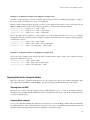
\_ [xhpl]
\_ [xhpl]
|
\_ [xhpl]
\_ [xhpl]
|
\_ [xhpl]
\_ [xhpl]
\_ [xhpl]
Example of the same ps output when run through bpstat -P instead:
[user@cluster user] $ ps xf | bpstat -P
NODE
0
0
1
1
2
2
3
3
PID
6503
6666
6667
6471
6538
6553
6654
6655
6656
6658
6657
6660
6659
6662
6661
6663
TTY
pts/2
pts/2
pts/2
pts/3
pts/3
pts/3
pts/3
pts/3
pts/3
pts/3
pts/3
pts/3
pts/3
pts/3
pts/3
pts/3
STAT
S
R
R
S
S
S
R
S
RW
SW
RW
SW
RW
SW
SW
SW
TIME
0:00
0:00
0:00
0:00
0:00
0:00
0:06
0:00
0:06
0:00
0:06
0:00
0:06
0:00
0:00
0:00
COMMAND
bash
ps xf
bpstat -P
bash
/bin/sh /usr/bin/linpack
\_ /bin/sh /usr/bin/mpirun -np 5 /tmp/xhpl
\_ /tmp/xhpl -p4pg /tmp/PI6553 -p4wd /tmp
\_ /tmp/xhpl -p4pg /tmp/PI6553 -p4wd /tmp
\_ [xhpl]
|
\_ [xhpl]
\_ [xhpl]
|
\_ [xhpl]
\_ [xhpl]
|
\_ [xhpl]
\_ [xhpl]
\_ [xhpl]
For additional information on bpstat, see the section on monitoring node status earlier in this chapter. For information on
the bpstat command line options, see the Reference Guide.
19
Chapter 2. Interacting With the System
20
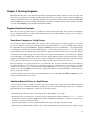
Chapter 3. Running Programs
This chapter describes how to run both serial and parallel jobs with Scyld ClusterWare, and how to monitor the status of the
cluster once your applications are running. It begins with a brief discussion of program execution concepts, including some
examples. The discussion then covers running programs that aren’t parallelized, running parallel programs (including MPIaware and PVM-aware programs), running serial programs in parallel, job batching, and file systems. Finally, the chapter
covers the sample linpack program included with Scyld ClusterWare.
Program Execution Concepts
This section compares program execution on a stand-alone computer and a Scyld cluster. It also discusses the differences
between running programs on a traditional Beowulf cluster and a Scyld cluster. Finally, it provides some examples of
program execution on a Scyld cluster.
Stand-Alone Computer vs. Scyld Cluster
On a stand-alone computer running Linux, Unix, and most other operating systems, executing a program is a very simple
process. For example, to generate a list of the files in the current working directory, you open a terminal window and type
the command ls followed by the [return] key. Typing the [return] key causes the command shell — a program that listens
to and interprets commands entered in the terminal window — to start the ls program (stored at /bin/ls). The output is
captured and directed to the standard output stream, which also appears in the same window where you typed the command.
A Scyld cluster isn’t simply a group of networked stand-alone computers. Only the master node resembles the computing
system with which you are familiar. The compute nodes have only the minimal software components necessary to support
an application initiated from the master node. So for instance, running the ls command on the master node causes the same
series of actions as described above for a stand-alone computer, and the output is for the master node only.
However, running ls on a compute node involves a very different series of actions. Remember that a Scyld cluster has
no resident applications on the compute nodes; applications reside only on the master node. So for instance, to run the ls
command on compute node 1, you would enter the command bpsh 1 ls on the master node. This command sends ls to
compute node 1 via Scyld’s BProc software, and the output stream is directed to the terminal window on the master node,
where you typed the command.
Some brief examples of program execution are provided in the last section of this chapter. Both BProc and bpsh are covered
in more detail in the Administrator’s Guide.
Traditional Beowulf Cluster vs. Scyld Cluster
A job on a Beowulf cluster is actually a collection of processes running on the compute nodes. In traditional clusters of
computers, and even on earlier Beowulf clusters, getting these processes started and running together was a complicated
task. Typically, the cluster administrator would need to do all of the following:
•
Ensure that the user had an account on all the target nodes, either manually or via a script.
•
Ensure that the user could spawn jobs on all the target nodes. This typically entailed configuring a hosts.allow file on
each machine, creating a specialized PAM module (a Linux authentication mechanism), or creating a server daemon on
each node to spawn jobs on the user’s behalf.
•
Copy the program binary to each node, either manually, with a script, or through a network file system.
•
Ensure that each node had available identical copies of all the dependencies (such as libraries) needed to run the program.
21
Chapter 3. Running Programs
•
Provide knowledge of the state of the system to the application manually, through a configuration file, or through some
add-on scheduling software.
With Scyld ClusterWare, most of these steps are removed. Jobs are started on the master node and are migrated out to the
compute nodes via BProc. A cluster architecture where jobs may be initiated only from the master node via BProc provides
the following advantages:
•
Users no longer need accounts on remote nodes.
•
Users no longer need authorization to spawn jobs on remote nodes.
•
Neither binaries nor libraries need to be available on the remote nodes.
•
The BProc system provides a consistent view of all jobs running on the system.
With all these complications removed, program execution on the compute nodes becomes a simple matter of letting BProc
know about your job when you start it. The method for doing so depends on whether you are launching a parallel program
(for example, an MPI job or PVM job) or any other kind of program. See the sections on running parallel programs and
running non-parallelized programs later in this chapter.
Program Execution Examples
This section provides a few examples of program execution with Scyld ClusterWare. Additional examples are provided in
the sections on running parallel programs and running non-parallelized programs later in this chapter.
Example 3-1. Directed Execution with bpsh
In the directed execution mode, the user explicitly defines which node (or nodes) will run a particular job. This mode is
invoked using the bpsh command, the ClusterWare shell command analogous in functionality to both the rsh (remote shell)
and ssh (secure shell) commands. Following are two examples of using bpsh.
The first example runs hostname on compute node 0 and writes the output back from the node to the user’s screen:
[user@cluster user] $ bpsh 0 /bin/hostname
n0
If /bin is in the user’s $PATH, then the bpsh does not need the full pathname:
[user@cluster user] $ bpsh 0 hostname
n0
The second example runs the /usr/bin/uptime utility on node 1. Assuming /usr/bin is in the user’s $PATH:
[user@cluster user] $ bpsh 1 uptime
12:56:44 up
4:57,
5 users,
load average: 0.06, 0.09, 0.03
Example 3-2. Dynamic Execution with beorun and mpprun
In the dynamic execution mode, Scyld decides which node is the most capable of executing the job at that moment in time.
Scyld includes two parallel execution tools that dynamically select nodes: beorun and mpprun. They differ only in that
beorun runs the job concurrently on the selected nodes, while mpprun runs the job sequentially on one node at a time.
The following example shows the difference in the elapsed time to run a command with beorun vs. mpprun:
[user@cluster user] $ date;beorun -np 8 sleep 1;date
22
Chapter 3. Running Programs
Fri Aug 18 11:48:30 PDT 2006
Fri Aug 18 11:48:31 PDT 2006
[user@cluster user] $ date;mpprun -np 8 sleep 1;date
Fri Aug 18 11:48:46 PDT 2006
Fri Aug 18 11:48:54 PDT 2006
Example 3-3. Binary Pre-Staged on Compute Node
A needed binary can be "pre-staged" by copying it to a compute node prior to execution of a shell script. In the following
example, the shell script is in a file called test.sh:
######
#! /bin/bash
hostname.local
#######
[user@cluster user] $ bpsh 1 mkdir -p /usr/local/bin
[user@cluster user] $ bpcp /bin/hostname 1:/usr/local/bin/hostname.local
[user@cluster user] $ bpsh 1 ./test.sh
n1
This makes the hostname binary available on compute node 1 as /usr/local/bin/hostname.local before the script
is executed. The shell’s $PATH contains /usr/local/bin, so the compute node searches locally for hostname.local in
$PATH, finds it, and executes it.
Note that copying files to a compute node generally puts the files into the RAM filesystem on the node, thus reducing main
memory that might otherwise be available for programs, libraries, and data on the node.
Example 3-4. Binary Migrated to Compute Node
If a binary is not "pre-staged" on a compute node, the full path to the binary must be included in the script in order to execute
properly. In the following example, the master node starts the process (in this case, a shell) and moves it to node 1, then
continues execution of the script. However, when it comes to the hostname.local2 command, the process fails:
######
#! /bin/bash
hostname.local2
#######
[user@cluster user] $ bpsh 1 ./test.sh
./test.sh:
line 2:
hostname.local2:
command not found
Since the compute node does not have hostname.local2 locally, the shell attempts to resolve the binary by asking for the
binary from the master. The problem is that the master has no idea which binary to give back to the node, hence the failure.
Because there is no way for Bproc to know which binaries may be needed by the shell, hostname.local2 is not migrated
along with the shell during the initial startup. Therefore, it is important to provide the compute node with a full path to the
binary:
######
#! /bin/bash
/tmp/hostname.local2
#######
23
Chapter 3. Running Programs
[user@cluster user] $ cp /bin/hostname /tmp/hostname.local2
[user@cluster user] $ bpsh 1 ./test.sh
n1
With a full path to the binary, the compute node can construct a proper request for the master, and the master knows which
exact binary to return to the compute node for proper execution.
Example 3-5. Process Data Files
Files that are opened by a process (including files on disk, sockets, or named pipes) are not automatically migrated to
compute nodes. Suppose the application BOB needs the data file 1.dat:
[user@cluster user] $ bpsh 1 /usr/local/BOB/bin/BOB 1.dat
1.dat must be either pre-staged to the compute node, e.g., using bpcp to copy it there; or else the data files must be accessible on an NFS-mounted file system. The file /etc/beowulf/fstab (or a node-specific fstab.nodeNumber) specifies
which filesystems are NFS-mounted on each compute node by default.
Example 3-6. Installing Commercial Applications
Through the course of its execution, the application BOB in the example above does some work with the data file 1.dat, and
then later attempts to call /usr/local/BOB/bin/BOB.helper.bin and /usr/local/BOB/bin/BOB.cleanup.bin.
If these binaries are not in the memory space of the process during migration, the calls to these binaries will fail. Therefore,
/usr/local/BOB should be NFS-mounted to all of the compute nodes, or the binaries should be pre-staged using bpcp to
copy them by hand to the compute nodes. The binaries will stay on each compute node until that node is rebooted.
Generally for commercial applications, the administrator should have $APP_HOME NFS-mounted on the compute nodes that
will be involved in execution. A general best practice is to mount a general directory such as /opt, and install all of the
applications into /opt.
Environment Modules
The ClusterWare env-modules environment-modules package provides for the dynamic modification of a user’s environment via modulefiles. Each modulefile contains the information needed to configure the shell for an application, allowing
a user to easily switch between applications with a simple module switch command that resets environment variables like
PATH and LD_LIBRARY_PATH. A number of modules are already installed that configure application builds and execution with OpenMPI, MPICH2, and MVAPICH2. Execute the command module avail to see a list of available modules. See
specific sections, below, for examples of how to use modules.
For more information about creating your own modules, see http://modules.sourceforge.net, or view the manpages man
module and man modulefile.
24
Chapter 3. Running Programs
Running Programs That Are Not Parallelized
Starting and Migrating Programs to Compute Nodes (bpsh)
There are no executable programs (binaries) on the file system of the compute nodes. This means that there is no getty, no
login, nor any shells on the compute nodes.
Instead of the remote shell (rsh) and secure shell (ssh) commands that are available on networked stand-alone computers
(each of which has its own collection of binaries), Scyld ClusterWare has the bpsh command. The following example shows
the standard ls command running on node 2 using bpsh:
[user@cluster user] $ bpsh 2 ls -FC /
bin/
bpfs/
dev/
etc/
home/
lib/
lib64/
opt/
proc/
sbin/
sys/
tmp/
usr/
var/
At startup time, by default Scyld ClusterWare exports various directories, e.g., /bin and /usr/bin, on the master node,
and those directories are NFS-mounted by compute nodes.
However, an NFS-accessible /bin/ls is not a requirement for bpsh 2 ls to work. Note that the /sbin directory also
exists on the compute node. It is not exported by the master node by default, and thus it exists locally on a compute node
in the RAM-based filesystem. bpsh 2 ls /sbin usually shows an empty directory. Nonetheless, bpsh 2 modprobe bproc
executes successfully, even though which modprobe shows the command resides in /sbin/modprobe and bpsh 2 which
modprobe fails to find the command on the compute node because its /sbin does not contain modprobe.
bpsh 2 modprobe bproc works because the bpsh initiates a modprobe process on the master node, then forms a process
memory image that includes the command’s binary and references to all its dynamically linked libraries. This process
memory image is then copied (migrated) to the compute node, and there the references to dynamic libraries are remapped
in the process address space. Only then does the modprobe command begin real execution.
bpsh is not a special version of sh, but a special way of handling execution. This process works with any program. Be aware
of the following:
•
All three standard I/O streams — stdin, stdout, and stderr — are forwarded to the master node. Since some programs
need to read standard input and will stop working if they’re run in the background, be sure to close standard input at
invocation by using use the bpsh -n flag when you run a program in the background on a compute node.
•
Because shell scripts expect executables to be present, and because compute nodes don’t meet this requirement, shell
scripts should be modified to include the bpsh commands required to affect the compute nodes and run on the master
node.
•
The dynamic libraries are cached separately from the process memory image, and are copied to the compute node only
if they are not already there. This saves time and network bandwidth. After the process completes, the dynamic libraries
are unloaded from memory, but they remain in the local cache on the compute node, so they won’t need to be copied if
needed again.
For additional information on the BProc Distributed Process Space and how processes are migrated to compute nodes, see
the Administrator’s Guide.
Copying Information to Compute Nodes (bpcp)
Just as traditional Unix has copy (cp), remote copy (rcp), and secure copy (scp) to move files to and from networked
machines, Scyld ClusterWare has the bpcp command.
25
Chapter 3. Running Programs
Although the default sharing of the master node’s home directories via NFS is useful for sharing small files, it is not a good
solution for large data files. Having the compute nodes read large data files served via NFS from the master node will result
in major network congestion, or even an overload and shutdown of the NFS server. In these cases, staging data files on
compute nodes using the bpcp command is an alternate solution. Other solutions include using dedicated NFS servers or
NAS appliances, and using cluster file systems.
Following are some examples of using bpcp.
This example shows the use of bpcp to copy a data file named foo2.dat from the current directory to the /tmp directory
on node 6:
[user@cluster user] $ bpcp foo2.dat 6:/tmp
The default directory on the compute node is the current directory on the master node. The current directory on the compute
node may already be NFS-mounted from the master node, but it may not exist. The example above works, since /tmp exists
on the compute node, but will fail if the destination does not exist. To avoid this problem, you can create the necessary
destination directory on the compute node before copying the file, as shown in the next example.
In this example, we change to the /tmp/foo directory on the master, use bpsh to create the same directory on the node 6,
then copy foo2.dat to the node:
[user@cluster user] $ cd /tmp/foo
[user@cluster user] $ bpsh 6 mkdir /tmp/foo
[user@cluster user] $ bpcp foo2.dat 6:
This example copies foo2.dat from node 2 to node 3 directly, without the data being stored on the master node. As in the
first example, this works because /tmp exists:
[user@cluster user] $ bpcp 2:/tmp/foo2.dat 3:/tmp
Running Parallel Programs
An Introduction to Parallel Programming APIs
Programmers are generally familiar with serial, or sequential, programs. Simple programs — like "Hello World" and the
basic suite of searching and sorting programs — are typical of sequential programs. They have a beginning, an execution
sequence, and an end; at any time during the run, the program is executing only at a single point.
A thread is similar to a sequential program, in that it also has a beginning, an execution sequence, and an end. At any time
while a thread is running, there is a single point of execution. A thread differs in that it isn’t a stand-alone program; it runs
within a program. The concept of threads becomes important when a program has multiple threads running at the same time
and performing different tasks.
To run in parallel means that more than one thread of execution is running at the same time, often on different processors
of one computer; in the case of a cluster, the threads are running on different computers. A few things are required to make
parallelism work and be useful: The program must migrate to another computer or computers and get started; at some point,
the data upon which the program is working must be exchanged between the processes.
The simplest case is when the same single-process program is run with different input parameters on all the nodes, and the
results are gathered at the end of the run. Using a cluster to get faster results of the same non-parallel program with different
inputs is called parametric execution.
26
Chapter 3. Running Programs
A much more complicated example is a simulation, where each process represents some number of elements in the system.
Every few time steps, all the elements need to exchange data across boundaries to synchronize the simulation. This situation
requires a message passing interface or MPI.
To solve these two problems — program startup and message passing — you can develop your own code using POSIX
interfaces. Alternatively, you could utilize an existing parallel application programming interface (API), such as the Message
Passing Interface (MPI) or the Parallel Virtual Machine (PVM). These are discussed in the sections that follow.
MPI
The Message Passing Interface (MPI) application programming interface is currently the most popular choice for writing
parallel programs. The MPI standard leaves implementation details to the system vendors (like Scyld). This is useful because
they can make appropriate implementation choices without adversely affecting the output of the program.
A program that uses MPI is automatically started a number of times and is allowed to ask two questions: How many of us
(size) are there, and which one am I (rank)? Then a number of conditionals are evaluated to determine the actions of each
process. Messages may be sent and received between processes.
The advantages of MPI are that the programmer:
•
Doesn’t have to worry about how the program gets started on all the machines
•
Has a simplified interface for inter-process messages
•
Doesn’t have to worry about mapping processes to nodes
•
Abstracts the network details, resulting in more portable hardware-agnostic software
Also see the section on running MPI-aware programs later in this chapter. Scyld ClusterWare includes several implementations of MPI:
MPICH
Scyld ClusterWare includes MPICH, a freely-available implementation of the MPI standard, is a project that is managed by
Argonne National Laboratory. Visit http://www.mcs.anl.gov/research/projects/mpi/mpich1-old/ for more information. Scyld
MPICH is modified to use BProc and Scyld job mapping support; see the section on job mapping later in this chapter.
MVAPICH
MVAPICH is an implementation of MPICH for Infiniband interconnects. Visit http://mvapich.cse.ohio-state.edu/ for more
information. Scyld MVAPICH is modified to use BProc and Scyld job mapping support; see the section on job mapping
later in this chapter.
MPICH2
Scyld ClusterWare includes MPICH2, a second generation MPICH. Visit http://www.mcs.anl.gov/research/projects/mpich2/
for more information. Scyld MPICH2 is customized to use environment modules. See the Section called Running MPICH2
and MVAPICH2 Programs for details.
MVAPICH2
MVAPICH2 is second generation MVAPICH. Visit http://mvapich.cse.ohio-state.edu/ for more information. Scyld MVAPICH2 is customized to use environment modules. See the Section called Running MPICH2 and MVAPICH2 Programs for
details.
27
Chapter 3. Running Programs
OpenMPI
OpenMPI is an open-source implementation of the Message Passing Interface 2 (MPI-2) specification. The OpenMPI implementation is an optimized combination of several other MPI implementations, and is likely to perform better than MPICH or
MVAPICH. Visit http://www.open-mpi.org/ for more information. Also see the Section called Running OpenMPI Programs
for details.
Other MPI Implementations
Various commercial MPI implementations run on Scyld ClusterWare. Visit the Penguin Computing Support Portal at
http://www.penguincomputing.com/support for more information. You can also download and build your own version of
MPI, and configure it to run on Scyld ClusterWare.
PVM
Parallel Virtual Machine (PVM) was an earlier parallel programming interface. Unlike MPI, it is not a specification but a
single set of source code distributed on the Internet. PVM reveals much more about the details of starting your job on remote
nodes. However, it fails to abstract implementation details as well as MPI does.
PVM is deprecated, but is still in use by legacy code. We generally advise against writing new programs in PVM, but some
of the unique features of PVM may suggest its use.
Also see the section on running PVM-aware programs later in this chapter.
Custom APIs
As mentioned earlier, you can develop you own parallel API by using various Unix and TCP/IP standards. In terms of
starting a remote program, there are programs written:
•
Using the rexec function call
•
To use the rexec or rsh program to invoke a sub-program
•
To use Remote Procedure Call (RPC)
•
To invoke another sub-program using the inetd super server
These solutions come with their own problems, particularly in the implementation details. What are the network addresses?
What is the path to the program? What is the account name on each of the computers? How is one going to load-balance the
cluster?
Scyld ClusterWare, which doesn’t have binaries installed on the cluster nodes, may not lend itself to these techniques. We
recommend you write your parallel code in MPI. That having been said, we can say that Scyld has some experience with
getting rexec() calls to work, and that one can simply substitute calls to rsh with the more cluster-friendly bpsh.
Mapping Jobs to Compute Nodes
Running programs specifically designed to execute in parallel across a cluster requires at least the knowledge of the number
of processes to be used. Scyld ClusterWare uses the NP environment variable to determine this. The following example will
use 4 processes to run an MPI-aware program called a.out, which is located in the current directory.
[user@cluster user] $ NP=4 ./a.out
28
Chapter 3. Running Programs
Note that each kind of shell has its own syntax for setting environment variables; the example above uses the syntax of the
Bourne shell (/bin/sh or /bin/bash).
What the example above does not specify is which specific nodes will execute the processes; this is the job of the mapper. Mapping determines which node will execute each process. While this seems simple, it can get complex as various
requirements are added. The mapper scans available resources at the time of job submission to decide which processors to
use.
Scyld ClusterWare includes beomap, a mapping API (documented in the Programmer’s Guide with details for writing your
own mapper). The mapper’s default behavior is controlled by the following environment variables:
•
NP — The number of processes requested, but not the number of processors. As in the example earlier in this section,
NP=4 ./a.out will run the MPI program a.out with 4 processes.
•
ALL_CPUS — Set the number of processes to the number of CPUs available to the current user. Similar to the example
above, --all-cpus=1 ./a.out would run the MPI program a.out on all available CPUs.
•
ALL_NODES — Set the number of processes to the number of nodes available to the current user. Similar to the
ALL_CPUS variable, but you get a maximum of one CPU per node. This is useful for running a job per node instead
of per CPU.
•
ALL_LOCAL — Run every process on the master node; used for debugging purposes.
•
NO_LOCAL — Don’t run any processes on the master node.
•
EXCLUDE — A colon-delimited list of nodes to be avoided during node assignment.
•
BEOWULF_JOB_MAP — A colon-delimited list of nodes. The first node listed will be the first process (MPI Rank 0)
and so on.
You can use the beomap program to display the current mapping for the current user in the current environment with the
current resources at the current time. See the Reference Guide for a detailed description of beomap and its options, as well
as examples for using it.
Running MPICH and MVAPICH Programs
MPI-aware programs are those written to the MPI specification and linked with Scyld MPI libraries. Applications that
use MPICH (Ethernet "p4") or MVAPICH (Infiniband "vapi") are compiled and linked with common MPICH/MVAPICH
implementation libraries, plus specific compiler family (e.g., gnu, Intel, PGI) libraries. The same application binary can
execute either in an Ethernet interconnection environment or an Infiniband interconnection environment that is specified at
run time. This section discusses how to run these programs and how to set mapping parameters from within such programs.
For information on building MPICH/MVAPICH programs, see the Programmer’s Guide.
mpirun
Almost all implementations of MPI have an mpirun program, which shares the syntax of mpprun, but which boasts of
additional features for MPI-aware programs.
In the Scyld implementation of mpirun, all of the options available via environment variables or flags through directed
execution are available as flags to mpirun, and can be used with properly compiled MPI jobs. For example, the command
for running a hypothetical program named my-mpi-prog with 16 processes:
[user@cluster user] $ mpirun -np 16 my-mpi-prog arg1 arg2
29
Chapter 3. Running Programs
is equivalent to running the following commands in the Bourne shell:
[user@cluster user] $ export NP=16
[user@cluster user] $ my-mpi-prog arg1 arg2
Setting Mapping Parameters from Within a Program
A program can be designed to set all the required parameters itself. This makes it possible to create programs in which the
parallel execution is completely transparent. However, it should be noted that this will work only with Scyld ClusterWare,
while the rest of your MPI program should work on any MPI platform.
Use of this feature differs from the command line approach, in that all options that need to be set on the command line can
be set from within the program. This feature may be used only with programs specifically designed to take advantage of it,
rather than any arbitrary MPI program. However, this option makes it possible to produce turn-key application and parallel
library functions in which the parallelism is completely hidden.
Following is a brief example of the necessary source code to invoke mpirun with the -np 16 option from within a program,
to run the program with 16 processes:
/* Standard MPI include file */
# include <mpi.h>
main(int argc, char **argv) {
setenv("NP","16",1); // set up mpirun env vars
MPI_Init(&argc,&argv);
MPI_Finalize();
}
More details for setting mapping parameters within a program are provided in the Programmer’s Guide.
Examples
The examples in this section illustrate certain aspects of running a hypothetical MPI-aware program named my-mpi-prog.
Example 3-7. Specifying the Number of Processes
This example shows a cluster execution of a hypothetical program named my-mpi-prog run with 4 processes:
[user@cluster user] $ NP=4 ./my-mpi-prog
An alternative syntax is as follows:
[user@cluster user] $ NP=4
[user@cluster user] $ export NP
[user@cluster user] $ ./my-mpi-prog
Note that the user specified neither the nodes to be used nor a mechanism for migrating the program to the nodes. The
mapper does these tasks, and jobs are run on the nodes with the lowest CPU utilization.
30
Chapter 3. Running Programs
Example 3-8. Excluding Specific Resources
In addition to specifying the number of processes to create, you can also exclude specific nodes as computing resources. In
this example, we run my-mpi-prog again, but this time we not only specify the number of processes to be used (NP=6), but
we also exclude of the master node (NO_LOCAL=1) and some cluster nodes (EXCLUDE=2:4:5) as computing resources.
[user@cluster user] $ NP=6 NO_LOCAL=1 EXCLUDE=2:4:5 ./my-mpi-prog
Running OpenMPI Programs
OpenMPI programs are those written to the MPI-2 specification. This section provides information needed to use programs
with OpenMPI as implemented in Scyld ClusterWare.
Pre-Requisites to Running OpenMPI
A number of commands, such as mpirun, are duplicated between OpenMPI and other MPI implementations. Scyld ClusterWare provides the env-modules package which gives users a convenient way to switch between the various implementations.
Be sure to load an OpenMPI module to favor OpenMPI, located in /opt/scyld/openmpi/, over the MPICH commands
and libraries which are located in /usr/. Each module bundles together various compiler-specific environment variables to
configure your shell for building and running your application, and for accessing compiler-specific manpages. Be sure that
you are loading the proper module to match the compiler that built the application you wish to run. For example, to load the
OpenMPI module for use with the Intel compiler, do the following:
[user@cluster user] $ module load openmpi/intel
Currently, there are modules for the GNU, Intel, and PGI compilers. To see a list of all of the available modules:
[user@cluster user] $ module avail openmpi
------------------------------- /opt/modulefiles ------------------------------openmpi/gnu/1.5.3
openmpi/intel/1.5.3 openmpi/pgi/1.5.3
For more information about creating your own modules, see http://modules.sourceforge.net and the manpages man module
and man modulefile.
Using OpenMPI
Unlike the Scyld ClusterWare MPICH implementation, OpenMPI does not honor the Scyld Beowulf job mapping environment variables. You must either specify the list of hosts on the command line, or inside of a hostfile. To specify the list of
hosts on the command line, use the -H option. The argument following -H is a comma separated list of hostnames, not node
numbers. For example, to run a two process job, with one process running on node 0 and one on node 1:
[user@cluster user] $ mpirun -H n0,n1 -np 2 ./mpiprog
Support for running jobs over Infiniband using the OpenIB transport is included with OpenMPI distributed with Scyld
ClusterWare. Much like running a job with MPICH over Infiniband, one must specifically request the use of OpenIB. For
example:
[user@cluster user] $ mpirun --mca btl openib,sm,self -H n0,n1 -np 2 ./myprog
31
Chapter 3. Running Programs
Read the OpenMPI mpirun man page for more information about, using a hostfile, and using other tunable options available
through mpirun.
Running MPICH2 and MVAPICH2 Programs
MPICH2 and MVAPICH2 programs are those written to the MPI-2 specification. This section provides information needed
to use programs with MPICH2 or MVAPICH2 as implemented in Scyld ClusterWare.
Pre-Requisites to Running MPICH2/MVAPICH2
As with Scyld OpenMPI, the Scyld MPICH2 and MVAPICH2 distributions are repackaged Open Source MPICH2 and
MVAPICH2 that utilize environment modules to build and to execute applications. Each module bundles together various
compiler-specific environment variables to configure your shell for building and running your application, and for accessing
implementation- and compiler-specific manpages. You must use the same module to both build the application and to execute
it. For example, to load the MPICH2 module for use with the Intel compiler, do the following:
[user@cluster user] $ module load mpich2/intel
Currently, there are modules for the GNU, Intel, and PGI compilers. To see a list of all of the available modules:
[user@cluster user] $ module avail mpich2 mvapich2
------------------------------- /opt/modulefiles ------------------------------mpich2/gnu/1.3.2
mpich2/intel/1.3.2 mpich2/pgi/1.3.2
------------------------------- /opt/modulefiles ------------------------------mvapich2/gnu/1.6
mvapich2/intel/1.6 mvapich2/pgi/1.6
For more information about creating your own modules, see http://modules.sourceforge.net and the manpages man module
and man modulefile.
Using MPICH2
Unlike the Scyld ClusterWare MPICH implementation, MPICH2 does not honor the Scyld Beowulf job mapping environment variables. Use mpiexec to execute MPICH2 applications. After loading an mpich2 module, see the man mpiexec
manpage for specifics, and visit http://www.mcs.anl.gov/research/projects/mpich2/ for full documentation.
Using MVAPICH2
Unlike the Scyld ClusterWare MVAPICH implementation, MVAPICH2 does not honor the Scyld Beowulf job mapping
environment variables. Use mpirun_rsh to execute MVAPICH2 applications. After loading an mvapich2 module, use
mpirun_rsh --help to see specifics, and visit http://mvapich.cse.ohio-state.edu/ for full documentation.
Running PVM-Aware Programs
Parallel Virtual Machine (PVM) is an application programming interface for writing parallel applications, enabling a collection of heterogeneous computers to be used as a coherent and flexible concurrent computational resource. Scyld has
developed the Scyld PVM library, specifically tailored to allow PVM to take advantage of the technologies used in Scyld
32
Chapter 3. Running Programs
ClusterWare. A PVM-aware program is one that has been written to the PVM specification and linked against the Scyld
PVM library.
A complete discussion of cluster configuration for PVM is beyond the scope of this document. However, a brief introduction
is provided here, with the assumption that the reader has some background knowledge on using PVM.
You can start the master PVM daemon on the master node using the PVM console, pvm. To add a compute node to the
virtual machine, issue an add .# command, where # is replaced by a node’s assigned number in the cluster.
Tip: You can generate a list of node numbers using bpstat command.
Alternately, you can start the PVM console with a hostfile filename on the command line. The hostfile should contain a .#
for each compute node you want as part of the virtual machine. As with standard PVM, this method automatically spawns
PVM slave daemons to the specified compute nodes in the cluster. From within the PVM console, use the conf command to
list your virtual machine’s configuration; the output will include a separate line for each node being used. Once your virtual
machine has been configured, you can run your PVM applications as you normally would.
Porting Other Parallelized Programs
Programs written for use on other types of clusters may require various levels of change to function with Scyld ClusterWare.
For instance:
•
Scripts or programs that invoke rsh can instead call bpsh.
•
Scripts or programs that invoke rcp can instead call bpcp.
•
beomap can be used with any script to load balance programs that are to be dispatched to the compute nodes.
For more information on porting applications, see the Programmer’s Guide
Running Serial Programs in Parallel
For jobs that are not "MPI-aware" or "PVM-aware", but need to be started in parallel, Scyld ClusterWare provides the parallel
execution utilities mpprun and beorun. These utilities are more sophisticated than bpsh, in that they can automatically
select ranges of nodes on which to start your program, run tasks on the master node, determine the number of CPUs on a
node, and start a copy on each CPU. Thus, mpprun and beorun provide you with true "dynamic execution" capabilities,
whereas bpsh provides "directed execution" only.
mpprun and beorun are very similar, and have similar parameters. They differ only in that mpprun runs jobs sequentially
on the selected processors, while beorun runs jobs concurrently on the selected processors.
mpprun
mpprun is intended for applications rather than utilities, and runs them sequentially on the selected nodes. The basic syntax
of mpprun is as follows:
[user@cluster user] $ mpprun [options]
app arg1 arg2...
33
Chapter 3. Running Programs
where app is the application program you wish to run; it need not be a parallel program. The arg arguments are the values
passed to each copy of the program being run.
Options
mpprun includes options for controlling various aspects of the job, including the ability to:
•
Specify the number of processors on which to start copies of the program
•
Start one copy on each node in the cluster
•
Start one copy on each CPU in the cluster
•
Force all jobs to run on the master node
•
Prevent any jobs from running on the master node
The most interesting of the options is the --map option, which lets the user specify which nodes will run copies of a program;
an example is provided in the next section. This argument, if specified, overrides the mapper’s selection of resources that it
would otherwise use.
See the Reference Guide for a complete list of options for mpprun.
Examples
Run 16 tasks of program app:
[user@cluster user] $ mpprun -np 16
app infile outfile
Run 16 tasks of program app on any available nodes except nodes 2 and 3:
[user@cluster user] $ mpprun -np 16 --exclude 2:3 app infile outfile
Run 4 tasks of program app with task 0 on node 4, task 1 on node 2, task 2 on node 1, and task 3 on node 5:
[user@cluster user] $ mpprun --map 4:2:1:5 app infile outfile
beorun
beorun is intended for applications rather than utilities, and runs them concurrently on the selected nodes. The basic syntax
of beorun is as follows:
[user@cluster user] $ beorun [options]
app arg1 arg2...
where app is the application program you wish to run; it need not be a parallel program. The arg arguments are the values
passed to each copy of the program being run.
Options
beorun includes options for controlling various aspects of the job, including the ability to:
•
34
Specify the number of processors on which to start copies of the program
Chapter 3. Running Programs
•
Start one copy on each node in the cluster
•
Start one copy on each CPU in the cluster
•
Force all jobs to run on the master node
•
Prevent any jobs from running on the master node
The most interesting of the options is the --map option, which lets the user specify which nodes will run copies of a program;
an example is provided in the next section. This argument, if specified, overrides the mapper’s selection of resources that it
would otherwise use.
See the Reference Guide for a complete list of options for beorun.
Examples
Run 16 tasks of program app:
[user@cluster user] $ beorun -np 16 app infile outfile
Run 16 tasks of program app on any available nodes except nodes 2 and 3:
[user@cluster user] $ beorun -np 16 --exclude 2:3 app infile outfile
Run 4 tasks of program app with task 0 on node 4, task 1 on node 2, task 2 on node 1, and task 3 on node 5:
[user@cluster user] $ beorun --map 4:2:1:5 app infile outfile
Job Batching
Job Batching Options for ClusterWare
For Scyld ClusterWare HPC, the default installation includes the TORQUE resource manager, providing users an intuitive
interface for for remotely initiating and managing batch jobs on distributed compute nodes. TORQUE is an open source
tool based on standard OpenPBS. Basic instructions for using TORQUE are provided in the next section. For more general
product information, see the TORQUE12 information page sponsored by Cluster Resources, Inc. (CRI). (Note that TORQUE
is not included in the default installation of Scyld Beowulf Series 30.)
Scyld also offers the Scyld TaskMaster Suite for clusters running Scyld Beowulf Series 30, Scyld ClusterWare HPC, and
upgrades to these products. TaskMaster is a Scyld-branded and supported commercial scheduler and resource manager,
developed jointly with Cluster Resources. For information on TaskMaster, see the Scyld TaskMaster Suite page in the HPC
Clustering area of the Penguin website13, or contact Scyld Customer Support.
In addition, Scyld provides support for most popular open source and commercial schedulers and resource managers, including SGE, LSF, PBSPro, Maui and MOAB. For the latest information, visit the Penguin Computing Support Portal at
http://www.penguincomputing.com/support.
Job Batching with TORQUE
The default installation is configured as a simple job serializer with a single queue named batch.
35
Chapter 3. Running Programs
You can use the TORQUE resource manager to run jobs, check job status, find out which nodes are running your job, and
find job output.
Running a Job
To run a job with TORQUE, you can put the commands you would normally use into a job script, and then submit the job
script to the cluster using qsub. The qsub program has a number of options that may be supplied on the command line or
as special directives inside the job script. For the most part, these options should behave exactly the same in a job script or
via the command line, but job scripts make it easier to manage your actions and their results.
Following are some examples of running a job using qsub. For more detailed information on qsub, see the qsub man page.
Example 3-9. Starting a Job with a Job Script Using One Node
The following script declares a job with the name "myjob", to be run using one node. The script uses the PBS -N directive,
launches the job, and finally sends the current date and working directory to standard output.
#!/bin/sh
## Set the job name
#PBS -N myjob
#PBS -l nodes=1
# Run my job
/path/to/myjob
echo Date: $(date)
echo Dir: $PWD
You would submit "myjob" as follows:
[bjosh@iceberg]$ qsub -l nodes=1 myjob
15.iceberg
Example 3-10. Starting a Job from the Command Line
This example provides the command line equivalent of the job run in the example above. We enter all of the qsub options
on the initial command line. Then qsub reads the job commands line-by-line until we type ^D, the end-of-file character. At
that point, qsub queues the job and returns the Job ID.
[bjosh@iceberg]$ qsub -N myjob -l nodes=1:ppn=1 -j oe
cd $PBS_0_WORKDIR
echo Date: $(date)
echo Dir: $PWD
^D
16.iceberg
Example 3-11. Starting an MPI Job with a Job Script
The following script declares an MPI job named "mpijob". The script uses the PBS -N directive, prints out the nodes
that will run the job, launches the job using mpirun, and finally prints out the current date and working directory. When
submitting MPI jobs using TORQUE, it is recommended to simply call mpirun without any arguments. mpirun will detect
that it is being launched from within TORQUE and assure that the job will be properly started on the nodes TORQUE has
assigned to the job. In this case, TORQUE will properly manage and track resources used by the job.
36
Chapter 3. Running Programs
## Set the job name
#PBS -N mpijob
# RUN my job
mpirun /path/to/mpijob
echo Date: $(date)
echo Dir: $PWD
To request 8 total processors to run "mpijob", you would submit the job as follows:
[bjosh@iceberg]$ qsub -l nodes=8 mpijob
17.iceberg
To request 8 total processors, using 4 nodes, each with 2 processors per node, you would submit the job as follows:
[bjosh@iceberg]$ qsub -l nodes=4:ppn=2 mpijob
18.iceberg
Checking Job Status
You can check the status of your job using qstat. The command line option qstat -n will display the status of queued jobs.
To watch the progression of events, use the watch command to execute qstat -n every 2 seconds by default; type [CTRL]-C
to interrupt watch when needed.
Example 3-12. Checking Job Status
This example shows how to check the status of the job named "myjob", which we ran on 1 node in the first example above,
using the option to watch the progression of events.
[bjosh@iceberg]$ qsub myjob && watch qstat -n
iceberg:
JobID Username Queue Jobname SessID NDS TSK ReqdMemory ReqdTime S ElapTime
15.iceberg bjosh default myjob -- 1 -- -- 00:01 Q --
Table 3-1. Useful Job Status Commands
Command
Purpose
ps -ef | bpstat -P
Display all running jobs, with node number for each
qstat -Q
Display status of all queues
qstat -n
Display status of queued jobs
qstat -f JOBID
Display very detailed information about Job ID
pbsnodes -a
Display status of all nodes
Finding Out Which Nodes Are Running a Job
To find out which nodes are running your job, use the following commands:
•
To find your Job Ids: qstat -an
•
To find the Process IDs of your jobs: qstat -f <jobid>
37
Chapter 3. Running Programs
•
To find the number of the node running your job: ps -ef | bpstat -P | grep <yourname>
The number of the node running your job will be displayed in the first column of output.
Finding Job Output
When your job terminates, TORQUE will store its output and error streams in files in the script’s working directory.
•
Default output file: <jobname>.o<jobid>
You can override the default using qsub with the -o <path> option on the command line, or use the #PBS -o <path>
directive in your job script.
•
Default error file: <jobname>.e<jobid>
You can override the default using qsub with the -e <path> option on the command line, or use the #PBS -e <path>
directive in your job script.
•
To join the output and error streams into a single file, use qsub with the -j oe option on the command line, or use the
#PBS -j oe directive in your job script.
Job Batching with POD Tools
POD Tools is a collection of tools for submitting TORQUE jobs to a remote cluster and for monitoring them. POD Tools is
useful for, but not limited to, submitting and monitoring jobs to a remote Penguin On Demand cluster. POD Tools executes
on both Scyld and non-Scyld client machines, and the Tools communicate with the beoweb service that must be executing
on the target cluster.
The primary tool in POD Tools is POD Shell (podsh), which is a command-line interface that allows for remote job
submission and monitoring. POD Shell is largely self-documented. Enter podsh --help for a list of possible commands and
their formats.
The general usage is podsh <action> [OPTIONS] [FILE/ID]. The action specifies what type of action to perform,
such as submit (for submitting a new job) or status (for collecting status on all jobs or a specific job).
POD Shell can upload a TORQUE job script to the target cluster, where it will be added to the job queue. Additionally, POD
Shell can be used to stage data in and out of the target cluster. Staging data in (i.e. copying data to the cluster) is performed
across an unencrypted TCP socket. Staging data out (i.e. from the cluster back to the client machine) is performed using scp
from the cluster to the client. In order for this transfer to be successful, password-less authentication must be in place using
SSH keys between the cluster’s master node and the client.
POD Shell uses a configuration file that supports both site-wide and user-local values. Site-wide values are stored in entries
in /etc/podtools.conf. These settings can be overridden by values in a user’s ~/.podtools/podtools.conf file.
These values can again be overridden by command-line arguments passed to podsh. The template for podtools.conf is
found at /opt/scyld/podtools/podtools.conf.template.
File Systems
Data files used by the applications processed on the cluster may be stored in a variety of locations, including:
•
38
On the local disk of each node
Chapter 3. Running Programs
•
On the master node’s disk, shared with the nodes through a network file system
•
On disks on multiple nodes, shared with all nodes through the use of a parallel file system
The simplest approach is to store all files on the master node, as with the standard Network File System. Any files in your
/home directory are shared via NFS with all the nodes in your cluster. This makes management of the files very simple, but
in larger clusters the performance of NFS on the master node can become a bottleneck for I/O-intensive applications. If you
are planning a large cluster, you should include disk drives that are separate from the system disk to contain your shared
files; for example, place /home on a separate pair of RAID1 disks in the master node. A more scalable solution is to utilize
a dedicated NFS server with a properly configured storage system for all shared files and programs, or a high performance
NAS appliance.
Storing files on the local disk of each node removes the performance problem, but makes it difficult to share data between
tasks on different nodes. Input files for programs must be distributed manually to each of the nodes, and output files from
the nodes must be manually collected back on the master node. This mode of operation can still be useful for temporary
files created by a process and then later reused on that same node.
Sample Programs Included with Scyld ClusterWare
linpack
The Linpack benchmark suite, used to evaluate computer performance, stresses a cluster by solving a random dense linear
system, maximizing your CPU and network usage. Administrators use Linpack to evaluate the cluster fitness. For information on Linpack, see the Top 500 page at http://www.top500.org/.
The linpack shell script provided with Scyld ClusterWare is a portable, non-optimized version of the High Performance
Linpack (HPL) benchmark. It is intended for verification purposes only, and the results should not be used for performance
characterization.
Running the linpack shell script starts xhpl after creating a configuration/input file. If linpack doesn’t run to completion or
takes too long to run, check for network problems, such as a bad switch or incorrect switch configuration.
Tip: The linpack default settings are too general to result in good performance on clusters larger than a few nodes;
consult the file /usr/share/doc/hpl-1.0/TUNING for tuning tips appropriate to your cluster. A first step is to increase
the problem size, set around line 15 to a default value of 3000. If this value is set too high, it will cause failure by memory
starvation.
The following figure illustrates example output from linpack.
39
Chapter 3. Running Programs
Figure 3-1. Testing Your Cluster with linpack
Notes
1. http://modules.sourceforge.net
2. http://www.mcs.anl.gov/research/projects/mpi/mpich1-old/
3. http://mvapich.cse.ohio-state.edu/
4. http://www.mcs.anl.gov/research/projects/mpich2/
5. http://mvapich.cse.ohio-state.edu/
6. http://www.open-mpi.org/
7. http://www.penguincomputing.com/support
8. http://modules.sourceforge.net
9. http://modules.sourceforge.net
10. http://www.mcs.anl.gov/research/projects/mpich2/
11. http://mvapich.cse.ohio-state.edu/
12. http://www.clusterresources.com/pages/products/torque-resource-manager.php
13. http://www.penguincomputing.com
14. http://www.top500.org/
40
Appendix A. Glossary of Parallel Computing Terms
Bandwidth
A measure of the total amount of information delivered by a network. This metric is typically expressed in millions of bits
per second (Mbps) for data rate on the physical communication media or megabytes per second (MBps) for the performance
seen by the application.
Backplane Bandwidth
The total amount of data that a switch can move through it in a given time, typically much higher than the bandwidth
delivered to a single node.
Bisection Bandwidth
The amount of data that can be delivered from one half of a network to the other half in a given time, through the least
favorable halving of the network fabric.
Boot Image
The file system and kernel seen by a compute node at boot time; contains enough drivers and information to get the system
up and running on the network.
Cluster
A collection of nodes, usually dedicated to a single purpose.
Compute Node
Nodes attached to the master through an interconnection network, used as dedicated attached processors. With Scyld, users
never need to directly log into compute nodes.
Data Parallel
A style of programming in which multiple copies of a single program run on each node, performing the same instructions
while operating on different data.
Efficiency
The ratio of a program’s actual speed-up to its theoretical maximum.
FLOPS
Floating-point operations per second, a key measure of performance for many scientific and numerical applications.
Grain Size, Granularity
A measure of the amount of computation a node can perform in a given problem between communications with other nodes,
typically defined as "coarse" (large amount of computation) or "fine" (small amount of computation). Granularity is a key
in determining the performance of a particular process on a particular cluster.
High Availability
Refers to level of reliability; usually implies some level of fault tolerance (ability to operate in the presence of a hardware
failure).
41
Appendix A. Glossary of Parallel Computing Terms
Hub
A device for connecting the NICs in an interconnection network. Only one pair of ports (a bus) can be active at any time.
Modern interconnections utilize switches, not hubs.
Isoefficiency
The ability of a process to maintain a constant efficiency if the size of the process scales with the size of the machine.
Jobs
In traditional computing, a job is a single task. A parallel job can be a collection of tasks, all working on the same problem
but running on different nodes.
Kernel
The core of the operating system, the kernel is responsible for processing all system calls and managing the system’s physical
resources.
Latency
The length of time from when a bit is sent across the network until the same bit is received. Can be measured for just the
network hardware (wire latency) or application-to-application (includes software overhead).
Local Area Network (LAN)
An interconnection scheme designed for short physical distances and high bandwidth, usually self-contained behind a single
router.
MAC Address
On an Ethernet NIC, the hardware address of the card. MAC addresses are unique to the specific NIC, and are useful for
identifying specific nodes.
Master Node
Node responsible for interacting with users, connected to both the public network and interconnection network. The master
node controls the compute nodes.
Message Passing
Exchanging information between processes, frequently on separate nodes.
Middleware
A layer of software between the user’s application and the operating system.
MPI
The Message Passing Interface, the standard for producing message passing libraries.
MPICH
A commonly used MPI implementation, built on the chameleon communications layer.
42
Appendix A. Glossary of Parallel Computing Terms
Network Interface Card (NIC)
The device through which a node connects to the interconnection network. The performance of the NIC and the network it
attaches to limit the amount of communication that can be done by a parallel program.
Node
A single computer system (motherboard, one or more processors, memory, possibly a disk, network interface).
Parallel Programming
The art of writing programs that are capable of being executed on many processors simultaneously.
Process
An instance of a running program.
Process Migration
Moving a process from one computer to another after the process begins execution.
PVM
The Parallel Virtual Machine, a common message passing library that predates MPI.
Scalability
The ability of a process to maintain efficiency as the number of processors in the parallel machine increases.
Single System Image
All nodes in the system see identical system files, including the same kernel, libraries, header files, etc. This guarantees that
a program that will run on one node will run on all nodes.
Socket
A low-level construct for creating a connection between processes on a remote system.
Speedup
A measure of the improvement in the execution time of a program on a parallel computer vs. a serial computer.
Switch
A device for connecting the NICs in an interconnection network so that all pairs of ports can communicate simultaneously.
Version Skew
The problem of having more than one version of software or files (kernel, tools, shared libraries, header files) on different
nodes.
43
Appendix A. Glossary of Parallel Computing Terms
44
Appendix B. TORQUE Release Information
The following is reproduced essentially verbatim from files contained within the TORQUE tarball downloaded from Adaptive Computing: http://www.adaptivecomputing.com/support/download-center/torque-download/
Release Notes
Software Version 4.2.2
=== What’s New in TORQUE v4.2 ===
pbs_server is now multi-threaded so that it will respond to user commands
much faster, and most importantly, one user command doesn’t tie up the
system and block other things.
TORQUE no longer uses rpp to communicate - tcp is used in all cases. rpp
allows the network to drop its packets when it is at a high load. tcp
does not allow this in the protocol, making it more reliable.
TORQUE now has the option of using a mom hierarchy to specify how the moms report
to the server. If not specified, each mom will report directly to the server as
previous versions have, but if specified direct traffic on the server can be
greatly reduced. Details on providing a mom hierarchy file are found here:
http://www.adaptivecomputing.com/resources/docs/torque/4-0/help.htm in
section 1.3.2
(1.0 Installation and configuration
> 1.3 Advanced configuration
> 1.3.2 Server configuration)
pbs_iff has been replaced with a daemon that needs to be running on any
submit host (under the condition that you are using iff, not munge or unix
sockets) To start the iff replacement, run trqauthd as root.
TORQUE now includes a job_radix option (-W job_radix=X) to specify how
many moms each mom should communicate with for that job. Moms are then an
n-branch tree communications-wise
=== Known Issues in TORQUE v4.2.0 ===
* Deadlock occasionally occurs on queues (TRQ-1435).
* You may lose jobs if your server is stuck in deadlock (TRQ-1314).
* TORQUE may not clear jobs from the nodeboard if NUMA is enabled.
Restart pbs_server when jobs are not cleared (TRQ-1426).
* If you restart with slot limits on TORQUE job arrays, slot limit holds may not reset
properly (TRQ-1424).
* Moab Workload Manager occasionally receives "End of File" messages from TORQUE (TRQ-1399).
* Multi-node jobs may report resources incorrectly (TRQ-1222).
* Your system may crash if you have a high system load while using TORQUE job arrays (TRQ-1401).
* The momctl command may receive "End of File" errors. When this occurs, TORQUE tries to
rerun momctl but may fail again.
Manually run momctl again to solve this problem (TRQ-1432).
* If bad job array files exit at startup, pbs_server may segfault.
45
Appendix B. TORQUE Release Information
*
*
*
*
*
*
*
*
*
If you encounter this behavior, move the offending .JB and .AR files out of the
$TORQUE_HOME/server_priv/jobs and $TORQUE_HOME/server_priv/arrays directories, respectively.
(TRQ- 1427).
In rare cases, mother superior may not abort a job when a sister node goes down (TRQ-1396).
Jobs that do not exist on the server may appear on the MOM in a running state (TRQ-1364).
Jobs may not clean up correctly when you launch mpich2 job with OSC mpiexec (TRQ-1232).
An incomplete environment variable could cause qsub to segfault. Prevent this by always
submitting environment variables with a <name>=<value> pair.
Avoid submitting <name>= or <name> only (TRQ-1125).
At an exceptionally high load and while running many short jobs (under 30-second execution
time), jobs may become stuck in a running state (TRQ-696).
Client commands and API calls can take up to 5 times the pbs_timeout to expire if the
destination times out each time (TRQ-1425).
Deadlock can occur if no jobs can copy their output files back to pbs_server and there
is a large number of jobs finishing rapidly. Verify that you have your system configured
such that output files are delivered to their proper locations (TRQ-1447).
In cases of system failures, such as the file system or network hanging, MOMs can become
unresponsive. If this happens, restart TORQUE (TRQ-1433).
Running qsub --version causes TORQUE to hang.
Run
qstat --version instead to avoid this problem.
New in 2.5.10
See the Section called Change Log.
New in 2.5.9
There were several bug fixes to TORQUE 2.5.9. Following are a list of
noteable bug fixes.
Added function DIS_tcp_close which frees buffer memory used for sending
and receiving tcp data. This reduces the running memory size of TORQUE.
Fix for a server seg-fault when using the record_job_info.
Fix for afteranyarray and afterokarry where dependent jobs would not
run after the dependent array requirements were satisfied.
Fix to delete .AR array files from the $TORQUE_HOME/server_priv/arrays
directory.
Fix to recover previous state of job arrays between restarts of pbs_server
Fix to prevent the server from hanging when moving jobs from one server to
another server
Fix to stop a segfault if using munge and the munge daemon was not running
Security fix to munge authorization to prevent users from gaining access
to TORQUE when munge was not running.
Fix to allow pam_pbssimpleauth to work properly.
A new torque.cfg option as added named TRQ_IFNAME. This option allows the
administrator to select the outbound tcp interface by interface name for qsub
commands.
46
Appendix B. TORQUE Release Information
To see a compelete list of changes please see the CHANGELOG.
New in 2.5.8
There were no new features added to 2.5.8. Notable bug fixes included a fix
for the queue resource procct where the procct value would be passed to
the scheduler if a job was placed in a routing queue. This would make the
value of procct show up as a generic resource in Moab and Maui and the job
could not be scheduled.
There is a known compiler problem if TORQUE is configured with --enable-unixsockets
and --enable-gcc-warnings. In the module src/server/process_request.c the following
message will be generated:
cc1: warnings being treated as errors
process_request.c: In function "get_creds":
process_request.c:288:3: error: dereferencing type-punned pointer will break
strict-aliasing rules
make[2]: *** [process_request.o] Error 1
For a complete list of changes see the CHANGELOG.
New in 2.5.6
The most visible new feature added in 2.5.6 was the auto detection of GPUs
when using the NVIDIA GPU devices. Also added is the ability to report
statistics about NVIDIA GPUs. Statistics are returned in the pbsnodes
output.
job_starter is a new MOM configuration parameter. This directs the MOM to
run a user specified script or binary. For more information see $job_starter
at http://www.adaptivecomputing.com/resources/docs/torque/a.cmomconfig.php.
rpp_throttle is a new MOM configuration parameter. This allows the administrator
to set a limit to how fast rpp packets (mostly mom to mom communication) are
put on the network. rpp uses UDP so this helps prevent large jobs with
large amounts of data from getting lost due to network congestion. See $rpp_throttle
at http://www.adaptivecomputing.com/resources/docs/torque/a.cmomconfig.php.
Added a new queue resource called procct which allows an administrator
to limit jobs allowed in a queue based on the number of processes
requested in the job.
For other bugfixes and features added to TORQUE 2.5.6, please see the
the Section called Change Log.
New in 2.5.5
Corrected the license file. With TORQUE 2.5.0 Adaptive Computing in good faith
updated the license file to reflect that TORQUE is currently administered by
Adaptive Computing. It also tried to remove the expired portions of the license
to make it easier to understand. While it was working to update the file it
inadvertently left in provision (2) from the OpenPBS v2.3 Software license
without the accompanying statement which explains that the provision expired on
December 31, 2001. This was an oversight on the part of Adaptive Computing.
Adaptive Computing does not have the authority nor the desire to change
47
Appendix B. TORQUE Release Information
the terms of the licensing. The updated licence file has been changed to
PBS_License_2.5.txt and is found in the root of the source. A copy of the
license file from version 2.4.x and earlier is available in the contrib
directory under PBS_License_2.3.txt.
The script contrib/init.d/pbs_server was changed to be able to create the
TORQUE serverdb file if it does not already exist.
Modified qsub to use the torque.cfg directive VALIDATEGROUPS and verify
that users who submit jobs using a -W group_list directive are part of
the group on the submit host. This helps plug a security hole when
disable_server_id_check is set to TRUE.
For all other bug fixes please see the the Section called Change Log
for the 2.5.5 build.
New in 2.5.4
Generic GPGPU support has been added to TORQUE 2.5.4. Users are able to
manually set the number of GPUs on a system in the $TORQUE_HOME/server_priv/nodes
file. GPUs are then requested on job submission as part of the nodes resource
list using the following syntax: -l nodes=X[:ppn=Y][:gpus=Z]. The allocated
gpus appear in $PBS_GPUFILE, a new environment variable, in the
form: <hostname>-gpu<index> and in a new job attribute exec_gpus:
<hostname>-gpu/<index>[+<hostname>-gpu/<index>...]. For more information
about using GPUs with TORQUE 2.5.4 see the documentation in section 1.5.3 at
http://www.clusterresources.com/products/torque/docs/1.5nodeconfig.shtml
and also section 2.1.2 at
http://www.clusterresources.com/products/torque/docs/2.1jobsubmission.shtml#resources
The buildutils/torque.spec.in file has been modified to comply more closely with RPM
standards. Users may experience some unexpected behavior from what they have experienced
in past versions of TORQUE. Please post your questions, problems and concerns to
the mailing list at [email protected]
While Adaptive Computing distributes the RPM files as part of the build it does not
support those files. Not every Linux distribution uses RPM. Adaptive Computing
provides a single solution using make and make install that works across all Linux
distributions and most UNIX systems. We recognize the RPM format provides many
advantages for deployment but it is up to the individual site to repackage the TORQUE
installation to match their individual needs.
If you have issues with the new spec files please post the issue or questions to the
torque users ([email protected]) mailing list
New in 2.5.3
Completed job information can now be logged. A new Boolean server parameter
record_job_info can be set to TRUE and a log file will be created
under $TORQUE_HOME/job_logs. The log file is in XML format and
contains the same information that would be produced by qstat -f.
For more information about how to setup and use job logs go to
http://www.clusterresources.com/products/torque/docs/10.1joblogging.shtml
The serverdb file which contains the queue and server configuration
data can optionally be converted to XML format. If you configure
TORQUE with the --enable-server-xml option the serverdb file will
48
Appendix B. TORQUE Release Information
be stored in XML format. If you are upgrading from a version of
TORQUE earlier than 2.5.3 the old serverdb file will be converted
to the new XML format.
WARNING -- If you wish to upgrade to the XML serverdb format please
backup the serverdb before doing the upgrade. This is a one-way upgrade.
Once the file has been converted to XML it cannot be converted back
to the binary format.
Munge has been added as an option for user authorization on the server.
The default user authorization for TORQUE uses privileged ports and
ruserok to authorize client applications. Munge creates an alternative
which is more scalable and can bypass the rsh type ruserok function
call. For more information see 1.3.2.8 Using MUNGE Authentication at
http://www.clusterresources.com/products/torque/docs/1.3advconfig.shtml
New in versions 2.5.2 and earlier 2.5.x versions.
Job arrays are now supported in the commands qalter, qdel, qhold, qrls
in addition to the qsub command.
Slot limits are a new feature added to job arrays which allow users and
administrators to have more control of the number of concurrently
running jobs from a job array. Slot limits can be set on a per job basis
or system wide with the new server parameter ’max_slot_limit’.
Administrators can also control how large user arrays can be with
the new server parameter ’max_job_array_size’.
New job dependency options have been added to work with job arrays. Users
can create dependencies based on the status of entire job arrays and
not just individual jobs.
qstat has also been updated to more conveniently display job array. Job
arrays are displayed in a summary of the array by default, however,
expanded display of the entire job can also be done.
Special thanks to Glen Beane and David Beer for their work on the
new job array functionality. For more information concerning updates
to job arrays in TORQUE 2.5.0 refer to the the Section called README.array_changes.
TORQUE 2.5.0 can now be run with Cygwin. This feature was added by
Igor Ilyenko, Yauheni Charniauski and Vikentsi Lapa. To learn how to
run TORQUE with Cygwin see README.cygwin. TORQUE on Cygwin was a
community project and support for this feature will be provided by
the TORQUE community.
For more information concerning the installation and use of TORQUE
with Cygwin please see the README.cygwin file.
The ’procs’ keyword has been part of the qsub syntax for some time.
However, TORQUE itself never interpreted this argument and simply
passed it through to the scheduler. With TORQUE 2.5.0 the ’procs’
keyword is now interpreted to mean allocate a designated number of
processors on any combination of nodes. For example the following
qsub command
49
Appendix B. TORQUE Release Information
qsub -l nodes=2 -l procs=2
will allocate two separate nodes with one processor each plus it will
allocate two additional processors from any other available nodes.
The same allocation can be achieved with the following syntax as well.
qsub -l nodes=2+procs=2.
A new MOM config option was added named ’alias_server_name’. This option
allows a MOM to add an additional host name address to its trusted
addresses. The option was added to overcome a problem with RPP and UDP
when alias IP addresses are used on a pbs_server.
’clone_batch_size’, ’clone_batch_delay’, ’job_start_timeout’, and
’checkpoint_defaults’ were added as new qmgr server parameters.
To find more information concerning the new parameters as well as other
TORQUE features see the documentation at
http://www.clusterresources.com/products/torque/docs/
README.array_changes
This file contains information concerning the use of the new job array
features in TORQUE 2.5.
--- WARNING --TORQUE 2.5 uses a new format for job arrays. It in not backwards
compatible with job arrays from version 2.3 or 2.4. Therefore, it is
imperative that the system be drained of any job arrays BEFORE upgrading.
Upgrading with job arrays queued or running may cause data loss, crashes,
etc, and is not supported.
COMMAND UPDATES FOR ARRAYS
-------------------------The commands qalter, qdel, qhold, and qrls now all support TORQUE
arrays and will have to be updated. The general command syntax is:
command <array_name> [-t array_range] [other command options]
The array ranges accepted by -t here are exactly the same as the array ranges
that can be specified in qsub.
(http://www.clusterresources.com/products/torque/docs/commands/qsub.shtml)
SLOT LIMITS
-------------------------It is now possible to limit the number of jobs that can run concurrently in a
50
Appendix B. TORQUE Release Information
job array. This is called a slot limit, and the default is unlimited. The slot
limit can be set in two ways.
The first method can be done at job submission:
qsub script.sh -t 0-299%5
This sets the slot limit to 5, meaning only 5 jobs from this array can be
running at the same time.
The second method can be done on a server wide basis using the server
parameter max_slot_limit. Since administrators are more likely to
be concerned with limiting arrays than users in many cases the
max_slot_limit parameter is a convenient way to set a global policy.
If max_slot_limit is not set then the default limit is unlimited. To set
max_slot_limit you can use the following queue manager command.
qmgr -c ’set server max_slot_limit=10’
This means that no array can request a slot limit greater than 10, and
any array not requesting a slot limit will receive a slot limit of 10.
If a user requests a slot limit greater than 10, the job will be
rejected with the message:
Requested slot limit is too large, limit is X. In this case, X would be 10.
It is recommended that if you are using torque with a scheduler like Moab or Maui
that you also set the server parameter moab_array_compatible=true. Setting
moab_array_compatible will put all jobs over the slot limit on hold
so the scheduler will not try and schedule jobs above the slot limit.
JOB ARRAY DEPENDENCIES
-------------------------The following dependencies can now be used for job arrays:
afterstartarray
afterokarray
afternotokarray
afteranyarray
beforestartarray
beforeokarray
beforenotokarray
beforeanyarray
The general syntax is:
qsub script.sh -W depend=dependtype:array_name[num_jobs]
The suffix [num_jobs] should appear exactly as above, although the number of
jobs is optional. If it isn’t specified, the dependency will assume that it is
the entire array, for example:
qsub script.sh -W depend=afterokarray:427[]
51
Appendix B. TORQUE Release Information
will assume every job in array 427[] has to finish successfully for the
dependency to be satisfied. The submission:
qsub script.sh -W depend=afterokarray:427[][5]
means that 5 of the jobs in array 427 have to successfully finish in order for
the dependency to be satisfied.
NOTE: It is important to remember that the "[]" is part of the array name.
QSTAT FOR JOB ARRAYS
-------------------------Normal qstat output will display a summary of the array instead of displaying
the entire array, job for job.
qstat -t will expand the output to display the entire array.
ARRAY NAMING CONVENTION
-------------------------Arrays are now named with brackets following the array name, for example:
dbeer@napali:~/dev/torque/array_changes$ echo sleep 20 | qsub -t 0-299
189[].napali
Individual jobs in the array are now also noted using square brackets instead of
dashes, for example, here is part of the output of qstat -t for the above
array:
189[287].napali
189[288].napali
189[289].napali
189[290].napali
189[291].napali
189[292].napali
189[293].napali
189[294].napali
189[295].napali
189[296].napali
189[297].napali
189[298].napali
189[299].napali
52
STDIN[287]
STDIN[288]
STDIN[289]
STDIN[290]
STDIN[291]
STDIN[292]
STDIN[293]
STDIN[294]
STDIN[295]
STDIN[296]
STDIN[297]
STDIN[298]
STDIN[299]
dbeer
dbeer
dbeer
dbeer
dbeer
dbeer
dbeer
dbeer
dbeer
dbeer
dbeer
dbeer
dbeer
0
0
0
0
0
0
0
0
0
0
0
0
0
Q
Q
Q
Q
Q
Q
Q
Q
Q
Q
Q
Q
Q
batch
batch
batch
batch
batch
batch
batch
batch
batch
batch
batch
batch
batch
Appendix B. TORQUE Release Information
Change Log
c - crash
b - bug fix
e - enhancement
f - new feature
n - note
4.2.2
b - Make job_starter work for parallel jobs as well as serial. (TRQ-1577 - thanks
to NERSC for the patch)
b - Fix one issue with being able to submit jobs to the cray while offline. TRQ-1595.
e - Make the abort and email messages for jobs more specific when they are killed
for going over a limit. TRQ-1076.
e - Add mom parameter mom_oom_immunize, making the mom immune to being killed in out
of memory conditions. Default is now true. (thanks to Lukasz Flis for this work)
b - Don’t count completed jobs against max_user_queuable. TRQ-1420.
e - For mics, set the variable $OFFLOAD_DEVICES with a list of MICs to use for the
job.
b - make pbs_track compatible with display_job_server_suffix = false. The user
has to set NO_SERVER_SUFFIX in the environment. TRQ-1389
b - Fix the way we monitor if a thread is active. Before we used the id, but if the
thread has exited, the id is no longer valid and this will cause a crash. Use
pthread_cleanup functionality instead. TRQ-1745.
b - TRQ-1751. Add some code to handle a corrupted job file where the job file says it
is running but there is no exec host list. These jobs now will receive a system
hold.
b - Fixed problem where max_queuable and max_user_queuable would fail incorrectly.
TRQ-1494
b - Cray: nppn wasn’t being specified in reservations. Fix this. TRQ-1660.
4.2.1
b - Fix a deadlock when submitting two large arrays consecutively, the second
depending on the first. TRQ-1646 (reported by Jorg Blank).
b - Changed communication infrastructure to use only unix domain sockets when
communicating from client commands to trqauthd
4.2.0
f - Support the MIC architecture. This was co-developed with Doug Johnson at
Ohio Supercomputer Center (OSC) and provides support for the Intel MIC
architecture similar to GPU support in TORQUE.
b - Fix a queue deadlock. TRQ-1435
b - Fix an issue with multi-node jobs not reporting resources completely. TRQ-1222.
b - Make the API not retry for 5 consecutive timeouts. TRQ-1425
b - Fix a deadlock when no files can be copied from compute nodes to pbs_server.
TRQ-1447.
b - Don’t strip quotes from values in scripts before specific processing. TRQ-1632
4.1.5
b - For cray: make sure that reservations are released when jobs are requeued. TRQ-1572.
b - For cray: support the mppdepth directive. Bugzilla #225.
c - If the job is no long valid after attempting to lock the array in get_jobs_array(),
make sure the array is valid before attempting to unlock it. TRQ-1598.
e - For cray: make it so you can continue to submit jobs to pbs_server even if you have
restarted it while the cray is offline. TRQ-1595.
b - Don’t log an invalid connection message when close_conn() is called on 65535
(PBS_LOCAL_CONNECTION). TRQ-1557.
53
Appendix B. TORQUE Release Information
4.1.4
e - When in cray mode, write physmem and availmem in addition to totmem so that
Moab correctly reads memory info.
e - Specifying size, nodes, and mppwidth and all mutually exclusize, so reject
job submissions that attempt to specify more than one of these. TRQ-1185.
b - Merged changes for revision 7000 by hand because the merge was not clean.
fixes problems with a deadlock when doing job dependencies using synccount/syncwith.
TRQ-1374
b - Fix a segfault in req_jobobit due to an off-by-one error. TRQ-1361.
e - Add the svn revision to --version outputs. TRQ-1357.
b - Fix a race condition in mom hierarchy reporting. TRQ-1378.
b - Fixed pbs_mom so epilogue will only run once. TRQ-1134
b - Fix some debug output escaping into job output. TRQ-1360.
b - Fixed a problem where server threads all get stuck in a poll. The problem
was an infinite loop created in socket_wait_for_read if poll return -1.
TRQ-1382
b - Fix a Cray-mode bug with jobs ending immediately when spanning nodes of
different proc counts when specifying -l procs. TRQ-1365.
b - Don’t fail to make the tmpdir for sister moms. bugzilla #220, TRQ-1403.
c - Fix crashes due to unprotected array accesses. TRQ-1395.
b - Fixed a deadlock in get_parent_dest_queues when the queue_parent_name
and queue_dest_name are the same. TRQ-1413. 11/7/12
b - Fixed segfault in req_movejob where the job ji_qhdr was NULL. TRQ-1416
b - Fix a conflict in the code for herogeneous jobs and regular jobs.
b - For alps jobs, use the login nodes evenly even when one goes down. TRQ-1317.
b - Display the correct ’Assigned Cpu Count’ in momctl output. TRQ-1307.
b - Make pbs_original_connect() no longer hang if the host is down. TRQ-1388.
b - Make epilogues run only once and be executed by the child and not the main
pbs_mom process. TRQ-937.
b - Reduce the error messages in HA mode from moms. They now only log errors if
no server could be contacted. TRQ-1385.
b - Fixed a seg-fault in send_depend_req. Also fixed a deadlock in the depend_on_term
TRQ-1430 and TRQ-1436
b - Fixed a null pointer dereference seg-fault when checking for disallowed types
TRQ-1408.
b - Fix a counting problem when running multi-req ALPS jobs (cray only). TRQ-1431.
b - Remove red herring error messages ’did not find work task for local request’.
These tasks are no longer created since issue_Drequest blocks until it gets the
reply and then processes it. TRQ-1423.
b - Fixed a problem where qsub was not applying the submit filter when given in the
torque.cfg file. TRQ-1446
e - When the mom has no jobs, check the aux path to make sure it is clean and
that we aren’t leaving any files there. TRQ-1240.
b - Fix a counting problem when running multi-req ALPS jobs (cray only). TRQ-1431.
b - Remove red herring error messages ’did not find work task for local request’.
These tasks are no longer created since issue_Drequest blocks until it gets the
reply and then processes it. TRQ-1423.
e - When the mom has no jobs, check the aux path to make sure it is clean and
that we aren’t leaving any files there. TRQ-1240.
b - Made it so that threads taken up by poll job tasks cannot consume all available
threads in the thread pool. This will make it so other work can continue if
poll jobs get stuck for whatever reason and that the server will recover. TRQ-1433
b - Fix a deadlock when recording alps reservations. TRQ-1421.
b - Fixed a segfault in req_jobobit caused by NULL pointer assignment to variable
pa. TRQ-1467
54
Appendix B. TORQUE Release Information
b - Fixed deadlock in remove_array. remove_array was calling get_arry with allarrays_mutex
locked. TRQ-1466
b - Fixed a problem with an end of file error when running momctl -dx. TRQ-1432.
b - Fix a deadlock in rare cases on job insertion. TRQ-1472.
b - Fix a deadlock after restarting pbs_server when it was SIGKILL’d before a
job array was done cloning. TRQ-1474.
b - Fix a Cray-related deadlock. Always lock the reporter mom before a compute
node. TRQ-1445
b - Additional fix for TRQ-1472. In rm_request on the mom pbs_tcp_timeout was
getting set to 0 which made it so the MOM would fail reading incoming data
if it had not already arrived. This would cause momctl -to fail with an
end of file message.
e - Add a safety net to resend any obits for exiting jobs on the mom that still
haven’t cleaned up after five minutes. TRQ-1458.
b - Fix cray running jobs being cancelled after a restart due to jobs not being
set to the login nodes. TRQ-1482.
b - Fix a bug that using -V got rid of -v. TRQ-1457.
b - Make qsub -I -x work again. TRQ-1483.
c - Fix a potential crash when getting the status of a login node in cray mode.
TRQ-1491.
4.1.3
b - fix a security loophole that potentially allowed an interactive job to run
as root due to not resetting a value when $attempt_to_make_dir and $tmpdir
are set. TRQ-1078.
b - fix down_on_error for the server. TRQ-1074.
b - prevent pbs_server from spinning in select due to sockets in CLOSE_WAIT.
TRQ-1161.
e - Have pbs_server save the queues each time before exiting so that legacy
formats are converted to xml after upgrading. TRQ-1120.
b - Fix phantom jobs being left on the pbs_moms and blocking jobs for Cray
hardware. TRQ-1162. (Thanks Matt Ezell)
b - Fix a race condition on free’d memory when check for orphaned alps
reservations. TRQ-1181. (Thanks Matt Ezell)
b - If interrupted when reading the terminal type for an interactive job continue
trying to read instead of giving up. TRQ-1091.
b - Fix displaying elapsed time for a job. TRQ-1133.
b - Make offlining nodes persistent after shutting down. TRQ-1087.
b - Fixed a memory leak when calling net_move. net_move allocates memory for args
and starts a thread on send_job. However, args were not getting released
in send_job. TRQ-1199
b - Changed pbs_connect to check for a server name. If it is passed in only that
server name is tried for a connection. If no server name is given then the
default list is used. The previous behavior was to try the name passed in and
the default server list. This would lead to confusion in utilities like qstat
when querying for a specific server. If the server specified was no available
information from the remaining list would still be returned.
TRQ-1143.
e - Make issue_Drequest wait for the reply and have functions continue processing
immediately after instead of the added overhead of using the threadpool.
c - tm_adopt() calls caused pbs_mom to crash. Fix this. TRQ-1210.
b - Array element 0 wasn’t showing up in qstat -t output. TRQ-1155.
b - Cores with multiple processing units were being incorrectly assigned in cpusets.
Additionally, multi-node jobs were getting the cpu list from each node in each
cpuset, also causing problems. TRQ-1202.
55
Appendix B. TORQUE Release Information
b - Removed some ambiguity in the for loop of send_job_work around svr_connect and
svr_disconnect. We were checking the handle for positive values but never
setting it negative after calling svr_disconnect. Potential race condition
to inadvertently close this file in multi-threaded environment.
b - Finding subjobs (for heterogeneous jobs) wasn’t compatible with hostnames that
have dashes. TRQ-1229.
b - Removed the call to wait_request the main_loop on pbs_server. All of our
communication is handled directly and there is no longer a need to wait for an
out of band reply from a client. TRQ-1161.
e - Modified output for qstat -r. Expanded Req’d Time to include seconds and centered
Elap Time over its column.
b - Fixed a bug found at Univ. of Michigan where a corrupt .JB file would cause
pbs_server to seg-fault and restart.
b - Don’t leave quotes on any arguments passed to the resource list. TRQ-1209.
b - Fix a race condition that causes deadlock when two threads are routing the same job.
b - Fixed a bug with qsub where environment variables were not getting populated with the
-v option. TRQ-1228.
b - This time for sure. TRQ-1228. When max_queuable or max_user_queuable were set it
was still possible to go over the limit. This was because a job is qualified
in the call to req_quejob but does not get inserted into the queue until svr_enquejob
is called in req_commit, four network requests later. In a multi-threaded environment
this allowed several jobs to be qualified and put in the pipeline before they
were actually commited to a queue.
b - If max_user_queuable or max_queuable were set on a queue TORQUE would not honor
the limit when filling those queues from a routing queue. This has now
been fixed. TRQ-1088.
b - Fixed seg-fault when running jobs asynchronously. TRQ-1252.
b - Job dependencies didn’t work with display_server_suffix=false. Fixed. TRQ-1255.
b - Don’t report alps reservation ids if a node is in interactive mode. TRQ-1251.
b - Only attempt to cancel an orphaned alps reservation a maximum of one time per
iteration. TRQ-1251.
b - Fixed a bug with SIGHUP to pbs_server. The signal handler (change_logs()) does file I/O
which is not allowed for signal interruption. This caused pbs_server to be up
but unresponsive to any commands. TRQ-1250 and TRQ-1224
b - Fix a deadlock when recording an alps reservation on the server side. Cray only.
TRQ-1272.
c - Fix mismanagement of the ji_globid. TRQ-1262.
b - Fixed a problem in the job rerouting thread where two threads could be running at the
same time while rerouting jobs from a routing queue and causing jobs to abort. The
result of this behavior made it so pbs_server could not be shut down with a SIGTERM or
SIGHUP. TRQ-1224
c - Setting display_job_server_suffix=false crashed with job arrays. Fixed. bugzilla #216
b - Restore the asynchronous functionality. TRQ-1284.
e - Made it so pbs_server will come up even if a job cannot recover because of a missing
job dependency. TRQ-1287
b - Fixed a segfault in the path from do_tcp to tm_request to tm_eof. In this path we freed
the tcp channel three times. the call to DIS_tcp_cleanup was removed from tm_eof and
tm_request. TRQ-1232.
b - Fixed a deadlock which occurs when there is a job with a dependency that is being moved
from a routing queue to an execution queue. TRQ-1294
b - Fix a deadlock in logging when the machine is out of disk space. TRQ-1302.
e - Retry cleanup with the mom every 20 seconds for jobs that are stuck in an exiting state.
TRQ-1299.
b - Enabled qsub filters to be access from a non-default location.i TRQ-1127
b - Put the ability to write the resources_used data to the accounting logs. This was in
56
Appendix B. TORQUE Release Information
4.1.1 and 4.1.2 but failed to make it into 4.1.3. TRQ-1329
b - Moved record_job_as_exiting from req_jobobit to on_job_exit_task so the job has a
chance to move through its exiting routines before the "cleanup stuck exiting jobs
thread" tries to remove them. This prevents a deadlock when on_job_exit and the
cleanup thread try to run at the same time. I also changed the time comparision
in check_exiting_jobs to use like units for the time comparison. TRQ-1306
b - Fixed a deadlock caused by queue not getting released when jobs are aborted when
moving jobs from a routing queue to an execution queue. TRQ-1344.
c - Fix a double free if the same chan is stored on two tasks for a job. TRQ-1299.
b - Changed pbs_original_connect to retry a failed connect attempt
MAX_RETRIES (5) times before returning failure. This will
reduce the number of client commands that fail due to a connection
failure. TRQ-1355
b - Fix the proliferation of "Non-digit found where a digit was expected" messages, due
to an off-by-one error. TRQ-1230.
4.1.2
e - Add the ability to run a single job partially on CRAY hardware and partially
on hardware external to the CRAY in order to allow visualization of
large simulations.
4.1.1
e - pbs_server will now detect and release orphaned ALPS reservations
b - Fixed a deadlock with nodes in stream_eof after call to svr_connect.
b - resources_used information now appears in the accounting log again
TRQ-1083 and bugzilla 198.
b - Fixed a seg-fault found a LBNL where freeaddrinfo would crash because
of uninitialized memory.
b - Fixed a deadlock in handle_complete_second_time. We were not unlocking
when exiting svr_job_purge.
e - Added the wrappers lock_ji_mutex and unlock_ji_mutex to do the mutex locking
for all job->ji_mutex locks.
e - admins can now set the global max_user_queuable limit using qmgr. TRQ-978.
b - No longer make multiple alps reservation parameters for each alps reservation.
This creates problems for the aprun -B command.
b - Fix a problem running extremely large jobs with alps 1.1 and 1.2. Reservations
weren’t correctly created in the past. TRQ-1092.
b - Fixed a deadlock with a queue mutex caused by call qstat -a <queue1> <queue2>
b - Fixed a memory corruption bug, double free in check_if_orphaned. To fix this
issue_Drequest was modified to always free the batch request regardless of
any errors.
b - Fix a potential segfault when using munge but not having set authorized users.
TRQ-1102
b - Fixed code so Moab no longer gets a End of File or other premature close
messages on the Moab to TORQUE connection. TRQ-1098
b - Added a modified version of a patch submitted by Matt Ezell for Bugzilla 207.
This fixes a seg-fault in qsub if Moab passes an environment variable without
a value.
b - fix an error in parsing environment variables with commas, newlines, etc. TRQ-1113
b - fixed a deadlock with array jobs running simultaneously with qstat.
e - Added a new showjobs utility to the contrib directory. New showjobs contributed by
Gareth Williams.
b - PBS_O_WORKDIR and some other environment variables sometimes didn’t appear in the
job’s environment. Correct this. Thank you to Matt Ezell for the patch.
b - gpus weren’t being released once a job finished. Fixed.
57
Appendix B. TORQUE Release Information
b - Removed code that added PBS_O_WORKDIR twice to the Variable_List attribute.
b - Disabled mom_job_sync functionality. This was intended to be released with 4.1.1
but it does not yet cover all cases of jobs needed. This was causing data corruption
with the .JB files.
b - Fixed a bug with qmove where the server would hang if the destination queue
was the same as the queue where the job was already assigned.
b - Fixed qsub -v option. Variable list was not getting passed in to job environment.
TRQ-1128
b - TRQ-1116. mail is now sent on job start again.
b - TRQ-1118. Cray jobs are now recovered correctly after a restart.
b - TRQ-1109. Fixed x11 forwarding for interactive jobs. (qsub -I -X). Previous to
this fix interactive jobs would not run any x applications such as xterm, xclock,
etc.
b - TRQ-1161, Fixes a problem where TORQUE gets into a high CPU utilization condition.
The problem was that in the function process_pbs_server_port there was not
error returned if the call to getpeername() failed in the default case.
b - TRQ-1161. This fixes another case that would cause a thread to spin on poll
in start_process_pbs_server_port. A call to the dis function would return
and error but the code would close the connection and return the error code which
was a value less than 20. start_process_pbs_server_port did not recognize the low
error code value and would keep calling into process_pbs_server_port.
b - qdel’ing a running job in the cray environment was trying to communicate with the
cray compute instead of the login node. This is now fixed. TRQ-1184.
b - TRQ-1161. Fixed a problem in stream_eof where a svr_connect was used to connect
to a MOM to see if it was still there. On successful connection the connection
is closed but the wrong function (close_conn) with the wrong argument (the
handle returned by svr_connect()) was used. Replaced with svr_disconnect
b - Make it so that procct is never shown to Moab or users. TRQ-872.
b - TRQ-1182. Fixed a problem where jobs with dependencies were deleted on
the restart of pbs_server.
b - TRQ-1199. Fixed memory leaks found by Valgrind. Fixed a leak when routing jobs
to a remote server, memory leak with procct, memory leak creating queues,
memory leak with mom_server_valid_message_source and a memory leak in req_track.
4.1.0
e - make free_nodes() only look at nodes in the exec_host list and not examine
all nodes to check if the job at hand was there. This should greatly speed
up freeing nodes.
b - Fixed memory leaks in generate_server_gpustats_smi. Only used with --enable-nvidia-gpus
is on.
f - add the server parameter interactive_jobs_can_roam (Cray only). When set to
true, interactive jobs can have any login as mother superior, but by default
all interactive jobs with have their submit_host as mother superior
b - Fixed TRQ-696. Jobs get stuck in running state.
b - Fixed a problem where interactive jobs using X-forwarding would fail
because TORQUE though DISPLAY was not set. The problem was that
DISPLAY was set using lowercase internally. TRQ-1010
4.0.3
b b c b b -
58
fix qdel -p all - was performing a qdel all. TRQ-947
fix some memory leaks in 4.0.2 on the mom and server TRQ-944
TRQ-973. Fix a possibility of a segfault in netcounter_incr()
removed memory manager from alloc_br and free_br to solve a memory leak
fixes to communications between pbs_sched and pbs_server. TRQ-884
Appendix B. TORQUE Release Information
b - fix server crash caused by gpu mode not being right after gpus=x:. TRQ-948.
b - fix logic in torque.setup so it does not say successfully started when
trqauthd failed to start. TRQ-938.
b - fix segfaults on job deletes, dependencies, and cases where a batch
request is held in multiple places. TRQ-933, 988, 990
e - TRQ-961/bugzilla-176 - add the configure option --with-hwloc-path=PATH
to allow installing hwloc to a non-default location.
c - fix a crash when using job dependencies that fail - TRQ-990
e - Cache addresses and names to prevent calling getnameinfo() and getaddrinfo()
too often. TRQ-993
c - fix a crash around re-running jobs
e - change so some Moab environment variables will be put into environment for
the prologue and epilogue scripts. TRQ-967.
b - make command line arguments override the job script arguments. TRQ-1033.
b - fix a pbs_mom crash when using blcr. TRQ-1020.
e - Added patch to buildutils/pbs_mkdirs.in which enables pbs_mkdirs to run
silently. Patch submitted by Bas van der Vlies. Bugzilla 199.
4.0.2
e - Change so init.d script variables get set based on the configure command.
TRQ-789, TRQ-792.
b - Fix so qrun jobid[] does not cause pbs_server segfault. TRQ-865.
b - Fix to validate qsub -l nodes=x against resources_max.nodes the same as v2.4.
TRQ-897.
b - bugzilla #185. Empty arrays should no longer be loaded and now when qdel’ed
they will be deleted.
b - bugzilla #182. The serverdb will now correctly write out memory allocated.
b - bugzilla #188. The deadlock when using job logging is resolved
b - bugzilla #184. pbs_server will no longer log an erroneous error when the 12th
job array is submitted.
e - Allow pbs_mom to change users group on stderr/stdout files. Enabled by configuring
Torque with CFLAGS=’-DRESETGROUP’. TRQ-908.
e - Have the parent intermediate mom process wait for the child to open the demux before
moving on for more precise synchronization for radix jobs.
e - Changed the way jobs queued in a routing queue are updated. A thread is now launched
at startup and by default checks every 10 seconds to see if there are jobs
in the routing queues that can be promoted to execution queues.
b - Fix so pbs_mom will compile when configured with --with-nvml-lib=/usr/lib and
--with-nvml-include. TRQ-926.
b - fix pbs_track to add its process to the cpuset as well. TRQ-925.
b - Fix so gpu count gets written out to server nodes file when using
--enable-nvidia-gpus. TRQ-927.
b - change pbs_server to listen on all interfaces. TRQ-923
b - Fix so "pbs_server --ha" does not fail when checking path for server.lock file. TRQ-907.
b - Fixed a problem in qmgr where only 9 commands could be completed before a failure.
Bugzilla 192 and TRQ-931
b - Fix to prevent deadlock on server restart with completed job that had a dependency.
TRQ-936.
b - prevent TORQUE from losing connectivity with Moab when starting jobs asynchronously
TRQ-918
b - prevent the API from segfaulting when passed a negative socket descriptor
b - don’t allow pbs_tcp_timeout to ever be less than 5 minutes - may be temporary
b - fix pbs_server so it fails if another instance of pbs_server is already
running on same port. TRQ-914.
59
Appendix B. TORQUE Release Information
4.0.1
b - Fix trqauthd init scripts to use correct path to trqauthd.
b - fix so multiple stage in/out files can again be used with qsub -W
b - fix so comma separated file list can be used with qsub -W stagein/stageout.
Matches qsub documentation again.
b - Only seed the random number generator once
b - The code to run the epilogue set of scripts was removed when refactoring the
obit code. The epilogues are now run as part of post_epilogue. preobit_reply
is no longer used.
b - if using a default hierarchy and moms on non-default ports, pass that information
along in the hierarchy
e - Make pbs_server contact pbs_moms in the order in which they appear in the hierarchy
in order to reduce errors on start-up of a large cluster.
b - fix another possibility for deadlock with routing queues
e - move some the the main loop functionality to the threadpool in order to increase
responsiveness.
e - Enabled the configuration to be able to write the path of the library directory
to /etc/ld.so.conf.d in a file named libtorque.conf. The file will be created
by default during make install. The configuration can be made to not install this
file by using the configure option --without-loadlibfile
b - Fixed a bug where Moab was using the option SYNCJOBID=TRUE which allows Moab
to create the job ids in TORQUE. With this in place if TORQUE were terminated
it would delete all jobs submitted through msub when pbs_server was restarted.
This fix recovers all jobs whether submitted with msub or qsub when pbs_server
restarts.
b - fix for where pbsnodes displays outdated gpu_status information.
b - fix problem with ’+ and segfault when using multiple node gpu requests.
b - Fixed a bug in svr_connect. If the value for func were null then the newly
created connection was not added to the svr_conn table. This was not right.
We now always add the new connection to svr_conn.
b - fix problem with mom segfault when using 8 or more gpus on mom node.
b - Fix so child pbs_mom does not remain running after qdel on slow starting job.
TRQ-860.
b - Made it so the MOM will let pbs_server know it is down after momctl -s is invoked.
e - Made it so localhost is no longer hard coded. The string comes from getnameinfo.
b - fix a mom hiearchy error for running the moms on non-default ports
b - Fix server segfault for where mom in nodes file is not in mom_hierarchy. TRQ-873.
b - Fix so pbs_mom won’t segfault after a qdel is done for a job that is still
running the prologue. TRQ-832.
b - Fix for segfault when using routing queues in pbs_server. TRQ-808
b - Fix so epilogue.precancel runs only once and only for canceled jobs. TRQ-831.
b - Added a close socket to validate_socket to properly terminate the connection.
Moved the free of the incoming variable sock to process_svr_conn from the
beginning of the function to the end. This fixed a problem where the client
would always get a RST when trying to close its end of the connection.
b - Fix server segfault for where mom in nodes file is not in mom_hierarchy. TRQ-873.
b - routing to a routing queue now works again, TRQ-905, bugzilla 186
b - Fix server segfaults that happened doing qhold for blcr job. TRQ-900.
n - TORQUE 4.0.1 released 5/3/2012
4.0.0
e - make a threadpool for TORQUE server. The number of threads is
customizable using min_threads and max_threads, and idle time before
exiting can be set using thread_idle_seconds.
e - make pbs_server multi-threaded in order to increase responsiveness and scalability.
60
Appendix B. TORQUE Release Information
e - remove the forking from pbs_server running a job, the thread handling the request just
waits until the job is run.
e - change qdel to simply send qdel all - previously this was executed by a qstat and a qdel
of every individual job
e - no longer fork to send mail, just use a thread
e - use hwloc as the backbone for cpuset support in TORQUE (contributed by Dr. Bernd Kallies)
e - add the boolean variable $use_smt to mom config. If set to false, this skips logical
cores and uses only physical cores for the job. It is true by default.
(contributed by Dr. Bernd Kallies)
n - with the multi-threading the pbs_server -t create and -t cold commands could no longer
ask for user input from the command line. The call to ask if the user wants to continue
was moved higher in the initialization process and some of the wording changed to
reflect what is now happening.
e - if cpusets are configured but aren’t found and cannot be mounted, pbs_mom will now
fail to start instead of failing silently.
e - Change node_spec from an N^2 (but average 5N) algorithm to an N algorithm with respect
to nodes. We only loop over each node once at a maximum.
e - Abandon pbs_iff in favor of trqauthd. trqauthd is a daemon to be started once that can
perform pbs_iff’s functionality, increasing speed and enabling future security
enhancements
e - add mom_hierarchy functionality for reporting. The file is located in
<TORQUE_HOME>/server_priv/mom_hierarchy, and can be written to tell moms to send
updates to other moms who will pass them on to pbs_server. See docs for details
e - add a unit testing framework (check). It is compiled with --with-check and tests
are executed using make check. The framework is complete but not many tests have
been written as of yet.
b - Made changes to IM protocol where commands were not either waiting for a reply
or not sending a reply. Also made changes to close connections that were left
open.
b - Fix for where qmgr record_job_info is True and server hangs on startup.
e - Mom rejection messages are now passed back to qrun when possible
e - Added the option -c for startup. By default, the server attempts to send the mom
hierarchy file to all moms on startup, and all moms update the server and request
the hierarchy file. If both are trying to do this at once, it can cause a lot of
traffic. -c tells pbs_server to wait 10 minutes to attempt to contact moms that
haven’t contacted it, reducing this traffic.
e - Added mom parameter -w to reduce start times. This parameter wait to send it’s
first update until the server sends it the mom hierarchy file, or until 10
minutes have passed. This should reduce large cluster startup times.
3.0.5
b b b e b -
fix for writing too much data when job_script is saved to job log.
fix for where pbs_mom would not automatically set gpu mode.
fix for alligning qstat -r output when configured with -DTXT.
Change size of transfer block used on job rerun from 4k to 64k.
With nvidia gpus, TORQUE was losing the directive of what nodes it should
run the job on from Moab. Corrected.
e - add the $PBS_WALLTIME variable to jobs, thanks to a patch from Mark Roberts
n - change moab_array_compatible server parameter so it defaults to true
e - change to allow pbs_mom to run if configured with --enable-nvidia-gpus but
installed on a node without Nvidia gpus.
3.0.4
c - fix a buffer being overrun with nvidia gpus enabled
b - no longer leave zombie processes when munge authenticating.
61
Appendix B. TORQUE Release Information
b - no longer reject procs if it is the second argument to -l
b - when having pbs_mom re-read the config file, old servers were kept, and pbs_mom
attempted to communicate with those as well. Now they are cleared and only the
new server(s) are contacted.
b - pbsnodes -l can now search on all valid node states
e - Added functionality that allows the values for the server parameter
authorized_users to use wild cards for both the user and host portion.
e - Improvements in munge handling of client connections and authentication.
3.0.3
b - fix for bugzilla #141 - qsub was overwriting the path variable in PBSD_authenticate
e - automatically create and mount /dev/cpuset when TORQUE is configured but the cpuset
directory isn’t there
b - fix a bug where node lines past 256 characters were rejected. This buffer has been
made much larger (8192 characters)
b - clear out exec_gpus as needed
b - fix for bugzilla #147 - recreate $PBS_NODESFILE file when restarting a blcr
checkpointed job
b - Applied patch submitted by Eric Roman for resmom/Makefile.am (Bugzilla #147)
b - Fix for adding -lcr for BLCR makefiles (Bugzilla #146)
c - fix a potential segfault when using asynchronous runjob with an array slot limit
b - fix bugzilla #135, stagein was deleting directory instead of file
b - fix bugzilla #133, qsub submit filter, the -W arguments are not all there
e - add a mom config option - $attempt_to_make_dir - to give the user the option to
have TORQUE attempt to create the directories for their output file if they don’t exist
b - Fixed momctl to return an error on failure. Prior to this fix momctl always returned 0
regardless of success or failure.
e - Change to allow qsub -l ncpus=x:gpus=x which adds a resource list entry for both
b - fix so user epilogues are run as user instead of root
b - No longer report a completion code if a job is pre-empted using qrerun.
c - Fix a crash in record_jobinfo() - this is fixed by backporting dynamic strings from
4.0.0 so that all of the resizing is done in a central location, fixing the crash.
b - No longer count down walltime for jobs that are suspending or have stopped running
for any other reasons
e - add a mom config option - $ext_pwd_retry - to specify # of retries on
checking for password validity.
3.0.2
c b b b e b e b b b -
check if the file pointer to /dev/console can be opened. If not, don’t attempt to write it
fix a potential buffer overflow security issue in job names and host address names
restore += functionality for nodes when using qmgr. It was overwriting old properties
fix bugzilla #134, qmgr -= was deleting all entries
added the ability in qsub to submit jobs requesting total gpus for job instead of
gpus per node: -l ncpus=X,gpus=Y
do not prepend ${HOME} with the current dir for -o and -e in qsub
allow an administrator using the proxy user submission to also set the job id to be used
in TORQUE. This makes TORQUE easier to use in grid configurations.
fix jobs named with -J not always having the server name appended correctly
make it so that jobs named like arrays via -J have legal output and error file names
make a fix for ATTR_node_exclusive - qsub wasn’t accepting -n as a valid argument
3.0.1
e - updated qsub’s man page to include ATTR_node_exclusive
b - when updating the nodes file, write out the ports for the mom if needed
b - fix a bug for non-NUMA systems that was continuously increasing memory values
62
Appendix B. TORQUE Release Information
e - the queue files are now stored as XML, just like the serverdb
e - Added code from 2.5-fixes which will try and find nodes that did not
resolve when pbs_server started up. This is in reference to Bugzilla
bug 110.
e - make gpus compatible with NUMA systems, and add the node attribute
numa_gpu_node_str for an additional way to specify gpus on node boards
e - Add code to verify the group list as well when VALIDATEGROUPS is set in torque.cfg
b - Fix a bug where if geometry requests are enabled and cpusets are enabled, the cpuset
wasn’t deleted unless a geometry request was made.
b - Fix a race condition for pbs_mom -q, exitstatus was getting overwritten and as a result
pbs_server wasn’t always re-queued, but were being deleted instead.
e - Add a configure option --with-tcp-retry-limit to prevent potential 4+ hour hangs on
pbs_server. We recommend --with-tcp-retry-limit=2
n - Changing the way to set ATTR_node_exclusive from -E to -n, in order to continue
compatibility with Moab.
b - preserve the order on array strings in TORQUE, like the route_destinations for a
routing queue
b - fix bugzilla #111, multi-line environment variables causing errors in TORQUE.
b - allow apostrophes in Mail_Users attributes, as apostrophes are rare but legal email
characters
b - restored functionality for -W umask as reported in bugzilla 115
b - Updated torque.spec.in to be able to handle the snapshot names of builds.
b - fix pbs_mom -q to work with parallel jobs
b - Added code to free the mom.lock file during MOM shutdown.
e - Added new MOM configure option job_starter. This options will execute
the script submitted in qsub to the executable or script provided
b - fixed a bug in set_resources that prevented the last resource in a list from being
checked. As a result the last item in the list would always be added
without regard to previous entries.
e - altered the prologue/epilogue code to allow root squashing
f - added the mom config parameter $reduce_prolog_checks. This makes it so TORQUE only
checks to verify that the file is a regular file and is executable.
e - allow more than 5 concurrent connections to TORQUE using pbsD_connect. Increase it to 10
b - fix a segfault when receiving an obit for a job that no longer exists
e - Added options to conditionally build munge, BLCR, high-availability, cpusets,
and spooling. Also allows customization of the sendmail path and allows for
optional XML conversion to serverdb.
b - also remove the procct resource when it is applied because of a default
c - fix a segfault when queue has acl_group_enable and acl_group_sloppy set
true and no acl_groups are defined.
3.0.0
e - serverdb is now stored as xml, this is no longer configurable.
f - added --enable-numa-support for supporting NUMA-type architectures. We
have tested this build on UV and Altix machines. The server treats the
mom as a node with several special numa nodes embedded, and the pbs_mom
reports on these numa nodes instead of itself as a whole.
f - for numa configurations, pbs_mom creates cpusets for memory as well as
cpus
e - adapted the task manager interface to interact properly with NUMA
systems, including tm_adopt
e - Addeded autogen.sh go make life easier in a Makefile.in-less world.
e - Modified buildutils/pbs_mkdirs.in to create server_priv/nodes file
at install time. The file only shows examples and a link to the
TORQUE documentation.
63
Appendix B. TORQUE Release Information
f - added ATTR_node_exclusive to allow a job to have a node exclusively.
f - added --enable-memacct to use an extra protocol in order to
accurately track jobs that exceed over their memory limits and kill
them
e - when ATTR_node_exclusive is set, reserve the entire node (or entire
numa node if applicable) in the cpuset
n - Changed the protocol versions for all client-to-server, mom-to-server and
mom-to-mom protocols from 1 to 2. The changes to the protocol in this version
of TORQUE will make it incompatible with previous versions.
e - when a select statement is used, tally up the memory requests and mark
the total in the resource list. This allows memory enforcement for
NUMA jobs, but doesn’t affect others as memory isn’t enforced for
multinode jobs
e - add an asynchronous option to qdel
b - do not reply when an asynchronous reply has already been sent
e - make the mem, vmem, and cput usage available on a per-mom basis using momctl -d2
(Dr. Bernd Kallies)
e - move the memory monitor functionality to linux/mom_mach.c in order to store the
more accurate statistics for usage, and still use it for applying limits.
(Dr. Bernd Kallies)
e - when pbs_mom is compiled to use cpusets, instead of looking at all processes,
only examine the ones in cpuset task files. For busy machines (especially large
systems like UVs) this can exponentially reduce job monitoring/harvesting times.
(Dr. Bernd Kallies)
e - when cpusets are configured and memory pressure enabled, add the ability to
check memory pressure for a job. Using $memory_pressure_threshold and
$memory_pressure_duration in the mom’s config, the admin sets a threshold at
which a job becomes a problem. If duration is set, the job will be killed if
it exceeds the threshold for the configured number of checks. If duration isn’t
set, then an error is logged.
(Dr. Bernd Kallies)
e - change pbs_track to look for the executable in the existing path so it doesn’t always
need a complete path.
(Dr. Bernd Kallies)
e - report sessions on a per numa node basis when NUMA is enabled
(Dr. Bernd Kallies)
b - Merged revision 4325 from 2.5-fixes. Fixed a problem where the -m n
(request no mail on qsub) was not always being recongnized.
e - Merged buildutils/torque.spec.in from 2.4-fixes.
Refactored torque spec file to comply with established RPM best
practices, including the following:
- Standard installation locations based on RPM macro configuration
(e.g., %{_prefix})
- Latest upstream RPM conditional build semantics with fallbacks for
older versions of RPM (e.g., RHEL4)
- Initial set of optional features (GUI, PAM, syslog, SCP) with more
planned
- Basic working configuration automatically generated at install-time
- Reduce the number of unnecessary subpackages by consolidating where
it makes sense and using existing RPM features (e.g., --excludedocs).
2.5.10
b - Fixed a problem where pbs_mom will crash of check_pwd returns NULL. This could
happen for example if LDAP was down and getpwnam returns NULL.
b - Removed a check for Interactive jobs in qsub and the -l flag. This check
64
Appendix B. TORQUE Release Information
e -
c e b c b -
b b b -
b e b -
appeared to be code that was never completed and it prevented the passing
of resource arguments.
Added code to delete a job on the MOM if a job is in the EXITED substate and
going through the scan_for_exiting code. This happens when an obit has been
sent and the obit reply received by the PBS_BATCH_DeleteJob has not been
received from the server on the MOM. This fix allows the MOM to delete the
job and free up resources even if the server for some reason does not send
the delete job request.
fix a crash in the dynamic_string.c code (backported from 3.0.3)
add a mom config option - $ext_pwd_retry - to specify # of retries on
checking for password validity. (backported from 3.0.3)
TRQ-608: Removed code to check for blocking mode in write_nonblocking_socket().
Fixes problem with interactive jobs (qsub -I) exiting prematurely.
fix a buffer being overrun with nvidia gpus enabled (backported from 3.0.4)
To fix a problem in 2.5.9 where the job_array structure was modified
without changing the version or creating an upgrade path. This made
it incompatible with previous versions of TORQUE 2.5 and 3.0.
Added new array structure job_array_259. This is the original torque
2.5.9 job_array structure with the num_purged element added in the middle
of the structure. job_array_259 was created so users could upgrade from 2.5.9
and 3.0.3 to later versions of TORQUE. The job_array structure was
modified by moving the num_purged element to the bottom of the structure.
pbsd_init now has an upgrade path for job arrays from version 3 to version
4. However, there is an exceptional case when upgrading from 2.5.9 or 3.0.3
where pbs_server must be started using a new -u option.
no longer leave zombie processes when munge authenticating. (backported from 3.0.4)
no longer reject procs if it is the second argument to -l (backported from 3.0.4)
when having pbs_mom re-read the config file, old servers were kept, and pbs_mom
attempted to communicate with those as well. Now they are cleared and only the
new server(s) are contacted. (backported from 3.0.4)
pbsnodes -l can now search on all valid node states (backported from 3.0.4)
Improvements in munge handling of client connections and authentication.
block SIGCHLD while reading the munge file to avoid false errors (backported from 3.0.4)
2.5.9
e - change mom to only log "cannot find nvidia-smi in PATH" once when built
with --enable-nvidia-gpus and running on a node that does not have Nvidia
drivers installed.
b - Change so gpu states get set/unset correctly. Fixes problems with multiple
exclusive jobs being assigned to same gpu and where next job gets rejected
because gpu state was not reset after last shared gpu job finished.
e - Added a 1 millisecond sleep to src/lib/Libnet/net_client.c client_to_svr()
if connect fails with EADDRINTUSE EINVAL or EADDRNOTAVAIL case. For these cases
TORQUE will retry the connect again. This fix increases the chance of success
on the next iteration.
b - Changes to decrease some gpu error messages and to detect unusual gpu
drivers and configurations.
b - Change so user cannot impersonate a different user when using munge.
e - Added new option to torque.cfg name TRQ_IFNAME. This allows the user to designate
a preferred outbound interface for TORQUE requests. The interface is the name
of the NIC interface, for example eth0.
e - Merged revision 4588 from 3.0-fixes. This enables TORQUE to work with root squash
enabled on nfs shares with prologue and epilogue scripts.
b - Fixed a problem in Munge where file descriptors were getting left open after failure
cases and the munge process.
65
Appendix B. TORQUE Release Information
b - Fixed the display for physmem, availmem and totmem for the linux build. The available
memory was incorrectly calculated and displayed.
b - Fixed a problem where pbs_server would seg-fault if munged was not running. It would
also seg-fault if an invalid credential were sent from a client. The seg-fault was
occurred in the same place for both cases.
b - Fixed a problem where jobs dependent on an array using afteranyarray would not start
when a job element of the array completed.
b - Fixed a bug where array jobs .AZ file would not be deleted when the array job was done.
e - Modified qsub so that it will set PBS_O_HOST on the server from the incoming interface.
(with this fix QSUBHOST from torque.cfg will no longer work. Do we need to make it
to override the host name?)
b - fix so user epilogues are run as user instead of root (backported from 3.0.3)
b - fix the prevent pbs_server from hanging when doing server to server job moves.
(backported from 3.0.3)
b - Fixed a problem where array jobs would always lose their state when pbs_server was
restarted. Array jobs now retain their previous state between restarts of the server
the same as non-array jobs. This fix takes care of a problem where Moab and TORQUE
would get out of sync on jobs because of this discrepency between states.
b - Replaced call to getpwnam_ext in pam_pbssimpleauth.c with getpwnam.
b - No longer report a completion code if a job is pre-empted using qrerun. (backported
from 3.0.3)
c - In some rare cases, TORQUE loads a job with no groups. Do not crash in this case.
(backported from 3.0.3)
e - Added instructions concerning the server parameter moab_array_compatible to the
README.array_changes file.
e - Added a new function DIS_tcp_close to the the code. This takes care of a problem
where TORQUE memory keeps growing because the read and write buffers associated
with each tcparray entry would grow to accommodate incoming and outgoing data
but would not shrink.
c - Fix a crash in record_jobinfo() - this is fixed by backporting dynamic strings from
4.0.0 so that all of the resizing is done in a central location, fixing the crash.
(backported from 3.0.3)
b - Initialized the default value for node_check_interval to 1.
b - No longer count down walltime for jobs that are suspending or have stopped running
for any other reasons (backported from 3.0.3)
b - Made a fix related to procct. If no resources are requested on the qsub line previous
versions of TORQUE did not create a Resource_List attribute. Specifically a node and
nodect element for Resource_List. Adding this broke some applications. I made it so
if no nodes or procs resources are requested the procct is set to 1 without creating
the nodes element.
e - Changed enable-job-create to with-job-create with an optional CFLAG argument.
--with-job-create=<CFLAG options>
e - Changed qstat.c to display 6 instead of 5 digits for Req’d Memory for a qstat -a.
2.5.8
b - fix for bugzilla #141 - qsub was overwriting the path variable in PBSD_authenticate
(backported from 3.0.3)
b - Reversed the order of $(MOMLIBS) and $(PBS_LIBS) in src/resmom/Makefile.in for
LDADD = @PBS_MACH@/libmommach.a $(PBS_LIBS) $(MOMLIBS). This fixes a link
problem on Suse Linux. This fixes bugzilla bug 143.
e - automatically create and mount /dev/cpuset when TORQUE is configured but the cpuset
directory isn’t there (backported from 3.0.3)
b - clear out exec_gpus as needed
b - fix for bugzilla #147 - recreate $PBS_NODESFILE file when restarting a blcr
checkpointed job (backported from 3.0.3)
66
Appendix B. TORQUE Release Information
b - Fixed kill_job so it will only run epilogue.precancel when a job is canceled
and not on normal job exit.
b - Applied patch submitted by Eric Roman for resmom/Makefile.am (Bugzilla #147)
(backported from 3.0.3)
b - Fix for adding -lcr for BLCR makefiles (Bugzilla #146 backported from 3.0.3)
e - Modified pbs_disconnect so it no longer does a read to wait for the server
side to disconnect first. Also modified write_nonblocking_socket to ensure
socket is non-blocking and exit if stuck on EAGAIN return from write.
e - added util function getpwnam_ext() that has retry and errno logging
capability for calls to getpwnam().
c - fix a potential segfault when using asynchronous runjob with an array slot limit
(backported from 3.0.3)
b - In pbs_original_connect() only the first NCONNECT entries of the connection table
were checked for availability. NCONNECT is defined as 10. However, the connection
table is PBS_NET_MAX_CONNECTIONS in size. PBS_NET_MAX_CONNECTIONS is 10240.
NCONNECT is now defined as PBS_NET_MAX_CONNECTIONS.
b - fix bugzilla #135, stagein was deleting directory instead of file (backported
from 3.0.3)
b - fix bugzilla #133, qsub submit filter, the -W arguments are not all there
(backported from 3.0.3)
b - If the resources nodes or procs are not submitted on the qsub command line then
the nodes attribute does not get set. This causes a problem if procct is set on
queues because there is no proc count available to evaluate. This fix sets
a default nodes value of 1 if the nodes or procs resources are not requested.
b - There is a bug where the procct resource would be passed up to the scheduler
if a job were delayed in a routing queue. The procct resource is interpreted
as a generic resource in the scheduler. This would cause the job to never be
able to run because it had a generic resource that did not exist (procct).
It is important for procct to be removed from the Resource_List before it is
queried by the scheduler. Code was added to allow the procct resource be removed
from the Resource_List while queued and then re-added before the queue evaluation
was done when the jobs were re-evaluated.
b - Made a fix with procct where initialize_procct was not properly accounting for
a "procs" resources.
e - Modified default_router() to set the svr_do_schedule flag to SCH_SCHEDULE_NEW if
a job was successfully routed to a queue. This helps reduce delays in running
jobs when they are promoted from a routing queue to an execution queue.
e - I added a new PBSE_ error code PBSE_READ_REPLY_TIMEOUT. This new error code
replaces PBSE_EXPIRED in the function PBSD_queuejob. PBSE_EXPIRED is intended
to be used for an expired credential and the error in PBSD_queuejob occurs
because the select waiting for a read on a tcp socket has timed out.
e - add a mom config option - $attempt_to_make_dir - to give the user the option to
have TORQUE attempt to create the directories for their output file if they don’t exist
(backported from 3.0.3
b - Changed configure to show --enable-gcc-warnings as an option as opposed to
--disable-gcc-warnings. --disable-gcc-warnings is currently the default configuration.
This fixes bug 154 of Bugzilla
eb- NVIDIA gpu mode settings were getting lost when using Moab. Made a change to
assign_hosts() to use the neednodes resource if gpus are present in the given spec.
Also changed shared mode for gpus to default to reflect NVIDIA’s naming scheme.
b - Added _GNU_SOURCE as a definition in configure.ac when compiling with
--enable-unixsockets to enable the CMSG macros to work.
e - Change so Nvidia drivers 260, 270 and above are recognized.
e - Added server attribute no_mail_force which when set True eliminates all
e-mail when job mail_points is set to "n"
67
Appendix B. TORQUE Release Information
2.5.7
e - Added new qsub argument -F. This argument takes a quoted string as
an argument. The string is a list of space separated commandline
arguments which are available to the job script.
e - Added an option to asynchronously delete jobs (currently cannot work
for qdel -a all due to limitations of single threads) backported from 3.0.2
c - Fix an issue where job_purge didn’t protect key variables that resulted in crashes
b - fix bugzilla #134, qmgr -= was deleting all entries (backported from 3.0.2)
b - do not prepend ${HOME} with the current dir for -o and -e in qsub
(backported from 3.0.2)
b - fix jobs named with -J not always having the server name appended correctly
(backported from 3.0.2)
b - make it so that jobs named like arrays via -J have legal output and error file names
(backported from 3.0.2)
b - Fixed a bug for high availability. The -l listener option for pbs_server was not
complete and did not allow pbs_server to properly communicate with the scheduler.
Also fixed a bug with job dependencies where the second server or later in the
$TORQUE_HOME/server_name directory was not added as part of the job dependency
so dependent jobs would get stuck on hold if the current server was not the first
server in the server_name file.
b - Fixed a potential buffer overflow problem in src/resmom/checkpoint.c function
mom_checkpoint_recover. I modified the code to change strcpy and strcat to strncpy
and strncpy.
2.5.6
b - Made changes to record_jobinfo and supporting functions to be
able to use dynamically allocated buffers for data. This fixed
a problem where incoming data overran fixed sized buffers.
b - restored functionality for -W umask as reported in bugzilla 115
(backported from 3.0.1)
b - Updated torque.spec.in to be able to handle the snapshot
names of builds.
e - Added new MOM configure option job_starter. This options will execute
the script submitted in qsub to the executable or script provided
as the argument to the job_starter option of the MOM configure file.
b - fix pbs_mom -q to work with parallel jobs (backported from 3.0.1)
b - fixed a problem with pbs_server high availability where the current
server could not keep the HA lock. The problem was a result of truncating
the directory name where the lock file was kept. TORQUE would fail to
validate permissions because it would do a stat on the wrong directory.
b - Added code to free the mom.lock file during MOM shutdown.
b - fixed a bug in set_resources that prevented the last resource in a list from being
checked. As a result the last item in the list would always be added
without regard to previous entries.
e - Added new symbol JOB_EXEC_OVERLIMIT. When a job exceeds a limit (i.e. walltime) the
job will fail with the JOB_EXEC_OVERLIMIT value and
also produce an abort case for mailing purposes. Previous to this change
a job exceeding a limit returned 0 on success and no mail
was sent to the user if requested on abort.
e - Added options to buildutils/torque.spec.in to conditionally build munge, BLCR,
high-availability, cpusets, and spooling. Also allows customization of the
sendmail path and allows for optional XML conversion to serverdb.
b - --with-tcp-retry-limit now actually changes things without needing to run autoheader
e - Added a new queue resource named procct. procct allows the administrator to
68
Appendix B. TORQUE Release Information
e b b e c f -
e -
c e -
c b -
b e -
b b b e -
b -
set queue limits based on the number of total processors requested in a job.
Patch provided by Martin Siegert.
allow more than 5 concurrent connections to TORQUE using pbsD_connect. Increase it to 10
(backported from 3.0.1)
fix a segfault when receiving an obit for a job that no longer exists
(backported from 3.0.1)
also remove the procct resource when it is applied because of a default
(backported from 3.0.1)
allow an administrator using the proxy user submission to also set the job id to be used
in TORQUE. This makes TORQUE easier to use in grid configurations. (backported from 3.0.2)
fix a segfault when queue has acl_group_enable and acl_group_sloppy set
true and no acl_groups are defined. (backported from 3.0.1)
Added the ability to detect Nvidia gpus using nvidia-smi (default) or NVML.
Server receives gpu statuses from pbs_mom. Added server attribute auto_node_gpu
that allows automatically setting number of gpus for nodes based on gpu
statuses. Added new configure options --enable-nvidia-gpus,
--with-nvml-include and --with-nvml-lib.
The -e and -o options of qsub allow a user to specify a path or optionally a
filename for output.
If the path given by the user ended with a directory name but no ’/’ character
at the end then TORQUE was confused and would not convert the .OU or .ER file
to the final output/error file. The code has now been changed to stat the path
to see if the end path element is a path or directory and handled appropriately.
fix a segfault when using --enable-nvidia-gpus and pbs_mom has Nvidia driver
older than 260 that still has nvidia-smi command
Added new MOM configuration option $rpp_throttle. The syntax for this in the
$TORQUE_HOME/mom_priv/config file is $rpp_throttle <value> where value is a long
representing microseconds. Setting this values causes rpp data to pause after every
sendto for <value> microseconds. This may help with large jobs where full data does
not arrive at sister nodes.
check if the file pointer to /dev/console can be opened. If not, don’t attempt to write it
(backported from 3.0.2)
Added patch from Michael Jennings to buildutils/torque.spec.in. This patch
allows an rpm configured with DRMAA to complete even if all of the
support files are not present on the system.
commited patch submitted by Michael Jennings to fix bug 130. TORQUE on the MOM would call
lstat as root when it should call it as user in open_std_file.
Added capability to automatically set mode on Nvidia gpus. Added support for
gpu reseterr option on qsub. Removed server attribute auto_node_gpu. The
nodes file will be updated with Nvidia gpu count when --enable-nvidia-gpu
configure option is used. Moved some code out of job_purge_thread to prevent
segfault on mom.
Fixed problem where calling qstat with a non-existent job id would hang the qstat
command. This was only a problem when configured with MUNGE.
fix a potential buffer overflow security issue in job names and host address names
restore += functionality for nodes when using qmgr. It was overwriting old properties
(backported from 3.0.2)
Applied patch submitted by Eric Roman. This patch addresses some build issues
with BLCR, and fixes an error where BLCR would report -ENOSUPPORT when trying
to checkpoint a parallel job. The patch adds a --with-blcr option to configure
to find the path to the BLCR libraries. There are --with-blcr-include,
--with-blcr-lib and --with-blcr-bin to override the search paths, if necessary.
The last option, --with-blcr-bin is used to generate contrib/blcr/checkpoint_script
and contrib/blcr/restart_script from the information supplied at configure time.
Added the -l (listener) option to the man page for pbs_server. The -l option has
69
Appendix B. TORQUE Release Information
been part of TORQUE for quite some time but the option has never been documented.
2.5.5
b - change so gpus get written back to nodes file
e - make it so that even if an array request has multiple consecutive ’%’ the slot
limit will be set correctly
b - Fixed bug in job_log_open where the global variable logpath was freed instead
of joblogpath.
b - Fixed memory leak in function procs_requested.
b - Validated incoming data for escape_xml to prevent a seg-fault with incoming
null pointers
e - Added submit_host and init_work_dir as job attributes. These two
values are now displayed with a qstat -f. The submit_host is
the name of the host from where the job was submitted. init_work_dir
is the working directory as in PBS_O_WORKDIR.
e - change so blcr checkpoint jobs can restart on different node. Use
configure --enable-blcr to allow.
b - remove the use of a GNU specific function, and fix an error for solaris builds
b - Updated PBS_License.txt to remove the implication that the software
is not freely redistributable.
b - remove the $PBS_GPUFILE when job is done on mom
b - fix a race condition when issuing a qrerun followed by a qdel that caused
the job to be queued instead of deleted sometimes.
e - Implemented Bugzilla Bug 110. If a host in the nodes file cannot be resolved
at startup the server will try once every 5 minutes until the node
will resolve and it will add it to the nodes list.
e - Added a "create" method to pbs_server init.d script so a serverdb file
can be created if it does not exist at startup time. This is an enhancement
in reference to Bugzilla bug 90.
e - Add code to verify the group list as well when VALIDATEGROUPS is set in torque.cfg
(backported from 3.0.1)
b - Fix a bug where if geometry requests are enabled and cpusets are enabled, the cpuset
wasn’t deleted unless a geometry request was made. (backported from 3.0.1)
b - Fix a race condition when starting pbs_mom with the -q option. exitstatus was getting
overwritten and as a result jobs would not always be requeued to pbs_server
but were being deleted instead. (backported from 3.0.1)
e - Add a configure option --with-tcp-retry-limit to prevent potential 4+ hour hangs on
pbs_server. We recommend --with-tcp-retry-limit=2 (backported from 3.0.1)
b - preserve the order on array strings in TORQUE, like the route_destinations for a
routing queue (backported from 3.0.1)
b - fix bugzilla #111, multi-line environment variables causing errors in TORQUE.
(backported from 3.0.1)
b - allow apostrophes in Mail_Users attributes, as apostrophes are rare but legal email
characters (backported from 3.0.1)
b - Fixed a problem in parse_node_token where the local static variable pt would be advanced
past the end of the line input if there is no newline character at the end of the nodes
file.
b - Fixed a problem with minimum sizes in queues. Minimum sizes were not getting enforced
because the logic checking the queue against the user request used and && when it need
a || in the comparison.
e - To fix Bugzilla Bug 121 I created a thread in job_purge on the mom in the file
src/resmom/job_func.c
All job purging now happens on its own thread. If any of the system calls fail to return
the thread will hang but the MOM will still be able to process work.
70
Appendix B. TORQUE Release Information
2.5.4
f - added the ability to track gpus. Users set gpus=X in the nodes file for
relevant node, and then request gpus in the nodes request:
-l nodes=X[:ppn=Y][:gpus=Z]. The gpus appear in $PBS_GPUFILE, a new
environment variable, in the form: <hostname>-gpu<index> and in a
new job attribute exec_gpus:
<hostname>-gpu/<index>[+<hostname>-gpu/<index>...]
b - clean up job mom checkpoint directory on checkpoint failure
e - Bugzilla bug 91. Check the status before the service is actually started.
(Steve Traylen - CERN)
e - Bugzilla bug 89. Only touch lock/subsys files if service actually starts.
(Steve Traylen - CERN)
c - when using job_force_cancel_time, fix a crash in rare cases
e - add server parameter moab_array_compatible. When set to true, this parameter
places a limit hold on jobs past the slot limit. Once one of the unheld jobs
completes or is deleted, one of the held jobs is freed.
b - fix a potential memory corruption for walltime remaining for jobs
(Vikentsi Lapa)
b - fix potential buffer overrun in pbs_sched (Bugzilla #98, patch from
Stephen Usher @ University of Oxford)
e - check if a process still exists before killing it and sleeping. This speeds up
the time for killing a task exponentially, although this will show mostly for
SMP/NUMA systems, but it will help everywhere.
(Dr. Bernd Kallies)
b - Fixed a problem where the -m n (request no mail on qsub) was not
always being recongnized.
b - Added patch for bug 101 by Martin Siegert. A null string was causing a segfault
in pbs_server when record_jobinfo called into attr_to_string.
b - Submitted patch from Vikentsi Lapa for bug 104. This patch adds the global
variable pbsuser and sets it to the user id of the current user. This was
needed for cygwin because the code had hard coded the value of 0 for root
for seteuid. In the case of cygwin root cannot be used.
b - Fix for reque failures on mom. Forked pbs_mom would silently segfault and
job was left in Exiting state.
b - prevent the nodes file from being overwritten when running make packages
b - change so "mom_checkpoint_job_has_checkpoint" and "execing command" log
messages do not always get logged
2.5.3
b - stop reporting errors on success when modifying array ranges
b - don’t try to set the user id multiple times
b - added some retrying to get connection and changed some log messages when
doing a pbs_alterjob after a checkpoint
c - fix segfault in tracejob. It wasn’t malloc’ing space for the null
terminator
e - add the variables PBS_NUM_NODES and PBS_NUM_PPN to the job environment
(TRQ-6)
e - be able to append to the job’s variable_list through the API
(TRQ-5)
e - Added support for munge authentication. This is an alternative for the
default ruserok remote authentication and pbs_iff. This is a compile
time option. The configure option to use is --enable-munge-auth.
Ken Nielson (TRQ-7) September 15, 2010.
b - fix the dependency hold for arrays. They were accidentally cleared
before (RT 8593)
71
Appendix B. TORQUE Release Information
e - add a logging statement if sendto fails at any points in rpp_send_out
b - Applied patch submitted by Will Nolan to fix bug 76.
"blocking read does not time out using signal handler"
e - Added functionality that allows the values for the server parameter
authorized_users to use wild cards for both the user and host portion.
c - corrected a segfault when display_job_server_suffix is set to false
and job_suffix_alias was unset.
b - Bugzilla bug 84. Security bug on the way checkpoint is being handled.
(Robin R. - Miami Univ. of Ohio)
e - Now saving serverdb as an xml file instead of a byte-dump, thus
allowing canned installations without qmgr scripts, as well as more
portability. Able to upgrade automatically from 2.1, 2.3, and 2.4
e - serverdb as xml is now optional, and it has to be configured with
--enable-server-xml. Each setting (normal and xml-enabled) can load
the other format
e - Created the ability to log all jobs to a file. The new file is located
under $TORQUE_HOME/job_logs. The file follows the same naming format
as server_logs and mom_logs. The name is derived from the current date.
This log file is optional. It can be activated using a new server
parameter record_job_info. By default this is false. If set to true it
will begin recording every job record when the job is purged.
b - fix to cleanup job files on mom after a BLCR job is checkpointed and held
b - make the tcp reading buffer able to grow dynamically to read larger
values in order to avoid "invalid protocol" messages
e - change so checkpoint files are transfered as the user, not as root.
f - Added configure option --with-servchkptdir which allows specifying path
for server’s checkpoint files
b - could not set the server HA parameters lock_file_update_time and
lock_file_check_time previously. Fixed.
e - Added new server parameter record_job_script. This works with record_job_info.
These are both boolean values and default to false. record_job_info must be
true in order for record_job_script to be enabled. If both values are
enabled the entire content of the job script will be recorded to the job log
file.
e - qpeek now has the options --ssh, --rsh, --spool, --host, -o, and
-e. Can now output both the STDOUT and STDERR files. Eliminated
numlines, which didn’t work.
e - Added the server parameters job_log_file_max_size, job_log_file_roll_depth and
job_log_keep_days to help manage job log files.
b - fix to prevent a possible segfault when using checkpointing.
2.5.2
e - Allow the nodes file to use the syntax node[0-100] in the name to
create identical nodes with names node0, node1, ..., node100.
(also node[000-100] => node000, node001, ... node100)
b - fix support of the ’procs’ functionality for qsub.
b - remove square brackets [] from job and default stdout/stderr filenames
for job arrays (fixes conflict with some non-bash shells)
n - fix build system so README.array_changes is included in tar.gz file made
with "make dist"
n - fix build system so contrib/pbsweb-lite-0.95.tar.gz, contrib/qpool.gz
and contrib/README.pbstools are included the the tar.gz file made
with "make dist"
c - fixed crash when moving the job to a different queue (bugzilla 73)
e - Modified buildutils/pbs_mkdirs.in to create server_priv/nodes file
72
Appendix B. TORQUE Release Information
c b b e -
b b e b -
b e b -
at install time. The file only shows examples and a link to the
TORQUE documentation. This enhancement was first committed to trunk.
fix pbs_server crash from invalid qsub -t argument
fix so blcr checkpoint jobs work correctly when put on hold
fixed bugzilla #75 where pbs_server would segfault with a double free when
calling qalter on a running job or job array.
Changed free_br back to its original form and modified copy_batchrequest
to make a copy of the rq_extend element which will be freed in
free_br.
fix condition where job array "template" may not get cleaned up properly
after a server restart
fix to get new pagg ID and add additional CSA records when restarting from
checkpoint
added documentation for pbs_alterjob_async(), pbs_checkpointjob(),
pbs_fbserver(), pbs_get_server_list() and pbs_sigjobasync().
Commited patch from Eygene Ryanbinkin to fix bug 61. /dev/null would
under some circumstances have its permissions modified when jobs exited
on a compute node.
only clear the mom state when actually running the health check script
allow input of walltime in the format of [DD]:HH:MM:SS
Fix so BLCR checkpoint files get copied to server on qchkpt and periodic
checkpoints
2.5.1
b - modified Makefile.in and Makefile.am at root to include contrib/AddPrivileges
2.5.0
e - Added new server config option alias_server_name. This option allows
the MOM to add an additional server name to be added to the list
of trusted addresses. The point of this is to be able to handle
alias ip addresses. UDP requests that come into an aliased ip address
are returned through the primary ip address in TORQUE. Because
the address of the reply packet from the server is not the same address
the MOM sent its HELLO1 request, the MOM drops the packet and the MOM
cannot be added to the server.
e - auto_node_np will now adjust np values down as well as up.
e - Enabled TORQUE to be able to parse the -l procs=x node spec. Previously
TORQUE simply recored the value of x for procs in Resources_List. It
now takes that value and allocates x processors packed on any available
node. (Ken Nielson Adaptive Computing. June 17, 2010)
f - added full support (server-scheduler-mom) for Cygwin (UIIP NAS of Belarus,
uiip.bas-net.by)
b - fixed EINPROGRESS in net_client.c. This signal appears every time of
connecting and requires individual processing. The old erroneous
processing brought a large network delay, especially on Cygwin.
e - improved signal processing after connecting in client_to_svr and added own
implementation of bindresvport for OS which lack it (Igor Ilyenko,
UIIP Minsk)
f - created permission checking of Windows (Cygwin) users, using mkpasswd,
mkgroup and own functions IamRoot, IamUser (Yauheni Charniauski,
UIIP Minsk)
f - created permission checking of submitted jobs (Vikentsi Lapa,
UIIP Minsk)
f - Added the --disable-daemons configure option for start server-sched-mom
as Windows services, cygrunsrv.exe goes its into background
73
Appendix B. TORQUE Release Information
independently.
e - Adapted output of Cygwin’s diagnostic information (Yauheni
Charniauski, UIIP Minsk)
b - Changed pbsd_main to call daemonize_server early only if
high_availability_mode is set.
e - added new qmgr server attributes (clone_batch_size, clone_batch_delay)
for controlling job cloning (Bugzilla #4)
e - added new qmgr attribute (checkpoint_defaults) for setting default
checkpoint values on Execution queues (Bugzilla #1)
e - print a more informative error if pbs_iff isn’t found when trying to
authenticate a client
e - added qmgr server attribute job_start_timeout, specifies timeout to be
used for sending job to mom. If not set, tcp_timeout is used.
e - added -DUSESAVEDRESOURCES code that uses servers saved resources used
for accounting end record instead of current resources used for jobs that
stopped running while mom was not up.
e - TORQUE job arrays now use arrays to hold the job pointers and not
linked lists (allows constant lookup).
f - Allow users to delete a range of jobs from the job array (qdel -t)
f - Added a slot limit to the job arrays - this restricts the number of
jobs that can concurrently run from one job array.
f - added support for holding ranges of jobs from an array with a single
qhold (using the -t option).
f - now ranges of jobs in an array can be modified through qalter
(using the -t option).
f - jobs can now depend on arrays using these dependencies:
afterstartarray, afterokarray, afternotokarray, afteranyarray,
f - added support for using qrls on arrays with the -t option
e - complte overhaul of job array submission code
f - by default show only a single entry in qstat output for the whole array
(qstat -t expands the job array)
f - server parameter max_job_array_size limits the number of jobs allowed
in an array
b - job arrays can no longer circumvent max_user_queuable
b - job arrays can no longer circumvent max_queuable
f - added server parameter max_slot_limit to restrict slot limits
e - changed array names from jobid-index to jobid[index] for consistency
2.4.13
e - change so blcr checkpoint jobs can restart on different node. Use
configure --enable-blcr to allow. (Bugzilla 68, backported from 2.5.5)
e - Add code to verify the group list as well when VALIDATEGROUPS is set in torque.cfg
(backported from 3.0.1)
b - Fix a bug where if geometry requests are enabled and cpusets are enabled, the cpuset
wasn’t deleted unless a geometry request was made. (backported from 3.0.1)
b - Fix a race condition for pbs_mom -q, exitstatus was getting overwritten and as a result
pbs_server wasn’t always re-queued, but were being deleted instead. (backported from 3.0.1)
b - allow apostrophes in Mail_Users attributes, as apostrophes are rare but legal email
characters (backported from 3.0.1)
b - Fixed a problem in parse_node_token where the local static variable pt would be advanced
past the end of the line input if there is no newline character at the end of the nodes
file.
b - Updated torque.spec.in to be able to handle the snapshot
names of builds.
b - Merged revisions 4555, 4556 and 4557 from 2.5-fixes branch. This revisions fix problems in
74
Appendix B. TORQUE Release Information
b b -
e b b -
c e -
e -
High availability mode and also a problem where the MOM was not releasing the lock on
mom.lock on exit.
fix pbs_mom -q to work with parallel jobs (backported from 3.0.1)
fixed a bug in set_resources that prevented the last resource in a list from being
checked. As a result the last item in the list would always be added
without regard to previous entries.
allow more than 5 concurrent connections to TORQUE using pbsD_connect. Increase it to 10
(backported from 3.0.1)
fix a segfault when receiving an obit for a job that no longer exists
(backported from 3.0.1)
Fixed a problem with minimum sizes in queues. Minimum sizes were not getting enforced
because the logic checking the queue against the user request used and && when it need
a || in the comparison.
fix a segfault when queue has acl_group_enable and acl_group_sloppy set
true and no acl_groups are defined. (backported from 3.0.1)
To fix Bugzilla Bug 121 I created a thread in job_purge on the mom in the file
src/resmom/job_func.c
All job purging now happens on its own thread. If any of the system calls fail to return
the thread will hang but the MOM will still be able to process work.
Updated Makefile.in, configure, etc. to reflect change in configure.ac to add
libpthread to the build. This was done for the fix for Bugzilla Bug 121.
2.4.12
b - Bugzilla bug 84. Security bug on the way checkpoint is being handled.
(Robin R. - Miami Univ. of Ohio, back-ported from 2.5.3)
b - make the tcp reading buffer able to grow dynamically to read larger
values in order to avoid "invalid protocol" messages (backported from
2.5.3)
b - could not set the server HA parameters lock_file_update_time and
lock_file_check_time previously. Fixed. (backported from 2.5.3)
e - qpeek now has the options --ssh, --rsh, --spool, --host, -o, and
-e. Can now output both the STDOUT and STDERR files. Eliminated
numlines, which didn’t work. (backported from 2.5.3)
b - Modified the pbs_server startup routine to skip unknown hosts in the
nodes file instead of terminating the server startup.
b - fix to prevent a possible segfault when using checkpointing (back-ported
from 2.5.3).
b - fix to cleanup job files on mom after a BLCR job is checkpointed and held
(back-ported from 2.5.3)
c - when using job_force_cancel_time, fix a crash in rare cases
(backported from 2.5.4)
b - fix a potential memory corruption for walltime remaining for jobs
(Vikentsi Lapa, backported from 2.5.4)
b - fix potential buffer overrun in pbs_sched (Bugzilla #98, patch from
Stephen Usher @ University of Oxford, backported from 2.5.4)
e - check if a process still exists before killing it and sleeping. This speeds up
the time for killing a task exponentially, although this will show mostly for
SMP/NUMA systems, but it will help everywhere. (backported from 2.5.4)
(Dr. Bernd Kallies)
e - Refactored torque spec file to comply with established RPM best
practices, including the following:
- Standard installation locations based on RPM macro configuration
(e.g., %{_prefix})
- Latest upstream RPM conditional build semantics with fallbacks for
older versions of RPM (e.g., RHEL4)
75
Appendix B. TORQUE Release Information
b b b b b -
- Initial set of optional features (GUI, PAM, syslog, SCP) with more
planned
- Basic working configuration automatically generated at install-time
- Reduce the number of unnecessary subpackages by consolidating where
it makes sense and using existing RPM features (e.g.,
--excludedocs).
Merged revision 4325 from 2.5-fixes. Fixed a problem where the -m n
(request no mail on qsub) was not always being recongnized.
Fix for reque failures on mom. Forked pbs_mom would silently segfault and
job was left in Exiting state. (backported from 2.5.4)
prevent the nodes file from being overwritten when running make packages
change so "mom_checkpoint_job_has_checkpoint" and "execing command" log
messages do not always get logged (back-ported from 2.5.4)
remove the use of a GNU specific function. (back-ported from 2.5.5)
2.4.11
b - changed type cast for calloc of ioenv from sizeof(char) to sizeof(char *)
in pbsdsh.c. This fixes bug 79.
e - allow input of walltime in the format of [DD]:HH:MM:SS (backported from
2.5.2)
b - only clear the mom state when actually running the health check script
(backported from 2.5.3)
b - don’t try to set the user id multiple times - (backported from 2.5.3)
c - fix segfault in tracejob. It wasn’t malloc’ing space for the null
terminator (back-ported from 2.5.3)
e - add the variables PBS_NUM_NODES and PBS_NUM_PPN to the job environment
(backported from 2.5.3, TRQ-6)
e - be able to append to the job’s variable_list through the API
(backported from 2.5.3, TRQ-5)
b - Added patch to fix bug 76, "blocking read does not time out using
signal handler.
b - Bugzilla bug 84. Security bug on the way checkpoint is being handled.
(Robin R. - Miami Univ. of Ohio, back-ported from 2.5.3)
b - make the tcp reading buffer able to grow dynamically to read larger
values in order to avoid "invalid protocol" messages (backported from
2.5.3)
b - could not set the server HA parameters lock_file_update_time and
lock_file_check_time previously. Fixed. (backported from 2.5.3)
e - qpeek now has the options --ssh, --rsh, --spool, --host, -o, and
-e. Can now output both the STDOUT and STDERR files. Eliminated
numlines, which didn’t work. (backported from 2.5.3)
b - Modified the pbs_server startup routine to skip unknown hosts in the
nodes file instead of terminating the server startup.
2.4.10
b - fix to get new pagg ID and add additional CSA records when restarting from
checkpoint (backported from 2.5.2)
e - added documentation for pbs_alterjob_async(), pbs_checkpointjob(),
pbs_fbserver(), pbs_get_server_list() and pbs_sigjobasync(). (backported
from 2.5.2)
b - fix for bug 61. The fix takes care of a problem where pbs_mom under
some situations will change the mode and permissions of /dev/null.
2.4.9
b - Bugzilla bug 57. Check return value of malloc for tracejob for Linux
76
Appendix B. TORQUE Release Information
(Chris Samuel - Univ. of Melbourne)
b - fix so "gres" config gets displayed by pbsnodes
b - use QSUBHOST as the default host for output files when no host is
specified. (RT 7678)
e - allow users to use cpusets and geometry requests at the same time by
specifying both at configure time.
b - Bugzilla bug 55. Check return value of malloc for pbs_mom for Linux
(Chris Samuel - Univ. of Melbourne)
e - added server parameter job_force_cancel_time. When configured to X
seconds, a job that is still there X seconds after a qdel will be
purged. Useful for freeing nodes from a job when one node goes down
midjob.
b - fixed gcc warnings reported by Skip Montanaro
e - added RPT_BAVAIL define that allows pbs_mom to report f_bavail instead of
f_bfree on Linux systems
b - no longer consider -t and -T the same in qsub
e - make PBS_O_WORKDIR accessible in the environment for prolog scripts
e - Bugzilla 59. Applied patch to allow ’=’ for qdel -m.
(Chris Samuel - Univ. of Melbourne)
b - properly escape characters (&"’<>) in XML output)
b - ignore port when checking host in svr_get_privilege()
b - restore ability to parse -W x=geometry:{...,...}
e - from Simon Toth: If no available amount is specified for a resource
and the max limit is set, the requirement should be checked against
the maximum only (for scheduler, bugzilla 23).
b - check return values from fwrite in cpuset.c to avoid warnings
e - expand acl host checking to allow * in the middle of hostnames, not
just at the beginning. Also allow ranges like a[10-15] to mean a10,
a11, ..., a15.
2.4.8
e - Bugzilla bug 22. HIGH_PRECISION_FAIRSHARE for fifo scheduling.
c - no longer sigabrt with "running" jobs not in an execution queue. log
an error.
c - fixed segfault for when TORQUE thinks there’s a nanny but there isn’t
e - mapped ’qsub -P user:group’ to qsub -P user -W group_list=group
b - reverted to old behavior where interactive scripts are checked for
directives and not run without a parameter.
e - setting a queue’s resource_max.nodes now actually restricts things,
although so far it only limits based on the number of nodes (i.e. not
ppn)
f - added QSUBSENDGROUPLIST to qsub. This allows the server to know the
correct group name when disable_server_id_check is set to true and
the user doesn’t exist on the server.
e - Bugzilla bug 54. Patch submitted by Bas van der Vlies to make pbs_mkdirs
more robust, provide a help function and new option -C <chk_tree_location>
2.4.7
b - fixed a bug for when a resource_list has been set, but isn’t completely
initialized, causing a segfault
b - stop counting down walltime remaining after a job is completed
b - correctly display the number for tasks as used in TORQUE in qstat -a output
b - no longer ignoring fread return values in linux cpuset code (gcc 4.3.3)
b - fixed a bug where job was added to obit retry list multiple times, causing
a segfault
77
Appendix B. TORQUE Release Information
b - Fix for Bugzilla bug 43. "configure ignores with-modulefiles=no"
b - no longer try to decide when to start with -t create in init.d scripts,
-t creates should be done manually by the user
f - added -P to qsub. When submitting a job as root, the root user may add -P
<username> to submit the job as the proxy user specified by <usermname>
2.4.6
f - added an asynchronous option for qsig, specified with -a.
b - fix to cleanup job that is left in running state after mom restart
f - added two server parameters: display_job_server_suffix and job_suffix_alias.
The first defaults to true and is whether or not jobs should be appended
by .server_name. The second defaults to NULL, but if it is defined it
will be appended at the end of the jobid, i.e. jobid.job_suffix_alias.
f - added -l option to qstat so that it will display a server name and an
alias if both are used. If these aren’t used, -l has no effect.
e - qstat -f now includes an extra field "Walltime Remaining" that tells
the remaining walltime in seconds. This field is does not account for
weighted walltime.
b - fixed open_std_file to setegid as well, this caused a problem with
epilogue.user scripts.
e - qsub’s -W can now parse attributes with quoted lists, for example:
qsub script -W attr="foo,foo1,foo2,foo3" will set foo,foo1,foo2,foo3
as attr’s value.
b - split Cray job library and CSA functionality since CSA is dependent on job
library but job library is not dependant on CSA
2.4.5
b - epilogue.user scripts were being run with prologue arguments. Fixed
bug in run_pelog() to include PE_EPILOGUSER so epilogue arguments get
passed to epilogue.user script.
b - Ticket 6665. pbs_mom and job recovery. Fixed a bug where the -q option
would terminate running processes as well as requeue jobs. This made the
-q option the same as the -r option for pbs_mom. -q will now only requeue
jobs and will not attempt to kill running processes. I also added a -P
option to start pbs_mom. This is similar to the -p option except the -P
option will only delete any left over jobs from the queue and will not
attempt to adopt and running processes.
e - Modified man page for pbs_mom. Added new -P option plus edited -p, -q
and -r options to hopefully make them more understandable.
n - 01/15/2010 created snapshot torque-2.4.5-snap201001151416.tar.gz.
b - now checks secondary groups (as well as primary) for creating a file
when spooling. Before it wouldn’t create the spool file if a user had
permission through a secondary group.
n - 01/18/2010. Items above this point merged into trunk.
b - fixed a file descriptor error with high availability. Before it was possible
to try to regain a file descriptor which was never held, now this is fixed.
b - No longer overwrites the user’s environment when spoolasfinalname is set.
Now the environment is handled correctly.
b - No longer will segfault if pbs_mom restarts in a bad state (user environment
not initialized)
e - Changing MAXNOTDEFAULT behavior. Now, by default, max is not default and max
can be configured as default with --enable-maxdefault.
2.4.4
b - fixed contrib/init.d/pbs_mom so that it doesn’t overwrite $args defined in
78
Appendix B. TORQUE Release Information
/etc/sysconfig/pbs_mom
b - when spool_as_final_name is configured for the mom, no longer send email
messages about not being able to copy the spool file
b - when spool_as_final_name is configured for the mom, correctly substitute
job environment variables
f - added logging for email events, allows the admin to check if emails are
being sent correctly
b - Made a fix to svr_get_privilege(). On some architectures a non-root user
name would be set to null after the line " host_no_port[num_host_chars] = 0;"
because num_host_chars was = 1024 which was the size of hot_no_port.
The null termination needed to happen at 1023. There were other problems
with this function so code was added to validate the incoming
variables before they were used. The symptom of this bug was that non-root
managers and operators could not perform operations where they should
have had rights.
b - Missed a format statement in an sprintf statement for the bug fix above.
b - Fixed a way that a file descriptor (for the server lockfile) could be used without
initialization. RT 6756
2.4.3
b - fix PBSD_authenticate so it correctly splits PATH with : instead of ;
(bugzilla #33)
b - pbs_mom now sets resource limits for tasks started with tm_spawn (Chris
Samuel, VPAC)
c - fix assumption about size of unsocname.sun_path in Libnet/net_server.c
b - Fix for Bugzilla bug 34. "torque 2.4.X breaks OSC’s mpiexec". fix in src/server
src/server/stat_job.c revision 3268.
b - Fix for Bugzilla bug 35 - printing the wrong pid (normal mode) and not
printing any pid for high availability mode.
f - added a diagnostic script (contrib/diag/tdiag.sh). This script grabs
the log files for the server and the mom, records the output of qmgr
-c ’p s’ and the nodefile, and creates a tarfile containing these.
b - Changed momctl -s to use exit(EXIT_FAILURE) instead of return(-1) if
a mom is not running.
b - Fix for Bugzilla bug 36. "qsub crashes with long dependency list".
b - Fix for Bugzilla bug 41. "tracejob creates a file in the local directory".
2.4.2
b - Changed predicate in pbsd_main.c for the two locations where
daemonize_server is called to check for the value of high_availability_mode
to determine when to put the server process in the background.
b - Added pbs_error_db.h to src/include/Makefile.am and src/include/Makefile.in.
pbs_error_db.h now needed for install.
e - Modified pbs_get_server_list so the $TORQUE_HOME/server_name file will work with
a comma delimited string or a list of server names separated by a new line.
b - fix tracejob so it handles multiple server and mom logs for the same day
f - Added a new server parameter np_default. This allows the administrator to
change the number of processors to a unified value dynamically for the
entire cluster.
e - high availability enhanced so that the server spawns a separate thread to
update the "lock" on the lockfile. Thread update and check time are both
setable parameters in qmgr.
b - close empty ACL files
2.4.1
79
Appendix B. TORQUE Release Information
e - added a prologue and epilogue option to the list of resources for qsub -l
which allows a per job prologue or epilogue script. The syntax for
the new option is qsub -l prologue=<prologue script>,
epilogue=<epilogue script>
f - added a "-w" option to qsub to override the working directory
e - changes needed to allow relocatable checkpoint jobs. Job checkpoint files
are now under the control of the server.
c - check filename for NULL to prevent crash
b - changed so we don’t try to copy a local file when the destination is a
directory and the file is already in that directory
f - changes to allow TORQUE to operate without pbs_iff (merged from 2.3)
e - made logging functions rentrant safe by using localtime_r instead of
localtime() (merged from 2.3)
e - Merged in more logging and NOSIGCHLDMOM capability from Yahoo branch
e - merged in new log_ext() function to allow more fine grained syslog events,
you can now specify severity level. Also added more logging statements
b - fixed a bug where CPU time was not being added up properly in all cases
(fix for Linux only)
c - fixed a few memory errors due to some uninitialized memory being allocated
(ported from 2.3 R2493)
e - added code to allow compilers to override CLONE_BATCH_SIZE at configure
time (allows for finer grained control on how arrays are created) (ported
from Yahoo R2461)
e - added code which prefixes the severity tag on all log_ext() and log_err()
messages (ported from Yahoo R2358)
f - added code from 2.3-extreme that allows TORQUE to handle more than 1024 sockets.
Also, increased the size of TORQUE’s internal socket handle table to avoid
running out of handles under busy conditions.
e - TORQUE can now handle server names larger than 64 bytes (now set to 1024,
which should be larger than the max for hostnames)
e - added qmgr option accounting_keep_days, specifies how long to keep
accounting files.
e - changed mom config varattr so invoked script returns the varattr name
and value(s)
e - improved the performance of pbs_server when submitting large numbers of
jobs with dependencies defined
e - added new parameter "log_keep_days" to both pbs_server and pbs_mom.
Specifies how long to keep log files before they are automatically removed
e - added qmgr server attribute lock_file, specifies where server lock file
is located
b - change so we use default file name for output / error file when just a
directory is specified on qsub / qalter -e -o options
e - modified to allow retention of completed jobs across server shutdown
e - added job_must_report qmgr configuration which says the job must be
reported to scheduler. Added job attribute "reported". Added PURGECOMP
functionality which allows scheduler to confirm jobs are reported. Also
added -c option to qdel. Used to clean up unreported jobs.
b - Fix so interactive jobs run when using $job_output_file_umask userdefault
f - Allow adding extra End accounting record for a running job that is rerun.
Provides usage data. Enabled by CFLAGS=-DRERUNUSAGE.
b - Fix to use queue/server resources_defaults to validate mppnodect against
resources_max when mppwidth or mppnppn are not specified for job
f - merged in new dynamic array struct and functions to implement a new (and
more efficient) way of loading jobs at startup--should help by 2 orders of
magnitude!
80
Appendix B. TORQUE Release Information
f - changed TORQUE_MAXCONNECTTIMEOUT to be a global variable that is now
changed by the MOM to be smaller than the pbs_server and is also
configurable on the MOM ($max_conn_timeout_micro_sec)
e - change so queued jobs that get deleted go to complete and get displayed
in qstat based on keep_completed
b - Changes to improve the qstat -x XML output and documentation
b - Change so BATCH_PARTITION_ID does not pass through to child jobs
c - fix to prevent segfault on pbs_server -t cold
b - fix so find_resc_entry still works after setting server extra_resc
c - keep pbs_server from trying to free empty attrlist after receiving
bad request (Michael Meier, University of Erlangen-Nurnberg) (merged from
2.3.8)
f - new fifo scheduler config option. ignore_queue: queue_name
allows the scheduler to be instructed to ignore up to 16 queues on the server
(Simon Toth, CESNET z.s.p.o.)
e - add administrator customizable email notifications (see manpage for
pbs_server_attributes) - (Roland Haas, Georgia Tech)
e - moving jobs can now trigger a scheduling iteration (merged from 2.3.8)
e - created a utility module that is shared between both server and mom but
does NOT get placed in the libtorque library
e - allow the user to request a specific processor geometry for their job using
a bitmap, and then bind their jobs to those processors using cpusets.
b - fix how qsub sets PBS_O_HOST and PBS_SERVER (Eirikur Hjartarson, deCODE
genetics) (merged from 2.3.8)
b - fix to prevent some jobs from getting deleted on startup.
f - add qpool.gz to contrib directory
e - improve how error constants and text messages are represented (Simon Toth,
CESNET z.s.p.o)
f - new boolean queue attribute "is_transit" that allows jobs to exceed
server resource limits (queue limits are respected). This allows routing
queues to route jobs that would be rejected for exceeding local resources
even when the job won’t be run locally. (Simon Toth, CESNET z.s.p.o)
e - add support for "job_array" as a type for queue disallowed_types attribute
e - added pbs_mom config option ignmem to ignore mem/pmem limit enforcement
e - added pbs_mom config option igncput to ignore pcput limit enforcement
2.4.0
f - added a "-q" option to pbs_mom which does *not* perform the default -p
behavior
e - made "pbs_mom -p" the default option when starting pbs_mom
e - added -q to qalter to allow quicker response to modify requests
f - added basic qhold support for job arrays
b - clear out ji_destin in obit_reply
f - add qchkpt command
e - renamed job.h to pbs_job.h
b - fix logic error in checkpoint interval test
f - add RERUNNABLEBYDEFAULT parameter to torque.cfg. allows admin to
change the default value of the job rerunnable attribute from true
to false
e - added preliminary Comprehensive System Accounting (CSA) functionality for
Linux. Configure option --enable-csa will cause workload management
records to be written if CSA is installed and wkmg is turned on.
b - changes to allow post_checkpoint() to run when checkpoint is completed,
not when it has just started. Also corrected issue when checkpoint fails
while trying to put job on hold.
81
Appendix B. TORQUE Release Information
b - update server immediately with changed checkpoint name and time attributes
after successful checkpoint.
e - Changes so checkpoint jobs failing after restarted are put on hold or
requeued
e - Added checkpoint_restart_status job attribute used for restart status
b - Updated manpages for qsub and qterm to reflect changed checkpointing
options.
b - reject a qchkpt request if checkpointing is not enabled for the job
b - Mom should not send checkpoint name and time to server unless checkpoint
was successful
b - fix so that running jobs that have a hold type and that fail on checkpoint
restart get deleted when qdel is used
b - fix so we reset start_time, if needed, when restarting a checkpointed job
f - added experimental fault_tolerant job attribute (set to true by passing
-f to qsub) this attribute indicates that a job can survive the loss of
a sister mom also added corresponding fault_tolerant and
fault_intolerant types to the "disallowed_types" queue attribute
b - fixes for pbs_moms updating of comment and checkpoint name and time
e - change so we can reject hold requests on running jobs that do not have
checkpoint enabled if system was configured with --enable-blcr
e - change to qsub so only the host name can be specified on the -e/-o options
e - added -w option to qsub that allows setting of PBS_O_WORKDIR
2.3.8
c - keep pbs_server from trying to free empty attrlist after receiving
bad request (Michael Meier, University of Erlangen-Nurnberg)
e - moving jobs can now trigger a scheduling iteration
b - fix how qsub sets PBS_O_HOST and PBS_SERVER (Eirikur Hjartarson, deCODE
genetics)
f - add qpool.gz to contrib directory
b - fix return value of cpuset_delete() for Linux (Chris Samuel - VPAC)
e - Set PBS_MAXUSER to 32 from 16 in order to accommodate systems that
use a 32 bit user name.(Ken Nielson Cluster Resources)
c - modified acct_job in server/accounting.c to dynamically allocate memory
to accommodate strings larger than PBS_ACCT_MAX_RCD. (Ken Nielson Cluster
Resources)
e - all the user to turn off credential lifetimes so they don’t have to lose
iterations while credentials are renewed.
e - added OS independent resending of failed job obits (from D Beer), also
removed OS specific CACHEOBITFAILURES code.
b - fix so after* dependencies are handled correctly for exiting / completed
jobs
2.3.7
b - fixed a bug where UNIX domain socket communication was failing when
"--disable-privports" was used.
e - add job exit status as 10th argument to the epilogue script
b - fix truncated output in qmgr (peter h IPSec+jan n NANCO)
b - change so set_jobexid() gets called if JOB_ATR_egroup is not set
e - pbs_mom sisters can now tolerate an explicit group ID instead of only a
valid group name. This helps TORQUE be more robust to group lookup failures.
2.3.6
b - change back to not sending status updates until we get cluster addr
message from server, also only try to send hello when the server stream
82
Appendix B. TORQUE Release Information
is down.
change pbs_server so log_file_max_size of zero behavior matches documentation
added periodic logging of version and loglevel to help in support
added pbs_mom config option ignvmem to ignore vmem/pvmem limit enforcement
change to correct strtoks that accidentally got changed in astyle
formatting
e - in Linux, a pbs_mom will now "kill" a job’s task, even if that task can no
longer be found in the OS processor table. This prevents jobs from getting
"stuck" when the PID vanishes in some rare cases.
b
e
e
b
-
2.3.5
e - added new init.d scripts for Debian/Ubuntu systems
b - fixed a bug where TORQUE’s exponential backoff for sending messages to the
MOM could overflow
2.3.4
c - fixed segfault when loading array files of an older/incompatible version
b - fixed a bug where if attempt to send job to a pbs_mom failed due to
timeout, the job would indefinitely remain the in ’R’ state
b - qsub now properly interprets -W umask=0XXX as octal umask
e - allow $HOME to be specified for path
e - added --disable-qsub-keep-override to allow the qsub -k flag to not
override -o -e.
e - updated with security patches for setuid, setgid, setgroups
b - fixed correct_ct() in svr_jobfunc.c so we don’t crash if we hit COMPLETED
job
b - fixed problem where momctl -d 0 showed ConfigVersion twice
e - if a .JB file gets upgraded pbs_server will back up the original
b - removed qhold / qrls -h n option since there is no code to support it
b - set job state and substate correctly when job has a hold attribute and
is being rerun
b - fixed a bug preventing multiple TORQUE servers and TORQUE MOMs from
operating properly all from the same host
e - fixed several compiler error and warnings for AIX 5.2 systems
b - fixed a bug with "max_report" where jobs not in the Q state were not always
being reported to scheduler
2.3.3
b - fixed bug where pbs_mom would sometimes not connect properly with
pbs_server after network failures
b - changed so run_pelog opens correct stdout/stderr when join is used
b - corrected pbs_server man page for SIGUSR1 and SIGUSR2
f - added new pbs_track command which may be used to launch an external
process and a pbs_mom will then track the resource usage of that process
and attach it to a specified job (experimental) (special thanks to David
Singleton and David Houlder from APAC)
e - added alternate method for sending cluster addresses to mom
(ALT_CLSTR_ADDR)
2.3.2
e - added --disable-posixmemlock to force mom not to use POSIX MEMLOCK.
b - fix potential buffer overrun in qsub
b - keep pbs_mom, pbs_server, pbs_sched from closing sockets opened by
nss_ldap (SGI)
e - added PBS_VERSION environment variable
83
Appendix B. TORQUE Release Information
e - added --enable-acct-x to allow adding of x attributes to accounting log
b - fix net_server.h build error
2.3.1
b - fixed a bug where torque would fail to start if there was no LF in nodes
file
b - fixed a bug where TORQUE would ignore the "pbs_asyrunjob" API extension
string when starting jobs in asynchronous mode
b - fixed memory leak in free_br for PBS_BATCH_MvJobFile case
e - torque can now compile on Linux and OS X with NDEBUG defined
f - when using qsub it is now possible to specify both -k and -o/-e
(before -o/-e did not behave as expected if -k was also used)
e - changed pbs_server to have "-l" option. Specifies a host/port that event
messages will be sent to. Event messages are the same as what the
scheduler currently receives.
e - added --enable-autorun to allow qsub jobs to automatically try to run
if there are any nodes available.
e - added --enable-quickcommit to allow qsub to combine the ready to commit
and commit phases into 1 network transmission.
e - added --enable-nochildsignal to allow pbs_server to use inline checking
for SIGCHLD instead of using the signal handler.
e - change qsub so ’-v var=’ will look in environment for value. If value
is not found set it to "".
b - fix qdel of entire job arrays for non operator/managers
b - fix so we continue to process exiting jobs for other servers
e - added source_login_batch and source_login_interactive to mom config. This
allows us to bypass the sourcing of /etc/profile, etc. type files.
b - fixed pbs_server segmentation fault when job_array submissions are
rejected before ji_arraystruct was initialized
e - add some casts to fix some compiler warnings with gcc-4.1 on i386 when
-D_FILE_OFFSET_BITS=64 is set
e - added --enable-maxnotdefault to allow not using resources_max as defaults.
b - added new values to TJobAttr so we don’t have mismatch with job.h values.
b - reset ji_momhandle so we cannot have more than one pjob for obit_reply to
find.
e - change qdel to accept ’ALL’ as well as ’all’
b - changed order of searching so we find most recent jobs first. Prevents
finding old leftover job when pids rollover. Also some CACHEOBITFAILURES
updates.
b - handle case where mom replies with an unknown job error to a stat request
from the server
b - allow qalter to modify HELD jobs if BLCR is not enabled
b - change to update errpath/outpath attributes when -e -o are used with qsub
e - added string output for errnos, etc.
2.3.0
b - fixed a bug where TORQUE would ignore the "pbs_asyrunjob" API extension
string when starting jobs in asynchronous mode
e - redesign how torque.spec is built
e - added -a to qrun to allow asynchronous job start
e - allow qrerun on completed jobs
e - allow qdel to delete all jobs
e - make qdel -m functionality match the documentation
b - prevent runaway hellos being sent to server when mom’s node is removed
from the server’s node list
84
Appendix B. TORQUE Release Information
e - local client connections use a unix domain socket, bypassing inet and
pbs_iff
f - Linux 2.6 cpuset support (in development)
e - new job array submission syntax
b - fixed SIGUSR1 / SIGUSR2 to correctly change the log level
f - health check script can now be run at job start and end
e - tm tasks are now stored in a single .TK file rather than eat lots of
inodes
f - new "extra_resc" server attribute
b - "pbs_version" attr is now correctly read-only
e - increase max size of .JB and .SC file names
e - new "sched_version" server attribute
f - new printserverdb tool
e - pbs_server/pbs_mom hostname arg is now -H, -h is help
e - added $umask to pbs_mom config, used for generated output files.
e - minor pbsnodes overhaul
b - fixed memory leak in pbs_server
2.2.2
b - correctly parse /proc/pid/stat that contains parens (Meier)
b - prevent runaway hellos being sent to server when mom’s node is removed
from the server’s node list
b - fix qdel of entire job arrays for non operator/managers
b - fix problem where job array .AR files are not saved to disk
b - fixed problem with tracking job memory usage on OS X
b - fix memory leak in server and mom with MoveJobFile requests
(backported from 2.3.1)
b - pbs_server doesn’t try to "upgrade" .JB files if they have a newer
version of the job_qs struct
2.2.1
b - fix a bug where dependent jobs get put on hold when the previous job has
completed but its state is still available for life of keep_completed
b - fixed a bug where pbs_server never delete files from the "jobs" directory
b - fixed a bug where compute nodes were being put in an indefinite "down"
state
e - added job_array_size attribute to pbs_submit documentation
2.2.0
e f e f e -
e
f
e
e
f
e
-
e -
improve RPP logging for corruption issues
dynamic resources
use mlockall() in pbs_mom if _POSIX_MEMLOCK
consumable resource "tokens" support (Harte-Hanks)
build process sets default submit filter path to ${libexecdir}/qsub_filter
we fall back to /usr/local/sbin/torque_submitfilter to maintain
compatibility
allow long job names when not using -N
new MOM $varattr config
daemons are no longer installed 700
tighten directory path checks
new mom configs: $auto_ideal_load and $auto_max_load
pbs_mom on Darwin (OS X) no longer depends on libkvm (now works on all
versions without need to re-enable /dev/kmem on newer PPC or all x86
versions)
added PBS_SERVER env variable for job scripts
85
Appendix B. TORQUE Release Information
e
f
e
e
e
e
e
b
e
b
e
e
e
e
f
b
-
add --about support to daemons and client commands
added qsub -t (primitive job array)
add PBS_RESOURCE_GRES to prolog/epilog environment
add -h hostname to pbs_mom (NCIFCRF)
filesec enhancements (StockholmU)
added ERS and IDS documentation
allow export of specific variables into prolog/epilog environment
change fclose to pclose to close submit filter pipe (ABCC)
add support for Cray XT size and larger qstat task reporting (ORNL)
pbs_demux is now built with pbs_mom instead of with clients
epilogue will only run if job is still valid on exec node
add qnodes, qnoded, qserverd, and qschedd symlinks
enable DEFAULTCKPT torque.cfg parameter
allow compute host and submit host suffix with nodefile_suffix
add --with-modulefiles=[DIR] support
be more careful about broken tclx installs
2.1.11
b - nqs2pbs is now a generated script
b - correct handling of priv job attr
b - change font selectors in manpages to bold
b - on pbs_server startup, don’t skip job-exclusive nodes on initial MOM scan
b - pbs_server should not connect to "down" MOMs for any job operation
b - use alarm() around writing to job’s stdio incase it happens to be a stopped tty
2.1.10
b - fix buffer overflow in rm_request,
fix 2 printf that should be sprintf (Umea University)
b - correct updating trusted client list (Yahoo)
b - Catch newlines in log messages, split messages text (Eygene Ryabinkin)
e - pbs_mom remote reconfig pbs_mom now disabled by default
use $remote_reconfig to enable it
b - fix pam configure (Adrian Knoth)
b - handle /dev/null correctly when job rerun
2.1.9
f - new queue attribute disallowed_types, currently recognized types:
interactive, batch, rerunable, and nonrerunable
e - refine "node note" feature with pbsnodes -N
e - bypass pbs_server’s uid 0 check on cygwin
e - update suse initscripts
b - fix mom memory locking
b - fix sum buffer length checks in pbs_mom
b - fix memory leak in fifo scheduler
b - fix nonstandard usage of ’tail’ in tpackage
b - fix aliasing error with brp_txtlen
f - allow manager to set "next job number" via hidden qmgr attribute
next_job_number
2.1.8
b b b b e -
86
stop possible memory corruption with an invalid request type (StockholmU)
add node name to pbsnodes XML output (NCIFCRF)
correct Resource_list in qstat XML output (NCIFCRF)
pam_authuser fixes from uam.es
allow ’pbsnodes -l’ to work with a node spec
Appendix B. TORQUE Release Information
b
b
b
e
-
clear exec_host and session_id on job requeue
fix mom child segfault when a user env var has a ’%’
correct buggy logging in chk_job_request() (StockholmU)
pbs_mom shouldn’t require server_name file unless it is
actually going to be read (StockholmU)
f - "node notes" with pbsnodes -n (sandia)
2.1.7
b b b f f e e e -
fix bison syntax error in Parser.y
fix 2.1.4 regression with spool file group owner on freebsd
don’t exit if mlockall sets errno ENOSYS
qalter -v variable_list
MOMSLEEPTIME env delays pbs_mom initialization
minor log message fixups
enable node-reuse in qsub eval if server resources_available.nodect is set
pbs_mom and pbs_server can now use PBS_MOM_SERVER_PORT,
PBS_BATCH_SERVICE_PORT, and PBS_MANAGER_SERVICE_PORT env vars.
e - pbs_server can also use PBS_SCHEDULER_SERVICE_PORT env var.
e - add "other" resource to pelog’s 5th argument
2.1.6
b b b b -
freebsd5 build fix
fix 2.1.4 regression with TM on single-node jobs
fix 2.1.4 regression with rerunning jobs
additional spool handling security fixes
2.1.5
b - fix 2.1.4 regression with -o/dev/null
2.1.4
b - fix cput job status
b - Fix "Spool Job Race condition"
2.1.3
b b b b e e f e e e b e c c b f -
correct run-time symbol in pam module on RHEL4
some minor hpux11 build fixes (PACCAR)
fix bug with log roll and automatic log filenames
compile error with size_fs() on digitalunix
pbs_server will now print build details with --about
new freebsd5 mom arch for Freebsd 5.x and 6.x (trasz)
backported new queue attribute "max_user_queuable"
optimize acl_group_sloppy
fix "list_head" symbol clash on Solaris 10
allow pam_pbssimpleauth to be built on OSX and Solaris
networking fixes for HPUX, fixes pbs_iff (PACCAR)
allow long job names when not using -N
using depend=syncwith crashed pbs_server
races with down nodes and purging jobs crashed pbs_server
staged out files will retain proper permission bits
may now specify umask to use while creating stderr and stdout spools
e.g. qsub -W umask=22
b - correct some fast startup behaviour
e - queue attribute max_queuable accounts for C jobs
2.1.2
87
Appendix B. TORQUE Release Information
b
b
b
f
f
f
e
f
e
-
e
f
f
f
-
e
b
b
b
b
b
b
b
b
e
f
-
2.1.1
c b e f f f -
f c
e
b
b
f
b
f
b
-
e e c
b
e
e
88
-
fix momctl queries with multiple hosts
don’t fail make install if --without-sched
correct MOM compile error with atol()
qsub will now retry connecting to pbs_server (see manpage)
X11 forwarding for single-node, interactive jobs with qsub -X
new pam_pbssimpleauth PAM module, requires --with-pam=DIR
add logging for node state adjustment
correctly track node state and allocation based for suspended jobs
entries can always be deleted from manager ACL,
even if ACL contains host(s) that no longer exist
more informative error message when modifying manager ACL
all queue create, set, and unset operations now set a queue mtime
added support for log rolling to libtorque
pbs_server and pbs_mom have two new attributes
log_file_max_size, log_file_roll_depth
support installing client libs and cmds on unsupported OSes (like cygwin)
fix subnode allocation with pbs_sched
fix node allocation with suspend-resume
fix stale job-exclusive state when restarting pbs_server
don’t fall over when duplicate subnodes are assigned after suspend-resume
handle suspended jobs correctly when restarting pbs_server
allow long host lists in runjob request
fix truncated XML output in qstat and pbsnodes
typo broke compile on irix6array and unicos8
momctl now skips down nodes when selecting by property
added submit_args job attribute
fix mom_sync_job code that crashes pbs_server (USC)
checking disk space in $PBS_SERVER_HOME was mistakenly disabled (USC)
node’s np now accessible in qmgr (USC)
add ":ALL" as a special node selection when stat’ing nodes (USC)
momctl can now use :property node selection (USC)
send cluster addrs to all nodes when a node is created in qmgr (USC)
- new nodes are marked offline
- all nodes get new cluster ipaddr list
- new nodes are cleared of offline bit
set a node’s np from the status’ ncpus (only if ncpus > np) (USC)
- controlled by new server attribute "auto_node_np"
fix possible pbs_server crash when nodes are deleted in qmgr (USC)
avoid dup streams with nodes for quicker pbs_server startup (USC)
configure program prefix/suffix will now work correctly (USC)
handle shared libs in tpackages (USC)
qstat’s -1 option can now be used with -f for easier parsing (USC)
fix broken TM on OSX (USC)
add "version" and "configversion" RM requests (USC)
in pbs-config --libs, don’t print rpath if libdir is in the sys dlsearch
path (USC)
don’t reject job submits if nodes are temporarily down (USC)
if MOM can’t resolve $pbsserver at startup, try again later (USC)
- $pbsclient still suffers this problem
fix nd_addrs usage in bad_node_warning() after deleting nodes (MSIC)
enable build of xpbsmom on darwin systems (JAX)
run-time config of MOM’s rcp cmd (see pbs_mom(8)) (USC)
momctl can now accept query strings with spaces, multiple -q opts (USC)
Appendix B. TORQUE Release Information
b
b
b
e
e
e
-
fix linking order for single-pass linkers like IRIX (ncifcrf)
fix mom compile on solaris with statfs (USC)
memory corruption on job exit causing cpu0 to be allocated more than once (USC)
add increased verbosity to tracejob and added ’-q’ commandline option
support larger values in qstat output (might break scripts!) (USC)
make ’qterm -t quick’ shutdown pbs_server faster (USC)
2.1.0p0
fixed job tracking with SMP job suspend/resume (MSIC)
modify pbs_mom to enforce memory limits for serial jobs (GaTech)
- linux only
enable ’never’ qmgr maildomain value to disable user mail
enable qsub reporting of job rejection reason
add suspend/resume diagnostics and logging
prevent stale job handler from destroying suspended jobs
prevent rapid hello from MOM from doing DOS on pbs_server
add diagnostics for why node not considered available
add caching of local serverhost addr lookup
enable job centric vs queue centric queue limit parameter
brand new autoconf+automake+libtool build system (USC)
automatic MOM restarts for easier upgrades (USC)
new server attributes: acl_group_sloppy, acl_logic_or, keep_completed, kill_delay
new server attributes: server_name, allow_node_submit, submit_hosts
torque.cfg no longer used by pbs_server
pbsdsh and TM enhancements (USC)
- tm_spawn() returns an error if execution fails
- capture TM stdout with -o
- run on unique nodes with -u
- run on a given hostname with -h
largefile support in staging code and when removing $TMPDIR (USC)
use bindresvport() instead of looping over calls to bind() (USC)
fix qsub "out of memory" for large resource requests (SANDIA)
pbsnodes default arg is now ’-a’ (USC)
new ":property" node selection when node stat and manager set (pbsnodes) (USC)
fix race with new jobs reporting wrong walltime (USC)
sister moms weren’t setting job state to "running" (USC)
don’t reject jobs if requested nodes is too large node_pack=T (USC)
add epilogue.parallel and epilogue.user.parallel (SARA)
add $PBS_NODENUM, $PBS_MSHOST, and $PBS_NODEFILE to pelogs (USC)
add more flexible --with-rcp=’scp|rcp|mom_rcp’ instead of --with-scp (USC)
build/install a single libtorque.so (USC)
nodes are no longer checked against server host acl list (USC)
Tcl’s buildindex now supports a 3rd arg for "destdir" to aid fakeroot installs (USC)
fixed dynamic node destroy qmgr option
install rm.h (USC)
printjob now prints saved TM info (USC)
make MOM restarts with running jobs more reliable (USC)
fix return check in pbs_rescquery fixing segfault in pbs_sched (USC)
add README.pbstools to contrib directory
workaround buggy recvfrom() in Tru64 (USC)
attempt to handle socklen_t portably (USC)
fix infinite loop in is_stat_get() triggered by network congestion (USC)
job suspend/resume enhancements (see qsig manpage) (USC)
support higher file descriptors in TM by using poll() instead of select() (USC)
immediate job delete feedback to interactive queued jobs (USC)
89
Appendix B. TORQUE Release Information
move qmgr manpage from section 8 to section 1
add SuSE initscripts to contrib/init.d/
fix ctrl-c race while starting interactive jobs (USC)
fix memory corruption when tm_spawn() is interrupted (USC)
2.0.0p8
really fix torque.cfg parsing (USC)
fix possible overlapping memcpy in ACL parsing (USC)
fix rare self-inflicted sigkill in MOM (USC)
2.0.0p7
fixed pbs_mom SEGV in req_stat_job()
fixed torque.cfg parameter handling
fixed qmgr memory leak
2.0.0p6
fix segfault in new "acl_group_sloppy" code if a group doesn’t exist (USC)
configure defaults changed to enable syslog, enable docs, and disable filesync (USC)
pelog now correctly restores previous alarm handler (Sandia)
misc fixes with syscalls returns, sign-mismatches, and mem corruption (USC)
prevent MOM from killing herself on new job race condition (USC)
- so far, only linux is fixed
remove job delete nanny earlier to not interrupt long stageouts (USC)
display C state later when using keep_completed (USC)
add ’printtracking’ command in src/tools (USC)
stop overriding the user with name resolution on qsub’s -o/-e args (USC)
xpbsmon now works with Tcl 8.4 (BCGSC)
don’t bother spooling/keeping job output intended for /dev/null (USC)
correct missing hpux11 manpage (USC)
fix compile for freebsd - missing symbols (yahoo)
fix momctl exit code (yahoo)
new "exit_status" job attribute (USC)
new "mail_domain" server attribute (overrides --maildomain) (USC)
configure fixes for linux x86_64 and tcl install weirdness (USC)
extended mom parameter buffer space
change pbs_mkdirs to use standard var names so that chroot installs work better (USC)
torque.spec now has tcl/gui and wordexp enabled by default
enable multiple dynamic+static generic resources per node (GATech)
make sure attrs on job launch are sent to server (fixes session_id) (USC)
add resmom job modify logging
torque.cfg parsing fixes
2.0.0p5
reorganize ji_newt structure to eliminate 64 bit data packing issues
enable ’--disable-spool’ configure directive
enable stdout/stderr stageout to search through $HOME and $HOME/.pbs_spool
fixes to qsub’s env handling for newlines and commas (UMU)
fixes to at_arst encoding and decoding for newlines and commas (USC)
use -p with rcp/scp (USC)
several fixes around .pbs_spool usage (USC)
don’t create "kept" stdout/err files ugo+rw (avoid insane umask) (USC)
qsub -V shouldn’t clobber qsub’s environ (USC)
don’t prevent connects to "down" nodes that are still talking (USC)
allow file globs to work correctly under --enable-wordexp (USC)
enable secondary group checking when evaluating queue acl_group attribute
90
Appendix B. TORQUE Release Information
- enable the new queue parameter "acl_group_sloppy"
sol10 build system fixes (USC)
fixed node manager buffer overflow (UMU)
fix "pbs_version" server attribute (USC)
torque.spec updates (USC)
remove the leading space on the node session attribute on darwin (USC)
prevent SEGV if config file is missing/corrupt
"keep_completed" execution queue attribute
several misc code fixes (UMU)
2.0.0p4
fix up socklen_t issues
fixed epilog to report total job resource utilization
improved RPM spec (USC)
modified qterm to drop hung connections to bad nodes
enhance HPUX operation
2.0.0p3
fixed dynamic gres loading in pbs_mom (CRI)
added torque.spec (rpmbuild -tb should work) (USC)
new ’packages’ make target (see INSTALL) (USC)
added ’-1’ qstat option to display node info (UMICH)
various fixes in file staging and copying (USC)
- reenable stageout of directories
- fix confusing email messages on failed stageout
- child processes can’t use MOM’s logging, must use syslog
fix overflow in RM netload (USC)
don’t check walltime on sister nodes, only on MS (ANU)
kill_task wasn’t being declared properly for all mach types (USC)
don’t unnecessarily link with libelf and libdl (USC)
fix compile warnings with qsort/bsearch on bsd/darwin (USC)
fix --disable-filesync to actually work (USC)
added prolog diagnostics to ’momctl -d’ output (CRI)
added logging for job file management (CRI)
added mom parameter $ignwalltime (CRI)
added $PBS_VNODENUM to job/TM env (USC)
fix self-referencing job deps (USC)
Use --enable-wordexp to enable variables in data staging (USC)
$PBS_HOME/server_name is now used by MOM _iff $pbsserver isn’t used_ (USC)
Fix TRU64 compile issues (NCIFCRF)
Expand job limits up to ULONG_MAX (NCIFCRF)
user-supplied TMPDIR no longer treated specially (USC)
remtree() now deals with symlinks correctly (USC)
enable configurable mail domain (Sandia)
configure now handles darwin8 (USC)
configure now handles --with-scp=path and --without-scp correctly (USC)
2.0.0p2
fix check_pwd() memory leak (USC)
2.0.0p1
fix mpiexec stdout regression from 2.0.0p0 (USC)
add ’qdel -m’ support to enable annotating job cancellation (CRI)
add mom diagnostics for prolog failures and timeouts (CRI)
interactive jobs cannot be rerunable (USC)
91
Appendix B. TORQUE Release Information
be sure nodefile is removed when job is purged (USC)
don’t run epilogue multiple times when multiple jobs exit at once (USC)
fix clearjob MOM request (momctl -c) (USC)
fix detection of local output files with localhost or /dev/null (USC)
new qstat/qselect -e option to only select jobs in exec queues (USC)
$clienthost and $headnode removed, $pbsclient and $pbsserver added (USC)
$PBS_HOME/server_name is now added to MOM’s server list (USC)
resmom transient TMPDIR (USC)
add joblist to MOM’s status & add experimental server "mom_job_sync" (USC)
export PBS_SCHED_HINT to prelogues if set in the job (USC)
don’t build or install pbs_rcp if --enable-scp (USC)
set user hold on submitted jobs with invalid deps (USC)
add initial multi-server support for HA (CRI)
Altix cpuset enhancements (CSIRO)
enhanced momctl to diagnose and report on connectivity issues (CRI)
added hostname resolution diagnostics and logging (CRI)
fixed ’first node down’ rpp failure (USC)
improved qsub response time
2.0.0p0
torque patches for RCP and resmom (UCHSC)
enhanced DIS logging
improved start-up to support quick startup with down nodes
fixed corrupt job/node/queue API reporting
fixed tracejob for large jobs (Sandia)
changed qdel to only send one SIGTERM at mom level
fixed doc build by adding AIX 5 resources docs
added prerun timeout change (RENTEC)
added code to handle select() EBADF - 9
disabled MOM quota feature by default, enabled with -DTENABLEQUOTA
cleanup MOM child error messages (USC)
fix makedepend-sh for gcc-3.4 and higher (DTU)
don’t fallback to mom_rcp if configured to use scp (USC)
1.2.0p6
enabled opsys mom config (USC)
enabled arch mom config (CRI)
fixed qrun based default scheduling to ignore down nodes (USC)
disable unsetting of key/integer server parameters (USC)
allow FC4 support - quota struct fix (USC)
add fix for out of memory failure (USC)
add file recovery failure messages (USC)
add direct support for external scheduler extensions
add passwd file corruption check
add job cancel nanny patch (USC)
recursively remove job dependencies if children can never be satisfied (USC)
make poll_jobs the default behavior with a restat time of 45 seconds
added ’shell-use-arg’ patch (OSC)
improved API timeout disconnect feature
added improved rapid start up
reworked mom-server
- removed ’unknown’
- improved pbsnodes
- fixed ’momctl -C’
92
state management (USC)
state
’offline’ management
which actually _prevented_ an update
Appendix B. TORQUE Release Information
-
fixed incorrect math on ’tmpTime’
added ’polltime’ to the math on ’tmpTime’
consolidated node state changes to new ’update_node_state()’
tightened up the "node state machine"
changed mom’s state to follow the documented state guidelines
correctly handle "down" from mom
moved server stream handling out of ’is_update_stat()’ to new
’init_server_stream()’
refactored the top of the main loop to tighten up state changes
fixed interval counting on the health check script
forced health check script if update state is forced
don’t spam the server with updates on startup
required new addr list after connections are dropped
removed duplicate state updates because of broken multi-server support
send "down" if internal_state is down (aix’s query_adp() can do this)
removed ferror() check on fread() because fread() randomly fails on initial
mom startup.
send "down" if health check returns "ERROR"
send "down" if disk space check fails.
1.2.0p5
make ’-t quick’ default behavior for qterm
added ’-p’ flag to qdel to enable forced job purge (USC)
fixed server resources_available n-1 issue
added further Altix CPUSet support (NCSA)
added local checkpoint script support for linux
fixed ’premature end of message warning’
clarify job deleted mail message (SDSC)
fixed AIX 5.3 support in configure (WestGrid)
fixed crash when qrun issued on job with incomplete requeue
added support for >= 4GB memory usage (GMX)
log job execution limits failures
added more detailed error messages for missing user shell on mom
fixed qsub env overflow issue
1.2.0p4
extended job prolog to include jobname, resource, queue, and account info
(MAINE)
added support for Darwin 8/OS X 10.4 (MAINE)
fixed suspend/resume for MPI jobs (NORWAY)
added support for epilog.precancel to enable local job cancellation handling
fixed build for case insensitive filesystems
fixed relative path based Makefiles for xpbsmom
added support for gcc 4.0
added PBSDEBUG support to client commands to allow more verbose diagnostics
of client failures
added ALLOWCOMPUTEHOSTSUBMIT option to torque.cfg
fixed dynamic pbs_server loglevel support
added mom-server rpp socket diagnostics
added support for multi-homed hosts w/SERVERHOST parameter in torque.cfg
added support for static linking w/PBSBINDIR
added availmem/totmem support to Darwin systems (MAINE)
added netload support to Darwin systems (MAINE)
1.2.0p3
93
Appendix B. TORQUE Release Information
enable multiple server to mom communication
fixed node reject message overwrite issue
enable pre-start node health check (BOEING)
fixed pid scanning for RHEL3 (VPAC)
added improved vmem/mem limit enforcement and reporting (UMU)
added submit filter return code processing to qsub
1.2.0p2
enhance network failure messages
fixed tracejob tool to only match correct jobs (WESTGRID)
modified reporting of linux availmem and totmem to allow larger file sizes
fixed pbs_demux for OSF/TRU64 systems to stop orphaned demux processes
added dynamic pbs_server loglevel specification
added intelligent mom job stat sync’ing for improved scalability (USC/CRI)
added mom state sync patch for dup join (USC)
added spool dir space check (MAINE)
1.2.0p1
add default DEFAULTMAILDOMAIN configure option
improve configure options to use pbs environment (USC)
use openpty() based tty management by default
enable default resource manager extensions
make mom config parameters case insensitive
added jobstartblocktime mom parameter
added bulk read in pbs_disconnect() (USC)
added support for solaris 5
added support for program args in pbsdsh (USC)
added improved task recovery (USC)
1.2.0p0
fixed MOM state update behavior (USC/Poland)
fixed set_globid() crash
added support for > 2GB file size job requirements
updated config.guess to 2003 release
general patch to initialize all function variables (USC)
added patch for serial job TJE leakage (USC)
add "hw.memsize" based physmem MOM query for darwin (Maine)
add configure option (--disable-filesync) to speed up job submission
set PBS mail precedence to bulk to avoid vacation responses (VPAC)
added multiple changes to address gcc warnings (USC)
enabled auto-sizing of ’qstat -Q’ columns
purge DOS EOL characters from submit scripts
1.1.0p6
added failure logging for various MOM job launch failures (USC)
allow qsub ’-d’ relative path qsub specification
enabled $restricted parameter w/in FIFO to allow used of non-privileged ports (SAIC)
checked job launch status code for retry decisions
added nodect resource_available checking to FIFO
disabled client port binding by default for darwin systems
(use --enable-darwinbind to re-enable)
- workaround for darwin bind and pclose OS bugs
fixed interactive job terminal control for MAC (NCIFCRF)
added support for MAC MOM-level cpu usage tracking (Maine)
fixed __P warning (USC)
94
Appendix B. TORQUE Release Information
added support for server level resources_avail override of job nodect limits
(VPAC)
modify MOM copy files and delete file requests to handle NFS root issues
(USC/CRI)
enhance port retry code to support mac socket behavior
clean up file/socket descriptors before execing prolog/epilog
enable dynamic cpu set management (ORNL)
enable array services support for memory management (ORNL)
add server command logging to diagnostics
fix linux setrlimit persistance on failures
1.1.0p5
added loglevel as MOM config parameter
distributed job start sequence into multiple routines
force node state/subnode state offline stat synchronization (NCSA)
fixed N-1 cpu allocation issue (no sanity checking in set_nodes)
enhance job start failure logging
added continued port checking if connect fails (rentec)
added case insensitive host authentication checks
added support for submitfilter command line args
added support for relocatable submitfilter via torque.cfg
fixed offline status cleared when server restarted (USC)
updated PBSTop to 4.05 (USC)
fixed PServiceType array to correctly report service messages
fixed pbs_server crash from job dependencies
prevent mom from truncating lock file when mom is already running
tcp timeout added as config option
1.1.0p4
added 15004 error logging
added use of openpty() call for locating pseudo terminals (SNL)
add diagnostic reporting of config and executable version info
add support for config push
add support for MOM config version parameters
log node offline/online and up/down state changes in pbs_server logs
add mom fork logging and home directory check
add timeout checking in rpp socket handling
added buffer overflow prevention routines
added lockfile logging
supported protected env variables with qstat
1.1.0p3
added
added
added
added
fixed
added
added
added
added
added
support for node specification w/pbsnodes -a
hstfile support to momctl
chroot (-D) support (SRCE)
mom chdir pjob check (SRCE)
MOM HELLO initialization procedure
momctl diagnostic/admin command (shutdown, reconfig, query, diagnose)
mom job abort bailout to prevent infinite loops
network reinitialization when socket failure detected
mom-to-scheduler reporting when existing job detected
mom state machine failure logging
1.1.0p2
add support for disk size reporting via pbs_mom
95
Appendix B. TORQUE Release Information
fixed netload initialization
fixed orphans on mom fork failure
updated to pbstop v 3.9 (USC)
fixed buffer overflow issue in net_server.c
added pestat package to contrib (ANU)
added parameter checking to cpy_stage() (NCSA)
added -x (xml output) support for ’qstat -f’ and ’pbsnodes -a’
added SSS xml library (SSS)
updated user-project mapping enforcement (ANL)
fix bogus ’cannot find submitfilter’ message for interactive jobs
fix incorrect job allocation issue for interactive jobs (NCSA)
prevent failure with invalid ’servername’ specification (NCSA)
provide more meaningful ’post processing error’ messages (NCSA)
check for corrupt jobs in server database and remove them immediately
enable SIGUSR1/SIGUSR2 pbs_mom dynamic loglevel adjustment
profiling enhancements
use local directory variable in scan_non_child_tasks() to prevent race condition (VPAC)
added AIX 5 odm support for realmem reporting (VPAC)
1.1.0p1
added pbstop to contrib (USC)
added OSC mpiexec patch (OSC)
confirmed OSC mom-restart patch (OSC)
fix pbsd_init purge job tracking
allow tracking of completed jobs (w/TORQUEKEEPCOMPLETED env)
added support for MAC OS 10
added qsub wrapper support
added ’-d’ qsub command line flag for specifying working directory
fixed numerous spelling issues in pbs docs
enable logical or’ing of user and group ACL’s
allow large memory sizes for physmem under solaris (USC)
fixed qsub SEGV on bad ’-o’ specification
add null checking on ap->value
fixed physmem() routine for tru64 systems to load compute node physical memory
added netload tracking
1.1.0p0
fixed linux swap space checking
fixed AIX5 resmom ODM memory leak
handle split var/etc directories for default server check (CHPC)
add pbs_check utility
added TERAGRID nospool log bounds checking
add code to force host domains to lower case
verified integration of OSC prologue-environment.patch (export Resource_List.nodes
in an environment variable for prologue)
verified integration of OSC no-munge-server-name.patch (do not install over
existing server_name)
verified integration of OSC docfix.patch (fix minor manpage type)
1.0.1p6
add messaging to report remote data staging failures to pbs_server
added tcp_timeout server parameter
add routine to mark hung nodes as down
add torque.setup initialization script
track okclient status
96
Appendix B. TORQUE Release Information
fixed INDIANA ji_grpcache MOM crash
fixed pbs_mom PBSLOGLEVEL/PBSDEBUG support
fixed pbs_mom usage
added rentec patch to mom ’sessions’ output
fixed pbs_server --help option
added OSC patch to allow jobs to survive mom shutdown
added patch to support server level node comments
added support for reporting of node static resources via sss interface
added support for tracking available physical memory for IRIX/Linux systems
added support for per node probes to dynamically report local state of
arbitrary value
fixed qsub -c (checkpoint) usage
1.0.1p5
add SUSE 9.0 support
add Linux 2.4 meminfo support
add support for inline comments in mom_priv/conf
allow support for upto 100 million unique jobs
add pbs_resources_all documentation
fix kill_task references
add contrib/pam_authuser
1.0.1p4
fixed multi-line readline buffer overflow
extended TORQUE documentation
fixed node health check management
1.0.1p3
added
added
added
added
added
added
added
added
support for pbs_server health check and routing to scheduler
support for specification of more than one clienthost parameter
PW unused-tcp-interrupt patch
PW mom-file-descriptor-leak patch
PW prologue-bounce patch
PW mlockall patch (release mlock for mom children)
support for job names up to 256 chars in length
PW errno-fix patch
1.0.1p2
added support for macintosh (darwin)
fixed qsub ’usage’ message to correctly represent ’-j’,
’-k’, ’-m’, and ’-q’ support
add support for ’PBSAPITIMEOUT’ env variable
fixed mom dec/hp/linux physmem probes to support 64 bit
fixed mom dec/hp/linux availmem probes to support 64 bit
fixed mom dec/hp/linux totmem probes to support 64 bit
fixed mom dec/hp/linux disk_fs probes to support 64 bit
removed pbs server request to bogus probe
added support for node ’message’ attribute to report internal
failures to server/scheduler
corrected potential buffer overflow situations
improved logging replacing ’unknown’ error with real error message
enlarged internal tcp message buffer to support 2000 proc systems
fixed enc_attr return code checking
Patches incorporated prior to patch 2:
97
Appendix B. TORQUE Release Information
HPUX superdome support
add proper tracking of HP resources - Oct 2003 (NOR)
is_status memory leak patches - Oct 2003 (CRI)
corrects various memory leaks
Bash test - Sep 2003 (FHCRC)
allows support for linked shells at configure time
AIXv5 support -Sep 2003 (CRI)
allows support for AIX 5.x systems
OSC Meminfo -- Dec 2001 (P. Wycoff)
corrects how pbs_mom figures out how much physical memory each node has under Linux
Sandia CPlant Fault Tolerance I (w/OSC enhancements)
-- Dec 2001 (L. Fisk/P. Wycoff)
handles server-MOM hangs
OSC Timeout I -- Dec 2001 (P. Wycoff)
enables longer inter daemon timeouts
OSC Prologue Env I -- Jan 2002 (P. Wycoff)
add support for env variable PBS_RESOURCE_NODES in job prolog
OSC Doc/Install I -- Dec 2001 (P. Wycoff)
fix to the pbsnodes man page
Configuration information for Linux on the IA64 architecture
fix the build process to make it clean out the documentation directories during
a "make distclean"
fix the installation process to keep it from overwriting
${PBS_HOME}/server_name if it already exists
correct code creating compile time warnings
allow PBS to compile on Linux systems which do not have the Linux kernel
source installed
Maui RM Extension -- Dec 2002 (CRI)
enable Maui resource manager extensions including QOS, reservations, etc
NCSA Scaling I -- Mar 2001 (G. Arnold)
increase number of nodes supported by PBS to 512
NCSA No Spool -- Apr 2001 (G. Arnold)
98
Appendix B. TORQUE Release Information
support $HOME/.pbs_spool for large jobs
NCSA MOM Pin
pin PBS MOM into memory to keep it from getting swapped
ANL RPP Tuning -- Sep 2000 (J Navarro)
tuning RPP for large systems
WGR Server Node Allocation -- Jul 2000 (B Webb)
addresses issue where PBS server incorrectly claims insufficient nodes
WGR MOM Soft Kill -- May 2002 (B Webb)
processes are killed with SIGTERM followed by SIGKILL
PNNL SSS Patch -- Jun 2002 (Skousen)
improves server-mom communication and server-scheduler
CRI Job Init Patch -- Jul 2003 (CRI)
correctly initializes new jobs eliminating unpredictable behavior and crashes
VPAC Crash Trap -- Jul 2003 (VPAC)
supports PBSCOREDUMP env variable
CRI Node Init Patch -- Aug 2003 (CRI)
correctly initializes new nodes eliminating unpredictable behavior and crashes
SDSC Log Buffer Patch -- Aug 2003 (SDSC)
addresses log message overruns
Notes
1. http://www.adaptivecomputing.com/support/download-center/torque-download/
99
Appendix B. TORQUE Release Information
100
Appendix C. OpenMPI Release Information
The following is reproduced essentially verbatim from files contained within the OpenMPI tarball downloaded from
http://www.open-mpi.org/
This file contains the main features as well as overviews of specific
bug fixes (and other actions) for each version of Open MPI since
version 1.0.
As more fully described in the "Software Version Number" section in
the README file, Open MPI typically releases two separate version
series simultaneously. Since these series have different goals and
are semi-independent of each other, a single NEWS-worthy item may be
introduced into different series at different times. For example,
feature F was introduced in the vA.B series at version vA.B.C, and was
later introduced into the vX.Y series at vX.Y.Z.
The first time feature F is released, the item will be listed in the
vA.B.C section, denoted as:
(** also to appear: X.Y.Z) -- indicating that this item is also
likely to be included in future release
version vX.Y.Z.
When vX.Y.Z is later released, the same NEWS-worthy item will also be
included in the vX.Y.Z section and be denoted as:
(** also appeared: A.B.C)
-- indicating that this item was previously
included in release version vA.B.C.
1.7.2
----- Major VampirTrace update to 5.14.4.2.
(** also appeared: 1.6.5)
- Fix to set flag==1 when MPI_IPROBE is called with MPI_PROC_NULL.
(** also appeared: 1.6.5)
- Set the Intel Phi device to be ignored by default by the openib BTL.
(** also appeared: 1.6.5)
- Decrease the internal memory storage used by intrinsic MPI datatypes
for Fortran types. Thanks to Takahiro Kawashima for the initial
patch.
(** also appeared: 1.6.5)
- Fix total registered memory calculation for Mellanox ConnectIB and
OFED 2.0.
(** also appeared: 1.6.5)
- Fix possible data corruption in the MXM MTL component.
(** also appeared: 1.6.5)
- Remove extraneous -L from hwloc’s embedding. Thanks to Stefan
Friedel for reporting the issue.
(** also appeared: 1.6.5)
- Fix contiguous datatype memory check. Thanks to Eric Chamberland
for reporting the issue.
(** also appeared: 1.6.5)
101
Appendix C. OpenMPI Release Information
- Make the openib BTL more friendly to ignoring verbs devices that are
not RC-capable.
(** also appeared: 1.6.5)
- Fix some MPI datatype engine issues. Thanks to Thomas Jahns for
reporting the issue.
(** also appeared: 1.6.5)
- Add INI information for Chelsio T5 device.
(** also appeared: 1.6.5)
- Integrate MXM STREAM support for MPI_ISEND and MPI_IRECV, and other
minor MXM fixes.
(** also appeared: 1.6.5)
- Fix to not show amorphous "MPI was already finalized" error when
failing to MPI_File_close an open file. Thanks to Brian Smith for
reporting the issue.
(** also appeared: 1.6.5)
- Fix an error that caused epoll to automatically be disabled
in libevent.
- Upgrade hwloc to 1.5.2.
- Fix MXM connection establishment flow.
- Fixed some minor memory leaks.
- Fixed datatype corruption issue when combining datatypes of specific
formats.
- Added Location Aware Mapping Algorithm (LAMA) mapping component.
- Fixes for MPI_STATUS handling in corner cases.
1.7.1
----- Fixed compile error when --without-memory-manager was specified
on Linux
- Fixed XRC compile issue in Open Fabrics support.
1.7
--- Added MPI-3 functionality:
- MPI_GET_LIBRARY_VERSION
- Matched probe
- MPI_TYPE_CREATE_HINDEXED_BLOCK
- Non-blocking collectives
- MPI_INFO_ENV support
- Fortran ’08 bindings (see below)
- Dropped support for checkpoint/restart due to loss of maintainer :-(
- Enabled compile-time warning of deprecated MPI functions by default
(in supported compilers).
- Revamped Fortran MPI bindings (see the README for details):
- "mpifort" is now the preferred wrapper compiler for Fortran
- Added "use mpi_f08" bindings (for compilers that support it)
- Added better "use mpi" support (for compilers that support it)
- Removed incorrect MPI_SCATTERV interface from "mpi" module that
was added in the 1.5.x series for ABI reasons.
- Lots of VampirTrace upgrades and fixes; upgrade to v5.14.3.
- Modified process affinity system to provide warning when bindings
102
Appendix C. OpenMPI Release Information
-
-
result in being "bound to all", which is equivalent to not being
bound.
Removed maffinity, paffinity, and carto frameworks (and associated
MCA params).
Upgraded to hwloc v1.5.1.
Added performance improvements to the OpenIB (OpenFabrics) BTL.
Made malloc hooks more friendly to IO interprosers. Thanks to the
bug report and suggested fix from Darshan maintainer Phil Carns.
Added support for the DMTCP checkpoint/restart system.
Added support for the Cray uGNI interconnect.
Fixed header file problems on OpenBSD.
Fixed issue with MPI_TYPE_CREATE_F90_REAL.
Wrapper compilers now explicitly list/link all Open MPI libraries if
they detect static linking CLI arguments.
Open MPI now requires a C99 compiler to build. Please upgrade your
C compiler if you do not have a C99-compliant compiler.
Fix MPI_GET_PROCESSOR_NAME Fortran binding to set ierr properly.
Thanks to LANL for spotting the error.
Many MXM and FCA updates.
Fixed erroneous free of putenv’ed string that showed up in Valgrind
reports.
Fixed MPI_IN_PLACE case for MPI_ALLGATHER.
Fixed a bug that prevented MCA params from being forwarded to
daemons upon launch.
Fixed issues with VT and CUDA --with-cuda[-libdir] configuration CLI
parameters.
Entirely new implementation of many MPI collective routines focused
on better performance.
Revamped autogen / build system.
Add new sensor framework to ORTE that includes modules for detecting
stalled applications and processes that consume too much memory.
Added new state machine framework to ORTE that converts ORTE into an
event-driven state machine using the event library.
Added a new MCA parameter (ess_base_stream_buffering) that allows the user
to override the system default for buffering of stdout/stderr streams
(via setvbuf). Parameter is not visible via ompi_info.
Revamped the launch system to allow consideration of node hardware
in assigning process locations and bindings.
Added the -novm option to preserve the prior launch behavior.
Revamped the process mapping system to utilize node hardware by adding
new map-by, rank-by, and bind-to cmd line options.
Added new MCA parameter to provide protection against IO forwarding
backlog.
Dropped support for native Windows due to loss of maintainers. :-(
Added a new parallel I/O component and multiple new frameworks to
support parallel I/O operations.
Fix typo in orte_setup_hadoop.m4. Thanks to Aleksej Saushev for
reporting it
Fix a very old error in opal_path_access(). Thanks to Marco Atzeri
for chasing it down.
1.6.5
-----
103
Appendix C. OpenMPI Release Information
- Major VampirTrace update to 5.14.4.2.
(** also to appear: 1.7.2)
- Fix to set flag==1 when MPI_IPROBE is called with MPI_PROC_NULL.
(** also to appear: 1.7.2)
- Set the Intel Phi device to be ignored by default by the openib BTL.
(** also to appear: 1.7.2)
- Decrease the internal memory storage used by intrinsic MPI datatypes
for Fortran types. Thanks to Takahiro Kawashima for the initial
patch.
(** also to appear: 1.7.2)
- Fix total registered memory calculation for Mellanox ConnectIB and
OFED 2.0.
(** also to appear: 1.7.2)
- Fix possible data corruption in the MXM MTL component.
(** also to appear: 1.7.2)
- Remove extraneous -L from hwloc’s embedding. Thanks to Stefan
Friedel for reporting the issue.
(** also to appear: 1.7.2)
- Fix contiguous datatype memory check. Thanks to Eric Chamberland
for reporting the issue.
(** also to appear: 1.7.2)
- Make the openib BTL more friendly to ignoring verbs devices that are
not RC-capable.
(** also to appear: 1.7.2)
- Fix some MPI datatype engine issues. Thanks to Thomas Jahns for
reporting the issue.
(** also to appear: 1.7.2)
- Add INI information for Chelsio T5 device.
(** also to appear: 1.7.2)
- Integrate MXM STREAM support for MPI_ISEND and MPI_IRECV, and other
minor MXM fixes.
(** also to appear: 1.7.2)
- Improved alignment for OpenFabrics buffers.
- Fix to not show amorphous "MPI was already finalized" error when
failing to MPI_File_close an open file. Thanks to Brian Smith for
reporting the issue.
(** also to appear: 1.7.2)
1.6.4
----- Fix Cygwin shared memory and debugger plugin support. Thanks to
Marco Atzeri for reporting the issue and providing initial patches.
- Fix to obtaining the correct available nodes when a rankfile is
providing the allocation. Thanks to Siegmar Gross for reporting the
problem.
- Fix process binding issue on Solaris. Thanks to Siegmar Gross for
reporting the problem.
- Updates for MXM 2.0.
- Major VT update to 5.14.2.3.
- Fixed F77 constants for Cygwin/Cmake build.
- Fix a linker error when configuring --without-hwloc.
- Automatically provide compiler flags that compile properly on some
types of ARM systems.
104
Appendix C. OpenMPI Release Information
- Fix slot_list behavior when multiple sockets are specified. Thanks
to Siegmar Gross for reporting the problem.
- Fixed memory leak in one-sided operations. Thanks to Victor
Vysotskiy for letting us know about this one.
- Added performance improvements to the OpenIB (OpenFabrics) BTL.
- Improved error message when process affinity fails.
- Fixed MPI_MINLOC on man pages for MPI_REDUCE(_LOCAL). Thanks to Jed
Brown for noticing the problem and supplying a fix.
- Made malloc hooks more friendly to IO interprosers. Thanks to the
bug report and suggested fix from Darshan maintainer Phil Carns.
- Restored ability to direct launch under SLURM without PMI support.
- Fixed MPI datatype issues on OpenBSD.
- Major VT update to 5.14.2.3.
- Support FCA v3.0+.
- Fixed header file problems on OpenBSD.
- Fixed issue with MPI_TYPE_CREATE_F90_REAL.
- Fix an issue with using external libltdl installations. Thanks to
opolawski for identifying the problem.
- Fixed MPI_IN_PLACE case for MPI_ALLGATHER for FCA.
- Allow SLURM PMI support to look in lib64 directories. Thanks to
Guillaume Papaure for the patch.
- Restore "use mpi" ABI compatibility with the rest of the 1.5/1.6
series (except for v1.6.3, where it was accidentally broken).
- Fix a very old error in opal_path_access(). Thanks to Marco Atzeri
for chasing it down.
1.6.3
----- Fix mpirun --launch-agent behavior when a prefix is specified.
Thanks to Reuti for identifying the issue.
- Fixed memchecker configury.
- Brought over some compiler warning squashes from the development trunk.
- Fix spawning from a singleton to multiple hosts when the "add-host"
MPI_Info key is used. Thanks to Brian Budge for pointing out the
problem.
- Add Mellanox ConnextIB IDs and max inline value.
- Fix rankfile when no -np is given.
- FreeBSD detection improvement. Thanks to Brooks Davis for the
patch.
- Removed TCP warnings on Windows.
- Improved collective algorithm selection for very large messages.
- Fix PSM MTL affinity settings.
- Fix issue with MPI_OP_COMMUTATIVE in the mpif.h bindings. Thanks to
Ake Sandgren for providing a patch to fix the issue.
- Fix issue with MPI_SIZEOF when using CHARACTER and LOGICAL types in
the mpi module. Thanks to Ake Sandgren for providing a patch to fix
the issue.
1.6.2
----- Fix issue with MX MTL.
Thanks to Doug Eadline for raising the issue.
105
Appendix C. OpenMPI Release Information
-
-
Fix singleton MPI_COMM_SPAWN when the result job spans multiple nodes.
Fix MXM hang, and update for latest version of MXM.
Update to support Mellanox FCA 2.5.
Fix startup hang for large jobs.
Ensure MPI_TESTANY / MPI_WAITANY properly set the empty status when
count==0.
Fix MPI_CART_SUB behavior of not copying periods to the new
communicator properly. Thanks to John Craske for the bug report.
Add btl_openib_abort_not_enough_reg_mem MCA parameter to cause Open
MPI to abort MPI jobs if there is not enough registered memory
available on the system (vs. just printing a warning). Thanks to
Brock Palen for raising the issue.
Minor fix to Fortran MPI_INFO_GET: only copy a value back to the
user’s buffer if the flag is .TRUE.
Fix VampirTrace compilation issue with the PGI compiler suite.
1.6.1
----- A bunch of changes to eliminate hangs on OpenFabrics-based networks.
Users with Mellanox hardware are ***STRONGLY ENCOURAGED*** to check
their registered memory kernel module settings to ensure that the OS
will allow registering more than 8GB of memory. See this FAQ item
for details:
http://www.open-mpi.org/faq/?category=openfabrics#ib-low-reg-mem
- Fall back to send/receive semantics if registered memory is
unavilable for RDMA.
- Fix two fragment leaks when registered memory is exhausted.
- Hueristically determine how much registered memory is available
and warn if it’s significantly less than all of RAM.
- Artifically limit the amount of registered memory each MPI process
can use to about 1/Nth to total registered memory available.
- Improve error messages when events occur that are likely due to
unexpected registered memory exhaustion.
- Fix double semicolon error in the C++ in <mpi.h>. Thanks to John
Foster for pointing out the issue.
- Allow -Xclang to be specified multiple times in CFLAGS. Thanks to
P. Martin for raising the issue.
- Break up a giant "print *" statement in the ABI-preserving incorrect
MPI_SCATTER interface in the "large" Fortran "mpi" module. Thanks
to Juan Escobar for the initial patch.
- Switch the MPI_ALLTOALLV default algorithm to a pairwise exchange.
- Increase the openib BTL default CQ length to handle more types of
OpenFabrics devices.
- Lots of VampirTrace fixes; upgrade to v5.13.0.4.
- Map MPI_2INTEGER to underlying MPI_INTEGERs, not MPI_INTs.
- Ensure that the OMPI version number is toleant of handling spaces.
Thanks to dragonboy for identifying the issue.
- Fixed IN parameter marking on Fortran "mpi" module
MPI_COMM_TEST_INTER interface.
- Various MXM improvements.
106
Appendix C. OpenMPI Release Information
- Make the output of "mpirun --report-bindings" much more friendly /
human-readable.
- Properly handle MPI_COMPLEX8|16|32.
- More fixes for mpirun’s processor affinity options (--bind-to-core
and friends).
- Use aligned memory for OpenFabrics registered memory.
- Multiple fixes for parameter checking in MPI_ALLGATHERV,
MPI_REDUCE_SCATTER, MPI_SCATTERV, and MPI_GATHERV. Thanks to the
mpi4py community (Bennet Fauber, Lisandro Dalcin, Jonathan Dursi).
- Fixed file positioning overflows in MPI_FILE_GET_POSITION,
MPI_FILE_GET_POSITION_SHARED, FILE_GET_SIZE, FILE_GET_VIEW.
- Removed the broken --cpu-set mpirun option.
- Fix cleanup of MPI errorcodes. Thanks to Alexey Bayduraev for the
patch.
- Fix default hostfile location. Thanks to Götz Waschk for noticing
the issue.
- Improve several error messages.
1.6
--- Fix some process affinity issues. When binding a process, Open MPI
will now bind to all available hyperthreads in a core (or socket,
depending on the binding options specified).
--> Note that "mpirun --bind-to-socket ..." does not work on POWER6and POWER7-based systems with some Linux kernel versions. See
the FAQ on the Open MPI web site for more information.
- Add support for ARM5 and ARM6 (in addition to the existing ARM7
support). Thanks to Evan Clinton for the patch.
- Minor Mellanox MXM fixes.
- Properly detect FDR10, FDR, and EDR OpenFabrics devices.
- Minor fixes to the mpirun(1) and MPI_Comm_create(3) man pages.
- Prevent segv if COMM_SPAWN_MULTIPLE fails. Thanks to Fujitsu for
the patch.
- Disable interposed memory management in fakeroot environments. This
fixes a problem in some build environments.
- Minor hwloc updates.
- Array versions of MPI_TEST and MPI_WAIT with a count==0 will now
return immediately with MPI_SUCCESS. Thanks to Jeremiah Willcock
for the suggestion.
- Update VampirTrace to v5.12.2.
- Properly handle forwarding stdin to all processes when "mpirun
--stdin all" is used.
- Workaround XLC assembly bug.
- OS X Tiger (10.4) has not been supported for a while, so forcibly
abort configure if we detect it.
- Fix segv in the openib BTL when running on SPARC 64 systems.
- Fix some include file ordering issues on some BSD-based platforms.
Thanks to Paul Hargove for this (and many, many other) fixes.
- Properly handle .FALSE. return parameter value to attribute copy
callback functions.
- Fix a bunch of minor C++ API issues; thanks to Fujitsu for the patch.
- Fixed the default hostfile MCA parameter behavior.
- Per the MPI spec, ensure not to touch the port_name parameter to
107
Appendix C. OpenMPI Release Information
MPI_CLOSE_PORT (it’s an IN parameter).
1.5.5
----- Many, many portability configure/build fixes courtesy of Paul
Hargrove. Thanks, Paul!
- Fixed shared memory fault tolerance support compiler errors.
- Removed not-production-quality rshd and tmd PLM launchers.
- Minor updates to the Open MPI SRPM spec file.
- Fixed mpirun’s --bind-to-socket option.
- A few MPI_THREAD_MULTIPLE fixes in the shared memory BTL.
- Upgrade the GNU Autotools used to bootstrap the 1.5/1.6 series to
all the latest versions at the time of this release.
- Categorically state in the README that if you’re having a problem
with Open MPI with the Linux Intel 12.1 compilers, *upgrade your
Intel Compiler Suite to the latest patch version*, and the problems
will go away. :-)
- Fix the --without-memory-manager configure option.
- Fixes for Totalview/DDT MPI-capable debuggers.
- Update rsh/ssh support to properly handle the Mac OS X library path
(i.e., DYLD_LIBRARY_PATH).
- Make warning about shared memory backing files on a networked file
system be optional (i.e., can be disabled via MCA parameter).
- Several fixes to processor and memory affinity.
- Various shared memory infrastructure improvements.
- Various checkpoint/restart fixes.
- Fix MPI_IN_PLACE (and other MPI sentinel values) on OS X. Thanks to
Dave Goodell for providing the magic OS X gcc linker flags necessary.
- Various man page corrections and typo fixes. Thanks to Fujitsu for
the patch.
- Updated wrapper compiler man pages to list the various --showme
options that are available.
- Add PMI direct-launch support (e.g., "srun mpi_application" under
SLURM).
- Correctly compute the aligned address when packing the
datatype description. Thanks to Fujitsu for the patch.
- Fix MPI obscure corner case handling in packing MPI datatypes.
Thanks to Fujitsu for providing the patch.
- Workaround an Intel compiler v12.1.0 2011.6.233 vector optimization
bug.
- Output the MPI API in ompi_info output.
- Major VT update to 5.12.1.4.
- Upgrade embedded Hardware Locality (hwloc) v1.3.2, plus some
post-1.3.2-release bug fixes. All processor and memory binding is
now done through hwloc. Woo hoo! Note that this fixes core binding
on AMD Opteron 6200 and 4200 series-based systems (sometimes known
as Interlagos, Valencia, or other Bulldozer-based chips).
- New MCA parameters to control process-wide memory binding policy:
hwloc_base_mem_alloc_policy, hwloc_base_mem_bind_failure_action (see
ompi_info --param hwloc base).
- Removed direct support for libnuma. Libnuma support may now be
picked up through hwloc.
- Added MPI_IN_PLACE support to MPI_EXSCAN.
108
Appendix C. OpenMPI Release Information
-
Various fixes for building on Windows, including MinGW support.
Removed support for the OpenFabrics IBCM connection manager.
Updated Chelsio T4 and Intel NE OpenFabrics default buffer settings.
Increased the default RDMA CM timeout to 30 seconds.
Issue a warning if both btl_tcp_if_include and btl_tcp_if_exclude
are specified.
- Many fixes to the Mellanox MXM transport.
1.5.4
----- Add support for the (as yet unreleased) Mellanox MXM transport.
- Add support for dynamic service levels (SLs) in the openib BTL.
- Fixed C++ bindings cosmetic/warnings issue with
MPI::Comm::NULL_COPY_FN and MPI::Comm::NULL_DELETE_FN. Thanks to
Julio Hoffimann for identifying the issues.
- Also allow the word "slots" in rankfiles (i.e., not just "slot").
(** also to appear in 1.4.4)
- Add Mellanox ConnectX 3 device IDs to the openib BTL defaults.
(** also to appear in 1.4.4)
- Various FCA updates.
- Fix 32 bit SIGBUS errors on Solaris SPARC platforms.
- Add missing ARM assembly code files.
- Update to allow more than 128 entries in an appfile.
(** also to appear in 1.4.4)
- Various VT updates and bug fixes.
- Update description of btl_openib_cq_size to be more accurate.
(** also to appear in 1.4.4)
- Various assembly "clobber" fixes.
- Fix a hang in carto selection in obscure situations.
- Guard the inclusion of execinfo.h since not all platforms have it.
to Aleksej Saushev for identifying this issue.
(** also to appear in 1.4.4)
- Support Solaris legacy munmap prototype changes.
(** also to appear in 1.4.4)
- Updated to Automake 1.11.1 per
http://www.open-mpi.org/community/lists/devel/2011/07/9492.php.
- Fix compilation of LSF support.
- Update MPI_Comm_spawn_multiple.3 man page to reflect what it
actually does.
- Fix for possible corruption of the environment. Thanks to Peter
Thompson for the suggestion. (** also to appear in 1.4.4)
- Enable use of PSM on direct-launch SLURM jobs.
- Update paffinity hwloc to v1.2, and to fix minor bugs affinity
assignment bugs on PPC64/Linux platforms.
- Let the openib BTL auto-detect its bandwidth.
- Support new MPI-2.2 datatypes.
- Updates to support more datatypes in MPI one-sided communication.
- Fix recursive locking bug when MPI-IO was used with
MPI_THREAD_MULTIPLE. (** also to appear in 1.4.4)
- Fix mpirun handling of prefix conflicts.
- Ensure mpirun’s --xterm options leaves sessions attached.
(** also to appear in 1.4.4)
- Fixed type of sendcounts and displs in the "use mpi" F90 module.
Thanks
109
Appendix C. OpenMPI Release Information
-
-
-
-
ABI is preserved, but applications may well be broken. See the
README for more details. Thanks to Stanislav Sazykin for
identifying the issue. (** also to appear in 1.4.4)
Fix indexed datatype leaks. Thanks to Pascal Deveze for supplying
the initial patch. (** also to appear in 1.4.4)
Fix debugger mapping when mpirun’s -npernode option is used.
Fixed support for configure’s --disable-dlopen option when used with
"make distclean".
Fix segv associated with MPI_Comm_create with MPI_GROUP_EMPTY.
Thanks to Dominik Goeddeke for finding this.
(** also to appear in 1.4.4)
Improved LoadLeveler ORTE support.
Add new WinVerbs BTL plugin, supporting native OpenFabrics verbs on
Windows (the "wv" BTL).
Add new btl_openib_gid_index MCA parameter to allow selecting which
GID to use on an OpenFabrics device’s GID table.
Add support for PCI relaxed ordering in the OpenFabrics BTL (when
available).
Update rsh logic to allow correct SGE operation.
Ensure that the mca_paffinity_alone MCA parameter only appears once
in the ompi_info output. Thanks to Gus Correa for identifying the
issue.
Fixed return codes from MPI_PROBE and MPI_IPROBE.
(** also to appear in 1.4.4)
Remove --enable-progress-thread configure option; it doesn’t work on
the v1.5 branch. Rename --enable-mpi-threads to
--enable-mpi-thread-multiple. Add new --enable-opal-multi-threads
option.
Updates for Intel Fortran compiler version 12.
Remove bproc support. Farewell bproc!
If something goes wrong during MPI_INIT, fix the error
message to say that it’s illegal to invoke MPI_INIT before
MPI_INIT.
1.5.3
----- Add missing "affinity" MPI extension (i.e., the OMPI_Affinity_str()
API) that was accidentally left out of the 1.5.2 release.
1.5.2
----- Replaced all custom topology / affinity code with initial support
for hwloc v1.1.1 (PLPA has been removed -- long live hwloc!). Note
that hwloc is bundled with Open MPI, but an external hwloc can be
used, if desired. See README for more details.
- Many CMake updates for Windows builds.
- Updated opal_cr_thread_sleep_wait MCA param default value to make it
less aggressive.
- Updated debugger support to allow Totalview attaching from jobs
launched directly via srun (not mpirun). Thanks to Nikolay Piskun
for the patch.
110
Appendix C. OpenMPI Release Information
- Added more FTB/CIFTS support.
- Fixed compile error with the PGI compiler.
- Portability fixes to allow the openib BTL to run on the Solaris
verbs stack.
- Fixed multi-token command-line issues when using the mpirun
--debug switch. For example:
mpirun --debug -np 2 a.out "foo bar"
Thanks to Gabriele Fatigati for reporting the issue.
- Added ARM support.
- Added the MPI_ROOT environment variable in the Open MPI Linux SRPM
for customers who use the BPS and LSF batch managers.
- Updated ROMIO from MPICH v1.3.1 (plus one additional patch).
- Fixed some deprecated MPI API function notification messages.
- Added new "bfo" PML that provides failover on OpenFabrics networks.
- Fixed some buffer memcheck issues in MPI_*_init.
- Added Solaris-specific chip detection and performance improvements.
- Fix some compile errors on Solaris.
- Updated the "rmcast" framework with bug fixes, new functionality.
- Updated the Voltaire FCA component with bug fixes, new
functionality. Support for FCA version 2.1.
- Fix gcc 4.4.x and 4.5.x over-aggressive warning notifications on
possibly freeing stack variables. Thanks to the Gentoo packagers
for reporting the issue.
- Make the openib component be verbose when it disqualifies itself due
to MPI_THREAD_MULTIPLE.
- Minor man page fixes.
- Various checkpoint / restart fixes.
- Fix race condition in the one-sided unlock code. Thanks to
Guillaume Thouvenin for finding the issue.
- Improve help message aggregation.
- Add OMPI_Affinity_str() optional user-level API function (i.e., the
"affinity" MPI extension). See README for more details.
- Added btl_tcp_if_seq MCA parameter to select a different ethernet
interface for each MPI process on a node. This parameter is only
useful when used with virtual ethernet interfaces on a single
network card (e.g., when using virtual interfaces give dedicated
hardware resources on the NIC to each process).
- Changed behavior of mpirun to terminate if it receives 10 (or more)
SIGPIPEs.
- Fixed oversubscription detection.
- Added new mtl_mx_board and mtl_mx_endpoint MCA parameters.
- Added ummunotify support for OpenFabrics-based transports. See the
README for more details.
1.5.1
----- Fixes for the Oracle Studio 12.2 Fortran compiler.
- Fix SPARC and SPARCv9 atomics. Thanks to Nicola Stange for the
initial patch.
- Fix Libtool issues with the IBM XL compiler in 64-bit mode.
- Restore the reset of the libevent progress counter to avoid
over-sampling the event library.
- Update memory barrier support.
111
Appendix C. OpenMPI Release Information
- Use memmove (instead of memcpy) when necessary (e.g., source and
destination overlap).
- Fixed ompi-top crash.
- Fix to handle Autoconf --program-transforms properly and other
m4/configury updates. Thanks to the GASNet project for the
--program transforms fix.
- Allow hostfiles to specify usernames on a per-host basis.
- Update wrapper compiler scripts to search for perl during configure,
per request from the BSD maintainers.
- Minor man page fixes.
- Added --with-libltdl option to allow building Open MPI with an
external installation of libltdl.
- Fixed various issues with -D_FORTIFY_SOURCE=2.
- Various VT fixes and updates.
1.5
--- Added "knem" support: direct process-to-process copying for shared
memory message passing. See http://runtime.bordeaux.inria.fr/knem/
and the README file for more details.
- Updated shared library versioning scheme and linking style of MPI
applications. The MPI application ABI has been broken from the
v1.3/v1.4 series. MPI applications compiled against any prior
version of Open MPI will need to, at a minimum, re-link. See the
README file for more details.
- Added "fca" collective component, enabling MPI collective offload
support for Voltaire switches.
- Fixed MPI one-sided operations with large target displacements.
Thanks to Brian Price and Jed Brown for reporting the issue.
- Fixed MPI_GET_COUNT when used with large counts. Thanks to Jed
Brown for reporting the issue.
- Made the openib BTL safer if extremely low SRQ settings are used.
- Fixed handling of the array_of_argv parameter in the Fortran
binding of MPI_COMM_SPAWN_MULTIPLE (** also to appear: 1.4.3).
- Fixed malloc(0) warnings in some collectives.
- Fixed a problem with the Fortran binding for
MPI_FILE_CREATE_ERRHANDLER. Thanks to Secretan Yves for identifying
the issue (** also to appear: 1.4.3).
- Updates to the LSF PLM to ensure that the path is correctly passed.
Thanks to Teng Lin for the patch (** also to appear: 1.4.3).
- Fixes for the F90 MPI_COMM_SET_ERRHANDLER and MPI_WIN_SET_ERRHANDLER
bindings. Thanks to Paul Kapinos for pointing out the issue
(** also to appear: 1.4.3).
- Fixed extra_state parameter types in F90 prototypes for
MPI_COMM_CREATE_KEYVAL, MPI_GREQUEST_START, MPI_REGISTER_DATAREP,
MPI_TYPE_CREATE_KEYVAL, and MPI_WIN_CREATE_KEYVAL.
- Fixes for Solaris oversubscription detection.
- If the PML determines it can’t reach a peer process, print a
slightly more helpful message. Thanks to Nick Edmonds for the
suggestion.
- Make btl_openib_if_include/exclude function the same way
btl_tcp_if_include/exclude works (i.e., supplying an _include list
overrides supplying an _exclude list).
112
Appendix C. OpenMPI Release Information
- Apply more scalable reachability algorithm on platforms with more
than 8 TCP interfaces.
- Various assembly code updates for more modern platforms / compilers.
- Relax restrictions on using certain kinds of MPI datatypes with
one-sided operations. Users beware; not all MPI datatypes are valid
for use with one-sided operations!
- Improve behavior of MPI_COMM_SPAWN with regards to --bynode.
- Various threading fixes in the openib BTL and other core pieces of
Open MPI.
- Various help file and man pages updates.
- Various FreeBSD and NetBSD updates and fixes. Thanks to Kevin
Buckley and Aleksej Saushev for their work.
- Fix case where freeing communicators in MPI_FINALIZE could cause
process failures.
- Print warnings if shared memory state files are opened on what look
like networked filesystems.
- Update libevent to v1.4.13.
- Allow propagating signals to processes that call fork().
- Fix bug where MPI_GATHER was sometimes incorrectly examining the
datatype on non-root processes. Thanks to Michael Hofmann for
investigating the issue.
- Various Microsoft Windows fixes.
- Various Catamount fixes.
- Various checkpoint / restart fixes.
- Xgrid support has been removed until it can be fixed (patches
would be welcome).
- Added simplistic "libompitrace" contrib package. Using the MPI
profiling interface, it essentially prints out to stderr when select
MPI functions are invoked.
- Update bundled VampirTrace to v5.8.2.
- Add pkg-config(1) configuration files for ompi, ompi-c, ompi-cxx,
ompi-f77, ompi-f90. See the README for more details.
- Removed the libopenmpi_malloc library (added in the v1.3 series)
since it is no longer necessary
- Add several notifier plugins (generally used when Open MPI detects
system/network administrator-worthy problems); each have their own
MCA parameters to govern their usage. See "ompi_info --param
notifier <name>" for more details.
- command to execute arbitrary commands (e.g., run a script).
- file to send output to a file.
- ftb to send output to the Fault Tolerant Backplane (see
http://wiki.mcs.anl.gov/cifts/index.php/CIFTS)
- hnp to send the output to mpirun.
- smtp (requires libesmtp) to send an email.
1.4.5
----- Fixed the --disable-memory-manager configure switch.
(** also to appear in 1.5.5)
- Fix typos in code and man pages. Thanks to Fujitsu for these fixes.
(** also to appear in 1.5.5)
- Improve management of the registration cache; when full, try freeing
old entries and attempt to re-register.
113
Appendix C. OpenMPI Release Information
- Fixed a data packing pointer alignment issue. Thanks to Fujitsu
for the patch.
(** also to appear in 1.5.5)
- Add ability to turn off warning about having the shared memory backing
store over a networked filesystem. Thanks to Chris Samuel for this
suggestion.
(** also to appear in 1.5.5)
- Removed an unnecessary memmove() and plugged a couple of small memory leaks
in the openib OOB connection setup code.
- Fixed some QLogic bugs. Thanks to Mark Debbage from QLogic for the patches.
- Fixed problem with MPI_IN_PLACE and other sentinel Fortran constants
on OS X.
(** also to appear in 1.5.5)
- Fix SLURM cpus-per-task allocation.
(** also to appear in 1.5.5)
- Fix the datatype engine for when data left over from the previous
pack was larger than the allowed space in the pack buffer. Thanks to
Yuki Matsumoto and Takahiro Kawashima for the bug report and the
patch.
- Fix Fortran value for MPI_MAX_PORT_NAME. Thanks to Enzo Dari for
raising the issue.
- Workaround an Intel compiler v12.1.0 2011.6.233 vector optimization
bug.
- Fix issues on Solaris with the openib BTL.
- Fixes for the Oracle Studio 12.2 Fortran compiler.
- Update iWARP parameters for the Intel NICs.
(** also to appear in 1.5.5)
- Fix obscure cases where MPI_ALLGATHER could crash. Thanks to Andrew
Senin for reporting the problem.
(** also to appear in 1.5.5)
1.4.4
----- Modified a memcpy() call in the openib btl connection setup to use
memmove() instead because of the possibility of an overlapping
copy (as identified by valgrind).
- Changed use of sys_timer_get_cycles() to the more appropriate
wrapper: opal_timer_base_get_cycles(). Thanks to Jani Monoses
for this fix.
- Corrected the reported default value of btl_openib_ib_timeout
in the "IB retries exceeded" error message. Thanks to Kevin Buckley
for this correction.
- Increased rdmacm address resolution timeout from 1s to 30s &
updated Chelsio T4 openib BTL defaults. Thanks to Steve Wise
for these updates.
(** also to appear in 1.5.5)
- Ensure that MPI_Accumulate error return in 1.4 is consistent with
1.5.x and trunk.
- Allow the word "slots" in rankfiles (i.e., not just "slot").
(** also appeared in 1.5.4)
- Add Mellanox ConnectX 3 device IDs to the openib BTL defaults.
(** also appeared in 1.5.4)
- Update description of btl_openib_cq_size to be more accurate.
114
Appendix C. OpenMPI Release Information
- Ensure mpirun’s --xterm options leaves sessions attached.
(** also appeared in 1.5.4)
- Update to allow more than 128 entries in an appfile.
(** also appeared in 1.5.4)
- Update description of btl_openib_cq_size to be more accurate.
(** also appeared in 1.5.4)
- Fix for deadlock when handling recursive attribute keyval deletions
(e.g., when using ROMIO with MPI_THREAD_MULTIPLE).
- Fix indexed datatype leaks. Thanks to Pascal Deveze for supplying
the initial patch. (** also appeared in 1.5.4)
- Fixed the F90 types of the sendcounts and displs parameters to
MPI_SCATTERV. Thanks to Stanislav Sazykin for identifying the issue.
(** also appeared in 1.5.4)
- Exclude opal/libltdl from "make distclean" when --disable-dlopen is
used. Thanks to David Gunter for reporting the issue.
- Fixed a segv in MPI_Comm_create when called with GROUP_EMPTY.
Thanks to Dominik Goeddeke for finding this.
(** also appeared in 1.5.4)
- Fixed return codes from MPI_PROBE and MPI_IPROBE.
(** also appeared in 1.5.4)
- Fixed undefined symbol error when using the vtf90 profiling tool.
- Fix for referencing an uninitialized variable in DPM ORTE. Thanks
to Avinash Malik for reporting the issue.
- Fix for correctly handling multi-token args when using debuggers.
- Eliminated the unneeded u_int*_t datatype definitions.
- Change in ORTE DPM to get around gcc 4.[45].x compiler wanrings
about possibly calling free() on a non-heap variable, even though it
will never happen because the refcount will never go to zero.
- Fixed incorrect text in MPI_File_set_view man page.
- Fix in MPI_Init_thread for checkpoint/restart.
- Fix for libtool issue when using pgcc to compile ompi in conjunction
with the -tp option.
- Fixed a race condition in osc_rdma_sync. Thanks to Guillaume
Thouvenin for finding this issue.
- Clarification of MPI_Init_thread man page.
- Fixed an indexing problem in precondition_transports.
- Fixed a problem in which duplicated libs were being specified for
linking. Thanks to Hicham Mouline for noticing it.
- Various autogen.sh fixes.
- Fix for memchecking buffers during MPI_*INIT.
- Man page cleanups. Thanks to Jeremiah Willcock and Jed Brown.
- Fix for VT rpmbuild on RHEL5.
- Support Solaris legacy munmap prototype changes.
(** also appeared in 1.5.4)
- Expands app_idx to int32_t to allow more than 127 app_contexts.
- Guard the inclusion of execinfo.h since not all platforms have it. Thanks
to Aleksej Saushev for identifying this issue.
(** also appeared in 1.5.4)
- Fix to avoid possible environment corruption. Thanks to Peter Thompson
for identifying the issue and supplying a patch.
(** also appeared in 1.5.4)
- Fixed paffinity base MCA duplicate registrations. Thanks to Gus
Correa for bringing this to our attention.
- Fix recursive locking bug when MPI-IO was used with
MPI_THREAD_MULTIPLE. (** also appeared in 1.5.4)
115
Appendix C. OpenMPI Release Information
- F90 MPI API fixes.
- Fixed a misleading MPI_Bcast error message. Thanks to Jeremiah
Willcock for reporting this.
- Added <sys/stat.h> to ptmalloc’s hooks.c (it’s not always included
by default on some systems).
- Libtool patch to get around a build problem when using the IBM XL
compilers.
- Fix to detect and avoid overlapping memcpy(). Thanks to
Francis Pellegrini for identifying the issue.
- Fix to allow ompi to work on top of RoCE vLANs.
- Restored a missing debugger flag to support TotalView. Thanks to
David Turner and the TV folks for supplying the fix.
- Updated SLURM support to 1.5.1.
- Removed an extraneous #include from the TCP BTL.
- When specifying OOB ports, fix to convert the ports into network
byte order before binding.
- Fixed use of memory barriers in the SM BTL. This fixed segv’s when
compiling with Intel 10.0.025 or PGI 9.0-3.
- Fix to prevent the SM BTL from creating its mmap’d file in
directories that are remotely mounted.
1.4.3
----- Fixed handling of the array_of_argv parameter in the Fortran
binding of MPI_COMM_SPAWN_MULTIPLE (** also to appear: 1.5).
- Fixed a problem with the Fortran binding for
MPI_FILE_CREATE_ERRHANDLER. Thanks to Secretan Yves for identifying
the issue (** also to appear: 1.5).
- Updates to the LSF PLM to ensure that the path is correctly passed.
Thanks to Teng Lin for the patch (** also to appear: 1.5).
- Fixes for the F90 MPI_COMM_SET_ERRHANDLER and MPI_WIN_SET_ERRHANDLER
bindings. Thanks to Paul Kapinos for pointing out the issue.
(** also to appear: 1.5).
- Fixed various MPI_THREAD_MULTIPLE race conditions.
- Fixed an issue with an undeclared variable from ptmalloc2 munmap on
BSD systems.
- Fixes for BSD interface detection.
- Various other BSD fixes. Thanks to Kevin Buckley helping to track.
all of this down.
- Fixed issues with the use of the -nper* mpirun command line arguments.
- Fixed an issue with coll tuned dynamic rules.
- Fixed an issue with the use of OPAL_DESTDIR being applied too aggressively.
- Fixed an issue with one-sided xfers when the displacement exceeds 2GBytes.
- Change to ensure TotalView works properly on Darwin.
- Added support for Visual Studio 2010.
- Fix to ensure proper placement of VampirTrace header files.
- Needed to add volatile keyword to a varialbe used in debugging
(MPIR_being_debugged).
- Fixed a bug in inter-allgather.
- Fixed malloc(0) warnings.
- Corrected a typo the MPI_Comm_size man page (intra -> inter). Thanks
to Simon number.cruncher for pointing this out.
- Fixed a SegV in orted when given more than 127 app_contexts.
116
Appendix C. OpenMPI Release Information
- Removed xgrid source code from the 1.4 branch since it is no longer
supported in the 1.4 series.
- Removed the --enable-opal-progress-threads config option since
opal progress thread support does not work in 1.4.x.
- Fixed a defect in VampirTrace’s vtfilter.
- Fixed wrong Windows path in hnp_contact.
- Removed the requirement for a paffinity component.
- Removed a hardcoded limit of 64 interconnected jobs.
- Fix to allow singletons to use ompi-server for rendezvous.
- Fixed bug in output-filename option.
- Fix to correctly handle failures in mx_init().
- Fixed a potential Fortran memory leak.
- Fixed an incorrect branch in some ppc32 assembly code. Thanks
to Matthew Clark for this fix.
- Remove use of undocumented AS_VAR_GET macro during configuration.
- Fixed an issue with VampirTrace’s wrapper for MPI_init_thread.
- Updated mca-btl-openib-device-params.ini file with various new vendor id’s.
- Configuration fixes to ensure CPPFLAGS in handled properly if a non-standard
valgrind location was specified.
- Various man page updates
1.4.2
----- Fixed problem when running in heterogeneous environments. Thanks to
Timur Magomedov for helping to track down this issue.
- Update LSF support to ensure that the path is passed correctly.
Thanks to Teng Lin for submitting a patch.
- Fixed some miscellaneous oversubscription detection bugs.
- IBM re-licensed its LoadLeveler code to be BSD-compliant.
- Various OpenBSD and NetBSD build and run-time fixes. Many thanks to
the OpenBSD community for their time, expertise, and patience
getting these fixes incorporated into Open MPI’s main line.
- Various fixes for multithreading deadlocks, race conditions, and
other nefarious things.
- Fixed ROMIO’s handling of "nearly" contiguous issues (e.g., with
non-zero true_lb). Thanks for Pascal Deveze for the patch.
- Bunches of Windows build fixes. Many thanks to several Windows
users for their help in improving our support on Windows.
- Now allow the graceful failover from MTLs to BTLs if no MTLs can
initialize successfully.
- Added "clobber" information to various atomic operations, fixing
erroneous behavior in some newer versions of the GNU compiler suite.
- Update various iWARP and InfiniBand device specifications in the
OpenFabrics .ini support file.
- Fix the use of hostfiles when a username is supplied.
- Various fixes for rankfile support.
- Updated the internal version of VampirTrace to 5.4.12.
- Fixed OS X TCP wireup issues having to do with IPv4/IPv6 confusion
(see https://svn.open-mpi.org/trac/ompi/changeset/22788 for more
details).
- Fixed some problems in processor affinity support, including when
there are "holes" in the processor namespace (e.g., offline
processors).
117
Appendix C. OpenMPI Release Information
- Ensure that Open MPI’s "session directory" (usually located in /tmp)
is cleaned up after process termination.
- Fixed some problems with the collective "hierarch" implementation
that could occur in some obscure conditions.
- Various MPI_REQUEST_NULL, API parameter checking, and attribute
error handling fixes. Thanks to Lisandro Dalcin for reporting the
issues.
- Fix case where MPI_GATHER erroneously used datatypes on non-root
nodes. Thanks to Michael Hofmann for investigating the issue.
- Patched ROMIO support for PVFS2 > v2.7 (patch taken from MPICH2
version of ROMIO).
- Fixed "mpirun --report-bindings" behavior when used with
mpi_paffinity_alone=1. Also fixed mpi_paffinity_alone=1 behavior
with non-MPI applications. Thanks to Brice Goglin for noticing the
problem.
- Ensure that all OpenFabrics devices have compatible receive_queues
specifications before allowing them to communicate. See the lengthy
comment in https://svn.open-mpi.org/trac/ompi/changeset/22592 for
more details.
- Fix some issues with checkpoint/restart.
- Improve the pre-MPI_INIT/post-MPI_FINALIZE error messages.
- Ensure that loopback addresses are never advertised to peer
processes for RDMA/OpenFabrics support.
- Fixed a CSUM PML false positive.
- Various fixes for Catamount support.
- Minor update to wrapper compilers in how user-specific argv is
ordered on the final command line. Thanks to Jed Brown for the
suggestions.
- Removed flex.exe binary from Open MPI tarballs; now generate flex
code from a newer (Windows-friendly) flex when we make official
tarballs.
1.4.1
----- Update to PLPA v1.3.2, addressing a licensing issue identified by
the Fedora project. See
https://svn.open-mpi.org/trac/plpa/changeset/262 for details.
- Add check for malformed checkpoint metadata files (Ticket #2141).
- Fix error path in ompi-checkpoint when not able to checkpoint
(Ticket #2138).
- Cleanup component release logic when selecting checkpoint/restart
enabled components (Ticket #2135).
- Fixed VT node name detection for Cray XT platforms, and fixed some
broken VT documentation files.
- Fix a possible race condition in tearing down RDMA CM-based
connections.
- Relax error checking on MPI_GRAPH_CREATE. Thanks to David Singleton
for pointing out the issue.
- Fix a shared memory "hang" problem that occurred on x86/x86_64
platforms when used with the GNU >=4.4.x compiler series.
- Add fix for Libtool 2.2.6b’s problems with the PGI 10.x compiler
suite. Inspired directly from the upstream Libtool patches that fix
the issue (but we need something working before the next Libtool
118
Appendix C. OpenMPI Release Information
release).
1.4
--The *only* change in the Open MPI v1.4 release (as compared to v1.3.4)
was to update the embedded version of Libtool’s libltdl to address a
potential security vulnerability. Specifically: Open MPI v1.3.4 was
created with GNU Libtool 2.2.6a; Open MPI v1.4 was created with GNU
Libtool 2.2.6b. There are no other changes between Open MPI v1.3.4
and v1.4.
1.3.4
----- Fix some issues in OMPI’s SRPM with regard to shell_scripts_basename
and its use with mpi-selector. Thanks to Bill Johnstone for
pointing out the problem.
- Added many new MPI job process affinity options to mpirun. See the
newly-updated mpirun(1) man page for details.
- Several updates to mpirun’s XML output.
- Update to fix a few Valgrind warnings with regards to the ptmalloc2
allocator and Open MPI’s use of PLPA.
- Many updates and fixes to the (non-default) "sm" collective
component (i.e., native shared memory MPI collective operations).
- Updates and fixes to some MPI_COMM_SPAWN_MULTIPLE corner cases.
- Fix some internal copying functions in Open MPI’s use of PLPA.
- Correct some SLURM nodelist parsing logic that may have interfered
with large jobs. Additionally, per advice from the SLURM team,
change the environment variable that we use for obtaining the job’s
allocation.
- Revert to an older, safer (but slower) communicator ID allocation
algorithm.
- Fixed minimum distance finding for OpenFabrics devices in the openib
BTL.
- Relax the parameter checking MPI_CART_CREATE a bit.
- Fix MPI_COMM_SPAWN[_MULTIPLE] to only error-check the info arguments
on the root process. Thanks to Federico Golfre Andreasi for
reporting the problem.
- Fixed some BLCR configure issues.
- Fixed a potential deadlock when the openib BTL was used with
MPI_THREAD_MULTIPLE.
- Fixed dynamic rules selection for the "tuned" coll component.
- Added a launch progress meter to mpirun (useful for large jobs; set
the orte_report_launch_progress MCA parameter to 1 to see it).
- Reduced the number of file descriptors consumed by each MPI process.
- Add new device IDs for Chelsio T3 RNICs to the openib BTL config file.
- Fix some CRS self component issues.
- Added some MCA parameters to the PSM MTL to tune its run-time
behavior.
- Fix some VT issues with MPI_BOTTOM/MPI_IN_PLACE.
- Man page updates from the Debain Open MPI package maintainers.
- Add cycle counter support for the Alpha and Sparc platforms.
119
Appendix C. OpenMPI Release Information
- Pass visibility flags to libltdl’s configure script, resulting in
those symbols being hidden. This appears to mainly solve the
problem of applications attempting to use different versions of
libltdl from that used to build Open MPI.
1.3.3
----- Fix a number of issues with the openib BTL (OpenFabrics) RDMA CM,
including a memory corruption bug, a shutdown deadlock, and a route
timeout. Thanks to David McMillen and Hal Rosenstock for help in
tracking down the issues.
- Change the behavior of the EXTRA_STATE parameter that is passed to
Fortran attribute callback functions: this value is now stored
internally in MPI -- it no longer references the original value
passed by MPI_*_CREATE_KEYVAL.
- Allow the overriding RFC1918 and RFC3330 for the specification of
"private" networks, thereby influencing Open MPI’s TCP
"reachability" computations.
- Improve flow control issues in the sm btl, by both tweaking the
shared memory progression rules and by enabling the "sync" collective
to barrier every 1,000th collective.
- Various fixes for the IBM XL C/C++ v10.1 compiler.
- Allow explicit disabling of ptmalloc2 hooks at runtime (e.g., enable
support for Debian’s builtroot system). Thanks to Manuel Prinz and
the rest of the Debian crew for helping identify and fix this issue.
- Various minor fixes for the I/O forwarding subsystem.
- Big endian iWARP fixes in the Open Fabrics RDMA CM support.
- Update support for various OpenFabrics devices in the openib BTL’s
.ini file.
- Fixed undefined symbol issue with Open MPI’s parallel debugger
message queue support so it can be compiled by Sun Studio compilers.
- Update MPI_SUBVERSION to 1 in the Fortran bindings.
- Fix MPI_GRAPH_CREATE Fortran 90 binding.
- Fix MPI_GROUP_COMPARE behavior with regards to MPI_IDENT. Thanks to
Geoffrey Irving for identifying the problem and supplying the fix.
- Silence gcc 4.1 compiler warnings about type punning. Thanks to
Number Cruncher for the fix.
- Added more Valgrind and other memory-cleanup fixes. Thanks to
various Open MPI users for help with these issues.
- Miscellaneous VampirTrace fixes.
- More fixes for openib credits in heavy-congestion scenarios.
- Slightly decrease the latency in the openib BTL in some conditions
(add "send immediate" support to the openib BTL).
- Ensure to allow MPI_REQUEST_GET_STATUS to accept an
MPI_STATUS_IGNORE parameter. Thanks to Shaun Jackman for the bug
report.
- Added Microsoft Windows support. See README.WINDOWS file for
details.
1.3.2
-----
120
Appendix C. OpenMPI Release Information
- Fixed a potential infinite loop in the openib BTL that could occur
in senders in some frequent-communication scenarios. Thanks to Don
Wood for reporting the problem.
- Add a new checksum PML variation on ob1 (main MPI point-to-point
communication engine) to detect memory corruption in node-to-node
messages
- Add a new configuration option to add padding to the openib
header so the data is aligned
- Add a new configuration option to use an alternative checksum algo
when using the checksum PML
- Fixed a problem reported by multiple users on the mailing list that
the LSF support would fail to find the appropriate libraries at
run-time.
- Allow empty shell designations from getpwuid(). Thanks to Sergey
Koposov for the bug report.
- Ensure that mpirun exits with non-zero status when applications die
due to user signal. Thanks to Geoffroy Pignot for suggesting the
fix.
- Ensure that MPI_VERSION / MPI_SUBVERSION match what is returned by
MPI_GET_VERSION. Thanks to Rob Egan for reporting the error.
- Updated MPI_*KEYVAL_CREATE functions to properly handle Fortran
extra state.
- A variety of ob1 (main MPI point-to-point communication engine) bug
fixes that could have caused hangs or seg faults.
- Do not install Open MPI’s signal handlers in MPI_INIT if there are
already signal handlers installed. Thanks to Kees Verstoep for
bringing the issue to our attention.
- Fix GM support to not seg fault in MPI_INIT.
- Various VampirTrace fixes.
- Various PLPA fixes.
- No longer create BTLs for invalid (TCP) devices.
- Various man page style and lint cleanups.
- Fix critical OpenFabrics-related bug noted here:
http://www.open-mpi.org/community/lists/announce/2009/03/0029.php.
Open MPI now uses a much more robust memory intercept scheme that is
quite similar to what is used by MX. The use of "-lopenmpi-malloc"
is no longer necessary, is deprecated, and is expected to disappear
in a future release. -lopenmpi-malloc will continue to work for the
duration of the Open MPI v1.3 and v1.4 series.
- Fix some OpenFabrics shutdown errors, both regarding iWARP and SRQ.
- Allow the udapl BTL to work on Solaris platforms that support
relaxed PCI ordering.
- Fix problem where the mpirun would sometimes use rsh/ssh to launch on
the localhost (instead of simply forking).
- Minor SLURM stdin fixes.
- Fix to run properly under SGE jobs.
- Scalability and latency improvements for shared memory jobs: convert
to using one message queue instead of N queues.
- Automatically size the shared-memory area (mmap file) to match
better what is needed; specifically, so that large-np jobs will start.
- Use fixed-length MPI predefined handles in order to provide ABI
compatibility between Open MPI releases.
- Fix building of the posix paffinity component to properly get the
number of processors in loosely tested environments (e.g.,
FreeBSD). Thanks to Steve Kargl for reporting the issue.
121
Appendix C. OpenMPI Release Information
- Fix --with-libnuma handling in configure.
reporting the problem.
Thanks to Gus Correa for
1.3.1
----- Added "sync" coll component to allow users to synchronize every N
collective operations on a given communicator.
- Increased the default values of the IB and RNR timeout MCA parameters.
- Fix a compiler error noted by Mostyn Lewis with the PGI 8.0 compiler.
- Fix an error that prevented stdin from being forwarded if the
rsh launcher was in use. Thanks to Branden Moore for pointing out
the problem.
- Correct a case where the added datatype is considered as contiguous but
has gaps in the beginning.
- Fix an error that limited the number of comm_spawns that could
simultaneously be running in some environments
- Correct a corner case in OB1’s GET protocol for long messages; the
error could sometimes cause MPI jobs using the openib BTL to hang.
- Fix a bunch of bugs in the IO forwarding (IOF) subsystem and add some
new options to output to files and redirect output to xterm. Thanks to
Jody Weissmann for helping test out many of the new fixes and
features.
- Fix SLURM race condition.
- Fix MPI_File_c2f(MPI_FILE_NULL) to return 0, not -1. Thanks to
Lisandro Dalcin for the bug report.
- Fix the DSO build of tm PLM.
- Various fixes for size disparity between C int’s and Fortran
INTEGER’s. Thanks to Christoph van Wullen for the bug report.
- Ensure that mpirun exits with a non-zero exit status when daemons or
processes abort or fail to launch.
- Various fixes to work around Intel (NetEffect) RNIC behavior.
- Various fixes for mpirun’s --preload-files and --preload-binary
options.
- Fix the string name in MPI::ERRORS_THROW_EXCEPTIONS.
- Add ability to forward SIFTSTP and SIGCONT to MPI processes if you
set the MCA parameter orte_forward_job_control to 1.
- Allow the sm BTL to allocate larger amounts of shared memory if
desired (helpful for very large multi-core boxen).
- Fix a few places where we used PATH_MAX instead of OPAL_PATH_MAX,
leading to compile problems on some platforms. Thanks to Andrea Iob
for the bug report.
- Fix mca_btl_openib_warn_no_device_params_found MCA parameter; it
was accidentally being ignored.
- Fix some run-time issues with the sctp BTL.
- Ensure that RTLD_NEXT exists before trying to use it (e.g., it
doesn’t exist on Cygwin). Thanks to Gustavo Seabra for reporting
the issue.
- Various fixes to VampirTrace, including fixing compile errors on
some platforms.
- Fixed missing MPI_Comm_accept.3 man page; fixed minor issue in
orterun.1 man page. Thanks to Dirk Eddelbuettel for identifying the
problem and submitting a patch.
- Implement the XML formatted output of stdout/stderr/stddiag.
122
Appendix C. OpenMPI Release Information
- Fixed mpirun’s -wdir switch to ensure that working directories for
multiple app contexts are properly handled. Thanks to Geoffroy
Pignot for reporting the problem.
- Improvements to the MPI C++ integer constants:
- Allow MPI::SEEK_* constants to be used as constants
- Allow other MPI C++ constants to be used as array sizes
- Fix minor problem with orte-restart’s command line options. See
ticket #1761 for details. Thanks to Gregor Dschung for reporting
the problem.
1.3
--- Extended the OS X 10.5.x (Leopard) workaround for a problem when
assembly code is compiled with -g[0-9]. Thanks to Barry Smith for
reporting the problem. See ticket #1701.
- Disabled MPI_REAL16 and MPI_COMPLEX32 support on platforms where the
bit representation of REAL*16 is different than that of the C type
of the same size (usually long double). Thanks to Julien Devriendt
for reporting the issue. See ticket #1603.
- Increased the size of MPI_MAX_PORT_NAME to 1024 from 36. See ticket #1533.
- Added "notify debugger on abort" feature. See tickets #1509 and #1510.
Thanks to Seppo Sahrakropi for the bug report.
- Upgraded Open MPI tarballs to use Autoconf 2.63, Automake 1.10.1,
Libtool 2.2.6a.
- Added missing MPI::Comm::Call_errhandler() function. Thanks to Dave
Goodell for bringing this to our attention.
- Increased MPI_SUBVERSION value in mpi.h to 1 (i.e., MPI 2.1).
- Changed behavior of MPI_GRAPH_CREATE, MPI_TOPO_CREATE, and several
other topology functions per MPI-2.1.
- Fix the type of the C++ constant MPI::IN_PLACE.
- Various enhancements to the openib BTL:
- Added btl_openib_if_[in|ex]clude MCA parameters for
including/excluding comma-delimited lists of HCAs and ports.
- Added RDMA CM support, includng btl_openib_cpc_[in|ex]clude MCA
parameters
- Added NUMA support to only use "near" network adapters
- Added "Bucket SRQ" (BSRQ) support to better utilize registered
memory, including btl_openib_receive_queues MCA parameter
- Added ConnectX XRC support (and integrated with BSRQ)
- Added btl_openib_ib_max_inline_data MCA parameter
- Added iWARP support
- Revamped flow control mechansisms to be more efficient
- "mpi_leave_pinned=1" is now the default when possible,
automatically improving performance for large messages when
application buffers are re-used
- Elimiated duplicated error messages when multiple MPI processes fail
with the same error.
- Added NUMA support to the shared memory BTL.
- Add Valgrind-based memory checking for MPI-semantic checks.
- Add support for some optional Fortran datatypes (MPI_LOGICAL1,
MPI_LOGICAL2, MPI_LOGICAL4 and MPI_LOGICAL8).
- Remove the use of the STL from the C++ bindings.
- Added support for Platform/LSF job launchers. Must be Platform LSF
123
Appendix C. OpenMPI Release Information
v7.0.2 or later.
- Updated ROMIO with the version from MPICH2 1.0.7.
- Added RDMA capable one-sided component (called rdma), which
can be used with BTL components that expose a full one-sided
interface.
- Added the optional datatype MPI_REAL2. As this is added to the "end of"
predefined datatypes in the fortran header files, there will not be
any compatibility issues.
- Added Portable Linux Processor Affinity (PLPA) for Linux.
- Addition of a finer symbols export control via the visibiliy feature
offered by some compilers.
- Added checkpoint/restart process fault tolerance support. Initially
support a LAM/MPI-like protocol.
- Removed "mvapi" BTL; all InfiniBand support now uses the OpenFabrics
driver stacks ("openib" BTL).
- Added more stringent MPI API parameter checking to help user-level
debugging.
- The ptmalloc2 memory manager component is now by default built as
a standalone library named libopenmpi-malloc. Users wanting to
use leave_pinned with ptmalloc2 will now need to link the library
into their application explicitly. All other users will use the
libc-provided allocator instead of Open MPI’s ptmalloc2. This change
may be overriden with the configure option enable-ptmalloc2-internal
- The leave_pinned options will now default to using mallopt on
Linux in the cases where ptmalloc2 was not linked in. mallopt
will also only be available if munmap can be intercepted (the
default whenever Open MPI is not compiled with --without-memorymanager.
- Open MPI will now complain and refuse to use leave_pinned if
no memory intercept / mallopt option is available.
- Add option of using Perl-based wrapper compilers instead of the
C-based wrapper compilers. The Perl-based version does not
have the features of the C-based version, but does work better
in cross-compile environments.
1.2.9 (unreleased)
------------------ Fix a segfault when using one-sided communications on some forms of derived
datatypes. Thanks to Dorian Krause for reporting the bug. See #1715.
- Fix an alignment problem affecting one-sided communications on
some architectures (e.g., SPARC64). See #1738.
- Fix compilation on Solaris when thread support is enabled in Open MPI
(e.g., when using --with-threads). See #1736.
- Correctly take into account the MTU that an OpenFabrics device port
is using. See #1722 and
https://bugs.openfabrics.org/show_bug.cgi?id=1369.
- Fix two datatype engine bugs. See #1677.
Thanks to Peter Kjellstrom for the bugreport.
- Fix the bml r2 help filename so the help message can be found. See #1623.
- Fix a compilation problem on RHEL4U3 with the PGI 32 bit compiler
caused by <infiniband/driver.h>. See ticket #1613.
- Fix the --enable-cxx-exceptions configure option. See ticket #1607.
- Properly handle when the MX BTL cannot open an endpoint. See ticket #1621.
124
Appendix C. OpenMPI Release Information
- Fix a double free of events on the tcp_events list. See ticket #1631.
- Fix a buffer overun in opal_free_list_grow (called by MPI_Init).
Thanks to Patrick Farrell for the bugreport and Stephan Kramer for
the bugfix. See ticket #1583.
- Fix a problem setting OPAL_PREFIX for remote sh-based shells.
See ticket #1580.
1.2.8
----- Tweaked one memory barrier in the openib component to be more conservative.
May fix a problem observed on PPC machines. See ticket #1532.
- Fix OpenFabrics IB partition support. See ticket #1557.
- Restore v1.1 feature that sourced .profile on remote nodes if the default
shell will not do so (e.g. /bin/sh and /bin/ksh). See ticket #1560.
- Fix segfault in MPI_Init_thread() if ompi_mpi_init() fails. See ticket #1562.
- Adjust SLURM support to first look for $SLURM_JOB_CPUS_PER_NODE instead of
the deprecated $SLURM_TASKS_PER_NODE environment variable. This change
may be *required* when using SLURM v1.2 and above. See ticket #1536.
- Fix the MPIR_Proctable to be in process rank order. See ticket #1529.
- Fix a regression introduced in 1.2.6 for the IBM eHCA. See ticket #1526.
1.2.7
----- Add some Sun HCA vendor IDs. See ticket #1461.
- Fixed a memory leak in MPI_Alltoallw when called from Fortran.
Thanks to Dave Grote for the bugreport. See ticket #1457.
- Only link in libutil when it is needed/desired. Thanks to
Brian Barret for diagnosing and fixing the problem. See ticket #1455.
- Update some QLogic HCA vendor IDs. See ticket #1453.
- Fix F90 binding for MPI_CART_GET. Thanks to Scott Beardsley for
bringing it to our attention. See ticket #1429.
- Remove a spurious warning message generated in/by ROMIO. See ticket #1421.
- Fix a bug where command-line MCA parameters were not overriding
MCA parameters set from environment variables. See ticket #1380.
- Fix a bug in the AMD64 atomics assembly. Thanks to Gabriele Fatigati
for the bug report and bugfix. See ticket #1351.
- Fix a gather and scatter bug on intercommunicators when the datatype
being moved is 0 bytes. See ticket #1331.
- Some more man page fixes from the Debian maintainers.
See tickets #1324 and #1329.
- Have openib BTL (OpenFabrics support) check for the presence of
/sys/class/infiniband before allowing itself to be used. This check
prevents spurious "OMPI did not find RDMA hardware!" notices on
systems that have the software drivers installed, but no
corresponding hardware. See tickets #1321 and #1305.
- Added vendor IDs for some ConnectX openib HCAs. See ticket #1311.
- Fix some RPM specfile inconsistencies. See ticket #1308.
Thanks to Jim Kusznir for noticing the problem.
- Removed an unused function prototype that caused warnings on
some systems (e.g., OS X). See ticket #1274.
- Fix a deadlock in inter-communicator scatter/gather operations.
125
Appendix C. OpenMPI Release Information
Thanks to Martin Audet for the bug report.
See ticket #1268.
1.2.6
----- Fix a bug in the inter-allgather for asymmetric inter-communicators.
Thanks to Martin Audet for the bug report. See ticket #1247.
- Fix a bug in the openib BTL when setting the CQ depth. Thanks
to Jon Mason for the bug report and fix. See ticket #1245.
- On Mac OS X Leopard, the execinfo component will be used for
backtraces, making for a more durable solution. See ticket #1246.
- Added vendor IDs for some QLogic DDR openib HCAs. See ticket #1227.
- Updated the URL to get the latest config.guess and config.sub files.
Thanks to Ralf Wildenhues for the bug report. See ticket #1226.
- Added shared contexts support to PSM MTL. See ticket #1225.
- Added pml_ob1_use_early_completion MCA parameter to allow users
to turn off the OB1 early completion semantic and avoid "stall"
problems seen on InfiniBand in some cases. See ticket #1224.
- Sanitized some #define macros used in mpi.h to avoid compiler warnings
caused by MPI programs built with different autoconf versions.
Thanks to Ben Allan for reporting the problem, and thanks to
Brian Barrett for the fix. See ticket #1220.
- Some man page fixes from the Debian maintainers. See ticket #1219.
- Made the openib BTL a bit more resilient in the face of driver
errors. See ticket #1217.
- Fixed F90 interface for MPI_CART_CREATE. See ticket #1208.
Thanks to Michal Charemza for reporting the problem.
- Fixed some C++ compiler warnings. See ticket #1203.
- Fixed formatting of the orterun man page. See ticket #1202.
Thanks to Peter Breitenlohner for the patch.
1.2.5
----- Fixed compile issue with open() on Fedora 8 (and newer) platforms.
Thanks to Sebastian Schmitzdorff for noticing the problem.
- Added run-time warnings during MPI_INIT when MPI_THREAD_MULTIPLE
and/or progression threads are used (the OMPI v1.2 series does not
support these well at all).
- Better handling of ECONNABORTED from connect on Linux. Thanks to
Bob Soliday for noticing the problem; thanks to Brian Barrett for
submitting a patch.
- Reduce extraneous output from OOB when TCP connections must
be retried. Thanks to Brian Barrett for submitting a patch.
- Fix for ConnectX devices and OFED 1.3. See ticket #1190.
- Fixed a configure problem for Fortran 90 on Cray systems. Ticket #1189.
- Fix an uninitialized variable in the error case in opal_init.c.
Thanks to Ake Sandgren for pointing out the mistake.
- Fixed a hang in configure if $USER was not defined. Thanks to
Darrell Kresge for noticing the problem. See ticket #900.
- Added support for parallel debuggers even when we have an optimized build.
See ticket #1178.
- Worked around a bus error in the Mac OS X 10.5.X (Leopard) linker when
126
Appendix C. OpenMPI Release Information
compiling Open MPI with -g. See ticket #1179.
- Removed some warnings about ’rm’ from Mac OS X 10.5 (Leopard) builds.
- Fix the handling of mx_finalize(). See ticket #1177.
Thanks to Ake Sandgren for bringing this issue to our attention.
- Fixed minor file descriptor leak in the Altix timer code. Thanks to
Paul Hargrove for noticing the problem and supplying the fix.
- Fix a problem when using a different compiler for C and Objective C.
See ticket #1153.
- Fix segfault in MPI_COMM_SPAWN when the user specified a working
directory. Thanks to Murat Knecht for reporting this and suggesting
a fix.
- A few manpage fixes from the Debian Open MPI maintainers. Thanks to
Tilman Koschnick, Sylvestre Ledru, and Dirk Eddelbuettel.
- Fixed issue with pthread detection when compilers are not all
from the same vendor. Thanks to Ake Sandgren for the bug
report. See ticket #1150.
- Fixed vector collectives in the self module. See ticket #1166.
- Fixed some data-type engine bugs: an indexing bug, and an alignment bug.
See ticket #1165.
- Only set the MPI_APPNUM attribute if it is defined. See ticket
#1164.
1.2.4
----- Really added support for TotalView/DDT parallel debugger message queue
debugging (it was mistakenly listed as "added" in the 1.2 release).
- Fixed a build issue with GNU/kFreeBSD. Thanks to Petr Salinger for
the patch.
- Added missing MPI_FILE_NULL constant in Fortran. Thanks to
Bernd Schubert for bringing this to our attention.
- Change such that the UDAPL BTL is now only built in Linux when
explicitly specified via the --with-udapl configure command line
switch.
- Fixed an issue with umask not being propagated when using the TM
launcher.
- Fixed behavior if number of slots is not the same on all bproc nodes.
- Fixed a hang on systems without GPR support (ex. Cray XT3/4).
- Prevent users of 32-bit MPI apps from requesting >= 2GB of shared
memory.
- Added a Portals MTL.
- Fix 0 sized MPI_ALLOC_MEM requests. Thanks to Lisandro Dalcin for
pointing out the problem.
- Fixed a segfault crash on large SMPs when doing collectives.
- A variety of fixes for Cray XT3/4 class of machines.
- Fixed which error handler is used when MPI_COMM_SELF is passed
to MPI_COMM_FREE. Thanks to Lisandro Dalcini for the bug report.
- Fixed compilation on platforms that don’t have hton/ntoh.
- Fixed a logic problem in the fortran binding for MPI_TYPE_MATCH_SIZE.
Thanks to Jeff Dusenberry for pointing out the problem and supplying
the fix.
- Fixed a problem with MPI_BOTTOM in various places of the f77-interface.
Thanks to Daniel Spangberg for bringing this up.
- Fixed problem where MPI-optional Fortran datatypes were not
127
Appendix C. OpenMPI Release Information
correctly initialized.
- Fixed several problems with stdin/stdout forwarding.
- Fixed overflow problems with the sm mpool MCA parameters on large SMPs.
- Added support for the DDT parallel debugger via orterun’s --debug
command line option.
- Added some sanity/error checks to the openib MCA parameter parsing
code.
- Updated the udapl BTL to use RDMA capabilities.
- Allow use of the BProc head node if it was allocated to the user.
Thanks to Sean Kelly for reporting the problem and helping debug it.
- Fixed a ROMIO problem where non-blocking I/O errors were not properly
reported to the user.
- Made remote process launch check the $SHELL environment variable if
a valid shell was not otherwise found for the user.
Thanks to Alf Wachsmann for the bugreport and suggested fix.
- Added/updated some vendor IDs for a few openib HCAs.
- Fixed a couple of failures that could occur when specifying devices
for use by the OOB.
- Removed dependency on sysfsutils from the openib BTL for
libibverbs >=v1.1 (i.e., OFED 1.2 and beyond).
1.2.3
----- Fix a regression in comm_spawn functionality that inadvertently
caused the mapping of child processes to always start at the same
place. Thanks to Prakash Velayutham for helping discover the
problem.
- Fix segfault when a user’s home directory is unavailable on a remote
node. Thanks to Guillaume Thomas-Collignon for bringing the issue
to our attention.
- Fix MPI_IPROBE to properly handle MPI_STATUS_IGNORE on mx and psm
MTLs. Thanks to Sophia Corwell for finding this and supplying a
reproducer.
- Fix some error messages in the tcp BTL.
- Use _NSGetEnviron instead of environ on Mac OS X so that there
are no undefined symbols in the shared libraries.
- On OS X, when MACOSX_DEPLOYMENT_TARGET is 10.3 or higher, support
building the Fortran 90 bindings as a shared library. Thanks to
Jack Howarth for his advice on making this work.
- No longer require extra include flag for the C++ bindings.
- Fix detection of weak symbols support with Intel compilers.
- Fix issue found by Josh England: ompi_info would not show framework
MCA parameters set in the environment properly.
- Rename the oob_tcp_include/exclude MCA params to oob_tcp_if_include/exclude
so that they match the naming convention of the btl_tcp_if_include/exclude
params. The old names are depreciated, but will still work.
- Add -wd as a synonym for the -wdir orterun/mpirun option.
- Fix the mvapi BTL to compile properly with compilers that do not support
anonymous unions. Thanks to Luis Kornblueh for reporting the bug.
1.2.2
-----
128
Appendix C. OpenMPI Release Information
- Fix regression in 1.2.1 regarding the handling of $CC with both
absolute and relative path names.
- Fix F90 array of status dimensions. Thanks to Randy Bramley for
noticing the problem.
- Add btl_openib_ib_pkey_value MCA parameter for controlling IB port selection.
- Fixed a variety of threading/locking bugs.
- Fixed some compiler warnings associated with ROMIO, OS X, and gridengine.
- If pbs-config can be found, use it to look for TM support. Thanks
to Bas van der Vlies for the inspiration and preliminary work.
- Fixed a deadlock in orterun when the rsh PLS encounters some errors.
1.2.1
----- Fixed a number of connection establishment errors in the TCP outof-band messaging system.
- Fixed a memory leak when using mpi_comm calls.
Thanks to Bas van der Vlies for reporting the problem.
- Fixed various memory leaks in OPAL and ORTE.
- Improved launch times when using TM (PBS Pro, Torque, Open PBS).
- Fixed mpi_leave_pinned to work for all datatypes.
- Fix functionality allowing users to disable sbrk() (the
mpool_base_disable_sbrk MCA parameter) on platforms that support it.
- Fixed a pair of problems with the TCP "listen_thread" mode for the
oob_tcp_listen_mode MCA parameter that would cause failures when
attempting to launch applications.
- Fixed a segfault if there was a failure opening a BTL MX endpoint.
- Fixed a problem with mpirun’s --nolocal option introduced in 1.2.
- Re-enabled MPI_COMM_SPAWN_MULTIPLE from singletons.
- LoadLeveler and TM configure fixes, Thanks to Martin Audet for the
bug report.
- Various C++ MPI attributes fixes.
- Fixed issues with backtrace code on 64 bit Intel & PPC OS X builds.
- Fixed issues with multi-word CC variables and libtool.
Thanks to Bert Wesarg for the bug reports.
- Fix issue with non-uniform node naming schemes in SLURM.
- Fix file descriptor leak in the Grid Engine/N1GE support.
- Fix compile error on OS X 10.3.x introduced with Open MPI 1.1.5.
- Implement MPI_TYPE_CREATE_DARRAY function (was in 1.1.5 but not 1.2).
- Recognize zsh shell when using rsh/ssh for launching MPI jobs.
- Ability to set the OPAL_DESTDIR or OPAL_PREFIX environment
variables to "re-root" an existing Open MPI installation.
- Always include -I for Fortran compiles, even if the prefix is
/usr/local.
- Support for "fork()" in MPI applications that use the
OpenFabrics stack (OFED v1.2 or later).
- Support for setting specific limits on registered memory.
1.2
--- Fixed race condition in the shared memory fifo’s, which led to
129
Appendix C. OpenMPI Release Information
orphaned messages.
- Corrected the size of the shared memory file - subtracted out the
space the header was occupying.
- Add support for MPI_2COMPLEX and MPI_2DOUBLE_COMPLEX.
- Always ensure to create $(includedir)/openmpi, even if the C++
bindings are disabled so that the wrapper compilers don’t point to
a directory that doesn’t exist. Thanks to Martin Audet for
identifying the problem.
- Fixes for endian handling in MPI process startup.
- Openib BTL initialization fixes for cases where MPI processes in the
same job has different numbers of active ports on the same physical
fabric.
- Print more descriptive information when displaying backtraces on
OS’s that support this functionality, such as the hostname and PID
of the process in question.
- Fixes to properly handle MPI exceptions in C++ on communicators,
windows, and files.
- Much more reliable runtime support, particularly with regards to MPI
job startup scalability, BProc support, and cleanup in failure
scenarios (e.g., MPI_ABORT, MPI processes abnormally terminating,
etc.).
- Significant performance improvements for MPI collectives,
particularly on high-speed networks.
- Various fixes in the MX BTL component.
- Fix C++ typecast problems with MPI_ERRCODES_IGNORE. Thanks to
Satish Balay for bringing this to our attention.
- Allow run-time specification of the maximum amount of registered
memory for OpenFabrics and GM.
- Users who utilize the wrapper compilers (e.g., mpicc and mpif77)
will not notice, but the underlying library names for ORTE and OPAL
have changed to libopen-rte and libopen-pal, respectively (listed
here because there are undoubtedly some users who are not using the
wrapper compilers).
- Many bug fixes to MPI-2 one-sided support.
- Added support for TotalView message queue debugging.
- Fixes for MPI_STATUS_SET_ELEMENTS.
- Print better error messages when mpirun’s "-nolocal" is used when
there is only one node available.
- Added man pages for several Open MPI executables and the MPI API
functions.
- A number of fixes for Alpha platforms.
- A variety of Fortran API fixes.
- Build the Fortran MPI API as a separate library to allow these
functions to be profiled properly.
- Add new --enable-mpirun-prefix-by-default configure option to always
imply the --prefix option to mpirun, preventing many rsh/ssh-based
users from needing to modify their shell startup files.
- Add a number of missing constants in the C++ bindings.
- Added tight integration with Sun N1 Grid Engine (N1GE) 6 and the
open source Grid Engine.
- Allow building the F90 MPI bindings as shared libraries for most
compilers / platforms. Explicitly disallow building the F90
bindings as shared libraries on OS X because of complicated
situations with Fortran common blocks and lack of support for
unresolved common symbols in shared libraries.
130
Appendix C. OpenMPI Release Information
- Added stacktrace support for Solaris and Mac OS X.
- Update event library to libevent-1.1b.
- Fixed standards conformance issues with MPI_ERR_TRUNCATED and
setting MPI_ERROR during MPI_TEST/MPI_WAIT.
- Addition of "cm" PML to better support library-level matching
interconnects, with support for Myrinet/MX, and QLogic PSM-based
networks.
- Addition of "udapl" BTL for transport across uDAPL interconnects.
- Really check that the $CXX given to configure is a C++ compiler
(not a C compiler that "sorta works" as a C++ compiler).
- Properly check for local host only addresses properly, looking
for 127.0.0.0/8, rather than just 127.0.0.1.
1.1.5
----- Implement MPI_TYPE_CREATE_DARRAY function.
- Fix race condition in shared memory BTL startup that could cause MPI
applications to hang in MPI_INIT.
- Fix syntax error in a corner case of the event library. Thanks to
Bert Wesarg for pointing this out.
- Add new MCA parameter (mpi_preconnect_oob) for pre-connecting the
"out of band" channels between all MPI processes. Most helpful for
MPI applications over InfiniBand where process A sends an initial
message to process B, but process B does not enter the MPI library
for a long time.
- Fix for a race condition in shared memory locking semantics.
- Add major, minor, and release version number of Open MPI to mpi.h.
Thanks to Martin Audet for the suggestion.
- Fix the "restrict" compiler check in configure.
- Fix a problem with argument checking in MPI_TYPE_CREATE_SUBARRAY.
- Fix a problem with compiling the XGrid components with non-gcc
compilers.
1.1.4
----- Fixed 64-bit alignment issues with TCP interface detection on
intel-based OS X machines.
- Adjusted TCP interface selection to automatically ignore Linux
channel-bonded slave interfaces.
- Fixed the type of the first parameter to the MPI F90 binding for
MPI_INITIALIZED. Thanks to Tim Campbell for pointing out the
problem.
- Fix a bunch of places in the Fortran MPI bindings where (MPI_Fint*)
was mistakenly being used instead of (MPI_Aint*).
- Fixes for fortran MPI_STARTALL, which could sometimes return
incorrect request values. Thanks to Tim Campbell for pointing out
the problem.
- Include both pre- and post-MPI-2 errata bindings for
MPI::Win::Get_attr.
- Fix math error on Intel OS X platforms that would greatly increase
shared memory latency.
131
Appendix C. OpenMPI Release Information
- Fix type casting issue with MPI_ERRCODES_IGNORE that would cause
errors when using a C++ compiler. Thanks to Barry Smith for
bringing this to our attention.
- Fix possible segmentation fault during shutdown when using the
MX BTL.
1.1.3
----- Remove the "hierarch" coll component; it was not intended to be
included in stable releases yet.
- Fix a race condition with stdout/stderr not appearing properly from
all processes upon termination of an MPI job.
- Fix internal accounting errors with the self BTL.
- Fix typos in the code path for when sizeof(int) != sizeof(INTEGER)
in the MPI F77 bindings functions. Thanks to Pierre-Matthieu
Anglade for bringing this problem to our attention.
- Fix for a memory leak in the derived datatype function
ompi_ddt_duplicate(). Thanks to Andreas Schafer for reporting,
diagnosing, and patching the leak.
- Used better performing basic algorithm for MPI_ALLGATHERV.
- Added a workaround for a bug in the Intel 9.1 C++ compiler (all
versions up to and including 20060925) in the MPI C++ bindings that
caused run-time failures. Thanks to Scott Weitzenkamp for reporting
this problem.
- Fix MPI_SIZEOF implementation in the F90 bindings for COMPLEX
variable types.
- Fixes for persistent requests involving MPI_PROC_NULL. Thanks to
Lisandro Dalcin for reporting the problem.
- Fixes to MPI_TEST* and MPI_WAIT* for proper MPI exception reporting.
Thanks to Lisandro Dalcin for finding the issue.
- Various fixes for MPI generalized request handling; addition of
missing MPI::Grequest functionality to the C++ bindings.
- Add "mpi_preconnect_all" MCA parameter to force wireup of all MPI
connections during MPI_INIT (vs. making connections lazily whenever
the first MPI communication occurs between a pair of peers).
- Fix a problem for when $FC and/or $F77 were specified as multiple
tokens. Thanks to Orion Poplawski for identifying the problem and
to Ralf Wildenhues for suggesting the fix.
- Fix several MPI_*ERRHANDLER* functions and MPI_GROUP_TRANSLATE_RANKS
with respect to what arguments they allowed and the behavior that
they effected. Thanks to Lisandro Dalcin for reporting the
problems.
1.1.2
----- Really fix Fortran status handling in MPI_WAITSOME and MPI_TESTSOME.
- Various datatype fixes, reported by several users as causing
failures in the BLACS testing suite. Thanks to Harald Forbert, Ake
Sandgren and, Michael Kluskens for reporting the problem.
- Correctness and performance fixes for heterogeneous environments.
- Fixed a error in command line parsing on some platforms (causing
132
Appendix C. OpenMPI Release Information
mpirun to crash without doing anything).
- Fix for initialization hangs on 64 bit Mac OS X PowerPC systems.
- Fixed some memory allocation problems in mpirun that could cause
random problems if "-np" was not specified on the command line.
- Add Kerberos authentication support for XGrid.
- Added LoadLeveler support for jobs larger than 128 tasks.
- Fix for large-sized Fortran LOGICAL datatypes.
- Fix various error checking in MPI_INFO_GET_NTHKEY and
MPI_GROUP_TRANSLATE_RANKS, and some collective operations
(particularly with regards to MPI_IN_PLACE). Thanks to Lisandro
Dalcin for reporting the problems.
- Fix receiving messages to buffers allocated by MPI_ALLOC_MEM.
- Fix a number of race conditions with the MPI-2 Onesided
interface.
- Fix the "tuned" collective componenete where some cases where
MPI_BCAST could hang.
- Update TCP support to support non-uniform TCP environments.
- Allow the "poe" RAS component to be built on AIX or Linux.
- Only install mpif.h if the rest of the Fortran bindings are
installed.
- Fixes for BProc node selection.
- Add some missing Fortran MPI-2 IO constants.
1.1.1
-----
-
-
-
Fix for Fortran string handling in various MPI API functions.
Fix for Fortran status handling in MPI_WAITSOME and MPI_TESTSOME.
Various fixes for the XL compilers.
Automatically disable using mallot() on AIX.
Memory fixes for 64 bit platforms with registering MCA parameters in
the self and MX BTL components.
Fixes for BProc to support oversubscription and changes to the
mapping algorithm so that mapping processes "by slot" works as
expected.
Fixes for various abort cases to not hang and clean up nicely.
If using the Intel 9.0 v20051201 compiler on an IA64 platform, the
ptmalloc2 memory manager component will automatically disable
itself. Other versions of the Intel compiler on this platform seem
to work fine (e.g., 9.1).
Added "host" MPI_Info key to MPI_COMM_SPAWN and
MPI_COMM_SPAWN_MULTIPLE.
Add missing C++ methods: MPI::Datatype::Create_indexed_block,
MPI::Datatype::Create_resized, MPI::Datatype::Get_true_extent.
Fix OSX linker issue with Fortran bindings.
Fixed MPI_COMM_SPAWN to start spawning new processes in slots that
(according to Open MPI) are not already in use.
Added capability to "mpirun a.out" (without specifying -np) that
will run on all currently-allocated resources (e.g., within a batch
job such as SLURM, Torque, etc.).
Fix a bug with one particular case of MPI_BCAST. Thanks to Doug
Gregor for identifying the problem.
Ensure that the shared memory mapped file is only created when there
is more than one process on a node.
133
Appendix C. OpenMPI Release Information
- Fixed problems with BProc stdin forwarding.
- Fixed problem with MPI_TYPE_INDEXED datatypes. Thanks to Yven
Fournier for identifying this problem.
- Fix some thread safety issues in MPI attributes and the openib BTL.
- Fix the BProc allocator to not potentially use the same resources
across multiple ORTE universes.
- Fix gm resource leak.
- More latency reduction throughout the code base.
- Make the TM PLS (PBS Pro, Torque, Open PBS) more scalable, and fix
some latent bugs that crept in v1.1. Thanks to the Thunderbird crew
at Sandia National Laboratories and Martin Schaffoner for access to
testing facilities to make this happen.
- Added new command line options to mpirun:
--nolocal: Do not run any MPI processes on the same node as mpirun
(compatibility with the OSC mpiexec launcher)
--nooversubscribe: Abort if the number of processes requested would
cause oversubscription
--quiet / -q: do not show spurious status messages
--version / -V: show the version of Open MPI
- Fix bus error in XGrid process starter. Thanks to Frank from the
Open MPI user’s list for identifying the problem.
- Fix data size mismatches that caused memory errors on PPC64
platforms during the startup of the openib BTL.
- Allow propagation of SIGUSR1 and SIGUSR2 signals from mpirun to
back-end MPI processes.
- Add missing MPI::Is_finalized() function.
1.1
--- Various MPI datatype fixes, optimizations.
- Fixed various problems on the SPARC architecture (e.g., not
correctly aligning addresses within structs).
- Improvements in various run-time error messages to be more clear
about what they mean and where the errors are occurring.
- Various fixes to mpirun’s handling of --prefix.
- Updates and fixes for Cray/Red Storm support.
- Major improvements to the Fortran 90 MPI bindings:
- General improvements in compile/linking time and portability
between different F90 compilers.
- Addition of "trivial", "small" (the default), and "medium"
Fortran 90 MPI module sizes (v1.0.x’s F90 module was
equivalent to "medium"). See the README file for more
explanation.
- Fix various MPI F90 interface functions and constant types to
match. Thanks to Michael Kluskens for pointing out the problems
to us.
- Allow short messagees to use RDMA (vs. send/receive semantics) to a
limited number peers in both the mvapi and openib BTL components.
This reduces communication latency over IB channels.
- Numerous performance improvements throughout the entire code base.
- Many minor threading fixes.
- Add a define OMPI_SKIP_CXX to allow the user to skip the mpicxx.h from
being included in mpi.h. It allows the user to compile C code with a CXX
134
Appendix C. OpenMPI Release Information
compiler without including the CXX bindings.
- PERUSE support has been added. In order to activate it add
--enable-peruse to the configure options. All events described in
the PERUSE 2.0 draft are supported, plus one Open MPI
extension. PERUSE_COMM_REQ_XFER_CONTINUE allow to see how the data
is segmented internally, using multiple interfaces or the pipeline
engine. However, this version only support one event of each type
simultaneously attached to a communicator.
- Add support for running jobs in heterogeneous environments.
Currently supports environments with different endianness and
different representations of C++ bool and Fortran LOGICAL.
Mismatched sizes for other datatypes is not supported.
- Open MPI now includes an implementation of the MPI-2 One-Sided
Communications specification.
- Open MPI is now configurable in cross-compilation environments.
Several Fortran 77 and Fortran 90 tests need to be pre-seeded with
results from a config.cache-like file.
- Add --debug option to mpirun to generically invoke a parallel debugger.
1.0.3 (unreleased; all fixes included in 1.1)
--------------------------------------------- Fix a problem noted by Chris Hennes where MPI_INFO_SET incorrectly
disallowed long values.
- Fix a problem in the launch system that could cause inconsistent
launch behavior, particularly when launching large jobs.
- Require that the openib BTL find <sysfs/libsysfs.h>. Thanks to Josh
Aune for the suggestion.
- Include updates to support the upcoming Autoconf 2.60 and Libtool
2.0. Thanks to Ralf Wildenhues for all the work!
- Fix bug with infinite loop in the "round robin" process mapper.
Thanks to Paul Donohue for reporting the problem.
- Enusre that memory hooks are removed properly during MPI_FINALIZE.
Thanks to Neil Ludban for reporting the problem.
- Various fixes to the included support for ROMIO.
- Fix to ensure that MPI_LONG_LONG and MPI_LONG_LONG_INT are actually
synonyms, as defined by the MPI standard. Thanks to Martin Audet
for reporting this.
- Fix Fortran 90 configure tests to properly utilize LDFLAGS and LIBS.
Thanks to Terry Reeves for reporting the problem.
- Fix shared memory progression in asynchronous progress scenarios.
Thanks to Mykael Bouquey for reporting the problem.
- Fixed back-end operations for predefined MPI_PROD for some
datatypes. Thanks to Bert Wesarg for reporting this.
- Adapted configure to be able to handle Torque 2.1.0p0’s (and above)
new library name. Thanks to Brock Palen for pointing this out and
providing access to a Torque 2.1.0p0 cluster to test with.
- Fixed situation where mpirun could set a shell pipeline’s stdout
to non-blocking, causing the shell pipeline to prematurely fail.
Thanks to Darrell Kresge for figuring out what was happening.
- Fixed problems with leave_pinned that could cause Badness with the
mvapi BTL.
- Fixed problems with MPI_FILE_OPEN and non-blocking MPI-2 IO access.
- Fixed various InfiniBand port matching issues during startup.
135
Appendix C. OpenMPI Release Information
Thanks to Scott Weitzenkamp for identifying these problems.
- Fixed various configure, build and run-time issues with ROMIO.
Thanks to Dries Kimpe for bringing them to our attention.
- Fixed error in MPI_COMM_SPLIT when dealing with intercommunicators.
Thanks to Bert Wesarg for identifying the problem.
- Fixed backwards handling of "high" parameter in MPI_INTERCOMM_MERGE.
Thanks to Michael Kluskens for pointing this out to us.
- Fixed improper handling of string arguments in Fortran bindings
for MPI-IO functionality
- Fixed segmentation fault with 64 bit applications on Solaris when
using the shared memory transports.
- Fixed MPI_COMM_SELF attributes to free properly at the beginning of
MPI_FINALIZE. Thanks to Martin Audet for bringing this to our
attention.
- Fixed alignment tests for cross-compiling to not cause errors with
recent versions of GCC.
1.0.2
----- Fixed assembly race condition on AMD64 platforms.
- Fixed residual .TRUE. issue with copying MPI attributes set from
Fortran.
- Remove unnecessary logic from Solaris pty I/O forwarding. Thanks to
Francoise Roch for bringing this to our attention.
- Fixed error when count = 0 was given for multiple completion MPI
functions (MPI_TESTSOME, MPI_TESTANY, MPI_TESTALL, MPI_WAITSOME,
MPI_WAITANY, MPI_WAITALL).
- Better handling in MPI_ABORT for when peer processes have already
died, especially under some resource managers.
- Random updates to README file, to include notes about the Portland
compilers.
- Random, small threading fixes to prevent deadlock.
- Fixed a problem with handling long mpirun app files. Thanks to Ravi
Manumachu for identifying the problem.
- Fix handling of strings in several of the Fortran 77 bindings.
- Fix LinuxPPC assembly issues. Thanks to Julian Seward for reporting
the problem.
- Enable pty support for standard I/O forwarding on platforms that
have ptys but do not have openpty(). Thanks to Pierre Valiron for
bringing this to our attention.
- Disable inline assembly for PGI compilers to avoid compiler errors.
Thanks to Troy Telford for bringing this to our attention.
- Added MPI_UNSIGNED_CHAR and MPI_SIGNED_CHAR to the allowed reduction
types.
- Fix a segv in variable-length message displays on Opterons running
Solaris. Thanks to Pierre Valiron for reporting the issue.
- Added MPI_BOOL to the intrinsic reduction operations MPI_LAND,
MPI_LOR, MPI_LXOR. Thanks to Andy Selle for pointing this out to us.
- Fixed TCP BTL network matching logic during MPI_INIT; in some cases
on multi-NIC nodes, a NIC could get paired with a NIC on another
network (typically resulting in deadlock). Thanks to Ken Mighell
for pointing this out to us.
- Change the behavior of orterun (mpirun, mpirexec) to search for
136
Appendix C. OpenMPI Release Information
-
-
-
-
-
-
-
argv[0] and the cwd on the target node (i.e., the node where the
executable will be running in all systems except BProc, where the
searches are run on the node where orterun is invoked).
Fix race condition in shared memory transport that could cause
crashes on machines with weak memory consistency models (including
POWER/PowerPC machines).
Fix warnings about setting read-only MCA parameters on bproc systems.
Change the exit status set by mpirun when an application process is
killed by a signal. The exit status is now set to signo + 128, which
conforms with the behavior of (almost) all shells.
Correct a datatype problem with the convertor when partially
unpacking data. Now we can position the convertor to any position
not only on the predefined types boundaries. Thanks to Yvan Fournier
for reporting this to us.
Fix a number of standard I/O forwarding issues, including the
ability to background mpirun and a loss of data issue when
redirecting mpirun’s standard input from a file.
Fixed bug in ompi_info where rcache and bml MCA parameters would not
be displayed.
Fixed umask issues in the session directory. Thanks to Glenn Morris
for reporting this to us.
Fixed tcsh-based LD_LIBRARY_PATH issues with --prefix. Thanks to
Glen Morris for identifying the problem and suggesting the fix.
Removed extraneous \n’s when setting PATH and LD_LIBRARY_PATH in the
rsh startup. Thanks to Glen Morris for finding these typos.
Fixed missing constants in MPI C++ bindings.
Fixed some errors caused by threading issues.
Fixed openib BTL flow control logic to not overrun the number of
send wqes available.
Update to match newest OpenIB user-level library API. Thanks to
Roland Dreier for submitting this patch.
Report errors properly when failing to register memory in the openib
BTL.
Reduce memory footprint of openib BTL.
Fix parsing problem with mpirun’s "-tv" switch. Thanks to Chris
Gottbrath for supplying the fix.
Fix Darwin net/if.h configure warning.
The GNU assembler unbelievably defaults to making stacks executable.
So when using gas, add flags to explicitly tell it to not make
stacks executable (lame but necessary).
Add missing MPI::Request::Get_status() methods. Thanks to Bill
Saphir for pointing this out to us.
Improved error messages on memory registration errors (e.g., when
using high-speed networks).
Open IB support now checks firmware for how many outstanding RDMA
requests are supported. Thanks to Mellanox for pointing this out to
us.
Enable printing of stack traces in MPI processes upon SIGBUS,
SIGSEGV, and SIGFPE if the platform supports it.
Fixed F90 compilation support for the Lahey compiler.
Fixed issues with ROMIO shared library support.
Fixed internal accounting problems with rsh support.
Update to GNU Libtool 1.5.22.
Fix error in configure script when setting CCAS to ias (the Intel
assembler).
137
Appendix C. OpenMPI Release Information
- Added missing MPI::Intercomm collectives.
- Fixed MPI_IN_PLACE handling for Fortran collectives.
- Fixed some more C++ const_cast<> issues. Thanks for Martin Audet
(again) for bringing this to our attention.
- Updated ROMIO with the version from MPICH 1.2.7p1, marked as version
2005-06-09.
- Fixes for some cases where the use of MPI_BOTTOM could cause
problems.
- Properly handle the case where an mVAPI does not have shared receive
queue support (such as the one shipped by SilverStorm / Infinicon
for OS X).
1.0.1
----- Fixed assembly on Solaris AMD platforms. Thanks to Pierre Valiron
for bringing this to our attention.
- Fixed long messages in the send-to-self case.
- Ensure that when the "leave_pinned" option is used, the memory hooks
are also enabled. Thanks to Gleb Natapov for pointing this out.
- Fixed compile errors for IRIX.
- Allow hostfiles to have integer host names (for BProc clusters).
- Fixed a problem with message matching of out-of-order fragments in
multiple network device scenarios.
- Converted all the C++ MPI bindings to use proper const_cast<>’s
instead of old C-style casts to get rid of const-ness. Thanks to
Martin Audet for raising the issue with us.
- Converted MPI_Offset to be a typedef instead of a #define because it
causes problems for some C++ parsers. Thanks to Martin Audet for
bringing this to our attention.
- Improved latency of TCP BTL.
- Fixed index value in MPI_TESTANY to be MPI_UNDEFINED if some
requests were not MPI_REQUEST_NULL, but no requests finished.
- Fixed several Fortran MPI API implementations that incorrectly used
integers instead of logicals or address-sized integers.
- Fix so that Open MPI correctly handles the Fortran value for .TRUE.,
regardless of what the Fortran compiler’s value for .TRUE. is.
- Improved scalability of MX startup.
- Fix datatype offset handling in the coll basic component’s
MPI_SCATTERV implementation.
- Fix EOF handling on stdin.
- Fix missing MPI_F_STATUS_IGNORE and MPI_F_STATUSES_IGNORE
instanatiations. Thanks to Anthony Chan for pointing this out.
- Add a missing value for MPI_WIN_NULL in mpif.h.
- Bring over some fixes for the sm btl that somehow didn’t make it
over from the trunk before v1.0. Thanks to Beth Tibbitts and Bill
Chung for helping identify this issue.
- Bring over some fixes for the iof that somehow didn’t make it over
from the trunk before v1.0.
- Fix for --with-wrapper-ldflags handling. Thanks to Dries Kimpe for
pointing this out to us.
1.0
138
Appendix C. OpenMPI Release Information
--Initial public release.
Notes
1. http://www.open-mpi.org/
139
Appendix C. OpenMPI Release Information
140
Appendix D. MPICH2 Release Information
The following is reproduced essentially verbatim from files contained within the MPICH2 tarball downloaded from
http://www.mcs.anl.gov/research/projects/mpich2/
===============================================================================
Changes in 1.5
===============================================================================
# OVERALL: Nemesis now supports an "--enable-yield=..." configure
option for better performance/behavior when oversubscribing
processes to cores. Some form of this option is enabled by default
on Linux, Darwin, and systems that support sched_yield().
# OVERALL: Added support for Intel Many Integrated Core (MIC)
architecture: shared memory, TCP/IP, and SCIF based communication.
# OVERALL: Added support for IBM BG/Q architecture.
for the contribution.
Thanks to IBM
# MPI-3: const support has been added to mpi.h, although it is
disabled by default. It can be enabled on a per-translation unit
basis with "#define MPICH2_CONST const".
# MPI-3: Added support for MPIX_Type_create_hindexed_block.
# MPI-3: The new MPI-3 nonblocking collective functions are now
available as "MPIX_" functions (e.g., "MPIX_Ibcast").
# MPI-3: The new MPI-3 neighborhood collective routines are now available as
"MPIX_" functions (e.g., "MPIX_Neighbor_allgather").
# MPI-3: The new MPI-3 MPI_Comm_split_type function is now available
as an "MPIX_" function.
# MPI-3: The new MPI-3 tools interface is now available as "MPIX_T_"
functions. This is a beta implementation right now with several
limitations, including no support for multithreading. Several
performance variables related to CH3’s message matching are exposed
through this interface.
# MPI-3: The new MPI-3 matched probe functionality is supported via
the new routines MPIX_Mprobe, MPIX_Improbe, MPIX_Mrecv, and
MPIX_Imrecv.
# MPI-3: The new MPI-3 nonblocking communicator duplication routine,
MPIX_Comm_idup, is now supported. It will only work for
single-threaded programs at this time.
# MPI-3: MPIX_Comm_reenable_anysource support
# MPI-3: Native MPIX_Comm_create_group support (updated version of
the prior MPIX_Group_comm_create routine).
# MPI-3: MPI_Intercomm_create’s internal communication no longer interferes
141
Appendix D. MPICH2 Release Information
with point-to-point communication, even if point-to-point operations on the
parent communicator use the same tag or MPI_ANY_TAG.
# MPI-3: Eliminated the possibility of interference between
MPI_Intercomm_create and point-to-point messaging operations.
# Build system: Completely revamped build system to rely fully on
autotools. Parallel builds ("make -j8" and similar) are now supported.
# Build system: rename "./maint/updatefiles" --> "./autogen.sh" and
"configure.in" --> "configure.ac"
# JUMPSHOT: Improvements to Jumpshot to handle thousands of
timelines, including performance improvements to slog2 in such
cases.
# JUMPSHOT: Added navigation support to locate chosen drawable’s ends
when viewport has been scrolled far from the drawable.
# PM/PMI: Added support for memory binding policies.
# PM/PMI: Various improvements to the process binding support in
Hydra. Several new pre-defined binding options are provided.
# PM/PMI: Upgraded to hwloc-1.5
# PM/PMI: Several improvements to PBS support to natively use the PBS
launcher.
# Several other minor bug fixes, memory leak fixes, and code cleanup.
A full list of changes is available using:
svn log -r8478:HEAD https://svn.mcs.anl.gov/repos/mpi/mpich2/tags/release/mpich2-1.5
... or at the following link:
https://trac.mcs.anl.gov/projects/mpich2/log/mpich2/tags/release/
mpich2-1.5?action=follow_copy&rev=HEAD&stop_rev=8478&mode=follow_copy
===============================================================================
Changes in 1.4.1
===============================================================================
# OVERALL: Several improvements to the ARMCI API implementation
within MPICH2.
# Build system: Added beta support for DESTDIR while installing
MPICH2.
# PM/PMI: Upgrade hwloc to 1.2.1rc2.
# PM/PMI: Initial support for the PBS launcher.
# Several other minor bug fixes, memory leak fixes, and code cleanup.
A full list of changes is available using:
142
Appendix D. MPICH2 Release Information
svn log -r8675:HEAD \
https://svn.mcs.anl.gov/repos/mpi/mpich2/tags/release/mpich2-1.4.1
... or at the following link:
https://trac.mcs.anl.gov/projects/mpich2/log/mpich2/tags/release/
mpich2-1.4.1?action=follow_copy&rev=HEAD&stop_rev=8675&mode=follow_copy
===============================================================================
Changes in 1.4
===============================================================================
# OVERALL: Improvements to fault tolerance for collective
operations. Thanks to Rui Wang @ ICT for reporting several of these
issues.
# OVERALL: Improvements to the universe size detection. Thanks to
Yauheni Zelenko for reporting this issue.
# OVERALL: Bug fixes for Fortran attributes on some systems. Thanks
to Nicolai Stange for reporting this issue.
# OVERALL: Added new ARMCI API implementation (experimental).
# OVERALL: Added new MPIX_Group_comm_create function to allow
non-collective creation of sub-communicators.
# FORTRAN: Bug fixes in the MPI_DIST_GRAPH_ Fortran bindings.
# PM/PMI: Support for a manual "none" launcher in Hydra to allow for
higher-level tools to be built on top of Hydra. Thanks to Justin
Wozniak for reporting this issue, for providing several patches for
the fix, and testing it.
# PM/PMI: Bug fixes in Hydra to handle non-uniform layouts of hosts
better. Thanks to the MVAPICH group at OSU for reporting this issue
and testing it.
# PM/PMI: Bug fixes in Hydra to handle cases where only a subset of
the available launchers or resource managers are compiled
in. Thanks to Satish Balay @ Argonne for reporting this issue.
# PM/PMI: Support for a different username to be provided for each
host; this only works for launchers that support this (such as
SSH).
# PM/PMI: Bug fixes for using Hydra on AIX machines. Thanks to
Kitrick Sheets @ NCSA for reporting this issue and providing the
first draft of the patch.
# PM/PMI: Bug fixes in memory allocation/management for environment
variables that was showing up on older platforms. Thanks to Steven
Sutphen for reporting the issue and providing detailed analysis to
143
Appendix D. MPICH2 Release Information
track down the bug.
# PM/PMI: Added support for providing a configuration file to pick
the default options for Hydra. Thanks to Saurabh T. for reporting
the issues with the current implementation and working with us to
improve this option.
# PM/PMI: Improvements to the error code returned by Hydra.
# PM/PMI: Bug fixes for handling "=" in environment variable values in
hydra.
# PM/PMI: Upgrade the hwloc version to 1.2.
# COLLECTIVES: Performance and memory usage improvements for MPI_Bcast
in certain cases.
# VALGRIND: Fix incorrect Valgrind client request usage when MPICH2 is
built for memory debugging.
# BUILD SYSTEM: "--enable-fast" and "--disable-error-checking" are once
again valid simultaneous options to configure.
# TEST SUITE: Several new tests for MPI RMA operations.
# Several other minor bug fixes, memory leak fixes, and code cleanup.
A full list of changes is available using:
svn log -r7838:HEAD \
https://svn.mcs.anl.gov/repos/mpi/mpich2/tags/release/mpich2-1.4
... or at the following link:
https://trac.mcs.anl.gov/projects/mpich2/log/mpich2/tags/release/
mpich2-1.4?action=follow_copy&rev=HEAD&stop_rev=7838&mode=follow_copy
---------------------------------------------------------------------KNOWN ISSUES
---------------------------------------------------------------------### Known runtime failures
* MPI_Alltoall might fail in some cases because of the newly added
fault-tolerance features. If you are seeing this error, try setting
the environment variable MPICH_ENABLE_COLL_FT_RET=0.
### Threads
* ch3:sock does not (and will not) support fine-grained threading.
* MPI-IO APIs are not currently thread-safe when using fine-grained
threading (--enable-thread-cs=per-object).
144
Appendix D. MPICH2 Release Information
* ch3:nemesis:tcp fine-grained threading is still experimental and may
have correctness or performance issues. Known correctness issues
include dynamic process support and generalized request support.
### Lacking channel-specific features
* ch3 does not presently support communication across heterogeneous
platforms (e.g., a big-endian machine communicating with a
little-endian machine).
* ch3:nemesis:mx does not support dynamic processes at this time.
* Support for "external32" data representation is incomplete. This
affects the MPI_Pack_external and MPI_Unpack_external routines, as
well the external data representation capabilities of ROMIO.
* ch3 has known problems in some cases when threading and dynamic
processes are used together on communicators of size greater than
one.
### Build Platforms
* Builds using the native "make" program on OpenSolaris fail unknown
reasons. A workaround is to use GNU Make instead. See the following
ticket for more information:
http://trac.mcs.anl.gov/projects/mpich2/ticket/1122
* Build fails with Intel compiler suite 13.0, because of weak symbol
issues in the compiler. A workaround is to disable weak symbol
support by passing --disable-weak-symbols to configure. See the
following ticket for more information:
https://trac.mcs.anl.gov/projects/mpich2/ticket/1659
* The sctp channel is fully supported for FreeBSD and Mac OS X. As of
the time of this release, bugs in the stack currently existed in
the Linux kernel, and will hopefully soon be resolved. It is known
to not work under Solaris and Windows. For Solaris, the SCTP API
available in the kernel of standard Solaris 10 is a subset of the
standard API used by the sctp channel. Cooperation with the Sun
SCTP developers to support ch3:sctp under Solaris for future
releases is currently ongoing. For Windows, no known kernel-based
SCTP stack for Windows currently exists.
### Process Managers
* The MPD process manager can only handle relatively small amounts of
data on stdin and may also have problems if there is data on stdin
that is not consumed by the program.
* The SMPD process manager does not work reliably with threaded MPI
processes. MPI_Comm_spawn() does not currently work for >= 256
145
Appendix D. MPICH2 Release Information
arguments with smpd.
### Performance issues
* SMP-aware collectives do not perform as well, in select cases, as
non-SMP-aware collectives, e.g. MPI_Reduce with message sizes
larger than 64KiB. These can be disabled by the configure option
"--disable-smpcoll".
* MPI_Irecv operations that are not explicitly completed before
MPI_Finalize is called may fail to complete before MPI_Finalize
returns, and thus never complete. Furthermore, any matching send
operations may erroneously fail. By explicitly completed, we mean
that the request associated with the operation is completed by one
of the MPI_Test or MPI_Wait routines.
### C++ Binding:
* The MPI datatypes corresponding to Fortran datatypes are not
available (e.g., no MPI::DOUBLE_PRECISION).
* The C++ binding does not implement a separate profiling interface,
as allowed by the MPI-2 Standard (Section 10.1.10 Profiling).
* MPI::ERRORS_RETURN may still throw exceptions in the event of an
error rather than silently returning.
Notes
1. http://www.mcs.anl.gov/research/projects/mpich2/
146
Appendix E. MVAPICH2 Release Information
The following is reproduced essentially verbatim from files contained within the MVAPICH2 tarball downloaded from
http://mvapich.cse.ohio-state.edu/
MVAPICH2 Changelog
-----------------This file briefly describes the changes to the MVAPICH2 software
package. The logs are arranged in the "most recent first" order.
MVAPICH2-1.9 (05/06/2013)
* Features and Enhancements (since 1.9rc1):
- Updated to hwloc v1.7
- Tuned Reduce, AllReduce, Scatter, Reduce-Scatter and
Allgatherv Collectives
* Bug-Fixes (since 1.9rc1):
- Fix cuda context issue with async progress thread
- Thanks to Osuna Escamilla Carlos from env.ethz.ch for the report
- Overwrite pre-existing PSM environment variables
- Thanks to Adam Moody from LLNL for the patch
- Fix several warnings
- Thanks to Adam Moody from LLNL for some of the patches
MVAPICH2-1.9RC1 (04/16/2013)
* Features and Enhancements (since 1.9b):
- Based on MPICH-3.0.3
- Updated SCR to version 1.1.8
- Install utility scripts included with SCR
- Support for automatic detection of path to utilities used by mpirun_rsh
during configuration
- Utilities supported: rsh, ssh, xterm, totalview
- Support for launching jobs on heterogeneous networks with mpirun_rsh
- Tuned Bcast, Reduce, Scatter Collectives
- Tuned MPI performance on Kepler GPUs
- Introduced MV2_RDMA_CM_CONF_FILE_PATH parameter which specifies path to
mv2.conf
* Bug-Fixes (since 1.9b):
- Fix autoconf issue with LiMIC2 source-code
- Thanks to Doug Johnson from OH-TECH for the report
- Fix build errors with --enable-thread-cs=per-object and
--enable-refcount=lock-free
- Thanks to Marcin Zalewski from Indiana University for the report
- Fix MPI_Scatter failure with MPI_IN_PLACE
- Thanks to Mellanox for the report
- Fix MPI_Scatter failure with cyclic host files
- Fix deadlocks in PSM interface for multi-threaded jobs
- Thanks to Marcin Zalewski from Indiana University for the report
- Fix MPI_Bcast failures in SCALAPACK
- Thanks to Jerome Vienne from TACC for the report
- Fix build errors with newer Ekopath compiler
- Fix a bug with shmem collectives in PSM interface
147
Appendix E. MVAPICH2 Release Information
- Fix memory corruption when more entries specified in mv2.conf than the
requested number of rails
- Thanks to Akihiro Nomura from Tokyo Institute of Technology for the
report
- Fix memory corruption with CR configuration in Nemesis interface
MVAPICH2-1.9b (02/28/2013)
* Features and Enhancements (since 1.9a2):
- Based on MPICH-3.0.2
- Support for all MPI-3 features
- Support for single copy intra-node communication using Linux supported
CMA (Cross Memory Attach)
- Provides flexibility for intra-node communication: shared memory,
LiMIC2, and CMA
- Checkpoint/Restart using LLNL’s Scalable Checkpoint/Restart Library (SCR)
- Support for application-level checkpointing
- Support for hierarchical system-level checkpointing
- Improved job startup time
- Provided a new runtime variable MV2_HOMOGENEOUS_CLUSTER for optimized
startup on homogeneous clusters
- New version of LiMIC2 (v0.5.6)
- Provides support for unlocked ioctl calls
- Tuned Reduce, Allgather, Reduce_Scatter, Allgatherv collectives
- Introduced option to export environment variables automatically with
mpirun_rsh
- Updated to HWLOC v1.6.1
- Provided option to use CUDA libary call instead of CUDA driver to check
buffer pointer type
- Thanks to Christian Robert from Sandia for the suggestion
- Improved debug messages and error reporting
* Bug-Fixes (since 1.9a2):
- Fix page fault with memory access violation with LiMIC2 exposed by newer
Linux kernels
- Thanks to Karl Schulz from TACC for the report
- Fix a failure when lazy memory registration is disabled and CUDA is
enabled
- Thanks to Jens Glaser from University of Minnesota for the report
- Fix an issue with variable initialization related to DPM support
- Rename a few internal variables to avoid name conflicts with external
applications
- Thanks to Adam Moody from LLNL for the report
- Check for libattr during configuration when Checkpoint/Restart and
Process Migration are requested
- Thanks to John Gilmore from Vastech for the report
- Fix build issue with --disable-cxx
- Set intra-node eager threshold correctly when configured with LiMIC2
- Fix an issue with MV2_DEFAULT_PKEY in partitioned InfiniBand network
- Thanks to Jesper Larsen from FCOO for the report
- Improve makefile rules to use automake macros
- Thanks to Carmelo Ponti from CSCS for the report
- Fix configure error with automake conditionals
- Thanks to Evren Yurtesen from Abo Akademi for the report
- Fix a few memory leaks and warnings
148
Appendix E. MVAPICH2 Release Information
- Properly cleanup shared memory files (used by XRC) when applications fail
MVAPICH2-1.9a2 (11/08/2012)
* Features and Enhancements (since 1.9a):
- Based on MPICH2-1.5
- Initial support for MPI-3:
(Available for all interfaces: OFA-IB-CH3, OFA-IWARP-CH3, OFA-RoCE-CH3,
uDAPL-CH3, OFA-IB-Nemesis, PSM-CH3)
- Nonblocking collective functions available as "MPIX_" functions
(e.g., "MPIX_Ibcast")
- Neighborhood collective routines available as "MPIX_" functions
(e.g., "MPIX_Neighbor_allgather")
- MPI_Comm_split_type function available as an "MPIX_" function
- Support for MPIX_Type_create_hindexed_block
- Nonblocking communicator duplication routine MPIX_Comm_idup (will
only work for single-threaded programs)
- MPIX_Comm_create_group support
- Support for matched probe functionality (e.g., MPIX_Mprobe,
MPIX_Improbe, MPIX_Mrecv, and MPIX_Imrecv),
(Not Available for PSM)
- Support for "Const" (disabled by default)
- Efficient vector, hindexed datatype processing on GPU buffers
- Tuned alltoall, Scatter and Allreduce collectives
- Support for Mellanox Connect-IB HCA
- Adaptive number of registration cache entries based on job size
- Revamped Build system:
- Uses automake instead of simplemake,
- Allows for parallel builds ("make -j8" and similar)
* Bug-Fixes (since 1.9a):
- CPU frequency mismatch warning shown under debug
- Fix issue with MPI_IN_PLACE buffers with CUDA
- Fix ptmalloc initialization issue due to compiler optimization
- Thanks to Kyle Sheumaker from ACT for the report
- Adjustable MAX_NUM_PORTS at build time to support more than two ports
- Fix issue with MPI_Allreduce with MPI_IN_PLACE send buffer
- Fix memleak in MPI_Cancel with PSM interface
- Thanks to Andrew Friedley from LLNL for the report
MVAPICH2-1.9a (09/07/2012)
* Features and Enhancements (since 1.8):
- Support for InfiniBand hardware UD-multicast
- UD-multicast-based designs for collectives
(Bcast, Allreduce and Scatter)
- Enhanced Bcast and Reduce collectives with pt-to-pt communication
- LiMIC-based design for Gather collective
- Improved performance for shared-memory-aware collectives
- Improved intra-node communication performance with GPU buffers
using pipelined design
- Improved inter-node communication performance with GPU buffers
with non-blocking CUDA copies
- Improved small message communication performance with
GPU buffers using CUDA IPC design
149
Appendix E. MVAPICH2 Release Information
- Improved automatic GPU device selection and CUDA context management
- Optimal communication channel selection for different
GPU communication modes (DD, DH and HD) in different
configurations (intra-IOH and inter-IOH)
- Removed libibumad dependency for building the library
- Option for selecting non-default gid-index in a loss-less
fabric setup in RoCE mode
- Option to disable signal handler setup
- Tuned thresholds for various architectures
- Set DAPL-2.0 as the default version for the uDAPL interface
- Updated to hwloc v1.5
- Option to use IP address as a fallback if hostname
cannot be resolved
- Improved error reporting
* Bug-Fixes (since 1.8):
- Fix issue in intra-node knomial bcast
- Handle gethostbyname return values gracefully
- Fix corner case issue in two-level gather code path
- Fix bug in CUDA events/streams pool management
- Fix ptmalloc initialization issue when MALLOC_CHECK_ is
defined in the environment
- Thanks to Mehmet Belgin from Georgia Institute of
Technology for the report
- Fix memory corruption and handle heterogeneous architectures
in gather collective
- Fix issue in detecting the correct HCA type
- Fix issue in ring start-up to select correct HCA when
MV2_IBA_HCA is specified
- Fix SEGFAULT in MPI_Finalize when IB loop-back is used
- Fix memory corruption on nodes with 64-cores
- Thanks to M Xie for the report
- Fix hang in MPI_Finalize with Nemesis interface when
ptmalloc initialization fails
- Thanks to Carson Holt from OICR for the report
- Fix memory corruption in shared memory communication
- Thanks to Craig Tierney from NOAA for the report
and testing the patch
- Fix issue in IB ring start-up selection with mpiexec.hydra
- Fix issue in selecting CUDA run-time variables when running
on single node in SMP only mode
- Fix few memory leaks and warnings
MVAPICH2-1.8 (04/30/2012)
* Features and Enhancements (since 1.8rc1):
- Introduced a unified run time parameter MV2_USE_ONLY_UD to enable UD only
mode
- Enhanced designs for Alltoall and Allgather collective communication from
GPU device buffers
- Tuned collective communication from GPU device buffers
- Tuned Gather collective
- Introduced a run time parameter MV2_SHOW_CPU_BINDING to show current CPU
bindings
- Updated to hwloc v1.4.1
150
Appendix E. MVAPICH2 Release Information
- Remove dependency on LEX and YACC
* Bug-Fixes (since 1.8rc1):
- Fix hang with multiple GPU configuration
- Thanks to Jens Glaser from University of Minnesota for the report
- Fix buffer alignment issues to improve intra-node performance
- Fix a DPM multispawn behavior
- Enhanced error reporting in DPM functionality
- Quote environment variables in job startup to protect from shell
- Fix hang when LIMIC is enabled
- Fix hang in environments with heterogeneous HCAs
- Fix issue when using multiple HCA ports in RDMA_CM mode
- Thanks to Steve Wise from Open Grid Computing for the report
- Fix hang during MPI_Finalize in Nemesis IB netmod
- Fix for a start-up issue in Nemesis with heterogeneous architectures
- Fix few memory leaks and warnings
MVAPICH2-1.8rc1 (03/22/2012)
* Features & Enhancements (since 1.8a2):
- New design for intra-node communication from GPU Device buffers using
CUDA IPC for better performance and correctness
- Thanks to Joel Scherpelz from NVIDIA for his suggestions
- Enabled shared memory communication for host transfers when CUDA is
enabled
- Optimized and tuned collectives for GPU device buffers
- Enhanced pipelined inter-node device transfers
- Enhanced shared memory design for GPU device transfers for large messages
- Enhanced support for CPU binding with socket and numanode level
granularity
- Support suspend/resume functionality with mpirun_rsh
- Exporting local rank, local size, global rank and global size through
environment variables (both mpirun_rsh and hydra)
- Update to hwloc v1.4
- Checkpoint-Restart support in OFA-IB-Nemesis interface
- Enabling run-through stabilization support to handle process failures in
OFA-IB-Nemesis interface
- Enhancing OFA-IB-Nemesis interface to handle IB errors gracefully
- Performance tuning on various architecture clusters
- Support for Mellanox IB FDR adapter
* Bug-Fixes (since 1.8a2):
- Fix a hang issue on InfiniHost SDR/DDR cards
- Thanks to Nirmal Seenu from Fermilab for the report
- Fix an issue with runtime parameter MV2_USE_COALESCE usage
- Fix an issue with LiMIC2 when CUDA is enabled
- Fix an issue with intra-node communication using datatypes and GPU device
buffers
- Fix an issue with Dynamic Process Management when launching processes on
multiple nodes
- Thanks to Rutger Hofman from VU Amsterdam for the report
- Fix build issue in hwloc source with mcmodel=medium flags
- Thanks to Nirmal Seenu from Fermilab for the report
- Fix a build issue in hwloc with --disable-shared or --disabled-static
151
Appendix E. MVAPICH2 Release Information
options
- Use portable stdout and stderr redirection
- Thanks to Dr. Axel Philipp from *MTU* Aero Engines for the patch
- Fix a build issue with PGI 12.2
- Thanks to Thomas Rothrock from U.S. Army SMDC for the patch
- Fix an issue with send message queue in OFA-IB-Nemesis interface
- Fix a process cleanup issue in Hydra when MPI_ABORT is called (upstream
MPICH2 patch)
- Fix an issue with non-contiguous datatypes in MPI_Gather
- Fix a few memory leaks and warnings
MVAPICH2-1.8a2 (02/02/2012)
* Features and Enhancements (since 1.8a1p1):
- Support for collective communication from GPU buffers
- Non-contiguous datatype support in point-to-point and collective
communication from GPU buffers
- Efficient GPU-GPU transfers within a node using CUDA IPC (for CUDA 4.1)
- Alternate synchronization mechanism using CUDA Events for pipelined device
data transfers
- Exporting processes local rank in a node through environment variable
- Adjust shared-memory communication block size at runtime
- Enable XRC by default at configure time
- New shared memory design for enhanced intra-node small message performance
- Tuned inter-node and intra-node performance on different cluster
architectures
- Update to hwloc v1.3.1
- Support for fallback to R3 rendezvous protocol if RGET fails
- SLURM integration with mpiexec.mpirun_rsh to use SLURM allocated hosts
without specifying a hostfile
- Support added to automatically use PBS_NODEFILE in Torque and PBS
environments
- Enable signal-triggered (SIGUSR2) migration
* Bug Fixes (since 1.8a1p1):
- Set process affinity independently of SMP enable/disable to control the
affinity in loopback mode
- Report error and exit if user requests MV2_USE_CUDA=1 in non-cuda
configuration
- Fix for data validation error with GPU buffers
- Updated WRAPPER_CPPFLAGS when using --with-cuda. Users should not have to
explicitly specify CPPFLAGS or LDFLAGS to build applications
- Fix for several compilation warnings
- Report an error message if user requests MV2_USE_XRC=1 in non-XRC
configuration
- Remove debug prints in regular code path with MV2_USE_BLOCKING=1
- Thanks to Vaibhav Dutt for the report
- Handling shared memory collective buffers in a dynamic manner to eliminate
static setting of maximum CPU core count
- Fix for validation issue in MPICH2 strided_get_indexed.c
- Fix a bug in packetized transfers on heterogeneous clusters
- Fix for deadlock between psm_ep_connect and PMGR_COLLECTIVE calls on
QLogic systems
- Thanks to Adam T. Moody for the patch
- Fix a bug in MPI_Allocate_mem when it is called with size 0
152
Appendix E. MVAPICH2 Release Information
- Thanks to Michele De Stefano for reporting this issue
- Create vendor for Open64 compilers and add rpath for unknown compilers
- Thanks to Martin Hilgemen from Dell Inc. for the initial patch
- Fix issue due to overlapping buffers with sprintf
- Thanks to Mark Debbage from QLogic for reporting this issue
- Fallback to using GNU options for unknown f90 compilers
- Fix hang in PMI_Barrier due to incorrect handling of the socket return
values in mpirun_rsh
- Unify the redundant FTB events used to initiate a migration
- Fix memory leaks when mpirun_rsh reads hostfiles
- Fix a bug where library attempts to use in-active rail in multi-rail
scenario
MVAPICH2-1.8a1p1 (11/14/2011)
* Bug Fixes (since 1.8a1)
- Fix for a data validation issue in GPU transfers
- Thanks to Massimiliano Fatica, NVIDIA, for reporting this issue
- Tuned CUDA block size to 256K for better performance
- Enhanced error checking for CUDA library calls
- Fix for mpirun_rsh issue while launching applications on Linux Kernels
(3.x)
MVAPICH2-1.8a1 (11/09/2011)
* Features and Enhancements (since 1.7):
- Support for MPI communication from NVIDIA GPU device memory
- High performance RDMA-based inter-node point-to-point communication
(GPU-GPU, GPU-Host and Host-GPU)
- High performance intra-node point-to-point communication for
multi-GPU adapters/node (GPU-GPU, GPU-Host and Host-GPU)
- Communication with contiguous datatype
- Reduced memory footprint of the library
- Enhanced one-sided communication design with reduced memory requirement
- Enhancements and tuned collectives (Bcast and Alltoallv)
- Update to hwloc v1.3.0
- Flexible HCA selection with Nemesis interface
- Thanks to Grigori Inozemtsev, Queens University
- Support iWARP interoperability between Intel NE020 and Chelsio T4 Adapters
- RoCE enable environment variable name is changed from MV2_USE_RDMAOE to
MV2_USE_RoCE
* Bug Fixes (since 1.7):
- Fix for a bug in mpirun_rsh while doing process clean-up in abort and
other error scenarios
- Fixes for code compilation warnings
- Fix for memory leaks in RDMA CM code path
MVAPICH2-1.7 (10/14/2011)
* Features and Enhancements (since 1.7rc2):
- Support SHMEM collectives upto 64 cores/node
- Update to hwloc v1.2.2
- Enhancement and tuned collective (GatherV)
153
Appendix E. MVAPICH2 Release Information
* Bug
-
Fixes:
Fixes for code compilation warnings
Fix job clean-up issues with mpirun_rsh
Fix a hang with RDMA CM
MVAPICH2-1.7rc2 (09/19/2011)
* Features and Enhancements (since 1.7rc1):
- Based on MPICH2-1.4.1p1
- Integrated Hybrid (UD-RC/XRC) design to get best performance
on large-scale systems with reduced/constant memory footprint
- Shared memory backed Windows for One-Sided Communication
- Support for truly passive locking for intra-node RMA in shared
memory and LIMIC based windows
- Integrated with Portable Hardware Locality (hwloc v1.2.1)
- Integrated with latest OSU Micro-Benchmarks (3.4)
- Enhancements and tuned collectives (Allreduce and Allgatherv)
- MPI_THREAD_SINGLE provided by default and MPI_THREAD_MULTIPLE as an
option
- Enabling Checkpoint/Restart support in pure SMP mode
- Optimization for QDR cards
- On-demand connection management support with IB CM (RoCE interface)
- Optimization to limit number of RDMA Fast Path connections for very large
clusters (Nemesis interface)
- Multi-core-aware collective support (QLogic PSM interface)
* Bug Fixes:
- Fixes for code compilation warnings
- Compiler preference lists reordered to avoid mixing GCC and Intel
compilers if both are found by configure
- Fix a bug in transferring very large messages (>2GB)
- Thanks to Tibor Pausz from Univ. of Frankfurt for reporting it
- Fix a hang with One-Sided Put operation
- Fix a bug in ptmalloc integration
- Avoid double-free crash with mpispawn
- Avoid crash and print an error message in mpirun_rsh when the hostfile is
empty
- Checking for error codes in PMI design
- Verify programs can link with LiMIC2 at runtime
- Fix for compilation issue when BLCR or FTB installed in non-system paths
- Fix an issue with RDMA-Migration
- Fix for memory leaks
- Fix an issue in supporting RoCE with second port on available on HCA
- Thanks to Jeffrey Konz from HP for reporting it
- Fix for a hang with passive RMA tests (QLogic PSM interface)
MVAPICH2-1.7rc1 (07/20/2011)
* Features and Enhancements (since 1.7a2)
- Based on MPICH2-1.4
- CH3 shared memory channel for standalone hosts (including laptops)
without any InfiniBand adapters
- HugePage support
- Improved on-demand InfiniBand connection setup
- Optimized Fence synchronization (with and without LIMIC2 support)
154
Appendix E. MVAPICH2 Release Information
- Enhanced mpirun_rsh design to avoid race conditions and support for
improved debug messages
- Optimized design for collectives (Bcast and Reduce)
- Improved performance for medium size messages for QLogic PSM
- Support for Ekopath Compiler
* Bug
-
Fixes
Fixes in Dynamic Process Management (DPM) support
Fixes in Checkpoint/Restart and Migration support
Fix Restart when using automatic checkpoint
- Thanks to Alexandr for reporting this
Compilation warnings fixes
Handling very large one-sided transfers using RDMA
Fixes for memory leaks
Graceful handling of unknown HCAs
Better handling of shmem file creation errors
Fix for a hang in intra-node transfer
Fix for a build error with --disable-weak-symbols
- Thanks to Peter Willis for reporting this issue
Fixes for one-sided communication with passive target synchronization
Proper error reporting when a program is linked with both static and
shared MVAPICH2 libraries
MVAPICH2-1.7a2 (06/03/2011)
* Features and Enhancements (Since 1.7a)
- Improved intra-node shared memory communication performance
- Tuned RDMA Fast Path Buffer size to get better performance
with less memory footprint (CH3 and Nemesis)
- Fast process migration using RDMA
- Automatic inter-node communication parameter tuning
based on platform and adapter detection (Nemesis)
- Automatic intra-node communication parameter tuning
based on platform
- Efficient connection set-up for multi-core systems
- Enhancements for collectives (barrier, gather and allgather)
- Compact and shorthand way to specify blocks of processes on the same
host with mpirun_rsh
- Support for latest stable version of HWLOC v1.2
- Improved debug message output in process management and fault tolerance
functionality
- Better handling of process signals and error management in mpispawn
- Performance tuning for pt-to-pt and several collective operations
* Bug
-
fixes
Fixes for memory leaks
Fixes in CR/migration
Better handling of memory allocation and registration failures
Fixes for compilation warnings
Fix a bug that disallows ’=’ from mpirun_rsh arguments
Handling of non-contiguous transfer in Nemesis interface
Bug fix in gather collective when ranks are in cyclic order
Fix for the ignore_locks bug in MPI-IO with Lustre
MVAPICH2-1.7a (04/19/2011)
155
Appendix E. MVAPICH2 Release Information
* Features and Enhancements
-
Based on MPICH2-1.3.2p1
Integrated with Portable Hardware Locality (hwloc v1.1.1)
Supporting Large Data transfers (>2GB)
Integrated with Enhanced LiMIC2 (v0.5.5) to support Intra-node
large message (>2GB) transfers
- Optimized and tuned algorithm for AlltoAll
- Enhanced debugging config options to generate
core files and back-traces
- Support for Chelsio’s T4 Adapter
MVAPICH2-1.6 (03/09/2011)
* Features and Enhancements (since 1.6-RC3)
- Improved configure help for MVAPICH2 features
- Updated Hydra launcher with MPICH2-1.3.3 Hydra process manager
- Building and installation of OSU micro benchmarks during default
MVAPICH2 installation
- Hydra is the default mpiexec process manager
* Bug
-
fixes (since 1.6-RC3)
Fix hang issues in RMA
Fix memory leaks
Fix in RDMA_FP
MVAPICH2-1.6-RC3 (02/15/2011)
* Features and Enhancements
- Support for 3D torus topology with appropriate SL settings
- For both CH3 and Nemesis interfaces
- Thanks to Jim Schutt, Marcus Epperson and John Nagle from
Sandia for the initial patch
- Quality of Service (QoS) support with multiple InfiniBand SL
- For both CH3 and Nemesis interfaces
- Configuration file support (similar to the one available in MVAPICH).
Provides a convenient method for handling all runtime variables
through a configuration file.
- Improved job-startup performance on large-scale systems
- Optimization in MPI_Finalize
- Improved pt-to-pt communication performance for small and
medium messages
- Optimized and tuned algorithms for Gather and Scatter collective
operations
- Optimized thresholds for one-sided RMA operations
- User-friendly configuration options to enable/disable various
checkpoint/restart and migration features
- Enabled ROMIO’s auto detection scheme for filetypes
on Lustre file system
- Improved error checking for system and BLCR calls in
checkpoint-restart and migration codepath
- Enhanced OSU Micro-benchmarks suite (version 3.3)
Bug Fixes
156
Appendix E. MVAPICH2 Release Information
-
Fix in aggregate ADIO alignment
Fix for an issue with LiMIC2 header
XRC connection management
Fixes in registration cache
IB card detection with MV2_IBA_HCA runtime option in
multi rail design
Fix for a bug in multi-rail design while opening multiple HCAs
Fixes for multiple memory leaks
Fix for a bug in mpirun_rsh
Checks before enabling aggregation and migration
Fixing the build errors with --disable-cxx
Thanks to Bright Yang for reporting this issue
Fixing the build errors related to "pthread_spinlock_t"
seen on RHEL systems
MVAPICH2-1.6-RC2 (12/22/2010)
* Features and Enhancements
- Optimization and enhanced performance for clusters with nVIDIA
GPU adapters (with and without GPUDirect technology)
- Enhanced R3 rendezvous protocol
- For both CH3 and Nemesis interfaces
- Robust RDMA Fast Path setup to avoid memory allocation
failures
- For both CH3 and Nemesis interfaces
- Multiple design enhancements for better performance of
medium sized messages
- Enhancements and optimizations for one sided Put and Get operations
- Enhancements and tuning of Allgather for small and medium
sized messages
- Optimization of AllReduce
- Enhancements to Multi-rail Design and features including striping
of one-sided messages
- Enhancements to mpirun_rsh job start-up scheme
- Enhanced designs for automatic detection of various
architectures and adapters
* Bug fixes
- Fix a bug in Post-Wait/Start-Complete path for one-sided
operations
- Resolving a hang in mpirun_rsh termination when CR is enabled
- Fixing issue in MPI_Allreduce and Reduce when called with MPI_IN_PLACE
- Thanks to the initial patch by Alexander Alekhin
- Fix for an issue in rail selection for small RMA messages
- Fix for threading related errors with comm_dup
- Fix for alignment issues in RDMA Fast Path
- Fix for extra memcpy in header caching
- Fix for an issue to use correct HCA when process to rail binding
scheme used in combination with XRC.
- Fix for an RMA issue when configured with enable-g=meminit
- Thanks to James Dinan of Argonne for reporting this issue
- Only set FC and F77 if gfortran is executable
MVAPICH2-1.6RC1 (11/12/2010)
157
Appendix E. MVAPICH2 Release Information
* Features and Enhancements
- Using LiMIC2 for efficient intra-node RMA transfer to avoid extra
memory copies
- Upgraded to LiMIC2 version 0.5.4
- Removing the limitation on number of concurrent windows in RMA
operations
- Support for InfiniBand Quality of Service (QoS) with multiple lanes
- Enhanced support for multi-threaded applications
- Fast Checkpoint-Restart support with aggregation scheme
- Job Pause-Migration-Restart Framework for Pro-active Fault-Tolerance
- Support for new standardized Fault Tolerant Backplane (FTB) Events
for Checkpoint-Restart and Job Pause-Migration-Restart Framework
- Dynamic detection of multiple InfiniBand adapters and using these
by default in multi-rail configurations (OLA-IB-CH3, OFA-iWARP-CH3 and
OFA-RoCE-CH3 interfaces)
- Support for process-to-rail binding policy (bunch, scatter and
user-defined) in multi-rail configurations (OFA-IB-CH3, OFA-iWARP-CH3 and
OFA-RoCE-CH3 interfaces)
- Enhanced and optimized algorithms for MPI_Reduce and MPI_AllReduce
operations for small and medium message sizes.
- XRC support with Hydra Process Manager
- Improved usability of process to CPU mapping with support of
delimiters (’,’ , ’-’) in CPU listing
- Thanks to Gilles Civario for the initial patch
- Use of gfortran as the default F77 compiler
- Support of Shared-Memory-Nemesis interface on multi-core platforms
requiring intra-node communication only (SMP-only systems, laptops, etc. )
* Bug fixes
- Fix for memory leak in one-sided code with --enable-g=all
--enable-error-messages=all
- Fix for memory leak in getting the context of intra-communicator
- Fix for shmat() return code check
- Fix for issues with inter-communicator collectives in Nemesis
- KNEM patch for osu_bibw issue with KNEM version 0.9.2
- Fix for osu_bibw error with Shared-memory-Nemesis interface
- Fix for Win_test error for one-sided RDMA
- Fix for a hang in collective when thread level is set to multiple
- Fix for intel test errors with rsend, bsend and ssend operations in Nemesis
- Fix for memory free issue when it allocated by scandir
- Fix for a hang in Finalize
- Fix for issue with MPIU_Find_local_and_external when it is called
from MPIDI_CH3I_comm_create
- Fix for handling CPPFLGS values with spaces
- Dynamic Process Management to work with XRC support
- Fix related to disabling CPU affinity when shared memory is turned off at run time
- MVAPICH2-1.5.1 (09/14/10)
* Features and Enhancements
- Significantly reduce memory footprint on some systems by changing the
stack size setting for multi-rail configurations
- Optimization to the number of RDMA Fast Path connections
- Performance improvements in Scatterv and Gatherv collectives for CH3
158
Appendix E. MVAPICH2 Release Information
-
-
* Bug
-
interface (Thanks to Dan Kokran and Max Suarez of NASA for identifying
the issue)
Tuning of Broadcast Collective
Support for tuning of eager thresholds based on both adapter and platform
type
Environment variables for message sizes can now be expressed in short
form K=Kilobytes and M=Megabytes (e.g. MV2_IBA_EAGER_THRESHOLD=12K)
Ability to selectively use some or all HCAs using colon separated lists.
e.g. MV2_IBA_HCA=mlx4_0:mlx4_1
Improved Bunch/Scatter mapping for process binding with HWLOC and SMT
support (Thanks to Dr. Bernd Kallies of ZIB for ideas and suggestions)
Update to Hydra code from MPICH2-1.3b1
Auto-detection of various iWARP adapters
Specifying MV2_USE_IWARP=1 is no longer needed when using iWARP
Changing automatic eager threshold selection and tuning for iWARP
adapters based on number of nodes in the system instead of the number of
processes
PSM progress loop optimization for QLogic Adapters (Thanks to Dr.
Avneesh Pant of QLogic for the patch)
fixes
Fix memory leak in registration cache with --enable-g=all
Fix memory leak in operations using datatype modules
Fix for rdma_cross_connect issue for RDMA CM. The server is prevented
from initiating a connection.
Don’t fail during build if RDMA CM is unavailable
Various mpirun_rsh bug fixes for CH3, Nemesis and uDAPL interfaces
ROMIO panfs build fix
Update panfs for not-so-new ADIO file function pointers
Shared libraries can be generated with unknown compilers
Explicitly link against DL library to prevent build error due to DSO link
change in Fedora 13 (introduced with gcc-4.4.3-5.fc13)
Fix regression that prevents the proper use of our internal HWLOC
component
Remove spurious debug flags when certain options are selected at build
time
Error code added for situation when received eager SMP message is larger
than receive buffer
Fix for Gather and GatherV back-to-back hang problem with LiMIC2
Fix for packetized send in Nemesis
Fix related to eager threshold in nemesis ib-netmod
Fix initialization parameter for Nemesis based on adapter type
Fix for uDAPL one sided operations (Thanks to Jakub Fedoruk from Intel
for reporting this)
Fix an issue with out-of-order message handling for iWARP
Fixes for memory leak and Shared context Handling in PSM for QLogic
Adapters (Thanks to Dr. Avneesh Pant of QLogic for the patch)
MVAPICH2-1.5 (07/09/10)
* Features and Enhancements (since 1.5-RC2)
- SRQ turned on by default for Nemesis interface
- Performance tuning - adjusted eager thresholds for
variety of architectures, vbuf size based on adapter
159
Appendix E. MVAPICH2 Release Information
types and vbuf pool sizes
- Tuning for Intel iWARP NE020 adapter, thanks to Harry
Cropper of Intel
- Introduction of a retry mechanism for RDMA_CM connection
establishment
* Bug fixes (since 1.5-RC2)
- Fix in build process with hwloc (for some Distros)
- Fix for memory leak (Nemesis interface)
MVAPICH2-1.5-RC2 (06/21/10)
* Features and Enhancements (since 1.5-RC1)
- Support for hwloc library (1.0.1) for defining CPU affinity
- Deprecating the PLPA support for defining CPU affinity
- Efficient CPU affinity policies (bunch and scatter) to
specify CPU affinity per job for modern multi-core platforms
- New flag in mpirun_rsh to execute tasks with different group IDs
- Enhancement to the design of Win_complete for RMA operations
- Flexibility to support variable number of RMA windows
- Support for Intel iWARP NE020 adapter
* Bug fixes (since 1.5-RC1)
- Compilation issue with the ROMIO adio-lustre driver, thanks
to Adam Moody of LLNL for reporting the issue
- Allowing checkpoint-restart for large-scale systems
- Correcting a bug in clear_kvc function. Thanks to T J (Chris) Ward,
IBM Research, for reporting and providing the resolving patch
- Shared lock operations with RMA with scatter process distribution.
Thanks to Pavan Balaji of Argonne for reporting this issue
- Fix a bug during window creation in uDAPL
- Compilation issue with --enable-alloca, Thanks to E. Borisch,
for reporting and providing the patch
- Improved error message for ibv_poll_cq failures
- Fix an issue that prevents mpirun_rsh to execute programs without
specifying the path from directories in PATH
- Fix an issue of mpirun_rsh with Dynamic Process Migration (DPM)
- Fix for memory leaks (both CH3 and Nemesis interfaces)
- Updatefiles correctly update LiMIC2
- Several fixes to the registration cache
(CH3, Nemesis and uDAPL interfaces)
- Fix to multi-rail communication
- Fix to Shared Memory communication Progress Engine
- Fix to all-to-all collective for large number of processes
MVAPICH2-1.5-RC1 (05/04/10)
* Features and Enhancements
- MPI 2.2 compliant
- Based on MPICH2-1.2.1p1
- OFA-IB-Nemesis interface design
- OpenFabrics InfiniBand network module support for
MPICH2 Nemesis modular design
160
Appendix E. MVAPICH2 Release Information
- Support for high-performance intra-node shared memory
communication provided by the Nemesis design
- Adaptive RDMA Fastpath with Polling Set for high-performance
inter-node communication
- Shared Receive Queue (SRQ) support with flow control,
uses significantly less memory for MPI library
- Header caching
- Advanced AVL tree-based Resource-aware registration cache
- Memory Hook Support provided by integration with ptmalloc2
library. This provides safe release of memory to the
Operating System and is expected to benefit the memory
usage of applications that heavily use malloc and free
operations.
- Support for TotalView debugger
- Shared Library Support for existing binary MPI application
programs to run ROMIO Support for MPI-IO
- Support for additional features (such as hwloc,
hierarchical collectives, one-sided, multithreading, etc.),
as included in the MPICH2 1.2.1p1 Nemesis channel
- Flexible process manager support
- mpirun_rsh to work with any of the eight interfaces
(CH3 and Nemesis channel-based) including OFA-IB-Nemesis,
TCP/IP-CH3 and TCP/IP-Nemesis
- Hydra process manager to work with any of the eight interfaces
(CH3 and Nemesis channel-based) including OFA-IB-CH3,
OFA-iWARP-CH3, OFA-RoCE-CH3 and TCP/IP-CH3
- MPIEXEC_TIMEOUT is honored by mpirun_rsh
* Bug fixes since 1.4.1
- Fix compilation error when configured with
‘--enable-thread-funneled’
- Fix MPE functionality, thanks to Anthony Chan for
reporting and providing the resolving patch
- Cleanup after a failure in the init phase is handled better by
mpirun_rsh
- Path determination is correctly handled by mpirun_rsh when DPM is
used
- Shared libraries are correctly built (again)
MVAPICH2-1.4.1
* Enhancements since mvapich2-1.4
- MPMD launch capability to mpirun_rsh
- Portable Hardware Locality (hwloc) support, patch suggested by
Dr. Bernd Kallies <[email protected]>
- Multi-port support for iWARP
- Enhanced iWARP design for scalability to higher process count
- Ring based startup support for RDMAoE
* Bug fixes since mvapich2-1.4
- Fixes for MPE and other profiling tools
as suggested by Anthony Chan ([email protected])
- Fixes for finalization issue with dynamic process management
- Removed overrides to PSM_SHAREDCONTEXT, PSM_SHAREDCONTEXTS_MAX variables.
161
Appendix E. MVAPICH2 Release Information
Suggested by Ben Truscott <[email protected]>.
- Fixing the error check for buffer aliasing in MPI_Reduce as
suggested by Dr. Rajeev Thakur <[email protected]>
- Fix Totalview integration for RHEL5
- Update simplemake to handle build timestamp issues
- Fixes for --enable-g={mem, meminit}
- Improved logic to control the receive and send requests to handle the
limitation of CQ Depth on iWARP
- Fixing assertion failures with IMB-EXT tests
- VBUF size for very small iWARP clusters bumped up to 33K
- Replace internal mallocs with MPIU_Malloc uniformly for correct
tracing with --enable-g=mem
- Fixing multi-port for iWARP
- Fix memory leaks
- Shared-memory reduce fixes for MPI_Reduce invoked with MPI_IN_PLACE
- Handling RDMA_CM_EVENT_TIMEWAIT_EXIT event
- Fix for threaded-ctxdup mpich2 test
- Detecting spawn errors, patch contributed by
Dr. Bernd Kallies <[email protected]>
- IMB-EXT fixes reported by Yutaka from Cray Japan
- Fix alltoall assertion error when limic is used
MVAPICH2-1.4
* Enhancements since mvapich2-1.4rc2
- Efficient runtime CPU binding
- Add an environment variable for controlling the use of multiple cq’s for
iWARP interface.
- Add environmental variables to disable registration cache for All-to-All
on large systems.
- Performance tune for pt-to-pt Intra-node communication with LiMIC2
- Performance tune for MPI_Broadcast
* Bug fixes since mvapich2-1.4rc2
- Fix the reading error in lock_get_response by adding
initialization to req->mrail.protocol
- Fix mpirun_rsh scalability issue with hierarchical ssh scheme
when launching greater than 8K processes.
- Add mvapich_ prefix to yacc functions. This can avoid some namespace
issues when linking with other libraries. Thanks to Manhui Wang
<[email protected]> for contributing the patch.
MVAPICH2-1.4-rc2
* Enhancements since mvapich2-1.4rc1
- Added Feature: Check-point Restart with Fault-Tolerant Backplane Support
(FTB_CR)
- Added Feature: Multiple CQ-based design for Chelsio iWARP
- Distribute LiMIC2-0.5.2 with MVAPICH2. Added flexibility for selecting
and using a pre-existing installation of LiMIC2
- Increase the amount of command line that mpirun_rsh can handle (Thanks
for the suggestion by Bill Barth @ TACC)
* Bug fixes since mvapich2-1.4rc1
- Fix for hang with packetized send using RDMA Fast path
162
Appendix E. MVAPICH2 Release Information
- Fix for allowing to use user specified P_Key’s (Thanks to Mike Heinz @
QLogic)
- Fix for allowing mpirun_rsh to accept parameters through the
parmeters file (Thanks to Mike Heinz @ QLogic)
- Modify the default value of shmem_bcast_leaders to 4K
- Fix for one-sided with XRC support
- Fix hang with XRC
- Fix to always enabling MVAPICH2_Sync_Checkpoint functionality
- Fix build error on RHEL 4 systems (Reported by Nathan Baca and Jonathan
Atencio)
- Fix issue with PGI compilation for PSM interface
- Fix for one-sided accumulate function with user-defined continguous
datatypes
- Fix linear/hierarchical switching logic and reduce threshold for the
enhanced mpirun_rsh framework.
- Clean up intra-node connection management code for iWARP
- Fix --enable-g=all issue with uDAPL interface
- Fix one sided operation with on demand CM.
- Fix VPATH build
MVAPICH2-1.4-rc1
* Bugs fixed since MVAPICH2-1.2p1
- Changed parameters for iWARP for increased scalability
- Fix error with derived datatypes and Put and Accumulate operations
Request was being marked complete before data transfer
had actually taken place when MV_RNDV_PROTOCOL=R3 was used
- Unregister stale memory registrations earlier to prevent
malloc failures
- Fix for compilation issues with --enable-g=mem and --enable-g=all
- Change dapl_prepost_noop_extra value from 5 to 8 to prevent
credit flow issues.
- Re-enable RGET (RDMA Read) functionality
- Fix SRQ Finalize error
Make sure that finalize does not hang when the srq_post_cond is
being waited on.
- Fix a multi-rail one-sided error when multiple QPs are used
- PMI Lookup name failure with SLURM
- Port auto-detection failure when the 1st HCA did
not have an active failure
- Change default small message scheduling for multirail
for higher performance
- MPE support for shared memory collectives now available
163
Appendix E. MVAPICH2 Release Information
MVAPICH2-1.2p1 (11/11/2008)
* Changes since MVAPICH2-1.2
- Fix shared-memory communication issue for AMD Barcelona systems.
MVAPICH2-1.2 (11/06/2008)
* Bugs fixed since MVAPICH2-1.2-rc2
- Ignore the last bit of the pkey and remove the pkey_ix option since the
index can be different on different machines. Thanks for Pasha@Mellanox for
the patch.
- Fix data types for memory allocations. Thanks for Dr. Bill Barth from TACC
for the patches.
- Fix a bug when MV2_NUM_HCAS is larger than the number of active HCAs.
- Allow builds on architectures for which tuning parameters do not exist.
* Changes related to the mpirun_rsh framework
- Always build and install mpirun_rsh in addition to the process manager(s)
selected through the --with-pm mechanism.
- Cleaner job abort handling
- Ability to detect the path to mpispawn if the Linux proc filesystem is
available.
- Added Totalview debugger support
- Stdin is only available to rank 0.
Other ranks get /dev/null.
* Other miscellaneous changes
- Add sequence numbers for RPUT and RGET finish packets.
- Increase the number of allowed nodes for shared memory broadcast to 4K.
- Use /dev/shm on Linux as the default temporary file path for shared memory
communication. Thanks for Doug Johnson@OSC for the patch.
- MV2_DEFAULT_MAX_WQE has been replaced with MV2_DEFAULT_MAX_SEND_WQE and
MV2_DEFAULT_MAX_RECV_WQE for send and recv wqes, respectively.
- Fix compilation warnings.
MVAPICH2-1.2-RC2 (08/20/2008)
* Following bugs are fixed in RC2
- Properly handle the scenario in shared memory broadcast code when the
164
Appendix E. MVAPICH2 Release Information
datatypes of different processes taking part in broadcast are different.
- Fix a bug in Checkpoint-Restart code to determine whether a connection is a
shared memory connection or a network connection.
- Support non-standard path for BLCR header files.
- Increase the maximum heap size to avoid race condition in realloc().
- Use int32_t for rank for larger jobs with 32k processes or more.
- Improve mvapich2-1.2 bandwidth to the same level of mvapich2-1.0.3.
- An error handling patch for uDAPL interface. Thanks for Nilesh Awate for
the patch.
- Explicitly set some of the EP attributes when on demand connection is used
in uDAPL interface.
MVAPICH2-1.2-RC1 (07/02/08)
* Following features are added for this new mvapich2-1.2 release:
- Based on MPICH2 1.0.7
- Scalable and robust daemon-less job startup
-- Enhanced and robust mpirun_rsh framework (non-MPD-based) to
provide scalable job launching on multi-thousand core clusters
-- Available for OpenFabrics (IB and iWARP) and uDAPL interfaces
(including Solaris)
- Adding support for intra-node shared memory communication with Checkpoint-restart
--
Allows best performance and scalability with fault-tolerance
support
- Enhancement to software installation
-- Change to full autoconf-based configuration
-- Adding an application (mpiname) for querying the MVAPICH2 library
version and configuration information
- Enhanced processor affinity using PLPA for multi-core architectures
- Allows user-defined flexible processor affinity
- Enhanced scalability for RDMA-based direct one-sided communication
with less communication resource
- Shared memory optimized MPI_Bcast operations
- Optimized and tuned MPI_Alltoall
165
Appendix E. MVAPICH2 Release Information
MVAPICH2-1.0.2 (02/20/08)
* Change the default MV2_DAPL_PROVIDER to OpenIB-cma
* Remove extraneous parameter is_blocking from the gen2 interface for
MPIDI_CH3I_MRAILI_Get_next_vbuf
* Explicitly name unions in struct ibv_wr_descriptor and reference the
members in the code properly.
* Change "inline" functions to "static inline" properly.
* Increase the maximum number of buffer allocations for communication
intensive applications
* Corrections for warnings from the Sun Studio 12 compiler.
* If malloc hook initialization fails, then turn off registration
cache
* Add MV_R3_THESHOLD and MV_R3_NOCACHE_THRESHOLD which allows
R3 to be used for smaller messages instead of registering the
buffer and using a zero-copy protocol.
* Fixed an error in message coalescing.
* Setting application initiated checkpoint as default if CR is turned on.
MVAPICH2-1.0.1 (10/29/07)
* Enhance udapl initializaton, set all ep_attr fields properly.
Thanks for Kanoj Sarcar from NetXen for the patch.
* Fixing a bug that miscalculates the receive size in case of complex
datatype is used.
Thanks for Patrice Martinez from Bull for reporting this problem.
* Minor patches for fixing (i) NBO for rdma-cm ports and (ii) rank
variable usage in DEBUG_PRINT in rdma-cm.c
Thanks to Steve Wise for reporting these.
MVAPICH2-1.0 (09/14/07)
* Following features and bug fixes are added in this new MVAPICH2-1.0 release:
- Message coalescing support to enable reduction of per Queue-pair
send queues for reduction in memory requirement on large scale
clusters. This design also increases the small message messaging
rate significantly. Available for Open Fabrics Gen2-IB.
- Hot-Spot Avoidance Mechanism (HSAM) for alleviating
network congestion in large scale clusters. Available for
Open Fabrics Gen2-IB.
166
Appendix E. MVAPICH2 Release Information
- RDMA CM based on-demand connection management for large scale
clusters. Available for OpenFabrics Gen2-IB and Gen2-iWARP.
- uDAPL on-demand connection management for large scale clusters.
Available for uDAPL interface (including Solaris IB implementation).
- RDMA Read support for increased overlap of computation and
communication. Available for OpenFabrics Gen2-IB and Gen2-iWARP.
- Application-initiated system-level (synchronous) checkpointing in
addition to the user-transparent checkpointing. User application can
now request a whole program checkpoint synchronously with BLCR by
calling special functions within the application. Available for
OpenFabrics Gen2-IB.
- Network-Level fault tolerance with Automatic Path Migration (APM)
for tolerating intermittent network failures over InfiniBand.
Available for OpenFabrics Gen2-IB.
- Integrated multi-rail communication support for OpenFabrics
Gen2-iWARP.
- Blocking mode of communication progress. Available for OpenFabrics
Gen2-IB.
- Based on MPICH2 1.0.5p4.
* Fix for hang while using IMB with -multi option.
Thanks to Pasha (Mellanox) for reporting this.
* Fix for hang in memory allocations > 2^31 - 1.
Thanks to Bryan Putnam (Purdue) for reporting this.
* Fix for RDMA_CM finalize rdma_destroy_id failure.
Added Timeout env variable for RDMA_CM ARP.
Thanks to Steve Wise for suggesting these.
* Fix for RDMA_CM invalid event in finalize. Thanks to Steve Wise and Sean Hefty.
* Fix for shmem memory collectives related memory leaks
* Updated src/mpi/romio/adio/ad_panfs/Makefile.in include path to find mpi.h.
Contributed by David Gunter, Los Alamos National Laboratory.
* Fixed header caching error on handling datatype messages with small vector
sizes.
* Change the finalization protocol for UD connection manager.
* Fix for the "command line too long" problem. Contributed by Xavier Bru
<[email protected]> from Bull (http://www.bull.net/)
* Change the CKPT handling to invalidate all unused registration cache.
167
Appendix E. MVAPICH2 Release Information
* Added ofed 1.2 interface change patch for iwarp/rdma_cm from Steve Wise.
* Fix for rdma_cm_get_event err in finalize. Reported by Steve Wise.
* Fix for when MV2_IBA_HCA is used. Contributed by Michael Schwind
of Technical Univ. of Chemnitz (Germany).
MVAPICH2-0.9.8 (11/10/06)
* Following features are added in this new MVAPICH2-0.9.8 release:
- BLCR based Checkpoint/Restart support
- iWARP support: tested with Chelsio and Ammasso adapters and OpenFabrics/Gen2 stack
- RDMA CM connection management support
- Shared memory optimizations for collective communication operations
- uDAPL support for NetEffect 10GigE adapter.
MVAPICH2-0.9.6 (10/22/06)
* Following features and bug fixes are added in this new MVAPICH2-0.9.6 release:
- Added on demand connection management.
- Enhance shared memory communication support.
- Added ptmalloc memory hook support.
- Runtime selection for most configuration options.
MVAPICH2-0.9.5 (08/30/06)
* Following features and bug fixes are added in this new MVAPICH2-0.9.5 release:
- Added multi-rail support for both point to point and direct one side
operations.
- Added adaptive RDMA fast path.
- Added shared receive queue support.
- Added TotalView debugger support
* Optimization of SMP startup information exchange for USE_MPD_RING to
enhance performance for SLURM. Thanks to Don and team members from Bull
and folks from LLNL for their feedbacks and comments.
* Added uDAPL build script functionality to set DAPL_DEFAULT_PROVIDER
168
Appendix E. MVAPICH2 Release Information
explicitly with default suggestions.
* Thanks to Harvey Richardson from Sun for suggesting this feature.
MVAPICH2-0.9.3 (05/20/06)
* Following features are added in this new MVAPICH2-0.9.3 release:
- Multi-threading support
- Integrated with MPICH2 1.0.3 stack
- Advanced AVL tree-based Resource-aware registration cache
- Tuning and Optimization of various collective algorithms
- Processor affinity for intra-node shared memory communication
- Auto-detection of InfiniBand adapters for Gen2
MVAPICH2-0.9.2 (01/15/06)
* Following features are added in this new MVAPICH2-0.9.2 release:
- InfiniBand support for OpenIB/Gen2
- High-performance and optimized support for many MPI-2
functionalities (one-sided, collectives, datatype)
- Support for other MPI-2 functionalities (as provided by MPICH2 1.0.2p1)
- High-performance and optimized support for all MPI-1 functionalities
MVAPICH2-0.9.0 (11/01/05)
* Following features are added in this new MVAPICH2-0.9.0 release:
- Optimized two-sided operations with RDMA support
- Efficient memory registration/de-registration schemes for RDMA operations
- Optimized intra-node shared memory support (bus-based and NUMA)
- Shared library support
- ROMIO support
- Support for multiple compilers (gcc, icc, and pgi)
MVAPICH2-0.6.5 (07/02/05)
169
Appendix E. MVAPICH2 Release Information
* Following features are added in this new MVAPICH2-0.6.5 release:
- uDAPL support (tested for InfiniBand, Myrinet, and Ammasso GigE)
MVAPICH2-0.6.0 (11/04/04)
* Following features are added in this new MVAPICH2-0.6.0 release:
- MPI-2 functionalities (one-sided, collectives, datatype)
- All MPI-1 functionalities
- Optimized one-sided operations (Get, Put, and Accumulate)
- Support for active and passive synchronization
- Optimized two-sided operations
- Scalable job start-up
- Optimized and tuned for the above platforms and different
network interfaces (PCI-X and PCI-Express)
- Memory efficient scaling modes for medium and large clusters
Notes
1. http://mvapich.cse.ohio-state.edu/
170
Appendix F. MPICH-3 Release Information
The following is reproduced essentially verbatim from files contained within the MPICH-3 tarball downloaded from
http://www.mpich.org/
CHANGELOG
===============================================================================
Changes in 3.0.4
===============================================================================
# BUILD SYSTEM: Reordered the default compiler search to prefer Intel
and PG compilers over GNU compilers because of the performance
difference.
WARNING: If you do not explicitly specify the compiler you want
through CC and friends, this might break ABI for you relative to
the previous 3.0.x release.
# OVERALL: Added support to manage per-communicator eager-rendezvous
thresholds.
# PM/PMI: Performance improvements to the Hydra process manager on
large-scale systems by allowing for key/value caching.
# Several other minor bug fixes, memory leak fixes, and code cleanup.
A full list of changes is available at the following link:
http://git.mpich.org/mpich.git/shortlog/v3.0.3..v3.0.4
===============================================================================
Changes in 3.0.3
===============================================================================
# RMA: Added a new mechanism for piggybacking RMA synchronization operations,
which improves the performance of several synchronization operations,
including Flush.
# RMA: Added an optimization to utilize the MPI_MODE_NOCHECK assertion in
passive target RMA to improve performance by eliminating a lock request
message.
# RMA: Added a default implementation of shared memory windows to CH3.
adds support for this MPI 3.0 feature to the ch3:sock device.
This
# RMA: Fix a bug that resulted in an error when RMA operation request handles
where completed outside of a synchronization epoch.
# PM/PMI: Upgraded to hwloc-1.6.2rc1. This version uses libpciaccess
instead of libpci, to workaround the GPL license used by libpci.
# PM/PMI: Added support for the Cobalt process manager.
171
Appendix F. MPICH-3 Release Information
# BUILD SYSTEM: allow MPI_LONG_DOUBLE_SUPPORT to be disabled with a configure
option.
# FORTRAN: fix MPI_WEIGHTS_EMPTY in the Fortran bindings
# MISC: fix a bug in MPI_Get_elements where it could return incorrect values
# Several other minor bug fixes, memory leak fixes, and code cleanup.
A full list of changes is available at the following link:
http://git.mpich.org/mpich.git/shortlog/v3.0.2..v3.0.3
===============================================================================
Changes in 3.0.2
===============================================================================
# PM/PMI: Upgrade to hwloc-1.6.1
# RMA: Performance enhancements for shared memory windows.
# COMPILER INTEGRATION: minor improvements and fixes to the clang static type
checking annotation macros.
# MPI-IO (ROMIO): improved error checking for user errors, contributed by IBM.
# MPI-3 TOOLS INTERFACE: new MPI_T performance variables providing information
about nemesis communication behavior and and CH3 message matching queues.
# TEST SUITE: "make testing" now also outputs a "summary.tap" file that can be
interpreted with standard TAP consumer libraries and tools. The
"summary.xml" format remains unchanged.
# GIT: This is the first release built from the new git repository at
git.mpich.org. A few build system mechanisms have changed because of this
switch.
# BUG FIX: resolved a compilation error related to LLONG_MAX that affected
several users (ticket #1776).
# BUG FIX: nonblocking collectives now properly make progress when MPICH is
configured with the ch3:sock channel (ticket #1785).
# Several other minor bug fixes, memory leak fixes, and code cleanup.
A full list of changes is available at the following link:
http://git.mpich.org/mpich.git/shortlog/v3.0.1..v3.0.2
===============================================================================
Changes in 3.0.1
===============================================================================
# PM/PMI: Critical bug-fix in Hydra to work correctly in multi-node
172
Appendix F. MPICH-3 Release Information
tests.
# A full list of changes is available using:
svn log -r10790:HEAD https://svn.mcs.anl.gov/repos/mpi/mpich2/tags/release/mpich-3.0.1
... or at the following link:
https://trac.mcs.anl.gov/projects/mpich2/log/mpich2/tags/release/mpich-3.0.1? \
action=follow_copy&rev=HEAD&stop_rev=10790&mode=follow_copy
===============================================================================
Changes in 3.0
===============================================================================
# MPI-3: All MPI-3 features are now implemented and the MPI_VERSION
bumped up to 3.0.
# OVERALL: Added support for ARM-v7 native atomics
# MPE: MPE is now separated out of MPICH and can be downloaded/used
as a separate package.
# PM/PMI: Upgraded to hwloc-1.6
# Several other minor bug fixes, memory leak fixes, and code cleanup.
A full list of changes is available using:
svn log -r10344:HEAD https://svn.mcs.anl.gov/repos/mpi/mpich2/tags/release/mpich-3.0
... or at the following link:
https://trac.mcs.anl.gov/projects/mpich2/log/mpich2/tags/release/mpich-3.0? \
action=follow_copy&rev=HEAD&stop_rev=10344&mode=follow_copy
===============================================================================
Changes in 1.5
===============================================================================
# OVERALL: Nemesis now supports an "--enable-yield=..." configure
option for better performance/behavior when oversubscribing
processes to cores. Some form of this option is enabled by default
on Linux, Darwin, and systems that support sched_yield().
# OVERALL: Added support for Intel Many Integrated Core (MIC)
architecture: shared memory, TCP/IP, and SCIF based communication.
# OVERALL: Added support for IBM BG/Q architecture.
for the contribution.
Thanks to IBM
# MPI-3: const support has been added to mpi.h, although it is
disabled by default. It can be enabled on a per-translation unit
basis with "#define MPICH2_CONST const".
173
Appendix F. MPICH-3 Release Information
# MPI-3: Added support for MPIX_Type_create_hindexed_block.
# MPI-3: The new MPI-3 nonblocking collective functions are now
available as "MPIX_" functions (e.g., "MPIX_Ibcast").
# MPI-3: The new MPI-3 neighborhood collective routines are now available as
"MPIX_" functions (e.g., "MPIX_Neighbor_allgather").
# MPI-3: The new MPI-3 MPI_Comm_split_type function is now available
as an "MPIX_" function.
# MPI-3: The new MPI-3 tools interface is now available as "MPIX_T_"
functions. This is a beta implementation right now with several
limitations, including no support for multithreading. Several
performance variables related to CH3’s message matching are exposed
through this interface.
# MPI-3: The new MPI-3 matched probe functionality is supported via
the new routines MPIX_Mprobe, MPIX_Improbe, MPIX_Mrecv, and
MPIX_Imrecv.
# MPI-3: The new MPI-3 nonblocking communicator duplication routine,
MPIX_Comm_idup, is now supported. It will only work for
single-threaded programs at this time.
# MPI-3: MPIX_Comm_reenable_anysource support
# MPI-3: Native MPIX_Comm_create_group support (updated version of
the prior MPIX_Group_comm_create routine).
# MPI-3: MPI_Intercomm_create’s internal communication no longer interferes
with point-to-point communication, even if point-to-point operations on the
parent communicator use the same tag or MPI_ANY_TAG.
# MPI-3: Eliminated the possibility of interference between
MPI_Intercomm_create and point-to-point messaging operations.
# Build system: Completely revamped build system to rely fully on
autotools. Parallel builds ("make -j8" and similar) are now supported.
# Build system: rename "./maint/updatefiles" --> "./autogen.sh" and
"configure.in" --> "configure.ac"
# JUMPSHOT: Improvements to Jumpshot to handle thousands of
timelines, including performance improvements to slog2 in such
cases.
# JUMPSHOT: Added navigation support to locate chosen drawable’s ends
when viewport has been scrolled far from the drawable.
# PM/PMI: Added support for memory binding policies.
# PM/PMI: Various improvements to the process binding support in
Hydra. Several new pre-defined binding options are provided.
174
Appendix F. MPICH-3 Release Information
# PM/PMI: Upgraded to hwloc-1.5
# PM/PMI: Several improvements to PBS support to natively use the PBS
launcher.
# Several other minor bug fixes, memory leak fixes, and code cleanup.
A full list of changes is available using:
svn log -r8478:HEAD https://svn.mcs.anl.gov/repos/mpi/mpich2/tags/release/mpich2-1.5
... or at the following link:
https://trac.mcs.anl.gov/projects/mpich2/log/mpich2/tags/release/mpich2-1.5? \
action=follow_copy&rev=HEAD&stop_rev=8478&mode=follow_copy
===============================================================================
Changes in 1.4.1
===============================================================================
# OVERALL: Several improvements to the ARMCI API implementation
within MPICH2.
# Build system: Added beta support for DESTDIR while installing
MPICH2.
# PM/PMI: Upgrade hwloc to 1.2.1rc2.
# PM/PMI: Initial support for the PBS launcher.
# Several other minor bug fixes, memory leak fixes, and code cleanup.
A full list of changes is available using:
svn log -r8675:HEAD https://svn.mcs.anl.gov/repos/mpi/mpich2/tags/release/mpich2-1.4.1
... or at the following link:
https://trac.mcs.anl.gov/projects/mpich2/log/mpich2/tags/release/mpich2-1.4.1? \
action=follow_copy&rev=HEAD&stop_rev=8675&mode=follow_copy
===============================================================================
Changes in 1.4
===============================================================================
# OVERALL: Improvements to fault tolerance for collective
operations. Thanks to Rui Wang @ ICT for reporting several of these
issues.
# OVERALL: Improvements to the universe size detection. Thanks to
Yauheni Zelenko for reporting this issue.
# OVERALL: Bug fixes for Fortran attributes on some systems. Thanks
to Nicolai Stange for reporting this issue.
175
Appendix F. MPICH-3 Release Information
# OVERALL: Added new ARMCI API implementation (experimental).
# OVERALL: Added new MPIX_Group_comm_create function to allow
non-collective creation of sub-communicators.
# FORTRAN: Bug fixes in the MPI_DIST_GRAPH_ Fortran bindings.
# PM/PMI: Support for a manual "none" launcher in Hydra to allow for
higher-level tools to be built on top of Hydra. Thanks to Justin
Wozniak for reporting this issue, for providing several patches for
the fix, and testing it.
# PM/PMI: Bug fixes in Hydra to handle non-uniform layouts of hosts
better. Thanks to the MVAPICH group at OSU for reporting this issue
and testing it.
# PM/PMI: Bug fixes in Hydra to handle cases where only a subset of
the available launchers or resource managers are compiled
in. Thanks to Satish Balay @ Argonne for reporting this issue.
# PM/PMI: Support for a different username to be provided for each
host; this only works for launchers that support this (such as
SSH).
# PM/PMI: Bug fixes for using Hydra on AIX machines. Thanks to
Kitrick Sheets @ NCSA for reporting this issue and providing the
first draft of the patch.
# PM/PMI: Bug fixes in memory allocation/management for environment
variables that was showing up on older platforms. Thanks to Steven
Sutphen for reporting the issue and providing detailed analysis to
track down the bug.
# PM/PMI: Added support for providing a configuration file to pick
the default options for Hydra. Thanks to Saurabh T. for reporting
the issues with the current implementation and working with us to
improve this option.
# PM/PMI: Improvements to the error code returned by Hydra.
# PM/PMI: Bug fixes for handling "=" in environment variable values in
hydra.
# PM/PMI: Upgrade the hwloc version to 1.2.
# COLLECTIVES: Performance and memory usage improvements for MPI_Bcast
in certain cases.
# VALGRIND: Fix incorrect Valgrind client request usage when MPICH2 is
built for memory debugging.
# BUILD SYSTEM: "--enable-fast" and "--disable-error-checking" are once
again valid simultaneous options to configure.
176
Appendix F. MPICH-3 Release Information
# TEST SUITE: Several new tests for MPI RMA operations.
# Several other minor bug fixes, memory leak fixes, and code cleanup.
A full list of changes is available using:
svn log -r7838:HEAD https://svn.mcs.anl.gov/repos/mpi/mpich2/tags/release/mpich2-1.4
... or at the following link:
https://trac.mcs.anl.gov/projects/mpich2/log/mpich2/tags/release/mpich2-1.4? \
action=follow_copy&rev=HEAD&stop_rev=7838&mode=follow_copy
===============================================================================
Changes in 1.3.2
===============================================================================
# OVERALL: MPICH2 now recognizes the OSX mach_absolute_time as a
native timer type.
# OVERALL: Performance improvements to MPI_Comm_split on large
systems.
# OVERALL: Several improvements to error returns capabilities in the
presence of faults.
# PM/PMI: Several fixes and improvements to Hydra’s process binding
capability.
# PM/PMI: Upgrade the hwloc version to 1.1.1.
# PM/PMI: Allow users to sort node lists allocated by resource
managers in Hydra.
# PM/PMI: Improvements to signal handling. Now Hydra respects Ctrl-Z
signals and passes on the signal to the application.
# PM/PMI: Improvements to STDOUT/STDERR handling including improved
support for rank prepending on output. Improvements to STDIN
handling for applications being run in the background.
# PM/PMI: Split the bootstrap servers into "launchers" and "resource
managers", allowing the user to pick a different resource manager
from the launcher. For example, the user can now pick the "SLURM"
resource manager and "SSH" as the launcher.
# PM/PMI: The MPD process manager is deprecated.
# PM/PMI: The PLPA process binding library support is deprecated.
# WINDOWS: Adding support for gfortran and 64-bit gcc libs.
# Several other minor bug fixes, memory leak fixes, and code cleanup.
A full list of changes is available using:
177
Appendix F. MPICH-3 Release Information
svn log -r7457:HEAD https://svn.mcs.anl.gov/repos/mpi/mpich2/tags/release/mpich2-1.3.2
... or at the following link:
https://trac.mcs.anl.gov/projects/mpich2/log/mpich2/tags/release/mpich2-1.3.2? \
action=follow_copy&rev=HEAD&stop_rev=7457&mode=follow_copy
===============================================================================
Changes in 1.3.1
===============================================================================
# OVERALL: MPICH2 is now fully compliant with the CIFTS FTB standard
MPI events (based on the draft standard).
# OVERALL: Major improvements to RMA performance for long lists of
RMA operations.
# OVERALL: Performance improvements for Group_translate_ranks.
# COLLECTIVES: Collective algorithm selection thresholds can now be controlled
at runtime via environment variables.
# ROMIO: PVFS error codes are now mapped to MPI error codes.
# Several other minor bug fixes, memory leak fixes, and code cleanup.
A full list of changes is available using:
svn log -r7350:HEAD https://svn.mcs.anl.gov/repos/mpi/mpich2/tags/release/mpich2-1.3.1
... or at the following link:
https://trac.mcs.anl.gov/projects/mpich2/log/mpich2/tags/release/mpich2-1.3.1? \
action=follow_copy&rev=HEAD&stop_rev=7350&mode=follow_copy
===============================================================================
Changes in 1.3
===============================================================================
# OVERALL: Initial support for fine-grained threading in
ch3:nemesis:tcp.
# OVERALL: Support for Asynchronous Communication Progress.
# OVERALL: The ssm and shm channels have been removed.
# OVERALL: Checkpoint/restart support using BLCR.
# OVERALL: Improved tolerance to process and communication failures
when error handler is set to MPI_ERRORS_RETURN. If a communication
operation fails (e.g., due to a process failure) MPICH2 will return
an error, and further communication to that process is not
possible. However, communication with other processes will still
proceed normally. Note, however, that the behavior collective
178
Appendix F. MPICH-3 Release Information
operations on communicators containing the failed process is
undefined, and may give incorrect results or hang some processes.
# OVERALL: Experimental support for inter-library dependencies.
# PM/PMI: Hydra is now the default process management framework
replacing MPD.
# PM/PMI: Added dynamic process support for Hydra.
# PM/PMI: Added support for LSF, SGE and POE in Hydra.
# PM/PMI: Added support for CPU and memory/cache topology aware
process-core binding.
# DEBUGGER: Improved support and bug fixes in the Totalview support.
# Build system: Replaced F90/F90FLAGS by FC/FCFLAGS. F90/F90FLAGS are
not longer supported in the configure.
# Multi-compiler support: On systems where C compiler that is used to
build mpich2 libraries supports multiple weak symbols and multiple aliases,
the Fortran binding built in the mpich2 libraries can handle different
Fortran compilers (than the one used to build mpich2). Details in README.
# Several other minor bug fixes, memory leak fixes, and code cleanup.
A full list of changes is available using:
svn log -r5762:HEAD https://svn.mcs.anl.gov/repos/mpi/mpich2/tags/release/mpich2-1.3
... or at the following link:
https://trac.mcs.anl.gov/projects/mpich2/log/mpich2/tags/release/mpich2-1.3? \
action=follow_copy&rev=HEAD&stop_rev=5762&mode=follow_copy
===============================================================================
Changes in 1.2.1
===============================================================================
# OVERALL: Improved support for fine-grained multithreading.
# OVERALL: Improved integration with Valgrind for debugging builds of MPICH2.
# PM/PMI: Initial support for hwloc process-core binding library in
Hydra.
# PM/PMI: Updates to the PMI-2 code to match the PMI-2 API and
wire-protocol draft.
# Several other minor bug fixes, memory leak fixes, and code cleanup.
A full list of changes is available using:
svn log -r5425:HEAD https://svn.mcs.anl.gov/repos/mpi/mpich2/tags/release/mpich2-1.2.1
179
Appendix F. MPICH-3 Release Information
... or at the following link:
https://trac.mcs.anl.gov/projects/mpich2/log/mpich2/tags/release/mpich2-1.2.1? \
action=follow_copy&rev=HEAD&stop_rev=5425&mode=follow_copy
===============================================================================
Changes in 1.2
===============================================================================
# OVERALL: Support for MPI-2.2
# OVERALL: Several fixes to Nemesis/MX.
# WINDOWS: Performance improvements to Nemesis/windows.
# PM/PMI: Scalability and performance improvements to Hydra using
PMI-1.1 process-mapping features.
# PM/PMI: Support for process-binding for hyperthreading enabled
systems in Hydra.
# PM/PMI: Initial support for PBS as a resource management kernel in
Hydra.
# PM/PMI: PMI2 client code is now officially included in the release.
# TEST SUITE: Support to run the MPICH2 test suite through valgrind.
# Several other minor bug fixes, memory leak fixes, and code cleanup.
A full list of changes is available using:
svn log -r5025:HEAD https://svn.mcs.anl.gov/repos/mpi/mpich2/tags/release/mpich2-1.2
... or at the following link:
https://trac.mcs.anl.gov/projects/mpich2/log/mpich2/tags/release/mpich2-1.2? \
action=follow_copy&rev=HEAD&stop_rev=5025&mode=follow_copy
===============================================================================
Changes in 1.1.1p1
===============================================================================
- OVERALL: Fixed an invalid read in the dataloop code for zero count types.
- OVERALL: Fixed several bugs in ch3:nemesis:mx (tickets #744,#760;
also change r5126).
- BUILD SYSTEM: Several fixes for functionality broken in 1.1.1 release,
including MPICH2LIB_xFLAGS and extra libraries living in $LIBS instead of
$LDFLAGS. Also, ’-lpthread’ should no longer be duplicated in link lines.
- BUILD SYSTEM: MPICH2 shared libraries are now compatible with glibc versioned
symbols on Linux, such as those present in the MX shared libraries.
180
Appendix F. MPICH-3 Release Information
- BUILD SYSTEM: Minor tweaks to improve compilation under the nvcc CUDA
compiler.
- PM/PMI: Fix mpd incompatibility with python2.3 introduced in mpich2-1.1.1.
- PM/PMI: Several fixes to hydra, including memory leak fixes and process
binding issues.
- TEST SUITE: Correct invalid arguments in the coll2 and coll3 tests.
- Several other minor bug fixes, memory leak fixes, and code cleanup.
list of changes is available using:
A full
svn log -r5032:HEAD https://svn.mcs.anl.gov/repos/mpi/mpich2/tags/release/mpich2-1.1.1p1
... or at the following link:
https://trac.mcs.anl.gov/projects/mpich2/log/mpich2/tags/release/mpich2-1.1.1p1? \
action=follow_copy&rev=HEAD&stop_rev=5032&mode=follow_copy
===============================================================================
Changes in 1.1.1
===============================================================================
# OVERALL: Improved support for Boost MPI.
# PM/PMI: Significantly improved time taken by MPI_Init with Nemesis and MPD on
large numbers of processes.
# PM/PMI: Improved support for hybrid MPI-UPC program launching with
Hydra.
# PM/PMI: Improved support for process-core binding with Hydra.
# PM/PMI: Preliminary support for PMI-2. Currently supported only
with Hydra.
# Many other bug fixes, memory leak fixes and code cleanup. A full
list of changes is available using:
svn log -r4655:HEAD https://svn.mcs.anl.gov/repos/mpi/mpich2/tags/release/mpich2-1.1.1
... or at the following link:
https://trac.mcs.anl.gov/projects/mpich2/log/mpich2/tags/release/mpich2-1.1.1? \
action=follow_copy&rev=HEAD&stop_rev=4655&mode=follow_copy
===============================================================================
Changes in 1.1
===============================================================================
- OVERALL: Added MPI 2.1 support.
181
Appendix F. MPICH-3 Release Information
- OVERALL: Nemesis is now the default configuration channel with a
completely new TCP communication module.
- OVERALL: Windows support for nemesis.
- OVERALL: Added a new Myrinet MX network module for nemesis.
- OVERALL: Initial support for shared-memory aware collective
communication operations. Currently MPI_Bcast, MPI_Reduce, MPI_Allreduce,
and MPI_Scan.
- OVERALL: Improved handling of MPI Attributes.
- OVERALL: Support for BlueGene/P through the DCMF library (thanks to
IBM for the patch).
- OVERALL: Experimental support for fine-grained multithreading
- OVERALL: Added dynamic processes support for Nemesis.
- OVERALL: Added automatic as well as statically runtime configurable
receive timeout variation for MPD (thanks to OSU for the patch).
- OVERALL: Improved performance for MPI_Allgatherv, MPI_Gatherv, and MPI_Alltoall.
- PM/PMI: Initial support for the new Hydra process management
framework (current support is for ssh, rsh, fork and a preliminary
version of slurm).
- ROMIO: Added support for MPI_Type_create_resized and
MPI_Type_create_indexed_block datatypes in ROMIO.
- ROMIO: Optimized Lustre ADIO driver (thanks to Weikuan Yu for
initial work and Sun for further improvements).
- Many other bug fixes, memory leak fixes and code cleanup. A full
list of changes is available using:
svn log -r813:HEAD https://svn.mcs.anl.gov/repos/mpi/mpich2/tags/release/mpich2-1.1
... or at the following link:
https://trac.mcs.anl.gov/projects/mpich2/log/mpich2/tags/release/mpich2-1.1? \
action=follow_copy&rev=HEAD&stop_rev=813&mode=follow_copy
===============================================================================
Changes in 1.0.7
===============================================================================
- OVERALL: Initial ROMIO device for BlueGene/P (the ADI device is also
added but is not configurable at this time).
- OVERALL: Major clean up for the propagation of user-defined and
182
Appendix F. MPICH-3 Release Information
other MPICH2 flags throughout the code.
- OVERALL: Support for STI Cell Broadband Engine.
- OVERALL: Added datatype free hooks to be used by devices
independently.
- OVERALL: Added device-specific timer support.
- OVERALL: make uninstall works cleanly now.
- ROMIO: Support to take hints from a config file
- ROMIO: more tests and bug fixes for nonblocking I/O
- PM/PMI: Added support to use PMI Clique functionality for process
managers that support it.
- PM/PMI: Added SLURM support to configure to make it transparent to
users.
- PM/PMI: SMPD Singleton Init support.
- WINDOWS: Fortran 90 support added.
- SCTP: Added MPICH_SCTP_NAGLE_ON support.
- MPE: Updated MPE logging API so that it is thread-safe (through
global mutex).
- MPE: Added infrastructure to piggyback argument data to MPI states.
- DOCS: Documentation creation now works correctly for VPATH builds.
- Many other bug fixes, memory leak fixes and code cleanup. A full
list of changes is available using:
svn log -r100:HEAD https://svn.mcs.anl.gov/repos/mpi/mpich2/branches/release/MPICH2_1_0_7
===============================================================================
Changes in 1.0.6
===============================================================================
- Updates to the ch3:nemesis channel including preliminary support for
thread safety.
- Preliminary support for dynamic loading of ch3 channels (sock, ssm,
shm). See the README file for details.
- Singleton init now works with the MPD process manager.
- Fixes in MPD related to MPI-2 connect-accept.
- Improved support for MPI-2 generalized requests that allows true
nonblocking I/O in ROMIO.
183
Appendix F. MPICH-3 Release Information
- MPE changes:
* Enabled thread-safe MPI logging through global mutex.
* Enhanced Jumpshot to be more thread friendly
+ added simple statistics in the Legend windows.
* Added backtrace support to MPE on Solaris and glibc based systems,
e.g. Linux. This improves the output error message from the
Collective/Datatype checking library.
* Fixed the CLOG2 format so it can be used in serial (non-MPI) logging.
- Performance improvements for derived datatypes (including packing
and communication) through in-built loop-unrolling and buffer
alignment.
- Performance improvements for MPI_Gather when non-power-of-two
processes are used, and when a non-zero ranked root is performing the
gather.
- MPI_Comm_create works for intercommunicators.
- Enabled -O2 and equivalent compiler optimizations for supported
compilers by default (including GNU, Intel, Portland, Sun, Absoft,
IBM).
- Many other bug fixes, memory leak fixes and code cleanup. A full
list of changes is available at
www.mcs.anl.gov/mpi/mpich2/mpich2_1_0_6changes.htm.
===============================================================================
Changes in 1.0.5
===============================================================================
- An SCTP channel has been added to the CH3 device. This was
implemented by Brad Penoff and Mike Tsai, Univ. of British Columbia.
Their group’s webpage is located at http://www.cs.ubc.ca/labs/dsg/mpi-sctp/ .
- Bugs related to dynamic processes have been fixed.
- Performance-related fixes have been added to derived datatypes and
collective communication.
- Updates to the Nemesis channel
- Fixes to thread safety for the ch3:sock channel
- Many other bug fixes and code cleanup. A full list of changes is available
at www.mcs.anl.gov/mpi/mpich2/mpich2_1_0_5changes.htm .
===============================================================================
Changes in 1.0.4
===============================================================================
- For the ch3:sock channel, the default build of MPICH2 supports
184
Appendix F. MPICH-3 Release Information
thread safety. A separate build is not needed as before. However,
thread safety is enabled only if the user calls MPI_Init_thread with
MPI_THREAD_MULTIPLE. If not, no thread locks are called, so there
is no penalty.
- A new low-latency channel called Nemesis has been added. It can be
selected by specifying the option --with-device=ch3:nemesis.
Nemesis uses shared memory for intranode communication and various
networks for internode communication. Currently available networks
are TCP, GM and MX. Nemesis is still a work in progress. See the
README for more information about the channel.
- Support has been added for providing message queues to debuggers.
Configure with --enable-debuginfo to make this information available.
This is still a "beta" test version and has not been extensively tested.
- For systems with firewalls, the environment variable MPICH_PORT_RANGE can
be used to restrict the range of ports used by MPICH2. See the documentation
for more details.
- Withdrew obsolete modules, including the ib and rdma communication layers.
For Infiniband and MPICH2, please see
http://nowlab.cse.ohio-state.edu/projects/mpi-iba/
For other interconnects, please contact us at [email protected] .
- Numerous bug fixes and code cleanup. A full list of changes is available
at www.mcs.anl.gov/mpi/mpich2/mpich2_1_0_4changes.htm .
- Numerous new tests in the MPICH2 test suite.
- For developers, the way in which information is passed between the top
level configure and configures in the device, process management, and
related modules has been cleaned up. See the comments at the beginning
of the top-level configure.in for details. This change makes it easier
to interface other modules to MPICH2.
===============================================================================
Changes in 1.0.3
===============================================================================
- There are major changes to the ch3 device implementation. Old and
unsupported channels (essm, rdma) have been removed.
The
internal interface between ch3 and the channels has been improved to
similify the process of adding a new channel (sharing existing code
where possible) and to improve performance. Further changes in this
internal interface are expected.
- Numerous bug fixes and code cleanup
Creation of intercommunicators and intracommunicators
from the intercommunicators created with Spawn and Connect/Accept
The computation of the alignment and padding of items within
structures now handles additional cases, including systems
185
Appendix F. MPICH-3 Release Information
where the alignment an padding depends on the type of the first
item in the structure
MPD recognizes wdir info keyword
gforker’s mpiexec supports -env and -genv arguments for controlling
which environment variables are delivered to created processes
- While not a bug, to aid in the use of memory trace packages, MPICH2
tries to free all allocated data no later than when MPI_Finalize
returns.
- Support for DESTDIR in install targets
- Enhancements to SMPD
- In order to support special compiler flags for users that may be
different from those used to build MPICH2, the environment variables
MPI_CFLAGS, MPI_FFLAGS, MPI_CXXFLAGS, and MPI_F90FLAGS may be used
to specify the flags used in mpicc, mpif77, mpicxx, and mpif90
respectively. The flags CFLAGS, FFLAGS, CXXFLAGS, and F90FLAGS are
used in the building of MPICH2.
- Many enhancements to MPE
- Enhanced support for features and idiosyncracies of Fortran 77 and
Fortran 90 compilers, including gfortran, g95, and xlf
- Enhanced support for C++ compilers that do not fully support abstract
base classes
- Additional tests in the mpich2/tests/mpi
- New FAQ included (also available at
http://www.mcs.anl.gov/mpi/mpich2/faq.htm)
- Man pages for mpiexec and mpif90
- Enhancements for developers, including a more flexible and general
mechanism for inserting logging and information messages, controlable
with --mpich-dbg-xxx command line arguments or MPICH_DBG_XXX environment
variables.
- Note to developers:
This release contains many changes to the structure of the CH3
device implementation (in src/mpid/ch3), including signficant
reworking of the files (many files have been combined into fewer files
representing logical grouping of functions). The next release of
MPICH2 will contain even more significant changes to the device
structure as we introduce a new communication implementation.
===============================================================================
Changes in 1.0.2
===============================================================================
186
Appendix F. MPICH-3 Release Information
- Optimizations to the MPI-2 one-sided communication functions for the
sshm (scalable shared memory) channel when window memory is
allocated with MPI_Alloc_mem (for all three synchronization methods).
- Numerous bug fixes and code cleanup.
- Fixed memory leaks.
- Fixed shared library builds.
- Fixed performance problems with MPI_Type_create_subarray/darray
- The following changes have been made to MPE2:
- MPE2 now builds the MPI collective and datatype checking library
by default.
- SLOG-2 format has been upgraded to 2.0.6 which supports event drawables
and provides count of real drawables in preview drawables.
- new slog2 tools, slog2filter and slog2updater, which both are logfile
format convertors. slog2filter removes undesirable categories of
drawables as well as alters the slog2 file structure. slog2updater
is a slog2filter that reads in older logfile format, 2.0.5, and
writes out the latest format 2.0.6.
- The following changes have been made to MPD:
- Nearly all code has been replaced by new code that follows a more
object-oriented approach than before. This has not changed any
fundamental behavior or interfaces.
- There is info support in spawn and spawn_multiple for providing
parts of the environment for spawned processes such as search-path
and current working directory. See the Standard for the required
fields.
- mpdcheck has been enhanced to help users debug their cluster and
network configurations.
- CPickle has replaced marshal as the source module for dumps and loads.
- The mpigdb command has been replaced by mpiexec -gdb.
- Alternate interfaces can be used.
See the Installer’s Guide.
===============================================================================
Changes in 1.0.1
===============================================================================
- Copyright statements have been added to all code files, clearly identifying
that all code in the distribution is covered by the extremely flexible
copyright described in the COPYRIGHT file.
187
Appendix F. MPICH-3 Release Information
- The MPICH2 test suite (mpich2/test) can now be run against any MPI
implementation, not just MPICH2.
- The send and receive socket buffers sizes may now be changed by setting
MPICH_SOCKET_BUFFER_SIZE. Note: the operating system may impose a maximum
socket buffer size that prohibits MPICH2 from increasing the buffers to the
desire size. To raise the maximum allowable buffer size, please contact your
system administrator.
- Error handling throughout the MPI routines has been improved. The error
handling in some internal routines has been simplified as well, making the
routines easier to read.
- MPE (Jumpshot and CLOG logging) is now supported on Microsoft Windows.
- C applications built for Microsoft Windows may select the desired channels at
runtime.
- A program
MPI_Init.
other MPI
program.
by such a
not started with mpiexec may become an MPI program by calling
It will have an MPI_COMM_WORLD of size one. It may then call
routines, including MPI_COMM_SPAWN, to become a truly parallel
At present, the use of MPI_COMM_SPAWN and MPI_COMM_SPAWN_MULTIPLE
process is only supported by the MPD process manager.
- Memory leaks in communicator allocation and the C++ binding have been fixed.
- Following GNU guidelines, the parts of the install step that checked the
installation have been moved to an installcheck target. Much of the
installation now supports the DESTDIR prefix.
- Microsoft Visual Studio projects have been added to make it possible to build
x86-64 version
- Problems with compilers and linkers that do not support weak symbols, which
are used to support the PMPI profiling interface, have been corrected.
- Handling of Fortran 77 and Fortran 90 compilers has been improved, including
support for g95.
- The Fortran stdcall interface on Microsoft Windows now supports character*.
- A bug in the OS X implementation of poll() caused the sock channel to hang.
A workaround has been put in place.
- Problems with installation under OS/X are now detected and corrected.
(Install breaks libraries that are more than 10 seconds old!)
- The following changes have been made to MPD:
- Sending a SIGINT to mpiexec/mpdrun, such as by typing control-C, now causes
SIGINT to be sent to the processes within the job. Previously, SIGKILL was
sent to the processes, preventing applications from catching the signal
and performing their own signal processing.
- The process for merging output has been improved.
188
Appendix F. MPICH-3 Release Information
- A new option, -ifhn, has been added to the machine file, allowing the user
to select the destination interface to be used for TCP communication. See
the User’s Manual for details.
- The user may now select, via the "-s" option to mpiexec/mpdrun, which
processes receive input through stdin. stdin is immediately closed for all
processes not in set receiving input. This prevents processes not in the
set from hanging should they attempt to read from stdin.
- The MPICH2 Installer’s Guide now contains an appendix on troubleshooting
problems with MPD.
- The following changes have been made to SMPD:
- On Windows machines, passwordless authentication (via SSPI) can now be used
to start processes on machines within a domain. This feature is a recent
addition, and should be considered experimental.
- On Windows machines, the -localroot option was added to mpiexec, allowing
processes on the local machines to perform GUI operations on the local
desktop.
- On Windows machines, network drive mapping is now supported via the -map
option to mpiexec.
- Three new GUI tools have been added for Microsoft Windows. These tools are
wrappers to the command line tools, mpiexec.exe and smpd.exe. wmpiexec
allows the user to run a job much in the way they with mpiexec. wmpiconfig
provides a means of setting various global options to the SMPD process
manager environment. wmpiregister encrypts the user’s credentials and
saves them to the Windows Registry.
- The following changes have been made to MPE2:
- MPE2 no longer attempt to compile or link code during ’make install’ to
validate the installation. Instead, ’make installcheck’ may now be used to
verify that the MPE installation.
- MPE2 now supports DESTDIR.
- The sock channel now has preliminary support for MPI_THREAD_SERIALIZED and
MPI_THREAD_MULTIPLE on both UNIX and Microsoft Windows. We have performed
rudimentary testing; and while overall the results were very positive, known
issues do exist. ROMIO in particular experiences hangs in several places.
We plan to correct that in the next release. As always, please report any
difficulties you encounter.
- Another channel capable of communicating with both over sockets and shared
memory has been added. Unlike the ssm channel which waits for new data to
arrive by continuously polling the system in a busy loop, the essm channel
waits by blocking on an operating system event object. This channel is
experimental, and is only available for Microsoft Windows.
- The topology routines have been modified to allow the device to override the
189
Appendix F. MPICH-3 Release Information
default implementation. This allows the device to export knowledge of the
underlying physical topology to the MPI routines (Dims_create and the
reorder == true cases in Cart_create and Graph_create).
- New memory allocation macros, MPIU_CHK[PL]MEM_*(), have been added to help
prevent memory leaks. See mpich2/src/include/mpimem.h.
- New error reporting macros, MPIU_ERR_*, have been added to simplify the error
handling throughout the code, making the code easier to read. See
mpich2/src/include/mpierrs.h.
- Interprocess communication using the Sock interface (sock and ssm channels)
may now be bound to a particular destination interface using the environment
variable MPICH_INTERFACE_HOSTNAME. The variable needs to be set for each
process for which the destination interface is not the default interface.
(Other mechanisms for destination interface selection will be provided in
future releases.) Both MPD and SMPD provide a more simplistic mechanism for
specifying the interface. See the user documentation.
- Too many bug fixes to describe. Much thanks goes to the users who reported
bugs. Their patience and understanding as we attempted to recreate the
problems and solve them is greatly appreciated.
===============================================================================
Changes in 1.0
===============================================================================
- MPICH2 now works on Solaris.
- The User’s Guide has been expanded considerably.
been expanded some as well.
The Installation Guide has
- MPI_COMM_JOIN has been implemented; although like the other dynamic process
routines, it is only supported by the Sock channel.
- MPI_COMM_CONNECT and MPI_COMM_ACCEPT are now allowed to connect with remote
process to which they are already connected.
- Shared libraries can now be built (and used) on IA32 Linux with the GNU
compilers (--enable-sharedlibs=gcc), and on Solaris with the native Sun
Workshop compilers (--enable-sharedlibs=solaris). They may also work on
other operating systems with GCC, but that has not been tested. Previous
restrictions disallowing C++ and Fortran bindings when building shared
libraries have been removed.
- The dataloop and datatype contents code has been improved to address
alignment issues on all platforms.
- A bug in the datatype code, which handled zero block length cases
incorrectly, has been fixed.
- An segmentation fault in the datatype memory management, resulting from
freeing memory twice, has been fixed.
190
Appendix F. MPICH-3 Release Information
- The following changes were made to the MPD process manager:
- MPI_SPAWN_MULTIPLE now works with MPD.
- The arguments to the ’mpiexec’ command supplied by the MPD have changed.
First, the -default option has been removed. Second, more flexible ways to
pass environment variables have been added.
- The commands ’mpdcheck’ and ’testconfig’ have been to installations using
MPD. These commands test the setup of the machines on which you wish to
run MPICH2 jobs. They help to identify misconfiguration, firewall issues,
and other communication problems.
- Support for MPI_APPNUM and MPI_UNIVERSE_SIZE has been added to the Simple
implementation of PMI and the MPD process manager.
- In general, error detection and recovery in MPD has improved.
- A new process manager, gforker, is now available. Like the forker process
manager, gforker spawns processes using fork(), and thus is quite useful on
SMPs machines. However, unlike forker, gforker supports all of the features
of a standard mpiexec, plus some. Therefore, It should be used in place of
the previous forker process manager, which is now deprecated.
- The following changes were made to ROMIO:
- The amount of duplicated ROMIO code in the close, resize, preallocate,
read, write, asynchronous I/O, and sync routines has been substantially
reduced.
- A bug in flattening code, triggered by nested datatypes, has been fixed.
- Some small memory leaks have been fixed.
- The error handling has been abstracted allowing different MPI
implementations to handle and report error conditions in their own way.
Using this abstraction, the error handling routines have been made
consistent with rest of MPICH2.
- AIO support has been cleaned up and unified. It now works correctly on
Linux, and is properly detected on old versions of AIX.
- A bug in MPI_File_seek code, and underlying support code, has been fixed.
- Support for PVFS2 has improved.
- Several dead file systems have been removed.
PIOFS, and Paragon, have been deprecated.
Others, including HFS, SFS,
- MPE and CLOG have been updated to version 2.1. For more details, please see
src/mpe2/README.
- New macros for memory management were added to support function local
allocations (alloca), to rollback pending allocations when error conditions
are detected to avoid memory leaks, and to improve the conciseness of code
191
Appendix F. MPICH-3 Release Information
performing memory allocations.
- New error handling macros were added to make internal error handling code
more concise.
===============================================================================
Changes in 0.971
===============================================================================
- Code restricted by copyrights less flexible than the one described in the
COPYRIGHT file has been removed.
- Installation and User Guides have been added.
- The SMPD PMI Wire Protocol Reference Manual has been updated.
- To eliminate portability problems, common blocks in mpif.h that spanned
multiple lines were broken up into multiple common blocks each described on a
single line.
- A new command, mpich2version, was added to allow the user to obtain
information about the MPICH2 installation. This command is currently a
simple shell script. We anticipate that the mpich2version command will
eventually provide additional information such as the patches applied and the
date of the release.
- The following changes were made to MPD2:
- Support was added for MPI’s "singleton init", in which a single
process started in the normal way (i.e., not by mpiexec or mpirun)
becomes an MPI process with an MPI_COMM_WORLD of size one by
calling MPI_Init. After this the process can call other MPI
functions, including MPI_Comm_spawn.
- The format for some of the arguments to mpiexec have changed,
especially for passing environment variables to MPI processes.
- In addition to miscellaneous hardening, better error checking and
messages have been added.
- The install process has been improved. In particular, configure
has been updated to check for a working install program and supply
it’s own installation script (install.sh) if necessary.
- A new program, mpdcheck, has been added to help diagnose machine
configurations that might be erroneous or at least confusing to
mpd.
- Runtime version checking has been added to insure that the Simple
implementation of PMI linked into the application and the MPD
process manager being used to run that application are compatible.
- Minor improvements have been made to mpdboot.
- Support for the (now deprecated) BNR interface has been added to
192
Appendix F. MPICH-3 Release Information
allow MPICH1 programs to also be run via MPD2.
- Shared libraries are now supported on Linux systems using the GNU compilers
with the caveat that C++ support must be disabled (--disable-cxx).
- The CH3 interface and device now provide a mechanism for using RDMA (remote
direct memory access) to transfer data between processes.
- Logging capabilities for MPI and internal routines have been readded.
the documentation in doc/logging for details.
See
- A "meminit" option was added to --enable-g to force all bytes associated with
a structure or union to be initialized prior to use. This prevents programs
like Valgrind from complaining about uninitialized accesses.
- The dist-with-version and snap targets in the top-level Makefile.sm now
properly produce mpich2-<ver>/maint/Version instead of mpich2-<ver>/Version.
In addition, they now properly update the VERSION variable in Makefile.sm
without clobbering the sed line that performs the update.
- The dist and snap targets in the top-level Makefile.sm now both use the
dist-with-version target to avoid inconsistencies.
- The following changes were made to simplemake:
- The environment variables DEBUG, DEBUG_DIRS, and DEBUG_CONFDIR can now be
used to control debugging output.
- Many fixes were made to make simplemake so that it would run cleanly with
perl -w.
- Installation of *all* files from a directory is now possible (example,
installing all of the man pages).
- The clean targets now remove the cache files produced by newer versions of
autoconf.
- For files that are created by configure, the determination of the
location of that configure has been improved, so that make of those
files (e.g., make Makefile) is more likely to work. There is still
more to do here.
- Short loops over subdirectories are now unrolled.
- The maintainerclean target has been renamed to maintainer-clean to match
GNU guidelines.
- The distclean and maintainer-clean targets have been improved.
- An option was added to perform one ar command per directory instead of one
per file when creating the profiling version of routines (needed only for
systems that do not support weak symbols).
===============================================================================
193
Appendix F. MPICH-3 Release Information
Changes in 0.97
===============================================================================
- MPI-2 one-sided communication has been implemented in the CH3 device.
- mpigdb works as a simple parallel debugger for MPI programs started
with mpd. New since MPICH1 is the ability to attach to running
parallel programs. See the README in mpich2/src/pm/mpd for details.
- MPI_Type_create_darray() and MPI_Type_create_subarray() implemented including
the right contents and envelope data.
- ROMIO flattening code now supports subarray and darray combiners.
- Improve scalability and performance of some ROMIO PVFS and PVFS2 routines
- An error message string parameter was added to MPID_Abort(). If the
parameter is non-NULL this string will be used as the message with the abort
output. Otherwise, the output message will be base on the error message
associated with the mpi_errno parameter.
- MPID_Segment_init() now takes an additional boolean parameter that specifies
if the segment processing code is to produce/consume homogeneous (FALSE) or
heterogeneous (TRUE) data.
- The definitions of MPID_VCR and MPID_VCRT are now defined by the device.
- The semantics of MPID_Progress_{Start,Wait,End}() have changed.
blocking progress loop now looks like the following.
A typical
if (req->cc != 0)
{
MPID_Progress_state progress_state;
MPID_Progress_start(&progress_state);
while (req->cc != 0)
{
mpi_errno = MPID_Progress_wait(&progress_state);
if (mpi_errno != MPI_SUCCESS)
{
/* --BEGIN ERROR HANDLING-- */
MPID_Progress_end(&progress_state);
goto fn_fail;
/* --END ERROR HANDLING-- */
}
}
MPID_Progress_end(&progress_state);
}
NOTE: each of these routines now takes a single parameter, a pointer to a
thread local state variable.
- The CH3 device and interface have been modified to better support
MPI_COMM_{SPAWN,SPAWN_MULTIPLE,CONNECT,ACCEPT,DISCONNECT}. Channels
writers will notice the following. (This is still a work in progress.
194
See
Appendix F. MPICH-3 Release Information
the note below.)
- The introduction of a process group object (MPIDI_PG_t) and a new
set of routines to manipulate that object.
- The renaming of the MPIDI_VC object to MPIDI_VC_t to make it more
consistent with the naming of other objects in the device.
- The process group information in the MPIDI_VC_t moved from the channel
specific portion to the device layer.
- MPIDI_CH3_Connection_terminate() was added to the CH3 interface to allow
the channel to properly shutdown a connection before the device deletes all
associated data structures.
- A new upcall routine, MPIDI_CH3_Handle_connection(), was added to allow the
device to notify the device when a connection related event has completed.
A present the only event is MPIDI_CH3_VC_EVENT_TERMINATED, which notify the
device that the underlying connection associated with a VC has been
properly shutdown. For every call to MPIDI_CH3_Connection_terminate() that
the device makes, the channel must make a corresponding upcall to
MPIDI_CH3_Handle_connection(). MPID_Finalize() will likely hang if this
rule is not followed.
- MPIDI_CH3_Get_parent_port() was added to provide MPID_Init() with the port
name of the the parent (spawner). This port name is used by MPID_Init()
and MPID_Comm_connect() to create an intercommunicator between the parent
(spawner) and child (spawnee). Eventually, MPID_Comm_spawn_multiple() will
be update to perform the reverse logic; however, the logic is presently
still in the sock channel.
Note: the changes noted are relatively fresh and are the beginning to a set
of future changes. The goal is to minimize the amount of code required by a
channel to support MPI dynamic process functionality. As such, portions of
the device will change dramatically in a future release. A few more changes
to the CH3 interface are also quite likely.
- MPIDI_CH3_{iRead,iWrite}() have been removed from the CH3 interface.
MPIDI_CH3U_Handle_recv_pkt() now returns a receive request with a populated
iovec to receive data associated with the request.
MPIDU_CH3U_Handle_{recv,send}_req() reload the iovec in the request and
return and set the complete argument to TRUE if more data is to read or
written. If data transfer for the request is complete, the complete argument
must be set to FALSE.
===============================================================================
Changes in 0.96p2
===============================================================================
The shm and ssm channels have been added back into the distribution.
Officially, these channels are supported only on x86 platforms using the gcc
compiler. The necessary assembly instructions to guarantee proper ordering of
memory operations are lacking for other platforms and compilers. That said, we
have seen a high success rate when testing these channels on unsupported
195
Appendix F. MPICH-3 Release Information
systems.
This patch release also
shared memory, or sshm,
allocates shared memory
preallocating N-squared
includes a new unsupported channel. The scalable
channel is similar to the shm channel except that it
communication queues only when necessary instead of
queues.
===============================================================================
Changes in 0.96p1
===============================================================================
This patch release fixes a problem with building MPICH2 on Microsoft Windows
platforms. It also corrects a serious bug in the poll implementation of the
Sock interface.
===============================================================================
Changes in 0.96
===============================================================================
The 0.96 distribution is largely a bug fix release. In addition to the many
bug fixes, major improvements have been made to the code that supports the
dynamic process management routines (MPI_Comm_{connect,accept,spawn,...}()).
Additional changes are still required to support MPI_Comm_disconnect().
We also added an experimental (and thus completely unsupported) rdma device.
The internal interface is similar to the CH3 interface except that it contains
a couple of extra routines to inform the device about data transfers using the
rendezvous protocol. The channel can use this extra information to pin memory
and perform a zero-copy transfer. If all goes well, the results will be rolled
back into the CH3 device.
Due to last minute difficulties, this release does not contain the shm or ssm
channels. These channels will be included in a subsequent patch release.
===============================================================================
Changes in 0.94
===============================================================================
Active target one-sided communication is now available for the ch3:sock
channel. This new functionality has undergone some correctness testing but has
not been optimized in terms of performance. Future release will include
performance enhancements, passive target communication, and availability in
channels other than just ch3:sock.
The shared memory channel (ch3:shm), which performs communication using shared
memory on a single machine, is now complete and has been extensively tested.
At present, this channel only supports IA32 based machines (excluding the
Pentium Pro which has a memory ordering bug). In addition, this channel must
be compiled with gcc. Future releases with support additional architectures
and compilers.
A new channel has been added that performs inter-node communication using
196
Appendix F. MPICH-3 Release Information
sockets (TCP/IP) and intra-node communication using shared memory. This
channel, ch3:ssm, is ideal for clusters of SMPs. Like the shared memory
channel (ch3:shm), this channel only supports IA32 based machines and must be
compiled with gcc. In future releases, the ch3:ssm channel will support
additional architectures and compilers.
The two channels that perform commutation using shared memory, ch3:shm and
ch3:ssm, now support the allocation of shared memory using both the POSIX and
System V interfaces. The POSIX interface will be used if available; otherwise,
the System V interface is used.
In the interest of increasing portability, many enhancements have been made to
both the code and the configure scripts.
And, as always, many bugs have been fixed :-).
***** INTERFACE CHANGES ****
The parameters to MPID_Abort() have changed. MPID_Abort() now takes a pointer
to communicator object, an MPI error code, and an exit code.
MPIDI_CH3_Progress() has been split into two functions:
MPIDI_CH3_Progress_wait() and MPIDI_CH3_Progress_test().
===============================================================================
Changes in 0.93
===============================================================================
Version 0.93 has undergone extensive changes to provide better error reporting.
Part of these changes involved modifications to the ADI3 and CH3 interfaces.
The following routines now return MPI error codes:
MPID_Cancel_send()
MPID_Cancel_recv()
MPID_Progress_poke()
MPID_Progress_test()
MPID_Progress_wait()
MPIDI_CH3_Cancel_send()
MPIDI_CH3_Progress()
MPIDI_CH3_Progress_poke()
MPIDI_CH3_iRead()
MPIDI_CH3_iSend()
MPIDI_CH3_iSendv()
MPIDI_CH3_iStartmsg()
MPIDI_CH3_iStartmsgv()
MPIDI_CH3_iWrite()
MPIDI_CH3U_Handle_recv_pkt()
MPIDI_CH3U_Handle_recv_req()
MPIDI_CH3U_Handle_send_req()
*******************************************************************************
Of special note are MPID_Progress_test(), MPID_Progress_wait() and
MPIDI_CH3_Progress() which previously returned an integer value indicating if
197
Appendix F. MPICH-3 Release Information
one or more requests had completed. They no longer return this value and
instead return an MPI error code (also an integer). The implication being that
while the semantics changed, the type signatures did not.
*******************************************************************************
The function used to create error codes, MPIR_Err_create_code(), has also
changed. It now takes additional parameters, allowing it create a stack of
errors and making it possible for the reporting function to indicate in which
function and on which line the error occurred. It also allows an error to be
designated as fatal or recoverable. Fatal errors always result in program
termination regardless of the error handler installed by the application.
A RDMA channel has been added and includes communication methods for shared
memory and shmem. This is recent development and the RDMA interface is still
in flux.
Release Notes
---------------------------------------------------------------------KNOWN ISSUES
---------------------------------------------------------------------### Large counts
* The new MPI-3 "large count" routines (e.g., MPI_Type_size_x) do not
work correctly due to 64-bit to 32-bit truncations occurring inside
the MPICH library. We expect to fix this in upcoming releases.
### Known runtime failures
* MPI_Alltoall might fail in some cases because of the newly added
fault-tolerance features. If you are seeing this error, try setting
the environment variable MPICH_ENABLE_COLL_FT_RET=0.
### Threads
* ch3:sock does not (and will not) support fine-grained threading.
* MPI-IO APIs are not currently thread-safe when using fine-grained
threading (--enable-thread-cs=per-object).
* ch3:nemesis:tcp fine-grained threading is still experimental and may
have correctness or performance issues. Known correctness issues
include dynamic process support and generalized request support.
### Lacking channel-specific features
* ch3 does not presently support communication across heterogeneous
platforms (e.g., a big-endian machine communicating with a
little-endian machine).
198
Appendix F. MPICH-3 Release Information
* ch3:nemesis:mx does not support dynamic processes at this time.
* Support for "external32" data representation is incomplete. This
affects the MPI_Pack_external and MPI_Unpack_external routines, as
well the external data representation capabilities of ROMIO.
* ch3 has known problems in some cases when threading and dynamic
processes are used together on communicators of size greater than
one.
### Build Platforms
* Build fails with Intel compiler suite 13.0, because of weak symbol
issues in the compiler. A workaround is to disable weak symbol
support by passing --disable-weak-symbols to configure. See the
following ticket for more information:
https://trac.mpich.org/projects/mpich/ticket/1659
### Process Managers
* Hydra has a bug related to stdin handling:
https://trac.mpich.org/projects/mpich/ticket/1782
* The MPD process manager can only handle relatively small amounts of
data on stdin and may also have problems if there is data on stdin
that is not consumed by the program.
* The SMPD process manager does not work reliably with threaded MPI
processes. MPI_Comm_spawn() does not currently work for >= 256
arguments with smpd.
### Performance issues
* SMP-aware collectives do not perform as well, in select cases, as
non-SMP-aware collectives, e.g. MPI_Reduce with message sizes
larger than 64KiB. These can be disabled by the configure option
"--disable-smpcoll".
* MPI_Irecv operations that are not explicitly completed before
MPI_Finalize is called may fail to complete before MPI_Finalize
returns, and thus never complete. Furthermore, any matching send
operations may erroneously fail. By explicitly completed, we mean
that the request associated with the operation is completed by one
of the MPI_Test or MPI_Wait routines.
### C++ Binding:
* The MPI datatypes corresponding to Fortran datatypes are not
199
Appendix F. MPICH-3 Release Information
available (e.g., no MPI::DOUBLE_PRECISION).
* MPI::ERRORS_RETURN may still throw exceptions in the event of an
error rather than silently returning.
Notes
1. http://www.mpich.org/
200