1
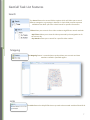
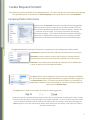
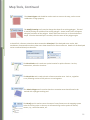
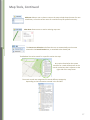
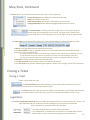
Map Tools, Continued The Layers button can be found at the bottom left corner of the map screen. Points Of Interest layers different landmarks on the map. Map is the default street view. 2011 Aerial Photos will show the aerial photo view of an area. Topographic Map shows different topographical features of an area. The Zoom Button is a sliding scale that ranges from 1 to 10, with 1 being full extent view, and 10 being the close up view. The zoom scale is found at the bottom left corner of the mapping screen, on the right side of the layers button. The Status Bar at the bottom of the ticket entry screen shows important information about a ticket. Notice is the legal date and time requested on a ticket. The Ticket Status is used to designate whether or not the ticket was processed within the date parameters of the excavation law. Compliant means the ticket was requested with a 48hour notice as designated by Alabama state law. Non-compliant means the ticket was requested sooner than the required 48hour notice date. Emergency means the ticket was processed as an emergency as defined by Alabama state law. Elapsed shows the amount of time the ticket was open. The date and time stamp reference when the ticket was processed. The user name of the person submitting the request is shown at the far right corner of the status bar. Closing a Ticket Saving a Ticket Tickets can be saved two ways. The Save and Close button will completely close out the ticket and remove it from the current view once the ticket number is given. The Save button will close the ticket and assign a ticket number to the request, but the ticket will remain visible on the ticket entry screen until manually discarded from the screen. Legal Dates The Good Through Date and Times are now visible on the bottom left corner of the ticket entry screen. The legal start date and time is 48 hours or two working days from the time of notification. Tickets are valid for 14 calendars from the start date. • The Good through date is the date a ticket will expire. • The Update date, is the date that an extension or renewal ticket must be made in order to have continuous coverage at an excavation site. 18