1
1.6
The Current Outputs
The instrument provides 2 analog current outputs. The first one is representing the gas
concentration in the configured units and range (cf. 2.5.3.2 for the software configuration) and the
second one gives the temperature of the sensor.
The temperature output has a fixed range, the 0% current is obtained for -5ºC (23ºF or 268.15K)
and below. At the other end, the full range current is obtained for 100ºC (212ºF or 373.15K) and
above.
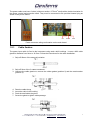
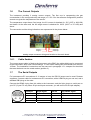
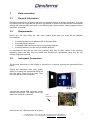
The connection and the wiring indications are represented in the picture below:
Out(gas) +
Out(gas) -
Out(temp) Out(temp) +
Analog output connector wiring and location on the main board
1.6.1
Cable fixation
The current output cable is fixed to the instrument using EMC (the cable shield can be connected
to the instrument’s box) strain relief bushings. It uses a M16 cable gland for diameter from 6mm to
10.5mm. The installation’s instructions are the same as in paragraph 1.5.1 excepted for the shield
that must be bend over the metal washer (position 3).
1.7
The Serial Outputs
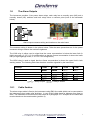
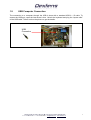
For instrument-to-PC connections of 12 meters or less, the RS-232 output can be used. Dextens
supplies a 3 meters cable for instrument-to-PC connection, with a LEMO-4 plug on one end, and a
standard DB 9 plug on the other.
Connect the LEMO-4 plug from this cable to the instrument, and the 9-pin plug to a serial port on
your PC (If your PC only has a 25-pin serial port connector, you will need a 25-to-9-pin adapter).
Lemo4 pin
RS232 signal
Sub D9
User RS232 signal
1
GND
5
GND
2
TxD
2
RxD
3
RxD
3
TxD
4
Not connected
-
Not connected
Dextens SA 18 Chemin des Aulx 1218 Plan-les-Ouates Switzerland
T + 41 22 884 83 06 F + 41 22 794 66 65 [email protected] www.dextens.ch
7