1
PREFERENCE LISTS | PAGE 9 of 12
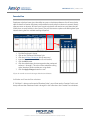
Favorite Five
Employees who have been given the ability to create a substitute preference list will now also be
able to select five favorite substitutes to be notified instantly when an absence is entered. Shortly
after you enter an absence, all five of your favorite substitutes will receive an email about the job
(if they have an email address in the system). They will also receive a phone call offering them your
absence during the first available evening call period.
1.
2.
3.
4.
5.
6.
Find the Employee in Aesop
Click on the “Preferred Substitutes” tab
Click the Add New Substitutes link (if necessary)
into the “Search” box and click the Search button)
Click the Edit button
Click the radio buttons that correspond to the numbered
columns 1 through 5. The subs will be ranked (for calling
order) based on which number you assign them.
7. Click the Apply Changes button to save*
*If you do not wish to save the changes click the Cancel button.
Call Order and Favorite Five selections
If “Call Order” is being used instead of “Random Order”, you will not see the Favorite Five list and
Aesop will treat the substitutes listed 1 through 5 in the call order as the Favorite Five substitutes.
April - ©2013 Frontline Technologies, Inc.
Confidential - Information in this document should not be distributed unless explicitly authorized.