1
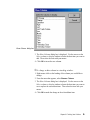
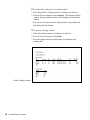
Show Columns dialog box
3. The Show Columns dialog box is displayed. Use the arrows on the
Select columns to display window to locate the data item you want to
add. Then select the item with your mouse.
4. Click OK to insert the new column.
å To change a data column in a tracking window:
1. Right mouse click on the heading of the column you would like to
change.
2. From the menu that appears, select Rename Column.
3. The Show Columns dialog box is displayed. Use the arrows on the
Select columns to display window to locate the data item you want to
use to replace the current data item. Then select the item with your
mouse.
4. Click OK to make the change to the selected data item.
Chapter III: Tracking Your Positions
75