1
5.
5.1.
Ports and buttons.
External ports.
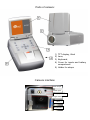
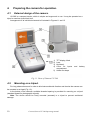
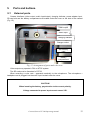
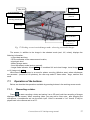
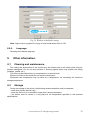
Camera interfaces (video output, audio input/output), charging indicator, power adapter input,
SD card slot and the battery compartment are located under the cover on the side of the camera
(Fig. 15).
Video output
Audio input
Charging indicator
Charger socket
SD memory
card
Battery
compartment
Fig. 15. Arrangement of ports under the cover.
Video output may operate in PAL or NTSC system.
The SD card must be formatted in FAT32.
When recording a voice note - approach maximally to the microphone. The microphone +
headphone set is plugged into the audio input located under the cover.
CAUTION!
When inserting the battery, pay attention to the correct polarity.
Voltage connected to power input cannot exceed 12V.
Corona Camera UV-260 Operating manual.
13