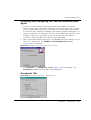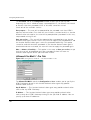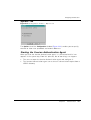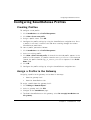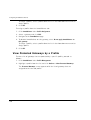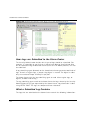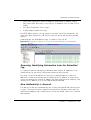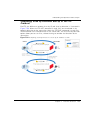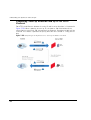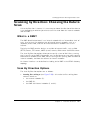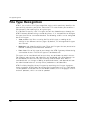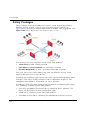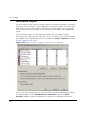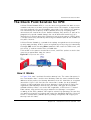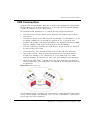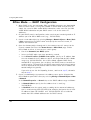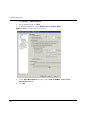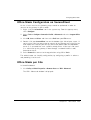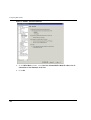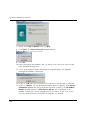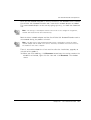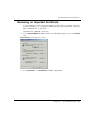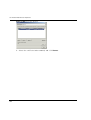
1
UTM-1 Administration Guide 702365 May 16, 2007 © 2003-2007 Check Point Software Technologies Ltd. All rights reserved. This product and related documentation are protected by copyright and distributed under licensing restricting their use, copying, distribution, and decompilation. No part of this product or related documentation may be reproduced in any form or by any means without prior written authorization of Check Point. While every precaution has been taken in the preparation of this book, Check Point assumes no responsibility for errors or omissions. This publication and features described herein are subject to change without notice. RESTRICTED RIGHTS LEGEND: Use, duplication, or disclosure by the government is subject to restrictions as set forth in subparagraph (c)(1)(ii) of the Rights in Technical Data and Computer Software clause at DFARS 252.227-7013 and FAR 52.227-19. TRADEMARKS: ©2003–2007 Check Point Software Technologies Ltd. All rights reserved. Check Point, AlertAdvisor, Application Intelligence, Check Point Express, Check Point Express CI, the Check Point logo, Check Point Pointsec Protector, ClusterXL, Confidence Indexing, ConnectControl, Connectra, Connectra Accelerator Card, Cooperative Enforcement, Cooperative Security Alliance, CoSa, DefenseNet, Dynamic Shielding Architecture, Eventia, Eventia Analyzer, Eventia Reporter, Eventia Suite, FireWall-1, FireWall-1 GX, FireWall-1 SecureServer, FloodGate-1, Hacker ID, Hybrid Detection Engine, IMsecure, INSPECT, INSPECT XL, Integrity, Integrity Clientless Security, Integrity SecureClient, InterSpect, IPS-1, IQ Engine, MailSafe, NG, NGX, Open Security Extension, OPSEC, OSFirewall, Pointsec, Pointsec Mobile, Policy Lifecycle Management, Provider-1, Safe@Home, Safe@Office, SecureClient, SecureClient Mobile, SecureKnowledge, SecurePlatform, SecurePlatform Pro, SecuRemote, SecureServer, SecureUpdate, SecureXL, SecureXL Turbocard, Sentivist, SiteManager-1, SmartCenter, SmartCenter Express, SmartCenter Power, SmartCenter Pro, SmartCenter UTM, SmartConsole, SmartDashboard, SmartDefense, SmartDefense Advisor, Smarter Security, SmartLSM, SmartMap, SmartPortal, SmartUpdate, SmartView, SmartView Monitor, SmartView Reporter, SmartView Status, SmartViewTracker, SofaWare, SSL Network Extender, Stateful Clustering, TrueVector, Turbocard, UAM, UserAuthority, User-to-Address Mapping, UTM-1, VPN-1, VPN-1 Accelerator Card, VPN-1 Edge, VPN-1 Express, VPN-1 Express CI, VPN-1 Power, VPN-1 Power VSX, VPN-1 Pro, VPN-1 SecureClient, VPN-1 SecuRemote, VPN-1 SecureServer, VPN-1 UTM, VPN-1 UTM Edge, VPN-1 VSX, Web Intelligence, ZoneAlarm, ZoneAlarm Anti-Spyware, ZoneAlarm Antivirus, ZoneAlarm Internet Security Suite, ZoneAlarm Pro, ZoneAlarm Secure Wireless Router, Zone Labs, and the Zone Labs logo are trademarks or registered trademarks of Check Point Software Technologies Ltd. or its affiliates. ZoneAlarm is a Check Point Software Technologies, Inc. Company. All other product names mentioned herein are trademarks or registered trademarks of their respective owners. The products described in this document are protected by U.S. Patent No. 5,606,668, 5,835,726, 5,987,611, 6,496,935, 6,873,988, 6,850,943, and 7,165,076 and may be protected by other U.S. Patents, foreign patents, or pending applications. For third party notices, see: THIRD PARTY TRADEMARKS AND COPYRIGHTS. Contents Preface Chapter 1 Who Should Use This Guide.............................................................................. 20 Summary of Contents ....................................................................................... 21 More Information ............................................................................................. 24 Feedback ........................................................................................................ 25 Introduction Introduction to UTM-1 ..................................................................................... 36 Overview of Menu Features ............................................................................... 37 Information ..................................................................................................... 38 Welcome.................................................................................................... 38 Appliance Status ........................................................................................ 38 Network .......................................................................................................... 39 Connections ............................................................................................... 39 Routing...................................................................................................... 39 DNS .......................................................................................................... 39 Domain...................................................................................................... 39 Hosts......................................................................................................... 40 Appliance ....................................................................................................... 41 Date and Time............................................................................................ 41 Backup and Restore .................................................................................... 41 Upgrade..................................................................................................... 42 Image Management..................................................................................... 43 Maintenance .............................................................................................. 44 Web Server................................................................................................. 44 Appliance Administration............................................................................. 44 Web and SSH Clients .................................................................................. 45 Administrator Security................................................................................. 45 Product Configuration ...................................................................................... 46 Download SmartConsole .............................................................................. 46 Launch SmartPortal .................................................................................... 46 Administrator ............................................................................................. 46 GUI Clients ................................................................................................ 46 Licenses .................................................................................................... 46 Certificate Authority .................................................................................... 47 Products .................................................................................................... 47 Chapter 2 Image Management and Backup/Restore Overview ......................................................................................................... 50 Image Management.......................................................................................... 51 Table of Contents 5 Overview of Image Management ................................................................... 51 Creating a New Image ...................................................................................... 53 Deleting an Image....................................................................................... 53 Reverting to a Saved Image.......................................................................... 53 Restoring the Factory Defaults ..................................................................... 54 Backup and Restore......................................................................................... 57 Overview of Backup and Restore................................................................... 57 Performing a Manual Backup ....................................................................... 58 Scheduling a Backup .................................................................................. 59 Restoring a Backed Up Configuration............................................................ 60 Chapter 3 Access Control The Need for Access Control ............................................................................. 62 Solution for Secure Access Control .................................................................... 63 Access Control at the Network Boundary ....................................................... 63 The Security Rule Base ............................................................................... 64 Example Access Control Rule ....................................................................... 65 Rule Base Elements .................................................................................... 65 Implied Rules............................................................................................. 66 Preventing IP Spoofing ................................................................................ 67 Multicast Access Control ............................................................................. 69 Considerations for Access Control...................................................................... 73 Spoof Protection ......................................................................................... 73 Simplicity .................................................................................................. 73 Basic Rules................................................................................................ 74 Rule Order ................................................................................................. 74 Topology Considerations: DMZ ..................................................................... 74 The X11 Service ......................................................................................... 75 When to Edit Implied Rules ......................................................................... 75 Configuring Access Control ............................................................................... 76 Defining Access Control Rules...................................................................... 76 Defining a Basic Policy................................................................................ 76 Configuring Anti-Spoofing............................................................................ 77 Configuring Multicast Access Control ............................................................ 78 Chapter 4 Authentication The Need for Authentication ............................................................................. 82 UTM-1 Solution for Authentication .................................................................... 83 Introduction to UTM-1 Authentication .......................................................... 83 Choosing an Authentication Method.............................................................. 84 Authentication Schemes.............................................................................. 84 Authentication Methods............................................................................... 87 Configuring Authentication ............................................................................... 97 Creating Users and Groups........................................................................... 97 Configuring User Authentication................................................................... 99 Configuring Session Authentication ............................................................ 100 Configuring Client Authentication ............................................................... 104 Configuring Authentication Tracking ........................................................... 109 6 Configuring a UTM-1 Gateway to use RADIUS ............................................. Granting User Access Based on RADIUS Server Groups ................................ Associating a RADIUS Server with a UTM-1 Gateway.................................... Configuring a UTM-1 Gateway to use SecurID.............................................. Configuring a UTM-1 Gateway to use TACACS+ ........................................... Groups of Windows users ........................................................................... Chapter 5 110 111 113 113 114 115 Network Address Translation (NAT) The Need to Conceal IP Addresses .................................................................. 118 Check Point Solution for Network Address Translation ....................................... 119 Public and Private IP addresses ................................................................. 120 NAT in UTM-1.......................................................................................... 120 Static NAT ............................................................................................... 122 Hide NAT................................................................................................. 123 Automatic and Manual NAT Rules .............................................................. 124 Automatic Hide NAT for Internal Networks .................................................. 125 Address Translation Rule Base ................................................................... 126 Bidirectional NAT ..................................................................................... 127 Understanding Automatically Generated Rules............................................. 128 Port Translation ........................................................................................ 130 NAT and Anti-Spoofing.............................................................................. 130 Routing Issues.......................................................................................... 130 Disabling NAT in a VPN Tunnel.................................................................. 132 Planning Considerations for NAT ..................................................................... 133 Hide Versus Static .................................................................................... 133 Automatic Versus Manual Rules ................................................................. 133 Choosing the Hide Address in Hide NAT...................................................... 134 Configuring NAT ............................................................................................ 135 General Steps for Configuring NAT ............................................................. 135 Basic Configuration - Network Node with Hide NAT...................................... 136 Sample Configuration - Static and Hide NAT ............................................... 137 Sample Configuration - Using Manual Rules for Port Translation ................... 139 Configuring Automatic Hide NAT for Internal Networks................................. 140 Advanced NAT Configuration .......................................................................... 141 Allowing Connections Between Translated Objects on Different Gateway Interfaces 141 Enabling Communication for Internal Networks with Overlapping IP addresses 142 SmartCenter Behind NAT .......................................................................... 146 IP Pool NAT ............................................................................................. 150 Chapter 6 SmartDefense Need for Active Defense ................................................................................. 158 The SmartDefense Solution for an Active Defense ............................................. 160 Introduction to SmartDefense .................................................................... 160 Application Intelligence-Defending Against the Next Generation of Threats..... 161 Network and Transport Layers: Necessary for Application Intelligence ............ 162 SmartDefense Services .............................................................................. 162 How SmartDefense Works .......................................................................... 164 Table of Contents 7 Categorizing SmartDefense Capabilities ...................................................... 164 The SmartDefense Tree Structure ............................................................... 166 SmartDefense Profiles .................................................................................... 173 Profile Cloning.......................................................................................... 173 Logging.................................................................................................... 174 Configuring SmartDefense .............................................................................. 175 Updating SmartDefense with the Latest Defenses ........................................ 175 Staying Vigilant ........................................................................................ 175 SmartDefense Services................................................................................... 176 Download Updates .................................................................................... 176 Advisories ................................................................................................ 177 Security Best Practices.............................................................................. 178 Configuring SmartDefense Profiles .................................................................. 179 Creating Profiles ....................................................................................... 179 Assign a Profile to the Gateway .................................................................. 179 View Protected Gateways by a Profile .......................................................... 180 SmartDefense StormCenter Module ................................................................. 181 The Need for Cooperation in Intrusion Detection .......................................... 181 Check Point Solution for Storm Center Integration ....................................... 182 Planning Considerations ............................................................................ 186 Configuring Storm Center Integration .......................................................... 187 Chapter 7 Anti Virus Protection Introduction to Integrated Anti Virus Protection ................................................ 192 Architecture .................................................................................................. 193 Configuring Integrated Anti Virus Scanning ...................................................... 194 Signature Update Mechanism ......................................................................... 195 Understanding Scan By Direction and Scan By IP ............................................. 196 Definition of Scan By Direction and Scan By IP ........................................... 196 Comparing Scan by Direction and by IP ...................................................... 197 Scanning by Direction: Choosing the Data to Scan ............................................ 201 What is a DMZ? ........................................................................................ 201 Scan By Direction Options ......................................................................... 201 File Type Recognition..................................................................................... 204 Continuous Download..................................................................................... 205 Logging and Monitoring .................................................................................. 206 File Size Limitations and Scanning.................................................................. 207 General Settings ....................................................................................... 207 File Handling ........................................................................................... 207 Archive File Handling ................................................................................ 208 Scan Failure............................................................................................. 208 VPN-1 UTM Edge Anti Virus ........................................................................... 209 Chapter 8 Web Intelligence The Need for Web Attack Protection ................................................................ 212 The Web Intelligence Solution for Web Attack Protection................................... 213 Web Intelligence Technologies ........................................................................ 214 Web Intelligence Online Updates..................................................................... 215 8 Web Intelligence Security and Usability ........................................................... 216 Web Server Focused Security ..................................................................... 216 Enforcement Granularity ............................................................................ 216 Configuration Flexibility............................................................................. 217 Variable Security Levels............................................................................. 218 Monitor-Only Mode ................................................................................... 218 Customizable Error Page............................................................................ 219 Web Content Protections ................................................................................ 221 Understanding HTTP Sessions, Connections and URLs...................................... 222 HTTP Request Example............................................................................. 222 HTTP Response Example ........................................................................... 223 HTTP Connections .................................................................................... 223 Understanding URLs ................................................................................. 224 Connectivity Versus Security Considerations ..................................................... 225 Monitor-Only Mode ................................................................................... 225 Protection for Specific Servers ................................................................... 225 Variable Security Levels............................................................................. 225 Connectivity Implications of Specific Protections ......................................... 225 Web Security Performance Considerations ........................................................ 227 Protections Implemented in the Kernel Vs. Security Server ........................... 227 Protections with a Higher Performance Overhead ......................................... 228 Adjusting the Number of Allowed Concurrent HTTP Connections ................... 228 Backward Compatibility Options for HTTP Protocol Inspection ........................... 229 Web Intelligence License Enforcement............................................................. 230 Chapter 9 SmartCenter Overview Introduction .................................................................................................. 234 VPN-1Power ............................................................................................. 234 Check Point Express.................................................................................. 234 Some Basic Concepts and Terminology ....................................................... 234 Possible Deployment Scenarios .................................................................. 236 Login Process ................................................................................................ 238 Overview .................................................................................................. 238 Authenticating the Administrator ................................................................ 238 Authenticating the SmartCenter Server Using Its Fingerprint ......................... 239 Managing Objects in SmartDashboard.............................................................. 240 SmartDashboard and Objects ..................................................................... 241 Managing Objects ..................................................................................... 243 Configuring Objects................................................................................... 244 Changing the Objects Tree View ................................................................. 245 Groups in the Network Objects Tree............................................................ 248 Securing Channels of Communication Between Internal Components (SIC).......... 253 The SIC Solution ...................................................................................... 254 The Internal Certificate Authority (ICA) ....................................................... 254 Initializing the Trust Establishment Process ................................................ 254 Understanding SIC Trust States ................................................................. 255 Testing the SIC Status............................................................................... 255 Resetting the Trust State ........................................................................... 256 Table of Contents 9 Troubleshooting ........................................................................................ 256 Network Topology .......................................................................................... 257 Managing Users in SmartDashboard ................................................................ 259 User Management Requirements ................................................................ 259 The Check Point User Management Solution ............................................... 259 Users Database......................................................................................... 260 User and Administrator Types .................................................................... 261 Configuring User Objects ........................................................................... 261 Working with Policies ..................................................................................... 266 Overview .................................................................................................. 266 Installing a Policy Package ........................................................................ 266 Uninstalling a Policy Package .................................................................... 268 Installing the User Database ...................................................................... 268 Chapter 10 Policy Management The Need for an Effective Policy Management Tool ........................................... 272 The Check Point Solution for Managing Policies ............................................... 273 Policy Management Overview ..................................................................... 273 Policy Packages........................................................................................ 274 Dividing the Rule Base into Sections Using Section Titles............................. 277 Querying and Sorting Rules and Objects...................................................... 277 Policy Management Considerations.................................................................. 280 Conventions ............................................................................................. 280 Policy Management Configuration.................................................................... 281 Managing Policy Packages ......................................................................... 281 Adding a Rule Section Title ....................................................................... 283 Querying the Rule Base ............................................................................. 283 Querying Objects ...................................................................................... 286 Sorting Objects in the Objects List Pane ..................................................... 286 Chapter 11 SmartMap Overview of SmartMap.................................................................................... 288 The SmartMap Solution............................................................................. 288 Working with SmartMap ................................................................................. 289 Enabling and Viewing SmartMap ................................................................ 289 Adjusting and Customizing SmartMap......................................................... 290 Working with Network Objects and Groups in SmartMap ............................... 292 Working with SmartMap Objects................................................................. 295 Working with Folders in SmartMap ............................................................. 297 Integrating SmartMap and the Rule Base ......................................................... 300 Displaying a Legend for Regular and/or NAT Rules ....................................... 300 Troubleshooting SmartMap ............................................................................. 303 For What Objects Are Topology Calculations Made? ...................................... 303 Calculating Topology Information ............................................................... 303 What is SmartMap Helper? ........................................................................ 304 Troubleshooting Duplicated Networks ......................................................... 304 Troubleshooting Unresolved Object Interfaces.............................................. 304 What Objects Can Be Defined as Protected Objects? .................................... 304 10 Defining Protected Objects as Groups ......................................................... 305 Working with SmartMap Output....................................................................... 306 Chapter 12 SmartView Tracker The Need for Tracking .................................................................................... 308 The Check Point Solution for Tracking ............................................................. 309 Tracking Overview ..................................................................................... 309 SmartView Tracker .................................................................................... 311 Filtering ................................................................................................... 314 Queries .................................................................................................... 314 Matching Rule .......................................................................................... 315 Log File Maintenance via Log Switch .......................................................... 318 Disk Space Management via Cyclic Logging................................................. 318 Log Export Capabilities.............................................................................. 318 Local Logging ........................................................................................... 319 Logging Using Log Servers ......................................................................... 319 Advanced Tracking Operations ................................................................... 320 Tracking Considerations ................................................................................. 321 Choosing which Rules to Track................................................................... 321 Choosing the Appropriate Tracking Option ................................................... 321 Forwarding Log Records Online vs. Forwarding Log Files on Schedule ............ 322 Tracking Configuration ................................................................................... 323 Basic Tracking Configuration...................................................................... 323 SmartView Tracker View Options................................................................. 324 Configuring Filters .................................................................................... 326 Follow Source, Destination and User Data ................................................... 327 Adding a Source ....................................................................................... 327 Viewing the Logs of a Rule from the Rule Base ............................................ 328 Configuring Queries................................................................................... 329 Hiding and Showing the Query Tree Pane .................................................... 331 Working with the Query Properties Pane ...................................................... 331 Modifying Column Properties ..................................................................... 332 Copying Log Record Data........................................................................... 333 Viewing a Record’s Details ......................................................................... 333 Viewing a Rule.......................................................................................... 334 Find by Interface ...................................................................................... 334 Maintaining the Logs................................................................................. 335 Local Logging ........................................................................................... 336 Working with Log Servers........................................................................... 337 Custom Commands ................................................................................... 339 Configuring Block Intruder ......................................................................... 340 Configuring Alert Commands...................................................................... 341 Chapter 13 SmartCenter Management The Need for SmartCenter Management........................................................... 344 The SmartCenter Management Solution ........................................................... 345 Overview of the Management Solution......................................................... 345 Managing Policy Versions .......................................................................... 345 Table of Contents 11 Version Control Operations......................................................................... 346 Version Upgrade ....................................................................................... 347 Version Diagnostics ................................................................................... 348 Backup and Restore .................................................................................. 348 SmartCenter Management Configuration .......................................................... 349 Manual versus Automatic Version Creation .................................................. 349 Chapter 14 SmartPortal Overview ....................................................................................................... 351 Deploying SmartPortal on a Dedicated Server ................................................... 352 Deploying SmartPortal on the SmartCenter Server ............................................. 353 SmartPortal Configuration and Commands ....................................................... 354 SmartPortal Commands ............................................................................. 354 Limiting Access to Specific IP Addresses .................................................... 354 SmartPortal Configuration.......................................................................... 355 Connecting to SmartPortal .............................................................................. 356 Troubleshooting ............................................................................................. 356 Chapter 15 SmartUpdate The Need for Software Upgrade and License Management ................................. 360 The SmartUpdate Solution.............................................................................. 361 Introducing SmartUpdate .......................................................................... 361 Understanding SmartUpdate...................................................................... 362 SmartUpdate - Seeing it for the First Time .................................................. 363 Common Operations.................................................................................. 365 Upgrading Packages....................................................................................... 367 Overview of Upgrading Packages ................................................................ 367 The Upgrade Package Process.................................................................... 368 Other Upgrade Operations ......................................................................... 373 Managing Licenses ........................................................................................ 375 Overview of License Management ............................................................... 375 Licensing Terminology............................................................................... 376 License Upgrade....................................................................................... 378 The License Attachment Process ................................................................ 379 Other License Operations........................................................................... 382 Generating CPInfo ......................................................................................... 384 The SmartUpdate Command Line.................................................................... 385 Chapter 16 Frequently Asked Questions Network Objects Management......................................................................... 388 Policy Management........................................................................................ 389 Appendix 17 Network Objects Introduction to Objects................................................................................... 392 The Object Creation Workflow .................................................................... 393 Viewing and Managing Objects ................................................................... 393 Network Objects ............................................................................................ 394 12 Check Point Objects.................................................................................. Nodes...................................................................................................... Interoperable Device ................................................................................. Networks.................................................................................................. Domains .................................................................................................. Open Security Extension (OSE) Devices ...................................................... Groups..................................................................................................... Logical Servers ......................................................................................... Address Ranges ........................................................................................ Dynamic Objects....................................................................................... VoIP Domains........................................................................................... Chapter 18 394 397 397 397 398 398 402 403 404 404 405 Overview of VPN The Connectivity Challenge ............................................................................. 408 The Basic Check Point VPN Solution ............................................................... 409 What is VPN ............................................................................................. 409 Understanding the Terminology .................................................................. 411 Site to Site VPN ....................................................................................... 412 VPN Communities..................................................................................... 412 Remote Access VPN.................................................................................. 414 Chapter 19 Introduction to Site to Site VPN The Need for Virtual Private Networks .............................................................. 416 Confidentiality .......................................................................................... 416 Authentication.......................................................................................... 416 Integrity ................................................................................................... 416 The Check Point Solution for VPN ................................................................... 417 How it Works ............................................................................................ 417 VPN Communities..................................................................................... 419 VPN Topologies ........................................................................................ 420 Authentication Between Community Members ............................................. 425 Dynamically Assigned IP Gateways ............................................................. 426 Routing Traffic within a VPN Community..................................................... 427 Access Control and VPN Communities ........................................................ 428 Excluded Services..................................................................................... 429 Special Considerations for Planning a VPN Topology ......................................... 430 Configuring Site to Site VPNs.......................................................................... 431 Migrating from Traditional mode to Simplified mode .................................... 431 Configuring a Meshed Community Between Internally Managed Gateways ...... 432 Configuring a Star VPN Community ............................................................ 433 Confirming a VPN Tunnel Successfully Opens.............................................. 434 Configuring a VPN with External Gateways Using PKI ........................................ 435 Configuring a VPN with External Gateways Using a Pre-Shared Secret................. 439 How to Authorize Firewall Control Connections in VPN Communities................... 442 Why Turning off FireWall Implied Rules Blocks Control Connections .............. 442 Allowing Firewall Control Connections Inside a VPN ..................................... 443 Table of Contents 13 Discovering Which Services are Used for Control Connections ....................... 443 Chapter 20 Introduction to Remote Access VPN Need for Remote Access VPN ......................................................................... 446 The Check Point Solution for Remote Access.................................................... 447 Enhancing SecuRemote with SecureClient Extensions .................................. 448 Establishing a Connection between a Remote User and a Gateway................. 449 Remote Access Community........................................................................ 450 Identifying Elements of the Network to the Remote Client............................. 450 Connection Mode...................................................................................... 451 User Profiles ............................................................................................ 451 Access Control for Remote Access Community ............................................. 452 Client-Gateway Authentication Schemes ..................................................... 452 Advanced Features.................................................................................... 455 Alternatives to SecuRemote/SecureClient .................................................... 455 VPN for Remote Access Considerations ............................................................ 456 Policy Definition for Remote Access ........................................................... 456 User Certificate Creation Methods when Using the ICA ................................. 456 Internal User Database vs. External User Database....................................... 457 NT Group/RADIUS Class Authentication Feature .......................................... 458 VPN for Remote Access Configuration.............................................................. 459 Establishing Remote Access VPN ............................................................... 460 Creating the Gateway and Defining Gateway Properties ................................. 462 Defining User and Authentication methods in LDAP ..................................... 462 Defining User Properties and Authentication Methods in the Internal Database...... 462 Initiating User Certificates in the ICA Management Tool ............................... 462 Generating Certificates for Users in SmartDashboard.................................... 463 Initiating Certificates for Users in SmartDashboard ...................................... 463 Configuring Certificates for Users and Gateway (Using Third Party PKI).......... 464 Enabling Hybrid Mode and Methods of Authentication.................................. 465 Configuring Authentication for NT groups and RADIUS Classes ..................... 466 Using a Pre-Shared Secret ......................................................................... 466 Defining an LDAP User Group .................................................................... 466 Defining a User Group ............................................................................... 467 Defining a VPN Community and its Participants........................................... 467 Defining Access Control Rules.................................................................... 467 Installing the Policy .................................................................................. 468 User Certificate Management ..................................................................... 468 Modifying encryption properties for Remote Access VPN............................... 470 Working with RSA’S Hard and Soft Tokens .................................................. 471 Chapter 21 Office Mode The Need for Remote Clients to be Part of the LAN........................................... 476 Office Mode Solution ..................................................................................... 477 Introducing Office Mode ............................................................................ 477 How Office Mode Works............................................................................. 478 Assigning IP Addresses.............................................................................. 480 14 IP Address Lease duration ......................................................................... 482 Using name resolution - WINS and DNS...................................................... 482 Anti Spoofing ........................................................................................... 483 Using Office Mode with multiple external interfaces ..................................... 483 Office Mode Per Site ................................................................................. 484 Enabling IP Address per User.......................................................................... 486 The Problem............................................................................................. 486 The Solution............................................................................................. 486 Office Mode Considerations ............................................................................ 489 IP pool Versus DHCP................................................................................. 489 Routing Table Modifications ...................................................................... 489 Using the Multiple External Interfaces Feature............................................. 489 Configuring Office Mode ................................................................................. 490 Office Mode — IP Pool Configuration.......................................................... 490 Configuring IP Assignment Based on Source IP Address ............................... 493 Office Mode via ipassignment.conf File ....................................................... 494 Subnet masks and Office Mode Addresses................................................... 494 Checking the Syntax.................................................................................. 495 Office Mode — DHCP Configuration ........................................................... 496 Office Mode - Using a RADIUS Server......................................................... 497 Office Mode Configuration on SecureClient.................................................. 499 Office Mode per Site ................................................................................. 499 Chapter 22 SecuRemote/SecureClient The Need for SecureClient .............................................................................. 502 The Check Point Solution ............................................................................... 503 How it works............................................................................................. 503 SCV Granularity for VPN Communities ............................................................. 504 Blocking Unverified SCV Connections .............................................................. 505 Selective Routing........................................................................................... 506 Desktop Security Policy .................................................................................. 509 When is a Policy Downloaded? ................................................................... 509 Policy Expiration and Renewal ................................................................... 509 Prepackaged Policy ................................................................................... 509 Policy Server High Availability .................................................................... 509 Wireless Hot Spot/Hotel Registration........................................................... 510 Enable Logging.............................................................................................. 511 NAT Traversal Tunneling ................................................................................ 512 Switching Modes ........................................................................................... 513 HTML Based Help ......................................................................................... 514 Configuring SecureClient ................................................................................ 515 Configuring SCV Granularity for VPN Communities ....................................... 515 Configuring block_scv_client_connections ................................................... 515 Configuring Selective Routing .................................................................... 516 Configuring Desktop Security Policy Expiration Time .................................... 517 Configuring Hot Spot/Hotel Registration ...................................................... 518 Configuring Enable Logging ....................................................................... 519 Configuring NAT Traversal ......................................................................... 520 Table of Contents 15 Enable/Disable Switching Modes ..................................................................... 522 Add HTML Help to Package ............................................................................ 523 Chapter 23 SSL Network Extender Introduction to the SSL Network Extender........................................................ 526 How the SSL Network Extender Works ............................................................. 527 Commonly Used Concepts .............................................................................. 528 Remote Access VPN.................................................................................. 528 Remote Access Community........................................................................ 528 Office Mode ............................................................................................. 528 Visitor Mode ............................................................................................. 529 Integrity Clientless Security ....................................................................... 529 Integrity Secure Browser............................................................................ 531 Special Considerations for the SSL Network Extender........................................ 533 Pre-Requisites .......................................................................................... 533 Features .................................................................................................. 534 Configuring the SSL Network Extender............................................................. 535 Configuring the Server............................................................................... 535 Load Sharing Cluster Support .................................................................... 544 Customizing the SSL Network Extender Portal ............................................. 545 Upgrading the SSL Network Extender Client ................................................ 549 Installation for Users without Administrator Privileges .................................. 550 SSL Network Extender User Experience ........................................................... 551 Configuring Microsoft Internet Explorer ....................................................... 551 About ActiveX Controls .............................................................................. 552 Downloading and Connecting the Client ...................................................... 552 Uninstall on Disconnect ............................................................................ 564 Removing an Imported Certificate .............................................................. 565 Troubleshooting ............................................................................................. 567 Chapter 24 Resolving Connectivity Issues The Need for Connectivity Resolution Features ................................................. 572 Check Point Solution for Connectivity Issues .................................................... 573 Other Connectivity Issues .......................................................................... 573 Overcoming NAT Related Issues...................................................................... 574 During IKE phase I ................................................................................... 575 During IKE phase II .................................................................................. 575 During IPSec............................................................................................ 577 NAT and Load Sharing Clusters .................................................................. 579 Overcoming Restricted Internet Access ............................................................ 581 Visitor Mode ............................................................................................. 581 Configuring Remote Access Connectivity .......................................................... 585 Configuring IKE Over TCP.......................................................................... 585 Configuring Small IKE phase II Proposals.................................................... 586 Configuring NAT Traversal (UDP Encapsulation) .......................................... 586 Configuring Visitor Mode............................................................................ 588 Configuring Remote Clients to Work with Proxy Servers................................. 589 16 Index........................................................................................................... 597 Table of Contents 17 18 Preface Preface P Who Should Use This Guide page 20 Summary of Contents page 21 More Information page 24 Feedback page 25 19 Who Should Use This Guide Who Should Use This Guide This guide is intended for administrators responsible for maintaining network security within an enterprise, including policy management and user support. This guide assumes a basic understanding of the following: 20 • System administration • The underlying operating system • Internet protocols (for example, IP, TCP and UDP) Summary of Contents Summary of Contents This guide describes the firewall and SmartDefense, VPN and SmartCenter server components of UTM-1. It contains the following sections and chapters: Chapter Description Chapter 1, “Introduction” Describes how to set up a security policy to fit organizational requirements. Chapter 2, “Image Management and Backup/Restore” Describes the VPN-1 authentication schemes (for username and password management) and authentication methods (how users authenticate). Chapter 3, “Access Control” Describes the Network Address Translation (NAT) process, which involves replacing one IP address with another. NAT can change both the source and destination address of the packet. It is used for both security and administrative purposes. Chapter 4, “Authentication” Describes the ISP Redundancy feature, which assures reliable Internet connectivity by allowing a single or clustered VPN-1 gateway to connect to the Internet via redundant Internet Service Provider (ISP) links. Chapter 5, “Network Address Translation (NAT)” Describes the ConnectControl server load balancing solution, which distributes network traffic among a number of servers and thereby reduces the load on a single machine, improves network response time and ensures high availability. Chapter 6, “SmartDefense” Describes the SmartDefense component, which actively defends your network, even when the protection is not explicitly defined in the Security Rule Base. SmartDefense unobtrusively analyzes activity across your network, tracking potentially threatening events and optionally sending notifications. It protects your organization from all known (and most unknown) network attacks using intelligent security technology. Preface 21 Summary of Contents 22 Chapter Description Chapter 7, “Anti Virus Protection” Information detailing the Anti Virus technology. Anti Virus protection is available for the HTTP, FTP, SMTP and POP3 protocols. Options for each protocol can be centrally configured. Chapter 8, “Web Intelligence” Understanding Web Intelligence, which allows customers to configure, enforce and update attack protections for web servers and applications, against known and unknown attacks. Chapter 9, “SmartCenter Overview” Includes an overview of usage, and describes the terminology and procedures that will help you manage UTM-1. Chapter 10, “Policy Management” Describes how to facilitate the administration and management of the Security Policy by the system administrator. Chapter 11, “SmartMap” Describes how a visual representation of your network is used to facilitate and enhance the understanding of the physical deployment and organization of your network. Chapter 12, “SmartView Tracker” Provides information about how to collect comprehensive information on your network activity in the form of logs and descibes how you can then audit these logs at any given time, analyze your traffic patterns and troubleshoot networking and security issues. Chapter 13, “SmartCenter Management” Explains the use of SmartCenter tools to make changes in the production environment securely, smoothly and efficiently. This chapter includes information on Revision control(SmartCenter can manage multiple versions of policies) and Backup & Restore (when it is imperative that the SmartCenter Server be upgraded, it is possible to create a functioning SmartCenter Server which will replace the existing machine while it is being serviced). Chapter 14, “SmartPortal” Includes an explanation about web based administration and troubleshooting of the UTM-1 SmartCenter Server. Summary of Contents Chapter Description Chapter 15, “SmartUpdate” Explains the use of SmartUpdate is an optional module for VPN-1 that automatically distributes software applications and updates for Check Point and OPSEC Certified products, and manages product licenses. This chapter shows how SmartUpdate provides a centralized means to guarantee that Internet security throughout the enterprise network is always up to date. It shows how SmartUpdate turns time-consuming tasks that could otherwise be performed only by experts into simple point and click operations. Chapter 16, “Frequently Asked Questions” Provides frequently asked questions about network objects management and policy management. Chapter 17, “Network Objects” Provides an in-depth explanation of network objects and how manage and configure them. Chapter 18, “Overview of VPN” Provides an overview of Check Point’s solution for VPN. Chapter 19, “Introduction to Site to Site VPN” An introduction to the basics of VPN’s between Gateways and VPN communities. Chapter 20, “Introduction to Remote Access VPN” Introduction to VPN connections between gateways and remote users. Chapter 21, “Office Mode” Office Mode enables a VPN-1 Power Gateway to assign a remote client an IP address. Chapter 22, “SecuRemote/SecureClient” SecuRemote/SecureClient is a method that allows you to connect to your organization in a secure manner, while at the same time protecting your machine from attacks that originate on the Internet. Chapter 23, “SSL Network Extender” Contains an introduction of the SSL Network Extender and the advantages it has for remote access clients. Chapter 24, “Resolving Connectivity Issues” Provides information of some of the challenges remote access clients face when connecting and various Check Point solutions. Preface 23 More Information More Information 24 • For additional technical information regarding Check Point products, refer to Check Point’s SecureKnowledge at https://secureknowledge.checkpoint.com/. • To view the latest version of this document in the Check Point User Center, go to: http://www.checkpoint.com/support/technical/documents. Feedback Feedback Check Point is engaged in a continuous effort to improve its documentation. Please help us by sending your comments to: [email protected] Preface 25 Feedback 26 Feedback Preface 27 Feedback 28 Feedback Preface 29 Feedback 30 Feedback 31 Feedback 32 Feedback Preface 33 Feedback 34 Chapter Introduction 1 In This Chapter Introduction to UTM-1 page 36 Overview of Menu Features page 37 Information page 38 Network page 39 Appliance page 41 Product Configuration page 46 35 Introduction to UTM-1 Introduction to UTM-1 Thank you for using UTM-1. UTM-1 provides comprehensive enterprise-class security for medium sized organizations (organizations with up to 500 users). It includes SmartCenter management for a specified number of sites, VPN-1 UTM gateways protecting a specified number of users, SmartDefense and VPN-1 SecuRemote for users. UTM-1 appliances offer uncompromising levels of security, while streamlining deployment and administration. UTM-1 appliances offer a complete set of security features including firewall, intrusion prevention, antivirus, anti-spyware, Web application firewall, VoIP security, instant messaging (IM) and peer-to-peer (P2P) blocking, Web Filtering, as well as secure site-to-site and remote access connectivity. UTM-1 is supported by SmartDefense™ Services, which maintain the most current preemptive security for the Check Point security infrastructure. To help you stay ahead of emerging threats and attacks, SmartDefense Services provide real-time updates and configuration advisories for defenses and security policies. 36 Overview of Menu Features Overview of Menu Features UTM-1 can be configured using the options from the main menu on the easy–to–use Web interface. Table 1-1 summarizes the items on the main menu. Table 1-1 Menu Item Description Information Displays various device information such as hostname, version and build, and installation type. Network Configure the network settings. Appliance Local appliance settings including image management, backup/restore settings and configuring administrators. Product Configuration Establish Secure Internal Communication (SIC), add a license and download SmartConsole applications. To configure the appliance using the First Time Wizard, see the Getting Started Guide. The Getting Started Guide is also available here: http://www.checkpoint.com/downloads/latest/utm/index.html Advanced configuration is available using the Command Line Interface. For more information, see the Command Line Interface NGX R62 Administration Guide available on the CD provided with the appliance. Chapter 1 Introduction 37 Information Information Welcome The Welcome page offers an introduction to the various sections of the WebGUI. Appliance Status This page provides a summary of the appliance information and disk information such as hostname, version and build and license status. Figure 1-1 Appliance Status page 38 Network Network Connections This page enables you to create, configure, and edit the properties of network connections. To update the view, click the Refresh button. Figure 1-2 Network Connections page Routing This page enables you to manage the routing table on your device. You can add a static or default route, or delete them. DNS In the DNS page, you can define up to three DNS servers. A DNS server translates domain names into IP addresses. Domain The Host and Domain Name page enables you to configure a hostname, a domain name, and select a primary interface from the drop-down box. The hostname will be associated with the IP of this interface. Chapter 1 Introduction 39 Network Hosts This page enables you to configure the host's local resolving configuration. Once a host is created, it cannot be edited. To make a change, the host must be deleted and recreated. Note - The Host entry for the local machine is automatically generated, based on the Domain configuration information. 40 Appliance Appliance Date and Time This page allows you to define the current date and time, as well as setting the time zone. The date must be in the format: dd-Mon-yyyy (e.g. 31-Dec-2003). The time should be: HH:mm (e.g. 23:30). Alternatively, Network Time Protocol (NTP) can be used to synchronize clocks of computers on the network. Backup and Restore This page allows you to configure backup and restore settings. You can choose to configure a scheduled backup, or you can choose to perform an immediate backup operation. The backup data can be stored on a TFTP Server, SCP Server, or locally. In addition, you can view a Backup Log. Restore is a feature that allows for the restoration of the computer back to a previous state. You can also manually create restore points to record your computer state and settings before you make changes to your computer. This allows you to restore the computer to a previous state, by choosing a restore point on a date or time prior to when you made the change. Backup files can be stored on the appliance either manually or through a scheduled backup. The list of these files are listed in the Appliance Backup Files page. On the Appliance Backup Files page, these files can be downloaded locally from the appliance. Chapter 1 Introduction 41 Appliance Figure 1-3 Backup and Restore page Upgrade In this page, upgrade UTM-1. Before the upgrade begins, an image is automatically created to preserve all the current configuration settings. Upgrades are available from the Check Point Download Center: http://www.checkpoint.com/downloads/latest/utm/index.html 42 Appliance Figure 1-4 Upgrade page Image Management In the Image Management page, a list of saved images are displayed. The image is a snapshot of the entire system and configuration settings. The image does not include logs. These images can be used to restore a machine back to the settings configured in the image. Figure 1-5 Image Management page Chapter 1 Introduction 43 Appliance Maintenance This page provides diagnostics information about all the processes that are running on the machine. For each Process, the User, PID, Parent PID, %CPU, % Memory and Command are displayed. You can use the Product commands drop-down list to Start, Restart, or Stop all of the Check Point products. In addition, you can Shutdown the device, Reboot it, or download a diagnostic file (cpinfo output) useful for support. Figure 1-6 Appliance Maintenance page Web Server In this window, you can configure the listening IP and port for the Administration Web server. Appliance Administration This page allows you to add and delete SecurePlatform Device Administrators, allows you to create or delete a SecurePlatform Device Administrator. In the Password recovery login token section, you can download a One Time Login Token that can be used in the event a password is forgotten. It is highly recommended to save and store the password recovery login token file in a safe place. 44 Appliance How Do I use the Login Token? In the event that apassword is forgotten, click on the Forgot your password? link on the login screen. Follow the instructions to access your appliance. Note - The Password recovery login token can only be used one time. It is recommended that you download and store another login token. Web and SSH Clients In the Web/SSH Clients page, a list of configured client IPs is displayed. Only the configured client IPs are permitted to access SecurePlatform and SSH services. Web/SSH clients can also be added and deleted from this page. Administrator Security In the Administrator Security page, you can configure the Administrator Security parameters. The Administrator Session Timeout determines how long a session has to be idle before the session is automatically terminated. Administrator Login Restrictions will lock an admin account after the configured amount of failed attempts. Chapter 1 Introduction 45 Product Configuration Product Configuration Download SmartConsole SmartConsole applications are required to configure and install a security policy. On this page, you can download the necessary files to install SmartConsole applications. Launch SmartPortal SmartPortal is an advanced management solution which extends browser-based access to SmartCenter. It allows security administrators to extend, at their discretion, security-policy access to other groups, thereby increasing security visibility within the organization. SmartPortal users can view security policies, network status, object properties and logs. Administrator The SmartCenter Administrators page lists the configured Administrators. If no Administrator has been configured, it enables you to add a SmartCenter Administrator. This SmartCenter Administrator will have Read/Write Permissions to SmartCenter and will be allowed to manage the SmartCenter gateway objects and Administrator accounts. Only one administrator can be added to this list. In order to add more administrators the user must use SmartDashboard. GUI Clients The SmartCenter GUI Clients page specifies the remote computers from which administrators will be allowed to connect to the SmartCenter Server. It lists the type, hostname/IP address and netmask of the configured GUI Clients, and enables you to add additional GUI Clients or remove them. Licenses The Licenses page lists the licenses for the products that you have installed. There is a 15 day trial period during which you can use all Check Point products. 46 Product Configuration Figure 1-7 Licenses page Certificate Authority The Certificate Authority page lists key parameters of the SmartCenter Certificate Authority. Products This page enables you to check (via the table), which products and versions are already installed on the machine. Chapter 1 Introduction 47 Product Configuration 48 Chapter Image Management and Backup/Restore 2 In This Chapter Overview page 50 Image Management page 51 Backup and Restore page 57 49 Overview Overview Keeping duplicates of system configurations and files represents an organizations protection against loss, damage or unavailability of data held on information systems. This chapter describes the role of image management and the backup and restore process in preventing data loss. 50 Image Management Image Management In This Section Overview of Image Management page 51 Creating a New Image page 53 Deleting an Image page 53 Reverting to a Saved Image page 53 Overview of Image Management UTM-1 can take a snapshot of your entire system. These images can later be used to revert the appliance settings to those configured in the image. The image contains all system and configuration files. The image does not contain log files. There are two different types of images. The first type is created manually by the administrator, as described in “Creating a New Image” on page 53. Multiple images of this type can be stored at the same time. The second type of image is created automatically before an upgrade starts. There are two types of upgrades: 1) full upgrade and 2) HFA. Only one image can be created and stored for each type of upgrade. For example, when you perform a full upgrade, an image is created. If an HFA is then installed, a second image is created giving you two “upgrade images,” one image from the full upgrade and one image from the HFA. If a second HFA is installed, a new image is automatically created and overwrites the image created by the first HFA installation. Figure 2-8 Image Management Page Chapter 2 Image Management and Backup/Restore 51 Image Management Restore Factory Defaults The Restore Factory Defaults mechanism restores all configuration settings to the default settings. This is helpful if a user has misconfigured the software configuration and the appliance needs to be reconfigured from scratch. This is also helpful if an administrator needs to change the management method (for example, from centrally managed to locally managed.) Warning - Restoring factory defaults deletes all information on the appliance including images, backup files, and logs. 52 Creating a New Image Creating a New Image You can manually create a backup image for use in restoring system settings. To create a new image: 1. Click Appliance > Image Management > Create. The Create Image page opens. 2. Enter a description of the new image. Click Apply. Deleting an Image To delete an image: 1. Click Appliance > Image Management. The Image Management page opens. 2. Select the image and click Remove. Reverting to a Saved Image You can restore the appliance settings to the settings contained in a saved image, overwriting the currently running configuration and settings. To revert to a saved image: 1. Click Appliance > Image Management. The Image Management page opens. Chapter 2 Image Management and Backup/Restore 53 Creating a New Image 2. Select an image and click Revert. The Revert To Image page opens 3. In the Revert to Image window, click Apply. Restoring the Factory Defaults You can restore the factory defaults on the appliance in either of the following ways: • Using the Web User Interface • Using Hyperterminal Warning - Restoring factory defaults all information on the appliance including images, backup files, and logs. 54 Creating a New Image To restore the factory defaults using the Web User Interface: 1. Select Appliance > Image Management > Restore Factory Defaults. 2. Click Apply. To restore the factory defaults using the Hyperterminal console: 1. Using the supplied serial console cable from the RJ45 port, connect UTM-1 to a hyperterminal machine. In the Port Settings window, the setting for the Serial console is 9600 8N1 (9600 BPS, 8 bits, no parity, 1 stop bit). From the Flow control drop-down list, select Hardware. 2. Configure the hyperterminal parameters. 3. In Hyperterminal, select Call > Call to connect to the appliance. 4. Power on UTM-1. Chapter 2 Image Management and Backup/Restore 55 Creating a New Image 5. While booting, the following text appears: When this text appears, you have approximately four seconds to hit any key to bring up the boot grub menu. Once the boot grub menu appears, you have approximately ten seconds to hit any key or the machine continues to boot. 6. Scroll down the boot menu to highlight Reset to factory defaults. 7. Press Enter to reset the appliance settings. 56 Backup and Restore Backup and Restore In This Section Overview of Backup and Restore page 57 Performing a Manual Backup page 58 Restoring a Backed Up Configuration page 60 Overview of Backup and Restore The Backup and Restore mechanism enables an administrator to export system configuration settings that can later be imported back to the appliance. The operating system and binaries are not included in the backup process. It is strongly recommended, that you create a backup of the configuration settings at regular intervals. Figure 2-9 Backup and Restore page Chapter 2 Image Management and Backup/Restore 57 Backup and Restore Scheduled Backups The Scheduling pane displays the following information pertaining to scheduled backups: • Status: The scheduled backup is enabled or disabled. • Backup to: The backup destination, which can be one of the following: the desktop computer, locally (on the appliance), a TFTP Server or an SCP Server, • Start at: The time to start the backup. • Recur every: The frequency at which to perform the backup. • File Name: The name of the backup file. Performing a Manual Backup To start a backup: 1. Select Appliance > Backup and Restore > Backup > Start Backup. 2. In the Backup system configuration files page, enter a name for the backup file in the Backup File Name field. 58 Backup and Restore 3. Select the location for the backup file. The include Check Point Products log files in the backup option is enabled by default. 4. Click Apply. Scheduling a Backup Backups can be performed according to configurable schedule. To schedule a backup: 1. Click Appliance > Backup and Restore > Backup > Scheduled Backup. 2. Select Enable backup recurrence. 3. Set up the backup schedule and enter the name of the file in the Backup File Name field. Chapter 2 Image Management and Backup/Restore 59 Backup and Restore 4. Select a device to hold the backup. The options include the appliance, a TFTP Server, or an SCP Server. Note - Trivial File Transfer Protocol is a version of the TCP/IP FTP protocol that has no directory or password capability. SCP is Secure Copy Protocol. 5. Click Apply. Restoring a Backed Up Configuration To restore a backed up configuration: 1. Click Appliance > Backup and Restore > Restore. 2. On the Restore system configuration files page, select the full path to the location where the file you want to restore is located. 3. Click Apply. 60 Chapter Access Control 3 In This Chapter The Need for Access Control page 62 Solution for Secure Access Control page 63 Considerations for Access Control page 73 Configuring Access Control page 76 61 The Need for Access Control The Need for Access Control As a network administrator you need the means to securely control access to resources such as networks, hosts, network services and protocols. Determining what resources can be accessed, and how, is the job of authorization, or Access Control. Determining “who” can access these resources is the job of user authentication, described in Chapter 4, “Authentication”. 62 Solution for Secure Access Control Solution for Secure Access Control In This Section Access Control at the Network Boundary page 63 The Security Rule Base page 64 Example Access Control Rule page 65 Rule Base Elements page 65 Implied Rules page 66 Preventing IP Spoofing page 67 Multicast Access Control page 69 Access Control at the Network Boundary A UTM-1 Gateway (a “firewall”) at a network boundary acts as an enforcement point that inspects and provides access control for all traffic passing through the gateway (Figure 3-10). Traffic that does not pass though the enforcement point is not controlled. Figure 3-10 A UTM-1 enforcement point inspects all traffic that cross it The UTM-1 administrator is responsible for implementing the company Security Policy. UTM-1 allows the company Security Policy to be consistently enforced across multiple firewalls. To achieve this, an enterprise-wide Security Policy Rule Base is defined at the SmartCenter Server central SmartCenter console. The SmartDashboard SmartConsole Client is used to install the Policy, and distribute it to the UTM-1 Gateways. Granular control of the Policy is possible by having specific rules apply only on specific enforcement points. Chapter 3 Access Control 63 Solution for Secure Access Control UTM-1 provides secure access control through its granular understanding of all underlying services and applications traveling on the network. Stateful Inspection technology provides full application-layer awareness, and comprehensive access control for more than 150 pre-defined applications, services and protocols as well as the ability to specify and define custom services. Stateful Inspection extracts state-related information required for security decisions from all application layers and maintains this information in dynamic state tables for evaluating subsequent connection attempts. For complete technical information about Stateful Inspection, see the Check Point Tech. Note at http://www.checkpoint.com/products/downloads/firewall-1_statefulinspection.pdf The Security Rule Base The Security Policy is implemented by defining an ordered set of rules in the Security Rule Base. A well-defined Security Policy is essential in order for UTM-1 to be an effective security solution. The fundamental concepts of the Security Rule Base is “That which is not explicitly permitted is prohibited”. The Rule Base specifies what communication will be allowed to pass and what will be blocked. It specifies the source and destination of the communication, what services can be used, at what times, whether to log the connection and the logging level. Reviewing SmartView Tracker traffic logs is a very important aspect of security management, and should get careful attention. UTM-1 works by inspecting packets in a sequential manner. When UTM-1 receives a packet belonging to a connection, it compares it against the first rule in the Security Rule Base, then the second, then the third, and so on. When it finds a rule that matches, it stops checking and applies that rule. If the packet goes through all the rules without finding a match, then that packet is denied. It is important to understand that the first rule that matches is applied to the packet, not the rule that best matches. 64 Solution for Secure Access Control Example Access Control Rule Figure 3-11 shows a typical Access Control rule. It says that HTTP connections that originate in one of Alaska_LAN group of hosts, to any destination, will be accepted, and logged. Figure 3-11 Example Access Control Rule Rule Base Elements A rule is made up of a number of Rule Base elements. Not all fields are always relevant in a given rule. Table 3-2 Rule Base elements Source and Destination The source and destination is with respect to the originator of the connection. For applications that work in the client server model, the source is the client. Once the connection is accepted, packets in the connection are allowed in both directions. Source and destination can also be negated. You may for example find it convenient to specify that the source is NOT in a given network. VPN Configure whether the rule applies to any connection, either encrypted or clear, or only to VPN connections. To limit this rule to VPN connections, right-click and select Replace... . Service The service column allows predefined applications to be specified. It is also possible to define new services. Action A packet can either be Accepted, Rejected, or Dropped. The other possible Actions relate to authentication (see Chapter 4, “Authentication” on page 109). If a connection is Rejected, the firewall sends a RST packet to the originating end of the connection and the connection is closed. If a packet is Dropped then no response is sent and the connection will eventually time out. Chapter 3 Access Control 65 Solution for Secure Access Control Table 3-2 Rule Base elements Track Various logging options are available. See the SmartCenter administration guide. Install-On Specifies the UTM-1 Gateways on which the rule is to be installed. There may be no need to enforce a particular rule at every UTM-1 Gateway. For example, a rule may allow certain network services to cross one particular gateway. If these services are not to be allowed to networks behind other UTM-1 Gateways, the rule need not be installed on other gateways. For further information, see the SmartCenter administration guide. Time Specify the days and time of day at which this rule should be enforced. Implied Rules The Security Policy is made up of rules. Apart from the rules defined by the administrator, UTM-1 also creates Implied Rules, which are derived from the Policy Global Properties. Implied rules are defined by UTM-1 to allow certain connections to and from the firewall with a variety of different services. Examples of two important implied rules are ones that enable • UTM-1 Control Connections • Outgoing Packets originating from the UTM-1 Gateway There are also implied rules for other possible connection scenarios. UTM-1 creates a group of implied rules from the Policy Global Properties, that it places first, last, or before last in the Security Rule Base defined by the administrator. Implied rules can be logged. The rules are therefore processed in the following order: 1. Implied Rules defined as first. If an implied rule is first, the implied rule cannot be modified or overwritten in the Security Rule Base, because the first rule that matches is always applied to packet, and no rules can be placed before it. 2. Explicit, administrator-defined rules 1 through n-1 in the Rule Base (assuming n rules). 3. Implied Rules listed as Before Last. Setting a property to Before Last makes it possible to define more detailed rules that will be enforced before this property. 4. Last explicitly defined rule (Rule n). 5. Implied Rules listed as Last. If a property is Last, it is enforced after the last rule in the Security Rule Base, which usually rejects all packets, and it will typically have no effect. 66 Solution for Secure Access Control 6. Implicit Drop Rule (no logging occurs). Preventing IP Spoofing Spoofing is a technique where an intruder attempts to gain unauthorized access by altering a packet's IP address to make it appear as though the packet originated in a part of the network with higher access privileges. It is important to make sure that the communication does in fact originate from the apparent source. Anti-spoofing verifies that packets are coming from, and going to, the correct interfaces on the gateway. It confirms that packets claiming to be from an internal network are actually coming from the internal network interface. It also verifies that, once a packet is routed, it is going through the proper interface. A packet coming from an external interface, even if it has a spoofed internal IP address, will be blocked because the UTM-1 anti-spoofing feature detects that the packet arrived from the wrong interface. Figure 3-12 illustrates what anti-spoofing does. On Alaska_GW, UTM-1 checks that • All incoming packets to interface IF1 come from the Internet. • All incoming packets to interface IF2 come from Alaska_LAN or Alaska_RND_LAN or Florida_LAN. On Alaska_RND_GW, UTM-1 checks that: • All incoming packets to interface IF3 come from Alaska_LAN or Florida_LAN or the Internet. • All incoming packets to interface IF4 come from Alaska_RND_LAN. When configuring anti-spoofing, you also need to specify (in the interface topology definitions) whether the interfaces lead to the Internet, in which case they must be defined as External, or whether they lead to an internal network, in which case they are defined as Internal. Figure 3-12 illustrates whether the gateway interfaces are Internal or External. Chapter 3 Access Control 67 Solution for Secure Access Control Figure 3-12 Illustrating Anti-Spoofing Excluding Specified Internal Addresses from Anti-Spoofing Checks In certain scenarios, it may be necessary to allow packets with source addresses that belong in an internal network to come in to the gateway via an external interface. This could be useful if an external application assigns internal IP addresses to external clients. In this case, it is possible to specify that anti-spoofing checks are not made on packets from specified internal networks. For example, in Figure 3-12, it is possible to specify that packets with source addresses in Alaska_RND_LAN are allowed to come into interface IF1. What are the Legal Addresses Legal addresses are those that are allowed to enter a UTM-1 interface. Legal addresses are determined by the topology of the network. When configuring Anti-Spoofing protection, the administrator must tell UTM-1 what are the legal IP addresses behind the interface. This can be done automatically using the Get Interfaces with Topology option which automatically defines the interface with its topology, and creates network objects. UTM-1 obtains this information by reading routing table entries. 68 Solution for Secure Access Control More information about Anti-spoofing Protection • For planning considerations, see “Spoof Protection” on page 73. • For configuration details, see “Configuring Anti-Spoofing” on page 77. Multicast Access Control In This Section Introduction to Multicast IP page 69 Multicast Routing Protocols page 70 Dynamic Registration Using IGMP page 70 IP Multicast Group Addressing page 70 Per Interface Multicast Restrictions page 71 Introduction to Multicast IP Multicast is used to transmit a single message to a select group of recipients. A typical use of multicast is to distribute real time audio and video to a set of hosts which have joined a distributed conference. Multicast is much like radio or TV where only those who have tuned their receivers to a selected frequency receive the information. In Multicast you hear the channel you are interested in, but not the others. IP Multicasting applications send one copy of each datagram (IP packet) and address it to a group of computers that want to receive it. This technique addresses datagrams to a group of receivers (at the multicast address) rather than to a single receiver (at a unicast address). The routers in the network forward the datagrams to only those routers and hosts that need to receive them. The Internet Engineering Task Force (IETF) has developed standards to support multicast communications. These standards define • Multicast Routing Protocols • Dynamic registration • IP Multicast Group Addressing Chapter 3 Access Control 69 Solution for Secure Access Control Multicast Routing Protocols Multicast enabled routers use multicast routing protocols to communicate multicast group information with each other. Examples of multicast routing protocols include Protocol-Independent Multicast (PIM), Distance Vector Multicast Routing Protocol (DVMRP), and Multicast Extensions to OSPF (MOSPF). Dynamic Registration Using IGMP Hosts use the Internet Group Management Protocol (IGMP) to update the nearest multicast router as to whether or not they wish to belong to a particular multicast group. Hosts can leave or join the group at any time. IGMP is defined in RFC 1112. IP Multicast Group Addressing The IP address space is divided into four sections: Class A, Class B, Class C, and Class D. Class A, B, and C addresses are used for unicast traffic. Class D addresses are reserved for multicast traffic and are allocated dynamically. The multicast address range (224.0.0.0 through 239.255.255.255) is only for the group address or destination address of IP multicast traffic. Every IP datagram whose destination address starts with “1110” is an IP Multicast datagram (Figure 3-13). Figure 3-13 Multicast Address Range Just as a radio is tuned to receive a program that is transmitted at a certain frequency, a host interface can be “tuned” to receive datagrams sent to a specific multicast group. This process is called joining a multicast group. The remaining 28 bits identify the multicast “group” to which the datagram is sent. Membership in a multicast group is dynamic—hosts can join and leave multicast groups. The source address for multicast datagrams is always the unicast source address. 70 Solution for Secure Access Control Reserved Local Addresses Multicast group addresses in the range 224.0.0.0 through 224.0.0.255 are assigned by the Internet Assigned Numbers Authority (IANA) for applications that are never forwarded by a router; they remain local on a particular LAN segment. These addresses are called permanent host groups. Some examples of reserved Local Network Multicast Groups are shown in Table 3-3. Table 3-3 Some examples of Local Network Multicast Groups Multicast Address Purpose 224.0.0.1 All hosts. An ICMP Request (ping) sent to this group should be answered by all multicast capable hosts on the network. Every multicast capable host must join this group at start-up on all its multicast capable interfaces. 224.0.0.2 All routers. All multicast routers must join this group on all its multicast capable interfaces. 224.0.0.4 The group of all DVMRP routers 224.0.0.5 All OSPF routers 224.0.0.13 All PIM routers More information about reserved multicast addresses can be found at http://www.iana.org/assignments/multicast-addresses. Per Interface Multicast Restrictions A multicast enabled router forwards multicast datagrams from one interface to another. When multicast is enabled on a UTM-1 Gateway running on SecurePlatform, you can define multicast access restrictions on each interface (see Figure 3-14). These restrictions specify multicast groups (that is, addresses or address ranges) to allow or block. The enforcement is performed on outgoing multicast datagrams. When access is denied to a multicast group on an interface in the outbound direction, IGMP packets destined to the group will be denied on that interface in the inbound direction. Chapter 3 Access Control 71 Solution for Secure Access Control Figure 3-14 Gateway with per-interface multicast restrictions When no restrictions for multicast datagrams are defined, multicast datagrams entering the gateway on one interface are allowed out of all others. As well as defining a per-interface restrictions, a rule must also be defined in the Security Rule Base that allows multicast traffic and required services. The Destination of this rule must allow the required multicast groups. For configuration details, see “Configuring Multicast Access Control” on page 78. VPN connections Multicast traffic can be encrypted and sent across VPN links that are defined using multiple VPN tunnel interfaces (virtual interfaces associated with the same physical interface). 72 Considerations for Access Control Considerations for Access Control In This Section Spoof Protection page 73 Simplicity page 73 Basic Rules page 74 Rule Order page 74 Topology Considerations: DMZ page 74 The X11 Service page 75 When to Edit Implied Rules page 75 Spoof Protection If you don’t protect your network against address spoofing, all your carefully crafted access control rules will be ineffective. It is easy enough for a malicious user to attempt to gain access by changing the source address of the packet. Make sure you configure anti-spoofing protection on every interface of the UTM-1 Gateway, including internal interfaces. For configuration details, see “Configuring Anti-Spoofing” on page 77. Simplicity The key to a secure firewall is a simple Rule Base. The biggest danger to the security of your organization can be simple misconfiguration. Why should a malicious user try to sneak spoofed, fragmented packets past your firewall when you have accidentally allowed unrestricted messaging protocols? To keep your Rule Base simple, keep it short. The more rules you have, the more likely you will make a mistake. The fewer rules your Rule Base has, the easier it is to understand and maintain. Chapter 3 Access Control 73 Considerations for Access Control Basic Rules Be careful to allow only the traffic that you want. Consider both traffic crossing the firewall that is initiated on the unprotected side of the firewall, and traffic initiated on the protected side of the firewall. The following basic Access Control rules are recommended in every Security Rule Base: • A Stealth Rule to prevent any direct access to the UTM-1 Gateway. • A Cleanup Rule to drop all traffic that is not permitted by the previous rules. There is an implied rule that does this, but the Cleanup Rule allows you to log any access attempts. Remember the fundamental concept of a Rule Base: “That which is not explicitly permitted is prohibited”. Rule Order Rule order is critical. Having the same rules, but placing them in a different order, can radically alter how your firewall works. It is therefore best to place the more specific rules first, the more general rules last. This prevents a general rule being matched before a more specific rule, and protects your firewall from misconfigurations. Topology Considerations: DMZ If you have servers that are externally accessible from the internet, you should create a demilitarized zone (DMZ). Servers in the DMZ are accessible from any network, and all externally accessible servers should be in the DMZ. The purpose of the DMZ is to isolate all servers that are accessible from untrusted sources, like the Internet, so that if someone compromises one of those servers, the intruder will have only limited access to externally accessible servers. Servers in the DMZ should be as secure as possible. Do not allow the DMZ to initiate connections into the internal network, other than for specific applications such as UserAuthority. 74 Considerations for Access Control The X11 Service The X11 (X Window System Version 11) graphics display system is the de-facto graphics system in the Unix world. To allow X11, you must create a specific rule using the X11 service. When selecting Any as the Source or Destination, the X11 service is not included. This is because of the unusual nature of X11, by which the GUI application actually acts as the server, rather than the client. When to Edit Implied Rules Implied rules are controlled from the Global Properties window FireWall Implied Rules page. In general, there is no need to change them. Some are best left unselected so that the property can be controlled with greater granularity via the Rule Base. For example, you may wish to allow ICMP pings across certain gateways only. The following are the recommended settings: Table 3-4 FireWall Implied Rules recommended settings Implied Rule Recommended Setting Accept UTM-1 Control Connections First Accept Remote Access control connections First Accept SmartUpdate connections First Accept outgoing packets originating from gateway Unselected Accept RIP Unselected Accept Domain Name Over UDP (Queries) Unselected Accept Domain Name over TCP (Zone transfer) Unselected Accept ICMP requests Unselected Accept dynamic address Modules’ DHCP traffic First Accept VRRP packets originating from cluster members (VSX Nokia VRRP) First Chapter 3 Access Control 75 Configuring Access Control Configuring Access Control In This Section Defining Access Control Rules page 76 Defining a Basic Policy page 76 Configuring Anti-Spoofing page 77 Configuring Multicast Access Control page 78 Defining Access Control Rules An example Access control Rule is shown in Figure 3-11 on page 65. To define a rule: 1. Define the network objects for each network and host (for details, see SmartCenter administration guide). 2. From the menu, select Rules > Add Rule and choose one of Bottom, Top, Below, Above. 3. In the Source and Destination columns, right click and select Add..., choose a network object and click OK. 4. In the Service column, right click, select Add..., choose a service or a service group, and click OK. 5. In the Action column, right click and select Accept, Drop, or Reject. 6. In the Track column, right click, select Add... and choose one of the tracking options. Defining a Basic Policy Figure 3-15 shows a network requiring an Access Control policy. 76 Configuring Access Control Figure 3-15 Sample network requiring an Access Control Policy The Access Control Policy is required to 1. Allow internal users access to the World Wide Web. 2. Allow all users access to the servers on the DMZ network. 3. Protect the network from outsiders. The Policy also requires two basic rules: a Stealth Rule and a Cleanup Rule To create the Policy, add rules in the SmartDashboard using the Rules > Add Rules... menu items, as detailed in “Defining a Basic Policy” on page 76. Figure 3-16 shows the resulting Access Control Security Rule Base. Figure 3-16 Typical Access Control Security Rule Base Configuring Anti-Spoofing Make sure you configure anti-spoofing protection on every interface of every UTM-1 Gateway, including internal interfaces. This basic configuration example shows how to set up anti-spoofing parameters on an external interface and the internal interface. Chapter 3 Access Control 77 Configuring Access Control Define a Valid Address for the External Interface 1. In SmartDashboard, select Manage > Network Objects. 2. Select the Check Point Gateway and right click Edit. 3. In the Properties list, click Topology. 4. Click Get > Interfaces to read the interface information on the gateway machine. 5. Select the interface that faces the Internet and click Edit. 6. In the Interface Properties window, click Topology, and select External (leads out to the internet). 7. Check Perform Anti-Spoofing based on interface topology. 8. To ensure Anti-Spoofing checks do not take place for addresses from certain internal networks coming into the external interface, define a network object that represents those internal networks, select Don't check packets from:, and from the drop-down list, select that network object. 9. Under Spoof Tracking select Log, and click OK. Define a Valid Address for Internal Interfaces 10. Under the name column, select the internal interface, click Edit. 11. In the Interface Properties window, click Topology, and click Internal (leads to the local network). 12. Under IP Addresses behind this interface: • If there is only one network behind the interface, choose Network defined by the interface IP and Net Mask. • If there is more than one network behind the interface, define a Group Network object that comprises all the networks behind the interface, choose Specific and select the group. 13. Check Perform Anti-Spoofing based on interface topology, under Spoof Tracking select Log, and click OK. 14. Repeat step 10 to step 13 for all internal interfaces. 15. Install the Security Policy. Configuring Multicast Access Control For background information about Multicast access control see “Multicast Access Control” on page 69. To configure Multicast access control, proceed as follows: 78 Configuring Access Control 1. In the Gateway General Properties page, ensure the Gateway version is correctly specified. A per-interface multicast policy can be defined for Gateways of version R60 or higher. 2. In the Topology page, edit an interface. 3. In the Interface Properties window, Multicast Restrictions tab (Figure 3-17), check Drop Multicast packets by the following conditions. Figure 3-17 Interface Properties window, Multicast Restrictions tab 4. Define either a restrictive or a permissive multicast policy for the interface. You can either • Drop multicast packets whose destination is in the list, or • Drop all multicast packets except those whose destination is in the list 5. Click New to add a multicast address range. In the Multicast Address Range Properties window, define either an IP address Range or a Single IP Address that are in the range 224.0.0.0 to 239.255.255.255. 6. In the Security Rule Base, add a rule to allow the required multicast groups. In the Destination of the rule specify the multicast groups defined in step 5. 7. Save and install the Security Policy. Chapter 3 Access Control 79 Configuring Access Control 80 Chapter Authentication 4 In This Chapter The Need for Authentication page 82 UTM-1 Solution for Authentication page 83 Configuring Authentication page 97 81 The Need for Authentication The Need for Authentication People in different departments and with different levels of responsibility must be given different access permissions to different parts of the network. It is therefore necessary to allow access only to valid users. Determining who is a valid user is the job of Authentication. 82 UTM-1 Solution for Authentication UTM-1 Solution for Authentication In This Section Introduction to UTM-1 Authentication page 83 Choosing an Authentication Method page 84 Authentication Schemes page 84 Authentication Methods page 87 Introduction to UTM-1 Authentication UTM-1 authenticates individual users via the use of credentials. UTM-1 can manage credentials using a number of different Authentication Schemes. All Authentication Schemes in UTM-1 rely on some sort of username and password. Some of these schemes involve storing the passwords on the UTM-1 enforcement module. In other schemes, passwords are stored on external servers. There are three ways in which users that wish to access a network resource can authenticate themselves to UTM-1. The available Authentication Methods are: User Authentication, Session Authentication, and Client Authentication. These Authentication Methods can be used for unencrypted communication. Authentication is also required for Remote Access communication using SecuRemote/SecureClient. Authentication ensures that the individual is who he or she claims to be, but says nothing about the access rights of the individual. Chapter 4 Authentication 83 UTM-1 Solution for Authentication Choosing an Authentication Method With User Authentication, the administrator can allow the user who is away from his or her desk, to work on the local network without extending access to all users on the same host. However, User Authentication is available only for the services Telnet, FTP, HTTP, and RLOGIN. Client Authentication is less secure than User Authentication because it allows multiple users and connections from the authorized IP address or host. The authorization is per machine. For example, if FINGER is authorized for a client machine, then all users on the client are authorized to use FINGER, and will not be asked to supply a password during the authorization period. For this reason, Client Authentication is best enabled for single user machines. The advantage of Client Authentication is that it can be used for any number of connections, for any service, and the authentication can be set to be valid for a specific length of time. Session Authentication supplies an authentication mechanism for any service, and requires users to supply their credentials per session. A Session Authentication agent must be installed on every authenticating client. It is therefore not suitable for authenticating HTTP, which opens multiple connections per session. Like Client Authentication, use it only on single-user machines, where only one user can come from a given IP at any one time. Authentication Schemes Authentication Schemes employ usernames and passwords to identify users. Some of these schemes are maintained locally, storing the usernames and passwords on the UTM-1 enforcement module. Others store the user database externally, and authentication requests are directed to an external authentication server. Some schemes, such as SecurID, are based on a one-time password. All the schemes can be used with users defined on an LDAP server. For information on configuring UTM-1 to integrate LDAP, see SmartDirectory (LDAP) and User Management in the SmartCenter book. Check Point Password UTM-1 can store a static password in its local user database for each user configured in SmartCenter Server. No additional software is needed. 84 UTM-1 Solution for Authentication OS Password UTM-1 can use the user and password information that is stored in the operating system of the machine on which UTM-1 is installed. It is also possible to use passwords that are stored in a Windows domain. No additional software is needed. RADIUS Originally developed by Livingston Enterprises (now part of Lucent Technologies) in 1992, Remote Authentication Dial-In User Service (RADIUS) is an external authentication scheme that provides security and scalability by separating the authentication function from the access server. RADIUS was submitted to the Internet Engineering Task Force (IETF) as a proposed standard protocol in 1996. RFC 2865 is the latest update to the proposed standard, and can be found at URL: www.ietf.org/rfc/rfc2865.txt. When employing RADIUS as an authentication scheme, UTM-1 forwards authentication requests by remote users to the RADIUS server. The RADIUS server, which stores user account information, authenticates the users. The RADIUS protocol uses UDP for communications with the gateway. RADIUS Servers and RADIUS Server Group objects are defined in SmartDashboard. For more on configuring RADIUS, see “Configuring a UTM-1 Gateway to use RADIUS” on page 110. SecurID Developed by RSA Security, SecurID requires users to both possess a token authenticator and to supply a PIN or password. Token authenticators generate one-time passwords that are synchronized to an RSA ACE/Server, and may come in the form of hardware or software. Hardware tokens are key-ring or credit card-sized devices, while software tokens reside on the PC or device from which the user wants to authenticate. All tokens generate a random, one-time-use access code that changes every minute or so. When a user attempts to authenticate to a protected resource, that one-time-use code must be validated by the ACE/Server. When employing SecurID as an authentication scheme, UTM-1 forwards authentication requests by remote users to the ACE/Server. ACE manages the database of RSA users and their assigned hard or soft tokens. The UTM-1 enforcement module acts as an ACE/Agent 5.0, which means that it directs all access requests to the RSA ACE/Server for authentication. For agent configuration see ACE/Server documentation. Chapter 4 Authentication 85 UTM-1 Solution for Authentication There are no scheme-specific parameters for the SecurID authentication scheme. For more on configuring SecurID, see “Configuring a UTM-1 Gateway to use SecurID” on page 113. TACACS Terminal Access Controller Access Control System (TACACS) provides access control for routers, network access servers and other networked devices via one or more centralized servers. TACACS was originally developed by the U.S. Department of Defense and BBN Planet Corp. and then further developed by Cisco. A newer version of the protocol called TACACS+ provides enhancements to the original protocol, including the use of TCP instead of UDP. TACACS is an external authentication scheme that provides verification services. When employing TACACS as an authentication scheme, UTM-1 forwards authentication requests by remote users to the TACACS server. The TACACS server, which stores user account information, authenticates users. The system supports physical card key devices or token cards, and supports Kerberos secret-key authentication. TACACS encrypts the username, password, authentication services and accounting information of all authentication requests for more secure communications. For information on configuring TACACS see “Configuring a UTM-1 Gateway to use TACACS+” on page 114. Undefined The authentication scheme for a user can be specified as undefined. If a user with an undefined authentication scheme is matched to a Security Rule with some form of authentication, he or she is always denied access. 86 UTM-1 Solution for Authentication Authentication Methods In This Section Introduction to Authentication Methods page 87 User Authentication page 88 Session Authentication page 90 Client Authentication page 91 Introduction to Authentication Methods Instead of creating a security rule that simply allows or denies connections, the firewall administrator can compel clients to authenticate when they try to access specific network resources. There are three such Authentication Methods: • User Authentication. • Session Authentication. • Client Authentication. These three Authentication Methods differ in services provided, logon mechanism, and user experience. All can be configured to connect and authenticate clients initially to the UTM-1 Gateway before passing the connection to the desired resource, a process known as non-transparent authentication. Alternatively, they can be configured to connect clients directly to the target server, a process known as transparent authentication. This section describes how the user authenticates using each of these methods, and how they work. For details on setting up the different authentication methods, see “Configuring Authentication” on page 97. Chapter 4 Authentication 87 UTM-1 Solution for Authentication User Authentication User Authentication provides authentication for the services: Telnet, FTP, HTTP, and rlogin. By default, User Authentication is transparent. The user does not explicitly connect to the UTM-1 Gateway, but initiates a connection directly to the target server. The following example demonstrates a Telnet session to 10.11.12.13, with User Authentication and the OS Password authentication scheme (Rlogin works in almost exactly the same way): # telnet 10.11.12.13 Trying 10.11.12.13... Connected to 10.11.12.13. Escape character is ‘^]’. Check Point FireWall-1 authenticated Telnet server running on tower User: fbloggs FireWall-1 password: ******* User fbloggs authenticated by FireWall-1 authentication Connected to 10.11.12.13 ... ... login: User Authentication works as follows: 1. UTM-1 intercepts the communication between the client and server. 2. UTM-1 prompts for a username and password. 3. If the user successfully authenticates, UTM-1 passes the connection on to the remote host. If the correct authentication information is not supplied by the user within the allowed number of connection attempts, the connection is dropped. 4. The remote host prompts for its own username and password. Note - When configuring user objects, you can set the locations that they are allowed to access. This can lead to conflicts with security rules that require a form of authentication. See “Resolving Access Conflicts” on page 105 for more information. The following example demonstrates an FTP session to 10.11.12.13, with User Authentication and the OS Password authentication scheme. # ftp 10.11.12.13 Connected to 10.11.12.13. 220 london Check Point FireWall-1 Secure FTP server running on tower Name (10.11.12.13:fbloggs): 88 UTM-1 Solution for Authentication Now the username must be entered in the following format: FireWall-1 User@Destination Host This format is demonstrated as follows: [email protected] 331-aftpd: FireWall-1 password: you can use FW-1-password Now enter the Check Point password: Password: xyz987 230-aftpd: User fbloggs authenticated by FireWall-1 authentication. 230-aftpd: Connected to 10.11.12.13. Logging in... 230-aftpd: 220 bigben ftp server (UNIX(r) System V Release 4.0) ready. ftp> At this point you will be connected to the remote FTP server. Log in using the user command: ftp> user anonymous 331 Anonymous access allowed, send identity (e-mail name) as password. Password: [email protected] 230 Anonymous user logged in. ftp> Timeout Considerations for User Authentication of HTTP In HTTP, the Web browser automatically supplies the password to the server for each connection. This creates special security considerations when using User Authentication for HTTP with one-time passwords. To avoid forcing users of one-time passwords to generate a new password for each connection, the HTTP Security Server extends the validity of the password for the time period defined in User Authentication session timeout in the Authentication page of the Check Point Gateway window. Users of one-time passwords do not have to reauthenticate for each request during this time period. To enhance security, you may want to compel users to reauthenticate for certain types of requests. For example, you can specify that every request to a specific HTTP server requires a new password, or that requests that change a server’s configuration require a new password. To set reauthentication parameters, adjust the Reauthentication options in the HTTP Server definition of the Global Properties > FireWall > Security Server page. Chapter 4 Authentication 89 UTM-1 Solution for Authentication For information on configuring User Authentication, see “Configuring User Authentication” on page 99. Session Authentication Session Authentication can be used for any service, but to retrieve a user’s identity it requires a Session Authentication agent. The Session Authentication agent is normally installed on the authenticating client, in which case the person who initiates the connection to the destination host supplies the authentication credentials. Like User Authentication, it requires an authentication procedure for each connection. However, the Session Authentication agent can also be installed on the destination machine, or on some other machine in the network. In that case, the person at the machine on which the Agent is installed is asked to supply the username and password. Figure 4-18 shows the Session Authentication login prompt. After typing his or her username, another prompt asks the user to supply a password. Figure 4-18 Session Authentication login prompt The Session Authentication agent works as follows: 1. The user initiates a connection directly to the server. 2. UTM-1 intercepts the connection. 3. The Session Authentication agent challenges the user for authentication data and returns this information to UTM-1. 4. If the authentication is successful, UTM-1 allows the connection to pass through the gateway and continue on to the target server. 90 UTM-1 Solution for Authentication For information on configuring Session Authentication and the Session Authentication agent, see “Configuring Session Authentication” on page 100. Note - When configuring user objects, you can set the locations that they are allowed to access. This can lead to conflicts with security rules that require a form of authentication. See “Resolving Access Conflicts” on page 105 for more information. Client Authentication In This Section Introduction to Client Authentication page 91 Manual Sign On page 92 Wait Mode for Client Authentication page 94 Partially Automatic Sign On page 95 Fully Automatic Sign On page 95 Agent Automatic Sign On page 96 Single Sign On page 96 Introduction to Client Authentication Client Authentication can be used to authenticate any service. It allows access from a specific IP address for an unlimited number of connections. The user working on a client performs the authentication by successfully meeting an authentication challenge, but it is the client machine that is granted access. Client Authentication is less secure than User Authentication, as it allows multiple users and connections from authorized IP addresses or hosts. The authorization is per machine for services that do not have an initial login procedure. The advantage of Client Authenticaiton is that it can be used for any number of connections, for any service, and authentication is valid for any length of time. Note - When configuring user objects, you can set the locations that they are allowed to access. This can lead to conflicts with security rules that require a form of authentication. See “Resolving Access Conflicts” on page 105 for more information. Client Authentication can be used with any one of the different sign on methods. These sign on methods provide a choice of Authentication Methods for authenticated and other services, as summarized in Table 4-5. For all sign on Chapter 4 Authentication 91 UTM-1 Solution for Authentication methods other than Manual Client Authentication, the UTM-1 Gateway is transparent to the user. This means that the user authenticates directly to the destination host. Table 4-5 Client Authentication Sign On Methods Client Authentication Sign On Method Authentication Method for authenticated services: Telnet, FTP, HTTP, RLOGIN Authentication Method for other services Manual Telnet to port 259 on Gateway HTTP to port 900 on Gateway Telnet to port 259 on Gateway HTTP to port 900 on Gateway Partially automatic User Authentication Not available Fully automatic User Authentication Session Authentication Agent automatic Session Authentication Session Authentication Single Sign On UserAuthority UserAuthority There are two Client Authentication Sign On options: • Standard Sign On • Specific Sign On Standard Sign On allows the user to use all the services permitted by the rule, without having to perform authentication for each service. Specific Sign On allows the user to access only the services they specify when they authenticate, even if the rule allows more than one service. If the user wishes to use another service, he or she needs to reauthenticate for that specific service. At the end of the session, the user can sign off. When a user signs off, he or she is signed off from all services, and the connection is closed by the remote host. An explanation follows of each of the Client Authentication sign on methods summarized in Table 4-5: Manual Sign On Manual Sign On is available for any service, as long as it is specified in the Client Authentication rule. In Manual Sign On, the user must first connect to the Gateway in order to authenticate (in other words, the authentication is not transparent). The user must authenticate in one of two ways: 1. A Telnet session to the Gateway on port 259 92 UTM-1 Solution for Authentication 2. An HTTP connection to the gateway on port 900, through a Web browser. The requested URL must include the gateway name and the port number, such as http://Gateway:900. The following example shows what Client Authentication with Standard, Manual Sign On looks like to a user. Before opening a connection to the destination host, user fbloggs first authenticates to london, the UTM-1 Gateway: tower 1% telnet london 259 Trying 191.23.45.67 ... Connected to london. Escape character is '^]'. CheckPoint FireWall-1 Client Authentication Server running on london Login: fbloggs FireWall-1 Password: ******** User authenticated by FireWall-1 auth. Choose: (1) Standard Sign On (2) Sign Off (3) Specific Sign On Enter your choice: 1 User authorized for standard services (1 rules) Connection closed by foreign host. Chapter 4 Authentication 93 UTM-1 Solution for Authentication The following example shows what Client Authenticating with Specific, Manual Sign On looks like to a user. In the example, two services are specified: rstat and finger, each one to a different host. tower 3% telnet london 259 Trying 191.23.45.67 ... Connected to london. Escape character is '^]'. CheckPoint FireWall-1 Client Authentication Server running on london Login: jim FireWall-1 Password: ******** User authenticated by Internal auth. Choose: (1) Standard Sign On (2) Sign Off (3) Specific Sign On Enter your choice: 3 Service: rstat Host: palace Client Authorized for service Another one (Y/N): Y Service: finger Host: thames Client Authorized for service Another one (Y/N): n Connection closed by foreign host. Wait Mode for Client Authentication Wait Mode is a Client Authentication capability for the UTM-1 Gateway that applies to Manual Sign On when the user initiates a Client Authenticated connection with a Telnet session to port 259 on the Gateway. Wait Mode makes it unnecessary to open a new Telnet session in order to Sign Off and withdraw Client Authentication privileges. In Wait mode, the initial Telnet session remains open, and Client Authentication privileges remain valid so long as the connection is open. The privileges are withdrawn when the Telnet session is closed. UTM-1 keeps the Telnet session open by pinging the authenticating client. If for some reason the client machine stops running, UTM-1 closes the Telnet session and Client Authentication privileges from this IP address are withdrawn. Enable Wait Mode works only with Client Authentication rules which specify Standard Sign On. If you select Enable Wait Mode, Client Authentication rules which require Specific Sign On are not applied. 94 UTM-1 Solution for Authentication Partially Automatic Sign On Partially Automatic Sign On is available for the authenticated services Telnet, FTP, HTTP, and RLOGIN services, as long as they are specified in the Client Authentication rule. No other services can be authenticated with Partially Automatic Client authentication. If the user attempts a connection to a remote host using one of the authenticated services, he or she is asked to authenticate by means of User Authentication. For Partially automatic client authentication, make sure that port 80 is accessible on the gateway machine. Fully Automatic Sign On Fully Automatic Sign On is available for any service, as long as the required service is specified in the Client Authentication rule. If the user attempts a connection to a remote host using an authenticated service (Telnet, FTP, HTTP, and RLOGIN), he or she is asked to authenticate by means of User Authentication. If the user attempts a connection to a remote host using any other service, he or she is asked to authenticate by means of the Session Authentication agent, which must be properly installed. For Fully automatic client authentication, make sure that port 80 is accessible on the gateway machine. Chapter 4 Authentication 95 UTM-1 Solution for Authentication Agent Automatic Sign On Agent Automatic Sign On is available for any service, as long as the required service is specified in the Client Authentication rule, and as long as the Session Authentication agent is properly installed. If the user attempts a connection to a remote host using any service, he or she is asked to authenticate by means of the Session Authentication agent. Single Sign On Single Sign On is available for any service, as long as the required service is specified in the Client Authentication rule. UserAuthority must be installed. Single Sign On is the Check Point address management feature that provides transparent network access. In this method, UTM-1 consults the user IP address records to determine which user is logged on at a given IP address. When a connection matches a Single Sign On enabled rule, UTM-1 queries UserAuthority with the packet's source IP. UserAuthority returns the name of the user who is registered to the IP. If the user's name is authenticated, the packet is accepted; if not, it is dropped. 96 Configuring Authentication Configuring Authentication In This Section Creating Users and Groups page 97 Configuring User Authentication page 99 Configuring Session Authentication page 100 Configuring Client Authentication page 104 Configuring Authentication Tracking page 109 Configuring a UTM-1 Gateway to use RADIUS page 110 Granting User Access Based on RADIUS Server Groups page 111 Associating a RADIUS Server with a UTM-1 Gateway page 113 Configuring a UTM-1 Gateway to use SecurID page 113 Configuring a UTM-1 Gateway to use TACACS+ page 114 Groups of Windows users page 115 Creating Users and Groups Authentication Rules are defined in terms of user groups, rather than in terms of individual users. You must therefore define users and add them to groups. You can define users using the UTM-1 proprietary user database, or using an LDAP server. For details on incorporating LDAP, see SmartDirectory (LDAP) and User Management in the SmartCenter book. This simple example shows how to create a group, create UTM-1 users from a template, add the users to the group, and install the user information in the database. For more details on creating users and groups, see SmartCenter Overview in the SmartCenter book. Chapter 4 Authentication 97 Configuring Authentication Creating a User Group 1. Select the User Groups from the Users and Administrators tab of the Objects tree. Right Click, and select New Group.... The Group Properties window opens. Give the group a Name. You will populate the group later, when creating the users. Creating a User Template 2. Select the Users from the Users and Administrators tab of the Objects tree. In the Templates branch right click and select New Template.... The User Template Properties window is displayed. 3. Give the template a name. In the Groups tab, add this user template to all the groups to which users based on this template need to belong. In the Authentication tab, choose the appropriate authentication scheme for the user. In the remaining tabs, enter the other properties of the user template. Once you have created a template, any user you create based on the template will inherit all of the template’s properties, including membership in groups. If you modify a template’s properties, the change will affect all users created from the template in the future. Users already created from the template will not be affected. Creating Users 4. In the Users branch of the objects tree, right click and choose the template on which the new user’s properties will be based. The User Properties window is displayed. 5. Enter the data for the user. For any user, you can freely change the properties that user inherited from the template, but they will be changed for the user only. The template remains unchanged. Install the User Information in the Database 6. Users and groups can be installed separately from the Rule Base. This means you can update users and groups without re-installing the Rule Base. To install the User Database, select Policy > Install Database... from the SmartDashboard menu. 98 Configuring Authentication Configuring User Authentication 1. Configure the Users and Groups that are needed for authentication, and install the User Database (see “Creating Users and Groups” on page 97). 2. Define a User Authentication access rule. a. In the Source column, right click to select Add User Access..., and choose the group. b. If you would like to restrict the location of authenticating users: In the Location section of the same window, check Restrict To and choose the host, group of hosts, network or group of networks from which users can access. c. In the Service field choose the services you would like to authenticate. d. In the Action column, choose User Auth. Table 4-6 shows an HTTP User Authentication Rule. Table 4-6 User Authentication Rule for HTTP and FTP SOURCE DESTINATION VPN SERVIC E ACTION Alaska_Users@Any Alaska_LAN Any Traffic HTTP FTP User Auth 3. Double click the Action column to edit the User Authentication Action Properties. 4. If you wish, adjust the User Authentication session timeout in the Authentication page of the UTM-1 Gateway object. 5. Install the Security Policy. The Importance of Rule Order for User Authentication When defining one or more User Authentication rule for the services Telnet, FTP, HTTP, and RLOGIN, and there are other non-authentication rules that use these services, make sure the User Authentication rule is placed last among these rules. Chapter 4 Authentication 99 Configuring Authentication Configuring Session Authentication 1. If using the Session Authentication agent, install and configure it for all the machines desktops that are to allow Session Authentication (see “Installing and Configuring the Session Authentication Agent” on page 101). 2. Configure the Users and Groups that are needed for authentication, and install the User Database (see “Creating Users and Groups” on page 97). 3. Edit the Check Point Gateway object representing the UTM-1 Gateway, and in the Authentication page, enable the required authentication schemes. The gateway must support all the authentication schemes defined for the users. For example, if some users use Check Point Password, and others use RADIUS Authentication, check both these schemes. 4. Define a Session Authentication access rule. a. In the Source column, right click to select Add User Access..., and choose the group. Don’t close the window yet. b. If you would like to restrict the location of users: In the Location section of the same window, check Restrict To and choose the host, group of hosts, network or group of networks from which users can access. c. In the Service field choose the services you would like to authenticate. d. In the Action column, choose Session Auth. Table 4-7 shows a typical Session Authentication Rule. Table 4-7 Session User Authentication Rule for HTTP and FTP SOURCE DESTINATION VPN SERVICE ACTION Alaska_Users@Any Alaska_LAN HTTP FTP Session Auth Any Traffic 5. Double click the Action column to edit the User Authentication Action Properties. 6. If you wish, adjust the Failed Authentication Attempts settings for Session Authentication in the Authentication page of the Global Properties. 7. Install the Security Policy. 100 Configuring Authentication Installing and Configuring the Session Authentication Agent 1. Install the Session Authentication agent from the CD-ROM. The Session Authentication agent is normally installed on the authenticating client, in which case the person who wants to the connection to the destination host supplies the authentication credentials. However, the Session Authentication agent can also be installed on the destination machine, or on some other machine in the network. In that case, the person at the machine on which the Agent is installed is asked to supply the username and a password. 2. Open the Session Authentication agent. On Windows machines, double-click its icon in the system tray. The FireWall-1 Session Authentication window (Figure 4-19) is displayed. Figure 4-19 FireWall-1 Session Authentication window 3. Click Configure. The Configuration window (Figure 4-20) is displayed. The Configuration window has three tabs, explained below. Passwords Tab Figure 4-20 Configuration window — Passwords tab Chapter 4 Authentication 101 Configuring Authentication The Passwords tab of the Configuration window enables you to specify how frequently the user is asked to supply a password (that is, to authenticate himself or herself). One-time passwords (such as SecurID) cannot be cached. Check one of the available choices: Every request — The user will be prompted for the password each time UTM-1 requests authentication. Each time the user initiates a session to which a Session Authentication rule applies, the user will be prompted for a password. In this case, no password caching occurs. Once per session — The user will be prompted for a password once per Session Authentication agent session. In this case, the user supplies the password once and the Session Authentication agent caches the password indefinitely. This option cannot be used with one-time passwords. If the Session Authentication agent is terminated and then re-started, the user will have to supply the password again. After ... minutes of inactivity — This option is the same as Once per session, except that the user will be prompted again for a password if there has been no authentication request for the specified time interval. Allowed FireWall-1 Pro Tab Figure 4-21 Configuration window — Allowed FireWall-1 tab The Allowed FireWall-1 tab of the Configuration window enables you to specify the UTM-1 Gateways for which this Session Authentication agent may provide authentication services. Any IP Address — This Session Authentication agent may provide authentication services for any UTM-1 Gateway. IP Address — This Session Authentication agent may provide authentication services only for a UTM-1 Gateway running on the specified IP address. You can specify up to three IP addresses. 102 Configuring Authentication Options Tab Figure 4-22 Configuration window — Options tab The Options tab of the Configuration window (Figure 4-22) enables you to specify whether to allow clear passwords and resolve addresses. Starting the Session Authentication Agent When you start the Session Authentication agent, it is minimized and its icon appears in the system tray. From this point on, one of two things can happen: • The user can open the Session Authentication agent and configure it. • The Session Authentication agent can receive an authentication request from a UTM-1 Gateway. Chapter 4 Authentication 103 Configuring Authentication Configuring Client Authentication In This Section Basic Client Authentication Configuration page 104 Allowing Client Authentication Wait Mode page 105 Resolving Access Conflicts page 105 Authorizing All Standard Sign On Rules page 106 Changing the Client Authentication Port Number page 107 Allowing Encrypted Client Authentication (HTTPS connections) page 108 Basic Client Authentication Configuration 1. Configure the Users and Groups that are needed for authentication, and install the User Database (see “Creating Users and Groups” on page 97). 2. Edit the Check Point Gateway object representing the UTM-1 Gateway, and in the Authentication page, enable the required authentication schemes. The gateway must support all the authentication schemes defined for the users. For example, if some users use Check Point Password, and others use RADIUS Authentication, check both these schemes. 3. Define a Client Authentication access rule. a. In the Source column, right click to select Add User Access..., and choose the group. b. If you would like to restrict the location of authenticating users: In the Location section of the same window, check Restrict To and choose the host, group of hosts, network or group of networks from which users can access. c. In the Service field choose the services you would like to authenticate. d. In the Action column, choose Client Auth. 104 Configuring Authentication Table 4-8 shows a typical Client Authentication Rule. Table 4-8 Client Authentication Rule for HTTP and FTP SOURCE DESTINATION VPN SERVICE ACTION Alaska_Users@Any Alaska_LAN HTTP FTP Client Auth Any Traffic 4. For Partially or fully automatic client authentication, make sure that port 80 is accessible on the gateway machine. 5. Double click the Action column to edit the Client Authentication Action Properties. The settings for Requires Sign On and for Sign On Method are described in “Client Authentication” on page 91. 6. Make sure all Client Authentication Rules are placed above the Rule that prevents direct connections to the UTM-1 Gateway (the “Stealth Rule”), so that they have access to the UTM-1 Gateway. 7. If you wish, adjust the Failed Authentication Attempts settings for Client Authentication in the Authentication page of the Global Properties. 8. Install the Security Policy. Allowing Client Authentication Wait Mode When using Manual Sign On, and the user authenticates with a Telnet session to port 259 on the Gateway, Wait Mode makes it unnecessary to open a new Telnet session in order to Sign Off and withdraw Client Authentication privileges. To enable Wait Mode, edit the Check Point Gateway object, and in the Authentication page, check Enable Wait Mode for Client Authentication. In Client Authentication Wait Mode, UTM-1 monitors the Telnet connection to port 259 of the Gateway by pinging the user’s host. You should define rules to allow the ping as follows: 1. Allow the echo-request service from the UTM-1 Gateway to the user’s host. 2. Allow the echo-reply service from the user’s host to the UTM-1 Gateway. Resolving Access Conflicts When configuring users, you can set locations to which they are allowed to access. In doing so, however, you are disallowing all locations not specified. This can lead to a conflict with any security rule requiring authentication. For example, if a rule grants authenticated access to users from Mktg_net to Finance_net, yet the Chapter 4 Authentication 105 Configuring Authentication Location tab of user Susan allows connections only within Mktg_net, UTM-1 does not know whether to allow the authentication request when Susan tries to connect to Finance_net. You can specify how to resolve this conflict by editing the Authentication Action Property of the rule in question. Right click on the Action field of a rule using some form of authentication and select Edit Properties. • If you want to apply the more restrictive access privileges specified in the rule and in the Location tab of each user’s User Properties window, choose Intersect with User Database. • If you want to allow access according to the location specified in the rule, choose Ignore User Database. You can set this property for both the Source and Destination of the rule. Authorizing All Standard Sign On Rules By default, the automatic sign on methods (Partially or Fully Automatic) open one rule after successful authentication — the rule for which the sign on was initiated. For example, if a user successfully authenticates according an automatic sign on rule, that user is allowed to work with the services and destinations permitted only by that rule. You can configure UTM-1 to automatically open all Standard Sign On rules after successful authentication through Partially or Fully Automatic Sign On. If a user successfully authenticates according to an automatic sign on rule, then all Standard Sign On rules which specify that user and source are opened. The user is then permitted to work with all the services and destinations permitted by the relevant rules. In other words, UTM-1 knows which user is at the client, and additional authentication is not necessary. To authorize all relevant Standard Sign On Rules after successful Partially or Fully Automatic authentication, use the GUIdbedit Database Tool to change a setting in UTM-1’s database. You can find the GUIdbedit Database Tool in the same directory on your local drive where SmartConsole is installed. 1. Launch GUIdbedit. 2. Search for the field name automatically_open_ca_rules. 3. Set the value to Policy. 106 true. The new value will take effect after you install the Security Configuring Authentication Changing the Client Authentication Port Number To change the port number used for Client Authentication, proceed as follows: 1. Stop UTM-1 (cpstop). 2. Modify the port number in the Manage for the following services: > Service > Show > TCP Services window • If you want to modify the port number for Telnet sign on, then modify the port number of the FW1_clntauth_telnet service. • If you want to modify the port number for HTTP sign on, then modify the port number of the FW1_clntauth_http service. These services are special UTM-1 services provided as part of the Client Authentication feature. 3. Use a simple text editor to edit the file $FWDIR/conf/fwauthd.conf, an example of which is depicted in Figure 4-23. Change the port number for the Client Authentication application to the same port number as in the previous step. • For Telnet Sign On, modify the first column in the in.aclientd line. • For HTTP Sign On, modify the first column in the in.ahclientd line. 21fwssd in.aftpd wait 0 80 fwssd in.ahttpd wait 0 513 fwssd in.arlogindwait 0 25 fwssd in.asmtpd wait 0 23 fwssd in.atelnetd wait 0 259 fwssd in.aclientd wait 259 10081 fwssd in.lhttpd wait 0 900 fwssd in.ahclientdwait 900 0 fwssd in.pingd respawn 0 0 fwssd in.asessiond respawn 0 0 fwssd in.aufpd respawn 0 0 vpn vpnd respawn 0 0 fwssd mdq respawn 0 0 xrm xrmdrespawn0-pr Figure 4-23 $FWDIR/conf/fwauthd.conf file Warning - Do not change anything else in the line. 4. Make sure that there is no rule that blocks the connection to the new port. 5. Restart UTM-1 (cpstart). Chapter 4 Authentication 107 Configuring Authentication Not all of the parameters shown in the sample file of Figure 4-23 will necessarily be present in your file. For information on configuring Client Authentication, see “Configuring Client Authentication” on page 104. Allowing Encrypted Client Authentication (HTTPS connections) To configure Encrypted Client Authentication, and set up authentication to both the UTM-1 Gateway and to your Internal Web Server. proceed as follows: 1. Run cpstop on the UTM-1 Gateway. 2. Edit the file fwauthd.conf in the $FWDIR/conf directory by changing the line 900 fwssd in.ahclientd wait 900 900 fwssd in.ahclientd wait 900 ssl:defaultCert to: Note - defaultCert is a nickname on the Certificate List on the UTM-1 Gateway. To check the nickname of your Gateway, open the VPN page of the Gateway Properties window and see the Certificates List. 3. Save the file and close it. 4. Run cpstart. 5. Open SmartDashboard. 6. Create the following Rule: Table 4-9 Source Destination Service Action User_group@Any Internal server https Client Auth (Partially automatic or Manual mode) Note - This Rule also allows HTTPS traffic between the client and the Web server. This traffic is allowed after a successful authentication. 7. Install the Policy. 8. In the client's browser proceed as follows: 108 Configuring Authentication a. Enter the URL address: https://<FireWall-1_name_or_IP_address>:900 b. Press Yes to trust the UTM-1 Gateway certificate. c. Enter the UTM-1 user name. d. Press OK. e. Press Yes. f. Enter the UTM-1 password. g. Press Submit. h. Enter the following URL address: https://<Internal_Web_Server_IP_address> i. Press Yes. Now you are authenticated both to the UTM-1 Gateway and to your Internal Web Server. Configuring Authentication Tracking Successful and unsuccessful authentication attempts can be monitored in SmartView Tracker or via other tracking options, such as email, alerts, etc. Authentication tracking is configured in the following ways: 1. Failed authentication attempts can be tracked for all forms of Authentication. On the Authentication page of a Gateway Object, the Authentication Failure Track property sets the tracking option when authentication failures occur. The selection that you make here sets the tracking policy for all failed authentication attempts that take place through this gateway. 2. Successful authentication attempts can be tracked for Client Authentication. In the Client Authentication Action Properties window, the Successful Authentication Tracking property sets the tracking option for all successful Client Authentication attempts. Right click in the Action column of the Client Authentication rule to set this option. The default setting is Log. 3. You can track all Authentication attempts, whether successful or unsuccessful, by selecting an option in the Track column of any rule using a form of authentication. The tracking option set by rule can only add to the tracking policy set in the Gateway Object. For example, if the Gateway Object is set to Log all failed authentication attempts, setting a rule to None will have no effect Chapter 4 Authentication 109 Configuring Authentication - failed authentication attempts will still be logged in SmartView Tracker. However, setting the rule to Alert will cause an Alert to be sent for each failed authentication attempt. Note - Authentication failure tracking for Check Point firewalls prior to version NG is set by the Authentication Failure Track property on the Authentication page of Global Properties. Configuring a UTM-1 Gateway to use RADIUS 1. In SmartDashboard, create a RADIUS Host object by choosing Manage > Network Objects > New > Node > Host... Name it and assign it an IP address. 2. Create a RADIUS Server object by choosing Manage > Server and OPSEC Applications > New…> RADIUS… a. Name the RADIUS Server object. b. Associate the RADIUS Server object with the RADIUS Host object you created in step 1. c. Assign the Service - choose between RADIUS on port 1645 service or NEW-RADIUS on port 1812. (The default setting is RADIUS, however the RADIUS standards group recommends using NEW-RADIUS, as 1645 can conflict with the datametrics service running on the same port.) d. Assign the same Shared Secret that you configured on the actual RADIUS server. e. Choose whether you want RADIUS Ver. 1.0 Compatible, which is RFC 2138 compliant, or RADIUS Ver. 2.0 Compatible, which is RFC 2865 compliant. f. Assign the RADIUS server’s Priority if you are employing more than one RADIUS Authentication Server. g. Click OK. 3. Right click on your gateway object and choose Edit > Authentication page. Enable RADIUS authentication. 4. Define a user group by choosing Manage > Users & Administrators > New > User Group (e.g. RADIUS_Users). 5. Enable RADIUS authentication for UTM-1 users by choosing Manage > Users and Administrators > New > User by Template > Default. 110 Configuring Authentication 6. Enable RADIUS authentication for users without UTM-1 user accounts by creating an External User Profile. Choose Manage > Users and Administrators > New > External User Profile > Match all users... or Match by domain.... To support more than one external authentication scheme, set up your External User Profiles with the setting Match By Domain. 7. For all User Profiles and Templates: a. On the General tab, enter the default login name for the RADIUS Server. (When configuring Match all users as an External User Profile, the name “generic*” is automatically assigned). b. On the Personal tab, adjust the Expiration Date. c. On the Authentication tab, choose RADIUS from the drop down list. d. On the Groups tab, add the User Profile to the RADIUS group. 8. Verify that communications between the firewall and the RADIUS Server are not NATed in the Address Translation Rule Base. 9. Save, verify, and install the policy. Granting User Access Based on RADIUS Server Groups With UTM-1 gateway you can control access for authenticated RADIUS users, based on the RADIUS group of the user. The administrator assigns users to groups. These groups are used in the Security Rule Base to restrict or grant access for users to resources. Users are unaware of the groups to which they belong. To use RADIUS groups, you must define a return attribute on the RADIUS Server, in the RADIUS user profile. This RADIUS attribute is returned to the VPN-1 gateway that contains the group name (RAD_<group to which the RADIUS users belong>) to which the users belongs. By default the Class attribute is used (IETF RADIUS attribute number 25), though other RADIUS attributes can be used. Chapter 4 Authentication 111 Configuring Authentication On the UTM-1 Gateway 1. Follow step 1 to step 3 in “Configuring a UTM-1 Gateway to use RADIUS” on page 110. 2. Create an External User Profile (Manage > Users and Administrators > New... > External User Profile > Match all users...). This is the generic* user. Go to the Authentication tab, and select Authentication Scheme: RADIUS, and then select the created RADIUS server (not the node) from the drop down list. 3. Define the necessary RADIUS user groups by choosing Manage > Users & Administrators > New > User Group. The name of the group must be in the format RAD_<group to which the RADIUS users belong>. Make sure the group is empty. 4. Create the necessary Security Rule Base rules to allow access to RADIUS users. 5. Save the changes, and exit SmartDashboard. 6. Run cpstop on the SmartCenter Server. 7. On the SmartCenter Server, use the Graphical Database Tool (GUIdbEdit) to change the value of the attribute add_radius_groups from false to true. 8. Run cpstart on the SmartCenter Server. 9. Install the policy. On the RADIUS server 10. Modify the RADIUS users to include a “class” RADIUS attribute on the users' Return list that corresponds to the Firewall user group they will be using for their access. To use a different attribute instead of the “Class” attribute 11. On the UTM-1 Gateway, use GUIdbEdit to modify the value of the firewall_properties attribute radius_groups_attr to the new RADIUS attribute. 12. On the RADIUS server, make sure you use the same RADIUS attribute (on the users' Return list that corresponds to the Firewall user group they will be using for their access). 112 Configuring Authentication Associating a RADIUS Server with a UTM-1 Gateway A user can be associated with the Radius authentication server via the User Properties Authentication tab. It is also possible to associate an enforcement module with a Radius server, such that this overrides the User to Radius server association. This is done by directly editing the UTM-1 database using the dbedit command. To associate one or more Radius servers to an enforcement module, use the dbedit command: modify network_objects <gw obj> radius_server servers:<radius obj> It is possible to switch off the RADIUS to UTM-1 association on a per user basis, so that the user will always authenticate to the Radius server specified in the User Properties Authentication tab. Do this by switching off another attribute in the UTM-1 database, using the dbedit command: modify users <user obj> use_fw_radius_if_exist false Configuring a UTM-1 Gateway to use SecurID 1. Generate and copy the sdconf.rec file from the ACE/Server to: • on UNIX, Linux or IPSO - /var/ace/sdconf.rec; • on Windows NT - %SystemRoot%\System32\sdconf.rec. 2. In SmartDashboard, right click on your gateway object and choose Edit > Authentication page. Enable SecurID authentication. 3. Define a user group by choosing Manage > Users & Administrators > New > User Group (e.g. SecurID_Users). 4. Enable SecurID authentication for UTM-1 users by choosing Manage > Users and Administrators > New > User by Template > Default. 5. Enable SecurID authentication for users without UTM-1 user accounts by creating an External User Profile. Choose Manage > Users and Administrators > New > External User Profile > Match all users... or Match by domain.... If you are supporting more than one external authentication scheme, make sure to set up your External User Profiles with the setting Match By Domain. 6. For all User Profiles and Templates: Chapter 4 Authentication 113 Configuring Authentication a. On the General tab, enter the default login name for the ACE/Server. (When configuring Match all users as an External User Profile, the name “generic*” is automatically assigned). b. On the Personal tab, adjust the Expiration Date. c. On the Authentication tab, choose SecurID from the drop down list. d. On the Groups tab, add the User Profile to the SecurID group. 7. Verify that communications between the firewall and the ACE/Server are not NATed in the Address Translation Rule Base. 8. Save, verify, and install the policy. When the UTM-1 Gateway has multiple interfaces, the SecurID agent in UTM-1 will in some cases use the wrong interface IP to decrypt the reply from ACE/Server, and authentication will fail. To overcome this problem, place a new text file named sdopts.rec is the same directory as sdconf.rec. The file should contain the following line CLIENT_IP=<ip> where <ip> is the primary IP of UTM-1, as defined on the ACE/Server. This is the IP of the interface to which the server is routed. Configuring a UTM-1 Gateway to use TACACS+ 1. In SmartDashboard, create a TACACS Host object by choosing Manage > Network Objects > New > Node > Host... Name it and assign it an IP address. 2. Create a TACACS server by choosing Manage > Server and OPSEC Applications > New…> TACACS… a. Name the TACACS Server object. b. Associate the TACACS Server object with the TACACS Host object you created in step 1. c. Choose the Type of TACACS you want to run. (The default is TACACS, but TACACS+ is recommended). d. Assign the Service - match the TACACS service (UDP or TCP) to the Type you chose in step c. 3. Right click on your gateway object and choose Edit > Authentication page. Enable TACACS authentication. 4. Define a user group by choosing Manage > Users & Administrators > New > User Group (e.g. TACACS_Users). 114 Configuring Authentication 5. Enable TACACS authentication for UTM-1 users by choosing Manage > Users and Administrators > New > User by Template > Default. 6. Enable TACACS authentication for users without UTM-1 user accounts by creating an External User Profile. Choose Manage > Users and Administrators > New > External User Profile > Match all users... or Match by domain.... If you are supporting more than one external authentication scheme, make sure to set up your External User Profiles with the setting Match By Domain. 7. For all User Profiles and Templates: a. On the General tab, enter the default login name for the TACACS Server. (When configuring Match all users as an External User Profile, the name “generic*” is automatically assigned). b. On the Personal tab, adjust the Expiration Date. c. On the Authentication tab, choose TACACS from the drop down list. d. On the Groups tab, add the User Profile to the TACACS group. 8. Verify that communications between the firewall and the TACACS Server are not NATed in the Address Translation Rule Base. 9. Save, verify, and install the policy. Groups of Windows users To create policy rules for groups of users which are not defined on the SmartCenter Server but are defined either on the enforcement module’s host which is a Windows machine or in the Windows machine’s trusted domain, proceed as follows: 1. Enable the feature by using the Graphical Database Tool (GUIdbEdit) to change the value of the attribute add_nt_groups to true. This attribute is located under the firewall_properties object in the properties table. 2. Make sure that the user belongs to a Windows user group. 3. In the SmartDashboard, create a user group with the name Windows_<Windows user group which the user belongs to>. The group may be empty. 4. Define a Generic User Profile for a user that uses OS password as the authentication scheme. Chapter 4 Authentication 115 Configuring Authentication 116 5 Chapter Network Address Translation (NAT) In This Chapter The Need to Conceal IP Addresses page 118 Check Point Solution for Network Address Translation page 119 Planning Considerations for NAT page 133 Configuring NAT page 135 Advanced NAT Configuration page 141 117 The Need to Conceal IP Addresses The Need to Conceal IP Addresses In an IP network, each computer is assigned a unique IP address that defines both the host and the network. Many computers in an organization have private, non-routable IP addresses, but nevertheless require access to the Internet. In most cases it is impossible to simply give them Internet-routable IP addresses, due to the lack of available public IP addresses, and administrative constraints. IPv4 (the current version of IP) provides only 32 bits of address space, so available IP addresses are becoming scarce, most having already been assigned. Internet Service Providers will usually allocate only one or a few addresses at a time. Larger companies may purchase several addresses for use, but purchasing addresses for every computer on the network is usually impossible. Even if public IP addresses become available, changing the addresses of every machine in a large network can be an administrative nightmare, being both labor intensive and time consuming. Whether computers have a routable or a non-routable addresses, the administrator may wish to conceal their real addresses for security reasons. The administrator may wish to ensure that addresses cannot be seen from outside the organization, or even from other parts of the same organization. Making a network’s internal addresses public knowledge can reveal the topology of the network. Hiding this information can only enhance security. 118 Check Point Solution for Network Address Translation Check Point Solution for Network Address Translation In This Section Public and Private IP addresses page 120 NAT in UTM-1 page 120 Static NAT page 122 Hide NAT page 123 Automatic and Manual NAT Rules page 124 Automatic Hide NAT for Internal Networks page 125 Address Translation Rule Base page 126 Bidirectional NAT page 127 Understanding Automatically Generated Rules page 128 Port Translation page 130 NAT and Anti-Spoofing page 130 Routing Issues page 130 Disabling NAT in a VPN Tunnel page 132 Chapter 5 Network Address Translation (NAT) 119 Check Point Solution for Network Address Translation Public and Private IP addresses Public IP addresses are those that are routable on the Internet. RFC 1918 documents private address spaces can be used on internal networks that will not have hosts directly connected to the Internet. The Internet assigned Numbers authority (IANA) has set aside the following three blocks of IP addresses for internal (private) network use: • Class A network numbers: 10.0.0.0–10.255.255.255 • Class B network numbers: 172.16.0.0–172.31.255.255 • Class C network numbers: 192.168.0.0–192.168.255.255 In an intranet that uses private addresses, a UTM-1 NAT gateway is put in place to connect the intranet to the Internet. The Global Properties > Non Unique IP Address Ranges page specifies the address ranges that UTM-1 considers private (non-unique). NAT in UTM-1 Network Address Translation (NAT) involves replacing one IP address with another. NAT can change both the source and destination address inside the packet. This means that a packet that is sent from the internal (protected) side to the external (unprotected) side of the firewall appears to the destination as if it came from a different address, and packet that is sent from the external to the internal side of the firewall will arrive at the correct address. UTM-1 supports two kinds of NAT: • Static NAT, where each private address is translated to a corresponding public address. In a typical Static NAT scenario with a number of machines in an internal network, the address of each machine is translated to a different public IP address. It is a many-to-many translation. Static NAT allows machines on both sides of the UTM-1 Gateway to initiate connections, so that, for example, internal servers can be made available externally. • Hide NAT, where a single public address is used to represent multiple computers on the internal network with private addresses. Hide NAT is a many-to-one translation. Hide NAT allows connections to be initiated only from the protected side of the UTM-1 Gateway. NAT can be performed on Check Point network objects, Nodes, Networks, Address Ranges, and Dynamic objects. 120 Check Point Solution for Network Address Translation NAT can be defined either automatically, via the network object, which automatically adds rules to the Address Translation Rule Base, or manually, by defining rules in the Address Translation Rule Base. Manually creating NAT Rules adds extra flexibility. For example, as well as translating IP addresses, it is possible to translate the Service, in other words the destination port numbers. Port number translation is a type of Static NAT, in which one port number is translated to another port number. Chapter 5 Network Address Translation (NAT) 121 Check Point Solution for Network Address Translation Static NAT Static NAT translates each private address to a corresponding public address. • Static NAT on a node translates the private address of the node to a public address. • Static NAT on a network or address range translates each IP address in the network or range to a corresponding public IP address, starting from the defined Static IP address. In Figure 5-24, an address range (10.1.1.2 to 10.1.1.10) is hidden behind a NAT range (192.168.0.2-192.168.0.11). A connection is shown originating at 10.1.1.3, and the source and destination translation for the original and reply packet. Figure 5-24 Static NAT on an Address Range 122 Check Point Solution for Network Address Translation Hide NAT With a NAT gateway, it is possible to share a single public address with multiple computers on your intranet that have private addresses. The Internet is unaware of the division you have created between the Internet and your intranet, and sees your multiple computer connection as simply a single connection. Hide NAT allows only connections that originate on the internal network. This lets an internal host initiate a connection to both inside and outside the intranet, but a host outside the network cannot initiate a connection to an internal host. The Hide Address is the address behind which the internal network, address range or node is hidden. You can choose to hide the internal address(es) • behind a virtual IP address, which is a public (routable) IP address that does not belong to any real machine, or • behind the IP address of the UTM-1 interface through which the packet is routed out (what used to be known as “Hiding behind IP address 0.0.0.0”). In Figure 5-25, an address range (10.1.1.2 to 10.1.1.10) is hidden behind the address of the external UTM-1 interface (192.168.0.1). A connection is shown originating at 10.1.1.3, and the source and destination translation for the original and reply packet. Figure 5-25 Hide NAT on An Address Range Chapter 5 Network Address Translation (NAT) 123 Check Point Solution for Network Address Translation How Hide NAT Works In Hide Mode, the source port numbers of the packets are modified. When return packets enter a firewall, UTM-1 determines by port number to which internal machines the packets are destined. Port numbers are dynamically assigned from two pools of numbers: • from 600 to 1023 • from 10,000 to 60,000 Port numbers are almost always assigned from the second pool. The first pool is used for only three services: rlogin (destination port 512), rshell (destination port 513) and rexec (destination port 514). If the service of the connection is one of these three, and the original source port is less than 1024, then a port number is assigned from the first pool. This behavior is configurable. UTM-1 keeps track of the port numbers assigned, so that the original port number is correctly restored for return packets. A port number currently in use is not assigned again to a new connection. Hide NAT has a capacity of 50,000 connections per server. This means that the Hide NAT capacity limit is only reached if more than 50,000 connections from Hide NATed internal clients are simultaneously directed at a single server on the unprotected side of the UTM-1 Gateway—a webcast of a wildly popular basketball game, perhaps? Automatic and Manual NAT Rules NAT can be defined automatically via the network object (Node, Network or Address Range). When you define NAT via the network object, rules are automatically added to the Address Translation Rule Base You can manually specify NAT rules, by adding or editing NAT rules to the Address Translation Rule Base. UTM-1 validates manual NAT rules, helping to avoid mistakes in the setup process. Creating manual NAT Rules gives maximum control over the way NAT will function. You can specify the source, destination and service separately for the original and the translated packet. When creating Manual NAT Rules, you must explicitly define the translated network objects in addition to the original objects. With Automatic rules this is not necessary. Automatic NAT rules cannot be edited in the Address Translation Rule Base. 124 Check Point Solution for Network Address Translation Automatic Hide NAT for Internal Networks It is possible to use Hide NAT to allow Internet access for very large, complex internal networks containing many subnets, not all of which may be known. Regular Hide NAT requires that all internal network addresses that need to be NATed must be specified. However, this may be impractical. If this is the case, it is possible to specify automatic Hide NAT for all internal networks. This means that every connection coming from internal interfaces and going out through an external gateway interface (as defined in the Topology page of the gateway object) will be NATed behind the external gateway interface address. Figure 5-26 shows connections from clients in internal networks initiating connections to servers in the Internet. The source addresses of internal clients are NATed to the address of the external interface, either 192.168.0.1 or 172.16.1.1, depending on the interface from which the connection emerges. Figure 5-26 Hide NAT behind gateway interface Note that regular NAT rules take precedence over NAT-for-internal-networks rules. In other words, if a connection can match both a regular NAT rule and a NAT-for-internal-networks rule, the connection will be matched to the regular NAT rule. Access Rules must still be defined in the Security Rule Base. Note - For configuration details, see “Configuring Automatic Hide NAT for Internal Networks” on page 140. Chapter 5 Network Address Translation (NAT) 125 Check Point Solution for Network Address Translation Address Translation Rule Base The Address Translation Rule Base is shown in Figure 5-27. Figure 5-27 Address Translation Rule Base Each rule specifies what happens to the first packet of a connection. Reply packets travel in the opposite direction to the original packet, but are matched to the same rule. The Address Translation Rule Base is divided into two sections, the Original Packet section, and the Translated Packet section. The Original Packet section specifies the conditions when the rule is applied. The Translated Packet section specifies the action taken when the rule is applied. Each section in the Address Translation Rule Base Editor is divided into Source, Destination, and Service. The action is always the same: • Translate Source under Original Packet, to Source under Translated Packet • Translate Destination under Original Packet, to Destination under Translated Packet • Translate Service under Original Packet, to Service under Translated Packet Rule Match Order Rule matching in the Address Translation Rule Base follows the same principle as in the Security Rule Base (see “The Security Rule Base” on page 64). When UTM-1 receives a packet belonging to a connection, it compares it against the first rule in the Rule Base, then the second, then the third, and so on. When it finds a rule that matches, it stops checking and applies that rule. The exception to this is when two automatic rules can match a connection, and Bidirectional NAT is turned on. 126 Check Point Solution for Network Address Translation Bidirectional NAT Bidirectional NAT applies to automatic NAT rules in the Address Translation Rule Base, and allows two automatic NAT rules to match a connection. Without Bidirectional NAT, only one automatic NAT rule can match a connection. When NAT is defined for a network object, an automatic NAT rule is generated which performs the required translation. If there are two such objects and one is the source of a connection and the other the destination, then without Bidirectional NAT, only one of these objects will be translated, because only one of the automatically generated NAT rules will be applied, and so a connection between the two objects will only be allowed in one direction. With Bidirectional NAT, both automatic NAT rules are applied, and both objects will be translated, so connections between the two objects will be allowed in both directions. The detailed logic of Bidirectional NAT is as follows: • If the first match on a connection is on a Manual NAT rule, no further checking of NAT Rule Base is done. • If the first match on a connection is on an Automatic NAT rule, then the rest of the NAT Rule Base is checked, one rule at a time, to see if another Automatic NAT Rule matches the connection. If it does, both rules are matched, and no further checking is performed. The operation of Bidirectional NAT can be tracked using the SmartView Tracker, using the fields NAT Rule Number and NAT Additional Rule Number. The “additional rule” is the rule that matches the automatic translation performed on the second object in Bidirectional NAT. Chapter 5 Network Address Translation (NAT) 127 Check Point Solution for Network Address Translation Understanding Automatically Generated Rules NAT can be defined automatically via the network object (Node, Network or Address range). When you define NAT via the network object, rules are automatically added to the Address Translation Rule Base. Hide NAT on a Node adds one rule to the Address Translation Rule Base. It specifies that the source address of the packet is translated for connections that originate in the Node in the internal network. This is called a Source Hide Rule. Static NAT on a Node adds two rules to the Address Translation Rule Base. In addition to the Source Hide rule, another rule specifies that for connections that originate in the external network, the Destination address of the packet is translated. This is called a Destination Static Rule. If NAT (Hide or Static) is performed on a Network or an address range, an extra rule is added. The extra rule specifies that communication within the network or address range is not translated, that is, a packet sent from one machine to another in the same network is not changed. Example of Automatically Generated Rule — Hide NAT For the scenario in Figure 5-25 on page 123, automatically defined Hide NAT on the address range Node adds two rules to the NAT Rule Base, as shown in Figure 5-29. Figure 5-28 Automatically Generated NAT Rules for Hide NAT on an Address Range Rule 1 says that for connections within the internal (unprotected) side of the firewall, no NAT takes place. Rule 2 says that for connections initiated on the internal (protected) side of the firewall, the source address of the packets is translated to the public Hide NAT address. In automatic Hide NAT rules, the translated address is known as the Hiding Address, and this is the address that is known and used on the unprotected side of the UTM-1 Gateway. The “real” addresses are the private addresses that are used on the protected side of the UTM-1 Gateway. 128 Check Point Solution for Network Address Translation Example of Automatically Generated Rules — Static NAT For the scenario in Figure 5-24 on page 122, automatically defined Static NAT on the Node adds two rules to the NAT Rule Base, as shown in Figure 5-29. Figure 5-29 Automatically Generated NAT Rules for Static NAT on an Address Range Rule 1 says that for connections within the internal (unprotected) side of the firewall, no NAT takes place. A packet sent from one machine to another in the same network is not changed. Rule 2 says that for packets originating on the internal (protected) side of the firewall, source addresses are translated to valid (public) static NAT addresses. Rule 3 says that for packets originating on the external (unprotected) side of the firewall, valid (public) destination addresses are translated to static NAT addresses. In automatic Static NAT rules, statically translated public addresses are called Valid Addresses, and these are the addresses that are known and used on the unprotected side of the UTM-1 Gateway. The “real” addresses are the private addresses that are used on the protected side of the UTM-1 Gateway. Precedence In Automatic Rules Automatic Rules are placed in the Address Translation Rule Base as follows: 1. Static NAT rules before Hide NAT rules. 2. NAT on a node before NAT on a network or an address range. Chapter 5 Network Address Translation (NAT) 129 Check Point Solution for Network Address Translation Port Translation Port Translation allows multiple application servers in a hidden network to be accessed using the a single IP address, based on the requested service (destination port). This has the benefit of saving on scarce public IP addresses. A typical implementation could allow an FTP server (accessible via port 21), an SMTP server (port 25) and an HTTP server (port 80) to be accessed using a single IP public address. To use Port Translation you need to craft manual NAT rules. Port Translation rules are supported on UTM-1 enforcement points of version NG FP3 and higher. NAT and Anti-Spoofing NAT is always performed after the anti-spoofing checks, and anti-spoofing checks are performed only on the source IP address of the packet. This means that irrespective of NAT, spoofing protection is configured on the interfaces of the UTM-1 Gateway in the same way. Unlike in previous versions of UTM-1, there are no special issues regarding anti-spoofing configuration and NAT. Routing Issues Static Routes on the UTM-1 Gateway This section is intended only for administrators who have upgraded the SmartCenter Server, where in the pre-upgrade: • pre-NG version, automatic NAT for the server was performed on the server side, or in the • pre-NG FP3 version, manual NAT for the server was performed on the server side. In a client-server connection across the UTM-1 Gateway, connections originate at the client, and the server sends reply packets back to the client. In NG or higher versions, for both manual and automatic rules, NAT for the server is performed by default on the client side of the UTM-1 Gateway (Figure 5-30). This ensures that the Operating System routes the packets correctly. In Figure 5-30, for the original packet, the UTM-1 Gateway translates the destination address to the valid address of the server, and then the packet is routed to destination. 130 Check Point Solution for Network Address Translation For reply packets, no NAT is performed on the destination, and the OS correctly routes the packet back to the client. Figure 5-30 Illustrating NAT on Client side, which ensures that static routes are not needed The NG and higher default setting ensures reliable anti-spoofing and routing. It is recommended to stick to the default setting unless you have upgraded your SmartCenter Server from a pre-NG version, and you have UTM-1 enforcement modules whose configuration requires other settings. If NAT for the server destination is configured to be performed on the server side, the operating system receives the packet for routing before NAT is performed. The operating system therefore sees a valid address as the destination, and will therefore route the packet back out to the Internet router rather than to the server. To resolve this, configure Static Host Routes on the UTM-1 Gateway, so that it forwards packets to the correct interface. For example: route add 192.168.0.3 10.1.1.2 Chapter 5 Network Address Translation (NAT) 131 Check Point Solution for Network Address Translation Automatic and Proxy arp Giving a machine in the internal network an external IP address using NAT makes that machine appear to the Internet to be on the external network, on the Internet side of the firewall. When NAT is configured automatically, the UTM-1 Gateway machine will reply on behalf of translated network objects to arp requests from the internet router for the address of the internal machine (Figure 5-31). Figure 5-31 Illustrating Automatic Arp configuration If using manual rules, you must configure proxy-arps. In other words, you must associate the translated IP address with the MAC address of the UTM-1 Gateway interface that is on the same network as the translated addresses. Disabling NAT in a VPN Tunnel When communicating within a VPN, it is usually not necessary to perform NAT. It is possible to disable NAT in a VPN tunnel with a single click in the VPN community object. Disabling NAT in a VPN tunnel by defining a NAT rule will slow down the performance of the VPN. 132 Planning Considerations for NAT Planning Considerations for NAT In This Section Hide Versus Static page 133 Automatic Versus Manual Rules page 133 Choosing the Hide Address in Hide NAT page 134 Hide Versus Static For protocols where the port number cannot be changed, Hide NAT cannot be used. When the external server must distinguish between clients based on their IP addresses, Hide NAT cannot be used, because all clients share the same IP address under Hide NAT. To allow connections from the external network to the internal network, only Static NAT can be used. Automatic Versus Manual Rules Automatic NAT rules are easy to configure and so are less prone to configuration errors. Automatic ARP configuration is only effective for automatic rules. Manually defining NAT Rules is complicated, but gives complete control over NAT. The following can only be done using Manual NAT Rules: • Restricting rules to specified destination IP addresses, as well as to specified source IP addresses. • Translating both source and destination IP addresses in the same packet. • Performing Static NAT only in one direction • Translating services (destination ports). • Restricting rules to specified services (ports). • Performing NAT on Dynamic objects. Chapter 5 Network Address Translation (NAT) 133 Planning Considerations for NAT Choosing the Hide Address in Hide NAT The Hide Address is the address behind which the network, address range or node is hidden. It is possible to either hide behind the interface of the Install on Gateway, or to hide behind a specified IP address. Choosing a fixed public IP address is a good option if you wish to hide the address of the UTM-1 Gateway. However, it means using an extra publicly routable IP address. Choosing to hide behind the address of the Install On Gateway is a good option for administrative purposes. If the external IP address of the firewall changes, there is no need to change the NAT settings. 134 Configuring NAT Configuring NAT In This Section General Steps for Configuring NAT page 135 Basic Configuration - Network Node with Hide NAT page 136 Sample Configuration - Static and Hide NAT page 137 Sample Configuration - Using Manual Rules for Port Translation page 139 Configuring Automatic Hide NAT for Internal Networks page 140 General Steps for Configuring NAT The steps for configuring NAT are always the same: 1. Determine the IP addresses to be used for translation. 2. Define Network Objects. 3. Define the Access Rules in the Security Rule Base. When defining Manual NAT rules, you must define network objects with translated addresses, whereas if using Automatic NAT Rules, you need define only one network object per real object. For example, if Static NAT is defined on an object called Alaska_Web, then the Security Rule Base need only refer to Alaska_Web (as in Figure 5-32), and there is no need to define a rule for Alaska_Web (Valid Address). Figure 5-32 Example Security Rule Base Rule for an object with Automatic NAT Source Destination Action Any Alaska_Web Accept 4. Define NAT Rules (Automatic and/or Manual). 5. Install the Security Policy. Chapter 5 Network Address Translation (NAT) 135 Configuring NAT Basic Configuration - Network Node with Hide NAT The following example shows how to set up basic Hide NAT for the configuration in Figure 5-33. The aim is to hide the IP address of the Alaska_Web web server (10.1.1.10) from connections that originate on the Internet. Alaska_GW has three interfaces, one of which faces the network on which Alaska_Web resides. Figure 5-33 Example Network Showing Network Node with Hide NAT 1. Edit the Node object for Alaska_Web, and in the NAT page, select Add Automatic Address Translation rules (Figure 5-34). Figure 5-34 Hide NAT configuration for a Node- NAT page 136 Configuring NAT 2. Select Translation Method Hide, and the option Hide behind the interface of the Install on Gateway. 3. Select the Install on Gateway. The NAT Gateway in this example is Alaska_GW, so you can select either Alaska_GW or All. Packets originating in Alaska_Web with the Internet as their destination will have their source address translated from 10.1.1.10 to 192.168.0.1. For example, packets originating on the web server will have their source address changed from 172.16.10.3 to 192.168.0.1. Sample Configuration - Static and Hide NAT The goal is make the SMTP server and the HTTP server on the internal network available to the Internet using public addresses, and provide Internet access for all users on the internal network. Figure 5-35 Sample Configuration - illustrating Static and Hide NAT The web and mail servers require static translation because incoming connections will be made to them from the Internet. Two routable addresses are available. 192.168.0.5 will be used for the Alaska.Web HTTP server, and 192.168.0.6 for the Alaska.Mail SMTP server. The internal clients require hide translation because they will initiate connections. No incoming connections are allowed to them from the Internet. They will hide behind the external interface of the UTM-1 Gateway. 1. Define network objects for Alsaka.Web (10.1.1.5), Alaska.Mail (10.1.1.6), Alaska_LAN (10.1.1.0 with Net Mask 255.255.255.0), and the UTM-1 Gateway (Alaska.GW). 2. Edit the Alaska.Web object, and in the NAT page check Add Automatic Address Translation Rules, select Translation Method Static, and define the Translate to IP Address as 192.168.0.5. Chapter 5 Network Address Translation (NAT) 137 Configuring NAT 3. Similarly for Alaska.Mail, select Translation Method Static, and define Translate to IP Address as 192.168.0.6. 4. Edit the Alaska_LAN object, and in the NAT page select Translation Method Hide, and select Hide behind the interface of the Install On Gateway. The effective Hide address for the internal clients on Alaska_LAN is therefore 192.168.0.1. The resulting Address Translation Rule Base is shown in Figure 5-36. Figure 5-36 Automatic Address Translation Rule Base for Static and Hide NAT 138 Configuring NAT Sample Configuration - Using Manual Rules for Port Translation The goal is to make an both a web server and a mail server in a DMZ network available from the Internet using a single IP address. Hide NAT is to be performed on all addresses in the DMZ. Figure 5-37 Sample Configuration - illustrating Port Translation using Manual NAT 1. Define network objects for the network Alaska.DMZ.LAN (172.16.0.0 with Net Mask 255.255.0.0), the web server Alaska_DMZ_Web (172.16.1.7), and the Mail server Alaska_DMZ_Mail (172.16.1.5), and the UTM-1 Gateway (Alaska.GW). 2. On the Alaska.DMZ.LAN network object, in the NAT tab, select Add Automatic Address Translation Rules, and Translation Method Hide, and select Hide behind the interface of the Install on Gateway. This adds two automatic rules to the Address Translation Rule Base (Rules 1 and 2 in Figure 5-38). 3. In the Address Translation Rule Base, define a Manual NAT Rule that translates requests for the HTTP service to the Web server (Rule 3 in Figure 5-38), and a Manual NAT Rule to translate SMTP requests to the SMTP server (Rule 4 in Figure 5-38). Chapter 5 Network Address Translation (NAT) 139 Configuring NAT Figure 5-38 Address Translation Rule Base for Port Mapping Configuring Automatic Hide NAT for Internal Networks Note - For background information, see “Automatic Hide NAT for Internal Networks” on page 125. Configure automatic Hide NAT for internal networks from the NAT page of the Check Point Gateway object. In the section Automatic Hide for Internal Networks, either check or uncheck the option Hide all connections from internal interfaces to external interfaces behind the gateway. 140 Advanced NAT Configuration Advanced NAT Configuration In This Section Allowing Connections Between Translated Objects on Different Gateway Interfaces page 141 Enabling Communication for Internal Networks with Overlapping IP addresses page 142 SmartCenter Behind NAT page 146 IP Pool NAT page 150 Allowing Connections Between Translated Objects on Different Gateway Interfaces The goal is to allow connections in both directions between statically translated objects (nodes, networks or address ranges) on different UTM-1 Gateway interfaces. If NAT is defined via the network object (as opposed to using Manual NAT Rules), then you will need to ensure that Bidirectional NAT is enabled. Chapter 5 Network Address Translation (NAT) 141 Advanced NAT Configuration Enabling Communication for Internal Networks with Overlapping IP addresses Overview Where two internal networks have overlapping (or partially overlapping) IP addresses, UTM-1, makes it possible to: • Enable communications between the overlapping internal networks. • Enable communications between the overlapping internal networks and the outside world. • Enforce a different Security Policy for each of the overlapping internal networks, if desired. Network Configuration The network shown in Figure 5-39 will be used as an example. Figure 5-39 Example — Class C network Both network A and network B share the same address space (192.168.1.0/24), so standard NAT cannot be used to enable communications between network A and network B. Instead, overlapping NAT must be performed on a per-interface basis. Users in network A who wish to communicate with users in network B will use the 192.168.30.0/24 network as a destination. Users in network B who wish to communicate with users in network A will use the 192.168.20.0/24 network as a destination. The UTM-1 enforcement module will translate the IP addresses differently on each interface, as follows: 142 Advanced NAT Configuration interface A • inbound source IP addresses will be translated to virtual network 192.168.20.0/24 • outbound destination IP addresses will be translated to network 192.168.1.0/24 interface B • inbound source IP addresses will be translated to network 192.168.30.0/24 • outbound destination IP addresses will be translated to network 192.168.1.0/24 interface C Overlapping NAT will not be configured for this interface. Instead, use NAT Hide in the usual way (not on a per-interface basis) to hide source addresses behind the interface’s IP address (192.168.4.1). Communication Example Suppose you wish to allow communication between internal networks and between an internal network and the Internet, as follows: Between Internal Networks Suppose user A at IP address 192.168.1.10 in network A wishes to connects to user B at IP address 192.168.1.10 (the same IP address) in network B. User A opens a connection to IP address 192.168.30.10. Table 5-10 step source IP address destination IP address interface A — before NAT 192.168.1.10 192.168.30.10 interface A — after NAT 192.168.20.10 192.168.30.10 UTM-1 enforcement module enforces Security Policy for packets from network 192.168.20.0/24 to network 192.168.30.0/24. interface B — before NAT 192.168.20.10 192.168.30.10 interface B — after NAT 192.168.20.10 192.168.1.10 Chapter 5 Network Address Translation (NAT) 143 Advanced NAT Configuration Between an Internal Network and the Internet Suppose user A at IP address 192.168.1.10 in network A connects to IP address 10.10.10.10 on the Internet. Table 5-11 step source IP address destination IP address interface A — before NAT 192.168.1.10 10.10.10.10 interface A — after NAT 192.168.20.10 10.10.10.10 UTM-1 enforcement module enforces Security Policy for packets from network 192.168.20.0/24 to the Internet. interface C — before NAT 192.168.20.10 10.10.10.10 interface C — after NAT Hide 192.168.4.1 10.10.10.10 Routing Consideration In order to allow routing from network A to network B, routing needs to be configured on the firewall machine. The following examples are for Windows and Linux. For other Operating Systems, use the equivalent commands: On Windows route add 192.168.30.0 mask 255.255.255.0 192.168.3.2 route add 192.168.20.0 mask 255.255.255.0 192.168.2.2 On Linux route add -net 192.168.30.0/24 gw 192.168.3.2 route add -net 192.168.20.0/24 gw 192.168.2.2 144 Advanced NAT Configuration UTM-1 Object Database Configuration To implement the overlapping NAT feature, use the dbedit database editor GUI (or command line utility). In the example configuration, you would set the per interface values for interface A and interface B as follows: Table 5-12 parameter value enable_overlapping_nat true overlap_nat_dst_ipaddr The overlapping IP addresses (before NAT). In the example configuration, this would be 192.168.1.0 for both interfaces. overlap_nat_src_ipaddr The IP addresses after NAT. In the example configuration, this would be 192.168.20.0 for interface A, and 192.168.30.0 for interface B. overlap_nat_netmask The net mask of the overlapping IP addresses. In the example, 255.255.255.0. Chapter 5 Network Address Translation (NAT) 145 Advanced NAT Configuration SmartCenter Behind NAT The SmartCenter server sometimes uses a private IP address (as listed in RFC 1918), or some other non routable IP address. Using private addresses for the internal networks has become common, mainly because the lack of IP addresses. Network Address Translation for the SmartCenter Server IP address is easy to configure. Static or Hide NAT on the SmartCenter Server address can be configured in one click, while still allowing connectivity with managed enforcement modules. All enforcement modules can be controlled from the SmartCenter Server, and logs can be sent to the SmartCenter Server. Network Address Translation can also be configured for a Management High Availability server and a Log Server, as well as for a SmartCenter Server. Note - SmartCenter Behind NAT is not supported for deployments in which SmartCenter also acts as an enforcement module and must be addressed from outside the NATed domain (for example, when it receives SAM commands). Figure 5-40 shows a typical scenario. The SmartCenter Server is in a network on which Network Address Translation is performed (the “NATed network”). The SmartCenter Server is able to control Check Point enforcement modules inside the NATed network, on the border between the NATed network and the outside world, and outside the NATed network. Figure 5-40 Typical configuration with NAT for the SmartCenter In ordinary Hide NAT configurations, no connections can be established from the external side the UTM-1 NAT gateway. In contrast, when using Hide NAT on the SmartCenter Server, enforcement modules are able to send logs to the SmartCenter Server. When using the SmartCenter behind NAT feature, the enforcement module (that is, the remote module) automatically selects the SmartCenter address to be addressed, and simultaneously applies NAT considerations when making this selection. 146 Advanced NAT Configuration NAT for the SmartCenter Server is enabled in the NAT page of the SmartCenter Server object by defining NAT and selecting Apply for VPN-1 Power/UTM control connections. There are situations in which the module will decide to contact the SmartCenter with an address that does not correspond to the remote module’s deployment. For example: • When there are enforcement modules from a version prior to NG with Application Intelligence. In such a case, refer to SecureKnowledge solution SK15558 at https://secureknowledge.checkpoint.com/ for further instructions. • When the enforcement module’s automatic selection does not conform with the routing of the module’s deployment. In the second case, you can define the masters and loggers manually. This allows the remote module to contact SmartCenter using the desired address. When an inbound connection from a managed module comes in to the UTM-1 Gateway, port mapping is used to translate from the hiding address to the real IP address of the SmartCenter Server. To do this select Use local definitions for Log Servers and Use local definitions for Masters and specify the correct IPs on the enforcement module. Such a solution encompasses two cases: • The remote module addresses the NATed IP when you would like it to address the real IP. • The remote module addresses the real IP when you would like it to address the NATed IP. In this case, specify the SIC name of the SmartCenter in the masters file. Note that: • Only one object can be defined with these settings, unless the second object is defined as a Secondary SmartCenter Server or a Log Server. • It is important to properly define the Topology settings on all enforcement modules. In Figure 5-40 for example, on California_GW, you must define the Primary_SmartCenter on its internal interface. • All managed modules, and the SmartCenter Server must be of version NG with Application Intelligence and above. • In previous versions, various workarounds were required. All previous workarounds will continue to work, with no changes in behavior. Chapter 5 Network Address Translation (NAT) 147 Advanced NAT Configuration Configuring the SmartCenter Server Object 1. On the Primary_SmartCenter object, In the NAT page, choose either Static NAT or Hide NAT. If using Hide NAT, select Hide behind IP Address (for example, 192.168.55.1). Do not Hide behind Gateway (address 0.0.0.0). 2. Install on the Gateway that protects the NATed objects or network. Do not select All. In Figure 5-40, Install on Gateway: California_GW. 3. Check Apply for VPN-1 Power/UTM control connections. Configuring the Enforcement Module Object California_GW must know that Primary_SmartCenter is behind it. In the California_GW Topology page, define: • Interface Eth3 In the General tab of the Interface Properties window of this interface: • IP Address 10.0.0.0 • Netmask 255.255.0.0 In the Topology tab of the Interface Properties window of this interface: • Network defined by the interface IP and Net Mask. Configuring Pre-NG with Application Intelligence Enforcement Module Objects For managed modules that are not of version NG with Application Intelligence or higher, you must define a dummy object. Referring to Figure 5-40, if Florida_GW and California_GW have a version lower than NG with Application Intelligence, the dummy objects ensure that • Florida_GW knows that its SmartCenter Server has the address 192.168.255.1. • California_GW knows that its SmartCenter Server has the address 10.0.0.1. Proceed as follows: Define a dummy object with the translated address of the Primary_SmartCenter: 1. Give it a Name (Dummy-SmartCenter). 2. In the General Properties page, in the Check Point Products section, select Secondary Management Station and Log Server. 148 Advanced NAT Configuration Define a dummy object for the California_GW object: 1. Give it a Name. 2. Give it the IP Address 192.168.255.1. 3. Give it the address of the Primary SmartCenter NAT definition. 4. In the General Properties page, in the Check Point Products section, select Secondary Management Station and Log Server. 5. In the Logs and Masters page: • Define Dummy-SmartCenter as a Master. • Define Dummy-SmartCenter as a Log Server (if the log server is on a separate machine, define two virtual objects). Chapter 5 Network Address Translation (NAT) 149 Advanced NAT Configuration IP Pool NAT An IP Pool is a range of IP addresses (an Address Range, a network or a group of one of these objects) routable to the gateway. IP Pool NAT ensures proper routing for encrypted connections, in two connection scenarios: • SecuRemote/SecureClient to MEP (Multiple Entry Point) Gateways • Gateway to MEP Gateways When a connection is opened from a SecuRemote/SecureClient or a client behind a Gateway, to a server behind the MEP Gateways, the packets are routed through one of the MEP Gateways. Return packets in the connection must be routed back through the same Gateway in order to maintain the connection. To ensure that this happens, each of the MEP Gateways maintains a pool of IP addresses that are routable to the Gateway itself. When a connection is opened to a server, the gateway substitutes an IP address from the IP Pool for the source IP address. Reply packets from the server return to the gateway, which restores the original source IP address and forwards the packets to the source. The pool of IP addresses is configured in the NAT > IP Pool page of the Gateway object. For a discussion of how IP Pool NAT is used in MEP scenarios, see Chapter 11, “Multiple Entry Point VPNs” in the Virtual Private Networks administration guide. IP Pool Per Interface It is possible to define a separate IP address pool on one or more Gateway interfaces, instead of defining a single pool of IPs for the Gateway. Defining an IP Pool per interface provides a solution to routing issues that can occur when the Gateway has more than two interfaces. It is sometimes important that reply packets return to the Gateway via the same Gateway interface. Figure 5-41 shows one of the MEP Gateways in a SecuRemote/SecureClient to MEP (Multiple Entry Point) Gateways deployment. 150 Advanced NAT Configuration Figure 5-41 IP Pool Per Interface If a remote client makes a connection to the internal network, reply packets from hosts inside the internal networks are routed to the correct Gateway interface through the use of static IP pool NAT addresses. The remote VPN client’s IP address is NATed to an address in the IP pool on one of the Gateway interfaces. The addresses in that IP pool are routable only through that Gateway interface, so all reply packets from the target host are returned to that interface, and not to any other. For this reason, it is important that the IP NAT pools of the interfaces do not overlap. When the packet returns to the Gateway interface, the Gateway restores the remote peer’s source IP address. The routing tables on the routers that lie behind the Gateway must be edited so that addresses from a Gateway IP pool are returned to the correct Gateway interface. Switching between IP Pool NAT per gateway and IP Pool NAT per interface and then installing the Security Policy deletes all IP Pool allocation and all NATed connections. Chapter 5 Network Address Translation (NAT) 151 Advanced NAT Configuration NAT Priorities IP Pool NAT can be used both for encrypted (VPN) connections and for clear connections that are not encrypted and decrypted by the Gateway. Note - To allow IP Pool NAT for clear connections through the Gateway, you must configure INSPECT changes in the user.def file. Contact Technical Support for details. For non-encrypted connections, IP Pool NAT has the following advantages over Hide NAT: 1. New back connections (X11, for example) can be opened to the NATed host. 2. User-to-IP mapping servers of protocols that allow one connection per IP, can work with a number of hosts instead of one host. 3. Protocols such as IPSec, GRE and IGMP can be NATed using IP Pool NAT (and Static NAT). Hide NAT works only with TCP, UDP and ICMP protocols. Because of these advantages, it is possible to specify that IP Pool NAT has priority over Hide NAT, if both match the same connection. Hide NAT is only applied if the IP pool is used up. The NAT priorities are: 1. Static NAT 2. IP Pool NAT 3. Hide NAT Static NAT has all the advantages of IP Pool NAT as well as other advantages, and so has a higher priority than the other NAT methods. For Gateways of versions lower than NGX (R60), and for upgraded Gateways (by default), the NAT priorities are: 1. Static NAT 2. Hide NAT 3. IP Pool NAT 152 Advanced NAT Configuration Reusing IP Pool Addresses For Different Destinations For Gateways of versions lower than NGX (R60) that are using IP Pool NAT, if an IP pool contains N addresses, up to N different clients can be NATed. From version NGX (R60), IP Pool addresses can be reused for different destinations. If a pool contains N addresses then any number of clients can be assigned an IP from the pool, as long as there are no more then N clients per server. This makes much more efficient use of the addresses in the pool. Using IP Pool allocation per destination, two different clients can receive the same IP from the pool, as long as they are communicating with different servers (connections 1 and 2 in Figure 5-42). When reusing addresses from the IP Pool, back connections are supported only from the original server. In other words, connections back to the client can be opened only from the specific server to which the connection was opened (connection 3). Figure 5-42 Reusing IP Pool NAT Addresses For Different Destinations The default “do not reuse” IP Pool behavior is that each IP address in the IP Pool is used once (connections 1 and 2 in Figure 5-43). In this mode, if an IP pool contains 20 addresses, up to 20 different clients can be NATed. Back connections can be opened from any source to the client (connection 3). Chapter 5 Network Address Translation (NAT) 153 Advanced NAT Configuration Figure 5-43 Do Not Reuse IP Pool NAT Addresses Switching between “reuse” and “do not reuse” modes and then installing the Security Policy deletes all IP Pool allocation and all NATed connections. Configuring IP Pool NAT 1. In Global Properties > NAT page, select Enable IP Pool NAT and choose tracking options. 2. In the Gateway General Properties page, ensure the Gateway version is correctly specified. IP Pool NAT can be defined per Gateway or (for Gateways of version NGX (R60) or higher) per Gateway interface. 3. For each Gateway or Gateway interface, create a network object that represents the IP pool NAT addresses for that Gateway or Gateway interface. The IP pool can be a network, group, or address range. For an address range, for example: • On the network objects tree, right-click Network Objects branch > New > Address Range... The Address Range Properties window opens. • On the General tab, enter the first IP and last IP of the address range. • Click OK. In the network objects tree, Address Ranges branch, the new address range appears. 4. On the Gateway object where IP pool NAT translation is performed, Gateway Properties window, NAT > IP Pool NAT page, select either one of: • Allocate IP Addresses from, and select the address range you created in order to configure IP Pool NAT for the whole Gateway, or select • Define IP Pool addresses on gateway interfaces in order to configure IP Pool NAT per interface. 5. If required select one or more of the options: 154 Advanced NAT Configuration • Use IP Pool NAT for VPN client connections • Use IP Pool NAT for gateway to gateway connections • Prefer IP Pool NAT over Hide NAT to specify that IP Pool NAT has priority over Hide NAT, if both match the same connection. Hide NAT is only applied if the IP pool is used up. 6. Click Advanced. • Return unused addresses to IP Pool after has a default of 60 minutes. Addresses in the Pool are reserved for that period even if the user logs off. If the user disconnects from his/her ISP and then redials and reconnects, there will be two Pool NAT addresses tied up for this user until the first address from the IP Pool times-out. If users regularly lose their ISP connections, you may want to decrease this time-out to stop the IP Pool being depleted. • Reuse IP addresses from the pool for different destinations is a good option to choose, unless you need to allow back connections to be opened to clients from any source, rather than just from the specific server to which the client originally opened the connection. • Click OK. 7. Edit the routing table of each internal router, so that packets with an a IP address assigned from the NAT pool are routed to the appropriate Gateway or (if using IP Pools per interface) the appropriate Gateway interface. IP Pool NAT for Clusters IP Pools for Gateway clusters are configured in two places in SmartDashboard: • In the Gateway Cluster object NAT > IP Pool NAT page, choose the connection scenario. • In the Cluster member object IP Pool NAT page, define the IP Pool on the cluster member. A separate IP pool must be configured for each cluster member. It is not possible to define a separate IP Pool for each cluster member interface. Chapter 5 Network Address Translation (NAT) 155 Advanced NAT Configuration 156 Chapter SmartDefense 6 In This Chapter Need for Active Defense page 158 The SmartDefense Solution for an Active Defense page 160 SmartDefense Profiles page 173 Configuring SmartDefense page 175 SmartDefense Services page 176 Configuring SmartDefense Profiles page 179 SmartDefense StormCenter Module page 181 157 Need for Active Defense Need for Active Defense The threats to network security are many, and they are evolving in sophistication as well as variety. Figure 6-44 Network Attacks Since access control devices like Check Point’s UTM-1 have prevented unauthorized traffic from passing through the gateway, hackers are now focusing their efforts on the misuse of allowed traffic and services. Some of the most serious threats in today's Internet environment come from attacks that attempt to exploit the application layer. Of particular interest to hackers are services such as HTTP (TCP port 80) and HTTPS (TCP port 443), which are commonly open in many networks. Access control devices cannot easily detect malicious attacks aimed at these services. Consider the following two examples of Denial of Service (DoS) attacks. Let’s say that you have decided to allow ICMP requests (pings) on your network. A DoS attack may exploit this to flood your network with pings, thereby preventing other connections. Without a defense that automatically detects and prevents this attack, your only recourse may be to disallow pinging, certainly not an ideal solution. But what do you do when a DoS attack exploits the protocol you use to communicate on the Internet? That’s what happens with a SYN attack, which disrupts TCP/IP traffic by sending SYN packets and then not acknowledging the TCP/IP server’s response packet. This causes the server to keep signaling until it eventually times out, a very effective attack. Certainly disabling TCP/IP is not an option. Other solutions available, such as content security applications like virus scanners, are important, but inadequate for this purpose. While they do inspect the content of individual packets, content security applications are limited to specific services, and are unable to detect patterns of malicious activity. 158 Need for Active Defense Securing the network with the most up-to-date methods of detecting and preventing attacks is critical for safeguarding data and communications. The only solution that addresses these types of threats is an active, intelligent, and reliably up-to-date defense. The following section details Check Point’s solution to the mutating nature of attacks on the perimeter of the network. Chapter 6 SmartDefense 159 The SmartDefense Solution for an Active Defense The SmartDefense Solution for an Active Defense In This Section Introduction to SmartDefense page 160 Application Intelligence-Defending Against the Next Generation of Threats page 161 Network and Transport Layers: Necessary for Application Intelligence page 162 How SmartDefense Works page 164 Categorizing SmartDefense Capabilities page 164 The SmartDefense Tree Structure page 166 Introduction to SmartDefense Check Point SmartDefense provides a unified security framework for various components that identify and prevent attacks. SmartDefense actively defends your network, even when the protection is not explicitly defined in the Security Rule Base. It unobtrusively analyzes activity across your network, tracking potentially threatening events and optionally sending notifications. It protects organizations from all known, and most unknown, network attacks using intelligent security technology. Keeping up-to-date with the latest defenses does not require up-to-the-minute technical knowledge. A single click updates SmartDefense with all the latest defenses from the SmartDefense website. SmartDefense provides a console that can be used to: 160 • Choose the attacks that you wish to defend against, and read detailed information about the attack. • Easily configure parameters for each attack, including logging options. • Receive real-time information on attacks, and update SmartDefense with new capabilities. The SmartDefense Solution for an Active Defense Application Intelligence-Defending Against the Next Generation of Threats A growing number of attacks attempt to exploit vulnerabilities in network applications rather than target the firewall directly. Check Point Application Intelligence is a set of advanced capabilities, integrated into Firewall and SmartDefense, which detects and prevents application-level attacks. Based on INSPECT intelligent inspection technology, Check Point Application Intelligence gives SmartDefense the ability to protect against application attacks and hazards. Figure 6-45 OSI (Open Systems Interconnection) Reference Model Note - The OSI Reference Model is a framework, or guideline, for describing how data is transmitted between devices on a network. The Application Layer is not the actual end-user software application, but a set of services that allows the software application to communicate via the network. Distinctions between layers 5, 6, and 7 are not always clear, and some competing models combine these layers, as does this guide. Chapter 6 SmartDefense 161 The SmartDefense Solution for an Active Defense Network and Transport Layers: Necessary for Application Intelligence Application Intelligence is primarily associated with application level defenses. However, in practice many attacks aimed at network applications actually target the network and transport layers. Hackers target these lower layers as a means to access the application layer, and ultimately the application and data itself. Also, by targeting lower layers, attacks can interrupt or deny service to legitimate users and applications (e.g., DoS attacks). For these reasons, SmartDefense addresses not only the application layer, but also network and transport layers. Preventing malicious manipulation of network-layer protocols (e.g., IP, ICMP) is a crucial requirement for multi-level security gateways. The most common vehicle for attacks against the network layer is the Internet Protocol (IP), whose set of services resides within this layer. As with the network layer, the transport layer and its common protocols (TCP, UDP) provide popular access points for attacks on applications and their data. SmartDefense Services SmartDefense Services maintain the most current preemptive security for the Check Point security infrastructure. SmartDefense Services provide ongoing and real-time updates and configuration advisories for defenses and security policies. SmartDefense Services also add completely new defense techniques for new and emerging protocols and applications between your regularly scheduled product upgrades. The SmartDefense Research Center also actively monitors and where appropriate communicates with white-, black- and grayhat communities to identify vulnerabilities and potential exploits before they are introduced into "the wild" (i.e., to the general internet community). Using this information, the SmartDefense Research Center develops defenses and disseminates the information using relevant components of the SmartDefense Services. SmartDefense Services content is delivered in several different ways: • 162 SmartDefense Updates are automatically imported into the SmartDashboard GUI when the Update Now button is pressed in SmartDashboard. After the Updates are imported, defenses can be activated and configured via the SmartDashboard. The SmartDefense Solution for an Active Defense • SmartDefense Advisories, Updates and Security Best Practices can be viewed on the Check Point website, and customers can be notified of new Advisories, Updates and Security Best Practices by signing-up for the SmartDefense Services newsletter and email notifications. • RSS feeds can be used to provide real-time notification of new content. • The Program Advisor for Integrity database is updated on an ongoing basis, and the database is accessed by endpoint computers as needed whenever the endpoint is connected to the Internet. • Anti-virus updates for UTM-1 are automatically delivered to the appropriate network enforcement points. SmartDefense Services utilize an annually recurring license based on either the number of gateways or endpoints secured. Check Point InterSpect and Connectra each include a complimentary one-year SmartDefense Services license with product purchase. SmartDefense Services support the Check Point VPN-1 product family (NG FP3 and higher), InterSpect, Connectra, and Integrity (Version 6 and higher). Subscription Information SmartDefense functionality is freely included with UTM-1. However, subscribing customers can automatically update SmartDefense and Web Intelligence with a single click. Customers who purchase a SmartDefense subscription service can obtain the following updates as soon as they are released. 1. HTTP and CIFS worm patterns. 2. INSPECT file updates. 3. Dynamic Attack protection. 4. Peer to Peer HTTP Headers Customers with a valid subscription license also receive special SmartDefense Advisories that provide updated SmartDefense and Web Intelligence attack protections, as well as information, tools and best practice methods to mitigate different attacks. Note - SmartDefense is integrated with Check Point gateways of version NG FP2 and higher. Previous versions do not receive the SmartDefense configurations. It is recommended to keep your gateway version up-to-date, as the newest defenses are incorporated into only the latest version of Check Point software. Chapter 6 SmartDefense 163 The SmartDefense Solution for an Active Defense Advisories SmartDefense Advisories are detailed descriptions and step-by-step instructions on how to activate and configure relevant defenses provided by Check Point products and SmartDefense Updates. The SmartDefense Advisories are available to SmartDefense Service subscribers. Security Best Practice Security Best Practices contain the latest security recommendations from Check Point about how to protect your system. How SmartDefense Works SmartDefense is integrated with all UTM-1 versions of NG FP2 and higher. As all inbound traffic is routed through the firewall, this is the natural place for active defense to reside. Some of SmartDefense’s capabilities are enforced on the network boundary, while others, such as Abnormal Behavior Analysis, are directed from the SmartCenter Server. The SmartDefense protections that you enable are distributed as part of the Security Policy to each enforcement point from the SmartCenter Server. SmartDefense blocks attacks at the network boundary using Check Point's Stateful Inspection technology. Categorizing SmartDefense Capabilities Check Point SmartDefense protects organizations against attacks and other non legitimate or undesired network activity. Its capabilities can be categorized as follows: • Defense against attacks page 165. • Information Disclosure Prevention page 165. • Abnormal Behavior Analysis page 166. Some SmartDefense features provide more than one category of capability. The Initial Sequence Number Defender (ISN Defender) for example, provides both defense against a specific attack, and Implicit Defense. 164 The SmartDefense Solution for an Active Defense Defense against attacks Check Point SmartDefense protects organizations from known and unknown network attacks. Attacks are stopped at the gateway, and are prevented from affecting the target server. SmartDefense is easy to configure, and defends against attacks while freeing the administrator from the need to understand the technical details of the attack. SmartDefense features protection against the following types of attack: • Denial of Service Attacks • TCP/IP Attacks • Web and Application Vulnerabilities • Network Probing • HTTP Worms For example, consider a type of TCP/IP attack called ISN Guessing. TCP/IP connections are initiated by way of a three-way handshake. The client sends a SYN packet, the server replies with a SYN/ACK, and the client sends an ACK packet to acknowledge the connection. With each SYN/ACK, the server also generates an initial sequence number (ISN or SN) that identifies the connection. The SNs are generated using a key of some sort, and for some operating systems it is possible to guess the next SN from the previous SN. If an external client can successfully guess the next valid SN, it can then open a connection to the server by sending a SYN/ACK packet with a valid SN. This connection could be from a non-existent IP address, and may carry damaging data. SmartDefense fends off this sort of attack by replacing the server as the SN generator, and uses an encrypted key to generate SNs much less susceptible to attack. Information Disclosure Prevention Implicit Defense prevents information about network entities from reaching the Internet, where this information could be misused. To return to our SN vulnerability example, when an internal server establishes a TCP connection, it sends successive SNs. In certain conditions, these SNs can be used to identify the source’s operating system. SmartDefense uses “fingerprint spoofing” to replace this fingerprint with another, thereby making it impossible for external clients to discover the operating system used by the internal servers. Chapter 6 SmartDefense 165 The SmartDefense Solution for an Active Defense Abnormal Behavior Analysis SmartDefense provides reporting and analysis of patterns of network behavior. It detects these patterns by analyzing logs sent to the SmartCenter by the UTM-1 enforcement modules. If a suspicious pattern is detected, the administrator can track the activity via a log or other kind of alert, depending on the configuration setting. The Port Scan detection feature is an example of abnormal behavior analysis. When enabled, SmartDefense senses when its ports are being scanned, logs the activity and can be configured to issue an alert. The SmartDefense Tree Structure The SmartDefense console is divided into a tree structure that classifies the defenses provided by SmartDefense. The following summarizes the major categories in the tree. Note - When updating SmartDefense, new categories, as well as attack defenses, may be added to the tree structure. General This page allows you to easily update SmartDefense with the latest information on new and emerging attacks (provided you participate in the subscription program). Anti-Spoofing Configuration Status This page indicates how anti-spoofing is configured on the gateways. It identifies any Check Point gateways on which anti-spoofing is not enabled, i.e., the attribute IP address behind this interface of the offending gateway is configured as Not Defined. You can change the settings by reconfiguring the individual gateways For more information, see the SmartDefense HTML pages and online help. Network Security These pages allow you to configure various SmartDefense protections against attacks on the network and transport level. The effect of such attacks, on the IP, TCP, UDP or ICMP network protocols, range from simple identification of the operating systems used in your organization, to denial of service attacks on hosts and servers on the network. 166 The SmartDefense Solution for an Active Defense Denial of Service Denial of Service (DoS) attacks are aimed at overwhelming the target with spurious data to the point where it is no longer able to respond to legitimate service requests. The attacks in this section exploit operating system bugs to remotely crash machines. For more information, see the SmartDefense HTML pages and online help. IP and ICMP This page allows you to enable a comprehensive sequence of layer 3 tests (IP and ICMP protocols). For example, the fragmentation timeout logs feature generates logs when detecting packets purposefully fragmented for a FireWall bypassing or Denial of Service attack. For more information, see the SmartDefense HTML pages and online help. TCP UTM-1 is able to identify the basic IP based protocols and analyze a packet in order to verify that it contains allowed options only. In order to verify that TCP packets are legitimate, the following tests are conducted: • protocol type verification • protocol header analysis • protocol flags analysis and verification SYN Attack Protection prevents attacks in which TCP connection initiation packets are sent to the server in an attempt to cause Denial of Service. The sequence verifier is a mechanism matching the current TCP packet’s sequence number against a TCP connection state. Packets that match the connection in terms of the TCP session but have incorrect sequence numbers are either dropped or stripped of data. For more information, see the SmartDefense HTML pages and online help. Chapter 6 SmartDefense 167 The SmartDefense Solution for an Active Defense Fingerprint Scrambling It is sometimes possible to identify the operating system used by a machine, or to impersonate an existing connection, by means of a fingerprint that characterizes the operating system or the connection. SmartDefense can prevent this by distorting the fingerprint to make such identification impossible. For more information, see the SmartDefense HTML pages and online help. Successive Events Successive Events detection provides a mechanism for detecting malicious or suspicious events and notifying the security administrator. Successive Events detection runs on the SmartCenter Server and analyzes logs from UTM-1 enforcement modules by matching log entries to attack profiles. The security administrator can modify attack detection parameters, turn detection on or off for specific attacks, or disable the Successive Events feature entirely. Logs which do not reach the SmartCenter Server (for example, local logs and logs sent to the Log Server) are not analyzed. For more information, see the SmartDefense HTML pages and online help. DShield Storm Center Storm Centers gather logging information about attacks. This information is voluntarily provided by organizations from across the world for the benefit of all. Storm Centers collate and present reports on real-time threats to network security in a way that is immediately useful. The SmartDefense Storm Center Module updates your organization with the latest attack information from the Storm Centers, and allows you to contribute your attack logs to their databases. One of the leading Storm Centers is SANS DShield.org. Check Point SmartDefense integrates with the SANS DShield.org Storm Center in two ways: • 168 The DShield.org Storm Center produces a Block List report, which is a list of address ranges that are worth blocking. This Block List is frequently updated. The SmartDefense Storm Center Module retrieves and adds this list to the Security Policy in a way that makes every update immediately effective. The SmartDefense Solution for an Active Defense • You can decide to send logs to the Storm Center in order to help other organizations combat the threats that were directed at your own network. You can decide which logs to send by selecting the rules for which you want to send logs. For more information about the SmartDefense DShield Storm Center integration, see “SmartDefense StormCenter Module” on page 181. Port Scan Port Scanning is a method of collecting information about open TCP and UDP ports in a network. Gathering information is not in itself an attack, but the information can be used later to target and attack vulnerable computers. To offer a service to other computers, a host has to open a port for that service. Ports often remain open from a default installation, and the administrator may not know about them. This can leave the host vulnerable to attack. For example, if the FTP service is left open by default, an attacker can try to guess the default username and password in order to get access to the machine. Port scanning can be performed either by a hacker using a scanning utility such as nmap, or by a worm trying to spread itself to other computers. Port Scanning is most commonly done by trying to access a port and waiting for a response. The response indicates whether or not the port is open. The Smartdefense Port Scanning feature does not block the scanning. SmartDefense detects ports scans with one of three possible levels of detection sensitivity. When a port scan is detected a log or alert is issued. It is possible to block clients that SmartDefense detects as performing port scanning, by configuring automatic SAM (Suspicious Activity Monitoring) alert rules on the SmartCenter to block offending IPs. For information about the sam_alert command see the Command Line Interface (CLI) administration guide. Warning - An automatic sam_alert rule may expose legitimate hosts to a remote DoS attack. An attacker could spoof a port scan from a legitimate IP, which would then be blocked by the automatic SAM rule. For more information, see the SmartDefense HTML pages and online help. Dynamic Ports A number of applications (such as FTP under heavy load, and SIP protocols) can set up connections by opening ports dynamically. These ports can turn out to be the same as those used by one of the pre-defined services in the SmartDashboard. Chapter 6 SmartDefense 169 The SmartDefense Solution for an Active Defense Use this page to define whether to drop a connection with a dynamically opened port that is the same as a pre-defined service port. Also use this page to choose whether to drop dynamic port connections that use low ports (below 1024). For more information, see the SmartDefense HTML pages and online help. Application Intelligence These pages allow you to configure various protections at the application layer, using SmartDefense's Application Intelligence capabilities. Mail The SMTP security server allows strict enforcement of the SMTP protocol. It protects against malicious mail messages, provides SMTP protocol centered security, prevents attempts to bypass the Rule Base using mail relays, and prevents Denial of Service and spam mail attacks. Usually the security server is activated by specifying resources or authentication rules in the Security Rule Base. These pages allow you to select what types of enforcement will be applied to SMTP connections passing through the security server. Clicking Configuration applies to all connections will forward all SMTP connections to the SMTP security server and enforce the defined settings on all connections, without having to define a resource in the Rule Base. Clicking Configurations apply only to connections related to rule base defined objects applies these configurations only to SMTP connections for which a resource is defined in the Rule Base. For more information, see the SmartDefense HTML pages and online help. FTP These pages allow you to configure various protections related to the FTP protocol. For example, preventing FTP port overflow checks foils any attempt to use an FTP server as an agent for a malicious operation. Microsoft Networks These pages allow you to configure various protections at the application layer, using SmartDefense's Application Intelligence capabilities. 170 The SmartDefense Solution for an Active Defense Peer to Peer SmartDefense can block Peer to Peer traffic by identifying the proprietary protocols and preventing the initial connection to the Peer to Peer networks. This prevents not only downloads, but also search operations. SmartDefense can identify the protocol even if the peer to peer application switches port numbers. The detection does not, for example, rely on identifying HTTP header signatures. For more information, see the SmartDefense HTML pages and online help. Instant Messengers These pages allow you to block Instant Messaging applications that use VoIP protocols. Instant Messaging applications have many capabilities, including voice calls, message transfer, and file sharing. DNS The DNS protocol is used to identify servers by their IP addresses and aliases. DNS protocol messages can be transported over TCP or UDP. This option checks that all the connections on the DNS port over UDP are DNS-related. In addition, certain restrictions are imposed on the type of data allowed in queries and answers. For more information, see the SmartDefense HTML pages and online help. VoIP Voice and video traffic, like any other information on the corporate IP network, has to be protected as it enters and leaves the organization. Possible threats to this traffic are • Call redirections, where calls intended for the receiver are redirected to someone else. • Stealing calls, where the caller pretends to be someone else. • Systems hacking using ports opened for VoIP connections VoIP calls involve a whole series of complex protocols, each of which can carry potentially threatening information through many ports. SmartDefense makes sure that addresses of the caller and receiver are where they are claimed to be, and that the caller and receiver are allowed to make and receive VoIP calls. In addition, SmartDefense examines the contents of the packets passing Chapter 6 SmartDefense 171 The SmartDefense Solution for an Active Defense through every allowed port, to make sure they contain proper information. Full stateful inspection on H.323, SIP, MGCP and SCCP commands ensures that all VoIP packets are structurally valid, and that they arrive in a valid sequence. SNMP SmartDefense enables you to protect against SNMP vulnerabilities by providing the option of enforcing SNMPv3 (the latest SNMP version) while rejecting previous versions. In addition, SmartDefense can allow all SNMP versions while dropping requests with SNMPv1 and SNMPv2 default community strings. A monitor-only mode makes it possible to track unauthorized traffic without blocking it. For more information, see the SmartDefense HTML pages and online help. 172 SmartDefense Profiles SmartDefense Profiles Different gateways may need to guard against different types of threats that requires different configurations. SmartDefense Profiles allow the administrator to customize the SmartDefense configuration according to the needs of each gateway in the community. A SmartDefense Profile may be installed on more than one gateway. There are several features that are not configured per profile but are set universally for all gateways: 1. Spoofed Reset Protection – the services exclusion list will not be per profile (since services are global and not per profile). 2. Successive Events – these settings are relevant for log servers and not for each gateway. 3. DShield Storm Center – Report to DShield – these settings are not part of the firewall and therefore cannot have different settings. 4. Definitions of patterns (worm catcher patterns, P2P/IM patterns) – the definition is global and each pattern can be activated/deactivated in each profile. If a profile is not specified, the gateway is assigned the default profile. All gateways earlier than NGX R60 use the default profile. Up to 20 profiles may be created and SmartDefense Profiles are available for all NGX R60 gateways and above. Note - Every profile created takes 2 MB of RAM from the user console machine on both Windows and Motif. Profile Cloning Creating a duplicate copy of an existing profile is called Profile Cloning. Once a clone is created, changes can be made to customize the new version. This is helpful when only a few changes are required from an existing profile and is easier than creating a brand new profile. Chapter 6 SmartDefense 173 SmartDefense Profiles Logging Activity is logged in Check Point’s SmartView Tracker. The SmartDefense Profile field contains the profile that is assigned to the gateway or user of that particular entry. This field is included in the SmartDefense query by default. In versions older than NGX R62, the profile is listed in the Information field. 174 Configuring SmartDefense Configuring SmartDefense Configuring SmartDefense is simple and intuitive. Proceed as follows: 1. In the SmartDashboard toolbar, click the SmartDefense icon. 2. In the SmartDefense Settings window, select the SmartDefense category to view information about the category. To view details of a specific attack, click [+] to expand the branch, and select the attack. 3. Check the attacks you wish to defend against, and configure Settings for the categories and the specific attacks. 4. Install the Security Policy. You need to reinstall the Security Policy in order to implement changes to the SmartDefense configuration. Updating SmartDefense with the Latest Defenses To obtain updates of all the latest defenses from the SmartDefense website, open the SmartDefense Settings > General page, and click Update SmartDefense. Staying Vigilant Of course your responsibility does not end with simply configuring SmartDefense according to your network’s needs. The security administrator must vigilantly review the records logged in Check Point’s SmartView Tracker. Knowledge of the threats your SmartDefense has encountered is crucial to maintaining an active defense. Chapter 6 SmartDefense 175 SmartDefense Services SmartDefense Services The SmartDefense Services tab enables the ability to update all available products from a central location. The tab contains the following three views: • Download Updates • Advisories • Security Best Practices Download Updates In this tab you can review information regarding available updates to download. Each entry in the table describes an updates package as follows: 1. VPN-1 gateways - Describes SmartDefense updates for the following network objects: • VPN-1 Power/UTM gateways • VPN-1 Power/UTM clusters • VPN-1 UTM Edge gateways • VPN-1 Power VSX gateways • VPN-1 Power VSX clusters 2. InterSpect 1.x and 2.0 - Describes SmartDefense and Web Intelligence updates for centrally managed InterSpect gateways of versions 1.0, 1.1, 1.5 and 2.0. This entry will appear only if the gateways are defined in SmartDashboard. 3. InterSpect NGX - Describes SmartDefense and Web Intelligence updates for centrally managed InterSpect gateways of version NGX. This entry will appear only if the gateways are defined in SmartDashboard. 4. Connectra 2.0 - Describes SmartDefense and Web Intelligence updates for centrally managed Connectra gateways of version 2.0. This entry will appear only if the gateways are defined in SmartDashboard. 5. Connectra NGX - Describes SmartDefense and Web Intelligence updates for centrally managed Connectra gateways of version NGX. This entry will appear only if the gateways are defined in SmartDashboard. 176 SmartDefense Services 6. Express CI - Describes manual signature updates for gateways that are AntiVirus installed. To implement this, make sure that AntiVirus is checked in the Check Point Products list on the General Properties page of the gateway. This entry will appear only if the gateways are defined in SmartDashboard. 7. Edge CI - Describes manual signature updates for VPN-1 UTM Edge gateways that are AntiVirus installed, these are defined on the Content Filtering page of the gateway. This entry will appear only if the gateways are defined in SmartDashboard The following columns give information about each particular update: 1. Last Downloaded Update column: This reflects the update that is currently downloaded in SmartCenter. When clicking on the link, the highlights of the currently installed update will be displayed. (For the CI entries such information does not exist). 2. Available New Update column: This reflects the latest available update on the download center. When clicking on the link, the highlights of the newest update will be displayed. (For the CI entries such information does not exist). 3. Deployment Status column: This shows which updated version is installed for each gateway, as well as the gateway status: a. Up to date - the gateway has the latest available update installed. b. Out of date - the gateway does not have the latest update installed c. Not available - there is no update currently installed on the gateway. Advisories In this tab you can see detailed descriptions and step-by-step instructions on how to activate and configure the relevant defenses provided by Check Point products and SmartDefense Updates. The view has two states: 1. When the admin is not logged in to the UserCenter: click on the Check Point Reference column and a vulnerability description is displayed. Chapter 6 SmartDefense 177 SmartDefense Services 2. When the admin is logged in to the UserCenter (via the Log in to UserCenter link located at the top of the page), a full step-by-step solution to the described attacks is provided. Security Best Practices In this tab you can see the latest security recommendations briefs from Check Point. Similar to the Advisories tab, this view also has two states - one when the admin is logged in and another when the admin is not logged in (See “Advisories” on page 177.) 178 Configuring SmartDefense Profiles Configuring SmartDefense Profiles Creating Profiles To configure a new profile: 1. Click SmartDefense tab > Profile Management. 2. Click New > Create new profile. 3. Assign a profile name. Click OK. 4. Configure the profile settings by using the SmartDefense navigation tree. Once a profile is selected, it remains selected when scrolling through the various SmartDefense protections. To clone a profile, proceed as follows: 1. Click SmartDefense tab > Profile Management. 2. Select an existing profile. 3. Click New > Clone selected profile. A clone of the selected profile appears in the profile list. For example, if a profile named Default_Protection is selected and cloned, the profile named Copy_of_Default_Protection appears in the Profile Name field. 4. Click OK. 5. Configure the profile settings by using the SmartDefense navigation tree. Assign a Profile to the Gateway Assigning a profile to the gateway can be done in two ways: • from the gateway itself • from the SmartDefense tab To assign a profile from the gateway itself: 1. Click Manage > Network Objects. 2. Select a gateway and click Edit. 3. Navigate to the SmartDefense page. 4. To disable SmartDefense on this gateway, select Do not apply SmartDefense on this gateway. Chapter 6 SmartDefense 179 Configuring SmartDefense Profiles To assign a profile, select a profile form the list in the from down menu next to Assign profile. 5. Click OK. To assign a profile from the SmartDefense tab: 1. Click SmartDefense tab > Profile Assignment. 2. Select a gateway and click Edit. 3. Navigate to the SmartDefense page. 4. To disable SmartDefense on this gateway, select Do not apply SmartDefense on this gateway. To assign a profile, select a profile form the list in the from down menu next to Assign profile. 5. Click OK. View Protected Gateways by a Profile To view a list of gateways that are protected by a specific profile, proceed as follows: 1. Click SmartDefense tab > Profile Management. 2. Highlight a profile from the list and click Actions > Show Protected Gateways. The Protected Gateways screen appears with the list of gateways that are assigned to the selected profile. 180 SmartDefense StormCenter Module SmartDefense StormCenter Module In This Section The Need for Cooperation in Intrusion Detection page 181 Check Point Solution for Storm Center Integration page 182 Planning Considerations page 186 Configuring Storm Center Integration page 187 The Need for Cooperation in Intrusion Detection The range and sophistication of the techniques used by hackers and crackers to penetrate private networks is increasing all the time. Very few organizations can hope to maintain up-to-the-minute protection against the latest attacks. Network Storm Centers are collaborative initiatives that have been set up to help the beleaguered Security Administrator fight back. Storm Centers gather logging information about attacks. This information is voluntarily provided by organizations from across the world for the benefit of all. Storm Centers collate and present report on real-time threats to network security in a way that is immediately useful. Figure 6-46 Cooperation between organizations and the Storm Center Chapter 6 SmartDefense 181 SmartDefense StormCenter Module Check Point Solution for Storm Center Integration In This Section Introduction page 182 How the Block List is Received page 183 How Logs are Submitted to the Storm Center page 184 What a Submitted Log Contains page 184 Removing Identifying Information from the Submitted Log page 185 How Authenticity is Assured page 185 Size of Logs and Effect on UTM-1 Performance page 186 Introduction The SmartDefense Storm Center Module is included in the standard UTM-1 product installation. It enables a two way information flow between the network Storm Centers, and the organizations requiring network security information. One of the leading Storm Centers is SANS DShield.org http://secure.dshield.org/. DShield.org gathers statistics and presents it as a series of reports at http://secure.dshield.org/reports.html. Check Point SmartDefense integrates with the SANS DShield.org Storm Center in two ways, illustrated in Figure 6-47. 182 • The DShield.org Storm Center produces a Block List report, which is a list of address ranges that are worth blocking. This Block List is frequently updated. The SmartDefense Storm Center Module retrieves and adds this list to the Security Policy in a way that makes every update immediately effective. • You can decide to send logs to the Storm Center in order to help other organizations combat the threats that were directed at your own network. You can decide which logs to send by selecting the Security rules and SmartDefense/Web Intelligence protections for which you want to send logs. SmartDefense StormCenter Module Figure 6-47 How the Block List is Received and Logs are Submitted How the Block List is Received The Security Administrator configures the SmartDefense option Network Security > DShield Storm Center > Retrieve and Block Malicious IPs. Malicious IP can be blocked for all gateways, or for specific gateways. An agent (daemon) on each UTM-1 Gateway for which malicious IP are to be blocked receives the Block List of malicious IP addresses from http://secure.dshield.org/block_list_info.html via HTTPS. Every refresh interval (the default is three hours), the agent takes the Block List, and updates the Security Policy with the IP address ranges in the Block List. This process is logged in the SmartView Tracker, in the UTM-1 log, as shown in Figure 6-48. Chapter 6 SmartDefense 183 SmartDefense StormCenter Module Figure 6-48 Showing the retrieval of the Block List in the SmartView Tracker How Logs are Submitted to the Storm Center The Security Administrator decides which type of logs should be submitted. For example, it is possible to specify that all logs of type Alert or User Defined Alert will be submitted. Logs of detected attacks (such as HTTP Worm patterns) can also be submitted. A log submitting agent (daemon) on the SmartCenter Server generates two kinds of logs. As well as regular logs, a compact log digest is created. The digest includes only the number of Drops and Rejects per port. The Storm Center tells the log submitting agent to send either regular logs, or digests, or both kinds of log. The log submitting agent sends to the Storm Center the logs chosen by the Security Administrator, of the type requested by the Storm Center. Log submission is done using HTTPS POST. The logs are compressed into a database. What a Submitted Log Contains The logs that are submitted to the Storm Center contain the following information: 184 SmartDefense StormCenter Module • Connection parameters: Source IP Address, Destination IP Address, Source Port, Destination Port (that is, the Service), IP protocol (such as UDP, TCP or ICMP). • Rule Base Parameters: Time, action. • A detailed description of the log. For HTTP Worm patterns, the log contains the same connection parameters, the same Rule Base parameters, and also the name of attack and the detected URL pattern. Submitted logs are SmartDefense logs, as shown in Figure 6-49. Figure 6-49 Showing the submission of logs to the Storm Center in the SmartView Tracker Removing Identifying Information from the Submitted Log It is possible to delete identifying information from internal IP addresses in the submitted log, by specifying a designated number of bits to mask. The mask can be used to delete as many bits as desired from the internal IP addresses. A zero bit mask obscures the whole of the IP address. A 32 bit mask reveals the whole of the internal IP address. An 8 bit mask reveals 8 valid bits, and converts an IP address such as 192.168.46.88 to 0.0.0.88. How Authenticity is Assured The Block List and the Submitted logs are securely transferred and authenticated via SSL. The Certificate of the Storm Center Certificate Authority comes with the Storm Center Module, and is stored locally. The locally stored certificate is used for two purposes: Chapter 6 SmartDefense 185 SmartDefense StormCenter Module 1. To check the authenticity of the origin of the received Block List, by verifying the validity of the certificate received with the Block List. 2. To establish an SSL connection with the Storm Center when submitting logs, while assuring that the logs are indeed sent to the Storm Center and to no one else. The Certificate Authority of SANS DShield.org is Equifax. The file name of the locally stored certificate is equifax.cer, and it is stored in the conf directory of the Storm Center Module installation. To send logs to DShield.org, you must register with them. DShield.org authenticate the submitters of logs with a username and password that submitters obtain when registering. Size of Logs and Effect on UTM-1 Performance Receiving the Block List has no effect on UTM-1UTM-1 performance because only a very small amount of data is received. The submitted log is only a small subset of the full SmartDefense log, and is compressed. The size of the log depends on the log interval, and the maximum size of the log database. As a rough guide, 10,000 lines of logs take up 200 KB. Planning Considerations Which Logs to send to the Storm Center Storm Centers have a special interest in receiving logging information about: 1. Unwanted port 80 traffic reaching the organization. 2. The Drop All rule (the last Rule in the Rule Base, that drops any traffic not explicitly allowed in previous rules). 3. Logs generated by blocking of malicious IPs. 4. SmartDefense and Web Intelligence protections. Which Logs NOT to send to the Storm Center Do not send logs from rules that log internal traffic. 186 SmartDefense StormCenter Module Which Identifying Information to Remove from Submitted Logs Decide on what part of your organizations IP addresses to obscure from the submitted logs. If all your internal addresses are private, non-routable addresses, you may not feel it is necessary to mask the addresses. On the other hand, even non-routable addresses can reveal information about your internal network topology. Configuring Storm Center Integration To Retrieve and Block Malicious IPs 1. UTM-1 Gateways and SmartCenter Server(s) must be able to connect to the Storm Center using HTTPS. In the Security Rule Base, define an appropriate Rule if necessary. 2. In SmartDefense, configure Network Security > DShield Storm Center > Retrieve and Block Malicious IPs. You can block connections from IPs in the Block List at all Gateways, or at selected Gateways Note - Make sure that the Block List is enforced on perimeter Gateways ONLY. 3. If you are also submitting logs to DShield, and would like to report logs generated by blocking malicious IPs, make the Track setting identical to the Submit Logs of Type setting in SmartDefense DShield Storm Center > Report to DShield. 4. Install the Security Policy. Manual Configuration for Blocking Malicious IPs The DShield Block List, when configured via SmartDefense, is enforced before the Rule Base. Because DShield uses statistical analysis, and the Block List is made up of /24 (Class C) networks, those IPs are not necessarily all malicious. Therefore, to prevent reputable IP addresses from being blocked, you can manually add a Block List Rule in the Security Rule Base. 1. In SmartDefense Network Security > DShield Storm Center, UNCHECK Retrieve and Block Malicious IPs. 2. Add the Block List Rule, as shown in Figure 6-50. Chapter 6 SmartDefense 187 SmartDefense StormCenter Module • Place the Block List rule as high as possible in the Security Rule Base, but below all authentication rules, and any other rules for trusted sources that should not be blocked. • If you want to retrieve and block malicious IPs only at particular gateways, specify them in the Install On cell of the rule. Note - Make sure that the Block List is enforced on perimeter Gateways ONLY. • If you are also submitting logs to DShield, and would like to report logs generated by blocking malicious IPs, make the Track setting identical to the Submit Logs of Type setting in SmartDefense DShield Storm Center > Report to DShield. Figure 6-50 The Block List Rule Table 6-13 Source Destination Service Action Install On Track Comment CPDShield Any Any Drop Policy Targets UserDefined Block List Rule 3. Install the Security Policy. To Submit logs to DShield.org 1. To submit logs to DShield.org, you must register at http://secure.dshield.org/cp/register.php. You will receive a username and password. (You can receive the Block List without registering.) 2. DShield can supply you with reports and statistics about the logs you have submitted. To see those reports, you need to login to DShield at http://secure.dshield.org/cp/login.php. 3. UTM-1 Gateways and SmartCenter Server(s) must be able to connect to the Storm Center using HTTPS. In the Security Rule Base, define an appropriate Rule if necessary. 4. In SmartDefense, configure Network Security > DShield Storm Center > Report to DShield. The option Submit all logs of type determines which logs will be sent to the Storm Center. For example, it is possible to specify that all logs of type Alert or User Defined Alert will be submitted. Set the Track option of any rule or SmartDefense/Web Intelligence protection whose logs you wish to submit, to the Track option defined here. 188 SmartDefense StormCenter Module 5. Configure the option Hide internal networks using this mask to prevent the internal network topology from being exposed by the submitted logs. A mask of 0.0.0.0 reveals the whole of the internal IP address. A mask of 255.255.255.0 reveals 8 valid bits, and converts an IP address such as 192.168.46.88 to 0.0.0.88. Make sure that the Topology is correctly defined for all Gateways (in the Gateway object Topology page). 6. Install the Security Policy. Chapter 6 SmartDefense 189 SmartDefense StormCenter Module 190 Chapter Anti Virus Protection 7 In This Chapter Introduction to Integrated Anti Virus Protection page 192 Architecture page 193 Configuring Integrated Anti Virus Scanning page 194 Signature Update Mechanism page 195 Understanding Scan By Direction and Scan By IP page 196 Scanning by Direction: Choosing the Data to Scan page 201 File Type Recognition page 204 Continuous Download page 205 Logging and Monitoring page 206 File Size Limitations and Scanning page 207 VPN-1 UTM Edge Anti Virus page 209 191 Introduction to Integrated Anti Virus Protection Introduction to Integrated Anti Virus Protection Viruses are a major threat to businesses. They have become more dangerous and sophisticated, and have evolved into worms, blended threats (which use combinations of malicious code and vulnerabilities for infection and spread), and trojans. UTM-1 gateways include integrated Anti Virus technology. As an integrated Anti Virus solution, no extra IT resources are required. Businesses gain the benefits of the easy management using the familiar Check Point SMART infrastructure that includes policy management, logging and monitoring. As a single box solution, hardware management is also simplified. Anti Virus protection is available for the HTTP, FTP, SMTP and POP3 protocols. By default all protocols are scanned, and options for each protocol can be centrally configured. 192 Architecture Architecture When Anti Virus scanning is enabled, traffic for the selected protocols is trapped in the kernel and forwarded to the security server. The security server forwards the data stream to the Anti Virus engine. The data is allowed or blocked based on the response of the Anti Virus engine. Anti Virus scanning is applied only to accepted traffic, that has been allowed by the Security Policy. With VPN-1 UTM an Anti Virus configuration makes CVP resource configuration obsolete. In cases where both Anti Virus and CVP are used only Anti Virus will work. Chapter 7 Anti Virus Protection 193 Configuring Integrated Anti Virus Scanning Configuring Integrated Anti Virus Scanning 1. For all UTM-1 gateway objects, check Anti Virus in the Check Point Products section of the General Properties page. Figure 7-51 Check Point Products List 2. In the Topology page, define the gateway topology, specifying the internal networks, and the DMZ. 3. Use the Security Rule Base to allow services. Anti Virus scanning is applied only to accepted traffic. 4. In the Content Inspection tab select the services that should be scanned using the options provided: 194 • In the Anti Virus page, configure options for file handling and scan failures. • In the Signature Updates page, configure when to perform automatic signature updates, or initiate a manual signature update. • In the SMTP, FTP, HTTP and POP3 pages, configure Anti Virus scanning options for these services. • In the File Types page, configure whether to Scan, Block or Pass traffic according to the file type, and configure continuous Download settings. Signature Update Mechanism Signature Update Mechanism Note - If the Express CI gateway and/or the SmartCenter Server download from a Check Point server, they must have http and https Internet connectivity and DNS must be properly configured on them. To download signature updates verify that you have a valid Check Point User Center username and password. Automatic updates of the virus signature can be scheduled at any chosen interval. Manual updates of virus signatures can be initiated at any time. Prior to downloading automatic signature (you had a typo) updates, verify that you have the following: • HTTP and HTTPs Internet connectivity is available and DNS is properly configured. • A valid Check Point User Center username and password. The following three signature update mechanisms are available. For both mechanisms, the default update interval is 120 minutes: • Download signature updates every x minutes allows you to choose the update interval. The default update interval is 120 minutes • Download from Check Point site indicates that each VPN-1 gateway (AKA module) is responsible for contacting Check Point’s site to fetch Anti Virus signatures. Updates are downloaded directly to the UTM-1 gateways. This method will likely result in faster update times. • Download from My local SmartCenter Server indicates that updates are downloaded only by the SmartCenter Server from the default Check Point signature distribution server, and then redistributed by the SmartCenter Server to all UTM-1 gateways. This method is useful when Internet access is not available for all gateways or when it is required that the download only occur once for all the gateways. Chapter 7 Anti Virus Protection 195 Understanding Scan By Direction and Scan By IP Understanding Scan By Direction and Scan By IP In This Section Definition of Scan By Direction and Scan By IP page 196 Comparing Scan by Direction and by IP page 197 Definition of Scan By Direction and Scan By IP There are two ways to specify the files to be scanned: Scan By direction and Scan by IP. In both cases, Anti Virus scanning is performed only on traffic that is allowed by the Security Rule Base Scan By Direction Specifies whether to scan files passing to or from the external, internal and/or DMZ networks. This method (the default) is an intuitive way of specifying which files will be scanned without having to specify hosts or networks. Use this method if you wish to scan all traffic in a given direction. It is possible to specify exceptions, that is, locations to or from which files will not be scanned. Note - Scan By Direction works only when UTM-1 is connected as a gateway, and is placed inline between the external and the Internal/DMZ networks. It does not work when UTM-1 is connected as a node, in Proxy mode. In addition, Scan By Direction only works when the Gateway topology is correctly defined. Scan By IP Address Scan by IP address allows you to define very precisely which traffic to scan. For example, if all incoming traffic from external networks reaches the DMZ, Scan by IP allows you to specify that only traffic to the FTP, SMTP, HTTP and POP3 servers will be scanned, whereas Scan by Direction scans all traffic to the DMZ. When choosing to Scan by IP address, you use a Rule Base to specify the source and destination of the data to scan. For FTP, for each rule, you can choose to scan either the GET or PUT methods, or both. For HTTP, for each rule, you can choose to scan either the HTTP Request, or the HTTP Response, or both. 196 Understanding Scan By Direction and Scan By IP Comparing Scan by Direction and by IP Scan by Direction allows you to specify which files to scan according to where the file (and not necessarily the connection) originated from and according to its recipients location. Scan by IP allows you to specify files to scan according to the connection they are sent through and the protocol phase/command where applicable. As a general rule, when you want most or all files in a given direction to be Anti-Virus scanned, you should use Scan by Direction. On the other hand, if you want to granularly specify a connection or part of a connection’s source or destination to be scanned, you should use Scan by IP. Comparing Scan by Direction and by IP for SMTP Protocol For SMTP, Scan by Direction and by IP are essentially the same. Figure 7-52 shows that for SMTP, the files (data) are always sent in the same direction as the connection. SMTP is used for sending mail. Protocols that are used for receiving email (such as POP3 and IMAP) are not scanned when SMTP is selected. Figure 7-52 Comparing Scan By Direction to Scan by IP address for SMTP Chapter 7 Anti Virus Protection 197 Understanding Scan By Direction and Scan By IP Comparing Scan by Direction and by IP for POP3 Protocol Figure 7-53 shows that for POP3, the files (data) are always sent in the opposite direction of the connection. POP3 is used for retrieving mail. Figure 7-53 Comparing Scan By Direction to Scan by IP address for POP3 198 Understanding Scan By Direction and Scan By IP Comparing Scan by Direction and by IP for FTP Protocol For FTP, the difference between Scan by IP and Scan by direction is illustrated in Figure 7-54. When the FTP GET command is used, files are transferred in the opposite direction to the connection. When the FTP PUT command is used, files are transferred in the same direction as the connection. The Scan files by direction option allows you to scan files, without having to consider the direction of the connection. Figure 7-54 Comparing Scan By Direction to Scan by IP address for FTP Chapter 7 Anti Virus Protection 199 Understanding Scan By Direction and Scan By IP Comparing Scan by Direction and by IP for HTTP Protocol For HTTP, the difference between Scan by IP and Scan by direction is illustrated in Figure 7-55. When choosing to scan by IP, the Source and Destination of the connection are specified, and also whether the Request, Response or both will be scanned. This makes it possible to specify what will be scanned in a very precise way. Figure 7-55 Comparing Scan By Direction to Scan by IP address for HTTP 200 Scanning by Direction: Choosing the Data to Scan Scanning by Direction: Choosing the Data to Scan If Scan by Direction is chosen, it is necessary to choose the direction of the data to scan, depending on whether you wish to scan files to or from the internal networks and the DMZ. What is a DMZ? The DMZ (demilitarized zone) is an internal network with an intermediate level of trust. Its trust level lies between that of trusted internal networks, such as a corporate private LAN, and that of untrusted external networks such as the Internet. Typically, the DMZ contains devices accessible to Internet traffic, such as Web (HTTP) servers, FTP servers, SMTP (e-mail) servers, DNS servers and POP3 servers. The Scan By Direction options allow you to specify a level of Anti Virus scanning that is specific to the DMZ. For example, you can decide not to scan traffic passing from external networks to the DMZ, while scanning traffic passing from the DMZ to internal networks, and from the external to internal networks. An internal interface can be defined as leading to the DMZ in the UTM-1 Gateway topology. Scan By Direction Options The Scan By Direction options are as follows: • Incoming files arriving to (see Figure 7-56) - this refers to files arriving from external interfaces. • the internal networks (1). • the DMZ (2). • the DMZ and internal networks (1 and 2). Chapter 7 Anti Virus Protection 201 Scanning by Direction: Choosing the Data to Scan Figure 7-56 Options for scanning Incoming files arriving to • Outgoing files leaving (see Figure 7-57) - this refers to files leaving through external interfaces. • the internal networks (1). • the DMZ (2). • the DMZ and internal networks (1 and 2). Figure 7-57 Options for scanning Outgoing files leaving • Internal files (see Figure 7-58) IF THERE IS NO DMZ • passing between all internal networks (1). IF THERE IS A DMZ 202 • passing between the DMZ and internal networks (2). • passing between all internal networks (i.e. between internal networks (1), from the DMZ to internal networks (2), and from internal networks to the DMZ (3)). Scanning by Direction: Choosing the Data to Scan Figure 7-58 Options for scanning Internal files Chapter 7 Anti Virus Protection 203 File Type Recognition File Type Recognition UTM-1 has a built-in File Type recognition engine, which positively identifies the types of files passed as part of the connection. This also enables you to define a per-type policy for handling files of a given type. It is possible to specify “safe” file types that will be allowed to pass through the UTM-1 Gateway without being scanned for viruses. It is also possible to configure file types that will be scanned or blocked. The following actions can be configured for each file type: • Scan performs Anti Virus scanning for files of this type, according to the settings in the different services pages. By default, all unrecognized file types are scanned. • Block does not allow files of this type. There are file types that are preset to be blocked according to SmartDefense advisories. • Pass allows files of this type to pass though the UTM-1 gateway without being scanned for viruses. Files of this type are considered safe. File types can be considered safe because they are not known to contain viruses. For example, some picture and video files are considered safe. Other formats can be considered safe because they are relatively hard to tamper with. What is considered safe can change according to published threats, and depends on how the administrator balances security versus performance considerations. UTM-1 reliably identifies binary file types by examining the file type signatures (magic numbers). UTM-1 does not rely on the file extension (such as *.GIF) which can be spoofed. It also does not use the MIME headers (such as image/gif) in HTTP and mail protocols, which can also be spoofed. 204 Continuous Download Continuous Download The Anti Virus engine acts as a proxy which caches the scanned file before delivering it to the client only for files that need to be scanned. When large files are being scanned, if the whole file is checked before being made available, the user may experience an unacceptably long delay before the file is delivered. A similar problem may arise when using client applications with short timeout periods (certain FTP clients for example) to download large files. If the whole file is cached and scanned before being delivered, the client applications may time out while waiting. To address this, Continuous Download trickles information to the client while the Anti Virus scanning is taking place. If a virus is found during the scan, the file delivery to the client is terminated. It is possible to specify file types for which Continuous Download will not take place. Some file types (such as Adobe Acrobat PDF files and Microsoft Power Point) can open on a client computer before the whole file has been downloaded. If Continuous Download is allowed for those file types, and a virus is present in the opened part of the file, it could infect the client computer. Note - SMTP and POP3 support Continuous Download per the entire email message. Chapter 7 Anti Virus Protection 205 Logging and Monitoring Logging and Monitoring Logging information about the Anti Virus scan is sent to the SmartCenter Server, and can be viewed using SmartView Tracker. Information about the results is shown in the logs. In addition, there are logs for signature updates, new update checks and download results. Monitoring Anti Virus status is performed with SmartView Monitor. The Anti Virus status will appear under the Firewall-1 product. This status contains information about the currently installed signature file and the Anti Virus engine version. The Anti Virus status also includes statistics about scanned files and found viruses. Upon virus detection, users of VPN-1 NG with Application Intelligence R57 will receive a log such as the following: Upon updating Signature updates, users of VPN-1 NG with Application Intelligence R57 will receive a log such as the following: Update Status: up-to-date Signature Version: 23.70.28 Update Source: SmartCenter Information: activity: Anti Virus Signature Update 206 File Size Limitations and Scanning File Size Limitations and Scanning General Settings The default settings in the Anti Virus window have been configured to prevent the Anti Virus engine from overloading. It is recommended that you use the default settings provided. If the Anti Virus engine becomes overloaded you can use the options in the Anti Virus window to determine: • whether you would like to take the chance of allowing files that have not been scanned to pass. This option will leave you open to virus attacks. • whether you would like to block all files. If you select to block all files a connectivity problem may arise. File Handling • Maximum file size to scan limits the file size that will be allowed through the gateway. If the file is a compressed archive, the limit applies to the file after decompression (The Anti Virus engine decompresses archives before scanning them). Before performing Anti Virus scanning, the gateway reassembles the entire file and then scans it. The limit is meant to protect the gateway resources and the destination client. An archive is a file that contains one or more files in a compressed format. Archives (and all other file types) are recognized by their binary signature (also known as the “magic number”). By default, any file type that is not positively identified as being non-archive, is assumed to be an archive, and the Anti Virus engine tries to expand it. • When file exceeds limit determines whether to not scan the file or block it. Note - An email is treated as an archive and as a result it is not affected when the file exceeds the limit. Chapter 7 Anti Virus Protection 207 File Size Limitations and Scanning Archive File Handling • Maximum archive nesting level is used to limit the number of nested archives (one within another). This limit protects the gateway and destination client from attacks employing deep nesting levels. • Maximum compression ratio is used to prevent attacks that employ a small size archive that decompresses into a very large file on target. • When archive file exceeds limit or extraction fails determines whether to not scan the file or block it. Scan Failure 208 • When Anti Virus engine is overloaded or scan fails determines whether to not scan the file or block it. • When Anti Virus engine fails to initialize determines whether to not scan the file or block it. VPN-1 UTM Edge Anti Virus VPN-1 UTM Edge Anti Virus With VPN-1 UTM Edge you can now enable Anti Virus protection from the General Properties tab of the VPN-1 UTM Edge gateway. The Anti Virus protection is now contained within VPN-1 UTM Edge. The option is referred to as Anti Virus Protection enabled. Selecting this option indicates that Anti Virus is installed and that updates will be sent to the specific gateway. With VPN-1 UTM Edge Anti Virus you can define maximum archive file sizes for VPN-1 UTM Edge machines that will be scanned, and you can configure what to do if these limits are exceeded and/or when the scan fails. The VPN-1 UTM Edge Anti Virus feature enables you to update virus signatures, either automatically or manually for VPN-1 UTM Edge machines and provides you with the tools to configure how VPN-1 UTM Edge traffic will be scanned. Note - It is important to configure a valid DNS server address on your management and enforcement module in order for the signature update to work. With the VPN-1 UTM Edge Anti Virus scanning policy you can select the service(s) to and from which a source and/or destination will be scanned. Scanning specifies the files to be scanned by means of a classic Rule Base that defines the source and destination of the connection to be scanned. Use this method if you wish to define very precisely which traffic to scan. For example, if all incoming traffic from external networks reaches the DMZ, it is possible to specify that only traffic to the Anti Virus servers will be scanned. To configure Anti Virus to work on VPN-1 UTM Edge gateways, it must be configured in the Edge Anti Virus section of the Content Inspection tab. The Edge Anti Virus settings in the Content Inspection tab only work for VPN-1 UTM Edge machines. Chapter 7 Anti Virus Protection 209 VPN-1 UTM Edge Anti Virus 210 Chapter Web Intelligence 8 In This Chapter The Need for Web Attack Protection page 212 The Web Intelligence Solution for Web Attack Protection page 213 Web Intelligence Technologies page 214 Web Intelligence Online Updates page 215 Web Intelligence Security and Usability page 216 Web Content Protections page 221 Understanding HTTP Sessions, Connections and URLs page 222 Connectivity Versus Security Considerations page 225 Web Security Performance Considerations page 227 Backward Compatibility Options for HTTP Protocol Inspection page 229 Web Intelligence License Enforcement page 230 211 The Need for Web Attack Protection The Need for Web Attack Protection Web servers and web applications have evolved from their origins as serving simple static content. Today, web servers and applications can create dynamic pages, invoke applications, and communicate with databases to produce useful content for users. With most web server platforms bundling applications with the server, even the simplest web sites interact with web applications. Figure 8-59 Multiple Security Vulnerabilities in the N-Tier Web Architecture With almost all organizations allowing web traffic (TCP port 80) through their perimeter firewall, hackers are increasingly focusing their attacks on web servers and applications. Many attacks today exploit security weaknesses in the different layers of the modern web architecture, often termed as the N-tier web architecture. These attacks range from defacing the primary web interface, getting an embedded web application on a server to do unintended functions, installing malicious applications, to tricking the backend database to send information back to the user. Similar to network security, web security is only as strong as the weakest link. To build secure web applications, web developers must design security in every aspect of the web application. Unfortunately, many enterprise web applications were not designed with holistic security in mind. Worse, an organization may only design web security into only some of the web servers that are made accessible to the outside world. 212 The Web Intelligence Solution for Web Attack Protection The Web Intelligence Solution for Web Attack Protection Check Point Web Intelligence enables customers to configure, enforce and update attack protections for web servers and applications. Web Intelligence protections are designed specifically for web-based attacks, and complement the network and application level protections offered by SmartDefense. In addition, Web Intelligence Advisories published online by Check Point provide information and add new attack defenses. Web Intelligence not only protects against a range of known attacks, varying from attacks on the web server itself to databases used by web applications, but also incorporates intelligent security technologies that protect against entire categories of emerging, or unknown, attacks. Unlike web firewalls and traditional intrusion protection systems, Web Intelligence provides proactive attack protections. It ensures that communications between clients and web servers comply with published standards and security best practices, restricts hackers from executing irrelevant system commands, and inspects traffic passing to web servers to ensure that they don't contain dangerous malicious code. Web Intelligence allows organizations to permit access to their web servers and applications without sacrificing either security or performance. Chapter 8 Web Intelligence 213 Web Intelligence Technologies Web Intelligence Technologies Web Intelligence is based on Check Point's Stateful Inspection, Application Intelligence, and Malicious Code Protector technologies, so that it is possible to block not only specific attacks, but also entire categories of attacks, while allowing legitimate traffic to pass. 214 • Malicious Code Protector is a Check Point patent-pending technology that blocks hackers from sending malicious code to target web servers and applications. It can detect malicious executable code within web communications by identifying not only the existence of executable code in a data stream but its potential for malicious behavior. Malicious Code Protector is a kernel-based protection delivering almost wire-speed performance. • Application Intelligence is a set of technologies that detect and prevent application-level attacks by integrating a deeper understanding of application behavior into network security defenses. • Stateful Inspection analyzes information flow into and out of a network so that real-time security decisions can be based on communication session information as well as on application information. It accomplishes this by tracking the state and context of all communications traversing the firewall gateway, even when the connection involves complex protocols. Web Intelligence Online Updates Web Intelligence Online Updates Web intelligence is an add-on for UTM-1. Customers who purchase the SmartDefense Subscription service can automatically update both SmartDefense and Web Intelligence with a single click. Updates are released frequently, and are obtained from the Check Point SmartDefense site: http://www.checkpoint.com/techsupport/documentation/smartdefense/index.html Customers with a valid subscription license also receive special SmartDefense Advisories that provide updated SmartDefense and Web Intelligence attack protections, as well as information, tools and best practice methods to mitigate different attacks. Tip - It is recommended to keep your gateway version up-to-date, as the newest defenses are incorporated into the latest version of Check Point software. Chapter 8 Web Intelligence 215 Web Intelligence Security and Usability Web Intelligence Security and Usability Web Intelligence provides a number of Security and Usability enhancements that make it a very effective tool for configuring, enforcing and updating attack protections for web servers and applications. In This Section Web Server Focused Security page 216 Enforcement Granularity page 216 Configuration Flexibility page 217 Variable Security Levels page 218 Monitor-Only Mode page 218 Customizable Error Page page 219 Web Server Focused Security Web Intelligence focuses on protecting web servers against attacks. As such, web server objects are defined, and protections are applied either to all web servers, or to selected web servers. Any gateway or host object can be defined as a web server. Enforcement Granularity It is possible to vary the scope of the protection. A protection can be applied to selected web servers, or to all web servers. Figure 8-60 Protection Scope and Action Settings 216 Web Intelligence Security and Usability Configuration Flexibility The Web Server View page in SmartDashboard gives a convenient global view of every Web Intelligence protection. The configuration state of every protection on every web server can be viewed and changed. Protections can be also be enabled/disabled from the individual protection page in Web Intelligence, and via the web server object. The protections can be applied via the web server object if the protection scope in Web Intelligence is set to apply to specific web servers. Figure 8-61 The Web Intelligence Web Server View, and the Web Server object. Chapter 8 Web Intelligence 217 Web Intelligence Security and Usability Variable Security Levels To provide good protection with a minimum number of false positives, a number of advanced defenses (Malicious Code Protector, Cross Site Scripting, SQL Injection and Command Injection) have three possible security levels. By moving a slider, you can choose the appropriate trade-off between a high detection rate on the one hand and a lowest possible level of false positives on the other. Figure 8-62 Variable protection level slider Monitor-Only Mode All Web Intelligence protections have a monitor-only option, which detects and tracks unauthorized traffic without blocking it (see Figure 8-60). Intrusions are logged in SmartView Tracker. The monitor-only option is helpful when deploying a Web Intelligence protection for the first time, to evaluate the effectiveness of the protection without interrupting connectivity. Monitor-only mode also makes it possible to have an audit-only deployment. Special Monitor-Only Mode When all active Web Intelligence protections are in monitor-only mode, connections that contain non-HTTP compliant data will not be rejected. In this special mode, Web Intelligence does not affect traffic at all. In contrast, when only some of the active protections are in monitor mode-only, non-HTTP compliant traffic will be rejected. This special operating mode is especially helpful when deploying Web Intelligence for the first time, to evaluate its effectiveness without interrupting connectivity, or when troubleshooting a problem that is related to Web Intelligence blocking traffic. 218 Web Intelligence Security and Usability Monitor-Only Per Web Server All protections on a particular web server can be set to monitor-only. This makes it possible to put a new web server in place and investigate which protections it needs, while ensuring that connectivity is maintained. To configure monitor-only per web server, use the Check Point Database Tool (GUIdbedit, located in the SmartConsole installation directory). Using GuiDBedit, search for the web server name, and then look for the field web_server_monitor_only and set it to TRUE. Customizable Error Page Many Web Intelligence protections give the administrator the ability to define an error page that can be sent back to the user whose browsing was blocked (see Figure 8-63). This page (in conjunction with SmartView Tracker) can be used to pinpoint the exact reason that caused the connection to be closed. Figure 8-63 HTML Error Page Configuration Chapter 8 Web Intelligence 219 Web Intelligence Security and Usability This makes it possible to quickly nail down and eliminate the attack, before it can spread. The security administrator can fix the problem even before users know about it, or if the users notice the problem first, they can call the Help Desk about it. Alternatively, users can be given information in the web page about how to fix the problem themselves, which is of great benefit to overworked support staff. The administrator can customize the page with text and a logo. To help pinpoint the reason that caused the connection to be closed, the page shows two IDs: a Reject ID and an Error ID. Note - Activating the Error Page decreases performance for Web traffic to which this feature is applied. Reject ID The Reject ID that appears on the Error page is intended to deliver information to the administrator without exposing it to a potential attacker. The Reject ID is unique for each rejected connection. The Reject ID also appears in the SmartView Tracker, and allows the administrator to correlate between an error and a log record of a specific connection. The log record contains attack information, such as “Cross site scripting detected”. Error Description ID The Error description ID is a standard ID that is used to identify the attack. It appears in the SmartView Tracker log, and corresponds to a SecureKnowledge solution about the attack. For example, the following could appear in the Information column of the SmartView Tracker log: “WSE0030002 cross site scripting detected in request”. The WSE0030002 is the Error description ID, and a SecureKnowledge search for that ID will locate information about the attack. The administrator can choose whether or not to display the Error Description ID on the error page. It is not recommended to display it because the information could be misused by an attacker. 220 Web Content Protections Web Content Protections UTM-1 provides Web Content Security via its OPSEC partners. This allows URL filtering and Network Virus Protection using Check Point best-of-breed partners. UTM-1 also provides a number of integrated web security capabilities that are configured via the Security Rule Base. These include a number of URL-based protections, and the ability to secure XML Web Services (SOAP) on Web Servers. Chapter 8 Web Intelligence 221 Understanding HTTP Sessions, Connections and URLs Understanding HTTP Sessions, Connections and URLs To understand how to best use UTM-1 web security and Web Intelligence protections, it is important to understand some basic terms and concepts regarding HTTP sessions, HTTP connections, and URLs. An HTTP session is made up of an HTTP request and an HTTP response. In other words: HTTP Session = HTTP Request + HTTP Response Both the HTTP request and the HTTP response have a header section and a body section. HTTP Request Example Header section The URL is marked in bold for clarity. GET http://www.site.com/path/file.html?param1=val1¶m2=value2 HTTP/1.1 Host: www.site.com Range: 1000-2000 Cookie: cookiename=A172653987651987361BDEF 222 Understanding HTTP Sessions, Connections and URLs Body section <Some content (usually a filled form which will be submitted)> HTTP Response Example Header section HTTP 200 OK Content-Encoding: gzip Content-Type: text/html Transfer-encoding: chunked Content-Disposition: http://alternative.url.com Body section <Some content (usually an HTML page or a binary file)> HTTP Connections HTTP/1.1 encourages the transmission of multiple requests over a single TCP connection. Each request must still be sent in one contiguous message, and a server must send responses (on a given connection) in the order that it received the corresponding requests. The following is an example of an HTTP request connection: Request # 1 Header section Post /Hello/ HTTP/1.1 Host: www.walla.co.il User-Agent: Mozilla/4.0 (compatible; MSIE 6.0; Windows NT5.0) Pragma: no-cache Content-length: 20 Connection: Keep-alive Request #1 Body This my example body Request # 2 Header section Get /scripts/ HTTP/1.1 Host: www.walla.co.il User-Agent: Mozilla/4.0 (compatible; MSIE 6.0; Windows NT5.0) Pragma: no-cache Content-length: 0 Connection: Keep-alive Chapter 8 Web Intelligence 223 Understanding HTTP Sessions, Connections and URLs Understanding URLs A URL is made up of the Host, Path and Query parameters. In the URL in Figure 8-64, the Host is http://www.elvis.com, the Path is /alive/qc.html, and the Query is everything else. UTM-1 and Web intelligence can filter the URL on these parameters and decide whether to allow the HTTP request containing a particular URL. Figure 8-64Example URL showing Host, Path and Query components 224 Connectivity Versus Security Considerations Connectivity Versus Security Considerations Web Intelligence can be tuned for greater web server security at the expense of connectivity, or vice versa. Monitor-Only Mode All Web Intelligence protections have a monitor-only mode which makes it possible to evaluate how the protection will affect connectivity, by examining logs to spot traffic that Web Intelligence has detected as being dangerous. All this, while allowing uninterrupted traffic flow. Protection for Specific Servers All Web Intelligence defenses can be activated for specific web servers. If the protection is problematic on a particular web server, it can be turned off for that specific web server. Variable Security Levels Some of the advanced defenses (Cross Site Scripting, Command Injection, SQL injection and Malicious Code Protector) have variable security level settings. If a connectivity problem arises on a specific web server the security level can be lowered for that web server. Connectivity Implications of Specific Protections HTTP protocol inspection settings that are too severe can affect connectivity to and from valid web servers. • HTTP Format sizes protection restricts URL lengths, header lengths or the number of headers. This is good practice because these elements can be used to perform a Denial of Service attack on a web server. However, These restrictions can potentially block valid sites. Applying the protection for specific web servers can solve the connectivity problems. • ASCII only Request Header protection can block connectivity to web pages that have non-ASCII characters in URLs. Applying the protection for specific web servers can solve the connectivity problems. Chapter 8 Web Intelligence 225 Connectivity Versus Security Considerations • 226 HTTP methods - Some standard and non-standard HTTP methods are unsafe, because they can be used to exploit vulnerabilities on a web server. Microsoft WebDAV methods (used for Outlook Express access to Hotmail), for example, have certain security issues, but blocking them can prevent use of important applications. Applying the protection for specific web servers can solve the connectivity problems. Web Security Performance Considerations Web Security Performance Considerations In This Section Protections Implemented in the Kernel Vs. Security Server page 227 Protections with a Higher Performance Overhead page 228 Adjusting the Number of Allowed Concurrent HTTP Connections page 228 Protections Implemented in the Kernel Vs. Security Server Web Intelligence provides a wide range of security features for web servers. All Web Intelligence features are implemented in the kernel Inspection Module, which means that users benefit from very high performance. UTM-1 provides a number of web security capabilities that do not require the Web Intelligence add-on. These capabilities make use of the HTTP Security Server. The performance provided by the HTTP Security Server is not as high as that provided by the kernel. These capabilities are available by defining a URI Resource and using it the Security Rule Base. They are listed in Table 8-14. Table 8-14 Web security capabilities that do not require the Web Intelligence Add-On Web security capability Integration with CVP servers for Anti-Virus protection. URL filtering (via a UFP server) with enhanced security checks. Blocking URL-based attacks by source and destination Integrated URL filtering of a limited list of sites. HTML weeding: Stripping script tags, Applet tags, ActiveX, FTP links and port Strings. HTTP Response scanning: Blocking Java Code. Securing XML Web Services (SOAP). For more information, see the Firewall and SmartDefense Administration Guide. Chapter 8 Web Intelligence 227 Web Security Performance Considerations Protections with a Higher Performance Overhead Web Intelligence default protections are optimized to blend high security and performance. Activating the following features decreases performance for Web traffic to which these features are applied: • Custom HTML error pages. • Header Spoofing, where headers are rewritten. • ASCII Only Response Headers, where the HTTP response is inspected. Adjusting the Number of Allowed Concurrent HTTP Connections It is possible to adjust the resources available for HTTP connections on the UTM-1 gateway. If traffic volume is greater then 1000 concurrent connections, you can increase the allowed maximum number of concurrent HTTP connections. Conversely, if there is a problem installing the Security Policy due to a lack of memory, you can decrease the allowed maximum number of concurrent connections. From the SmartDashboard main menu, select Policy> Global Properties, and then SmartDashboard Customization > Configure. In the Advanced Configuration window, select FireWall-1 > Web Security > Tuning. Adjust the value of the parameter http_max_concurrent_connections. The default value is 1000. 228 Backward Compatibility Options for HTTP Protocol Inspection Backward Compatibility Options for HTTP Protocol Inspection Web Intelligence performs high performance kernel-level inspection of all connections passing through enforcement modules of version NG with Application Intelligence (R55W) or higher. On enforcement modules of lower version, there is a choice. In Web Intelligence, under HTTP Protocol Inspection, it is possible to choose whether to perform HTTP protocol inspection using the kernel for optimized performance, or using the HTTP Security Server for strict protocol enforcement. The three options are: 1. Configurations apply to all connections: Perform optimized protocol enforcement The following HTTP protocol inspection options are enforced by the kernel on all connections (if active): HTTP Format sizes, ASCII Only Request, Header Rejection, and General HTTP Worm Catcher. Note that in this option, the ASCII Only Response Headers protection is not performed. If a connection matches a rule in the Rule Base that activates the Security Server, the Security Server performs these options (if activated). 2. Configurations apply to all connections: Perform strict protocol enforcement The HTTP protocol inspection options are enforced by the Security Server. 3. Configurations apply only to connections related to resources used in the Rule Base For connections related to resources used in the Rule Base, the HTTP protocol inspection options are enforced by the Security Server. For all other connections, the options are not enforced. Chapter 8 Web Intelligence 229 Web Intelligence License Enforcement Web Intelligence License Enforcement A gateway or gateway cluster requires a Web Intelligence license if it enforces one or more of the following protections: • Malicious Code Protector • LDAP Injection • SQL Injection • Command Injection • Directory Listing • Error Concealment • ASCII Only Request • Header Rejection • HTTP Methods The actual license required depends on the number of Web servers protected by the gateway or gateway cluster. The available licenses are shown in Table 8-15. Table 8-15 Web Intelligence Licenses Maximum Number of Web Servers SKU for Gateways SKU for Gateway Clusters 3 CPMP-WIT-3-NGX CPMP-HWIT-3-NGX 10 CPMP-WIT-10-NGX CPMP-HWIT-10-NGX Unlimited CPMP-WIT-U-NGX CPMP-HWIT-U-NGX For gateway clusters, a single regular gateway license is required for any one of the cluster members, and a cluster license for each of the other cluster members. For R60 and higher versions, the correct licensing is enforced by counting the number of Web Servers that are protected by each Gateway. This number is calculated using the setting in the Protected by field of the Web Server page of the Web Server object. If *All is specified, the number of counted Web servers is incremented for all gateways that enforce Web Intelligence features. For version R60 and higher versions, if the correct license is not installed, it is not possible to Install a Policy on any gateway. When upgrading, be aware of this change of behavior. 230 Web Intelligence License Enforcement Web Intelligence licenses are installed on and attached to the SmartCenter Server. The SmartCenter Server allocates licenses to gateways in an optimal way. For example, if three gateways A, B, and C, protect 3, 7, and 35 Web servers respectively, and the SmartCenter Server has three licenses: one for 3 Web servers, one for 10 and a third for an unlimited number. The licenses are allocated as in Table 8-16. Table 8-16 Example Web Intelligence License Allocation Gateway Number of protected Web Servers Allocated license A 3 CPMP-WIT-3-NG B 7 CPMP-WIT-10-NG C 35 CPMP-WIT-U-NG Licenses cannot be accumulated. For example, if a gateway protects six Web servers, the gateway requires one CPMP-WIT-10-NG license. It is not possible to use two CPMP-WIT-3-NG licenses. Chapter 8 Web Intelligence 231 Web Intelligence License Enforcement 232 Chapter SmartCenter Overview 9 In This Chapter Introduction page 234 Managing Objects in SmartDashboard page 240 Securing Channels of Communication Between Internal Components (SIC) page 253 Network Topology page 257 Managing Users in SmartDashboard page 259 Working with Policies page 266 233 Introduction Introduction To make the most of Check Point products, their capabilities and features, you must be familiar with some basic concepts and components. This chapter includes an overview of usage, and describes the terminology and procedures that will help you install VPN-1 for NGX R62 and Check Point Express. Unless otherwise stated, all references to VPN-1 in this Guide are relevant to Check Point Express. In addition, the process of creating your first Policy Package is described. Note - Refer to the Check Point Express Supplemental Guide to view a list of supported features. VPN-1Power VPN-1 Power is part of the Check Point Suite. It provides a comprehensive security solution for very large enterprises and organizations. It integrates access control, authentication, and encryption to guarantee the security of network connections, the authenticity of local and remote users, and the privacy and integrity of data communications. VPN-1 Power supports both site-to-site and, together with VPN-1 SecuRemote/SecureClient, remote access VPN solutions. Check Point Express Check Point Express provides comprehensive enterprise-class security for medium-sized organizations (up to 500 users). It includes SmartCenter management for a specified number of sites, VPN-1 UTM Gateways protecting a specified number of users, SmartDefense, and VPN-1 SecuRemote for users. Some Basic Concepts and Terminology 234 • Administrators are the designated managers of SmartConsole. They are assigned different levels of access permissions, which define their ability to view and/or modify data using SmartConsole. At least one administrator must have full Read/Write permissions in order to manage the Security Policy. • Configuration is the process by which VPN-1 Power/UTM is configured using the Check Point Configuration Tool. This tool runs immediately after the initial stages of installation are complete. However, it can be run and modified at any time. During the configuration process, the major attributes of the installed Some Basic Concepts and Terminology product are defined, such Administrators, Fingerprints (for first time SmartCenter server identity verification), as well as features such as Management High Availability. • A gateway is the component that enforces a Policy (for example, a Security Policy). This gateway is referred to as the VPN-1 gateway. The Check Point UTM gateway is called the VPN-1 UTM gateway. • Installation is the process by which the VPN-1 Power or Check Point Express components are installed on a computer. Check Point products are based on a three-tier technology architecture in which a typical Check Point deployment comprises a gateway, the SmartCenter server, and a SmartConsole (usually SmartDashboard). There are several different ways to deploy these components: • A standalone deployment is the simplest deployment, where the VPN-1 Power or Check Point Express components that are responsible for the management of the Security Policy (the SmartCenter server and the gateway) are installed on the same machine. • A distributed deployment is a more complex deployment, where the gateway and the SmartCenter server are deployed on different machines. In all deployments, SmartConsole can be installed on any machine, unless stated otherwise. • Licenses are required in order to use certain Check Point products and features. It is recommended to use SmartUpdate for license management. • Login is the process by which the administrator connects to the SmartCenter server using a SmartConsole. The recommended method for logging in to the SmartCenter server is by using a certificate. • Objects are defined and managed in SmartDashboard to represent actual network components such as gateways, servers and networks. • A Policy Package is a set of Policies that are enforced on selected gateways. These Policies may include different types of policies, such as a Security Policy or a QoS policy. • A Security Policy defines the rules and conditions that govern which communications are permitted to enter and to leave the organization. • SmartConsole is a set of GUI applications used to manage different aspects of the corporate network. For example, SmartView Tracker track logs and alerts issued by the system. Chapter 9 SmartCenter Overview 235 Possible Deployment Scenarios • SmartCenter server is the component that manages the database and policies, and downloads policies to the gateways. This server is also referred to as SmartCenter Power server. The Check Point Express server is called the SmartCenter Express server. • A Log server is the repository for log entries generated on gateways, that is, the gateways send their log entries to the Log server. A Log server is often installed on the same machine as the SmartCenter server. • SmartDashboard is the SmartConsole used to create, edit and install policies. • Users are the people defined in SmartDashboard as the users of an organization. For example, users may be the employees of a specified organization. Possible Deployment Scenarios There are two basic deployments: • • Standalone deployment: The gateway and the SmartCenter server are installed on the same machine. Distributed deployment: The gateway and the SmartCenter server are installed on different machines (Figure 9-65). Figure 9-65 A typical deployment 236 Possible Deployment Scenarios In Figure 9-65, there are two gateways. Each gateway is installed on a gateway module that leads to the Internet on one side, and the LAN on the other side. It is possible to create a Virtual Private Network (VPN) between the two gateways to secure all communication between them. The SmartCenter server is installed on the LAN, so that it is protected by VPN-1 Power & Check Point Express. The SmartCenter server manages the gateways and allows remote users to securely connect to the corporate network. SmartDashboard may be installed on the SmartCenter server or on any other internal machine. In addition to Check Point modules, other OPSEC-partner modules (for example, an AntiVirus Server) can be deployed in collaboration with the SmartCenter server and its gateways to complete the network security. This chapter describes how to deploy and manage Check Point products to secure a network, including: • Managing Objects in SmartDashboard describes how to manage objects, the building blocks of policies. • Securing Channels of Communication Between Internal Components (SIC) describes how Check Point components installed on different machines securely communicate with each other for policy installation, status information, and so on. • Network Topology describes how the structure of the internal network protected by the gateway is represented on the Network object that represents the gateway. • Managing Users in SmartDashboard describes how to manage administrators and users. • Working with Policies describes how to define and install policies. Chapter 9 SmartCenter Overview 237 Login Process Login Process Overview The process of logging in to the SmartCenter server is common to all Check Point SmartConsole applications (SmartDashboard, SmartUpdate, and so on). This process consists of a bidirectional operation, in which the administrator and the SmartCenter server authenticate each other and create a secure channel of communication between them using Secure Internal Communication (SIC). Once both the administrator and the SmartCenter server have been successfully authenticated, SmartCenter launches the selected SmartConsole. Authenticating the Administrator Administrators can authenticate themselves in two different ways, depending on the tool used to create them: the Check Point Configuration Tool or the SmartDashboard. Administrators defined using the Check Point Configuration Tool authenticate themselves with a User Name and Password combination. This process is known as asymmetric SIC, since only the Smart Center server is authenticated using a certificate. Administrators defined through the SmartDashboard authenticate themselves with a Certificate. The administrator browses to the certificate and unlocks it by entering its password. This process is known as symmetric SIC, since both the SmartCenter server and the administrator authenticate each other using certificates. After providing the authentication information, the administrator specifies the name or IP address of the target SmartCenter server and clicks OK to perform the authentication. If the administrator is authenticated successfully by the SmartCenter server, one of the following operations takes place: 238 • If this is the first time this SmartConsole has been used to connect to the SmartCenter server, the administrator must manually authenticate the SmartCenter server using its Fingerprint. • If this SmartConsole has already been used to connect to the SmartCenter server, and an administrator has already authenticated the SmartCenter server, Fingerprint authentication is performed automatically. Authenticating the SmartCenter Server Using Its Fingerprint Authenticating the SmartCenter Server Using Its Fingerprint The administrator authenticates the SmartCenter server using the SmartCenter server’s Fingerprint. This Fingerprint, shown in the Fingerprint tab of the Check Point Configuration Tool, is obtained by the administrator before attempting to connect to the SmartCenter server. The first time the administrator connects to the SmartCenter server, the SmartCenter server displays a Fingerprint verification window. The administrator, who has the original Fingerprint on hand, compares it to the displayed Fingerprint. If the two are identical, the administrator approves the Fingerprint as valid. This action saves the Fingerprint (along with the SmartCenter server’s IP address) to the SmartConsole machine’s registry, where it remains available for automatically authenticating the SmartCenter server in the future. If the Fingerprints are not identical, the administrator quits the Fingerprint verification window and returns to the initial login window. In this case, the administrator should verify the resolvable name or IP address of the SmartCenter server. Chapter 9 SmartCenter Overview 239 Managing Objects in SmartDashboard Managing Objects in SmartDashboard In This Section SmartDashboard and Objects page 241 Managing Objects page 243 Configuring Objects page 244 Changing the Objects Tree View page 245 Groups in the Network Objects Tree page 248 Objects are created by the system administrator to represent actual hosts and devices, as well as intangible components such as services (for example, HTTP and TELNET) and resources (for example, URI and FTP). Each component of an organization has a corresponding object to represent it. Once these objects are created, they can be used in the rules of the Security Policy. Objects are the building blocks of Security Policy rules and are stored in the Objects database on the SmartCenter server. Objects in SmartDashboard are divided into several categories which can be viewed in the different tabs of the Objects Tree (Figure 9-66). Figure 9-66 Objects Tree For example, the Network Objects tab shows both the physical machines and the logical components, such as dynamic objects and address ranges, that make up your organization. 240 SmartDashboard and Objects When creating objects the system administrator must consider the needs of the organization: • What are the physical and logical components that make up the organization? Each component that accesses the firewall probably needs to be defined. • Who are the users and administrators and how should they be divided into different groups? In other words, a substantial amount of planning should go into deciding what objects should be created and how they should be implemented. SmartDashboard and Objects In This Section Introduction to SmartDashboard and Objects page 242 Objects Tree Pane page 242 Objects List Pane page 243 Rule Base Pane page 243 SmartMap Pane page 243 Chapter 9 SmartCenter Overview 241 SmartDashboard and Objects Introduction to SmartDashboard and Objects SmartDashboard is comprised of four principal areas known as panes. Each pane is labeled in Figure 9-67: Figure 9-67 Managing and Implementing Objects Objects are created, manipulated, and accessed in these panes. The following section describes the functions and characteristics of each pane. Objects Tree Pane The Objects Tree is the main view for managing and displaying objects. Objects are organized into logical categories (called tabs), such as Network Objects and Services. Each tab, in turn, orders its objects logically. For example, the Services tab locates all services using ICMP in the folder called ICMP. The Network Objects tab has an additional way of organizing objects. For additional information, see “Changing the Objects Tree View” on page 245 for details. 242 Managing Objects Objects List Pane The Objects Tree works in conjunction with the Objects List. The Objects List displays current information for a selected object category. For example, when a Logical Server Network Object is selected in the Objects Tree, the Objects List displays a list of Logical servers, with certain details displayed. Rule Base Pane Objects are implemented across various Rule Bases where they are used in the rules of the various policies. For example, Network Objects are generally used in the Source, Destination or Install On columns, while Time objects can be applied in any Rule Base with a Time column. SmartMap Pane A graphical display of objects in the system is displayed in SmartMap view. This view is a visual representation of the network topology. Existing objects representing physical components such as Gateways or Hosts are displayed in SmartMap, but logical objects such as dynamic objects cannot be displayed. Managing Objects The Objects Tree is the main view for adding, editing, and deleting objects, although these operations can also be performed from the menus, toolbars, and the various views, such as in Rule Bases or in SmartMap. Creating an Object via the Objects Tree To add a new object, right-click the object type that you would like to add. For example, in the Network Objects tab, right-click Networks and select New Network (see Figure 9-68). Figure 9-68 Adding a New Network via the Objects Tree Chapter 9 SmartCenter Overview 243 Configuring Objects Editing an Object via the Objects Tree To edit an existing object, right-click the object in the Objects Tree and select Edit, or double-click the object that you would like to modify. Deleting an Object via the Objects Tree To delete an existing object, right-click the object in the Objects Tree and select Delete. Configuring Objects An object consists of one or more tabs and/or pages in which the object settings are configured. The following procedure describe the creation and configuration of a typical object. To define and configure a new Check Point Gateway object: 1. To create a new Check Point Gateway in the Objects Tree, right-click Check Point and select New Check Point > Gateway…. Figure 9-69 Creating a New Check Point Gateway in the Objects Tree A window opens allowing you to configure this object using a helper wizard, or manually, via the Classic method. 2. Select the Classic method. The Check Point Gateway window opens with the following four default pages: 244 • General Properties: For most new objects, the required values are a name and an IP address. In this window, you should also configure the Check Point products to be installed on the Check Point Gateway. To enable this object to communicate with the SmartCenter server, you must initialize Secure Internal Communication (SIC) by clicking Communication. • Topology: Enter the interfaces that make up the network topology of your organization. • NAT: If relevant, configure this object for NAT and anti-spoofing purposes. Changing the Objects Tree View • Advanced: If relevant, configure this object to use the SNMP daemon. 3. Once you have configured the object, click OK to apply the changes to the new object. This object is added to the Network Objects tab of the Objects Tree and to the Objects List. Note - It is possible to clone a Host object and a Network object (that is, duplicate the object). To do this, right-click the Host or Network object you would like to duplicate, select Clone... and enter a new name. Changing the Objects Tree View There are two ways of viewing and organizing network objects in the Network Objects Tree: • Classic View, which automatically places each object in a pre-defined logical category. • Group View, which provides additional flexibility in organizing objects by groups. Classic View In Classic View, network objects are displayed according to object type. For example, a corporate mail server appears under the Node category (see Figure 9-70). Figure 9-70 Nodes in the Objects Tree Check Point management stations and gateways appear in the category Check Point, DAIP servers appear in the category Dynamic Objects, and so on. Organizing objects by category is preferred for small to medium-sized deployments. SmartDashboard opens to Classic View by default unless set to Group View. Chapter 9 SmartCenter Overview 245 Changing the Objects Tree View Group View In Group View, network objects are organized according to the Group Objects to which they belong. For example, a group called GW-group could include all of the Gateway objects in an organization (see Figure 9-71). Figure 9-71 Group View Group View provides the flexibility to display objects in keeping with the specific needs of your organization. For example, by function (as in the gateway group example above), by regional distribution of resources, or any number of other groupings. Group View is especially useful for larger deployments that could benefit from grouping objects in this way. Any objects not associated with a group appear as they would in Classic View, in the appropriate logical category under the category Others. To switch to Group View: 1. Right-click Network Objects and select Arrange by groups. As changing views can at first be disorienting, a warning message appears (Figure 9-72). Figure 9-72 SmartDashboard Warning 246 Changing the Objects Tree View 2. Click OK. The Network Objects tab is now arranged by group. If no groups have been created, the order is similar to that of Classic View, with the addition of the category Others (see Figure 9-73). Figure 9-73 Switch to Arrange by Group When you begin adding groups, they appear above the Others category. For example, network objects grouped by function would look something like Figure 9-74. Figure 9-74 Grouping Network Objects by Function Removing Objects from Groups in Group View To remove an object from a group: • In the Objects Tree, right-click the object and select Remove From Group. This deletes the group membership of the object, but not the object itself. Chapter 9 SmartCenter Overview 247 Groups in the Network Objects Tree Groups in the Network Objects Tree In This Section Defining and Configuring a Group Object page 248 Showing the Group’s Hierarchy page 249 Group Conventions page 251 Defining and Configuring a Group Object To create a new group in the Objects Tree: 1. Right-click Network Objects and select New > Groups > Simple Group….The Group Properties window opens. Figure 9-75 Creating a New Simple Group 2. In the Group Properties window, give the group a name, select the objects you want in the group from the Not in Group pane, and click Move >. 3. To save the new group, click OK. Note that when you select a group in the Objects Tree, the group’s network objects appear in the Objects List, as shown in Figure 9-77. 248 Groups in the Network Objects Tree Figure 9-76 Group Network Objects in the Objects List You can create groups that are members of other groups. In Figure 9-77, the nested group Alaska is shown as a member of GW-group in the Objects List. Figure 9-77 Group within a Group Group Sort Order The Network Objects tree can be sorted by type, name, and color. • Sort Tree by Type is the default view where objects are arranged in logical categories. • Sort Tree by Name removes all categories from the Network Objects pane and orders objects alphabetically. Group objects are always listed first. • Sort Tree by Color removes all categories from the Network Objects pane and orders objects by color. As in Sort by Name, group objects are listed first. To change the sorting order of the Network Objects tree, right-click any category or object in the Network Objects tree and select one of the three Sort Tree by options. Showing the Group’s Hierarchy You can set groups to display their member objects within the Objects Tree. Thus, in a glance you can see each group and the network objects associated with it. Each object added appears in its logical category under the group. For example, in Figure 9-78, GW-group contains the folder Check Point and its member gateway objects. Chapter 9 SmartCenter Overview 249 Groups in the Network Objects Tree Figure 9-78 Groups Hierarchy This ability to view group member objects in a hierarchical fashion is useful in providing context to each device. Grouping objects in meaningful ways makes it easier to locate and work with them. A remote gateway object in a group called GW-group is easily located, for example. In addition, when creating nested groups (groups within groups), displaying the hierarchy clarifies the organizational structure. In Figure 9-79, group GW-group is a member of group Texas. Figure 9-79 Group within a Group in Hierarchical View Showing the groups hierarchy also provides additional functionality. For example, you can right-click a group object and create a new network object that is automatically assigned membership in the group. It also allows groups to be sorted individually. By right-clicking a group object, you can sort objects in a manner independent of how the tree or other groups are sorted. You can sort each group by type, name or color, or as the Objects Tree is sorted. To enable the groups hierarchy, right-click either the Groups category or a group object and select Show groups hierarchy. 250 Groups in the Network Objects Tree Assigning and Removing Group Membership You can assign group membership to an object by dragging it to a group, as well as by copying and pasting. Removing it from the group, however, is performed by editing the group object. Removing an Object from a Group When showing the groups hierarchy, an object can be removed from a group by right-clicking the object in the Objects Tree and selecting Remove from group. Group Conventions You can configure a group object to have SmartDashboard prompt you whenever you create a network object whose criteria match certain properties you define as characteristic of the group. If you select Suggest to add objects to this group, the Group Properties window then shifts to display matchable properties (see Figure 9-80). Figure 9-80 Group Properties Chapter 9 SmartCenter Overview 251 Groups in the Network Objects Tree From the drop-down menus, choose any combination of name, color, and network to set the appropriate condition to be a member of this group. For example, if you set the network object Corporate-dmz-net as a matchable property, each time you create an object with an IP address on this network, SmartDashboard will prompt you to include the new object in this group. If an object matches the properties of several groups, the Groups Selection Dialog window appears (see Figure 9-81). Figure 9-81 Groups Selection Dialog Window If the list of matching groups includes a group to which you do not want to assign the object, set that group’s Action property to Don’t Add, and click OK. If you alter the properties of an object so that it no longer matches the parameters of the group, SmartDashboard notifies you and asks if you want to remove the object from the group. Removing an object from a group does not delete the object or otherwise change it. If an object does not belong to any other group, you can locate it in its logical category under Others. 252 Securing Channels of Communication Between Internal Components (SIC) Securing Channels of Communication Between Internal Components (SIC) In This Section The SIC Solution page 254 The Internal Certificate Authority (ICA) page 254 Initializing the Trust Establishment Process page 254 Understanding SIC Trust States page 255 Testing the SIC Status page 255 Resetting the Trust State page 256 Troubleshooting page 256 The SmartCenter server must be able to communicate with all the modules and partner-OPSEC applications that it manages, even though they may be installed on different machines. The interaction must take place to ensure that the modules receive all the necessary information from the SmartCenter server (such as the Security Policy). While information must be allowed to pass freely, it also has to pass securely. This means that: • The communication must be encrypted so that an imposter cannot send, receive or intercept communication meant for someone else. • The communication must be authenticated, there can be no doubt as to the identity of the communicating peers. • The transmitted communication should have data integrity, that is, the communication has not been altered or distorted in any form. • The SIC setup process allowing the intercommunication to take place must be user-friendly. Chapter 9 SmartCenter Overview 253 The SIC Solution If these criteria are met, secure channels of communication between inter-communicating components of the system can be set up and enforced to protect the free and secure flow of information. The SIC Solution Secure communication channels between Check Point modules (such as SmartCenter server, gateways or OPSEC modules) can be set up using Secure Internal Communication (SIC). This Check Point feature ensures that these modules can communicate freely and securely using a simple communication initialization process, The following security measures are taken to ensure the safety of SIC: • Certificates for authentication • Standards-based SSL for the creation of the secure channel • 3DES for encryption. The Internal Certificate Authority (ICA) The ICA is created during the SmartCenter server installation process. The ICA is responsible for issuing certificates for authentication. For example, the ICA issues certificates, such as SIC certificates for authentication purposes to administrators or VPN certificates to users and gateways. Initializing the Trust Establishment Process The purpose of the Communication Initialization process is to establish trust between SmartCenter server and the Check Point modules. This trust enables these components to communicate freely and securely. Trust can only be established when the modules and the SmartCenter server have been issued SIC certificates. The SIC initialization process occurs as follows: Note - In order for SIC between the Management and the Module to succeed, their clocks must be properly and accurately synchronized. 1. In the Check Point Configuration Tool, the Internal Certificate Authority (ICA) is created when the SmartCenter server is installed. 254 Understanding SIC Trust States After the ICA is created, it issues and delivers a certificate to the SmartCenter server. 2. SIC can be initialized for every module in the Secure Internal Communication tab of the Check Point Configuration tool. An Activation Key must be decided upon and remembered. This same Activation Key must be applied on the appropriate network object in SmartDashboard. At this point only the module side has been prepared. The Trust state remains Uninitialized. 3. In SmartDashboard, connect to the SmartCenter server. Create a new object that represents the module. In the General Properties page of the module, click Communication to initialize the SIC procedure. 4. In the Communication window of the object, enter the Activation Key that you created in step 2. 5. To continue the SIC procedure, click Initialize. The module is issued a certificate by the ICA. The certificate is signed by the ICA. 6. SSL negotiation takes place after which the two communicating peers are authenticating with their Activation Key. 7. The certificate is downloaded securely and stored on the module. 8. After successful Initialization, the module can communicate with any module that possesses a SIC certificate, signed by the same ICA. The Activation Key is deleted. The SIC process no longer requires the Activation Key, only the SIC certificates. Understanding SIC Trust States When the SIC certificate has been securely delivered to the module, the Trust state is Trust Established. Until then, the module can be in one of two states: Uninitialized or Initialized but not trusted. Initialized but not trusted means that the certificate has been issued for the module, but has not yet been delivered. Testing the SIC Status The SIC status reflects the state of the module after it has received the certificate issued by the ICA. This status conveys whether or not the SmartCenter server is able to communicate securely with the module. The most typical status is Communicating. Any other status indicates that the SIC communication is problematic. For example, if the SIC status is Unknown then there is no connection between the Module and the SmartCenter server. If the SIC status is Not Chapter 9 SmartCenter Overview 255 Resetting the Trust State Communicating, the SmartCenter server is able to contact the module, but SIC communication cannot be established. In this case, an error message appears, which may contain specific instructions on how to remedy the situation. Resetting the Trust State Resetting the Trust State revokes the module’s SIC certificate. This must be done if the security of the module has been breached, or if for any other reason the module functionality must be stopped. When the module is reset, the Certificate Revocation List (CRL) is updated to include the name of the revoked certificate. The CRL is signed by the ICA and issued to all the modules in this system the next time a SIC connection is made. If there is a discrepancy between the CRL of two communicating components, the newest CRL is always used. The modules refer to the latest CRL and deny a connection from an imposter posing as a module and using a SIC certificate that has already been revoked. Warning - The Reset operation must be performed on the module’s object, using SmartDashboard, as well as physically on the module using the Check Point Configuration Tool. To reset the Trust State in SmartDashboard: 1. In SmartDashboard, in the General Properties window of the module, click Communication. The Communication window opens. 2. In the Communication window, click Reset. 3. To reset the Trust State in the Check Point Configuration tool of the module, click Reset in the Secure Internal Communication tab. 4. Install the Security Policy on all modules. This deploys the updated CRL to all modules. Troubleshooting If SIC fails to initialize, verify that: 256 • The SmartCenter server and its modules are of version NG and higher. • The gateway is up and connected to the network. • The Activation Key is properly set for both the module and the SmartCenter server. • The clocks of the SmartCenter server and its gateways are properly set and accurately synchronized. Network Topology Network Topology The network topology represents the internal network (both the LAN and the DMZ) protected by the Enforcement module. The module must be aware of the layout of the network topology to: • Correctly enforce the Security Policy. • Ensure the validity of IP addresses in traffic (inbound and outbound). • Configure a special domain for Virtual Private Networks. Each component in the network topology is distinguished on the network by its IP address and net mask. The combination of objects and their respective IP information make up the topology. For example: • The IP address of the LAN is 10.111.254.0 with the net mask 255.255.255.0. • A Check Point Gateway on this network has an external interface with the following IP address 192.168.1.1, and an internal interface with the IP address 10.111.254.254. In this case, there is one simple internal network. In more complicated scenarios, the LAN is composed of many different networks, as illustrated in the Figure 9-82. Figure 9-82 A Complex Topology The internal network is composed of the following: • The IP address of the first gateway is 10.11.254.0 with net mask 255.255.255.0. • The IP address of the second gateway is 10.112.117.0 with net mask 255.255.255.0. Chapter 9 SmartCenter Overview 257 Network Topology • A Check Point Gateway that protects this network has an external interface with IP address 192.168.1.1, and an internal interface with the IP address 10.111.254.254. In this case, the system administrator must define the topology of the gateway accordingly. In SmartDashboard: 258 • An object should be created to represent each network. The definition must include the network’s IP address and net mask. • A group object should be created which includes both networks. This object represents the LAN. • In the Gateway object, the internal interface should be edited to include the group object. (In the selected Gateway, double-click the internal interface in the Topology page. Select the group defined as the specific IP addresses that lie behind this interface). Managing Users in SmartDashboard Managing Users in SmartDashboard In This Section User Management Requirements page 259 The Check Point User Management Solution page 259 Users Database page 260 User and Administrator Types page 261 Configuring User Objects page 261 User Management Requirements Your network can be accessed and managed by multiple users and administrators. To manage your network securely and efficiently, you must: • Centrally manage all users through a single administrative framework. • Ensure only authenticated users can access your network and allow users to securely access your network from remote locations. The Check Point User Management Solution Check Point users can be managed using either the Lightweight Directory Access Protocol (LDAP) or SmartDashboard. SmartDirectory (LDAP) LDAP is a standardized protocol that makes a single Users Database available to multiple applications (for example, email, domains, and firewalls) and requires a special deployment (in addition to the VPN-1 Power deployment). Chapter 9 SmartCenter Overview 259 Users Database SmartDashboard Check Point’s user management solution is part of SmartDashboard. Users, Administrators and their groups are managed as objects, using the standard object administration tools: the Objects Tree pane and the Objects Manager window. • • The Objects Tree pane (Users and Administrators tab): • Provides a graphical overview of all users and administrators. • Allows you to manage users and administrators by right-clicking the relevant folder (for example, Administrator, Administrator Groups, External User Profiles, etc.) and selecting the appropriate command (Add, Edit, Delete, etc.) from the menu. The Objects Manager (Users and Administrators window): • Lists all users and administrators (you can filter this list to focus on a specific type of users or administrators). • Allows you to define new objects using the New... menu, and to delete or modify an object by selecting them in the list and clicking Remove or Edit (respectively). The user’s definition includes access permissions to and from specific machines at specific times of the day. The user definition can be used in the Rule Base’s Authentication Rules and in Remote Access VPN. SmartDashboard further facilitates user management by allowing you to define user and administrator templates. Templates serve as prototypes of standard users, whose properties are common to many users. Any user you create based on a template inherits all of the template’s properties, including membership in groups. Users Database The users defined in SmartDashboard (as well as their authentication schemes and encryption keys) are saved to the proprietary Check Point Internal Users Database (also referred to as the Users Database). The Users Database resides on the SmartCenter server and on the firewalled machines (the enforcement points). The Users Database is automatically downloaded to the VPN-1 Power Modules as part of the Policy installation process. Alternatively, you can manually install the Users Database by selecting Policy > Install Database.... The Users Database does not contain information about users defined outside VPN-1 (such as users in external SmartDirectory (LDAP) groups), but it does contain information about the external groups themselves (for example, on which 260 User and Administrator Types Account Unit the external group is defined). For this reason, changes to external groups take effect only after the Security Policy is installed or after the Users Database is downloaded. User and Administrator Types SmartDashboard allows you to manage a variety of user and administrator types: • Administrators: Login to a Check Point SmartConsole (SmartDashboard, SmartUpdate, etc.) with either Read Only or Read/Write permissions, to view or manage (respectively) the network’s various databases and policies. • Administrator Groups: Consist of administrators and of administrator sub-groups. Administrator Groups are used to specify which administrators have permissions to install Policies on a specific gateway. • External User Profiles: Profiles of externally defined users, that is, users who are not defined in the internal users database or on an LDAP server. External user profiles are used to avoid the burden of maintaining multiple Users Databases by defining a single, generic profile for all external users. External users are authenticated based on either their name or their domain. • Groups: User groups consist of users and of user sub-groups. Including users in groups is required for performing a variety of operations, such as defining user access rules or RemoteAccess communities. • LDAP Groups: An LDAP group specifies certain LDAP user characteristics. All LDAP users defined on the LDAP server that match these characteristics are included in the LDAP group. LDAP groups are required for performing a variety of operations, such as defining LDAP user access rules or LDAP RemoteAccess communities. • Templates: User templates facilitate the user definition process and prevent mistakes, by allowing you to create a new user based on the appropriate template and change only a few relevant properties as needed. • Users: Local clients or remote clients that access your network and its resources. Configuring User Objects This section describes how to configure standard user objects through the Users and Administrators tab of the Objects Tree (Figure 9-83). You can apply the same principles to configure other types of users (administrators, administrator groups, and so on). Chapter 9 SmartCenter Overview 261 Configuring User Objects Figure 9-83 Adding a User Objects Configuring Users User Objects are defined in the Users and Administrators tab. To configure a new user: 1. In the Users and Administrators tab of the Objects Tree, create a new user (see Figure 9-83). The User Properties window iopens. 2. In the General tab, specify the User’s Login Name. Note - If this user’s certificate is to be generated by a non-Check Point Certificate Authority, the Login Name is the Common Name (CN) component of the user’s Domain Name (DN). For example, if the user’s DN is: [CN = James, O = My Organization, C = My Country], the user’s Login Name is James. CNs used as Login Names must consist of a single string (with no spaces). This property is the user’s only mandatory property and is case sensitive. 262 Configuring User Objects 3. Define additional user properties as required: • The time period during which this user definition is valid (specified in the Personal tab). • The groups this user Belongs to (specified in the Groups tab). Including users in groups is required for performing a variety of operations, such as defining User Authentication rules or RemoteAccess communities. • The network objects from which (Source objects) and to which (Destination objects) the user is allowed access (specified in the Location tab). • The days and times during which the user is allowed to connect to the network (specified in the Time tab). • Authentication, certificates and encryption settings (for details, please refer to the Firewall and SmartDefense Administration Guide and the VPN Administration Guide). 4. Click OK. The user’s definition is saved to the Users Database on the SmartCenter server. Configuring Administrators 1. In the Users and Administrators tab of the Objects Tree, create a new administrator. The Administrator Properties window opens. 2. In the General tab, specify the administrator’s Login Name and Permissions Profile. 3. In the Admin Certificates tab, create a login certificate for this administrator as follows: a. Click Generate and save. You are warned that the certificate generation cannot be undone unless you click Revoke. b. Click OK. The Enter Password window opens. c. Enter and confirm the Password to be used with this certificate. d. Click OK. The Save Certificate File As window opens. Chapter 9 SmartCenter Overview 263 Configuring User Objects e. Browse to the folder in which you wish to save the certificate and click Save (by default, the certificate is saved under the administrator’s Login Name but you can rename it as needed). In the Admin Certificates tab, the Certificate State changes to Object has a certificate and the administrator’s Distinguished Name (DN) is displayed. 4. Click OK. The administrator’s definition is saved to the Users Database on the SmartCenter server. Configuring Templates To create a new user template: 1. In the Users and Administrators tab of the Objects Tree, create a new template. The User Template Properties window opens. 2. In the General tab, specify the template’s name in the Login Name field. This property is mandatory and is case sensitive. 3. Define additional user properties as needed (see step 3 on page 263). To use a template to define a new user: 1. Right-click the Users folder and select New User > Template name.... 2. In the General tab, specify the new user’s Login Name. This is the only property the user cannot inherit from the template. 3. Select one of the following: • To complete the user definition using the template’s default settings, click OK. • To specify the user’s unique properties, modify the relevant settings as needed and click OK. The template’s definition is saved to the Users Database on the SmartCenter server. 264 Configuring User Objects Configuring Groups To create a new user group: 1. In the Users and Administrators tab of the Objects Tree, create a new user group. The Group Properties window opens. 2. Specify the groups name in the Name field. This property is the group’s only mandatory property and is case sensitive. 3. Move the users, external user profiles or groups to be included in this group from the Not in Group list to the In Group list. • To easily locate objects in the Not in Group list, limit the View to a specific type of objects (for example, users). • The In Group list shows collapsed sub-groups, without listing their members. For a list of all group members (including the sub-groups’ members), click View Expanded Group.... 4. Click OK to complete the definition. The group’s definition is saved to the Users Database on the SmartCenter server. Chapter 9 SmartCenter Overview 265 Working with Policies Working with Policies In This Section Overview page 266 Installing a Policy Package page 266 Uninstalling a Policy Package page 268 Overview A Policy Package is a set of Policies that are enforced by the Enforcement modules. They can be installed or uninstalled together on selected VPN-1 modules. The Policy Package components include: • Advanced Security — consisting of: • the Security Rule Base • the Address Translation (NAT) Rule Base • the Users Database — the proprietary Check Point Internal User Database, containing the definitions and authentication schemes of all users defined in SmartDashboard. • the Objects Database — the proprietary Check Point Objects Database, containing the definitions of all network objects defined in SmartDashboard. • QoS — the Quality of Service (Check Point QoS) Rule Base • Desktop Security — the Desktop Security Rule Base Installing a Policy Package The installation process does the following: 1. Performs a heuristic verification on rules to ensure they are consistent and that no rule is redundant. If there are verification errors (for example, when two of the Policy’s rules are identical), the Policy is not installed. However, if there are 266 Installing a Policy Package verification warnings (for example, when anti-spoofing is not enabled for a module with multiple interfaces), the Policy Package is installed with a warning. 2. Confirms that each of the Modules on which the rule is enforced (known as the Install On objects) enforces at least one of the rules. Install On objects that do not enforce any of the rules enforce the default rule, which rejects all communications. 3. Converts the Security Policy into an Inspection Script and compiles this Script to generate an Inspection Code. 4. Distributes the Inspection Code to the selected installation targets. 5. Distributes the User and Encryption databases to the selected installation targets. To install a Policy Package: 1. Display the Policy package in the Rule Base. 2. Select Policy > Install.... The Install Policy window opens. Note - The Policy to be installed includes implied rules, resulting from the Global Properties settings. To view the implied rules, select View > Implied Rules from the menu. 3. Select the installation components: a. Installation Targets: The VPN-1 modules on which the Policy is installed. By default, all internal modules are available for selection. Alternatively, you defined specific modules per Policy Package in the Select Installation Targets window (accessed by clicking Select Targets...). b. For each installation target, select the Policy components (Advanced Security, QoS or Desktop Security) to be installed. c. The installation Mode: The action to be taken if the installation is not successful for all targets (so different targets enforce different Policies): - Install on each Module independently, or - Install on all modules, or on none of the modules Note - If you are installing the Policy on a Gateway Cluster, specify if the installation must be successful for all Cluster Members. Chapter 9 SmartCenter Overview 267 Uninstalling a Policy Package 4. Click OK. The Installation Process window opens, allowing you to monitor the progress of the verification, compilation and installation. If the verification is completed with no errors and the SmartCenter server is able to connect to the module securely, the Policy installation succeeds. If there are verification or installation errors, the installation fails (in which case you can view the errors to find the source of the problem). If there are verification warnings, the installation succeeds with the exception of the component specified in the warning. Note - To find out which Policy is installed on each module, select File > Installed Policies.... Uninstalling a Policy Package To uninstall a Policy Package: 1. Display the Policy package in the Rule Base. 2. Select Policy > Uninstall.... The Uninstall Policy window opens. Note - Uninstalling the Policy also removes its implied rules. 3. Select the components to uninstall. 4. Click OK. The Uninstall window opens, allowing you to monitor the progress of the operation. You are notified whether the uninstall has succeeded or failed, and if so, for what reason. Installing the User Database The changes you make through SmartDashboard to user or administrator definitions are saved to the User Database. To provide your modules with the latest user definitions, you must install the User Database on all relevant targets. 268 Installing the User Database To install the User Database: • Select one of the following options: • Install the Policy Package: Select this option if you have modified additional Policy Package components (for example, added new Security Policy rules) that are used by the installation targets. • Install the User Database: Select this option if the only changes you need to implement are in the user or administrator definitions. Chapter 9 SmartCenter Overview 269 Installing the User Database 270 Chapter Policy Management 10 In This Chapter The Need for an Effective Policy Management Tool page 272 The Check Point Solution for Managing Policies page 273 Policy Management Considerations page 280 Policy Management Configuration page 281 271 The Need for an Effective Policy Management Tool The Need for an Effective Policy Management Tool As corporate structures grow in size, more network resources, such as machines, servers and routers are deployed. It stands to reason that as the Security Policy encompasses more and more network objects and logical structures (representing these entities), which are used in an increasing number of rules, it becomes more complex and presents more of a challenge for the system administrator to manage. Because of the complexity of the Security Policy, many system administrators operate according to the "if it ain’t broke, don't fix it" axiom: • New rules are often placed in a “safe” position (e.g., at the end of the Rule Base) rather than in the most effective position. • Obsolete rules and objects are seldom eliminated. These practices clutter and inflate the Security Policy and the databases unnecessarily, invariably affecting both the performance of the Security Policy and the ability of the system administrator to manage it properly. A simple, seamless solution is needed to facilitate the administration and management of the Security Policy by the system administrator. This easy-to-use policy management tool needs to take the following factors into account: 272 • The complexity of the corporate structure, with its multiple sites and branches, each of which has its own specific corporate needs. • The need to easily locate objects of interest. • The need to analyze the Rule Base. The Check Point Solution for Managing Policies The Check Point Solution for Managing Policies In This Section Policy Management Overview page 273 Policy Packages page 274 Dividing the Rule Base into Sections Using Section Titles page 277 Querying and Sorting Rules and Objects page 277 Policy Management Overview The SmartCenter server provides a wide range of tools that address the various policy management tasks, both at the definition stage and at the maintenance stage: • Policy Packages allow you to easily group different types of policies, to be installed together on the same installation target(s). • Predefined Installation Targets allow you to associate each Policy Package with the appropriate set of modules. This feature eliminates the need to repeat the module selection process every time you install (or uninstall) the Policy Package, with the option to easily modify the list at any given time. In addition, it minimizes the risk of installing policies on inappropriate targets. • Section Titles allow you to visually break down your Rule Base into subjects, thereby instantly improving your orientation and ability to locate rules and objects of interest. • Queries provide versatile search capabilities for both objects and the rules in which they are used. • Sorting your objects in the Objects Tree and Objects List pane is a simple and quick way to locate objects. This feature is greatly facilitated by consistent use of naming and coloring conventions. Chapter 10 Policy Management 273 Policy Packages Policy Packages Policy Packages allow you to address the specific needs of your organization’s different sites by creating a specific Policy Package for each type of site. Figure 10-84 illustrates an example organization’s network, consisting of four sites. Figure 10-84Example Organization with Different Types of Sites Each of these sites uses a different set of Check Point products: • Servers Farm has VPN-1 Power installed. • Sales Alaska and Sales California site have VPN-1 installed. • Executive Management has VPN-1 and Check Point QoS installed. Even sites that use the same product may have very different security needs, requiring different rules in their policies. To manage these different types of sites efficiently, you need three different Policy Packages. Each Policy Package should include a combination of policies that correspond to the products installed on the site in question. Accordingly, a Policy Package comprises one or more of the following policy types, each controlling a different Check Point product: 274 • A Security and Address Translation Policy, controlling VPN-1 gateways. This Policy also determines the VPN configuration mode. • A QoS Policy, controlling Check Point QoS modules. • A Desktop Security Policy, controlling SecuRemote/SecureClient machines. Policy Packages Unlike the above Policies, the Security Rule Base does not apply to a specific site but to the relationship between sites. Therefore, this Rule Base is common to all sites. The Web Access Rule Base is independent of Policy Packages, since it applies to the organization as a whole (as opposed to a specific site). Its appearance in the Rule Base pane is determined by SmartDashboard’s Global Properties settings (see the SmartDashboard Customization page of the Global Properties window). File Operations File operations (New, Open, Save, and so on) are performed at the Policy Package level (as opposed to the single policy level). • New allows you to either define a new Policy Package or add a single policy to an existing Policy Package. • Open allows you to display an existing Policy Package. The policy types included in the Policy Package determine which tabs are displayed in the Rule Base. • Save allows you to save the entire Policy Package. • Save As allows you to save the entire Policy Package, or to save a specific policy that is currently in focus in the Rule Base (i.e. Security and Address Translation, QoS or Desktop Security). • Delete allows you to delete the entire Policy Package. • Add to Policy Package allows you to add existing Policies to your Policy Package. • Copy Policy to Package allows you to copy existing Policies to your Policy Package. Note - To back up a Policy Package before you modify it, use the Database Revision Control feature. Do not use File operations for backup or testing purposes, since they clutter the system with extraneous Packages. In addition, as there are multiple Packages but only one Objects Database, the saved Package may not correspond to changes in the Objects Database. Chapter 10 Policy Management 275 Policy Packages Installation Targets To install (and uninstall) Policy Packages correctly and eliminate errors, each Policy Package is associated with a set of appropriate installation targets. This association both eliminates the need to repeat the module selection process per installation and ensures that Policy Package is not mistakenly installed on any inappropriate target. The installation targets are defined for the whole Policy Package, thereby eliminating the need to specify them per rule in each policy. The selected targets are automatically displayed every time you perform an Install or Uninstall operation (Figure 10-85 on page 276). Figure 10-85Example Installation Targets in the Install Policy Window You can set the Package’s Policies to be either selected or cleared by default for all installation targets (in the SmartDashboard customization page of the Global Properties window), and then modify these settings as needed per installation. 276 Dividing the Rule Base into Sections Using Section Titles Dividing the Rule Base into Sections Using Section Titles Section Titles enable you to visually group rules according to their subjects. For example, medium-size organizations may have a single policy for all of their sites, and use Section Titles to differentiate between the rules of each site (larger organizations with more complex Policies may prefer to use Policy Packages). Arranging rules in sections must not come at the expense of placing the most commonly matched rules at the beginning of the Rule Base. Querying and Sorting Rules and Objects Querying Rules Querying rules can deepen your understanding of the policy and help you identify the most appropriate place for new rules. You can run queries on the Security, Desktop Security, and Web Access Rule Bases. A query consists of one or more clause statements. Each statement refers to the relationship between the selected object(s) and a specific column in the rule. You can apply the query to single objects, groups of objects, or both. To further enhance the query, you can use the appropriate logical condition (“Negate”, “And” or “Or”). Once you apply the query, only rules matching its criteria are displayed in the Rule Base. Rules that do not match the query are hidden, but remain an integral part of the policy and are included in its installation. You can refine these query results by running additional queries. An example scenario in which Rule Base queries are useful is when a server running on host A is moved to host B. Such a change requires updating the access permissions of both hosts. To find the rules you need to change, you can run a query that searches for all rules where host A or host B appear in the Destination column. By default, the query searches not only for rules that include these hosts, but also for rules that include networks or groups that contain them, as well as rules whose Destination is Any. Alternatively, you can search only for rules that explicitly include these objects. Chapter 10 Policy Management 277 Querying and Sorting Rules and Objects Querying Network Objects The Network Objects query allows you to find objects that match the query criteria. You can use this query tool to both control and troubleshoot object-related issues. The query lists either All objects in your system (the default selection) or a specific type of object (e.g., VPN-1 installed, Check Point QoS installed, Gateway Clusters). You can refine this list using a variety of filters (e.g., Search by Name, Search by IP) and use wildcards in the string you search for. In addition to these basic searches, you can also perform more advanced queries for • Objects whose IP address does not match their interface(s) • Duplicate IP addresses used by several objects • Objects that are not used Note - Objects that are used by entities defined on an LDAP server are considered by the query as “not used”. You can further benefit from the query results by defining them as a group. For example, you may wish to create a group of all Mail Servers in your system and use this group in your Rule Base. If your naming convention is to include the word “Mail” in a Mail Server’s name, you can easily find these objects by showing All network objects, choosing the Search by Name filter and entering the string *Mail*. Then create a group out of the results and use it in the appropriate rule. This group object is also available through other Check Point SmartConsoles. For example, if you are using the Eventia Reporter, you can include this group as the source of connections in the Email Activity report. Sorting the Objects Tree and the Objects List Pane The Objects Tree features a right-click Sort menu, allowing you to sort each tab by type (the default selection), name or color. This sort parameter applies to the Objects List pane as well. In addition, the Objects List pane can be sorted by clicking the relevant column’s title. Sorting can be a useful troubleshooting tool, for example: • 278 To easily determine which site an object belongs to, assign a different color to objects in each site and then sort the relevant Objects Tree’s tab by color. Querying and Sorting Rules and Objects • To expose IP address duplications, display the Network Objects tab of the Objects Tree and sort the IP Address column of the Objects List pane. • To find out which service is occupying a specific port, display the Services tab of the Objects Tree and sort the Port column of the Objects List pane. Chapter 10 Policy Management 279 Policy Management Considerations Policy Management Considerations Conventions It is recommended to define a set of object naming and coloring conventions, which can significantly facilitate locating the object(s) you need. For example, if you use a prefix indicating the object’s location (e.g., NYC_Mail_Server), you can easily group all objects by their location, by simply sorting the Object List pane’s Name column. Similarly, you can implement a coloring convention that indicates which site an object belongs to, and then sort the relevant Object Tree’s tab by color. 280 Policy Management Configuration Policy Management Configuration In This Section Managing Policy Packages page 281 Adding a Rule Section Title page 283 Querying the Rule Base page 283 Querying Objects page 286 Sorting Objects in the Objects List Pane page 286 Managing Policy Packages This section describes how to create Policy Packages and define their installation targets, as well as how to add a policy to an existing Policy Package. Creating a New Policy Package To create a new policy package: 1. Select File > New.... The New Policy Package window opens. 2. Enter the New Policy Package Name. This name cannot: • Contain any reserved words, spaces, numbers at the beginning, any of the following characters: %, #, ‘, &, *, !, @, ?, <, >, /, \, : • End with any of the following suffixes: .w, .pf, .W. 3. In the Include the following Policy types section, select any or all of the following policy types to be included in the Policy Package: • Security and Address Translation: Select either a Simplified or a Traditional VPN configuration mode. • QoS: Select between a Traditional mode and an Express mode. • Desktop Security. Chapter 10 Policy Management 281 Managing Policy Packages Table 10-17 lists the Rule Base tabs corresponding to each policy type. Table 10-17 Rule Base Tabs per Policy Type Policy Type Rule Base Tabs Displayed Security and Address Translation: Traditional mode Security, Address Translation and Web Access Security and Address Translation: Simplified mode Security, Address Translation, VPN Manager and Web Access QoS QoS Desktop Security Desktop Security 4. Click OK to create the Policy Package. SmartDashboard displays the new Policy Package, consisting of the selected policy type tabs. Defining the Policy Package’s Installation Targets To define the installation targets: 1. Select Policy > Policy Installation Targets.... The Select Installation Targets window opens. 2. Select one of the following: • All internal modules (the default option) • Specific modules, selected by moving the relevant installation targets from the Not in Installation Targets list to the In Installation Targets list. 3. Click OK. The selected modules will be available as installation targets whenever you install or uninstall this Policy Package. 4. To set the default state of all modules to either Selected or Not Selected, thereby facilitating the policy installation (or uninstall) process, select Policy > Global Properties and select the appropriate setting in the Global Properties window’s SmartDashboard Customization page. 5. You can further modify the installation targets as part of the installation (or uninstall) operation: 282 Adding a Rule Section Title • To modify the targets of this operation only, select the relevant modules and Policies and clear all others. • To modify the targets of all future operations, click Select Targets... to display the Select Installation Targets window and modify the list as needed. Adding a Policy to an Existing Policy Package To add a policy to a package: 1. Select File > Add Policy to Package.... The Add Policy to Package window opens. 2. Select one or more of the available policy types (for example, Security and Address Translation, Qos and Desktop Security). 3. Click OK. Adding a Rule Section Title To add a Rule Section title: 1. Select the rule above which or under which you want to add a section title. 2. Select Rules > Add Section Title > Above or Below (respectively) from the menu. The Header window opens. 3. Specify the title of the new section and click OK. The new section title is displayed in the appropriate location. All rules between this title and the next title (or the end of the rule base) are now visually grouped together. 4. By default, the section is expanded. To hide the section’s rules, collapse its title by clicking the (-) sign. 5. If the rules following this section are not proceeded by their own section title, you can mark the end of this section by adding an appropriate title (e.g., “End of Alaska Rules”). Querying the Rule Base To configure a new query: 1. Display the Rule Base you wish to query (Security, Desktop Security or Web Access) and select Search>Query Rules.... Chapter 10 Policy Management 283 Querying the Rule Base The Rule Base Query Clause/View Policy of Gateway window opens. 2. Select the Column you wish to query (e.g., Destination) from the drop-down list. 3. Move the object(s) to which your query applies from Not in List to In List. 4. If you have selected more than one object, specify whether it is enough for the selected column to contain at least one of these objects (the default option), or must it contain all of them. 5. This clause searches for rules where the specified column contains either the selected objects, or other objects they belong to (e.g., groups or networks). • To search for rules where the specified column does not contain the selected objects, check Negate. • To search only for rules where the specified column contains the objects themselves (as opposed to a group of network they belong to), check Explicit. 6. To run this query clause, click Apply. The rules matching the query clause are displayed in the Rule Base, while all other rules are hidden. 7. To save this query clause, click Save. The Save Query window opens. 8. Specify this query’s name and click OK. The Rule Base Queries window opens, showing the new query in the SmartDashboard Queries List. 284 Querying the Rule Base Intersecting Queries To perform intersecting queries: 1. Display the Rule Base you wish to query (Security, Desktop Security or Web Access) and select Search>Manage Rule Queries. The Rule Base Queries window opens. 2. Select the first query you wish to run and click Apply. The rules matching this query are displayed in the Rule Base, while all other rules are hidden. 3. If you cannot find a relevant query on the list, you can define one now as follows: a. Click New.... The Rule Base Query window opens. b. Specify the new query’s Name and click New.... The Rule Base Query Clause/View Policy of Gateway window opens. c. Define the query (see step 2 on page 284 to step 5 on page 284) and click OK. The query is added to the Clause list. d. You can add new clauses to the query and use the following logical operations: • And, to search for rules matching all clauses • Or, to search for rules matching at least one of the clauses • Negate query, to search for the negation of these clauses. 4. Select the second query you wish to run. 5. Click one of the following: • And, so that only rules matching both queries are displayed. • Or, to show rules that match either one of queries. 6. To run the selected query, click Apply. 7. To show all rules, click Clear all. Chapter 10 Policy Management 285 Querying Objects Querying Objects To query objects: 1. Select Search > Query Network Objects. The Network Objects window opens, showing All network objects in your system (the default selection) in the Network objects section. Alternatively, you filter the display according to the object type (e.g., VPN-1 installed, Check Point QoS installed). 2. In the Refined Filter section, specify the appropriate search criterion and click Apply. For example: • To find objects whose names contain a specific strings, select Search by Name from the Refine by drop-down list, and enter the string you wish to search for (you may use wildcards). • To find objects with duplicate IP addresses, select Duplicates from the Refine by drop-down list. The objects that match the search criteria are displayed. 3. To locate one of these objects in SmartMap, click Show. 4. To create a group consisting of the search results, click Define query results as group... and specify the new group’s name in the Group Properties window. Sorting Objects in the Objects List Pane To sort objects: 1. Display the Object Tree’s relevant tab (e.g., Services). 2. In the Objects List pane, click the relevant column’s title (e.g., Port). You can now easily locate the object(s) in question, for example: you can find services that are using the same port. 286 Chapter SmartMap 11 In This Chapter Overview of SmartMap page 288 Working with SmartMap page 289 Integrating SmartMap and the Rule Base page 300 Troubleshooting SmartMap page 303 Working with SmartMap Output page 306 287 Overview of SmartMap Overview of SmartMap Most organizations have multiple gateways, hosts, networks, and servers. The topology of these organizations is represented in SmartDashboard by network objects. The topology is often highly complex, vastly distributed over many different machines, and enforced in many different rules and Rule Bases. While this layout matches the needs of your organization, it is difficult to visualize, and even harder to translate in a schematic format. While the network objects are easy to use in the Rule Base, it would be easier to understand and troubleshoot the policy if the rules were displayed in an easily understood format. The SmartMap Solution SmartMap view is a visual representation of your network. This view facilitates and enhances the understanding of the physical deployment and organization of your network. SmartMap is used to: 288 • Convert the logical layout of your organization into a graphical schematic layout, which can be printed or exported as an image file. • Show selected network objects, communities, and rules within the graphical representation, by right-clicking on these items from numerous places in the various Rule Bases, Object Tree pages and Object List. For enhanced visualization, you can zoom in to these selected items. • Edit objects displayed in SmartMap. The changes made are integrated throughout SmartDashboard. • Troubleshoot the policy, for example, SmartMap can resolve unresolved objects and make automatic calculations for objects behind the Gateway, Install On targets, and for anti-spoofing purposes. Working with SmartMap Working with SmartMap In This Section Enabling and Viewing SmartMap page 289 Adjusting and Customizing SmartMap page 290 Working with Network Objects and Groups in SmartMap page 292 Working with SmartMap Objects page 295 Working with Folders in SmartMap page 297 Enabling and Viewing SmartMap Before you begin to work with SmartMap you need to enable it. This section describes how to enable, toggle, and launch SmartMap. Enabling SmartMap It is not possible to work with SmartMap until it has been enabled. • To enable SmartMap, select Policy > Global Properties > SmartMap. Toggling SmartMap To clear SmartDashboard of visual clutter, SmartMap can be toggled until such time that you need to work with it again. Note - When the SmartMap view is hidden or inactive, all of its menus and commands are disabled; however, topology calculations do continue. • To view SmartMap, select View > SmartMap. • To disable SmartMap, select View > SmartMap. Chapter 11 SmartMap 289 Adjusting and Customizing SmartMap Launching SmartMap SmartMap can be displayed, embedded, or docked into the GUI window, or it can be displayed outside of the SmartDashboard window. • To display SmartMap outside the SmartDashboard window, select SmartMap > Docked View. Adjusting and Customizing SmartMap This section describes the options that affect the way that SmartMap is viewed or displayed. In This Section Zooming In and Out in SmartMap View page 290 Scrolling page 291 Adjusting SmartMap Using the Navigator page 291 Customizing SmartMap Layout (Arranging Styles) page 291 Optimally Arranging SmartMap (Global Arrange) page 291 Optimally Arranging SmartMap (Incremental Arrange) page 292 Zooming In and Out in SmartMap View The level of magnification can be selected or customized. The operations that can be executed include: 290 • Enhancing the view so that all or a selected part of SmartMap is optimally fit into the display window. • Selecting from one of the displayed zoom values or setting your own (for example, Zoom In (magnify) or Zoom Out (diminish) the current SmartMap display). • Magnifying an area in SmartMap by dragging the mouse over a specific area. All objects that fall within the selected area are magnified. Adjusting and Customizing SmartMap To automatically zoom in on a particular area: 1. Select SmartMap > Zoom Mode. 2. Drag the mouse over a specific area in SmartMap. The area you selected zooms into view. To select the level of magnification: 1. Select SmartMap > Select Mode. 2. Drag the mouse over a specific area in SmartMap. 3. Select SmartMap > Zoom and select the option that best meets your needs from the sub-menu. Scrolling If you have an IntelliMouse, you can use the scroll wheel to scroll SmartMap. Adjusting SmartMap Using the Navigator The Navigator is a secondary window that displays an overview of SmartMap. This view can be adjusted by altering the select box. As parts of SmartMap are selected in the Navigator window, the SmartMap display is altered to match the selected area. When the Navigator window is closed, its coordinates are saved. When it is reopened, the same view of SmartMap is displayed. • To launch the Navigator, select SmartMap > View Navigator. Customizing SmartMap Layout (Arranging Styles) SmartMap enables you to determine the manner in which network objects are placed within SmartMap in one of two possible arrange styles. • To select a SmartMap style, select SmartMap > Customization > Arranging Styles and then select one of the following: • Hierarchic: SmartMap resembles a tree graph. • Symmetric SmartMap resembles star and ring structures. Optimally Arranging SmartMap (Global Arrange) Use Global Arrange to optimally arrange the whole SmartMap within the entire view, SmartMap will be arranged according to the currently set arrange style. • To arrange the entire SmartMap, select SmartMap > Arrange > Global Arrange. Chapter 11 SmartMap 291 Working with Network Objects and Groups in SmartMap Optimally Arranging SmartMap (Incremental Arrange) Use Incremental Arrange to optimally arrange a selected area of SmartMap within the entire view, SmartMap will be arranged according to the currently set arrange style. • To arrange a selected area, select SmartMap > Arrange > SmartMap > Arrange > Incremental Arrange. Working with Network Objects and Groups in SmartMap Network Objects are represented by standardized icons in SmartMap. Network Object icons are connected by edges. Edges (also called connections) are the lines or links that are drawn automatically or manually between network objects in SmartMap. These connections can be fixed or they can be editable. In order to work with objects, you need to be in SmartMap > Select Mode. This mode is the default working mode that allows you to select the object in SmartMap. SmartMap can be used to add and edit network objects. All items in SmartDashboard that are representations of physical network objects (such as OSE Devices and network objects) can also be seen and edited in the SmartMap view. Objects that are not representations of physical network objects (such as Address ranges) cannot be seen in SmartMap. Adding a Network Object to SmartMap To add a network object: 1. Right-click in SmartMap and select New Network Object. 2. Select the object that you would like to add. The Object’s Properties window opens. 3. Configure the new object. Note - You can add a new network object directly to a network by right-clicking a specific network in SmartMap and then continuing according to the previous instructions, Creating a Group To create a group: 292 Working with Network Objects and Groups in SmartMap 1. Select all the objects that you would like to include in the group. 2. Right-click the selected objects and select Group from the popup menu. 3. Configure the group by adding or removing objects to and from the group. Editing Network Objects To edit a network object: 1. Do one of the following: • Double-click an object in SmartMap. • Right-click a selected object/edge in SmartMap and select Edit from the popup menu. The Object’s Properties window opens. 2. Edit the object. Note that if you change the IP address of a selected object, the placement of the object in SmartMap may change accordingly. Removing Network Objects To remove a network object: 1. Right-click the selected object(s) that you would like to delete select Remove from the popup menu. You are prompted to confirm that you would like to remove the selected object(s) 2. Select Yes to confirm. Note - A warning is displayed if you attempt to remove an object that is used in the policy. If you ignore the warning, the object is still removed and SmartMap is adjusted accordingly. Fixed Connections Versus Editable Connections • Automatic connections: These are non-editable connections that exist between objects whose topology can be deterministically calculated. These connections can only be changed if the objects connected by them are edited. A non-editable connection can be made into an editable one, if other objects are added or modified. For example, if a host is uniquely connected to a network and later an identical network is defined, the host's connection changes from a fixed connection to an editable one to allow the host to be moved from the one network to the other. Chapter 11 SmartMap 293 Working with Network Objects and Groups in SmartMap • Editable connections: These are editable connections that can be created automatically by SmartMap by adding or modifying objects (for example, by modifying the connection between contained and containing networks), or they can be manually defined by the user. For example, when ambiguous networks are resolved, or when networks are connected to the Internet or to other networks (either by a containment relation or using a connectivity cloud), these connections can be disconnected by right-clicking on the connecting edge and selecting Disconnect. Selecting an Area in SmartMap (Select Mode) Select an area in SmartMap by dragging the mouse over a specific area. All objects that fall within the area of the select box are selected. Objects that are selected in Select Mode can be dragged to another area in SmartMap. • To move to Select mode, select SmartMap > Select Mode. Customizing the Viewing Options Customizing the Color and Width of Objects and Edges Only the width of edges can be customized. • To change options, select SmartMap > Customization > View Options. Setting the Layers for SmartMap Not all object types can be viewed automatically in SmartMap. You can decide what types of layers you would like to add to your view. You can select from the basic layer which provides you all default objects, and from the OPSEC layer which adds certain OPSEC object types. • To set layers, select SmartMap > Customization > View Options. Customizing Tooltips for Objects You can select the Information about the network object to be displayed when the cursor passes over the object in SmartMap. • 294 To customize tooltip information, select SmartMap > Customization > Tooltips Information. Working with SmartMap Objects Customizing the Display of Object Labels and IP Addresses You can customize the Object Label and IP Address attributes and limitations to be displayed in SmartMap. • To customize the object labels, select SmartMap > Customization > Object Label Options. Working with SmartMap Objects SmartMap maintains graphic connectivity between different parts of the network by creating and adding several new topology objects, such as: • Internet Objects: Represent the Internet. • Connectivity Clouds: Represent a private web or an Intranet. • Implied Networks: A network that is created when a network object is created that has no viable network to which it can be connected. This network is read-only and non-editable although it can be actualized, that is made into a real network. • Ambiguous Networks: A network that is created when a network object is created that has multiple viable networks to which it can be connected, the network object is connected to the ambiguous network and the user needs to decide to which network the network object should be connected. Note - Topology objects, or objects created by the SmartMap view, such as clouds and implied networks, cannot be defined as protected objects. They cannot be included in any group, nor can they be pasted into the SmartDashboard Rule Base. • Contained Networks: A Contained Network is always derived from the same or lower net mask class as the Containing Network. Adding an Internet Cloud The Internet Cloud defines connectivity between the network object and a public network without supplying technical details of the path between them. Multiple Internet clouds can be added to SmartMap. These clouds are non-editable. When SmartMap performs calculations it looks for Internet clouds and uses them to identify whether interfaces are external or internal. • To create a new cloud, select SmartMap > New Internet Cloud. Chapter 11 SmartMap 295 Working with SmartMap Objects Adding a Connectivity Cloud The Connectivity Cloud defines connectivity between the network object and a private network without supplying technical details of the path between them. Multiple Connectivity clouds can be added to SmartMap. These clouds are editable. • To add a connectivity cloud, select SmartMap > New Connectivity Cloud. Connecting a Network to Internet Clouds There is always at least one Internet cloud in SmartMap. This cloud cannot be deleted. A line is automatically drawn between an existing network and the sole Internet cloud. Connecting a Network to Connectivity Clouds/Internet Cloud (Multiple Networks) To connect a network to a connectivity cloud: 1. Right-click the network you would like to connect to the Connectivity cloud by holding the ctrl key down until all networks are selected. 2. Right-click the last selected network. 3. Select Connect to and select the required option. Connecting Multiple Networks to a Connectivity Cloud Since SmartMap connects networks according to their IP addresses hierarchy, contained networks are automatically connected to their parent network. This connection is editable and can be removed. To connect multiple networks to a connectivity cloud: 1. Select the networks that you would like to connect to the Connectivity cloud. 2. Select Connect Networks. 3. Specify the Connectivity cloud settings. Viewing the Settings of an Implied Network To view the settings of an implied network: The Implied network is named by its IP address and a superimposed “I”. It is Read Only, unless it is actualized, or made into a real network. • 296 Right-click the Implied Networkelect View from the popup menu. Working with Folders in SmartMap Actualizing an Implied Network The Implied network is Read Only, unless it is actualized, or made into a real network. This means that it is made into a functioning network with its own specification and legitimate (legal or illegal) IP address. To actualize an implied network: 1. Right-click the Implied network and select Actualize from the popup menu. 2. Configure the settings. Removing the Connection between a Containing and a Contained Network 1. Right-click the edge of the Contained Network and select Disconnect from the popup menu. Working with Folders in SmartMap Topology collapsing, often referred to as folding, facilitates the use of SmartMap by expanding or collapsing topology structures. This collapsing mechanism simplifies SmartMap by ridding it of visual clutter, but still preserving its underlying structure. The folding mechanism allows you to collapse certain topology structure types. The folders can be created at the following points: • On an edge that is an interface as well as all the object behind it. • On any network that has hosts or on containing networks. • On any gateway and its locales. • There are two special folders which can be collapsed: • Objects To Resolve: Contains network objects and unresolved hosts that are ambiguous. • External Objects: Contains hosts which have no networks to which they can be connected (because they do not fit into any network’s IP address range) as well as any standalone networks. This folder does not include Check Point installed objects. Chapter 11 SmartMap 297 Working with Folders in SmartMap Collapsing and Expanding Locales To collapse locales: • Right-click the locale and select Collapse Locale from the popup menu. To collapse other topology structures: 1. Right-click the object or edge that you would like to collapse and select Collapse Object, where “object” is a variable depending on the object or edge that you selected. To expand Topology folders: • Right-click the folder that contains the content that you would like to view, and select Expand from the popup menu. Viewing/Hiding the Content of “Special” Folders External Objects and Unresolved Objects are two special types of folders which cannot be expanded, but whose contents can be viewed/hidden. To view the content of “Special” folders: • Right-click the folder whose contents you would like to view, and select Show Contents from the popup menu. To hide the content of “Special” folders: • Right-click the folder whose contents you would like to hide, and select Hide Contents from the popup menu. Defining the Contents of a “Special” Folder as a Group To group folder contents: 1. Right-click the folder whose members you would like to group, and select Define as Group from the popup menu. 2. Configure the content group in the Group Properties window. Renaming Topology Folders Folders are given a default name. This name can be edited. To rename a folder: 1. Right-click the folder that you would like to rename, and select Rename from the popup menu. 298 Working with Folders in SmartMap 2. Enter a new name for the folder. Adding the Contents of a SmartMap Folder to the Rule Base When the contents of the folder are dragged and copied into the Rule Base you will be prompted to decide whether or not to save the members of the folder as a group, or to add the contents member by member. 1. Select the folder whose contents you would like to add to the Rule Base. 2. Hold down the Shift key and drag the selected folder to the desired location in the Rule Base. 3. If the contents are added as a group, configure the Group Properties window. Editing External Objects External Objects are hosts that have no viable networks to which they can be connected. The object’s IP address is not within the range of the IP address of any currently defined network. To edit an external object: 1. Right-click the External Objects folder, and select Edit from the popup menu. 2. Configure the selected external object in the Properties window. Viewing Gateway Clusters The Gateway Cluster objects are never included in the Objects to Resolve folder, even though they may be unresolved. To view a gateway cluster: 1. Right-click the selected Gateway Cluster, and select Show Members from the popup menu. Chapter 11 SmartMap 299 Integrating SmartMap and the Rule Base Integrating SmartMap and the Rule Base You can drag rules from the Rule Base and show them in SmartMap. You can enhance your understanding of the displayed rule by adding a Legend. You can paste objects and folders from SmartMap. You can show network objects selected in the Rule Base and other locations in SmartMap. You can also add the contents of a SmartMap folder to the Rule Base. For details, see “Working with Folders in SmartMap” on page 297. Displaying a Legend for Regular and/or NAT Rules The Legend provides a key to the understanding of rules displayed in SmartMap. • To display a legend, select SmartMap > Customization > View Options. Copying Networks Objects into the Rule Base You can paste network objects into the Rule Base. Topology objects (for example, clouds, ambiguous networks.) cannot be pasted into the Rule Base. To copy network objects into the Rule Base: 1. Right-click a selected network object and select Copy to Rule Base from the popup menu. 2. Right-click the column into which you want to paste the selected network object and select Paste from the popup menu. Viewing a Network Object Selected in the Rule Base in SmartMap To view a network object in SmartMap: 1. In the Rule Base, select the Network Object that you would like to show in SmartMap. 2. Drag and drop the network object into SmartMap. 300 Displaying a Legend for Regular and/or NAT Rules Viewing Network Objects selected in SmartMap in the Rule Base To view a network object in the Rule Base: 1. In SmartMap, select the Network Object that you would like to show in the Rule Base. 2. Hold down the Shift and Alt keys on the keyboard, and drag and drop the network object into SmartMap. Displaying a Rule in SmartMap In SmartMap, a rule can be shown in a magnified view or according to the current zoom level. Note - Only Security Policy rules can be shown in SmartMap View. To show a rule: 1. In the Rule Base, select a rule that you would like to display in SmartMap by rule number. 2. Select Show and then select the required view option from the popup menu. Displaying the Rule Color Legend Rules appear as combinations of highlighted colors and arrows on SmartMap. For instance, colors are designated to represent the Source, Destination and Install On columns of SmartDashboard. These colors can be viewed in the Rule Color Legend window, which is displayed when a rule is shown. When you drag a rule into SmartMap, the Rule Color Legend is automatically displayed. Rules appear as combinations of highlighted colors and arrows on SmartMap. The colors assigned to the arrows represents the action being performed. The arrow also indicates the direction of the rule; from whence the rule came (source), and to where it is going (destination). • Red: Drop, Reject • Green: Accept • Blue: User Auth, Client Auth, Session Auth • Purple: Encrypt, Client Encrypt Chapter 11 SmartMap 301 Displaying a Legend for Regular and/or NAT Rules Identifying Rules that Require Special Attention When rules are shown in SmartMap, the “Any” value is represented by the icon at the base or the head of the arrow to indicate that the Source or Destination, respectively, is Any. The rules mentioned below are mapped and displayed in a specific manner: • Where the Source is Any, the rule is mapped from the Install On to the Destination. • Where the Destination is Any, the rule is mapped out from the Source to the Install On. • Where both Source and Destination are Any, only the paths between the Install Ons are shown. 302 Troubleshooting SmartMap Troubleshooting SmartMap SmartMap can be used as a troubleshooting tool, mostly for topology calculations and certain connectivity issues such as duplicated networks and unresolved object interfaces. For What Objects Are Topology Calculations Made? Topology information specifies data about the object interfaces and the IP addresses behind the interfaces, including: • Gateways which are VPN-1 installed with two or more interfaces • OSE Devices Calculating Topology Information You can calculate topology for objects selected in the following places: • SmartMap • Objects Tree • Objects List The Legend in the Topology Calculation Results window explains how you are meant to read the Interfaces topology list. • Red: The results of the calculation are different from the currently defined topology information. This information needs to be approved. Click Approve to display and contrast the current topology information with the resulting topology information. click Approve all to automatically approve all calculations without comparing and contrasting results. • Blue: The calculation has been automatically approved. • Regular: No change has been made to the topology information. To calculate topology for a selected object: 1. Right-click the object and select Calculate Topology from the popup menu. The Topology Calculation Results window displays the topology information after a calculation has been made for the selected object. Chapter 11 SmartMap 303 What is SmartMap Helper? What is SmartMap Helper? SmartMap Helper teaches you how to solve tasks relating to connectivity such as: • Duplicated networks • Unresolved object interfaces The Helper is a learning tool. Once you understand how to solve these connectivity tasks, you can solve them directly in SmartMap View, and not via the Helper. Troubleshooting Duplicated Networks Duplicated networks occur if there is more than one network with an identical net mask and IP address. Note - Some network systems may require duplicated networks. Consider the needs of your system before modifying duplicated networks. To solve duplicated networks, you can modify the shared IP address so that they are all unique. Alternatively, you can delete the duplicated network. Troubleshooting Unresolved Object Interfaces When there is more than one viable network to which a network object can be connected, the network object is temporarily connected to an Ambiguous network until such time that it can be properly resolved. See Ambiguous Networks in “Working with SmartMap Objects” on page 295. What Objects Can Be Defined as Protected Objects? Any object that does not lead to the Internet can be defined as a protected object. This includes: 304 • Gateway Clusters • Gateways which are VPN-1 installed with two or more interfaces • OSE Devices Defining Protected Objects as Groups Defining Protected Objects as Groups Any object that does not lead to the Internet can be defined as a protected object. 1. Right-click the selected object(s) and select Define Protected Objects as Group from the popup menu. 2. Configure the group in the Group Properties window. Chapter 11 SmartMap 305 Working with SmartMap Output Working with SmartMap Output Once you have set up your deployment, several operations can be performed. Make sure that you save and/or install your policy to ensure that all the changes made in SmartMap are applied. SmartMap is always displayed in the layout and with the coordinates it had when last saved. Once SmartMap is saved, you can print SmartMap or even export it to another format for ease of use. Printing SmartMap You can set the attributes for printing in SmartMap. This includes how the output is to be scaled, the size of the margins and finally information to be included (such as page numbers, borders, crop marks, or even a customized caption). Exporting SmartMap as an Image File You can configure the attributes for images that are exported to an image file, Including the type and size of the image. You can also specify the treatment of folders in the exported image, as well as general information, including the name, label, date of export, and a logical prefix that can be referred to and understood. This is especially important when saving multiple image files. Finally, you specify the location in which the image file is to be saved and whether you want to open or to print the image files once they have been exported. Exporting SmartMap to Microsoft Visio You can configure the settings for SmartMap exported to Microsoft Visio. You can specify the object data to be exported, including general information about the object, such as its name, IP address and net mask. You can also specify the treatment of folders and icons during the export operation. You can preserve the Check Point icons and colors or you can choose to use icons from the Microsoft Visio stencil. Finally, decide which general information should be included on the output for instance, the date, a label, and the location in which the exported SmartMap is to be saved. 306 Chapter SmartView Tracker 12 In This Chapter The Need for Tracking page 308 The Check Point Solution for Tracking page 309 Tracking Considerations page 321 Tracking Configuration page 323 307 The Need for Tracking The Need for Tracking As a system administrator, you need an advanced tracking tool in order to: • Ensure your products are operating properly, and confirm that both basic operations such as access control and more advanced operations like IKE are performed correctly. • Troubleshoot system and security issues • Gather information for legal purposes • Generate reports to analyze your traffic patterns You need different levels of tracking, depending on the data’s importance. For example, while you may choose to track standard network patterns (e.g., your users’ surfing patterns), this information is not urgent and you can inspect it at your convenience. However, if your firewall is being attacked, you must be alerted immediately. 308 The Check Point Solution for Tracking The Check Point Solution for Tracking In This Section Tracking Overview page 309 SmartView Tracker page 311 Filtering page 314 Queries page 314 Matching Rule page 315 Log File Maintenance via Log Switch page 318 Disk Space Management via Cyclic Logging page 318 Log Export Capabilities page 318 Local Logging page 319 Logging Using Log Servers page 319 Advanced Tracking Operations page 320 Tracking Overview Check Point products enable you to collect comprehensive information on your network activity in the form of logs. You can then audit these logs at any given time, analyze your traffic patterns and troubleshoot networking and security issues. Figure 12-86 illustrates the log collection and tracking process. Figure 12-86Log Collection and Tracking Process Chapter 12 SmartView Tracker 309 Tracking Overview The SmartDashboard allows you to customize your tracking settings for each Rule Base, by specifying per-rule whether or not to track the events that match it. If you decide to track the events that match a certain rule, you can choose from a variety of tracking options, based on the information’s urgency. For example, you can choose a standard Log for allowed HTTP connections; opt for an Account log when you wish to save byte data; or issue an Alert (in addition to the log) when a connection’s destination is your firewall machine. For a list of the available tracking options, right-click the relevant rule’s Track column. The VPN-1 gateways on which this Policy is installed collect data as specified in the Policy, and forward the logs to the Log server (and/or to SmartCenter servers, depending on their settings). The logs are organized in files according to the order in which they arrived at the log server. All new logs are saved to the fw.log file, except for audit (management-related) logs, which are saved to the fw.adtlog file. The Log server makes these logs available for inspection via SmartView Tracker - a comprehensive auditing solution, enabling central management of both active and old logs of all Check Point products. You can conveniently customize searches to address your specific tracking needs; integrate the logs with Check Point’s Eventia Reporter; or export them to text files or to an external Oracle database. The log server also performs the operations specified in the Policy for events matching certain rules (e.g., issuing an alert, sending email, or running a user-defined script). In addition, you can benefit from the tracking and auditing capabilities of the Check Point SmartConsole: 310 • SmartView Monitor allows you to manage, view and test the status of various Check Point components throughout the system, as well as to generate reports on traffic on interfaces, VPN-1 and QoS modules, and other Check Point system counters. • Eventia Reporter allows you to save consolidated records (as opposed to “raw” logs) and conveniently focus on events of interest. SmartView Tracker Tracking Network Traffic The SmartView Tracker can be used to track all daily network traffic and activity logged by any Check Point and OPSEC Partners log-generating product. It can also be used to indicate certain problems. Network administrators can use the log information for: • Detecting and monitoring security-related events. For example, alerts, repeated rejected connections or failed authentication attempts, might point to possible intrusion attempts. • Collecting information about problematic issues. For example, a client has been authorized to establish a connection but the attempts to connect have failed. The SmartView Tracker might indicate that the Rule Base has been erroneously defined to block the client’s connection attempts. • Statistical purposes, such as analyzing network traffic patterns. For example, how many HTTP services were used during peak activity as opposed to Telnet services. SmartView Tracker Figure 12-87 displays the main window of SmartView Tracker. Each entry in the Records pane is a record of an event that was logged according to a specific rule in the Rule Base. New records that are added to the fw.log file are automatically added to the Records pane as well. To understand Figure 12-87, refer to the numbers in the figure and the following explanation: 1. The Log, Active and Audit modes display different types of logs. 2. The Query Tree pane displays the Predefined and Custom queries. 3. The Query Properties pane displays the properties of the fields in the Records pane. 4. The Records pane displays the fields of each record in the log file. Chapter 12 SmartView Tracker 311 SmartView Tracker Figure 12-87SmartView Tracker — Main Screen The log fields displayed are a function of the following factors: • The product that generated the log (e.g., VPN-1 Power, Check Point QoS). • The type of operation performed (e.g., installation, opening a connection). For example, when NAT is used, the address translation fields (with the ‘Xlate’ prefix, e.g., XlateSrc, XlateDst) are displayed. When VPN-1 is used, IKE-related fields (e.g., IKE Cookiel, IKE CookieR) are displayed. 312 SmartView Tracker Table 12-18 describes the different types of actions recorded by SmartView Tracker. Table 12-18 Action Icons Icon Action Icon Action Accept: The connection was allowed to proceed. Decrypt: Reject: The connection was blocked. Key Install: Drop: The connection was dropped without notifying the source. Authorize: The connection was encrypted. Deauthorize: Encrypt: Authcrypt: The connection was decrypted. encryption keys were created Client Authentication logon Client Authentication logoff SecuRemote user logon SmartView Tracker Modes SmartView Tracker consists of three different modes: • Log: The default mode, this mode displays all logs in the current fw.log file. These include entries for security-related events logged by different Check Point products, as well as Check Point’s OPSEC partners. New logs that are added to the fw.log file are added to the bottom or the Records pane. • Active: This mode allows you to focus on connections that are currently open through the VPN-1 gateways that are logging to the active Log file. • Audit: This mode allows you to focus on management-related records, such as records of changes made to objects in the Rule Base and general SmartDashboard usage. This mode displays audit-specific data, such as the record’s Administrator, Application or Operation details, which is read from the fw.adt log file. You can toggle between modes by clicking the corresponding tab. Chapter 12 SmartView Tracker 313 Filtering Filtering SmartView Tracker’s filtering mechanism allows you to conveniently focus on log data of interest while hiding other data, by defining the appropriate criteria per log field. Once you have applied the filtering criteria, only entries matching the selected criteria are displayed. The filtering options available are a function of the log field in question. For example, while the Date field is filtered to show data that is after, before, or in the range of the specified date, the Source, Destination and Origin fields are filtered to match (or differ from) the specified machines. It is very useful to filter the Product field and focus on a specific Check Point product, therefore SmartView Tracker features these filters as predefined queries, as described in the following section. Queries SmartView Tracker gives you control over the Log file information displayed. You can either display all records in the Log file, or filter the display to focus on a limited set of records matching one or more conditions you are interested in. This filtering is achieved by running a query. A query consists of the following components: • Condition(s) applied to one or more log fields (record columns). For example, to investigate all HTTP requests arriving from a specific source, you can run a query specifying HTTP as the Service column’s filter and the machine in question as the Source column’s filter. • A selection of the columns you wish to show. For example, when investigating HTTP requests, the URL log field is relevant. Each of the three modes (Log, Active and Audit) has its own Query Tree, consisting of the following folders: • Predefined: Containing the default queries that cannot be directly modified or saved. The predefined queries available depend on the mode you are in. The default query of all three modes is All Records. In addition, the Log mode includes predefined per product or feature queries. 314 Matching Rule • Custom: Allowing you to customize your own Query based on a predefined one, to better address your needs. Customized queries are the main querying tool, allowing you to pinpoint the data you are interested in. An existing query that is copied or saved under a new name is automatically added to the Custom folder. The attributes of the selected query are displayed in the Query Properties pane. Matching Rule SmartView Tracker records the Security Rule Base rule to which a connection was matched. The matching rule is recorded in four columns in SmartView Tracker, as shown in Figure 12-88: Figure 12-88Recording the Matching Rule • The Rule column records the number of the rule in the Rule Base at the time the log entry was recorded. Like other properties in SmartView Tracker, logs can be sorted and queried by rule number. • The Current Rule Number column is a dynamic field that reflects the current placement of the rule in the Rule Base and displays the current policy package name. As the Rule Base is typically subject to change, this column makes it possible to locate the rules that have changed their relative positions in the Rule Base since the log was recorded, and to create filters for log entries that match the rule, not just the rule number. By way of example, note the log entry in Figure 12-88. When this log was first recorded, it recorded the matching rule as Rule 1. Since then the rule’s position in the Rule Base has changed, and so the Current Rule Number column reports its present position as 2 [Standard], where [Standard] is the name of the policy package in which this rule resides. • The Rule UID column records the unique identifying number (UID) that is generated for each rule at the time that it is created. This number serves an internal tracking function, and as such the column is hidden by default. To display this column, select View > Query Properties and enable the Rule UID property. Note - SmartCenter supports UID rule numbers from NG with Application Intelligence R55 and later. However, to enable VPN-1 gateways of versions R55 and R55W to include the UID field when forwarding logs, you must first install a policy generated by a NGX R62 SmartCenter server to those VPN-1 gateways. • The Rule Name column the short textual description of the rule in the Name column of the Rule Base, when in use. Chapter 12 SmartView Tracker 315 Matching Rule Filtering Log Entries by Matching Rule To filter log entries based on a matching rule, right-click a log entry and select either Follow Rule or Follow Rule Number. • Follow Rule generates a filtered view of all logs that matched this rule, and are based on the UID number of the rule. • Follow Rule Number generates a filtered view of all log files that match the number recorded in the Rule column of the selected log. These two operations are essentially short-cuts to creating a filter. You can achieve the same results by right-clicking anywhere in a given column and selecting Edit Filter, and then entering the filtering criteria you want to apply. The Rule and Current Rule Number filters, which provide the same functionality as the Follow Rule and Follow Rule Number commands, can also create filtered views based on multiple matching rules. Figure 12-89 shows the Current Rule Number Filter. Figure 12-89Current Rule Number Filter For configuration information, see “Configuring the Current Rule Number Filter” on page 326. 316 Matching Rule Viewing the Matching Rule in Context From SmartView Tracker, you can launch SmartDashboard to examine the rule within the context of the Security Rule Base. If you right-clickthe relevant log and select View rule in SmartDashboard, SmartDashboard opens with the rule highlighted in white, similar toRule 10 in Figure 12-90. Figure 12-90Rule highlighted in SmartDashboard If you are using version control, SmartDashboard opens with the revision that was saved when this record was created. If no revision is available and the record was created after installing NG with Application Intelligence R55 (or later), SmartDashboard uses the unique identifying number to display the relevant rule. If neither version control nor a UID number are available, the View rule in SmartDashboard option is not available. Viewing the Logs of a Rule from SmartDashboard From the Security Rule Base in SmartDashboard, there are two methods by which you can launch SmartView Tracker to view all of the log entries that match a particular rule. If you right-click the rule, you can choose to either: • View rule logs in SmartView Tracker, which opens SmartView Tracker to a filtered view of all logs that matched on the rule. • Copy Rule ID, which copies the unique identifying number of the rule to the clipboard, allowing the user to paste the value into the Rule UID Filter in SmartView Tracker. For detailed instructions, see “Viewing the Logs of a Rule from the Rule Base” on page 328. Chapter 12 SmartView Tracker 317 Log File Maintenance via Log Switch Log File Maintenance via Log Switch The active Log file’s size is kept below the 2 GB default limit by closing the current file when it approaches this limit and starting a new file. This operation, known as a log switch, is performed either automatically, when the Log file reaches the specified size or according to a log switch schedule; or manually, in SmartView Tracker. The file that is closed is written to the disk and named according to the current date and time. The new Log file automatically receives the default Log file name ($FWDIR/log/fw.log for the log mode or $FWDIR/log/fwadt.log for the audit mode). Disk Space Management via Cyclic Logging When there is a lack of sufficient free disk space, the system stops generating logs. To ensure the logging process continues even when there is not enough disk space, you can set a process known as Cyclic Logging. This process automatically starts deleting old log files when the specified free disk space limit is reached, so that the gateway can continue logging new information. The Cyclic Logging process is controlled by: • Modifying the amount of required free disk space. • Setting the gateway to refrain from deleting logs from a specific number of days back. Log Export Capabilities While SmartView Tracker is the standard log tracking solution, you may also wish to use your logs in other ways that are specific to your organization. For that purpose, Check Point products provide you with the option to export log files to the appropriate destination. A log file can be exported in two different ways: • As a simple text file • In a database format, exported to an external Oracle database SmartView Tracker supports a basic export operation, in which the display is copied as-is into a text file. More advanced export operations (for example, exporting the whole log file or exporting log online) are performed using the command line (using the fwm logexport, log_export and fw log commands). 318 Local Logging Selecting the Export option (File > Export...) allows you to create a comma-delimited ASCII file that can be used as input for other applications. Local Logging By default, gateways forward their log records online to the log server. Alternatively, to improve the gateway’s performance, you can free it from constantly sending logs by saving the information to local log files. These files can either be automatically forwarded to the log server or SmartCenter server, according to a specified schedule; or manually imported through SmartView Tracker, using the Remote File Management operation. If you choose to use a local logging configuration, you need to manually configure the standard log maintenance settings (log switch, cyclic logging, and so on) on the gateway. Logging Behavior During Downtime During downtime, when the gateway cannot forward its logs, they are written to a local file. To view these local files, you must manually import them using the Remote File Management operation. Logging Using Log Servers To reduce the load on the log server, administrators can install log servers and then configure the gateways to forward their logs to these log servers. In this case, the logs are viewed by logging with SmartView Tracker into the log server machine (instead of the SmartCenter server machine). A log server behaves just like a SmartCenter server for all log management purposes: it executes the operation specified in the Policy for events matching certain rules (e.g., issuing an alert or an email); performs an Automatic Log Switch when fw.log reaches 2GB; allows you to export files, and so on. Chapter 12 SmartView Tracker 319 Advanced Tracking Operations Advanced Tracking Operations Block Intruder SmartView Tracker’s Active mode allows you to shut out intruders, by selecting the connection you’ve identified as intrusive and blocking one of the following: • Connection: Blocks the selected connection or any other connection with the same service, source or destination. • Source : Blocks access to and from the source of the connection. Blocks all connections that are headed to or coming from the machine specified in the Source field. • Destination: Blocks access to and from thedestination of the connection. Blocks all connections that are headed to or coming from the machine specified in the Destination field. You can specify a time frame during which this connection is to be blocked. Block Intruder uses SAM to perform the block action. Custom Commands SmartView Tracker allows you to conveniently run commands from the SmartConsole, instead of working in the command line. The commands available by default are ping and whois. These commands, along with the ones you add manually, are available from the popupu menu when you right-click a cell in the Records pane. 320 Tracking Considerations Tracking Considerations In This Section Choosing which Rules to Track page 321 Choosing the Appropriate Tracking Option page 321 Forwarding Log Records Online vs. Forwarding Log Files on Schedule page 322 Choosing which Rules to Track The extent to which you can benefit from the events log depends on how well they represent the traffic patterns you are interested in. Therefore, you must ensure your Security Policy is indeed tracking all events you may later wish to study. On the other hand, you should keep in mind that tracking multiple events results in an inflated log file, which requires more disk space and management operations. To balance these conflicting needs and determine which of your Policy’s rules should be tracked, consider how useful this information is to you. For example, consider whether this information: • Improves your network’s security • Enhances your understanding of your users’ behavior • Is the kind of data you need to see in reports • May be useful for future purposes Choosing the Appropriate Tracking Option For each rule you track, specify one of the following tracking options: • Log: Saves the event’s details to your log file, for future reference. This option is useful for obtaining general information on your network’s traffic. • Account: Includes byte information in the record you save. • Alert: Allows you to both log the event and set the SmartCenter server to execute a relevant command, for example, display a popup window, send an email alert or an SNMP trap alert, or run a user-defined script. Chapter 12 SmartView Tracker 321 Forwarding Log Records Online vs. Forwarding Log Files on Schedule Forwarding Log Records Online vs. Forwarding Log Files on Schedule By default, gateways forward their log records online, one by one, to the selected destination (the SmartCenter server or a log server). In this case, SmartView Tracker allows you to see new records as they are forwarded to the machine you logged into. To improve the gateway’s performance, you can free it from constantly forwarding logs by configuring a Local Logging system in which the records are saved to a local log file. If you set a log forwarding schedule, you can open this file (instead of the active file) in SmartView Tracker. Otherwise, you can manually import this file from the gateway, using the Remote File Management operation. Modifying the Log Forwarding Process In previous releases, scheduled log forwarding could be configured from VPN-1 gateways to SmartCenter servers and log servers. The forwarding process consisted of moving the files from the sender to the reciever. Log files were copied to the reciever and then deleted from the sender. In R62, log files can be forwarded without deleting them from the SmartCenter server, gateway, or log server that sends them. This is particularly useful in a Provider-1 environment. In a Provider-1 environment, logs are commonly saved on the customer’s log server, to which the customer connects using SmartView Tracker. However, for analysis and back-up purposes, these logs are soon forwarded to dedicated servers run by the customer’s ISP, to which the customer has no access. This enhancement to the scheduled log forwarding process makes the logs available to both the customer and customer’s ISP. By default, this feature is disabled. To enable this feature, use DBedit to set the forward_log_without_delete property to TRUE. Note - If cyclical logging has been enabled, the log files maintained on the sender after forwarding are eventually overwritten. 322 Tracking Configuration Tracking Configuration In This Section Basic Tracking Configuration page 323 SmartView Tracker View Options page 324 Configuring Filters page 326 Configuring Queries page 329 Hiding and Showing the Query Tree Pane page 331 Working with the Query Properties Pane page 331 Modifying Column Properties page 332 Copying Log Record Data page 333 Viewing a Record’s Details page 333 Viewing a Rule page 334 Find by Interface page 334 Maintaining the Logs page 335 Local Logging page 336 Working with Log Servers page 337 Custom Commands page 339 Configuring Block Intruder page 340 Configuring Alert Commands page 341 Basic Tracking Configuration To track connections in your network: 1. For each of the Security Policy rules you wish to track, right-click in the Track column and select Log from the popup menu. All events matching these rules are logged. 2. Launch SmartView Tracker from the SmartDashboard’s Window menu. The Log mode is displayed, showing the records of all events you have logged. Chapter 12 SmartView Tracker 323 SmartView Tracker View Options SmartView Tracker View Options In This Section Adjusting the View page 324 Query Pane page 325 Resolving IP Addresses page 325 Resolving Services page 325 Showing Null Matches page 326 Adjusting the View The SmartView Tracker user interface can be modified to better suit your auditing needs. Table 12-19 lists the operations you can perform to adjust the view. Table 12-19 SmartView Tracker View Options Operation How... Toggling the display of the Query Tree and Query Properties panes Select View > Query Tree or Query Properties (respectively). Resizing columns Select one of the following: Sorting columns • In the Query Properties pane, enter the appropriate number of characters in the Width column, or • In the Records pane, drag the column’s right border while holding down the mouse button. Release it when the column has reached its desired width. Select one of the following: • In the Query Properties pane, drag the column up or down to the desired position, or • 324 In the Records pane, drag the header of the column left or right to the desired position. Collapsing/expanding the Query Tree Select (+) or (-), respectively. Display a record’s details window Double-click the record in the Records pane. SmartView Tracker View Options Query Pane The Query Tree pane is the area where the log files appear. The SmartView Tracker has a new and improved interface enabling you to open multiple windows. You can open more than one log file simultaneously. You can also open more than one window of the same log file. This may be helpful if you want to get different images of the same log file. For example, you can open two windows of the same file and use different filtering criteria in each window. You can view both windows simultaneously and compare the different images. You can also resize each window to include as many windows as possible in the Query pane. The Query pane is divided into two sections: • The Query Properties pane shows all the attributes of the fields contained in the Records pane. • The Records pane displays the fields of each record in the log file. Resolving IP Addresses Since the IP address resolution process consumes time and resources, SmartView Tracker allows you to choose whether or not to display source and destination host names in the Log file. Click the Resolve IP toolbar button to toggle between: • Displaying the name of the host and the domain. • Displaying the addresses in conventional IP dot notation. Resolving Services The Resolving Services option allows you to control the display of the source and destination port in the log file. Each port number is mapped to the type of service it uses. This option toggles between: • Displaying the destination port number. • Displaying the type of service the port uses. Note - If you click Resolving Services to display the type of service the port uses, and the port number appears, it means that a service has not been defined for this port. A port number can be mapped to a service either in the Objects database using the Object Manager or in the Services Configuration file. In SecurePlatform, the Services Configuration file name is called /etc/services. Chapter 12 SmartView Tracker 325 Configuring Filters Showing Null Matches This option controls the display of Null Matches, that is, log entries that are neither included nor excluded by the current filtering criteria. For example, if you choose to display only log entries whose Action is either Reject or Drop, control logs are null matches because Action is not relevant to a control log. They are neither included nor excluded. If the Show Null Matches toolbar button is clicked, the null matches are displayed. Configuring Filters Filtering a Log Field You can filter a log field and focus on data of interest 1. Display the Query Properties pane (by selecting View > Query Properties). Then right-click the desired log field in the Filter column and select Edit Filter from the popup menu. or In the Records pane, right-click the log field (e.g., the column) you wish to filter, and select Edit Filter from the popup menu. Each field displays a type-specific Filter window. Configure the filter attributes in the window as required. . 2. Click OK to apply the filter settings. The log data is filtered and displayed accordingly.. Note - Filtering criteria takes effect only if the Apply Filter toolbar button is activated. Configuring the Current Rule Number Filter To launch the Current Rule Number Filter: 1. Right-click anywhere in the column Curr. Rule No., and select Edit Filter from the popup menu. 2. Select the appropriate policy package from the drop-down list. 3. Select the current rule number(s) of the logs you want to display and click OK. 326 Follow Source, Destination and User Data Follow Source, Destination and User Data With the Follow Source... commands you can create a filter that matches a specific query to a specific Source, Destination or User. Right-click the record with the value of interest in the Records pane and select one of the following Follow commands: • Follow Source enables a search for a log record according to a specific source. • Follow Destination enables a search for a log record according to a specific destination. • Follow User enables a search for a log record according to a specific user. • Follow Rule Number enables a search for a log record according to the rule name. • Follow Rule enables enables a search for a log record according to the rule number. Note - A new window opens, displaying the relevant column (Source, Destination or User) first. Adding a Source The Add Source option allows you to add a Source to the communication. Right-click the record with the value of interest in the Records pane and select one of the following Add Source commands: • Add Source to Bypass indicates that connections from this source pass transparently through InterSpect. However, basic sanity tests on the packets are performed, and malformed packets are dropped. IP addresses can also be added to and removed from the bypass list via SmartDashboard. • Add Source to Block indicates that connections from this source are not allowed. This Action isolates the zone from the rest of the network, and can be used when a zone is infected, or is under threat. IP addresses can also be added to and removed from the bypass list via SmartDashboard. • Add Source to Quarantine indicates that the hosts or network of worm or attack victims at this source are blocked at the borders of the zone for a limited period of time, and quarantined users of a web browser are informed that they are blocked via a customized web page. IP addresses can also be added to and Chapter 12 SmartView Tracker 327 Viewing the Logs of a Rule from the Rule Base removed from quarantine via SmartDashboard. In addition, the administrator can decide that if SmartDefense detects an attack, then the source of the attack will be put into quarantine. Viewing the Logs of a Rule from the Rule Base From the Rule Base in SmartDashboard, it is possible to generate a filtered view of logs that match a specific rule. You can do this by viewing the rule logs in the SmartView Tracker or by copying the rule ID. To view rule logs in SmartView Tracker: • Right-click a rule in the No. column in SmartDashboard and select View rule logs in SmartView Tracker. SmartView Tracker opens with a filter applied to the Curr. Rule No. column to display only those logs that match on the selected rule. To copy the rule ID: 1. Right-click the rule in the No. column in SmartDashboard and select Copy rule ID. 2. In SmartView Tracker, select View > Query Properties and enable the Rule UID column. 3. Right-click the Rule UID column heading and select Edit Filter. 4. Paste the UID in the Value field and click OK. A filter is applied to the Curr. Rule No. column to display only those logs that matched on the Rule UID. 328 Configuring Queries Configuring Queries In This Section Creating a Query page 329 Opening An Existing Query page 329 Creating A Customized Entry page 330 Saving a Query Under a New Name page 330 Saving Changes to a Custom Query page 330 Renaming a Customized Query page 330 Deleting a Customized Query page 331 Creating a Query New queries are created by customizing existing queries and saving them under new names. To create a new query: 1. Select an existing query in the Query Tree (either a predefined query or a custom query) and select Query > Copy. A copy of the query, named New, is added to the Custom folder. 2. Rename the new query. 3. In the Query Properties pane, modify the query as required by specifying the following for each relevant log field (column): • Whether or not to Show the information available for that column. • The Width of the column displaying the information. • The Filter (conditions) applied to the column. 4. Double-click the query to run it. Opening An Existing Query You can open an existing query in an active window in several ways: • In the Query Tree pane, select the query you would like to open. Select Query > Open. The query appears in the Records pane. • Right-click the query you would like to open. Select Open. The query appears in the Records pane. Chapter 12 SmartView Tracker 329 Configuring Queries • Double-click the query you would like to open. The query appears in the Records pane. Creating A Customized Entry Predefined queries contained in the Predefined folder cannot be modified but they can be saved under a different name. To save a predefined query under a different name: 1. Open a predefined query. 2. Modify the query as required. 3. From the Query menu, select Save As. 4. Type the query name. 5. Click OK. The modified view is placed in the Custom folder. Saving a Query Under a New Name You can modify a query and save it under a new name. To modify a predefined Query and save it under a new name: 1. Modify the predefined query as required. 2. Select Save As from the Query menu, and specify a file name for the modified query. 3. Click OK. The modified query is placed in the Custom folder. Saving Changes to a Custom Query To save the changes made to a custom Query: 1. Modify the query as required. 2. Select Save from the Query menu. Renaming a Customized Query To rename a query: 1. Select the query you want to rename. • 330 From the Query menu, select Rename, or right-click the query and select Rename from the popup menu. The newly-duplicated query is placed in the Custom folder. Hiding and Showing the Query Tree Pane 2. Enter the query name and press Enter. Deleting a Customized Query To delete a customized query: 1. Select the query you want to delete. 2. From the Query menu, select Delete, or right-click the query and select Delete from the popup menu. Note - You cannot delete an open or predefined query. Hiding and Showing the Query Tree Pane You can choose to hide or display the Query Tree pane. To toggle the display of the Query Tree pane, select Query Tree from the View menu. Working with the Query Properties Pane The Query Properties pane shows the attributes for the corresponding columns in the Records pane. These attributes include whether the columns are displayed or hidden, the width of the column and the filtering arguments you used to display specific entries. The Query Properties pane contains four columns. Table 12-20 Column Description Column The name of the column. Show Select Show to display the corresponding column in the Records pane. Clear the checkbox to conceal the corresponding column. Width The specified width of the corresponding column in the Records pane in pixels. Filter The items contained in this column represent the filtering criteria used to display specific log data. Chapter 12 SmartView Tracker 331 Modifying Column Properties Modifying Column Properties Showing/Hiding a Column You can show/hide columns in either of the following ways: • In the Query Properties pane, select the column’s check box in the Show column to display the column or clear the check box to hide it. The corresponding column in the Records pane is displayed/hidden respectively. • In the Records pane, right-click the column heading. Select Hide from the displayed menu.The column is hidden and at the same time, the check box in the Show column in the Query Properties pane is automatically cleared. Changing a Column’s Width If you change the width of a column in one pane, it is automatically changed in the other. You can change the width of a column in either of the following ways: • In the Query Properties page, double-click the Width field that you would like to edit in the Width column. The Width field becomes an editable field in which you can specify a new width (in pixels). Edit the width value and click Enter. The corresponding column in the Records pane is widened/narrowed accordingly. • In the Records pane, place the cursor on the column’s right border in the header. The cursor changes to the column resize cursor. Hold down the mouse button and move the column border to the desired position, and then release the mouse button. The value in the column’s corresponding Width field in the Query Properties pane is automatically modified accordingly. Rearranging a Column’s Position You can rearrange a column’s position in the Query Properties or the Records pane. If you change the position in one pane, it is automatically changed in the other. You can change the column position in either of the following ways: 332 • In the Queries Properties pane, drag the column up or down to the desired position. • In the Records pane, drag the header of the column left or right to the desired position. Copying Log Record Data Copying Log Record Data You can copy a whole log record or only one of its cells to the clipboard. To copy a log cell: • Right-click the desired cell and select Copy Cell from the popup menu to copy the cell contents to the clipboard. To copy an whole log record: • Right-click the desired record and select Copy Line from the popup menu to copy the entire record to the clipboard. Viewing a Record’s Details The Record Details window is displayed by double-clicking the record in the Records pane. This window allows you to conveniently view the record's values for all fields included in your query. Fields that have been defined as hidden for that record are not displayed. The fields appear in the same order as they appear in the Records pane, and all field values appear in their entirety, as can be seen in the tool tip. This window allows you to perform the following operations: • Display the details of the former or subsequent record by clicking the Previous or Next button, respectively. (These buttons correspond to the keyboard arrows). • Copy the line to the clipboard by clicking Copy. • Display all other available log fields, which contain data but were not included in the original query, by clicking Additional Columns. • End operations that take a long time by clicking Abort (this button is enabled only when the server is running). Note - The Abort option only becomes active when a certain action is being executed, for example, when the log file is being updated or when a search is taking place. Chapter 12 SmartView Tracker 333 Viewing a Rule Viewing a Rule You can view the rule that created the log. To view a rule: 1. Open SmartDashboard. • Click the Database Revision Control toolbar button. • Select Create new version upon Install Policy. • Click Close. • Install Policies in the SmartDashboard. 2. Go to SmartView Tracker. 3. Right-click the desired record. 4. Select View Rule in SmartDashboard. The SmartDashboard opens and the rule appears. Note - This process only works for logs that have a rule number and were created after the Create a new version upon Install Policy operation is selected. In addition, this option is only available on a Management Station. It is not available on CLM (Customer Log Module). Find by Interface To find by interface, add the specific Interface. You can find according to direction, forward and back. 334 Maintaining the Logs Maintaining the Logs The following maintenance operations apply to all logging systems, whether the logs are forwarded to the SmartCenter server (the default setting), sent to log servers, or saved locally. Managing the Log Switch Settings A log switch can be performed in one of the following ways: • Automatically, when the log file’s size is 2 GB. You can modify this default size limit, as well as define a log switch schedule, through the SmartDashboard, by editing the properties of the object collecting the logs (the SmartCenter server, log server or the gateway). • Manually, from SmartView Tracker. To modify the Automatic Log Switch settings: 1. In SmartDashboard, double-click the gateway. The gateway’s properties window opens. 2. In Log switch section of the Logs and Masters page, specify when to perform the log switch: • To specify the file size that should trigger a log switch, select Log switch when file size is... MBytes and specify the appropriate size. • To set up a log switch schedule, select Schedule log switch to and select the appropriate time object from the drop-down list. If you specify both options, the log switch is performed when the first criterion is met. 3. Click OK. To manually switch the Log: 1. In SmartView Tracker, select File > Switch Active File. The Switch active Log File window opens. 2. By default, the current log file is named based on the current date and time.To specify a different name, clear Default and enter the appropriate name in the Log File Name field. Chapter 12 SmartView Tracker 335 Local Logging Managing the Cyclic Logging Settings To configure the Cyclic Logging process: 1. In the SmartDashboard, double-click the gateway. The gateway’s properties window opens. 2. In the Disk Space Management section of the Logs and Masters page, specify the following: • Whether to Measure free disk space in MBytes or Percent. • Select Required Free Disk Space and enter the appropriate value. • To refrain from deleting the most recent log files among your old log files, select Do not delete log files from the last and specify the appropriate number of Days. Purging a Log File To delete all records in the active fw.log log file, display the Log or Audit mode and select Purge Active File from the File menu. Local Logging To save logs to a local file (instead of forwarding them to the SmartCenter server or to a log server): 1. In the SmartDashboard, double-click the gateway to display its properties window. 2. In the Log Servers page (under the Logs and Masters branch), select Define Log Servers and then select Save logs locally, on this machine (VM). 3. You can either set a schedule for forwarding the local file to the appropriate machine (the SmartCenter server or a log server), or manually import these files using SmartView Tracker. To specify a log file forwarding schedule: • Display the Additional Logging Configuration page (under the Logs and Masters branch). • In the Log forwarding settings section, set the following: i. 336 Select Forward log files to SmartCenter Server and select the log server from the drop-down list. Working with Log Servers ii. Set a Log forwarding schedule by selecting the appropriate time object from the drop-down list. To view the local file using SmartView Tracker: • Select Tools > Remote Files Management... The Remote Files Management window opens, listing all Check Point Gateways from which you can fetch Log files. • Select the desired Check Point Gateway and click Get File List.. The Files on <Gateway Name> window opens, listing all Log files found on the selected Check Point Gateway. • Select one or more files to be fetched. Note - You cannot fetch an active log file. If you want to fetch the current file, you must first perform a log switch. • Click Fetch Files. The Files Fetch Progress window opens, showing the progress of the file transfer operation. Working with Log Servers To reduce the SmartCenter server’s load via log servers: 1. Install the log server software on the machine you wish to dedicate to logging purposes. 2. Launch the SmartDashboard and add the log server you have installed as a Check Point network object: • Select Manage > New > Check Point > Host.... The Check Point Host window opens. • In the General Properties page, define the standard network object properties, as follows: i. Select Log Server in the Check Point Products list. ii. Set up Secure Internal Communication between this log server and the SmartCenter server. • Define additional properties as needed and click OK. Chapter 12 SmartView Tracker 337 Working with Log Servers 3. Install the Check Point Objects Database on the log server object: • Select Policy > Install Database.... The Install Database window opens. • In the Install Database on list, select the log server object and click OK. 4. To set up the gateway to forward its logs to this log server, double-click the gateway so that its properties window opens. 5. You can either forward the log records online, one by one, or you can save the records locally, and then forward them in a file according to a specific schedule. To forward log records online: • Display the Log Servers page (under the Logs and Masters branch). • Select Define Log Servers. • Add this log server to the Always send logs to table (click Add... to display the Add Logging Servers window, and move the log server from the Available Log Servers list to the Select Log Servers list). To specify a log file forwarding schedule: • Display the Additional Logging Configuration page (under the Logs and Masters branch). • In the Log forwarding settings section, set the following: i. Select Forward log files to Management Server and select the log server from the drop-down list. ii. - Set a Log forwarding schedule by selecting the appropriate time object from the drop-down list. 6. By default, when the selected log server is unreachable, the logs are written to a local file. Alternatively, you can select a backup log server as follows: • Display the Log Servers page (under the Logs and Masters branch). • Under When a Log Server is unreachable, send logs to section, click Add... to display the Add Logging Servers window. • Move the log server from the Available Log Servers list to the Select Log Servers list and click OK. 7. Repeat step 4 to step 6 on all relevant gateways. 8. Launch SmartView Tracker and log in to this log server (instead of the SmartCenter server). 338 Custom Commands Custom Commands To configure the commands you can run through SmartView Tracker: 1. Select Tools > Custom Commands.... The Custom Commands window opens. 2. Click Add.... The Add New Command window opens. 3. Specify the following command properties: • Menu Text, defines how this command is to be displayed in the right-click menu (e.g., Ping). • Command, specifying the name of the command (e.g., ping.exe). • Arguments to be used by the command. • IP Columns only, allowing you to apply this command only to columns that have an IP address value (e.g., Origin, Source, Destination). Note - It is recommended not to use a full path name in the Executable field, since the executable file may be found in different directories of different SmartView Tracker clients. The administrator must ensure that the command can be executed from the SmartView Tracker installation directory. Commands requiring a full path can be executed by a script, which all administrators save in the same directory, but each administrator edits according to the company’s needs. Example: 1. In the Add New Command window, add the Menu Content TELNET, which runs the command TELNET using <Cell Value> as its Parameter. 2. In the Records pane, right-click a record with the IP address 20.13.5.2. and select telnet from the popup menu. The executed command is: telnet 20.13.5.2. Chapter 12 SmartView Tracker 339 Configuring Block Intruder Configuring Block Intruder SmartView Tracker allows you to terminate an active connection and block further connections from and to specific IP addresses. The Block Intruder feature only works on UDP and TCP connections. To block a connection: 1. Select the connection you wish to block by clicking it in the Active mode’s Records pane. 2. From the Tools menu, select Block Intruder. The Block Intruder window opens. 3. In the Blocking Scope section, lect the connections that you would like to block: • Block all connections with the same source, destination and service: Blocks the selected connection or any other connection with the same service, source or destination. • Block access from this source: Blocks all connections that are coming from the machine specified in the Source field. • Block access to this destination: Blocks all connections that are headed to the machine specified in the Destination field. 4. In the Blocking Timeout section, select one of the following: • Indefinite: Blocks all further access • For... minutes: Blocks all further access attempts for the specified number of minutes 5. In the Force this blocking section, select one of the following: • Only on...: Blocks access attempts through the indicated VPN-1 gateway. • On any VPN-1 & FireWall-1 Gateway: Blocks access attempts through all VPN-1 gateways defined as gateways or hosts on the log server. 6. Click OK. To clear blocked connections from the display, select Clear Blocking from the Tools menu. 340 Configuring Alert Commands Configuring Alert Commands When you set a rule’s Track column to Alert, SNMP Trap, Mail or UserDefined, a log of the event matching the rule is written to the active log file and the SmartCenter server executes the appropriate alert script. Alert scripts are defined in the SmartDashboard, in the Global Properties window’s Alert Commands page. You can use the default mail alert and SNMP trap alert scripts, by entering the appropriate IP addresses. Alternatively, you can define your own alert(s) in the three UserDefined fields. Chapter 12 SmartView Tracker 341 Configuring Alert Commands 342 13 Chapter SmartCenter Management In This Chapter The Need for SmartCenter Management page 344 The SmartCenter Management Solution page 345 SmartCenter Management Configuration page 349 343 The Need for SmartCenter Management The Need for SmartCenter Management SmartCenter is the security center of the organization. Changes that are made in SmartCenter must be completely secure and efficient in order to avoid even the most temporary compromise of the system. Organizations are dynamically shifting all the time. Network security needs to be maintained constantly, and occasionally certain modifications are necessary, such as updating the Security Policy and Check Point software. When modifications need to be made to the network, you must ensure that backups are available and in place. These backups are usually replicas of the functioning environment which can be used if the changes are not applied successfully. In other words, backups can be used to revert to the version of the network as it was before the significant changes were applied. There may also be legal reasons which compel companies to maintain backup versions. By taking precautions prior to making changes to the Security Policy, the system administrator can make extra sure that all the conditions necessary for a smooth, seamless upgrade operation exist. Although it is possible to perform a live upgrade on a SmartCenter server, it is advisable to prepare an upgraded machine which can be examined carefully to ensure that it is functioning properly. After verifying its proper functioning, the upgraded machine can slowly be integrated in place of the existing SmartCenter server. Under these circumstances, information can be exported to the upgraded machine from the original machine without any problems. 344 The SmartCenter Management Solution The SmartCenter Management Solution In This Section Overview of the Management Solution page 345 Managing Policy Versions page 345 Version Control Operations page 346 Version Upgrade page 347 Version Diagnostics page 348 Backup and Restore page 348 Overview of the Management Solution SmartCenter has several tools that allow changes in the production environment to be made securely, smoothly and efficiently. These include: • Revision control: SmartCenter can manage multiple versions of policies. Different versions of policies can be stored and viewed using the Revision control tool. This tool enables the system administrator to revert the current policy to a previously saved version. For more information, see “Managing Policy Versions” on page 345. • Backup & Restore: When it is imperative that the SmartCenter server be upgraded, it is possible to create a functioning SmartCenter server which will replace the existing machine while it is being serviced. This Backup server is an upgraded clone of the existing SmartCenter server. The system administrator tests it to ensure that it is fully functioning, and only thereafter integrates it in place of the original SmartCenter server. For more information, see “Backup and Restore” on page 348. Managing Policy Versions Policies are created by the system administrator and managed via the SmartCenter server. Different versions of these policies can be saved. Each version includes backups of the various databases (objects, users, Certificate Authority data, and so on). This information is zipped and saved. The existing versions are recorded in a “Version table”. This table can be viewed and the versions which are displayed can be modified. I Chapter 13 SmartCenter Management 345 Version Control Operations Versions can be created manually by the system administrator, or the system can be set to automatically create a new version every time Security Policy installation takes place. Version Control Operations The the following operations can be executed for version control: It is possible to: • Create a Version • Export and Import a Version • View a Version • Revert to a Previous Version • Delete a Version Create a Version A new version can be manually created by the system administrator, or the system can be set to automatically create new versions every time a new policy is installed. Each new version has the following attributes: • the creation date • the system administrator who initiated the new version • the version of the software • two editable options determined by the system administrator: the name of the version, as well as, an additional optional comment. Note - It is recommended to create a version before upgrading the system. This enables the administrator to revert to a functioning environment in case of problems during the upgrade operation. Export and Import a Version It is possible to export existing versions using the Command Line. This can be useful in order to save disk space. When the exported version is necessary, it can be imported back into the Versions table. The imported version appears in the version table as a regular maintained version 346 Version Upgrade View a Version A saved version can be viewed in SmartDashboard. For every saved version you can view certain entities such as objects, users, rules. Various operations, such as queries, can be executed on these entities. Revert to a Previous Version The revert operation allows you to revert to a previously saved version. Once you initiate the revert operation, the selected version overwrites the current policy. For security reasons, Certificate Authority (CA) data is the one type of information that is not overwritten, instead it is merged with the CA data of the current policy. Before the revert operation is performed, the system administrator can expect to receive a report on the expected outcome of the revert operation. For example, information on certificates that are going to be revoked is supplied. At this point, the system administrator needs to decide whether or not to continue with the revert operation. The users database is the only entity that does not automatically revert as a result of the revert operation. This is because the users database is extremely dynamic; users are added and deleted frequently. The users database is always changing regardless of the policy version. The system administrator can decide to revert to a selected Policy version, but to maintain the current users database. In this manner, the current users database is used with the restored Policy. Delete a Version A previously saved version can be deleted. This operation will also delete the various databases included in the policy version. Version Upgrade When the SmartCenter server is upgraded, the various versions are upgraded as well. This means that saved versions will be compliant with the upgraded software, and there is no need to downgrade to a previous software version to revert to a saved version. For example, new object attributes are added to comply with the new features. Chapter 13 SmartCenter Management 347 Version Diagnostics Version Diagnostics The success or failure of version operations that require modification of the Versions table (such as creating, reverting to or deleting a version) are audited in the audit log of the SmartView Tracker. It is recommended that these logs be checked to ensure that operations have taken place successfully. Saved versions require disk space. If the existing disk space is exhausted, a threshold alert is sent to the SmartView Monitor. Use this SmartConsole to make sure that you meet the disk space requirements needed to implement the versioning feature. Backup and Restore The Backup and Restore operation exports the SmartCenter environment from the SmartCenter server, and allows it to be imported to another machine. This other machine is a working clone of the SmartCenter server. It has identical functionalities and capabilities as the original SmartCenter server. This operation supports Operating System (OS) migration, namely the OS of the original, as well as, the clone machines can be different. The Backup and Restore feature allows you to: 348 • Replace the original SmartCenter server with another clone SmartCenter server, while the original is being serviced. • Maintain a backup of the SmartCenter server to be used in case of failover • Upgrade the SmartCenter server. System administrators are cautious when upgrading the SmartCenter server in the production environment. It is more secure to upgrade another machine, and import the information from the original SmartCenter server in order to make a clone. Once the clone has been tested thoroughly and it is found to be fully functional, it can be integrated as the official SmartCenter server operating in the production environment. The imported information is upgraded prior to integration into the new machine so that it complies with the new and/or changed features relevant to the software version to which the SmartCenter server has been upgraded. SmartCenter Management Configuration SmartCenter Management Configuration Version Operations are performed via the Database Revision Control window. This window can be accessed by selecting File > Database Revision Control. Figure 13-91Database Revision Control table In this window you can: • Create a new version of the current policy manually by clicking Create. • View a saved version by clicking View Version. • Revert to a saved version by clicking Restore Version. • View the properties of a selected version by clicking Properties. Certain of the version options are editable. • Delete a selected version by clicking Delete. Manual versus Automatic Version Creation You can create a new version of the current policy by clicking Create in the Database Revision Control window (Figure 13-91). Alternately, new versions can be configured to be created automatically every time a policy is installed. You can do this by selecting Create new version upon install policy operation in the Install Policy window. You can access this window by selecting Policy > Install. Chapter 13 SmartCenter Management 349 Manual versus Automatic Version Creation 350 Chapter SmartPortal 14 In This Chapter Overview page 351 Deploying SmartPortal on a Dedicated Server page 352 Deploying SmartPortal on the SmartCenter Server page 353 SmartPortal Configuration and Commands page 354 Connecting to SmartPortal page 356 Troubleshooting page 356 Overview SmartPortal enables web-based administration and troubleshooting of the VPN-1 SmartCenter server. The SmartPortal product is included on the NGX R62 CD-ROM. The product can be deployed on a dedicated server, or alongside the SmartCenter server. SSL encrypted connections are used to access the SmartPortal web interface. Administrative access can be limited to specific IP addresses. Dedicated administrator users can be limited to SmartPortal access only. 351 Deploying SmartPortal on a Dedicated Server Deploying SmartPortal on a Dedicated Server When deploying SmartPortal on a dedicated server, the following actions should be taken to successfully integrate the SmartPortal Server with the SmartCenter Server. During the SmartPortal installation, you are prompted to choose a SIC (Secure Internal Communication) password that will be used to establish trust with the SmartCenter server. 1. On the SmartCenter server, create a network object to represent the SmartPortal server. • Configure the network objects properties. • Select SmartPortal from the Check Point Product list. 2. Add access rules to allow administrative access to the SmartPortal server. 3. Create administrator users with SmartPortal permissions if you want to restrict access to SmartPortal. • 352 Administrator users can be limited to SmartPortal access only using a Permission profile. To create a Permission profile, select the Allow access SmartPortal only permission for the specific administrator. Deploying SmartPortal on the SmartCenter Server Deploying SmartPortal on the SmartCenter Server When deploying SmartPortal alongside the SmartCenter Server, the following actions should be taken to successfully integrate the SmartPortal component with the SmartCenter server. 1. If SmartPortal was installed after the SmartCenter server, modify the SmartCenter server network object to include SmartPortal in its product list. If SmartPortal and the SmartCenter server were installed from the same wrapper, this step is unnecessary. 2. Add access rules to allow administrative access using TCP 4433 to the SmartCenter server itself. 3. Create administrator users with SmartPortal permissions if you want to restrict access to SmartPortal. Administrator users can be limited to SmartPortal access only using a Permission profile. To create a Permission profile, select the Allow access SmartPortal only permission for the specific administrator. Chapter 14 SmartPortal 353 SmartPortal Configuration and Commands SmartPortal Configuration and Commands SmartPortal Commands • smartportalstop: Stops SmartPortal services. • smartportalstart: Starts SmartPortal services. Limiting Access to Specific IP Addresses To allow only specific IP addresses or networks to access SmartPortal, stop SmartPortal and create the hosts.allow file under the SmartPortal conf directory (in Windows: C:\program files\CheckPoint\R62\SmartPortal\portal\conf and in Solaris, Linux and SecurePlatform: /opt/CPportal-R62/portal/conf). If the hosts.allow file is not in the SmartPortal conf directory, create it if it is required. The file format is: ALL: ALL (to allow all IPs) ALL: x.x.x.x (to allow specific IPs) ALL: x.x.x.x/y.y.y.y (to allow specific networks where x.x.x.x is the IP address and y.y.y.y is the netmask) 354 SmartPortal Configuration SmartPortal Configuration The following SmartPortal product properties can be modified by editing the cp_httpd_admin.conf conf file. This file can be found in the SmartPortal conf directory. Note - Any modifications to the cp_httpd_admin.conf file should be made after performing SmartPortalStop. • To change the web server port, modify the PORT attribute (default is TCP 4433). • To use HTTP instead of HTTPS set the SSL attribute to 0. It is not recommended to do this for security reasons and should only be used when troubleshooting. • To change the Web Server certificate, modify the SERVCERT (the full path to the certificate) and CERTPWD (the certificate password) attributes. Chapter 14 SmartPortal 355 Connecting to SmartPortal Connecting to SmartPortal You can connect to SmartPortal using one of the following supported web browsers: • Internet Explorer • Mozilla • FireFox • Netscape SmartPortal requires that you enable JavaScript and disable popup blockers in your browser. To connect to SmartPortal: • Enter the following URL in one of the supported browsers: https://<SmartCenter_server_ip>:4433 Note - After authenticating. click the HELP button to display the SmartPortal Online Help. The Online help explains the functionality of each window. Troubleshooting • The web demon (cpwmd) error log file is cpwmd.elg and can be found in the SmartPortal log (in Windows: C:\program files\CheckPoint\R60\SmartPortal\portal\log and in Solaris, Linux and SecurePlatform: /opt/CPportal-R60/portal/log) directory. • The web server (cp_http_serve) error log file is cphttpd.elg and can be found in the SmartPortal log directory. • To see debug cpwmd messages, perform the following: • • To see debug cpwmd messages with greater detail, perform the following: • • cpwmd debug -app SmartPortal on TDERROR_ALL_ALL=5 To see additional cp_http_server debug messages, stop the daemon using cpwd_admin stop -name CPHTTPD and perform the following steps: • 356 cpwmd debug -app SmartPortal on Set the TDERROR_CPHTTPD_ALL environment variable to 5. Troubleshooting • Set the OPSEC_DEBUG_LEVEL environment variable to 3. • Execute cp_http_server -v -f <full path to the cp_httpd_admin.conf file>. • To see CGI log messages of incoming and outgoing data, stop the cp_http_server daemon, set the CPWM_DEBUG environment variable to 1 and run cp_http_server. • The output is written to the cgi_log.txt and cgi_out.txt files in the temp directory (c:\temp on Windows and /tmp on Unix/Linux/SPLAT). Chapter 14 SmartPortal 357 Troubleshooting 358 Chapter SmartUpdate 15 In This Chapter The Need for Software Upgrade and License Management page 360 The SmartUpdate Solution page 361 Upgrading Packages page 367 Managing Licenses page 375 Generating CPInfo page 384 The SmartUpdate Command Line page 385 359 The Need for Software Upgrade and License Management The Need for Software Upgrade and License Management Managing remote gateways can be time-consuming and difficult. Keeping remote firewalls and gateways up-to-date with the latest security patches and software often requires on-site expertise, an expensive proposition when managing dispersed networks. Even in small local networks, the routine of applying patches and distributing licenses can tax an organization’s technical resources. 360 The SmartUpdate Solution The SmartUpdate Solution In This Section Introducing SmartUpdate page 361 Understanding SmartUpdate page 362 SmartUpdate - Seeing it for the First Time page 363 Common Operations page 365 Introducing SmartUpdate SmartUpdate is an optional module for VPN-1 that automatically distributes software applications and updates for Check Point and OPSEC Certified products, and manages product licenses. It provides a centralized means to guarantee that Internet security throughout the enterprise network is always up to date. SmartUpdate turns time-consuming tasks that could otherwise be performed only by experts into simple point-and-click operations. SmartUpdate extends your organization’s ability to provide centralized policy management across enterprise-wide deployments. SmartUpdate can deliver automated software and license updates to hundreds of distributed security gateways from a single management console. SmartUpdate ensures security deployments are always up-to-date by enforcing the most current security software. This provides greater control and efficiency while dramatically decreasing maintenance costs of managing global security installations. SmartUpdate enables remote upgrade, installation and license management to be performed securely and easily. A system administrator can monitor and manage remote gateways from a central location, and decide whether there is a need for software upgrade, new installations or license modification. On a VPN-1 gateway, it is possible to remotely upgrade: • VPN-1 gateways • Hotfixes, Hotfix Accumulators (HFAs) and patches • Third party OPSEC applications • VPN-1 UTM Edge/Embedded • Nokia Operating System • SecurePlatform Chapter 15 SmartUpdate 361 The SmartUpdate Solution All operations that can be performed via SmartUpdate can also be performed via thecommand line interface. See “The SmartUpdate Command Line” on page 385 for more information. Understanding SmartUpdate Figure 15-1illustrates the integration of SmartUpdate in the network. Figure 15-1 SmartUpdate Architecture SmartUpdate installs two repositories on the SmartCenter server: • License Repository, which is stored on all platforms in the directory $FWDIR\conf\. • Package Repository, which is stored: • on Windows machines in C:\SUroot. • on UNIX machines in /var/suroot. The Package Repository requires a separate license, in addition to the license for the SmartCenter server. This license should stipulate the number of nodes that can be managed in the Package Repository. 362 The SmartUpdate Solution Packages and licenses are loaded into these repositories from several sources: • the Download Center web site (packages) • the Check Point CD (packages) • the User Center (licenses) • by importing a file (packages and licenses) • by running the cplic command line Of the many processes that run on the VPN-1 gateways distributed across the corporate network, two in particular are used for SmartUpdate. Upgrade operations require the cprid daemon, and license operations use the cpd daemon. These processes listen and wait for the information to be summoned by the SmartCenter server. From a remote location, an administrator logged into the SmartCenter server initiates operations using the SmartUpdate tool. The SmartCenter server makes contact with VPN-1 gateways via processes running on these gateways in order to execute the operations initiated by the system administrator (e.g., attach a license, or upload an upgrade). Information is taken from the repositories on the SmartCenter server. For instance, if a new installation is being initiated, the information is retrieved from the Package Repository; if a new license is being attached to remote gateway, information is retrieved from the License Repository. This entire process is Secure Internal Communication (SIC) based, and therefore completely secure. SmartUpdate - Seeing it for the First Time SmartUpdate has two tabs: • Packages: Shows the packages and Operating Systems installed on VPN-1 gateways managed by the SmartCenter server. Operations that relate to packages can only be performed in the Packages tab. • Licenses: Shows the licenses on the managed VPN-1 gateways. Operations that relate to licenses can only be performed in the Licenses tab. These tabs are divided into a tree structure that displays the packages installed and the licenses attached to each managed VPN-1 gateway. The tree has three levels: • Root: Shows the name of the SmartCenter server to which the GUI is connected. Chapter 15 SmartUpdate 363 The SmartUpdate Solution • Second: Shows the names of the VPN-1 gateways configured in SmartDashboard. • Third: Shows the Check Point packages (in the Packages tab) or installed licenses (in the Licenses tab) on the VPN-1 gateway. Additionally, the following panes can be displayed: 364 • Package Repository: Shows all the packages available for installation. To view this pane, select Packages > View Repository. • License Repository: Shows all licenses (attached or unattached). To view this pane, select Licenses > View Repository. • Operation Status: Shows past and current SmartUpdate operations. To view this pane, select Operations > View Status. In this pane you can view: • Operations performed (e.g., Installing package <X> on VPN-1 gateway <Y>, or Attaching license <L> to VPN-1 gateway <Y>.). • The status of the operation being performed, throughout all the stages of its development (for instance, operation started, or a warning) • A progress indicator. • The time that the operation takes to complete. The SmartUpdate Solution Common Operations Dragging and Dropping page 365 Sorting page 365 Expanding or Collapsing page 365 Modifying the Repository View page 365 Viewing Operation Details page 366 Searching for Text page 366 Printing Views page 366 Dragging and Dropping Packages and licenses can be dragged and dropped from the Repositories onto the VPN-1 gateways in thePackage/Licenses Management tree. This drag and drop operation invokes the distribute orattach operation respectively. Sorting To sort in ascending or descending order, click the column title in the Licenses or Packages tab. Expanding or Collapsing To expand or collapse the VPN-1 gateways tree structure, right-click the tree root and select Expand/Collapse. Modifying the Repository View To modify the Repository View: 1. Right-click a blank row or column in the Repository window and select an option from the popup menu. For example, in the Licenses Repository you can opt to view only the attached licenses, whereas, in the Packages Repository, you can opt to view certain packages, such as the available OS packages. Chapter 15 SmartUpdate 365 The SmartUpdate Solution Clearing the Repository of Completed Operations To clear a single operation, select the line in the Operation Status window and press the Delete key, or right click and select Clear. To clear all completed operations from the Operation Status window, select Status Clear all completed operations. > Viewing Operation Details To view operation details, in the Operation Status window, double-click the operation entry. The Operation Details window shows the operation description, start and finish times, and progress history. The window is resizable. To copy the Status lines to the clipboard, select the line, right-click and select Copy. Searching for Text To search for any text string: select Tools > Find. The Find window opens. • Enter the string for which you would like to search in the Find what field. • Select where you would like to search, e.g., License tab or Package Repository. Printing Views To print a view, select File > Print. The Choose Window opens. Select the window that you would like to print, e.g., Operation Status or License Repository. Optionally, you can adjust the print setup settings, or preview the output. Logging SmartUpdate Operations 366 • A log file of SmartUpdate package operations is generated in the file $SUROOT\log\su.elg. • An audit log of SmartUpdate operations can be viewed in the SmartView Tracker Audit View. Upgrading Packages Upgrading Packages In This Section Overview of Upgrading Packages page 367 The Upgrade Package Process page 368 Other Upgrade Operations page 373 Overview of Upgrading Packages The latest management version can be applied to a single VPN-1 gateway, or to multiple VPN-1 gateways simultaneously. Use the Upgrade all Packages operation to bring packages up to the most current management version. When you perform Upgrade all Packages, all products are upgraded to the latest SmartCenter server version. This process upgrades both the software packages and its related HFA (that is, the most up-to-date HFA is installed). When the process is complete, the software packages and the latest HFA exist in the Package Repository. To upgrade Check Point packages to versions earlier than the latest available version, they must be upgraded one-by-one. Use the Distribute operation to upgrade packages to management versions other than the most current, or to apply specific HFAs. In addition, SmartUpdate recognizes gateways that do not have the latest HFA. When you right-click an HFA in the Package Repository and select Distribute, you are prompted by a recommendation to install a new HFA on the gateways that do not have it. Chapter 15 SmartUpdate 367 Upgrading Packages The Upgrade Package Process In This Section Prerequisites for Remote Upgrades page 368 Retrieving Data From VPN-1 Gateways page 368 Adding New Packages to the Package Repository page 369 Verifying the Viability of a Distribution page 370 Transferring Files to Remote Devices page 370 Performing Distributions and Upgrades page 370 Upgrading VPN-1Edge/Embedded Appliance Firmware with SmartUpdate page 371 Prerequisites for Remote Upgrades • Ensure that SmartUpdate connections are allowed. Select SmartDashboard > Policy > Global Properties > FireWall-1 Implied Rules, and ensure that Accept SmartUpdate Connections is selected. • Secure Internal Communication (SIC) must be enabled to allow secure communications between the SmartCenter server and remote VPN-1 gateways. Retrieving Data From VPN-1 Gateways Version data, including exactly what OS, vendor and management version is on each remote gateway, can be retrieved directly from the gateway. 368 • To retrieve data on a specific VPN-1 gateway, right-click the gateway in the Package Management window and select Get Gateway Data. • If you are installing or upgrading multiple VPN-1 gateways, select Packages > Get Data From All. Upgrading Packages Adding New Packages to the Package Repository To distribute (that is, install) or upgrade a package, you must first add it to the Package Repository. You can add packages to the Package Repository from the Download Center, the User Center or the Check Point CD. To download packages from the Download Center: 1. Select Packages > New Package > Add from Download Center. 2. Accept the Software Subscription Download Agreement. 3. Enter your user credentials. 4. Select the packages to be downloaded. Use the Ctrl and Shift keys to select multiple files. You can also use the Filter to show just the packages you need. 5. Click Download to add the packages to the Package Repository. To download packages from the User Center: Use this procedure for adding OPSEC packages and Hotfixes to the Package Repository. 1. Open a browser to the Download Center at: http://www.checkpoint.com/techsupport/downloads.jsp 2. Select the package you want to upgrade. 3. Enter your user credentials. 4. Accept the Software Subscription Download Agreement. 5. Select the appropriate platform and package, and save the download to the local disk. 6. Select Packages > New Package > Import File 7. In the Add Package window, navigate to the desired .tgz file and click Open to add the packages to the Package Repository. To download packages from the Check Point CD: 1. Select Packages > New Package > Add from CD. 2. Browse to the location of the CD drive, and click OK. The Add Package From CD window opens, showing the available packages on the CD. (If you wish to upload packages from a Check Point Comprehensive CD, select the CD-ROM drive as the path.) 3. Select the package(s) to be added to the Package Repository, and click OK. Chapter 15 SmartUpdate 369 Upgrading Packages Verifying the Viability of a Distribution Verify that the distribution (that is, installation) or upgrade is viable based upon the VPN-1 gateway data retrieved. The verification process checks that: • The Operating System and currently distributed packages are appropriate for the package to be distributed. • There is sufficient disk space. • The package is not already distributed. • The package dependencies are fulfilled. To manually verify a distribution, select Packages > Pre-Install Verifier…. Transferring Files to Remote Devices When you are ready to upgrade or distribute packages from the Package Repository, it is recommended to transfer the package files to the devices to be upgraded. Placing the file on theremote device shortens the overall installation time, frees SmartCenter server for other operations, and reduces the chance of a communications error during the distribute/upgrade process. Once the package file is located on the remote device, you can activate the distribute/upgrade whenever it is convenient. Transfer the package file(s) to the directory $SUROOT/tmp on the remote device. If this directory does not exist, do one of the following: • For Windows gateways, place the package file in the directory SYSTEMDRIVE\temp (SYSTEMDRIVE is usually C:\) • For UNIX gateways, place the package file in the directory /opt/. Performing Distributions and Upgrades There are two methods for performing distributions (that is, installations) and upgrades. In one operation you can upgrade all packages on a single remote gateway, or you can distribute specific packages one-by-one. Upgrading All Packages on a Check Point Remote Gateway All Check Point NGX R62 packages on a single remote gateway, other than the operating system, can be remotely upgrade in a single operation. The Upgrade all Packages function allows you to simultaneously distribute or upgrade multiple packages to the latest management version. To upgrade all packages: 370 Upgrading Packages 1. Select Packages > Upgrade all Packages. 2. From the Upgrade All Packages window, select the VPN-1 gateways that you want to upgrade. Use the Ctrl and Shift keys to select multiple devices. Note - The Reboot if required... option (checked by default) is required in order to activate the newly distributed package. 3. If one or more of the required packages are missing from the Package Repository, the Download Packages window opens. Download the required package directly to the Package Repository. 4. Click Upgrade. The installation proceeds only if the upgrade packages for the selected packages are available in the Package Repository. Upgrading a Single Package on a Check Point Remote Gateway Use this procedure to select the specific package that you want to apply to a single package. The distribute function allows you to: • Upgrade the OS on a Nokia appliance or on SecurePlatform NGX R62 • Upgrade any package to a management version other than the latest • Apply Hot Fix Accumulators (HFAs) To upgrade a single package: 1. In the Package Management window, click the VPN-1 gateway you want to upgrade. 2. Select Packages > distribute. 3. From the distribute Packages window, select the package that you want to distribute. Use the Ctrl and Shift keys to select multiple packages, and then click distribute. The installation proceeds only if the upgrade packages selected are available in the Package Repository. Upgrading VPN-1Edge/Embedded Appliance Firmware with SmartUpdate The VPN-1 UTM Edge/Embedded gateway firmware represents the software that is running on the appliance. The VPN-1 UTM Edge/Embedded gateway’s firmware can be viewed and upgraded using SmartUpdate. This is a centralized Chapter 15 SmartUpdate 371 Upgrading Packages management tool that is used to upgrade all gateways in the system by downloading new versions from the download center. When installing new firmware, the firmware is prepared at the SmartCenter server, downloaded and subsequently installed when the VPN-1 UTM Edge/Embedded gateway fetches for updates. The VPN-1 UTM Edge/Embedded gateway fetches at predefined intervals, therefore the upgraded version can be viewed on the gateway only after the interval has passed. If you do not want to wait for the fetch process to occur, you can download the updates by selecting the Push Packages Now (Edge only) option from the Packages menu. This option enables creation of a connection with VPN-1 UTM Edge to access the latest software package(s). The distribution is immediate, eliminating the need to wait for the fetch process to get the package. 372 Upgrading Packages Other Upgrade Operations In This Section Cancelling an Operation page 373 Uninstalling Distributions and Upgrades page 373 Rebooting the VPN-1 Gateway page 373 Recovering from a Failed Upgrade page 374 Deleting Packages From the Package Repository page 374 Cancelling an Operation You can halt the distribution (that is, installation) or upgrade while in progress. To cancel an operation: • Select Status > Stop Operation. At a certain point in any operation, the Stop Operation function becomes unavailable. If you decide to cancel an operation after this point is reached, wait for the operation to complete, and then select Packages > Uninstall. Uninstalling Distributions and Upgrades If you want to cancel an operation and you have passed the point of no return, or the operation has finished, you can uninstall the upgrade by selecting Packages > Uninstall. Note - Uninstallation restores the gateway to the last management version distributed. Rebooting the VPN-1 Gateway After distribution (that is, installation) or uninstallation, it is recommended to reboot the gateway. To reboot the gateway, either: • Select Reboot if required... in the final stage of each respective operation, or • Select Packages > Reboot Gateway. Chapter 15 SmartUpdate 373 Upgrading Packages Recovering from a Failed Upgrade If an upgrade fails on SecurePlatform, SmartUpdate restores the previously distributed version. SecurePlatform Automatic Revert If an upgrade or distribution operation fails on a SecurePlatform device, the device reboots itself and automatically reverts to the last version distributed. Snapshot Image Management Before performing an upgrade, you can use thecommand line to create a Snapshot image of the SecurePlatform OS, or of the packages distributed. If the upgrade or distribution operation fails, you can use the command line to revert the disk to the saved image. To create a Snapshot file on the gateway, type: cprinstall snapshot <object name> <filename> To show the available Snapshot files, type: cprinstall show <object name> To revert to a given Snapshot file, type: cprinstall revert <object name> <filename> Note - Snapshot files are stored at /var/CPsnapshot on the gateway. Deleting Packages From the Package Repository To clear the Package Repository of extraneous or outdated packages, select one or more packages and select Packages > Delete Package. This operation cannot be undone. 374 Managing Licenses Managing Licenses In This Section Overview of License Management page 375 Licensing Terminology page 376 License Upgrade page 378 The License Attachment Process page 379 Other License Operations page 382 Overview of License Management SmartUpdate allows you to manage licenses for all Check Point packages throughout the organization from the SmartCenter server. SmartUpdate provides a global view of all available and installed licenses, allowing you to perform such operations as adding new licenses, attaching licenses, and upgrading licenses to VPN-1 gateways, and deleting expired licenses. Check Point licenses come in two forms, Central and Local. The Central license is the preferred method of licensing. A Central license ties the package license to the IP address of the SmartCenter server. This means that there is one IP address for all licenses; the license remains valid if you change the IP address of the gateway; and a license can be taken from one VPN-1 gateway and given to another with ease. For maximum flexibility, it is recommended to use Central licenses. The Local license is an older method of licensing, however it is still supported by SmartUpdate. A Local license ties the package license to the IP address of the specific VPN-1 gateway. It cannot be transferred to a gateway with a different IP address. When you add a license to the system using SmartUpdate, it is stored in the License Repository. Once there, it must be installed to the gateway and registered with the SmartCenter server. Installing and registering a license is accomplished through an operation known as attaching a license. Central licenses require an administrator to designate a gateway for attachment, while Local licenses are automatically attached to their respective VPN-1 gateways. Chapter 15 SmartUpdate 375 Managing Licenses Licensing Terminology • Add Licenses received from the User Center should first be added to the SmartUpdate License Repository. Adding a local license to the License Repository also attaches it to the gateway. Licenses can be conveniently imported to the License Repository via a file and they can be added manually by pasting or typing the license details. • Attach Licenses are attached to a gateway via SmartUpdate. Attaching a license to a gateway involves installing the license on the remote gateway, and associating the license with the specific gateway in the License Repository. • Central License A Central License is a license attached to the SmartCenter server IP address, rather than the gateway IP address. The benefits of a Central License are: • • Only one IP address is needed for all licenses. • A license can be taken from one gateway and given to another. • The new license remains valid when changing the gateway IP address. There is no need to create and install a new license. Certificate Key The Certificate Key is a string of 12 alphanumeric characters. The number is unique to each package. For an evaluation license your certificate key can be found inside the mini pack. For a permanent license you should receive your certificate key from your reseller. • CPLIC A command line for managing local licenses and local license operations. Refer to Local Licensing Commands in the NGX R62 SmartCenter Administration Guide for additional information. • Detach Detaching a license from a gateway involves uninstalling the license from the remote gateway and making the license in the License Repository available to any gateway. • State Licenses can be in one of the following states: Requires Upgrade, No NGX R62 License, Obsolete or Assigned. 376 Managing Licenses The license state depends on whether the license is associated with the VPN-1 gateway in the License Repository, and whether the license is installed on the remote VPN-1 gateway. The license state definitions are as follows: • Attached indicates that the license is associated with the VPN-1 gateway in the License Repository, and is installed on the remote VPN-1 gateway. • Unattached indicates that the license is not associated with the VPN-1 gateway in the License Repository, and is not installed on any VPN-1 gateway. • Requires Upgrade indicates an NG license that is installed on a NGX R62 machine, for which no replacement upgraded license exists. • Assigned is a NGX R62 license that is associated with the VPN-1 gateway in the License Repository, but has not yet been installed on the gateway as a replacement for an existing NG license. • No NGX license is an NG license that does not need a new license, or one for which the license upgrade failed. • Obsolete license is a pre-NGX license for which a replacement NGX R62 license is installed on an NGX R62 VPN-1 gateway. • Upgrade Status is a field in the License Repository that contains an error message from the User Center when the Upgrade process fails. • Get Locally installed licenses can be placed in the License Repository, in order to update the repository with all licenses across the installation. The Get operation is a two-way process that places all locally installed licenses in the License Repository and removes all locally deleted licenses from the License Repository. • License Expiration Licenses expire on a particular date, or never. After a license has expired, the functionality of the Check Point package may be impaired. • Local License A Local License is tied to the IP address of the specific gateway and can only be used with a gateway or a SmartCenter server with the same address. • Multi-License File Licenses can be conveniently added to a gateway or a SmartCenter server via a file, rather than by typing long text strings. Multi-license files contain more than one license, and can be downloaded from the User Center: https://usercenter.checkpoint.com/home2/index.jsp. Chapter 15 SmartUpdate 377 Managing Licenses Multi-license files are supported by the cplic put, and cplic add command-line commands. • SKU/Features SKU stands for Stock Keeping Unit and is a character string that identifies an individual packages features. License Upgrade One of the many SmartUpdate features allows you to upgrade licenses that reside in the License Repository. SmartUpdate takes all the licenses in the License Repository and attempts to upgrade them using the Upgrade tool. For a full explanation on how to upgrade licenses, refer to the Upgrading Licenses to NGX R62 chapter in the NGX R62 Upgrade Guide. 378 Managing Licenses The License Attachment Process In This Section Introducing the License Attachment Process page 379 Retrieving License Data From VPN-1 Gateways page 379 Adding New Licenses to the License Repository page 380 Attaching Licenses page 381 Introducing the License Attachment Process When a Central license is placed in the License Repository, SmartUpdate allows you to attach it to Check Point packages. Attaching a license installs it on the remote gateway and registers it with the SmartCenter server. New licenses need to be attached when: • An existing license expires. • An existing license is upgraded to a newer license. • A Local license is replaced with a Central license. • The IP address of the SmartCenter server or VPN-1 gateway changes. Attaching a license is a three-step process: 1. Get real-time license data from the remote gateway. 2. Add the appropriate license to the License Repository. 3. Attach the license to the device. The following sections explain the process in detail. Retrieving License Data From VPN-1 Gateways License data, including exactly what type of license is on each remote gateway, can be retrieved data directly from the gateway. • To retrieve license data from a single remote gateway, right-click the gateway in the License Management window and select Get Licenses. • To retrieve license data from multiple VPN-1 gateways, select Licenses > Get All Licenses. Chapter 15 SmartUpdate 379 Managing Licenses Adding New Licenses to the License Repository To install a license, you must first add it to the License Repository. You can add licenses to the License Repository by downloading them from the User Center, by importing the license files, or by manually adding the license details. Downloading Licenses from the User Center To download licenses: 1. Select Licenses > New License > Add from User Center. 2. Enter your credentials. 3. Perform one of the following: • Generate a new license. If there are no identical licenses, the license is added to the License Repository. • Change the IP address of an existing license, i.e., Move IP. • Change the license from Local to Central. • Upgrade the license from version 4.1 to NGX R62. Importing License Files A license file can contain multiple licenses. Unattached Central licenses appear in the License Repository, and Local licenses are automatically attached to their VPN-1 gateway. All licenses are assigned a default name in the format SKU@ time date, which you can modify at a later time. To import a license file: 1. Select Licenses > New License > Import File. 2. Browse to the location of the license file, select it, and click Open. Manually Adding License Details You may add licenses that you have received from the Licensing Center by email. The email contains the license installation instructions. 380 Managing Licenses To manually add a license: 1. Locate the license: • If you have received a license by email, copy the license to the clipboard. Copy the string that starts with cplic putlic... and ends with the last SKU/Feature. For example: cplic putlic 1.1.1.1 06Dec2002 dw59Ufa2-eLLQ9NB-gPuyHzvQ-WKreSo4Zx CPSUITE-EVAL-3DES-NGX CK-1234567890 • If you have a hardcopy printout, continue to step 2. 2. Select the License tab in SmartUpdate. 3. Select Licenses > New License > Add Manually. The Add Licenses window opens. 4. Enter the license details: • If you copied the license to the clipboard, click Paste License. The fields are populated with the license details. • Alternatively, enter the license details from a hard-copy printout. 5. Click Calculate, and make sure the result matches the validation code received from the User Center. 6. You may assign a name to the license, if desired. If you leave the Name field empty, the license is assigned a name in the format SKU@ time date. 7. Click OK to complete the operation. Attaching Licenses After licenses have been added to the License Repository, select one or more licenses to attach to a VPN-1 gateway. 1. Select the license(s). 2. Select Licenses > Attach. 3. In the Attach Licenses window, select the desired device. If the attach operation fails, the Local licenses are deleted from the Repository. Chapter 15 SmartUpdate 381 Managing Licenses Other License Operations In This Section Detaching Licenses page 382 Deleting Licenses From the License Repository page 382 Viewing License Properties page 382 Checking for Expired Licenses page 383 Exporting a License to a File page 383 Detaching Licenses Detaching a license involves deleting a single Central license from a remote VPN-1 gateway and marking it as unattached in the License Repository. This license is then available to be used by any VPN-1 gateway. To detach a license, select Licenses > Detach and select the licenses to be detached from the displayed window. Note - Local licenses, prior to NGX R62, cannot be detached from a remote VPN-1 gateway. Deleting Licenses From the License Repository Licenses that are not attached to any VPN-1 gateway and are no longer needed can be deleted from the License Repository. To delete a license: 1. Right-click anywhere in the License Repository and select View Unattached Licenses. 2. Select the unattached license(s) to be deleted, and click Delete. Viewing License Properties The overall view of the License Repository displays general information on each license such as the name of the license and the IP address of the machine to which it is attached. You can view other properties as well, such as expiration date, SKU, license type, certificate key and signature key. To view license properties, double-click the license in the Licenses tab. 382 Managing Licenses Checking for Expired Licenses After a license has expired, the functionality of the Check Point package is impaired; therefore, it is advisable to be aware of the pending expiration dates of all licenses. To check for expired licenses: • Select Licenses > Show Expired Licenses. To check for licenses nearing their dates of expiration: 1. In the License Expiration window, set the Search for licenses expiring within the next x days property. 2. Click Apply to run the search. To delete expired licenses: • In the License Expiration window, select the detached license(s) and click Delete. Exporting a License to a File Licenses can be exported to a file. The file can later be imported to the License Repository. This can be useful for administrative or support purposes. To export a license to a file: 1. In the License Repository, select one or more licenses, right-click and select Export to File…. 2. In the Choose File to Export License(s) To window, name the file (or select an existing file), and browse to the desired location. Click Save. All selected licenses are exported. If the file already exists, the new licenses are added to the file. Chapter 15 SmartUpdate 383 Generating CPInfo Generating CPInfo CPInfo is a support tool that gathers into one text file a wide range of data concerning the Check Point packages in your system. When speaking with a Check Point Technical Support Engineer, you may be asked to run CPInfo and transmit the data to the Support Center. To generate CPInfo: 1. Select Tools > Generate CPInfo to run CPInfo. 2. Select the directory in which you want to save the output file. 3. Select one of the following methods to name the file: • Based on the SR number the technician assigns you • Acustom name that you define. 4. Optionally, you may choose to add: 384 • Log files to the CPInfo output • The registry to the CPInfo output The SmartUpdate Command Line The SmartUpdate Command Line All management operations that are performed via the SmartUpdate GUI can also be executed via the command line. There are three main commands: • cppkg to work with the Packages Repository • cprinstall to perform remote installations of packages • cplic for license management For details on how to use these commands, see the Command Line Interface (CLI) Administration Guide. Chapter 15 SmartUpdate 385 The SmartUpdate Command Line 386 16 Chapter Frequently Asked Questions In This Chapter Network Objects Management page 388 Policy Management page 389 387 Network Objects Management Network Objects Management What is the difference between a Check Point Gateway and a Check Point Host — A Firewalled gateway is a machine that has a network or few networks behind it. The Firewall on this machine protects these networks. A Firewalled host is a machine (usually a server) that does not have networks behind it, and the Firewall on this machine protects the machine itself. Since there are no machines behind the host, its topology does not include internal interfaces or anti-spoofing definitions. What do I do if I cannot perform a “Get > Interfaces with Topology” operation for a Check Point Host? — The interfaces of a Check Point Host are automatically configured; therefore, it is not possible to retrieve them by performing a Get operation. If you are trying to Get > Interfaces with Topology for a Check Point Host, your host should probably be a Check Point Gateway. Convert the host to a gateway by right-clicking the specified host icon in the Objects tree and selecting Convert to Gateway. 388 Policy Management Policy Management How can I open or save a specific Policy? — All Policy operations (opening, saving etc.) are performed at the Policy Package-level (as opposed to the single policy-level). For detailed instructions, please refer to Chapter 10, “Policy Management””. Why are some Rule Base tabs missing when I open a Policy Package? — •Policy Packages may include one or more of the following policies: - a Security and Address Translation Policy, consisting of the Security, Address Translation and VPN Manager Rule. - a QoS Policy, displayed in the QoS Rule Base. - a Desktop Security Policy, displayed in the Desktop Security Rule Base. - The Web Access Rule Base. The Rule Bases you see correspond to the Policies included in this specific Policy Package. After upgrading all of my products, why does the SmartDashboard show only the Security Rue Base? — The Policy Package you are currently displaying contains only the Security and Address Translation Policies, so the QoS and Desktop Security Policies are not displayed. For more details, please refer to Chapter 10, “Policy Management””. How can I locate duplicate IP addresses? — Select Search > Query Network Objects... from the SmartDashboard menu and select Duplicates from the Refine by drop-down list. The port I need to use is occupied. How can I find the corresponding service? — Display the Object Tree’s Services tab and then sort the Objects List by its Port column. Chapter 16 Frequently Asked Questions 389 Policy Management 390 Chapter Network Objects 17 In This Section Introduction to Objects page 392 Network Objects page 394 391 Introduction to Objects Introduction to Objects Network objects are created to represent actual physical machines and components,such as gateway, servers, as well as logical components, such as IP address 4anges and Dynamic objects. Objects are created and managed by the system administrator via SmartDashboard. All objects are managed using SmartDashboard, therefore it is recommended that the objects database not be accessed or edited directly. This section provides general information about network objects, including configuration specifications, where applicable. 392 The Object Creation Workflow The Object Creation Workflow 1. Objects created by the system administrator are automatically stored in the objects database on the SmartCenter server in $FWDIR/conf/objects_5_0.c. 2. When the Security Policy is installed on the module, SmartCenter server computes the objects.c file for the module. This file is computed and derived from the objects_5_0.c file. 3. The SmartCenter server downloads the objects.c file to the module. 4. When a policy is installed, all changes made to objects are applied and saved. These changes are also registered in the objects database, which is automatically updated. Viewing and Managing Objects Figure 17-2 Managing and Implementing Objects When an object is created it is allocated an iconic representation that can be viewed and applied from any of the following locations: • Objects Tree is the Objects manager from which objects are created, viewed and managed. To make sure that all network objects folders are displayed, right-click the Network Objects root, and clear Do not show empty folders. • Objects List is the view in which detailed information about specific objects categories is displayed (such as all the available networks). • Rule Base is the view in which objects are implemented and applied to the rules which make up the Security Policy. • SmartMap is the view in which the objects implemented in the Rule Base are displayed in a graphical representation. Appendix 17 Network Objects 393 Network Objects Network Objects In This Section Check Point Objects page 394 Nodes page 397 Interoperable Device page 397 Networks page 397 Domains page 398 Open Security Extension (OSE) Devices page 398 Groups page 402 Logical Servers page 403 Address Ranges page 404 Dynamic Objects page 404 VoIP Domains page 405 Check Point Objects Check Point Gateways A Check Point gateway object is a gateway with more than one interface on which Check Point software is installed (in most cases VPN-1, although other Check Point products such as Check Point QoS or Eventia Reporter may also be installed). This gateway sits on the network that serves as an entry point to the LAN and is managed by the SmartCenter server. A Check Point gateway is characterized as follows: • It has one or more Check Point products installed. • If VPN-1 installed, it requires a VPN-1 license. • It is a routing mechanism that is capable of IP forwarding. • It has more than one interface, therefore it can be used to implement anti-spoofing. If the Check Point gateway that you defined does not need to perform IP forwarding or anti-spoofing, you can convert it to a Check Point Host.To convert a Check Point gateway to a Check Point host: Right-click the Check Point gateway in the Objects Tree and select Convert to Host. 394 Check Point Objects VPN-1 UTM Edge/Embedded Gateway A VPN-1 UTM Edge/Embedded Gateway object is a network object that represents a VPN-1 UTM Edge/Embedded Gateway. This gateway sits on the network and can be managed by the SmartCenter server or by an external management server. To define VPN-1 UTM Edge/Embedded gateway objects: 1. In the Network Objects tab of the Objects Tree, create a new VPN-1 UTM Edge/Embedded Gateway. • Configure its general settings, including its name and IP address (whether static or dynamic) and version information. • To define the VPN-1 UTM Edge/Embedded Gateway as a member of a VPN community, select VPN Enabled and select the VPN Community type (whether Site to Site or Remote Access). Check Point Host A Check Point host is a host on which Check Point software has been installed that is managed by the SmartCenter server. A Check Point host is characterized as follows: • It has one or more Check Point products installed. • It is not a routing mechanism and is not capable of IP forwarding. • It has only one interface, therefore its topology cannot be modified and it cannot be used to implement Anti-spoofing. • It requires a SecureServer license and not a VPN-1 license. If you have defined a Check Point host and you are trying to use it to perform IP forwarding or anti-spoofing, you must convert it to a Check Point gateway.To convert a Check Point host to a Check Point gateway: Right-click the Check Point host in the Objects Tree and select Convert to Gateway. Gateway Cluster A Gateway Cluster is a group of VPN-1 module machines on which Check Point software has been installed that has been configured to provide failover services using ClusterXL or another Cluster solution. You can detach a Cluster member from a Gateway Cluster and convert it into a Check Point Gateway. Appendix 17 Network Objects 395 Check Point Objects To convert a cluster member into a Check Point Gateway: 1. Right-click on a Cluster object in the Objects Tree or List, and select Detach Cluster Members. 2. Select the member in the displayed window and click Detach. 3. Ignore the displayed warning to complete the conversion. The Gateway Properties window for the converted cluster member opens. 4. Click OK to finalize the conversion. Externally Managed Gateway/Host An Externally Managed Check Point gateway or host is a gateway or host that has been installed with Check Point software. This Externally Managed gateway is a Check Point gateway that is managed by an external SmartCenter server. While it does not receive the Check Point Security Policy, it can participate in Check Point VPN communities and solutions. 396 Nodes Nodes A node can represent any network entity. The two most common uses of this object are to create non-Check Point Gateways and Hosts. • A Gateway Node is a gateway that does not have Check Point software installed. • A Host Node is a host that does not have Check Point software installed. Converting Nodes • Gateway Nodes can be converted to Host Nodes and vice versa. Right-click the specified Node in the Objects Tree and select Convert to Host or Gateway. • Gateway Nodes can be converted to Check Point Gateways. Right-click the Gateway Node in the Objects Tree and select Convert to Check Point Gateway. • Host Nodes can be converted to Check Point Hosts. Right-click the specified Host Node in the Objects Tree and select Convert to Check Point Host. Interoperable Device An Interoperable Device is a device that has no Check Point product software installed. This device is managed by any Management Server, including SmartCenter server. Although it cannot receive the Check Point Security Policy, it can participate in Check Point VPN communities and solutions. Networks A Network is a group of IP addresses defined by a network address and a net mask. The net mask indicates the size of the network. A Broadcast IP address is an IP address which is destined for all hosts on the specified network. If this address is included, the Broadcast IP address is considered part of the network. Appendix 17 Network Objects 397 Domains Domains This object defines a DNS domain name. The format of the domain name is .x.y, where each section of the domain name is demarcated by a period. For instance .mysite.com or .mysite.co.uk. The domain name that is specified must be an actual domain name that can be resolved to a valid IP address. The first time that a domain name is resolved by VPN-1 a brief delay may occur. Once the domain name has been resolved, it is entered into the cache, and no further delays take place on any subsequent access attempts. Due to the initial delays that may occur for each new domain name; the rules that contain Domain objects in their Source or Destination should be placed towards the end of the Rule Base. Open Security Extension (OSE) Devices In This Section Overview of OSE Devices page 398 OSE Device Properties Window — General Tab page 399 OSE Device Properties Window — Topology Tab page 400 Defining Router Anti-Spoofing Properties page 400 Overview of OSE Devices The Open Security Extension features enables VPN-1 to manage third-party open security extension devices (OSE). The number of managed devices depends on your license. Devices include hardware and software packet filters. VPN-1 also supports hardware security devices which provide routing and additional security features, such as Network Address Translation and Authentication. Security devices are managed in the Security Policy as Embedded Devices. The SmartCenter server generates Access Lists from the Security Policy and downloads them to selected routers and open security device. Table 17-1 lists the OSE devices supported by VPN-1: Table 17-1 VPN-1 Supported OSE Devices 398 OSE Device Supported Versions Cisco Systems 9.x, 10.x, 11.x, 12.x Nortel 13.x, 14.x Open Security Extension (OSE) Devices When working with a Cisco Router (that is, OSE object), the Rule Base should not contain any of the following or SmartCenter will fail to generate Access Lists from the rules. • Drop (in the Action column) • Encrypt (Action) • Alert (Action) • RPC (Service) • <??AH>(Service) • ACE (Service) • Authentication Rules • Negate Cell OSE Device Properties Window — General Tab The following attributes are set in the General tab of the OSE Device Properties window: • Name: The name of the OSE device. The name given here should be identical to the name as it appears in the system database on the server. • IP Address: The device’s IP address. • Get Address: Click this button to resolve the name to an address. Note - It is recommended that you list OSE device objects in your hosts (Unix) and lmhosts (Windows) files in addition to defining them in the VPN-1 database. • Comment: This text is displayed in the bottom of the Network Object window when this object is selected. • Color: Select a colorfrom the drop-down list. The OSE device will be represented in the color selected, throughout the SmartMap for easier user tracking and management. • Type: Select one of the following options from the drop-down list: • Cisco Systems • Nortel Appendix 17 Network Objects 399 Open Security Extension (OSE) Devices OSE Device Properties Window — Topology Tab OSE devices report their network interfaces and setup at boot time. Each OSE device has a different command for listing its configuration. Note - At least one interface must be defined in the Topology tab or Install Policy will fail. The Show all IPs behind gateway option shows all IP addresses behind the device in the SmartMap View. To add an interface, click Add. The Interface Properties window opens. To edit an interface, select the interface and click Edit, or double-click the interface. The Interface Properties window opens. To delete an interface, select the interface and click Remove. The manner in which names are specified for OSE device interfaces is different from the manner in which they are specified for interfaces of other network objects. The following attributes are set for device interfaces: • Name: The name of the network interface as specified in the router’s interface configuration scheme. This name does not include a trailing number. • IP Address: The IP address of the device • Net Mask: The net mask of the device. • Exportable for SecuRemote/SecureClient: Specifies whether information about this object can be made available to SecuRemote/SecureClient machines. Defining Router Anti-Spoofing Properties In the Interface Properties window, you can define router anti-spoofing parameters when installing Access Lists on routers. The Interface Properties window is almost identical to the Interface Properties window for network objects. Note - To implement anti-spoofing for Cisco (version 10.x and higher), you must define additional properties in the Setup tab of each router after you define the Valid Addresses in the Interfaces Properties window. For more information, see “Anti-Spoofing Parameters and OSE Device Setup (Cisco and Nortel)” on page 401. 400 Open Security Extension (OSE) Devices Note - Logging for spoofing attempts is available for external interfaces only. Anti-Spoofing Parameters and OSE Device Setup (Cisco and Nortel) For Cisco (Version 10.x and higher) and Nortel OSE devices, you must specify the direction of the filter rules generated from anti-spoofing parameters. The direction of enforcement is specified in the Setup tab of each router. For Cisco routers, the direction of enforcement is defined by the Spoof Rules Interface Direction property. The following parameters are included in the device setup: • Access List No: The number of Cisco access lists enforced. Cisco routers Version 12x and below support an ACL number range from 101-200. Cisco routers Version 12x and above support an ACL range number from 101-200 and also an ACL number range from 2000-2699. Inputting this ACL number range enables the support of more interfaces. • Username: The name required to logon to the OSE device. • Password: The Administrator password (Read only) as defined on the router. • Enable Username: The user name required to install Access Lists. • Enable Password: The password required to install Access Lists. The security administrator must select one of the following options from the drop-down list for the above Username and Password fields (this includes the Enable fields): None: Indicates the parameter is not needed. Known: The value of the parameter must be entered. Prompt: Indicates that the security administrator will be prompted for this parameter. • Version: The Cisco OSE device version (9.x, 10.x, 11.x, 12,x)OSE Device Interface Direction — Installed rules are enforced on data packets traveling in this direction on all interfaces. Appendix 17 Network Objects 401 Groups • Spoof Rules Interface Direction: The spoof tracking rules are enforced on data packets traveling in this direction on all interfaces.Security:The security administrator must select either none, Wellfleet or Other from the drop-down list. • Password: The password to access the OSE device. • Additional Managers — Additional managers as defined in the Bay Site Manager software. • Volume: The volume on the OSE device. • Config File: The name of the config file on the OSE device. • Version: The version of the OSE device (7.x, 8.x, 9.x, 10.x, 11.x, or 12.x). • OSE Device Access • • • Username: The name required to log on to the OSE device. • Password: The password to access the OSE device. • Manager Password: The password required to connect to the OSE device. Interface Directions • Rules: The direction in which the rules are enforced on the OSE device interfaces • Spoof Rules: The direction in which spoof rules are enforced on each OSE device interface Generate ICMP Errors: For denied packets, this option specifies whether or not the OSE Device should generate ICMP destination administratively unreachable messages (ICMP type 13). Groups A network objects group is a collection of hosts, gateways, networks or other groups. Groups are used in cases where you cannot work with single objects, e.g., when working with VPN domains or with topology definitions. In addition, groups can greatly facilitate and simplify network management, since they allow you to perform operations only once instead of repeating them for every group member. 402 Logical Servers The Group Properties window lists the network objects included from the group versus those excluded from the group. To configure the group, move objects between the lists as needed. To include an unlisted network object in the group, create it now by clicking New... This window shows collapsed sub-groups, without listing their members. For a list of all group members (including the sub-groups’ members), click View Expanded Group.... Logical Servers A Logical Server is a group of machines that provides the same services. The workload of this group is distributed between all its members. When a Server group is stipulated in the Servers group field, the client is bound to this physical server. In Persistent server mode, the client and the physical server are bound for the duration of the session. • Persistency by Service: Once a client is connected to a physical server for a specified service, subsequent connection to the same Logical Server and the same service are redirected to the same physical server for the duration of the session. • Persistency by Server: Once a client is connected to a physical server, subsequent connections to the same Logical Server (for any service) are redirected to the same physical server for the duration of the session. Appendix 17 Network Objects 403 Address Ranges Balance Method The load balancing algorithm stipulates how the traffic is balanced between the servers. There are several types of balancing methods: • Server Load: VPN-1 determines which server is best equipped to handle the new connection. • Round Trip Time: On the basis of the shortest round trip time between VPN-1 and the servers, executed by a simple ping, VPN-1 determines which Server is best equipped to handle the new connection. • Round Robin: The new connection is assigned to the first available server. • Random: The new connection is assigned to a server at random. • Domain: The new connection is assigned to a server based on domain names. Address Ranges An Address Range object stipulates the range of IP addresses used in the network from the first to the last IP address. This object is used when the networks themselves do not have IP address-net mask alignment, so an Address Range is necessary for the implementation of: • NAT, and • VPN Dynamic Objects A dynamic object is a "logical" object where the IP address will be resolved differently per VPN-1 module using the dynamic_objects command. The following are the predefined Dynamic Objects: 404 • LocalMachine-all-interfaces: The DAIP machine interfaces (static and dynamic) are resolved into this object. • LocalMachine: The external interface (dynamic) of the ROBO gateway (as declared in cpconfig when configuring the ROBO gateway). • InternalNet:The internal interface of the ROBO gateway (as declared in cpconfig when configuring the ROBO gateway). • AuxiliaryNet: The auxiliary interface of the ROBO gateway (as declared in cpconfig when configuring the ROBO gateway). VoIP Domains • DMZNet: The DMZ interface of the ROBO gateway (as declared in cpconfig when configuring the ROBO gateway). For more information see the CLI Administration Guide. VoIP Domains There are five types of VoIP Domain objects: • VoIP Domain SIP Proxy • VoIP Domain H.323 Gatekeeper • VoIP Domain H.323 Gateway • VoIP Domain MGCP Call Agent • VoIP Domain SCCP CallManager In many VoIP networks, the control signals follow a different route through the network than the media. This is the case when the call is managed by a signal routing device. Signal routing is done in SIP by the Redirect Server, Registrar, and/or Proxy. In SIP, signal routing is done by the Gatekeeper and/or Gateway. Enforcing signal routing locations is an important aspect of VoIP security. It is possible to specify the endpoints that the signal routing device is allowed to manage. This set of locations is called a VoIP Domain. For more information, refer to the Firewall and SmartDefense Administration Guide. Appendix 17 Network Objects 405 VoIP Domains 406 Chapter Overview of VPN 18 In This Chapter The Connectivity Challenge page 408 The Basic Check Point VPN Solution page 409 407 The Connectivity Challenge The Connectivity Challenge With the explosive growth in computer networks and network users, IT managers are faced with the task of consolidating existing networks, remote sites, and remote users into a single secure structure. Branch offices require connectivity with other branch offices as well as the central organization. Remote users require enhanced connectivity features to cope with today’s changing networking environments. New partnership deals mean business to business connections with external networks. Typically, consolidation needs to take place using existing infrastructure. For many, this means connectivity established via the Internet as opposed to dedicated leased lines. Remote sites and users must be unified while at the same time maintaining high levels of security. Once connectivity has been established, the connections must remain secure, offer high levels of privacy, authentication, and integrity while keeping costs low. In addition, only legitimate traffic must be allowed to enter the internal network. Possibly harmful traffic must be inspected for content. Within the internal network, different levels of access must also exist so that sensitive data is only available to the right people. 408 The Basic Check Point VPN Solution The Basic Check Point VPN Solution In This Section: What is VPN page 409 Understanding the Terminology page 411 Site to Site VPN page 412 VPN Communities page 412 Remote Access VPN page 414 Virtual Private Networking technology leverages existing infrastructure (the Internet) as a way of building and enhancing existing connectivity in a secure manner. Based on standard Internet secure protocols, VPN implementation enables secure links between special types of network nodes: the UTM-1 module. Site to Site VPN ensures secure links between Gateways. Remote Access VPN ensures secure links between Gateways and remote access clients. What is VPN Check Point’s UTM-1 is an integrated software solution that provides secure connectivity to corporate networks, remote and mobile users, branch offices and business partners on a wide range of open platforms and security appliances. Figure 18-3 shows the variety of applications and appliances suitable for UTM-1, from hand-held PDAs and wireless laptops to mission critical networks and servers: Chapter 18 Overview of VPN 409 The Basic Check Point VPN Solution Figure 18-3 UTM-1 solutions UTM-1 integrates access control, authentication, and encryption to guarantee the security of network connections over the public Internet. A typical deployment places a UTM-1 Gateway connecting the corporate network (from the Internet), and remote access software on the laptops of mobile users. Other remote sites are guarded by additional UTM-1 Gateways and communication between all components regulated by a strict security policy. UTM-1 Components UTM-1 is composed of: 410 • VPN endpoints, such as Gateways, clusters of Gateways, or remote client software (for mobile users) which negotiate the VPN link. • VPN trust entities, for example the Check Point Internal Certificate Authority. The ICA is part of the UTM-1 suite used for establishing trust for SIC connections between Gateways, authenticating administrators and third party servers. The ICA provides certificates for internal Gateways and remote access clients which negotiate the VPN link. • VPN Management tools. SmartCenter Server and SmartDashboard. SmartDashboard is the SmartConsole used to access the SmartCenter Server Management. The VPN Manager is part of SmartDashboard. SmartDashboard enables organizations to define and deploy Intranet, and remote Access VPNs. The Basic Check Point VPN Solution Understanding the Terminology A number of terms are used widely in Secure VPN implementation, namely: • VPN. A private network configured within a public network, such as the Internet • VPN Tunnel. An exclusive channel or encrypted link between Gateways. • VPN Topology. The basic element of VPN is the link or encrypted tunnel. Links are created between Gateways. A collection of links is a topology. The topology shows the layout of the VPN. Two basic topologies found in VPN are Mesh and Star. • VPN Gateway. The endpoint for the encrypted connection, which can be any peer that supports the IPSec protocol framework. Gateways can be single standalone modules or arranged into clusters for “high availability” and “load sharing”. • VPN Domain. A group that specifies the hosts or networks for which encryption of IP datagrams is performed. A VPN Gateway provides an entrance point to the VPN Domain. • Site to Site VPN. Refers to a VPN tunnel between Gateways. • Remote Access VPN. Refers to remote users accessing the network with client software such as SecuRemote/SecureClient or third party IPSec clients. The UTM-1 Gateway provides a Remote Access Service to the remote clients. • Encryption algorithm. A set of mathematically expressed processes for rendering information into a meaningless form, the mathematical transformations and conversions controlled by a special key. In VPN, various encryption algorithms such as 3DES and AES ensure that only the communicating peers are able to understand the message. • Integrity. Integrity checks (via hash functions) ensure that the message has not been intercepted and altered during transmission. • Trust. Public key infrastructure (PKI), certificates and certificate authorities are employed to establish trust between Gateways. (In the absence of PKI, Gateways employ a pre-shared secret.) • IKE & IPSec. Secure VPN protocols used to manage encryption keys, and exchange encrypted packets. IPSec is an encryption technology framework which supports several standards to provide authentication and encryption services of data on a private or public network. IKE (Internet Key Exchange) is a key management protocol standard. IKE enhances IPSec by providing additional features, flexibility, and ease of configuration. Chapter 18 Overview of VPN 411 The Basic Check Point VPN Solution Site to Site VPN At the center of VPN is the encrypted tunnel (or VPN link) created using the IKE/IPSec protocols. The two parties are either UTM-1 Gateways or remote access clients. The peers negotiating a link first create a trust between them. This trust is established using certificate authorities, PKI or pre-shared secrets. Methods are exchanged and keys created. The encrypted tunnel is established and then maintained for multiple connections, exchanging key material to refresh the keys when needed. A single Gateway maintains multiple tunnels simultaneously with its VPN peers. Traffic in each tunnel is encrypted and authenticated between the VPN peers, ensuring integrity and privacy. Data is transferred in bulk via these virtual-physical links. VPN Communities There are two basic community types - Mesh and Star. A topology is the collection of enabled VPN links in a system of Gateways, their VPN domains, hosts located behind each Gateway and the remote clients external to them. In a Mesh community, every Gateway has a link to every other Gateway, as shown in Figure 18-4: Figure 18-4 UTM-1 Gateways in a Mesh community In a Star community, only Gateways defined as Satellites (or “spokes”) are allowed to communicate with a central Gateway (or “Hub”) but not with each other: 412 The Basic Check Point VPN Solution Figure 18-5 UTM-1 Gateways in a Star community As shown in Figure 18-5, it is possible to further enhance connectivity by meshing central Gateways. This kind of topology is suitable for deployments involving Extranets that include networks belonging to business partners. Chapter 18 Overview of VPN 413 The Basic Check Point VPN Solution Remote Access VPN Whenever users access the organization from remote locations, it is essential that the usual requirements of secure connectivity be met but also the special demands of remote clients. SecuRemote/SecureClient extends VPN functionality to remote users, enabling users to securely communicate sensitive information to networks and servers over the VPN tunnel, using both dial-up (including broadband connections), and LAN (and wireless LAN) connections. Users are managed either in the internal database of the UTM-1 Gateway or via an external LDAP server. Figure 18-6 Remote Client to Host behind Gateway In Figure 18-6, the remote user initiates a connection to the Gateway. Authentication takes place during the IKE negotiation. Once the user’s existence is verified, the Gateway then authenticates the user, for example by validating the user’s certificate. Once IKE is successfully completed, a tunnel is created; the remote client connects to Host 1. 414 Chapter Introduction to Site to Site VPN 19 In This Chapter: The Need for Virtual Private Networks page 416 The Check Point Solution for VPN page 417 Special Considerations for Planning a VPN Topology page 430 Configuring Site to Site VPNs page 431 415 The Need for Virtual Private Networks The Need for Virtual Private Networks Communicating parties need a connectivity platform that is not only fast, scalable, and resilient but also provides: • Confidentiality • Integrity • Authentication Confidentiality Only the communicating parties must be able to read the private information exchanged between them. Authentication The communicating parties must be sure they are connecting with the intended party. Integrity The sensitive data passed between the communicating parties is unchanged, and this can be proved with an integrity check. 416 The Check Point Solution for VPN The Check Point Solution for VPN A Virtual Private Network (VPN) is a secure connectivity platform that both connects networks and protects the data passing between them. For example, an organization may have geographically spaced networks connected via the Internet; the company has connectivity but no privacy. UTM-1 provides privacy by encrypting those connections that need to be secure. Another company may connect all parts of its geographically spaced network through the use of dedicated leased lines; this company has achieved connectivity and privacy but at great expense. UTM-1 offers a cheaper connectivity solution by connecting the different parts of the network via the public Internet. A Virtual Private Network is a network that employs encrypted tunnels to exchange securely protected data. UTM-1 creates encrypted tunnels by using the Internet Key Exchange (IKE) and IP Security (IPSec) protocols. IKE creates the VPN tunnel, and this tunnel is used to transfer IPSec encoded data. Think of IKE as the process that builds a tunnel, and IPSec packets as trucks that carry the encrypted data along the tunnel. Figure 19-7 Simplified VPN tunnel How it Works In Figure 19-8, host 1 and host 6 need to communicate. The connection passes in the clear between host 1 and the local Gateway. From the source and destination addresses of the packet, the Gateway determines that this should be an encrypted connection. If this is the first time the connection is made, the local Gateway initiates an IKE negotiation with the peer Gateway in front of host 6. During the negotiation, both Gateways authenticate each other, and agree on encryption methods and keys. After a successful IKE negotiation, a VPN tunnel is created. From now on, every packet that passes between the Gateways is encrypted according to the IPSec protocol. IKE supplies authenticity (Gateways are sure they are communicating with each other) and creates the foundation for IPSec. Once the tunnel is created, IPSec provides privacy (through encryption) and integrity (via one-way hash functions). Chapter 19 Introduction to Site to Site VPN 417 The Check Point Solution for VPN Figure 19-8 Confidentiality, integrity, and authentication via IPSec. After a VPN tunnel has been established (Figure 19-8), packets are dealt with in the following way: 418 • A packet leaves the source host and reaches the Gateway. • The Gateway encrypts the packet. • The packet goes down the VPN tunnel to the second Gateway. In actual fact, the packets are standard IP packets passing through the Internet. However, because the packets are encrypted, they can be considered as passing through a private “virtual” tunnel. • The second Gateway decrypts the packet. • The packet is delivered in the clear to the destination host. From the hosts perspective, they are connecting directly. The Check Point Solution for VPN VPN Communities Creating VPN tunnels between Gateways is made easier through the configuration of VPN communities. A VPN community is a collection of VPN enabled Gateways capable of communicating via VPN tunnels. To understand VPN Communities, a number of terms need to be defined: • VPN Community member. Refers to the Gateway that resides at one end of a VPN tunnel. • VPN domain. Refers to the hosts behind the Gateway. The VPN domain can be the whole network that lies behind the gateway or just a section of that network. For example a Gateway might protect the corporate LAN and the DMZ. Only the corporate LAN needs to be defined as the VPN domain. • VPN Site. Community member plus VPN domain. A typical VPN site would be the branch office of a bank. • VPN Community. The collection of VPN tunnels/links and their attributes. • Domain Based VPN. Routing VPN traffic based on the encryption domain behind each Gateway in the community. In a star community, this allows satellite Gateways to communicate with each other through center Gateways. • Route Based VPN. Traffic is routed within the VPN community based on the routing information, static or dynamic, configured on the Operating Systems of the Gateways. Figure 19-9 VPN Terminology The methods used for encryption and ensuring data integrity determine the type of tunnel created between the Gateways, which in turn is considered a characteristic of that particular VPN community. Chapter 19 Introduction to Site to Site VPN 419 The Check Point Solution for VPN SmartCenter Server can manage multiple VPN communities, which means communities can be created and organized according to specific needs. Note - Defining services in the clear in the community (available in gateway-to-gateway communities) is not supported if one of the internally managed members is of version earlier than NG FP3. Remote Access Community A Remote Access Community is a type of VPN community created specifically for users that usually work from remote locations, outside of the corporate LAN. This type of community ensures secure communication between users and the corporate LAN. For more information, see: “Introduction to Remote Access VPN” on page 445. VPN Topologies The most basic topology consists of two Gateways capable of creating a VPN tunnel between them. SmartCenter Server’s support of more complex topologies enables VPN communities to be created according to the particular needs of an organization. SmartCenter Server supports two main VPN topologies: • Meshed • Star Meshed VPN Community A Mesh is a VPN community in which a VPN site can create a VPN tunnel with any other VPN site in the community: 420 The Check Point Solution for VPN Figure 19-10Basic Meshed community Star VPN Community A star is a VPN community consisting of central Gateways (or “hubs”) and satellite Gateways (or “spokes”). In this type of community, a satellite can create a tunnel only with other sites whose Gateways are defined as central. Figure 19-11Star VPN community A satellite Gateway cannot create a VPN tunnel with a Gateway that is also defined as a satellite Gateway. Central Gateways can create VPN tunnels with other Central Gateways only if the Mesh center gateways option has been selected on the Central Gateways page of the Star Community Properties window. Chapter 19 Introduction to Site to Site VPN 421 The Check Point Solution for VPN Choosing a topology Which topology to choose for a VPN community depends on the overall policy of the the organization. For example, a meshed community is usually appropriate for an Intranet in which only Gateways which are part of the internally managed network are allowed to participate; Gateways belonging to company partners are not. A Star VPN community is usually appropriate when an organization needs to exchange information with networks belonging to external partners. These partners need to communicate with the organization but not with each other. The organization’s Gateway is defined as a “central” Gateway; the partner Gateways are defined as “satellites.” For more complex scenarios, consider a company with headquarters in two countries, London and New York. Each headquarters has a number of branch offices. The branch offices only need to communicate with the HQ in their country, not with each other; only the HQ’s in New York and London need to communicate directly. To comply with this policy, define two star communities, London and New York. Configure the London and New York Gateways as “central” Gateways. Configure the Gateways of New York and London branch offices as “satellites.” This allows the branch offices to communicate with the HQ in their country. Now create a third VPN community, a VPN mesh consisting of the London and New York Gateways. Figure 19-12Two stars and mesh 422 The Check Point Solution for VPN Topology and Encryption Issues Issues involving topology and encryption can arise as a result of an organization’s policy on security, for example the country in which a branch of the organization resides may have a national policy regarding encryption strength. For example, policy says the Washington Gateways should communicate using 3DES for encryption. Policy also states the London Gateways must communicate uses DES as the encryption algorithm. In addition, the Washington and London Gateways (as shown in Figure 19-13) need to communicate with each other using the weaker DES. Consider the solution in Figure 19-13: Figure 19-13Different means of encryption in separate Mesh communities In this solution, Gateways in the Washington mesh are also defined as satellites in the London star. In the London star, the central Gateways are meshed. Gateways in Washington build VPN tunnels with the London Gateways using DES. Internally, the Washington Gateways build VPN tunnels using 3DES. Chapter 19 Introduction to Site to Site VPN 423 The Check Point Solution for VPN Special Condition for VPN Gateways Individually, Gateways can appear in many VPN communities; however, two Gateways that can create a VPN link between them in one community cannot appear in another VPN community in which they can also create a link. For example: Figure 19-14Special condition The London and New York Gateways belong to the London-NY Mesh VPN community. To create an additional VPN community which includes London, New York, and Paris is not allowed. The London and New York Gateways cannot appear “together” in more than one VPN community. Two Gateways that can create a VPN link between them in one community can appear in another VPN community provided that they are incapable of creating a link between them in the second community. For example: 424 The Check Point Solution for VPN Figure 19-15Three VPN communities In Figure 19-15, The London and New York Gateways appear in the London-NY mesh. These two Gateways also appear as Satellite Gateways in the Paris Star VPN community. In the Paris Star, satellite Gateways (London and NY) can only communicate with the central Paris Gateway. Since the London and New York satellite Gateways cannot open a VPN link between them, this is a valid configuration. Authentication Between Community Members Before Gateways can exchange encryption keys and build VPN tunnels, they first need to authenticate to each other. Gateways authenticate to each other by presenting one of two types of “credentials”: • Certificates. Each Gateway presents a certificate which contains identifying information of the Gateway itself, and the Gateway’s public key, both of which are signed by the trusted CA. For convenience, UTM-1 has its own Internal CA that automatically issues certificates for all internally managed Gateways, requiring no configuration by the user. In addition, UTM-1 supports other PKI solutions. • Pre-shared secret. A pre-shared is defined for a pair of Gateways. Each Gateway proves that it knows the agreed upon pre-shared secret. The pre-shared secret can be a mixture of letters and numbers, a password of some kind. Considered more secure, certificates are the preferred means. In addition, since the Internal CA on the SmartCenter Server automatically provides a certificate to each UTM-1 Gateway it manages, it is more convenient to use this type of authentication. Chapter 19 Introduction to Site to Site VPN 425 The Check Point Solution for VPN However, if a VPN tunnel needs to be created with an externally managed Gateway (a Gateway managed by a different SmartCenter Server) the externally managed Gateway: • Might support certificates, but certificates issued by an external CA, in which case both Gateways need to trust the other’s CA. (For more information, see: “Configuring a VPN with External Gateways Using PKI” on page 435.) • May not support certificates; in which case, VPN supports the use of a “pre-shared secret.” For more information, see: “Configuring a VPN with External Gateways Using a Pre-Shared Secret” on page 439. A “secret” is defined per external Gateway. If there are five internal Gateways and two externally managed Gateways, then there are two pre-shared secrets. The two pre-shared secrets are used by the five internally managed Gateways. In other words, all the internally managed Gateways use the same pre-shared secret when communicating with a particular externally managed Gateway. Dynamically Assigned IP Gateways A Dynamically Assigned IP (DAIP) Gateway is a Gateway where the external interface’s IP address is assigned dynamically by the ISP. Creating VPN tunnels with DAIP Gateways are only supported by using certificate authentication. Peer Gateways identify internally managed DAIP Gateways using the DN of the certificate. Peer Gateways identify externally managed DAIP Gateways and 3rd party DAIP Gateways using the Matching Criteria configuration DAIP Gateways may initiate a VPN tunnel with non-DAIP Gateways. However, since a DAIP Gateway’s external IP address is always changing, peer Gateways cannot know in advance which IP address to use to connect to the DAIP Gateway. As a result, a peer Gateway cannot initiate a VPN tunnel with a DAIP Gateway unless DNS Resolving is configured on the DAIP Gateway. If the IP on the DAIP Gateway changes during a session, it will renegotiate IKE using the newly assigned IP address. In a star community when VPN routing is configured, DAIP Gateways cannot initiate connections from their external IP through the center Gateway(s) to other DAIP Gateways or through the center to the Internet. In this configuration, connections from the encryption domain of the DAIP are supported. 426 The Check Point Solution for VPN Routing Traffic within a VPN Community VPN routing provides a way of controlling how VPN traffic is directed. There are two methods for VPN routing: • Domain Based VPN • Route Based VPN Domain Based VPN This method routes VPN traffic based on the encryption domain behind each Gateway in the community. In a star community, this allows satellite Gateways to communicate with each other through center Gateways. Configuration for Domain Based VPN is performed directly through SmartDashboard. Route Based VPN Traffic is routed within the VPN community based on the routing information, static or dynamic, configured on the Operating Systems of the Gateways. Note - If both Domain Based VPN and Route Based VPN are configured, then Domain Based VPN will take precedence. Chapter 19 Introduction to Site to Site VPN 427 The Check Point Solution for VPN Access Control and VPN Communities Configuring Gateways into a VPN community does not create a de facto access control policy between the Gateways. The fact that two Gateways belong to the same VPN community does not mean the Gateways have access to each other. The configuration of the Gateways into a VPN community means that if these Gateways are allowed to communicate via an access control policy, then that communication is encrypted. Access control is configured in the Security Policy Rule Base. Using the VPN column of the Security Policy Rule Base, it is possible to create access control rules that apply only to members of a VPN community, for example: Table 19-2 Source Destination VPN Service Action Any Any Community_A HTTP Accept The connection is matched only if all the conditions of the rule are true, that is - it must be an HTTP connection between a source and destination IP address within VPN Community A. If any one of these conditions is not true, the rule is not matched. If all conditions of the rule are met, the rule is matched and the connection allowed. It is also possible for a rule in the Security Policy Rule Base to be relevant for both VPN communities and host machines not in the community. For example: Figure 19-16 Access control in VPN communities 428 The Check Point Solution for VPN The rule in the Security Policy Rule base allows an HTTP connection between any internal IP with any IP: Table 19-3 Source Destination VP N Service Action Any_internal_machine Any Any HTTP Accept In Figure 19-16, an HTTP connection between host 1 and the Internal web server behind Gateway 2 matches this rule. A connection between the host 1 and the web server on the Internet also matches this rule; however, the connection between host 1 and the internal web server is a connection between members of a VPN community and passes encrypted; the connection between host 1 and the Internet web server passes in the clear. In both cases, the connection is simply matched to the Security Policy Rule; whether or not the connection is encrypted is dealt with on the VPN level. VPN is another level of security separate from the access control level. Accepting all Encrypted Traffic If you select Accept all encrypted traffic on the General page of the VPN community Properties window, a new rule is added to the Security Policy Rule Base. This rule is neither a regular rule or an implied rule, but an automatic community rule, and can be distinguished by its “beige” colored background. Excluded Services In the VPN Communities Properties window Excluded Services page, you can select services that are not to be encrypted, for example Firewall control connections. Services in the clear means “do not make a VPN tunnel for this connection”. For further information regarding control connections, see: “How to Authorize Firewall Control Connections in VPN Communities” on page 442. Note that Excluded Services is not supported when using Route Based VPN. Chapter 19 Introduction to Site to Site VPN 429 Special Considerations for Planning a VPN Topology Special Considerations for Planning a VPN Topology When planning a VPN topology it is important to ask a number of questions: 1. Who needs secure/private access? 2. From a VPN point of view, what will be the structure of the organization? 3. Internally managed Gateways authenticate each other using certificates, but how will externally managed Gateways authenticate? 430 • Do these externally managed Gateways support PKI? • Which CA should be trusted? Configuring Site to Site VPNs Configuring Site to Site VPNs VPN communities can be configured in either traditional or simplified mode. In Traditional mode, one of the actions available in the Security Policy Rule Base is Encrypt. When encrypt is selected, all traffic between the Gateways is encrypted. UTM-1 is more easily configured through the use of VPN communities, otherwise known as working in Simplified Mode. Migrating from Traditional mode to Simplified mode To switch from Traditional mode to Simplified mode: 1. On the Global Properties > VPN page, select either Simplified mode to all new Security Policies, or Traditional or Simplified per new Security Policy. File > Save. If you do not save, you are prompted to do so. 2. File > New... The New Policy Package window opens. 3. Create a name for the new security policy package and select Security and Address Translation. 4. For the VPN configuration method, select Simplified mode (if you selected Traditional or Simplified per new Security policy in Global Properties). Click OK. In the Security Policy Rule base, a new column marked VPN appears and the Encrypt option is no longer available in the Action column. You are now working in Simplified Mode. Chapter 19 Introduction to Site to Site VPN 431 Configuring Site to Site VPNs Configuring a Meshed Community Between Internally Managed Gateways Internally managed VPN communities have one of two possible topologies; meshed or star. To configure an internally managed VPN meshed community, create the network objects (Gateways) first and then add them to the community: 1. In the Network Objects tree, right click Network Objects > New > Check Point > Gateway...Select Simple mode (wizard) or Classic mode. The Check Point Gateway properties window opens. a. On the General Properties page, after naming the object and supplying an IP address, select VPN and establish SIC communication. b. On the Topology page, click Add to add interfaces. Once an interface appears in the table, clicking Edit... opens the Interface Properties window. c. In the Interface Properties window, define the general properties of the interface and the topology of the network behind it. d. Still on the Topology page, VPN Domain section, define the VPN domain as either all the machines behind the Gateway based on the topology information or manually defined: i. As an address range. ii. As a network. iii. As a group, which can be a combination of address ranges, networks, and even other groups. (There are instances where the VPN domain is a group which contains only the Gateway itself, for example where the Gateway is acting as a backup to a primary Gateway in a MEPed environment.) The network Gateway objects are now configured, and need to be added to a VPN community. Note - There is nothing to configure on the VPN page, regarding certificates, since internally managed Gateways automatically receive a certificate from the internal CA. 2. On the Network objects tree, select the VPN Communities tab. a. Right-click Site to Site. b. From the short-cut menu, select New Site To Site... > Meshed. The Meshed Communities Properties window opens. 432 Configuring Site to Site VPNs c. On the General page, select Accept all encrypted traffic if you need all traffic between the Gateways to be encrypted. If not, then create appropriate rules in the Security Policy Rule Base that allows encrypted traffic between community members. d. On the Participating Gateways page, add the Gateways created in step 1. A VPN tunnel is now configured. For more information on other options, such as VPN Properties, Advanced Properties, and Shared Secret, see the IPSEC and IKE chapter in the VPN Administration Guide. 3. If you did not select Accept all encrypted traffic in the community, build an access control policy, for example: Table 19-4 Source Destination VPN Service Action Any Any Meshed community Any Accept Where “Meshed community” is the VPN community you have just defined. Configuring a Star VPN Community A star VPN community is configured in much the same way as a meshed community, the difference being the options presented on the Star Community Properties window: • On the General page, Enable VPN routing for satellites section, select To center only. • On the Central Gateways page, Add... the central Gateways. • On the Central Gateways page, select Mesh central gateways if you want the central gateways to communicate. • On the Satellite Gateways page, click Add... to add the satellite Gateways. Chapter 19 Introduction to Site to Site VPN 433 Configuring Site to Site VPNs Confirming a VPN Tunnel Successfully Opens To confirm a VPN tunnel has successfully opened: 1. Edit a rule in the Security Policy Rule base that encrypts a specific service between Member Gateways of a VPN community, for example FTP. 2. Select log as the tracking option. 3. Open an appropriate connection, in this example FTP session from a host behind the first Gateway to an FTP server behind the second. 4. Open SmartView Tracker and examine the logs. The connection appears as encrypted, as in Figure 19-17. Figure 19-17Sample log 434 Configuring a VPN with External Gateways Using PKI Configuring a VPN with External Gateways Using PKI Configuring a VPN with external gateways (those managed by a different SmartCenter Server) is more complicated than configuring a VPN with internal Gateways (managed by the same SmartCenter Server). This is because: • Configuration is done separately in two distinct systems. • All details must be agreed and coordinated between the administrators. Details such as the IP address or the VPN domain topology cannot be detected automatically but have to be supplied manually by the administrator of the peer VPN Gateways. • The gateways are likely to be using different Certificate Authorities (CAs). Even if the peer VPN Gateways use the Internal CA (ICA), it is still a different CA. There are various scenarios when dealing with externally managed gateways. The following description tries to address typical cases and assumes that the peers work with certificates. If this is not the case refer to “Configuring a VPN with External Gateways Using a Pre-Shared Secret” on page 439. Note - Configuring a VPN using PKI and certificates is considered more secure than using pre-shared secrets. Although an administrator may choose which community type to use, the Star Community is more natural for a VPN with externally managed gateways. The Internal gateways will be defined as the central gateways while the external ones will be defined as the satellites. The decision whether to mesh the central, internal Gateways or not depends on the requirements of the organization. The diagram below shows this typical topology. Note that this is the Topology from the point of view of the administrator of Gateways A1 and A2. The Administrator of Gateways B1 and B2 may well also define a Star Topology, but with B1 and B2 as his central Gateways, and A1 and A2 as satellites. Chapter 19 Introduction to Site to Site VPN 435 Configuring a VPN with External Gateways Using PKI Figure 19-18External Gateways as Satellites in a Star VPN Community The configuration instructions require an understanding of how to build a VPN. The details can be found in: “Introduction to Site to Site VPN” on page 415. To configure a UTM-1 using certificates, with the external Gateways as satellites in a star VPN Community, proceed as follows: 1. Obtain the certificate of the CA that issued the certificate for the peer VPN Gateways, from the peer administrator. If the peer gateway is using the ICA, you can obtain the CA certificate using a web browser from: http://<IP address of peer Gateway or Management Server>:18264 2. In SmartDashboard, define the CA object for the CA that issued the certificate for the peer. 3. Define the CA that will issue certificates for your side if the Certificate issued by ICA is not appropriate for the required VPN tunnel. You may have to export the CA certificate and supply it to the peer administrator. 1. Define the Network Object(s) of the Gateway(s) that are internally managed. In particular, be sure to do the following: • 436 In the General Properties page of the Gateway object, select VPN. Configuring a VPN with External Gateways Using PKI • In the Topology page, define the Topology, and the VPN Domain. If the VPN Domain does not contain all the IP addresses behind the gateway, define the VPN domain manually by defining a group or network of machines and setting them as the VPN Domain. 2. If the ICA certificate is not appropriate for this VPN tunnel, then in the VPN page, generate a certificate from the relevant CA. 3. Define the Network Object(s) of the externally managed gateway(s). • If it is not a Check Point Gateway, define an Interoperable Device object from: Manage > Network Objects... > New... > Interoperable Device... • If it is a Check Point Gateway, In the Network Objects tree, right click and select New > Check Point > Externally Managed Gateway.... 4. Set the various attributes of the peer gateway. In particular, be sure to do the following: • In the General Properties page of the Gateway object, select VPN (for an Externally Managed Check Point Gateway object only). • in the Topology page, define the Topology and the VPN Domain using the VPN Domain information obtained from the peer administrator. If the VPN Domain does not contain all the IP addresses behind the gateway, define the VPN domain manually by defining a group or network of machines and setting them as the VPN Domain. • In the VPN page, define the Matching Criteria. specify that the peer must present a certificate signed by its own CA. If feasible, enforce details that appear in the certificate as well. 5. Define the Community. The following details assume that a Star Community was chosen, but a Meshed Community is an option as well. If working with a Meshed community ignore the difference between the Central Gateways and the Satellite Gateways. • Agree with the peer administrator about the various IKE properties and set them in the VPN Properties page and the Advanced Properties page of the community object. • Define the Central Gateways. These will usually be the internally managed ones. If there is no another Community defined for them, decide whether or not to mesh the central gateways. If they are already in a Community, do not mesh the central Gateways. • Define the Satellite Gateways. These will usually be the external ones. Chapter 19 Introduction to Site to Site VPN 437 Configuring a VPN with External Gateways Using PKI 6. Define the relevant access rules in the Security Policy. Add the Community in the VPN column, the services in the Service column, the desired Action, and the appropriate Track option. 7. Install the Security Policy. 438 Configuring a VPN with External Gateways Using a Pre-Shared Secret Configuring a VPN with External Gateways Using a Pre-Shared Secret Configuring a UTM-1 with external gateways (those managed by a different SmartCenter Server) is more complicated than configuring a UTM-1 with internal Gateways (managed by the same SmartCenter Server). This is because: • Configuration is done separately in two distinct systems. • All details must be agreed and coordinated between the administrators. Details such as the IP address or the VPN domain topology cannot be detected automatically but have to be supplied manually by the administrator of the peer VPN Gateways. There are various scenarios when dealing with externally managed gateways. The following description tries to address typical cases but assumes that the peers work with pre-shared secrets. If this is not the case refer to “Configuring a VPN with External Gateways Using PKI” on page 435. Note - Configuring a VPN using PKI and certificates is considered more secure than using pre-shared secrets. Although an administrator may choose which community type to use, the Star Community is more natural for a VPN with externally managed gateways. The Internal gateways will be defined as the central gateways while the external ones will be defined as the satellites. The decision whether to mesh the central, internal Gateways or not depends on the requirements of the organization. The diagram below shows this typical topology. Note that this is the Topology from the point of view of the administrator of Gateways A1 and A2. The administrator of Gateways B1 and B2 may well also define a Star Topology, but with B1 and B2 as his central Gateways, and A1 and A2 as satellites. Chapter 19 Introduction to Site to Site VPN 439 Configuring a VPN with External Gateways Using a Pre-Shared Secret Figure 19-19External Gateways as Satellites in a Star VPN Community The configuration instructions require an understanding of how to build a VPN. The details can be found in: “Introduction to Site to Site VPN” on page 415. To configure a UTM-1 using pre-shared secrets, with the external Gateways as satellites in a star VPN Community, proceed as follows: 1. Define the Network Object(s) of the Gateway(s) that are internally managed. In particular, be sure to do the following: • In the General Properties page of the Gateway object, select VPN. • In the Topology page, define the Topology, and the VPN Domain. If the VPN Domain does not contain all the IP addresses behind the gateway, define the VPN domain manually by defining a group or network of machines and setting them as the VPN Domain. 2. Define the Network Object(s) of the externally managed gateway(s). • If it is not a Check Point Gateway, define an Interoperable Device object from: Manage > Network Objects... > New... > Interoperable Device... • If it is a Check Point Gateway, In the Network Objects tree, right click and select New > Check Point > Externally Managed Gateway.... 3. Set the various attributes of the peer gateway. In particular, be sure to do the following: • 440 In the General Properties page of the Gateway object, select VPN (for an Externally Managed Check Point Gateway object only). Configuring a VPN with External Gateways Using a Pre-Shared Secret • in the Topology page, define the Topology and the VPN Domain using the VPN Domain information obtained from the peer administrator. If the VPN Domain does not contain all the IP addresses behind the gateway, define the VPN domain manually by defining a group or network of machines and setting them as the VPN Domain. 4. Define the Community. The following details assume that a Star Community was chosen, but a Meshed Community is an option as well. If working with a Mesh community ignore the difference between the Central Gateways and the Satellite Gateways. • Agree with the peer administrator about the various IKE properties and set them in the VPN Properties page and the Advanced Properties page of the community object. • Define the Central Gateways. These will usually be the internally managed ones. If there is no another Community defined for them, decide whether or not to mesh the central gateways. If they are already in a Community, do not mesh the central Gateways. • Define the Satellite Gateways. These will usually be the external ones. 5. Agree on a pre-shared secret with the administrator of the external Community members. Then, in the Shared Secret page of the community, select Use Only Shared Secret for all External Members. For each external peer, enter the pre-shared secret. 6. Define the relevant access rules in the Security Policy. Add the Community in the VPN column, the services in the Service column, the desired Action, and the appropriate Track option. 7. Install the Security Policy. Chapter 19 Introduction to Site to Site VPN 441 How to Authorize Firewall Control Connections in VPN Communities How to Authorize Firewall Control Connections in VPN Communities Check Point Nodes communicate with other Check Point Nodes by means of control connections. For example, a control connection is used when the Security Policy is installed from the SmartCenter Server to UTM-1 Gateways. Also, logs are sent from UTM-1 Gateways to the SmartCenter Server across control connections. Control connections use Secure Internal Communication (SIC). Control connections are allowed using Implied Rules in the Security Rule Base. Implied Rules are added to or removed from the Security Rule Base, by checking or unchecking options in the FireWall Implied Rules page of the SmartDashboard Global Properties. Some administrators prefer not to rely on implied rules, and instead prefer to define explicit rules in the Security Rule Base. Why Turning off FireWall Implied Rules Blocks Control Connections If you turn off implicit rules, you may not be able to install a Policy on a Remote UTM-1 Gateway. Even if you define explicit rules in place of the implied rules, you may still not be able to install the policy. Figure 19-20 and the following explanation illustrate the problem. Figure 19-20Turning off control connections can cause Policy installation to fail The administrator wishes to configure a VPN between Gateways A and B by configuring SmartDashboard. To do this, the administrator must install a Policy from the SmartCenter Server to the Gateways. 1. The SmartCenter successfully install the Policy on Gateway A. As far as Gateway A is concerned, Gateways A and B now belong to the same VPN Community. However, B does not yet have this Policy. 442 How to Authorize Firewall Control Connections in VPN Communities 2. The SmartCenter Server tries to open a connection to Gateway B in order to install the Policy. 3. Gateway A allows the connection because of the explicit rules allowing the control connections, and starts IKE negotiation with Gateway B to build a VPN tunnel for the control connection. 4. Gateway B does not know how to negotiate with A because it does not yet have the Policy. Therefore Policy installation on Gateway B fails. The solution for this is to make sure that control connections do not have to pass through a VPN tunnel. Allowing Firewall Control Connections Inside a VPN If you turn off implied rules, you must make sure that control connections are not changed by the UTM-1 Gateways. To do this, add the services that are used for control connections to the Excluded Services page of the Community object. Note - Even though control connections between the SmartCenter Server and the Gateway are not encrypted by the community, they are nevertheless encrypted and authenticated using Secure Internal Communication (SIC). Discovering Which Services are Used for Control Connections 1. In the main menu, select View > Implied Rules. 2. In the Global Properties FireWall page, select Accept VPN-1 Power control connections. 3. Examine the Security Rule Base to see what Implied Rules are visible. Note the services used in the Implied Rules. Chapter 19 Introduction to Site to Site VPN 443 How to Authorize Firewall Control Connections in VPN Communities 444 Chapter Introduction to Remote Access VPN 20 In This Chapter Need for Remote Access VPN page 446 The Check Point Solution for Remote Access page 447 VPN for Remote Access Considerations page 456 VPN for Remote Access Configuration page 459 445 Need for Remote Access VPN Need for Remote Access VPN Whenever users access the organization from remote locations, it is essential that the usual requirements of secure connectivity be met but also the special demands of remote clients, for example: • The IP of a remote access client might be unknown. • The remote access client might be connected to a corporate LAN during the working day and connected to a hotel LAN during the evening, perhaps hidden behind some kind of NATing device. • The remote client might need to connect to the corporate LAN via a wireless access point. • Typically, when a remote client user is out of the office, they are not protected by the current security policy; the remote access client is both exposed to Internet threats, and can provide a way into the corporate network if an attack goes through the client. To resolve these issues, a security framework is needed that ensures remote access to the network is properly secured. 446 The Check Point Solution for Remote Access The Check Point Solution for Remote Access In This Section Establishing a Connection between a Remote User and a Gateway page 449 Remote Access Community page 450 Access Control for Remote Access Community page 452 Identifying Elements of the Network to the Remote Client page 450 Client-Gateway Authentication Schemes page 452 Advanced Features page 455 VPN-1 SecuRemote — Check Point’s Remote Access VPN solution — enables you to create a VPN tunnel between a remote user and your organization’s internal network. The VPN tunnel guarantees: • Authenticity, by using standard authentication methods • Privacy, by encrypting data • Integrity, by using industry-standard integrity assurance methods SecuRemote/SecureClient extends VPN functionality to remote users, enabling users to securely communicate sensitive information to networks and servers over the VPN tunnel, using LAN, wireless LAN and various dial-up (including broadband) connections. Users are managed either in the internal database of the UTM-1 Gateway or via an external LDAP server. After a SecuRemote user is authenticated, a transparent secured connection is established. SecuRemote works with: • UTM-1 Gateways. • VPN-1 UTM Edge Gateways Chapter 20 Introduction to Remote Access VPN 447 The Check Point Solution for Remote Access Enhancing SecuRemote with SecureClient Extensions SecureClient is a remote access client that includes and extends SecuRemote by adding a number of features: • Security features • Connectivity features • Management features Security Features • A Desktop Security Policy. • Logging and Alerts • Secure Configuration Verification (SCV) Connectivity Features • Office mode addresses (see: “Office Mode” on page 475). • Visitor mode (see: “Resolving Connectivity Issues” on page 571.) • Hub mode. Management Features 448 • Automatic software distribution. • Advanced packaging and distribution options • Diagnostic tools The Check Point Solution for Remote Access Establishing a Connection between a Remote User and a Gateway To allow the user to access a network resource protected by a UTM-1 Gateway, a VPN tunnel establishment process is initiated. An IKE (Internet Key Exchange) negotiation takes place between the peers. During IKE negotiation, the peers’ identities are authenticated. The Gateway verifies the user’s identity and the client verifies that of the Gateway. The authentication can be performed using several methods, including digital certificates issued by the Internal Certificate Authority (ICA). It is also possible to authenticate using third-party PKI solutions, pre-shared secrets or third party authentication methods (for example, SecurID, RADIUS etc.). After the IKE negotiation ends successfully, a secure connection (a VPN tunnel) is established between the client and the Gateway. All connections between the client and the Gateway’s VPN domain (the LAN behind the Gateway) are encrypted inside this VPN tunnel, using the IPSec standard. Except for when the user is asked to authenticate in some manner, the VPN establishment process is transparent. Figure 20-21Remote to Gateway In Figure 20-21, the remote user initiates a connection to Gateway 1. User management is not performed via the VPN database, but an LDAP server belonging to VPN Site 2. Authentication takes place during the IKE negotiation. Gateway 1 verifies that the user exists by querying the LDAP server behind Gateway 2. Once the user’s existence is verified, the Gateway then authenticates the user, for example by validating the user’s certificate. Once IKE is successfully completed, a tunnel is created; the remote client connects to Host 1. Chapter 20 Introduction to Remote Access VPN 449 The Check Point Solution for Remote Access If the client is behind the Gateway (for example, if the user is accessing the corporate LAN from a company office), connections from the client to destinations that are also behind the LAN Gateway are not encrypted. Remote Access Community A Check Point Remote Access community enables you to quickly configure a VPN between a group of remote users and UTM-1 gateways. A Remote Access community is a virtual entity that defines secure communications between UTM-1 gateways and remote users. All communications between the remote users and the gateways’ VPN domains are secured (authenticated and encrypted) according to the parameters defined for Remote Access communications in SmartDashboard Global Properties. Identifying Elements of the Network to the Remote Client SecuRemote/SecureClient needs to know the elements of the organization’s internal network before it can handle encrypted connections to and from network resources. These elements, known as a topology, are downloaded from any UTM-1 module managed by the SmartCenter Server. A site’s topology information includes IP addresses on the network and host addresses in the VPN domains of other Gateways controlled by the same SmartCenter Server. If a destination IP is inside the site’s topology, the connection is passed in a VPN tunnel. When the user creates a site, the client automatically contacts the site and downloads topology information and the various configuration properties defined by the administrator for the client. This connection is secured and authenticated using IKE over SSL. The site’s topology has a validity timeout after which the client would download an updated topology. The network administrator can also configure an automatic topology update for remote clients. This requires no intervention by the user. 450 The Check Point Solution for Remote Access Connection Mode The remote access clients connect with Gateways using Connect mode. During connect mode, the remote user deliberately initiates a VPN link to a specific Gateway. Subsequent connections to any host behind other Gateways will transparently initiate additional VPN links as required. Connect mode offers: • Office mode, to resolve routing issues between the client and the Gateway. See, “Office Mode” on page 475. • Visitor mode, for when the client needs to tunnel all client to Gateway traffic through a regular TCP connection on port 443. • Routing all traffic through Gateway (Hub mode), to achieve higher levels of security and connectivity. • Auto connect, when an application tries to open a connection to a host behind a Gateway, the user is prompted to initiate a VPN link to that Gateway. For example, when the e-mail client tries to access the IMAP server behind Gatway X, SecureClient prompts the user to initiate a tunnel to that Gateway. • User profiles (Location Profiles). See: “User Profiles” on page 451. User Profiles Mobile users are faced with a variety of connectivity issues. During the morning they find themselves connected to the LAN of a partner company; during the evening, behind some kind of NATing device employed by the hotel where they are staying. Different user profiles are used to overcome changing connectivity conditions. Users create their own profiles, or the network administrator creates a number of profiles for them. If the administrator creates a profile, the profile is downloaded to the client when the user updates the site topology. The user selects which profile to work with from a list. For example, a profile that enables UDP encapsulation in order to cope with some NATing device, or a profile that enables Visitor mode when the remote client must tunnel the VPN connection over port 443. The policy server used to download the Desktop Security Policy is also contained in the profile. Chapter 20 Introduction to Remote Access VPN 451 The Check Point Solution for Remote Access Access Control for Remote Access Community Typically the administrator needs to define a set of rules that determines access control to and from the network. This is also true for remote access clients belonging to a remote access community. Policy rules must be created in order to control the way remote clients access the internal network via the Gateway. (Membership of a community does not give automatic access to the network.) The Gateway’s Security Policy Rule Base defines access control; in other words, whether a connection is allowed. Whether a connection is encrypted is determined by the community. If both the source and the destination belong to the community, the connection is encrypted; otherwise, it is not encrypted. For example, consider a rule that allows FTP connections. If a connection matching the rule is between community members, the connection is encrypted. If the connection is not between community members, the connection is not encrypted. The Gateway’s Security Policy controls access to resources behind the Gateway, and protects the UTM-1 Gateway and the networks behind it. Since the remote client is not behind the Gateway, it is not protected by the Gateway’s Security Policy. Remote access using SecureClient can be protected by a Desktop Security Policy. Client-Gateway Authentication Schemes Authentication is a key factor in establishing a secure communication channel among gateways and remote clients. Various authentication methods are available, for example: 452 • Digital certificates • Pre-shared secrets • Other authentication methods (made available via Hybrid mode) The Check Point Solution for Remote Access Digital Certificates Digital Certificates are the most recommended and managable method for authentication. Both parties present certificates as a means of proving their identity. Both parties verify that the peer’s certificate is valid (i.e. that it was signed by a known and trusted CA, and that the certificate has not expired or been revoked). Digital certificates are issued either by Check Point’s Internal Certificate Authority or third-party PKI solutions. Check Point’s ICA is tightly integrated with VPN and is the easiest way to configure a Remote Access VPN. The ICA can issue certificates both to UTM-1 gateways (automatically) and to remote users (generated or initiated). Using the ICA, generate a certificate and transfer it to the user “out-of-band.” Alternatively, initiate the certificate generation process on SmartCenter Server. The process is completed independently by the user. The administrator can also initiate a certificate generation on the ICA management tool (the only option available if users are defined on an LDAP server). It is also possible to use third-party Certificate Authorities to create certificates for authentication between UTM-1 Gateways and remote users. The supported certificate formats are PKCS#12, CAPI, and Entrust. Users can also be provided with a hardware token for storing certificates. This option offers the advantage of higher level of security, since the private key resides only on the hardware token. As part of the certificate validation process during the IKE negotiation, both the client and the Gateway check the peer’s certificate against the Certificate Revocation List (CRL) published by the CA which issued the certificate. If the client is unable to retrieve a CRL, the Gateway retrieves the CRL on the client’s behalf and transfers the CRL to the client during the IKE negotiation (the CRL is digitally signed by the CA for security). Chapter 20 Introduction to Remote Access VPN 453 The Check Point Solution for Remote Access Pre-Shared Secret This authentication method has the advantage of simplicity, but it is less secure than certificates. Both parties agree upon a password before establishing the VPN. The password is exchanged “out-of-band”, and reused multiple times. During the authentication process, both the client and Gateway verify that the other party knows the agreed-upon password. Note - Passwords configured in the pre-shared secret tab are used in hybrid mode IKE and not in pre-shared secret mode. Pre-shared secret IKE mode is used for working with 4.1 Clients. Other Authentication methods available via Hybrid Mode Different organizations employing various means of user authentication may wish to utilize these means for remote access. Hybrid mode is an IKE mode that supports an asymmetrical way of authentication to address this requirement. Using Hybrid mode, the user employs one of the methods listed below to authenticate to the Gateway. In return, the Gateway authenticates itself to the client using strong, certificate-based authentication. Authentication methods which can be used in Hybrid mode are all those supported for normal user authentication in VPN, namely: • One Time Password — The user is challenged to enter the number displayed on the Security Dynamics SecurID card. There are no scheme-specific parameters for the SecurID authentication scheme. The UTM-1 enforcement module acts as an ACE/Agent 5.0. For agent configuration. SoftID (a software version of RSA's SecurID) and various other One Time Password cards and USB tokens are also supported. 454 • UTM-1 - Password — The user is challenged to enter his or her internal UTM-1 password. • OS Password — The user is challenged to enter his or her Operating System password. • RADIUS — The user is challenged for the correct response, as defined by the RADIUS server. • TACACS — The user is challenged for the correct response, as defined by the TACACS or TACACS+ server. • SAA. SAA is an OPSEC API extension to SecuRemote/SecureClient that enables third party authentication methods, such as biometrics, to be used with SecuRemote/SecureClient. The Check Point Solution for Remote Access For additional information regarding authentication methods that are not based on certificates or pre-shared secrets see: The Authentication chapter in the FireWall and SmartDefense Administration Guide. Advanced Features Remote Access VPN supports other advanced features such as: • Resolving connectivity and routing issues. See: “Office Mode” on page 475, and “Resolving Connectivity Issues” on page 571. • IP-per-user/group. • L2TP clients. Alternatives to SecuRemote/SecureClient To avoid the overhead of installing and maintaining client software, Check Point also provides the SSL Network Extender, a simple-to-implement thin client installed on the user’s machine via a web browser. The browser connects to an SSL enabled web server and downloads the thin client as an ActiveX component. Installation is automatic. Chapter 20 Introduction to Remote Access VPN 455 VPN for Remote Access Considerations VPN for Remote Access Considerations In This Section Policy Definition for Remote Access page 456 User Certificate Creation Methods when Using the ICA page 456 Internal User Database vs. External User Database page 457 NT Group/RADIUS Class Authentication Feature page 458 When designing Remote Access VPN, consider the following issues: Policy Definition for Remote Access There must be a rule in the Security Policy Rule Base that grants remote users access to the LAN. Consider which services are allowed. Restrict those services that need to be restricted with an explicit rule in the Security Policy Rule Base. User Certificate Creation Methods when Using the ICA Check Point’s Internal Certificate Authority (ICA) offers two ways to create and transfer certificates to remote users: 1. The administrator generates a certificate in SmartCenter Server for the remote user, saves it to removable media and transfers it to the client "out-of-band." 2. The administrator initiates the certificate process on the SmartCenter Server (or ICA management tool), and is given a registration key. The administrator transfers the registration key to the user "out-of-band." The client establishes an SSL connection to the ICA (using the CMC protocol) and completes the certificate generation process using the registraion key. In this way: • Private keys are generated on the client. • The created certificate can be stored as a file on the machines hard-drive, on a CAPI storage device, or on a hardware token. This method is especially suitable for geographically spaced-remote users. 456 VPN for Remote Access Considerations Internal User Database vs. External User Database Remote Access functionality includes a flexible user management scheme. Users are managed in a number of ways: • INTERNAL - UTM-1 can store a static password in its local user database for each user configured in SmartCenter Server. No additional software is needed. • LDAP - LDAP is an open industry standard that is used by multiple vendors. Check Point products are compliant with LDAP technology. This compliancy enables: • • Users to be managed externally by an LDP server. • The Enforcement modules to retrieve CRLs. • User information from other applications gathered in the LDAP users database, to be shared by many different applications. UTM-1 uses the user information for authentication purposes. RADIUS - Remote Authentication Dial-In User Service (RADIUS) is an external authentication scheme that provides security and scalability by separating the authentication function from the access server. When employing RADIUS as an authentication scheme, UTM-1 forwards authentication requests by remote users to the RADIUS server. The RADIUS server, which stores user account information, authenticates the users. The RADIUS protocol uses UDP for communications with the Gateway. RADIUS Servers and RADIUS Server Group objects are defined in SmartDashboard. • SecurID Token Management ACE/Server - Developed by RSA Security, SecurID requires users to both possess a token authenticator and to supply a PIN or password. Token authenticators generate one-time passwords that are synchronized to an RSA ACE/Server, and may come in the form of hardware or software. Hardware tokens are key-ring or credit card-sized devices, while software tokens reside on the PC or device from which the user wants to authenticate. All tokens generate a random, one-time-use access code that changes every minute or so. When a user attempts to authenticate to a protected resource, that one-time-use code must be validated by the ACE/Server. When employing SecurID as an authentication scheme, UTM-1 forwards authentication requests by remote users to the ACE/Server. ACE manages the database of RSA users and their assigned hard or soft tokens. The UTM-1 enforcement module acts as an ACE/Agent 5.0, which means that it directs all access requests to the RSA ACE/Server for authentication. For agent configuration see ACE/Server documentation. Chapter 20 Introduction to Remote Access VPN 457 VPN for Remote Access Considerations There are two main difference between user management on the internal database, and user management on a SmartDirectory (LDAP) server. Firstly, user management in the SmartDirectory (LDAP) server is done externally and not locally. Secondly, on a SmartDirectory (LDAP) server templates can be modified and applied to users dynamically. This means that user definitions are easy to change and to manage; and changes are instantaneous or “live”. Changes that are applied to a SmartDirectory (LDAP) template are reflected immediately for all users who are using that template. NT Group/RADIUS Class Authentication Feature Authentication can take place according to NT groups or RADIUS classes. In this way, remote access users are authenticated according to the remote access community group they belong to. Note - Only NT groups are supported, not Active Directory. 458 VPN for Remote Access Configuration VPN for Remote Access Configuration In This Section: Establishing Remote Access VPN page 460 Defining User and Authentication methods in LDAP page 462 Defining User Properties and Authentication Methods in the Internal Database. page 462 Initiating User Certificates in the ICA Management Tool page 462 Generating Certificates for Users in SmartDashboard page 463 Initiating Certificates for Users in SmartDashboard page 463 Configuring Certificates for Users and Gateway (Using Third Party PKI) page 464 Enabling Hybrid Mode and Methods of Authentication page 465 Configuring Authentication for NT groups and RADIUS Classes page 466 Using a Pre-Shared Secret page 466 Defining an LDAP User Group page 466 Defining a User Group page 467 Defining a VPN Community and its Participants page 467 Defining Access Control Rules page 467 Installing the Policy page 468 User Certificate Management page 468 Modifying encryption properties for Remote Access VPN page 470 Working with RSA’S Hard and Soft Tokens page 471 The following configuration assumes you are working in the Simplified mode. If not, go to Policy > Global Properties >VPN, select Simplified mode to all new Security Policies and create a new Security Policy. Establishing Remote Access VPN requires configuration on both the Gateway side (via SmartCenter server) and remote user side. For the Gateway side, the administrator needs to: 1. Define the Gateway 2. Decide how to manage users 3. Configure the VPN community and its participants Chapter 20 Introduction to Remote Access VPN 459 VPN for Remote Access Configuration 4. Set appropriate access control rules in the Security Policy Rule Base 5. Install the policy on the Gateway On the remote client side, the user needs to: 1. Define a site 2. Register to the internal CA to receive a certificate (if required) 3. Connect to the site. For more information see the SecuRemote/SecureClient Guide. Establishing Remote Access VPN The general workflow for establishing remote access VPN is shown in Figure 20-22. Start at the top, with Create Gateway and define Gateway properties, and trace a route down to Install policy. Sections following the chart detail step-by-step procedures for each phase. Figure 20-22 displays a general workflow for establishing remote access VPN: 460 VPN for Remote Access Configuration Figure 20-22Work Flow for establishing remote access VPN Chapter 20 Introduction to Remote Access VPN 461 VPN for Remote Access Configuration Creating the Gateway and Defining Gateway Properties 1. In SmartDashboard, create the Gateway network object. 2. On the General Properties page of the network object, select VPN. 3. Initialize a secure communication channel between the UTM-1 enforcement module and the SmartCenter Server by clicking Communication... 4. On the Topology page of Gateway, define the Gateway’s interfaces and the VPN domain. A certificate is automatically issued by the Internal CA for the Gateway. Defining User and Authentication methods in LDAP 1. Obtain and install a license that enables the UTM-1 enforcement module to retrieve information from an LDAP server. 2. Create an LDAP account unit. 3. Define users as LDAP users. A new network object for LDAP users is created on the Users tree. (The LDAP users also appear in the objects list window to the right.) For more information see: LDAP and User Management in the SmartCenter Administration Guide. Defining User Properties and Authentication Methods in the Internal Database. Refer to Overview section in the SmartCenter Administration Guide. Initiating User Certificates in the ICA Management Tool 1. Double click a user to open that user’s property window. On the Encryption tab click Edit... The IKE phase 2 properties window opens. On the Authentication tab of this window, select Public Key. 2. Initiate the user certificate in the ICA management tool. For more information see the SmartCenter Administration Guide. 462 VPN for Remote Access Configuration Generating Certificates for Users in SmartDashboard 1. On the User properties window, Encryption tab, click Edit... The IKE phase 2 properties window opens. On the Authentication tab, select Public key. 2. In the Certificates tab of the User Properties window, click Generate and Save. 3. Enter and confirm a PKCS #12 password. PKCS #12 is a portable format for storing or transporting a user’s private keys, certificates, etc. The PKCS #12 file and the password should be securely transferred to the user "out-of-band", preferably via diskette. 4. In Global Properties, Authentication window, add or disable suffix matching. For users with certificates, it is possible to specify that only certificates with a specified suffix in their DN are accepted. This feature is enabled by default, and is required only if the user names are not the full DN. All certificates DN’s are checked against this suffix. Initiating Certificates for Users in SmartDashboard An alternative to generating certificates for remote users is to only initiate the certificate generation process. The process is then completed by the user. To initiate the certificate creation process: 1. On the User properties window, Encryption tab, click Edit... The IKE phase 2 properties window opens. On the Authentication tab, select Public key. 2. In the Certificates tab of the User Properties window, click Initialize and select Copy to clipboard. The registration key is copied to the clipboard. 3. Open a text editor (for example, Notepad) and paste in the registration key. 4. Transfer the registration key to the user “out-of-band.” 5. In Global Properties, Authentication window, add or disable suffix matching. For users with certificates, it is possible to specify that only certificates with a specified suffix in their DN are accepted. This feature is enabled by default, and is required only if the user names are not the full DN. All certificates DN’s are checked against this suffix. Chapter 20 Introduction to Remote Access VPN 463 VPN for Remote Access Configuration Configuring Certificates for Users and Gateway (Using Third Party PKI) Using third party PKI involves creating: • A certificate for the user and • A certificate for the Gateway You can use a third-party OPSEC PKI certificate authority that supports the PKCS#12, CAPI or Entrust standards to issue certificates for UTM-1 Gateways and users. The Gateway must trust the CA and have a certificate issued by the CA. For users managed on an LDAP server, the full distinguished name (DN) which appears on the certificate is the same as the user’s name. But if the user is managed on the internal database, the user name and DN on the certificate will not match. For this reason, the user name in the internal database must be either the full DN which appears on the certificate or just the name which appears in the CN portion of the certificate. For example, if the DN which appears on the certificate is: CN=John, OU=Finance, O=Widget Enterprises, C=US The name of the user on the internal database must be either: • John, or: • CN=John, OU=Finance, O=Widget Enterprises, C=US Note - The DN on the certificate must include the user’s LDAP branch. Some PKI solutions do not include (by default) the whole branch information in the subject DN, for example the DN only includes the common name. This can be rectified in the CA configuration. To use a third-party PKI solution: 1. On the User properties window, Encryption tab, click Edit... The IKE phase 2 properties window opens. On the Authentication tab, select Public key. 2. Define the third party Certificate Authority as an object in SmartDashboard. 3. Generate a certificate for your UTM-1 Gateway from the third party CA. 4. Generate a certificate for the remote user from the third party CA. (Refer to relevant third party documentation for details.) Transfer the certificate to the user. 5. In Global Properties, Authentication window, add or disable suffix matching. 464 VPN for Remote Access Configuration For users with certificates, it is possible to specify that only certificates with a specified suffix in their DN are accepted. This feature is enabled by default, and is required only if: • Users are defined in the internal database, and • The user names are not the full DN. All certificates DN’s are checked against this suffix. Note - If an hierarchy of Certificate Authorities is used, the chain certificate of the user must reach the same root CA that the Gateway trusts. Enabling Hybrid Mode and Methods of Authentication Hybrid mode allows the Gateway and remote access client to use different methods of authentication. To enable Hybrid Mode: From Policy > Global Properties > Remote Access >VPN - Basic select Hybrid Mode (VPN-1 & FireWall-1 authentication). Defining User Authentication Methods in Hybrid Mode 1. On the User Properties window, Authentication tab, select an appropriate authentication scheme. 2. Enter authentication credentials for the user. 3. Supply the user ("out-of-band") with these credentials. For information regarding authentication methods for users, authentication servers, and enabling authentication methods on the Gateway, see the chapter on “Authentication” in the FireWall-1 and SmartDefense book. Chapter 20 Introduction to Remote Access VPN 465 VPN for Remote Access Configuration Configuring Authentication for NT groups and RADIUS Classes To enable this group authentication feature: 1. Set the add_radius_groups property in objects.C to “true”, 2. Define a generic* profile, with RADIUS as the authentication method. 3. Create a rule in the Policy rule base whose “source” is this group of remote users that authenticate using NT Server or RADIUS. Office Mode IP assignment file This method also works for Office Mode. The group listed in the ipassignment.conf file points to the group that authenticates using NT group authentication or RADIUS classes. See: “Office Mode via ipassignment.conf File” on page 494. Using a Pre-Shared Secret When using pre-shared secrets, the Remote User and UTM-1 Gateway authenticate each other by verifying that the other party knows the shared secret: the user’s password. To enable the use of pre-shared secrets: 1. In Policy > Global Properties > Remote Access > VPN — Basic, select Pre-Shared Secret (For SecuRemote/SecureClient users) 2. Deselect Hybrid Mode. 3. For each user, go to the Encryption tab of the User Properties window, select IKE and click Edit... to display the IKE Phase 2 Properties window. 4. In the Authentication tab, enable Password (Pre-Shared Secret) and enter the pre-shared secret into the Password (Pre-shared secret) and Confirm Password fields. 5. Inform the user of the password “out-of-band”. Defining an LDAP User Group See: LDAP and User Management in the SmartCenter book. 466 VPN for Remote Access Configuration Defining a User Group In SmartDashboard, create a group for remote access users. Add the appropriate users to this group. Defining a VPN Community and its Participants 1. On the VPN Communities tree, double-click Remote_Access_Community. The Remote Access Community Properties window opens. 2. On the Participating Gateways page, Add... Gateways participating in the Remote Access Community. 3. On the Participating User Groups page, Add... the group that contains the remote access users. Defining Access Control Rules Access control is a layer of security not connected with VPN. The existence of a remote access community does not mean that members of that community have free automatic access to the network. Appropriate rules need to be created in the Security Policy Rule Base blocking or allowing specific services. 1. Create a rule in the Security Policy Rule Base that deals with remote access connections. 2. Double-click the entry in the VPN column. The VPN Match Conditions window opens: 3. Select Only connections encrypted in specific VPN Communities. Chapter 20 Introduction to Remote Access VPN 467 VPN for Remote Access Configuration 4. Click Add... to include a specific community in this Security Policy Rule. 5. Define services and actions. For example, to allow remote access users to access the organization’s SMTP server, called SMTP_SRV, create the following rule: Table 20-5 Source Destination VPN Service Action Track Any SMTP_SRV Remote_Access_Community SMTP Accept Log Installing the Policy Install the policy and instruct the users to create or update the site topology. User Certificate Management Managing user certificates involves: • Tracing the status of the user’s certificate • Automatically renewing a certificate • Revoking certificates Tracing the Status of User’s Certificate The status of a user’s certificate can be traced at any time in the Certificates tab of the user’s Properties window. The status is shown in the Certificate state field. If the certificate has not been generated by the user by the date specified in the Pending until field, the registration key is deleted. If the user is defined in LDAP, then tracing is performed by the ICA management tool. Automatically Renewing a Users’ Certificate ICA certificates for users can be automatically renewed a number of days before they expire. The client initiates a certificate renewal operation with the CA before the expiration date is reached. If successful, the client receives an updated certificates. To configure automatic certificate renewal: 1. Select Policy > Global Properties > Remote Access > Certificates. 468 VPN for Remote Access Configuration 2. Select Renew users internal CA certificates and specify a time period. The time period is the number of days before the user’s certificate is about to expire in which the client will attempt to renew the certificate. 3. Install the Security Policy. 4. Instruct the user to update the site’s topology. Revoking Certificates The way in which certificates are revoked depends on whether they are managed internally or externally, via LDAP. For internally managed Users When a user is deleted, their certificate is automatically revoked. Certificates can be disabled or revoked at any time. If you initiated a certificate generation that was not completed by the user, you can disable the pending certificate by clicking Disable in the Certificates tab of the User Properties window. If the certificate is already active, you can revoke it by clicking Revoke in the Certificates tab of the User Properties window. For Users Managed in LDAP If users are managed in LDAP, certificates are revoked using the ICA management tool. Chapter 20 Introduction to Remote Access VPN 469 VPN for Remote Access Configuration Modifying encryption properties for Remote Access VPN The encryption properties of the users participating in a Remote Access community are set by default. If you must modify the encryption algorithm, the data integrity method and/or the Diffie-Hellman group, you can either do this globally for all users or configure the properties per user. To modify the user encryption properties globally: 1. Select Policy > Global Properties > Remote Access > VPN - (IKE Phase 1). Configure the appropriate settings: • Support encryption algorithms - Select the encryption algorithms that will be supported with remote hosts. • Use encryption algorithms - Choose the encryption algorithm that will have the highest priority of the selected algorithms. If given a choice of more that one encryption algorithm to use, the algorithm selected in this field will be used. • Support Data Integrity - Select the hash algorithms that will be supported with remote hosts to ensure data integrity. • Use Data Integrity - The hash algorithm chosen here will be given the highest priority if more than one choice is offered. • Support Diffie-Hellman groups - Select the Diffie-Hellman groups that will be supported with remote hosts. • Use Diffie-Hellman group - SecureClient users utilize the Diffie-Hellman group selected in this field. To enforce the global encryption properties for some users while being able to modify them for specific users go to Policy > Global Properties > Remote Access > VPN - (IPSEC Phase 2): 1. Set the required properties in the window and disable Enforce Encryption Algorithm and Data Integrity on all users. 2. In the Encryption tab of the User Properties window select IKE and click Edit. The IKE Phase 2 Properties window is displayed. 3. Select the Encryption tab. 470 VPN for Remote Access Configuration 4. If you want the encryption and data integrity algorithms of the user to be taken from the Global Properties definitions, select Defined in the Remote Access VPN page of the Global Properties window. If you want to customize the algorithms for this user, select Defined below and select the appropriate encryption and data integrity algorithms. Working with RSA’S Hard and Soft Tokens If you use SecurID for authentication, you must manage the users on RSA’s ACE management server. ACE manages the database of RSA users and their assigned hard or soft tokens. SecureClient contacts the site’s Gateway. The Gateway contacts the ACE Server for user authentication information. This means: • The remote users must be defined as RSA users on the ACE Server. • On the UTM-1 Gateway, the SecurID users must be placed into a group with an external user profile account that specifies SecurID as the authentication method. SecurID Authentication Devices Several versions of SecurID devices are available. The older format is a small device that displays a numeric code, called a tokencode, and time bars. The token code changes every sixty seconds, and provides the basis for authentication. To authenticate, the user must add to the beginning of the tokencode a special password called a PIN number. The time bar indicates how much time is left before the next tokencode is generated. The remote user is requested to enter both the PIN number and tokencode into SecureClient’s connection window. The newer format resembles a credit card, and displays the tokencode, time bars and a numeric pad for typing in the PIN number. These type of device mixes the tokencode with the entered PIN number to create a Passcode. SecureClient requests only the passcode. Chapter 20 Introduction to Remote Access VPN 471 VPN for Remote Access Configuration SoftID operates the same as the passcode device but consists only of software that sits on the desktop. The Advanced view displays the tokencode and passcode with COPY buttons, allowing the user to cut and paste between softID and SecureClient. SoftID and SecureClient For remote users to successfully use RSA’s softID: 1. The administrator creates the remote users on the Ace Server 2. "Out-of-band", the administrator distributes the SDTID token file (or several tokens) to the remote users. 3. The remote user imports the tokens. 4. The following userc.c property on SecureClient must be set in the OPTIONS section: support_rsa_soft_tokens (true) 472 VPN for Remote Access Configuration The remote user sees three windows: In this window, the remote user needs to enter the Token Serial Number and PIN. If the remote user does not enter a PIN number, the following window appears: The PIN must be entered. Chapter 20 Introduction to Remote Access VPN 473 VPN for Remote Access Configuration If the token requires a passphrase, the remote user sees this window: 474 Chapter Office Mode 21 In This Chapter The Need for Remote Clients to be Part of the LAN page 476 Office Mode Solution page 477 Office Mode Considerations page 489 Configuring Office Mode page 490 475 The Need for Remote Clients to be Part of the LAN The Need for Remote Clients to be Part of the LAN As remote access to internal networks of organizations becomes widespread, it is essential that remote users are able to access as many of the internal resources of the organization as possible. Typically, when remote access is implemented, the client connects using an IP address locally assigned by, for example, an ISP. The client may even receive a non-routable IP which is then hidden behind a NATing device. Because of this, several problems may arise: • Some networking protocols or resources may require the client’s IP address to be an internal one. Router ACLs (access lists), for example, might be configured to allow only specific or internal IP addresses to access network resources. This is difficult to adjust without knowing the a remote client’s IP address in advance. • When assigned with a non-routable IP address a conflict may occur, either with similar non-routable addresses used on the corporate LAN, or with other clients which may receive the same IP address while positioned behind some other hiding NAT device. For example, if a SecuRemote/SecureClient user receives an IP of 10.0.0.1 which is entered into the headers of the IPSec packet. The packet is NATed. The packet’s new source IP is 192.168.17.5. The Gateway decapsulates the NATed IP and decrypts the packet. The IP address is reverted to its original source IP of 10.0.0.1. If there is an internal host with the same IP, the packet will probably be dropped (if anti-spoofing is turned on). If there is no duplicate IP, and the packet is forwarded to some internal server, the server will then attempt to reply to an non-existent address. • 476 Two remote users are assigned the same IP address by an ISP (for example, two users are accessing the organization from hotels which provide internal addresses and NAT them on the outbound). Both users try to access the internal network with the same IP address. The resources on the internal network of the organization may have difficulty distinguishing between the users. Office Mode Solution Office Mode Solution In This Section Introducing Office Mode page 477 How Office Mode Works page 478 Assigning IP Addresses page 480 IP Address Lease duration page 482 Using name resolution - WINS and DNS page 482 Anti Spoofing page 483 Using Office Mode with multiple external interfaces page 483 Introducing Office Mode Office Mode enables a UTM-1 Gateway to assign a remote client an IP address. The assignment takes place once the user connects and authenticates. The assignment lease is renewed as long as the user is connected. The address may be taken either from a general IP address pool, or from an IP address pool specified per user group. The address can be specified per user, or via a DHCP server, enabling the use of a name resolution service. With DNS name resolution, it is easier to access the client from within the corporate network. It is possible to allow all your users to use Office Mode, or to enable the feature for a specific group of users. This can be used, for example, to allow privileged access to a certain group of users (e.g., administrators accessing the LAN from remote stations). It is also useful in early integration stages of Office Mode, allowing you time to “pilot” this feature on a specific group of users, while the rest of the users continue to work in the traditional way. Office Mode is supported with the following: • SecureClient • SSL Network Extender • Crypto • L2TP Chapter 21 Office Mode 477 Office Mode Solution How Office Mode Works When you connect to the organization, an IKE negotiation is initiated automatically to the UTM-1 Gateway. When using Office Mode, a special IKE mode called config mode is inserted between phase 1 and phase 2 of IKE. During config mode, the client requests an IP from the gateway. Several other parameters are also configurable this way, such as a DNS server IP address, and a WINS server IP address. After the gateway allocates the IP address, the client assigns the IP to a Virtual Adapter on the Operating system. The routing of packets to the corporate LAN is modified to go through this adapter. Packets routed in this way bear the IP address assigned by the gateway as their source IP address. Before exiting through the real adapter, the packets will be IPSec encapsulated using the external IP address (assigned to the real adapter) as the source address. In this way, non-routable IP addresses can be used with Office Mode; the Office Mode non-routable address is concealed within the IPSec packet. For Office Mode to work, the IP address assigned by the UTM-1 Gateway needs to be routable to that gateway from within the corporate LAN. This will allow packets on the LAN being sent to the client to be routed back through the gateway. (See also: “Office Mode and Static Routes in a Non-flat Network” on page 480). Note - A remote user with SecuRemote only is not supported in Office Mode. A Closer Look The following steps illustrate the process taking place when a remote user connected through Office Mode wishes to exchange some information with resources inside the organization: 478 • The user is trying to connect to some resource on the LAN, thus a packet destined for the internal network is to be sent. This packet is routed through the virtual interface that Office Mode had set up, and bears the source IP address allocated for the remote user. • The packet is encrypted and builds a new encapsulating IP header for it. The source IP of the encapsulating packet is the remote client’s original IP address, and its destination is the IP address of the UTM-1 Gateway. The encapsulated packet is then sent to the organization through the Internet. Office Mode Solution • The UTM-1 Gateway of the organization receives the packet, decapsulates and decrypts it, revealing the original packet, which bears the source IP allocated for the remote user. The Gateway then forwards the decapsulated packet to its destination. • The internal resource gets a packet seemingly coming from an internal address. It processes the packet and sends response packets back to the remote user. These packets are routed back to the (internal) IP address assigned to the remote user. • The gateway gets the packet, encrypts and encapsulates it with the remote users’ original (routable) IP address and returns the packet back to the remote user: Figure 21-23Packets routed correctly to the remote client. In Figure 21-23: • The remote host uses the Office mode address in the encapsulated packet and 10.0.0.1 in the encapsulating header. • The packet is NATed to the new source address: 192.168.17.5 • The Gateway decapsulates the NATed IP address and decrypts the packet. The source IP address is the Office Mode address. • The packet is forwarded to the internal server, which replies correctly. Chapter 21 Office Mode 479 Office Mode Solution Office Mode and Static Routes in a Non-flat Network A flat network is one in which all stations can reach each other without going through a bridge or a router. One segment of a network is a “flat network”. A static route is a route that is manually assigned by the system administrator (to a router) and needs to be manually updated to reflect changes in the network. If the LAN is non-flat (stations reach each other via routers and bridges) then the OM address of the remote client must be statically assigned to the routers so that packets on the LAN, destined for the remote client, are correctly routed to the Gateway. Assigning IP Addresses The internal IP addresses assigned by the gateway to the remote user can be allocated using one of the following methods: • IP Pool • DHCP Server IP Pool The System Administrator designates a range of IP addresses to be utilized for remote client machines. Each client requesting to connect in Office Mode is provided with a unique IP address from the pool. IP Assignment Based on Source IP Address IP addresses from the IP pool may be reserved and assigned to remote users based on their source IP address. When a remote host connects to the Gateway, its IP address is compared to a predefined range of source IP addresses. If the IP address is found to be in that range, then it is assigned an Office Mode IP address from a range dedicated for that purpose. The IP addresses from this reserved pool can be configured to offer a separate set of access permissions given to these remote users. 480 Office Mode Solution DHCP Server A Dynamic Host Configuration Protocol (DHCP) server can be used to allocate IP addresses for Office Mode clients. When a remote user connects to the Gateway using Office Mode, the Gateway requests the DHCP server to assign the user an IP address from a range of IP addresses designated for Office Mode users. UTM-1 Gateway DHCP requests can contain various client attributes that allow DHCP clients to differentiate themselves. The attributes are pre configured on the client side operating system, and can be used by different DHCP servers in the process of distributing IP addresses. UTM-1 Gateways DHCP request can contain the following attributes: • Host Name • Fully Qualified Domain Name (FQDN) • Vendor Class • User Class RADIUS Server A RADIUS server can be used for authenticating remote users. When a remote user connects to a Gateway, the username and password are passed on to the RADIUS server, which checks that the information is correct, and authenticates the user. The RADIUS server can also be configured to allocate IP addresses. Note - Authentication and IP assignment must be performed by the same RADIUS server. Chapter 21 Office Mode 481 Office Mode Solution IP Address Lease duration When a remote user’s machine is assigned an IP address, that machine can use it for a certain amount of time. This time period is referred to as the “IP address lease duration.” The remote client automatically asks for a lease renewal after half of the IP lease duration period has elapsed. Hence, if the IP lease duration time is set to 60 minutes, a renewal request will be sent after 30 minutes. If a renewal is granted, the client will request a renewal again after 30 minutes and so on. If the renewal fails, the client attempts again after half of the remaining time, e.g. 15 minutes, then 7.5 minutes, etc. If no renewal is granted and the 60 minutes of the lease duration times out, the tunnel link terminates. To renew the connection the remote user must reconnect to the gateway. Upon reconnection, an IKE renegotiation is initiated and a new tunnel created. When the IP address is allocated from a predefined IP pool on the gateway, the gateway determines the IP lease duration period, default being 15 minutes. When using a DHCP server to assign IP addresses to users, the DHCP server’s configuration determines the IP lease duration. When a user disconnects and reconnects to the gateway within a short period of time, it is likely that the user will get the same IP address as before. Using name resolution - WINS and DNS To facilitate access of a remote user to resources on the internal network, the administrator can specify WINS and DNS servers for the remote user. This information is sent to the remote user during IKE config mode along with the IP address allocation information, and is used by the remote user’s operating system for name-to-IP resolution when the user is trying to access the organization’s internal resources. 482 Office Mode Solution Anti Spoofing With Anti Spoofing, a network administrator configures which IP addresses are expected on each interface of the UTM-1 Gateway. Anti-spoofing ensures IP addresses are only received or transmitted in the context of their respective gateway interfaces. Office Mode poses a problem to the anti-spoofing feature, since a client machine can connect and authenticate through several interfaces, e.g. the external interface to the Internet, or the wireless LAN interface; thus an Office Mode IP address may be encountered on more than one interface. Office Mode enhances Anti Spoofing by making sure an encountered Office Mode IP address is indeed assigned to the user, authenticated on the source IP address on the IPSec encapsulating packet, i.e. the external IP. Using Office Mode with multiple external interfaces Typically, routing is performed before encryption in VPN. In some complex scenarios of Office Mode, where the gateway may have several external interfaces, this might cause a problem. In these scenarios, packets destined at a remote user’s virtual IP address will be marked as packets that are supposed to be routed through one external interface of the gateway. Only after the initial routing decision is made do the packets undergo IPSEC encapsulation. After the encapsulation, the destination IP address of these packets is changed to the original IP address of the client. The routing path that should have been selected for the encapsulated packet might be through a different external interface than that of the original packet (since the destination IP address changed), in which case a routing error occurs. Office Mode has the ability to make sure that all Office Mode packets undergo routing after they are encapsulated. Chapter 21 Office Mode 483 Office Mode Solution Office Mode Per Site After a remote user connects and receives an Office Mode IP address from a Gateway, every connection to that Gateways encryption domain will go out with the Office Mode IP as the internal source IP. The Office Mode IP is what hosts in the encryption domain will recognize as the remote user’s IP address. The Office Mode IP address assigned by a specific Gateway can be used in its own encryption domain and in neighboring encryption domains as well. The neighboring encryption domains should reside behind Gateways that are members of the same VPN community as the assigning Gateway. Since the remote hosts connections are dependant on the Office Mode IP address it received, should the Gateway that issued the IP become unavailable, all the connections to the site will terminate. In order for all Gateways on the site to recognize the remote users Office Mode IP addresses, the Office Mode IP range must be known by all of the Gateways and the IP ranges must be routable in all the networks. However, when the Office Mode per Site feature is in use, the IP-per-user feature cannot be implemented. Note - When Office Mode per Site is activated, Office Mode Anti-Spoofing is not enforced. 484 Office Mode Solution Figure 21-24Office Mode per Site In this scenario: • The remote user makes a connection to Gateway 1. • Gateway 1 assigns an Office Mode IP address to the remote user. • While still connected to Gateway 1, the remote user can make a connection to hosts behind Gateway 2 using the Office Mode IP address issued by Gateway 1. Chapter 21 Office Mode 485 Enabling IP Address per User Enabling IP Address per User The Problem In some configurations, a router or other device restricts access to portions of the network to specified IP addresses. A remote user connecting in Office Mode must be able to ensure that he or she is allocated an IP address which will allow the connection to pass through the router. Note - If this feature is implemented, it is imperative to enable anti-spoofing for Office Mode. See “Anti Spoofing” on page 483 for more information. The Solution There are two ways to implement this feature, depending on whether IP addresses are allocated by a DHCP server or IP Pool. DHCP Server If Office Mode addresses are allocated by a DHCP server, proceed as follows: 1. Open the Check Point object from the Objects Tree. 2. In the Object Properties > Remote Access >Office Mode page: • Enable Office Mode (either for all users or for the relevant group) • Select a DHCP server and under MAC address for DHCP allocation, select calculated per user name 3. Install the Policy on the Module. 4. On the Module, run the following command to obtain the MAC address assigned to the user. vpn macutil <username> 5. On the DHCP Server make a new reservation, specifying the IP address and MAC address, assigning the IP address for the exclusive use of the given user. 486 Enabling IP Address per User ipassignment.conf File The $FWDIR/conf/ipassignment.conf file on the Module, is used to implement the IP-per-user feature. It allows the administrator to assign specific addresses to specific users or specific ranges to specific groups when they connect using Office Mode or L2TP clients. For an explanation of the file’s syntax, see the comments (the lines beginning with the # character) in the sample file below. Note - This file must be manually added to all the modules. Sample ipassignment.conf File Chapter 21 Office Mode 487 Enabling IP Address per User # This file is used to implement the IP-per-user feature. It allows the # administrator to assign specific addresses to specific users or specific # ranges to specific groups when they connect using Office Mode or L2TP. # # The format of this file is simple: Each line specifies the target # gateway, the IP address (or addresses) we wish to assign and the user # (or group) name as in the following examples: # # Gateway Type IP Address User Name # ============= ===== =========================== ======================== # Paris-GW, 10.5.5.8, Jean # Brasilia, addr 10.6.5.8, Joao # comments are allowed # Miami, addr 10.7.5.8, CN=John,OU=users,O=cpmgmt.acme.com.gibeuu # Miami range 100.107.105.110-100.107.105.119/24 Finance # Miami net 10.7.5.32/28 Accounting # # Note that real records do not begin with a pound-sign (#), and the commas # are optional. Invalid lines are treated as comments. Also, the # user name may be followed by a pound-sign and a comment. # # The first item is the gateway name. This could be a name, an IP # address or an asterisk (*) to signify all gateways. A gateway will # only honor lines that refer to it. # # The second item is a descriptor. It can be 'addr', 'range' or 'net'. # 'addr' specifies one IP for one user. This prefix is optional. # 'range' and 'net' specify a range of addresses. These prefixes are # required. # # The third item is the IP address or addresses. In the case of a single # address, it is specified in standard dotted decimal format. # ranges can be specified either by the first and last IP address, or using # a net specification. In either case you need to also specify the subnet # mask length ('/24' means 255.255.255.0). With a range, this is the subnet # mask. With a net it is both the subnet mask and it also determines the # addresses in the range. # # The last item is the user name. This can be a common name if the # user authenticates with some username/password method (like hybrid # or MD5-Challenge) or a DN if the user authenticates with a # certificate. 488 Office Mode Considerations Office Mode Considerations In This Section IP pool Versus DHCP page 489 Routing Table Modifications page 489 Using the Multiple External Interfaces Feature page 489 IP pool Versus DHCP The question of whether IP addresses should be assigned by the Firewall (using IP pools) or by a DHCP server is a network administration and financial issue. Some network administrators may prefer to manage all of their dynamic IP addresses from the same location. For them, a central DHCP server might be preferable. Moreover, DHCP allows a cluster to assign all the addresses from a single pool, rather than have a different pool per cluster member as you have to with Firewall IP pools. On the other hand, purchasing a DHCP server can be viewed by some as an unnecessary financial burden, in which case the IP pool option might be preferred. Routing Table Modifications IP addresses, assigned by Office Mode need to be routed by the internal LAN routers to the gateway (or gateway cluster) that assigned the address. This is to make sure packets, destined to remote access Office Mode users, reach the gateway in order to be encapsulated and returned to the client machine. This may require changes to the organization’s routing tables. Using the Multiple External Interfaces Feature Enabling this feature instructs Office Mode to perform routing decisions after the packets are encapsulated using IPSEC, to prevent routing problems discussed in “Using Office Mode with multiple external interfaces” on page 483. This feature adds new checks and changes to the routing of packets through the gateway, and has an impact on performance. As a result, it is recommended to use this feature only when: • The Gateway has multiple external interfaces, and • Office Mode packets are routed to the wrong external interface. Chapter 21 Office Mode 489 Configuring Office Mode Configuring Office Mode In This Section Office Mode — IP Pool Configuration page 490 Office Mode via ipassignment.conf File page 494 Office Mode — DHCP Configuration page 496 Office Mode Configuration on SecureClient page 499 Before configuring Office Mode the assumption is that standard VPN Remote Access has already been configured. For more details on how to configure VPN Remote Access, see “Introduction to Remote Access VPN” on page 445. Before starting the Office Mode configuration, you must select an internal address space designated for remote users using Office Mode. This can be any IP address space, as long as the addresses in this space do not conflict with addresses used within the enterprise domain. It is possible to choose address spaces which are not routable on the Internet, such as 10.x.x.x. The basic configuration of Office Mode is using IP pools. The configuration of Office Mode using DHCP for address allocation can be found in “Office Mode — DHCP Configuration” on page 496. Office Mode — IP Pool Configuration To deploy the basic Office Mode (using IP pools): 1. Create a network object to represent the IP Pool, by selecting Manage > Network Objects > New > Network. In the Network Properties — General tab, set the IP pool range of addresses as follows: 490 • In Network Address specify the first address to be used (e.g. 10.130.56.0). • In Net Mask enter the subnet mask according to the amount of addresses you wish to use (entering 255.255.255.0, for example, this will designate all 254 IP addresses from 10.130.56.1 till 10.130.56.254 for Office Mode addresses.) • Changes to the Broadcast Address section and the Network Properties — NAT tab are not necessary. • Close the network object properties window. Configuring Office Mode 2. Open the Gateway object through which the remote users will connect to the internal network and select the Remote Access > Office Mode page. Enable Office Mode for either all users or for a certain group. Figure 21-25Office Mode page • In the Allocate IP from network select the IP Pool network object you have previously created. • IP lease duration — specify the duration in which the IP is used by the remote host. • Under Multiple Interfaces, specify whether you want routing to be done after the encapsulation of Office Mode packets, allowing traffic to be routed correctly when your gateway has multiple external interfaces. • Select Anti-Spoofing if you wish the firewall to check that Office Mode packets are not spoofed. Chapter 21 Office Mode 491 Configuring Office Mode It is possible to specify which WINS and DNS servers Office Mode users should use. To specify WINS and/or DNS servers, continue to step 3. Otherwise skip to step 6. Note - WINS and DNS servers should be set on the SmartCenter machine only when IP pool is the selected method. 3. Create a DNS server object, by selecting Manage > Network Objects > New > Node > Host and specify the DNS machine’s name, IP address and subnet mask. Repeat this step if you have additional DNS servers. 4. Create a WINS server object, by selecting Manage > Network objects > New > Node > Host and specify the WINS machine’s name, IP address and subnet mask. Repeat this step if you have additional WINS servers. 5. In the Check Point Gateway — Remote Access > Office Mode page, in the IP Pool section click the “optional parameters” button. • In the IP Pool Optional Parameters window, select the appropriate objects for the primary and backup DNS and WINS servers. • In the Domain name field, specify the suffix of the domain where the internal names are defined. This instructs the Client as per what suffix to add when it addresses the DNS server (e.g. example.com). 6. Install the Policy. 7. Make sure that all the internal routers are configured to route all the traffic destined to the internal address space you had reserved to Office Mode users through the UTM-1 Gateway. For instance, in the example above it is required to add routes to the class C sub network of 10.130.56.0 through the gateway’s IP address. In addition to the steps mentioned for the gateway side configuration, a few configuration steps have to be performed on the client side in order to connect to the gateway in Office Mode. See: “Office Mode Configuration on SecureClient” on page 499. 492 Configuring Office Mode Configuring IP Assignment Based on Source IP Address The settings for the IP Assignment Based on Source IP Address feature are configured by editing a plain text file called user.def. This file is located in the \FWDIR\conf directory of the SmartCenter server which manages the enforcement modules used for remote access. A range of source IP addresses must be defined along with a corresponding range of Office Mode addresses. The \FWDIR\conf\user.def file can contain multiple definitions for multiple modules. The first range defined per line is the source IP address range. The second range defined per line is the Office Mode IP address range. Figure 21-26IP Assignment Based on Source IP Address Example In this scenario: • (10.10.5.0, 10.10.5.129), (10.10.9.0, 10.10.9.255), and (70.70.70.4, 70.70.70.90) are the VPN remote clients source IP address ranges • (1.1.1.5, 1.1.1.87), (1.1.1.88, 1.1.1.95), and (8.8.8.6, 8.8.8.68) are the Office Mode IP addresses that will be assigned to the remote users whose source IP falls in the range defined on the same line. • For example: A user with a source IP address between 10.10.10.5.0 and 10.10.5.129, will receive an Office Mode address between 1.1.1.5 and 1.1.1.87. IP Assignment Based on Source IP Address is enabled using a flag in the \FWDIR\conf\objects_5_0.C file. Add the following flag: om_use_ip_per_src_range (followed by value) One of the following values should be applied to the flag: • [Exclusively] - If the remote hosts IP is not found in the source range, remote user does not get an Office Mode IP address. • [True] - If the remote hosts IP is not found in the source IP range, the user will get an Office Mode IP address using another method. • [False] (default)- The flag is not used. Chapter 21 Office Mode 493 Configuring Office Mode Office Mode via ipassignment.conf File It is possible to over-ride the Office Mode settings created on SmartCenter Server by editing a plain text file called ipassignment.conf in the \FWDIR\conf directory of the UTM-1 enforcement module. The module uses these Office Mode settings and not those defined for the object in SmartCenter Server. Ipassignment.conf can specify: • An IP per user/group, so that a particular user or user group always receives the same Office Mode address. This allows the administrator to assign specific addresses to users, or particular IP ranges/networks to groups when they connect using Office Mode. • A different WINS server for a particular user or group • A different DNS server • Different DNS domain suffixes for each entry in the file. Subnet masks and Office Mode Addresses You cannot use the ipassignment.conf file to assign a subnet mask to a single user. If using IP pools, the mask is taken from the network object, or defaults to 255.255.255.0 if using DHCP. 494 Configuring Office Mode Checking the Syntax The syntax of the ipassignment file can be checked using the command ipafile_check. From a shell prompt use issue: vpn ipafile_check ipassignment.conf The two parameters are: • warn. Display errors • detail. Show all details For example: Chapter 21 Office Mode 495 Configuring Office Mode Office Mode — DHCP Configuration 1. When DHCP is the selected mode, DNS and WINS parameters are downloaded from the DHCP server. If using Office Mode in DHCP mode and you wish to supply the user with DNS and/or WINS information, make sure that the DNS and/or WINS information on your DHCP server is set to the correct IP addresses. 2. On your DHCP server’s configuration, make sure that you have designated an IP address space for Office Mode users (e.g., 10.130.56.0). 3. Create a new node object by selecting Manage > Network objects > New > Node > Host, representing the DHCP server and specify the machine’s name, IP address and subnet mask. 4. Open the Gateway object through which the remote users will connect to the internal network and select the Remote Access > Office Mode page. Enable Office Mode to either all users or to a certain group. • Check the Automatic (use DHCP) option. • Select the DHCP object you have previously created. • In the Virtual IP address for DHCP server replies, specify an IP address from the sub network of the IP addresses which are designated for Office Mode usage (e.g. 10.130.56.254). Since Office Mode supports DHCP Relay method for IP assignment, you can direct the DHCP server as to where to send its replies. The routing on the DHCP server and that of internal routers must be adjusted so that packets from the DHCP server to this address are routed through the gateway. If you wish to use the Anti-Spoofing feature, continue to step 5, otherwise skip to step 7. 5. Create a network object to represent the address space you’ve allocated for Office Mode on your DHCP server, by selecting Manage > Network Objects > New > Network. In the Network Properties — General tab, set the DHCP address range as follows: 496 • In Network Address specify the first address that is used (e.g. 10.130.56.0). • In Net Mask enter the subnet mask according to the amount of addresses that is used (entering 255.255.255.0, for example, designates that all 254 IP addresses from 10.130.56.1 until 10.130.56.254 are set aside for remote host Office Mode addresses on the DHCP server). Configuring Office Mode • Changes to the Broadcast Address section and the Network Properties — NAT tab are not necessary. • Close the network object properties window. 6. Return to the Gateway object, open the Remote Access > Office Mode page. In the Additional IP addresses for Anti-Spoofing, select the network object you have created with the IP address range you have set aside for Office Mode on the DHCP server. 7. Install the policy. 8. Make sure that all the internal routers are configured to route all the traffic destined to the internal address space you had reserved to Office Mode users through the UTM-1 Gateway. For instance, in the example above it is required to add routes to the class C sub network of 10.130.56.0 through the gateway’s IP address. In addition to the steps mentioned for the gateway side configuration, a few configuration steps have to be performed on the client side in order to connect to the gateway in Office mode. See “Office Mode Configuration on SecureClient” on page 499. Note - Office Mode is supported only in Connect Mode. Office Mode - Using a RADIUS Server To configure the RADIUS server to allocate IP addresses, proceed as follows. In SmartDashboard: 1. Click Manage > Servers and OPSEC Applications. 2. Select RADIUS server and click Edit. The RADIUS Server Properties window appears. 3. Click the RADIUS Accounting tab. 4. Select Enable IP Pool Management. 5. Select the service the RADIUS server uses to communicate with remote users. To configure the RADIUS server to perform authentication for remote users, proceed as follows. In SmartDashboard: Chapter 21 Office Mode 497 Configuring Office Mode 1. Click Manage > Network Objects. 2. Select Gateway and click Edit. 3. In Gateway properties, select Remote Access > Office Mode. Figure 21-27Office Mode Properties Window 4. In the Office Mode Method section, select From the RADIUS server used to authenticate the user. 5. Click OK. 498 Configuring Office Mode Office Mode Configuration on SecureClient On the client’s machine the following steps should be performed in order to connect to the gateway in Office mode: 1. Right click the SecureClient icon in the system tray. From the pop-up menu, select Configure. 2. Select Tools > Configure Connection Profile > Advanced and select Support Office Mode. 3. Click OK, Save and Close and then select Exit from your File menu. 4. Double click your SecureClient icon on the bottom right side of your screen. If you’re using a dial-up connection to connect to the gateway select Use Dial-up and choose the name of your dial-up connection profile from the drop-down menu (it is assumed that such a profile already exists. If dial-up is not used (i.e. connection to the gateway is done through a network interface card) proceed to step 5. 5. Select Connect to connect to the organization using Office Mode. The administrator can simplify configuration, by configuring a profile in advance and providing it to the user. Office Mode per Site In SmartDashboard: 1. Click Policy > Global Properties > Remote Access > VPN - Advanced. The VPN - Advanced window is displayed: Chapter 21 Office Mode 499 Configuring Office Mode Figure 21-28VPN - Advanced Window 2. In the Office Mode section, select Use first allocated Office Mode IP address for all connections to the Gateways of the site. 3. Click OK. 500 22 Chapter SecuRemote/SecureClient In This Chapter The Need for SecureClient page 502 The Check Point Solution page 503 SCV Granularity for VPN Communities page 504 Selective Routing page 506 Desktop Security Policy page 509 NAT Traversal Tunneling page 512 Configuring SecureClient page 515 501 The Need for SecureClient The Need for SecureClient Anyone who wishes to send or receive e-mail while at home, or while over the weekend, needs to do so securely. When on the road, several challenges are presented by different network environments, such as a hotel Internet connection or the connection from a business partner’s network. 502 The Check Point Solution The Check Point Solution VPN SecuRemote/SecureClient allows you to connect to your organization in a secure manner, while at the same time protecting your machine from attacks that originate on the Internet. You can access private files over the Internet knowing that unauthorized persons cannot view the same file or alter it. With VPN SecuRemote/SecureClient, remote users connect to the organization using any network adapter (including wireless adapters) or modem dialup. Once both sides are sure they are communicating with the intended party, all subsequent communication is private (encrypted) and secure. This is illustrated in Figure 22-29: Figure 22-29SecureClient connecting to Site How it works SecuRemote/SecureClient provides secure connectivity by authenticating the parties and encrypting the data that passes between them. To do this, VPN SecuRemote/SecureClient takes advantage of standard Internet protocols for strong encryption and authentication. Authentication means that both parties identify themselves correctly. Encryption ensures that only the authenticated parties can read the data passed between them. In addition, the integrity of the data is maintained, which means the data cannot be altered during transit. Chapter 22 SecuRemote/SecureClient 503 SCV Granularity for VPN Communities SCV Granularity for VPN Communities Access can be granted to specific hosts without being verified in order to allow the remote host to become fully compliant with the networks Security Policy. For example, if the anti-virus software is not up-to-date on a remote host, the Gateway would normally block the connection entirely. However, access can be granted to the antivirus server in order to get the appropriate updates. After the updates are retrieved and installed on the remote host, it will pass the SCV check and get full access. SCV granularity is supported for Simplified Mode configuration only. 504 Blocking Unverified SCV Connections Blocking Unverified SCV Connections When a client becomes unverified, there is an option in the local.scv file to block connections that require verification: block_scv_client_connections. When this feature is active, and the client enters an unverified state, all SCV connections are blocked, even those which were opened during the time the client was verified. However, only SCV connections are blocked; that is, only those connections that require the client to be in a verified state. Other connections are not blocked. Chapter 22 SecuRemote/SecureClient 505 Selective Routing Selective Routing A VPN tunnel setup requires a configuration of a VPN domain for each participant Gateway. The Selective Routing feature was designed to offer flexibility to define different encryption domains per VPN site-to-site communities and Remote Access (RA) Communities. Remote Access VPN Dedicated Encryption Domain Figure 22-30Accessing Encryption domain for RA In this scenario: 506 • Gateways 1 & 2 are connected via a site-to-site VPN. • Each Gateway has its own encryption domain. • Gateway 1 is also used by SecuRemote/SecureClient users. • Using Selective Routing, a Remote Access (RA) encryption domain is configured on Gateway 1 that will grant access only to Server 1 and FileServer 1. Selective Routing In this case, the remote hosts are granted access to part of the encryption domain. SecuRemote/SecureClient users will only be able to access servers within the encryption domain that is permitted to them. The users will be denied access to Server 2 and FileServer 2. Including External Resources in a Remote Access Encryption Domain Figure 22-31Accessing External Resources In this scenario: • SecureClient users connect to Gateway 1. • Gateway 1 has an encrypted domain that includes an external resource. • Gateway 1 offers the SecureClient users access to external resources such as the Internet in addition to the VPN domain. In the scenario depicted in Figure 22-31, an external resource is a part of the RA Encryption domain. Therefore, whenever the external resource is accessed by a remote host, the connection to that resource will be initiated by Gateway 1. The Gateway also has the ability to transfer traffic from the SecureClient users to servers on the DMZ. Chapter 22 SecuRemote/SecureClient 507 Selective Routing Providing Remote Access VPN to an External Encryption Domain Figure 22-32Accessing External Encryption Domain In this scenario: • Gateways 1 & 2 are connected via a site-to-site VPN. • Each Gateway has its own encryption domain. • Gateway 1 is used by SecureClient users. In this case, the encryption domain for remote users extends beyond one Gateway. Gateway 1 relays SecureClients encrypted traffic destined to Server 2 and FileServer 2 which are located behind Gateway 2. As a result, SecureClient users do not need to re-authenticate when accessing the resources behind Gateway 2. This also allows for logging all the SecureClient activity to other resources behind other Gateways. Note - For remote hosts to successfully access resources behind Gateway 1, either: all Office Mode IP’s must be part of Gateway 2’s encryption domain, or Hide NAT must be enabled on Gateway 1 508 Desktop Security Policy Desktop Security Policy When is a Policy Downloaded? When a user creates a site in SecureClient, a list of Policy Servers is downloaded to the client’s machine. A policy will be automatically downloaded from a Policy Server when the SecureClient machine connects to the site. The automatic policy download can also be disabled — this configuration is controlled in the user’s profile. Policy Expiration and Renewal The Desktop security policy is only valid for a certain period of time. After half of the period set has elapsed, the remote client queries the Policy Server for a renewal/update. The client tries to renew the current policy even if the previous renewal failed. If the renewal process continually fails, then the current Desktop Security Policy expires the remote client remains with the previous policy. During the Security Policy update, the mobile users log files are being uploaded to the Policy Server. Prepackaged Policy SecureClient can be pre-packaged to include a default policy by: 1. Open SC tar.gz 2. Placing the policy files in the tar.gz directory (local.scv local.dt local.lp, etc.). 3. In the install section of product.ini, specifying initialpolicy.bat 4. Re-packaging the client using packing tool (or running setup from the tar.gz) 5. Installing SC from the generated package/tar.gz directory. The policy becomes active when the client is started for the first time. Policy Server High Availability When connecting to a Gateway, you automatically logon to the Policy Server residing behind that Gateway. If an alternative policy server was defined in the connection profile, you may logon to a Policy Server residing on another Gateway by activating the Policy Server High Availability functionality by setting the use_profile_ps_configuration option as true in the userc.c file. Chapter 22 SecuRemote/SecureClient 509 Desktop Security Policy Wireless Hot Spot/Hotel Registration Wireless Hotspot is a wireless broadband Internet access service available at public locations such as airport lounges, coffee shops and hotels. When using Hotspot application, a user launches a web browser and attempts to connect to the Internet. When this occurs, the browser is automatically redirected by the Hotspot server to the Hotspot Welcome page for registration. during the registration process, the user fills in the required information. Once the registration is complete, the user may continue surfing the Internet. Hotspot allows users with restrictive outbound policies and/or Hub Mode to register with Hotspot. When a user selects to allow Hotspot, SecureClient modifies the desktop security policy and/or Hub Mode routing to enable Hotspot registration. This modification is restricted by time, number of IP addresses and ports. SecureClient records the IP addresses and ports that were accessed during the registration phase. 510 Enable Logging Enable Logging Enabling logging will locally save all the activity on a remote host. This information is useful in tracking problems and troubleshooting. The information saved in the log files may contain confidential information and should only be sent back to the system administrator. The Enable Logging feature can also be included in a Prepackaged Policy. Chapter 22 SecuRemote/SecureClient 511 NAT Traversal Tunneling NAT Traversal Tunneling The negotiation prior to the establishment of a VPN tunnel might result in the production of large packets. Some NAT devices may not fragment large packets correctly making the connection impossible. To resolve this issue, there are several methods that may be used: • NAT-T - NAT-T is based on IETF RFC 3947 and 3948. When a remote user initiates a VPN session with a Gateway, the remote host informs the Gateway that it is able to communicate using NAT-T. During the initial negotiation, both peers attempt to detect whether the traffic passed through a NAT device. If a NAT device is detected between the peers, communication between them switches to UDP port 4500. NAT-T is not supported using Aggressive Mode. UDP port 4500 must be enabled which will be used for the entire VPN session. NAT-T is supported for VPN-1 UTM Edge, L2TP clients and 3rd party Gateways. 512 • IKE over TCP - IKE over TCP solves the problem of large UDP packets created during IKE phase I. The IKE negotiation is performed using TCP packets. TCP packets are not fragmented; in the IP header of a TCP packet, the DF flag (“do not fragment”) is turned on. A full TCP session is opened between the remote host and the Gateway for the IKE negotiation during phase I. • UDP Encapsulation - This method adds a special UDP header that contains readable port information to the IPSec packet. The new port information is not the same as the original. The port number 2746 is included in both the source and destination ports. The NAT device uses the source port for the hide operation but the destination address and port number remains the same. When the peer Gateway sees 2746 as the port number in the destination address, the Gateway calls a routine to decapsulate the packet. Switching Modes Switching Modes The VPN-1 SecureClient product has two views, compact and extended. The compact view is recommended for users that do not require multiple sites and profile management. The extended view offers profile management and multiple VPN-1 Server definitions. Chapter 22 SecuRemote/SecureClient 513 HTML Based Help HTML Based Help An HTML based user manual can be packaged in a SecureClient Package. The HTML help contains extensive help and graphics. 514 Configuring SecureClient Configuring SecureClient In This Chapter Configuring SCV Granularity for VPN Communities page 515 Configuring block_scv_client_connections page 515 Configuring Selective Routing page 516 Configuring Desktop Security Policy Expiration Time page 517 Configuring NAT Traversal page 520 Configuring SCV Granularity for VPN Communities In SmartDashboard: 1. Click Policy > Global Properties. 2. Click [+] next to Remote Access to expand the branch and select Secure Configuration Verification (SCV). 3. Select the Apply SCV on Simplified Mode Security Policies checkbox and click the Exceptions button. The Hosts available without passing SCV verification appears. 4. Click Add to set the hosts and services to be excluded from SCV verification. Configuring block_scv_client_connections To block a user that becomes unverified, set the attribute block_scv_client_connections to true in the in the local.scv file. Chapter 22 SecuRemote/SecureClient 515 Configuring SecureClient Configuring Selective Routing From SmartDashboard, proceed as follows: 1. In the Network Objects Tree, highlight and right click the Gateway to be edited. 2. Select Edit. The Check Point Gateway properties page appears 3. Select Topology to display the topology window. Figure 22-33Check Point Gateway Topology Window. 4. Click the Set domain for Remote Access Community button. The VPN Domain per Remote Access Community window appears. 5. Click the Set button. The Set VPN Domain per Remote Access Community window appears. 516 Configuring SecureClient 6. From the drop down menu, select the object that will represent the Remote Access VPN domain. 7. Click OK. Configuring Desktop Security Policy Expiration Time 1. In SmartDashboard, click Policy > Global Properties. The Global Properties window appears. 2. Select Remote Access to display the Remote Access -VPN-1 SecuRemote/SecureClient window. 3. In the VPN-1 SecureClient - Desktop Security Policy expiration time section, select the amount of time (in minutes) before the security policy will remain with the current policy. 4. Click OK. Chapter 22 SecuRemote/SecureClient 517 Configuring SecureClient Configuring Hot Spot/Hotel Registration Enabling the Hotspot option is configured using the userc.c file. The Hotspot set (with defaults) is as follows: :hotspot( :enabled (false) :log (false) :connect_timeout (600) :max_ip_count (5) :block_hotspot_after_connect (false) :max_trials (0) :local_subnets (false) :ports( :(80) :(443) :(8080) ) ) Table 22-6 Hotspot Parameters Parameter Default Description enabled false Set to true to enable a user to perform Hotspot registration log false Set to true to send logs with the list of IP addresses and ports accessed during registration connect_timeout 600 Maximum number of seconds to complete registration max_ip_count 5 Maximum number of IP addresses allowed during registration block_hotspot_after_connect false If set to true upon successful connect, the recorded ports and addresses will not remain open 518 Configuring SecureClient Table 22-6 Hotspot Parameters Parameter Default Description max_trials 0 This value represents the maximum number of unsuccessful hotspot registration attempts that an end user may perform. Once this limit is reached, the user will not be allowed to attempt registration again. The counter is reset upon reboot, or upon a successful VPN connect. In addition, if you modify the max_trials value, the modification will take affect only upon successful connect, or reboot. If the max_trials value is set to 0, an unlimited number of trials is allowed local_subnets false Restrict access to local subnets only ports 80 443 8080 Restrict access to specific ports Configuring Enable Logging Enable Logging is configured in SmartDashboard and SecuRemote/SecureClient. In SmartDashboard: 1. Go to Global Properties > Remote Access > VPN - Advanced. 2. Select Allow users to save troubleshooting logs. 3. Click OK. In the system tray of the desktop: 1. Right click the SecureClient icon. From the popup menu, select Settings. 2. On the Advanced tab, select Enable Logging and click Save Logs. Wait until the following message appears: Chapter 22 SecuRemote/SecureClient 519 Configuring SecureClient 3. Save the logs to the default location: NOTE: The default location is a hidden folder in windows. If you need to locate this folder, then in Control panel > Folder Options > View select Show hidden files and folders. 4. Close the location window. The file has been saved automatically. Including Enabling Logging in a Prepackaged Policy In the [install] section of the product.ini file add one of the following commands to either enable or disable the Enable Logging feature in a prepackaged policy: • logging.bat enable • logging.bat disable Configuring NAT Traversal In SmartDashboard: 1. Click Manage > Remote Access > Connection Profiles. The Connection Profiles window appears. 2. Select Connection Profile and click Edit. 3. In the Advanced tab, click Connectivity Enhancements. 520 Configuring SecureClient Figure 22-34Connection Profile Properties - Advanced Tab 4. Select Use NAT traversal tunneling. 5. Select Support IKE over TCP and/or Force UDP Encapsulation. 6. Click OK. Chapter 22 SecuRemote/SecureClient 521 Enable/Disable Switching Modes Enable/Disable Switching Modes In the userc.c file, set the flag enable_mode_switching to true. 522 Add HTML Help to Package Add HTML Help to Package 1. Open the .tgz distribution of SecuRemote/SecureClient. 2. Add SR_HELP.TGZ to the directory in which you have opened the .tgz. 3. Specify sc_help_install.bat in the install section of product.ini and product.ini.simp. 4. Re-package using packaging tool. Chapter 22 SecuRemote/SecureClient 523 Add HTML Help to Package 524 Chapter SSL Network Extender 23 In This Document: Introduction to the SSL Network Extender page 526 How the SSL Network Extender Works page 527 Commonly Used Concepts page 528 Special Considerations for the SSL Network Extender page 533 Configuring the SSL Network Extender page 535 SSL Network Extender User Experience page 551 Troubleshooting page 567 525 Introduction to the SSL Network Extender Introduction to the SSL Network Extender Whenever users access the organization from remote locations, it is essential that not only the usual requirements of secure connectivity be met but also the special demands of remote clients. These requirements include: • Connectivity: The remote client must be able to access the organization from various locations, even if behind a NATing device, Proxy or Firewall. The range of applications available must include web applications, mail, file shares, and other more specialized applications required to meet corporate needs. • Secure connectivity: Guaranteed by the combination of authentication, confidentiality and data integrity for every connection. • Usability: Installation must be easy. No configuration should be required as a result of network modification. The given solution should be seamless for the connecting user. To resolve these issues, a secure connectivity framework is needed to ensure that remote access to the corporate network is securely enabled. The SSL (Secure Socket Layer) Network Extender is a simple-to-implement remote access solution. A thin client is installed on the user’s machine. (The SSL Network Extender client has a much smaller size than other clients.) It is connected to an SSL enabled web server that is part of the Enforcement Module. By default, the SSL enabled web server is disabled. It is activated by using the SmartDashboard, thus enabling full secure IP connectivity over SSL. The SSL Network Extender requires a server side configuration only, unlike other remote access clients. Once the end user has connected to a server, the thin client is downloaded as an ActiveX component, installed, and then used to connect to the corporate network using the SSL protocol. It is much easier to deploy a new version of the SSL Network Extender client than it is to deploy a new version of other conventional clients. 526 How the SSL Network Extender Works How the SSL Network Extender Works The SSL Network Extender solution comprises a thin client installed on the user’s Desktop/Laptop and an SSL enabled web server component, integrated into the UTM-1 Enforcement Module. To enable connectivity for clients using the SSL Network Extender - UTM-1 must be configured to support SecuRemote/SecureClient, in addition to a minor configuration referring to the SSL Network Extender. The SSL Network Extender may be installed on the user's machine by downloading it from the R55 HFA10 (or higher) Enforcement Module. Chapter 23 SSL Network Extender 527 Commonly Used Concepts Commonly Used Concepts This section briefly describes commonly used concepts that you will encounter when dealing with the SSL Network Extender. It is strongly recommended that you review the “Remote Access VPN” section of this book before reading this guide. In This Section: Remote Access VPN page 528 Remote Access Community page 528 Office Mode page 528 Visitor Mode page 529 Integrity Clientless Security page 529 Integrity Secure Browser page 531 Remote Access VPN Refers to remote users accessing the network with client software such as SecuRemote/SecureClient, SSL clients, or third party IPSec clients. The VPN-1 Gateway provides a Remote Access Service to the remote clients. Remote Access Community A Remote Access Community is a Check Point VPN-1 concept. It is a type of VPN community created specifically for users that usually work from remote locations, outside of the corporate LAN. Office Mode Office Mode is a Check Point remote access VPN solution feature. It enables a UTM-1 gateway to assign a remote client an IP address. This IP address is used only internally for secure encapsulated communication with the home network, and therefore is not visible in the public network. The assignment takes place once the user connects and authenticates. The assignment lease is renewed as long as the user is connected. The address may be taken either from a general IP address pool, or from an IP address pool specified per user group, using a configuration file. 528 Commonly Used Concepts Visitor Mode Visitor Mode is a Check Point remote access VPN solution feature. It enables tunneling of all client-to-Gateway communication through a regular TCP connection on port 443. Visitor mode is designed as a solution for firewalls and Proxy servers that are configured to block IPsec connectivity. Integrity Clientless Security Integrity Clientless Security (ICS) may be used to scan endpoint computers for potentially harmful software before allowing them to access the internal application. When end users access the SSL Network Extender for the first time, they are prompted to download an ActiveX component that scans the end user machine for Malware. The scan results are presented both to the gateway and to the end user. SSL Network Extender access is granted/denied to the end user based on the compliance options set by the administrator. Screened Software Types ICS can screen for the Malware software types listed in the following table: Table 23-7 Screened Software Types Software Type Description Worms Programs that replicate over a computer network for the purpose of disrupting network communications or damaging software or data. Trojan horses Malicious programs that masquerade as harmless applications. Hacker tools Tools that facilitate a hacker’s access to a computer and/or the extraction of data from that computer. Keystroke loggers Programs that record user input activity (that is, mouse or keyboard use) with or without the user’s consent. Some keystroke loggers transmit the recorded information to third parties. Chapter 23 SSL Network Extender 529 Commonly Used Concepts Table 23-7 Screened Software Types 530 Software Type Description Adware Programs that display advertisements, or records information about Web use habits and store it or forward it to marketers or advertisers without the user’s authorization or knowledge. Browser plug-ins Programs that change settings in the user's browser or adds functionality to the browser. Some browser plug-ins change the default search page to a pay-per-search site, change the user's home page, or transmit the browser history to a third party. Dialers Programs that change the user’s dialup connection settings so that instead of connecting to a local Internet Service Provider, the user connects to a different network, usually a toll number or international phone number. 3rd party cookies Cookies that are used to deliver information about the user’s Internet activity to marketers. Other undesirable software Any unsolicited software that secretly performs undesirable actions on a user's computer and does not fit any of the above descriptions. Commonly Used Concepts Integrity Secure Browser The following section presents an overview of the Integrity Secure Browser, discusses how to work with it, known limitations and issues. Overview Integrity Secure Browser (ISB) protects all session-specific data, accumulated on the client side, during browsing. End-users can now utilize Check Point’s proprietary secure browser that enables data protection during user-sessions, and enables cache wiping, after the sessions have ended. During user-sessions, ISB will safeguard data in: • Password and Form fields • URL history • cached files • cookies • registry entries • recently-used files Upon termination of a given user-session, ISB will wipe out all of the aforementioned information, pertaining to that particular session, leaving no data for spyware to view, use, or trace. ISB safeguards browser-specific data by redirecting and caching the data in its own private cache, instead of saving the data in publicly available space, as other browsers do. After the user session expires/terminates, ISB wipes its cache. In addition, ISB also warns users of potentially unsafe actions that they could perform unwittingly. For example, ISB issues a popup warning whenever users try to copy information into a clipboard, or save temporary files to public space, on the disk. How to work with ISB If you configure use of ICS, via SmartDashboard, users will also be able to utilize Check Point's Integrity Secure Browser, as well as other browsers, installed on their local machines. Accessing the web via your current browser may permit unauthorized access to sensitive information. It is highly recommended to use ISB, thereby enabling secure access to the web. Chapter 23 SSL Network Extender 531 Commonly Used Concepts Users attempting to access the SSL Network Extender will be presented with a choice: to use ISB, or to continue using their current browser. Once the user has selected ISB, a new secure session will be opened utilizing ISB. If the user selects to continue using his/her current browser, a new session will be opened utilizing that browser. In order to use ISB on a particular machine, it has to be downloaded and installed on that machine. Download, installation and invocation of ISB are done automatically and transparently (to the user) if he/she is using Internet Explorer for the initial connection to the SSL Network Extender. On subsequent connections to the SSL Network Extender, i.e. when ISB has been installed previously, users will still be prompted to select between ISB and their current browser. Note - Users will be prompted to select between ISB and their current browser if they try to connect using a non-ISB browser. Known Limitations Known limitations are listed below: 1. Forced client-side ISB usage is not enforced at this time. At present, client-side ISB usage is optional. 2. ISB is not yet capable of uploading files to a site. 3. Since ISB wipes out its cache, the user’s browser preference can not be saved. Users must, therefore, select anew each time he/she attempts to connect to the SSL Network Extender. Known Issues Known issues are listed below: 1. It is not advisable to open more than ten ISB widows in one session as it may cause the ISB not to respond. 2. Some content-rich sites may cause ISB not to respond, although this is quite unlikely. 3. Using ISB with some anti-spyware software may cause ISB installation failure. 532 Special Considerations for the SSL Network Extender Special Considerations for the SSL Network Extender This section lists SSL Network Extender special considerations, i.e. pre-requisites, features and limitations: In This Section: Pre-Requisites page 533 Features page 534 Pre-Requisites The SSL Network Extender pre-requisites are listed below: Client-side pre-requisites The SSL Network Extender client-side pre-requisites are listed below: • Remote client must be running Windows 2000 Pro/XP Home Edition and Pro. • Remote client must use Internet Explorer version 5.0 or higher (must allow ActiveX). • First time client installation, uninstall and upgrade requires administrator privileges on the client computer. Server-side pre-requisites The SSL Network Extender server-side pre-requisites are listed below: • The SSL Network Extender is a server side component, which is part of a specific Enforcement Module, with which the SSL Network Extender is associated. It may be enabled on the gateway, already configured to serve as a Remote Access SecureClient Gateway. • The specific VPN-1 Enforcement Module must be configured as a member of the VPN-1 Remote Access Community, and configured to work with Visitor Mode. This will not interfere with SecureClient functionality, but will allow SecureClient users to utilize Visitor Mode. • The same access rules are configured for both SecureClient and SSL Network Extender users. Chapter 23 SSL Network Extender 533 Special Considerations for the SSL Network Extender • If you want to use Integrity Clientless Security (ICS), you must install the ICS server. Customers can download the ICS server from http://www.checkpoint.com/products/clientless/index.html along with its documentation. Features The SSL Network Extender features are listed below: 534 • Easy installation and deployment. • Intuitive and easy interface for configuration and use. • The SSL Network Extender mechanism is based on Visitor Mode and Office Mode. • Automatic proxy detection is implemented. • Small size client: Download size of SSL Network Extender package < 300K; after installation, size of SSL Network Extender on disk is approximately 650K. • All UTM-1 authentication schemes are supported: Authentication can be performed using a certificate, Check Point password or external user databases, such as SecurID, LDAP, RADIUS and so forth. • At the end of the session, no information about the user or gateway remains on the client machine. • Extensive logging capability, on the gateway, identical to that in VPN-1 SecuRemote/SecureClient. • High Availability Clusters and Failover are supported. • SSL Network Extender Upgrade is supported. • The SSL Network Extender supports the RC4 encryption method. • Users can authenticate using certificates issued by any trusted CA that is defined as such by the system administrator in SmartDashboard. • SSL Network Extender is now supported on IPSO. • Integrity Clientless Security prevents threats posed by Malware types, such as Worms, Trojan horses, Hacker's tools, Key loggers, Browser plug-ins, Adwares, Third party cookies, and so forth. • SSL Network Extender can be configured to work in Hub Mode. VPN routing for remote access clients is enabled via Hub Mode. In Hub mode, all traffic is directed through a central Hub. Configuring the SSL Network Extender Configuring the SSL Network Extender The following sections describe how to configure the server. Load Sharing Cluster Support, customizing the Web GUI, upgrading the SSL Network Extender client and Installation for Users without Administrator privileges are also discussed. In This Section: Configuring the Server page 535 Load Sharing Cluster Support page 544 Customizing the SSL Network Extender Portal page 545 Upgrading the SSL Network Extender Client page 549 Installation for Users without Administrator Privileges page 550 Configuring the Server Before attempting to configure the server, verify that you have a valid license for the SSL Network Extender. You can use cpconfig to verify that you have a valid license for the SSL Network Extender. Check Point software is activated with a License Key. You can obtain this License Key by registering the Certificate Key that appears on the back of the software media pack, in the Check Point User Center, http://www.checkpoint.com/usercenter. Chapter 23 SSL Network Extender 535 Configuring the SSL Network Extender Server-Side Configuration The SSL Network Extender requires only server side configuration In This Section: Configuring the Gateway as a Member of the Remote Access Community page 536 Configuring the Gateway to Support the SSL Network Extender page 538 Configuring the SSL Network Extender page 539 Configuring the Gateway as a Member of the Remote Access Community 1. Open SmartDashboard, select the Gateway Object on the Network Object tab of the Objects Tree. The General Properties window is displayed. 2. Verify that VPN-1 Power is selected and click OK. 3. Select VPN in the objects tree on the left hand side. 4. Verify that the module participates in the Remote Access Community. If not, add the module to the Remote Access Community. 5. In the Topology Tab of the Gateway Properties page, configure the VPN Domain for SSL Network Extender, in the same way that you configure it for SecureClient Note - You can use the VPN Domain to configure SSL Network Extender to work in Hub Mode. All traffic is then directed through a central Hub. You can also use the "Set domain for Remote Access Community ..." button on the same tab to create different encryption domain for Remote Access clients that connect to the gateway (see “Configuring Selective Routing” on page 516). 6. Configure Visitor Mode, as described in the “Resolving Connectivity Issues” chapter. Configuring Visitor Mode doesn’t interfere with regular SecureClient users’ functionality. It merely allows SecureClient users to enable Visitor Mode. (For a description of Visitor Mode, refer to “Visitor Mode” on page 529.) Note - The SSL Network Extender uses TCP 443 (SSL) to establish a secure connection with VPN SecurePlatform and the Nokia platform use TCP 443 (SSL) for remote administration purposes. Another port may be assigned to the SSL Network Extender, however, this is not recommended, as most proxies do not allow ports other than 80 and 443. Instead, it is strongly recommended that you assign the SecurePlatform, or Nokia platform web user interface to a port other than 443. 7. If you are working with SecurePlatform, you may perform the following actions: 536 Configuring the SSL Network Extender • You can change the webui port, by running the following command: webui enable <port number> (for example, webui enable 444) • You can disable the webui completely, by running the following command: webui disable 8. To change a Voyager port on Nokia platform, run: voyager –e x –S <port number> (x represents the encryption level.) For more information, run: voyager –h 9. Select Remote Access > Office Mode. 10. Configure Office Mode, as described in the “Office Mode” chapter. (For a description of Office Mode, refer to “Office Mode” on page 528.) Note - Office Mode support is mandatory on the gateway side. 11. Configure Users and Authentication. Note - If you are upgrading from the R55 Enforcement Module to Dallas, and the SSL Network Extender was previously configured on the R55 Enforcement Module, you must delete the slim.conf file. Otherwise, the file settings will override the SmartDashboard GUI configuration settings. Chapter 23 SSL Network Extender 537 Configuring the SSL Network Extender Configuring the Gateway to Support the SSL Network Extender To configure the SSL Network Extender: Note - You must configure each Gateway that will be using the SSL Network Extender. 1. Select Remote Access > SSL Network Extender. The SSL Network Extender window is displayed. 2. Activate Support SSL Network Extender. 3. Select the server side certificate with which the gateway will authenticate from the drop-down list. 4. Click OK. 538 Configuring the SSL Network Extender Configuring the SSL Network Extender 1. Select Policy > Global Properties > Remote Access > SSL Network Extender. The SSL Network Extender Global Properties window is displayed. 2. Select the user authentication method, employed by the SSL Network Extender, from the drop-down list. The options are: • Certificate: The system will authenticate the user only via a certificate. Enrollment is not allowed. • Certificate with enrollment: The system will authenticate the user only via a certificate. Enrollment is allowed. If the user does not have a certificate, he/she can enroll using a registration key, received previously from the system administrator. • Legacy: (Default) The system authenticates the user via his/her Username and Password. • Mixed: The system attempts to authenticate the user via a certificate. If the user does not have a valid certificate, the system attempts to authenticate the user via his/her Username and Password. Management of Internal CA Certificates If the administrator has configured Certificate with Enrollment as the user authentication scheme, the user can create a certificate for his/her use, by using a registration key, provided by the system administrator. To create a user certificate for enrollment: 1. Follow the procedure described in “The Internal Certificate Authority (ICA) and the ICA Management Tool” in the SmartCenter Administration Guide. Note - In this version, enrollment to an External CA is not supported. 2. Browse to the ICA Management Tool site, https://<mngmt IP>:18265, and select Create Certificates. Chapter 23 SSL Network Extender 539 Configuring the SSL Network Extender 3. Enter the user’s name, and click Initiate to receive a Registration Key, and send it to the user. When the user attempts to connect to the SSL Network Extender, without having a certificate, the Enrollment window is displayed, and he/she can create a certificate for his/her use by entering the Registration Key, received from the system administrator. For a description of the user login experience, refer to “Downloading and Connecting the Client”. Note - The system administrator can direct the user to the URL, http://<IP>/registration.html, to allow the user to receive a Registration Key and create a certificate, even if they do not wish to use the SSL Network Extender, at this time. 3. You can determine whether the SSL Network Extender will be upgraded automatically, or not. Select the client upgrade mode from the drop-down list. The options are: • Do not upgrade: Users of older versions will not be prompted to upgrade. • Ask user: (Default) Ask user whether or not to upgrade, when the user connects. • Force upgrade: Every user, whether users of older versions or new users will download and install the newest SSL Network Extender version. Note - The Force Upgrade option should only be used in cases where the system administrator is sure that all the users have administrator privileges. Otherwise, the user will not be able to connect to and use the SSL Network Extender. For a description of the user upgrade experience, refer to “Downloading and Connecting the Client”. 4. You can determine whether the SSL Network Extender client will support the RC4 encryption method, as well as 3DES. (RC4 is a faster encryption method.) Select the supported encryption method from the drop-down list. The options are: • 3DES only: (Default) The SSL Network Extender client supports 3DES, only. • 3DES or RC4: The SSL Network Extender client supports the RC4 encryption method, as well as 3DES. 5. You can determine whether the SSL Network Extender will be uninstalled automatically, when the user disconnects. Select the desired option from the drop-down list. The options are: 540 Configuring the SSL Network Extender • Keep installed: (Default) Do not uninstall. If the user wishes to uninstall the SSL Network Extender, he/she can do so manually. • Ask user whether to uninstall: Ask user whether or not to uninstall, when the user disconnects. • Force uninstall: Always uninstall automatically, when the user disconnects. For a description of the user disconnect experience, refer to “Uninstall on Disconnect”. Note - The Uninstall on Disconnect feature will not ask the user whether or not to uninstall, and will not uninstall the SSL Network Extender, if a user has entered a suspend/hibernate state, while he/she was connected. 6. You can determine whether the Integrity Clientless Security (ICS) will be activated, or not. When ICS is activated, users attempting to connect to the SSL Network Extender will be required to successfully undergo an ICS scan before being allowed to access the SSL Network Extender. Select the desired option from the drop-down list. The options are: • None • Integrity Clientless Security Chapter 23 SSL Network Extender 541 Configuring the SSL Network Extender Fetching the xml Configuration File After installing the ICS server and configuring it, you must fetch the xml config file from the ICS server by performing the following steps: 1. Open a browser on any machine. 2. Browse to http://<site ip>/<site name or virtual directory>/sre/ report.asp and save the displayed XML file to disk, using Save As. 3. Copy the XML file to $FWDIR/conf/extender/request.xml on the gateway. Upgrading ICS Note - At present, the Dynamic ICS Update feature is not supported. You can manually upgrade ICS as follows: 1. Replace the ICSScanner.cab file, under $FWDIR/conf/extender, with the new package. 2. Edit the file ics.html, under $FWDIR/conf/extender, as follows: i. Search for #Version= and replace the current value with the new version. ii. Save. 7. Click Advanced. The SSL Network Extender Advanced Settings window is displayed. Figure 23-35SSL Network Extender Advanced Settings window 542 Configuring the SSL Network Extender 8. Configure the Session Timeout period. Once authenticated, remote users are assigned an SSL Network Extender session. The session provides the context in which the SSL Network Extender processes all subsequent requests until the user logs out, or the session ends due to a time-out. Note - The default value is 8 hours. The minimum is 10 minutes, and the maximum is 24 hours. Five minutes before the specified session time (timeout) has elapsed, the user may be prompted for his/her credentials, depending upon authentication settings, and once the credentials are accepted, the timeout interval is initialized. If the user has not provided credentials before the timeout has elapsed, the user is disconnected from the server and will need to reconnect the client manually. 9. Configure the keep-alive packets transmission frequency. The keep-alive packets inform NAT devices or HTTP proxies, via which the user is connected, that the user connection is still active. 10. Click OK. The SSL Network Extender Global Properties window is displayed. 11. Click OK. Chapter 23 SSL Network Extender 543 Configuring the SSL Network Extender Load Sharing Cluster Support The SSL Network Extender provides Load Sharing Cluster Support. To provide Load Sharing Cluster Support: 1. Double-click the Gateway Cluster Object on the Network Object tab of the Objects Tree. The Gateway Cluster Properties window is displayed. Note - A Load Sharing Cluster must have been created before you can configure use of sticky decision function. 2. Select Cluster XL. The Cluster XL tab is displayed. 3. Click Advanced. The Advanced Load Sharing Configuration window is displayed. Figure 23-36Advanced Load Sharing Configuration window 4. Select Use Sticky Decision Function. When the client connects to the cluster, all its traffic will pass through a single gateway. If that member gateway fails, the client will reconnect transparently to another cluster member and resume its session. 5. Select Gateway Cluster Object > Remote Access > Office Mode. When defining Office Mode, for use with Load Sharing Clusters, only the Manual (using IP pool) method is supported. 544 Configuring the SSL Network Extender Figure 23-37Advanced Load Sharing Configuration window Customizing the SSL Network Extender Portal You can modify the SSL Network Extender Portal by changing skins and languages. Configuring the Skins Option To configure the Skins Option: The skin directory is located under $FWDIR/conf/extender on the SSL Network Extender gateways. There are two subdirectories. They are: • chkp: contains skins that Check Point provides by default. At upgrade, this subdirectory may be overwritten. • custom: contains skins defined by the customer. If custom does not exist yet, create it. At upgrade, this subdirectory is not overwritten. New skins are added in this subdirectory. Chapter 23 SSL Network Extender 545 Configuring the SSL Network Extender Disabling a Skin 1. Enter the specific skin subdirectory, under custom, that is to be disabled and create a file named disable. This file may be empty. 2. If the specific skin does not exist under custom, create it and then create a file within it named disable. 3. Install Policy. The next time that the user connects to the SSL Network Extender portal, this skin will not be available to him/her. Example cd $FWDIR/conf/extender/skin/custom mkdir skin1 touch disable Install Policy. Creating a Skin 1. Enter the custom subdirectory. 2. Create a folder with the desired skin name. Note - Verify that this name is not already used in chkp. If it is, the new skin definition will override the existing skin definition (as long as the new skin definition exists). Once you have deleted the new skin definition, the chkp skin definition will once again be used. Each skin folder must contain the following five style sheets: • help_data.css: The main OLH page uses this style sheet. • help.css: The inner frame on the OLH page uses this style sheet. • index.css: The ISB and ICS pages, and the main SSL Network Extender portal page use this style sheet. • style.css: All login pages use this style sheet. • style_main.css: The main SSL Network Extender Connection page, Proxy Authentication page and Certificate Registration page use this style sheet. Note - It is recommended that you copy the aforementioned files from another chkp skin, and then modify them as desired. 3. Install Policy after creating the new skin. 546 Configuring the SSL Network Extender Example Add your company logo to the main SSL Network Extender portal page. cd $FWDIR/conf/extender/skin/custom mkdir <skin_name> cd <skin_name> copy ../../chkp/skin2/* . Place logo image file in this directory Edit index.css. Goto .company_logo and replace the existing URL reference with a reference to the new logo image file. Save. Install Policy. Note - No spaces are allowed in the <skin_name> Configuring the Languages Option To configure the Languages Option: The languages directory is located under $FWDIR/conf/extender on the SSL Network Extender gateways. There may be two subdirectories. They are: • chkp: contains languages that Check Point provides by default. At upgrade, this subdirectory may be overwritten. • custom: contains languages defined by the customer. If custom does not exist yet, create it. At upgrade, this subdirectory is not overwritten. New languages are added in this subdirectory. Chapter 23 SSL Network Extender 547 Configuring the SSL Network Extender Disabling a Language 1. Enter the specific language subdirectory, under custom, that is to be disabled (if it exists) and create a file named disable. This file may be empty. 2. If the specific language does not exist under custom, create it and then create a file within it named disable. 3. Install Policy. The next time that the user connects to the SSL Network Extender portal, this language will not be available to him/her. Adding a Language 1. Enter the custom subdirectory. 2. Create a folder with the desired language name. Note - Verify that this name is not already used in chkp. If it is, the new language definition will override the existing language definition (as long as the new language definition exists). Once you have deleted the new language definition, the chkp language definition will once again be used. 3. Copy the messages.js file of an existing chkp language to this folder. 4. Edit the messages.js file and translate the text bracketed by quotation marks. 5. Save. 6. Install Policy after adding the new language. Example cd $FWDIR/conf/extender/language mkdir custom cd custom mkdir <language_name> cd <language_name> copy ../../chkp/english/messages.js Edit the messages.js file and translate the text bracketed by quotation marks. Save. In custom/english/messages.js, add a line as follows: <language_name>=”translation of language_name”; 548 Configuring the SSL Network Extender Install Policy. Note - No spaces are allowed in the <language_name> Modifying a Language 1. Enter the custom subdirectory. 2. Create a folder with a language name that matches the chkp language folder to be modified. 3. Create an empty messages.js file, and insert only those messages that you want to modify, in the following format: <variable_name>=”<desired text>”; Note - For reference, refer to the messages.js file, located in chkp/<language>. Upgrading the SSL Network Extender Client In order to upgrade the SSL Network Extender you must perform three actions: • Replace the SSL Network Extender package, (extender.cab), located in $FWDIR/conf/extender on the SSL Network Extender Gateways. Note - It is strongly recommended to perform a backup before replacing the SSL Network Extender package. • Update the SSL Network Extender version number in the slim_ver.txt file in $FWDIR/conf. • Configure the client upgrade mode via SmartDashboard (Global Properties). Note - Upgrade can be performed only by users having administrator privileges. • Install Policy Chapter 23 SSL Network Extender 549 Configuring the SSL Network Extender Installation for Users without Administrator Privileges The SSL Network Extender usually requires Administrator privileges to install the ActiveX component. To allow users that do not have Administrator privileges to use the SSL Network Extender, the Administrator can use his/her remote corporate installation tools (such as, Microsoft SMS) to publish the installation of the SSL Network Extender, as an MSI package, in configuring the SSL Network Extender. To prepare the SSL Network Extender MSI package: 1. Move the extender.cab file, located in $FWDIR/conf/extender, to a Windows machine and open the file using WinZip. 2. Extract the cpextender.msi, and use as an MSI package, for remote installation. 550 SSL Network Extender User Experience SSL Network Extender User Experience In This Section: Configuring Microsoft Internet Explorer page 551 About ActiveX Controls page 552 Downloading and Connecting the Client page 552 Uninstall on Disconnect page 564 Removing an Imported Certificate page 565 This section describes the user experience, including downloading and connecting the SSL Network Extender client, importing a client certificate, and uninstall on disconnect. Configuring Microsoft Internet Explorer Check Point SSL Network Extender uses ActiveX controls and cookies to connect to applications via the Internet. These enabling technologies require specific browser configuration to ensure that the applications are installed and work properly on your computer. The Trusted Sites Configuration approach includes the SSL Network Extender Portal as one of your Trusted Sites. This approach is highly recommended, as it does not lessen your security. Please follow the directions below to configure your browser. Trusted Sites Configuration 1. In Internet Explorer, select Tools > Internet Options > Security. 2. Select Trusted sites. 3. Click Sites. 4. Enter the URL of the SSL Network Extender Portal and click Add. 5. Click OK twice. Chapter 23 SSL Network Extender 551 SSL Network Extender User Experience About ActiveX Controls ActiveX controls are software modules, based on Microsoft's Component Object Model (COM) architecture. They add functionality to software applications by seamlessly incorporating pre-made modules with the basic software package. On the Internet, ActiveX controls can be linked to Web pages and downloaded by an ActiveX-compliant browser. ActiveX controls turn Web pages into software pages that perform like any other program. The SSL Network Extender uses ActiveX control in its applications, and you must download the specific ActiveX components required for each application. Once these components are loaded, you do not need to download them again unless upgrades or updates become available. Note - You must have Administrator rights to install or uninstall software on Windows XP Professional, as well as on the Windows 2000 operating systems. Downloading and Connecting the Client The following section discusses how to download and connect the SSL Network Extender. To download the Client 1. Using Internet Explorer, browse to the SSL Network Extender portal of the gateway at https://<GW name or IP>. The Security Alert window may be displayed. Figure 23-38Security Alert Window 552 SSL Network Extender User Experience The site’s security certificate has been issued by an authority that you have not designated as a trusted CA. Before you connect to this server, you must trust the CA that signed the server certificate. (The system administrator can define which CAs may be trusted by the user.) You can view the certificate in order to decide if you wish to proceed. Note - The administrator can direct the user to the URL, http://< mngmt IP>:18264, to install this CA certificate, thereby establishing trust, and avoiding future displays of this message. The Install this CA Certificate link is shown in the following figure. Figure 23-39Install this CA Certificate 2. Click Yes. If Integrity Clientless Security is enabled, the Browser Selection window is displayed. Figure 23-40Browser Selection window Chapter 23 SSL Network Extender 553 SSL Network Extender User Experience 3. You will be presented with a choice: to use ISB, or to continue using your current browser. Once you have selected the ISB, a new secure session will be opened utilizing the ISB. If you select to continue using your current browser, a new session will be opened utilizing that browser. It is highly recommended that you use Check Point’s proprietary secure browser that enables data protection during user-sessions, and enables cache wiping, after the sessions have ended. 4. You can select a different language from the Language drop-down list. If you change languages, while connected to the SSL Network Extender portal, you will be informed that if you continue the process you will be disconnected, and must reconnect. 5. You can select a different skin from the Skin drop-down list. You can change skins, while connected to the SSL Network Extender portal. 6. Click Continue. 7. If this is the first time that the user attempts to access the SSL Network Extender, the Server Confirmation window appears: Figure 23-41Server Confirmation window The user is asked to confirm that the listed ICS server is identical to the organization’s site for remote access. 8. If the user clicks Yes, the ICS client continues the software scan. Moreover, if the Save this confirmation for future use checkbox is selected, the Server Confirmation window will not appear the next time the user attempts to login. 9. If the user clicks No, an error message is displayed and the user is denied access. 554 SSL Network Extender User Experience Once the user has confirmed the ICS server, an automatic software scan takes place on the client's machine. Upon completion, the scan results and directions on how to proceed are displayed. Figure 23-42Scan Results ICS not only prevent users with potentially harmful software from accessing your network, but also require that they conform to the corporate antivirus and firewall policies, as well. A user is defined as having successfully passed the ICS scan only if he/she successfully undergoes scans for Malware, Anti Virus, and Firewall. Each malware is displayed as a link, which, if selected, redirects you to a data sheet describing the detected malware. The data sheet includes the name and a short description of the detected malware, what it does, and the recommended removal method/s. Chapter 23 SSL Network Extender 555 SSL Network Extender User Experience The options available to the user are configured by the administrator on the ICS server. The options are listed in the following table: Table 23-8 Scan Options Scan Option Description Scan Again Allows a user to rescan for malware. This option is used in order to get refreshed scan results, after manually removing an undesired software item. Cancel Prevents the user from proceeding with the portal login, and closes the current browser window. Continue Causes the ICS for Connectra client to disregard the scan results and proceed with the log on process. 10. Click Continue. If the authentication scheme configured, is User Password Only, the following SSL Network Extender Login window is displayed. Figure 23-43SSL Network Extender Login Window 11. Enter the User Name and Password and click OK. Figure 23-52 is displayed. Note - If user authentication has been configured to be performed via a 3rd party authentication mechanism, such as SecurID or LDAP, the Administrator may require the user to change his/her PIN, or Password. In such a case, an additional Change Credentials window is displayed, before the user is allowed to access the SSL Network Extender. 12. If the authentication scheme, configured, is Certificate without Enrollment, and the user already has a certificate, Figure 23-52 is displayed. If the user does not already have a certificate, access is denied. 556 SSL Network Extender User Experience 13. If the authentication scheme, configured, is Certificate with Enrollment, and the user does not already have a certificate, the Enrollment window is displayed: Note - It is strongly recommended that the user set the property Do not save encrypted pages to disk on the Advanced tab of the Internet Properties of Internet Explorer. This will prevent the certificate from being cached on disk. Figure 23-44Enrollment window 14. The user enters his/her Registration Key, selects a PKCS#12 Password and clicks Enroll. The PKCS#12 file is downloaded. The user should open the file and utilize the Microsoft Certificate Import wizard. Importing a Client Certificate to Internet Explorer Importing a client certificate to Internet Explorer is acceptable for allowing access to either a home PC with broadband access, or a corporate laptop with a dial-up connection. The client certificate will be automatically used by the browser, when connecting to an SSL Network Extender gateway. To import a client certificate: 1. Open the downloaded PKCS#12 file. The Certificate Import Wizard window appears: Chapter 23 SSL Network Extender 557 SSL Network Extender User Experience Figure 23-45Certificate Import Wizard window 2. Click Next. The File to Import window appears: Figure 23-46File to Import window The P12 file name is displayed. 3. Click Next. The Password window appears: 558 SSL Network Extender User Experience Figure 23-47Password window It is strongly recommended that the user enable Strong Private Key Protection. The user will then be prompted for consent/credentials, as configured, each time authentication is required. Otherwise, authentication will be fully transparent for the user. 4. Enter your password, click Next twice. If the user enabled Strong Private Key Protection, the Importing a New Private Exchange Key window appears: Figure 23-48Importing a New Private Exchange Key window 5. If you click OK, the Security Level is assigned the default value Medium, and the user will be asked to consent each time his/her certificate is required for authentication. 6. If you click Set Security Level, the Set Security Level window appears: Chapter 23 SSL Network Extender 559 SSL Network Extender User Experience Figure 23-49Set Security Level window 7. Select either High or Medium and click Next. 8. Click Finish. The Import Successful window appears: Figure 23-50Import Successful window 9. Click OK. 10. Close and reopen your browser. You can now use the certificate that has now been imported for logging in. 11. If the system administrator configured the upgrade option, the Upgrade Confirmation window is displayed: Figure 23-51Upgrade Confirmation window 12. If you click OK, you must reauthenticate and then a new ActiveX is installed. 13. If you click Cancel, the SSL Network Extender connects normally. (The Upgrade Confirmation window will not be displayed again for a week.) The SSL Network Extender window appears. A Click here to upgrade link is displayed in the window, enabling the user to upgrade even at this point. If you click on the link, you must reauthenticate before the upgrade can proceed. 560 SSL Network Extender User Experience 14. If you are connecting to the SSL gateway for the first time, a VeriSign certificate message appears, requesting the user’s consent to continue installation. Figure 23-52VeriSign Certificate Message 15. Click Yes. At first connection, the user is notified that the client will be associated with a specific gateway, and requested to confirm. Figure 23-53Client associated with specific gateway The server certificate of the gateway is authenticated. If the system Administrator has sent the user a fingerprint, it is strongly recommended that the user verify that the root CA fingerprint is identical to the fingerprint, sent to him/her. The system Administrator can view and send the fingerprint of all the trusted root CAs, via the Certificate Authority Properties window in SmartDashboard. Chapter 23 SSL Network Extender 561 SSL Network Extender User Experience 16. Click Yes. The ActiveX downloads. The client is connected. 17. If the user is using a proxy server that requires authentication, the Proxy Authentication pop-up is displayed. The user must enter his/her proxy username and password, and click OK. Figure 23-54Client connected You may work with the client as long as the SSL Network Extender Connection window, shown below, remains open, or minimized (to the System tray). Figure 23-55Client connected 562 SSL Network Extender User Experience Once the SSL Network Extender is initially installed, a new Windows service named Check Point SSL Network Extender and a new virtual network adapter are added. This new network adapter can be seen by typing ipconfig /all from the Command line. Note - The settings of the adapter and the service must not be changed. IP assignment, renewal and release will be done automatically. Both the virtual network adapter and the Check Point SSL Network Extender service are removed during the product uninstall. Note - The Check Point SSL Network Extender service is dependent on both the virtual network adapter and the DHCP client service. Therefore, the DHCP client service must not be disabled on the user’s computer. There is no need to reboot the client machine after the installation, upgrade, or uninstall of the product. 18. When you finish working, click Disconnect to terminate the session, or when the window is minimized, right-click the icon and click Disconnect. The window closes. Chapter 23 SSL Network Extender 563 SSL Network Extender User Experience Uninstall on Disconnect If the administrator has configured Uninstall on Disconnect to ask the user whether or not to uninstall, the user can configure Uninstall on Disconnect as follows. To set Uninstall on Disconnect: 1. Click Disconnect. The Uninstall on Disconnect window is displayed, as shown in the following figure. Figure 23-56Uninstall on Disconnect 2. Click Yes, No or Cancel. Clicking Yes results in removing the SSL Network Extender from the user’s computer. Clicking No results in leaving the SSL Network Extender on the user’s computer. The Uninstall on Disconnect window will not be displayed the next time the user connects to the SSL Network Extender. Clicking Cancel results in leaving the SSL Network Extender on the user’s computer. The Uninstall on Disconnect window will be displayed the next time the user connects to the SSL Network Extender. 564 SSL Network Extender User Experience Removing an Imported Certificate If you imported a certificate to the browser, it will remain in storage until you manually remove it. It is strongly recommended that you remove the certificate from a browser that is not yours. To remove the imported certificate: 1. In the Internet Options window, shown in the following figure, access the Content tab. Figure 23-57Internet Options window 2. Click Certificates. The Certificates window is displayed: Chapter 23 SSL Network Extender 565 SSL Network Extender User Experience Figure 23-58Certificates window 3. Select the certificate to be removed, and click Remove. 566 Troubleshooting Troubleshooting Tips on how to resolve issues that you may encounter are listed in the following table: Table 23-9 Troubleshooting Tips Issue Resolution All user's packets destined directly to the external SSL Network Extender Gateway will not be encrypted by the SSL Network Extender. If there is a need to explicitly connect to the Gateway through the SSL tunnel, connect to the internal interface, which is part of the encryption domain. The SSL Network Extender Gateway allows users to authenticate themselves via certificates. Therefore, when connecting to the SSL Network Extender Gateway, the following message may appear: “The Web site you want to view requests identification. Select the certificate to use when connecting.” In order not to display this message to the users, two solutions are proposed: 1) On the client computer, access the Internet Explorer. Under Tools > Options > Security tab, select Local intranet > Sites. You can now add the SSL Network Extender Gateway to the Local intranet zone, where the Client Authentication pop up will not appear. Click Advanced, and add the Gateway’s external IP or DNS name to the existing list. 2) On the client computer, access the Internet Explorer. Under Tools > Options > Security tab, select Internet Zone > Custom Level. In the Miscellaneous section, select Enable for the item Don’t prompt for client certificate selection when no certificates or only one certificate exists. Click OK. Click Yes on the Confirmation window. Click OK again. NOTE: This solution will change the behavior of the Internet Explorer for all Internet sites, so if better granularity is required, refer to the previous solution. Chapter 23 SSL Network Extender 567 Troubleshooting Table 23-9 Troubleshooting Tips Issue Resolution If the client computer has SecuRemote/SecureClient software installed, and is configured to work in ‘transparent mode’, and its encryption domain contains SSL Network Extender Gateway, or otherwise overlaps with the SSL Network Extender encryption domain, the SSL Network Extender will not function properly. To resolve this, disable the overlapping site in SecuRemote/SecureClient. 568 Troubleshooting Table 23-9 Troubleshooting Tips Issue Resolution If the client computer has SecuRemote/SecureClient software installed, and is configured to work in ‘connect mode’, and its encryption domain contains SSL Network Extender Gateway, or otherwise overlaps with the SSL Network Extender encryption domain, the SSL Network Extender will not function properly. To resolve this, verify that the flag ‘allow_clear_traffic_while_disconnect ed’ is True (which is the default value). SSL Network Extender connections can not pass SCV rules. SecureClient users must be differentiated from SSL Network Extender users in order to allow the SecureClient connections to pass the SCV rules. One way to do this is to use the SCV capabilities in the rulebase. In Traditional Mode you can configure two types of rules, by selecting the Apply Rule Only if Desktop Configuration Options are verified. The selected (SCV) rules will pass only SecureClient connections, while the rules that were not selected will pass SecureClient and SSL Network Extender connections. When using Simplified Mode, the Administrator may specify services that will be excluded from SCV checking. Both SecureClient and SSL Network Extender clients attempting to access such services will be allowed access, even when not SCV verified. SCV will not be enforced on specified services for both types of clients. Chapter 23 SSL Network Extender 569 Troubleshooting 570 24 CHAPTER Resolving Connectivity Issues In This Chapter The Need for Connectivity Resolution Features page 572 Check Point Solution for Connectivity Issues page 573 Overcoming NAT Related Issues page 574 Overcoming Restricted Internet Access page 581 Configuring Remote Access Connectivity page 585 571 The Need for Connectivity Resolution Features The Need for Connectivity Resolution Features While there are a few connectivity issues regarding VPN between Gateways, remote access clients present a special challenge. Remote clients are, by their nature, mobile. During the morning they may be located within the network of a partner company, the following evening connected to a hotel LAN or behind some type of enforcement or NATing device. Under these conditions, a number of connectivity issues can arise: 572 • Issues involving NAT devices that do not support fragmentation. • Issues involving service/port filtering on the enforcement device Other Connectivity Issues Check Point Solution for Connectivity Issues Check Point resolves NAT related connectivity issues with a number of features: • IKE over TCP • Small IKE phase II proposals • UDP encapsulation • IPSec Path Maximum Transmission Unit (IPSec PMTU) Check Point resolves port filtering issues with Visitor Mode (formally: TCP Tunneling). Other Connectivity Issues Other connectivity issues can arise, for example when a remote client receives an IP address that matches an IP on the internal network. Routing issues of this sort are resolved using Office mode. For more information see: “Office Mode”. Other issues, such as Domain Name Resolution involving DNS servers found on an internal network protected by a Gateway, are resolved with Split DNS. Chapter 24 Resolving Connectivity Issues 573 Overcoming NAT Related Issues Overcoming NAT Related Issues NAT related issues arise with hide NAT devices that do not support packet fragmentation. When a remote access client attempts to create a VPN tunnel with its peer Gateway, the IKE or IPSec packets may be larger than the Maximum Transmission Unit (MTU) value. If the resulting packets are greater than the MTU, the packets are fragmented at the Data Link layer of the Operating System’s TCP/IP stack. Problems arise when the remote access client is behind a hide NAT device that does not support this kind of packet fragmentation: Figure 24-59UDP Fragmentation Hide NAT not only changes the IP header but also the port information contained in the UDP header. In Figure 24-59, the UDP packet is too long so the remote client fragments the packet. The first fragment consists of the IP header plus the UDP 574 During IKE phase I header and some portion of the data. The second fragment consists of only the IP header and the second data fragment. The NATing device does not know how to wait for all the fragments, reassemble and NAT them. When the first fragment arrives, the NAT device successfully translates the address information in the IP header, and port information in the UDP header and forwards the packet. When the second fragment arrives, the NATing device cannot translate the port information because the second packet does not contain a UDP header; the packet is dropped. The IKE negotiation fails. During IKE phase I To understand why large UDP packets arise, we need to take a closer look at the first phase of IKE. During IKE phase I, the remote access client and Gateway attempt to authenticate each other. One way of authenticating is through the use of certificates. If the certificate or Certificate Revocation List (CRL) is long, large UDP packets result, which are then fragmented by the operating system of the remote client. Note - If the UTM-1UTM-1 peers authenticate each other using pre-shared secrets, large UDP packets are not created; however, certificates are more secure, and thus recommended. IKE Over TCP IKE over TCP solves the problem of large UDP packets created during IKE phase I. The IKE negotiation is performed using TCP packets. TCP packets are not fragmented; in the IP header of a TCP packet, the DF flag (“do not fragment”) is turned on. A full TCP session is opened between the peers for the IKE negotiation during phase I. During IKE phase II A remote access client does not have a policy regarding methods of encryption and integrity. Remote access clients negotiate methods for encryption and integrity via a series of proposals, and need to negotiate all possible combinations with the Gateway. This can lead to large UDP packets which are once again fragmented by the remote client’s OS before sending. The NAT device in front of the remote client drops the packet that has no UDP header (containing port information). Again, the IKE negotiation fails. Why not use IKE over TCP again, as in phase I? Chapter 24 Resolving Connectivity Issues 575 Overcoming NAT Related Issues IKE over TCP solves the fragmentation problem of long packets, but in phase II there are times when the Gateway needs to initiate the connection to the remote client. (Only the remote client initiates phase I, but either side can identify the need for a phase II renewal of keys; if the Gateway identifies the need, the Gateway initiates the connection.) If the Gateway initiates the connection, the Gateway knows the IP address of the NATing device, but cannot supply a port number that translates to the remote client behind the NATing device. (The port number used during previous connections is only temporary, and can quickly change.) The NATing device cannot forward the connection correctly for the remote client; the connection initiated by the Gateway fails. It is possible to use IKE over TCP, but this demands a TCP connection to be always open; the open session reserves the socket on the Gateway, taking up valuable system resources. The more reasonable solution is to keep open the port on the NATing device by sending UDP “keep alive” packets to the Gateway, and then performing IKE phase II in the usual way. However, there is still a need to shorten the UDP packets to prevent possible fragmentation. Small IKE Phase II Proposals Both Gateway and remote peer start the IKE negotiation by proposing a small number of methods for encryption and integrity. The more common methods are included in the small proposals. If proposals match between the remote client and the Gateway, the proposed methods are used; if no match is found, a greater number of proposals are made. Usually a match is found with the small proposals, and fragmentation is no longer an issue. However, there are cases where a match is not found, and a larger number of proposals need to be made. (This will most likely happen in instances where the remote Gateway uses AES-128 for encryption, and AES-128 is not included in the small proposals.) A greater number of proposals can result in larger UDP packets. These larger packets are once again fragmented at the Data Link Layer of the TCP/IP stack on the client, and then discarded by the hide NAT device that does not support fragmentation. In the case of AES-128, this method of encryption can be included in the small proposals by defining AES-128 as the preferred method. 576 During IPSec During IPSec NAT traversal (UDP Encapsulation for Firewalls and Proxies) Having successfully negotiated IKE phases I and II, we move into the IPSec stage. Data payloads encrypted with (for example) 3DES and hashed (for integrity) with MD5, are placed within an IPSec packet. However, this IPSec packet no longer contains a TCP or UDP header. A hide NAT device needs to translate the port information inside the header. The TCP/UDP header has been encrypted along with the data payload and can no longer be read by the NATing device. A port number needs to be added; UDP Encapsulation is a process that adds a special UDP header that contains readable port information to the IPSec packet: Figure 24-60UDP Encapsulation: The new port information is not the same as the original. The port number 2746 is included in both the source and destination ports. The NAT device uses the source port for the hide operation but the destination address and port number remains the same. When the peer Gateway sees 2746 as the port number in the destination address, the Gateway calls a routine to decapsulate the packet. IPSec Path Maximum Transmission Units IPSec Path MTU is a way of dealing with IPSec packet fragmentation. The Data Link layer imposes an upper limit on the size of the packets that can be sent across the physical network, the Maximum Transmission Unit, or MTU. Before sending a Chapter 24 Resolving Connectivity Issues 577 Overcoming NAT Related Issues packet, the TCP/IP stack of the operating system queries the local interface to obtain its MTU. The IP layer of the TCP/IP stack compares the MTU of the local interface with the size of the packet and fragments the packet if necessary. When a remote client is communicating across multiple routers with a Gateway, it is the smallest MTU of all the routers that is important; this is the path MTU (PMTU), and for remote access clients there is a special IPSec PMTU discovery mechanism to prevent the OS of the client from fragmenting the IPSec packet if the IPSec packet is too large. However, the PMTU between the remote client and the Gateway will not remain constant, since routing across the Internet is dynamic. The route from Gateway to client may not be the same in both directions, hence each direction may have its own PMTU. VPN handles this in two ways: • Active IPSec PMTU • Passive IPSec PMTU Active IPSec PMTU After IKE phase II but before the IPSec stage, the remote access client sends special discovery IPSec packets of various sizes to the Gateway. The DF (do not fragment) bit on the packet is set. If a packet is longer than any router’s MTU, the router drops the packet and sends an ICMP error message to the remote client. From the largest packet not fragmented, the remote client resolves an appropriate PMTU. This PMTU is not conveyed directly to the OS. Unknown to the operating system, during the TCP three-way handshake, the Maximum Segment Size (MSS) on the SYN and SYN-ACK packets are changed to reflect the PMTU. This is known as Active IPSec PMTU. 578 NAT and Load Sharing Clusters Figure 24-61IPSec discover packets Passive IPSec PMTU Passive IPSec PMTU solves the problem of dynamic Internet routing. Passive IPSec PTMU is a process that occurs when either side receives an ICMP error message resulting from a change in the routing path. Since routes change dynamically on the Internet, if a different router needs to fragment the packet that has the DF bit set, the router discards the packet and generates an ICMP “cannot fragment” error message. The error message is sent to the UTM-1UTM-1 peer that sent the packet. When the peer receives this error message, the peer decreases the PMTU and retransmits. Note - From the system administrator’s perspective, there is nothing to configure for PMTU; the IPSec PMTU discovery mechanism, both active and passive, runs automatically. NAT and Load Sharing Clusters In Figure 24-62, the remote client is behind a NATing device and connecting to a load-sharing cluster: Chapter 24 Resolving Connectivity Issues 579 Overcoming NAT Related Issues Figure 24-62NAT & Load Sharing Clusters For the connection to survive a failover between cluster members, the “keep alive” feature must be enabled in Global Properties > Remote Access > Enable Back connections from gateway to client This is also true if the NATing is performed on the Gateway cluster side. 580 Visitor Mode Overcoming Restricted Internet Access When a user connects to the organization from a remote location such as hotel or the offices of a customer, Internet connectivity may be limited to web browsing using the standard ports designated for HTTP, typically port 80 for HTTP and port 443 for HTTPS. Since the remote client needs to perform an IKE negotiation on port 500 or send IPSec packets (which are not the expected TCP packets; IPSec is a different protocol), a VPN tunnel cannot be established in the usual way. This issue is resolved using Visitor Mode, formally known as TCP Tunneling. Visitor Mode Visitor Mode tunnels all client-to-Gateway communication through a regular TCP connection on port 443. Figure 24-63Visitor Mode All required VPN connectivity (IKE, IPsec, etc.) between the Client and the Server is tunneled inside this TCP connection. This means that the peer Gateway needs to run a Visitor Mode (TCP) server on port 443. Note • Even if the remote location’s Gateway in Figure 24-63 is not a Check Point product (a Gateway from another vendor) Visitor mode will still tunnel a connection through it. • While in Visitor Mode, you can not define a new site. • Topology update takes place only if the last connection used a profile that enabled Visitor Mode. Chapter 24 Resolving Connectivity Issues 581 Overcoming Restricted Internet Access Number of Users To obtain optimal performance of the Visitor Mode server: • Minimize the number of users allowed Visitor Mode if performance degrades • Increase the number of sockets available on the OS by editing the appropriate values, for example the socket descriptor on Linux systems Allocating Customized Ports The organization decides that it would like to use a customized port for the Visitor Mode Server other than the typically designated port 443. In this scenario, another port that is mutually agreed upon by all the remote locations and the home organization, can be used for Visitor Mode. This solution works well with business partners; the partner simply agrees to open a port for the visitor Mode connections. If the chosen port is not represented by a pre-defined service in SmartDashboard, this service must be created in order for the port to be used. If a port has been mutually agreed upon, and there is a proxy, configure the proxy to allow traffic destined to this port. Note - All partner Gateways must agree on the same allocated port, since the visitor Mode server on the peer Gateway will be listening on only one port. Visitor Mode and Proxy Servers Visitor Mode can still be utilized in instances where the remote location runs a proxy server. In this scenario, the remote user enables Visitor Mode connections to pass through the proxy server. 582 Visitor Mode Figure 24-64Incorporating a Proxy Server Visitor Mode When the Port 443 is Occupied By an HTTPS Server If the designated port is already in use, for example reserved for HTTPS connections by a Server at the organization’s Gateway, a log is sent “Visitor Mode Server failed to bind to xxx.xxx.xxx.xxx:yy (either port was already taken or the IP address does not exist)” to SmartCenter Server. If the peer Gateway is already running a regular HTTP server that also listens on the standard HTTPS port 443, then it must be set up with two external interfaces, both of which have public IP addresses — one for the HTTP server, and one for the Visitor Mode server. This second routable address can be achieved in two ways: • installing an additional network interface for the Visitor Mode server, or • by utilizing a virtual IP on the same network interface which is blocking the port. On the Gateway object running the Visitor Mode server, General Properties > Remote Access page > there is a setting for Allocated IP address. All the available IP addresses can be configured to listen on port 443 for Visitor Mode connections. Chapter 24 Resolving Connectivity Issues 583 Overcoming Restricted Internet Access Visitor Mode with SecurePlatform/Nokia SecurePlatform running on Linux and Nokia boxes are installed with a pre-configured HTTPS server; the server runs on the Gateway and listens on port 443. Installing an additional network interface or utilizing a virtual IP for the Visitor Mode server is not relevant since these HTTPS servers automatically bind to all available IP addresses. In this case, it is preferable to reserve 443 for Visitor Mode, since users connecting, for example, from a hotel, may only be allowed to connect via ports 80 and 443. These pre-configured HTTPS servers need to be allocated ports that do not conflict with the Visitor Mode server. Visitor Mode in a MEPed Environment Visitor Mode also works in a MEPed environment. Interface Resolution For interface resolution in a Visitor Mode environment, it is recommended to use static IP resolution or dedicate a single interface for Visitor Mode. Note - Visitor mode is only supported for Internet Explorer 4.0 and up. 584 Configuring IKE Over TCP Configuring Remote Access Connectivity In this Section: Configuring IKE Over TCP page 585 Configuring Small IKE phase II Proposals page 586 Configuring NAT Traversal (UDP Encapsulation) page 586 Configuring Visitor Mode page 588 Configuring Remote Clients to Work with Proxy Servers page 589 Configuring IKE Over TCP 1. For the Gateway, open Global Properties > Remote Access page > VPN-Basic sub-page > IKE over TCP section. Select Gateways support IKE over TCP. 2. Enable IKE over TCP in a connection profile; the remote user works in connect mode to automatically receive the profile. To configure: a. From the file menu, Manage > Remote Access > Connection profiles... the Connection Profiles window opens. Click New... b. Connection Profile Properties window opens. On the Advanced tab, select Support IKE over TCP. If the user is not working in connect mode, the user has to manually enable IKE over TCP on the client. When IKE over TCP is enabled on the Gateway, the Gateway continues to support IKE over UDP as well. For remote clients, IKE over TCP is supported only for as long as the client works with a profile that enables IKE over TCP. Chapter 24 Resolving Connectivity Issues 585 Configuring Remote Access Connectivity Configuring Small IKE phase II Proposals Small phase II IKE proposals always include AES-256, but not AES-128. Suppose you want to include AES-128 in the small proposals: 1. Open the command line database editing tool DBedit. There are two properties that control whether small proposals are used or not, one for pre-NG with Application Intelligence, the other for NG with Application Intelligence. • phase2_proposal - determines whether an old client (pre-NG with Application Intelligence) will try small proposals - default “false”. • phase2_proposal_size - determines whether a new client (for NG with Application Intelligence) will try small proposals - default “true”. 2. In Global Properties > Remote Access page > VPN -Advanced subpage > User Encryption Properties section, select AES-128. This configures remote users to offer AES-128 as a small proposal. Configuring NAT Traversal (UDP Encapsulation) On the Gateway network object, enable UDP encapsulation, and decide on a port to handle UDP encapsulation: 1. General Properties > Remote Access page > NAT Traversal section, select Support NAT traversal mechanism (UDP encapsulation). 2. From the Allocated port drop-down box, select a port. VPN1_IPSec_encapsulation is the default. 3. IKE phase II proposals are offered both with and without UDP encapsulation when dealing with remote access. (There is no UDP encapsulation between Gateways). There is no need to enable UDP on the client unless you want to shorten the existing small IKE phase II proposals. Enable UDP encapsulation in a connection profile; the remote user works in connect mode to automatically receive the profile. To configure: a. From the file menu, Manage > Remote Access > Connection profiles... the Connection Profiles window opens. Click New.... b. Connection Profile Properties window opens. On the Advanced tab, select Force UDP Encapsulation. If the user is not working in connect mode, the user has to manually enable UDP Encapsulation on the client. On the client’s file menu, Tools > Advanced IKE Settings, select Force UDP Encapsulation. 586 Configuring NAT Traversal (UDP Encapsulation) Selecting UDP encapsulation on the Gateway means that the Gateway supports both encapsulated VPN traffic and traffic that is not encapsulated. Note - Microsoft L2TP IPSec clients cannot work with Check Point gateways when UDP encapsulation is required. Chapter 24 Resolving Connectivity Issues 587 Configuring Remote Access Connectivity Configuring Visitor Mode Visitor Mode requires the configuration of both the Server and the Client. Server Configuration To enable the TCP tunnelling feature on UTM-1: On the Gateway object running the Visitor Mode Server, Remote Access page > Visitor Mode section, select Support Visitor Mode. • If port 443 is the assigned port for TCPT server, do not change the tcp https default in the Allocated Port section. • If a customized port (other than the default port) is agreed upon, from the drop-down menu select the service that corresponds to this port. If the chosen port is not represented by a pre-defined service in SmartDashboard, create this service. • In Allocated IP Address the default is All IPs. To avoid port conflicts, select the appropriate routable valid IP for the Visitor Mode server. If the server has Dynamic Interface Resolving Configuration... enabled (on the VPN - Advanced page) it is recommended to allocate a specific address for visitor mode instead of All IPs. Note - When Visitor Mode is activated on the Gateway, the RDP interface discovery mechanism does not work. A Visitor Mode handshake is used instead. These settings configure a Visitor Mode server to run on the Gateway. Visitor Mode and Gateway Clusters Cluster support is limited. The high availability and Load Sharing solutions must provide “stickiness”. That is, the visitor mode connection must always go through the same cluster member. Failover from cluster member to cluster member in a High Availability scenario is not supported. 588 Configuring Remote Clients to Work with Proxy Servers Enabling Visitor Mode Using a Connection Profile Create a customized connection profile for Visitor Mode users. This profile enables the Visitor Mode feature on the Client side. To create the profile: 1. In SmartDashboard, Manage > Remote Access > Connection profiles... the Connection Profiles window opens. 2. Click New... to create a new connection profile or Edit... to alter an existing profile. The Connection Profile Properties window opens. 3. On the Advanced tab, select Visitor Mode. On the remote client, configure the user to work in connect mode. Configuring Remote Clients to Work with Proxy Servers 1. In SecureClient, select Detect Proxy from Internet Explorer Settings In previous versions, the proxy had to be manually defined. 2. Provide a username and password for proxy authentication. This information is latter transferred with the “connect” command to the proxy server. Chapter 24 Resolving Connectivity Issues 589 Configuring Remote Access Connectivity Figure 24-65Proxy settings in Internet Explorer Now Secure Client can read any of the settings shown in Figure 24-65 but only if: • SecureClient is connected to a LAN or WLAN (not dial-up) • Secure Domain Logon (SDL) is not enabled. Note - Visitor mode attempts to connect to the proxy server without authenticating. If a user name and password is required by the proxy, the error message “proxy requires authentication appears”. Windows Proxy Replacement If SecureClient is on a LAN\WLAN and a proxy server is configured on the LAN, SecureClient replaces the proxy settings so that new connections are not sent to the VPN domain via the proxy but go directly to the LAN\WLAN’s Gateway. This feature works with and without Visitor Mode. SecureClient must be on a WAN\WLAN and not using a dial-up connection. 590 Configuring Remote Clients to Work with Proxy Servers When SC replaces the proxy file, it generates a similar plain script PAC file containing the entire VPN domain IP ranges and DNS names (to be returned as “DIRECT”). This file is stored locally, since the windows OS must receive this information as a plain script PAC file. This file replaces the automatic configuration script as defined in Internet Explorer: Special Considerations for Windows Proxy Replacement Sensitive information regarding the site’s IP Address and DNS settings are contained in SecureClient’s userc.C file. For this reason, the file is obfuscated by an algorithm that hides the real content (but does not encrypt it). When the proxy replacement feature is used, the same information is written to the plain text PAC file. For this reason, administrators should be aware that the Windows Proxy Replacement feature exposes the VPN domain by writing Site IP addresses and DNS settings as Java Script code in this plain text PAC file, which can be viewed by any end user. Configuring windows Proxy Replacement Windows proxy replacement is configured either on the Gateway or SecureClient Client. On the Gateway 1. Global Properties > SmartDashboard Customization 2. Click Configure Chapter 24 Resolving Connectivity Issues 591 Configuring Remote Access Connectivity The Advanced Configuration window opens: 3. Select either: • ie_proxy_replacement. If option is selected, windows proxy replacement is always performed, even if visitor mode is not enabled. • ie_proxy_replacement_limit_to_tcpt. If this option is selected, then proxy replacement takes place only when visitor mode is enabled. When SecureClient performs an update, the policy regarding windows proxy replacement is downloaded and put into effect. On SecureClient Alternatively, these two properties can be set in the userc.c file on the remote client: :ie_proxy_replacement (true) :ie_proxy_replacement_limit_to_tcpt (true) 592 THIRD PARTY TRADEMARKS AND COPYRIGHTS Entrust is a registered trademark of Entrust Technologies, Inc. in the United States and other countries. Entrust’s logos and Entrust product and service names are also trademarks of Entrust Technologies, Inc. Entrust Technologies Limited is a wholly owned subsidiary of Entrust Technologies, Inc. FireWall-1 and SecuRemote incorporate certificate management technology from Entrust. Verisign is a trademark of Verisign Inc. The following statements refer to those portions of the software copyrighted by University of Michigan. Portions of the software copyright © 1992-1996 Regents of the University of Michigan. All rights reserved. Redistribution and use in source and binary forms are permitted provided that this notice is preserved and that due credit is given to the University of Michigan at Ann Arbor. The name of the University may not be used to endorse or promote products derived from this software without specific prior written permission. This software is provided “as is” without express or implied warranty. Copyright © Sax Software (terminal emulation only). The following statements refer to those portions of the software copyrighted by Carnegie Mellon University. Copyright 1997 by Carnegie Mellon University. All Rights Reserved. Permission to use, copy, modify, and distribute this software and its documentation for any purpose and without fee is hereby granted, provided that the above copyright notice appear in all copies and that both that copyright notice and this permission notice appear in supporting documentation, and that the name of CMU not be used in advertising or publicity pertaining to distribution of the software without specific, written prior permission.CMU DISCLAIMS ALL WARRANTIES WITH REGARD TO THIS SOFTWARE, INCLUDING ALL IMPLIED WARRANTIES OF MERCHANTABILITY AND FITNESS, IN NO EVENT SHALL CMU BE LIABLE FOR ANY SPECIAL, INDIRECT OR CONSEQUENTIAL DAMAGES OR ANY DAMAGES WHATSOEVER RESULTING FROM LOSS OF USE, DATA OR PROFITS, WHETHER IN AN ACTION OF CONTRACT, NEGLIGENCE OR OTHER TORTIOUS ACTION, ARISING OUT OF OR IN CONNECTION WITH THE USE OR PERFORMANCE OF THIS SOFTWARE. The following statements refer to those portions of the software copyrighted by The Open Group. THE SOFTWARE IS PROVIDED "AS IS", WITHOUT WARRANTY OF ANY KIND, EXPRESS OR IMPLIED, INCLUDING BUT NOT LIMITED TO THE WARRANTIES OF MERCHANTABILITY, FITNESS FOR A PARTICULAR PURPOSE AND NONINFRINGEMENT. IN NO EVENT SHALL THE OPEN GROUP BE LIABLE FOR ANY CLAIM, DAMAGES OR OTHER LIABILITY, WHETHER IN AN ACTION OF CONTRACT, TORT OR OTHERWISE, ARISING FROM, OUT OF OR IN CONNECTION WITH THE SOFTWARE OR THE USE OR OTHER DEALINGS IN THE SOFTWARE. The following statements refer to those portions of the software copyrighted by The OpenSSL Project. This product includes software developed by the OpenSSL Project for use in the OpenSSL Toolkit (http://www.openssl.org/). THIS SOFTWARE IS PROVIDED BY THE OpenSSL PROJECT ``AS IS'' AND ANY * EXPRESSED OR IMPLIED WARRANTIES, INCLUDING, BUT NOT LIMITED TO, THE IMPLIED WARRANTIES OF MERCHANTABILITY AND FITNESS FOR A PARTICULAR PURPOSE ARE DISCLAIMED. IN NO EVENT SHALL THE OpenSSL PROJECT OR ITS CONTRIBUTORS BE LIABLE FOR ANY DIRECT, INDIRECT, INCIDENTAL, SPECIAL, EXEMPLARY, OR CONSEQUENTIAL DAMAGES (INCLUDING, BUT NOT LIMITED TO, PROCUREMENT OF SUBSTITUTE GOODS OR SERVICES; LOSS OF USE, DATA, OR PROFITS; OR BUSINESS INTERRUPTION) HOWEVER CAUSED AND ON ANY THEORY OF LIABILITY, WHETHER IN CONTRACT, STRICT LIABILITY, OR TORT (INCLUDING NEGLIGENCE OR OTHERWISE) ARISING IN ANY WAY OUT OF THE USE OF THIS SOFTWARE, EVEN IF ADVISED OF THE POSSIBILITY OF SUCH DAMAGE. The following statements refer to those portions of the software copyrighted by Eric Young. THIS SOFTWARE IS PROVIDED BY ERIC YOUNG ``AS IS'' AND ANY EXPRESS OR IMPLIED WARRANTIES, INCLUDING, BUT NOT LIMITED TO, THE IMPLIED WARRANTIES OF MERCHANTABILITY AND FITNESS FOR A PARTICULAR PURPOSE ARE DISCLAIMED. IN NO EVENT SHALL THE AUTHOR OR CONTRIBUTORS BE LIABLE FOR ANY DIRECT, INDIRECT, INCIDENTAL, SPECIAL, EXEMPLARY, OR CONSEQUENTIAL DAMAGES (INCLUDING, BUT NOT LIMITED TO, PROCUREMENT OF SUBSTITUTE GOODS OR SERVICES; LOSS OF USE, DATA, OR PROFITS; OR BUSINESS INTERRUPTION) HOWEVER CAUSED AND ON ANY THEORY OF LIABILITY, WHETHER IN CONTRACT, STRICT LIABILITY, OR TORT (INCLUDING NEGLIGENCE OR OTHERWISE) ARISING IN ANY WAY OUT OF THE USE OF THIS SOFTWARE, EVEN IF ADVISED OF THE POSSIBILITY OF SUCH DAMAGE. Copyright © 1998 The Open Group. The following statements refer to those portions of the software copyrighted by Jean-loup Gailly and Mark Adler Copyright (C) 1995-2002 Jean-loup Gailly and Mark Adler. This software is provided 'as-is', without any express or implied warranty. In no event will the authors be held liable for any damages arising from the use of this software. Permission is granted to anyone to use this software for any purpose, including commercial applications, and to alter it and redistribute it freely, subject to the following restrictions: 1. The origin of this software must not be misrepresented; you must not claim that you wrote the original software. If you use this software in a product, an acknowledgment in the product documentation would be appreciated but is not required. 2. Altered source versions must be plainly marked as such, and must not be misrepresented as being the original software. 3. This notice may not be removed or altered from any source distribution. The following statements refer to those portions of the software copyrighted by the Gnu Public License. This program is free software; you can redistribute it and/or modify it under the terms of the GNU General Public License as published by the Free Software Foundation; either version 2 of the License, or (at your option) any later version. This program is distributed in the hope that it will be useful, but WITHOUT ANY WARRANTY; without even the implied warranty of MERCHANTABILITY or FITNESS FOR A PARTICULAR PURPOSE. See the GNU General Public License for more details.You should have received a copy of the GNU General Public License along with this program; if not, write to the Free Software Foundation, Inc., 675 Mass Ave, Cambridge, MA 02139, USA. The following statements refer to those portions of the software copyrighted by Thai Open Source Software Center Ltd and Clark Cooper Copyright (c) 2001, 2002 Expat maintainers. Permission is hereby granted, free of charge, to any person obtaining a copy of this software and associated documentation files (the "Software"), to deal in the Software without restriction, including without limitation the rights to use, copy, modify, merge, publish, distribute, sublicense, and/or sell copies of the Software, and to permit persons to whom the Software is furnished to do so, subject to the following conditions: The above copyright notice and this permission notice shall be included in all copies or substantial portions of the Software. THE SOFTWARE IS PROVIDED "AS IS", WITHOUT WARRANTY OF ANY KIND, EXPRESS OR IMPLIED, INCLUDING BUT NOT LIMITED TO THE WARRANTIES OF MERCHANTABILITY, FITNESS FOR A PARTICULAR PURPOSE AND NONINFRINGEMENT. IN NO EVENT SHALL THE AUTHORS OR COPYRIGHT HOLDERS BE LIABLE FOR ANY CLAIM, DAMAGES OR OTHER LIABILITY, WHETHER IN AN ACTION OF CONTRACT, TORT OR OTHERWISE, ARISING FROM, OUT OF OR IN CONNECTION WITH THE SOFTWARE OR THE USE OR OTHER DEALINGS IN THE SOFTWARE. GDChart is free for use in your applications and for chart generation. YOU Check Point Software Technologies Ltd. U.S. Headquarters: 800 Bridge Parkway, Redwood City, CA 94065, Tel: (650) 628-2000 Fax: (650) 654-4233, [email protected] International Headquarters: 3A Jabotinsky Street, Ramat Gan, 52520, Israel, Tel: 972-3-753 4555 Fax: 972-3-575 9256, http://www.checkpoint.com MAY NOT re-distribute or represent the code as your own. Any redistributions of the code MUST reference the author, and include any and all original documentation. Copyright. Bruce Verderaime. 1998, 1999, 2000, 2001. Portions copyright 1994, 1995, 1996, 1997, 1998, 1999, 2000, 2001, 2002 by Cold Spring Harbor Laboratory. Funded under Grant P41RR02188 by the National Institutes of Health. Portions copyright 1996, 1997, 1998, 1999, 2000, 2001, 2002 by Boutell.Com, Inc. Portions relating to GD2 format copyright 1999, 2000, 2001, 2002 Philip Warner. Portions relating to PNG copyright 1999, 2000, 2001, 2002 Greg Roelofs. Portions relating to gdttf.c copyright 1999, 2000, 2001, 2002 John Ellson ([email protected]). Portions relating to gdft.c copyright 2001, 2002 John Ellson ([email protected]). Portions relating to JPEG and to color quantization copyright 2000, 2001, 2002, Doug Becker and copyright (C) 1994, 1995, 1996, 1997, 1998, 1999, 2000, 2001, 2002, Thomas G. Lane. This software is based in part on the work of the Independent JPEG Group. See the file README-JPEG.TXT for more information. Portions relating to WBMP copyright 2000, 2001, 2002 Maurice Szmurlo and Johan Van den Brande. Permission has been granted to copy, distribute and modify gd in any context without fee, including a commercial application, provided that this notice is present in user-accessible supporting documentation. This does not affect your ownership of the derived work itself, and the intent is to assure proper credit for the authors of gd, not to interfere with your productive use of gd. If you have questions, ask. "Derived works" includes all programs that utilize the library. Credit must be given in user-accessible documentation. This software is provided "AS IS." The copyright holders disclaim all warranties, either express or implied, including but not limited to implied warranties of merchantability and fitness for a particular purpose, with respect to this code and accompanying documentation. Although their code does not appear in gd 2.0.4, the authors wish to thank David Koblas, David Rowley, and Hutchison Avenue Software Corporation for their prior contributions. Licensed under the Apache License, Version 2.0 (the "License"); you may not use this file except in compliance with the License. You may obtain a copy of the License at http://www.apache.org/licenses/LICENSE-2.0 The curl license COPYRIGHT AND PERMISSION NOTICE Copyright (c) 1996 - 2004, Daniel Stenberg, <[email protected]>.All rights reserved. Permission to use, copy, modify, and distribute this software for any purpose with or without fee is hereby granted, provided that the above copyright notice and this permission notice appear in all copies. THE SOFTWARE IS PROVIDED "AS IS", WITHOUT WARRANTY OF ANY KIND, EXPRESS OR IMPLIED, INCLUDING BUT NOT LIMITED TO THE WARRANTIES OF MERCHANTABILITY, FITNESS FOR A PARTICULAR PURPOSE AND NONINFRINGEMENT OF THIRD PARTY RIGHTS. IN NO EVENT SHALL THE AUTHORS OR COPYRIGHT HOLDERS BE LIABLE FOR ANY CLAIM, DAMAGES OR OTHER LIABILITY, WHETHER IN AN ACTION OF CONTRACT, TORT OR OTHERWISE, ARISING FROM, OUT OF OR IN CONNECTION WITH THE SOFTWARE OR THE USE OR OTHER DEALINGS IN THE SOFTWARE. Except as contained in this notice, the name of a copyright holder shall not be used in advertising or otherwise to promote the sale, use or other dealings in this Software without prior written authorization of the copyright holder. The PHP License, version 3.0 Copyright (c) 1999 - 2004 The PHP Group. All rights reserved. Redistribution and use in source and binary forms, with or without modification, is permitted provided that the following conditions are met: 1. Redistributions of source code must retain the above copyright notice, this list of conditions and the following disclaimer. 2. Redistributions in binary form must reproduce the above copyright notice, this list of conditions and the following disclaimer in the documentation and/ or other materials provided with the distribution. 3. The name "PHP" must not be used to endorse or promote products derived from this software without prior written permission. For written permission, please contact [email protected]. 4. Products derived from this software may not be called "PHP", nor may "PHP" appear in their name, without prior written permission from [email protected]. You may indicate that your software works in conjunction with PHP by saying "Foo for PHP" instead of calling it "PHP Foo" or "phpfoo" 5. The PHP Group may publish revised and/or new versions of the license from time to time. Each version will be given a distinguishing version number. Once covered code has been published under a particular version of the license, you may always continue to use it under the terms of that version. You may also choose to use such covered code under the terms of any subsequent version of the license published by the PHP Group. No one other than the PHP Group has the right to modify the terms applicable to covered code created under this License. 6. Redistributions of any form whatsoever must retain the following acknowledgment: "This product includes PHP, freely available from <http://www.php.net/>". THIS SOFTWARE IS PROVIDED BY THE PHP DEVELOPMENT TEAM ``AS IS'' AND ANY EXPRESSED OR IMPLIED WARRANTIES, INCLUDING, BUT NOT LIMITED TO, THE IMPLIED WARRANTIES OF MERCHANTABILITY AND FITNESS FOR A PARTICULAR PURPOSE ARE DISCLAIMED. IN NO EVENT SHALL THE PHP DEVELOPMENT TEAM OR ITS CONTRIBUTORS BE LIABLE FOR ANY DIRECT, INDIRECT, INCIDENTAL, SPECIAL, EXEMPLARY, OR CONSEQUENTIAL DAMAGES (INCLUDING, BUT NOT LIMITED TO, PROCUREMENT OF SUBSTITUTE GOODS OR SERVICES; LOSS OF USE, DATA, OR PROFITS; OR BUSINESS INTERRUPTION) HOWEVER CAUSED AND ON ANY THEORY OF LIABILITY, WHETHER IN CONTRACT, STRICT LIABILITY, OR TORT (INCLUDING NEGLIGENCE OR OTHERWISE) ARISING IN ANY WAY OUT OF THE USE OF THIS SOFTWARE, EVEN IF ADVISED OF THE POSSIBILITY OF SUCH DAMAGE. This software consists of voluntary contributions made by many individuals on behalf of the PHP Group. The PHP Group can be contacted via Email at [email protected]. For more information on the PHP Group and the PHP project, please see <http://www.php.net>. This product includes the Zend Engine, freely available at <http://www.zend.com>. This product includes software written by Tim Hudson ([email protected]). Copyright (c) 2003, Itai Tzur <[email protected]> All rights reserved. Redistribution and use in source and binary forms, with or without modification, are permitted provided that the following conditions are met: Redistribution of source code must retain the above copyright notice, this list of conditions and the following disclaimer. Neither the name of Itai Tzur nor the names of other contributors may be used to endorse or promote products derived from this software without specific prior written permission. THIS SOFTWARE IS PROVIDED BY THE COPYRIGHT HOLDERS AND CONTRIBUTORS "AS IS" AND ANY EXPRESS OR IMPLIED WARRANTIES, INCLUDING, BUT NOT LIMITED TO, THE IMPLIED WARRANTIES OF MERCHANTABILITY AND FITNESS FOR A PARTICULAR PURPOSE ARE DISCLAIMED. IN NO EVENT SHALL THE COPYRIGHT OWNER OR CONTRIBUTORS BE LIABLE FOR ANY DIRECT, INDIRECT, INCIDENTAL, SPECIAL, EXEMPLARY, OR CONSEQUENTIAL DAMAGES (INCLUDING, BUT NOT LIMITED TO, PROCUREMENT OF SUBSTITUTE GOODS OR SERVICES; LOSS OF USE, DATA, OR PROFITS; OR BUSINESS INTERRUPTION) HOWEVER CAUSED AND ON ANY THEORY OF LIABILITY, WHETHER IN CONTRACT, STRICT LIABILITY, OR TORT (INCLUDING NEGLIGENCE OR OTHERWISE) ARISING IN ANY WAY OUT OF THE USE OF THIS SOFTWARE, EVEN IF ADVISED OF THE POSSIBILITY OF SUCH DAMAGE. The material in document is provided with "RESTRICTED RIGHTS." Software and accompanying documentation are provided to the U.S. government ("Government") in a transaction subject to the Federal Acquisition Regulations with Restricted Rights. The Government's rights to use, modify, reproduce, release, perform, display or disclose are restricted by paragraph (b)(3) of the Rights in Noncommercial Computer Software and Noncommercial Computer Soft-ware Documentation clause at DFAR 252.227-7014 (Jun 1995), and the other restrictions and terms in paragraph (g)(3)(i) of Rights in Data-General clause at FAR 52.227-14, Alternative III (Jun 87) and paragraph (c)(2) of the Commer-cial Copyright (c) 1998, 1999, 2000 Thai Open Source Software Center Ltd Computer Software-Restricted Rights clause at FAR 52.227-19 (Jun 1987). Permission is hereby granted, free of charge, to any person obtaining a copy of this software and associated documentation files (the "Software"), to deal in the Software without restriction, including without limitation the rights to use, copy, modify, merge, publish, distribute, sublicense, and/or sell copies of the Software, and to permit persons to whom the Software is furnished to do so, subject to the following conditions: The above copyright notice and this permission notice shall be included in all copies or substantial portions of the Software. THE SOFTWARE IS PROVIDED "AS IS", WITHOUT WARRANTY OF ANY KIND, EXPRESS OR IMPLIED, INCLUDING BUT NOT LIMITED TO THE WARRANTIES OF MERCHANTABILITY, FITNESS FOR A PARTICULAR PURPOSE AND NONINFRINGEMENT. IN NO EVENT SHALL THE AUTHORS OR COPYRIGHT HOLDERS BE LIABLE FOR ANY CLAIM, DAMAGES OR OTHER LIABILITY, WHETHER IN AN ACTION OF CONTRACT, TORT OR OTHERWISE, ARISING FROM, OUT OF OR IN CONNECTION WITH THE SOFTWARE OR THE USE OR OTHER DEALINGS IN THE SOFTWARE. Copyright © 2003, 2004 NextHop Technologies, Inc. All rights reserved. Confidential Copyright Notice Except as stated herein, none of the material provided as a part of this document may be copied, reproduced, distrib-uted, republished, downloaded, displayed, posted or transmitted in any form or by any means, including, but not lim-ited to, electronic, mechanical, photocopying, recording, or otherwise, without the prior written permission of NextHop Technologies, Inc. Permission is granted to display, copy, distribute and download the materials in this doc-ument for personal, non-commercial use only, provided you do not modify the materials and that you retain all copyright and other proprietary notices contained in the materials unless otherwise stated. No material contained in this document may be "mirrored" on any server without written permission of NextHop. Any unauthorized use of any material contained in this document may violate copyright laws, trademark laws, the laws of privacy and publicity, and communications regulations and statutes. Permission terminates automatically if any of these terms or condi-tions are breached. Upon termination, any downloaded and printed materials must be immediately destroyed. Use of the material in this document by the Government constitutes acknowledgment of NextHop's proprietary rights in them, or that of the original creator. The Contractor/Licensor is NextHop located at 1911 Landings Drive, Mountain View, California 94043. Use, duplication, or disclosure by the Government is subject to restrictions as set forth in applicable laws and regulations. Disclaimer Warranty Disclaimer Warranty Disclaimer Warranty Disclaimer Warranty THE MATERIAL IN THIS DOCUMENT IS PROVIDED "AS IS" WITHOUT WARRANTIES OF ANY KIND EITHER EXPRESS OR IMPLIED. TO THE FULLEST EXTENT POSSIBLE PURSUANT TO THE APPLICABLE LAW, NEXTHOP DISCLAIMS ALL WARRANTIES, EXPRESSED OR IMPLIED, INCLUDING, BUT NOT LIMITED TO, IMPLIED WARRANTIES OF MERCHANTABILITY, FITNESS FOR A PARTICULAR PURPOSE, NON INFRINGEMENT OR OTHER VIOLATION OF RIGHTS. NEITHER NEXTHOP NOR ANY OTHER PROVIDER OR DEVELOPER OF MATERIAL CONTAINED IN THIS DOCUMENT WARRANTS OR MAKES ANY REPRESEN-TATIONS REGARDING THE USE, VALIDITY, ACCURACY, OR RELIABILITY OF, OR THE RESULTS OF THE USE OF, OR OTHERWISE RESPECTING, THE MATERIAL IN THIS DOCUMENT. Limitation of Liability UNDER NO CIRCUMSTANCES SHALL NEXTHOP BE LIABLE FOR ANY DIRECT, INDIRECT, SPECIAL, INCIDENTAL OR CONSEQUENTIAL DAMAGES, INCLUDING, BUT NOT LIMITED TO, LOSS OF DATA OR PROFIT, ARISING OUT OF THE USE, OR THE INABILITY TO USE, THE MATERIAL IN THIS DOCUMENT, EVEN IF NEXTHOP OR A NEXTHOP AUTHORIZED REPRESENTATIVE HAS ADVISED OF THE POSSIBILITY OF SUCH DAMAGES. IF YOUR USE OF MATERIAL FROM THIS DOCUMENT RESULTS IN THE NEED FOR SERVICING, REPAIR OR CORRECTION OF EQUIPMENT OR DATA, YOU ASSUME ANY COSTS THEREOF. SOME STATES DO NOT ALLOW THE EXCLUSION OR LIMITATION OF INCIDENTAL OR CONSEQUENTIAL DAMAGES, SO THE ABOVE LIMITATION OR EXCLUSION MAY NOT FULLY APPLY TO YOU. Trademark Notice Copyright © ComponentOne, LLC 1991-2002. All Rights Reserved. The trademarks, service marks, and logos (the "Trademarks") used and displayed in this document are registered and unregistered Trademarks of NextHop in the US and/or other countries. The names of actual companies and products mentioned herein may be Trademarks of their respective owners. Nothing in this document should be construed as granting, by implication, estoppel, or otherwise, any license or right to use any Trademark displayed in the document. The owners aggressively enforce their intellectual property rights to the fullest extent of the law. The Trademarks may not be used in any way, including in advertising or publicity pertaining to distribution of, or access to, materials in this document, including use, without prior, written permission. Use of Trademarks as a "hot" link to any website is prohibited unless establishment of such a link is approved in advance in writing. Any questions concerning the use of these Trademarks should be referred to NextHop at U.S. +1 734 222 1600. BIND: ISC Bind (Copyright (c) 2004 by Internet Systems Consortium, Inc. ("ISC")) Copyright 1997-2001, Theo de Raadt: the OpenBSD 2.9 Release PCRE LICENCE PCRE is a library of functions to support regular expressions whose syntax and semantics are as close as possible to those of the Perl 5 language. Release 5 of PCRE is distributed under the terms of the "BSD" licence, as specified below. The documentation for PCRE, supplied in the "doc" directory, is distributed under the same terms as the software itself. Written by: Philip Hazel <[email protected]> University of Cambridge Computing Service, Cambridge, England. Phone: U.S. Government Restricted Rights +44 1223 334714. Copyright (c) 1997-2004 University of Cambridge All rights reserved. Redistribution and use in source and binary forms, with or without modification, are permitted provided that the following conditions are met: * Redistributions of source code must retain the above copyright notice, this list of conditions and the following disclaimer. * Redistributions in binary form must reproduce the above copyright notice, this list of conditions and the following disclaimer in the documentation and/ or other materials provided with the distribution. * Neither the name of the University of Cambridge nor the names of its contributors may be used to endorse or promote products derived from this software without specific prior written permission. THIS SOFTWARE IS PROVIDED BY THE COPYRIGHT HOLDERS AND CONTRIBUTORS "AS IS" AND ANY EXPRESS OR IMPLIED WARRANTIES, INCLUDING, BUT NOT LIMITED TO, THE IMPLIED WARRANTIES OF MERCHANTABILITY AND FITNESS FOR A PARTICULAR PURPOSE ARE DISCLAIMED. IN NO EVENT SHALL THE COPYRIGHT OWNER OR CONTRIBUTORS BE LIABLE FOR ANY DIRECT, INDIRECT, INCIDENTAL, SPECIAL, EXEMPLARY, OR CONSEQUENTIAL DAMAGES (INCLUDING, BUT NOT LIMITED TO, PROCUREMENT OF SUBSTITUTE GOODS OR SERVICES; LOSS OF USE, DATA, OR PROFITS; OR BUSINESS INTERRUPTION) HOWEVER CAUSED AND ON ANY THEORY OF LIABILITY, WHETHER IN CONTRACT, STRICT LIABILITY, OR TORT (INCLUDING NEGLIGENCE OR OTHERWISE) ARISING IN ANY WAY OUT OF THE USE OF THIS SOFTWARE, EVEN IF ADVISED OF THE POSSIBILITY OF SUCH DAMAGE. Index A Access Control definition 63 Add Package From CD 369 Address Range 404 Address Translation Rule Base 126 Administrator authentication 238 configuring 263 login 238 template 260 types 261 Administrator Security 45 Alert Commands mail alert 341 SNMP trap alert 341 user defined 341 Ambiguous Networks, Contained NetworksSmartMap network connectivity 295 Anti Virus 191 Anti-spoofing 400 and NAT 130 configuring 77 planning considerations 73 SmartDefense configuration 166 understanding 67 Appliance Administration 44 Appliance Status 38 Application Intelligence 214 Architecture of UTM-1 63 Audit Log 366 Authentication administrator 238 Automated Software 361 B Backup and Restore 41 Block Intruder 320 configuration 340 Building tunnels 415 Access Control 428 Authentication 416 Choosing a topology 422 Confidentiality 416 Configuring 431 Confirming a VPN Tunnel Successfully Opens 434 encryption issues 423 Externally Managed Gateways 425 How it Works 417 Integrity 416 Mesh 420 Remote Access Community 420 Special Considerations 430 Star 421 Topologies 420 C CAPI 453 Central License 375, 376, 379 Centralized Policy Management 361 Certificate Key 376 Check Point CD 363 Client Certificate importing 557 Configuring the SSL Network Extender 535 cpd 363 CPInfo 384 CPLIC 376 cplic 385 cppkg 385 cprid daemon 363 cprinstall 385 Custom Commands 320 Cyclic Logging 318 configuration 336 D Database users 260 Date and Time 41 Definitions of patterns 173 Desktop Security Policy 509 DHCP Server 477, 480, 481, 486, 489, 496 Diffie-Hellman 470 Digital Certificates 453 Distribute 367, 370 distributing 370 Domain Based VPN 427 Download Center 363 Download SmartConsole 46 DShield Storm Center 173 DVMRP (Distance Vector Multicast Routing Protocol) 70 Dynamic Objects 404 E Error page 219 Excluded Services 429 Expand/Collapse 365 Exporting license 383 External group when changes take effect 261 Externally Managed Gateway/ Host 396 F FAQs 387 597 network object management 388 policy management 389 Files transfer to remote devices 370 Filter 314 configuration 326 Fingerprint SmartCenter server authentication 239 Fingerprint scrambling 168 fw.log 318 FW1_clntauth 107 fwauthd.conf 107 G Gateway Cluster 395 H HFA 367 Hide NAT 123 Hosts file 399 Hot Fix Accumulators 371 Hotfixes 369 HTTP concurrent connections 228 Sessions 222 Hub Mode 510 Hybrid Mode 452, 454, 465 I IGMP 70 IKE 449 Image Management 43 Implied Networks 295 Implied Rules definition 66 when to edit 75 Installation targets 276 Installation Target configuring 282 598 Integrated Firewalls 402 Internal Certificate Authority SIC 254 Internal Certificate Authority (ICA) 449, 453, 456 IP addresses, private and public 120 IPSec 411, 417, 449, 478, 489, 512, 573, 577, 578, 581 L L2TP 512 LDAP 259 group 261 License 364 attaching 375 central 375 exporting 383 finding expired 383 local 375 management 361 obsolete 377 removing from repository 382 updates 361 upgrading 375 viewing properties 382 License Expiration 377 License Management 379 License Repository 362, 363, 364, 375, 378, 379, 380, 383 Licenses 46, 363 Licenses Repository 365 Licensing Web Intelligence 230 lmhosts file 399 Load Balancing 404 Local License 375, 377, 379 Log cyclic logging 318, 336 downtime 319 export 318 file maintenance 318 local 319, 336 log server 319 purge 336 remote file management 319 switching the active log file 318, 335 Log File 366 Log Server 310, 319 configuration 337 log servers 319 Log Switch 318 configuration 335 schedule 335 Logical Server 403 Login bi-directional authentication 238 login SIC 238 Logs maintaining 335 M macutil 486 Malicious Activity Detection (MAD) 168 Malicious Code Protector 214 Match 64 Mesh Community 412, 420, 422, 432, 433, 437 Meshed Community 433, 441 Monitoring System Status 324 Monitor-only 218 considerations 225 for all active protections 218 per Web server 219 Multicast addressing 70 configuration 78 protocols 70 securing 69 Multi-License File 377 N NAT anti-spoofing 130 arp commands 132 automatic and manual 124 bidirectional 127 definition 120 disabling in VPNs 132 Hide address 134 Hide NAT 123 Hide NAT for all internal networks 125 Hide, planning for 133 IP pools 150 port translation configuring 139 understanding 130 private and public addresses 120 Rule Base 126 rule match 126 Static NAT 122 static routes 130 Static, planning for 133 understanding automatic 128 Navigator 291 Network Objects Management FAQs 388 Nokia 371 Null Matches 326 O Objects Address Range 404 configuring 244 dynamic 404 gateway 394 group 402 Host 395 in SmartDashboard 241 management operations 243 managing 240 overview 392 VoIP domain 405 Objects Tree sorting 278 Office Mode 476 IP Per User 489 ipassignment.conf File 487, 494 Per Site 499 Online Updates 215 Operation Status 366 OPSEC 361, 369 OSE Devices overview 398 properties 399 OSPF 70 definition 314 intersecting queries 285 network object 278 predefined 314 rule 277 Rule Base 283 P Package Management 368 Package Repository 362, 363, 364, 369, 370 Packages 363, 364, 370 distribute 371 upgrade 370 Packages Repository 365 PIM (Protocol-Independent Multicast) 70 PKCS#12 453 Policy adding to a policy package 283 Policy Management FAQs 389 Policy Package 266 adding a policy 283 advanced security 266 desktop security 266, 274 file operations 275 installation target 282 installation targets 276 overview 266, 274 QoS 266, 274 query network object 278 query rules 277 rule section title 277 security and address translation 274 uninstall 268 user database 266 VPN manager 274 web access 274 Port scan 169 Protection scope 216 Q Query all records 314 configuration 329 custom 314 R RADIUS Server 454, 457, 481, 497, 498 Reboot VPN-1 373 Remote Access Community 450 Remote Access Connectivity Resolution 572 Active IPSec PMTU 578 Allocating Customized Ports 582 Configuring IKE Over TCP 585 Configuring NAT Traversal (UDP Encapsulation) 586 Configuring Remote Clients to work with Proxy Servers 589 Configuring Small IKE phase II Proposals 586 Configuring Visitor Mode 588 IKE Over TCP 575 IPSec Path Maximum Transmission Units 577 NAT Related Issues 574 NAT traversal 577 Passive IPSec PMTU 579 Proxy Servers 582 Small IKE Phase II Proposals 576 UDP Encapsulation 577 Visitor Mode in a MEPed environment 584 with SecurePlatform/ Nokia 584 Remote Devices upgrade 370 Remote Firewalls 360 Remote Gateways 360 Remote Upgrade 361 Repository 365 RFC 1918 120 599 Route Based VPN 427 Routers anti-spoofing capabilities 400 Rule section titles 277 track 321 Rule Base. See Security Rule Base S Screened Software Types 529 Secure Internal Communication (SIC) 363, 368 SecuRemote/SecureClient Configuration 515 Desktop Security Policy 509 Enable Logging 511 NAT Traversal Tunneling 512 Prepackaged Policy 509 SCV Granularity for VPN Communities 504 Selective Routing 506 SecurePlatform 371, 374 SecurID 449 Security Levels 218 Security Policy 64 Security Rule Base basic rules 74 elements 65 match 64 using X11 in 75 Sequence verifier 160 Services X11 75 Show 326 SIC 238 ICA, Internal Certificate Authority 254 initialize, Configuration Tool 254 reset Trust state 256 Secure Internal Communication 253 test SIC status 255 the solution 254 troubleshooting 256 Trust states 255 Single Management Console 361 600 SKU 378 SmartCenter management 344 policy versions 345 version control operations 346 SmartCenter Server backup and restore 348 fingerprint 239 SmartDashboard 392 SmartDefense architecture 164 DoS attack protection 167 Malicious Activity Detection (MAD) 168 sequence verifier 160 subscription service 163 updating 175 SmartDefense Profiles 173 Configuring 179 Logging 174 Profile Cloning 173 SmartMap adjust 290 connections 293 Connectivity Clouds 295 customize 290 enable 289 folders 297 Global Arrange 291 Incremental Arrange 292 integration with Rule Base 300 Internet 295 launching 290 magnification 290 Navigator 291 output 306 overview 288 scrolling 291 select mode 292 solution 288 toggling 289 troubleshooting 303 view 289 working with Network Objects and Groups 292 SmartPortal client side requirements 356 commands 354 configuration 355 connecting to 356 deploying on a dedicated server 352 deploying on SmartCenter server 353 limiting access 354 supported browsers 356 troubleshooting 356 SmartUpdate centralized policy management 361 command line 385 Operation Status pane, using the 364 overview 361 SmartView Tracker 311 active 313 alert command configuration 341 audit 313 block intruder 320, 340 custom commands 320, 339 filter 314, 326 fw.adtlog 313 fw.log 313, 318 local logging 319 log 313 log export 318 log switch 318, 335 modes 313 null matches 326 overview 311 purge 336 query 314, 329 remote file management 336 resolving IP addresses 325 track options 321 view options 324 working with 319 Snapshot 374 Sort 278 objects list pane 278 Spoofed Reset Protection 173 SSL Network Extender Configuration 535 Introduction 526 Special Considerations 533 Star Community 412, 419, 421, 433, 435, 437, 439, 441 Stateful Inspection 63, 214 Static NAT 122 Stop Operation 373 Successive Events 173 T Template 261 administrator 260 configuring 264 user 260 Topology network, definition 257 Tracking basic configuration 323 column 309 options 321 overview 309 rules 321 Troubleshooting SmartCenter FAQs 388 SmartPortal 356 Visitor Mode 448, 451, 573, 581, 582, 583, 584, 588, 590, 592 VoIP Domains 405 VPN Communities 395, 412, 419, 420, 424, 428, 431, 432, 442, 467 SCV Granularity 504, 515 vpn macutil 486 VPN-1 361 reboot 373 UTM Edge/Embedded Gateway 395 W Web U Uninstall on Disconnect 564 UNIX 370 Upgrade 42 all packages 370 licenses 375 status 377 Upgrade All Packages 367 Upgrades uninstallation 373 User configuring 261 database 260 managing in LDAP 259 managing in SmartDashboard 260 template 260 types 261 User Center 363 Users Database 260 install 268 UTM Edge/Embedded Gateway 395 N-tier architecture 212 vulnerabilities 212 Web and SSH Clients 45 Web Intelligence connectivity Implications 225 Licensing 230 performance implications 228 security levels 218 Technologies 214 Web Server View 217 Wireless Hot Spot 510, 518 X X11 service, using in Rule Base 75 V Version Control Operations 346 Version Diagnostics 348 601 602