1
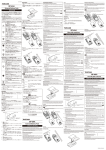
Fast forward/backward: Long time press
<(
or rr while playing.
o button in playing
condition to confirm point "A", then repress O
to confirm point "B". The recorder starts to
repeat from A to B. Press O or "M" or x
A-B marker repeat: Press
Press <</> buttons at the main menu interface
until recorder comes to the screen like above.
Press "M" button to confirm your selection.
Repress
"M" button to refurn to main menu.
files in the recordeq
If there are recording
recorder
will automatically
the
enter into recording
play mode when powered on.
Press
x
button in recording pause condition the
button to stop repeating.
Delete: When the playing stops, press << or >t
to select the files which should be deleted. Press
"M" button for 3 seconds. It displays as follow.
Repress "M" button to confirm deletion.
recorder will automatically enter into record
play mode and start to play present recording
file.
Play/Pause: Press >r button to start playing,
repress
}l
to pause.
Volume adjustment Press"+" or'1"to adjust
the volume.
Selection: Press <<
or
>> to select last
file or
I
tlr
I
tLl
Remerks: At..
"Delete" condition, if
"rrt".irg
there's no further
operation in 3 seconds, the
recorder will automatically exit "Delete"
condition.
Attention: Please backup the important files
-10-
-11-