1
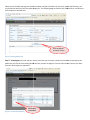
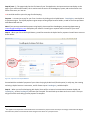
When you have selected your Tests (you can select one or more), they will show up below the name and club
information in the “Selected Tests Listbox”. Almost immediately, a series of question boxess will pop up on your screen,
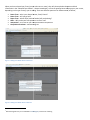
depending on the type of test(s) you are taking. There are different questions for different tests, as follows;
•
•
•
•
•
•
Dance Tests – who is your Dance Partner, Email, Phone
Phone?
Dance Tests – will you go Solo?
Dance Tests – whose steps (male or female) will you be doing?
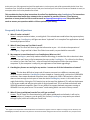
Skills – Will you do yourr skills pattern to music or not
not?
Interpretive – The name of your interpretive Music Composition
Competitive Freeskate – Planned Program1
Figure 7 - Adding Extra Details about a Dance Test
Figure 8 - Adding Extra Details about a Skills Test
1
Planned Program entry is not available in CoastRegistry at this time of writing