1
PREVIOUS VERSIONS
This chapter offers additional information about “Previous Versions” in Windows and the impact
they may have on your privacy and data.
What is Previous Versions?
Windows includes a useful innovation to help you protect your data: Previous Versions. This
feature automatically creates point-in-time copies of files as you work, so you can quickly and
easily retrieve versions of a document you may have accidentally deleted. This feature is a
potential security risk as sensitive files can be recreated – even if they have been deleted.
How to Erase Previous Versions
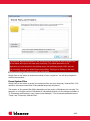
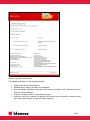
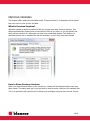
When you erase files and folders or the recycle bin, a dialog will be displayed before they have
been erased. This dialog asks you if you also wish to erase previous versions of the selected files.
This is an operation that requires you to elevate your privileges using the User Account Control.
14/19