1
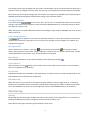
Protocol SCL: Nokeval SCL protocol. Used with most of Nokeval products. ModbusRTU: Nokeval Modbus RTU devices. Used if the device is set to Modbus mode. SEM: Status Instruments SEM series in-head transmitters. The baud rate is forced to 1200. Address Legal addresses with SCL protocol are 0…123 and 126. With Modbus, 1…247. SEM does not use an address. When Nokeval SCL protocol is used, many devices will respond in address 126 in addition to the address of their own. Worth trying if the address is not known. Connect buttons Some devices have multiple card slots or other modules, each of them having a menu of their own. In this case use the Master/A/B/C buttons to select the card to connect to. If the target device is simple and has one menu only, use the Direct button. After clicking any of the connect buttons MekuWin opens a new window for the menu and tries to establish a connection to the device. It is allowed to open several connections to separate devices or slots before closing the previous. The error message ”This program version does not support this device. Please update.” means that this MekuWin is too old for this device. Then you must download a new MekuWin from the Nokeval web site. The error message “No response” is typically caused by incorrect communication parameters, or incorrect serial bus connections. Configuration window After connecting to the device, a new window is opened. The window contains a pull-down menu, a toolbar, a diagnostic section (initially hidden), and the menu tree. The uppermost level in the tree contains items ”Conf” and ”Mon”. Under Conf are the configuration settings of the device. The Mon item is used to monitor the device, i.e. view some live values. Configuration Menu tree The configuration settings are arranged as a hierarchical tree: The Conf menu has submenus, and these contain settings and possibly more submenus. In the tree view, the submenus can be expanded using the + buttons, or collapsed back using the same buttons. 3