1
1.5
Getting Help
At the MrBayes > prompt, type help to see a list of the commands available
in MrBayes. Most commands allow you to set values (options) for different parameters. If you type help <command> , where <command> is any of the listed
commands, you will see the help information for that command as well as a description of the available options. For most commands, you will also see a list of
the current settings at the end. Try, for instance, help lset or help mcmc . The
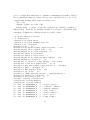
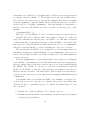
lset settings table looks like this:
Parameter
Options
Current Setting
-----------------------------------------------------------------Nucmodel
4by4/Doublet/Codon/Aa
4by4
Nst
1/2/6
1
Code
Universal/Vertmt/Mycoplasma/
Yeast/Ciliates/Metmt
Universal
Ploidy
Haploid/Diploid
Diploid
Rates
Equal/Gamma/Propinv/Invgamma/Adgamma Equal
Ngammacat
<number>
4
Nbetacat
<number>
5
Omegavar
Equal/Ny98/M3
Equal
Covarion
No/Yes
No
Coding
All/Variable/Noabsencesites/
Nopresencesites
All
Parsmodel
No/Yes
No
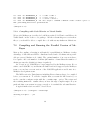
------------------------------------------------------------------
Note that MrBayes 3 supports abbreviation of commands and options, so in
many cases it is sufficient to type the first few letters of a command or option
instead of the full name.
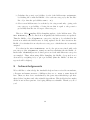
A complete list of commands and options is given in the command reference,
which can be downloaded from the program web site (www.mrbayes.net). You
can also produce an ASCII text version of the command reference at any time by
giving the command manual to MrBayes. Finally, you can get in touch with other
MrBayes users and developers through the mrbayes-users email list (subscription
information at www.mrbayes.net).
6