1
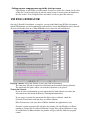
Date and Time Control:
If you want CollectALL or DownloadALL to update the date and time after collecting
or downloading, check the appropriate box.
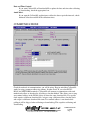
AutoCollect:
If you want the CollectALL application to collect the data at periodic intervals, check
theAutoCollect box and fill in the collection times.
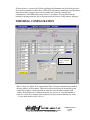
COMMUNICATIONS:
Check the methods of communications you will be using. Keep in mind that CollectALL
works by using a common addressing scheme. In other words, If you select RS232,
RS485 and NETWORK terminals, CollectALL will attempt to communicate with each
method and collect or download to all addresses for that method. This allows you to setup
one terminal address in the INI file if they all share the same download file. If a specific
clock requires a different download file, assign a setup a different address for that clock
and assign it a different download file name. If a terminal address is not found while
polling it will be skipped when collecting or downloading. This expedites collecting and
downloading.
©1998-2006 Control Module, Inc. – ALL RIGHTS RESERVED
USERS MANUAL
9/18/06
Page 8