1
5.2 Percent Saturation/ppm
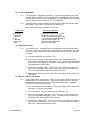
5.2.1 The instrument provides measurement of dissolved oxygen in either percent
saturation or ppm. In ppm measurement the reading is automatically compensated
for temperature changes in the medium.
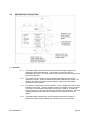
a) To select units of measurement enter the menu by pressing CALL to indicate
%sat/ppm.
b) Press the UP arrow button to select %sat or the DOWN arrow button or select
ppm.
c) Press RUN to return to on line or press CALL for another menu selection.
5.3 Calibration
5.3.1
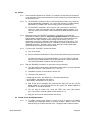
To calibrate the instrument you will need a container of fresh clean water. For best
results a bubbler such as that used in a tropical fish tank should be in the container.
a) Clean the sensor with a soft cloth and mild soap solution.
b) Place the sensor over the water container for a few minutes. (There is no need
to remove it from the float if so installed.)
c) Press CALL to enter the menu.
d) If the password function is enabled, enter the password then press CALL to
illuminate the “%sat/ppm” indicator. If the password function is not enabled,
“%sat/ppm” will illuminate at the first press of CALL.
e) Use the UP arrow button to illuminate the %sat LED located to the right of the
display.
f)
Press CALL twice to illuminate the CALIBRATION indicator.
g) Use the arrow buttons to make the display read 100.0.
h) Press ENTER as soon as the reading stabilizes. The display will flash until
ENTER is pressed again to confirm entry.
i)
If you wish to change the measuring unit to ppm, press CALL a number of times
to return to “%sat/ppm” and change ppm with the down button.
j)
Press RUN to return to on line measurement.
NOTE: If a major change is necessary to make the display read 100% the display
will flash when you press ENTER. This is to warn that you may have made
a mistake such as using “stale” water. If you are confident your procedure
was correct, press ENTER a second time. Otherwise, repeat the calibration
procedure by pressing CALL a sufficient number of times to go through the
menu and return to CALIBRATION.
Model 2200D/P91
Page 13