1
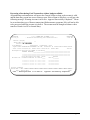
Miami-Dade College Menu
Path: CM PC
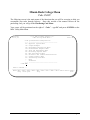
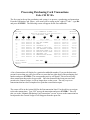
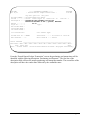
The following screen is the main menu of the functions that you will be accessing to help you
accomplish your tasks through Odyssey. Since this section of the manual focuses on the
purchasing card, you will go to the Purchasing Card Menu.
Your cursor will be positioned on the right of “Code:” - type PC and press <ENTER> at the
MDC Utility Main Menu.
MFU000P1
Oct 2,03
***** MDC College System *****
- MDC Utility Main Menu Code
---AS
CB
DR
DM
TA
RR
EI
FA
IQ
PC
?
.
---Code: PC
10:47 AM
System/Function/Explanation
-----------------------------------Approval System Menu
Campus Budgets
Department Requisition Menu
Disbursement Request Menu
Time and Attendance Menu
Recurring Request Menu
EFT Information Menu
Financial Aid Student Authorization
Campus Inquiry Menu
Purchasing Card Menu
Help
Terminate
------------------------------------
Direct command...:
____________________________________________________________
Enter-PF1---PF2---PF3---PF4---PF5---PF6---PF7---PF8---PF9---PF10--PF11--PF12-help retrn quit
flip
main
ODYSSEY – Finance User Reference Manual
Purchasing 3-1