1
horizontal(L/R)
X
vertical(U/D)
X
X
X
3. Trouble shooting
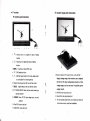
V position: To adjust the OSD position in
3.1. Only black and white picture.
.
HPosition, Toadjustthepictureinhorizontal.
OSD Timeout: To adlust the time on the screen
Please check saturation. brightness & contrast adiustment.
3.2, NO picture after put on the power
r
Transparent: Toadjusttheleveloftransparent.
Check video signat cable whether connecting correct, make
sure use the gualified signal cable and connect the monitor
El
( Function)
correctly.
I
Check the optional power adapter or power(battery) should
qualified specificalion and normal power supply
3.3. The image color distortion or abnormal, eg. lack some
color.
r
Please check signal cable connecl correctly or not. The
cable damage or loose will cause poor transfer, then above
x
x
x
x
x
malfunction will happen.
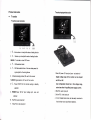
Reset: Back to original setting.
3.4. The image has a
Color system: Selection for color video system
Display ratio: Screen display ratio selection 16:9/4:3
r
L/R flip: lmage flip L/R
UID
Check the signal connector is plugged in tight or not, and
the socket connecting is loose and so on.
flip: lmage flip U/D
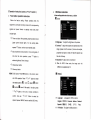
E ( Sound )
similar interference fringe, smearing and
dark.
r
Remark:
lf there are still other problems, please contact wilh our related
deals.
.
lf interruptive image occurs, it maybe that the signal frequency
isn't matcfled with normal standard.
.
X
Volume:To ad,iust the volume
lt is a normal condition that some bilght lines appear on the
screen when you turn off the unit.