1
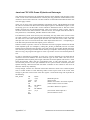
CALL
RESTORE
CALL
PUSH
CALL
POP
POP
RET
RET
CP
SCF
CCF
RET
OR
SCF
RET
CAS_IN_CHAR
AF
INTERCEPT
AF
HL
C
Z
#1A
NZ
A
;Put original jump back because
;AMSDOS requires it to be executed
;in its original position!
;Read the character
;Continue intercepting jumpblock
;Quit if OK
;Quit if ESC
;Quit if a real error
;Pretend OK if soft EOF
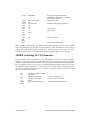
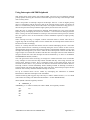
Before reading from the file the user should call INSTALL and from then on CAS IN CHAR
will return character #1A just like any other character. Note that INSTALL must only be
called once, otherwise the original contents of the jumpblock entry will be lost! The patch
will be lost if the external commands TAPE, TAPE.IN, DISC or DISC.IN are executed.
MODE switching on V1.0 firmware
Some programs, such as SORCERY+, run with different parts of the screen in different
modes. It is possible to do this using the firmware but it is necessary to intercept the SCR
MODE CLEAR indirection so that the screen is not cleared each time the mode is changed.
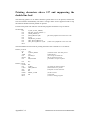
On V1.l firmware all that is necessary is to patch a RET instruction into the first byte of the
SCR MODE CLEAR indirection. On V1.0 firmware this would result in all the inks being
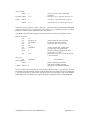
set to the background colour! This can be overcome by using the following routine to install
the users own ink refresh routine:
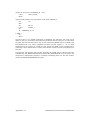
LD
LD
LD
LD
LD
CALL
RET
Appendix 13.2
HL,SCR_MODE_CLEAR
(HL),#C9
HL,EVENT_BLOCK
DE,INK_ROUTINE
B,#81
KL_NEW_FRAME_FLY
; Points to 9 byte block
; points to Interrupt routine
; Add Frame Flyback Interrupt
AMSTRAD CPC464/664/6128 FIRMWARE