1
Table of Contents
Introduction
○
○
○
○
○
○
Included Components
○
○
○
○
○
○
○
○
○
○
○
○
○
○
○
○
○
○
○
○
○
○
○
○
○
○
○
○
○
○
○
○
○
○
1
○
○
○
○
○
○
○
○
○
○
○
○
○
○
○
○
○
○
○
○
○
○
1
○
○
○
○
○
○
○
1
○
○
○
Driver Software Installation for Windows 2000/ME/98/98 SE
Driver Software Installation for Apple Macintosh
Hardware Installation
○
○
○
○
○
Inserting a SmartMedia Card
Basic Operation
○
○
○
○
○
○
○
○
○
○
○
○
○
○
○
○
Macintosh Troublshooting
○
○
○
○
○
○
○
○
○
○
○
○
○
○
○
○
○
○
○
2
○
○
○
○
○
○
○
○
2
○
○
○
2
○
○
○
○
○
○
○
○
○
○
○
○
○
○
○
○
○
○
○
○
○
○
○
○
○
○
○
○
○
○
○
○
○
○
○
○
○
○
○
○
○
○
○
○
○
○
○
○
○
○
3
○
○
○
○
○
○
○
○
○
○
○
○
○
○
○
○
○
○
○
○
○
○
3
○
○
○
○
○
○
○
○
○
○
○
○
○
4
○
○
○
○
○
○
○
○
○
○
○
○
4
○
○
○
○
○
○
○
○
○
○
○
○
○
○
○
○
○
○
○
○
○
○
○
○
○
○
○
○
○
Network - Windows Drive Letter Assignment
Windows Troublshooting
○
○
○
○
Formatting a SmartMedia Card
○
○
○
○
Removing a SmartMedia Card
Operational Notes
○
○
○
○
○
○
○
○
○
○
○
○
○
○
○
○
○
○
○
○
○
○
○
○
○
○
○
○
○
○
○
○
○
○
○
○
○
○
○
○
○
○
○
○
○
○
○
○
○
5
○
○
○
○
○
○
○
○
○
○
○
○
○
○
○
○
○
○
6
○
○
○
○
○
○
○
○
○
○
○
○
○
○
○
○
○
○
7
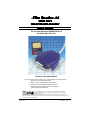
The eFilm Reader-14 will accept
SmartMedia Cards up to 128MB.
It’s ‘hot swappable’ - You can insert
and remove SmartMedia Cards
without the need to shut down the
computer.
Connect to
USB socket
of computer
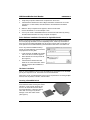
Note the shape of the
connectors. Be sure to
properly align these shapes
when attaching caples.
NEVER force a connection,
as this may damage either of
the connecting devices.
SmartMedia Card
socket