1
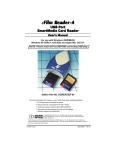
USB SmartMedia Card Reader
DDREADER-14
Introduction
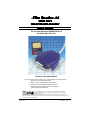
Thank you and congratulations on your purchase of the eFilm Reader-14 SmartMedia
Card to USB reader/writer. Before you begin use of this product, please take some time
to read all instructions and warranty information.
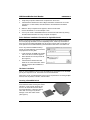
The Reader-14 is designed to read and write to SmartMedia Cards. It is a convenient
bridge between your computer and SmartMedia Card compliant devices. The media is
accessed the same as a removable drive; in Windows, it will appear as a Removable
Disk icon in My Computer, and on a Macintosh it will appear as an icon on the desktop.
Please look to our web site at http://www.delkin.com for FAQs and current information on
compatibility issues as well as the latest software drivers.
Included Components
❏ eFilm Reader-14
❏ Driver CD
❏ Registration Card
❏ Manual
System Requirements
IBM compatible desktop or laptop PC
• Windows 2000/ME/98
• USB port
Apple Macintosh desktop or laptop
• MAC OS 8.5+
• USB port
Driver Software Installation Procedure for Windows® 2000/ME/98
Before connecting the eFilm Reader-14, you must install the device drivers located on
the accompanying CD-ROM. To avoid possible conflicts, install only the Reader-14
drivers.
Driver Installation Procedure
1.
Start Windows and close any
other applications during
installation.
2.
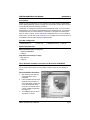
Insert the Delkin Devices driver
CD-ROM. If the CD does not
start automatically, double click
on the CD-ROM drive in My
Computer. The CD will open in
a driver installation application.
(See Figure 1)
3.
Click Reader-14 from the list
of products on the left.
Figure 1: Windows Installation Program
Delkin Devices User’s Manual
Page 1