1
CONTENTS
Preface................................................................................................................................... 1
PART I
INSTALLATION OF THE SEKS-GUI PACKAGE.................................................................... 2
I.1. System Requirements....................................................................................................... 2
I.2. Items Related To the SEKS-GUI Package....................................................................... 2
I.3. Installation Notes.............................................................................................................. 2
I.4. Testing BMElib.................................................................................................................. 4
PART II
INTRODUCTION TO SEKS-GUI............................................................................................ 5
Section II.A
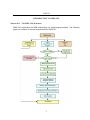
The SEKS-GUI Structure....................................................................................................... 5
Section II.B
What information you need to run SEKS-GUI………………................................................... 6
1. Hard Data File............................................................................................................... 6
2. Soft Data File................................................................................................................ 7
3. Output Format File.......................................................................................................11
Section II.C
Starting a SEKS-GUI Session............................................................................................... 14
PART III
SEKS-GUI SCREENS........................................................................................................... 15
Section III.A
Data Input ………………………………………………............................................................ 15
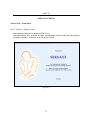
1. Splash Screen............................................................................................................. 15
2. “Choose a Task”.......................................................................................................... 16
3. “Import Hard Data Wizard” Screen – Part I................................................................. 18
4. “Import Hard Data Wizard” Screen – Part II................................................................ 20
5. “Import Soft Data Wizard” Screen – Part I................................................................... 21
6. “Import Soft Data Wizard” Screen – Part I (continued)............................................... 22
7. “Import Soft Data Wizard” Screen – Part II.................................................................. 23
8. “Output Grid Wizard” Screen....................................................................................... 24
9. “Data Exploratory Analysis” Screen – Part I................................................................ 26
ii