1
Number of Characters
Specify the total length of the message.
Media Priority
Specify the media priority. Based on the priority, the messages are processed with the media
concerned.
Padding Required
Check this option if padding is required. Padding letters will be added at the end of each
message.
2.2.2 Message Media Control
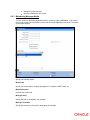
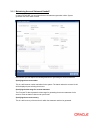
You can invoke the ‘Message Media Control Maintenance’ screen by typing ‘MSDMCS’ in the
field at the top right corner of the Application tool bar and clicking the adjoining arrow button. The
below given screen displays:
Specify the following details:
Node
Specify the DB instance name.
Media
Select the media from the adjoining option list. The option list displays all the valid media
maintained in the system.



![[December] [2010] Oracle Part Number E51712-01](http://vs1.manualzilla.com/store/data/005705420_1-4b383e67b8ec6628c44005398bb7935f-150x150.png)

![[January] [2010] Oracle Part Number E51573-01](http://vs1.manualzilla.com/store/data/005949232_1-523acd1fdebcb19bbe7f8615d255a7d7-150x150.png)