1
Step 1
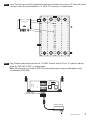
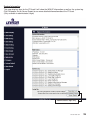
Insert Push lock pins onto IP Quad bracket and mount bracket into enclosure (IP Quad will mount
into any Leviton Structured Media box 14” 28”or 42” enclosure), as shown below:
NETWORK
POWER
4 CHANNEL IP/QUAD VIDEO MODULE
CAT NO. VSQIP-000
CAM1 CAM2 CAM3 CAM4
Step 2
VIDEO
OUT
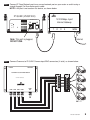
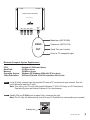
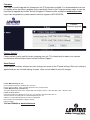
Plug Phoenix power connector into the 12V/GND Terminal wait for 30 sec. IP quad will indicate
power by PWR LED lit RED, as shown below:
Note: You may also use Leviton 47605-PSA and connect power using provided power leads
included with 47605-PSA.
D01 D02 GND DI1 DI2 GND
RS485/422/232
PWR
RX
TX
Tx+ Tx- Rx+ Rx- I2V GND
LAN
WAN
Phoenix Power
Connector Adapter
Power Connector
DG-000-VSQIP-05A
1