1
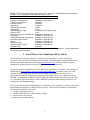
Table1. Source of parameter values input into the DST. Statewide = standardized value provided with
the DST. Local = site-specific value obtained using local data.
Parameter
Source of data
Seafood contaminant concentration Local *
Seafood consumption rate
Statewide or optional local *
Cooking reduction factor
Statewide
Exposure duration
Statewide
Body weight
Statewide
Sediment concentration
Local *
Seafood lipid
Local
Seafood foraging range
Statewide for each dietary guild *
Sediment TOC
Local
Proportion of seafood in human diet Statewide or optional local
Temperature
Statewide or optional local
Suspended sediment concentration Statewide or optional local
Particulate organic carbon
Statewide or optional local
Salinity
Statewide or optional local
Dissolved oxygen
Statewide or optional local
Dissolved organic carbon
Statewide or optional local
Seafood weight
Statewide
* These parameters are varied as probability distributions in the Tier II assessment. All other parameters
are treated as point estimates.
3. Install Monte Carlo Simulation (MCS) Add-In
The DST performs stochastic simulations using Monte Carlo Simulation. To make the DST fully functional, a free Excel Add‐In (YASAIw) must be installed. The YASAIw Add‐In was developed by Greg Pelletier, Washington Department of Ecology ([email protected]), based on software originally developed by Jonathan Eckstein and Steven T. Riedmueller, Rutgers University. A copy of the Add‐In is included in the zip file with the DST distribution. The Add‐In is also available for download from http://www.ecy.wa.gov/programs/eap/models.html The Add‐In comes with a pdf document (Pelletier 2009) here referred to as the YASAIw User’s Manual. Once the zip file is downloaded and opened, installation instructions, found on page 2 of the User’s Manual, should be followed. The YASAIw User’s Manual (Pelletier 2009) also contains helpful information about the Add‐
In. In particular, pages 13 through 17 contain additional information about running simulations, the charting tools, and troubleshooting. The first time that the DST and YASAIw Add‐In are installed on a new computer, a number of issues must be checked and resolved for the DST to function properly. Instructions are provided in the Appendix that should be followed for four issues: 1. Configure Excel Macro security 2. Confirm YASAIw Add‐In has been correctly installed 3. Confirm macros are enabled 4. Update links to YASAIw Add‐In 3