1
User’s Manual
Smart-Accredit CLOSO
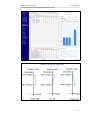
menu against Curve-up Methods available under Curve-up Controls.
These options are: (1) Shift up, (2) Shift and round off, (3) Tilt top, (4)
Tilt top and round off, (5) Tilt bottom, and (6) Tilt bottom and round
off. A pictorial explanation of these options appears shown in Fig. 16
when the user presses the toggle button with a question mark on it
located besides the curve up options list. The instructor selects a curve
up method using the drop down list and then fills up values for “Shift
by”, “Start at” and “End at”. “Shift by” specifies the amount by which
the marks are to be shifted up, “Start at” and “End at” specify the range
of marks on which the curve up method is to be applied. For example,
an instructor wants to leave out students having extremely low marks
as shifting up their marks with a reasonable value will not help them in
any way. In such a case, he can specify a lower limit on the marks using
“Start at” so that students who achieved marks equal to or less than
“Start at” marks do not get any boost up. Next the instructor chooses
the assessment and its corresponding CLO where s/he wishes to apply
curve up. Finally, he presses the “Curve up” button to curve up the
marks of the students.
5.2.2.1
Simple Shift
This is the simplest curve up option where the marks of all or selected
students are moved up by a constant value specified in the box labeled
“Shift by”. The instructor can also specify the range of marks using
“Start at” and “End at” boxes on which the shift up is to be applied.
When the instructor presses the “Curve up” button, marks of students
who fall in the specified range are shifted up by a constant value
specified in the “Shift by” box.
5.2.2.2
Top Tilt
As the illustration in Fig. 16 shows, this method gives more credit to
students with higher marks than students with lower marks. The value
specified in “Shift by” is proportionally distributed amongst all the
marks between “Start at” and “End at”. For example, assume that the
value of “Shift by” is 2, “Start at” is 0 and “End at” is 10. Also, assume
that the maximum marks allocated to a particular CLO in an assessment
are 10. A mark of 1 will be shifted up by 2/10 = 0.2, marks of 2 by (2 x
0.2), marks of 3 by (3 x 0.2) and so on. Of course, the software will
ensure that after shifting up, the marks do not cross the maximum
marks.
26