1
DHS Systems, LLC
TM 95236-00
0006
SHUTDOWN AND PREPARE FOR TRANSPORT
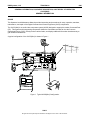
The following procedures details powering down and storing the AVCS (MINI) system.
NOTE
The AVCS (MINI) maintains all operational information and instructions on a flash memory card.
There are no shut down procedures necessary for the system software.
If the AVCS (MINI) is supplying power to a projector, ensure that the projector has been shut
down IAW manufacturers’ instructions prior to turning off the AVCS (MINI) System.
Power Down AVCS (MINI) System
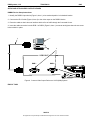
1. Power down all peripheral equipment connected to the AVCS (MINI) IAW the appropriate Technical Manual.
1
HA RD IG G
WEIGHTRANGE
80-100LBS.
PR OTECTI ON
PRESEN T
LINE
FAULT
OK
isobar
MIC 1
AUDIOIN
AUDIOOUT
LINE 1
LINE A
CONTROL
SPEAKER
CTL. LAN
TOUCH PANEL
PO TS LINE
EXTERNAL
DEVICE
MI C 2
LINE 2
CTL. IP RESET
VIDEOIN
VIDEOOUT
11 0 AC ONLY
GND.
RGB 1
RG B 1
RGB 3
RGB 2
RGB 4
CV 1
RGB 2
CV 2
INPUT ONLY
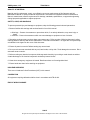
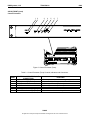
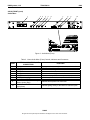
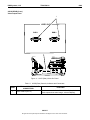
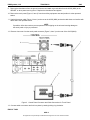
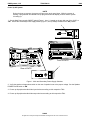
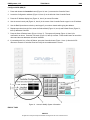
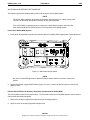
Figure 21. Main Power Supply Switch.
NOTE
Do not turn off the RGB spectrum 4-Window Processor Power Switch on the front of the AVCS
system.
2. Set the Main Power supply ON/OFF switch (Figure 21, Item 1), located on the top right rear of the AVCS
(MINI), to ‘OFF’.
Disassemble and Store the Ancillary Equipment Included with the AVCS (MINI)
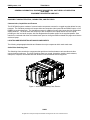
The AVCS (MINI) is stored in two transit cases. The first case houses the AVCS (MINI) System and the second
case houses all ancillary equipment.
1. Retrieve the ancillary equipment transport case from its storage position.
2. Open the cover of ancillary equipment transport case.
0006-20
No rights are conveyed except as indicated in the legend on the cover of this document.