1
®
DVI CAT-5
MS EXTREME
EXT-DVI-CAT5-MS
USER MANUAL
www.gefen.com
ASKING FOR ASSISTANCE
Technical Support:
Telephone
(818) 772-9100
(800) 545-6900
Fax
(818) 772-9120
Technical Support Hours:
8:00 AM to 5:00 PM Monday thru Friday.
Write To:
Gefen Inc.
c/o Customer Service
20600 Nordhoff St.
Chatsworth, CA 91311
[email protected]
www.gefen.com
Notice
Gefen Inc. reserves the right to make changes in the hardware, packaging and any
accompanying documentation without prior written notice.
The DVI CAT-5 MS Extreme is a trademark of Gefen Inc.
© 2009 Gefen Inc., All Rights Reserved.
Rev A1
TABLE OF CONTENTS
1
Introduction
2
DVI CAT-5 MS Extreme Sender Front Panel Descriptions
3
DVI CAT-5 MS Extreme Receiver Front Panel Descriptions
4
How To Connect The DVI CAT-5 MS Extreme
5
DIP Switch Usage Guide
6
Additional DIP Switch Functions
7
CAT-5 Link Cable - Wiring Diagram
8
Mounting Plate Installation
9
Troubleshooting
10 Terminology
11 Specifications
12 Warranty
OPERATION NOTES
READ THESE NOTES BEFORE INSTALLING
OR OPERATING THE DVI CAT-5 MS EXTREME EXTENDER
• The DVI CAT-5 MS Extreme units are housed in a metal box for better RF shielding.
• Your CAT-5 cable should not exceed 300 feet.
• If you do not need DDC or HDCP data you can use a single CAT-5 cable for the video
only. The DDC will not be connected. (For further information, see our Terminology
section on page10.) If HDCP is required, both CAT-5 cables must be used between
the sender and receiver units.
• If the source requires EDID present, you can use the Gefen DVI Detective to provide
EDID information to your source but will not transmit HDCP.
• Shielded CAT-6 with metal RJ-45 connectors is recommended to protect from random
flashes caused by EMI.
• Power supply for the receiver should not be connected unless you are using one
CAT-5 or going over a distance of 200ft.
• Extensions over 130ft. require you to manually EQ your signal (see page 4).
• Extensions under 130ft. use Auto EQ (which is on by default) (see page 4).
• The extender is factory set to Auto EQ which will work for distances under 130 ft.
• This product features the option to force the output colorspace to RGB and/or use a
pre-programmed EDID. These features can be used to resolve specific user issues or
for troubleshooting purposes. Please see page 6 for more information.
INTRODUCTION
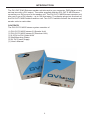
The DVI CAT-5 MS Extreme sender unit sits next to your computer, DVD player or any
set-top box with a DVI output. The cable supplied with the DVI CAT-5 MS Extreme
connects your DVI source to the sender unit. The DVI CAT-5 MS Extreme receiver unit
sits next to your DVI display - up to 300 feet away. The display plugs into the back of
the DVI CAT-5 MS Extreme receiver unit. Two CAT-5 cables connect the receiver and
sender units to each other.
CONTENTS
The DVI CAT-5 MS Extreme system consists of:
(1) DVI CAT-5 MS Extreme-S (Sender Unit)
(1) DVI CAT-5 MS Extreme-R (Receiver Unit)
(1) 6 ft DVI to DVI Cable M-M
(2) Wall Mounting Plates
(2) 5V DC Power Supply
(1) User's Manual
1
DVI CAT-5 MS EXTREME SENDER FRONT PANEL DESCRIPTIONS
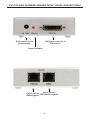
Connects to 5 Volt
power supply
DVI Input connects to
DVI source
Power Indicator
CAT-5 carries
CAT-5 carries
TMDS signals DDC/HDCP signals
2
DVI CAT-5 MS EXTREME RECEIVER FRONT PANEL DESCRIPTIONS
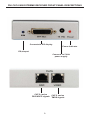
Connects to DVI display
Power Indicator
EQ trimpot
Connects to 5 Volt
power supply
CAT-5 carries
CAT-5 carries
DDC/HDCP signals TMDS signals
3
HOW TO CONNECT THE DVI CAT-5 MS EXTREME
1
Connect your display to the DVI CAT-5 MS Extreme receiver unit.
2
Connect your source to the DVI CAT-5 MS Extreme sender unit.
3
Connect your CAT-5 cables between the sender and the receiver.
4
Plug the 5V power supply into the DVI CAT-5 MS Extreme sender and receiver
unit.
5
You should now have picture. If you do not see a picture, try unplugging and
re-plugging the DVI input on the DVI sender unit. Make sure your CAT-5 cables
are not crossed. Power-cycle the unit.
* If any problems arise please refer to the troubleshooting page (see page 9).
HOW TO USE THE EQ TRIMPOT
The EQ trimpot is used extensions over 130 ft. By default, the DVI CAT-5 MS Extreme
comes set to "Auto EQ" (with DIP switch 1 OFF). Underneath the receiver is a bank of
DIP switches, hidden by a blank sticker, and if you flip DIP switch 1 ON you can turn
off the "Auto EQ" so that you can manually EQ your signal by using the EQ trimpot on
the receiver. If you flip DIP switch number 1 back to the OFF position you can set the
DVI CAT-5 MS Extreme back to "Auto EQ". Auto EQ works best when the sender is
set to "NO BOOST" (see page 5). Auto EQ also works best up to 130 ft reliably. If you
are using the DVI CAT-5 MS Extreme beyond any distance of 130 ft., then it is best if
you manually EQ your signal.
USING THE TRIMPOT
1
Have both of your CAT-5 or CAT-6 cables connected.
2
Start by having the source connected and turning on the display.
3
Set the sender to medium boost.
4
Start with the trimpot all the way counter clockwise and slowly turn the trimpot
clockwise.
If you do not get a picture still or have noise, set the sender to high boost and try to
re-EQ your signal.
4
SERVICE SWITCH USAGE GUIDE
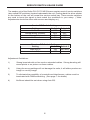
The sender unit of the Gefen DVI CAT-5 MS Extreme contain a set of service switches
(also called DIP switches) located underneath the unit. Peeling back the silver sticker
on the bottom of the unit will reveal the service switch bay. These service switches
are used to boost the signal to best match the conditions in your setup. (*Note:
Adjustments should be done with sources and display on.)
Sender DIP Switch Settings
Setting
Switch 1 Switch 2
No Boost
OFF
ON
Normal Boost (Default)
OFF
OFF
Strong Boost
ON
OFF
Not Used
ON
ON
Receiver DIP Switch Settings
Setting
Switch 1 Switch 2
Manual EQ
ON
not used
Auto EQ
OFF
not used
Adjustment Guidelines:
1)
Strong boost should not be used on stranded cables. Strong boosting will
cause pixels or no picture on these cables.
2)
Using the wrong settings will not damage the units; it will either produce no
image or a noisy image.
3)
To eliminate the possibility of crosstalk and interference, cables must be
terminated with 568B scheduling. (See page 7 for details)
4)
No Boost should be set when using Auto EQ.
5
ADDITIONAL DIP SWITCH FUNCTIONS
FORCE RGB AND PRE-PROGRAMMED EDID FEATURES
DIP switch 1 on the 4-bank DIP switch located on the underside of receiver unit
enables and disables the automatic equalization function. Additional features can
be enabled by using the other DIP switches 2-4 on this bank.
EDID
FORCING THE RGB COLORSPACE
In some cases, the output video may have a pink or green tint. This usually is
attributed to the output device (i.e. display) not supporting the colorspace being used
by the source device. All digital displays will handle the standard RGB colorspace.
DIP switch 2 can be enabled to force the output colorspace to RGB. If the input
colorspace is YCbCr, the colorspace will be converted to RBG prior to output on
the receiver unit.
USING THE PRE-PROGRAMMED EDID
In some cases it may be necessary to force an EDID for troubleshooting purposes.
Enabling DIP switch 3 will force the use of a pre-programmed EDID to be sent to
the source instead of the connected output device (i.e. display). The EDID specifics
are listed below.
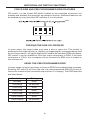
Resolution
Timing
640x480
60Hz
720x480i/p
59.94/60Hz
720x576i/p
50Hz
1280x720p
50Hz
1280x720p
59.94/60Hz
1920x1080i/p
50Hz
1920x1080i/p
59.94/60Hz
6
7
1
8
8
7
6
5
4
3
2
1
RJ-45 Jack
Brown
White/Brown
Green
White/Blue
Blue
White/Green
Orange
White/Orange
8
7
6
5
4
3
2
1
1
8
RJ-45 Jack
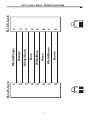
CAT-5 LINK CABLE - WIRING DIAGRAM
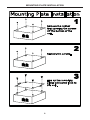
MOUNTING PLATE INSTALLATION
8
TROUBLESHOOTING
Frequently Asked Questions
What kind of CAT-5e cable should I be using?
Solid core CAT-5e cable rated at 350 MHz and terminated in 568a or 568b is the
minimum requirement. For resolutions greater than 1280x1024 or 1080i, Gefen
recommends solid shielded CAT-6 cables.
I’m getting no video on the screens, what can I check?
First thing to check is make sure that the video CAT-5 is linked to the other video CAT-5
port and the same with the DDC ports. Try removing the power supply from the receiver
side, if the power light turns off then you have your CAT-5 cables crossed. In some
setups with grounding issues you will not get a picture with the receiver powered. Test
to make sure the units are working with short CAT-5e cables 15-20 feet. You can also
make sure you have the correct boost setting configured (refer to page 5). If you are
getting no video or noise you can also try setting the DVI CAT-5 Extreme to Auto EQ or
manually EQ your signal. (see page 4)
Occasionally the picture blanks out, how do I fix this?
Flickering or a blinking image is the result of a loss of sync between the display
and the source. Try lowering the resolution to see if that helps, if it does, the CAT-5
cables you are using are unable to handle the bandwidth of the higher resolution
and thus you are losing sync. Try a shielded CAT-6 cable on the video line to reduce
interference. Usually this is caused by EMI and a shielded CAT-6 with metal RJ-45
connectors with the drain wire soldered to the connectors will resolve the issue. You
can also try adjusting the service switches. Please refer to the service switch guide
on page 5 for the different combinations. Also eliminate any patch panels and wall
plates. Patch panels and wall plates are prone to EMI if they are not shielded properly.
Why is there a green or pink tint to my picture?
A tint of green or pink in the picture is a result of incorrect color space being transmitted.
This can be resolved by forcing the RGB colorspace. Please refer to page 6 for more
information on how to force the output to RGB colorspace.
9
TERMINOLOGY
CAT-5
Category 5 cable, commonly known as CAT-5, is an unshielded twisted pair type
cable designed for high signal integrity. The actual standard defines specific electrical
properties of the wire, but it is most commonly known as being rated for its Ethernet
capability of 100 Mbit/s. Its specific standard designation is EIA/TIA-568. CAT-5 cable
typically has three twists per inch of each twisted pair of 24 gauge copper wires within
the cable.
CAT-5e
Similar to CAT-5 cable, but is enhanced to support speeds of up to 1000 Megabits
per second.
DDC
Short form for Display Data Channel. It is a VESA standard for communication between
a monitor and a video adapter. Using DDC, a monitor can inform the video card about
its properties, such as maximum resolution and color depth. The video card can
then use this information to ensure that the user is presented with valid options for
configuring the display.
DDWG
Digital Display Working Group DDWG are the creators of the DVI specification.
DVI
Digital Visual Interface. A digital video standard established by the DDWG, which was
designed to carry uncompressed digital video signals to a display.
HDMI
The High-Definition Multi-media Interface (HDMI) is an industry-supported,
uncompressed, all-digital audio/video interface. HDMI provides an interface between
any compatible digital audio/video source, such as a set-top box, DVD player, and
A/V receiver and a compatible digital audio and/or video monitor, such as a digital
television (DTV).
HDCP
High-Bandwidth Digital Content Protection. Created by Intel, HDCP is used with HDTV
signals over HDMI and HDMI connections and on D-Theater D-VHS recordings to
prevent unauthorized duplication of copy written material.
HDTV
High-Definition Television. The high-resolution subset of our DTV system. The ATSC
defines HDTV as a 16:9 image with twice the horizontal and vertical resolution of our
existing system, accompanied by 5.1 channels of Dolby Digital audio. The CEA defines
HDTV as an image with 720 progressive or 1080 interlaced active (top to bottom)
scan lines. 1280:720p and 1920:1080i are typically accepted as high-definition scan
rates.
VESA
Video Electronic Standards Association, a consortium of manufacturers formed to
10
SPECIFICATIONS
Single Link Bandwidth....................................................................................165 MHz
Single Link Resolution..........................................................1080p/60Hz,1920 x 1200
Input Video Signal.....................................................................................1.2 Volts p-p
Input DDC Signal...............................................................................5 Volts p-p (TTL)
Input/Output DVI Connector...................................DVI-I (29 pin) female (Digital Only)
Link Connector....................................................................................................RJ-45
Power Supply......................................................................................................5V DC
Power Consumption................................................................10 Watts (max) per unit
Dimensions.................................................................................3.1”D x 3.2”W x 1.1”H
Shipping Weight...................................................................................................4 lbs.
11