1
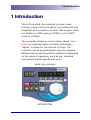
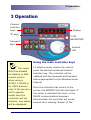
3 Operation 3 Operation Channel selection keys Display “S” keys “CLIP NAVIGATOR” Transport keys Remote LED Using the main controller keys The server To select a server channel for control, MUST be enabled press the desired numbered channel for Odetics or AMP selection key. The controller will be remote control updated with the timecode and transport when using a status appropriate for the attached server HT252. A HT262 is channel. for VDCP protocol Once the controller has control of the only. If the server is server, the REMOTE LED will illuminate. If set to operate the server is switched into local, or the locally then the RS422 communications becomes controller will not disconnected, the controller will sound function, only status several short warning ‘bleeps’ (if the will be displayed. 2015 Hi Tech Systems Limited 7