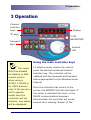
1
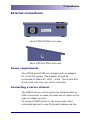
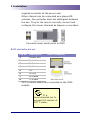
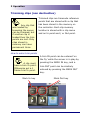
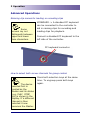
altuS VTR and Disk controller Contents 1 INTRODUCTION 1 2 INSTALLATION 3 Unpacking 3 Desk mounting 3 Warnings – read before installation or use 4 EXTERNAL CONNECTIONS 5 Power requirements 5 Connecting a server channel 5 RJ45 connector pin out 3 OPERATION Using the main controller keys 6 7 7 What is the CLIP NAVIGATOR? 8 What are the S keys? 9 How to Load Clips 9 How to Jog, shuttle and variable 10 How to record 11 How to stop record 11 How to eject a clip 11 How to store clips into memory 11 Trimming clips (non destructive) How to enter trim points 12 12 A trim IN point can be entered ‘on the fly’ while the server is in play by pressing the MARK IN key, and a trim OUT point can be similarly entered by pressing the MARK OUT key. 12 How to loop a clip 13 Advanced Operations 14 Entering clip names for loading or recording clips 14 How to select both server channels for group control 14 How to clear the memory, and restore to factory default? 15 How to change the timecode source 15 How to enter and exit the altuS SETUP menu. 17 How to change operational parameters in the SETUP menu 17 MENU OPERATIONAL SETTINGS FOR HT252 18 MENU OPERATIONAL SETTINGS FOR HT262 21 2015 Hi Tech Systems Limited