1
Cabling and Power Up
Setting Up the CE Tool (PC)
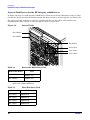
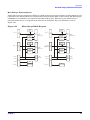
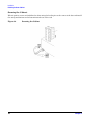
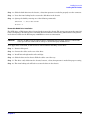
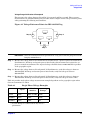
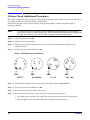
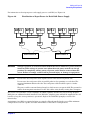
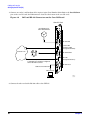
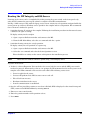
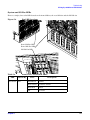
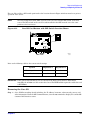
1. Connect one end of a null modem cable (9-pin to 9-pin) (Part Number 5182-4794) to the Local RS-232
port on the core I/O card (the DB9 connector located at the bottom of the core I/O card).
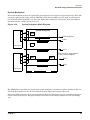
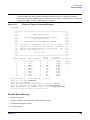
Figure 4-9
LAN and RS-232 Connectors on the Core I/O Board
Core I/O Card
UPS (Optional) or
Other Serial Device
RS-232 UPS
RS-232 UPS Port
System LAN
(Customer LAN)
SYSTEM LAN Port
Modem
( Assigned /dev/lan0 )
RS-232 Remote Port
Customer Lan
RS-232 Remote
GSP LAN Port
MP LAN
RS-232 Local Port
Note: The ability to telnet to the MP LAN Port
is available once the MP is configured
via the RS-232 Local Port
( Assigned /dev/lan1 )
RS-232 Local
Cable Part # 5182-4794
CE Tool (PC)
KIN001
5/23/01
2. Connect the other end of the RS-232 cable to the CE Tool.
86
Chapter 4