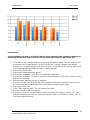
1
REPORT
DESIGN
GUIDE
Version
6.5
Izenda Reports Report Design Guide, Revision 2
Copyright © 2002-2012 Izenda LLC. All rights reserved.
Information in this document, including URL and other Internet Web site references, is subject to
change without notice. Izenda LLC MAKES NO WARRANTIES, EXPRESS, IMPLIED OR STATUTORY, AS TO
THE INFORMATION IN THIS DOCUMENT. Unless otherwise noted, the companies, organizations,
products, domain names, e-mail addresses, logos, people, places, and events depicted in examples
herein are fictitious. No association with any real company, organization, product, domain name, email address, logo, person, place, or event is intended or should be inferred. Complying with all
applicable copyright laws is the responsibility of the user.
Without limiting the rights under copyright, no part of this document may be reproduced, stored in or
introduced into a retrieval system, or transmitted in any form or by any means (electronic, mechanical,
photocopying, recording, or otherwise), or for any purpose, without the express written permission of
Izenda LLC.
Izenda LLC may have patents, patent applications, trademarks, copyrights, or other intellectual
property rights covering subject matter in this document. Except as expressly provided in any written
license agreement from Izenda LLC, the furnishing of this document does not give you any license to
these patents, trademarks, copyrights, or other intellectual property.
Izenda, Izenda Reports, Agile Reporting are either registered trademarks or trademarks of Izenda LLC in
the United States and/or other countries.
Firefox is a trademark of Mozilla. Internet Explorer, Excel, and Word are trademarks of Microsoft.
All other trademarks are property of their respective owners.
Izenda Reports User’s Guide v6.4
User’s Guide
Izenda Reports
Preface
Izenda is a reporting and business intelligence platform that connects directly to relational and nonrelational data sources. Through its .NET API, it loosely couples with Microsoft-based applications to
integrate with your current security, branding, and navigation.
Izenda Reports enables you to easily access your databases directly and quickly transform raw data into
useful and readily understood information.
With Izenda, you can:
Extract the information you need from one or more related tables.
Format data into tables, reports, charts, pivots, and gauges.
View the resulting report in your Web-browser and then print it.
Export reports in several formats, including Microsoft Word, Microsoft Excel, and Adobe PDF.
Automate many processes through scheduling, sharing, alerting, batch processing, and caching
Implement custom layout reports through Izenda Forms
Develop user-defined or custom Dashboards and Maps
Izenda’s point-and-click interface is designed for the standard business user, with Advanced options
available for those with greater access and skill. Many users will never design reports, but simply make
modifications to current core reports, or use drill-downs to start at a high level overview and click
through to get to the required information.
This user manual will step you through each simple process in using Izenda, and provide you with what
you need to know to create your queries and reports. Any data that your application developer has
included in the database can be accessible to you in creating ad hoc reports.
Izenda Reports User’s Guide v6.5
2
Izenda Reports
User’s Guide
CONTENTS
1.0
INTRODUCTION to izenda Reports ........................................................................................... 6
1.1
Report List ................................................................................................................................... 7
Branded Standalone Izenda Interface – Office 2013 Style Report List ................................................... 7
Embedded Application Example – Report List ........................................................................................ 7
1.2
Report Designer .......................................................................................................................... 8
1.3
Report Viewer ............................................................................................................................. 8
1.4
Dashboard Designer .................................................................................................................... 9
1.5
Settings...................................................................................................................................... 10
2.0
Quick Start Guide .................................................................................................................. 11
2.1
Building your first report........................................................................................................... 12
2.2
The “Design a New Report” Link ............................................................................................... 15
2.3
The Delete, Design and Modify Buttons ................................................................................... 15
2.4
Toolbar ...................................................................................................................................... 16
2.5
Report Design Lessons .............................................................................................................. 17
2.5.1 Designing a List of Shipping Countries Report ...................................................................... 17
2.5.2 Adding additional fields, using field functions, using field formats, & sorting the data. ..... 18
2.5.3 Visually Grouping & Subtotal Function ................................................................................. 19
2.5.4 Adding a Summary and a Title .............................................................................................. 20
2.5.5 Exporting a Report ................................................................................................................ 21
3.0
Data Sources Tab................................................................................................................... 22
3.1
Simple Mode ............................................................................................................................. 22
3.2
Admin Tip – Setting Visible Data Sources ................................................................................. 23
3.3
Admin Tip – Using Constraints .................................................................................................. 23
3.4
Advanced Mode ........................................................................................................................ 24
3.4.2 Understanding the Data Model ............................................................................................ 26
3.4.3 Join Types .............................................................................................................................. 27
3.4.4 Function Buttons of Data Sources Tab ................................................................................. 29
3.5
Custom Data Source Selection Page ......................................................................................... 30
4.0
Fields Tab .............................................................................................................................. 31
4.1
Field Dropdown Menu .............................................................................................................. 32
4.2
Description ................................................................................................................................ 32
4.3
Sort, VG, & Arithmetic Check Boxes ......................................................................................... 33
4.4
Other Buttons on the Fields Tab ............................................................................................... 33
4.5
Functions Drop-Down ............................................................................................................... 35
4.6
Format Dropdown Menu .......................................................................................................... 37
4.7
Quick Add .................................................................................................................................. 39
4.8
Advanced Field Settings Button ................................................................................................ 40
4.9
Add Pivot ................................................................................................................................... 42
4.10 Admin Tips ................................................................................................................................ 42
4.10.1 Aliasing .............................................................................................................................. 42
Izenda Reports User’s Guide v6.5
3
Izenda Reports
User’s Guide
4.10.2 Hidden Filters .................................................................................................................... 43
5.0
Filters Tab ............................................................................................................................. 44
5.1.1 Filter Field Dropdown Menu ................................................................................................. 44
5.1.2 Filter Operator Dropdown Menu and Value(s)..................................................................... 45
5.1.3 Operator Categories ............................................................................................................. 45
5.1.4 Blank and Param Checkboxes ............................................................................................... 48
5.1.5 Other Buttons on the Filters Tab .......................................................................................... 48
5.1.6 Other Filter Features ............................................................................................................. 49
6.0
Summary Tab ........................................................................................................................ 50
6.1
Deltas ........................................................................................................................................ 51
7.0
Chart Tab .............................................................................................................................. 52
7.1.1 None Selection ...................................................................................................................... 52
7.2
Trend Selection ......................................................................................................................... 53
7.2.1 Creating a Trend Chart showing Orders by Month............................................................... 54
7.2.2 Creating an Advanced Trend Chart Report ........................................................................... 55
7.3
Pie Chart .................................................................................................................................... 56
7.3.1 Creating a Pie Chart showing the percentage of orders from each country ........................ 56
7.3.2 Creating an Advanced Pie Chart Report ............................................................................... 58
7.3.3 Plot Selection ........................................................................................................................ 60
7.4
Bar Charts .................................................................................................................................. 61
7.4.1 Example Bar Chart................................................................................................................. 62
7.4.2 Create a Bar Chart Showing the Top 15 Countries ............................................................... 63
7.4.3 Create a Bar Chart with a Separator ..................................................................................... 64
7.4.4 Other Bar Chart Options ....................................................................................................... 66
7.5
Funnel Chart.............................................................................................................................. 69
8.0
Gauge Tab ............................................................................................................................. 70
8.1
Create First Four Gauges Alphabetically Counting Orders by Country .................................... 71
8.2
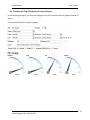
Creating the Top 4 Orders by Country Gauges ......................................................................... 72
8.3
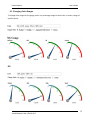
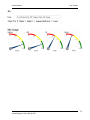
Changing Color Ranges ............................................................................................................. 73
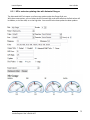
8.3.1 KPI’s and auto-updating data with Animated Gauges .......................................................... 75
8.4
Gauges with Drill-Down Effects ................................................................................................ 76
9.0
Misc Tab................................................................................................................................ 77
9.1
Share With & Rights .................................................................................................................. 79
9.1.1 Setting Sharing Permissions .................................................................................................. 80
9.2
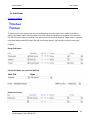
Drill-Downs................................................................................................................................ 81
9.2.1 Passing Filters from Master Report to Sub-Report............................................................... 83
9.3
Scheduler .................................................................................................................................. 84
9.3.1 How to Set Up the Izenda Scheduler .................................................................................... 85
9.3.2 Report Owner: Setting the User and Admin States ............................................................. 86
10.0 Style Tab ............................................................................................................................... 87
10.1 Style Properties ......................................................................................................................... 88
10.2 Changing Colors Through CSS ................................................................................................... 90
10.2.1 Setting the Report List page (ReportList.aspx) CSS .................................................. 91
10.2.2 Customer Integration Example ..................................................................................... 92
Izenda Reports User’s Guide v6.5
4
Izenda Reports
User’s Guide
11.0 Toolbar And Preview ............................................................................................................. 93
11.1 How to Modify the Toolbar Through the API ........................................................................... 94
11.2 Changing What Buttons are Displayed in the Toolbar.............................................................. 94
11.3 Preview Tab ............................................................................................................................... 95
12.0 Pivots Section........................................................................................................................ 96
12.1 Create a Simple Pivot Report. ................................................................................................... 96
12.2 Create an Advanced Pivot Report ............................................................................................. 98
13.0 Izenda Maps ........................................................................................................................ 100
Izenda Reports User’s Guide v6.5
5
User’s Guide
Izenda Reports
1.0 INTRODUCTION TO IZENDA REPORTS
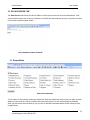
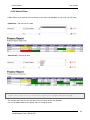
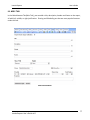
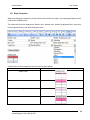
Izenda Live Demo Page
Click on the Link Above or the Image to Navigate to the Page
Izenda Reports User’s Guide v6.5
6
User’s Guide
Izenda Reports
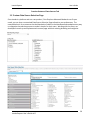
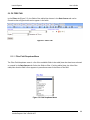
1.1 Report List
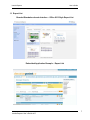
Branded Standalone Izenda Interface – Office 2013 Style Report List
Embedded Application Example – Report List
Izenda Reports User’s Guide v6.5
7
Izenda Reports
User’s Guide
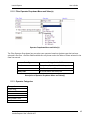
1.2 Report Designer
The Report Designer lets you create new reports and modify existing reports.
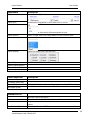
The Report Viewer lets you easily modify a previously create report and save a variation, print it,
export to various formats, and share it through email.
1.3 Report Viewer
Izenda Reports User’s Guide v6.5
8
Izenda Reports
User’s Guide
1.4 Dashboard Designer
Izenda Reports User’s Guide v6.5
9
Izenda Reports
User’s Guide
1.5 Settings
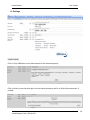
Click on C# or VB Button to see code samples for the selected property
Click on Details to see the description for the selected property and Go to Online Documentation, if
needed.
Izenda Reports User’s Guide v6.5
10
Izenda Reports
User’s Guide
2.0 QUICK START GUIDE
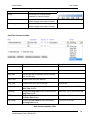
Toolbar Preview
Creating a Basic Report
Report Creation Full Tutorial
Izenda Reports User’s Guide v6.5
11
User’s Guide
Izenda Reports
2.1 Building your first report
Navigate to the Report List page
Click the "Design A New Report" link
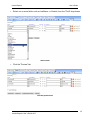
Click to design a new report
Select a report data source in the "Data Sources" tab (the drop-down contains tables
and views) like Invoices or Orders
Select Views and Tables
Izenda Reports User’s Guide v6.5
12
User’s Guide
Izenda Reports
Select one or more fields, such as LastName, or OrderId, from the "Field" drop-downs
Select Fields
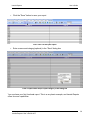
Click the "Preview" tab
Click the preview tab
Izenda Reports User’s Guide v6.5
13
User’s Guide
Izenda Reports
Click the "Save" button to save your report
Click “Save” to save your report
Enter a name and category(optional) in the "Save" dialog box
Enter a report name and/or report category in the dialog box
You now have your first functional report. This is a very basic example, and Izenda Reports
offers far more capabilities.
Izenda Reports User’s Guide v6.5
14
User’s Guide
Izenda Reports
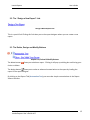
2.2 The “Design a New Report” Link
Design a New Report Link
This is a special link. Clicking this link takes you to the report designer where you can create a new
report.
2.3 The Delete, Design and Modify Buttons
Report Link, Delete & Modify Buttons
The delete button
choice to delete.
allows you to delete a report. Clicking it will pop-up a dialog box confirming your
The design button allows you to make an advanced customization to the report by loading the
report in the report designer.
By clicking on the Report Title (Automation Test) you can make simple customizations in the Report
Viewer interface.
Izenda Reports User’s Guide v6.5
15
User’s Guide
Izenda Reports
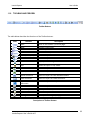
2.4 Toolbar
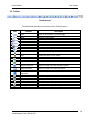
Toolbar Buttons
The table below describes the functions of the Toolbar buttons.
Icons
Features
Description
Back
Goes to the browser’s previous page.
New
Creates a new report.
Save
Saves a report.
Save As
Allows a new report name to be saved.
Print (PDF Export)
Saves the report as a PDF document.
IE
Runs the report in the web browser.
Schema
Display database diagram
SQL
Views the report in SQL mode.
CSV
Saves the report as a CSV file.
Excel Spread sheet
Saves the report as a MS-EXCEL file.
Word Document
Saves the report as a MS-Word document.
XML document
Saves the report as a XML document.
Open office
document
Saves the report as an Open Office Document.
RTF document
Saves the report as a RTF document
Back to Report List
Takes you to the Report List screen.
E-mail
E-mails a report to a client
Settings
Takes you to Settings.aspx page.
Izenda Reports User’s Guide v6.5
16
Izenda Reports
User’s Guide
2.5 Report Design Lessons
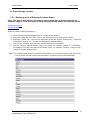
2.5.1 Designing a List of Shipping Countries Report
Goal - The goal of this lesson is to create a report which lists all of the countries the
company ships to, view the report by using the preview tab, name, and save the report.
Design this Report
Edit this Report
Steps to create a new Izenda report 1. From the ReportList.aspx page Click on "Design a New Report".
2. Under the "Data Sources" tab - Click on the drop down arrow and choose "Orders"
3. Under the "Fields" tab - Click on the drop down arrow and choose "ShipCountry". Leave the
"Description" box as it is. (this will be discussed in another lesson).
4. Click on the "Preview" tab to see the Izenda report you just created.
5. Click on "Save as" tool bar button, name your report, for example "Lesson 1-1", and enter
the category you want the report to be shown under, for example "Training", click ok. Now
you have a saved Izenda report.
Note: This Izenda report shows you real time information. If you want to take a snap shot of the
current results you can export the information. (Exporting will be discussed later)
|
Izenda Reports User’s Guide v6.5
17
User’s Guide
Izenda Reports
2.5.2 Adding additional fields, using field functions, using field formats, & sorting
the data.
Goal - The Goal of the lesson is to add to the Country List Report from the previous
lesson, including the ship city, number of orders, and total freight costs. Then we will
sort the data alphabetically by country.
Design this Report
Edit this Report
1. If you do not have the lesson open from before, then you will need to load it by clicking the
link above.
2. Let's add some more information to the report other than just the ShipCountry field. Click
the fields tab.
3. In the bottom most row under the field label, select "ShipCity" from the drop down box.
Add “Order ID” & “Freight” as well.
4. The freight field is a dollar amount so select the "$0.00" Format from the drop down box.
5. Click Preview. You will see the fields have been added.
6. I'm interested in the number of orders to each city and the total freight spent shipping the
orders. To see this information we need to add some functions to the fields.
7. Next to the "OrderID" field select "count" from the function drop down box. This will count
the number of order IDs from the previous report. Let's change the description to "Orders"
by entering that into the description textbox.
8. **Notice that when a function is selected all of the fields default to using the group function.
9. Next to the "Freight" field select "sum" from the function drop down box. This will sum the
freight. Let's change the description to "Freight" by entering that into the description
textbox.
10. Click the "Preview" tab. Now let's sort the data alphabetically by country.
11. Click on the "Fields" tab. Then click on the "sort a-z" checkbox on the same row as the
"ShipCountry" field.
12. Click the "Preview" tab. Now the data is sorted. Let's save the report.
13. Click on the "Save as" tool bar button, name your report, for example "Orders and Freight
by Country", and enter the category you want the report to be shown under, for example
"Training", click ok. Now you have a saved Izenda report.
Screen shot from final report made in this lesson.
Izenda Reports User’s Guide v6.5
18
Izenda Reports
User’s Guide
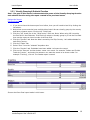
2.5.3 Visually Grouping & Subtotal Function
Goal - The goal of this lesson is demonstrate the power of the Visually Grouping function
and subtotal function using the report created in the previous lesson.
Design this Report
Edit this Report
1. If you do not have the lesson open from before, then you will need to load it by clicking the
link above.
2. Notice how some countries have multiple cities listed. We can visually group by the country
and have a cleaner report. Click on the "Fields" tab.
3. Click the "VG" check box in the "ShipCountry" field row. Note: When using VG it must be
the first field in the fields tab. If the field you select to Visually group by is not the first field
then use the up arrow icons to make it the first field.
4. Click the "Preview" tab. Now the data is sorted by the Ship Country. Let's add subtotals for
each Ship Country.
5. Click the "Fields" tab.
6. Select "Sum" from the "subtotal" dropdown box.
7. Click the "Preview" tab. Subtotals have been added. Let's save the report.
8. Click on the "Save as" tool bar button, name your report, for example "Orders and Freight
Totals by Country", and enter the category you want the report to be shown under, for
example "Training", click ok. The Izenda report is saved.
Screen shot from final report made in this lesson
Izenda Reports User’s Guide v6.5
19
Izenda Reports
User’s Guide
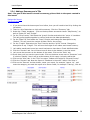
2.5.4 Adding a Summary and a Title
Goal - The goal of this lesson is to add a summary grid and title to the report created in
this lesson
Design this Report
Edit this Report
1. If you do not have the lesson open from before, then you will need to load it by clicking the
link above.
2. There is a lot of data here so let's add a summary. Click the "Summary" tab.
3. Under the "Fields" dropdown - Click on the drop down arrow and choose "ShipCountry”, as
well as “Order ID” and “Freight”.
4. For the "Ship Country" field select the "group" function and select the "sort a-z" checkbox.
This will group the data together by country and sort the data alphabetically.
5. For the "Order ID" field select the "count" function and change the description to say
"Orders". This will count the number of Order IDs for the country.
6. For the "Freight" field select the "Sum" function and the "$0.00" format. Change the
description to say "Freight". This will sum the freight for all orders sent to each country.
7. Let's add a grand total to see how much business we have done. Check Add Sub-totals.
8. Click the "Preview" tab. You will have to scroll down to the bottom to see the report.
9. Let's move the summary to the bottom of the report. Click on the "Style" tab.
10. Scroll down until you see the report order. Click on the down arrow next to "Summary" until
it is below "Details". Now it will be at the bottom of this report. Let's also add a title.
11. Click on the "Misc" tab. In the "Title" box enter "Orders and Freight By City and Country"
12. Click the "Preview" tab. Now the Report is Titled and in the order I want. Let's Save it.
13. Click on the "Save as" tool bar button, name your report, for example "Lesson 1-4", and
enter the category you want the report to be shown under, for example "Training", click ok.
Izenda Reports User’s Guide v6.5
20
Izenda Reports
User’s Guide
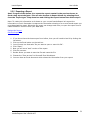
2.5.5 Exporting a Report
Goal: The goal of this lesson is to export the report created in the previous lesson to
Excel using report designer. This can also be done in Report Viewer by selecting Excel
from the "export type" drop down box and clicking the export button then follow step 3.
Note: To retain this information as it shows on your current Izenda Report let's export the
information to Excel. Remember to capture the information showing on a current Izenda report you
must download the report. Otherwise the report can change each time you open the report since it
reads the data in real time from your data base.
Design this Report
Edit this Report
1. If you do not have the lesson open from before, then you will need to load it by clicking the
link above.
2. Click on the Excel button on the tool bar.
3. You will see a box that asks "Do you want to open or save this file".
4. Click "Open".
5. Now you will see a "web" version of the report.
6. Click file, save as.
7. Decide where you want to save the file and name the file.
8. Change the "Save as type" to Microsoft Excel Worksheet.
9. You now have an Excel document which shows the information from your report.
Izenda Reports User’s Guide v6.5
21
User’s Guide
Izenda Reports
3.0 DATA SOURCES TAB
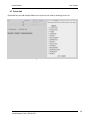
The Data Sources tab shows you which Tables or Views you have access to from the database. Your
system administrator can set up the interface to simplify the data selection process, so you do not have
to know the underlying data model.
DATA SOURCES VIDEO TUTORIAL
3.1 Simple Mode
Data Source Selection
To join tables in check boxes mode you should just check the tables you want to join one after another.
When you check the first table, all tables that cannot be joined to it will automatically be disabled.
After you will select the next table to join, the list of available checkable tables will be refreshed (see
image below).
Izenda Reports User’s Guide v6.5
22
User’s Guide
Izenda Reports
Auto Disabling Data Sources To Join
3.2 Admin Tip – Setting Visible Data Sources
Setting Visible Data Sources
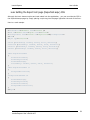
You can set up which data sources are available on a per user/per role basis by setting the Visible Data
Sources property in the Global.asax file.
//Pass User Credentials
AdHocSettings.CurrentUserName = HttpContext.Current.Session["UserName"] as
string;
AdHocSettings.CurrentUserIsAdmin = true;
AdHocSettings.VisibleDataSources = new string[] { "Orders", "Employees",
"AdminData" };
3.3 Admin Tip – Using Constraints
Using Constraints
Virtual constraints are easy to add in Izenda Reports. Complicated schemas no longer require
extensive user education or the changing of database schemas. Virtual constraints allow Izenda
Reports to know about all connections between tables.
If there are already constraints in the database, this will work automatically. If there are no
constraints in the DB schema, you could add virtual constraints manually through the Izenda API
using AdHocSettings.ShowDataSourcesAsCheckBoxes = true.
Note that constraints are required to use data sources auto-join.
You could use wildcards to add rules for all tables instead of adding constraints for each pair of
Izenda Reports User’s Guide v6.5
23
Izenda Reports
User’s Guide
tables.
Here is a very simple example of how to use virtual constraints:
AdHocContext.Driver.AddConstraint("Account.Id", "*.AccountID");
AdHocContext.Driver.AddConstraint("User.Id", "*.OwnerId");
AdHocContext.Driver.AddConstraint("User.Id", "Account.OwnerId");
You will not able to manually specify the joined fields in this mode. If you need this capability, you will
need to manually specify the Foreign Key relationships by clicking the Advanced button from the Data
Sources tab.
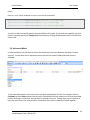
3.4 Advanced Mode
In Advanced Mode, you will have to select the relationships that exist between the tables or views
yourself. You will start with a drop-down menu that lists the various Tables and Views that are
available.
To join two tables and/or views, they must have fields with identical entries. For example, both the
Customers and the Orders tables have the same CustomerID field that contains one of several possible
entries: beverages, condiments, dairy products, seafood, and so on. Foreign keys are not required to
have the same name, but must possess a relationship that results in data when joined together.
Izenda Reports User’s Guide v6.5
24
User’s Guide
Izenda Reports
The Join Field dropdown menu (below) is a list of the fields contained in the table/view selected in the
Table dropdown menu to the left. Select the field that has identical entries as the table/view that it
needs to be joined with.
Join Field Dropdown Menu
The Foreign Table dropdown menu (below) is a list of the tables/views that have been selected in the
Table dropdown menu, other than the one in that row. Select the table/view to join the table/view in
that row.
Foreign Table Dropdown Menu
The Field dropdown menu (Error! Reference source not found.) is a list of fields in the table/view that
are selected in the Foreign Table dropdown menu to the left. Select the field to join with the
table/view in that row.
Field Dropdown Menu
Izenda Reports User’s Guide v6.5
25
User’s Guide
Izenda Reports
The Join Type dropdown menu (below) is a list of the available joining methods. The “Inner” method
discards any objects from the joint fields that do not have an identical match. The “Left” method still
displays those without an identical match
Join Type Dropdown Menu
3.4.2 Understanding the Data Model
Most users choosing to use the Advanced Mode need to have a clear understanding of the database
schema (image below), which is a blueprint of how the data is organized in the database, to be able to
quickly join tables together. This mode does allow for greater flexibility in selecting the types of joins
that can be performed, but is not recommended for most users.
Database Schema Diagram
Izenda Reports User’s Guide v6.5
26
Izenda Reports
User’s Guide
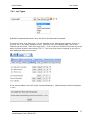
3.4.3 Join Types
By default, Izenda will perform an Inner Join across the data sources selected.
To show the Joins Type drop down, you can navigate to the Settings.aspx page by clicking on
the gear icon in the report designer screen. After you are in the settings page, click on the
Features tab and check "Show Join Drop Down". Click on Save to Izenda.config at the top of the
page, and clear browser cache using CTRL F5. The Joins Drop Down will appear to the right of
each additional data source chosen.
It can also be added via the API under ConfigureSettings(): AdHocSettings.ShowJoinDropDown
= true;.
Izenda Reports User’s Guide v6.5
27
Izenda Reports
User’s Guide
SQL Code of chosen Join Types:
Inner (Direct) Join: Selects rows from two tables such that the value in one column of the first
table also appears in a column of the second table.
SELECT DISTINCT
[dbo].[Invoices].[CustomerName] AS 'Customer Name'
FROM [dbo].[Orders]
INNER JOIN [dbo].[Invoices] ON [dbo].[Invoices].[CustomerID]=[dbo].[Orders].[CustomerID];
Cross Join: A cross join will return a result table where each row from the first table is combined
with each row from the second table.
SELECT DISTINCT
[dbo].[Invoices].[CustomerName] AS 'Customer Name'
FROM [dbo].[Orders]
CROSS JOIN [dbo].[Invoices];
Left(First Exists) Join: The Left Outer Join known also as Left Join returns all rows from the left
table in the Left Outer Join clause, no matter if the joined columns match. A field in a result row
will be null if the corresponding input table did not contain a matching row.
Izenda Reports User’s Guide v6.5
28
User’s Guide
Izenda Reports
SELECT DISTINCT
[dbo].[Invoices].[CustomerName] AS 'Customer Name'
FROM [dbo].[Orders]
LEFT OUTER JOIN [dbo].[Invoices] ON
[dbo].[Invoices].[CustomerID]=[dbo].[Orders].[CustomerID];
Right Join: The Right Outer Join known also as Right Join returns all rows from the right table in
the Right Outer Join clause, no matter if the joined columns match. A field in a result row will be
null if the corresponding input table did not contain a matching row.
SELECT DISTINCT
[dbo].[Invoices].[CustomerName] AS 'Customer Name'
FROM [dbo].[Orders]
RIGHT OUTER JOIN [dbo].[Invoices] ON
[dbo].[Invoices].[CustomerID]=[dbo].[Orders].[CustomerID];
Full Join: The Full Outer Join known also as Full Join returns all rows from Both the Right Outer
Join & Left Outer Join. A field in a result row will be null if the corresponding input table did not
contain a matching row.
SELECT DISTINCT
[dbo].[Invoices].[CustomerName] AS 'Customer Name'
FROM [dbo].[Orders]
FULL OUTER JOIN [dbo].[Invoices] ON
[dbo].[Invoices].[CustomerID]=[dbo].[Orders].[CustomerID];
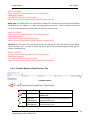
3.4.4 Function Buttons of Data Sources Tab
Function Buttons
The
,
, and
function buttons are defined in Table 2 below.
Icons
Control Name
Delete button
Insert Row
button (above)
Insert Row
button(below)
Izenda Reports User’s Guide v6.5
Description
Click this button to delete the row the
button is on.
Click this button to insert a row above the
row the button is on.
Click this button to insert a row below the
row the button is on.
29
User’s Guide
Izenda Reports
Function Buttons of Data Sources Tab
3.5 Custom Data Source Selection Page
Since Izenda is a platform and not a set product, if the Simple or Advanced Modes do not fit your
needs, you can have a customized Data Source Selection Page tailored to your preferences. The
example below is for a customer that had hundreds of tables in their database and needed an easy way
to categorize the selection process to make it simpler for their users. Working with the client, we
developed a mock-up and implemented a custom page with their existing branding and navigation.
Izenda Reports User’s Guide v6.5
30
User’s Guide
Izenda Reports
4.0 FIELDS TAB
Fields Tab
After selecting the data sources you want to display, as in the previous step, continue to the Fields tab.
In the Fields tab, you will choose which fields you want to display and be able to apply various
formatting options.
Listed below is a brief description of the properties available in the main Fields tab screen.
Feature
Field Selection
Description
Select fields from the drop-down menu or use the Quick Add button
Description
Displays a new title for the Field
Sort
VG
A
Sorts A - Z
Visually Groups the Field
Arithmetic – Performs basic calculations (+, -, x, %) and concatenation of text.
Function
Format
Other buttons
Displays functions available based on the type of data being accessed.
Displays the formats available to be displayed based on the data type.
On the far right you can delete, insert, move, or set advanced properties.
Records
Sets the number of records to display, which is used many times to add a Top
to the query result, such as Top 10 Customers by Revenue
Add Sub-total
Adds a sub-total to the report under each numeric column
Add Side-total
Quick Add
Add Pivot
Adds a side-total to the report beside each numeric row
Lets you quickly add multiple fields to the report at one time
Displays the pivot inputs to add to the report
Continue to Summary
Continues to the next tab in the report design process, the Summary tab.
Izenda Reports User’s Guide v6.5
31
User’s Guide
Izenda Reports
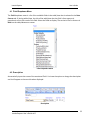
4.1 Field Dropdown Menu
The Field dropdown menu is a list of the available fields in the table/view that is selected in the Data
Sources tab. If joining tables/view, the title of the table/view that the field is from appears in
parenthesis next to the name of the field. Select the fields to display. The entries in the list that are in
Bold are the table/datasource names.
Field Dropdown Menu
4.2 Description
Automatically Inputs the name of the associated Field. You have the option to change the description
and it will appear as the new title when displayed.
Description
Izenda Reports User’s Guide v6.5
32
User’s Guide
Izenda Reports
4.3 Sort, VG, & Arithmetic Check Boxes
Sort, VG, & Arithmetic Check Boxes
Table 3 explains the Sort, Group, and VG Check Box features.
Features
Sort check box
Sort (z-a) under
Advanced
VG check box
Arithmetic
Description
Check this box if you want the table/view to be sorted by
the field selected in the Field dropdown menu to the left
in ascending order.
This check box is in the advanced properties of the row
and can be set if you want the table/view to be sorted
by the field selected in the Field dropdown menu to the
left in descending order.
Check this box to change the column for the field
selected in the Field dropdown menu to the left into
subheadings
Arithmetic. Performs basic calculations (+, -, x, %) and
concatenation of text.
Calculated Fields KB
Descriptions of Sort, Group, and VG Check Boxes
4.4 Other Buttons on the Fields Tab
The
,
, and
function buttons shown in Figure 4-1 are for the rows that they are in.
Figure 4-1 Function Buttons of Fields Tab
Izenda Reports User’s Guide v6.5
33
User’s Guide
Izenda Reports
Table 4 describes the function buttons of the Fields tab.
Icons
Control Name
Description
Delete button
Click this button to delete the row the button is on.
Insert Row
button (above)
Insert Row
button (below)
Move
Click this button to insert a row above the row the button is on.
Advanced
Properties
Advanced properties for that row.
Click this button to insert a row below the row the button is on.
Allows user to move a row up or down in the list
Table 4 Function Buttons of Fields Tab
Izenda Reports User’s Guide v6.5
34
Izenda Reports
User’s Guide
4.5 Functions Drop-Down
Functions allow you to perform calculations on the data and can be chosen from the dropdown menu
based on the data type of the selected Field.
Article on SQL Functions (w3schools.com)
Text (String) Functions Available
Date/Time Functions Available
Numeric Functions Available
Izenda Reports User’s Guide v6.5
35
Izenda Reports
User’s Guide
Functions Table
Function Name
...
Average
Count
Count Distinct
Maximum
Minimum
Sum
Sum Distinct
Group
Group(Day)
Group(Month)
Group(Year)
Group(Month Name)
Group(Date)
Group(Day of Week)
Group(Year & Month)
Group(Year & MN)
Group(Week)
Group(Year & Quarter)
Days Old
Sum(Days Old)
Izenda Reports User’s Guide v6.5
Description
No function used
Average the values in a column
Counts the number of values in a column
Counts the number of distinct values in a column
Takes Maximum value of a field
Takes Minimum value of a field
Sums the values in a column
Sums the rows with distinct values in a column .
Groups field values together for aggregating
23; day of month
3; instead of March
2012
July
7/4/2012
Sun or Mon
2012 -07
2012 - Jul
Jul 01 – Jul 07 (Sunday to Saturday of Week)
2012–Q3
342 (Number of Days from Today’s Date)
782 (Sums the Number of Days from Todays Date)
36
User’s Guide
Izenda Reports
4.6 Format Dropdown Menu
The Format dropdown menu is a list of formats for the entries of the field selected in the Field
dropdown menu directly to the left to appear in. Depending on the Field data type and the function,
you will have differing options for formatting. The main two formats used will be available for all
numbers and dates.
Format Dropdown Menu
Numeric Formats Available
Format
...
0,000
0,000.00
$0.00
$/100
0.0
0.00
0.000
0%
% of Group (with
rounding)
% of Group
Description
Displays the number as it is stored in
the database
Displays as a whole number
Displays with two decimal places
Displays as currency with two
decimal places
Displays the Number / 100 In
currency format.
Displays with one decimal place
Displays with two decimal places
Displays with three decimal places
Displays the number as a percentage
Same as % of Group but rounds to
closest tenth (ex. 1.11547% would be
1.1%).
Calculates the percentage of the row
Izenda Reports User’s Guide v6.5
Examples
500
500
500.00
$500.00
$5.00
500.0
500.00
500.000
50000%
100.0% (only one selected value,
500)
100%
37
User’s Guide
Izenda Reports
Gauge
Gauge (variable)
Dash Gauge
value to the entire group of values.
Shows value in a Linear Gauge
instead of a numerical value.
Shows values in a Linear Gauge
which changes format due to values.
Shows values in a Linear Gauge
which changes format due to values.
Date/Time Formats Available
Format
Description
Displays the date as it exists in the database
Examples
...
Short Date
Displays date using the mm/dd/yyyy format
7/4/2012
Long Date
Displays the day of the week, month, numeric
day, and the year
Wednesday, July 04, 2012
Short Time
Displays time as hh:mm AM/PM
12:00 AM
Long Time
Displays time as hh:mm:ss AM/PM
12:00:00 AM
Full(short)
Displays the Long Date format, followed by the
Short Time format
Displays the Long Date format, followed by the
Long Time format
Displays the Short Date format, followed by
the Short Time format
Displays the Short Date format, followed by
the Long Time format
Wednesday, July 04, 2012 4:34 PM
Full(long)
D&T (short)
D&T (long)
7/4/2012 12:00:00 AM
Wednesday, July 04, 2012 4:34:52 PM
7/4/2012 4:34 PM
7/4/2012 4:34:52 PM
Date Format Dropdown Table
Izenda Reports User’s Guide v6.5
38
User’s Guide
Izenda Reports
4.7 Quick Add
Quick Add lets you add multiple fields to the report at one time by selecting from a list.
Figure x-x Fields Quick Add
Izenda Reports User’s Guide v6.5
39
User’s Guide
Izenda Reports
4.8 Advanced Field Settings Button
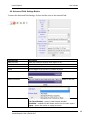
To access the Advanced Field Settings, click on the Gear icon on the selected Field.
Setting Name
Hide this field
Sort (z-a)
Italic – Bold
Width
Label Justication
Description
Hides the field from display when report is ran
Sorts in descending order
Italic and Bold for that field
Set the width of the column in number of pixels
Sets the Column label to the left, right, or middle of the row
Value Justication
Sets the Value of the field to the left, right, or middle of the row
Subreport
Sets the drill-down child report
Drill-Down Style
Link – opens in same browser window
Link (New Window) – opens in new browser window
Embedded – embeds the drill-down results into the main report
Popup – opens the results on a pop-up screen
Izenda Reports User’s Guide v6.5
40
Izenda Reports
User’s Guide
SubTotal (Function)
Gradient Cells Shading
Sets a gradient effect shading the affected cells.
Text Highlight
Highlights the text for the given range. Can use any color
from list on Styles Tab color drop-down.
Example: 5 to 6:Blue;7 to 10:Red
Highlights the cell for the given range.
Let’s you set text values for number ranges, so if you set
0 to 10: Under, Vancouver would say Under from above
Cell Highlight
Value Ranges
Expression
Izenda Reports User’s Guide v6.5
Below, we use Sum (Freight) * .35 to get the new column
41
User’s Guide
Izenda Reports
4.9 Add Pivot
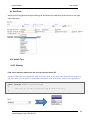
Add Pivot lets you generate analytical data grids and essentially adds extra pivot columns to the right
side of the eport.
4.10 Admin Tips
4.10.1 Aliasing
Field can be aliased or hidden from the menu through the Izenda API.
Dynamic Fields lets you dynamically alter the field names in the drop down that the user sees on a
per-user basis. This is useful for localization and when custom fields are used in your application.
public override void ConfigureSettings()
{
AdHocSettings.FieldAliases["ShipCity"] = "DepartureCity";
}
ALIAS
Izenda Reports User’s Guide v6.5
42
Izenda Reports
User’s Guide
4.10.2 Hidden Filters
Hidden Filters let you enforce row-level security on any field in the database on a per user / per role basis.
US Manager – Can only see U.S. data
Administrator – Can see all data
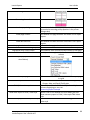
Izenda.AdHoc.AdHocSettings.HiddenFilters["ShipCountry"]= GetUserCountry();
The example above only lets you see data from your country value in the database.
You can set hidden filters to be a specific value or a range of values.
Izenda Reports User’s Guide v6.5
43
User’s Guide
Izenda Reports
5.0 FILTERS TAB
In the Filters tab (Figure 5-1), the fields of the table/view chosen in the Data Sources tab can be
filtered so that only pertinent entries appear in the table.
Figure 5-1 Filters Tab
5.1.1 Filter Field Dropdown Menu
The Filter Field dropdown menu is a list of the available fields in the table/view that have been selected
or created in the Data Sources tab. Select the fields to filter. If joining tables/view, the title of the
table/view that the field is from appears in parentheses next to the name of the field.
Figure 5-2 Field Dropdown Menu
Izenda Reports User’s Guide v6.5
44
User’s Guide
Izenda Reports
5.1.2 Filter Operator Dropdown Menu and Value(s)
Operator Dropdown Menu and Value(s).
The Filter Operator Drop-down lets you select your operator based on the data type that has been
selected in the filter. the filter fields available are only those under the Tables or Views selected in the
Data Sources tab.
Data Type
Categories Available
Number
Comparison, Equivalence, Field Comparison
Text
Date/Time
All of the above and Text
All of the above and Date/Time
Description of Operator Dropdown Menu and Value(s)
5.1.3 Operator Categories
Comparison
Is Less Than
Is Greater Than
Between
Isn’t Less Than
Isn’t Greater Than
Isn’t Between
Izenda Reports User’s Guide v6.5
45
User’s Guide
Izenda Reports
Equivalence
Description
Equals
Enter the value(s) directly.
Equals (List)
Equals (Autocomplete)
Allows you to copy/paste a list of values from a .csv file
Equals (Select)
Equals (Multiple)
Start typing the value and it will autocomplete for you
Select a single value from a drop-down list for a particular field
Select multiple values from the drop-down list
Equals (Popup)
Select the values from a pop-up menu
Doesn’t Equals
Doesn’t Equals (Select)
Doesn’t Equals (Multiple)
Doesn’t Equals (Popup)
Field Comparison
Is Less Than (Field)
Is Greater Than (Field)
Equals (Field)
Not Equals (Field)
Description
Multiple Field Joins – when needing to join on multiple fields or keys
Available for All
...
Blank
Isn’t Blank
Use Previous OR
No filter is set for the report.
Records that include blank or Null values will be included in the report.
Records that do not include blank or Null values will be included in the
report.
How to Use Previous OR KB
Izenda Reports User’s Guide v6.5
46
User’s Guide
Izenda Reports
Text
Description
Like
Begins With
Ends With
Isn’t Like
You can use the Like operator to find values in a field that match the
pattern you specify. Like “sa” could return sam, samurai,or raisan.
Begins with the values you set.
Ends with the values you set.
Isn’t Like “sa” would not return any results with sa in it.
Date/Time
Description
Between (Calendar)
Between two dates you select from a calendar
In Time Period
You can use the standard values above or create your own custom
timespans.
Add New Time Period KB
Less Than Days Old
Greater Than Days Old
Equals Days Old
Izenda Reports User’s Guide v6.5
47
User’s Guide
Izenda Reports
5.1.4 Blank and Param Checkboxes
Filter Selection
The Blank and Param checkboxes (see image above) allow you to control the filtering behavior in the
report viewer. They do not affect the “Preview” tab of the report designer.
Blank Checkbox: To use this, first set a “Filter Field” and then set an “Operator.”
If “Blank” is checked, the filter will return data which matches the “Value(s)”
dropdown/textbox and also data which has a blank/null value in that field .
In the example above, if “Blank” is checked and then viewed in the report viewer, then the user would
see all of the data where the “ShipCity” begins with “s” and all of the “Address” records which are
blank or null.
Param Checkbox: To use this, first set a “Filter Field”, set an “Operator”, and then set “Value(s)”, as in
the previous example. This will display the filtered report in the report viewer and allow the user to
change the filter value. If it is not checked, then the filter will not be visible to the end-user and the
end-user will not be able to change the filter.
The example above shows a filter which will display a report in the report viewer where only the
Address fields which begin with “s” will be shown. However, a user will be able to change the “s” to a
“t” and update the report if desired.
5.1.5 Other Buttons on the Filters Tab
The
,
,
Icons
,
and
function buttons of the Filters tab are shown below.
Control Name
Delete button
Description
Click this button to delete the row the button is on.
Insert Row
button (above)
Insert Row
button (below)
Move
Click this button to insert a row above the row the button is
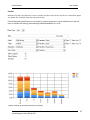
on.
Click this button to insert a row below the row the button is
on.
Allows users to move a row up or down in the list.
Izenda Reports User’s Guide v6.5
48
User’s Guide
Izenda Reports
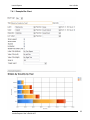
Table 7 Descriptions of Buttons
5.1.6 Other Filter Features
Feature
Description
Show Filters in Report Description
Require ___ Parameters in Viewer
Lists the Filters on the screen when accessed in the Report Viewer
Sets the number of filter parameters the user must set when
accessing this report in the Report Viewer
Ex: (1 OR 2) AND (3 OR 4)
Advanced Filter Logic KB
Filter Logic (Conditional Filtering)
Require ___ Parameters in Viewer
The example below requires the user to select at least two parameters before the report will run in the
Report Viewer.
Require The First Two Parameters in Viewer
Izenda Reports User’s Guide v6.5
49
User’s Guide
Izenda Reports
6.0 SUMMARY TAB
In the Summary tab (below), a table can be created that summarizes the chosen fields using different
functions (Ex: Average, Count, Maximum, and so on). You can also make a group of fields by choosing
the Group option from the Function dropdown menu.
Most actions and properties available in the Summary Tab are available in the Fields Tab.
The only difference is the removal of the Quick Add and Pivot capabilities, and addition of the Add
Deltas checkbox
For more information on performing a Summary, refer to the Fields section.
Summary Tab
Summary Results
Izenda Reports User’s Guide v6.5
50
Izenda Reports
User’s Guide
6.1 Deltas
Delta means "Change In".
Any time there is a change in a quantity that change is calculated by taking the later value for that
quantity and subtracting from it the earlier value for that quantity.
This can be used in a report by selecting "Add Deltas" under the Summary tab.
Select the "Add Deltas" checkbox under Summary tab.
Report view showing Summary with Delta.
Result: The Deltas() show the change in the Unit Price over the period of time.
Izenda Reports User’s Guide v6.5
51
User’s Guide
Izenda Reports
7.0 CHART TAB
In the Chart tab, a chart can be created using the data in the table/view selected on the Data Sources
tab.
Chart Tab
The Charts Tab lets you create different variations of charts, including:
Trend
Pie
Plot
Bar
Funnel
You can have multiple charts in one report or put multiple charts of summary information on a
Dashboard to show key business metrics.
7.1.1 None Selection
When the chart type is None (…), no chart appears.
None Selection
Izenda Reports User’s Guide v6.5
52
User’s Guide
Izenda Reports
7.2 Trend Selection
Trend Selection
The table below describes the features of the Trend chart type selection.
Features
Trend chart
Date dropdown
menu
Value dropdown
menu
Description
By choosing chart type Trend, the chart appears in Trend format.
Will show all of your available fields that are dates
Choose any value from the dropdown list.
Show Legend
Show Value
Labels
Smooth
Smoothing of the data points, as seen in graph Figure x-x above
Label Title
(Bottom)
Inserts a label centered at the bottom of the chart
Value Title (Left)
Scale %
Inserts a label centered to the left of the chart
Allows you to scale your chart to a percentage of the original size
Izenda Reports User’s Guide v6.5
53
Izenda Reports
User’s Guide
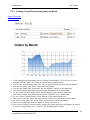
7.2.1 Creating a Trend Chart showing Orders by Month
Design This Report
Edit This Report
1. From the ReportList.aspx page Click on "Design a New Report". Or if you are in report
designer click the "New" icon. Now we need to select a data source.
2. Click on the "Data Sources" tab. Then click on the drop down box and choose "Orders".
3. Click on the "Chart" tab. This is where we create charts.
4. Click on the "Chart Type" drop down box and choose "Trend" for the chart type.
5. Click on the "Date" drop down box and select "OrderDate" for our date field.
6. For the "Date" function select "Group (Month Name)" from the drop down box.
7. Click on the "Value" drop down box and select "OrderID" for our value field.
8. For the "Value" function select "Count Distinct" from the drop down box.
9. Click on the "Preview" tab so you can view the report. Let's add a title to this report.
10. 10. Click on the "Misc" tab. In the "Title" text box enter "Orders by Month"
11. Click the "Preview" tab. Now the Report is Titled. Let's Save it.
12. Click on the "Save as" tool bar button, name your report and enter the category you want
the report to be shown under. Click OK. The Izenda report is saved.
Izenda Reports User’s Guide v6.5
54
Izenda Reports
User’s Guide
7.2.2 Creating an Advanced Trend Chart Report
Design This Report
Edit This Report
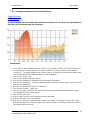
In this example, we will modify the trend chart created in 7.2.1 above, by separating the
data by year and smoothing out the graph.
Instructions
1. If you did not just complete lesson 2-1 then you will need to load it. This can be done from
the reports list or report designer. It will be under the "Training" category and labeled
"Lesson 2-1". In report designer just click the name. In reports list you click the pencil next
to the name and this will load the report in report designer.
2. Click on the "Chart" tab.
3. Click on the "Show Advanced" button.
4. Click on the "Separator" drop down box and select "OrderDate"
5. Click on the "Separator" "Function" drop down box and select "Group (year)" this is how the
data will be separated.
6. Notice that the legend check box is selected.
7. Click on the "Smooth" check box.
8. Click the "Preview" tab. Now the Trend Chart has been enhanced and separated by year.
Let's update the title for this report.
9. Click on the "Misc" tab.
10. In the "Title" text box enter "Orders by Month and Year"
11. Click the "Preview" tab. Let's Save it.
12. Click on the "Save as" tool bar button, name your report, for example "Lesson 2-2", and
enter the category you want the report to be shown under, for example "Training", click ok.
The Izenda report is saved.
Izenda Reports User’s Guide v6.5
55
User’s Guide
Izenda Reports
7.3 Pie Chart
The images below show the Pie (chart) selection menu of the Chart tab.
Pie (Chart) Selection
The table below describes the Pie chart selection.
Features
Pie chart
Label dropdown menu
Value dropdown menu
Description
By choosing chart type Pie, the chart appears in
Pie format.
Choose any label from the dropdown list.
Choose any value from the dropdown list.
Description of Pie (Chart) Selection
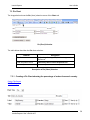
7.3.1 Creating a Pie Chart showing the percentage of orders from each country
Design This Report
Edit This Report
Izenda Reports User’s Guide v6.5
56
Izenda Reports
User’s Guide
Instructions
1. From the ReportList.aspx page Click on "Design a New Report". Or if you are in report
designer click the "New" icon. Now we need to select a data source.
2. Click on the "Data Sources" tab. Then click on the drop down box and choose "Orders".
3. Click on the "Chart" tab. This is where we create charts.
4. Click on the "Chart Type" drop down box and choose "Pie" for the chart type.
5. Click on the "Label" drop down box and select "ShipCountry" for our label field.
6. For the "Label" function select "Group" from the drop down box.
7. Click on the "Value" drop down box and select "OrderID" for our value field.
8. For the "Value" function select "Count Distinct" from the drop down box. Let's sort the
values so the countries with the most orders will be together.
9. Click on the sort checkbox for the value field.
10. Click on the "Preview" tab so you can view the report. Let's add a title to this report.
11. Click on the "Misc" tab.
12. In the "Title" text box enter "Orders By Country"
13. Click the "Preview" tab. Now the Report is Titled. Let's Save it.
14. Click on the "Save as" tool bar button, name your report, for example "Lesson 4-1", and
enter the category you want the report to be shown under, for example "Training", click ok.
The Izenda report is saved.
Izenda Reports User’s Guide v6.5
57
Izenda Reports
User’s Guide
7.3.2 Creating an Advanced Pie Chart Report
Design This Report
Edit This Report
In this lesson, we will modify the pie chart created in the pie chart above in Figure x-x by
separating the data by year so we can see which countries had the most orders each
year.
Instructions
1. If you did not just complete lesson 4-1 then you will need to load it. This can be done from
the reports list or report designer. It will be under the "Training" category and labeled
"Lesson 4-1". In report designer just click the name. In reports list you click the pencil next
to the name and this will load the report in report designer.
2. Click on the "Chart" tab.
3. Click on the "Show Advanced" button.
4. Click on the "Separator" drop down box and select "OrderDate"
5. Click on the "Separator" "Function" drop down box and select "Group(Year)" this is how the
data will be separated. Let's limit the number of records shown to 10.
Izenda Reports User’s Guide v6.5
58
Izenda Reports
User’s Guide
6. Click on the Show records textbox. Enter 10. Let's add a legend.
7. Click on the "Legend" check box to select it. Let's explode the largest slice from each year.
8. Click on the "Explode Largest Slice" check box. Let's add percentages to the pie graph.
9. Click on the "Show Percentage" check box. Let's also change the type of pie chart.
10. Click on the "Chart Type" drop down box and select "Doughnut."
11. Click the "Preview" tab. Now the Pie Chart has been enhanced to show the countries with
the most orders separated by year. Let's update the title for this report.
12. Click on the "Misc" tab.
13. In the "Title" text box enter "Orders By Country and Year"
14. Click the "Preview" tab. Let's Save it.
15. Click on the "Save as" tool bar button, name your report, for example "Lesson 4-2", and
enter the category you want the report to be shown under, for example "Training", click ok.
The Izenda report is saved.
Izenda Reports User’s Guide v6.5
59
User’s Guide
Izenda Reports
7.3.3 Plot Selection
The images below show the Plot (chart) selection of the Chart tab.
Plot Selection
The table below describes the Plot (chart) selection.
Features
Plot chart
X-axis dropdown menu
Y-axis dropdown menu
Description
By choosing chart type Plot, the chart appears in
Plot format.
Choose any field from the dropdown for the Xaxis.
Choose any field from the dropdown for the Y-axis.
Description of Plot (Chart) Selection
Izenda Reports User’s Guide v6.5
60
User’s Guide
Izenda Reports
7.4 Bar Charts
The images bellow show the user selection parameters for a simple Bar Chart which counts the
number of distinct orders by country.
The table below describes the Bar (chart) selection entries.
Features
Description
By choosing chart type Bar, the chart appears in
Bar format.
Choose any label from the dropdown list.
Choose any value from the dropdown list.
Bar chart
Label dropdown menu
Value dropdown menu
Description of Bar (Chart) Selection
Izenda Reports User’s Guide v6.5
61
Izenda Reports
User’s Guide
7.4.1 Example Bar Chart
Izenda Reports User’s Guide v6.5
62
Izenda Reports
User’s Guide
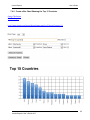
7.4.2 Create a Bar Chart Showing the Top 15 Countries
Design This Report
Edit This Report
http://www.izenda.com/demo/ReportViewer.aspx?rn=Training\\Lesson+3-1
Izenda Reports User’s Guide v6.5
63
Izenda Reports
User’s Guide
Instructions
1. From the ReportList.aspx page Click on "Design a New Report". Or if you are in report
designer click the "New" icon. Now we need to select a data source.
2. Click on the "Data Sources" tab. Then click on the drop down box and choose "Orders".
3. Click on the "Chart" tab. This is where we create charts.
4. Click on the "Chart Type" drop down box and choose "Bar" for the chart type.
5. Click on the "Label" drop down box and select "ShipCountry" for our label field.
6. For the "Label" function select "Group" from the drop down box.
7. Click on the "Value" drop down box and select "CustomerID" for our value field.
8. For the "Value" function select "Count Distinct" from the drop down box. Let's limit the
number of Countries listed on the graph to 15.
9. Click on the Show records textbox. Enter "15". Let's sort the data so we get the Top 15
countries sorted by number of customers.
10. Click on the sort checkbox for the value field.
11. Click on the "Preview" tab so you can view the report. Let's add a title to this report.
12. Click on the "Misc" tab.
13. In the "Title" text box enter "Top 15 Countries"
14. Click the "Preview" tab. Now the Report is Titled. Let's Save it.
15. Click on the "Save as" tool bar button, name your report, for example "Lesson 3-1", and
enter the category you want the report to be shown under, for example "Training", click ok.
The Izenda report is saved.
7.4.3 Create a Bar Chart with a Separator
Design This Report
Modify This Report
Izenda Reports User’s Guide v6.5
64
Izenda Reports
User’s Guide
Instructions
In this example, the goal is to modify the bar chart created in the preceding example by
separating the data by year so we can see who the top customers were each year.
1. If you did not just complete lesson 3-1 then you will need to load it. This can be done from
the reports list or report designer. It will be under the "Training" category and labeled
"Lesson 3-1". In report designer just click the name. In reports list you click the pencil next
to the name and this will load the report in report designer.
2. Click on the "Chart" tab.
3. Click on the "Show Advanced" button.
4. Click on the "Separator" drop down box and select "OrderDate"
5. Click on the "Separator" "Function" drop down box and select "Group (Year)" this is how the
data will be separated.
6. Notice that the legend check box is selected.
7. Click the "Preview" tab. Now the Bar Chart has been enhanced to show the countries with
the most customers separated by year. Let's update the title for this report.
8. Click on the "Misc" tab.
9. In the "Title" text box enter "Top 15 Countries by Year"
10. Click the "Preview" tab. Let's Save it.
11. Click on the "Save as" tool bar button, name your report, for example "Lesson 3-2", and
enter the category you want the report to be shown under, for example "Training", click ok.
The Izenda report is saved.
Izenda Reports User’s Guide v6.5
65
Izenda Reports
User’s Guide
7.4.4 Other Bar Chart Options
Show Pareto
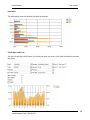
In a bar graph, the bars are plotted in order of increasing x. The heights of the bars fell where they will.
In a pareto chart, the bars are plotted in order of decreasing height, so the tallest bar is on the left, and the bars
get shorter as you move to the right.
Izenda Reports User’s Guide v6.5
66
Izenda Reports
User’s Guide
Stacked
Stacked bar graph is a graph that is used to compare the parts to the whole. The bars in a stacked bar graph
are divided into categories. Each bar represents a total.
If the Stacked bar graph feature is not turned on, please contact your system administrator and ask
them to validate this setting, AdhocSettings.AllowStackedBarChart = true;.
*Report filtered by selected countries to simplify
Izenda Reports User’s Guide v6.5
67
Izenda Reports
User’s Guide
Horizontal
The selected bar chart will display the Label horizontally.
Shade Area Under Line
You can use the Share Area Under Line check box when you have a Line Value selected on the same
Bar Chart.
Izenda Reports User’s Guide v6.5
68
Izenda Reports
User’s Guide
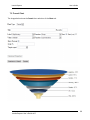
7.5 Funnel Chart
The images below show the Funnel chart selection of the Chart tab.
Izenda Reports User’s Guide v6.5
69
User’s Guide
Izenda Reports
8.0 GAUGE TAB
In the Gauge tab, you can add a panel of gauges to a report.
There are four different types of gauges you can create:
Radial
Radial 2
Animated Half Circle
Animated Half Circle with KPI’s
Linear
Izenda Reports User’s Guide v6.5
70
User’s Guide
Izenda Reports
8.1 Create First Four Gauges Alphabetically Counting Orders by Country
The Report below is showing the first 4 gauges based on the alphabetical order of the selected
countries.
Gauge tab contents
Izenda Reports User’s Guide v6.5
71
Izenda Reports
User’s Guide
8.2 Creating the Top 4 Orders by Country Gauges
In the following example, you will see the gauges of the four countries with the greatest number of
orders.
You can add four different types of gauges
Izenda Reports User’s Guide v6.5
72
Izenda Reports
User’s Guide
8.3 Changing Color Ranges
To change color ranges for the gauge, enter in a percentage range for each color, or enter a range of
specific values.
OR
Izenda Reports User’s Guide v6.5
73
Izenda Reports
User’s Guide
OR
Izenda Reports User’s Guide v6.5
74
Izenda Reports
User’s Guide
8.3.1 KPI’s and auto-updating data with Animated Gauges
The Animated Half Circle opens up a few more options under the Gauge Style row.
With these new options, you can select the KPI Low and High, and select whether the Red values will
be hidden, on the low side, or on the high side. You can also select how update the date updates.
Izenda Reports User’s Guide v6.5
75
Izenda Reports
User’s Guide
8.4 Gauges with Drill-Down Effects
Izenda Reports User’s Guide v6.5
76
User’s Guide
Izenda Reports
9.0 MISC TAB
In the Miscellaneous Tab (Misc Tab), you can add a title, description, header and footer to the report,
all with left, middle, or right justification. Sharing and Scheduling are the two most popular features
under this tab.
Misc tab contents
Izenda Reports User’s Guide v6.5
77
User’s Guide
Izenda Reports
Feature
Description
Report Header Image Justification
Allows you to move the Report Header to the left,
middle or right.
Enter the title of the report.
Examples below use “INSERT TEXT” as input.
Title
Description
Enter a description for the report.
Header
Allows a user to set a report header.
Footer
Allows a user to set a report footer.
Izenda Reports User’s Guide v6.5
78
User’s Guide
Izenda Reports
9.1 Share With & Rights
Share With allows you to share reports with:
Everyone
Other roles like Marketing or Sales
Other users like Bob or Lisa
Your system administrator will likely determine the list of who you can share with that populates in
your drop-down menu. Select who you would like to Share With and determine the level of access you
will give them to this report. The table below describes the characteristics of each option for selecting
the appropriate rights.
Rights
…
None
Full Access
Read only
View Only
Locked
Izenda Reports User’s Guide v6.5
Description
Do not share this report with anyone
Can share with every user and group
Can make changes to Save As but cannot
modify the original
Cannot make any changes to the report
Locks the report down so no one else has
access to it
79
Izenda Reports
User’s Guide
9.1.1 Setting Sharing Permissions
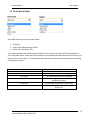
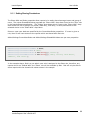
The Share With and Roles properties allow reports to be easily shared amongst users and group of
users. The values SharedWithValues populate the "Share With" drop-down found on the “Misc” tab
in the Izenda Reports application. The "Rights" drop-down which is next to the "Share With" dropdown allow the user to assign Full Access, Read Only, View Only, or None permissions to the
selected choice in the "Share With" drop-down.
Roles on a per-user basis are specified by the CurrentUserRoles properities. If a user is given a
role, then he will have access to the reports which are shared with that role.
AdHocSettings.CurrentUserRoles and AdHocSettings.SharedWithValues are per-user properties.
AdHocSettings.CurrentUserIsAdmin = false;
AdHocSettings.CurrentUserName = "Bob";
AdHocSettings.CurrentUserRoles = new string[] { "Sales" };
AdHocSettings.SharedWithValues = new string[] { "Bob", "Sales", "Bob Smith",
"Admins", "Sam Jones" };
In the example above, Bob is a non-admin user who is assigned to the Sales role, therefore, any
reports which are "Shared With" the "Sales" role will be accesible by Bob. Bob will only be able to
share reports with the shared with values shown in the sample.
Izenda Reports User’s Guide v6.5
80
Izenda Reports
User’s Guide
9.2 Drill-Downs
Drill-down Video KB
To create a drill-down report, you can start by designing the main report, but in order to be able to
select a drill-down report, that sub-report must first have a drill-down key to show up in the selection
list. Once the sub-report is available in the selection list for your Sub-Report or Target Report, meaning
it has been defined what Drill-down key will link the two reports, you can select you drill-down type.
Example
Design Sub-Report
Set the Drill-Down Key under the MISC tab
Design main report
Izenda Reports User’s Guide v6.5
81
User’s Guide
Izenda Reports
Click on Advanced Field Settings in Main Report
Select the Subreport
Select the Drill-Down Type
Option
...
Link
Link(New Window)
Embedded
Popup
Hover
Izenda Reports User’s Guide v6.5
Description
Opens in the same browser window
Opens in a new browser window
Embeds within the main report field selected
Displays as a pop-up window. You must click on
the image to clear it from the screen.
Shows the sub-report on the same screen as an
overlay when you hover over the current field,
chart, or gauge.
82
Izenda Reports
User’s Guide
9.2.1 Passing Filters from Master Report to Sub-Report
There is a property that your system administrator can set to allow the filters applied in the parent report to
automatically pass through to the child report (master report to sub-report). It is called
InheritFiltersinSubreports, and gets or sets the value indicating whether filters will be inherited in subreports.
Listed below is an example of where you would set this in the code.
public class CustomAdHocConfig : Izenda.AdHoc.DatabaseAdHocConfig
{
// Configure settings
// Add Custom Setting below license key and connection string setting
public override void ConfigureSettings()
{
AdHocSettings.SqlServerConnectionString = "INSERT_CONNECTION_STRING_HERE";
//AdHocSettings.VisibleTables = new string[] { "VIEW1", "TABLE2" };
AdHocSettings.InheritFiltersInSubreports = true;
}
Izenda Reports User’s Guide v6.5
83
Izenda Reports
User’s Guide
9.3 Scheduler
The scheduling controls may not be available to all users.
If you do not see them, please speak with your system administrator.
Schedule:
Repeat Type:
Send Email As:
Recipients:
Set the schedule date and time.
Set the repeat frequency.
Sets the format in which the email is sent.
Enter a comma separated list of recipients.
Izenda Reports User’s Guide v6.5
84
Izenda Reports
User’s Guide
9.3.1 How to Set Up the Izenda Scheduler
How to setup and use the Izenda Scheduler
The scheduler requires the use of the IzendaScheduler.exe file, which is found in the root of the
directory to which you installed Izenda Reports. You then need to add a scheduled task to your system
which runs every minute. The task uses the IzendaScheduler.exe to access a page in our application
which determines if any reports need to go out (run_scheduled_reports= on rs.aspx page). The
IzendaScheduler.exe file does not actually send out the files or access anything else except for the
specific page in our application which you give the exe file as a parameter.
To turn on the scheduler controls for certain users, use the show scheduler controls property.
Izenda.Adhoc.AdHocSettings.ShowScheduleControls = true;.
Repeat Type
Select a time frame like Every Month.
Or select an Alert, which will send an email if filter parameters are not met.
You can also enter in custom time spans, for example, in cases of Fiscal vs. Yearly Quarters – KB Article
Send Email as
You can send the email as a number of attachments, like PDF, Word, & Excel, as a Link, which shows a
link to click on in the email, or as Embedded, which embeds the report in the body of the email.
Izenda Reports User’s Guide v6.5
85
Izenda Reports
User’s Guide
9.3.2 Report Owner: Setting the User and Admin States
You can select the owner of the report. By default, it is set as the DefaultAdministrator.
DefaultAdministrator has admin priveleges and will be able to see and change all other users’ reports.
In most cases, your system administrator will set this property for you and might even hide it from the
scheduler screen.
Setting the user and their access rights
By default, Izenda Reports includes a user account called "defaultadministrator". The setting
"CurrentUserIsAdmin" is used to set whether or not the current user is an Administrator user. If set
to true, then Ad Hoc allows the current user to have Administrator privileges. These privileges are
the ability to see all reports both shared and private, change the owner of a report, and over write
the Read only reports. If set to false, then the user can only see shared reports. In this case, we
must also set the "CurrentUserName" property to the user's name, which for example, can come
from the session variable.
After setting the user name and whether or not the user is an Administrator, one can set the
database, table, view, or field level access.
Setting an Administrator user
C# or VB.NET
Izenda.AdHoc.AdHocSettings.CurrentUserIsAdmin = true;
Setting the user name
C# or VB.NET
Izenda.AdHoc.AdHocSettings.CurrentUserName = "Bob";
Izenda Reports User’s Guide v6.5
86
User’s Guide
Izenda Reports
10.0
STYLE TAB
In the Style tab, you can customize the look and feel of the report that will be displayed. You can
change the color of the border, header, and rows, as well as the order the report items.
Style tab contents
Izenda Reports User’s Guide v6.5
87
User’s Guide
Izenda Reports
10.1 Style Properties
When you change the properties of the various colors within the report, the sample grid below can be
used to see the differences.
The colors which can be changed are: Border color, Header color, Header foreground color, Item color,
Item foreground color, and Alternating item color.
Explanations of other properties found on tab are given below.
Feature
Border color
Description
Header color
Header foreground color
Item color
Izenda Reports User’s Guide v6.5
88
Izenda Reports
User’s Guide
Item foreground color
Alternating item color
Landscape printing
Show page number
Show date and time
Use pagination in web view
Add bookmark for each visual group
Page Break After Visual Groups
Minimize Grid Width
Determines whether the report prints in landscape mode.
(It can also be set using print properties in the printer
dialogue box)
Sets whether the page numbers are shown in PDF report
exports.
Sets whether the date and time are shown in PDF report
exports.
Sets whether pagination is used in the report viewer.
Sets whether bookmarks are used in adobe PDF exports.
Sets whether each Visual Group will receive its own page
Adjusts the margins to the smallest width for each
column
Visual Group Style (explained in more
detail below)
Items per page
Allows a user to set the number of items shown per page
in a grid.
Report Order
Allows the user to set the order of the Summary, Chart,
Gauges, Map, and Detail (Field) grids
Field|Value column pairs
Allows a user to set the field value style for multiple
columns displaying on one row.
Accounting Report Example
Show main report in Field | Value style
Allows a user to set whether the main detail grid uses
Show summary report in Field | Value style Field-Value
style
Show summary report in Field | Value style Allows a user to set whether the summary grid uses FieldValue style
Izenda Reports User’s Guide v6.5
89
Izenda Reports
User’s Guide
10.2 Changing Colors Through CSS
Izenda Reports fully integrates with your application both at the program level and visually. All
visual aspects of Izenda Reports are user customizable and can be made to match your existing
application's visual look and feel. Listed below are some of the quickest ways to change the look
and feel of our application in order to blend seamlessly with your product or application.
You can download the CSS Zip and set the appearance of the report input screens, the toolbar and
tabs, as well as the reports output appearance.
The steps are:
download the CSS file
o CSS.ZIP
edit the CSS files, but do not change the selector names or the filenames
save the edited files to your server where they can be access via absolute urls
navigate to the settings.aspx page
navigate to the "Images & CSS" tab
enter the new absolute URLs of the CSS files
fully clear your cache and restart the application
After resetting and clearing the cache, the CSS changes should reflect in Izenda Reports.
Izenda Reports User’s Guide v6.5
90
User’s Guide
Izenda Reports
10.2.1 Setting
the Report List page (ReportList.aspx) CSS
Although the html element styles are hard coded into the application, you can override the CSS in
the Reportlist.aspx page by simply placing a style tag into the page right after the end of the form.
Here is a code sample.
<uc1:Header ID="Header1" runat="server" />
<form id="Form1" method="post" runat="server">
<cc1:ReportList runat="server" id="reportList"></cc1:ReportList>
</form>
<style type='text/css'>
A:link {font-family: Verdana, Geneva, Arial, Helvetica;}
A:visited {font-family: Verdana, Geneva, Arial, Helvetica;}
A:active {font-family: Verdana, Geneva, Arial, Helvetica;}
A:hover {font-family: Verdana, Geneva, Arial, Helvetica;}
table.ReportsListTable
{
border-color:white;
border-style:solid;
border-width:2px;
font-family: Verdana, Geneva, Arial, Helvetica;
}
table.ReportsListTable tr
{
background-color:red;
}
tr.ReportsListHeader td
{
border-width:1px;
border-style:solid;
border-color:white;
background-color:silver;
}
</style>
Izenda Reports User’s Guide v6.5
91
User’s Guide
Izenda Reports
10.2.2 Customer
Integration Example
Izenda Reports User’s Guide v6.5
92
User’s Guide
Izenda Reports
11.0
TOOLBAR AND PREVIEW
Toolbar Buttons
The table below describes the functions of the Toolbar buttons.
Icons
Features
Description
Back
Goes to the browser’s previous page.
New
Creates a new report.
Save
Saves a report.
Save As
Allows a new report name to be saved.
Print (PDF Export)
Saves the report as a PDF document.
IE
Runs the report in the web browser.
Schema
Display database diagram
SQL
Views the report in SQL mode.
CSV
Saves the report as a CSV file.
Excel Spread sheet
Saves the report as a MS-EXCEL file.
Word Document
Saves the report as a MS-Word document.
XML document
Saves the report as a XML document.
Open office
document
Saves the report as an Open Office Document.
RTF document
Saves the report as a RTF document
Back to Report List
Takes you to the Report List screen.
E-mail
E-mails a report to a client
Settings
Takes you to Settings.aspx page.
Descriptions of Toolbar Buttons
Izenda Reports User’s Guide v6.5
93
Izenda Reports
User’s Guide
11.1 How to Modify the Toolbar Through the API
The Toolbar represents a set of controls (mainly - buttons), which allow users quick access to the
most often used features. AdHoc has a set of classes that allow you to construct any toolbar
dynamically using the API, but there are four pre-refined (default) toolbars in AdHoc:
Report Designer toolbar (a, below) - the most complex one.
Report Viewer toolbar (b)
Dashboard Designer toolbar (c)
Dashboard Viewer toolbar (d) - the simplest one.
a)
b)
c)
d)
Default AdHoc toolbars. (More Detail KB Article)
AdHoc allows you the option to either customize the default toolbars or create a completely new
toolbar, by manipulating basic toolbar objects using the toolbar API. The Toolbar is implemented by
using classToolbar, which has a collection of ToolbarItem. Any control derived from
ToolbarItem represents a basic toolbar object and can be placed at the Toolbar. Since
ToolbarItem is derived from WebControl, it has all of its properties and events, like Enabled,
Visible, etc. AdHoc has three built-in toolbar controls derived from ToolbarItem:
ToolbarButton
ToolbarCheckBox
ToolbarSeparator
11.2 Changing What Buttons are Displayed in the Toolbar
Similar to most other settings, you can turn each button on or off on a per user/per role basis.
Izenda.AdHoc.AdHocSettings.CurrentUserIsAdmin = false;
Izenda.AdHoc.AdHocSettings.ShowSettingsButton = false;
Izenda.AdHoc.AdHocSettings.ShowSqlOutputIcon = false;
In the example above, we have turned off the Settings Button and the SQL Output Button for non-admin users.
Izenda Reports User’s Guide v6.5
94
User’s Guide
Izenda Reports
11.3 Preview Tab
In the Preview tab (see image below), a preliminary version of the created table can be viewed, along
with its Summary table, Chart(s), Map, Gauges, along with any other properties that have been set. Go
back and change selections in the previous tabs and see how they affect the table by returning to it in
the Preview tab.
Preview Tab
Izenda Reports User’s Guide v6.5
95
Izenda Reports
12.0
User’s Guide
PIVOTS SECTION
The Izenda reports Pivot feature allows users to generate analytical data grids from within Izenda
reports. The Pivot feature essentially adds extra pivot columns to the right side of the report. This is
useful for comparing data over multiple categorical dimensions.
Below is an example of the Design and Output of a standard Pivot View of the Average Amount Spent
on Freight.
12.1 Create a Simple Pivot Report.
1. Click on the "Data Sources" tab and select desired data sources. (Ex. Orders)
2. Click on the "Fields" tab. Select the desired Field(s) names & attributes (Sorting, VG, Function,
& Format) for the report. (Ex. ShipCountry)
Before Pivot:
Izenda Reports User’s Guide v6.5
96
Izenda Reports
User’s Guide
Create pivot view on above report:
1. Under Fields tab, click the "Add Pivot" button.
2. Drop down "Add pivot columns for". Select the field you wish to display across the top of the
pivot view (Ex. OrderDate). Next, select the function type from drop down (Ex. Group(Year))
3. Drop down "Calculate cell values on". Select the field you wish to display down the left side of
the pivot view (Ex. Freight). Next, select the function & format types from the drop downs
(ex. Average & $0.00). **This field's data will also populate the rows within the pivot view.
4. Optional: Select the "Add subtotals using" drop down and apply Advanced Settings.
5. Click Preview
After Pivot:
Essentially, the pivot capability adds additional columns based on the data to the right of the report. In
this example, the first column is essentially a standard report and the 2010, 2011, 2012 columns were
added by the pivot capability.
Standard Report View:
Columns added by Pivot:
Izenda Reports User’s Guide v6.5
97
Izenda Reports
User’s Guide
12.2 Create an Advanced Pivot Report
Let's use these concepts to develop a more sophisticated report that shows us a monthly time-series
report for each country visually grouped by employee.
In this report, we want to show the Top 5 companies that accounted for the most freight in 2011 and
breakdown the analysis by month.
Here is what the design screen would look like for this report.
Here's how we add the non-pivot fields.
1.
2.
3.
4.
We started off by using the same Data Source for the previous report, Orders.
We then Select the Fields, grouping by ShipCountry, and Summing the Freight.
Next, we check the Subtotals box to give us a summary line for each country.
Then, we click on the advanced icon for the Freight field, sorting from Z-A to list the highest
values first.
5. After that, we selected 5 Records in the top left to show the 5 countries with the largest freight
amount.
For the pivot portion of the report, we:
1. Select the OrderDate at the Pivot column and Year & MN as the way it will be displayed.
2. Select Freight as what we will measure in our pivot, performing a sum for each column.
The final step is to add the filter to make it calculate the results from only 2011 data.
Izenda Reports User’s Guide v6.5
98
Izenda Reports
User’s Guide
Finally, here are the results of the report with Pivot:
To make the report more consumable, you might also want to add highlighting to show the months
with lows values.
For this, click on the Advanced Field Settings icon on the pivot field where you are calculating cell
values, on the far right of the image below.
Then, set the Cell Highlight to 0 to 50: Red.
Here is the result:
Izenda Reports User’s Guide v6.5
99
Izenda Reports
13.0
User’s Guide
IZENDA MAPS
The Izenda Maps add-on provides interactive geographical visualization to the reporting experience. For more
information, please click here.
**Please note: You must have purchased the Maps module to access this functionality.
In the report below, we are shading the colors of the states based on the sum of the freight, applying a hover over
that shows the top products by state, and displaying an indicator bar on the location of the postal code while
showing the number of orders vertically in the bar.
Izenda Reports User’s Guide v6.5
100
User’s Guide
Izenda Reports
Feature
Description
Map Type
Zoom to Data
Zooms to the region or state the data is in
State
Select the field where state data is located
Shading
Selects the field and function you will use
for shading
Fill Color From - To
Fills the color of the shading from a
selected color to a selected color
Label (1st one displayed)
Sets the text displayed for the Legend
Postal Code
Select the field where postal code data is
located
Latitude / Longitude
Select the field where GIS data is located
for lat/long
Value
Sets the field and function you will use in
the indicator bar
Label (2nd one displayed)
Izenda Reports User’s Guide v6.5
101