1
Trouble Display
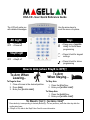
The screen will display all troubles when they occur.
1. Press the [TBL] key. The trouble(s) will be displayed. Scroll through the
trouble list using the [S] and [T] keys.
2. Read the corresponding explanation of the trouble from the trouble list in
the User Guide. If no repair instructions are given, call your security
company for repairs.
3. Press the [CLEAR] key to exit.
Panic Keys
To send a silent or audible alarm to your security company, press and hold one of
the key combinations listed below for two seconds.
Panic Alarm Type
Police
Medical
Fire
Key Combinations
Keys [1] and [3]
Keys [4] and [6]
Keys [7] and [9]
How to Bypass Zones
Alarm Memory Display
Bypassed zones remained unarmed
when the partition is armed.
1. Press the [BYP] key.
2. Enter your [ACCESS CODE].
3. Select the zone(s) you want to
bypass by entering the two-digit
zone number (i.e. zone 3 = 03).
4. Press the [ENTER] key to save
and exit.
To view the alarms that occurred
during the last armed period:
1. Disarm the system.
2. Press the [MEM] key.
3. The zones that were in alarm the
last time the system was armed
will be displayed.
4. Press the [ENTER] key to save
and exit.
paradox.com
Printed in Canada - 05/2010
K32LCD-EQ01