1
which indicates where the event are from and can therefore easily be filtered out
by just comparing that mac address to the address of the A1001 that received the
event.
3.2.3
Data Filtering
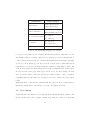
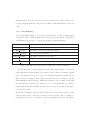
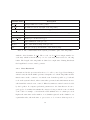
To avoid the Event Sniffer to log an unnecessary amount of data, we implemented
a log filter to filter out information that is not of interest. Depending on what type
of information are about to be logged, the log filter behaves differently.
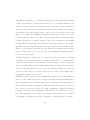
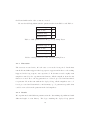
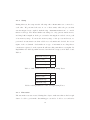
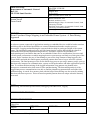
Information Tag
Characteristics
EVENT2
Information from the Event2 system implemented at Axis
SYSTEM USAGE
Information about the system in general
PROCESS USAGE
Process specific information
SYSLOG EVENT
Information parsed from the syslog
ACCESS TIME
A specific category used when measuring access time on the A1001
PROCESS CRASHED
Information involving a crashed process
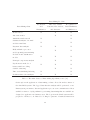
Table 3: The different categories the log filter use to filter information
To specify for the log filter what kind of information that should be logged one
of the information tags from Table 3 are sent in to the log filter. Depending on what
type of information is about to be logged, necessary information is sent into the log
filter as well, for example, when logging information about a certain process, the
CPU utilization and the memory utilization is passed to the log filter, along with
the information tag. If these two values are over a certain threshold, specified at
compile time in the Event Sniffer, the information is seen as relevant and is passed
on to the ring buffer.
Every time something is logged, the log filter also check another criteria. This
criteria exists for some of the above mentioned categories and could for example be
if the memory usage of a certain process reaches its highest values since the Event
37