1
Imagination Technologies
Public
Contents
1.
Introduction ................................................................................................................................. 2
2.
Getting Started ............................................................................................................................ 4
2.1.
Hardware Requirements ..................................................................................................... 4
2.2.
Package Contents .............................................................................................................. 4
2.2.1.
Windows ................................................................................................................... 4
2.2.2.
Linux ......................................................................................................................... 5
2.2.3.
OS X ......................................................................................................................... 5
2.3.
Installation ........................................................................................................................... 5
2.3.1.
Windows ................................................................................................................... 5
2.3.2.
Linux ......................................................................................................................... 5
2.3.3.
OS X ......................................................................................................................... 6
3.
PVRVFrame Graphical User Interface ....................................................................................... 7
3.1.
Working with Profiles .......................................................................................................... 7
3.2.
Running an Application ....................................................................................................... 9
4.
Supported Extensions ..............................................................................................................10
5.
Current Limitations ...................................................................................................................12
6.
Contact Details ..........................................................................................................................13
List of Figures
Figure 1. PVRVFrame layer overview ..................................................................................................... 3
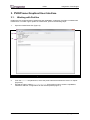
Figure 2. PVRVFrame GUI ..................................................................................................................... 7
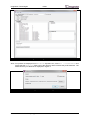
Figure 3. Viewing further information ...................................................................................................... 8
Figure 4. Preferences dialog box ............................................................................................................ 8
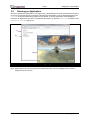
Figure 5. Running an application ............................................................................................................ 9
List of Tables
Table 1. Emulation requirements ............................................................................................................ 4
Table 2. Package contents for Windows ................................................................................................. 4
Table 3. Package contents for Linux ....................................................................................................... 5
Table 4. Package contents for OS X ....................................................................................................... 5
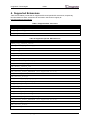
Table 5. Supported EGL extensions ..................................................................................................... 10
Table 6. Supported OpenGL ES extensions ......................................................................................... 10
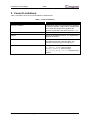
Table 7. Current limitations ................................................................................................................... 12
1. Introduction
PVRVFrame is an emulation layer for desktop platforms that provides an OpenGL ES and EGL
environment mimicking that available on PowerVR-enabled devices. It works by redirecting OpenGL
ES API calls to the underlying OpenGL desktop implementation present on the development system.
PVRVFrame is aimed at developers writing OpenGL ES applications for PowerVR-enabled embedded
devices and is designed to mitigate the need to work directly with this hardware. Figure 1 captures
this understanding.
Revision PowerVR SDK REL_3.5@3523383a
2
User Manual