1
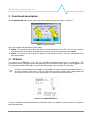
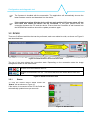
Configuration and diagnostic tool 3 Functional description On POWERMASTER start-up, the user must select the device type as shown on Figure 1. Figure 1: Start-up screen User can operate the application in two ways: Offline: This mode is active when the device is disconnected from the PC. The user can perform a limited number of activities, all activities that require the device connected are disabled. Online: This mode is active when the device is connected to the PC. The user can benefit of all the functionalities. 3.1 NPS2400 To connect the NPS2400 to the PC the CommBox (Communication Box) is mandatory. The CommBox must be inserted into the dedicated slot on the NPS2400 (see Figure 2) and plugged to the PC using the provided USB cable. Connect the main supply input to power on the device. In case only single phase is available, it is possible to connect neutral and phase between L1 and L2 to power on the device. The DC output will not work and the under voltage alarm will be shown on the screen, but it will be possible to communicate with the device. Figure 2: CommBox connection There are 4 different activities that can be performed, each one related to a tab, as shown on Figure 3 and described later. POWERMASTER user manual rev. 1.4 Page 5/10