1
Email2CRM Quick Start User Manual
October 21, 2010
Getting Started
Thank you for choosing Email2CRM as your integrated email messaging with web analytics solution for
Microsoft Dynamics CRM 4.0. Email2CRM is a CRM Innovation solution where we have partnered with
the VerticalResponse business class email marketing system to provide analytics integration to your
Dynamics CRM deployment. The following information is designed to help you begin using Email2CRM
quickly. For more in depth product information, see the full Email2CRM User’s Manual.
Creating a Marketing List
Creating and maintaining Marketing Lists is a crucial part of effective VerticalResponse usage. To that
end, Email2CRM makes maintaining your VerticalResponse Marketing Lists simple and painless because
Email2CRM uses your Dynamics CRM deployment as the system of record for Marketing List
maintenance.
NOTE: Do not create a CRM Campaign and add a Marketing List to it and then sync to VR. A CRM
Campaign record is created automatically from each email blast with the associated marketing lists
used for that email blast.
To create and maintain a Marketing List, simply follow the instructions below:
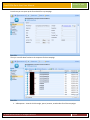
In your Dynamics CRM Dashboard, locate the Marketing List you would like to sync to VerticalResponse
and open its form or click the ‘New’ button on the control bar to create a new Marketing List.
When you have selected or created your Marketing List, locate the ‘Sync to VR’ radio button under the
‘Email2CRM’ heading of that Marketing List’s form view. Set the radio button to ‘Yes’, then click the
‘Save and Close’ button at the top of the form
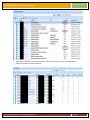
The Marketing List you have created will be recreated in your VerticalResponse account automatically
the next time the Email2CRM system syncs your account. Typically, this happens every thirty (30)
minutes to two (2) hours, so please plan accordingly. You will know the list has been synced when a
number appears in the read-only ‘VR id’ field that appears in the Email2CRM section of the form.
© 2010 CRM Innovation LLC All Rights Reserved
Page 3