1
Mini-ITX Mainboard Manual
5.4
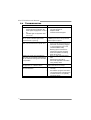
TROUBLESHOOTING
Probable
Solution
1.
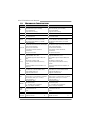
No power to the system at all
1.
Make sure power cable is
Power light don’t illuminate, fan
securely plugged in.
inside power supply does not turn 2.
Replace cable.
on.
3.
Contact technical support.
2.
Indicator light on keyboard does
not turn on.
System inoperative. Keyboard lights
Using even pressure on both ends of
are on, power indicator lights are lit,
the DIMM, press down firmly until the
and hard drive is spinning.
module snaps into place.
System does not boot from hard disk 1.
Check cable running from disk to
drive, can be booted from optical drive.
disk controller board. Make sure
both ends are securely plugged
in; check the drive type in the
standard CMOS setup.
2.
Backing up the hard drive is
extremely important. All hard
disks are capable of breaking
down at any time.
System only boots from optical drive. 1.
Back up data and applications
Hard disk can be read and applications
files.
can be used but booting from hard disk 2.
Reformat the hard drive.
is impossible.
Re-install applications and data
using backup disks.
Screen message says “Invalid
Review system’s equipment. Make sure
Configuration” or “CMOS Failure.”
correct information is in setup.
Cannot boot system after installing
1.
Set master/slave jumpers
second hard drive.
correctly.
2.
Run SETUP program and select
correct drive types. Call the drive
manufacturers for compatibility
with other drives.
2007/04/10
62