1
4.1 Using a Practical Project Workspace
In the course of developing and customizing software for your target, you will need to organize
various software packages and project components in a comprehensive and easy-to-use
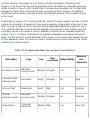
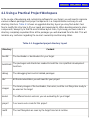
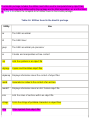
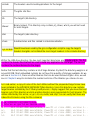
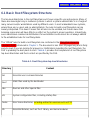
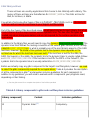
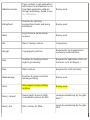
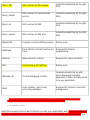
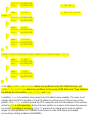
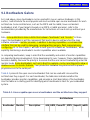
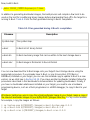
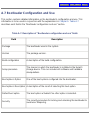
directory structure. Table 4-1 shows a suggested directory layout you may find useful. Feel
free to modify this structure to fit your needs and requirements. When deciding where to place
components, always try to find the most intuitive layout. Also, try to keep your own code in a
directory completely separated from all the packages you will download from the Net. This will
minimize any confusion regarding the source's ownership and licensing status.
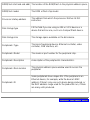
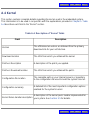
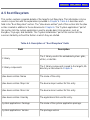
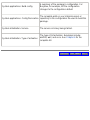
Table 4-1. Suggested project directory layout
Directory
Content
bootldr
The bootloader or bootloaders for your target
build-tools
The packages and directories needed to build the cross-platform development
toolchain
debug
The debugging tools and all related packages
doc
All the documentation you will need for your project
images
The binary images of the bootloader, the kernel, and the root filesystem ready to
be used on the target
kernel
The different kernel versions you are evaluating for your target
project
Your own source code for this project
rootfs
The root filesystem as seen by the target's kernel at runtime